steering FORD FUSION ENERGI 2018 Repair Manual
[x] Cancel search | Manufacturer: FORD, Model Year: 2018, Model line: FUSION ENERGI, Model: FORD FUSION ENERGI 2018Pages: 538, PDF Size: 7.52 MB
Page 387 of 538
Home screen displayTileItem
If your vehicle does not have navigation, this spacecontains the audio information.
1 If equipped.
You can touch any of the feature displaysto access that feature.
Anytime you select the home button, thesystem returns you to this screen.
USING VOICE RECOGNITION
The SYNC 3 system allows you to use voicecommands, to control features like audioand climate controls. By using voicecommands, you can keep your hands onthe wheel and your eyes on the road.
You can access each feature controlled bySYNC 3 through a variety of commands.
To activate the SYNC 3 voicecommands push the voicebutton on the steering wheel andwait for the prompt.
___ is a dynamic listing, meaning that it canbe the name of anything, such as artist, thename of contact or number. The contextand the description of the command tellyou what to say for this dynamic option.
There are some commands that work forevery feature, these commands are:
Action and DescriptionVoice Command
Brings you to the main menu.Main Menu
Returns you to the previous screen.Go back
Ends the voice session.Cancel
Gives you a list of possible voice commands.List of Commands
You can name any feature and the system gives a list ofcommands available for the feature. For example, you couldsay:
___ List of Commands
Phone List of Commands
Navigation List of Commands
You can use this command to view the next page of options onany screen where multiple pages of choices are given.Next Page
You can use this command to view the previous page of optionson any screen where multiple pages of choices are given.Previous Page
Gives you available commands you can use on the currentscreen.Help
384
Fusion Energi / Fusion Hybrid (CC7) Hybrid Electric Vehicle (HEV)/Plug-In Hybrid Electric Vehicle (PHEV), Canada/United States of America, enUSA, Edition date: 201705, Second Printing
SYNC™ 3E142599
Page 404 of 538
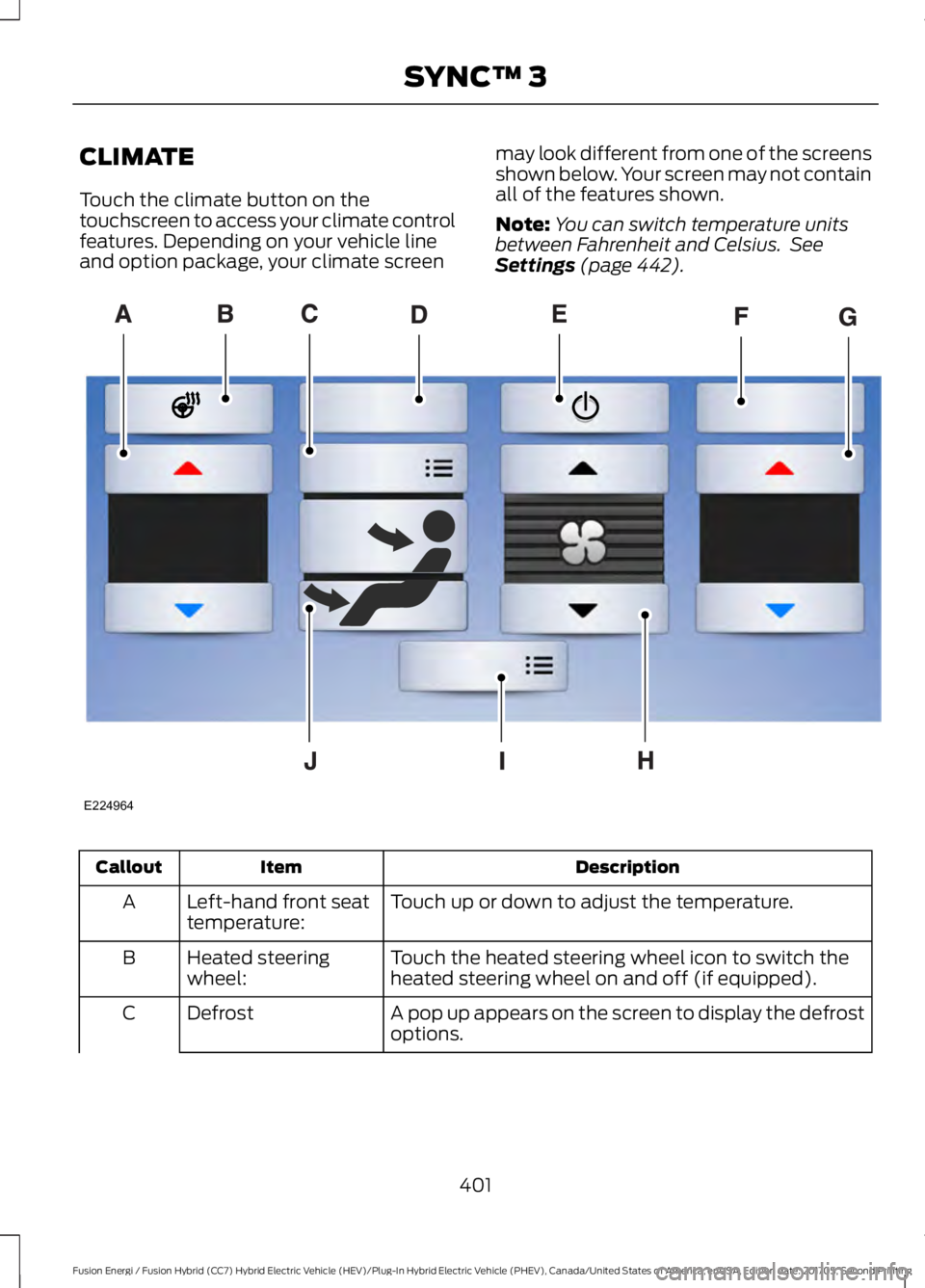
CLIMATE
Touch the climate button on thetouchscreen to access your climate controlfeatures. Depending on your vehicle lineand option package, your climate screen
may look different from one of the screensshown below. Your screen may not containall of the features shown.
Note:You can switch temperature unitsbetween Fahrenheit and Celsius. SeeSettings (page 442).
DescriptionItemCallout
Touch up or down to adjust the temperature.Left-hand front seattemperature:A
Touch the heated steering wheel icon to switch theheated steering wheel on and off (if equipped).Heated steeringwheel:B
A pop up appears on the screen to display the defrostoptions.DefrostC
401
Fusion Energi / Fusion Hybrid (CC7) Hybrid Electric Vehicle (HEV)/Plug-In Hybrid Electric Vehicle (PHEV), Canada/United States of America, enUSA, Edition date: 201705, Second Printing
SYNC™ 3E224964
Page 409 of 538
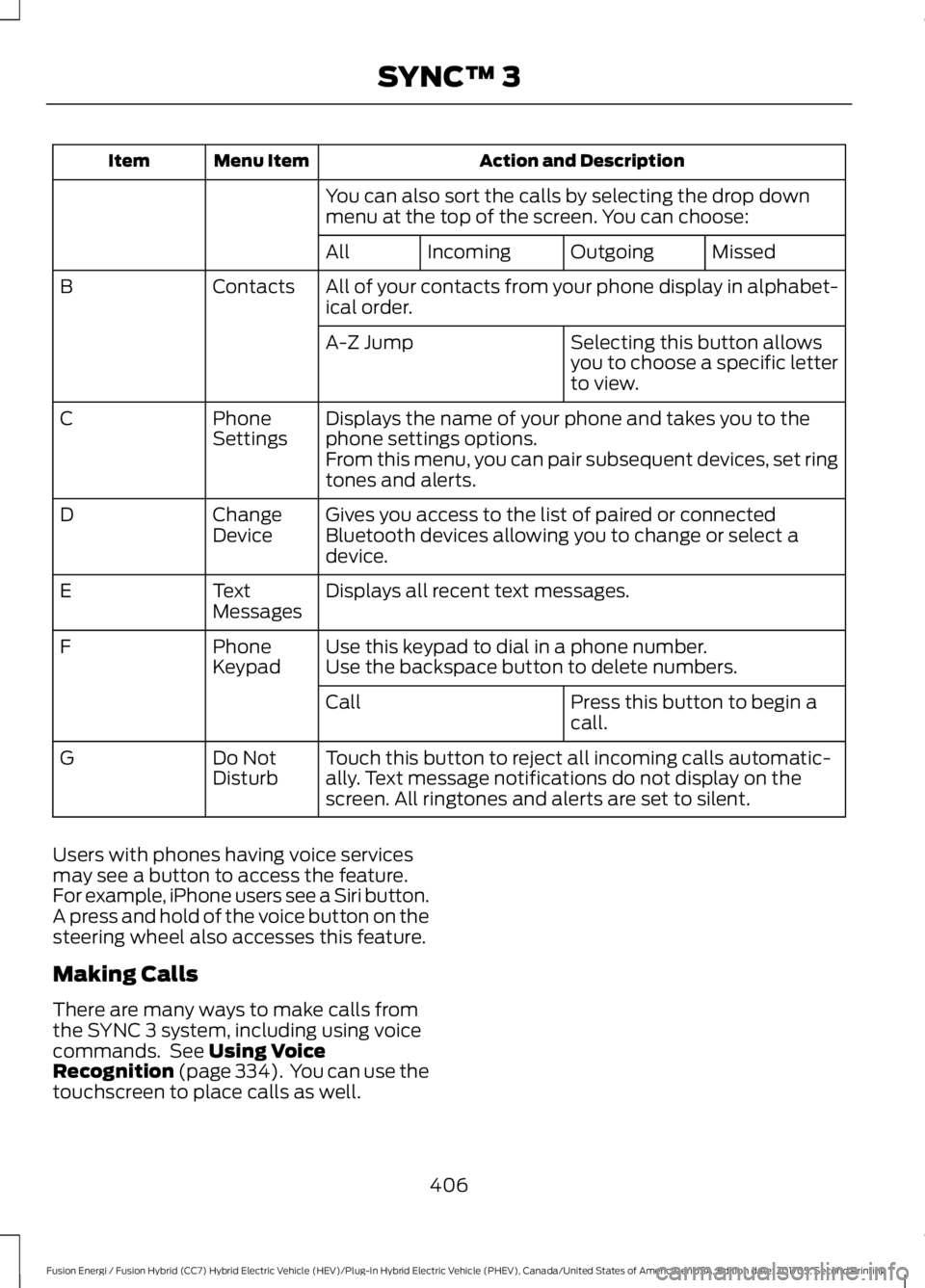
Action and DescriptionMenu ItemItem
You can also sort the calls by selecting the drop downmenu at the top of the screen. You can choose:
MissedOutgoingIncomingAll
All of your contacts from your phone display in alphabet-ical order.ContactsB
Selecting this button allowsyou to choose a specific letterto view.
A-Z Jump
Displays the name of your phone and takes you to thephone settings options.PhoneSettingsC
From this menu, you can pair subsequent devices, set ringtones and alerts.
Gives you access to the list of paired or connectedBluetooth devices allowing you to change or select adevice.
ChangeDeviceD
Displays all recent text messages.TextMessagesE
Use this keypad to dial in a phone number.PhoneKeypadFUse the backspace button to delete numbers.
Press this button to begin acall.Call
Touch this button to reject all incoming calls automatic-ally. Text message notifications do not display on thescreen. All ringtones and alerts are set to silent.
Do NotDisturbG
Users with phones having voice servicesmay see a button to access the feature.For example, iPhone users see a Siri button.A press and hold of the voice button on thesteering wheel also accesses this feature.
Making Calls
There are many ways to make calls fromthe SYNC 3 system, including using voicecommands. See Using VoiceRecognition (page 334). You can use thetouchscreen to place calls as well.
406
Fusion Energi / Fusion Hybrid (CC7) Hybrid Electric Vehicle (HEV)/Plug-In Hybrid Electric Vehicle (PHEV), Canada/United States of America, enUSA, Edition date: 201705, Second Printing
SYNC™ 3
Page 410 of 538
To call a number in your contacts,select:
Action and DescriptionMenu Item
You can then select thename of the contact youwant to call. Any numbersstored for that contactdisplay along with anystored contact photos. Youcan then select thenumber that you want tocall. The system begins thecall.
Contacts
To call a number from your recent calls,select:
Action and DescriptionMenu Item
You can then select anentry that you want to call.The system begins the call.
Recent CallList
To call a number that is not stored inyour phone, select:
Action and DescriptionMenu Item
Select the digits of thenumber you wish to call.PhoneKeypad
The system begins the call.Call
Pressing the backspace button deletes thelast digit you typed.
Receiving Calls
During an incoming call, an audible tonesounds. Caller information appears in thedisplay if it is available.
To accept the call, select:
Menu Item
Accept
Note:You can also accept the call bypressing the phone button on the steeringwheel.
To reject the call, select:
Menu Item
Reject
Note:You can also reject the call bypressing the phone button on the steeringwheel.
Ignore the call by doing nothing. SYNC 3logs it as a missed call.
During a Phone Call
During a phone call, the contacts nameand number display on the screen alongwith the call duration.
The phone status items are also visible:
•Signal Strength.
•Battery.
•911 Assist (United States and Canadaonly). See Settings (page 442).
You can select any of the following duringan active phone call:
407
Fusion Energi / Fusion Hybrid (CC7) Hybrid Electric Vehicle (HEV)/Plug-In Hybrid Electric Vehicle (PHEV), Canada/United States of America, enUSA, Edition date: 201705, Second Printing
SYNC™ 3
Page 411 of 538
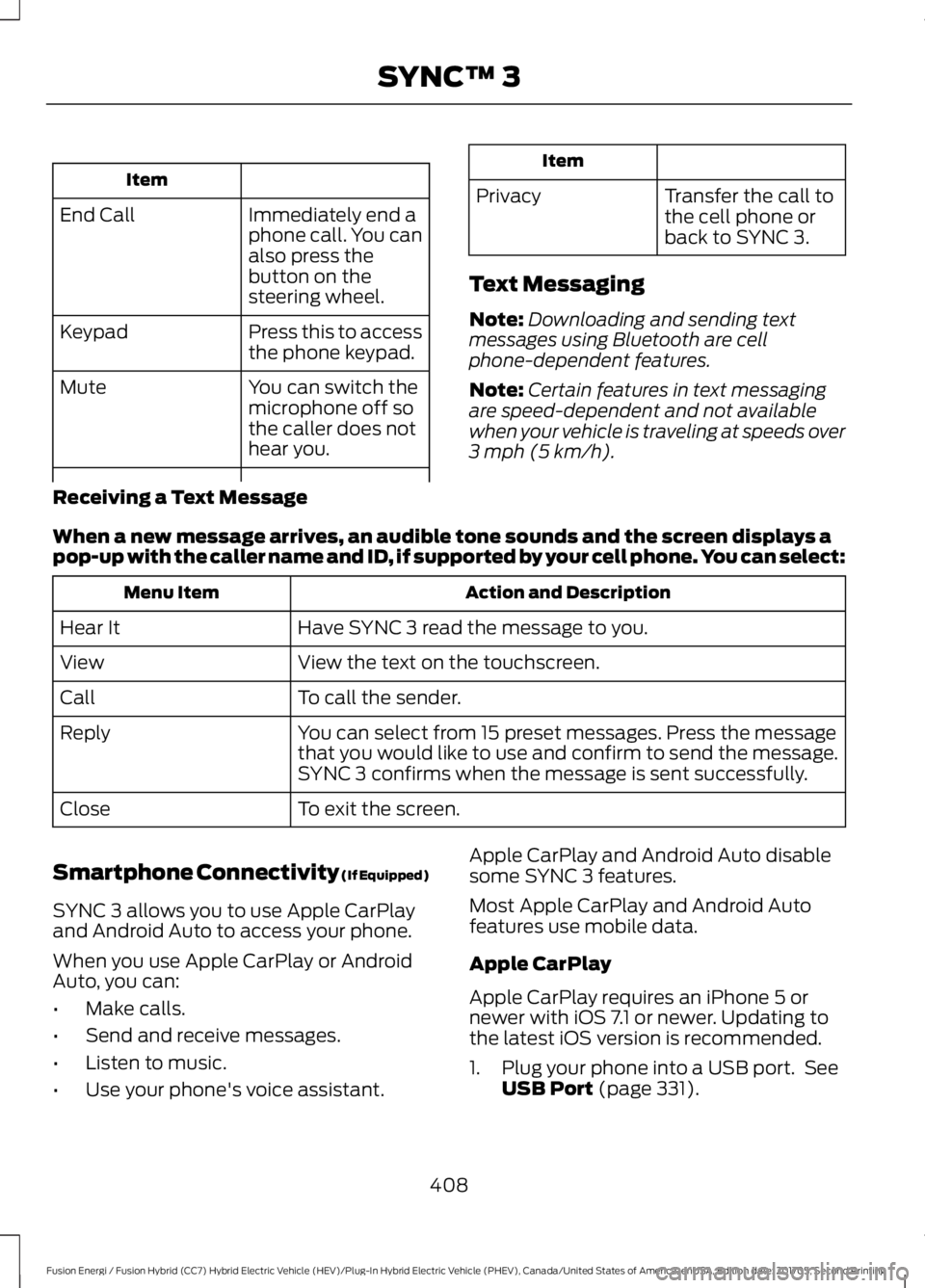
Item
Immediately end aphone call. You canalso press thebutton on thesteering wheel.
End Call
Press this to accessthe phone keypad.Keypad
You can switch themicrophone off sothe caller does nothear you.
Mute
Item
PrivacyTransfer the call tothe cell phone orback to SYNC 3.
Text Messaging
Note:Downloading and sending textmessages using Bluetooth are cellphone-dependent features.
Note:Certain features in text messagingare speed-dependent and not availablewhen your vehicle is traveling at speeds over3 mph (5 km/h).
Receiving a Text Message
When a new message arrives, an audible tone sounds and the screen displays apop-up with the caller name and ID, if supported by your cell phone. You can select:
Action and DescriptionMenu Item
Have SYNC 3 read the message to you.Hear It
View the text on the touchscreen.View
To call the sender.Call
You can select from 15 preset messages. Press the messagethat you would like to use and confirm to send the message.SYNC 3 confirms when the message is sent successfully.
Reply
To exit the screen.Close
Smartphone Connectivity (If Equipped)
SYNC 3 allows you to use Apple CarPlayand Android Auto to access your phone.
When you use Apple CarPlay or AndroidAuto, you can:
•Make calls.
•Send and receive messages.
•Listen to music.
•Use your phone's voice assistant.
Apple CarPlay and Android Auto disablesome SYNC 3 features.
Most Apple CarPlay and Android Autofeatures use mobile data.
Apple CarPlay
Apple CarPlay requires an iPhone 5 ornewer with iOS 7.1 or newer. Updating tothe latest iOS version is recommended.
1. Plug your phone into a USB port. SeeUSB Port (page 331).
408
Fusion Energi / Fusion Hybrid (CC7) Hybrid Electric Vehicle (HEV)/Plug-In Hybrid Electric Vehicle (PHEV), Canada/United States of America, enUSA, Edition date: 201705, Second Printing
SYNC™ 3
Page 442 of 538
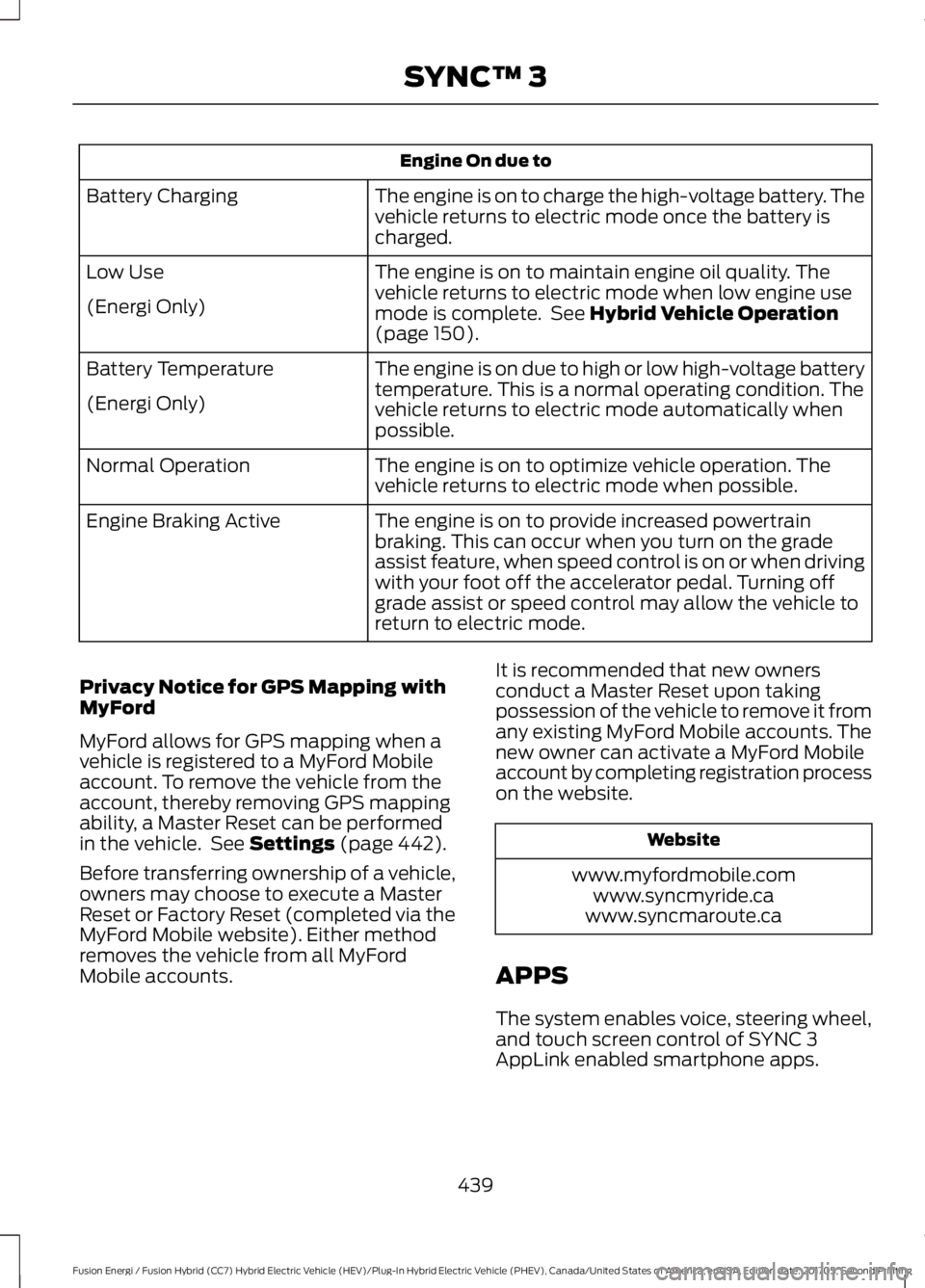
Engine On due to
The engine is on to charge the high-voltage battery. Thevehicle returns to electric mode once the battery ischarged.
Battery Charging
The engine is on to maintain engine oil quality. Thevehicle returns to electric mode when low engine usemode is complete. See Hybrid Vehicle Operation(page 150).
Low Use
(Energi Only)
The engine is on due to high or low high-voltage batterytemperature. This is a normal operating condition. Thevehicle returns to electric mode automatically whenpossible.
Battery Temperature
(Energi Only)
The engine is on to optimize vehicle operation. Thevehicle returns to electric mode when possible.Normal Operation
The engine is on to provide increased powertrainbraking. This can occur when you turn on the gradeassist feature, when speed control is on or when drivingwith your foot off the accelerator pedal. Turning offgrade assist or speed control may allow the vehicle toreturn to electric mode.
Engine Braking Active
Privacy Notice for GPS Mapping withMyFord
MyFord allows for GPS mapping when avehicle is registered to a MyFord Mobileaccount. To remove the vehicle from theaccount, thereby removing GPS mappingability, a Master Reset can be performedin the vehicle. See Settings (page 442).
Before transferring ownership of a vehicle,owners may choose to execute a MasterReset or Factory Reset (completed via theMyFord Mobile website). Either methodremoves the vehicle from all MyFordMobile accounts.
It is recommended that new ownersconduct a Master Reset upon takingpossession of the vehicle to remove it fromany existing MyFord Mobile accounts. Thenew owner can activate a MyFord Mobileaccount by completing registration processon the website.
Website
www.myfordmobile.comwww.syncmyride.cawww.syncmaroute.ca
APPS
The system enables voice, steering wheel,and touch screen control of SYNC 3AppLink enabled smartphone apps.
439
Fusion Energi / Fusion Hybrid (CC7) Hybrid Electric Vehicle (HEV)/Plug-In Hybrid Electric Vehicle (PHEV), Canada/United States of America, enUSA, Edition date: 201705, Second Printing
SYNC™ 3
Page 443 of 538
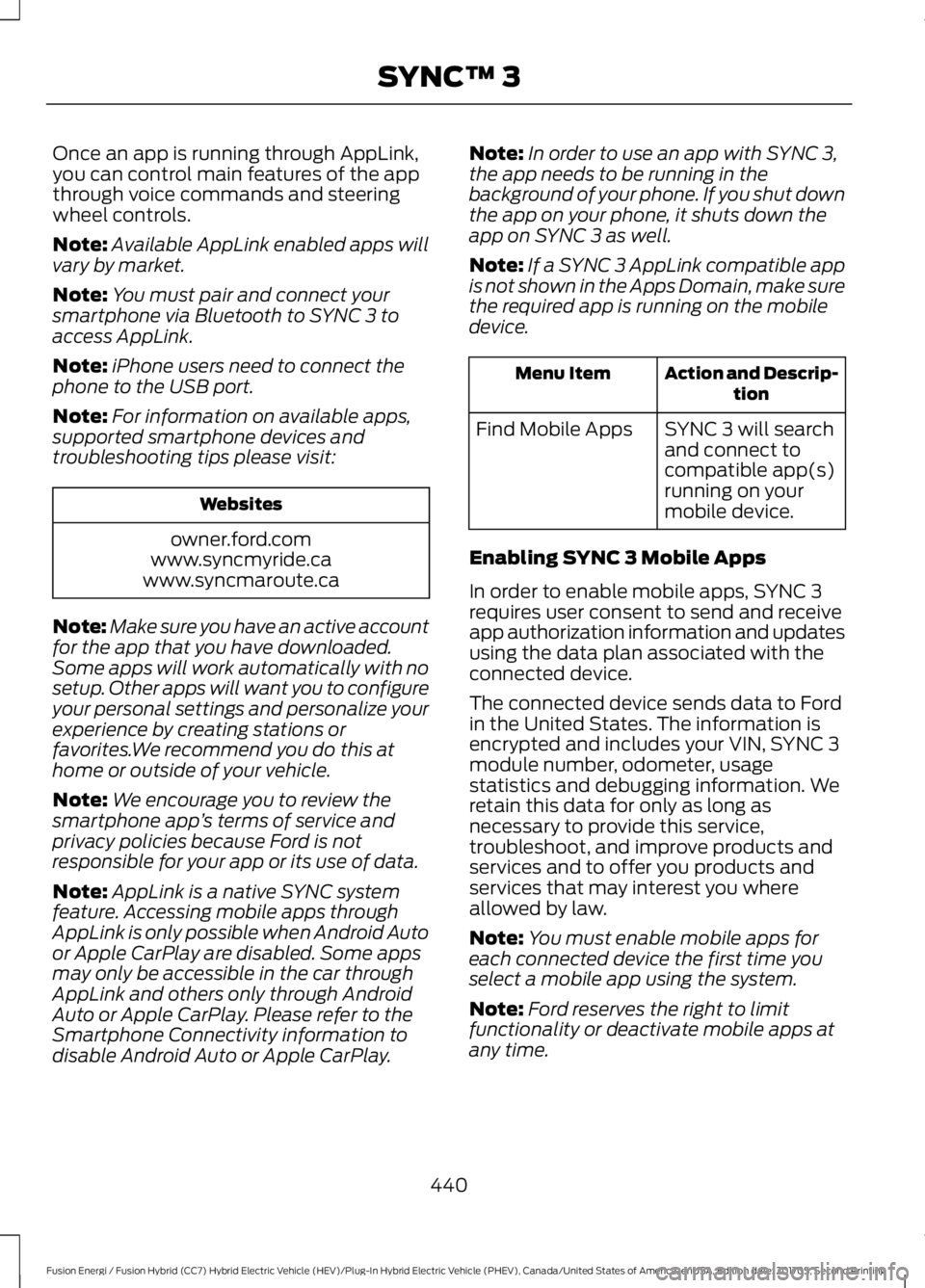
Once an app is running through AppLink,you can control main features of the appthrough voice commands and steeringwheel controls.
Note:Available AppLink enabled apps willvary by market.
Note:You must pair and connect yoursmartphone via Bluetooth to SYNC 3 toaccess AppLink.
Note:iPhone users need to connect thephone to the USB port.
Note:For information on available apps,supported smartphone devices andtroubleshooting tips please visit:
Websites
owner.ford.comwww.syncmyride.cawww.syncmaroute.ca
Note:Make sure you have an active accountfor the app that you have downloaded.Some apps will work automatically with nosetup. Other apps will want you to configureyour personal settings and personalize yourexperience by creating stations orfavorites.We recommend you do this athome or outside of your vehicle.
Note:We encourage you to review thesmartphone app’s terms of service andprivacy policies because Ford is notresponsible for your app or its use of data.
Note:AppLink is a native SYNC systemfeature. Accessing mobile apps throughAppLink is only possible when Android Autoor Apple CarPlay are disabled. Some appsmay only be accessible in the car throughAppLink and others only through AndroidAuto or Apple CarPlay. Please refer to theSmartphone Connectivity information todisable Android Auto or Apple CarPlay.
Note:In order to use an app with SYNC 3,the app needs to be running in thebackground of your phone. If you shut downthe app on your phone, it shuts down theapp on SYNC 3 as well.
Note:If a SYNC 3 AppLink compatible appis not shown in the Apps Domain, make surethe required app is running on the mobiledevice.
Action and Descrip-tionMenu Item
SYNC 3 will searchand connect tocompatible app(s)running on yourmobile device.
Find Mobile Apps
Enabling SYNC 3 Mobile Apps
In order to enable mobile apps, SYNC 3requires user consent to send and receiveapp authorization information and updatesusing the data plan associated with theconnected device.
The connected device sends data to Fordin the United States. The information isencrypted and includes your VIN, SYNC 3module number, odometer, usagestatistics and debugging information. Weretain this data for only as long asnecessary to provide this service,troubleshoot, and improve products andservices and to offer you products andservices that may interest you whereallowed by law.
Note:You must enable mobile apps foreach connected device the first time youselect a mobile app using the system.
Note:Ford reserves the right to limitfunctionality or deactivate mobile apps atany time.
440
Fusion Energi / Fusion Hybrid (CC7) Hybrid Electric Vehicle (HEV)/Plug-In Hybrid Electric Vehicle (PHEV), Canada/United States of America, enUSA, Edition date: 201705, Second Printing
SYNC™ 3
Page 479 of 538
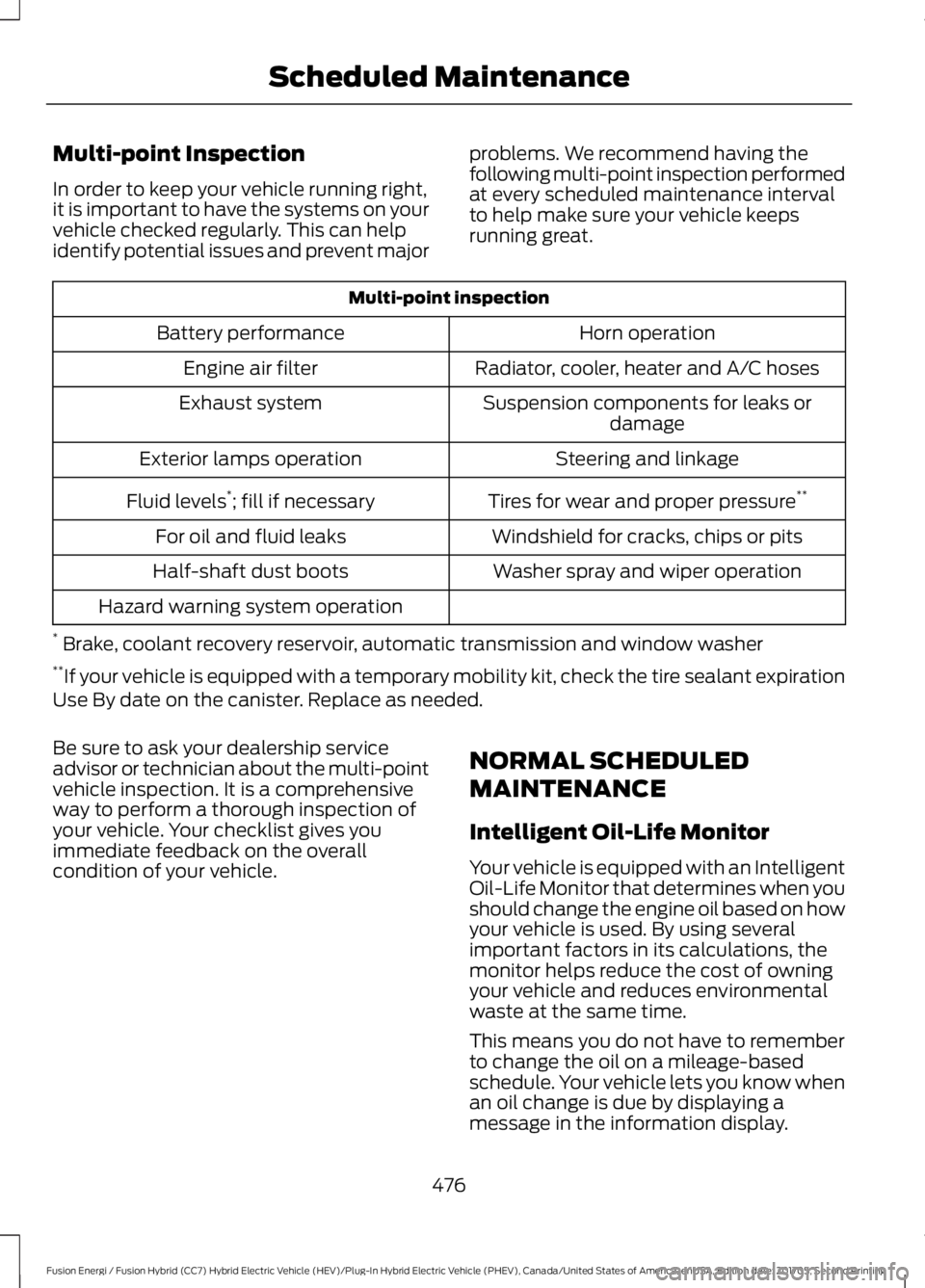
Multi-point Inspection
In order to keep your vehicle running right,it is important to have the systems on yourvehicle checked regularly. This can helpidentify potential issues and prevent major
problems. We recommend having thefollowing multi-point inspection performedat every scheduled maintenance intervalto help make sure your vehicle keepsrunning great.
Multi-point inspection
Horn operationBattery performance
Radiator, cooler, heater and A/C hosesEngine air filter
Suspension components for leaks ordamageExhaust system
Steering and linkageExterior lamps operation
Tires for wear and proper pressure**Fluid levels*; fill if necessary
Windshield for cracks, chips or pitsFor oil and fluid leaks
Washer spray and wiper operationHalf-shaft dust boots
Hazard warning system operation
* Brake, coolant recovery reservoir, automatic transmission and window washer**If your vehicle is equipped with a temporary mobility kit, check the tire sealant expirationUse By date on the canister. Replace as needed.
Be sure to ask your dealership serviceadvisor or technician about the multi-pointvehicle inspection. It is a comprehensiveway to perform a thorough inspection ofyour vehicle. Your checklist gives youimmediate feedback on the overallcondition of your vehicle.
NORMAL SCHEDULED
MAINTENANCE
Intelligent Oil-Life Monitor
Your vehicle is equipped with an IntelligentOil-Life Monitor that determines when youshould change the engine oil based on howyour vehicle is used. By using severalimportant factors in its calculations, themonitor helps reduce the cost of owningyour vehicle and reduces environmentalwaste at the same time.
This means you do not have to rememberto change the oil on a mileage-basedschedule. Your vehicle lets you know whenan oil change is due by displaying amessage in the information display.
476
Fusion Energi / Fusion Hybrid (CC7) Hybrid Electric Vehicle (HEV)/Plug-In Hybrid Electric Vehicle (PHEV), Canada/United States of America, enUSA, Edition date: 201705, Second Printing
Scheduled Maintenance
Page 481 of 538
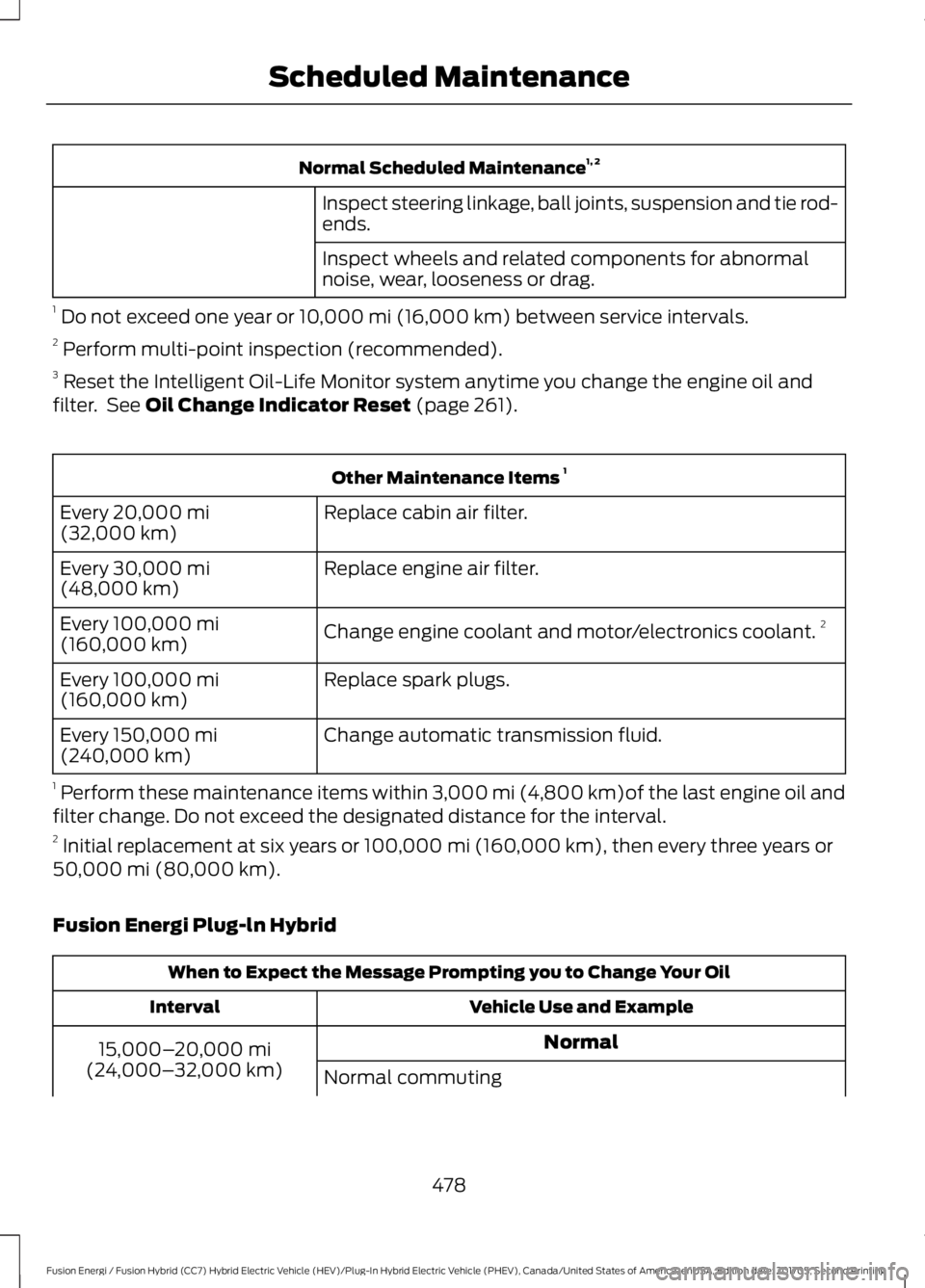
Normal Scheduled Maintenance1, 2
Inspect steering linkage, ball joints, suspension and tie rod-ends.
Inspect wheels and related components for abnormalnoise, wear, looseness or drag.
1 Do not exceed one year or 10,000 mi (16,000 km) between service intervals.2 Perform multi-point inspection (recommended).3 Reset the Intelligent Oil-Life Monitor system anytime you change the engine oil andfilter. See Oil Change Indicator Reset (page 261).
Other Maintenance Items 1
Replace cabin air filter.Every 20,000 mi(32,000 km)
Replace engine air filter.Every 30,000 mi(48,000 km)
Change engine coolant and motor/electronics coolant.2Every 100,000 mi(160,000 km)
Replace spark plugs.Every 100,000 mi(160,000 km)
Change automatic transmission fluid.Every 150,000 mi(240,000 km)
1 Perform these maintenance items within 3,000 mi (4,800 km)of the last engine oil andfilter change. Do not exceed the designated distance for the interval.2 Initial replacement at six years or 100,000 mi (160,000 km), then every three years or50,000 mi (80,000 km).
Fusion Energi Plug-ln Hybrid
When to Expect the Message Prompting you to Change Your Oil
Vehicle Use and ExampleInterval
Normal15,000–20,000 mi(24,000–32,000 km)Normal commuting
478
Fusion Energi / Fusion Hybrid (CC7) Hybrid Electric Vehicle (HEV)/Plug-In Hybrid Electric Vehicle (PHEV), Canada/United States of America, enUSA, Edition date: 201705, Second Printing
Scheduled Maintenance
Page 482 of 538
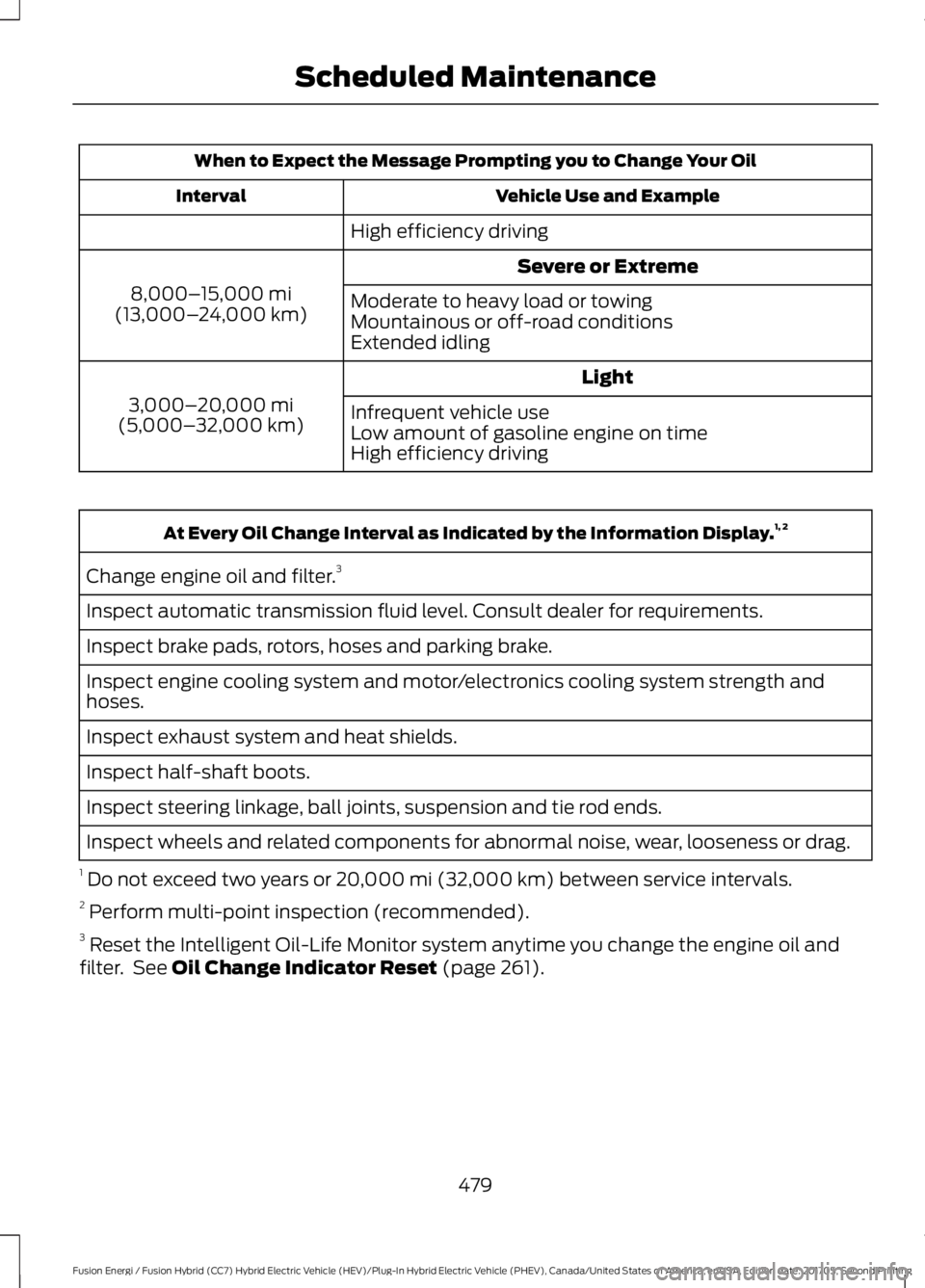
When to Expect the Message Prompting you to Change Your Oil
Vehicle Use and ExampleInterval
High efficiency driving
Severe or Extreme
8,000–15,000 mi(13,000–24,000 km)Moderate to heavy load or towingMountainous or off-road conditionsExtended idling
Light
3,000–20,000 mi(5,000–32,000 km)Infrequent vehicle useLow amount of gasoline engine on timeHigh efficiency driving
At Every Oil Change Interval as Indicated by the Information Display.1, 2
Change engine oil and filter.3
Inspect automatic transmission fluid level. Consult dealer for requirements.
Inspect brake pads, rotors, hoses and parking brake.
Inspect engine cooling system and motor/electronics cooling system strength andhoses.
Inspect exhaust system and heat shields.
Inspect half-shaft boots.
Inspect steering linkage, ball joints, suspension and tie rod ends.
Inspect wheels and related components for abnormal noise, wear, looseness or drag.
1 Do not exceed two years or 20,000 mi (32,000 km) between service intervals.2 Perform multi-point inspection (recommended).3 Reset the Intelligent Oil-Life Monitor system anytime you change the engine oil andfilter. See Oil Change Indicator Reset (page 261).
479
Fusion Energi / Fusion Hybrid (CC7) Hybrid Electric Vehicle (HEV)/Plug-In Hybrid Electric Vehicle (PHEV), Canada/United States of America, enUSA, Edition date: 201705, Second Printing
Scheduled Maintenance