clock FORD FUSION HYBRID 2014 User Guide
[x] Cancel search | Manufacturer: FORD, Model Year: 2014, Model line: FUSION HYBRID, Model: FORD FUSION HYBRID 2014Pages: 473, PDF Size: 5.93 MB
Page 310 of 473
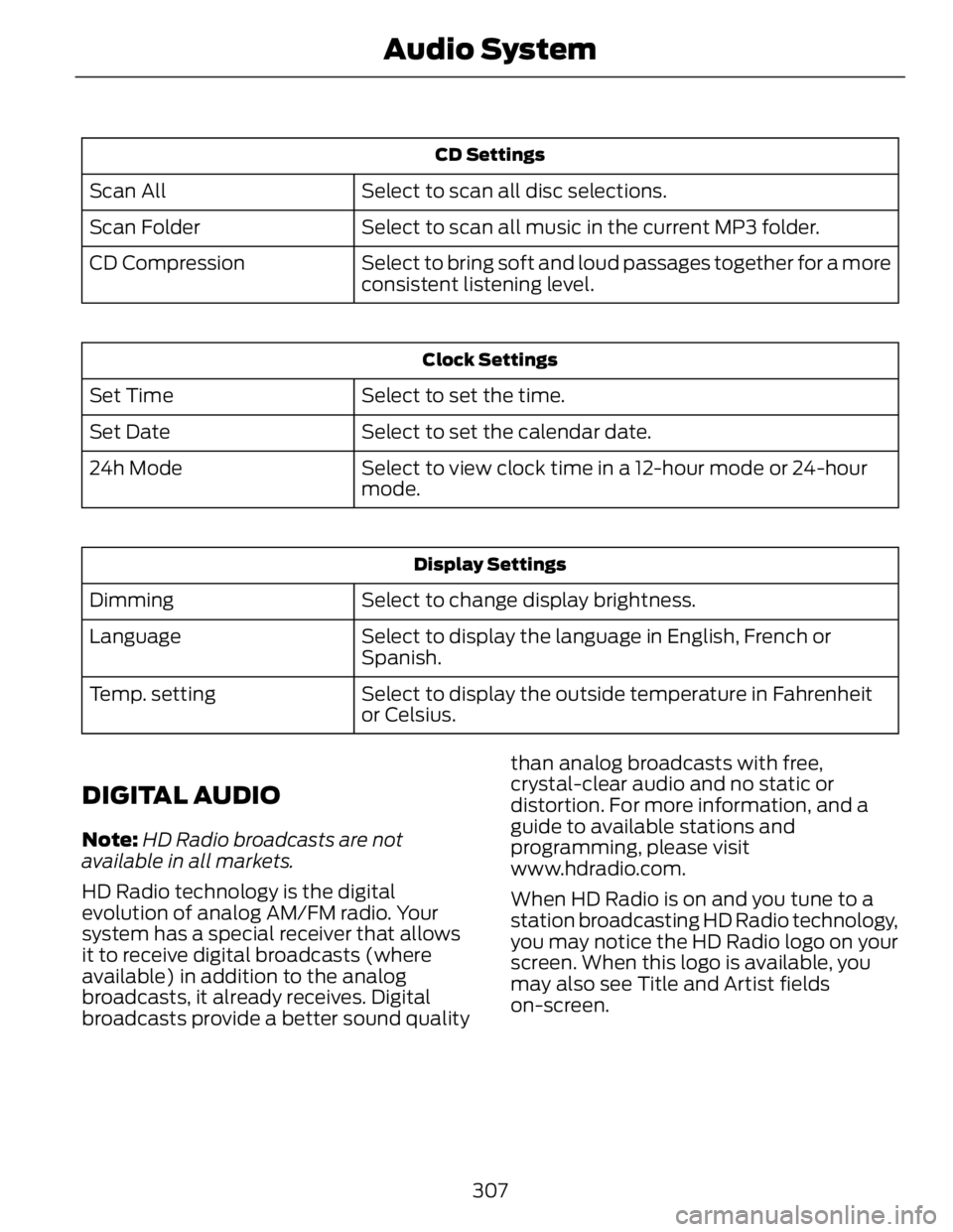
CD Settings
Select to scan all disc selections.Scan All
Select to scan all music in the current MP3 folder.Scan Folder
Select to bring soft and loud passages together for a more
consistent listening level.CD Compression Clock Settings
Select to set the time.Set Time
Select to set the calendar date.Set Date
Select to view clock time in a 12-hour mode or 24-hour
mode.24h Mode
Display Settings
Select to change display brightness.Dimming
Select to display the language in English, French or
Spanish.Language
Select to display the outside temperature in Fahrenheit
or Celsius.Temp. setting
DIGITAL AUDIO Note: HD Radio broadcasts are not
available in all markets.
HD Radio technology is the digital
evolution of analog AM/FM radio. Your
system has a special receiver that allows
it to receive digital broadcasts (where
available) in addition to the analog
broadcasts, it already receives. Digital
broadcasts provide a better sound quality than analog broadcasts with free,
crystal-clear audio and no static or
distortion. For more information, and a
guide to available stations and
programming, please visit
www.hdradio.com.
When HD Radio is on and you tune to a
station broadcasting HD Radio technology,
you may notice the HD Radio logo on your
screen. When this logo is available, you
may also see Title and Artist fields
on-screen.
307Audio System
Page 360 of 473
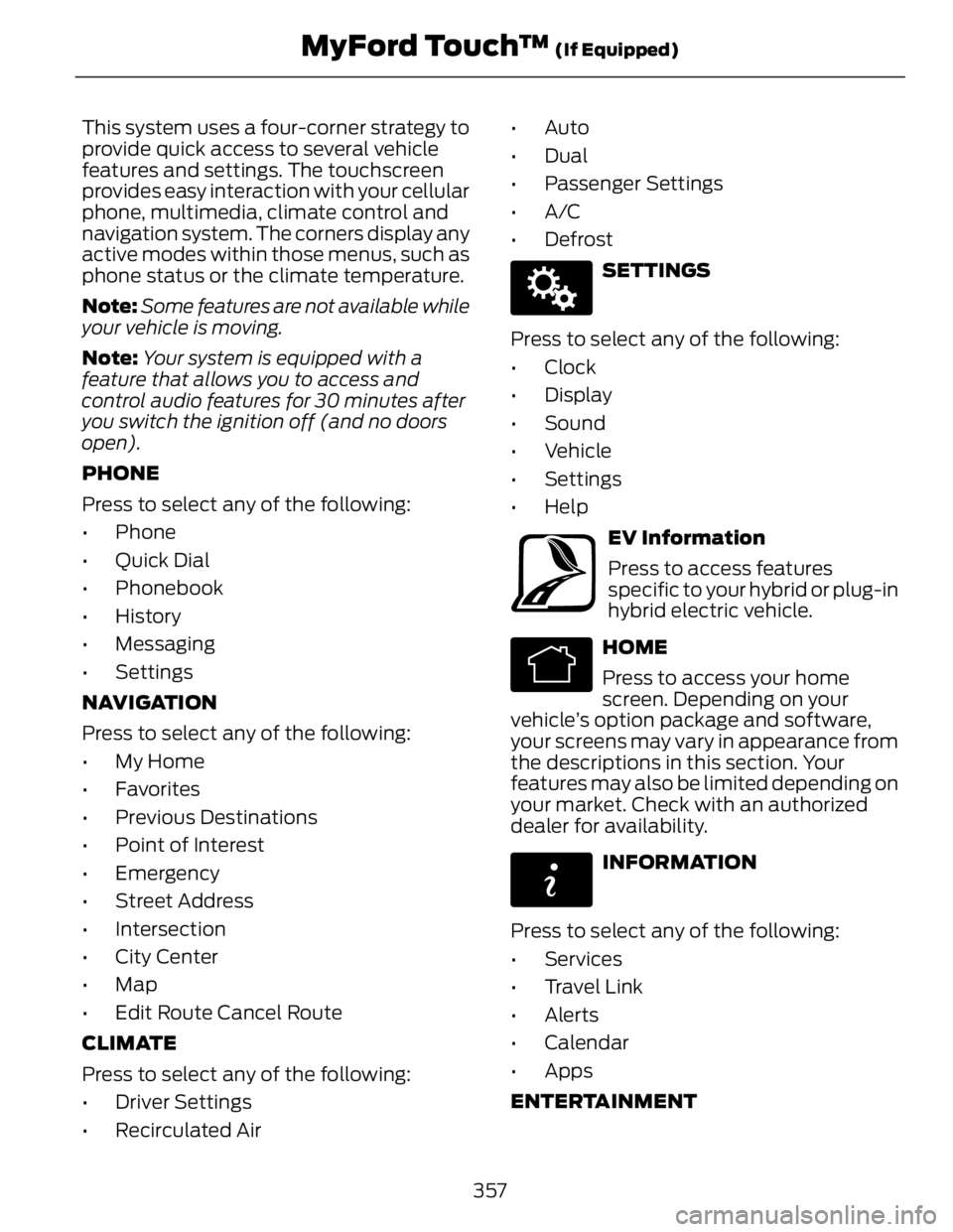
This system uses a four-corner strategy to
provide quick access to several vehicle
features and settings. The touchscreen
provides easy interaction with your cellular
phone, multimedia, climate control and
navigation system. The corners display any
active modes within those menus, such as
phone status or the climate temperature.
Note: Some features are not available while
your vehicle is moving.
Note: Your system is equipped with a
feature that allows you to access and
control audio features for 30 minutes after
you switch the ignition off (and no doors
open).
PHONE
Press to select any of the following:
• Phone
• Quick Dial
• Phonebook
• History
• Messaging
• Settings
NAVIGATION
Press to select any of the following:
• My Home
• Favorites
• Previous Destinations
• Point of Interest
• Emergency
• Street Address
• Intersection
• City Center
• Map
• Edit Route Cancel Route
CLIMATE
Press to select any of the following:
• Driver Settings
• Recirculated Air • Auto
•Dual
• Passenger Settings
•A/C
•Defrost E142607
SETTINGS
Press to select any of the following:
• Clock
• Display
• Sound
• Vehicle
• Settings
• Help E161716
EV Information
Press to access features
specific to your hybrid or plug-in
hybrid electric vehicle. E142613
HOME
Press to access your home
screen. Depending on your
vehicle’s option package and software,
your screens may vary in appearance from
the descriptions in this section. Your
features may also be limited depending on
your market. Check with an authorized
dealer for availability. E142608
INFORMATION
Press to select any of the following:
• Services
• Travel Link
• Alerts
• Calendar
• Apps
ENTERTAINMENT
357MyFord Touch™ (If Equipped)
Page 367 of 473
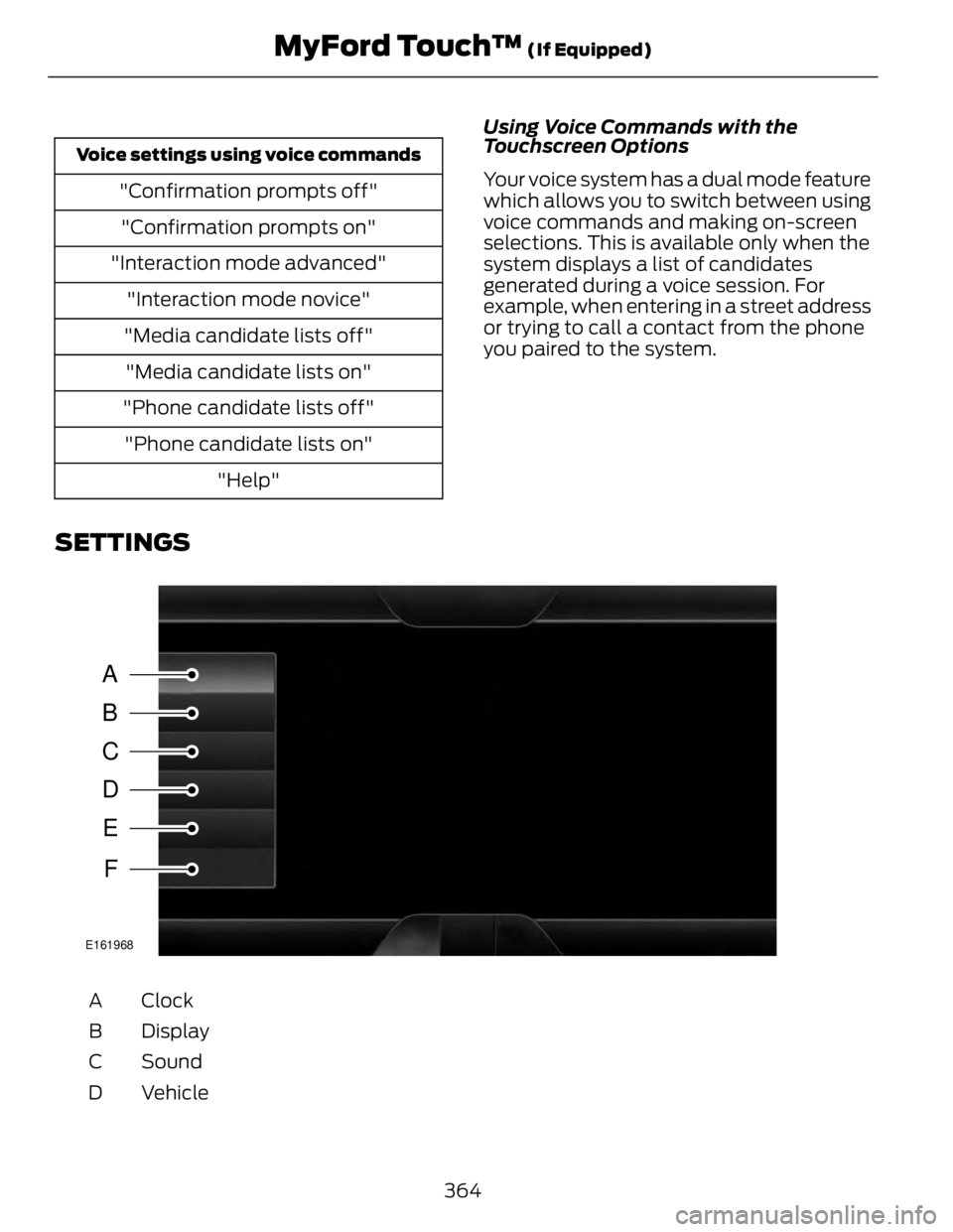
Voice settings using voice commands
"Confirmation prompts off"
"Confirmation prompts on"
"Interaction mode advanced"
"Interaction mode novice"
"Media candidate lists off"
"Media candidate lists on"
"Phone candidate lists off"
"Phone candidate lists on"
"Help" Using Voice Commands with the
Touchscreen Options
Your voice system has a dual mode feature
which allows you to switch between using
voice commands and making on-screen
selections. This is available only when the
system displays a list of candidates
generated during a voice session. For
example, when entering in a street address
or trying to call a contact from the phone
you paired to the system.
SETTINGS
A
B
C
D
E
F E161968
ClockA
DisplayB
SoundC
VehicleD
364MyFord Touch™ (If Equipped)
Page 368 of 473
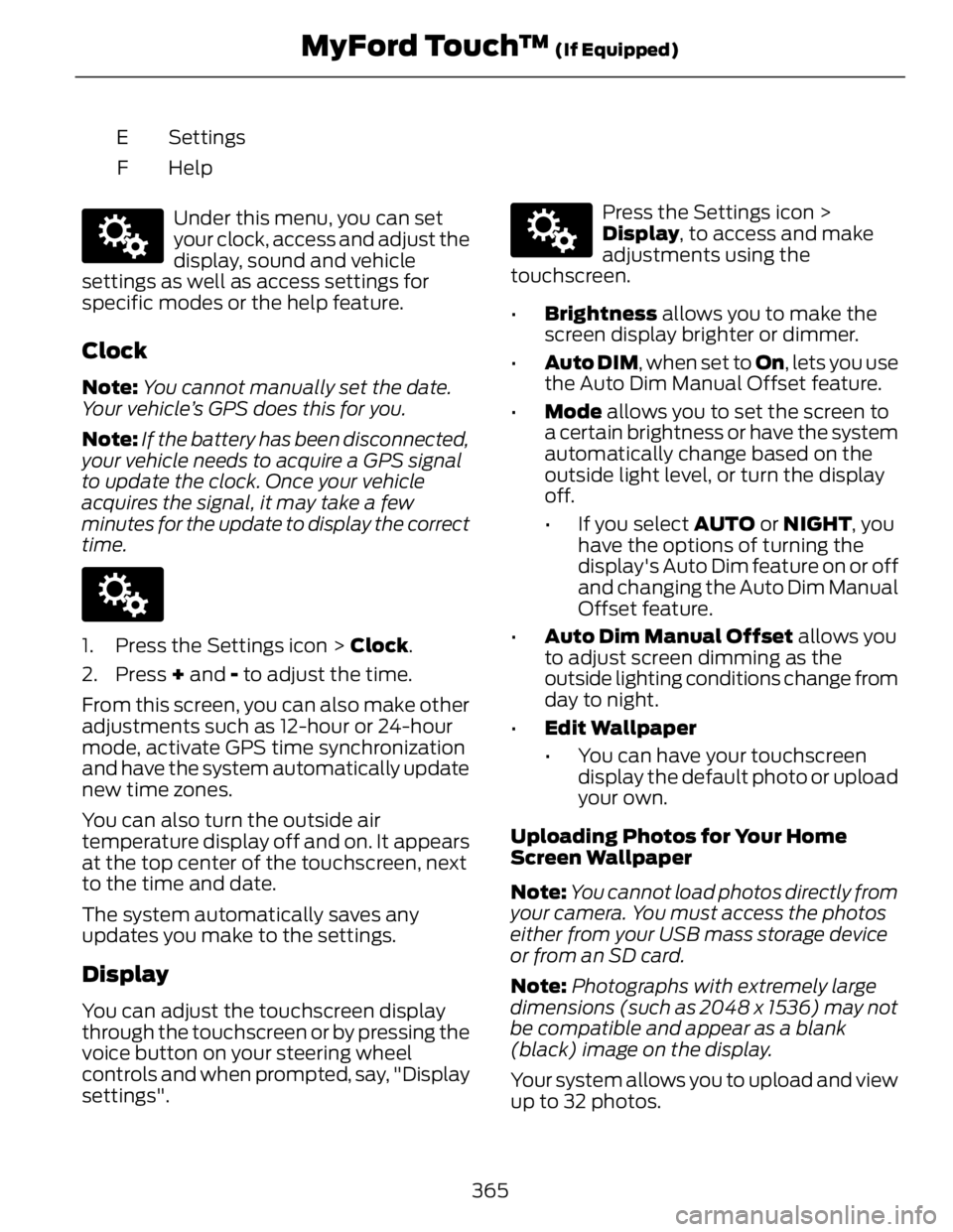
SettingsE
HelpFE142607
Under this menu, you can set
your clock, access and adjust the
display, sound and vehicle
settings as well as access settings for
specific modes or the help feature.
Clock Note: You cannot manually set the date.
Your vehicle’s GPS does this for you.
Note: If the battery has been disconnected,
your vehicle needs to acquire a GPS signal
to update the clock. Once your vehicle
acquires the signal, it may take a few
minutes for the update to display the correct
time. E142607
1. Press the Settings icon > Clock .
2. Press + and - to adjust the time.
From this screen, you can also make other
adjustments such as 12-hour or 24-hour
mode, activate GPS time synchronization
and have the system automatically update
new time zones.
You can also turn the outside air
temperature display off and on. It appears
at the top center of the touchscreen, next
to the time and date.
The system automatically saves any
updates you make to the settings.
Display
You can adjust the touchscreen display
through the touchscreen or by pressing the
voice button on your steering wheel
controls and when prompted, say, "Display
settings". E142607
Press the Settings icon >
Display , to access and make
adjustments using the
touchscreen.
• Brightness allows you to make the
screen display brighter or dimmer.
• Auto DIM , when set to On , lets you use
the Auto Dim Manual Offset feature.
• Mode allows you to set the screen to
a certain brightness or have the system
automatically change based on the
outside light level, or turn the display
off.
• If you select AUTO or NIGHT , you
have the options of turning the
display's Auto Dim feature on or off
and changing the Auto Dim Manual
Offset feature.
• Auto Dim Manual Offset allows you
to adjust screen dimming as the
outside lighting conditions change from
day to night.
• Edit Wallpaper
• You can have your touchscreen
display the default photo or upload
your own.
Uploading Photos for Your Home
Screen Wallpaper
Note: You cannot load photos directly from
your camera. You must access the photos
either from your USB mass storage device
or from an SD card.
Note: Photographs with extremely large
dimensions (such as 2048 x 1536) may not
be compatible and appear as a blank
(black) image on the display.
Your system allows you to upload and view
up to 32 photos.
365MyFord Touch™ (If Equipped)
Page 421 of 473
MAX A/C: Touch to cool your vehicle with recirculated air. Touch again for
normal A/C operation. MAX A/C distributes air through instrument panel vents
and may help reduce odors from entering your vehicle. MAX A/C is more
economical and efficient than normal A/C mode.E
A/C: Touch to turn air conditioning on or off. To improve air conditioning when
starting your vehicle, drive with the windows slightly open for two to three
minutes. Use A/C with recirculated air to improve cooling performance and
efficiency.F
AUTO: Touch to turn on fully automatic operation. Select the desired
temperature using the temperature control. The system automatically adjusts
fan speed, air distribution, A/C operation, and outside or recirculated air, to heat
or cool the vehicle to maintain the selected temperature.G
Rear defroster: Touch to turn the rear window defroster and heated mirrors
(if equipped).H
Manual airflow distribution controls:Floor/Defrost: Distributes air through
the windshield defroster vents, demister vents, floor vents and rear seat floor
vents, and provides outside air to reduce window fogging. Panel: Distributes
air through the instrument panel vents. Panel/Floor: Distributes air through
the instrument panel vents, demister vents, floor vents and rear seat floor vents.
Floor: Distributes air through the demister vents, floor vents and rear seat floor
vents. Defrost: Touch to clear the windshield of fog and thin ice. Touch again
to return to the previous airflow selection. When switched on, defrost distributes
outside air through the windshield defroster vents and demister vents to reduce
window fogging.I
Driver settings: Depending on your vehicle and option package, you may have
the following features: Touch the + and - to adjust the temperature. Touch the
heated seat icon to control the heated seat (if equipped). Touch the cooled
seat icon to control the cooled seat (if equipped). Touch MyTemp to select
your previously pre-set temperature setpoint. Touch and hold MyTemp store
a new pre-set for temperature setpoint. Touch the heated steering wheel icon
(if equipped) to warm the steering wheel.J
Note: If your vehicle is equipped with a
wood-trimmed steering wheel, it does not
heat between the 10 o'clock and 2 o'clock
positions.
Climate Control Voice Commands E142599
Press the voice button on the
steering wheel controls. When
prompted, say any of the
following commands: Climate control commands
"Climate automatic"
"Climate my temperature"
"Climate off"
"Climate on"
418MyFord Touch™ (If Equipped)
Page 471 of 473
Satellite Radio...............................................310 Satellite Radio Electronic Serial Number
(ESN)...................................................................311
Satellite Radio Reception Factors...............310
SIRIUS® Satellite Radio Service..................310
Trouble shooting ................................................... 311
Scheduled Maintenance Record...........454
Scheduled Maintenance..........................444
Seats...................................................................121
Security ...............................................................61
Settings...........................................................364 Clock .......................................................................365
Display ...................................................................365
Settings ..................................................................367
Sound ....................................................................366
Vehicle ...................................................................366
Side Airbags.....................................................40
Side Curtain Airbags......................................41
Sitting in the Correct Position...................121
Snow Chains See: Using Snow Chains..................................291
Special Notices................................................12 New Vehicle Limited Warranty.........................12
Special Instructions..............................................12
Special Operating Conditions Scheduled
Maintenance ...............................................451Exceptions ............................................................453
Speed Control See: Cruise Control............................................185
Stability Control.............................................175 Principle of Operation.......................................175
Starter Switch See: Ignition Switch...........................................136
Starting a Gasoline Engine........................137 Automatic Shutdown.......................................138
Guarding Against Exhaust Fumes...............140
Important Ventilating Information..............140
Switching Off the Vehicle When It Is
Moving...............................................................139
Switching Off the Vehicle When It Is
Stationary .........................................................139
Vehicles with an Ignition Key..........................137
Vehicles with Keyless Start.............................137
Starting and Stopping the Engine..........136
General Information..........................................136
Steering ............................................................ 201
Electric Power Steering....................................201
Steering Wheel...............................................64 Storage Compartments.............................135
Sunroof See: Moonroof........................................................77
Sun Visors..........................................................77 Illuminated Vanity Mirror....................................77
Supplementary Restraints System.........35 Principle of Operation.........................................35
Symbols Glossary.............................................7
SYNC™ Applications and
Services ........................................................335911 Assist...............................................................335
SYNC AppLink.....................................................341
SYNC Services: Traffic, Directions &
Information (TDI).........................................338
Vehicle Health Report......................................337
SYNC™............................................................319 General Information..........................................319
SYNC™ Troubleshooting.........................350
T Technical Specifications See: Capacities and Specifications............293
Temporary Mobility Kit...............................267 First Stage: Reinflating the Tire with Sealing
Compound and Air.......................................269
General Information..........................................267
Second Stage: Checking Tire
Pressure ............................................................270
Tips for Use of the Kit......................................268
What to do after the Tire has been
Sealed.................................................................271
What to do when a Tire Is Punctured........268
The Better Business Bureau (BBB) Auto
Line Program (U.S. Only).......................220
Tire Care...........................................................273 Glossary of Tire Terminology.........................274
Information About Uniform Tire Quality
Grading ..............................................................273
Information Contained on the Tire
Sidewall............................................................275
Temperature A B C.............................................274
Traction AA A B C...............................................273
Treadwear.............................................................273
Tire Inflation When Punctured
See: Temporary Mobility Kit...........................267
468Index