ECU FORD FUSION HYBRID 2014 Owners Manual
[x] Cancel search | Manufacturer: FORD, Model Year: 2014, Model line: FUSION HYBRID, Model: FORD FUSION HYBRID 2014Pages: 473, PDF Size: 5.93 MB
Page 4 of 473
Introduction About This Manual...........................................7
Symbols Glossary.............................................7
Data Recording..................................................9
California Proposition 65..............................11
Perchlorate.........................................................11
Ford Credit..........................................................11
Replacement Parts
Recommendation ........................................11
Special Notices................................................12
Mobile Communications
Equipment .....................................................12
Export Unique Options..................................12
Child SafetyGeneral Information.......................................13
Child Seat Positioning...................................14
Booster Seats...................................................16
Installing Child Seats.....................................18
Child Safety Locks..........................................23
Safety Belts Principle of Operation...................................25
Fastening the Safety Belts..........................26
Safety Belt Height Adjustment................30
Safety Belt Warning Lamp and Indicator
Chime .............................................................30
Safety Belt Minder..........................................31
Child Restraint and Safety Belt
Maintenance ................................................32
Personal Safety System™Personal Safety System™..........................34
Supplementary Restraints
SystemPrinciple of Operation..................................35
Driver and Passenger Airbags...................36
Knee Airbag.......................................................37
Front Passenger Sensing System.............37 Side Airbags.....................................................40
Side Curtain Airbags......................................41
Crash Sensors and Airbag Indicator........42
Airbag Disposal...............................................43
Keys and Remote Controls General Information on Radio
Frequencies..................................................44
Remote Control..............................................44
Replacing a Lost Key or Remote
Control ...........................................................49
MyKey™ Principle of Operation..................................50
Creating a MyKey.............................................51
Clearing All MyKeys........................................51
Checking MyKey System Status................51
Using MyKey With Remote Start
Systems.........................................................52
MyKey Troubleshooting...............................52
Locks Locking and Unlocking.................................54
Keyless Entry....................................................57
Interior Luggage Compartment
Release..........................................................60
Security Passive Anti-Theft System..........................61
Anti-Theft Alarm............................................63
Steering Wheel Adjusting the Steering Wheel...................64
Audio Control..................................................64
Voice Control...................................................65
Cruise Control..................................................65
Information Display Control.......................65
Heated Steering Wheel...............................66
1Table of Contents
Page 15 of 473
Warranty on Replacement Parts Genuine Ford and Motorcraft replacement
parts are the only replacement parts that
benefit from a Ford Warranty. Damage
caused to your vehicle as a result of the
failure of non-Ford parts may not be
covered by the Ford Warranty. For
additional information, refer to the terms
and conditions of the Ford Warranty.
SPECIAL NOTICES New Vehicle Limited Warranty For a detailed description of what is
covered and what is not covered by your
vehicle’s New Vehicle Limited Warranty,
refer to the Warranty Manual that is
provided to you along with your Owner’s
Manual.
Special Instructions For your added safety, your vehicle is fitted
with sophisticated electronic controls.
WARNINGS
Failure to follow the specific
warnings and instructions could
result in personal injury. See
Supplementary Restraints System
(page 35).
Front seat mounted rear-facing child
or infant seats should NEVER be
placed in front of an active
passenger airbag.
MOBILE COMMUNICATIONS
EQUIPMENT Using mobile communications equipment
is becoming increasingly important in the
conduct of business and personal affairs.
However, you must not compromise your
own or others’ safety when using such
equipment. Mobile communications can enhance personal safety and security when
appropriately used, particularly in
emergency situations. Safety must be
paramount when using mobile
communications equipment to avoid
negating these benefits. Mobile
communication equipment includes, but
is not limited to, cellular phones, pagers,
portable email devices, text messaging
devices and portable two-way radios.
WARNING
Driving while distracted can result in
loss of vehicle control, crash and
injury. We strongly recommend that
you use extreme caution when using any
device that may take your focus off the
road. Your primary responsibility is the safe
operation of your vehicle. We recommend
against the use of any hand-held device
while driving and encourage the use of
voice-operated systems when possible.
Make sure you are aware of all applicable
local laws that may affect the use of
electronic devices while driving.
EXPORT UNIQUE OPTIONS For your particular global region, your
vehicle may be equipped with features and
options that are different from the features
and options that are described in this
Owner’s Manual. A market unique
supplement may be supplied that
complements this book. By referring to the
market unique supplement, if provided,
you can properly identify those features,
recommendations and specifications that
are unique to your vehicle. This Owner’s
Manual is written primarily for the U.S. and
Canadian Markets. Features or equipment
listed as standard may be different on units
built for Export. Refer to this Owner’s
Manual for all other required
information and warnings.
12Introduction
Page 16 of 473
GENERAL INFORMATION See the following sections for directions
on how to properly use safety restraints
for children.
WARNINGS
Always make sure your child is
secured properly in a device that is
appropriate for their height, age and
weight. Child safety restraints must be
bought separately from your vehicle.
Failure to follow these instructions and
guidelines may result in an increased risk
of serious injury or death to your child.
All children are shaped differently.
The recommendations for safety
restraints are based on probable
child height, age and weight thresholds
from National Highway Traffic Safety
Administration and other safety
organizations, or are the minimum WARNINGS
requirements of law. Ford recommends
checking with a NHTSA Certified Child
Passenger Safety Technician (CPST) and
consult your pediatrician to make sure your
child seat is appropriate for your child, and
is compatible with and properly installed
in your vehicle. To locate a child seat fitting
station and CPST, contact the NHTSA toll
free at 1-888-327-4236 or go to
http://www.nhtsa.dot.gov. In Canada,
check with your local St. John Ambulance
office for referral to a CPST or for further
information, contact your provincial
ministry of transportation, locate your local
St. John Ambulance office by searching for
St. John Ambulance on the internet, or
Transport Canada at 1-800-333-0371
(http://www.tc.gc.ca). Failure to properly
restrain children in safety seats made
especially for their height, age, and weight
may result in an increased risk of serious
injury or death to your child.
13Child Safety
Page 21 of 473
E142597
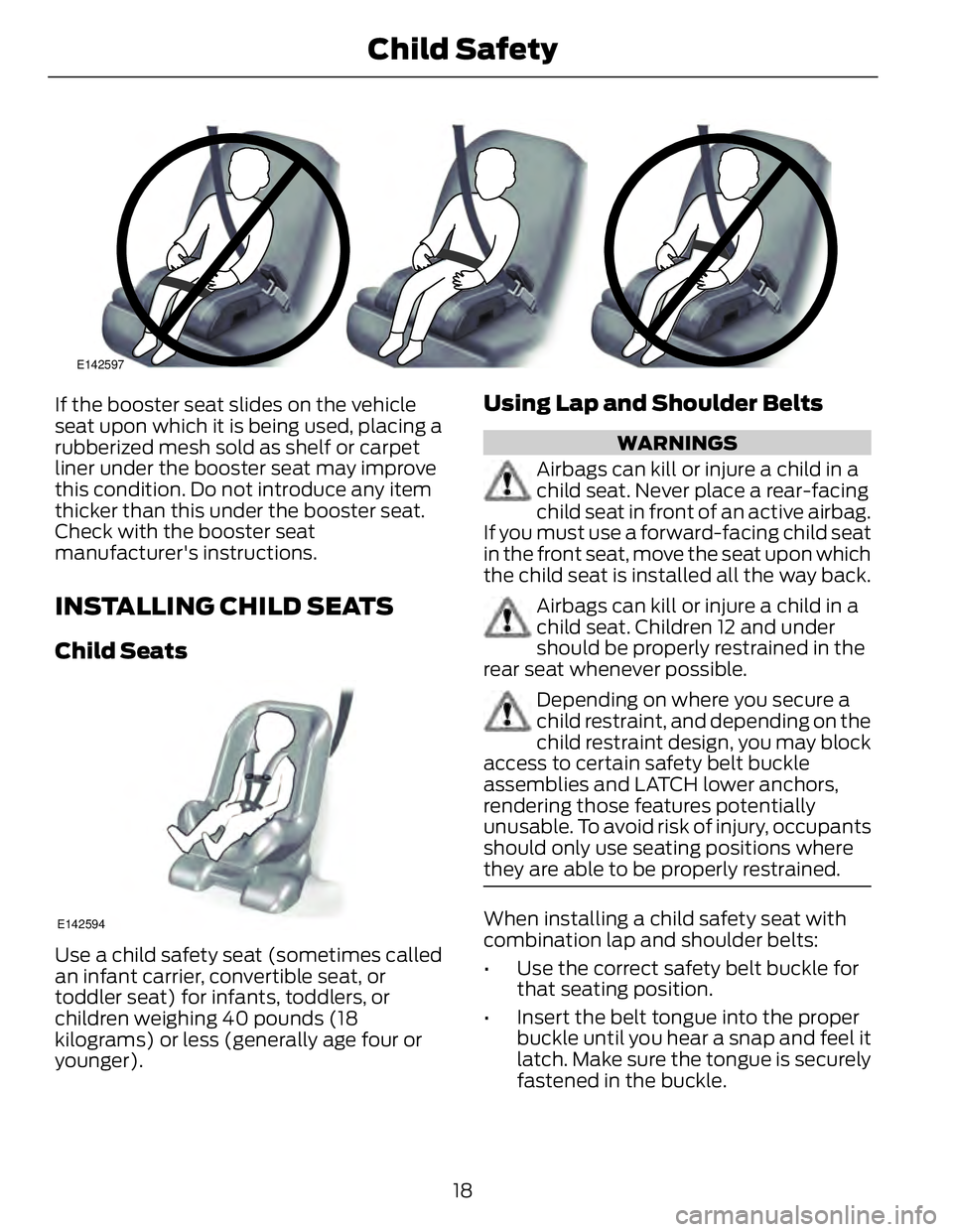
If the booster seat slides on the vehicle
seat upon which it is being used, placing a
rubberized mesh sold as shelf or carpet
liner under the booster seat may improve
this condition. Do not introduce any item
thicker than this under the booster seat.
Check with the booster seat
manufacturer's instructions.
INSTALLING CHILD SEATS Child Seats
E142594
Use a child safety seat (sometimes called
an infant carrier, convertible seat, or
toddler seat) for infants, toddlers, or
children weighing 40 pounds (18
kilograms) or less (generally age four or
younger). Using Lap and Shoulder Belts WARNINGS
Airbags can kill or injure a child in a
child seat. Never place a rear-facing
child seat in front of an active airbag.
If you must use a forward-facing child seat
in the front seat, move the seat upon which
the child seat is installed all the way back.
Airbags can kill or injure a child in a
child seat. Children 12 and under
should be properly restrained in the
rear seat whenever possible.
Depending on where you secure a
child restraint, and depending on the
child restraint design, you may block
access to certain safety belt buckle
assemblies and LATCH lower anchors,
rendering those features potentially
unusable. To avoid risk of injury, occupants
should only use seating positions where
they are able to be properly restrained.
When installing a child safety seat with
combination lap and shoulder belts:
• Use the correct safety belt buckle for
that seating position.
• Insert the belt tongue into the proper
buckle until you hear a snap and feel it
latch. Make sure the tongue is securely
fastened in the buckle.
18Child Safety
Page 23 of 473
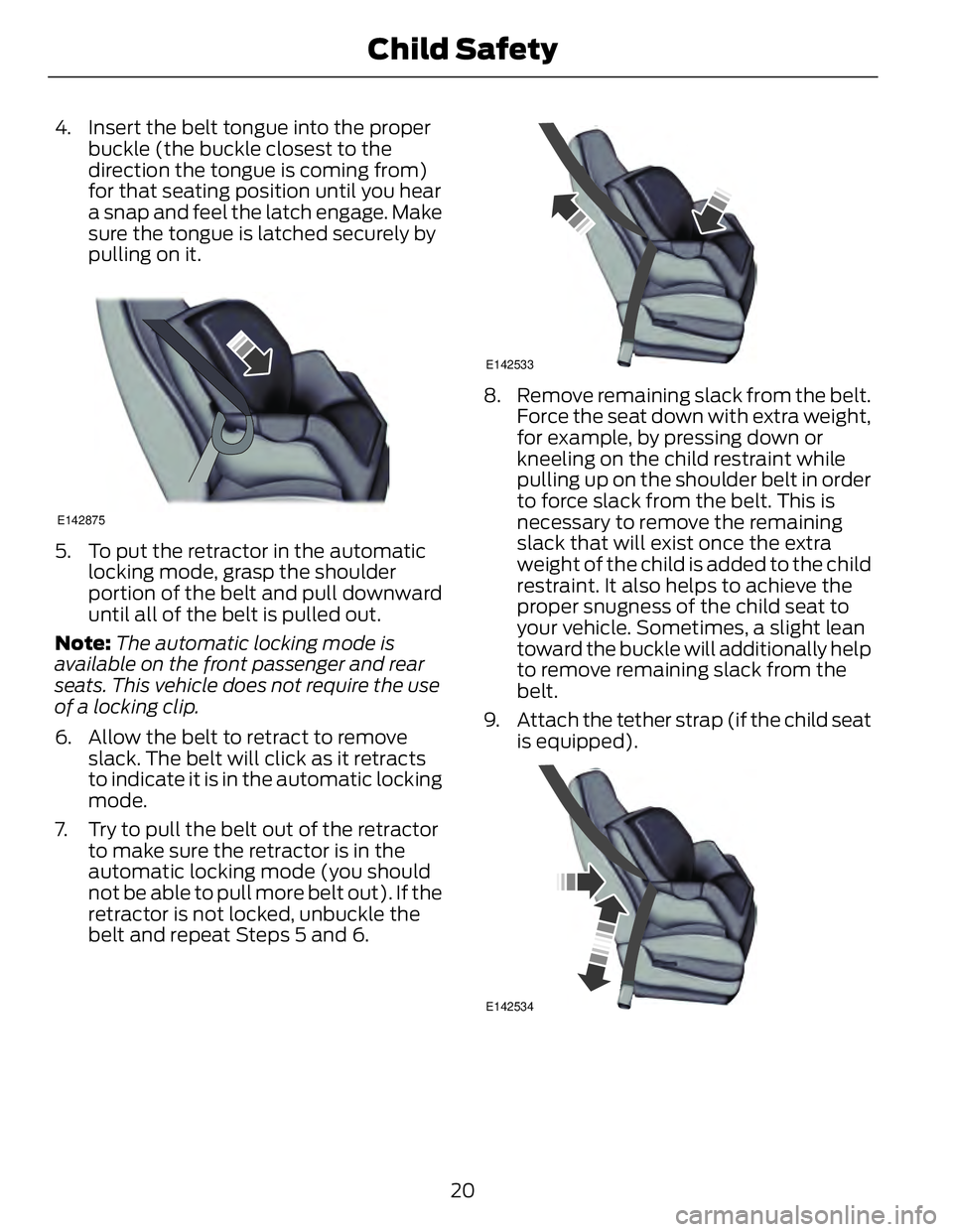
4. Insert the belt tongue into the proper
buckle (the buckle closest to the
direction the tongue is coming from)
for that seating position until you hear
a snap and feel the latch engage. Make
sure the tongue is latched securely by
pulling on it. E142875
5. To put the retractor in the automatic
locking mode, grasp the shoulder
portion of the belt and pull downward
until all of the belt is pulled out.
Note: The automatic locking mode is
available on the front passenger and rear
seats. This vehicle does not require the use
of a locking clip.
6. Allow the belt to retract to remove
slack. The belt will click as it retracts
to indicate it is in the automatic locking
mode.
7. Try to pull the belt out of the retractor
to make sure the retractor is in the
automatic locking mode (you should
not be able to pull more belt out). If the
retractor is not locked, unbuckle the
belt and repeat Steps 5 and 6. E142533
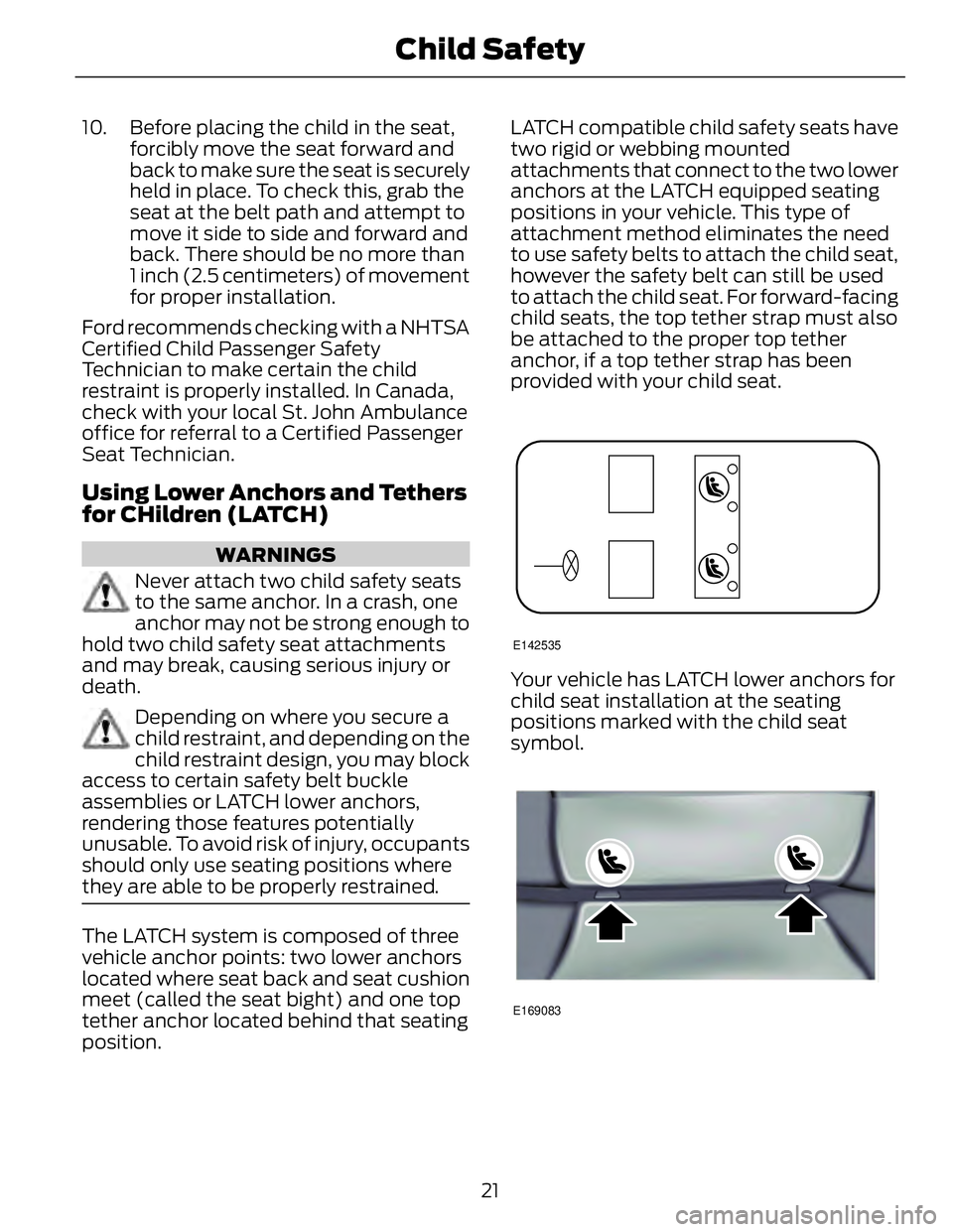
8. Remove remaining slack from the belt.
Force the seat down with extra weight,
for example, by pressing down or
kneeling on the child restraint while
pulling up on the shoulder belt in order
to force slack from the belt. This is
necessary to remove the remaining
slack that will exist once the extra
weight of the child is added to the child
restraint. It also helps to achieve the
proper snugness of the child seat to
your vehicle. Sometimes, a slight lean
toward the buckle will additionally help
to remove remaining slack from the
belt.
9. Attach the tether strap (if the child seat
is equipped).
E142534
20Child Safety
Page 24 of 473
10. Before placing the child in the seat,
forcibly move the seat forward and
back to make sure the seat is securely
held in place. To check this, grab the
seat at the belt path and attempt to
move it side to side and forward and
back. There should be no more than
1 inch (2.5 centimeters) of movement
for proper installation.
Ford recommends checking with a NHTSA
Certified Child Passenger Safety
Technician to make certain the child
restraint is properly installed. In Canada,
check with your local St. John Ambulance
office for referral to a Certified Passenger
Seat Technician.
Using Lower Anchors and Tethers
for CHildren (LATCH) WARNINGS
Never attach two child safety seats
to the same anchor. In a crash, one
anchor may not be strong enough to
hold two child safety seat attachments
and may break, causing serious injury or
death.
Depending on where you secure a
child restraint, and depending on the
child restraint design, you may block
access to certain safety belt buckle
assemblies or LATCH lower anchors,
rendering those features potentially
unusable. To avoid risk of injury, occupants
should only use seating positions where
they are able to be properly restrained.
The LATCH system is composed of three
vehicle anchor points: two lower anchors
located where seat back and seat cushion
meet (called the seat bight) and one top
tether anchor located behind that seating
position. LATCH compatible child safety seats have
two rigid or webbing mounted
attachments that connect to the two lower
anchors at the LATCH equipped seating
positions in your vehicle. This type of
attachment method eliminates the need
to use safety belts to attach the child seat,
however the safety belt can still be used
to attach the child seat. For forward-facing
child seats, the top tether strap must also
be attached to the proper top tether
anchor, if a top tether strap has been
provided with your child seat. E142535
Your vehicle has LATCH lower anchors for
child seat installation at the seating
positions marked with the child seat
symbol.
E169083
21Child Safety
Page 25 of 473
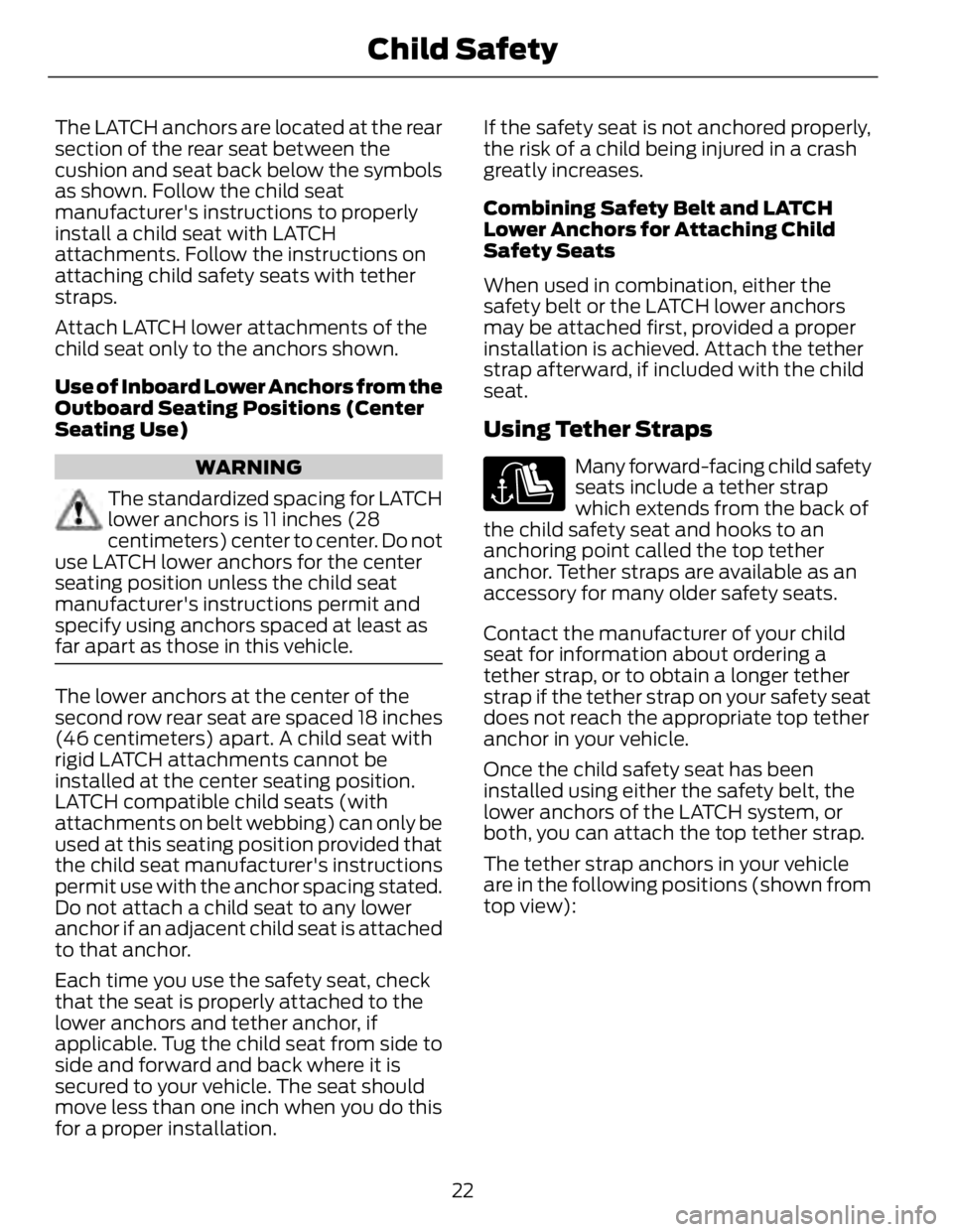
The LATCH anchors are located at the rear
section of the rear seat between the
cushion and seat back below the symbols
as shown. Follow the child seat
manufacturer's instructions to properly
install a child seat with LATCH
attachments. Follow the instructions on
attaching child safety seats with tether
straps.
Attach LATCH lower attachments of the
child seat only to the anchors shown.
Use of Inboard Lower Anchors from the
Outboard Seating Positions (Center
Seating Use)
WARNING
The standardized spacing for LATCH
lower anchors is 11 inches (28
centimeters) center to center. Do not
use LATCH lower anchors for the center
seating position unless the child seat
manufacturer's instructions permit and
specify using anchors spaced at least as
far apart as those in this vehicle.
The lower anchors at the center of the
second row rear seat are spaced 18 inches
(46 centimeters) apart. A child seat with
rigid LATCH attachments cannot be
installed at the center seating position.
LATCH compatible child seats (with
attachments on belt webbing) can only be
used at this seating position provided that
the child seat manufacturer's instructions
permit use with the anchor spacing stated.
Do not attach a child seat to any lower
anchor if an adjacent child seat is attached
to that anchor.
Each time you use the safety seat, check
that the seat is properly attached to the
lower anchors and tether anchor, if
applicable. Tug the child seat from side to
side and forward and back where it is
secured to your vehicle. The seat should
move less than one inch when you do this
for a proper installation. If the safety seat is not anchored properly,
the risk of a child being injured in a crash
greatly increases.
Combining Safety Belt and LATCH
Lower Anchors for Attaching Child
Safety Seats
When used in combination, either the
safety belt or the LATCH lower anchors
may be attached first, provided a proper
installation is achieved. Attach the tether
strap afterward, if included with the child
seat.
Using Tether Straps Many forward-facing child safety
seats include a tether strap
which extends from the back of
the child safety seat and hooks to an
anchoring point called the top tether
anchor. Tether straps are available as an
accessory for many older safety seats.
Contact the manufacturer of your child
seat for information about ordering a
tether strap, or to obtain a longer tether
strap if the tether strap on your safety seat
does not reach the appropriate top tether
anchor in your vehicle.
Once the child safety seat has been
installed using either the safety belt, the
lower anchors of the LATCH system, or
both, you can attach the top tether strap.
The tether strap anchors in your vehicle
are in the following positions (shown from
top view):
22Child Safety
Page 29 of 473
• Crash sensors and monitoring system
with readiness indicator.
The safety belt pretensioners at the front
seating positions are designed to tighten
the safety belts when activated. In frontal
and near-frontal crashes, the safety belt
pretensioners may be activated alone or,
if the crash is of sufficient severity, together
with the front airbags. The pretensioners
may also activate when a side curtain
airbag is deployed.
FASTENING THE SAFETY
BELTS Standard belts shown, inflatable belts
similar
The front outboard and rear safety
restraints in the vehicle are combination
lap and shoulder belts.
E142587
1. Insert the belt tongue into the proper
buckle (the buckle closest to the
direction the tongue is coming from)
until you hear a snap and feel it latch.
Make sure you securely fasten the
tongue in the buckle. E142588
2. To unfasten, press the release button
and remove the tongue from the
buckle.
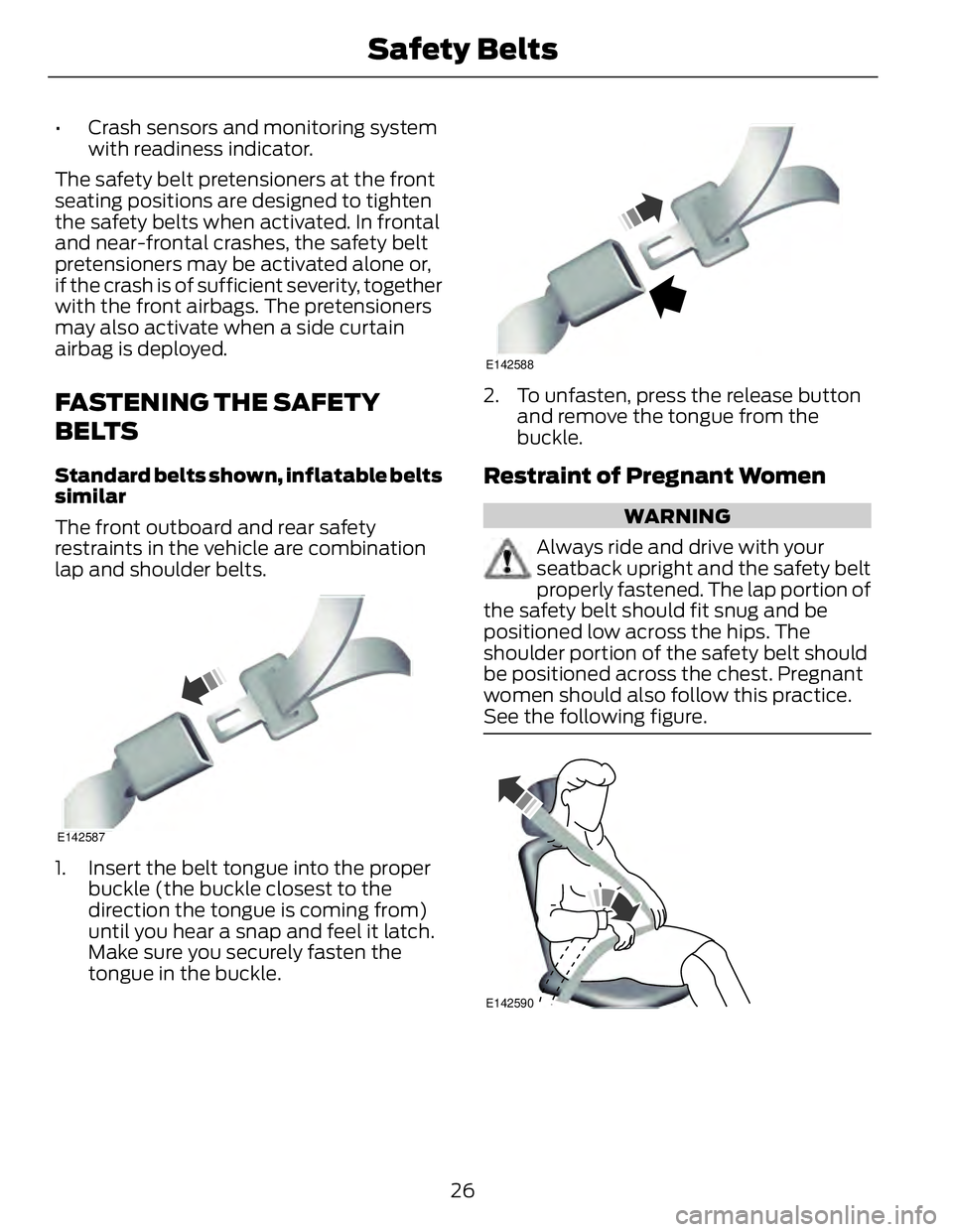
Restraint of Pregnant Women WARNING
Always ride and drive with your
seatback upright and the safety belt
properly fastened. The lap portion of
the safety belt should fit snug and be
positioned low across the hips. The
shoulder portion of the safety belt should
be positioned across the chest. Pregnant
women should also follow this practice.
See the following figure.
E142590
26Safety Belts
Page 48 of 473
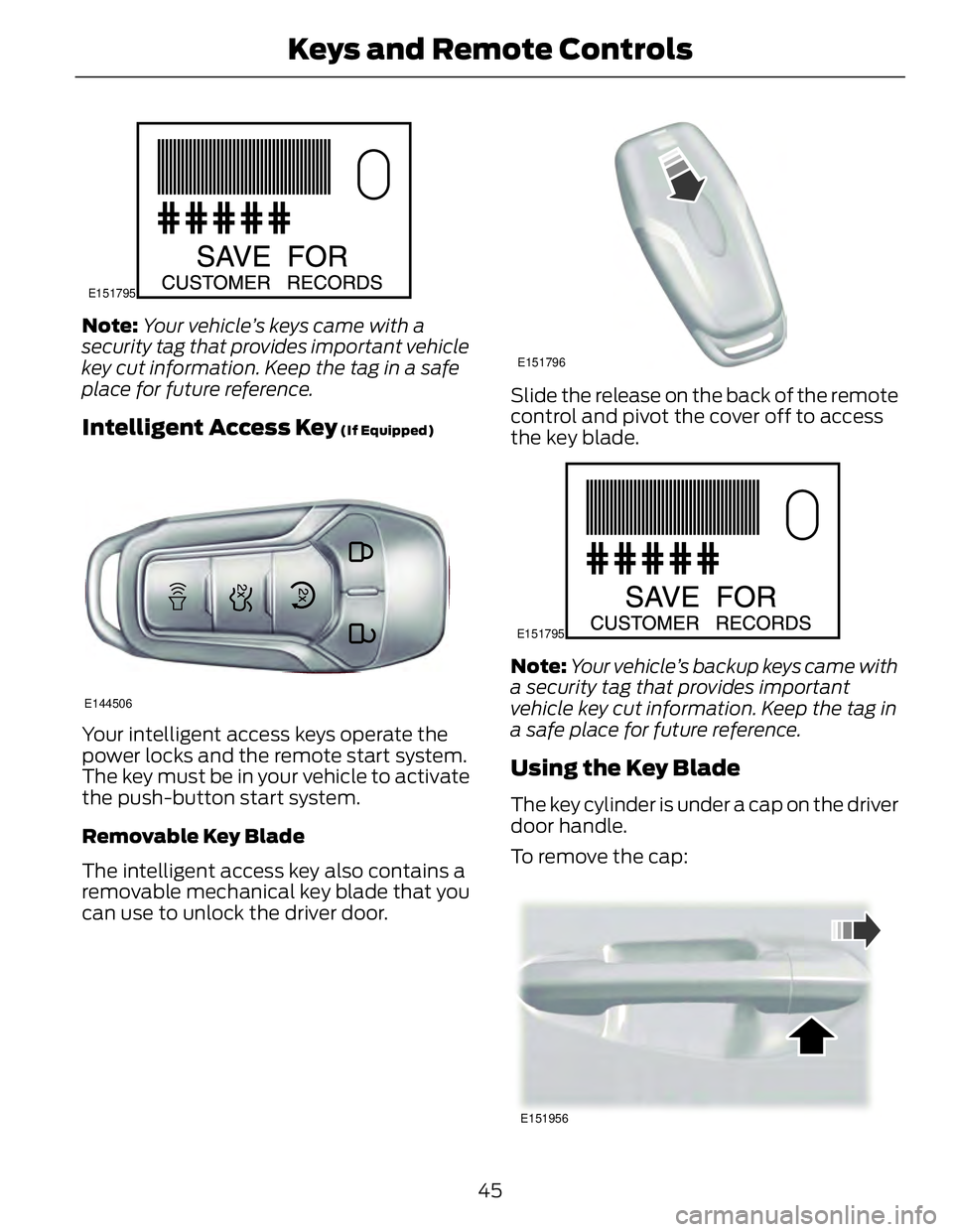
E151795
Note: Your vehicle’s keys came with a
security tag that provides important vehicle
key cut information. Keep the tag in a safe
place for future reference.
Intelligent Access Key (If Equipped)
E144506
Your intelligent access keys operate the
power locks and the remote start system.
The key must be in your vehicle to activate
the push-button start system.
Removable Key Blade
The intelligent access key also contains a
removable mechanical key blade that you
can use to unlock the driver door. E151796
Slide the release on the back of the remote
control and pivot the cover off to access
the key blade. E151795
Note: Your vehicle’s backup keys came with
a security tag that provides important
vehicle key cut information. Keep the tag in
a safe place for future reference.
Using the Key Blade The key cylinder is under a cap on the driver
door handle.
To remove the cap:
E151956
45Keys and Remote Controls
Page 55 of 473
NUMBER OF MYKEY(S)
Indicates the number of MyKeys
programmed to your vehicle. Use this
feature to detect how many MyKeys you
have for your vehicle and determine when
a MyKey has been deleted.
NUMBER OF ADMIN KEY(S)
Indicates how many admin keys are
programmed to your vehicle. Use this
feature to determine how many
unrestricted keys you have for your vehicle,
and detect if an additional MyKey has been
programmed. USING MYKEY WITH REMOTE
START SYSTEMS MyKey is not compatible with non
Ford-approved, aftermarket remote start
systems. If you choose to install a remote
start system, see an authorized dealer for
a Ford-approved remote start system.
MYKEY TROUBLESHOOTING Potential CausesCondition
· The key or fob used to start the vehicle does
not have admin privileges.I cannot create a MyKey.
· The key or fob used to start the vehicle is the
only admin key (there always has to be at least
one admin key).
· Vehicles with push-button start: The intelli-
gent access key fob is not positioned correctly
next to the steering column. See Keyless
Starting (page 136).
· SecuriLock passive anti-theft system is
disabled or in unlimited mode.
· The vehicle has been started using a remote
start system that is not programmed with
admin privileges. See Using MyKey With
Remote Start Systems (page 52).
· The key or fob used to start your vehicle does
not have admin privileges.I cannot program the configurable
settings.
· No MyKeys are created. See Creating a
MyKey (page 51).
· The vehicle has been started using a remote
start system that is not programmed with
admin privileges. See Using MyKey With
Remote Start Systems (page 52).
· The key or fob used to start your vehicle does
not have admin privileges.I cannot clear the MyKeys.
52MyKey™