door lock FORD FUSION HYBRID 2017 Owner's Manual
[x] Cancel search | Manufacturer: FORD, Model Year: 2017, Model line: FUSION HYBRID, Model: FORD FUSION HYBRID 2017Pages: 516, PDF Size: 7.53 MB
Page 102 of 516
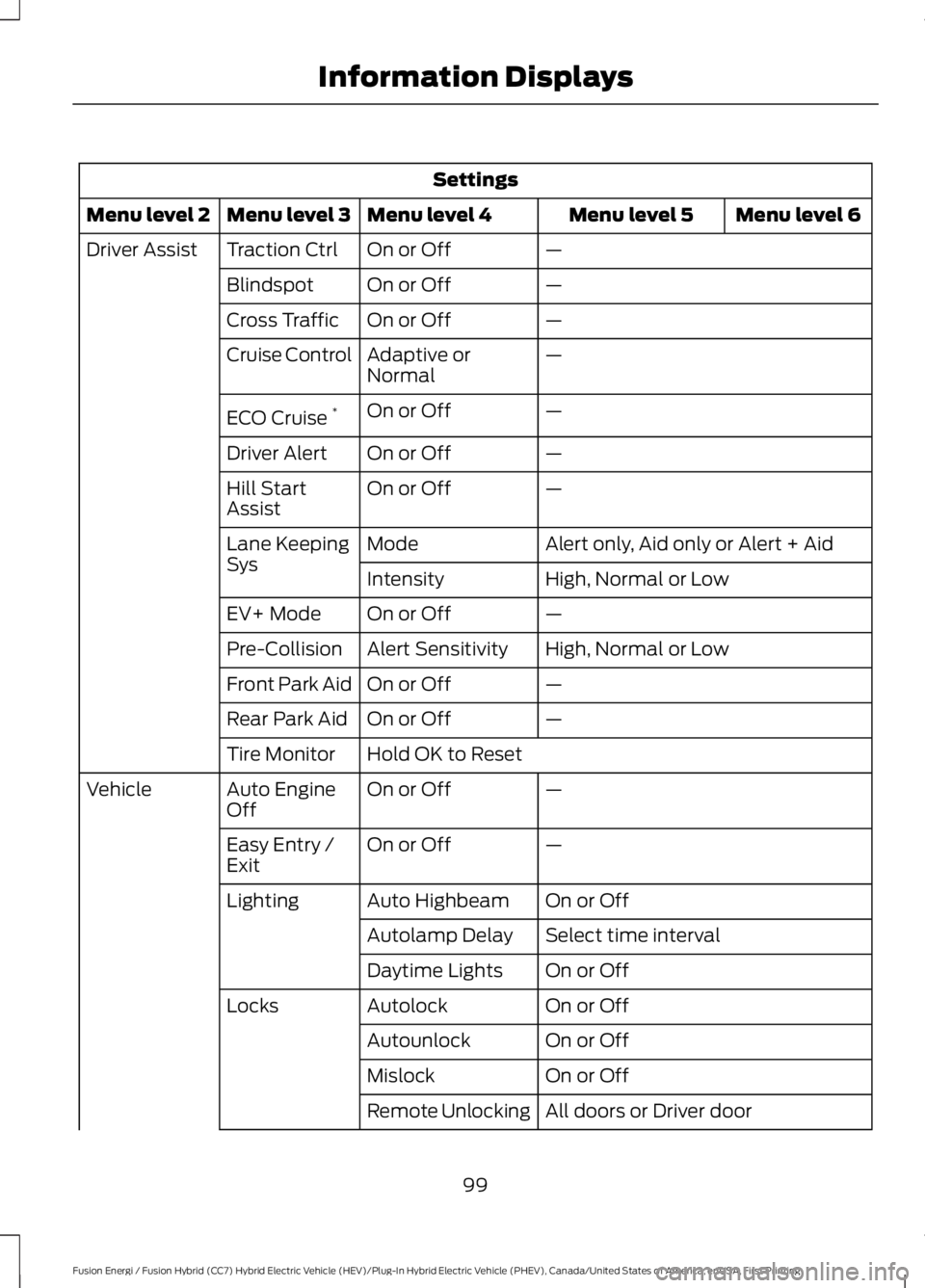
Settings
Menu level 6Menu level 5Menu level 4Menu level 3Menu level 2
—On or OffTraction CtrlDriver Assist
—On or OffBlindspot
—On or OffCross Traffic
—Adaptive orNormalCruise Control
—On or OffECO Cruise*
—On or OffDriver Alert
—On or OffHill StartAssist
Alert only, Aid only or Alert + AidModeLane KeepingSysHigh, Normal or LowIntensity
—On or OffEV+ Mode
High, Normal or LowAlert SensitivityPre-Collision
—On or OffFront Park Aid
—On or OffRear Park Aid
Hold OK to ResetTire Monitor
—On or OffAuto EngineOffVehicle
—On or OffEasy Entry /Exit
On or OffAuto HighbeamLighting
Select time intervalAutolamp Delay
On or OffDaytime Lights
On or OffAutolockLocks
On or OffAutounlock
On or OffMislock
All doors or Driver doorRemote Unlocking
99
Fusion Energi / Fusion Hybrid (CC7) Hybrid Electric Vehicle (HEV)/Plug-In Hybrid Electric Vehicle (PHEV), Canada/United States of America, enUSA, First Printing
Information Displays
Page 110 of 516
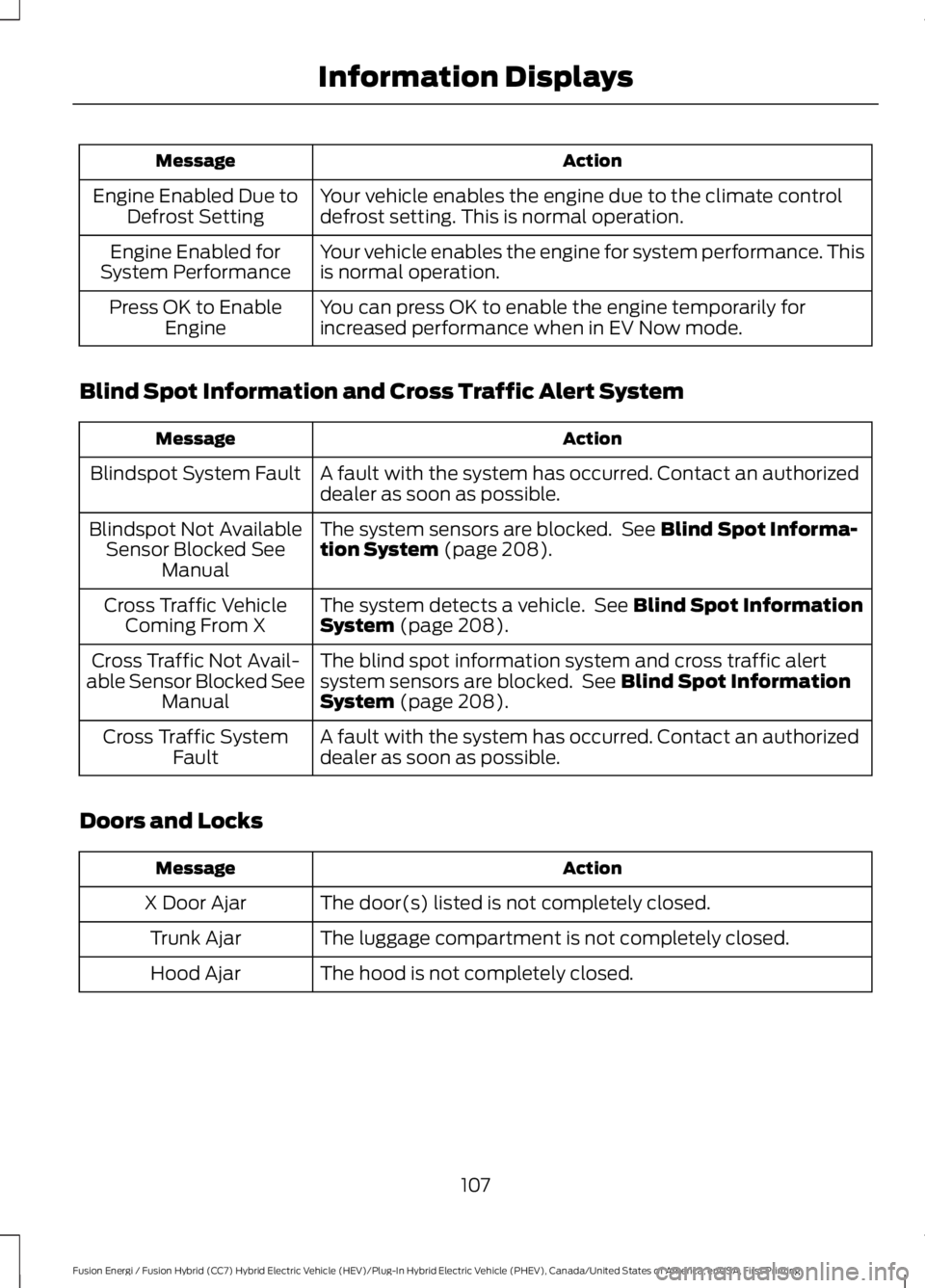
ActionMessage
Your vehicle enables the engine due to the climate controldefrost setting. This is normal operation.Engine Enabled Due toDefrost Setting
Your vehicle enables the engine for system performance. Thisis normal operation.Engine Enabled forSystem Performance
You can press OK to enable the engine temporarily forincreased performance when in EV Now mode.Press OK to EnableEngine
Blind Spot Information and Cross Traffic Alert System
ActionMessage
A fault with the system has occurred. Contact an authorizeddealer as soon as possible.Blindspot System Fault
The system sensors are blocked. See Blind Spot Informa-tion System (page 208).Blindspot Not AvailableSensor Blocked SeeManual
The system detects a vehicle. See Blind Spot InformationSystem (page 208).Cross Traffic VehicleComing From X
The blind spot information system and cross traffic alertsystem sensors are blocked. See Blind Spot InformationSystem (page 208).
Cross Traffic Not Avail-able Sensor Blocked SeeManual
A fault with the system has occurred. Contact an authorizeddealer as soon as possible.Cross Traffic SystemFault
Doors and Locks
ActionMessage
The door(s) listed is not completely closed.X Door Ajar
The luggage compartment is not completely closed.Trunk Ajar
The hood is not completely closed.Hood Ajar
107
Fusion Energi / Fusion Hybrid (CC7) Hybrid Electric Vehicle (HEV)/Plug-In Hybrid Electric Vehicle (PHEV), Canada/United States of America, enUSA, First Printing
Information Displays
Page 111 of 516
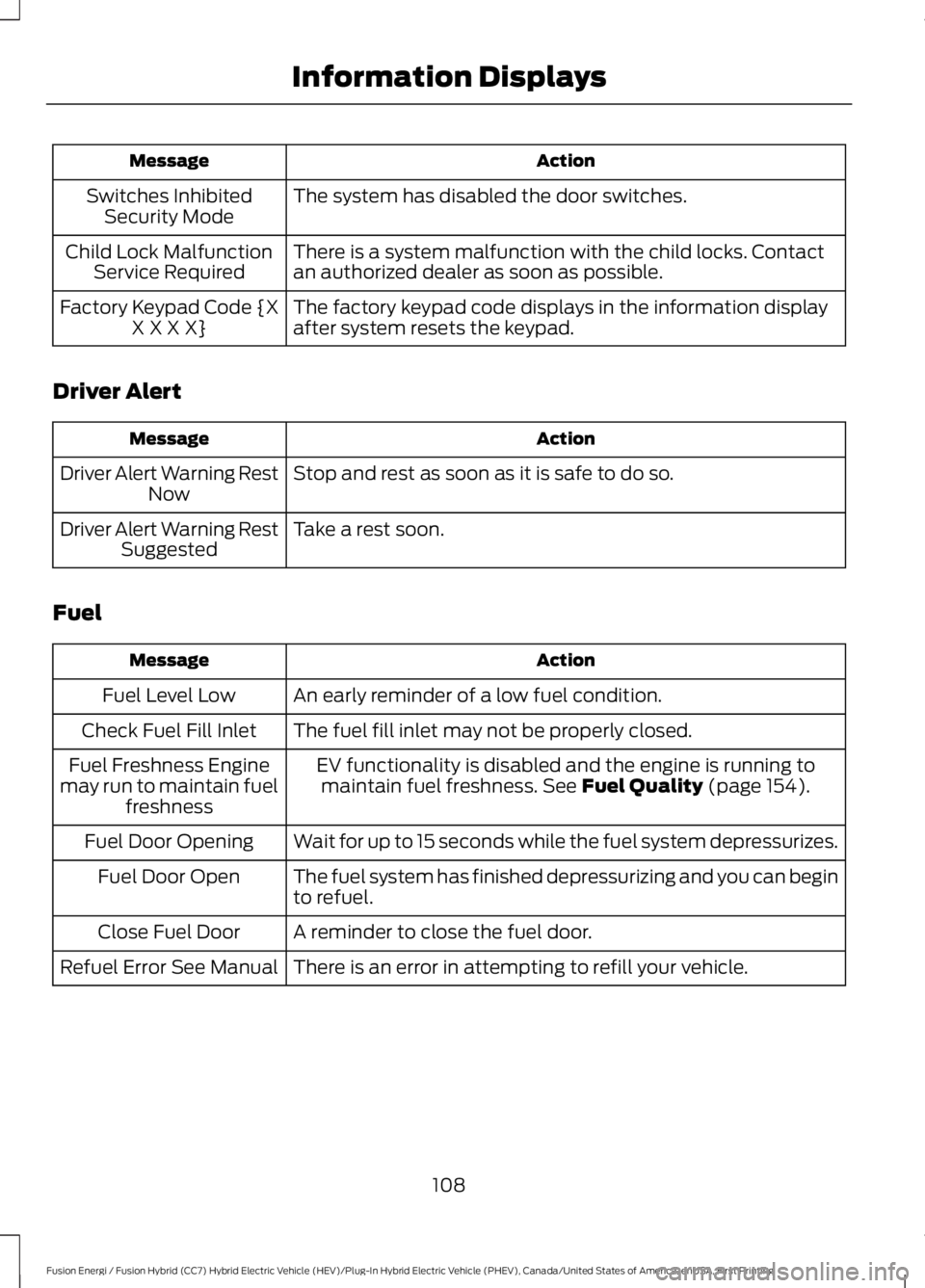
ActionMessage
The system has disabled the door switches.Switches InhibitedSecurity Mode
There is a system malfunction with the child locks. Contactan authorized dealer as soon as possible.Child Lock MalfunctionService Required
The factory keypad code displays in the information displayafter system resets the keypad.Factory Keypad Code {XX X X X}
Driver Alert
ActionMessage
Stop and rest as soon as it is safe to do so.Driver Alert Warning RestNow
Take a rest soon.Driver Alert Warning RestSuggested
Fuel
ActionMessage
An early reminder of a low fuel condition.Fuel Level Low
The fuel fill inlet may not be properly closed.Check Fuel Fill Inlet
EV functionality is disabled and the engine is running tomaintain fuel freshness. See Fuel Quality (page 154).Fuel Freshness Enginemay run to maintain fuelfreshness
Wait for up to 15 seconds while the fuel system depressurizes.Fuel Door Opening
The fuel system has finished depressurizing and you can beginto refuel.Fuel Door Open
A reminder to close the fuel door.Close Fuel Door
There is an error in attempting to refill your vehicle.Refuel Error See Manual
108
Fusion Energi / Fusion Hybrid (CC7) Hybrid Electric Vehicle (HEV)/Plug-In Hybrid Electric Vehicle (PHEV), Canada/United States of America, enUSA, First Printing
Information Displays
Page 130 of 516
•Driver seat.
•Power mirrors.
•Power steering column.
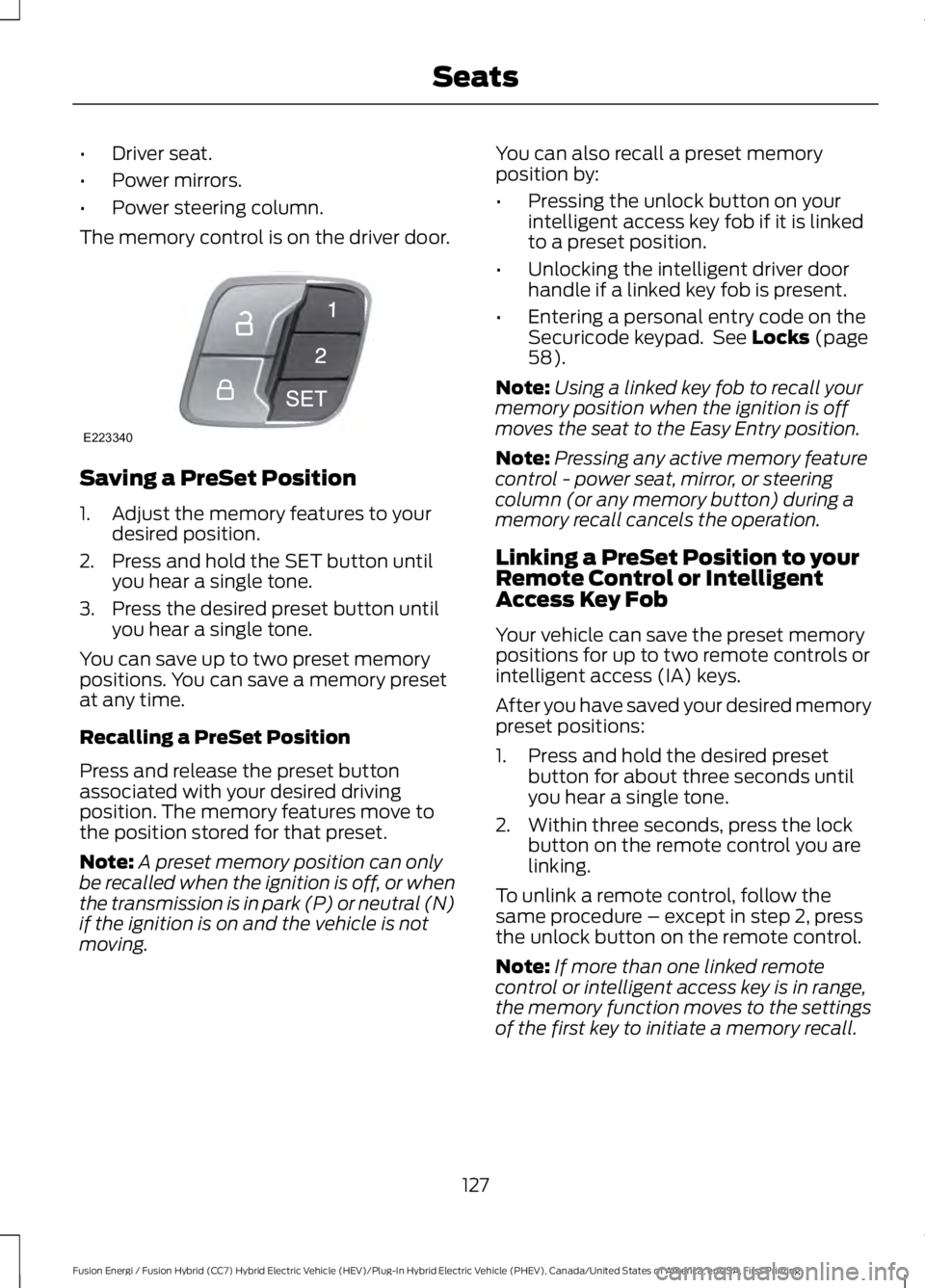
The memory control is on the driver door.
Saving a PreSet Position
1. Adjust the memory features to yourdesired position.
2. Press and hold the SET button untilyou hear a single tone.
3. Press the desired preset button untilyou hear a single tone.
You can save up to two preset memorypositions. You can save a memory presetat any time.
Recalling a PreSet Position
Press and release the preset buttonassociated with your desired drivingposition. The memory features move tothe position stored for that preset.
Note:A preset memory position can onlybe recalled when the ignition is off, or whenthe transmission is in park (P) or neutral (N)if the ignition is on and the vehicle is notmoving.
You can also recall a preset memoryposition by:
•Pressing the unlock button on yourintelligent access key fob if it is linkedto a preset position.
•Unlocking the intelligent driver doorhandle if a linked key fob is present.
•Entering a personal entry code on theSecuricode keypad. See Locks (page58).
Note:Using a linked key fob to recall yourmemory position when the ignition is offmoves the seat to the Easy Entry position.
Note:Pressing any active memory featurecontrol - power seat, mirror, or steeringcolumn (or any memory button) during amemory recall cancels the operation.
Linking a PreSet Position to yourRemote Control or IntelligentAccess Key Fob
Your vehicle can save the preset memorypositions for up to two remote controls orintelligent access (IA) keys.
After you have saved your desired memorypreset positions:
1. Press and hold the desired presetbutton for about three seconds untilyou hear a single tone.
2. Within three seconds, press the lockbutton on the remote control you arelinking.
To unlink a remote control, follow thesame procedure – except in step 2, pressthe unlock button on the remote control.
Note:If more than one linked remotecontrol or intelligent access key is in range,the memory function moves to the settingsof the first key to initiate a memory recall.
127
Fusion Energi / Fusion Hybrid (CC7) Hybrid Electric Vehicle (HEV)/Plug-In Hybrid Electric Vehicle (PHEV), Canada/United States of America, enUSA, First Printing
SeatsE223340
Page 135 of 516
HomeLink Wireless ControlSystem
WARNINGS
Make sure that the garage door andsecurity device are free fromobstruction when you areprogramming. Do not program the systemwith the vehicle in the garage.
Do not use the system with anygarage door opener that does nothave the safety stop and reversefeature as required by U.S. Federal SafetyStandards (this includes any garage dooropener manufactured before April 1, 1982).A garage door opener which cannot detectan object, signaling the door to stop andreverse, does not meet current federalsafety standards. Using a garage dooropener without these features increasesthe risk of serious injury or death.
Note:Make sure you keep the originalremote control transmitter for use in othervehicles as well as for future systemprogramming.
Note:We recommend that upon the saleor lease termination of your vehicle, youerase the programmed function buttons forsecurity reasons. See Erasing the FunctionButton Codes.
Note:You can program a maximum ofthree devices. To change or replace any ofthe three devices after it has been initiallyprogrammed, you must first erase thecurrent settings. See Erasing the FunctionButton Codes.
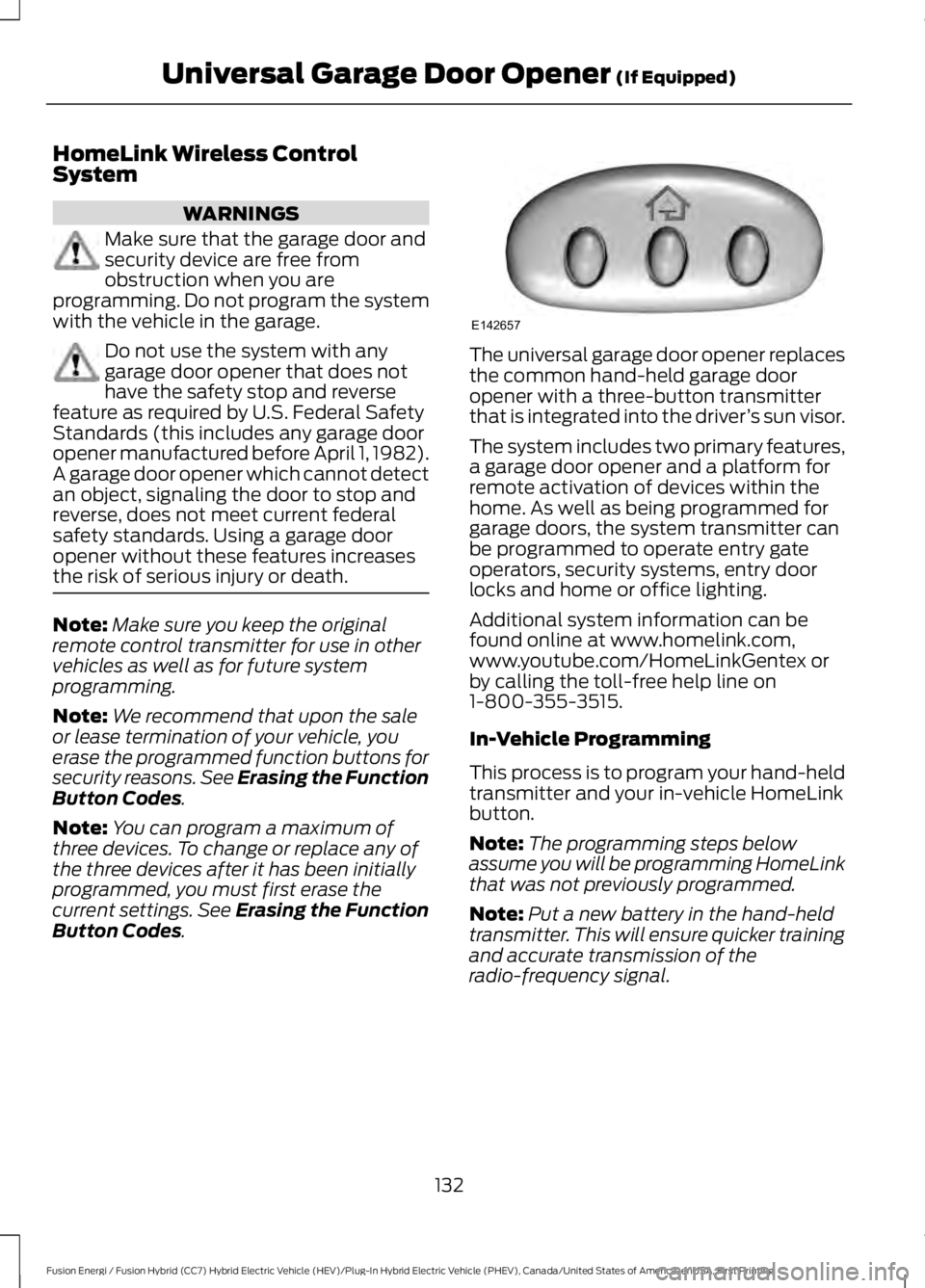
The universal garage door opener replacesthe common hand-held garage dooropener with a three-button transmitterthat is integrated into the driver’s sun visor.
The system includes two primary features,a garage door opener and a platform forremote activation of devices within thehome. As well as being programmed forgarage doors, the system transmitter canbe programmed to operate entry gateoperators, security systems, entry doorlocks and home or office lighting.
Additional system information can befound online at www.homelink.com,www.youtube.com/HomeLinkGentex orby calling the toll-free help line on1-800-355-3515.
In-Vehicle Programming
This process is to program your hand-heldtransmitter and your in-vehicle HomeLinkbutton.
Note:The programming steps belowassume you will be programming HomeLinkthat was not previously programmed.
Note:Put a new battery in the hand-heldtransmitter. This will ensure quicker trainingand accurate transmission of theradio-frequency signal.
132
Fusion Energi / Fusion Hybrid (CC7) Hybrid Electric Vehicle (HEV)/Plug-In Hybrid Electric Vehicle (PHEV), Canada/United States of America, enUSA, First Printing
Universal Garage Door Opener (If Equipped)E142657
Page 146 of 516
3. Shift into park (P).
4. Fully press the accelerator pedal.
5. Briefly press the push button ignitionswitch.
Fast Restart
The fast restart feature allows you torestart your vehicle within 20 seconds ofswitching it off, even if it does not detecta valid passive key.
Within 20 seconds of switching the engineoff, press the brake pedal and press thepush button ignition switch. After 20seconds, you can no longer start yourvehicle if it does not detect a valid passivekey.
Once your vehicle starts, it remains runninguntil you press the push button ignitionswitch, even if your vehicle does not detecta valid passive key. If you open and closea door while your vehicle is running, thesystem searches for a valid passive key.After 20 seconds, you can no longer startyour vehicle if it does not detect a validpassive key.
Automatic Engine Shutdown
This feature automatically shuts downyour vehicle if it has been idling for anextended period. The ignition also turns offto save battery power. Before your vehicleshuts down, a message appears in theinformation display showing a timercounting down. If you do not intervenewithin 30 seconds, your vehicle shutsdown. Another message appears in theinformation display to inform you that yourvehicle has shut down to save fuel. Startyour vehicle as normal.
Automatic Engine Shutdown Override
Note: You cannot permanently switch offthe automatic shutdown. When you switchit off temporarily, it turns on at the nextignition cycle.
You can stop the shutdown, or reset thetimer, at any point before the 30-secondcountdown has expired by doing any of thefollowing:
•Interacting with your vehicle, forexample pressing the brake oraccelerator pedal.
•You can temporarily switch off theshutdown any time the ignition is onusing the information display. SeeInformation Displays (page 94).
•During the countdown beforeshutdown, you are prompted to pressOK or RESET (depending on your typeof information display) to temporarilyswitch the feature off (for the currentignition cycle only).
Stopping the Engine When YourVehicle is Stationary
Note:The ignition, all electrical circuits andall warning lamps and indicators will beturned off.
Note:If your vehicle is left running for 30minutes without any interaction, itautomatically shuts down.
1. Apply the parking brake.
2. Shift into park (P).
3. Briefly press the push button ignitionswitch.
Stopping the Engine When YourVehicle is Moving
WARNING
Switching off the engine when thevehicle is still moving will result in aloss of brake and steering assistance.The steering will not lock, but higher effortwill be required. When the ignition isswitched off, some electrical circuits,including air bags, warning lamps andindicators may also be off. If the ignitionwas turned off accidentally, you can shiftinto neutral (N) and re-start the engine.
143
Fusion Energi / Fusion Hybrid (CC7) Hybrid Electric Vehicle (HEV)/Plug-In Hybrid Electric Vehicle (PHEV), Canada/United States of America, enUSA, First Printing
Starting and Stopping the Engine
Page 147 of 516
1.Shift into neutral and use the brakes tobring your vehicle to a safe stop.
2. When your vehicle has stopped, shiftinto park (P).
3. Apply the parking brake.
4.Press and hold the push button ignitionswitch, or press it three times withintwo seconds.
Guarding Against Exhaust Fumes
WARNING
If you smell exhaust fumes insideyour vehicle, have your vehiclechecked by your authorized dealerimmediately. Do not drive your vehicle ifyou smell exhaust fumes. Carbonmonoxide is present in exhaust fumes.Take precautions to avoid its dangerouseffects.
Important Ventilating Information
If you stop your vehicle and then leave theengine idling for long periods, werecommend that you do one of thefollowing:
•Open the windows at least 1 in (3 cm).
•Set your climate control to outside air.
ENGINE BLOCK HEATER (If
Equipped)
WARNINGS
Failure to follow engine block heaterinstructions could result in propertydamage or serious personal injury.
Do not use your heater withungrounded electrical systems ortwo-pronged adapters. There is a riskof electrical shock.
Note:The heater is most effective whenoutdoor temperatures are below 0°F(-18°C).
The heater acts as a starting aid bywarming the engine coolant. This allowsthe climate control system to respondquickly. The equipment includes a heaterelement (installed in the engine block) anda wire harness. You can connect thesystem to a grounded 120-volt ACelectrical source.
We recommend that you do the followingfor a safe and correct operation:
•Use a 16-gauge outdoor extension cordthat is product certified byUnderwriter’s Laboratory (UL) orCanadian Standards Association(CSA). This extension cord must besuitable for use outdoors, in coldtemperatures, and be clearly markedSuitable for Use with OutdoorAppliances. Do not use an indoorextension cord outdoors. This couldresult in an electric shock or become afire hazard.
•Use as short an extension cord aspossible.
•Do not use multiple extension cords.
•Make sure that when in operation, theextension cord plug and heater cordplug connections are free and clear ofwater. This could cause an electricshock or fire.
•Make sure your vehicle is parked in aclean area, clear of combustibles.
•Make sure the heater, heater cord andextension cord are firmly connected.
•Check for heat anywhere in theelectrical hookup once the system hasbeen operating for approximately 30minutes.
•Make sure the heater system ischecked for proper operation beforewinter.
144
Fusion Energi / Fusion Hybrid (CC7) Hybrid Electric Vehicle (HEV)/Plug-In Hybrid Electric Vehicle (PHEV), Canada/United States of America, enUSA, First Printing
Starting and Stopping the Engine
Page 148 of 516
Using the Engine Block Heater
The engine block heater plug is located ina housing in the left fog lamp bezel. Openthe hinged, circular door and make surethe receptacle terminals are clean and dryprior to use. Clean them with a dry cloth ifnecessary.
The heater uses 0.4 to 1.0 kilowatt-hoursof energy per hour of use. The system doesnot have a thermostat. It will achievemaximum temperature afterapproximately three hours of operation. Ifyou use the heater longer than three hours,this will not improve system performanceand will use unnecessary electricity.
145
Fusion Energi / Fusion Hybrid (CC7) Hybrid Electric Vehicle (HEV)/Plug-In Hybrid Electric Vehicle (PHEV), Canada/United States of America, enUSA, First Printing
Starting and Stopping the Engine
Page 170 of 516
Charge Port
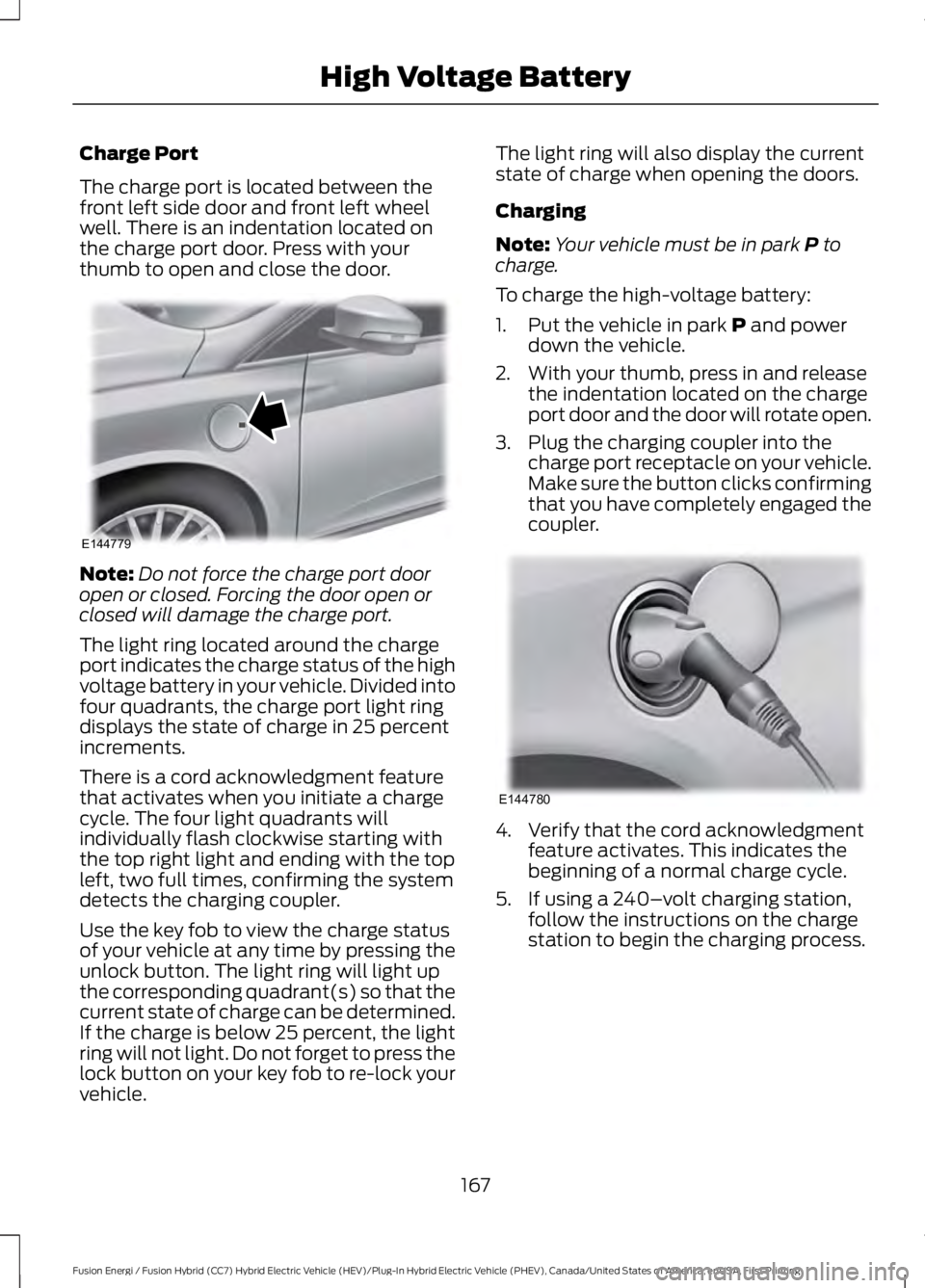
The charge port is located between thefront left side door and front left wheelwell. There is an indentation located onthe charge port door. Press with yourthumb to open and close the door.
Note:Do not force the charge port dooropen or closed. Forcing the door open orclosed will damage the charge port.
The light ring located around the chargeport indicates the charge status of the highvoltage battery in your vehicle. Divided intofour quadrants, the charge port light ringdisplays the state of charge in 25 percentincrements.
There is a cord acknowledgment featurethat activates when you initiate a chargecycle. The four light quadrants willindividually flash clockwise starting withthe top right light and ending with the topleft, two full times, confirming the systemdetects the charging coupler.
Use the key fob to view the charge statusof your vehicle at any time by pressing theunlock button. The light ring will light upthe corresponding quadrant(s) so that thecurrent state of charge can be determined.If the charge is below 25 percent, the lightring will not light. Do not forget to press thelock button on your key fob to re-lock yourvehicle.
The light ring will also display the currentstate of charge when opening the doors.
Charging
Note:Your vehicle must be in park P tocharge.
To charge the high-voltage battery:
1. Put the vehicle in park P and powerdown the vehicle.
2. With your thumb, press in and releasethe indentation located on the chargeport door and the door will rotate open.
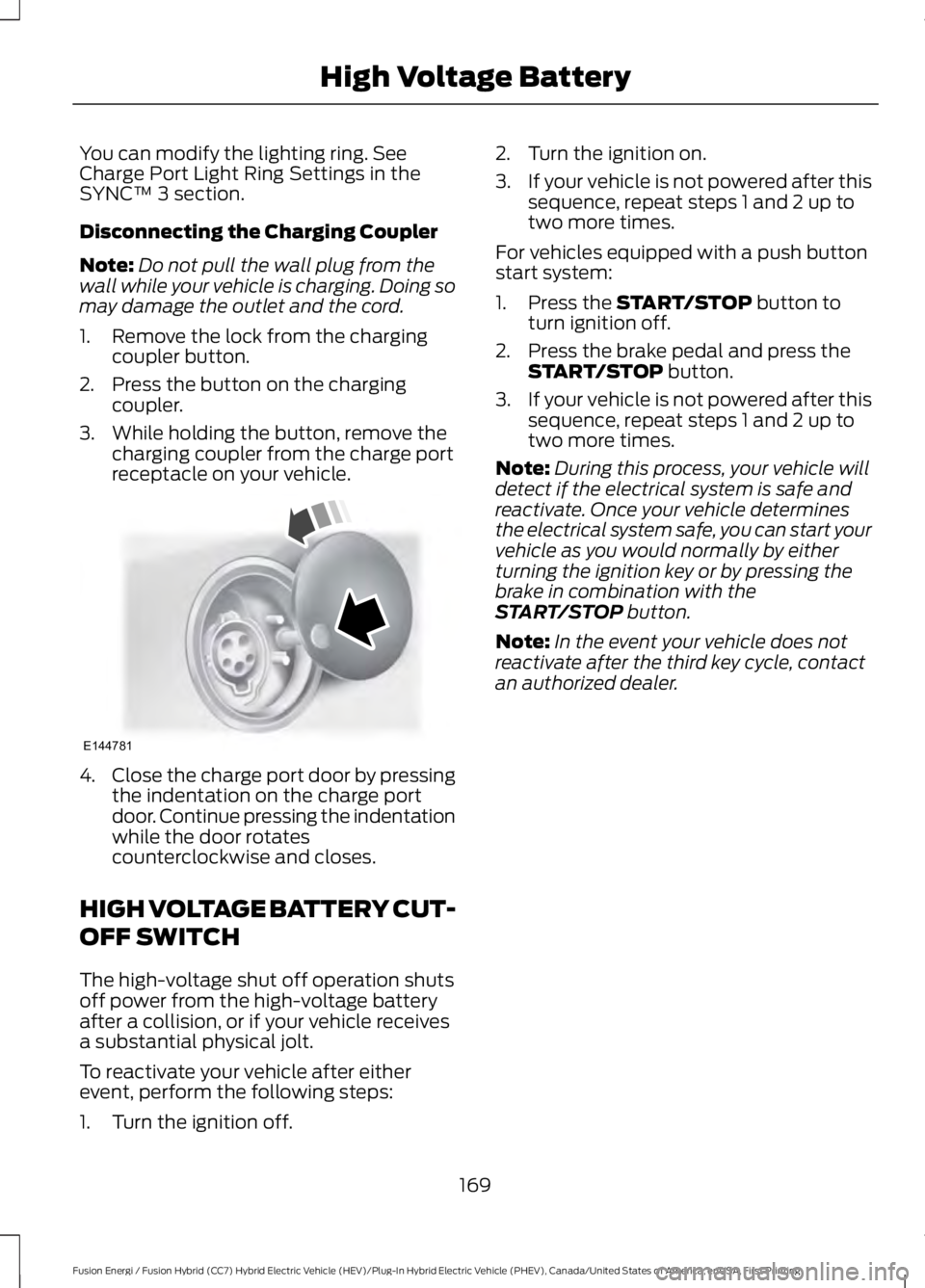
3. Plug the charging coupler into thecharge port receptacle on your vehicle.Make sure the button clicks confirmingthat you have completely engaged thecoupler.
4. Verify that the cord acknowledgmentfeature activates. This indicates thebeginning of a normal charge cycle.
5. If using a 240–volt charging station,follow the instructions on the chargestation to begin the charging process.
167
Fusion Energi / Fusion Hybrid (CC7) Hybrid Electric Vehicle (HEV)/Plug-In Hybrid Electric Vehicle (PHEV), Canada/United States of America, enUSA, First Printing
High Voltage BatteryE144779 E144780
Page 172 of 516
You can modify the lighting ring. See Charge Port Light Ring Settings in the SYNC™ 3 section.
Disconnecting the Charging Coupler
Note:Do not pull the wall plug from thewall while your vehicle is charging. Doing somay damage the outlet and the cord.
1. Remove the lock from the chargingcoupler button.
2. Press the button on the chargingcoupler.
3. While holding the button, remove thecharging coupler from the charge portreceptacle on your vehicle.
4.Close the charge port door by pressingthe indentation on the charge portdoor. Continue pressing the indentationwhile the door rotatescounterclockwise and closes.
HIGH VOLTAGE BATTERY CUT-
OFF SWITCH
The high-voltage shut off operation shutsoff power from the high-voltage batteryafter a collision, or if your vehicle receivesa substantial physical jolt.
To reactivate your vehicle after eitherevent, perform the following steps:
1. Turn the ignition off.
2. Turn the ignition on.
3.If your vehicle is not powered after thissequence, repeat steps 1 and 2 up totwo more times.
For vehicles equipped with a push buttonstart system:
1. Press the START/STOP button toturn ignition off.
2. Press the brake pedal and press theSTART/STOP button.
3.If your vehicle is not powered after thissequence, repeat steps 1 and 2 up totwo more times.
Note:During this process, your vehicle willdetect if the electrical system is safe andreactivate. Once your vehicle determinesthe electrical system safe, you can start yourvehicle as you would normally by eitherturning the ignition key or by pressing thebrake in combination with theSTART/STOP button.
Note:In the event your vehicle does notreactivate after the third key cycle, contactan authorized dealer.
169
Fusion Energi / Fusion Hybrid (CC7) Hybrid Electric Vehicle (HEV)/Plug-In Hybrid Electric Vehicle (PHEV), Canada/United States of America, enUSA, First Printing
High Voltage BatteryE144781