door lock FORD FUSION HYBRID 2017 Service Manual
[x] Cancel search | Manufacturer: FORD, Model Year: 2017, Model line: FUSION HYBRID, Model: FORD FUSION HYBRID 2017Pages: 516, PDF Size: 7.53 MB
Page 371 of 516
Action and DescriptionMenu ItemItem
This bar displays icons and messages pertaining to currentsystem activities including climate settings, voicecommands and phone functions such as text messages.
Status BarA
This button is available on the main screens. Pressing ittakes you to the home screen view.HomeB
This shows the current time. You can set the clock manuallyor have it controlled by the vehicle's GPS location. SeeSettings (page 437).
ClockC
This displays the current outside temperature.OutsideTemperatureD
You can touch any of the buttons on this bar to select afeature.Feature BarE
The touchscreen allows you quick accessto all of your comfort, navigation,communication and entertainmentoptions. Using the status and feature baryou can quickly select the feature you wantto use.
Note:Your system is equipped with afeature that allows you to access andcontrol audio features for 10 minutes afteryou switch the ignition off (and no doorsopen).
The Status Bar
Additional icons also display in the statusbar depending on market, vehicle optionsand current operation. If a feature is notactive, the icon does not display. Certainicons may move to the left or rightdepending on what options are active.
368
Fusion Energi / Fusion Hybrid (CC7) Hybrid Electric Vehicle (HEV)/Plug-In Hybrid Electric Vehicle (PHEV), Canada/United States of America, enUSA, First Printing
SYNC™ 3
Page 451 of 516
Door Keypad Code
Select this button to add or erase apersonal door keypad code. To add orerase a personal code, you first need to
enter the five-digit factory set code. Youcan find this code on the owner's walletcard in the glove box or from yourauthorized dealer.
Camera Settings
To make adjustments using the touchscreen, select:
Action and DescriptionMessage
Camera Settings
Then select from the following:
You can enable or disable this option using the slider.Rear CameraDelay
You can find more information on the rear-view camera system in the parking aids chapterof your owner manual.
Onboard Modem Serial Number (ESN)
Selecting this button on the settings menushows you the ESN number for yoursystem. You need this number for certainregistrations such as Satellite Radio.
Charge Port Light (If Equipped)
To make adjustments using the touchscreen, select:
Action and DescriptionMenu Item
Charge Port Light
You can then select:
Illuminates when plugging in, opening doors, pressing theunlock button on your remote and while charging.On
Does not illuminate.Off
Illuminates only when plugging in, opening doors, orpressing the unlock button on your remote.Limited
Note:Details on the charge port lightfunctions are in another chapter. See HighVoltage Battery (page 162).
448
Fusion Energi / Fusion Hybrid (CC7) Hybrid Electric Vehicle (HEV)/Plug-In Hybrid Electric Vehicle (PHEV), Canada/United States of America, enUSA, First Printing
SYNC™ 3
Page 453 of 516
When you select valet mode a pop upappears informing you that a four digitcode must be entered to enable anddisable valet mode. You can use any PINyou chose but you must use the same PINto disable valet mode. The system asksyou to input the code.
Note:If the system is locked and youcannot remember the PIN, please contactthe Customer Relationship Center.
United States: 1-800-392-3673Canada: 1-800-565-3673
To enable valet mode, enter your chosenPIN. The system then asks to confirm yourPIN by reentering it. The system then locks.
To unlock the system, enter the same pinnumber. The system reconnects to yourphone and all of your options are availableagain.
SYNC™ 3 TROUBLESHOOTING
Your SYNC 3 system is easy to use.However, should questions arise, pleaserefer to the tables below.
To check your cell phone's compatibility,visit the Ford website.
Website
owner.ford.comwww.syncmyride.cawww.syncmaroute.ca
Cell phone issues
Possible solutionPossible causeIssue
Refer to your device's manual about audioadjustments.
The audio controlsettings on your cellphone may be affectingSYNC 3 performance.
There is back-ground noiseduring a phonecall.
Try switching your cell phone off, resettingit or removing the battery, then try again.Possible cell phonemalfunction.
During a call, Ican hear theother personbut they cannothear me.
Make sure that the microphone for SYNC3 is not set to off. Look for the microphoneicon on the phone screen.
To restart your system, shut down theengine, open and close the door, and thenlock the door and wait for 2-3 minutes.Make sure that your SYNC 3 screen is blackand the lighted USB port is off.
The system may need tobe restarted.
During a call, Icannot hear theother personand they cannothear me.
Check your cell phone's compatibility.This is a cell phone-dependent feature.SYNC 3 is notable to down-load my phone-book.
Make sure you allow SYNC 3 to retrievecontacts from your phone. Refer to yourcell manual.
Possible cell phonemalfunction.
450
Fusion Energi / Fusion Hybrid (CC7) Hybrid Electric Vehicle (HEV)/Plug-In Hybrid Electric Vehicle (PHEV), Canada/United States of America, enUSA, First Printing
SYNC™ 3
Page 465 of 516
For a complete listing of the accessoriesthat are available for your vehicle, pleasecontact your authorized dealer or visit theonline store web site:
Web Address (United States)
www.Accessories.Ford.com
Web Address (Canada)
www.Accessories.Ford.ca
Ford Motor Company will repair or replaceany properly authorized dealer-installedFord Original Accessory found to bedefective in factory-supplied materials orworkmanship during the warranty period,as well as any component damaged by thedefective accessories.
Ford Motor Company warrants yourvehicle's accessory through the warrantythat provides the greatest benefit:
•24 months, unlimited mileage.
•The remainder of your new vehiclelimited warranty.
Contact an authorized dealer for detailsand a copy of the warranty.
Exterior Style
•Bumper protectors.
•Graphics.
•Rear spoiler.
•Side-window deflectors.
•Splash guards.
•Wheels.
Interior Style
•All-weather floor mats.
•Door sill plates.
•Electrochromaticcompass/temperature interior mirrors.
•Premium carpeted floor mats.
Lifestyle
•Ash cup or smoker's packages.
•Cargo area protectors.
•Cargo net.
•Cargo organizers.
•Charge cord bag*.
•Interior light kit.
•Roof racks and carriers*.
•Tablet cradle*.
Peace of Mind
•Bumper-mounted parking sensor*.
•Keyless entry keypad.
•Remote start.
•Roadside assistance kit*.
•Vehicle security systems.
•Wheel locks.
*Ford Licensed Accessories. The accessorymanufacturer designs, develops andtherefore warrants Ford LicensedAccessories, and does not design or testthese accessories to Ford Motor Companyengineering requirements. Contact anauthorized Ford dealer for the accessorymanufacturer's limited warranty detailsand request a copy of the Ford LicensedAccessories product limited warranty fromthe accessory manufacturer.
462
Fusion Energi / Fusion Hybrid (CC7) Hybrid Electric Vehicle (HEV)/Plug-In Hybrid Electric Vehicle (PHEV), Canada/United States of America, enUSA, First Printing
Accessories
Page 471 of 516
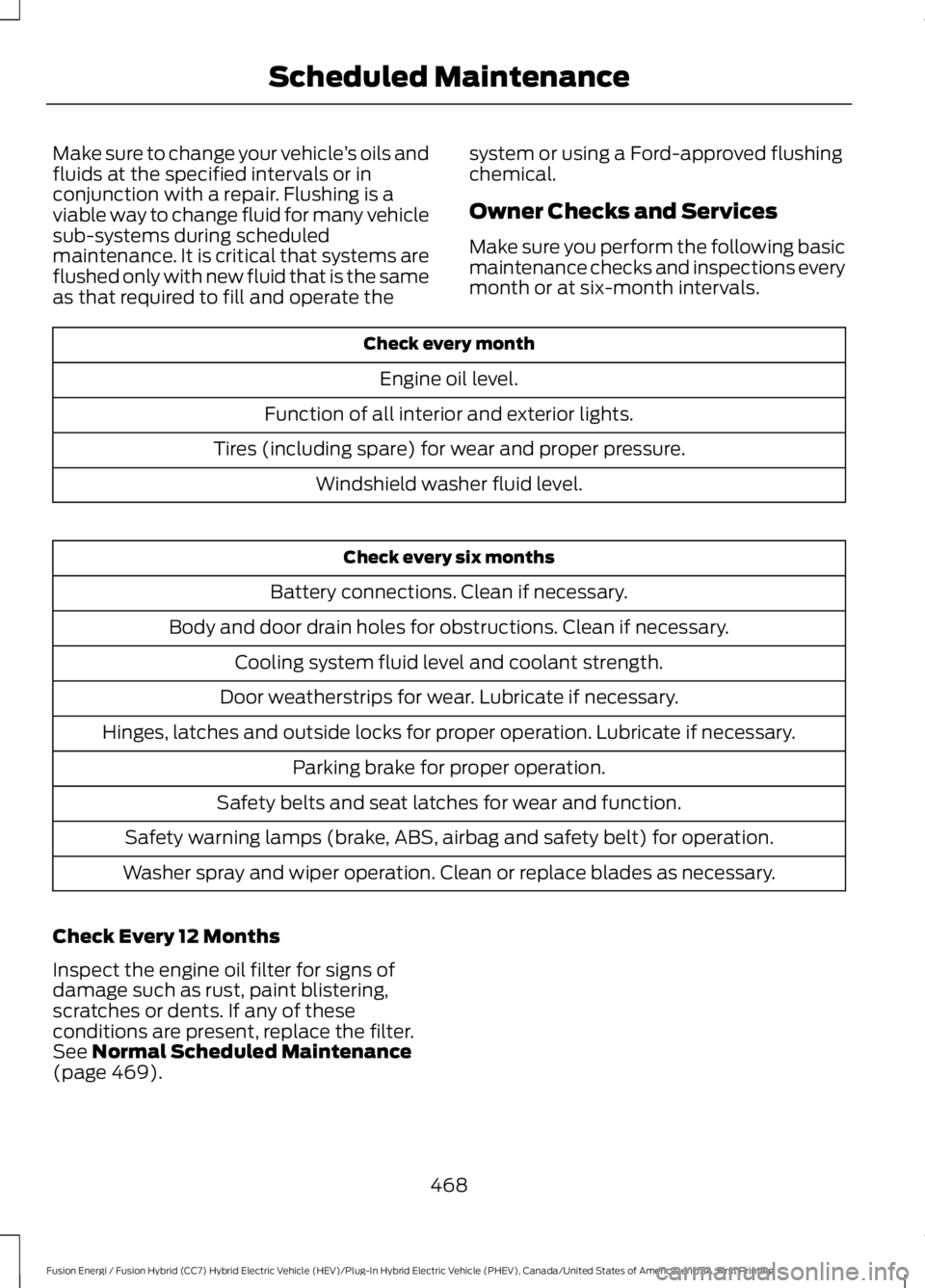
Make sure to change your vehicle’s oils andfluids at the specified intervals or inconjunction with a repair. Flushing is aviable way to change fluid for many vehiclesub-systems during scheduledmaintenance. It is critical that systems areflushed only with new fluid that is the sameas that required to fill and operate the
system or using a Ford-approved flushingchemical.
Owner Checks and Services
Make sure you perform the following basicmaintenance checks and inspections everymonth or at six-month intervals.
Check every month
Engine oil level.
Function of all interior and exterior lights.
Tires (including spare) for wear and proper pressure.
Windshield washer fluid level.
Check every six months
Battery connections. Clean if necessary.
Body and door drain holes for obstructions. Clean if necessary.
Cooling system fluid level and coolant strength.
Door weatherstrips for wear. Lubricate if necessary.
Hinges, latches and outside locks for proper operation. Lubricate if necessary.
Parking brake for proper operation.
Safety belts and seat latches for wear and function.
Safety warning lamps (brake, ABS, airbag and safety belt) for operation.
Washer spray and wiper operation. Clean or replace blades as necessary.
Check Every 12 Months
Inspect the engine oil filter for signs ofdamage such as rust, paint blistering,scratches or dents. If any of theseconditions are present, replace the filter.See Normal Scheduled Maintenance(page 469).
468
Fusion Energi / Fusion Hybrid (CC7) Hybrid Electric Vehicle (HEV)/Plug-In Hybrid Electric Vehicle (PHEV), Canada/United States of America, enUSA, First Printing
Scheduled Maintenance
Page 509 of 516
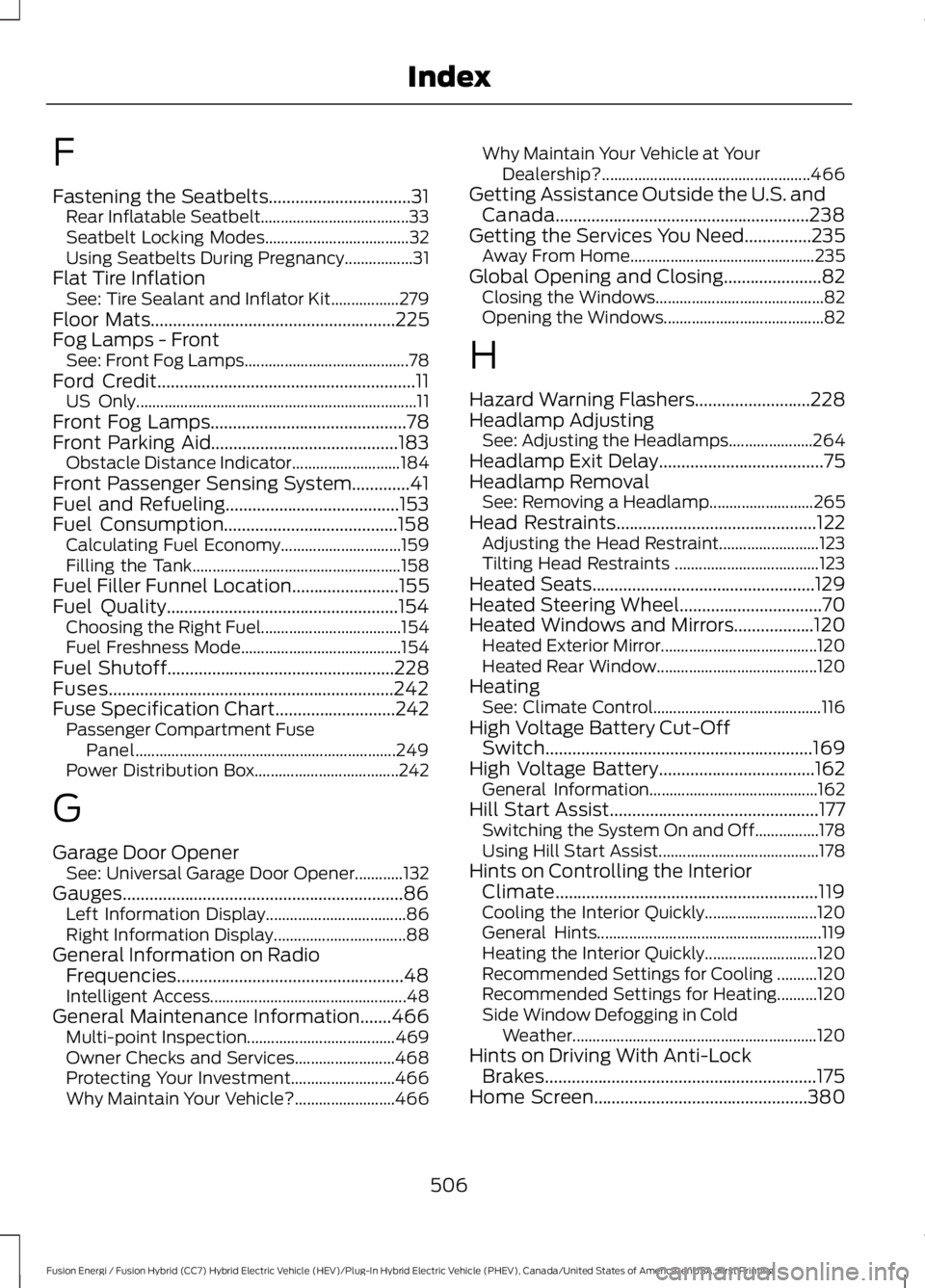
F
Fastening the Seatbelts................................31Rear Inflatable Seatbelt.....................................33Seatbelt Locking Modes....................................32Using Seatbelts During Pregnancy.................31Flat Tire InflationSee: Tire Sealant and Inflator Kit.................279Floor Mats.......................................................225Fog Lamps - FrontSee: Front Fog Lamps.........................................78Ford Credit..........................................................11US Only......................................................................11Front Fog Lamps............................................78Front Parking Aid..........................................183Obstacle Distance Indicator...........................184Front Passenger Sensing System.............41Fuel and Refueling.......................................153Fuel Consumption.......................................158Calculating Fuel Economy..............................159Filling the Tank....................................................158Fuel Filler Funnel Location........................155Fuel Quality....................................................154Choosing the Right Fuel...................................154Fuel Freshness Mode........................................154Fuel Shutoff...................................................228Fuses................................................................242Fuse Specification Chart...........................242Passenger Compartment FusePanel.................................................................249Power Distribution Box....................................242
G
Garage Door OpenerSee: Universal Garage Door Opener............132Gauges...............................................................86Left Information Display...................................86Right Information Display.................................88General Information on RadioFrequencies...................................................48Intelligent Access.................................................48General Maintenance Information.......466Multi-point Inspection.....................................469Owner Checks and Services.........................468Protecting Your Investment..........................466Why Maintain Your Vehicle?.........................466
Why Maintain Your Vehicle at YourDealership?....................................................466Getting Assistance Outside the U.S. andCanada.........................................................238Getting the Services You Need...............235Away From Home..............................................235Global Opening and Closing......................82Closing the Windows..........................................82Opening the Windows........................................82
H
Hazard Warning Flashers..........................228Headlamp AdjustingSee: Adjusting the Headlamps.....................264Headlamp Exit Delay.....................................75Headlamp RemovalSee: Removing a Headlamp..........................265Head Restraints.............................................122Adjusting the Head Restraint.........................123Tilting Head Restraints ....................................123Heated Seats..................................................129Heated Steering Wheel................................70Heated Windows and Mirrors..................120Heated Exterior Mirror.......................................120Heated Rear Window........................................120HeatingSee: Climate Control..........................................116High Voltage Battery Cut-OffSwitch............................................................169High Voltage Battery...................................162General Information..........................................162Hill Start Assist...............................................177Switching the System On and Off................178Using Hill Start Assist........................................178Hints on Controlling the InteriorClimate...........................................................119Cooling the Interior Quickly............................120General Hints........................................................119Heating the Interior Quickly............................120Recommended Settings for Cooling ..........120Recommended Settings for Heating..........120Side Window Defogging in ColdWeather.............................................................120Hints on Driving With Anti-LockBrakes.............................................................175Home Screen................................................380
506
Fusion Energi / Fusion Hybrid (CC7) Hybrid Electric Vehicle (HEV)/Plug-In Hybrid Electric Vehicle (PHEV), Canada/United States of America, enUSA, First Printing
Index
Page 510 of 516
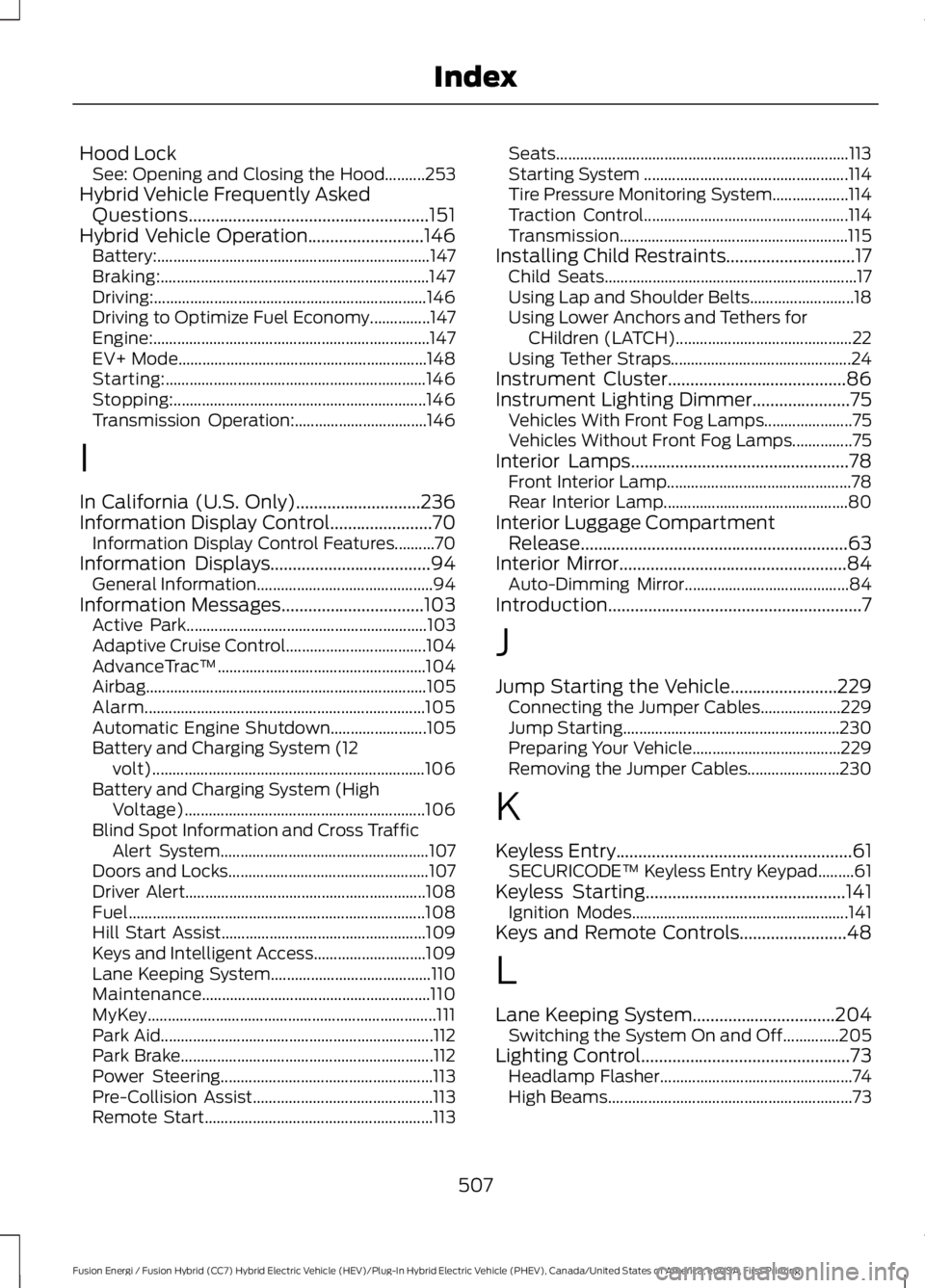
Hood LockSee: Opening and Closing the Hood..........253Hybrid Vehicle Frequently AskedQuestions......................................................151Hybrid Vehicle Operation..........................146Battery:....................................................................147Braking:...................................................................147Driving:....................................................................146Driving to Optimize Fuel Economy...............147Engine:.....................................................................147EV+ Mode..............................................................148Starting:.................................................................146Stopping:...............................................................146Transmission Operation:.................................146
I
In California (U.S. Only)............................236Information Display Control.......................70Information Display Control Features..........70Information Displays....................................94General Information............................................94Information Messages................................103Active Park............................................................103Adaptive Cruise Control...................................104AdvanceTrac™....................................................104Airbag......................................................................105Alarm......................................................................105Automatic Engine Shutdown........................105Battery and Charging System (12volt)....................................................................106Battery and Charging System (HighVoltage)............................................................106Blind Spot Information and Cross TrafficAlert System....................................................107Doors and Locks..................................................107Driver Alert............................................................108Fuel..........................................................................108Hill Start Assist...................................................109Keys and Intelligent Access............................109Lane Keeping System........................................110Maintenance.........................................................110MyKey........................................................................111Park Aid....................................................................112Park Brake...............................................................112Power Steering.....................................................113Pre-Collision Assist.............................................113Remote Start.........................................................113
Seats.........................................................................113Starting System ...................................................114Tire Pressure Monitoring System...................114Traction Control...................................................114Transmission.........................................................115Installing Child Restraints.............................17Child Seats...............................................................17Using Lap and Shoulder Belts..........................18Using Lower Anchors and Tethers forCHildren (LATCH)............................................22Using Tether Straps.............................................24Instrument Cluster........................................86Instrument Lighting Dimmer......................75Vehicles With Front Fog Lamps......................75Vehicles Without Front Fog Lamps...............75Interior Lamps.................................................78Front Interior Lamp..............................................78Rear Interior Lamp..............................................80Interior Luggage CompartmentRelease............................................................63Interior Mirror...................................................84Auto-Dimming Mirror.........................................84Introduction.........................................................7
J
Jump Starting the Vehicle........................229Connecting the Jumper Cables....................229Jump Starting......................................................230Preparing Your Vehicle.....................................229Removing the Jumper Cables.......................230
K
Keyless Entry.....................................................61SECURICODE™ Keyless Entry Keypad.........61Keyless Starting.............................................141Ignition Modes......................................................141Keys and Remote Controls........................48
L
Lane Keeping System................................204Switching the System On and Off..............205Lighting Control...............................................73Headlamp Flasher................................................74High Beams.............................................................73
507
Fusion Energi / Fusion Hybrid (CC7) Hybrid Electric Vehicle (HEV)/Plug-In Hybrid Electric Vehicle (PHEV), Canada/United States of America, enUSA, First Printing
Index
Page 511 of 516
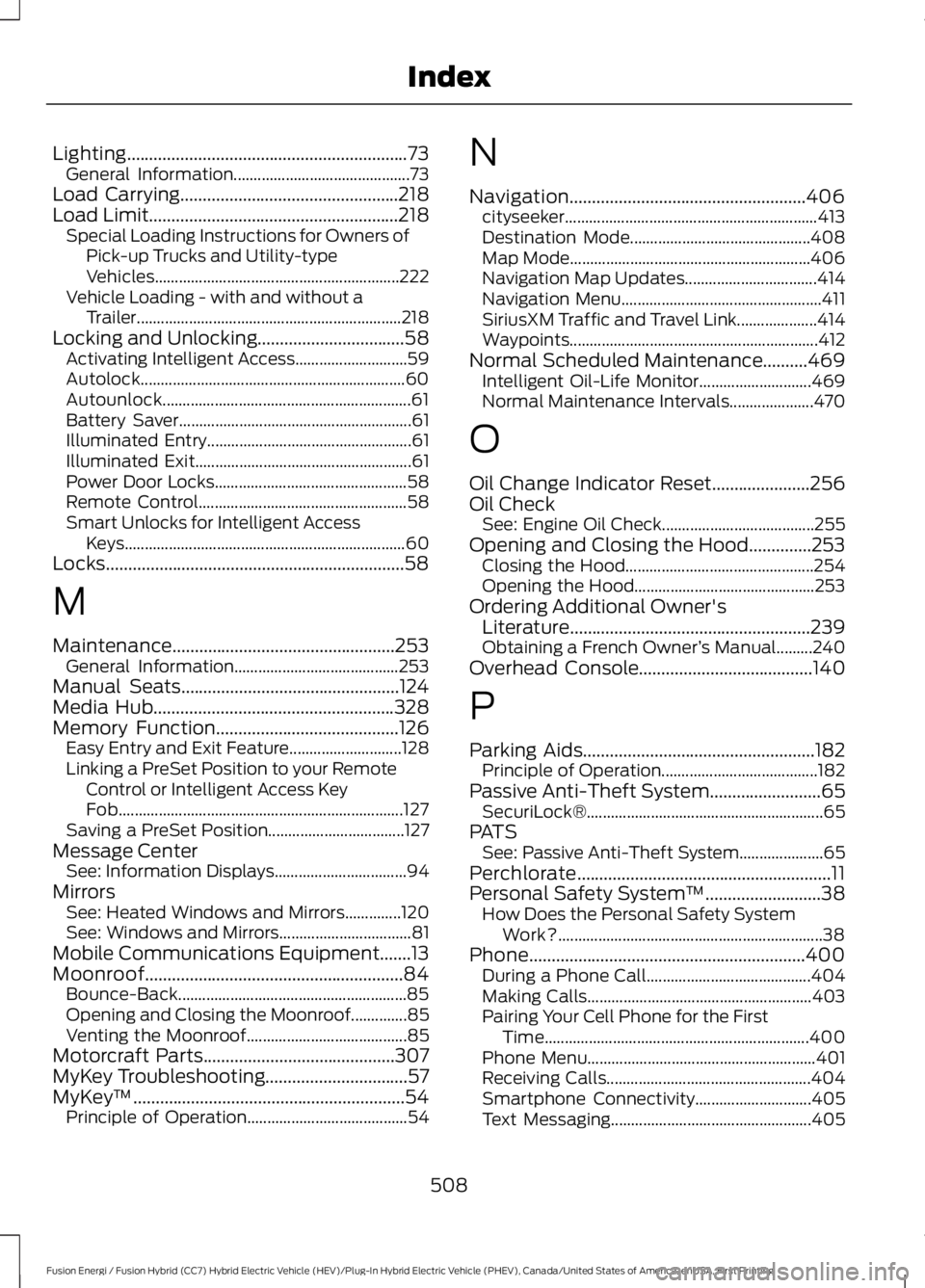
Lighting...............................................................73General Information............................................73Load Carrying.................................................218Load Limit........................................................218Special Loading Instructions for Owners ofPick-up Trucks and Utility-typeVehicles.............................................................222Vehicle Loading - with and without aTrailer..................................................................218Locking and Unlocking.................................58Activating Intelligent Access............................59Autolock..................................................................60Autounlock..............................................................61Battery Saver..........................................................61Illuminated Entry...................................................61Illuminated Exit......................................................61Power Door Locks................................................58Remote Control....................................................58Smart Unlocks for Intelligent AccessKeys......................................................................60Locks...................................................................58
M
Maintenance..................................................253General Information.........................................253Manual Seats.................................................124Media Hub......................................................328Memory Function.........................................126Easy Entry and Exit Feature............................128Linking a PreSet Position to your RemoteControl or Intelligent Access KeyFob.......................................................................127Saving a PreSet Position..................................127Message CenterSee: Information Displays.................................94MirrorsSee: Heated Windows and Mirrors..............120See: Windows and Mirrors.................................81Mobile Communications Equipment.......13Moonroof..........................................................84Bounce-Back.........................................................85Opening and Closing the Moonroof..............85Venting the Moonroof........................................85Motorcraft Parts...........................................307MyKey Troubleshooting................................57MyKey™.............................................................54Principle of Operation........................................54
N
Navigation.....................................................406cityseeker...............................................................413Destination Mode.............................................408Map Mode............................................................406Navigation Map Updates.................................414Navigation Menu..................................................411SiriusXM Traffic and Travel Link....................414Waypoints..............................................................412Normal Scheduled Maintenance..........469Intelligent Oil-Life Monitor............................469Normal Maintenance Intervals.....................470
O
Oil Change Indicator Reset......................256Oil CheckSee: Engine Oil Check......................................255Opening and Closing the Hood..............253Closing the Hood...............................................254Opening the Hood.............................................253Ordering Additional Owner'sLiterature......................................................239Obtaining a French Owner’s Manual.........240Overhead Console.......................................140
P
Parking Aids....................................................182Principle of Operation.......................................182Passive Anti-Theft System.........................65SecuriLock®...........................................................65PATSSee: Passive Anti-Theft System.....................65Perchlorate.........................................................11Personal Safety System™..........................38How Does the Personal Safety SystemWork?..................................................................38Phone..............................................................400During a Phone Call.........................................404Making Calls........................................................403Pairing Your Cell Phone for the FirstTime..................................................................400Phone Menu.........................................................401Receiving Calls...................................................404Smartphone Connectivity.............................405Text Messaging..................................................405
508
Fusion Energi / Fusion Hybrid (CC7) Hybrid Electric Vehicle (HEV)/Plug-In Hybrid Electric Vehicle (PHEV), Canada/United States of America, enUSA, First Printing
Index
Page 512 of 516
Plug-In Hybrid Vehicle Operation..........148ECO Cruise............................................................150EV Modes..............................................................148Fuel Freshness....................................................150Low Engine Use...................................................150Plug-in Power Mode and HybridMode..................................................................148Post-Crash Alert System..........................233Power Door LocksSee: Locking and Unlocking.............................58Power Seats....................................................12410-way power seat.............................................1266-way power seat...............................................125Power Lumbar.....................................................126Power Windows...............................................81Accessory Delay.....................................................81Bounce-Back..........................................................81One-Touch Down..................................................81One-Touch Up........................................................81Window Lock..........................................................81Pre-Collision Assist......................................214Using the Pre-Collision AssistSystem...............................................................215Protecting the Environment........................15
R
Rear Parking Aid............................................182Obstacle Distance Indicator...........................183Rear Seat Armrest.........................................131Rear Seats.......................................................128Rear View Camera........................................191Camera Guidelines............................................193Manual Zoom......................................................194Obstacle Distance Indicator...........................194Rear Camera Delay............................................194Using the Rear View Camera System.........192Rear View CameraSee: Rear View Camera.....................................191Refueling..........................................................156Fuel Filler Door Manual OverrideLever...................................................................158System Warnings...............................................158Remote Control..............................................48Car Finder.................................................................51Intelligent Access Key........................................48Remote Start..........................................................51Replacing the Battery.........................................50
Sounding the Panic Alarm.................................51Using the Key Blade............................................49Remote Start...................................................121Automatic Settings.............................................121Removing a Headlamp..............................265Repairing Minor Paint Damage...............275Replacement PartsRecommendation........................................12Collision Repairs....................................................12Scheduled Maintenance and MechanicalRepairs..................................................................12Warranty on Replacement Parts.....................12Replacing a Lost Key or RemoteControl.............................................................53Reporting Safety Defects (CanadaOnly).............................................................240Reporting Safety Defects (U.S.Only).............................................................240Roadside Assistance...................................227Vehicles Sold in Canada: Getting RoadsideAssistance........................................................227Vehicles Sold in Canada: RoadsideAssistance Program Coverage.................228Vehicles Sold in Canada: Using RoadsideAssistance.......................................................228Vehicles Sold in the United States: GettingRoadside Assistance....................................227Vehicles Sold in the United States: UsingRoadside Assistance....................................227Roadside Emergencies...............................227Running-InSee: Breaking-In.................................................224Running Out of Fuel.....................................155Adding Fuel From a Portable FuelContainer..........................................................155Filling a Portable Fuel Container..................155
S
Safety Canopy™............................................44Safety Precautions.......................................153Satellite Radio..............................................325Satellite Radio Electronic Serial Number(ESN)................................................................326Satellite Radio Reception Factors...............326SIRIUS® Satellite Radio Service..................326Troubleshooting..................................................327Scheduled Maintenance Record............474
509
Fusion Energi / Fusion Hybrid (CC7) Hybrid Electric Vehicle (HEV)/Plug-In Hybrid Electric Vehicle (PHEV), Canada/United States of America, enUSA, First Printing
Index
Page 514 of 516
Treadwear............................................................286Tire Inflation When PuncturedSee: Tire Sealant and Inflator Kit.................279Tire Pressure Monitoring System...........301Changing Tires With a Tire PressureMonitoring System.......................................302Understanding Your Tire PressureMonitoring System ......................................302Tire Repair KitSee: Tire Sealant and Inflator Kit.................279Tire Sealant and Inflator Kit.....................279First Stage: Reinflating the Tire with SealingCompound and Air........................................281General Information.........................................280Second Stage: Checking TirePressure............................................................283Tips for Use of the Kit......................................280What to do after the Tire has beenSealed...............................................................283What to do when a Tire Is Punctured.........281TiresSee: Wheels and Tires......................................279Towing a Trailer.............................................223Towing Points................................................234Installing the Recovery Hook.........................234Recovery Hook Location.................................234Towing the Vehicle on FourWheels..........................................................223Emergency Towing............................................223Recreational Towing.........................................223Towing..............................................................223Traction Control.............................................179Principle of Operation.......................................179Transmission Code Designation............309Transmission..................................................170TransmissionSee: Transmission..............................................170Transporting the Vehicle...........................233Type Approvals............................................500RF Certification Logos for Tire PressureMonitoring Sensor(s).................................500
U
Under Hood Overview...............................254Unique Driving Characteristics................146Universal Garage Door Opener................132HomeLink Wireless Control System............132
USB Port.........................................................328Using Adaptive Cruise Control................196Automatic Cancellation.................................200Blocked Sensor...................................................201Canceling the Set Speed...............................200Changing the Set Speed................................200Detection Issues.................................................201Following a Vehicle............................................198Following a Vehicle to a CompleteStop....................................................................198Hilly Condition Usage......................................200Overriding the System......................................199Resuming the Set Speed...............................200Setting the Adaptive Cruise Speed..............197Setting the Adaptive Cruise Speed WhenYour Vehicle is Stationary...........................197Setting the Gap Distance................................198Switching Adaptive Cruise ControlOff......................................................................200Switching Adaptive Cruise ControlOn........................................................................197Switching to Normal Cruise Control...........202System Not Available.......................................201Using Cruise Control....................................195Switching Cruise Control Off.........................196Switching Cruise Control On..........................195Using MyKey With Remote StartSystems...........................................................57Using Snow Chains....................................300Using Stability Control................................181Using Summer Tires..................................300Using SYNC™ With Your MediaPlayer............................................................350Accessing Your USB Song Library...............354Bluetooth Devices and SystemSettings............................................................356Connecting Your Digital Media Player to theUSB Port..........................................................350Media Menu Features......................................354Media Voice Commands..................................351USB 2.....................................................................356Voice Commands for Audio Sources..........357Using SYNC™ With Your Phone............333Accessing Features through the PhoneMenu..................................................................338Accessing Your Phone Settings.....................341Bluetooth Devices.............................................342Making Calls........................................................336
511
Fusion Energi / Fusion Hybrid (CC7) Hybrid Electric Vehicle (HEV)/Plug-In Hybrid Electric Vehicle (PHEV), Canada/United States of America, enUSA, First Printing
Index