steering FORD FUSION HYBRID 2017 Repair Manual
[x] Cancel search | Manufacturer: FORD, Model Year: 2017, Model line: FUSION HYBRID, Model: FORD FUSION HYBRID 2017Pages: 516, PDF Size: 7.53 MB
Page 402 of 516
Note: The heated steering wheel may remain on after remote starting thevehicle, based on your remote start settings. The heated steering wheel mayalso turn on when you start your vehicle, if it was on when you switched yourvehicle off.
Note: For steering wheels with wood trim, the heating feature will not heat thewheel between the 10 and 2 o'clock positions.
Defrost: A pop up appears on the screen to display the defrost options.C
MAX Defrost: Touch the button to maximize defrosting. Air flows through thewindshield vents, the fan automatically adjusts to the highest speed and thedriver and passenger temperatures are set to HI. You can use this setting todefog or clear a thin covering of ice from the windshield. The heated rear windowalso automatically turns on when you select MAX Defrost.
Defrost: Distributes air through the windshield defroster vents and demistervents.
Heated rear window: Turns the heated rear window on and off. See HeatedWindows and Mirrors (page 120).
AUTO: Touch the button to switch on automatic operation. Select the desiredtemperature using the temperature control. The system adjusts fan speed, airdistribution, air conditioning operation, and selects outside air or recirculatedair to heat or cool the vehicle in order to maintain the desired temperature.
D
Power: Touch the button to switch the system on and off. Switching off theclimate control system prevents outside air from entering the vehicle.E
DUAL: This button lights up when the passenger controls are active. To switchthe off and link the passenger temperature to the driver temperature, touch theDUAL button.
F
Note: the passenger side temperature and the DUAL indication automaticallyturn on when you or your passenger adjust the passenger temperature.
Passenger temperature: Touch up or down to adjust the temperature.G
Fan speed: Touch up or down to increase or decrease the volume of air thatcirculates in your vehicle.H
Note: You cannot adjust the fan speed when the system is set to AUTO or MAXA/C.
A/C: A pop-up appears on the screen to display the air conditioning options.I
MAX A/C: Touch the button to activate and maximize cooling. The driver andpassenger temperatures are set to LO, recirculated air flows through theinstrument panel vents, air conditioning automatically turns on and the fanautomatically adjusts to the highest speed.
A/C: Touch to switch the air conditioning on or off. Use A/C with recirculatedair to improve cooling performance and efficiency.
399
Fusion Energi / Fusion Hybrid (CC7) Hybrid Electric Vehicle (HEV)/Plug-In Hybrid Electric Vehicle (PHEV), Canada/United States of America, enUSA, First Printing
SYNC™ 3
Page 406 of 516
Action and DescriptionMenu ItemItem
Displays all recent text messages.Text MessagesD
Use this keypad to dial in a phone number.Phone KeypadEUse the backspace button to delete numbers.
Press this button to begin acall.Call
Touch this button to send all calls directly to your voicemail.New text message notifications are not displayed on the screenand all ringtones and alerts are set to silent.
Do Not DisturbF
Users with phones having voice servicesmay see a button to access the feature.For example, iPhone users see a Siri button.A press and hold of the voice button on thesteering wheel also accesses this feature.
Making Calls
There are many ways to make calls fromthe SYNC 3 system, including using voicecommands. See Using VoiceRecognition (page 331). You can use thetouchscreen to place calls as well.
403
Fusion Energi / Fusion Hybrid (CC7) Hybrid Electric Vehicle (HEV)/Plug-In Hybrid Electric Vehicle (PHEV), Canada/United States of America, enUSA, First Printing
SYNC™ 3
Page 407 of 516
To call a number in your contacts,select:
Action and DescriptionMenu Item
You can then select thename of the contact youwant to call. Any numbersstored for that contactdisplay along with anystored contact photos. Youcan then select thenumber that you want tocall. The system begins thecall.
Contacts
To call a number from your recent calls,select:
Action and DescriptionMenu Item
You can then select anentry that you want to call.The system begins the call.
Recent CallList
To call a number that is not stored inyour phone, select:
Action and DescriptionMenu Item
Select the digits of thenumber you wish to call.PhoneKeypad
The system begins the call.Call
Pressing the backspace button deletes thelast digit you typed.
Receiving Calls
During an incoming call, an audible tonesounds. Caller information appears in thedisplay if it is available.
To accept the call, select:
Menu Item
Accept
Note:You can also accept the call bypressing the phone button on the steeringwheel.
To reject the call, select:
Menu Item
Reject
Note:You can also reject the call bypressing the phone button on the steeringwheel.
Ignore the call by doing nothing. SYNC 3logs it as a missed call.
During a Phone Call
During a phone call, the contacts nameand number display on the screen alongwith the call duration.
The phone status items are also visible:
•Signal Strength.
•Battery.
•911 Assist (United States and CanadaOnly). See Settings (page 437).
You can select any of the following duringan active phone call:
404
Fusion Energi / Fusion Hybrid (CC7) Hybrid Electric Vehicle (HEV)/Plug-In Hybrid Electric Vehicle (PHEV), Canada/United States of America, enUSA, First Printing
SYNC™ 3
Page 408 of 516
Item
Immediately end aphone call. You canalso press thebutton on thesteering wheel.
End Call
Press this to accessthe phone keypad.Keypad
You can switch themicrophone off sothe caller does nothear you.
Mute
Item
PrivacyTransfer the call tothe cell phone orback to SYNC 3.
Text Messaging
Note:Downloading and sending textmessages using Bluetooth are cellphone-dependent features.
Note:Certain features in text messagingare speed-dependent and not availablewhen your vehicle is traveling at speeds over3 mph (5 km/h).
Receiving a Text Message
When a new message arrives, an audible tone sounds and the screen displays apop-up with the caller name and ID, if supported by your cell phone. You can select:
Action and DescriptionMenu Item
Have SYNC 3 read the message to you.Hear It
View the text on the touchscreen.View
To call the sender.Call
You can select from 15 preset messages. Press the messagethat you would like to use and confirm to send the message.SYNC 3 confirms when the message is sent successfully.
Reply
To exit the screen.Close
Smartphone Connectivity (If Equipped)
SYNC 3 allows you to use Apple CarPlayand Android Auto to access your phone.
When you use Apple CarPlay or AndroidAuto, you can:
•Make calls.
•Send and receive messages.
•Listen to music.
•Use your phone's voice assistant.
405
Fusion Energi / Fusion Hybrid (CC7) Hybrid Electric Vehicle (HEV)/Plug-In Hybrid Electric Vehicle (PHEV), Canada/United States of America, enUSA, First Printing
SYNC™ 3
Smartphone connectivity disables someSYNC 3 features.
Most smartphone connectivity featuresrequire mobile data usage.
Apple CarPlay
Apple CarPlay requires an iPhone 5 or newer with iOS 7.1 or newer (Ford recommends updating to the latest iOS version). To enable this feature, plug your phone into a USB port and select Apple CarPlay on your SYNC 3 screen. See Media Hub (page 328).
Page 437 of 516
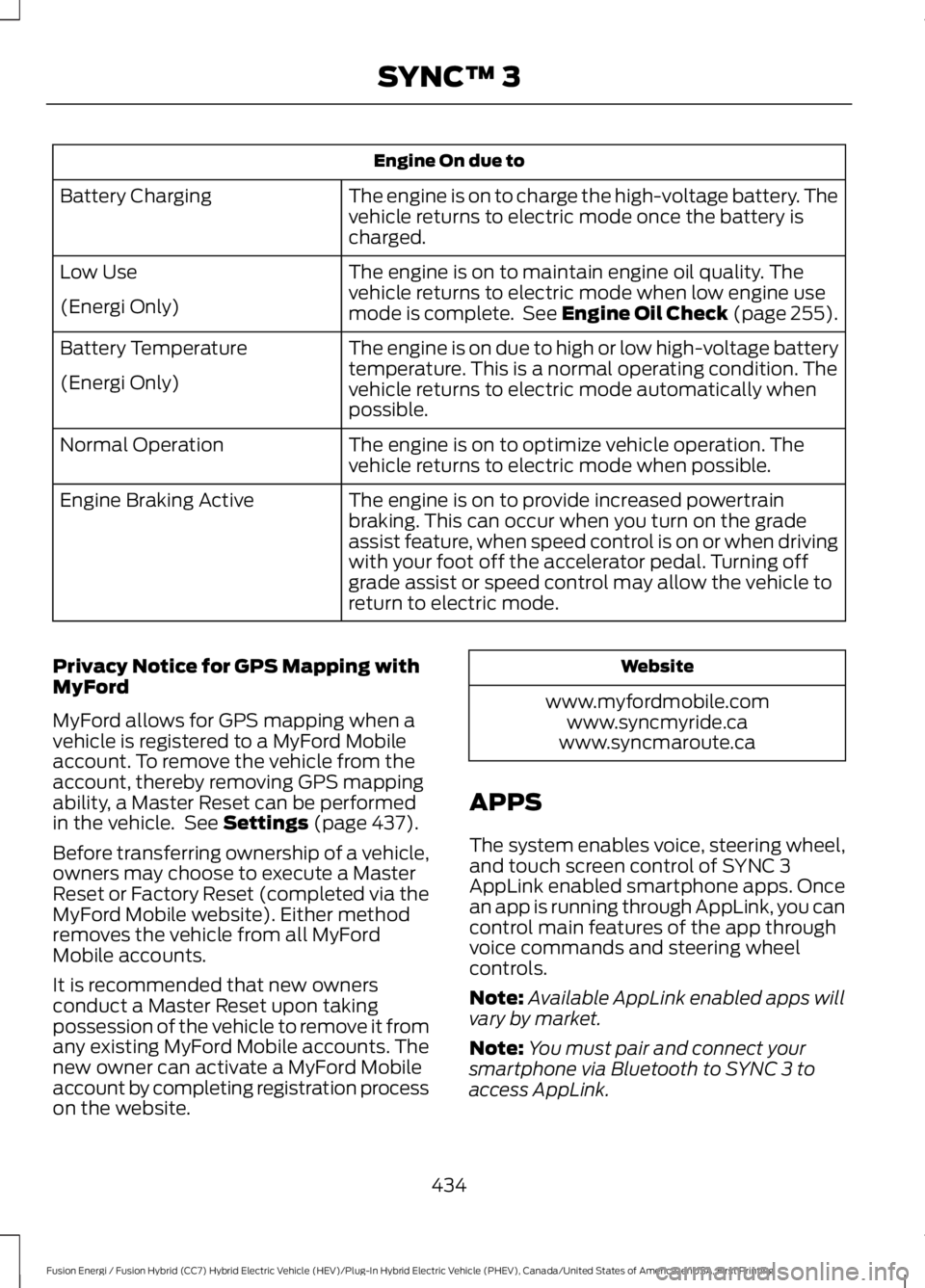
Engine On due to
The engine is on to charge the high-voltage battery. Thevehicle returns to electric mode once the battery ischarged.
Battery Charging
The engine is on to maintain engine oil quality. Thevehicle returns to electric mode when low engine usemode is complete. See Engine Oil Check (page 255).
Low Use
(Energi Only)
The engine is on due to high or low high-voltage batterytemperature. This is a normal operating condition. Thevehicle returns to electric mode automatically whenpossible.
Battery Temperature
(Energi Only)
The engine is on to optimize vehicle operation. Thevehicle returns to electric mode when possible.Normal Operation
The engine is on to provide increased powertrainbraking. This can occur when you turn on the gradeassist feature, when speed control is on or when drivingwith your foot off the accelerator pedal. Turning offgrade assist or speed control may allow the vehicle toreturn to electric mode.
Engine Braking Active
Privacy Notice for GPS Mapping withMyFord
MyFord allows for GPS mapping when avehicle is registered to a MyFord Mobileaccount. To remove the vehicle from theaccount, thereby removing GPS mappingability, a Master Reset can be performedin the vehicle. See Settings (page 437).
Before transferring ownership of a vehicle,owners may choose to execute a MasterReset or Factory Reset (completed via theMyFord Mobile website). Either methodremoves the vehicle from all MyFordMobile accounts.
It is recommended that new ownersconduct a Master Reset upon takingpossession of the vehicle to remove it fromany existing MyFord Mobile accounts. Thenew owner can activate a MyFord Mobileaccount by completing registration processon the website.
Website
www.myfordmobile.comwww.syncmyride.cawww.syncmaroute.ca
APPS
The system enables voice, steering wheel,and touch screen control of SYNC 3AppLink enabled smartphone apps. Oncean app is running through AppLink, you cancontrol main features of the app throughvoice commands and steering wheelcontrols.
Note:Available AppLink enabled apps willvary by market.
Note:You must pair and connect yoursmartphone via Bluetooth to SYNC 3 toaccess AppLink.
434
Fusion Energi / Fusion Hybrid (CC7) Hybrid Electric Vehicle (HEV)/Plug-In Hybrid Electric Vehicle (PHEV), Canada/United States of America, enUSA, First Printing
SYNC™ 3
Page 472 of 516
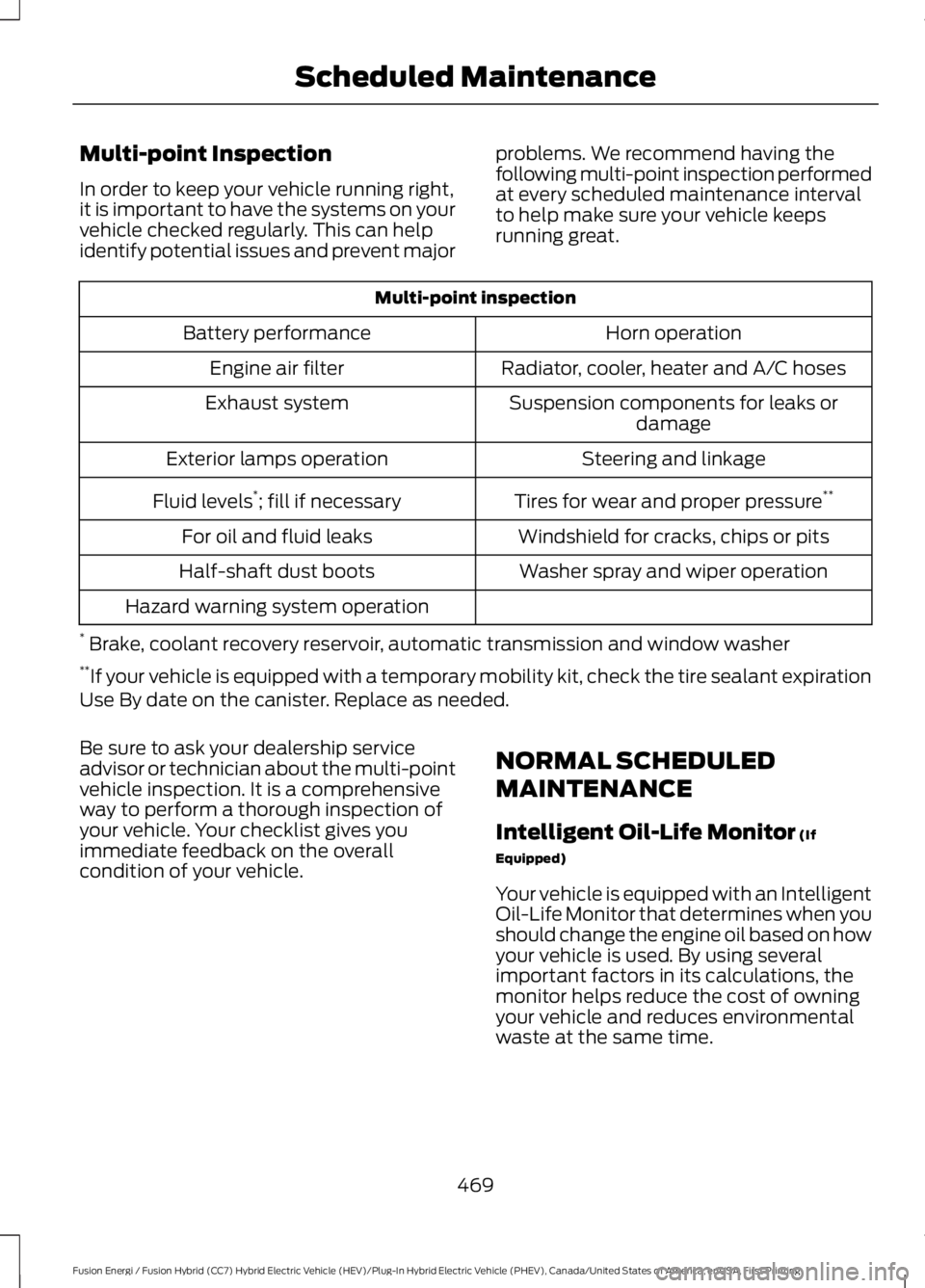
Multi-point Inspection
In order to keep your vehicle running right,it is important to have the systems on yourvehicle checked regularly. This can helpidentify potential issues and prevent major
problems. We recommend having thefollowing multi-point inspection performedat every scheduled maintenance intervalto help make sure your vehicle keepsrunning great.
Multi-point inspection
Horn operationBattery performance
Radiator, cooler, heater and A/C hosesEngine air filter
Suspension components for leaks ordamageExhaust system
Steering and linkageExterior lamps operation
Tires for wear and proper pressure**Fluid levels*; fill if necessary
Windshield for cracks, chips or pitsFor oil and fluid leaks
Washer spray and wiper operationHalf-shaft dust boots
Hazard warning system operation
* Brake, coolant recovery reservoir, automatic transmission and window washer**If your vehicle is equipped with a temporary mobility kit, check the tire sealant expirationUse By date on the canister. Replace as needed.
Be sure to ask your dealership serviceadvisor or technician about the multi-pointvehicle inspection. It is a comprehensiveway to perform a thorough inspection ofyour vehicle. Your checklist gives youimmediate feedback on the overallcondition of your vehicle.
NORMAL SCHEDULED
MAINTENANCE
Intelligent Oil-Life Monitor (If
Equipped)
Your vehicle is equipped with an IntelligentOil-Life Monitor that determines when youshould change the engine oil based on howyour vehicle is used. By using severalimportant factors in its calculations, themonitor helps reduce the cost of owningyour vehicle and reduces environmentalwaste at the same time.
469
Fusion Energi / Fusion Hybrid (CC7) Hybrid Electric Vehicle (HEV)/Plug-In Hybrid Electric Vehicle (PHEV), Canada/United States of America, enUSA, First Printing
Scheduled Maintenance
Page 474 of 516
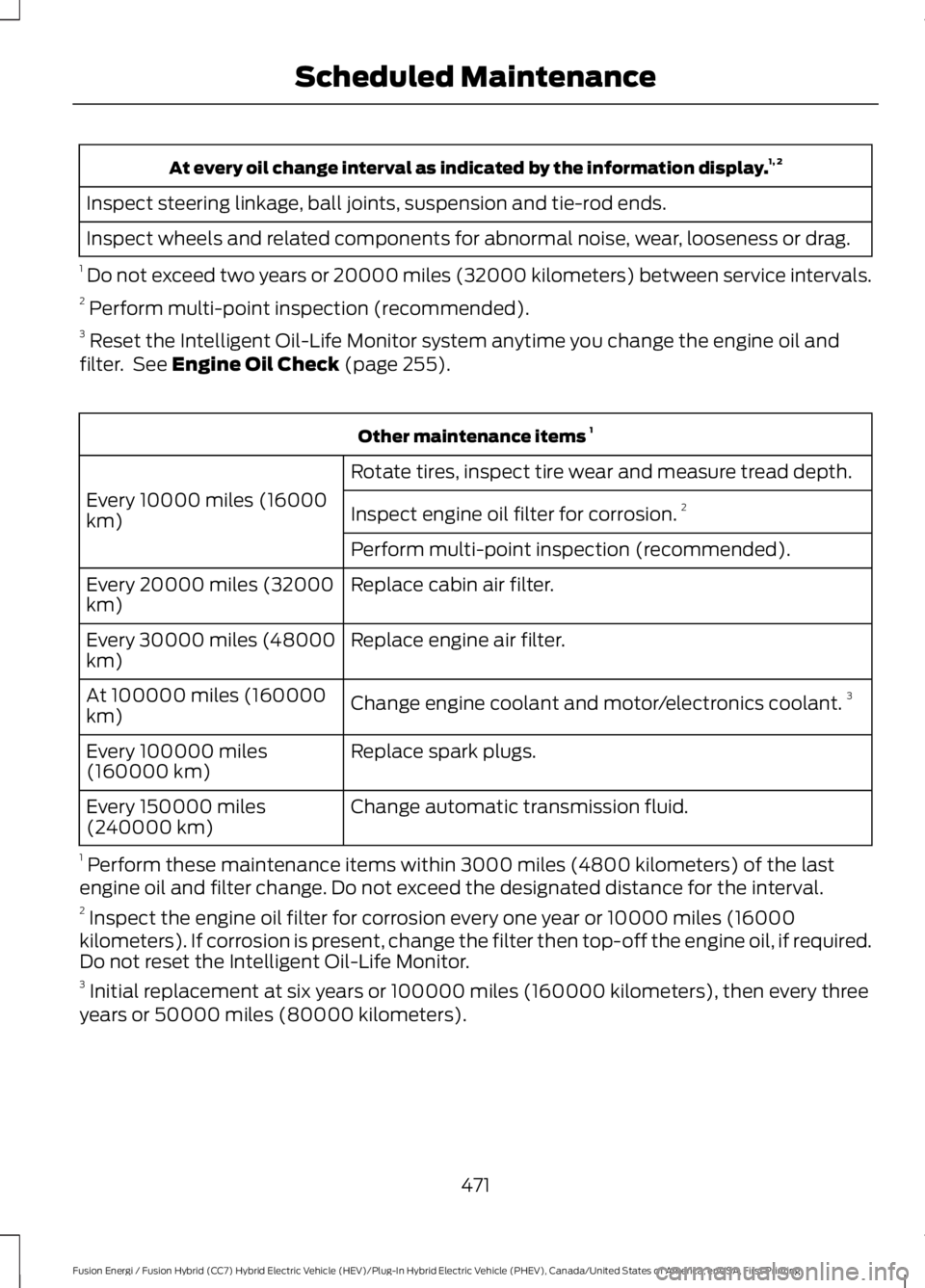
At every oil change interval as indicated by the information display.1, 2
Inspect steering linkage, ball joints, suspension and tie-rod ends.
Inspect wheels and related components for abnormal noise, wear, looseness or drag.
1 Do not exceed two years or 20000 miles (32000 kilometers) between service intervals.2 Perform multi-point inspection (recommended).3 Reset the Intelligent Oil-Life Monitor system anytime you change the engine oil andfilter. See Engine Oil Check (page 255).
Other maintenance items 1
Rotate tires, inspect tire wear and measure tread depth.
Every 10000 miles (16000km)Inspect engine oil filter for corrosion.2
Perform multi-point inspection (recommended).
Replace cabin air filter.Every 20000 miles (32000km)
Replace engine air filter.Every 30000 miles (48000km)
Change engine coolant and motor/electronics coolant.3At 100000 miles (160000km)
Replace spark plugs.Every 100000 miles(160000 km)
Change automatic transmission fluid.Every 150000 miles(240000 km)
1 Perform these maintenance items within 3000 miles (4800 kilometers) of the lastengine oil and filter change. Do not exceed the designated distance for the interval.2 Inspect the engine oil filter for corrosion every one year or 10000 miles (16000
kilometers). If corrosion is present, change the filter then top-off the engine oil, if required.Do not reset the Intelligent Oil-Life Monitor.3 Initial replacement at six years or 100000 miles (160000 kilometers), then every threeyears or 50000 miles (80000 kilometers).
471
Fusion Energi / Fusion Hybrid (CC7) Hybrid Electric Vehicle (HEV)/Plug-In Hybrid Electric Vehicle (PHEV), Canada/United States of America, enUSA, First Printing
Scheduled Maintenance
Page 506 of 516
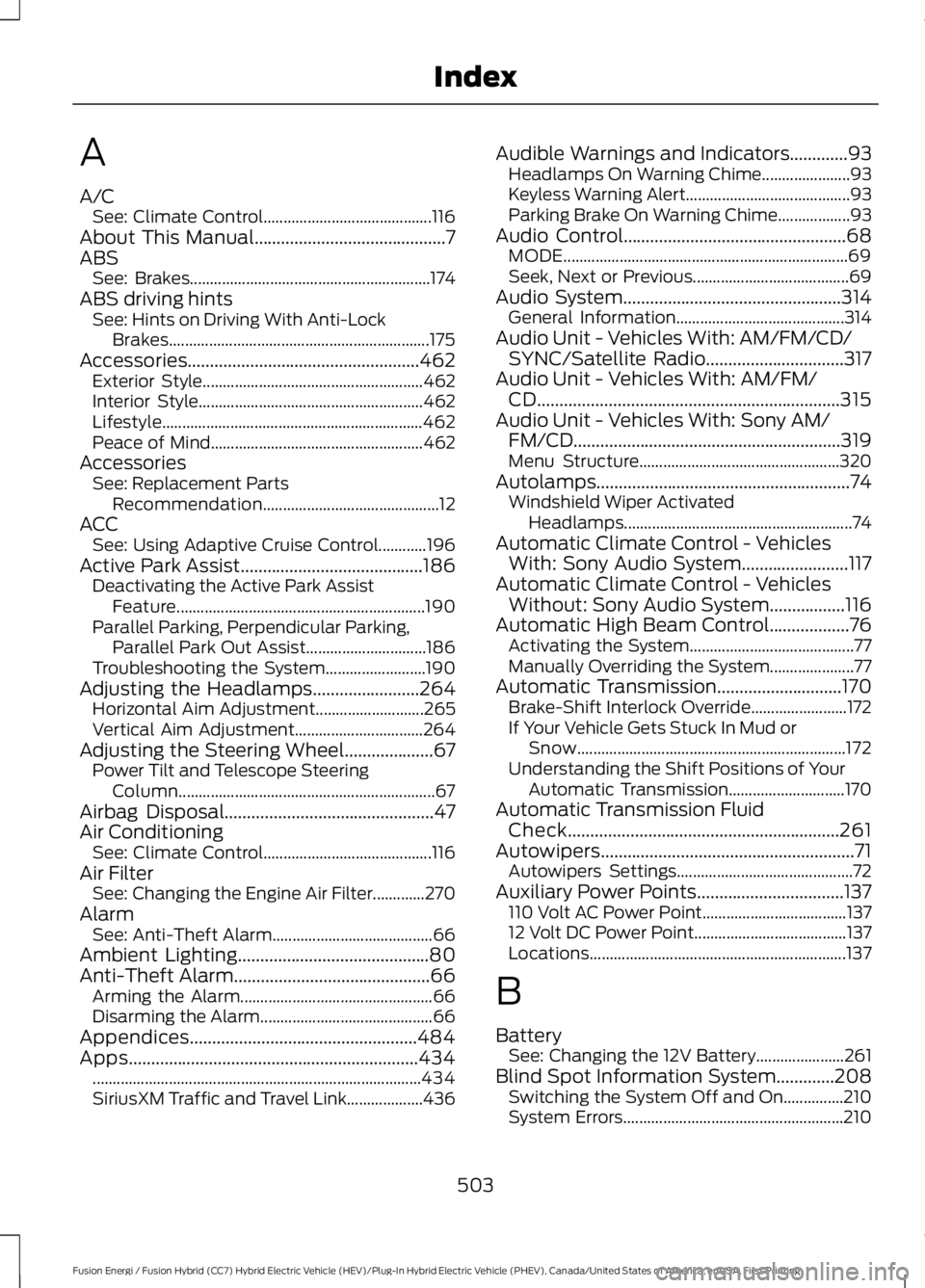
A
A/CSee: Climate Control..........................................116About This Manual...........................................7ABSSee: Brakes............................................................174ABS driving hintsSee: Hints on Driving With Anti-LockBrakes.................................................................175Accessories....................................................462Exterior Style.......................................................462Interior Style........................................................462Lifestyle.................................................................462Peace of Mind.....................................................462AccessoriesSee: Replacement PartsRecommendation............................................12ACCSee: Using Adaptive Cruise Control............196Active Park Assist.........................................186Deactivating the Active Park AssistFeature..............................................................190Parallel Parking, Perpendicular Parking,Parallel Park Out Assist..............................186Troubleshooting the System.........................190Adjusting the Headlamps........................264Horizontal Aim Adjustment...........................265Vertical Aim Adjustment................................264Adjusting the Steering Wheel....................67Power Tilt and Telescope SteeringColumn................................................................67Airbag Disposal...............................................47Air ConditioningSee: Climate Control..........................................116Air FilterSee: Changing the Engine Air Filter.............270AlarmSee: Anti-Theft Alarm........................................66Ambient Lighting...........................................80Anti-Theft Alarm............................................66Arming the Alarm................................................66Disarming the Alarm...........................................66Appendices...................................................484Apps.................................................................434..................................................................................434SiriusXM Traffic and Travel Link...................436
Audible Warnings and Indicators.............93Headlamps On Warning Chime......................93Keyless Warning Alert.........................................93Parking Brake On Warning Chime..................93Audio Control..................................................68MODE.......................................................................69Seek, Next or Previous.......................................69Audio System.................................................314General Information..........................................314Audio Unit - Vehicles With: AM/FM/CD/SYNC/Satellite Radio...............................317Audio Unit - Vehicles With: AM/FM/CD....................................................................315Audio Unit - Vehicles With: Sony AM/FM/CD............................................................319Menu Structure..................................................320Autolamps.........................................................74Windshield Wiper ActivatedHeadlamps.........................................................74Automatic Climate Control - VehiclesWith: Sony Audio System........................117Automatic Climate Control - VehiclesWithout: Sony Audio System.................116Automatic High Beam Control..................76Activating the System.........................................77Manually Overriding the System.....................77Automatic Transmission............................170Brake-Shift Interlock Override........................172If Your Vehicle Gets Stuck In Mud orSnow...................................................................172Understanding the Shift Positions of YourAutomatic Transmission.............................170Automatic Transmission FluidCheck.............................................................261Autowipers.........................................................71Autowipers Settings............................................72Auxiliary Power Points.................................137110 Volt AC Power Point....................................13712 Volt DC Power Point......................................137Locations................................................................137
B
BatterySee: Changing the 12V Battery......................261Blind Spot Information System.............208Switching the System Off and On...............210System Errors.......................................................210
503
Fusion Energi / Fusion Hybrid (CC7) Hybrid Electric Vehicle (HEV)/Plug-In Hybrid Electric Vehicle (PHEV), Canada/United States of America, enUSA, First Printing
Index
Page 509 of 516
F
Fastening the Seatbelts................................31Rear Inflatable Seatbelt.....................................33Seatbelt Locking Modes....................................32Using Seatbelts During Pregnancy.................31Flat Tire InflationSee: Tire Sealant and Inflator Kit.................279Floor Mats.......................................................225Fog Lamps - FrontSee: Front Fog Lamps.........................................78Ford Credit..........................................................11US Only......................................................................11Front Fog Lamps............................................78Front Parking Aid..........................................183Obstacle Distance Indicator...........................184Front Passenger Sensing System.............41Fuel and Refueling.......................................153Fuel Consumption.......................................158Calculating Fuel Economy..............................159Filling the Tank....................................................158Fuel Filler Funnel Location........................155Fuel Quality....................................................154Choosing the Right Fuel...................................154Fuel Freshness Mode........................................154Fuel Shutoff...................................................228Fuses................................................................242Fuse Specification Chart...........................242Passenger Compartment FusePanel.................................................................249Power Distribution Box....................................242
G
Garage Door OpenerSee: Universal Garage Door Opener............132Gauges...............................................................86Left Information Display...................................86Right Information Display.................................88General Information on RadioFrequencies...................................................48Intelligent Access.................................................48General Maintenance Information.......466Multi-point Inspection.....................................469Owner Checks and Services.........................468Protecting Your Investment..........................466Why Maintain Your Vehicle?.........................466
Why Maintain Your Vehicle at YourDealership?....................................................466Getting Assistance Outside the U.S. andCanada.........................................................238Getting the Services You Need...............235Away From Home..............................................235Global Opening and Closing......................82Closing the Windows..........................................82Opening the Windows........................................82
H
Hazard Warning Flashers..........................228Headlamp AdjustingSee: Adjusting the Headlamps.....................264Headlamp Exit Delay.....................................75Headlamp RemovalSee: Removing a Headlamp..........................265Head Restraints.............................................122Adjusting the Head Restraint.........................123Tilting Head Restraints ....................................123Heated Seats..................................................129Heated Steering Wheel................................70Heated Windows and Mirrors..................120Heated Exterior Mirror.......................................120Heated Rear Window........................................120HeatingSee: Climate Control..........................................116High Voltage Battery Cut-OffSwitch............................................................169High Voltage Battery...................................162General Information..........................................162Hill Start Assist...............................................177Switching the System On and Off................178Using Hill Start Assist........................................178Hints on Controlling the InteriorClimate...........................................................119Cooling the Interior Quickly............................120General Hints........................................................119Heating the Interior Quickly............................120Recommended Settings for Cooling ..........120Recommended Settings for Heating..........120Side Window Defogging in ColdWeather.............................................................120Hints on Driving With Anti-LockBrakes.............................................................175Home Screen................................................380
506
Fusion Energi / Fusion Hybrid (CC7) Hybrid Electric Vehicle (HEV)/Plug-In Hybrid Electric Vehicle (PHEV), Canada/United States of America, enUSA, First Printing
Index
Page 510 of 516
Hood LockSee: Opening and Closing the Hood..........253Hybrid Vehicle Frequently AskedQuestions......................................................151Hybrid Vehicle Operation..........................146Battery:....................................................................147Braking:...................................................................147Driving:....................................................................146Driving to Optimize Fuel Economy...............147Engine:.....................................................................147EV+ Mode..............................................................148Starting:.................................................................146Stopping:...............................................................146Transmission Operation:.................................146
I
In California (U.S. Only)............................236Information Display Control.......................70Information Display Control Features..........70Information Displays....................................94General Information............................................94Information Messages................................103Active Park............................................................103Adaptive Cruise Control...................................104AdvanceTrac™....................................................104Airbag......................................................................105Alarm......................................................................105Automatic Engine Shutdown........................105Battery and Charging System (12volt)....................................................................106Battery and Charging System (HighVoltage)............................................................106Blind Spot Information and Cross TrafficAlert System....................................................107Doors and Locks..................................................107Driver Alert............................................................108Fuel..........................................................................108Hill Start Assist...................................................109Keys and Intelligent Access............................109Lane Keeping System........................................110Maintenance.........................................................110MyKey........................................................................111Park Aid....................................................................112Park Brake...............................................................112Power Steering.....................................................113Pre-Collision Assist.............................................113Remote Start.........................................................113
Seats.........................................................................113Starting System ...................................................114Tire Pressure Monitoring System...................114Traction Control...................................................114Transmission.........................................................115Installing Child Restraints.............................17Child Seats...............................................................17Using Lap and Shoulder Belts..........................18Using Lower Anchors and Tethers forCHildren (LATCH)............................................22Using Tether Straps.............................................24Instrument Cluster........................................86Instrument Lighting Dimmer......................75Vehicles With Front Fog Lamps......................75Vehicles Without Front Fog Lamps...............75Interior Lamps.................................................78Front Interior Lamp..............................................78Rear Interior Lamp..............................................80Interior Luggage CompartmentRelease............................................................63Interior Mirror...................................................84Auto-Dimming Mirror.........................................84Introduction.........................................................7
J
Jump Starting the Vehicle........................229Connecting the Jumper Cables....................229Jump Starting......................................................230Preparing Your Vehicle.....................................229Removing the Jumper Cables.......................230
K
Keyless Entry.....................................................61SECURICODE™ Keyless Entry Keypad.........61Keyless Starting.............................................141Ignition Modes......................................................141Keys and Remote Controls........................48
L
Lane Keeping System................................204Switching the System On and Off..............205Lighting Control...............................................73Headlamp Flasher................................................74High Beams.............................................................73
507
Fusion Energi / Fusion Hybrid (CC7) Hybrid Electric Vehicle (HEV)/Plug-In Hybrid Electric Vehicle (PHEV), Canada/United States of America, enUSA, First Printing
Index