steering FORD FUSION HYBRID 2017 Owner's Manual
[x] Cancel search | Manufacturer: FORD, Model Year: 2017, Model line: FUSION HYBRID, Model: FORD FUSION HYBRID 2017Pages: 516, PDF Size: 7.53 MB
Page 130 of 516
•Driver seat.
•Power mirrors.
•Power steering column.
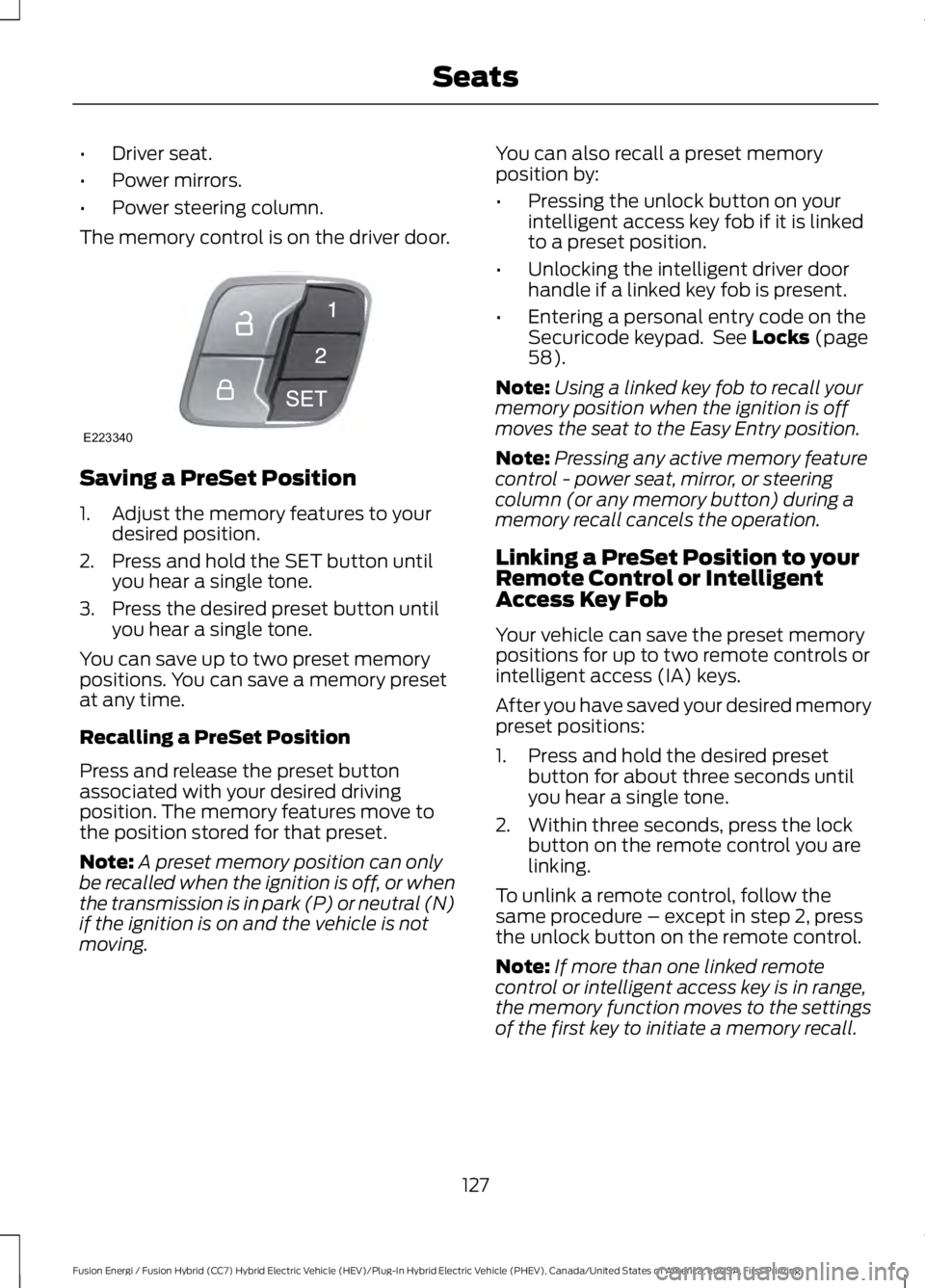
The memory control is on the driver door.
Saving a PreSet Position
1. Adjust the memory features to yourdesired position.
2. Press and hold the SET button untilyou hear a single tone.
3. Press the desired preset button untilyou hear a single tone.
You can save up to two preset memorypositions. You can save a memory presetat any time.
Recalling a PreSet Position
Press and release the preset buttonassociated with your desired drivingposition. The memory features move tothe position stored for that preset.
Note:A preset memory position can onlybe recalled when the ignition is off, or whenthe transmission is in park (P) or neutral (N)if the ignition is on and the vehicle is notmoving.
You can also recall a preset memoryposition by:
•Pressing the unlock button on yourintelligent access key fob if it is linkedto a preset position.
•Unlocking the intelligent driver doorhandle if a linked key fob is present.
•Entering a personal entry code on theSecuricode keypad. See Locks (page58).
Note:Using a linked key fob to recall yourmemory position when the ignition is offmoves the seat to the Easy Entry position.
Note:Pressing any active memory featurecontrol - power seat, mirror, or steeringcolumn (or any memory button) during amemory recall cancels the operation.
Linking a PreSet Position to yourRemote Control or IntelligentAccess Key Fob
Your vehicle can save the preset memorypositions for up to two remote controls orintelligent access (IA) keys.
After you have saved your desired memorypreset positions:
1. Press and hold the desired presetbutton for about three seconds untilyou hear a single tone.
2. Within three seconds, press the lockbutton on the remote control you arelinking.
To unlink a remote control, follow thesame procedure – except in step 2, pressthe unlock button on the remote control.
Note:If more than one linked remotecontrol or intelligent access key is in range,the memory function moves to the settingsof the first key to initiate a memory recall.
127
Fusion Energi / Fusion Hybrid (CC7) Hybrid Electric Vehicle (HEV)/Plug-In Hybrid Electric Vehicle (PHEV), Canada/United States of America, enUSA, First Printing
SeatsE223340
Page 146 of 516
3. Shift into park (P).
4. Fully press the accelerator pedal.
5. Briefly press the push button ignitionswitch.
Fast Restart
The fast restart feature allows you torestart your vehicle within 20 seconds ofswitching it off, even if it does not detecta valid passive key.
Within 20 seconds of switching the engineoff, press the brake pedal and press thepush button ignition switch. After 20seconds, you can no longer start yourvehicle if it does not detect a valid passivekey.
Once your vehicle starts, it remains runninguntil you press the push button ignitionswitch, even if your vehicle does not detecta valid passive key. If you open and closea door while your vehicle is running, thesystem searches for a valid passive key.After 20 seconds, you can no longer startyour vehicle if it does not detect a validpassive key.
Automatic Engine Shutdown
This feature automatically shuts downyour vehicle if it has been idling for anextended period. The ignition also turns offto save battery power. Before your vehicleshuts down, a message appears in theinformation display showing a timercounting down. If you do not intervenewithin 30 seconds, your vehicle shutsdown. Another message appears in theinformation display to inform you that yourvehicle has shut down to save fuel. Startyour vehicle as normal.
Automatic Engine Shutdown Override
Note: You cannot permanently switch offthe automatic shutdown. When you switchit off temporarily, it turns on at the nextignition cycle.
You can stop the shutdown, or reset thetimer, at any point before the 30-secondcountdown has expired by doing any of thefollowing:
•Interacting with your vehicle, forexample pressing the brake oraccelerator pedal.
•You can temporarily switch off theshutdown any time the ignition is onusing the information display. SeeInformation Displays (page 94).
•During the countdown beforeshutdown, you are prompted to pressOK or RESET (depending on your typeof information display) to temporarilyswitch the feature off (for the currentignition cycle only).
Stopping the Engine When YourVehicle is Stationary
Note:The ignition, all electrical circuits andall warning lamps and indicators will beturned off.
Note:If your vehicle is left running for 30minutes without any interaction, itautomatically shuts down.
1. Apply the parking brake.
2. Shift into park (P).
3. Briefly press the push button ignitionswitch.
Stopping the Engine When YourVehicle is Moving
WARNING
Switching off the engine when thevehicle is still moving will result in aloss of brake and steering assistance.The steering will not lock, but higher effortwill be required. When the ignition isswitched off, some electrical circuits,including air bags, warning lamps andindicators may also be off. If the ignitionwas turned off accidentally, you can shiftinto neutral (N) and re-start the engine.
143
Fusion Energi / Fusion Hybrid (CC7) Hybrid Electric Vehicle (HEV)/Plug-In Hybrid Electric Vehicle (PHEV), Canada/United States of America, enUSA, First Printing
Starting and Stopping the Engine
Page 152 of 516
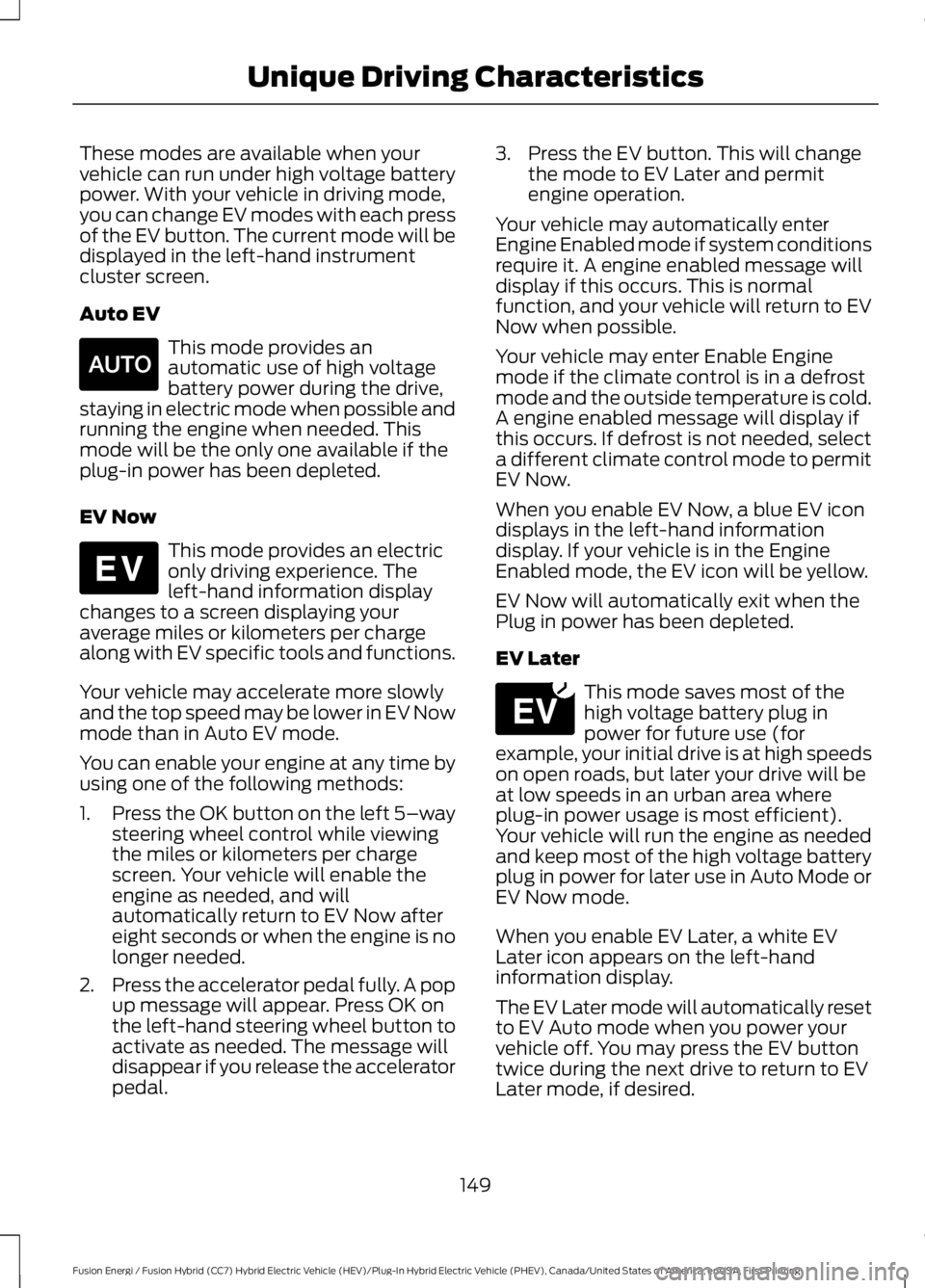
These modes are available when yourvehicle can run under high voltage batterypower. With your vehicle in driving mode,you can change EV modes with each pressof the EV button. The current mode will bedisplayed in the left-hand instrumentcluster screen.
Auto EV
This mode provides anautomatic use of high voltagebattery power during the drive,staying in electric mode when possible andrunning the engine when needed. Thismode will be the only one available if theplug-in power has been depleted.
EV Now
This mode provides an electriconly driving experience. Theleft-hand information displaychanges to a screen displaying youraverage miles or kilometers per chargealong with EV specific tools and functions.
Your vehicle may accelerate more slowlyand the top speed may be lower in EV Nowmode than in Auto EV mode.
You can enable your engine at any time byusing one of the following methods:
1.Press the OK button on the left 5–waysteering wheel control while viewingthe miles or kilometers per chargescreen. Your vehicle will enable theengine as needed, and willautomatically return to EV Now aftereight seconds or when the engine is nolonger needed.
2.Press the accelerator pedal fully. A popup message will appear. Press OK onthe left-hand steering wheel button toactivate as needed. The message willdisappear if you release the acceleratorpedal.
3. Press the EV button. This will changethe mode to EV Later and permitengine operation.
Your vehicle may automatically enterEngine Enabled mode if system conditionsrequire it. A engine enabled message willdisplay if this occurs. This is normalfunction, and your vehicle will return to EVNow when possible.
Your vehicle may enter Enable Enginemode if the climate control is in a defrostmode and the outside temperature is cold.A engine enabled message will display ifthis occurs. If defrost is not needed, selecta different climate control mode to permitEV Now.
When you enable EV Now, a blue EV icondisplays in the left-hand informationdisplay. If your vehicle is in the EngineEnabled mode, the EV icon will be yellow.
EV Now will automatically exit when thePlug in power has been depleted.
EV Later
This mode saves most of thehigh voltage battery plug inpower for future use (forexample, your initial drive is at high speedson open roads, but later your drive will beat low speeds in an urban area whereplug-in power usage is most efficient).Your vehicle will run the engine as neededand keep most of the high voltage batteryplug in power for later use in Auto Mode orEV Now mode.
When you enable EV Later, a white EVLater icon appears on the left-handinformation display.
The EV Later mode will automatically resetto EV Auto mode when you power yourvehicle off. You may press the EV buttontwice during the next drive to return to EVLater mode, if desired.
149
Fusion Energi / Fusion Hybrid (CC7) Hybrid Electric Vehicle (HEV)/Plug-In Hybrid Electric Vehicle (PHEV), Canada/United States of America, enUSA, First Printing
Unique Driving CharacteristicsE155152 E144814 E151263
Page 177 of 516
GENERAL INFORMATION
Note:Occasional brake noise is normal. Ifa metal-to-metal, continuous grinding orcontinuous squeal sound is present, thebrake linings may be worn-out. Have thesystem checked by an authorized dealer. Ifthe vehicle has continuous vibration orshudder in the steering wheel while braking,have it checked by an authorized dealer.
Note:Brake dust may accumulate on thewheels, even under normal drivingconditions. Some dust is inevitable as thebrakes wear and does not contribute tobrake noise. See Cleaning the AlloyWheels (page 275).
See Warning Lamps andIndicators (page 89).
Wet brakes result in reduced brakingefficiency. Gently press the brake pedal afew times when driving from a car wash orstanding water to dry the brakes.
Brake Over Accelerator
In the event the accelerator pedalbecomes stuck or entrapped, apply steadyand firm pressure to the brake pedal toslow the vehicle and reduce engine power.If you experience this condition, apply thebrakes and bring your vehicle to a safestop. Move the transmission to park (P),switch the engine off and apply the parkingbrake. Inspect the accelerator pedal forany interference. If none are found and thecondition persists, have your vehicle towedto the nearest authorized dealer.
Brake Assist
Brake assist detects when you brakeheavily by measuring the rate at which youpress the brake pedal. It providesmaximum braking efficiency as long as youpress the pedal. Brake assist can reducestopping distances in critical situations.
Anti-lock Brake System
This system helps you maintain steeringcontrol during emergency stops by keepingthe brakes from locking.
This lamp momentarilyilluminates when you switch theignition on. If the light does notilluminate during start up, remains on orflashes, the anti-lock braking system maybe disabled. Have the system checked byan authorized dealer. If the anti-lock brakesystem is disabled, normal braking is stilleffective.
If the brake warning lampilluminates when you release theparking brake, have your systemchecked by an authorized dealer.
Regenerative Braking System
This feature is used to simulate the enginebraking of an internal combustion engineand assist the standard brake system whilerecovering some of the energy of motionand storing it in the battery to improve fueleconomy. The standard brake system isdesigned to fully stop the car ifregenerative braking is not available.During regenerative braking, the motor isspun as a generator to create electricalcurrent. This recharges the battery andslows the vehicle. In effect, once theaccelerator pedal is released, the motorchanges from an energy user to an energyproducer.
When you release the accelerator pedal orpress the brake pedal, the brake controllerautomatically detects the amount ofdeceleration requested and optimizes howmuch of the deceleration will be producedby regenerative braking. The remainingportion is generated by standard friction
174
Fusion Energi / Fusion Hybrid (CC7) Hybrid Electric Vehicle (HEV)/Plug-In Hybrid Electric Vehicle (PHEV), Canada/United States of America, enUSA, First Printing
BrakesE144522 E144522
Page 178 of 516
braking. When the battery is almost fullycharged, the amount of regenerativebraking is limited to avoid overcharging,and the requested deceleration isproduced by standard friction brakingalone.
Regenerative braking does not take theplace of the standard friction brakes; it onlyassists them. Regenerative braking hasalso been designed to interact with theanti-lock brake system. Regenerativebraking is disabled when the anti-lockbrake system is activated or the battery isfully charged.
HINTS ON DRIVING WITH
ANTI-LOCK BRAKES
Note:When the system is operating, thebrake pedal may pulse and may travelfurther. Maintain pressure on the brakepedal. You may also hear a noise from thesystem. This is normal.
The anti-lock braking system will noteliminate the risks when:
•You drive too closely to the vehicle infront of you.
•Your vehicle is hydroplaning.
•You take corners too fast.
•The road surface is poor.
ELECTRIC PARKING BRAKE
The electric parking brake replaces theconventional handbrake. The operatingswitch is located in the center console.
WARNING
Always set the parking brake andleave your vehicle with thetransmission in park (P) (automatictransmission) or in first gear (1) or reverse(R) (manual transmission).
Note:When you apply the electric parkingbrake in certain conditions, for example, ona steep hill, the electric parking brake mayreapply the brakes within three to tenminutes.
Note:You may notice various noises whenyou apply and release the electric parkingbrake. This is normal and no cause forconcern.
Parking On a Hill (Vehicles With aManual Transmission)
If you park your vehicle facing uphill, movethe transmission to first gear (1) and turnthe steering wheel away from the curb. Ifyou park your vehicle facing downhill, movethe transmission to reverse (R) and turnthe steering wheel toward the curb.
Applying the Electric Parkingbrake
WARNINGS
The brake system warning lamp willflash during an electric parking brakeapply. If the brake system warninglamp continues to flash, there could be aproblem with your electric parking brake.
Applying the electric parking brakewhile moving will result in use of theanti-lock braking system. Do not usethe electric parking brake system when thevehicle is moving unless the normal brakesystem is unable to stop the vehicle.
With the exception of emergencyconditions (for example, the brakepedal does not work or is blocked),do not apply the electric parking brakewhile the vehicle is moving. On bends, orpoor road surfaces or weather conditions,emergency braking can cause the vehicleto skid out of control or off the road.
175
Fusion Energi / Fusion Hybrid (CC7) Hybrid Electric Vehicle (HEV)/Plug-In Hybrid Electric Vehicle (PHEV), Canada/United States of America, enUSA, First Printing
Brakes
Page 183 of 516
PRINCIPLE OF OPERATION
WARNINGS
Vehicle modifications involvingbraking system, aftermarket roofracks, suspension, steering system,tire construction and wheel and tire sizemay change the handling characteristicsof your vehicle and may adversely affectthe performance of the electronic stabilitycontrol system. In addition, installing anystereo loudspeakers may interfere withand adversely affect the electronic stabilitycontrol system. Install any aftermarketstereo loudspeaker as far as possible fromthe front center console, the tunnel, andthe front seats in order to minimize the riskof interfering with the electronic stabilitycontrol sensors. Reducing theeffectiveness of the electronic stabilitycontrol system could lead to an increasedrisk of loss of vehicle control, vehiclerollover, personal injury and death.
Remember that even advancedtechnology cannot defy the laws ofphysics. It’s always possible to losecontrol of a vehicle due to inappropriatedriver input for the conditions. Aggressivedriving on any road condition can causeyou to lose control of your vehicleincreasing the risk of personal injury orproperty damage. Activation of theelectronic stability control system is anindication that at least some of the tireshave exceeded their ability to grip the road;this could reduce the operator’s ability tocontrol the vehicle potentially resulting ina loss of vehicle control, vehicle rollover,personal injury and death. If your electronicstability control system activates, SLOWDOWN.
The system automatically turns on eachtime you switch the ignition on.
If a fault occurs in either the stabilitycontrol or the traction control system, youmay experience the following conditions:
•The stability and traction control lightilluminates steadily.
•The stability control and tractioncontrol systems do not enhance yourvehicle's ability to maintain traction ofthe wheels.
If a driving condition activates either thestability control or the traction controlsystem you may experience the followingconditions:
•The stability and traction control lightflashes.
•Your vehicle slows down.
•Reduced engine power.
•A vibration in the brake pedal.
•The brake pedal is stiffer than usual.
•If the driving condition is severe andyour foot is not on the brake, the brakepedal may move as the system applieshigher brake force.
The stability control system has severalfeatures built into it to help you maintaincontrol of your vehicle:
Electronic Stability Control
The system enhances your vehicle’s abilityto prevent skids or lateral slides byapplying brakes to one or more of thewheels individually and, if necessary,reducing engine power.
Traction Control
The system enhances your vehicle’s abilityto maintain traction of the wheels bydetecting and controlling wheel spin. SeeUsing Traction Control (page 179).
180
Fusion Energi / Fusion Hybrid (CC7) Hybrid Electric Vehicle (HEV)/Plug-In Hybrid Electric Vehicle (PHEV), Canada/United States of America, enUSA, First Printing
Stability Control
Page 190 of 516
•A foreign object damages or obstructsthe front or rear bumper or sidesensors.
•The correct tire size is not in use on yourvehicle (for example, a mini-spare tire).
Using Active Park Assist - ParallelParking
Press the button located on thecenter console near the gearshiftlever or the right side of thecenter stack once.
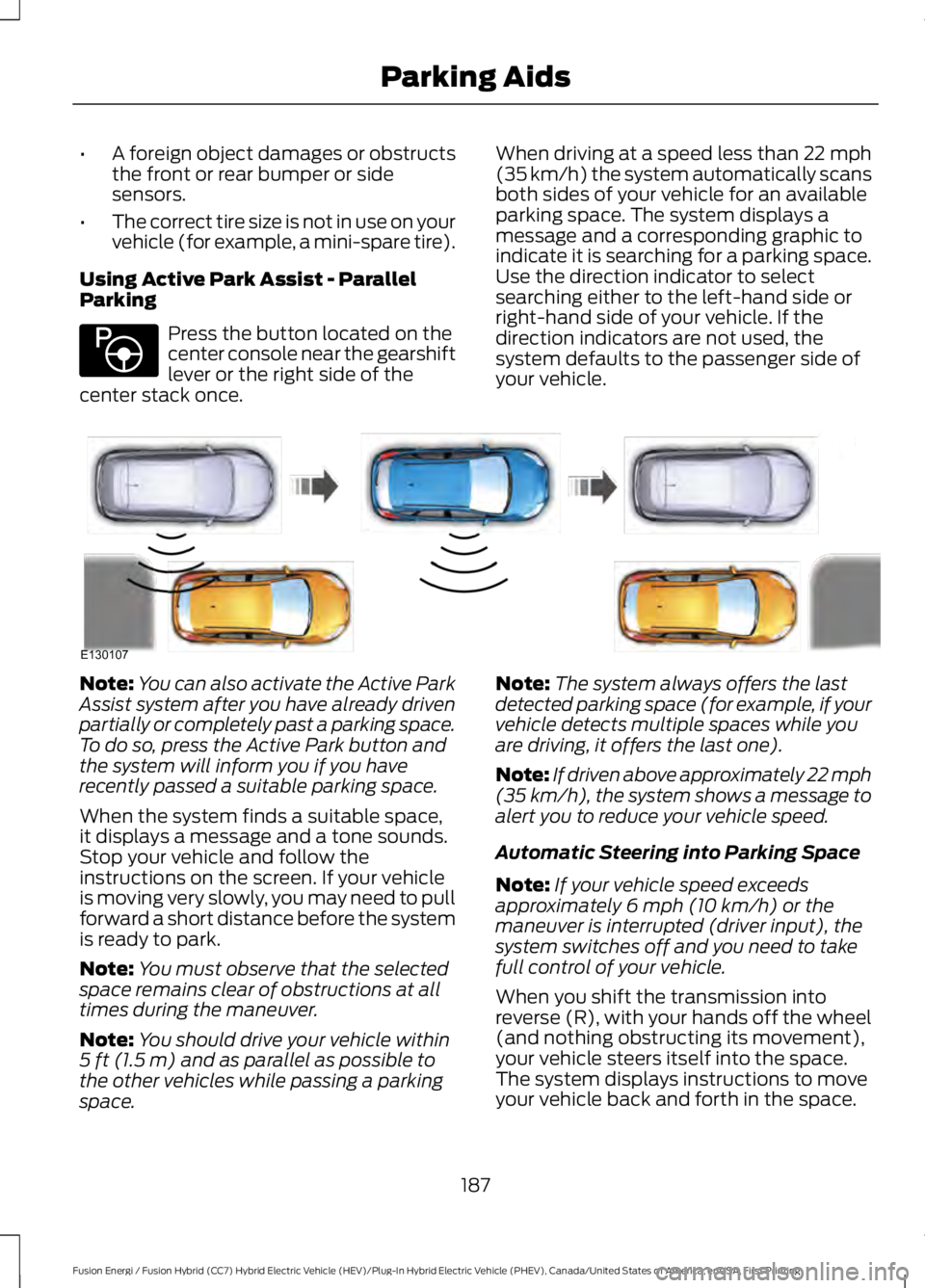
When driving at a speed less than 22 mph(35 km/h) the system automatically scansboth sides of your vehicle for an availableparking space. The system displays amessage and a corresponding graphic toindicate it is searching for a parking space.Use the direction indicator to selectsearching either to the left-hand side orright-hand side of your vehicle. If thedirection indicators are not used, thesystem defaults to the passenger side ofyour vehicle.
Note:You can also activate the Active ParkAssist system after you have already drivenpartially or completely past a parking space.To do so, press the Active Park button andthe system will inform you if you haverecently passed a suitable parking space.
When the system finds a suitable space,it displays a message and a tone sounds.Stop your vehicle and follow theinstructions on the screen. If your vehicleis moving very slowly, you may need to pullforward a short distance before the systemis ready to park.
Note:You must observe that the selectedspace remains clear of obstructions at alltimes during the maneuver.
Note:You should drive your vehicle within5 ft (1.5 m) and as parallel as possible tothe other vehicles while passing a parkingspace.
Note:The system always offers the lastdetected parking space (for example, if yourvehicle detects multiple spaces while youare driving, it offers the last one).
Note:If driven above approximately 22 mph(35 km/h), the system shows a message toalert you to reduce your vehicle speed.
Automatic Steering into Parking Space
Note:If your vehicle speed exceedsapproximately 6 mph (10 km/h) or themaneuver is interrupted (driver input), thesystem switches off and you need to takefull control of your vehicle.
When you shift the transmission intoreverse (R), with your hands off the wheel(and nothing obstructing its movement),your vehicle steers itself into the space.The system displays instructions to moveyour vehicle back and forth in the space.
187
Fusion Energi / Fusion Hybrid (CC7) Hybrid Electric Vehicle (HEV)/Plug-In Hybrid Electric Vehicle (PHEV), Canada/United States of America, enUSA, First Printing
Parking AidsE146186 E130107
Page 191 of 516
When you think your vehicle is properlyparked, or you hear a solid tone from theparking aid (accompanied by a displaymessage and a chime), bring your vehicleto a complete stop.
When automatic steering is complete, thesystem displays a message and a tonesounds, indicating that the active parkassist process is finished. You areresponsible for checking the parking joband making any necessary correctionsbefore leaving your vehicle.
Using Active Park Assist -Perpendicular Parking
Press the button located on thecenter console near the gearshiftlever or the right side of thecenter stack twice.
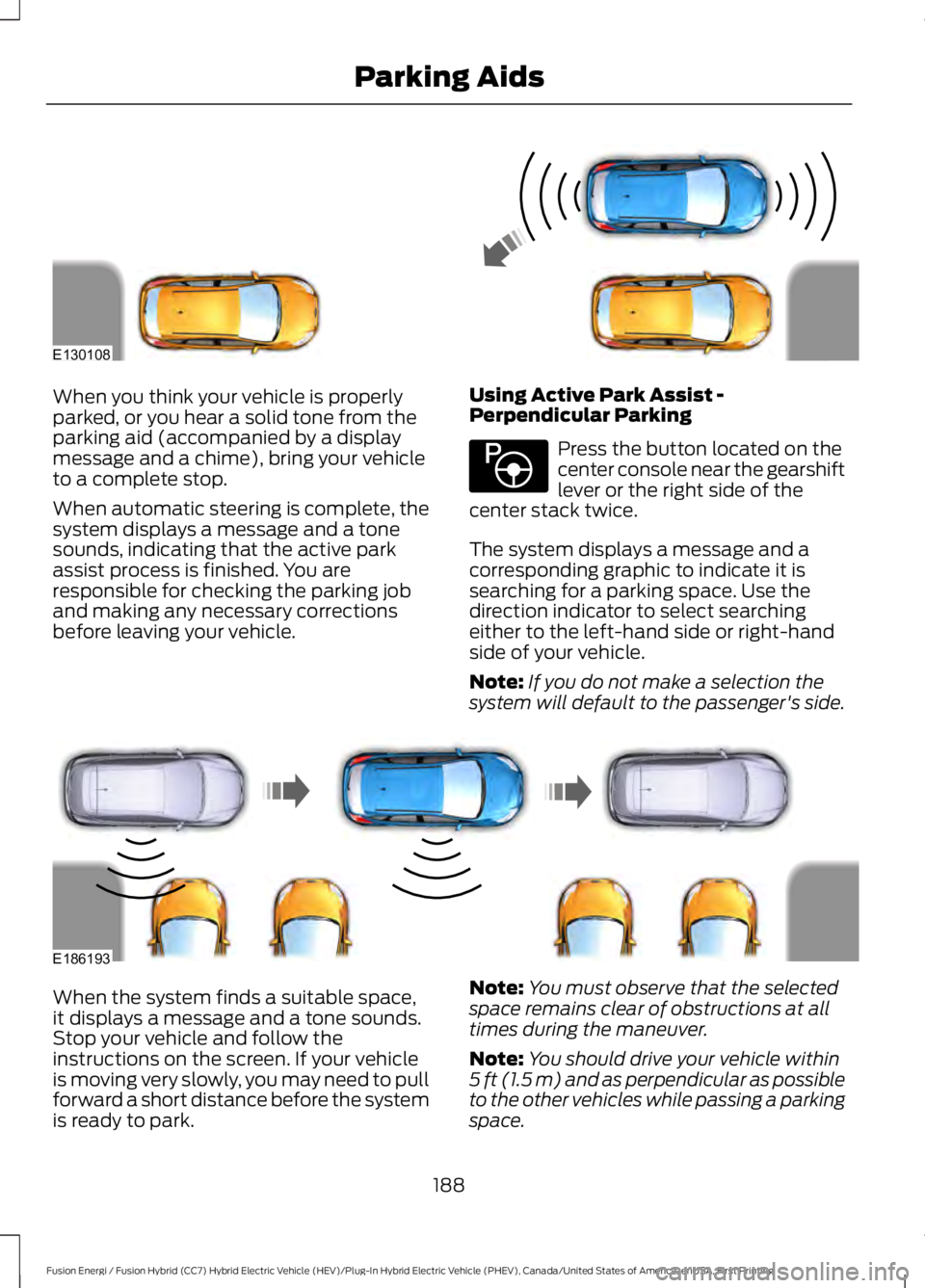
The system displays a message and acorresponding graphic to indicate it issearching for a parking space. Use thedirection indicator to select searchingeither to the left-hand side or right-handside of your vehicle.
Note:If you do not make a selection thesystem will default to the passenger's side.
When the system finds a suitable space,it displays a message and a tone sounds.Stop your vehicle and follow theinstructions on the screen. If your vehicleis moving very slowly, you may need to pullforward a short distance before the systemis ready to park.
Note:You must observe that the selectedspace remains clear of obstructions at alltimes during the maneuver.
Note:You should drive your vehicle within5 ft (1.5 m) and as perpendicular as possibleto the other vehicles while passing a parkingspace.
188
Fusion Energi / Fusion Hybrid (CC7) Hybrid Electric Vehicle (HEV)/Plug-In Hybrid Electric Vehicle (PHEV), Canada/United States of America, enUSA, First Printing
Parking AidsE130108 E146186 E186193
Page 192 of 516
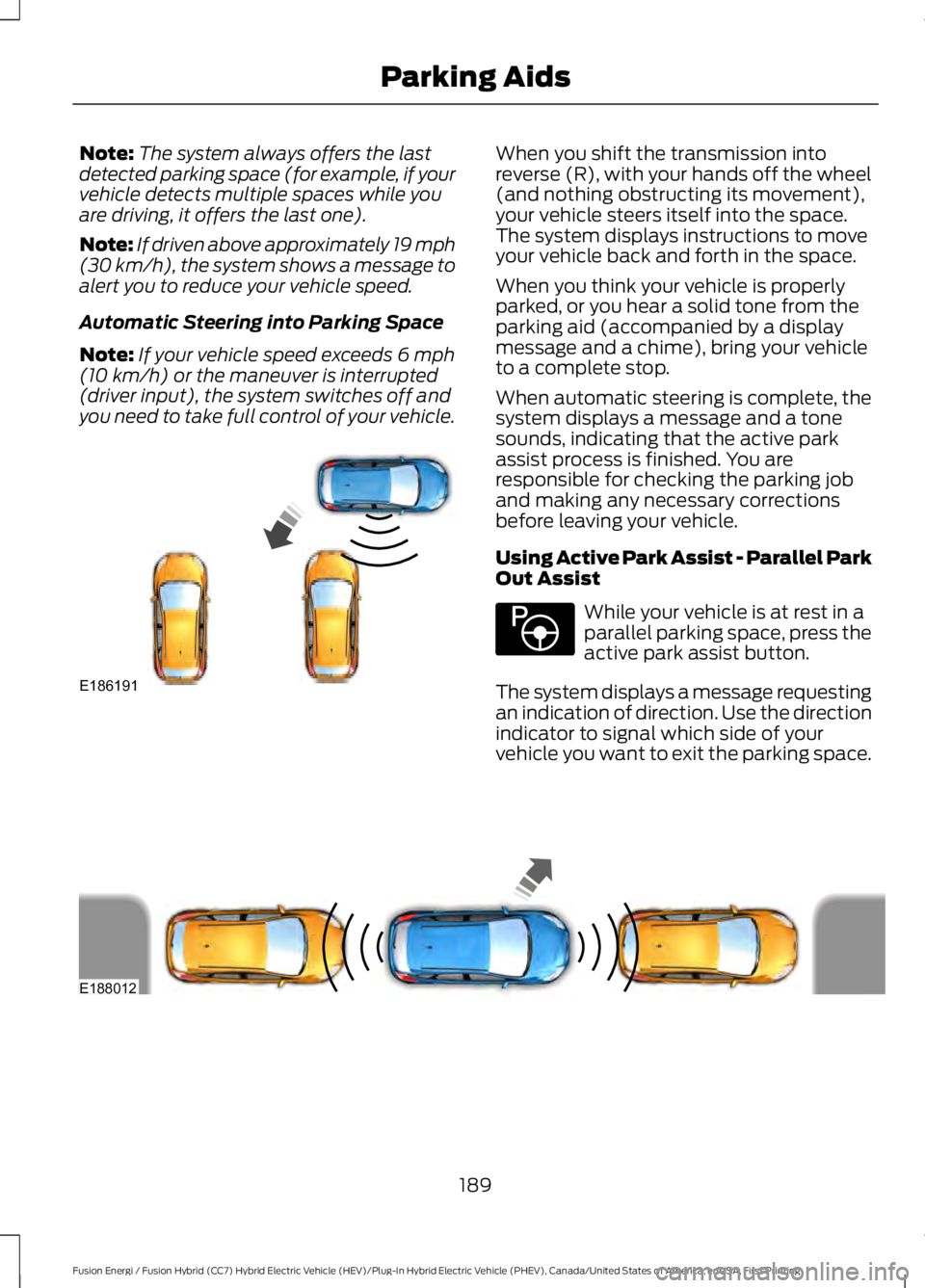
Note:The system always offers the lastdetected parking space (for example, if yourvehicle detects multiple spaces while youare driving, it offers the last one).
Note:If driven above approximately 19 mph(30 km/h), the system shows a message toalert you to reduce your vehicle speed.
Automatic Steering into Parking Space
Note:If your vehicle speed exceeds 6 mph(10 km/h) or the maneuver is interrupted(driver input), the system switches off andyou need to take full control of your vehicle.
When you shift the transmission intoreverse (R), with your hands off the wheel(and nothing obstructing its movement),your vehicle steers itself into the space.The system displays instructions to moveyour vehicle back and forth in the space.
When you think your vehicle is properlyparked, or you hear a solid tone from theparking aid (accompanied by a displaymessage and a chime), bring your vehicleto a complete stop.
When automatic steering is complete, thesystem displays a message and a tonesounds, indicating that the active parkassist process is finished. You areresponsible for checking the parking joband making any necessary correctionsbefore leaving your vehicle.
Using Active Park Assist - Parallel ParkOut Assist
While your vehicle is at rest in aparallel parking space, press theactive park assist button.
The system displays a message requestingan indication of direction. Use the directionindicator to signal which side of yourvehicle you want to exit the parking space.
189
Fusion Energi / Fusion Hybrid (CC7) Hybrid Electric Vehicle (HEV)/Plug-In Hybrid Electric Vehicle (PHEV), Canada/United States of America, enUSA, First Printing
Parking AidsE186191 E146186 E188012
Page 193 of 516
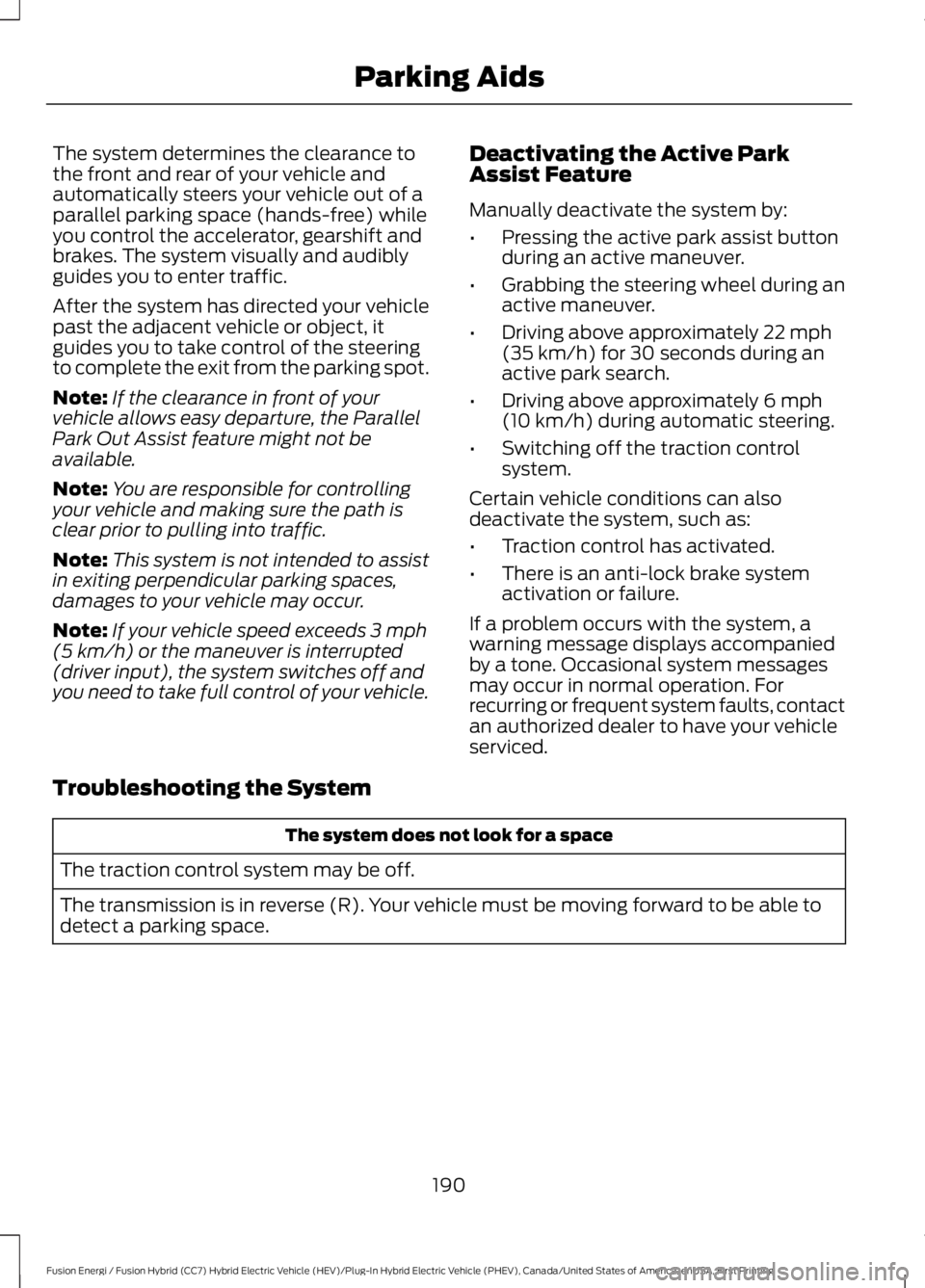
The system determines the clearance tothe front and rear of your vehicle andautomatically steers your vehicle out of aparallel parking space (hands-free) whileyou control the accelerator, gearshift andbrakes. The system visually and audiblyguides you to enter traffic.
After the system has directed your vehiclepast the adjacent vehicle or object, itguides you to take control of the steeringto complete the exit from the parking spot.
Note:If the clearance in front of yourvehicle allows easy departure, the ParallelPark Out Assist feature might not beavailable.
Note:You are responsible for controllingyour vehicle and making sure the path isclear prior to pulling into traffic.
Note:This system is not intended to assistin exiting perpendicular parking spaces,damages to your vehicle may occur.
Note:If your vehicle speed exceeds 3 mph(5 km/h) or the maneuver is interrupted(driver input), the system switches off andyou need to take full control of your vehicle.
Deactivating the Active ParkAssist Feature
Manually deactivate the system by:
•Pressing the active park assist buttonduring an active maneuver.
•Grabbing the steering wheel during anactive maneuver.
•Driving above approximately 22 mph(35 km/h) for 30 seconds during anactive park search.
•Driving above approximately 6 mph(10 km/h) during automatic steering.
•Switching off the traction controlsystem.
Certain vehicle conditions can alsodeactivate the system, such as:
•Traction control has activated.
•There is an anti-lock brake systemactivation or failure.
If a problem occurs with the system, awarning message displays accompaniedby a tone. Occasional system messagesmay occur in normal operation. Forrecurring or frequent system faults, contactan authorized dealer to have your vehicleserviced.
Troubleshooting the System
The system does not look for a space
The traction control system may be off.
The transmission is in reverse (R). Your vehicle must be moving forward to be able todetect a parking space.
190
Fusion Energi / Fusion Hybrid (CC7) Hybrid Electric Vehicle (HEV)/Plug-In Hybrid Electric Vehicle (PHEV), Canada/United States of America, enUSA, First Printing
Parking Aids