manual transmission FORD FUSION/HYBRID 2020 User Guide
[x] Cancel search | Manufacturer: FORD, Model Year: 2020, Model line: FUSION/HYBRID, Model: FORD FUSION/HYBRID 2020Pages: 486, PDF Size: 6.28 MB
Page 216 of 486

Using the Blind Spot Information
System
Vehicles with Automatic Transmission
The system turns on when all of the
following occur:
•
You start your vehicle.
• You shift into drive (D).
• The vehicle speed is greater than
6 mph (10 km/h).
Note: The system does not operate in park
(P) or reverse (R).
Vehicles with Manual Transmission
The system turns on when all of the
following occur:
• You start your vehicle.
• The vehicle speed is greater than
6 mph (10 km/h)
.
Note: The system does not operate in
reverse (R).
System Lights and Messages When the system detects a vehicle, an
alert indicator illuminates in the exterior
mirror on the side the approaching vehicle
is coming from. If you turn the direction
indicator on for that side of your vehicle,
the alert indicator flashes. Note:
The system may not alert you if a
vehicle quickly passes through the detection
zone.
Blocked Sensors The sensors are behind the rear bumper
on both sides of your vehicle.
Note:
Keep the sensors free from snow, ice
and large accumulations of dirt.
Note: Do not cover the sensors with bumper
stickers, repair compound or other objects.
Note: Blocked sensors could affect system
performance.
If the sensors are blocked, a message may
appear in the information display. See
Information Messages (page 105). The
alert indicators remain illuminated but the
system does not alert you.
System Errors
If the system detects a fault, a warning
lamp illuminates and a message displays.
See
Information Messages (page 105).
Switching the System Off and On
You can switch the system off using the
information display. See
General
Information (page 96). When you switch
the system off, a warning lamp illuminates
and a message displays. When you switch
the system on or off, the alert indicators
flash twice.
Note: The system remembers the last
setting when you start your vehicle.
213
Fusion Energi (CC7) Hybrid Electric Vehicle (HEV)/Plug-In Hybrid Electric Vehicle (PHEV), Canada/United States of America, enUSA, Edition date: 201905, Second-Printing Driving AidsE142442 E205199
Page 239 of 486
TRANSPORTING THE VEHICLE
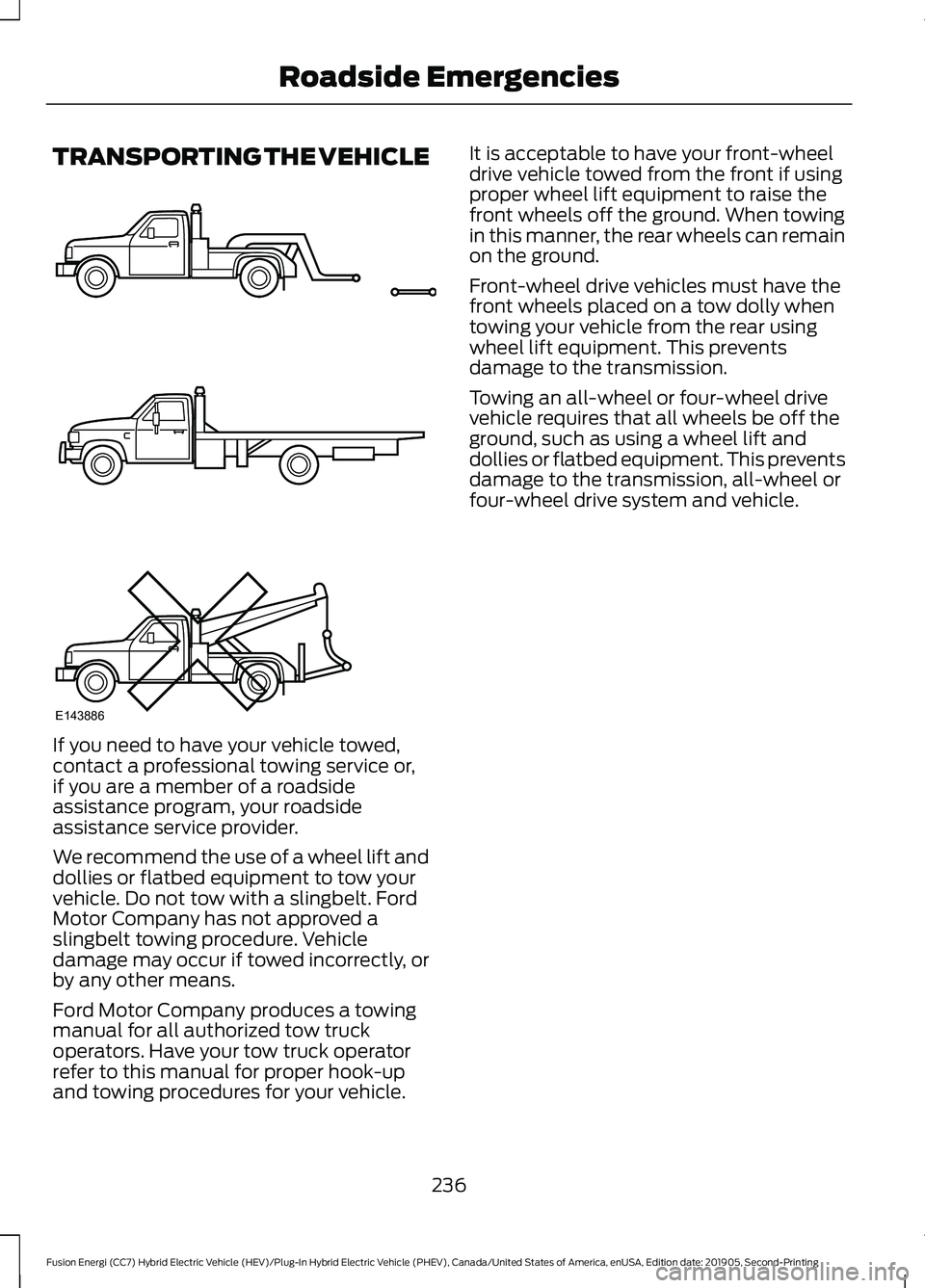
If you need to have your vehicle towed,
contact a professional towing service or,
if you are a member of a roadside
assistance program, your roadside
assistance service provider.
We recommend the use of a wheel lift and
dollies or flatbed equipment to tow your
vehicle. Do not tow with a slingbelt. Ford
Motor Company has not approved a
slingbelt towing procedure. Vehicle
damage may occur if towed incorrectly, or
by any other means.
Ford Motor Company produces a towing
manual for all authorized tow truck
operators. Have your tow truck operator
refer to this manual for proper hook-up
and towing procedures for your vehicle. It is acceptable to have your front-wheel
drive vehicle towed from the front if using
proper wheel lift equipment to raise the
front wheels off the ground. When towing
in this manner, the rear wheels can remain
on the ground.
Front-wheel drive vehicles must have the
front wheels placed on a tow dolly when
towing your vehicle from the rear using
wheel lift equipment. This prevents
damage to the transmission.
Towing an all-wheel or four-wheel drive
vehicle requires that all wheels be off the
ground, such as using a wheel lift and
dollies or flatbed equipment. This prevents
damage to the transmission, all-wheel or
four-wheel drive system and vehicle.
236
Fusion Energi (CC7) Hybrid Electric Vehicle (HEV)/Plug-In Hybrid Electric Vehicle (PHEV), Canada/United States of America, enUSA, Edition date: 201905, Second-Printing Roadside EmergenciesE143886
Page 342 of 486
USING SYNC™ WITH YOUR
PHONE
Hands-free calling is one of the main
features of SYNC. While the system
supports a variety of features, many are
dependent on your cellular phone's
functionality. At a minimum, most cellular
phones with Bluetooth wireless technology
support the following functions:
•
Answering an incoming call.
• Ending a call.
• Dialing a number.
• Redialing.
• Call waiting notification.
• Caller ID.
Other features, such as text messaging
using Bluetooth and automatic phonebook
download, are phone-dependent features.
Pairing a Phone
Wirelessly pairing your phone with SYNC
allows you to make and receive hands-free
calls.
Note: Make sure to switch on the ignition
and the radio. Shift the transmission into
park (P) for automatic transmission or first
gear for manual transmission.
Using the Audio System
Note: To scroll through the menus, press
the up and down arrows on your audio
system.
1. Make sure to switch on your phone's Bluetooth feature before starting the
search. See your device's manual if
necessary.
2. Press the Settings button.
3. Select Bluetooth from the menu.
4. Press the
OK button.
5. Select the option to add. This starts the pairing process. 6. When a message to begin pairing
appears in the audio display, search for
SYNC on your device.
Depending on your phone's capability and
your market, the system may prompt you
with questions, such as setting the current
phone as the primary phone and
downloading your phonebook.
Using Voice Commands Make sure to switch on your
phone's Bluetooth feature
before starting the search. See
your device's manual if necessary.
Press the voice button and when
prompted say: Action and Descrip-
tion
Voice Command
Follow the instruc-
tions on the audio
display.
Pair Phone
Phone Voice Commands Press the voice button. You can
do things like place a phone call
and access text messages.
When prompted, say a command. See the
following table for examples of
commands. Voice Command
___ List of Commands
Help
Call ___
Dial ___
Text Messages
339
Fusion Energi (CC7) Hybrid Electric Vehicle (HEV)/Plug-In Hybrid Electric Vehicle (PHEV), Canada/United States of America, enUSA, Edition date: 201905, Second-Printing SYNC™
(If Equipped)E142599 E142599
Page 480 of 486
Hood Lock
See: Opening and Closing the Hood..........256
Horn.....................................................................73
Hybrid Vehicle Frequently Asked Questions......................................................152
Hybrid Vehicle Operation..........................148 Battery:................................................................... 149
Braking:................................................................... 149
Driving:.................................................................... 148
Driving to Optimize Fuel Economy..............149
Engine:.................................................................... 149
Starting:................................................................. 148
Stopping:............................................................... 148
Transmission Operation:................................. 148
I
In California (U.S. Only)............................238
Information Display Control.......................72
Information Displays....................................96 General Information........................................... 96
Information Messages................................105
Active Park............................................................ 105
Adaptive Cruise Control.................................. 106
AdvanceTrac ™.................................................... 106
Airbag...................................................................... 107
Alarm....................................................................... 107
Automatic Engine Shutdown......................... 107
Battery and Charging System (12 volt).................................................................... 108
Battery and Charging System (High Voltage)............................................................ 108
Blind Spot Information and Cross Traffic Alert System.................................................... 109
Doors and Locks.................................................. 110
Driver Alert............................................................. 110
Fuel........................................................................\
... 110
Hill Start Assist...................................................... 111
Keys and Intelligent Access.............................. 111
Lane Keeping System......................................... 112
Maintenance.......................................................... 112
MyKey....................................................................... 113
Park Aid................................................................... 114
Park Brake.............................................................. 114
Power Steering..................................................... 115
Pre-Collision Assist............................................. 115
Remote Start......................................................... 116
Seats........................................................................\
116Starting System ..................................................
116
Tire Pressure Monitoring System................... 117
Traction Control.................................................... 117
Transmission.......................................................... 117
Installing Child Restraints...........................22 Child Seats.............................................................. 22
Using Lap and Shoulder Belts......................... 22
Using Lower Anchors and Tethers for CHildren (LATCH)........................................... 24
Using Tether Straps............................................. 26
Instrument Cluster
........................................88
Instrument Lighting Dimmer......................77
Instrument Panel
............................................18
Interior Lamps.................................................79
Front Interior Lamp.............................................. 79
Rear Interior Lamps............................................ 80
Interior Luggage Compartment Release............................................................67
Interior Mirror
...................................................86
Auto-Dimming Mirror......................................... 86
Manual Dimming Mirror..................................... 86
Introduction.........................................................7
J
Jump Starting the Vehicle.........................232 Connecting the Jumper Cables.................... 232
Jump Starting...................................................... 233
Preparing Your Vehicle..................................... 232
Removing the Jumper Cables....................... 233
K
Keyless Entry
....................................................65
SECURICODE™ Keyless Entry
Keypad................................................................ 65
Keyless Starting
............................................143
Ignition Modes..................................................... 143
Keys and Remote Controls..........................51
L
Lane Keeping System................................208 Switching the System On and Off..............209
Lighting Control
..............................................76
Flashing the Headlamp High Beam...............77
Headlamp High Beam........................................ 76
477
Fusion Energi (CC7) Hybrid Electric Vehicle (HEV)/Plug-In Hybrid Electric Vehicle (PHEV), Canada/United States of America, enUSA, Edition date: 201905, Second-Printing Index