light FORD FUSION/HYBRID 2020 Owner's Manual
[x] Cancel search | Manufacturer: FORD, Model Year: 2020, Model line: FUSION/HYBRID, Model: FORD FUSION/HYBRID 2020Pages: 486, PDF Size: 6.28 MB
Page 92 of 486
A full fill represents the total amount of
energy you can get from an external charge
(plugging your vehicle in). When the fill
reaches empty, your vehicle automatically
enters Hybrid Mode and the large battery
gauge will no longer be shown.
An optional small battery gauge is provided
for Hybrid vehicles and for Hybrid Mode
only in Energi vehicles. This can be enabled
in the Settings menu under Battery Display.
See General Information (page 96). The
fill level, or State of Charge, indicates the
amount of energy stored in the high
voltage battery as a percent of total energy
capacity. The level increases or decreases
as the battery charges and discharges
during normal operation.
Regen Display
A circular arrow symbol displays when
energy is being recaptured through the
regenerative braking system. Regen Display
can be disabled in the Settings menu. See
General Information (page 96).
Fuel Gauge:
The fuel gauge indicates about how much
fuel is in the fuel tank.
The arrow adjacent to the fuel pump
symbol indicates on which side of your
vehicle the fuel filler door is located.
Note: The fuel gauge may vary slightly
when your vehicle is moving or on a slope.
Low Fuel Reminder
A low fuel level reminder displays and
sounds when the distance to empty
reaches
75 mi (120 km) for MyKey, and at
50 mi (80 km), 25 mi (40 km), 12 mi
(20 km) and 0 mi (0 km) for all vehicle
keys.
Note: The low fuel reminder can appear at
different fuel gauge positions depending on
fuel economy conditions. This variation is
normal. Vehicle Settings and Personalization
Display/Trip
See
General Information (page 96).
Information
See
General Information (page 96).
Settings
See
General Information (page 96).
Brake Coach Display:
The Brake Coach appears after the vehicle
has come to a stop. It coaches you to brake
in a manner which maximizes the amount
of energy returned through the
regenerative braking system. The percent
displayed is an indication of the
regenerative braking efficiency with 100%
representing the maximum amount of
energy recovery.
You can switch this feature on or off in the
information displays settings menu. See
General Information
(page 96).
Trip Summary:
Trip Summary displays upon shutting off
your vehicle. The information is cumulative
over the last trip. A new trip begins each
time your start your vehicle (when the
Ready to Drive message comes on).
89
Fusion Energi (CC7) Hybrid Electric Vehicle (HEV)/Plug-In Hybrid Electric Vehicle (PHEV), Canada/United States of America, enUSA, Edition date: 201905, Second-Printing Instrument Cluster
Page 94 of 486
Trip Efficiency Leaves
Trip Efficiency Leaves display upon
shutting off your Hybrid vehicle. For Energi
vehicles, the trip efficiency leaves display
only when the vehicle operates in Hybrid
Mode for the entire trip. The number of
leaves represent the average for the last
trip. A new trip begins each time you start
your vehicle (when the Ready to Drive
message comes on). Corresponding Trip
Summary data displays on the left
information display.
Next Full Charge
The Next Full Charge display is shown
upon shutting off your Energi vehicle
whenever your vehicle operates in Plug-in
Power Mode for a portion of your trip.
Miles or kilometers per full charge
This is an estimate of the EV Range you
would see if you plugged in and fully
charged your vehicle right now. The
estimate is based on your energy usage
while driving. Energy usage is affected by
your driving style and route, climate control
use, outside temperature and other factors.
Energy usage effects (+/-)
A green bar indicates a positive effect on
your EV range per full charge estimate. An
amber bar indicates a negative effect. The
bigger the bar the bigger the effect on your
estimate.
•
Driving style/route – This includes
energy used to propel your vehicle
based on your driving style and route.
Your driving style includes how fast you
drive and whether your acceleration
and braking is mild or aggressive. Your
route includes factors such as the
amount of city or highway driving and
road grades.
• Climate control use – This includes
energy used by your vehicle ’s high
voltage climate control components
such as the electric A/C compressor
and the electric heater.
• Outside temp./other – This includes
energy losses due to outside
temperature and other conditions
which reduce vehicle system efficiency.
Energy used for low voltage
accessories such as cabin fans, heated
seats, headlights, etc. is also included.
WARNING LAMPS AND
INDICATORS
The following warning lamps and
indicators alert you to a vehicle condition
that may become serious. Some lamps
illuminate when you start your vehicle to
make sure they work. If any lamps remain
on after starting your vehicle, refer to the
respective system warning lamp for further
information.
Note: Some warning indicators appear in
the information display and operate the
same as a warning lamp but do not
illuminate when you start your vehicle.
91
Fusion Energi (CC7) Hybrid Electric Vehicle (HEV)/Plug-In Hybrid Electric Vehicle (PHEV), Canada/United States of America, enUSA, Edition date: 201905, Second-Printing Instrument Cluster
Page 95 of 486
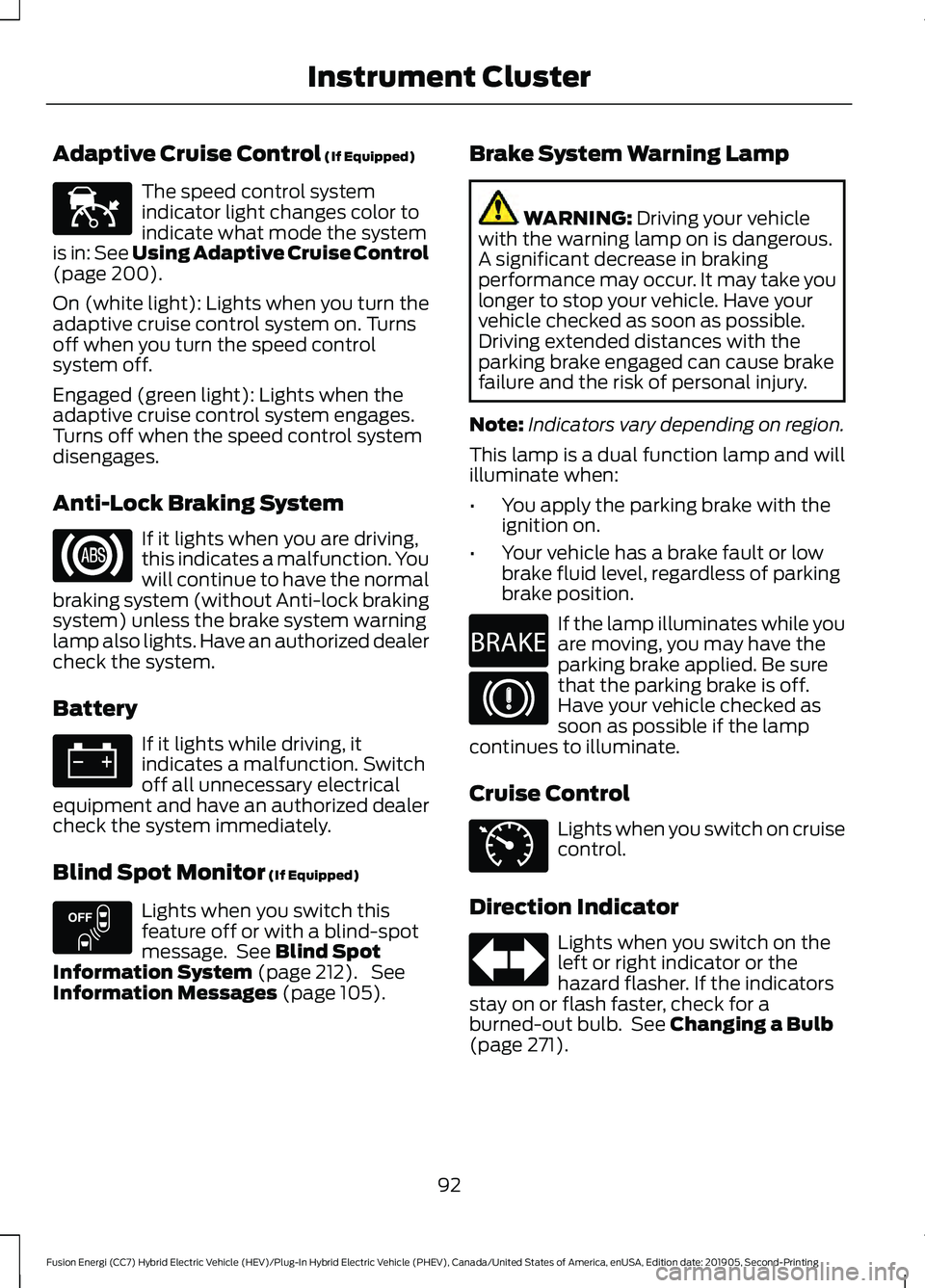
Adaptive Cruise Control (If Equipped)
The speed control system
indicator light changes color to
indicate what mode the system
is in:
See Using Adaptive Cruise Control
(page 200).
On (white light): Lights when you turn the
adaptive cruise control system on. Turns
off when you turn the speed control
system off.
Engaged (green light): Lights when the
adaptive cruise control system engages.
Turns off when the speed control system
disengages.
Anti-Lock Braking System If it lights when you are driving,
this indicates a malfunction. You
will continue to have the normal
braking system (without Anti-lock braking
system) unless the brake system warning
lamp also lights. Have an authorized dealer
check the system.
Battery If it lights while driving, it
indicates a malfunction. Switch
off all unnecessary electrical
equipment and have an authorized dealer
check the system immediately.
Blind Spot Monitor
(If Equipped) Lights when you switch this
feature off or with a blind-spot
message. See
Blind Spot
Information System (page 212). See
Information Messages (page 105). Brake System Warning Lamp WARNING:
Driving your vehicle
with the warning lamp on is dangerous.
A significant decrease in braking
performance may occur. It may take you
longer to stop your vehicle. Have your
vehicle checked as soon as possible.
Driving extended distances with the
parking brake engaged can cause brake
failure and the risk of personal injury.
Note: Indicators vary depending on region.
This lamp is a dual function lamp and will
illuminate when:
• You apply the parking brake with the
ignition on.
• Your vehicle has a brake fault or low
brake fluid level, regardless of parking
brake position. If the lamp illuminates while you
are moving, you may have the
parking brake applied. Be sure
that the parking brake is off.
Have your vehicle checked as
soon as possible if the lamp
continues to illuminate.
Cruise Control Lights when you switch on cruise
control.
Direction Indicator Lights when you switch on the
left or right indicator or the
hazard flasher. If the indicators
stay on or flash faster, check for a
burned-out bulb. See
Changing a Bulb
(page 271).
92
Fusion Energi (CC7) Hybrid Electric Vehicle (HEV)/Plug-In Hybrid Electric Vehicle (PHEV), Canada/United States of America, enUSA, Edition date: 201905, Second-Printing Instrument ClusterE144524 E151262 E270480 E71340
Page 96 of 486
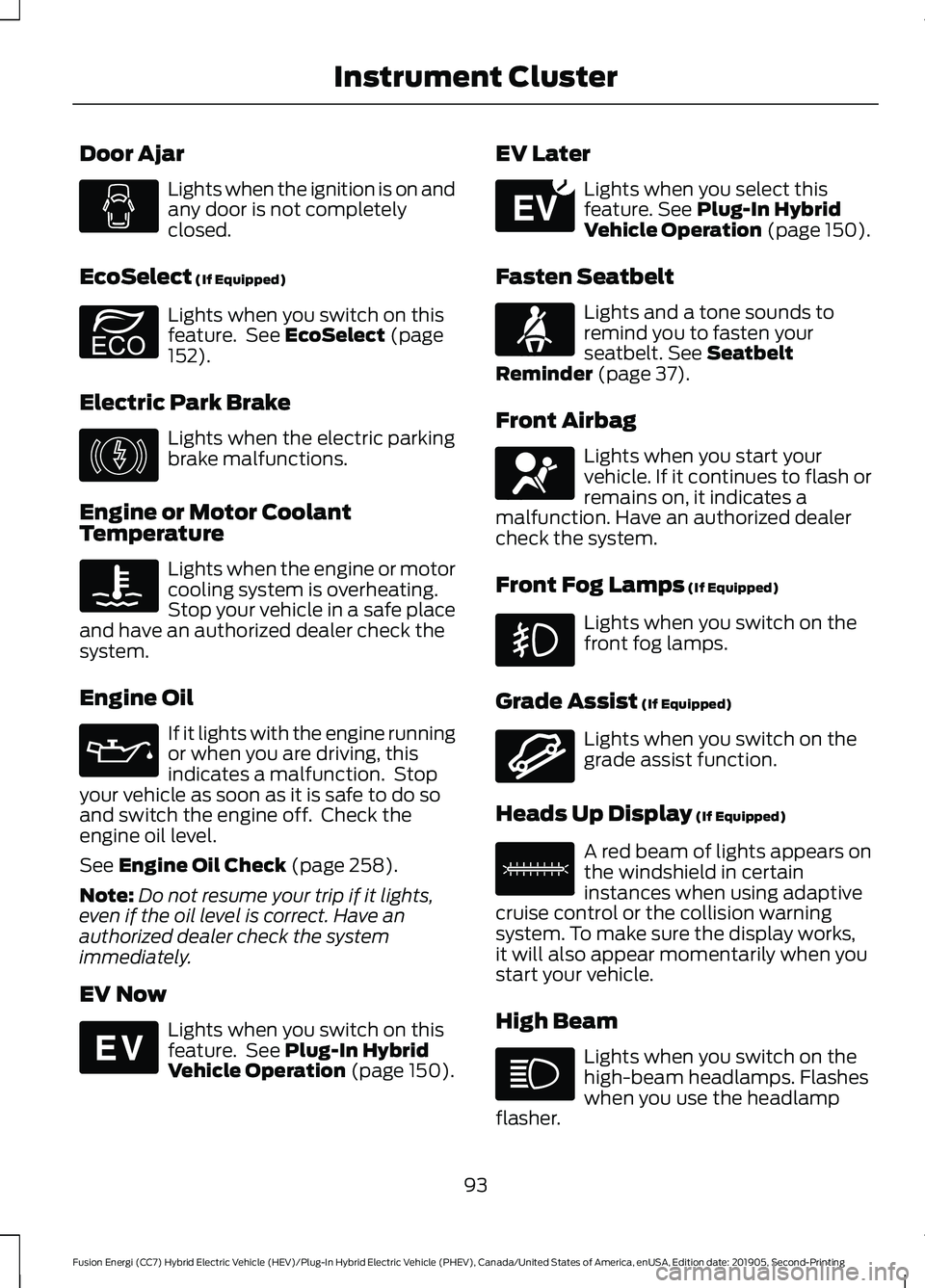
Door Ajar
Lights when the ignition is on and
any door is not completely
closed.
EcoSelect (If Equipped) Lights when you switch on this
feature. See
EcoSelect (page
152).
Electric Park Brake Lights when the electric parking
brake malfunctions.
Engine or Motor Coolant
Temperature Lights when the engine or motor
cooling system is overheating.
Stop your vehicle in a safe place
and have an authorized dealer check the
system.
Engine Oil If it lights with the engine running
or when you are driving, this
indicates a malfunction. Stop
your vehicle as soon as it is safe to do so
and switch the engine off. Check the
engine oil level.
See
Engine Oil Check (page 258).
Note: Do not resume your trip if it lights,
even if the oil level is correct. Have an
authorized dealer check the system
immediately.
EV Now Lights when you switch on this
feature. See
Plug-In Hybrid
Vehicle Operation (page 150). EV Later Lights when you select this
feature.
See Plug-In Hybrid
Vehicle Operation (page 150).
Fasten Seatbelt Lights and a tone sounds to
remind you to fasten your
seatbelt.
See Seatbelt
Reminder (page 37).
Front Airbag Lights when you start your
vehicle. If it continues to flash or
remains on, it indicates a
malfunction. Have an authorized dealer
check the system.
Front Fog Lamps
(If Equipped) Lights when you switch on the
front fog lamps.
Grade Assist
(If Equipped) Lights when you switch on the
grade assist function.
Heads Up Display
(If Equipped) A red beam of lights appears on
the windshield in certain
instances when using adaptive
cruise control or the collision warning
system. To make sure the display works,
it will also appear momentarily when you
start your vehicle.
High Beam Lights when you switch on the
high-beam headlamps. Flashes
when you use the headlamp
flasher.
93
Fusion Energi (CC7) Hybrid Electric Vehicle (HEV)/Plug-In Hybrid Electric Vehicle (PHEV), Canada/United States of America, enUSA, Edition date: 201905, Second-Printing Instrument Cluster E194390 E146190 E144814 E151263 E71880 E67017 E144523 E156133
Page 97 of 486
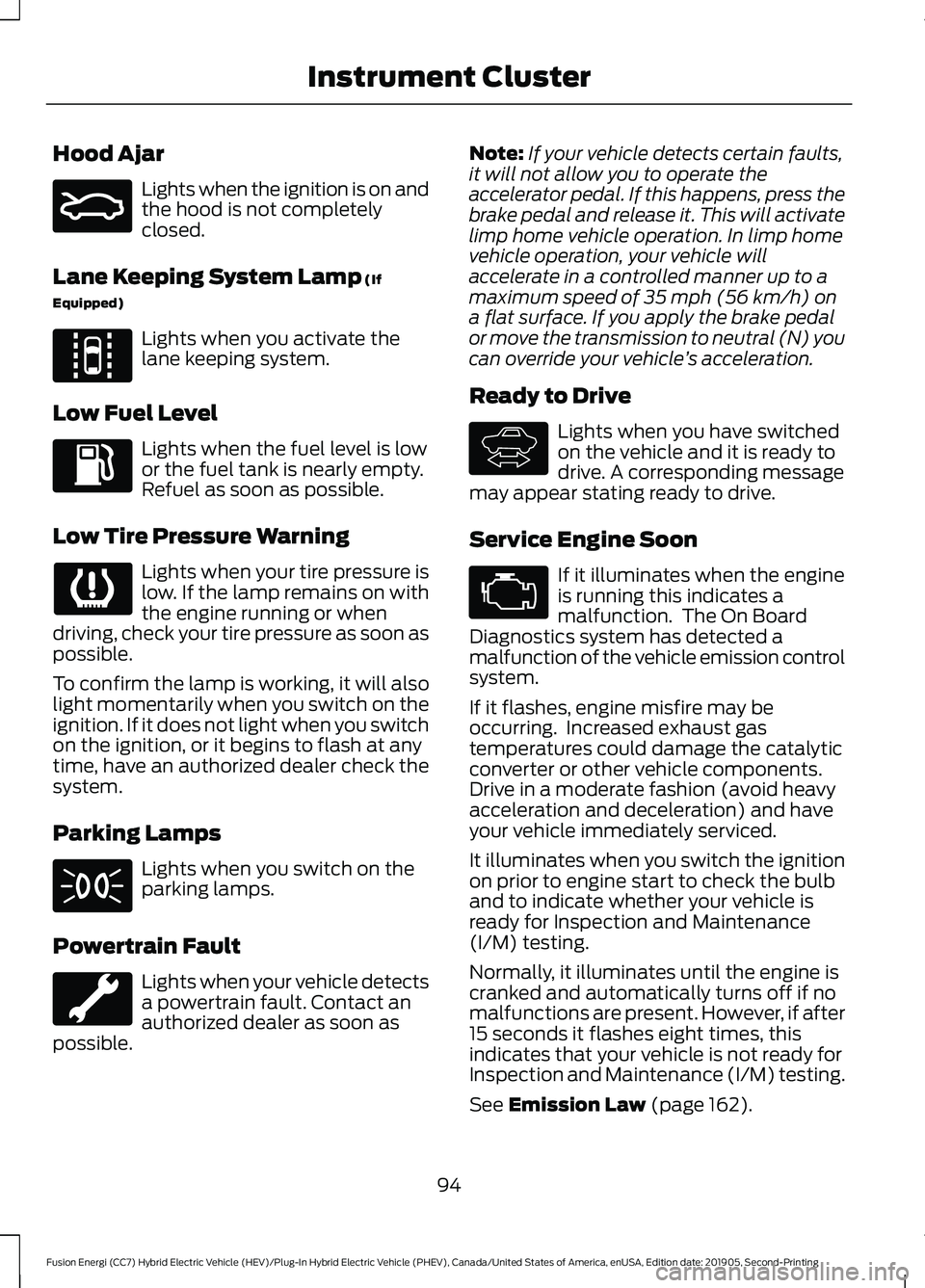
Hood Ajar
Lights when the ignition is on and
the hood is not completely
closed.
Lane Keeping System Lamp (If
Equipped) Lights when you activate the
lane keeping system.
Low Fuel Level Lights when the fuel level is low
or the fuel tank is nearly empty.
Refuel as soon as possible.
Low Tire Pressure Warning Lights when your tire pressure is
low. If the lamp remains on with
the engine running or when
driving, check your tire pressure as soon as
possible.
To confirm the lamp is working, it will also
light momentarily when you switch on the
ignition. If it does not light when you switch
on the ignition, or it begins to flash at any
time, have an authorized dealer check the
system.
Parking Lamps Lights when you switch on the
parking lamps.
Powertrain Fault Lights when your vehicle detects
a powertrain fault. Contact an
authorized dealer as soon as
possible. Note:
If your vehicle detects certain faults,
it will not allow you to operate the
accelerator pedal. If this happens, press the
brake pedal and release it. This will activate
limp home vehicle operation. In limp home
vehicle operation, your vehicle will
accelerate in a controlled manner up to a
maximum speed of 35 mph (56 km/h) on
a flat surface. If you apply the brake pedal
or move the transmission to neutral (N) you
can override your vehicle ’s acceleration.
Ready to Drive Lights when you have switched
on the vehicle and it is ready to
drive. A corresponding message
may appear stating ready to drive.
Service Engine Soon If it illuminates when the engine
is running this indicates a
malfunction. The On Board
Diagnostics system has detected a
malfunction of the vehicle emission control
system.
If it flashes, engine misfire may be
occurring. Increased exhaust gas
temperatures could damage the catalytic
converter or other vehicle components.
Drive in a moderate fashion (avoid heavy
acceleration and deceleration) and have
your vehicle immediately serviced.
It illuminates when you switch the ignition
on prior to engine start to check the bulb
and to indicate whether your vehicle is
ready for Inspection and Maintenance
(I/M) testing.
Normally, it illuminates until the engine is
cranked and automatically turns off if no
malfunctions are present. However, if after
15 seconds it flashes eight times, this
indicates that your vehicle is not ready for
Inspection and Maintenance (I/M) testing.
See
Emission Law (page 162).
94
Fusion Energi (CC7) Hybrid Electric Vehicle (HEV)/Plug-In Hybrid Electric Vehicle (PHEV), Canada/United States of America, enUSA, Edition date: 201905, Second-Printing Instrument ClusterE159324 E144813 E144692
Page 98 of 486
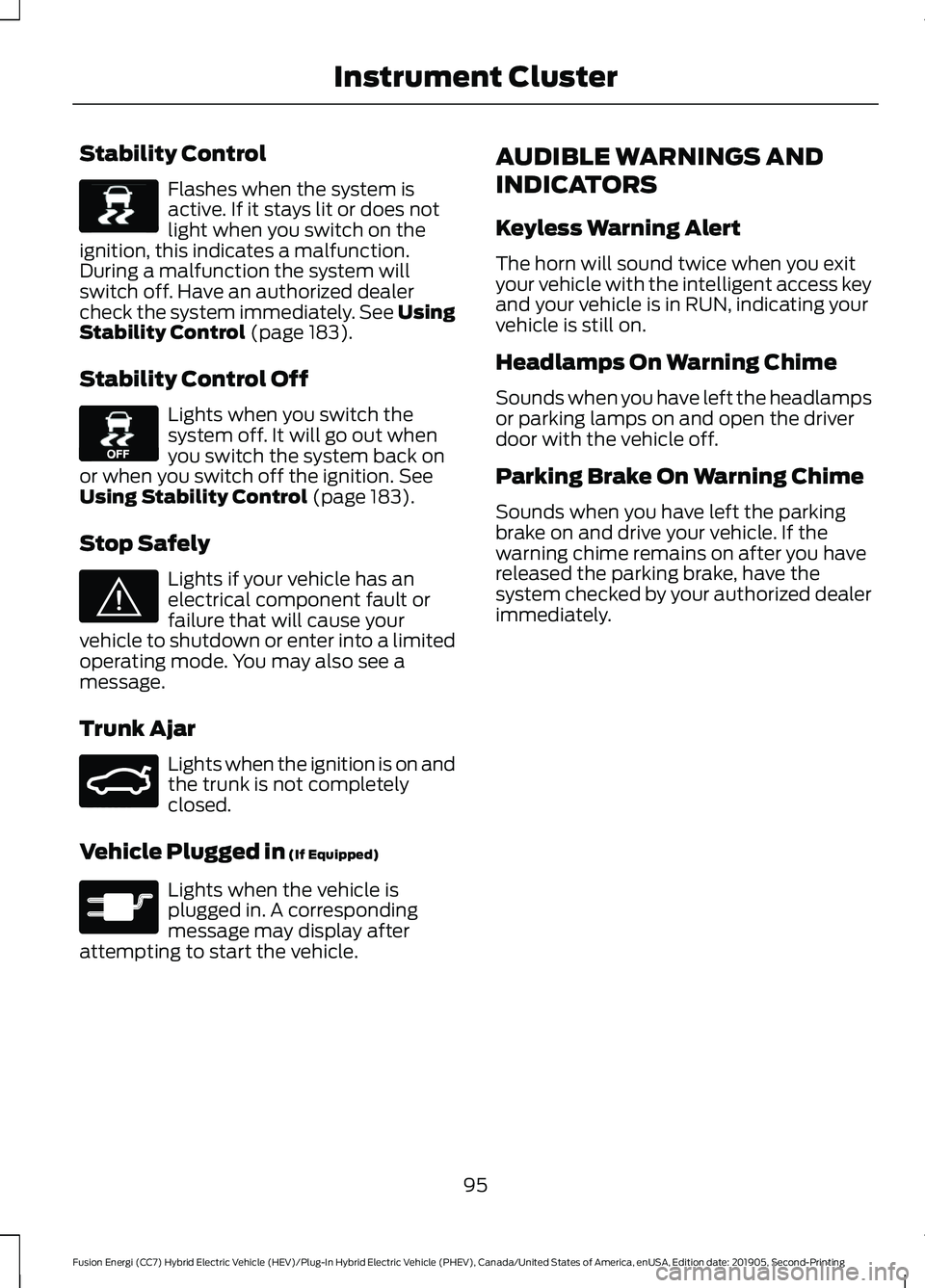
Stability Control
Flashes when the system is
active. If it stays lit or does not
light when you switch on the
ignition, this indicates a malfunction.
During a malfunction the system will
switch off. Have an authorized dealer
check the system immediately. See Using
Stability Control (page 183).
Stability Control Off Lights when you switch the
system off. It will go out when
you switch the system back on
or when you switch off the ignition.
See
Using Stability Control (page 183).
Stop Safely Lights if your vehicle has an
electrical component fault or
failure that will cause your
vehicle to shutdown or enter into a limited
operating mode. You may also see a
message.
Trunk Ajar Lights when the ignition is on and
the trunk is not completely
closed.
Vehicle Plugged in
(If Equipped) Lights when the vehicle is
plugged in. A corresponding
message may display after
attempting to start the vehicle. AUDIBLE WARNINGS AND
INDICATORS
Keyless Warning Alert
The horn will sound twice when you exit
your vehicle with the intelligent access key
and your vehicle is in RUN, indicating your
vehicle is still on.
Headlamps On Warning Chime
Sounds when you have left the headlamps
or parking lamps on and open the driver
door with the vehicle off.
Parking Brake On Warning Chime
Sounds when you have left the parking
brake on and drive your vehicle. If the
warning chime remains on after you have
released the parking brake, have the
system checked by your authorized dealer
immediately.
95
Fusion Energi (CC7) Hybrid Electric Vehicle (HEV)/Plug-In Hybrid Electric Vehicle (PHEV), Canada/United States of America, enUSA, Edition date: 201905, Second-Printing Instrument ClusterE138639 E130458 E144693 E159323 E144694
Page 99 of 486
GENERAL INFORMATION
WARNING: Driving while distracted
can result in loss of vehicle control, crash
and injury. We strongly recommend that
you use extreme caution when using any
device that may take your focus off the
road. Your primary responsibility is the
safe operation of your vehicle. We
recommend against the use of any
hand-held device while driving and
encourage the use of voice-operated
systems when possible. Make sure you
are aware of all applicable local laws
that may affect the use of electronic
devices while driving.
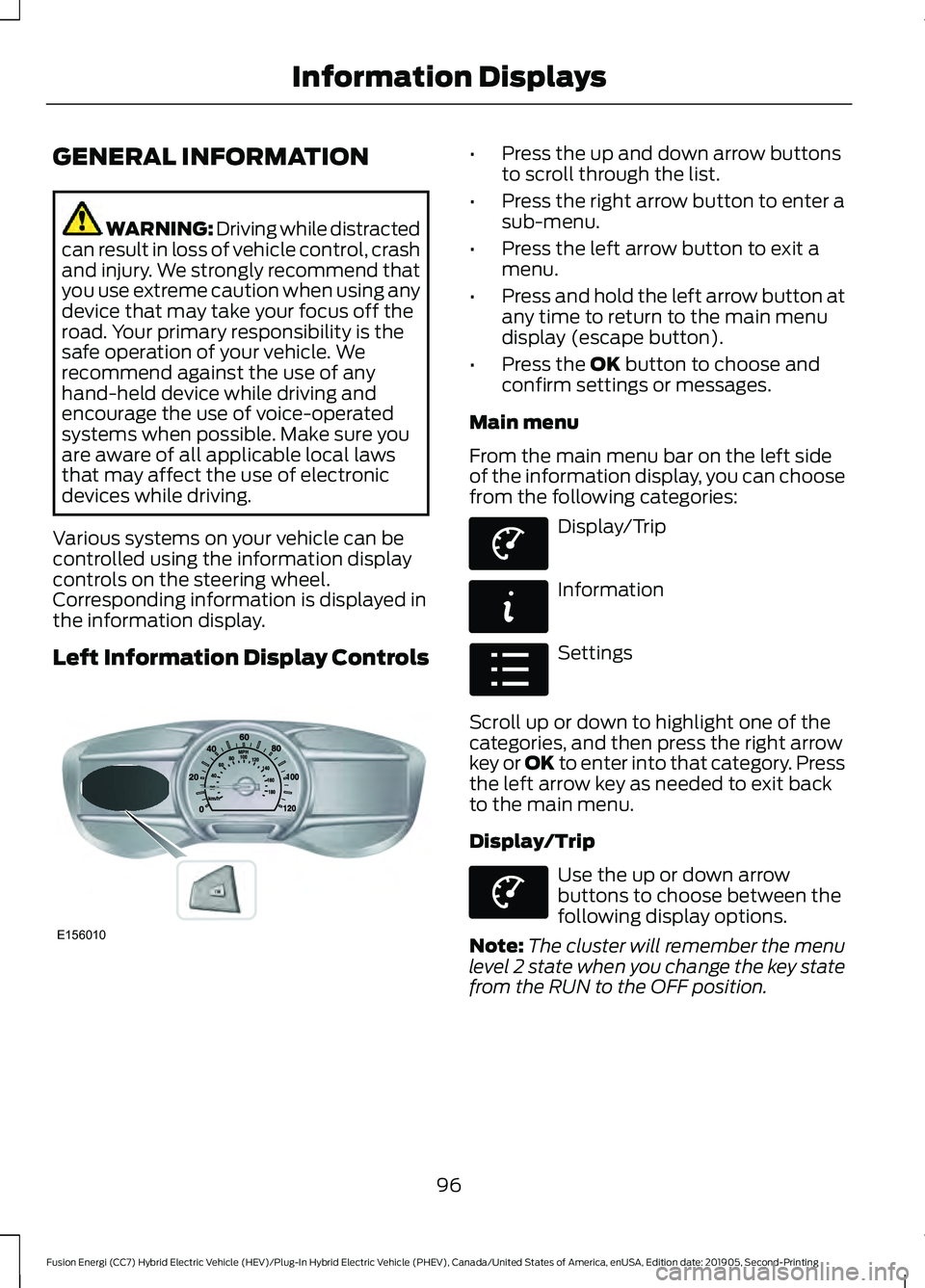
Various systems on your vehicle can be
controlled using the information display
controls on the steering wheel.
Corresponding information is displayed in
the information display.
Left Information Display Controls •
Press the up and down arrow buttons
to scroll through the list.
• Press the right arrow button to enter a
sub-menu.
• Press the left arrow button to exit a
menu.
• Press and hold the left arrow button at
any time to return to the main menu
display (escape button).
• Press the OK button to choose and
confirm settings or messages.
Main menu
From the main menu bar on the left side
of the information display, you can choose
from the following categories: Display/Trip
Information
Settings
Scroll up or down to highlight one of the
categories, and then press the right arrow
key or OK to enter into that category. Press
the left arrow key as needed to exit back
to the main menu.
Display/Trip Use the up or down arrow
buttons to choose between the
following display options.
Note: The cluster will remember the menu
level 2 state when you change the key state
from the RUN to the OFF position.
96
Fusion Energi (CC7) Hybrid Electric Vehicle (HEV)/Plug-In Hybrid Electric Vehicle (PHEV), Canada/United States of America, enUSA, Edition date: 201905, Second-Printing Information DisplaysE156010 E144639 E144642 E100023 E144639
Page 102 of 486
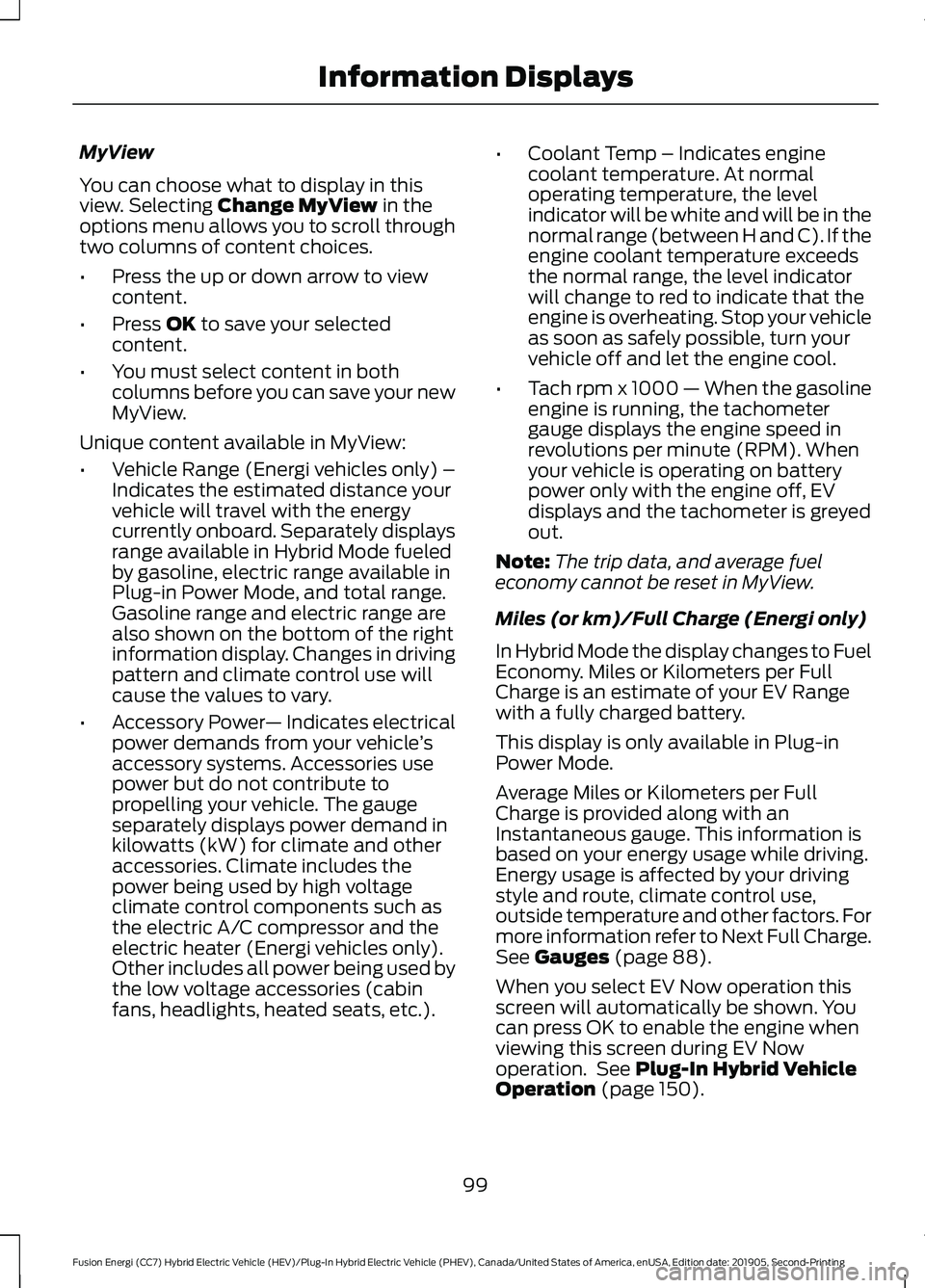
MyView
You can choose what to display in this
view. Selecting Change MyView in the
options menu allows you to scroll through
two columns of content choices.
• Press the up or down arrow to view
content.
• Press
OK to save your selected
content.
• You must select content in both
columns before you can save your new
MyView.
Unique content available in MyView:
• Vehicle Range (Energi vehicles only) –
Indicates the estimated distance your
vehicle will travel with the energy
currently onboard. Separately displays
range available in Hybrid Mode fueled
by gasoline, electric range available in
Plug-in Power Mode, and total range.
Gasoline range and electric range are
also shown on the bottom of the right
information display. Changes in driving
pattern and climate control use will
cause the values to vary.
• Accessory Power — Indicates electrical
power demands from your vehicle ’s
accessory systems. Accessories use
power but do not contribute to
propelling your vehicle. The gauge
separately displays power demand in
kilowatts (kW) for climate and other
accessories. Climate includes the
power being used by high voltage
climate control components such as
the electric A/C compressor and the
electric heater (Energi vehicles only).
Other includes all power being used by
the low voltage accessories (cabin
fans, headlights, heated seats, etc.). •
Coolant Temp – Indicates engine
coolant temperature. At normal
operating temperature, the level
indicator will be white and will be in the
normal range (between H and C). If the
engine coolant temperature exceeds
the normal range, the level indicator
will change to red to indicate that the
engine is overheating. Stop your vehicle
as soon as safely possible, turn your
vehicle off and let the engine cool.
• Tach rpm x 1000 — When the gasoline
engine is running, the tachometer
gauge displays the engine speed in
revolutions per minute (RPM). When
your vehicle is operating on battery
power only with the engine off, EV
displays and the tachometer is greyed
out.
Note: The trip data, and average fuel
economy cannot be reset in MyView.
Miles (or km)/Full Charge (Energi only)
In Hybrid Mode the display changes to Fuel
Economy. Miles or Kilometers per Full
Charge is an estimate of your EV Range
with a fully charged battery.
This display is only available in Plug-in
Power Mode.
Average Miles or Kilometers per Full
Charge is provided along with an
Instantaneous gauge. This information is
based on your energy usage while driving.
Energy usage is affected by your driving
style and route, climate control use,
outside temperature and other factors. For
more information refer to Next Full Charge.
See
Gauges (page 88).
When you select EV Now operation this
screen will automatically be shown. You
can press OK to enable the engine when
viewing this screen during EV Now
operation. See
Plug-In Hybrid Vehicle
Operation (page 150).
99
Fusion Energi (CC7) Hybrid Electric Vehicle (HEV)/Plug-In Hybrid Electric Vehicle (PHEV), Canada/United States of America, enUSA, Edition date: 201905, Second-Printing Information Displays
Page 104 of 486
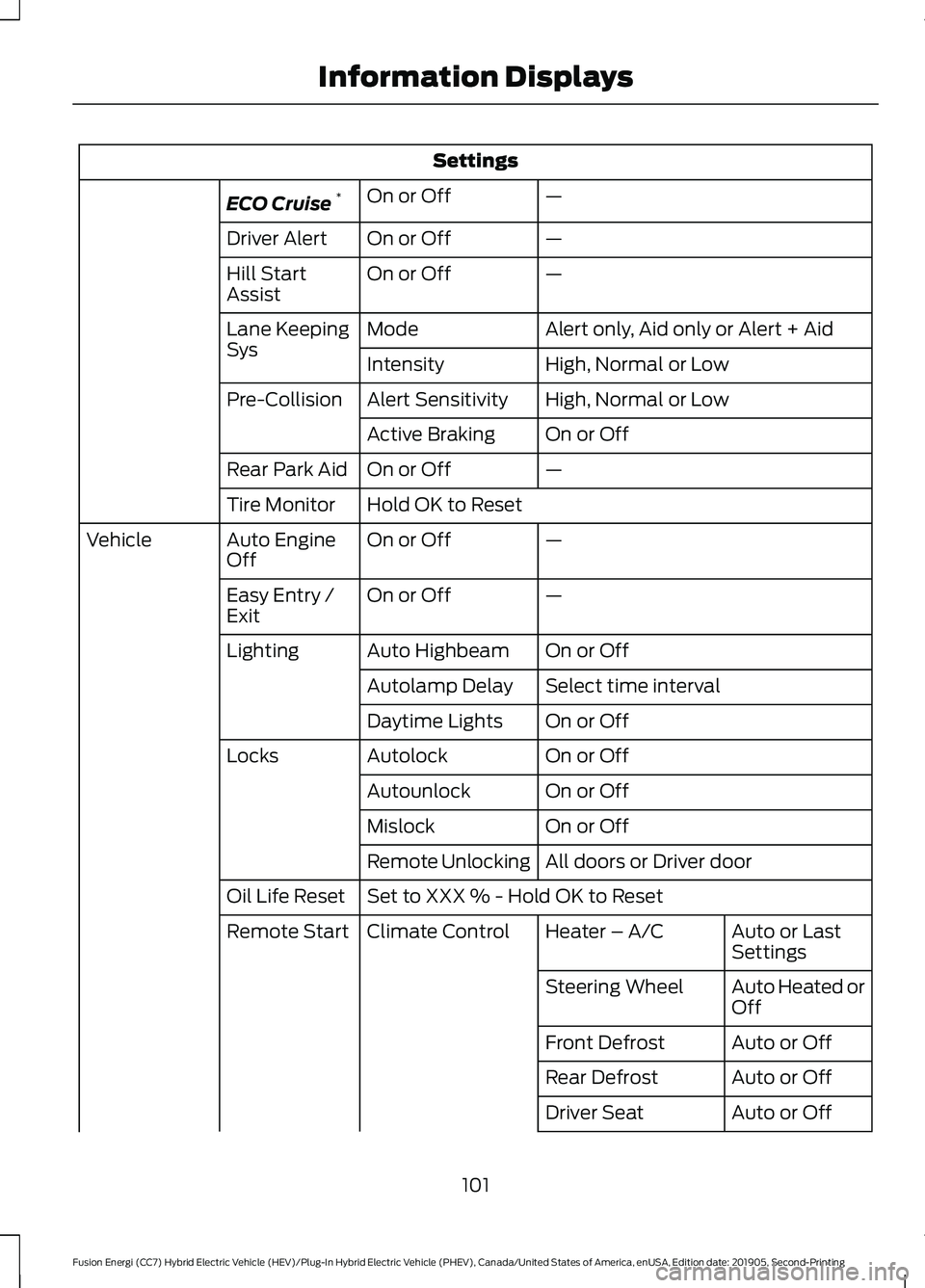
Settings
—
On or Off
ECO Cruise *
—
On or Off
Driver Alert
—
On or Off
Hill Start
Assist
Alert only, Aid only or Alert + Aid
Mode
Lane Keeping
Sys
High, Normal or Low
Intensity
High, Normal or Low
Alert Sensitivity
Pre-Collision
On or Off
Active Braking
—
On or Off
Rear Park Aid
Hold OK to Reset
Tire Monitor
—
On or Off
Auto Engine
Off
Vehicle
—
On or Off
Easy Entry /
Exit
On or Off
Auto Highbeam
Lighting
Select time interval
Autolamp Delay
On or Off
Daytime Lights
On or Off
Autolock
Locks
On or Off
Autounlock
On or Off
Mislock
All doors or Driver door
Remote Unlocking
Set to XXX % - Hold OK to Reset
Oil Life Reset
Auto or Last
Settings
Heater – A/C
Climate Control
Remote Start
Auto Heated or
Off
Steering Wheel
Auto or Off
Front Defrost
Auto or Off
Rear Defrost
Auto or Off
Driver Seat
101
Fusion Energi (CC7) Hybrid Electric Vehicle (HEV)/Plug-In Hybrid Electric Vehicle (PHEV), Canada/United States of America, enUSA, Edition date: 201905, Second-Printing Information Displays
Page 114 of 486
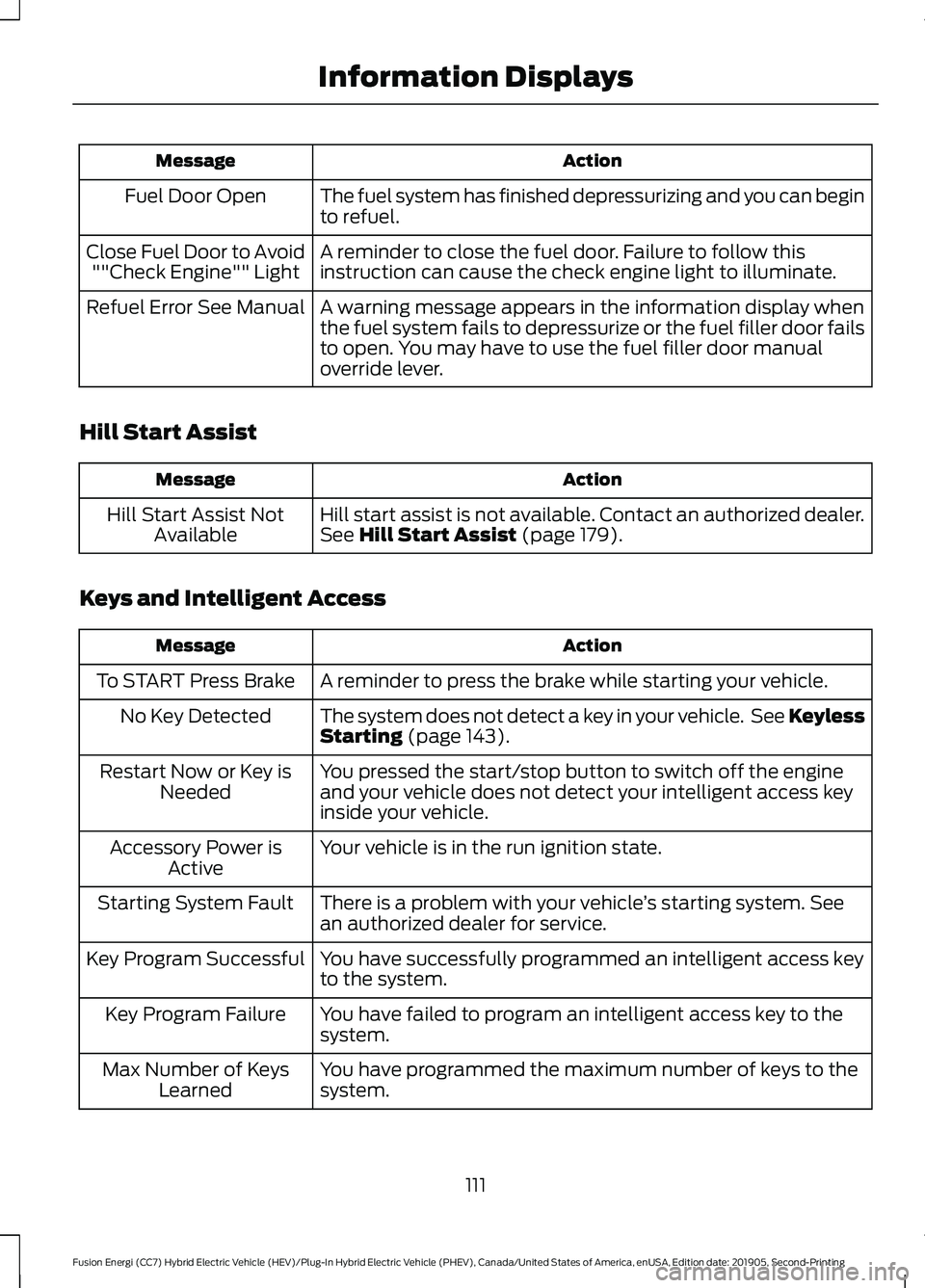
Action
Message
The fuel system has finished depressurizing and you can begin
to refuel.
Fuel Door Open
A reminder to close the fuel door. Failure to follow this
instruction can cause the check engine light to illuminate.
Close Fuel Door to Avoid
""Check Engine"" Light
A warning message appears in the information display when
the fuel system fails to depressurize or the fuel filler door fails
to open. You may have to use the fuel filler door manual
override lever.
Refuel Error See Manual
Hill Start Assist Action
Message
Hill start assist is not available. Contact an authorized dealer.
See Hill Start Assist (page 179).
Hill Start Assist Not
Available
Keys and Intelligent Access Action
Message
A reminder to press the brake while starting your vehicle.
To START Press Brake
The system does not detect a key in your vehicle. See Keyless
Starting
(page 143).
No Key Detected
You pressed the start/stop button to switch off the engine
and your vehicle does not detect your intelligent access key
inside your vehicle.
Restart Now or Key is
Needed
Your vehicle is in the run ignition state.
Accessory Power is
Active
There is a problem with your vehicle ’s starting system. See
an authorized dealer for service.
Starting System Fault
You have successfully programmed an intelligent access key
to the system.
Key Program Successful
You have failed to program an intelligent access key to the
system.
Key Program Failure
You have programmed the maximum number of keys to the
system.
Max Number of Keys
Learned
111
Fusion Energi (CC7) Hybrid Electric Vehicle (HEV)/Plug-In Hybrid Electric Vehicle (PHEV), Canada/United States of America, enUSA, Edition date: 201905, Second-Printing Information Displays