key FORD GT 2017 2.G User Guide
[x] Cancel search | Manufacturer: FORD, Model Year: 2017, Model line: GT, Model: FORD GT 2017 2.GPages: 313, PDF Size: 6.41 MB
Page 49 of 313
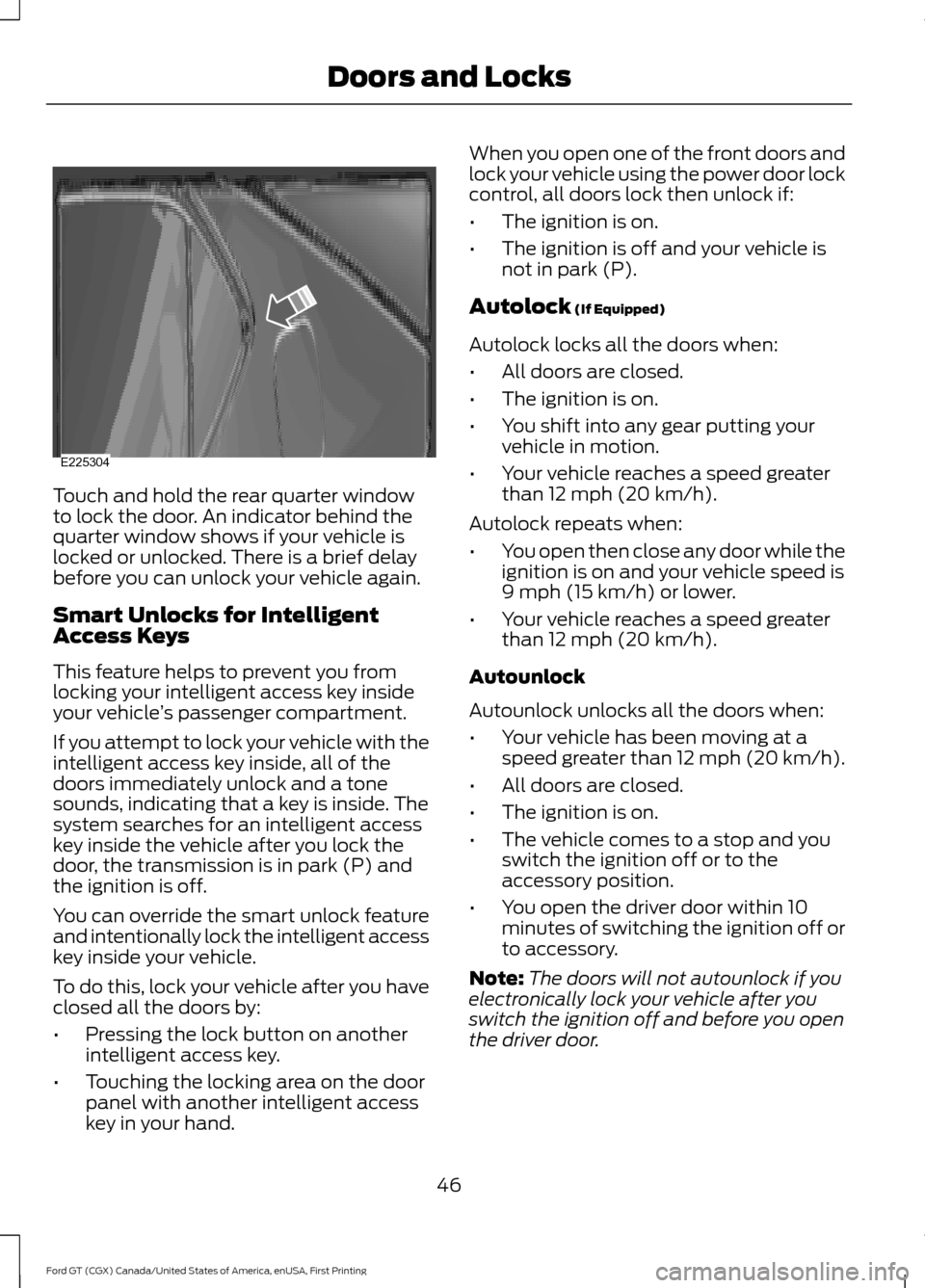
Touch and hold the rear quarter window
to lock the door. An indicator behind the
quarter window shows if your vehicle is
locked or unlocked. There is a brief delay
before you can unlock your vehicle again.
Smart Unlocks for Intelligent
Access Keys
This feature helps to prevent you from
locking your intelligent access key inside
your vehicle
’s passenger compartment.
If you attempt to lock your vehicle with the
intelligent access key inside, all of the
doors immediately unlock and a tone
sounds, indicating that a key is inside. The
system searches for an intelligent access
key inside the vehicle after you lock the
door, the transmission is in park (P) and
the ignition is off.
You can override the smart unlock feature
and intentionally lock the intelligent access
key inside your vehicle.
To do this, lock your vehicle after you have
closed all the doors by:
• Pressing the lock button on another
intelligent access key.
• Touching the locking area on the door
panel with another intelligent access
key in your hand. When you open one of the front doors and
lock your vehicle using the power door lock
control, all doors lock then unlock if:
•
The ignition is on.
• The ignition is off and your vehicle is
not in park (P).
Autolock (If Equipped)
Autolock locks all the doors when:
• All doors are closed.
• The ignition is on.
• You shift into any gear putting your
vehicle in motion.
• Your vehicle reaches a speed greater
than
12 mph (20 km/h).
Autolock repeats when:
• You open then close any door while the
ignition is on and your vehicle speed is
9 mph (15 km/h)
or lower.
• Your vehicle reaches a speed greater
than
12 mph (20 km/h).
Autounlock
Autounlock unlocks all the doors when:
• Your vehicle has been moving at a
speed greater than 12 mph (20 km/h).
• All doors are closed.
• The ignition is on.
• The vehicle comes to a stop and you
switch the ignition off or to the
accessory position.
• You open the driver door within 10
minutes of switching the ignition off or
to accessory.
Note: The doors will not autounlock if you
electronically lock your vehicle after you
switch the ignition off and before you open
the driver door.
46
Ford GT (CGX) Canada/United States of America, enUSA, First Printing Doors and LocksE225304
Page 50 of 313
Enabling or Disabling Autolock and
Autounlock
Note:
You can switch autounlock and
autolock on or off independently of each
other.
Autolock is not configurable in all markets.
If the autolock settings are not available
in your information display, then the
system is not configurable. See General
Information (page 68).
Illuminated Entry
(If Equipped)
The interior lamp illuminates when you
unlock the doors with the remote entry
system.
The illuminated entry system turns off the
lights if:
• The ignition is on.
• You press the remote control lock
button.
• After 25 seconds of illumination.
The light does not turn off if:
• You switch them on with the lamp
control.
• Any door is open.
Illuminated Exit
(If Equipped)
The interior lamp illuminates when all
doors are closed and you switch the
ignition off.
The lamp turns off if all the doors remain
closed and:
• 25 seconds elapse.
• You press the push button ignition
switch.
Battery Saver
If you leave on the courtesy lamps, dome
lamps or headlamps, the battery saver
turns them off 10 minutes after you switch
the ignition off. Accessory Mode Battery Saver for
Intelligent Access Keys
If you leave your vehicle switched on, it
shuts off when it detects a certain amount
of battery drain, or after 45 minutes.
OPENING THE DOORS
Note:
While your vehicle is in motion, the
door release buttons will only function if you
press the button three times in two seconds.
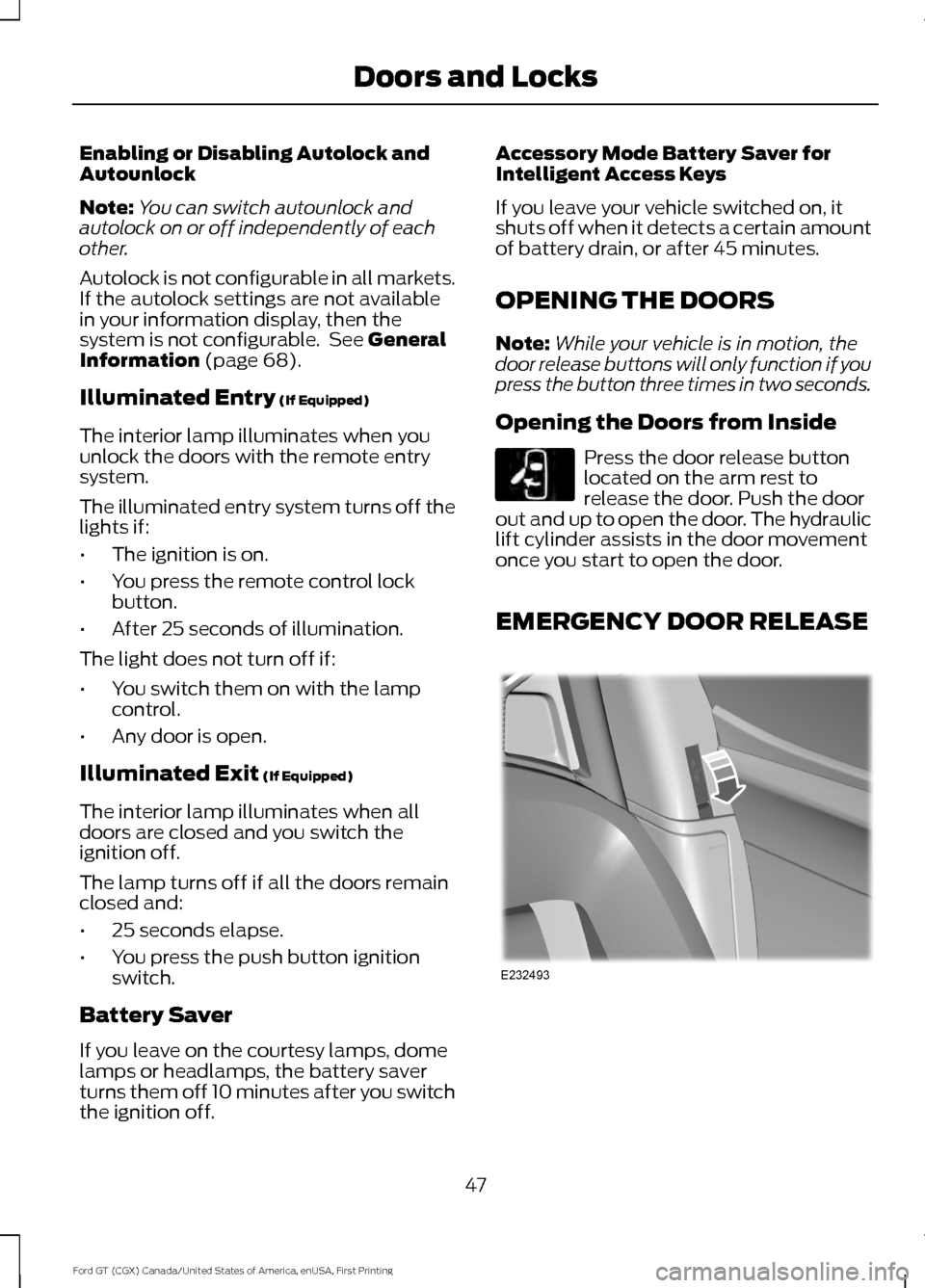
Opening the Doors from Inside Press the door release button
located on the arm rest to
release the door. Push the door
out and up to open the door. The hydraulic
lift cylinder assists in the door movement
once you start to open the door.
EMERGENCY DOOR RELEASE 47
Ford GT (CGX) Canada/United States of America, enUSA, First Printing Doors and LocksE232417 E232493
Page 52 of 313
PASSIVE ANTI-THEFT
SYSTEM
Note:
The system is not compatible with
non-Ford aftermarket remote start systems.
Use of these systems may result in vehicle
starting problems and a loss of security
protection.
Note: Metallic objects, electronic devices
or a second coded key on the same key
chain may cause vehicle starting problems
if they are too close to the key when starting
your vehicle. Prevent these objects from
touching the coded key while starting your
vehicle. Switch the ignition off, move all
objects on the key chain away from the
coded key and restart your vehicle if a
problem occurs.
Note: Do not leave a duplicate coded key
in your vehicle. Always take your keys and
lock all doors when leaving your vehicle.
SecuriLock
The system helps prevent your vehicle
from starting unless you use a coded key
programmed to your vehicle. Using the
wrong key may prevent your vehicle from
starting. A message may appear in the
information display.
If you are unable to start your vehicle with
a correctly coded key, it is not operating
properly. A message may appear in the
information display.
Automatic Arming
Your vehicle arms immediately after
switching the ignition off.
Automatic Disarming
Switching the ignition on with a coded key
disarms your vehicle. Replacement Keys
Note:
Your vehicle comes equipped with
two intelligent access keys.
The intelligent access key functions as a
programmed key that operates the driver
door lock and activates the intelligent
access with push button start system, as
well as a remote control.
If your programmed transmitters are lost
or stolen and you do not have an extra
coded key, contact the Ford GT concierge
to have your Ford GT transported to your
Certified Ford GT Service Dealership to
erase the key codes from your vehicle and
program new coded keys. See About This
Manual (page 5).
Store an extra programmed key away from
your vehicle in a safe place to help prevent
any inconveniences. See your authorized
dealer to purchase additional spare or
replacement keys.
Programming a Spare Intelligent
Access Key
Note: You can program a maximum of four
intelligent access keys to your vehicle.
You must have two previously
programmed intelligent access keys inside
your vehicle and the new unprogrammed
intelligent access keys readily accessible.
See an authorized dealer to have the spare
key programmed if two previously
programmed keys are not available.
Make sure that your vehicle is off before
beginning this procedure. Make sure that
you close all the doors before beginning
and that they remain closed throughout
the procedure. Perform all steps within 30
seconds of starting the sequence. Stop
and wait for at least one minute before
starting again if you perform any steps out
of sequence.
Read and understand the entire procedure
before you begin.
49
Ford GT (CGX) Canada/United States of America, enUSA, First Printing Security
Page 53 of 313
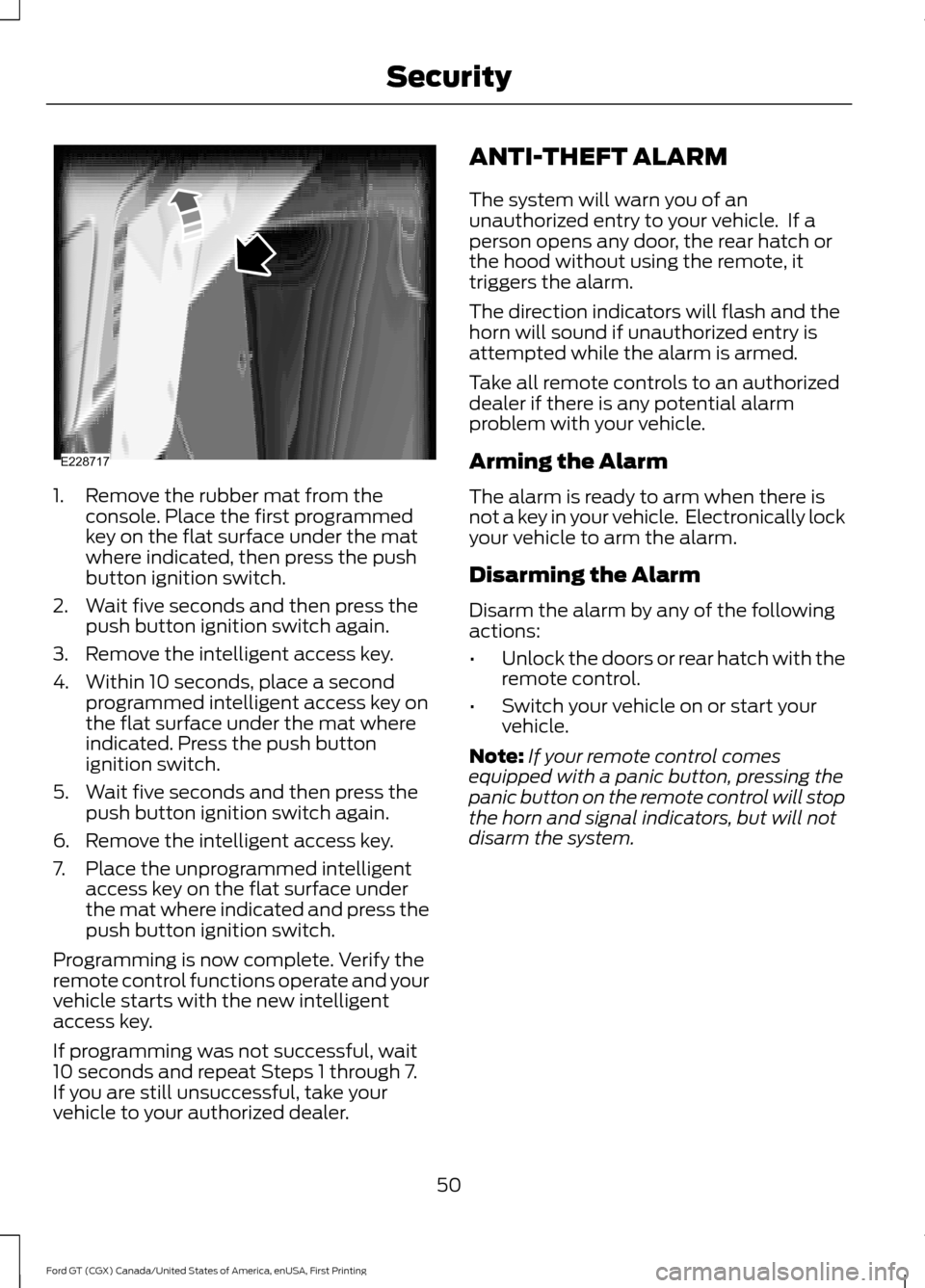
1. Remove the rubber mat from the
console. Place the first programmed
key on the flat surface under the mat
where indicated, then press the push
button ignition switch.
2. Wait five seconds and then press the push button ignition switch again.
3. Remove the intelligent access key.
4. Within 10 seconds, place a second programmed intelligent access key on
the flat surface under the mat where
indicated. Press the push button
ignition switch.
5. Wait five seconds and then press the push button ignition switch again.
6. Remove the intelligent access key.
7. Place the unprogrammed intelligent access key on the flat surface under
the mat where indicated and press the
push button ignition switch.
Programming is now complete. Verify the
remote control functions operate and your
vehicle starts with the new intelligent
access key.
If programming was not successful, wait
10 seconds and repeat Steps 1 through 7.
If you are still unsuccessful, take your
vehicle to your authorized dealer. ANTI-THEFT ALARM
The system will warn you of an
unauthorized entry to your vehicle. If a
person opens any door, the rear hatch or
the hood without using the remote, it
triggers the alarm.
The direction indicators will flash and the
horn will sound if unauthorized entry is
attempted while the alarm is armed.
Take all remote controls to an authorized
dealer if there is any potential alarm
problem with your vehicle.
Arming the Alarm
The alarm is ready to arm when there is
not a key in your vehicle. Electronically lock
your vehicle to arm the alarm.
Disarming the Alarm
Disarm the alarm by any of the following
actions:
•
Unlock the doors or rear hatch with the
remote control.
• Switch your vehicle on or start your
vehicle.
Note: If your remote control comes
equipped with a panic button, pressing the
panic button on the remote control will stop
the horn and signal indicators, but will not
disarm the system.
50
Ford GT (CGX) Canada/United States of America, enUSA, First Printing SecurityE228717
Page 70 of 313
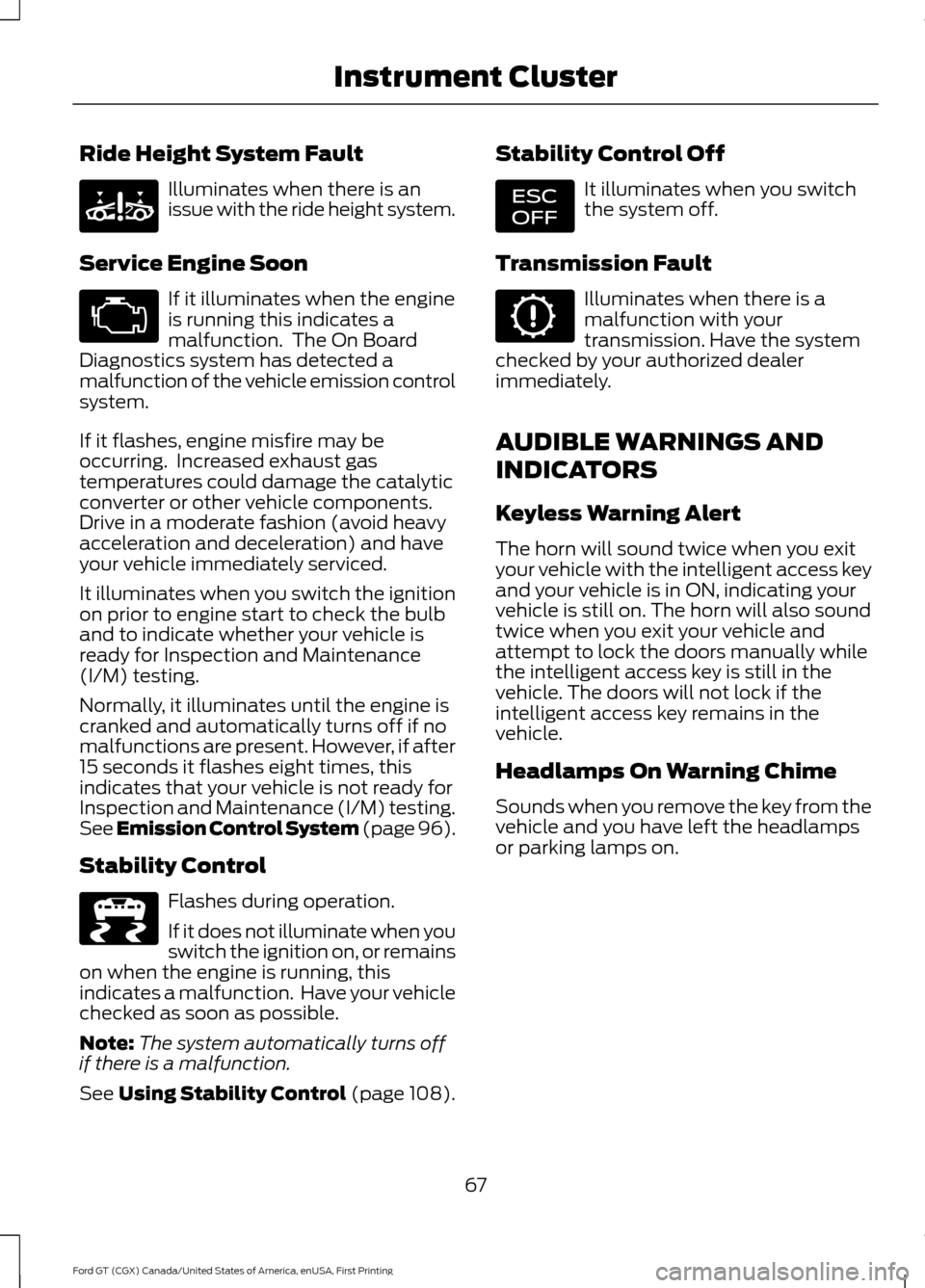
Ride Height System Fault
Illuminates when there is an
issue with the ride height system.
Service Engine Soon If it illuminates when the engine
is running this indicates a
malfunction. The On Board
Diagnostics system has detected a
malfunction of the vehicle emission control
system.
If it flashes, engine misfire may be
occurring. Increased exhaust gas
temperatures could damage the catalytic
converter or other vehicle components.
Drive in a moderate fashion (avoid heavy
acceleration and deceleration) and have
your vehicle immediately serviced.
It illuminates when you switch the ignition
on prior to engine start to check the bulb
and to indicate whether your vehicle is
ready for Inspection and Maintenance
(I/M) testing.
Normally, it illuminates until the engine is
cranked and automatically turns off if no
malfunctions are present. However, if after
15 seconds it flashes eight times, this
indicates that your vehicle is not ready for
Inspection and Maintenance (I/M) testing.
See Emission Control System (page 96).
Stability Control Flashes during operation.
If it does not illuminate when you
switch the ignition on, or remains
on when the engine is running, this
indicates a malfunction. Have your vehicle
checked as soon as possible.
Note: The system automatically turns off
if there is a malfunction.
See Using Stability Control (page 108). Stability Control Off It illuminates when you switch
the system off.
Transmission Fault Illuminates when there is a
malfunction with your
transmission. Have the system
checked by your authorized dealer
immediately.
AUDIBLE WARNINGS AND
INDICATORS
Keyless Warning Alert
The horn will sound twice when you exit
your vehicle with the intelligent access key
and your vehicle is in ON, indicating your
vehicle is still on. The horn will also sound
twice when you exit your vehicle and
attempt to lock the doors manually while
the intelligent access key is still in the
vehicle. The doors will not lock if the
intelligent access key remains in the
vehicle.
Headlamps On Warning Chime
Sounds when you remove the key from the
vehicle and you have left the headlamps
or parking lamps on.
67
Ford GT (CGX) Canada/United States of America, enUSA, First Printing Instrument ClusterE234585 E236447 E236448
Page 76 of 313
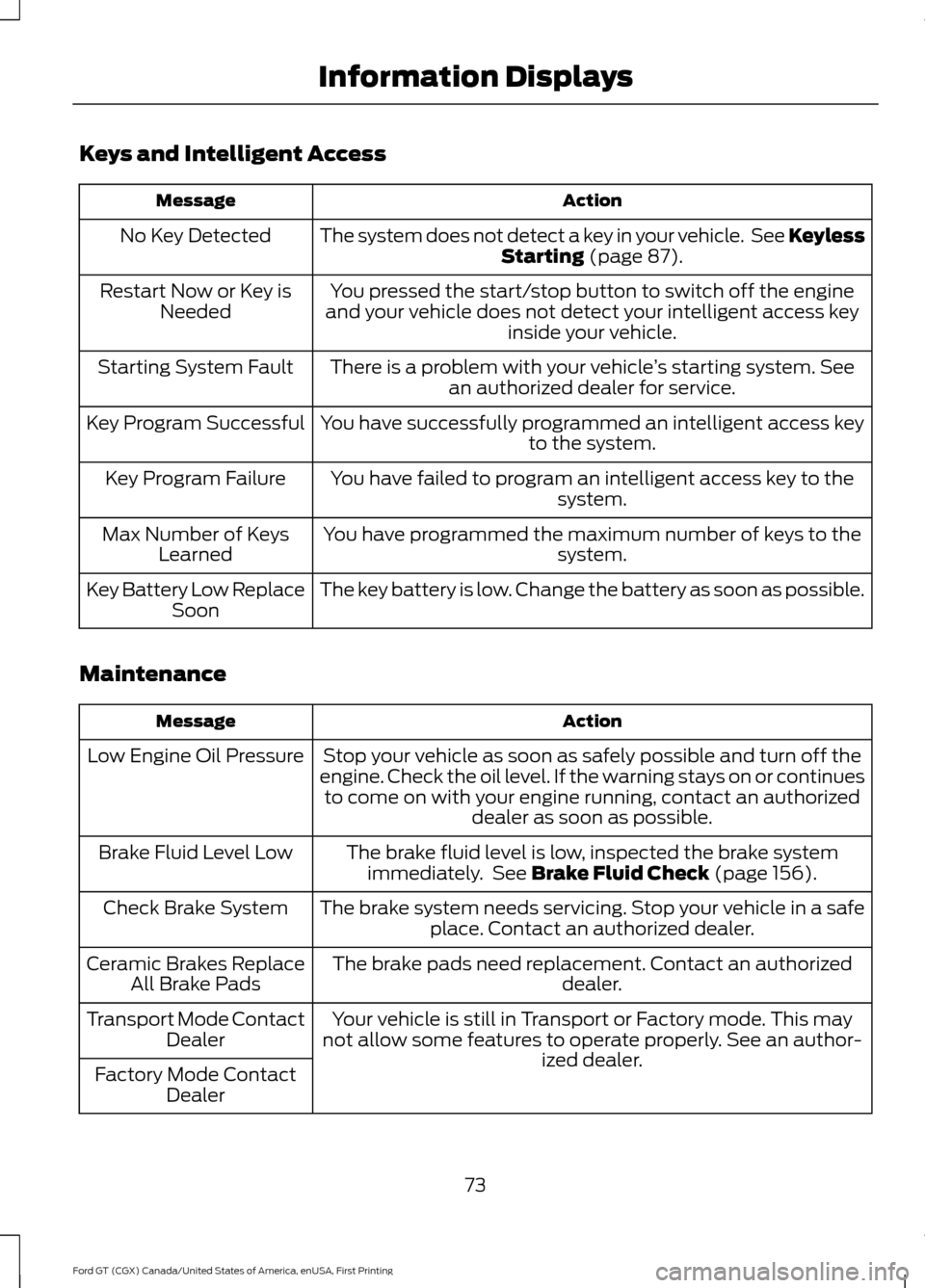
Keys and Intelligent Access
Action
Message
The system does not detect a key in your vehicle. See Keyless Starting (page 87).
No Key Detected
You pressed the start/stop button to switch off the engine
and your vehicle does not detect your intelligent access key inside your vehicle.
Restart Now or Key is
Needed
There is a problem with your vehicle ’s starting system. See
an authorized dealer for service.
Starting System Fault
You have successfully programmed an intelligent access keyto the system.
Key Program Successful
You have failed to program an intelligent access key to thesystem.
Key Program Failure
You have programmed the maximum number of keys to the system.
Max Number of Keys
Learned
The key battery is low. Change the battery as soon as possible.
Key Battery Low Replace
Soon
Maintenance Action
Message
Stop your vehicle as soon as safely possible and turn off the
engine. Check the oil level. If the warning stays on or continues to come on with your engine running, contact an authorized dealer as soon as possible.
Low Engine Oil Pressure
The brake fluid level is low, inspected the brake systemimmediately. See
Brake Fluid Check (page 156).
Brake Fluid Level Low
The brake system needs servicing. Stop your vehicle in a safeplace. Contact an authorized dealer.
Check Brake System
The brake pads need replacement. Contact an authorized dealer.
Ceramic Brakes Replace
All Brake Pads
Your vehicle is still in Transport or Factory mode. This may
not allow some features to operate properly. See an author- ized dealer.
Transport Mode Contact
Dealer
Factory Mode Contact Dealer
73
Ford GT (CGX) Canada/United States of America, enUSA, First Printing Information Displays
Page 90 of 313
GENERAL INFORMATION
WARNINGS
Extended idling at high engine
speeds can produce very high
temperatures in the engine and
exhaust system, creating the risk of fire or
other damage. Do not park, idle or drive your vehicle
on dry grass or other dry ground
cover. The emission system heats up
the engine compartment and exhaust
system, creating the risk of fire. Do not start the engine in a closed
garage or in other enclosed areas.
Exhaust fumes can be toxic. Always
open the garage door before you start the
engine. Exhaust leaks may result in entry of
harmful and potentially lethal fumes
into the passenger compartment. If
you smell exhaust fumes inside your
vehicle, have your vehicle inspected
immediately. Do not drive if you smell
exhaust fumes. If you disconnect the battery, your vehicle
may exhibit some unusual driving
characteristics for approximately 5 mi
(8 km) after you reconnect it. This is
because the engine management system
must realign itself with the engine. You
can disregard any unusual driving
characteristics during this period.
The powertrain control system meets all
Canadian interference-causing equipment
standard requirements regulating the
impulse electrical field or radio noise.
When you start the engine, avoid pressing
the accelerator pedal before and during
operation. Only use the accelerator pedal
when you have difficulty starting the
engine. KEYLESS STARTING
Note:
The keyless starting system may not
function if the key is close to metal objects
or electronic devices such as cellular
phones.
Note: A valid key must be located inside
your vehicle to switch the ignition on and
start the engine.
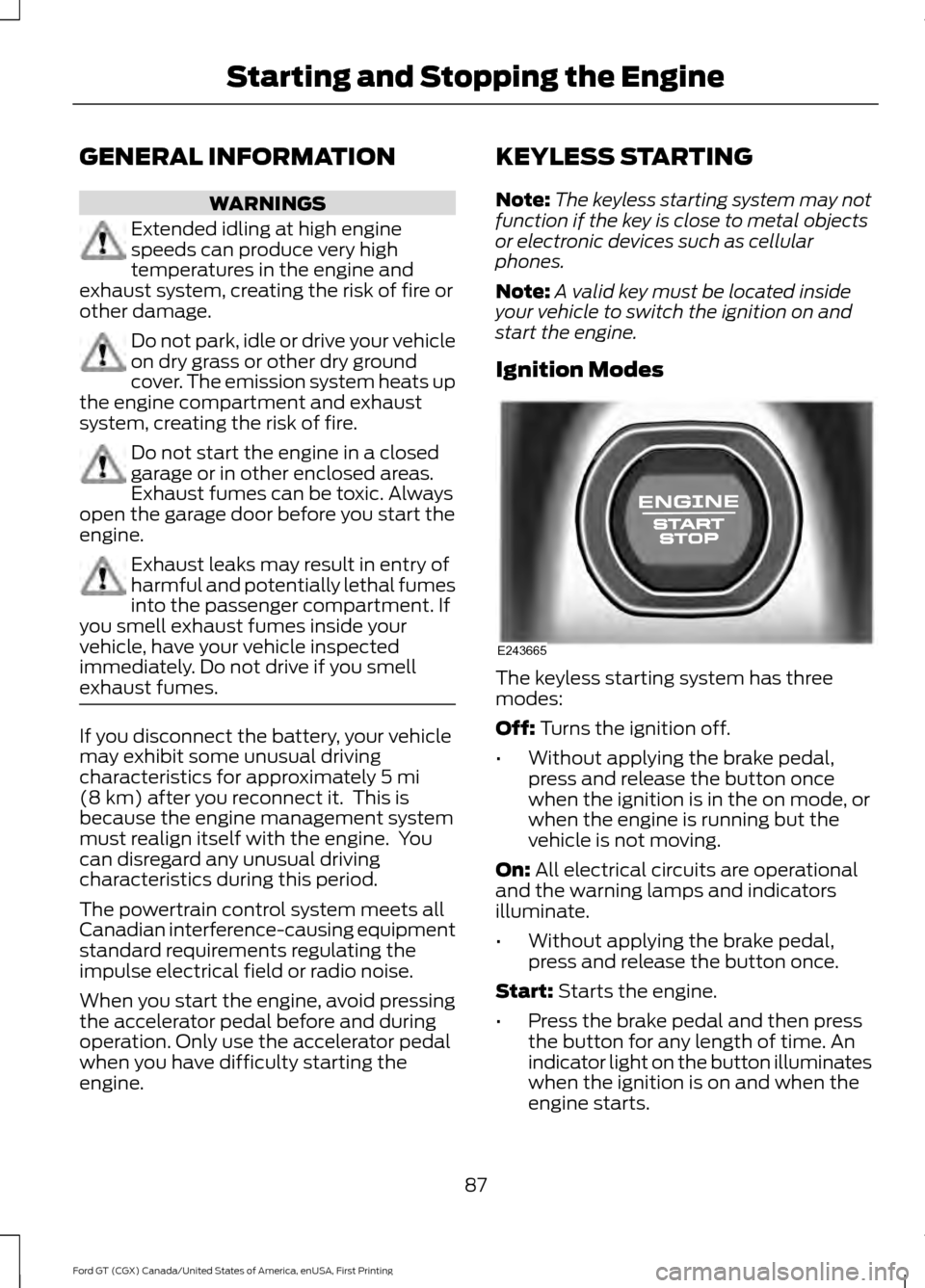
Ignition Modes The keyless starting system has three
modes:
Off:
Turns the ignition off.
• Without applying the brake pedal,
press and release the button once
when the ignition is in the on mode, or
when the engine is running but the
vehicle is not moving.
On:
All electrical circuits are operational
and the warning lamps and indicators
illuminate.
• Without applying the brake pedal,
press and release the button once.
Start:
Starts the engine.
• Press the brake pedal and then press
the button for any length of time. An
indicator light on the button illuminates
when the ignition is on and when the
engine starts.
87
Ford GT (CGX) Canada/United States of America, enUSA, First Printing Starting and Stopping the EngineE243665
Page 91 of 313
STEERING WHEEL LOCK
The steering wheel locks automatically
when you leave your vehicle and take the
intelligent access key with you. The
steering wheel unlocks automatically when
you enter your vehicle with the intelligent
access key.
Note:
You may need to turn the steering
wheel left or right if the wheel does not
unlock completely. This may happen in
certain situations, such as parking your
vehicle on a steep grade.
STARTING THE ENGINE
When you start the engine, the idle speed
increases. This helps to warm up the
engine. If the engine idle speed does not
slow down automatically, have your
vehicle checked by an authorized dealer.
Note: You can crank the engine for a total
of 60 seconds, without the engine starting,
before the starting system temporarily
disables. The 60 seconds does not have to
be all at once. For example, you can crank
the engine three times for 20 seconds each,
without the engine starting, to reach the 60
second time limit. If you exceed the cranking
time, a message appears in the information
display to alert you of this. You cannot
attempt to start the engine for at least 15
minutes. After 15 minutes, you have a 15
second time limit to crank the engine. You
need to wait 60 minutes before you crank
the engine again for 60 seconds.
Before starting the engine, check the
following:
• Make sure all occupants fasten their
seatbelts.
• Make sure the headlamps and
electrical accessories are off. •
Make sure the parking brake is on.
• Move the transmission selector into
park (P).
Note: Do not touch the accelerator pedal.
Note: You must have your intelligent access
key in the vehicle in order to shift the
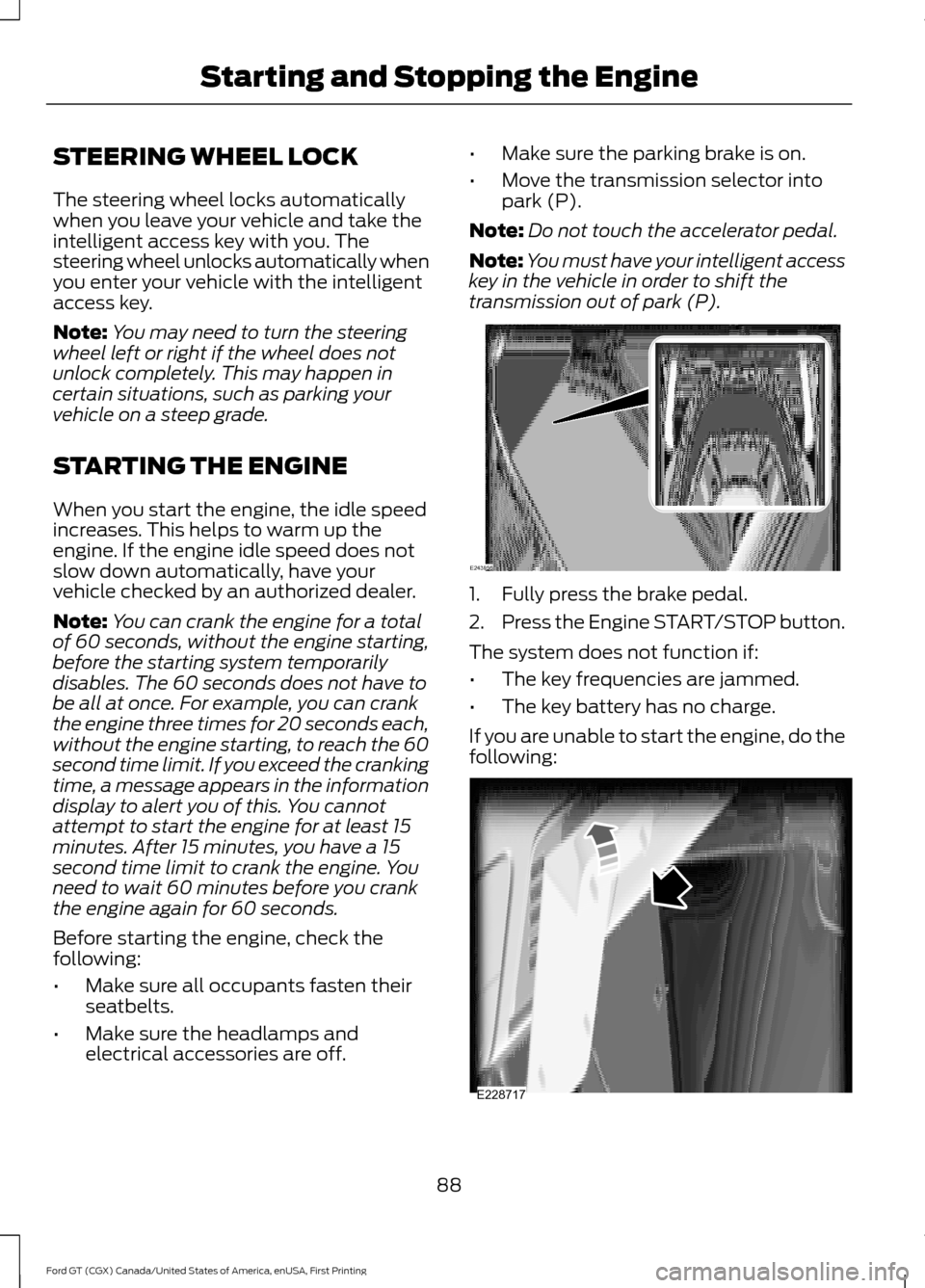
transmission out of park (P). 1. Fully press the brake pedal.
2.
Press the Engine START/STOP button.
The system does not function if:
• The key frequencies are jammed.
• The key battery has no charge.
If you are unable to start the engine, do the
following: 88
Ford GT (CGX) Canada/United States of America, enUSA, First Printing Starting and Stopping the EngineE243956 E228717
Page 92 of 313
1.
Place the key fob under the rubber mat
in front of the Engine START/STOP
button.
2. With the key in this position, press the brake pedal and then the Engine
START/STOP button to switch the
ignition on and start your vehicle.
Note: If the vehicle fails to start, replace
the key fob battery.
Fast Restart
The fast restart feature allows you to
restart the engine within 20 seconds of
switching it off, even if a valid key is not
present.
Within 20 seconds of switching the engine
off, press the brake pedal and press the
START/STOP button. After 20 seconds
have expired, you can no longer restart the
engine without the key present inside your
vehicle.
Once the engine has started, it remains
running until you press the START/STOP
button, even if the system does not detect
a valid key. If you open and close a door
while the engine is running, the system
searches for a valid key. You cannot restart
the engine if the system does not detect a
valid key within 20 seconds.
Failure to Start
If you cannot start the engine after three
attempts, wait 10 seconds and follow this
procedure:
1. Fully press the brake pedal.
2. Move the transmission selector to the park (P) position.
3. Fully press the accelerator pedal and hold it there.
4. Press the START/STOP button once. Stopping the Engine When Your
Vehicle is Stationary
1. Move the transmission selector to the
park (P) position.
2. Press the START/STOP button once.
3. Apply the parking brake.
Note: This switches off the ignition, all
electrical circuits, warning lamps and
indicators.
Stopping the Engine When Your
Vehicle is Moving WARNING
Switching off the engine when the
vehicle is still moving will result in a
loss of brake and steering assistance.
The steering will not lock, but higher effort
will be required. When the ignition is
switched off, some electrical circuits,
including air bags, warning lamps and
indicators may also be off. If the ignition
was turned off accidentally, you can shift
into neutral (N) and re-start the engine. 1. Move the transmission selector to the
neutral position and use the brakes to
bring your vehicle to a safe stop.
2. When your vehicle has stopped, park (P) will engage automatically.
3. Press and hold the START/STOP button for one second, or press it three
times within two seconds.
4. Apply the parking brake.
89
Ford GT (CGX) Canada/United States of America, enUSA, First Printing Starting and Stopping the Engine
Page 100 of 313
an emission control device or prevent it
from working. Information about your
vehicle
’s emission system is on the Vehicle
Emission Control Information Decal
located on or near the engine. This decal
also lists engine displacement.
Please consult your warranty information
for complete details.
On-Board Diagnostics (OBD-II)
Your vehicle has a computer known as the
on-board diagnostics system (OBD-II) that
monitors the engine ’s emission control
system. The system protects the
environment by making sure that your
vehicle continues to meet government
emission standards. The OBD-II system
also assists a service technician in properly
servicing your vehicle. When the service engine soon
indicator illuminates, the OBD-II
system has detected a
malfunction. Temporary malfunctions may
cause the service engine soon indicator to
illuminate. Examples are:
1. Your vehicle has run out of fuel —the
engine may misfire or run poorly.
2. Poor fuel quality or water in the fuel —the engine may misfire or run
poorly.
3. The fuel fill inlet may not have closed properly. See Refueling (page 93).
4. Driving through deep water —the
electrical system may be wet.
You can correct these temporary
malfunctions by filling the fuel tank with
good quality fuel, properly closing the fuel
fill inlet or letting the electrical system dry
out. After three driving cycles without these
or any other temporary malfunctions present, the service engine soon indicator
should stay off the next time you start the
engine. A driving cycle consists of a cold
engine startup followed by mixed city and
highway driving. No additional vehicle
service is required.
If the service engine soon indicator remains
on, have your vehicle serviced at the first
available opportunity. Although some
malfunctions detected by the OBD-II may
not have symptoms that are apparent,
continued driving with the service engine
soon indicator on can result in increased
emissions, lower fuel economy, reduced
engine and transmission smoothness and
lead to more costly repairs.
Readiness for Inspection and
Maintenance (I/M) Testing
Some state and provincial and local
governments may have
Inspection/Maintenance (I/M) programs
to inspect the emission control equipment
on your vehicle. Failure to pass this
inspection could prevent you from getting
a vehicle registration.
If the service engine soon
indicator is on or the bulb does
not work, your vehicle may need
service. See On-Board Diagnostics.
Your vehicle may not pass the I/M test if
the service engine soon indicator is on or
not working properly (bulb is burned out),
or if the OBD-II system has determined
that some of the emission control systems
have not been properly checked. In this
case, the vehicle is not ready for I/M
testing.
If the vehicle ’s engine or transmission has
just been serviced, or the battery has
recently run down or been replaced, the
OBD-II system may indicate that the
vehicle is not ready for I/M testing. To
determine if the vehicle is ready for I/M
testing, turn the ignition key to the on
97
Ford GT (CGX) Canada/United States of America, enUSA, First Printing Fuel and Refueling