ignition FORD GT 2018 Owner's Guide
[x] Cancel search | Manufacturer: FORD, Model Year: 2018, Model line: GT, Model: FORD GT 2018Pages: 325, PDF Size: 6.61 MB
Page 111 of 325
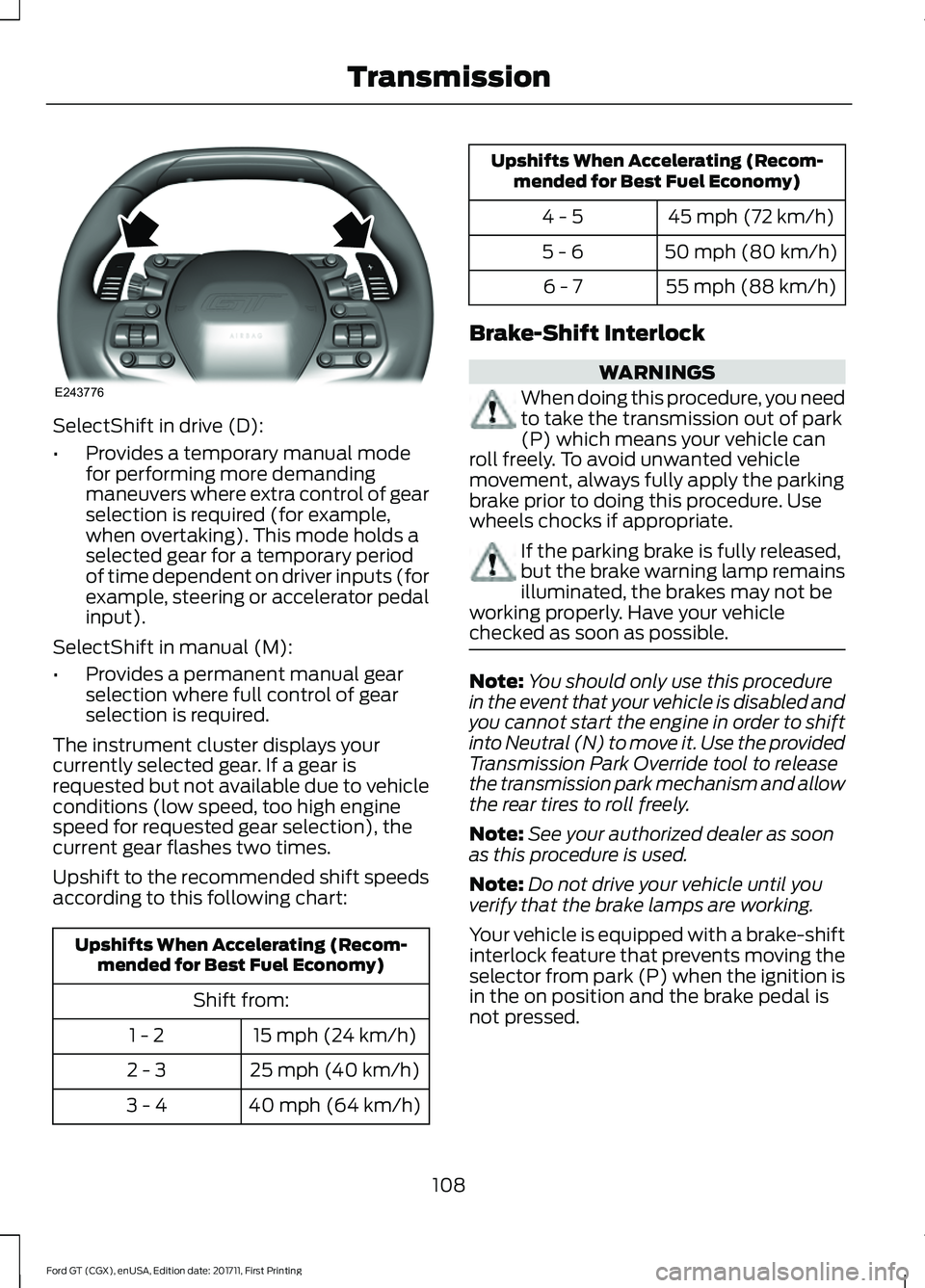
SelectShift in drive (D):
•
Provides a temporary manual mode
for performing more demanding
maneuvers where extra control of gear
selection is required (for example,
when overtaking). This mode holds a
selected gear for a temporary period
of time dependent on driver inputs (for
example, steering or accelerator pedal
input).
SelectShift in manual (M):
• Provides a permanent manual gear
selection where full control of gear
selection is required.
The instrument cluster displays your
currently selected gear. If a gear is
requested but not available due to vehicle
conditions (low speed, too high engine
speed for requested gear selection), the
current gear flashes two times.
Upshift to the recommended shift speeds
according to this following chart: Upshifts When Accelerating (Recom-
mended for Best Fuel Economy)
Shift from:15 mph (24 km/h)
1 - 2
25 mph (40 km/h)
2 - 3
40 mph (64 km/h)
3 - 4 Upshifts When Accelerating (Recom-
mended for Best Fuel Economy)
45 mph (72 km/h)
4 - 5
50 mph (80 km/h)
5 - 6
55 mph (88 km/h)
6 - 7
Brake-Shift Interlock WARNINGS
When doing this procedure, you need
to take the transmission out of park
(P) which means your vehicle can
roll freely. To avoid unwanted vehicle
movement, always fully apply the parking
brake prior to doing this procedure. Use
wheels chocks if appropriate. If the parking brake is fully released,
but the brake warning lamp remains
illuminated, the brakes may not be
working properly. Have your vehicle
checked as soon as possible. Note:
You should only use this procedure
in the event that your vehicle is disabled and
you cannot start the engine in order to shift
into Neutral (N) to move it. Use the provided
Transmission Park Override tool to release
the transmission park mechanism and allow
the rear tires to roll freely.
Note: See your authorized dealer as soon
as this procedure is used.
Note: Do not drive your vehicle until you
verify that the brake lamps are working.
Your vehicle is equipped with a brake-shift
interlock feature that prevents moving the
selector from park (P) when the ignition is
in the on position and the brake pedal is
not pressed.
108
Ford GT (CGX), enUSA, Edition date: 201711, First Printing TransmissionE243776
Page 112 of 325
If you cannot move the selector out of park
(P) position with the ignition in the on
position and the brake pedal pressed, a
malfunction may have occurred. It is
possible that a fuse has blown or your
vehicle
’s brake lamps are not operating
properly. See Fuse Specification Chart
(page 146).
If the fuse is good and the brake lamps are
functioning, then there may be a fault in
the system. To roll the car or to allow the
vehicle to be transported for repair, use the
following procedure to place the
transmission into neutral (N) manually. To
place the transmission into neutral (N) in
the event of a battery failure, or other
electrical fault that prevents the shifter
from working, use this procedure.
Manually Placing the Transmission in
Park Override
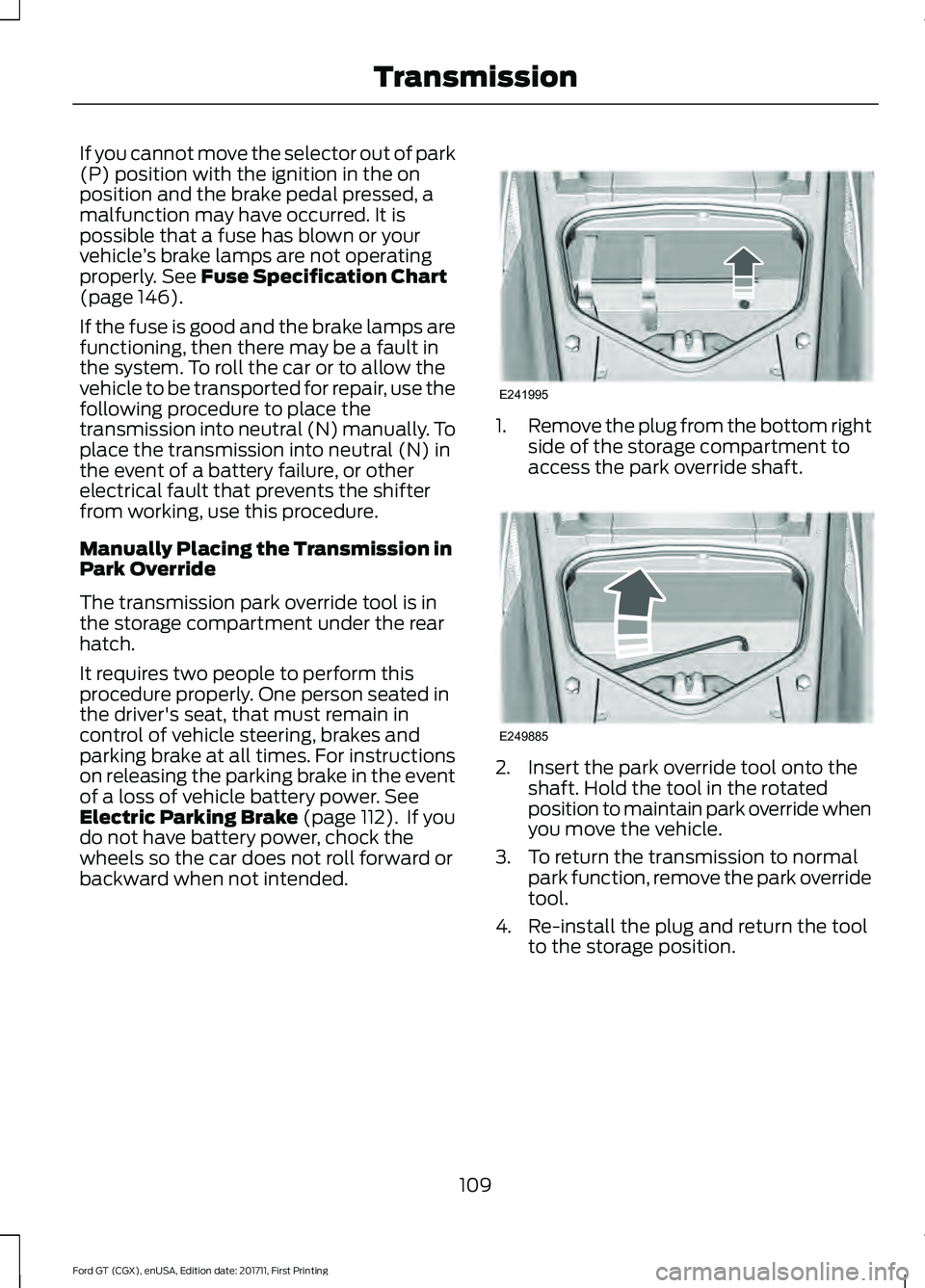
The transmission park override tool is in
the storage compartment under the rear
hatch.
It requires two people to perform this
procedure properly. One person seated in
the driver's seat, that must remain in
control of vehicle steering, brakes and
parking brake at all times. For instructions
on releasing the parking brake in the event
of a loss of vehicle battery power.
See
Electric Parking Brake (page 112). If you
do not have battery power, chock the
wheels so the car does not roll forward or
backward when not intended. 1.
Remove the plug from the bottom right
side of the storage compartment to
access the park override shaft. 2. Insert the park override tool onto the
shaft. Hold the tool in the rotated
position to maintain park override when
you move the vehicle.
3. To return the transmission to normal park function, remove the park override
tool.
4. Re-install the plug and return the tool to the storage position.
109
Ford GT (CGX), enUSA, Edition date: 201711, First Printing TransmissionE241995 E249885
Page 114 of 325
GENERAL INFORMATION
Note:
Occasional brake noise is normal. If
a metal-to-metal, continuous grinding or
continuous squeal sound is present, the
brake linings may be worn-out. Have the
system checked by an authorized dealer. If
your vehicle has continuous vibration or
shudder in the steering wheel while braking,
have it checked by an authorized dealer.
Note: Brake dust may accumulate on the
wheels, even under normal driving
conditions. Some dust is inevitable as the
brakes wear and does not contribute to
brake noise. See Cleaning the Wheels
(page 177). See
Warning Lamps and
Indicators (page 65).
Wet brakes result in reduced braking
efficiency. Gently press the brake pedal a
few times after washing the car.
Carbon Ceramic Brake Discs
Your vehicle has carbon ceramic brake
discs. When cleaning your wheels and tires,
use care not to get any wheel cleaner or
tire dressing on the brake discs. This lamp illuminates when your
brakes pads are worn and
require replacement. See an
authorized dealer for replacement.
Brake Over Accelerator
In the event the accelerator pedal
becomes stuck or entrapped, apply steady
and firm pressure to the brake pedal to
slow the vehicle and reduce engine power.
If you experience this condition, apply the
brakes and bring your vehicle to a safe stop. Move the transmission to park (P),
switch the engine off and apply the parking
brake. Inspect the accelerator pedal for
any interferences. If none are found and
the condition persists, have your vehicle
towed to the nearest authorized dealer.
Brake Assist
Brake assist detects when you brake
rapidly by measuring the rate at which you
press the brake pedal. It provides
maximum braking efficiency as long as you
press the pedal, and can reduce stopping
distances in critical situations.
Anti-lock Brake System
This system helps you maintain steering
control during emergency stops by keeping
the brakes from locking.
This lamp momentarily
illuminates when you switch the
ignition on. If the light does not
illuminate during start up, remains on or
flashes, the system may be disabled. Have
the system checked by an authorized
dealer. If the anti-lock brake system is
disabled, normal braking is still effective. If the brake warning lamp
remains illuminated after you
release the parking brake, have
the system checked by an authorized
dealer.
HINTS ON DRIVING WITH
ANTI-LOCK BRAKES
The anti-lock braking system does not
eliminate the risks when:
• You drive too closely to the vehicle in
front of you.
• Your vehicle is hydroplaning.
• You take corners too fast.
• The road surface is poor.
111
Ford GT (CGX), enUSA, Edition date: 201711, First Printing BrakesE138644 E269429 E269429
Page 115 of 325
Note:
If the system activates, the brake
pedal may pulse and may travel further.
Maintain pressure on the brake pedal. You
may also hear a noise from the system. This
is normal.
ELECTRIC PARKING BRAKE WARNING
Always set the parking brake and
leave your vehicle with the
transmission in park (P).
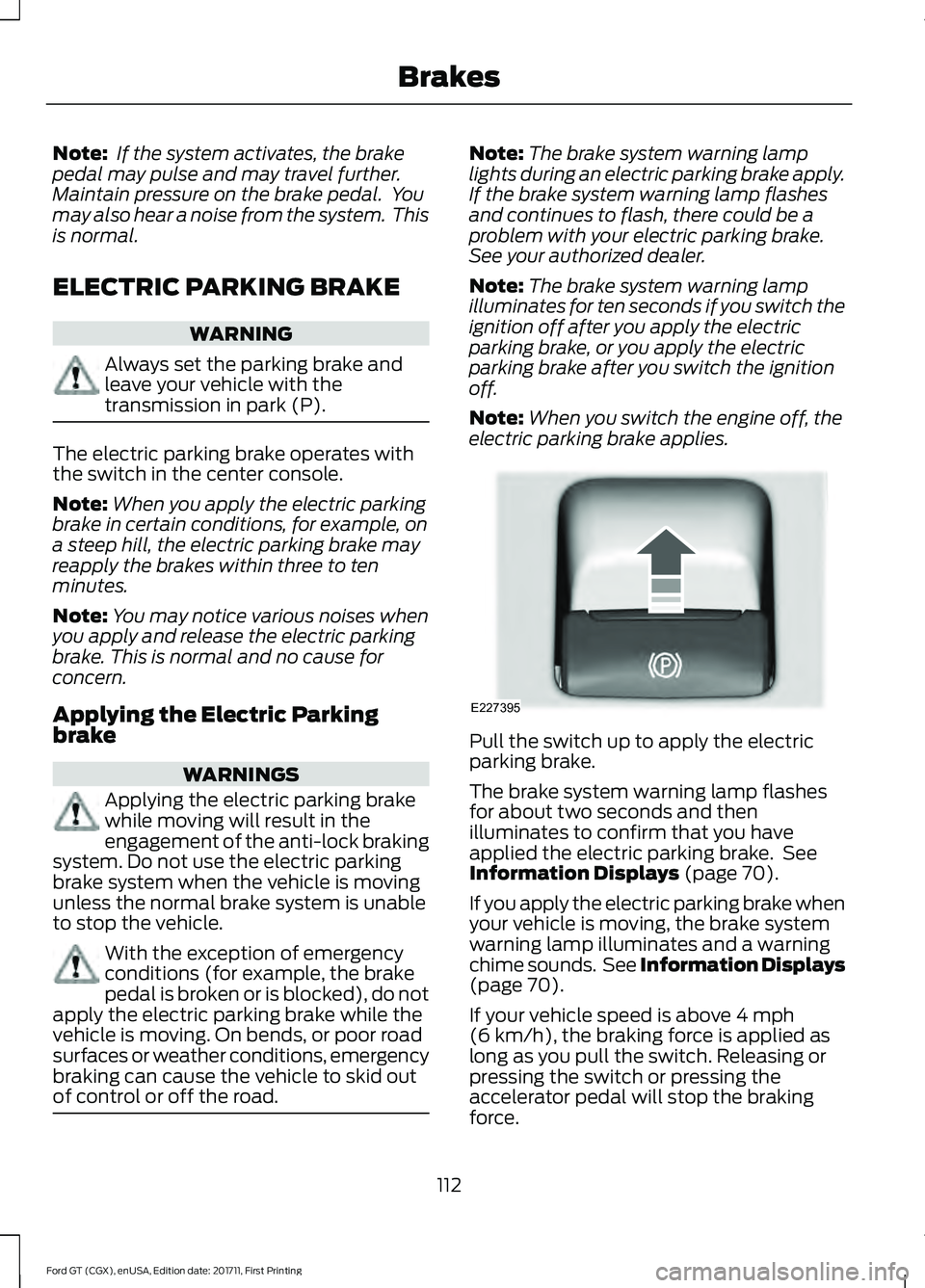
The electric parking brake operates with
the switch in the center console.
Note:
When you apply the electric parking
brake in certain conditions, for example, on
a steep hill, the electric parking brake may
reapply the brakes within three to ten
minutes.
Note: You may notice various noises when
you apply and release the electric parking
brake. This is normal and no cause for
concern.
Applying the Electric Parking
brake WARNINGS
Applying the electric parking brake
while moving will result in the
engagement of the anti-lock braking
system. Do not use the electric parking
brake system when the vehicle is moving
unless the normal brake system is unable
to stop the vehicle. With the exception of emergency
conditions (for example, the brake
pedal is broken or is blocked), do not
apply the electric parking brake while the
vehicle is moving. On bends, or poor road
surfaces or weather conditions, emergency
braking can cause the vehicle to skid out
of control or off the road. Note:
The brake system warning lamp
lights during an electric parking brake apply.
If the brake system warning lamp flashes
and continues to flash, there could be a
problem with your electric parking brake.
See your authorized dealer.
Note: The brake system warning lamp
illuminates for ten seconds if you switch the
ignition off after you apply the electric
parking brake, or you apply the electric
parking brake after you switch the ignition
off.
Note: When you switch the engine off, the
electric parking brake applies. Pull the switch up to apply the electric
parking brake.
The brake system warning lamp flashes
for about two seconds and then
illuminates to confirm that you have
applied the electric parking brake. See
Information Displays (page 70).
If you apply the electric parking brake when
your vehicle is moving, the brake system
warning lamp illuminates and a warning
chime sounds. See Information Displays
(page
70).
If your vehicle speed is above
4 mph
(6 km/h), the braking force is applied as
long as you pull the switch. Releasing or
pressing the switch or pressing the
accelerator pedal will stop the braking
force.
112
Ford GT (CGX), enUSA, Edition date: 201711, First Printing BrakesE227395
Page 116 of 325
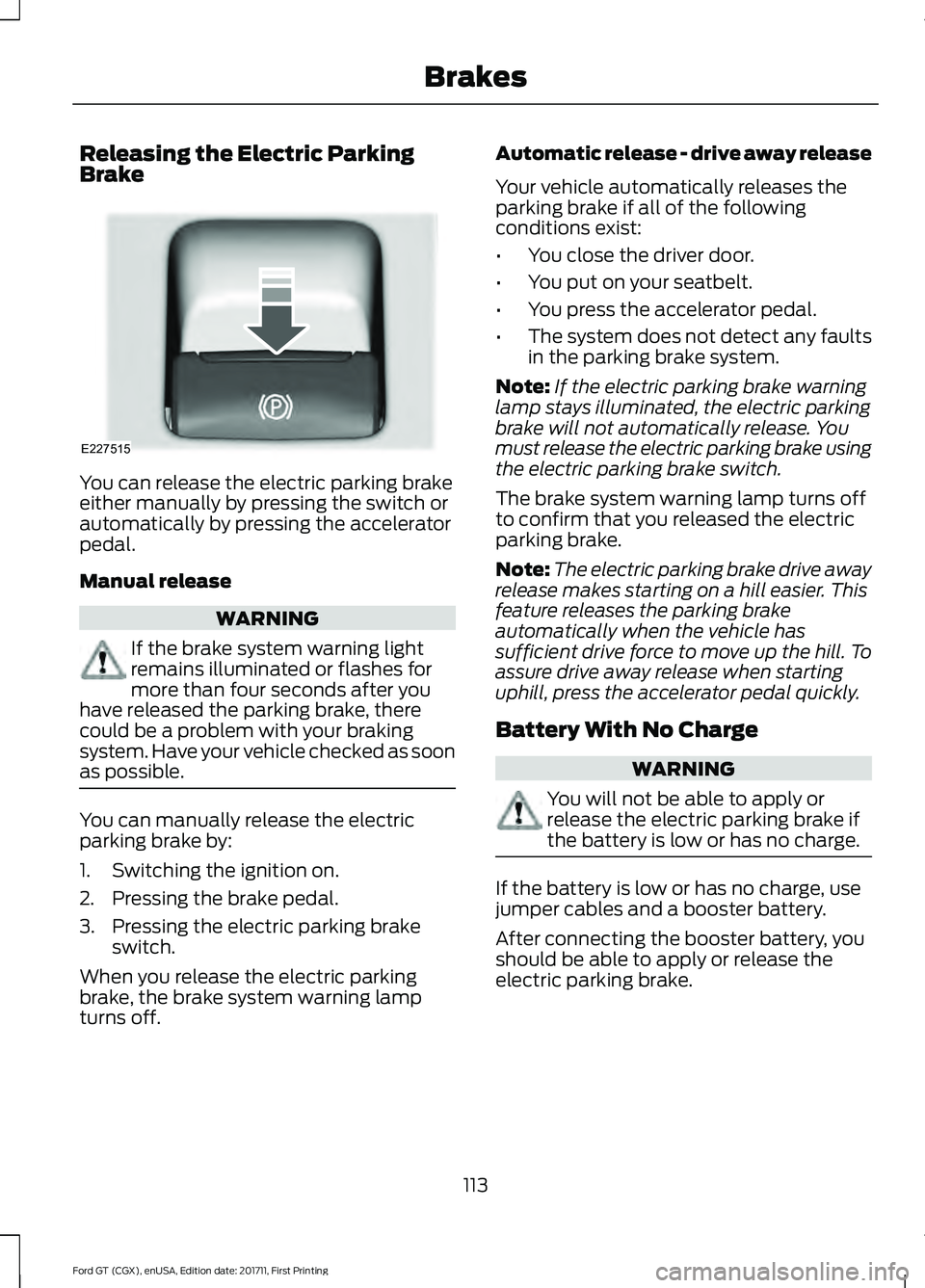
Releasing the Electric Parking
Brake
You can release the electric parking brake
either manually by pressing the switch or
automatically by pressing the accelerator
pedal.
Manual release
WARNING
If the brake system warning light
remains illuminated or flashes for
more than four seconds after you
have released the parking brake, there
could be a problem with your braking
system. Have your vehicle checked as soon
as possible. You can manually release the electric
parking brake by:
1. Switching the ignition on.
2. Pressing the brake pedal.
3. Pressing the electric parking brake
switch.
When you release the electric parking
brake, the brake system warning lamp
turns off. Automatic release - drive away release
Your vehicle automatically releases the
parking brake if all of the following
conditions exist:
•
You close the driver door.
• You put on your seatbelt.
• You press the accelerator pedal.
• The system does not detect any faults
in the parking brake system.
Note: If the electric parking brake warning
lamp stays illuminated, the electric parking
brake will not automatically release. You
must release the electric parking brake using
the electric parking brake switch.
The brake system warning lamp turns off
to confirm that you released the electric
parking brake.
Note: The electric parking brake drive away
release makes starting on a hill easier. This
feature releases the parking brake
automatically when the vehicle has
sufficient drive force to move up the hill. To
assure drive away release when starting
uphill, press the accelerator pedal quickly.
Battery With No Charge WARNING
You will not be able to apply or
release the electric parking brake if
the battery is low or has no charge.
If the battery is low or has no charge, use
jumper cables and a booster battery.
After connecting the booster battery, you
should be able to apply or release the
electric parking brake.
113
Ford GT (CGX), enUSA, Edition date: 201711, First Printing BrakesE227515
Page 118 of 325
PRINCIPLE OF OPERATION
WARNINGS
Vehicle modifications involving
braking system, aftermarket roof
racks, suspension, steering system,
tire construction and wheel and tire size
may change the handling characteristics
of your vehicle and may adversely affect
the performance of the electronic stability
control system. In addition, installing any
stereo loudspeakers may interfere with
and adversely affect the electronic stability
control system. Install any aftermarket
stereo loudspeaker as far as possible from
the front center console, the tunnel, and
the front seats in order to minimize the risk
of interfering with the electronic stability
control sensors. Reducing the
effectiveness of the electronic stability
control system could lead to an increased
risk of loss of vehicle control, vehicle
rollover, personal injury and death. Remember that even advanced
technology cannot defy the laws of
physics. It's always possible to lose
control of a vehicle due to inappropriate
driver input for the conditions. Aggressive
driving on any road condition can cause
you to lose control of your vehicle
increasing the risk of personal injury or
property damage. Activation of the
electronic stability control system is an
indication that at least some of the tires
have exceeded their ability to grip the road;
this could reduce the operator's ability to
control the vehicle potentially resulting in
a loss of vehicle control, vehicle rollover,
personal injury and death. If your electronic
stability control system activates, SLOW
DOWN. WARNINGS
The stability and traction control
light illuminates steadily if the
system detects a failure. Make sure
you did not manually disable the traction
control system using the information
display controls or the switch. If the
stability control and traction control light
is still illuminating steadily, have the
system serviced by an authorized dealer
immediately. Operating your vehicle with
the traction control disabled could lead to
an increased risk of loss of vehicle control,
vehicle rollover, personal injury and death. The stability and traction control systems
help you to avoid drive wheel spin and loss
of traction. The system automatically
turns on each time you switch the ignition
on.
If a fault occurs in either the stability
control or the traction control system, you
may experience the following conditions:
•
The stability and traction control light
illuminates steadily.
• The stability control and traction
control systems do not enhance your
vehicle's ability to maintain traction of
the wheels.
If a driving condition activates either the
stability control or the traction control
system you may experience the following
conditions:
• The stability and traction control light
flashes.
• Your vehicle slows down.
• Reduced engine power.
• A vibration in the brake pedal.
• The brake pedal is stiffer than usual.
• If the driving condition is severe and
your foot is not on the brake, the brake
pedal may move as the system applies
higher brake force.
115
Ford GT (CGX), enUSA, Edition date: 201711, First Printing Stability Control
Page 119 of 325
The stability and traction control systems
have several features built into it to help
you maintain control of your vehicle:
AdvanceTrac
™ Electronic
Stability Control
The system enhances your vehicle ’s ability
to prevent skids or lateral slides by
applying brakes to one or more of the
wheels individually and, if necessary,
reducing engine power.
Traction Control
The system enhances your vehicle ’s ability
to maintain traction of the wheels by
detecting and controlling wheel spin.
Traction control settings on your vehicle
are integrated into the AdvanceTrac
Stability Control system. USING STABILITY CONTROL
AdvanceTrac
™ Electronic
Stability Control
The system automatically turns on each
time you switch the ignition on. You can
also use the stability control button on the
center console to adjust the operation of
the AdvanceTrac stability control system.
AdvanceTrac electronic stability control is
disabled when the transmission is in
reverse (R).
The amount of change you can make to
the AdvanceTrac stability control system
depends on the Drive Mode you have
selected.
The following chart describes how much you can change the functionality of
stability control and traction control in each Drive Mode: How to Select
Operation
Available Setting(s)
Drive Mode
No input required.
Normal.
On.
Normal, Wet and
V-Max.
No input required.
Normal.
On.
Sport and Track. Press the ESC
button once.
Stability control is
reduced, traction
control remains on.
Performance.
Press the ESC
button twice within 0.5 seconds.
Stability control is
reduced, traction
control is disabled.
Performance+.
Press the ESCbutton for 5 seconds.
Stability and traction
control is disabled.
Off.
If the stability or traction control system
has been reduced or disabled, press the
stability and traction control button once
to return to the normal on setting. Note:
Do not use Track or V-Max modes on
public roadways.
Note: Messages appear in the instrument
cluster when you make changes to the
AdvanceTrac system.
116
Ford GT (CGX), enUSA, Edition date: 201711, First Printing Stability Control
Page 124 of 325
PRINCIPLE OF OPERATION
Cruise control lets you maintain a set
speed without keeping your foot on the
accelerator pedal. You can use cruise
control when your vehicle speed is greater
than 20 mph (30 km/h).
USING CRUISE CONTROL WARNINGS
Do not use cruise control on winding
roads, in heavy traffic or when the
road surface is slippery. This could
result in loss of vehicle control, serious
injury or death. When you are going downhill, your
vehicle speed could increase above
the set speed. The system does not
apply the brakes. Note:
Cruise control disengages if the
vehicle speed decreases more than 10 mph
(16 km/h) below the set speed when driving
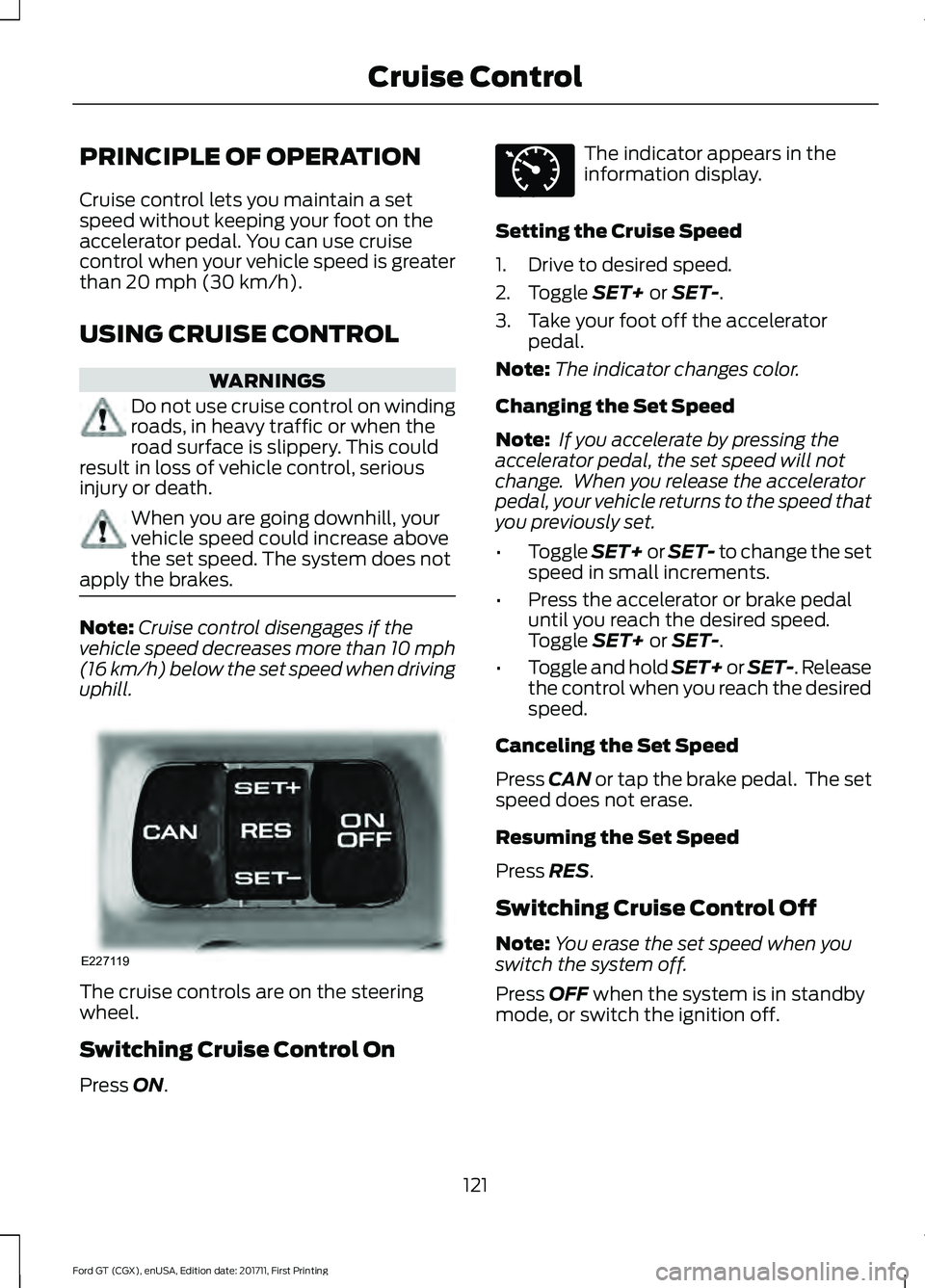
uphill. The cruise controls are on the steering
wheel.
Switching Cruise Control On
Press
ON. The indicator appears in the
information display.
Setting the Cruise Speed
1. Drive to desired speed.
2. Toggle
SET+ or SET-.
3. Take your foot off the accelerator pedal.
Note: The indicator changes color.
Changing the Set Speed
Note: If you accelerate by pressing the
accelerator pedal, the set speed will not
change. When you release the accelerator
pedal, your vehicle returns to the speed that
you previously set.
• Toggle
SET+ or SET- to change the set
speed in small increments.
• Press the accelerator or brake pedal
until you reach the desired speed.
Toggle
SET+ or SET-.
• Toggle and hold SET+ or SET-. Release
the control when you reach the desired
speed.
Canceling the Set Speed
Press
CAN or tap the brake pedal. The set
speed does not erase.
Resuming the Set Speed
Press
RES.
Switching Cruise Control Off
Note: You erase the set speed when you
switch the system off.
Press
OFF when the system is in standby
mode, or switch the ignition off.
121
Ford GT (CGX), enUSA, Edition date: 201711, First Printing Cruise ControlE227119 E71340
Page 139 of 325
ROADSIDE ASSISTANCE
Vehicles Sold in the United States:
Getting Roadside Assistance
To fully assist you should you have a
vehicle concern, Ford Motor Company
offers a complimentary roadside
assistance program. This program is
separate from the New Vehicle Limited
Warranty.
The service is available:
•
24 hours a day, seven days a week.
• The coverage period is three years from
the date of purchase.
Roadside Assistance covers:
• Assistance with a flat tire.
• Battery jump start.
• Lock-out assistance (key replacement
cost is the customer's responsibility).
• Assistance if your vehicle runs out of
fuel.
• Winch out — available if your vehicle is
stuck.
• Towing — Ford dealership or
independent service contractors, if not
prohibited by state, local or municipal
law, shall tow your vehicle to the
nearest Certified Ford GT Dealership.
Vehicles Sold in the United States:
Using Roadside Assistance
United States Ford GT customers who
require Roadside Assistance, call the Ford
GT Concierge at 800-210-5795.
If you need to arrange roadside assistance
for yourself, Ford Motor Company
reimburses a reasonable amount for
towing to the nearest authorized
dealership. To obtain reimbursement
information, contact the Ford GT Concierge
at 800-210-5795. For assistance outside of the United
States, refer to the complete list of Ford
GT Concierge phone numbers. See About
This Manual (page 5).
HAZARD FLASHERS
Note: The hazard flashers operate when
the ignition is in any position. If used when
the vehicle is not running, the battery loses
charge. As a result, there may be insufficient
power to restart your vehicle. The hazard flasher control is on
the floor console. Use your
hazard flashers when your
vehicle is creating a safety hazard for other
motorists.
• Press the flasher control and all front
and rear direction indicators flash.
• Press the button again to switch them
off.
FUEL SHUTOFF WARNING
If your vehicle has been involved in a
crash, have the fuel system checked.
Failure to follow this instruction
could result in fire, personal injury or death. Note:
When you try to restart your vehicle
after a fuel shutoff, the vehicle makes sure
that various systems are safe to restart.
Once the vehicle determines the systems
are safe, then the vehicle allows you to
restart.
Note: In the event that your vehicle does
not restart after your third attempt, contact
a qualified technician.
The fuel pump shutoff stops the flow of
fuel to the engine in the event of a
moderate to severe crash. Not every
impact causes a shutoff.
136
Ford GT (CGX), enUSA, Edition date: 201711, First Printing Roadside EmergenciesE142663
Page 177 of 325
Raising the Rear Wing
For routine cleaning, raise the wing.
Using the information display select the
following:
1. Rear wing deployment.
2. Select Raised.
After you have cleaned your vehicle, to
return the wing to the lowered position you
must drive the car at 15 mph (25 km/h) or
above. The wing will return to the lowered
position.
Note:
You cannot lower the wing when your
vehicle is stationary.
Exterior Plastic Parts
For routine cleaning we recommend
Motorcraft® Detail Wash. If tar or grease
spots are present, we recommend
Motorcraft® Bug and Tar Remover.
Under Hood
For removing black rubber marks from
under the hood we recommend
Motorcraft® Wheel and Tire Cleaner or
Motorcraft® Bug and Tar Remover.
WAXING
Note: If your vehicle has a matte paint
finish, do not wax your vehicle.
Regular waxing is necessary to protect your
car's paint from the elements. We
recommend that you wash and wax the
painted surface once or twice a year.
When washing and waxing, park your
vehicle in a shaded area out of direct
sunlight. Always wash your vehicle before
applying wax.
• Use a quality wax that does not contain
abrasives.
• Follow the manufacturer ’s instructions
to apply and remove the wax. •
Apply a small amount of wax in a
back-and-forth motion, not in circles.
• Do not allow wax to come in contact
with any non-body (low-gloss black)
colored trim. The wax will discolor or
stain the parts over time.
• Do not apply wax to glass areas.
• After waxing, your car's paint should
feel smooth, and be free of streaks and
smudges.
CLEANING THE ENGINE
Engines are more efficient when they are
clean because grease and dirt buildup keep
the engine warmer than normal.
When washing:
• Do not spray a hot engine with cold
water to avoid cracking the engine
block or other engine components.
• Spray Motorcraft® Engine Shampoo
and Degreaser on all parts that require
cleaning and pressure rinse clean. In
Canada, use Motorcraft Engine
Shampoo.
• Never wash or rinse the engine while it
is hot or running; water in the running
engine may cause internal damage.
• Never wash or rinse any ignition coil,
spark plug wire or spark plug well, or
the area in and around these locations.
• Never spray water on electrical
components such as modules,
connectors and fuse boxes. Cover all
electrical components before cleaning
to prevent water damage.
174
Ford GT (CGX), enUSA, Edition date: 201711, First Printing Vehicle Care