instrument cluster FORD GT 2019 User Guide
[x] Cancel search | Manufacturer: FORD, Model Year: 2019, Model line: GT, Model: FORD GT 2019Pages: 321, PDF Size: 5.24 MB
Page 70 of 321
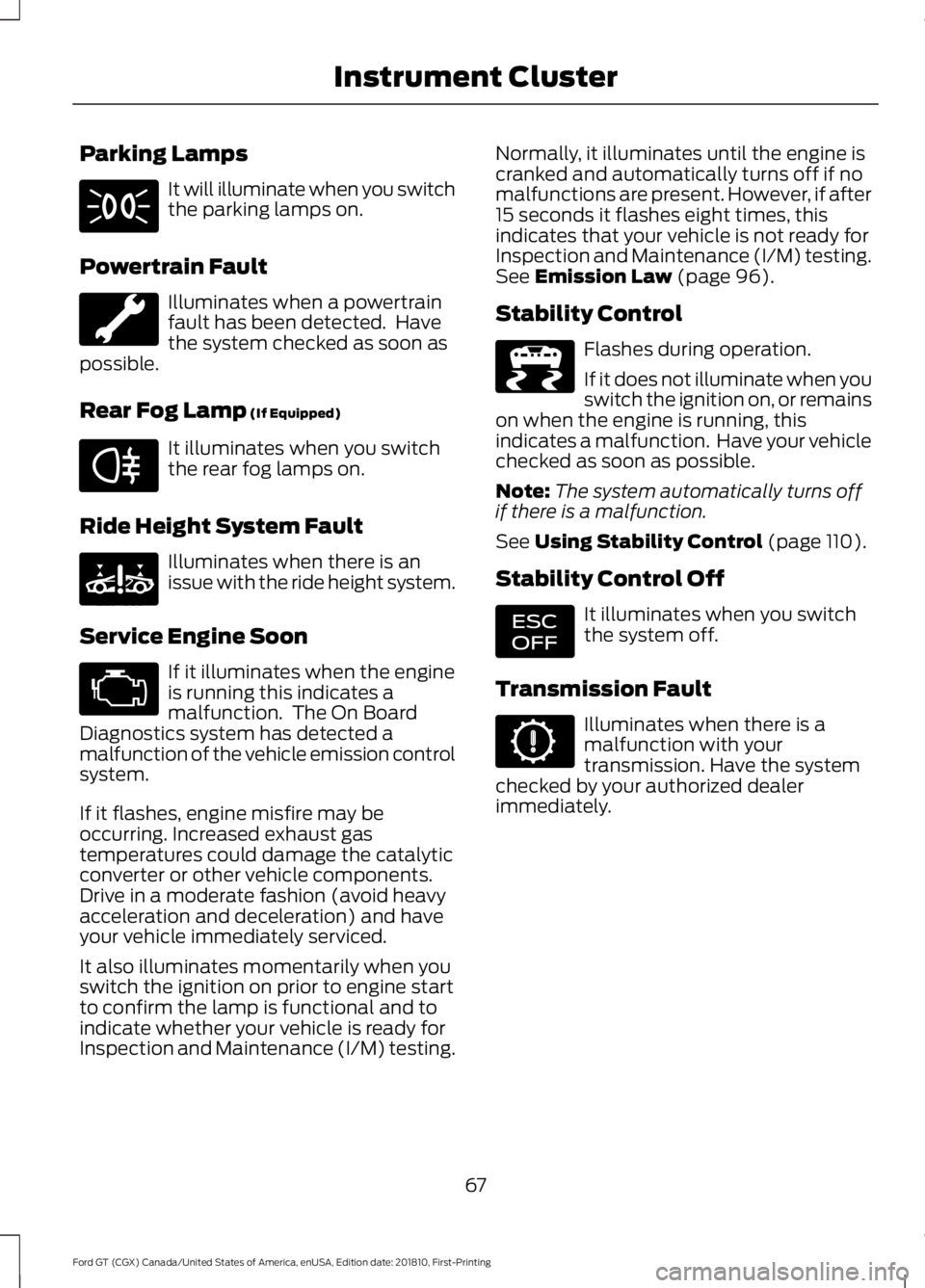
Parking Lamps
It will illuminate when you switch
the parking lamps on.
Powertrain Fault Illuminates when a powertrain
fault has been detected. Have
the system checked as soon as
possible.
Rear Fog Lamp (If Equipped) It illuminates when you switch
the rear fog lamps on.
Ride Height System Fault Illuminates when there is an
issue with the ride height system.
Service Engine Soon If it illuminates when the engine
is running this indicates a
malfunction. The On Board
Diagnostics system has detected a
malfunction of the vehicle emission control
system.
If it flashes, engine misfire may be
occurring. Increased exhaust gas
temperatures could damage the catalytic
converter or other vehicle components.
Drive in a moderate fashion (avoid heavy
acceleration and deceleration) and have
your vehicle immediately serviced.
It also illuminates momentarily when you
switch the ignition on prior to engine start
to confirm the lamp is functional and to
indicate whether your vehicle is ready for
Inspection and Maintenance (I/M) testing. Normally, it illuminates until the engine is
cranked and automatically turns off if no
malfunctions are present. However, if after
15 seconds it flashes eight times, this
indicates that your vehicle is not ready for
Inspection and Maintenance (I/M) testing.
See
Emission Law (page 96).
Stability Control Flashes during operation.
If it does not illuminate when you
switch the ignition on, or remains
on when the engine is running, this
indicates a malfunction. Have your vehicle
checked as soon as possible.
Note: The system automatically turns off
if there is a malfunction.
See
Using Stability Control (page 110).
Stability Control Off It illuminates when you switch
the system off.
Transmission Fault Illuminates when there is a
malfunction with your
transmission. Have the system
checked by your authorized dealer
immediately.
67
Ford GT (CGX) Canada/United States of America, enUSA, Edition date: 201810, First-Printing Instrument Cluster E67040 E234585 E236447 E236448
Page 71 of 321
AUDIBLE WARNINGS AND
INDICATORS
Keyless Warning Alert
The horn will sound twice when you exit
your vehicle with the intelligent access key
and your vehicle is in ON, indicating your
vehicle is still on. The horn will also sound
twice when you exit your vehicle and
attempt to lock the doors manually while
the intelligent access key is still in the
vehicle. The doors will not lock if the
intelligent access key remains in the
vehicle.
Headlamps On Warning Chime
Sounds when you remove the key from the
vehicle and you have left the headlamps
or parking lamps on.
68
Ford GT (CGX) Canada/United States of America, enUSA, Edition date: 201810, First-Printing Instrument Cluster
Page 104 of 321
Neutral (N)
With the selector in neutral (N), your
vehicle can be started and is free to roll.
Hold the brake pedal down when in this
position.
Stay in Neutral Mode
Stay in Neutral mode allows your vehicle
to stay in neutral when you exit your
vehicle. Your vehicle must be stationary to
enter this mode.
To enter Stay in Neutral mode:
•
With the engine running.
• Release the parking brake if applied,
press down the brake pedal and press
the parking brake release switch on the
center console.
• Press down the brake pedal and move
the transmission selector to neutral
(N).
• A message appears in your display
screen.
• Press the manual (M) button to enter
Stay in Neutral mode.
• Another message appears in your
display screen confirming Neutral
mode is engaged.
• Stay in Neutral mode remains engaged
as long as the engine is running. If the
engine is turned off, a 30 minute timer
starts and appears in your display
screen.
To exit Stay in Neutral mode, press down
the brake pedal and select a different gear.
Drive (D)
Drive (D) is the normal driving position for
the best fuel economy. In the drive (D)
position, the transmission automatically
shifts through gears one through seven. Manual (M)
To select manual (M), place the
transmission selector in drive (D) and press
"M" button in the middle of the selector.
Once you select manual (M), you must use
the paddle shifters to upshift or downshift
the transmission.
To exit manual (M) and return to drive (D),
press the "M" button again.
SelectShift™ Automatic
Transmission
Your vehicle is equipped with a SelectShift
Automatic transmission, which gives you
the ability to change gears up or down as
desired.
In order to prevent the engine from running
at too low an RPM, which may cause it to
stall, SelectShift still automatically makes
some downshifts if it has determined that
you have not downshifted in time.
Although SelectShift makes some
downshifts for you, it still allows you to
downshift at any time as long as
SelectShift determines that no damage
occurs to the engine from over-revving.
Note:
Engine damage may occur if you
maintain excessive engine revving without
shifting.
SelectShift does not automatically upshift,
even if the engine is approaching the RPM
limit. It must be shifted manually by use of
the upshift (+) paddle. When using Manual
(M) shift mode, pay attention to the shift
indicator on the top rim of the steering
wheel and the RPM indicator in the
instrument cluster.
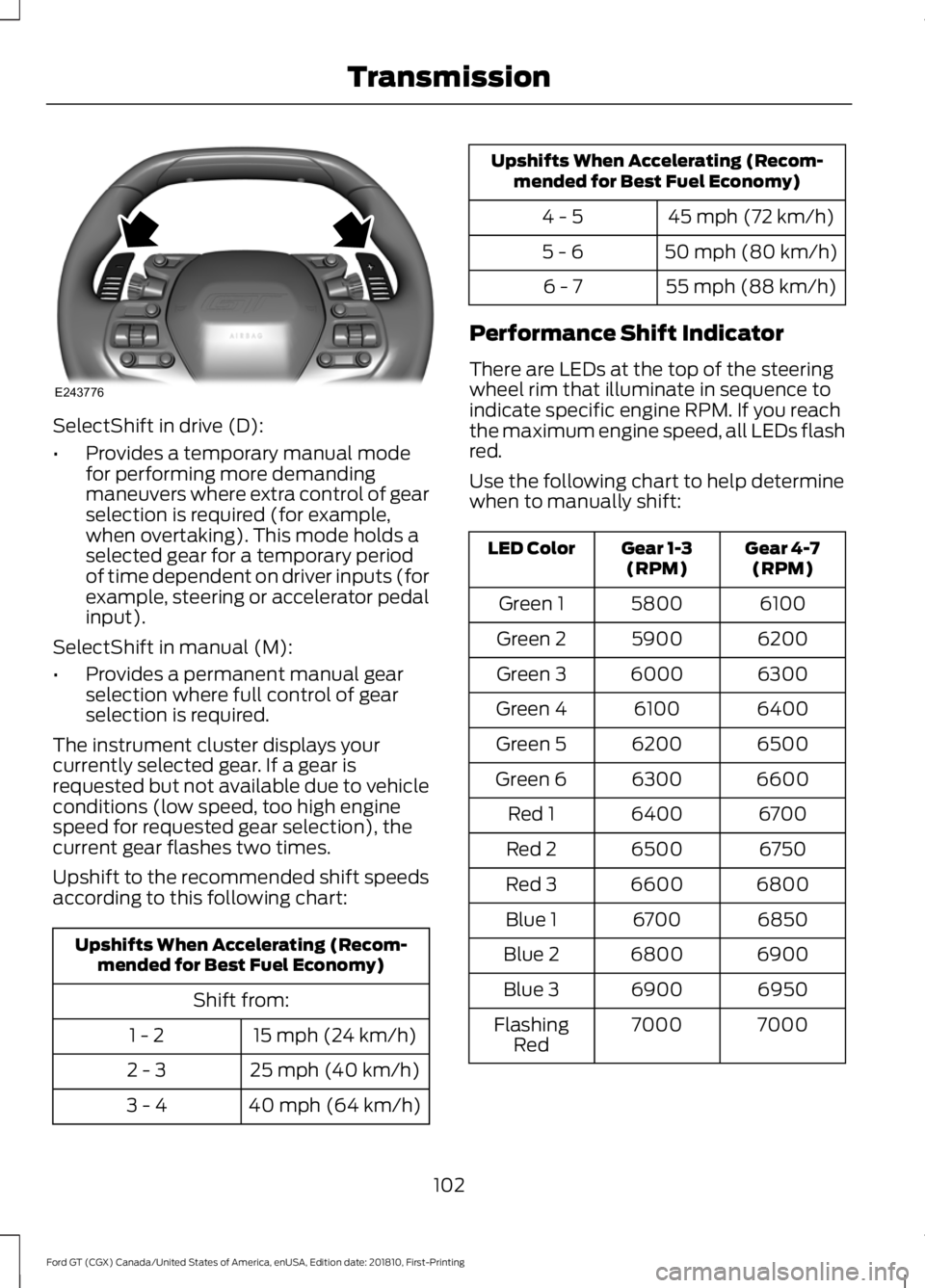
Use the paddles on the steering wheel
to shift.
• Pull the right paddle (+) to upshift.
• Pull the left paddle (–) to downshift.
101
Ford GT (CGX) Canada/United States of America, enUSA, Edition date: 201810, First-Printing Transmission
Page 105 of 321
SelectShift in drive (D):
•
Provides a temporary manual mode
for performing more demanding
maneuvers where extra control of gear
selection is required (for example,
when overtaking). This mode holds a
selected gear for a temporary period
of time dependent on driver inputs (for
example, steering or accelerator pedal
input).
SelectShift in manual (M):
• Provides a permanent manual gear
selection where full control of gear
selection is required.
The instrument cluster displays your
currently selected gear. If a gear is
requested but not available due to vehicle
conditions (low speed, too high engine
speed for requested gear selection), the
current gear flashes two times.
Upshift to the recommended shift speeds
according to this following chart: Upshifts When Accelerating (Recom-
mended for Best Fuel Economy)
Shift from:15 mph (24 km/h)
1 - 2
25 mph (40 km/h)
2 - 3
40 mph (64 km/h)
3 - 4 Upshifts When Accelerating (Recom-
mended for Best Fuel Economy)
45 mph (72 km/h)
4 - 5
50 mph (80 km/h)
5 - 6
55 mph (88 km/h)
6 - 7
Performance Shift Indicator
There are LEDs at the top of the steering
wheel rim that illuminate in sequence to
indicate specific engine RPM. If you reach
the maximum engine speed, all LEDs flash
red.
Use the following chart to help determine
when to manually shift: Gear 4-7
(RPM)
Gear 1-3
(RPM)
LED Color
6100
5800
Green 1
6200
5900
Green 2
6300
6000
Green 3
6400
6100
Green 4
6500
6200
Green 5
6600
6300
Green 6
6700
6400
Red 1
6750
6500
Red 2
6800
6600
Red 3
6850
6700
Blue 1
6900
6800
Blue 2
6950
6900
Blue 3
7000
7000
Flashing
Red
102
Ford GT (CGX) Canada/United States of America, enUSA, Edition date: 201810, First-Printing TransmissionE243776
Page 114 of 321
If the stability or traction control system
has been reduced or disabled, press the
stability and traction control button once
to return to the normal on setting.
Note:
Do not use Track or V-Max modes on
public roadways.
Note: Messages appear in the instrument
cluster when you make changes to the
AdvanceTrac system.
Note: When you start your vehicle,
AdvanceTrac turns on for all drive modes.
It does not remember the previous setting.
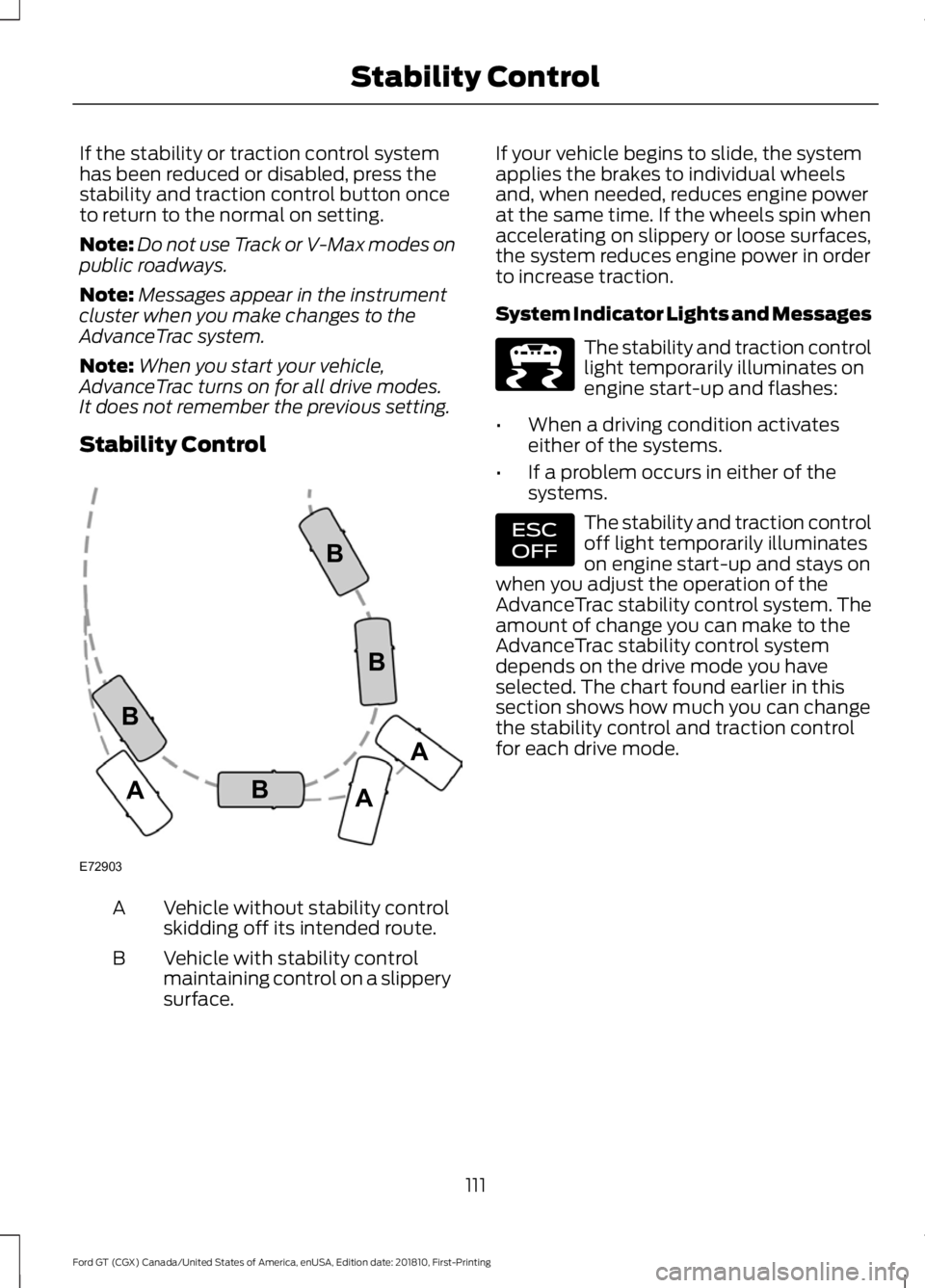
Stability Control Vehicle without stability control
skidding off its intended route.
A
Vehicle with stability control
maintaining control on a slippery
surface.
B If your vehicle begins to slide, the system
applies the brakes to individual wheels
and, when needed, reduces engine power
at the same time. If the wheels spin when
accelerating on slippery or loose surfaces,
the system reduces engine power in order
to increase traction.
System Indicator Lights and Messages The stability and traction control
light temporarily illuminates on
engine start-up and flashes:
• When a driving condition activates
either of the systems.
• If a problem occurs in either of the
systems. The stability and traction control
off light temporarily illuminates
on engine start-up and stays on
when you adjust the operation of the
AdvanceTrac stability control system. The
amount of change you can make to the
AdvanceTrac stability control system
depends on the drive mode you have
selected. The chart found earlier in this
section shows how much you can change
the stability control and traction control
for each drive mode.
111
Ford GT (CGX) Canada/United States of America, enUSA, Edition date: 201810, First-Printing Stability ControlE72903A
AA
B
BB
B E236447 E236448
Page 150 of 321
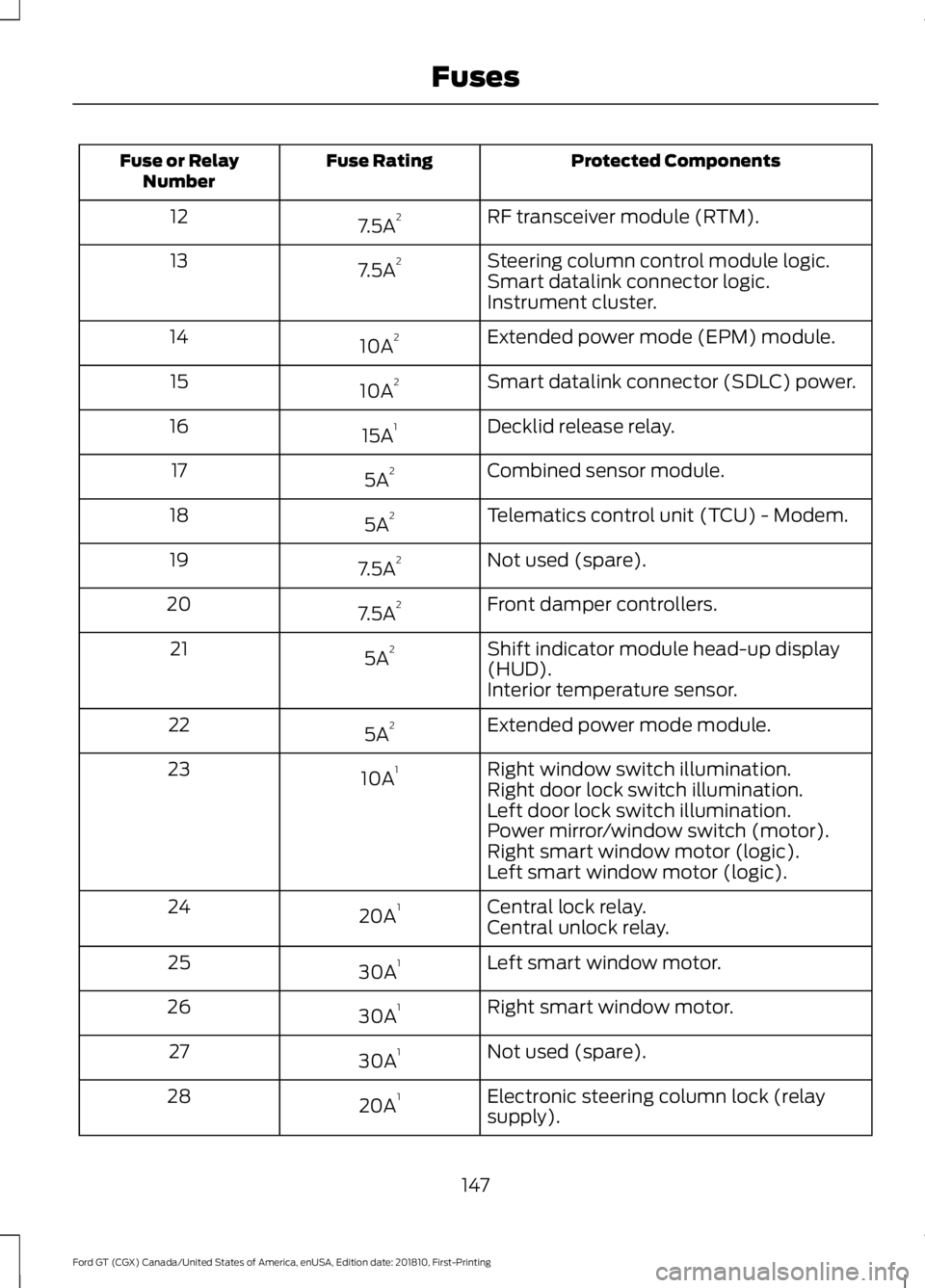
Protected Components
Fuse Rating
Fuse or Relay
Number
RF transceiver module (RTM).
7.5A 2
12
Steering column control module logic.
7.5A 2
13
Smart datalink connector logic.
Instrument cluster.
Extended power mode (EPM) module.
10A 2
14
Smart datalink connector (SDLC) power.
10A 2
15
Decklid release relay.
15A 1
16
Combined sensor module.
5A 2
17
Telematics control unit (TCU) - Modem.
5A 2
18
Not used (spare).
7.5A 2
19
Front damper controllers.
7.5A 2
20
Shift indicator module head-up display
(HUD).
5A 2
21
Interior temperature sensor.
Extended power mode module.
5A 2
22
Right window switch illumination.
10A 1
23
Right door lock switch illumination.
Left door lock switch illumination.
Power mirror/window switch (motor).
Right smart window motor (logic).
Left smart window motor (logic).
Central lock relay.
20A 1
24
Central unlock relay.
Left smart window motor.
30A 1
25
Right smart window motor.
30A 1
26
Not used (spare).
30A 1
27
Electronic steering column lock (relay
supply).
20A 1
28
147
Ford GT (CGX) Canada/United States of America, enUSA, Edition date: 201810, First-Printing Fuses
Page 154 of 321
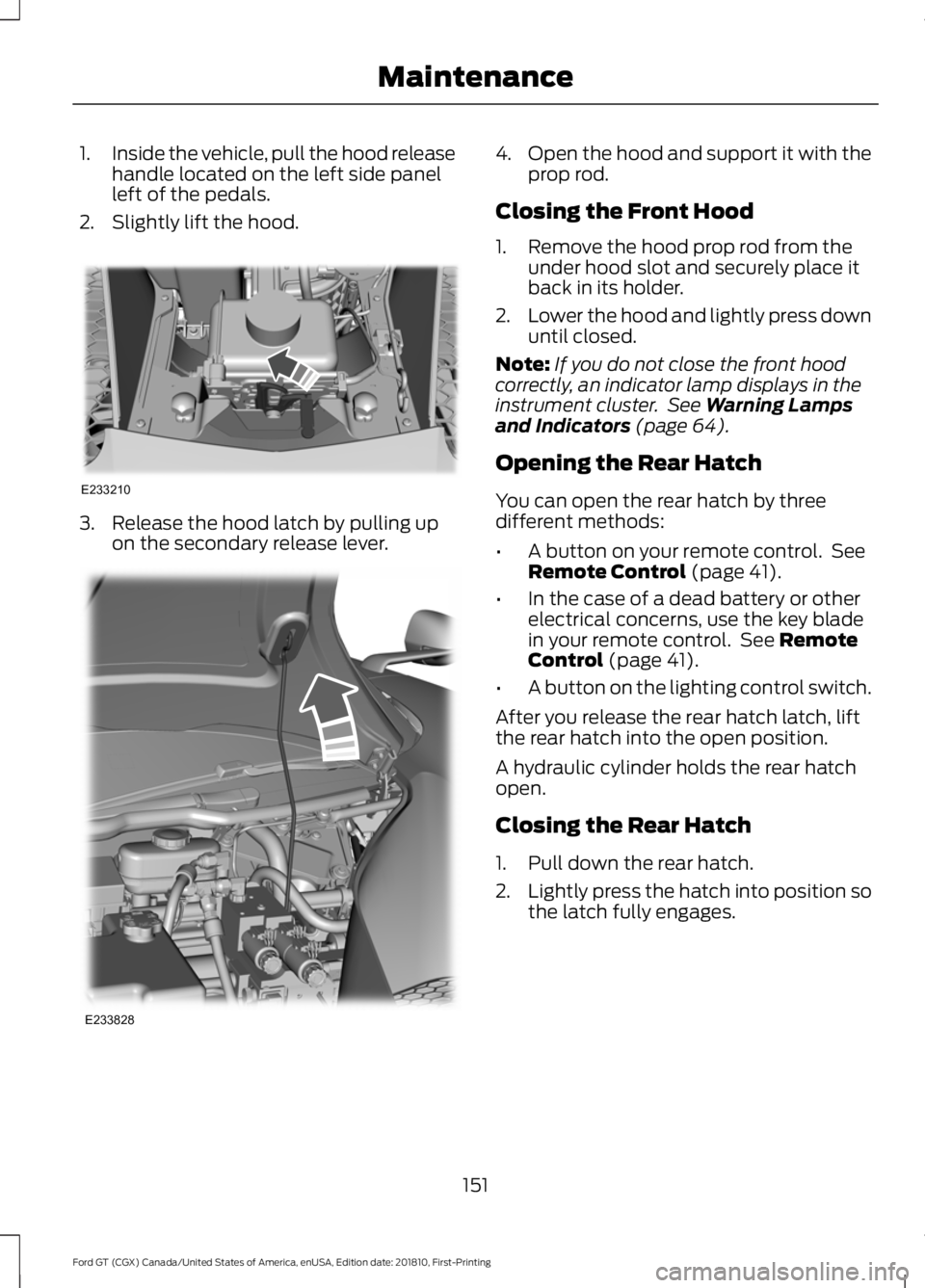
1.
Inside the vehicle, pull the hood release
handle located on the left side panel
left of the pedals.
2. Slightly lift the hood. 3. Release the hood latch by pulling up
on the secondary release lever. 4.
Open the hood and support it with the
prop rod.
Closing the Front Hood
1. Remove the hood prop rod from the under hood slot and securely place it
back in its holder.
2. Lower the hood and lightly press down
until closed.
Note: If you do not close the front hood
correctly, an indicator lamp displays in the
instrument cluster. See Warning Lamps
and Indicators (page 64).
Opening the Rear Hatch
You can open the rear hatch by three
different methods:
• A button on your remote control. See
Remote Control
(page 41).
• In the case of a dead battery or other
electrical concerns, use the key blade
in your remote control. See
Remote
Control (page 41).
• A button on the lighting control switch.
After you release the rear hatch latch, lift
the rear hatch into the open position.
A hydraulic cylinder holds the rear hatch
open.
Closing the Rear Hatch
1. Pull down the rear hatch.
2. Lightly press the hatch into position so
the latch fully engages.
151
Ford GT (CGX) Canada/United States of America, enUSA, Edition date: 201810, First-Printing MaintenanceE233210 E233828
Page 170 of 321
ABOUT LAUNCH CONTROL
Note:
Only use this feature in a controlled
environment, such as a track. Launch control
is not for use in normal driving.
Note: Launch control is not available when
in the Wet drive mode.
Your vehicle has a launch control feature
that uses clutch and engine controls to
reduce wheel spin or slip on a hard
acceleration from a standing start.
To operate launch control, your vehicle
must meet the following conditions:
• You must be in any drive mode other
than Wet drive mode.
• You must close the doors, front hood
and rear hatch.
• Your vehicle should be on a level
surface.
• You must disengage the electric park
brake.
• You must be at a complete stop with
the brake pedal applied and the
transmission selector in drive (D).
• Transmission clutch fluid temperature
must be in the normal operating
temperature range.
• No powertrain or brake system warning
indicators are active.
Launch Control remains active until:
• You switch the feature off through the
display screen.
• Your vehicle no longer meets the
conditions required for launch control
to operate. USING LAUNCH CONTROL
To use Launch Control:
•
Activate the launch control feature
through the display screen. See
General Information (page 69).
• When activated, the LC icon appears
in white inside the instrument cluster.
• With your vehicle at a complete stop,
hold the brake pedal firmly and press
the accelerator pedal to wide open
throttle.
• When the engine reaches the required
RPM and your vehicle meets all other
system requirements, the LC icon turns
from white to green and the vehicle is
ready to launch.
• Quickly release the brake pedal and
carefully steer your vehicle when it
accelerates from a stop. The launch
control feature controls wheel spin as
you accelerate.
• After completing the run and stopping,
the LC icon returns to white.
• If any operating conditions are not
within specification, the LC icon turns
grey with a strikethrough.
• You can switch launch control off
through the display screen.
See
General Information (page 69).
167
Ford GT (CGX) Canada/United States of America, enUSA, Edition date: 201810, First-Printing Launch Control
Page 175 of 321
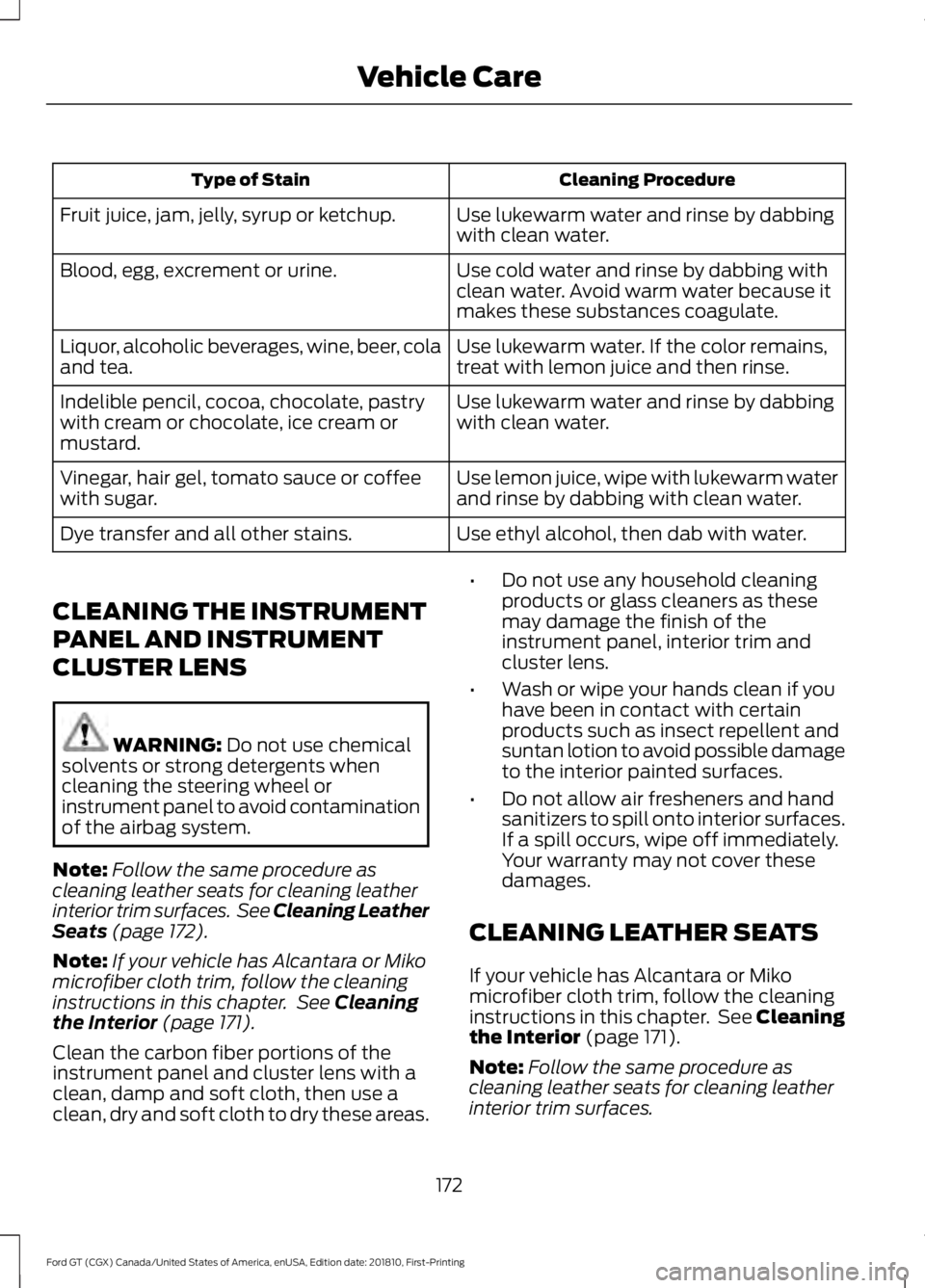
Cleaning Procedure
Type of Stain
Use lukewarm water and rinse by dabbing
with clean water.
Fruit juice, jam, jelly, syrup or ketchup.
Use cold water and rinse by dabbing with
clean water. Avoid warm water because it
makes these substances coagulate.
Blood, egg, excrement or urine.
Use lukewarm water. If the color remains,
treat with lemon juice and then rinse.
Liquor, alcoholic beverages, wine, beer, cola
and tea.
Use lukewarm water and rinse by dabbing
with clean water.
Indelible pencil, cocoa, chocolate, pastry
with cream or chocolate, ice cream or
mustard.
Use lemon juice, wipe with lukewarm water
and rinse by dabbing with clean water.
Vinegar, hair gel, tomato sauce or coffee
with sugar.
Use ethyl alcohol, then dab with water.
Dye transfer and all other stains.
CLEANING THE INSTRUMENT
PANEL AND INSTRUMENT
CLUSTER LENS WARNING: Do not use chemical
solvents or strong detergents when
cleaning the steering wheel or
instrument panel to avoid contamination
of the airbag system.
Note: Follow the same procedure as
cleaning leather seats for cleaning leather
interior trim surfaces. See Cleaning Leather
Seats
(page 172).
Note: If your vehicle has Alcantara or Miko
microfiber cloth trim, follow the cleaning
instructions in this chapter. See
Cleaning
the Interior (page 171).
Clean the carbon fiber portions of the
instrument panel and cluster lens with a
clean, damp and soft cloth, then use a
clean, dry and soft cloth to dry these areas. •
Do not use any household cleaning
products or glass cleaners as these
may damage the finish of the
instrument panel, interior trim and
cluster lens.
• Wash or wipe your hands clean if you
have been in contact with certain
products such as insect repellent and
suntan lotion to avoid possible damage
to the interior painted surfaces.
• Do not allow air fresheners and hand
sanitizers to spill onto interior surfaces.
If a spill occurs, wipe off immediately.
Your warranty may not cover these
damages.
CLEANING LEATHER SEATS
If your vehicle has Alcantara or Miko
microfiber cloth trim, follow the cleaning
instructions in this chapter. See Cleaning
the Interior (page 171).
Note: Follow the same procedure as
cleaning leather seats for cleaning leather
interior trim surfaces.
172
Ford GT (CGX) Canada/United States of America, enUSA, Edition date: 201810, First-Printing Vehicle Care
Page 272 of 321
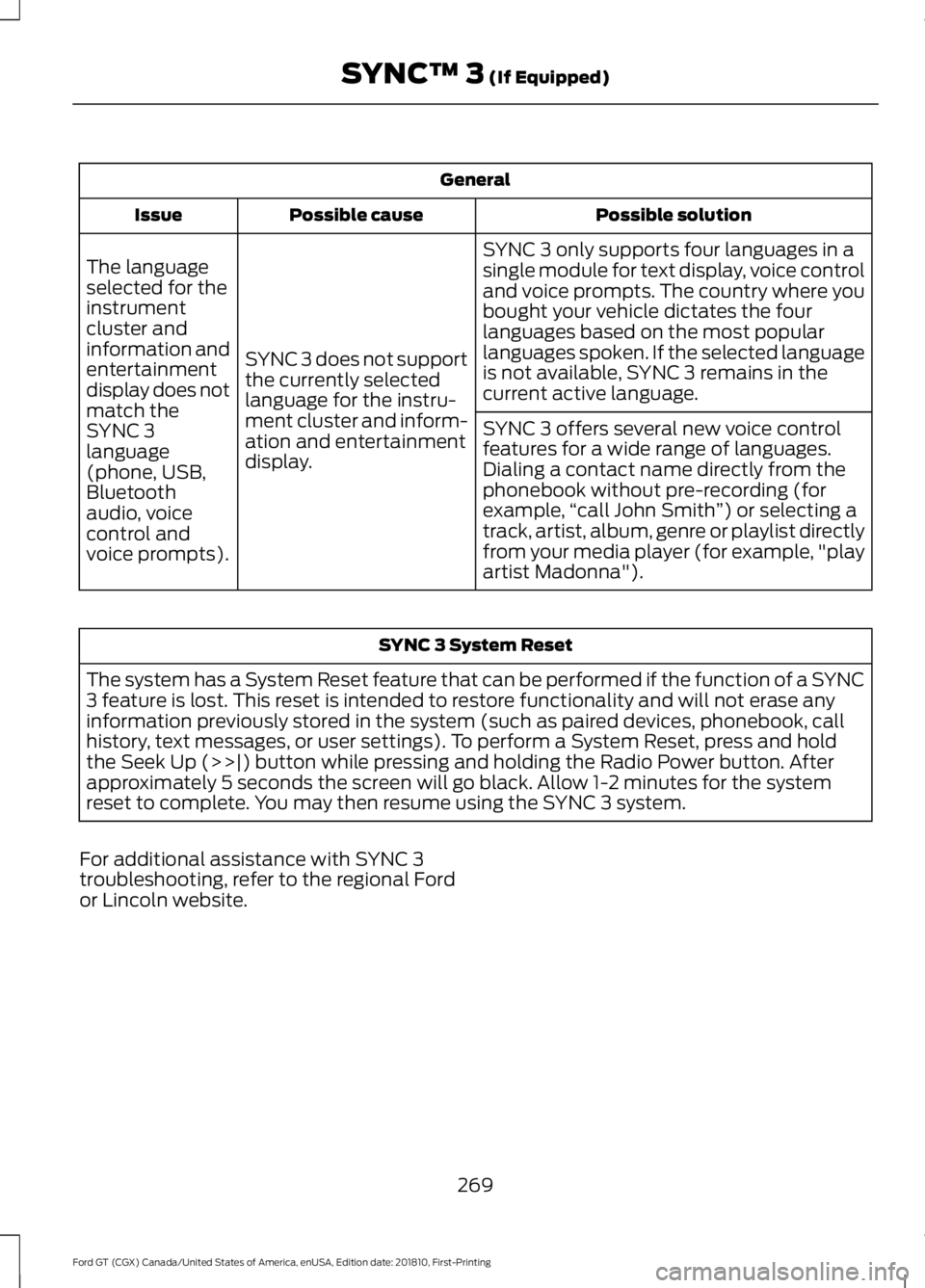
General
Possible solution
Possible cause
Issue
SYNC 3 only supports four languages in a
single module for text display, voice control
and voice prompts. The country where you
bought your vehicle dictates the four
languages based on the most popular
languages spoken. If the selected language
is not available, SYNC 3 remains in the
current active language.
SYNC 3 does not support
the currently selected
language for the instru-
ment cluster and inform-
ation and entertainment
display.
The language
selected for the
instrument
cluster and
information and
entertainment
display does not
match the
SYNC 3
SYNC 3 offers several new voice control
features for a wide range of languages.
Dialing a contact name directly from the
phonebook without pre-recording (for
example,
“call John Smith ”) or selecting a
track, artist, album, genre or playlist directly
from your media player (for example, "play
artist Madonna").
language
(phone, USB,
Bluetooth
audio, voice
control and
voice prompts). SYNC 3 System Reset
The system has a System Reset feature that can be performed if the function of a SYNC
3 feature is lost. This reset is intended to restore functionality and will not erase any
information previously stored in the system (such as paired devices, phonebook, call
history, text messages, or user settings). To perform a System Reset, press and hold
the Seek Up (>>|) button while pressing and holding the Radio Power button. After
approximately 5 seconds the screen will go black. Allow 1-2 minutes for the system
reset to complete. You may then resume using the SYNC 3 system.
For additional assistance with SYNC 3
troubleshooting, refer to the regional Ford
or Lincoln website.
269
Ford GT (CGX) Canada/United States of America, enUSA, Edition date: 201810, First-Printing SYNC™ 3 (If Equipped)