brake light FORD GT 2019 Owners Manual
[x] Cancel search | Manufacturer: FORD, Model Year: 2019, Model line: GT, Model: FORD GT 2019Pages: 321, PDF Size: 5.24 MB
Page 5 of 321
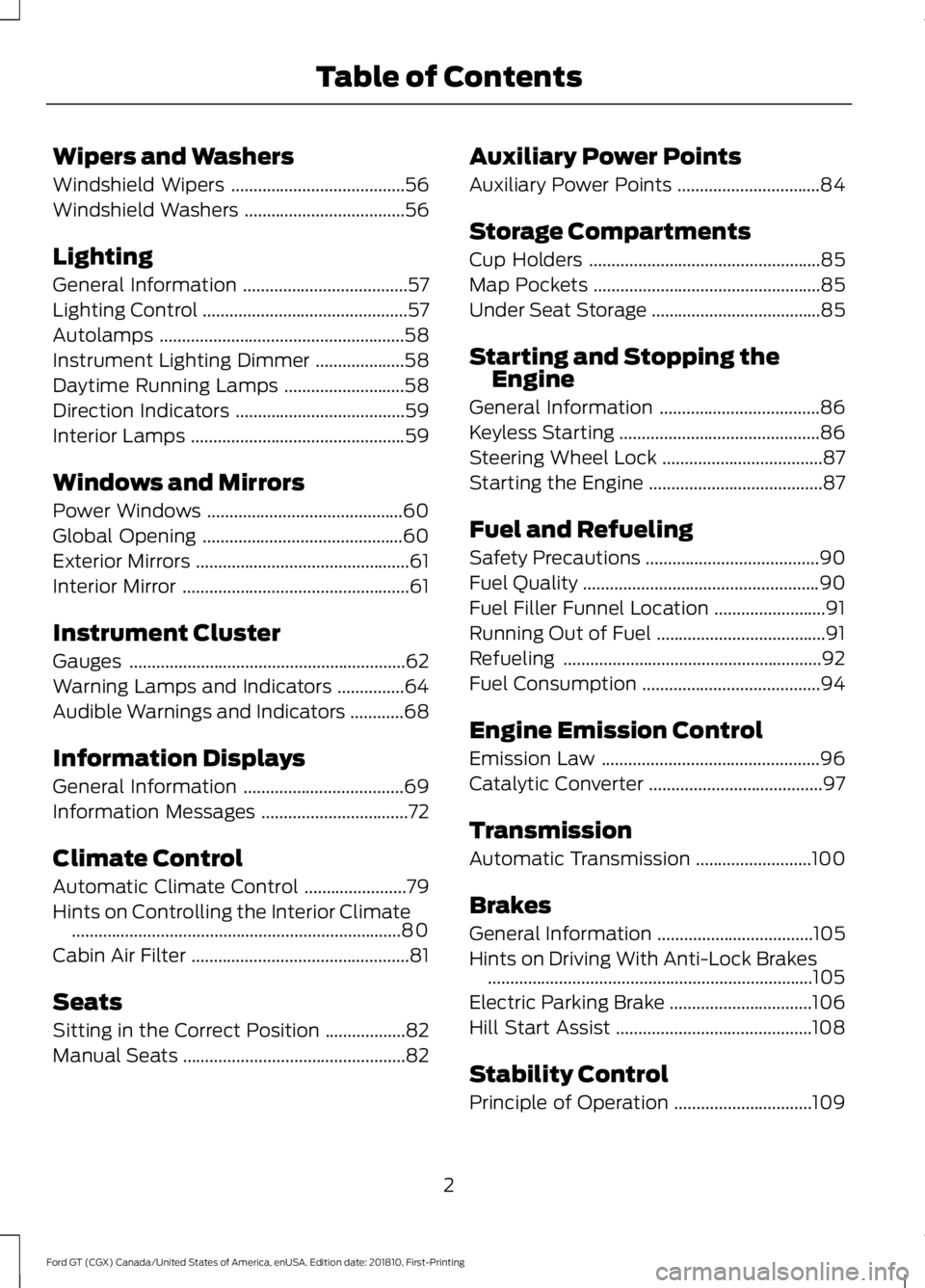
Wipers and Washers
Windshield Wipers
.......................................56
Windshield Washers ....................................
56
Lighting
General Information .....................................
57
Lighting Control ..............................................
57
Autolamps .......................................................
58
Instrument Lighting Dimmer ....................
58
Daytime Running Lamps ...........................
58
Direction Indicators ......................................
59
Interior Lamps ................................................
59
Windows and Mirrors
Power Windows ............................................
60
Global Opening .............................................
60
Exterior Mirrors ................................................
61
Interior Mirror ...................................................
61
Instrument Cluster
Gauges ..............................................................
62
Warning Lamps and Indicators ...............
64
Audible Warnings and Indicators ............
68
Information Displays
General Information ....................................
69
Information Messages .................................
72
Climate Control
Automatic Climate Control .......................
79
Hints on Controlling the Interior Climate ........................................................................\
..
80
Cabin Air Filter .................................................
81
Seats
Sitting in the Correct Position ..................
82
Manual Seats ..................................................
82Auxiliary Power Points
Auxiliary Power Points
................................
84
Storage Compartments
Cup Holders ....................................................
85
Map Pockets ...................................................
85
Under Seat Storage ......................................
85
Starting and Stopping the Engine
General Information ....................................
86
Keyless Starting .............................................
86
Steering Wheel Lock ....................................
87
Starting the Engine .......................................
87
Fuel and Refueling
Safety Precautions .......................................
90
Fuel Quality .....................................................
90
Fuel Filler Funnel Location .........................
91
Running Out of Fuel ......................................
91
Refueling ..........................................................
92
Fuel Consumption ........................................
94
Engine Emission Control
Emission Law .................................................
96
Catalytic Converter .......................................
97
Transmission
Automatic Transmission ..........................
100
Brakes
General Information ...................................
105
Hints on Driving With Anti-Lock Brakes ........................................................................\
.
105
Electric Parking Brake ................................
106
Hill Start Assist ............................................
108
Stability Control
Principle of Operation ...............................
109
2
Ford GT (CGX) Canada/United States of America, enUSA, Edition date: 201810, First-Printing Table of Contents
Page 9 of 321
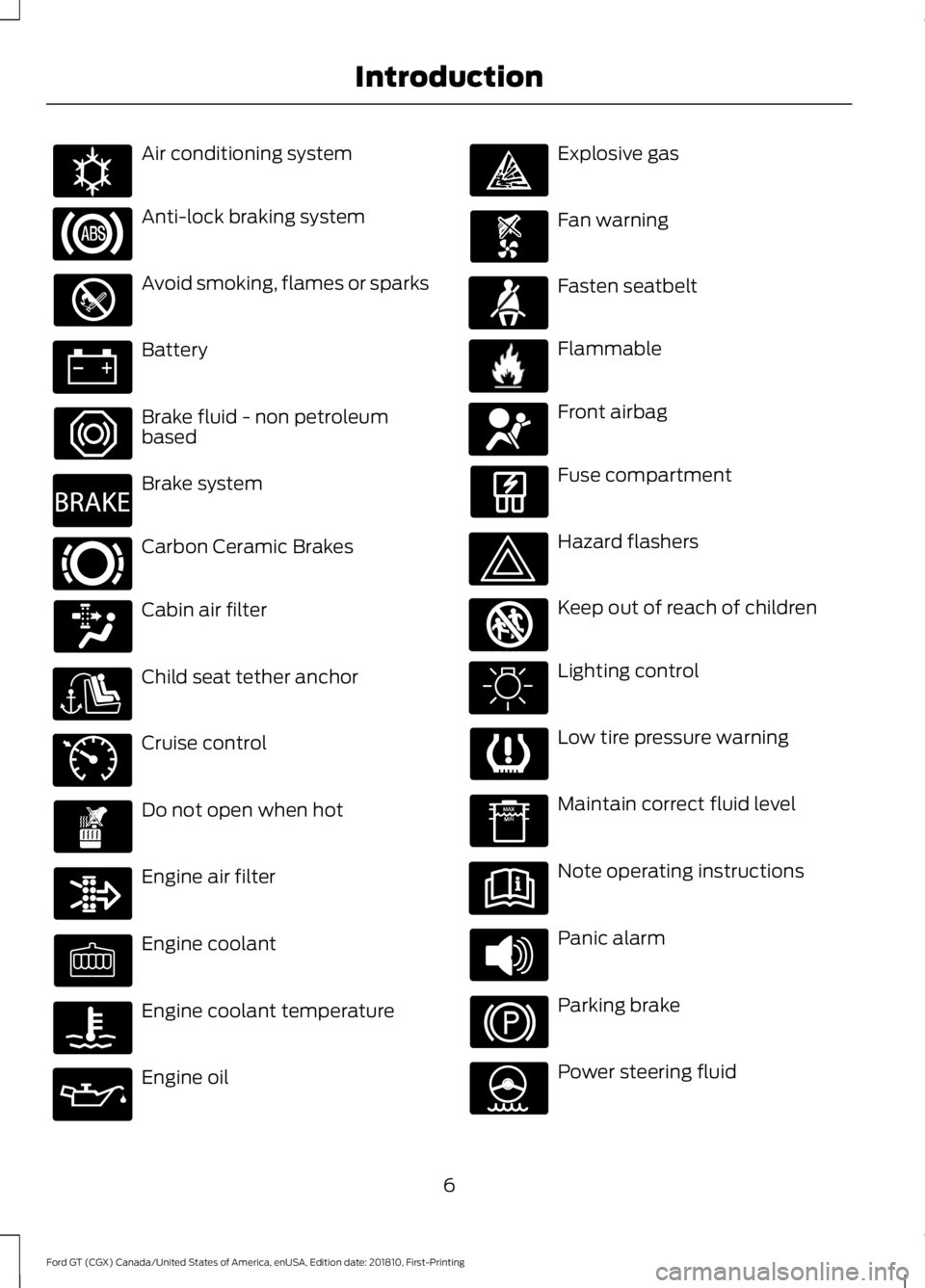
Air conditioning system
Anti-lock braking system
Avoid smoking, flames or sparks
Battery
Brake fluid - non petroleum
based
Brake system
Carbon Ceramic Brakes
Cabin air filter
Child seat tether anchor
Cruise control
Do not open when hot
Engine air filter
Engine coolant
Engine coolant temperature
Engine oil Explosive gas
Fan warning
Fasten seatbelt
Flammable
Front airbag
Fuse compartment
Hazard flashers
Keep out of reach of children
Lighting control
Low tire pressure warning
Maintain correct fluid level
Note operating instructions
Panic alarm
Parking brake
Power steering fluid
6
Ford GT (CGX) Canada/United States of America, enUSA, Edition date: 201810, First-Printing IntroductionE162384 E270480 E269429 E71340 E71880 E231160 E67017 E161353
Page 33 of 321
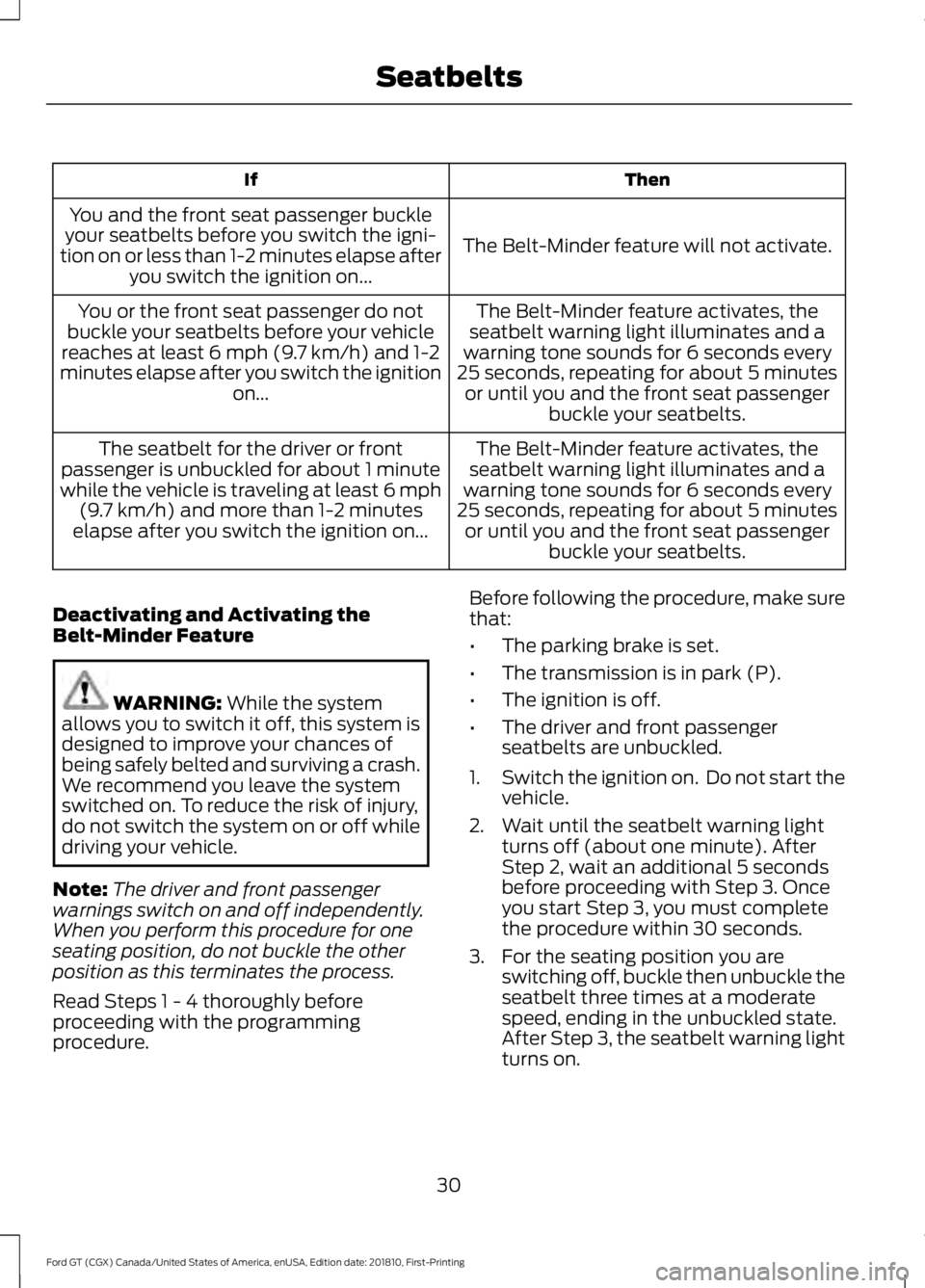
Then
If
The Belt-Minder feature will not activate.
You and the front seat passenger buckle
your seatbelts before you switch the igni-
tion on or less than 1-2 minutes elapse after you switch the ignition on...
The Belt-Minder feature activates, the
seatbelt warning light illuminates and a
warning tone sounds for 6 seconds every
25 seconds, repeating for about 5 minutes or until you and the front seat passenger buckle your seatbelts.
You or the front seat passenger do not
buckle your seatbelts before your vehicle
reaches at least 6 mph (9.7 km/h) and 1-2
minutes elapse after you switch the ignition on...
The Belt-Minder feature activates, the
seatbelt warning light illuminates and a
warning tone sounds for 6 seconds every
25 seconds, repeating for about 5 minutes or until you and the front seat passenger buckle your seatbelts.
The seatbelt for the driver or front
passenger is unbuckled for about 1 minute
while the vehicle is traveling at least 6 mph (9.7 km/h)
and more than 1-2 minutes
elapse after you switch the ignition on...
Deactivating and Activating the
Belt-Minder Feature WARNING:
While the system
allows you to switch it off, this system is
designed to improve your chances of
being safely belted and surviving a crash.
We recommend you leave the system
switched on. To reduce the risk of injury,
do not switch the system on or off while
driving your vehicle.
Note: The driver and front passenger
warnings switch on and off independently.
When you perform this procedure for one
seating position, do not buckle the other
position as this terminates the process.
Read Steps 1 - 4 thoroughly before
proceeding with the programming
procedure. Before following the procedure, make sure
that:
•
The parking brake is set.
• The transmission is in park (P).
• The ignition is off.
• The driver and front passenger
seatbelts are unbuckled.
1. Switch the ignition on. Do not start the
vehicle.
2. Wait until the seatbelt warning light turns off (about one minute). After
Step 2, wait an additional 5 seconds
before proceeding with Step 3. Once
you start Step 3, you must complete
the procedure within 30 seconds.
3. For the seating position you are switching off, buckle then unbuckle the
seatbelt three times at a moderate
speed, ending in the unbuckled state.
After Step 3, the seatbelt warning light
turns on.
30
Ford GT (CGX) Canada/United States of America, enUSA, Edition date: 201810, First-Printing Seatbelts
Page 67 of 321
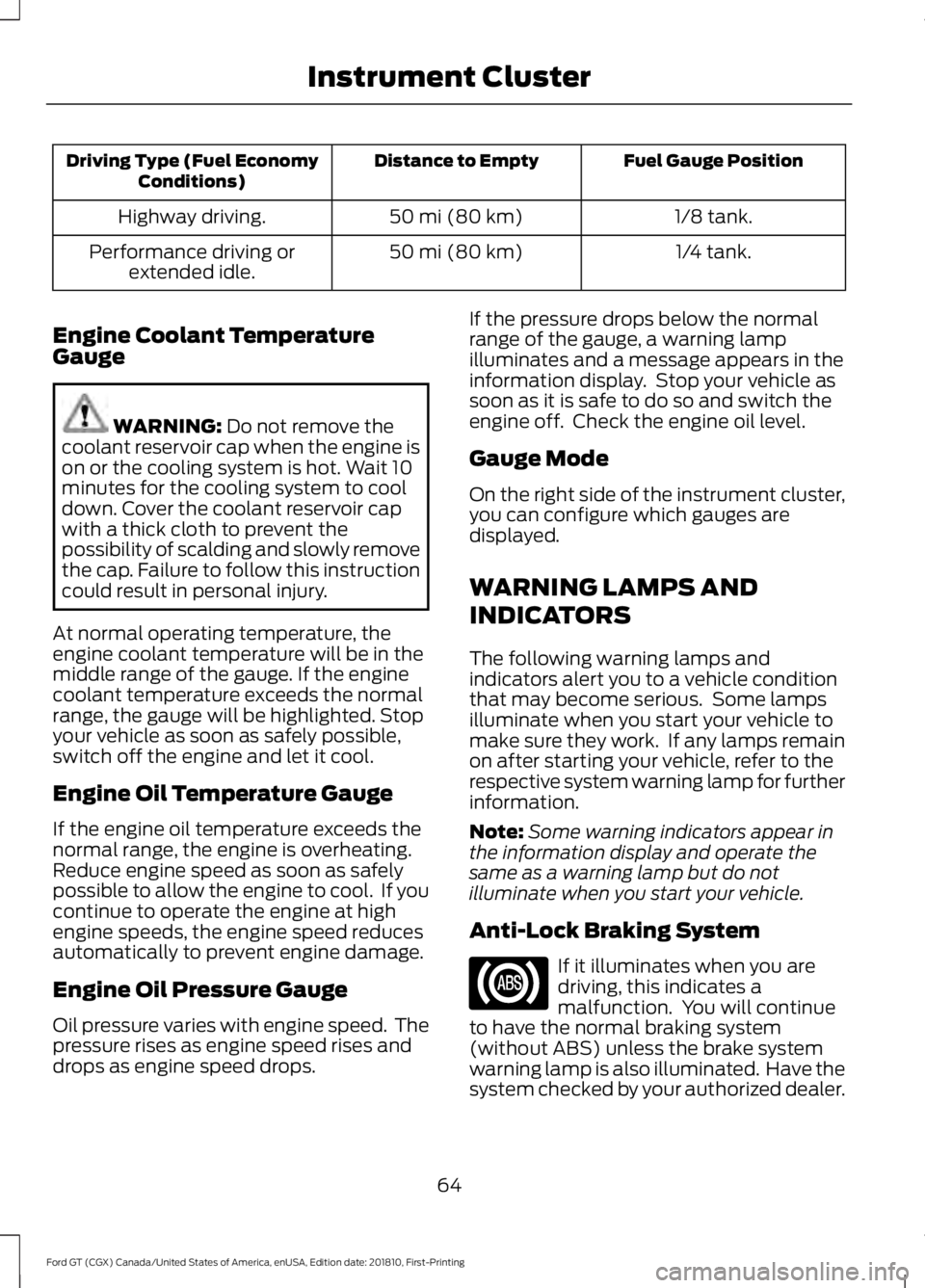
Fuel Gauge Position
Distance to Empty
Driving Type (Fuel Economy
Conditions)
1/8 tank.
50 mi (80 km)
Highway driving.
1/4 tank.
50 mi (80 km)
Performance driving or
extended idle.
Engine Coolant Temperature
Gauge WARNING: Do not remove the
coolant reservoir cap when the engine is
on or the cooling system is hot. Wait 10
minutes for the cooling system to cool
down. Cover the coolant reservoir cap
with a thick cloth to prevent the
possibility of scalding and slowly remove
the cap. Failure to follow this instruction
could result in personal injury.
At normal operating temperature, the
engine coolant temperature will be in the
middle range of the gauge. If the engine
coolant temperature exceeds the normal
range, the gauge will be highlighted. Stop
your vehicle as soon as safely possible,
switch off the engine and let it cool.
Engine Oil Temperature Gauge
If the engine oil temperature exceeds the
normal range, the engine is overheating.
Reduce engine speed as soon as safely
possible to allow the engine to cool. If you
continue to operate the engine at high
engine speeds, the engine speed reduces
automatically to prevent engine damage.
Engine Oil Pressure Gauge
Oil pressure varies with engine speed. The
pressure rises as engine speed rises and
drops as engine speed drops. If the pressure drops below the normal
range of the gauge, a warning lamp
illuminates and a message appears in the
information display. Stop your vehicle as
soon as it is safe to do so and switch the
engine off. Check the engine oil level.
Gauge Mode
On the right side of the instrument cluster,
you can configure which gauges are
displayed.
WARNING LAMPS AND
INDICATORS
The following warning lamps and
indicators alert you to a vehicle condition
that may become serious. Some lamps
illuminate when you start your vehicle to
make sure they work. If any lamps remain
on after starting your vehicle, refer to the
respective system warning lamp for further
information.
Note:
Some warning indicators appear in
the information display and operate the
same as a warning lamp but do not
illuminate when you start your vehicle.
Anti-Lock Braking System If it illuminates when you are
driving, this indicates a
malfunction. You will continue
to have the normal braking system
(without ABS) unless the brake system
warning lamp is also illuminated. Have the
system checked by your authorized dealer.
64
Ford GT (CGX) Canada/United States of America, enUSA, Edition date: 201810, First-Printing Instrument Cluster
Page 97 of 321
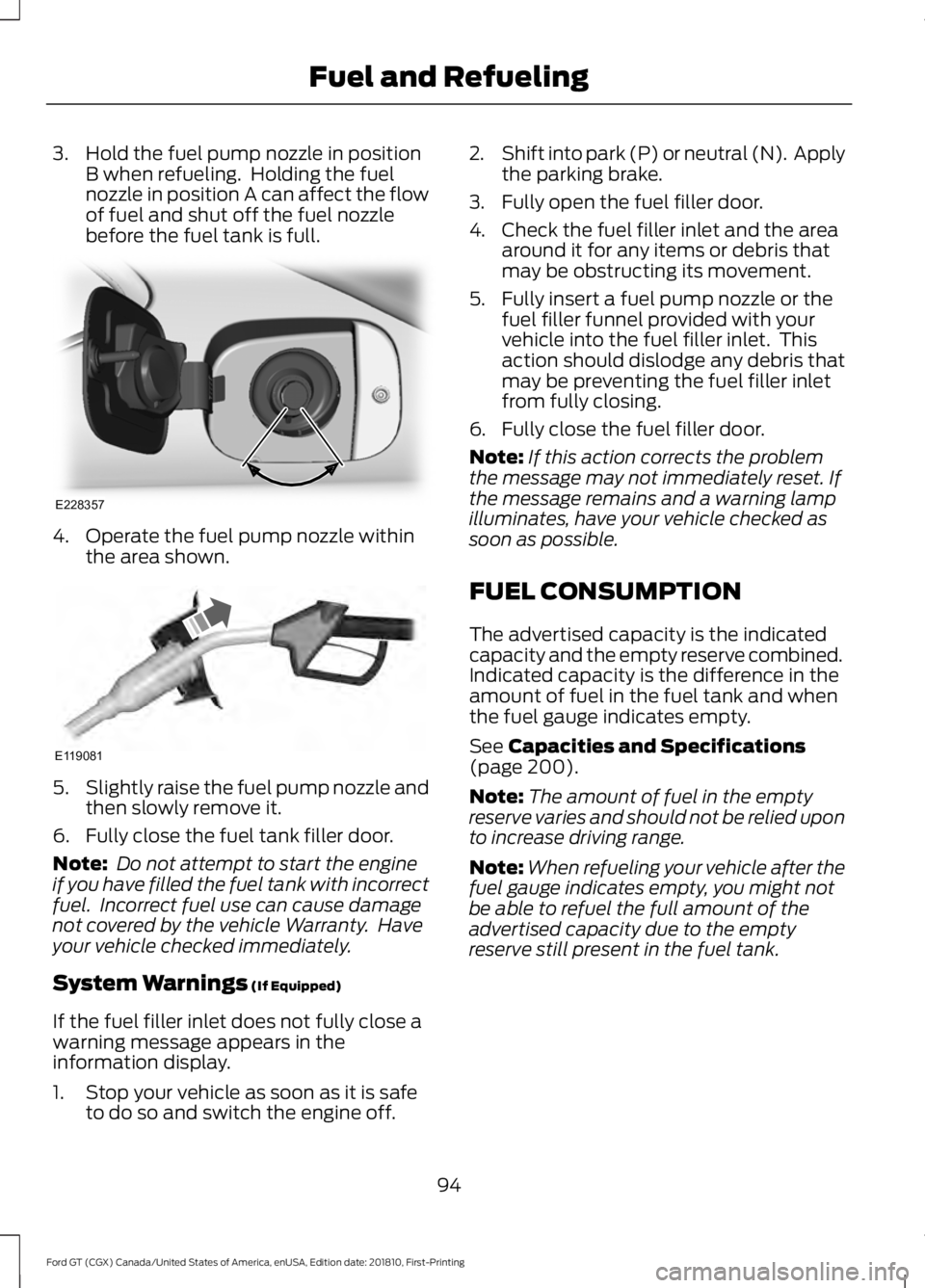
3. Hold the fuel pump nozzle in position
B when refueling. Holding the fuel
nozzle in position A can affect the flow
of fuel and shut off the fuel nozzle
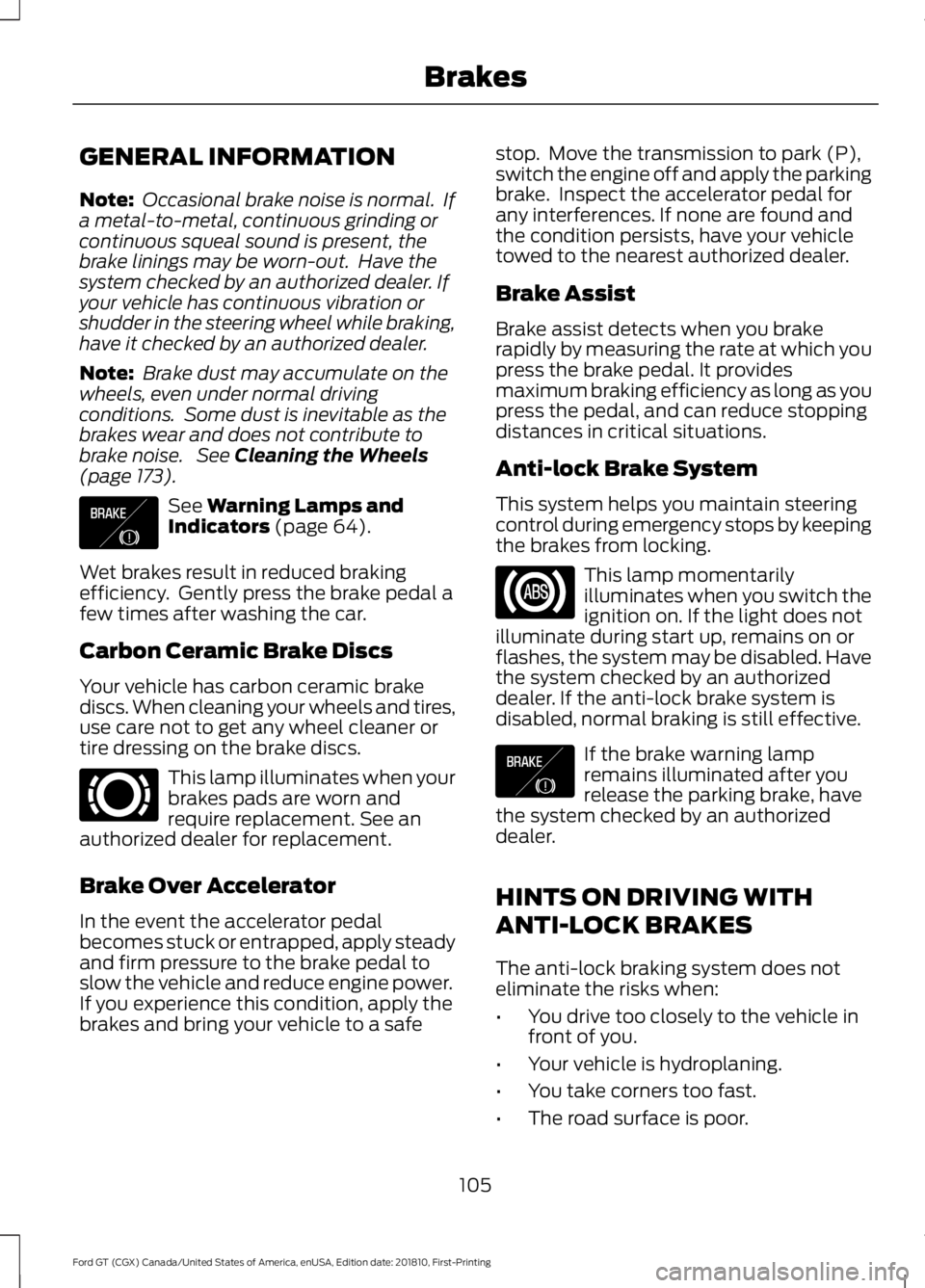
before the fuel tank is full. 4. Operate the fuel pump nozzle within
the area shown. 5.
Slightly raise the fuel pump nozzle and
then slowly remove it.
6. Fully close the fuel tank filler door.
Note: Do not attempt to start the engine
if you have filled the fuel tank with incorrect
fuel. Incorrect fuel use can cause damage
not covered by the vehicle Warranty. Have
your vehicle checked immediately.
System Warnings (If Equipped)
If the fuel filler inlet does not fully close a
warning message appears in the
information display.
1. Stop your vehicle as soon as it is safe to do so and switch the engine off. 2.
Shift into park (P) or neutral (N). Apply
the parking brake.
3. Fully open the fuel filler door.
4. Check the fuel filler inlet and the area around it for any items or debris that
may be obstructing its movement.
5. Fully insert a fuel pump nozzle or the fuel filler funnel provided with your
vehicle into the fuel filler inlet. This
action should dislodge any debris that
may be preventing the fuel filler inlet
from fully closing.
6. Fully close the fuel filler door.
Note: If this action corrects the problem
the message may not immediately reset. If
the message remains and a warning lamp
illuminates, have your vehicle checked as
soon as possible.
FUEL CONSUMPTION
The advertised capacity is the indicated
capacity and the empty reserve combined.
Indicated capacity is the difference in the
amount of fuel in the fuel tank and when
the fuel gauge indicates empty.
See
Capacities and Specifications
(page 200).
Note: The amount of fuel in the empty
reserve varies and should not be relied upon
to increase driving range.
Note: When refueling your vehicle after the
fuel gauge indicates empty, you might not
be able to refuel the full amount of the
advertised capacity due to the empty
reserve still present in the fuel tank.
94
Ford GT (CGX) Canada/United States of America, enUSA, Edition date: 201810, First-Printing Fuel and RefuelingE228357 E119081
Page 108 of 321
GENERAL INFORMATION
Note:
Occasional brake noise is normal. If
a metal-to-metal, continuous grinding or
continuous squeal sound is present, the
brake linings may be worn-out. Have the
system checked by an authorized dealer. If
your vehicle has continuous vibration or
shudder in the steering wheel while braking,
have it checked by an authorized dealer.
Note: Brake dust may accumulate on the
wheels, even under normal driving
conditions. Some dust is inevitable as the
brakes wear and does not contribute to
brake noise. See Cleaning the Wheels
(page 173). See
Warning Lamps and
Indicators (page 64).
Wet brakes result in reduced braking
efficiency. Gently press the brake pedal a
few times after washing the car.
Carbon Ceramic Brake Discs
Your vehicle has carbon ceramic brake
discs. When cleaning your wheels and tires,
use care not to get any wheel cleaner or
tire dressing on the brake discs. This lamp illuminates when your
brakes pads are worn and
require replacement. See an
authorized dealer for replacement.
Brake Over Accelerator
In the event the accelerator pedal
becomes stuck or entrapped, apply steady
and firm pressure to the brake pedal to
slow the vehicle and reduce engine power.
If you experience this condition, apply the
brakes and bring your vehicle to a safe stop. Move the transmission to park (P),
switch the engine off and apply the parking
brake. Inspect the accelerator pedal for
any interferences. If none are found and
the condition persists, have your vehicle
towed to the nearest authorized dealer.
Brake Assist
Brake assist detects when you brake
rapidly by measuring the rate at which you
press the brake pedal. It provides
maximum braking efficiency as long as you
press the pedal, and can reduce stopping
distances in critical situations.
Anti-lock Brake System
This system helps you maintain steering
control during emergency stops by keeping
the brakes from locking.
This lamp momentarily
illuminates when you switch the
ignition on. If the light does not
illuminate during start up, remains on or
flashes, the system may be disabled. Have
the system checked by an authorized
dealer. If the anti-lock brake system is
disabled, normal braking is still effective. If the brake warning lamp
remains illuminated after you
release the parking brake, have
the system checked by an authorized
dealer.
HINTS ON DRIVING WITH
ANTI-LOCK BRAKES
The anti-lock braking system does not
eliminate the risks when:
• You drive too closely to the vehicle in
front of you.
• Your vehicle is hydroplaning.
• You take corners too fast.
• The road surface is poor.
105
Ford GT (CGX) Canada/United States of America, enUSA, Edition date: 201810, First-Printing BrakesE138644 E269429 E138644
Page 109 of 321
Note:
If the system activates, the brake
pedal may pulse and may travel further.
Maintain pressure on the brake pedal. You
may also hear a noise from the system. This
is normal.
ELECTRIC PARKING BRAKE WARNING: Always set the parking
brake and leave your vehicle with the
transmission in park (P).
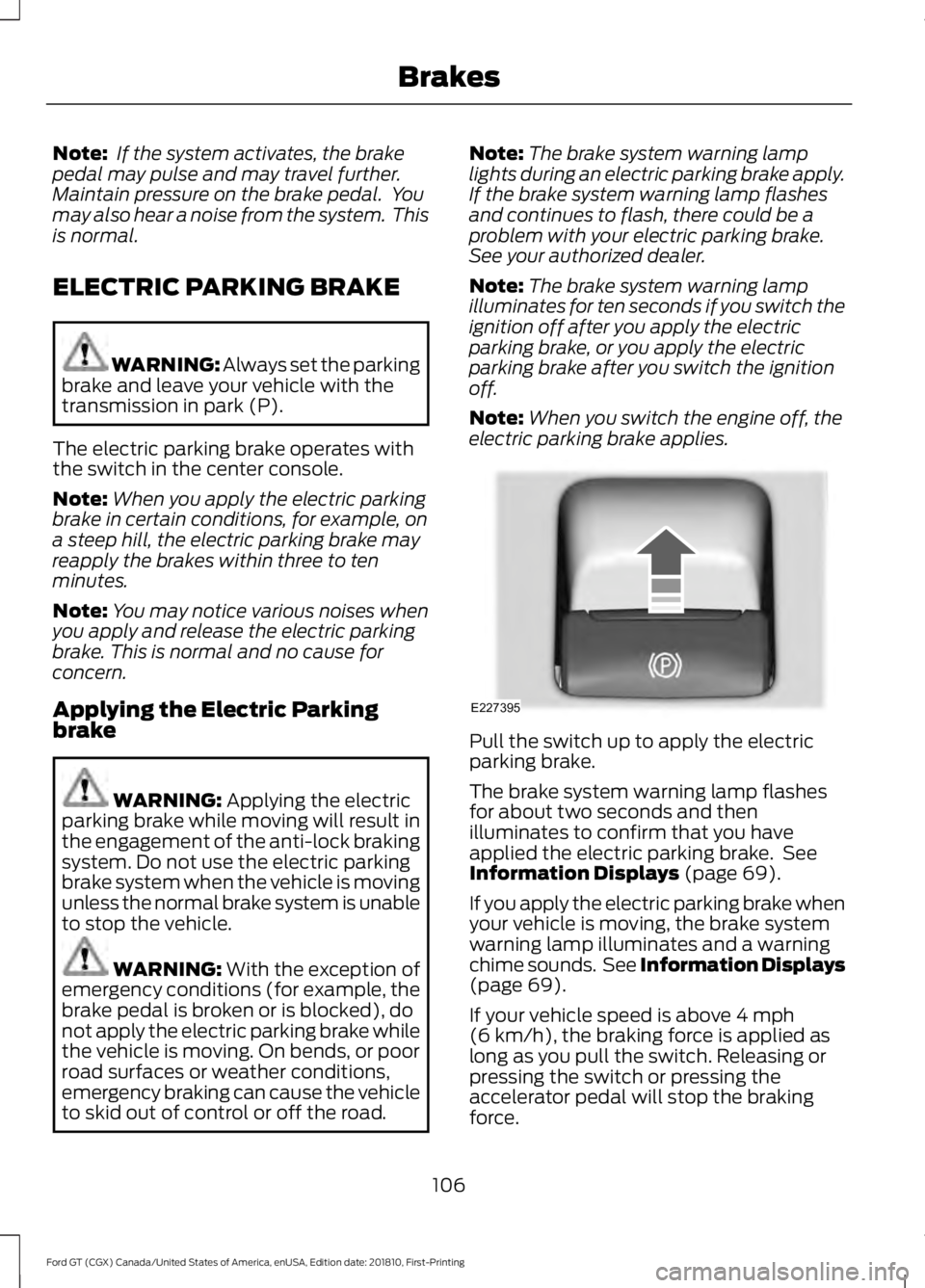
The electric parking brake operates with
the switch in the center console.
Note: When you apply the electric parking
brake in certain conditions, for example, on
a steep hill, the electric parking brake may
reapply the brakes within three to ten
minutes.
Note: You may notice various noises when
you apply and release the electric parking
brake. This is normal and no cause for
concern.
Applying the Electric Parking
brake WARNING:
Applying the electric
parking brake while moving will result in
the engagement of the anti-lock braking
system. Do not use the electric parking
brake system when the vehicle is moving
unless the normal brake system is unable
to stop the vehicle. WARNING: With the exception of
emergency conditions (for example, the
brake pedal is broken or is blocked), do
not apply the electric parking brake while
the vehicle is moving. On bends, or poor
road surfaces or weather conditions,
emergency braking can cause the vehicle
to skid out of control or off the road. Note:
The brake system warning lamp
lights during an electric parking brake apply.
If the brake system warning lamp flashes
and continues to flash, there could be a
problem with your electric parking brake.
See your authorized dealer.
Note: The brake system warning lamp
illuminates for ten seconds if you switch the
ignition off after you apply the electric
parking brake, or you apply the electric
parking brake after you switch the ignition
off.
Note: When you switch the engine off, the
electric parking brake applies. Pull the switch up to apply the electric
parking brake.
The brake system warning lamp flashes
for about two seconds and then
illuminates to confirm that you have
applied the electric parking brake. See
Information Displays
(page 69).
If you apply the electric parking brake when
your vehicle is moving, the brake system
warning lamp illuminates and a warning
chime sounds. See Information Displays
(page
69).
If your vehicle speed is above
4 mph
(6 km/h), the braking force is applied as
long as you pull the switch. Releasing or
pressing the switch or pressing the
accelerator pedal will stop the braking
force.
106
Ford GT (CGX) Canada/United States of America, enUSA, Edition date: 201810, First-Printing BrakesE227395
Page 110 of 321
Releasing the Electric Parking
Brake
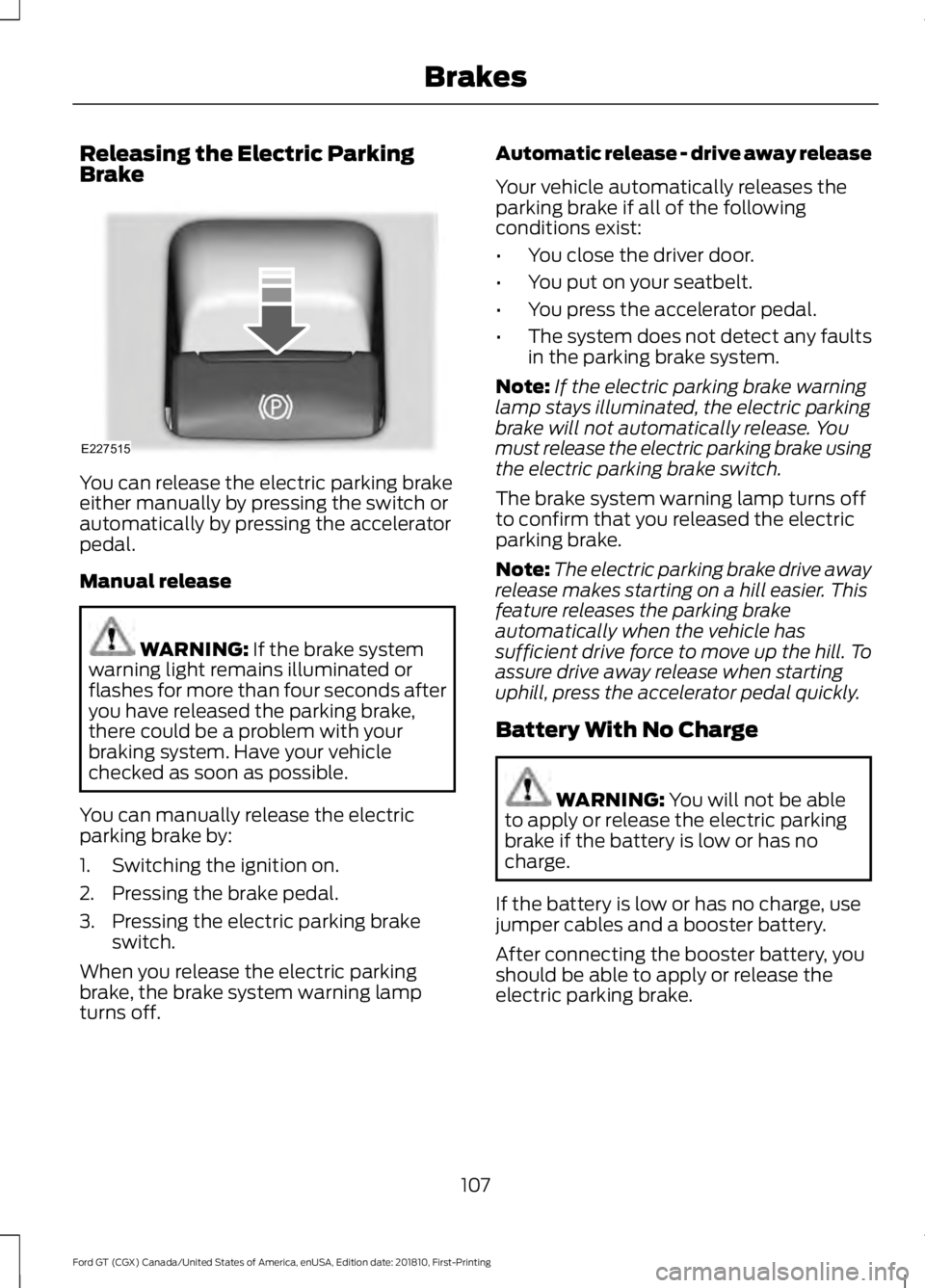
You can release the electric parking brake
either manually by pressing the switch or
automatically by pressing the accelerator
pedal.
Manual release
WARNING: If the brake system
warning light remains illuminated or
flashes for more than four seconds after
you have released the parking brake,
there could be a problem with your
braking system. Have your vehicle
checked as soon as possible.
You can manually release the electric
parking brake by:
1. Switching the ignition on.
2. Pressing the brake pedal.
3. Pressing the electric parking brake switch.
When you release the electric parking
brake, the brake system warning lamp
turns off. Automatic release - drive away release
Your vehicle automatically releases the
parking brake if all of the following
conditions exist:
•
You close the driver door.
• You put on your seatbelt.
• You press the accelerator pedal.
• The system does not detect any faults
in the parking brake system.
Note: If the electric parking brake warning
lamp stays illuminated, the electric parking
brake will not automatically release. You
must release the electric parking brake using
the electric parking brake switch.
The brake system warning lamp turns off
to confirm that you released the electric
parking brake.
Note: The electric parking brake drive away
release makes starting on a hill easier. This
feature releases the parking brake
automatically when the vehicle has
sufficient drive force to move up the hill. To
assure drive away release when starting
uphill, press the accelerator pedal quickly.
Battery With No Charge WARNING:
You will not be able
to apply or release the electric parking
brake if the battery is low or has no
charge.
If the battery is low or has no charge, use
jumper cables and a booster battery.
After connecting the booster battery, you
should be able to apply or release the
electric parking brake.
107
Ford GT (CGX) Canada/United States of America, enUSA, Edition date: 201810, First-Printing BrakesE227515
Page 112 of 321
PRINCIPLE OF OPERATION
WARNING: Vehicle modifications
involving braking system, aftermarket
roof racks, suspension, steering system,
tire construction and wheel and tire size
may change the handling characteristics
of your vehicle and may adversely affect
the performance of the electronic
stability control system. In addition,
installing any stereo loudspeakers may
interfere with and adversely affect the
electronic stability control system. Install
any aftermarket stereo loudspeaker as
far as possible from the front center
console, the tunnel, and the front seats
in order to minimize the risk of interfering
with the electronic stability control
sensors. Reducing the effectiveness of
the electronic stability control system
could lead to an increased risk of loss of
vehicle control, vehicle rollover, personal
injury and death. WARNING:
Remember that even
advanced technology cannot defy the
laws of physics. It's always possible to
lose control of a vehicle due to
inappropriate driver input for the
conditions. Aggressive driving on any
road condition can cause you to lose
control of your vehicle increasing the risk
of personal injury or property damage.
Activation of the electronic stability
control system is an indication that at
least some of the tires have exceeded
their ability to grip the road; this could
reduce the operator's ability to control
the vehicle potentially resulting in a loss
of vehicle control, vehicle rollover,
personal injury and death. If your
electronic stability control system
activates, SLOW DOWN. WARNING:
The stability and
traction control light illuminates steadily
if the system detects a failure. Make sure
you did not manually disable the traction
control system using the information
display controls or the switch. If the
stability control and traction control light
is still illuminating steadily, have the
system serviced by an authorized dealer
immediately. Operating your vehicle with
the traction control disabled could lead
to an increased risk of loss of vehicle
control, vehicle rollover, personal injury
and death.
The stability and traction control systems
help you to avoid drive wheel spin and loss
of traction. The system automatically
turns on each time you switch the ignition
on.
If a fault occurs in either the stability
control or the traction control system, you
may experience the following conditions:
• The stability and traction control light
illuminates steadily.
• The stability control and traction
control systems do not enhance your
vehicle's ability to maintain traction of
the wheels.
If a driving condition activates either the
stability control or the traction control
system you may experience the following
conditions:
• The stability and traction control light
flashes.
• Your vehicle slows down.
• Reduced engine power.
• A vibration in the brake pedal.
109
Ford GT (CGX) Canada/United States of America, enUSA, Edition date: 201810, First-Printing Stability Control
Page 114 of 321
If the stability or traction control system
has been reduced or disabled, press the
stability and traction control button once
to return to the normal on setting.
Note:
Do not use Track or V-Max modes on
public roadways.
Note: Messages appear in the instrument
cluster when you make changes to the
AdvanceTrac system.
Note: When you start your vehicle,
AdvanceTrac turns on for all drive modes.
It does not remember the previous setting.
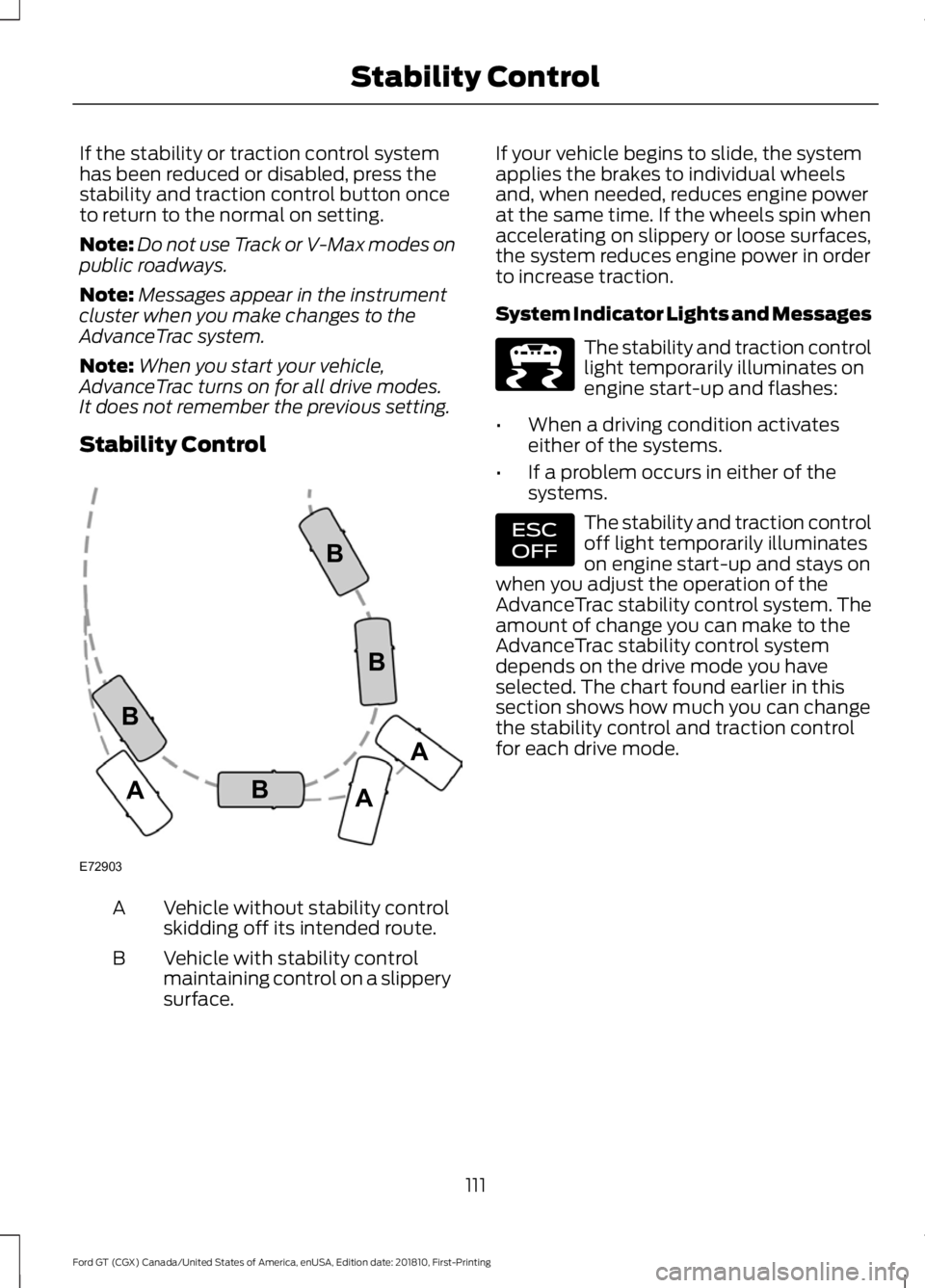
Stability Control Vehicle without stability control
skidding off its intended route.
A
Vehicle with stability control
maintaining control on a slippery
surface.
B If your vehicle begins to slide, the system
applies the brakes to individual wheels
and, when needed, reduces engine power
at the same time. If the wheels spin when
accelerating on slippery or loose surfaces,
the system reduces engine power in order
to increase traction.
System Indicator Lights and Messages The stability and traction control
light temporarily illuminates on
engine start-up and flashes:
• When a driving condition activates
either of the systems.
• If a problem occurs in either of the
systems. The stability and traction control
off light temporarily illuminates
on engine start-up and stays on
when you adjust the operation of the
AdvanceTrac stability control system. The
amount of change you can make to the
AdvanceTrac stability control system
depends on the drive mode you have
selected. The chart found earlier in this
section shows how much you can change
the stability control and traction control
for each drive mode.
111
Ford GT (CGX) Canada/United States of America, enUSA, Edition date: 201810, First-Printing Stability ControlE72903A
AA
B
BB
B E236447 E236448