radio FORD GT 2019 User Guide
[x] Cancel search | Manufacturer: FORD, Model Year: 2019, Model line: GT, Model: FORD GT 2019Pages: 321, PDF Size: 5.24 MB
Page 223 of 321
USING VOICE RECOGNITION
The SYNC 3 system allows you to use voice
commands, to control features like audio
and climate controls. By using voice
commands, you can keep your hands on
the wheel and your eyes on the road.
You can access each feature controlled by
SYNC 3 through a variety of commands. To activate the SYNC 3 voice
commands push the voice
button on the steering wheel and
wait for the prompt.
___ is a dynamic listing, meaning that it can
be the name of anything, such as artist, the
name of contact or number. The context
and the description of the command tell
you what to say for this dynamic option.
There are some commands that work for
every feature, these commands are: Action and Description
Voice Command
Brings you to the main menu.
Main Menu
Returns you to the previous screen.
Go back
Ends the voice session.
Cancel
Gives you a list of possible voice commands.
List of Commands
You can name any feature and the system gives a list of
commands available for the feature. For example, you could
say:
___ List of Commands
Phone List of Commands
Navigation List of Commands
You can use this command to view the next page of options on
any screen where multiple pages of choices are given.
Next Page
You can use this command to view the previous page of options
on any screen where multiple pages of choices are given.
Previous Page
Gives you available commands you can use on the current
screen.
Help
Included here are some of the most
popular commands for each SYNC 3
feature. Audio Voice Commands
___ is a dynamic listing, meaning that for
audio voice commands it can be the name
of a Sirius channel or a channel number, a
radio frequency number, or the name of an
artist, album, song or a genre.
220
Ford GT (CGX) Canada/United States of America, enUSA, Edition date: 201810, First-Printing SYNC™ 3 (If Equipped)E142599
Page 231 of 321
Menu item
AM
FM The name of the USB that is plugged in displays here.
USB
Bluetooth Stereo
If you have SYNC 3 compatible apps on your connected smart phone, they
display here as individual source selections.
Apps
AM/FM Radio
Tuning a Station
You can use the tune or seek controls on
the radio bezel to select a station.
To tune a station using the
touchscreen, select: Menu item
Direct Tune
A pop up appears, allowing you to type in
the frequency of a station. You can only
enter a valid station for the source you are
currently listening to.
You can press the backspace button to
delete the previously entered number. Once you have entered the station's
call numbers, you can select: Action and descrip-
tion
Menu item
Press to begin
playing the station
you have entered.
Enter
Press to exit
without changing
the station.
Cancel
Presets
To set a new preset, tune to the station
and then press and hold one of the
memory preset buttons. The audio mutes
briefly while the system saves the station
and then returns.
There are two preset banks available for
AM and three banks for FM. To access
additional presets, tap the preset button.
The indicator on the preset button shows
which bank of presets you are currently
viewing.
Bluetooth Stereo or USB
Bluetooth Stereo and USB allow you to
access media that you store on your
Bluetooth device or USB device such as
music, audio books or podcasts.
228
Ford GT (CGX) Canada/United States of America, enUSA, Edition date: 201810, First-Printing SYNC™ 3 (If Equipped)
Page 233 of 321
Function
Button
Composers
This button allows you to choose a specific
letter to view within the category you are
browsing.
A-Z Jump
If available, this allows you to browse the
folders and files on your USB device.
Explore Device
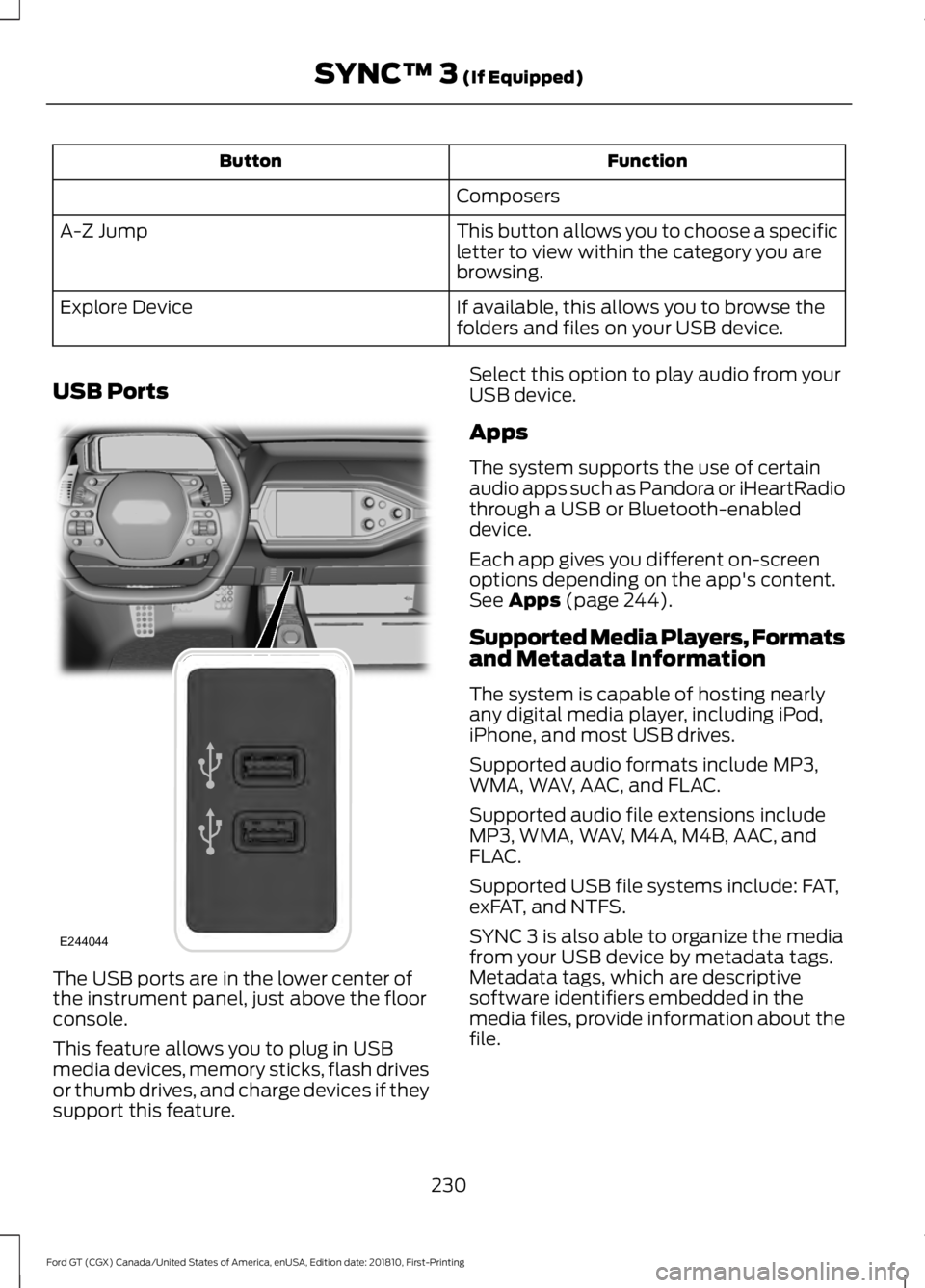
USB Ports The USB ports are in the lower center of
the instrument panel, just above the floor
console.
This feature allows you to plug in USB
media devices, memory sticks, flash drives
or thumb drives, and charge devices if they
support this feature. Select this option to play audio from your
USB device.
Apps
The system supports the use of certain
audio apps such as Pandora or iHeartRadio
through a USB or Bluetooth-enabled
device.
Each app gives you different on-screen
options depending on the app's content.
See Apps (page 244).
Supported Media Players, Formats
and Metadata Information
The system is capable of hosting nearly
any digital media player, including iPod,
iPhone, and most USB drives.
Supported audio formats include MP3,
WMA, WAV, AAC, and FLAC.
Supported audio file extensions include
MP3, WMA, WAV, M4A, M4B, AAC, and
FLAC.
Supported USB file systems include: FAT,
exFAT, and NTFS.
SYNC 3 is also able to organize the media
from your USB device by metadata tags.
Metadata tags, which are descriptive
software identifiers embedded in the
media files, provide information about the
file.
230
Ford GT (CGX) Canada/United States of America, enUSA, Edition date: 201810, First-Printing SYNC™ 3
(If Equipped)E244044
Page 253 of 321
You can enable and disable the following options as well:
Action and Description
Menu Item
When enabled, vehicle audio (such as radio or apps) is muted for the
duration of the phone call even when the phone call is in privacy.
Mute Audio in
Privacy
When enabled, an alert displays that your phone is roaming when
you attempt to place a call.
Roaming
Warning
When enabled, a message displays when the battery on your phone
is running low.
Low Battery
Notification
911 Assist
Note: This service is only available in the
United States and Canada. Select this button to modify the on or off
setting for this feature. If the mobile
phone
’s contacts have been downloaded,
you can adjust the following option: Action and Description
Menu Item
You can select up to two numbers from your mobile device's phone-
book as emergency contacts for quick access at the end of the 911
Assist call process.
Set Emergency
Contacts
Radio
This button is available if a Radio source
such as AM or FM is the active media
source. Pressing the button allows you to
access the following features: Action and Description
Menu Item
This feature is available when FM Radio is your active media source.
Activate this feature to have the system display radio text.
Radio Text
Refresh
Autoset Presets
(AST)
Selecting this option stores the six strongest stations in your current
location to the last preset bank of the currently tuned source.
Navigation
You can adjust many of the Navigation
preferences by selecting the following
menus.
250
Ford GT (CGX) Canada/United States of America, enUSA, Edition date: 201810, First-Printing SYNC™ 3 (If Equipped)
Page 272 of 321
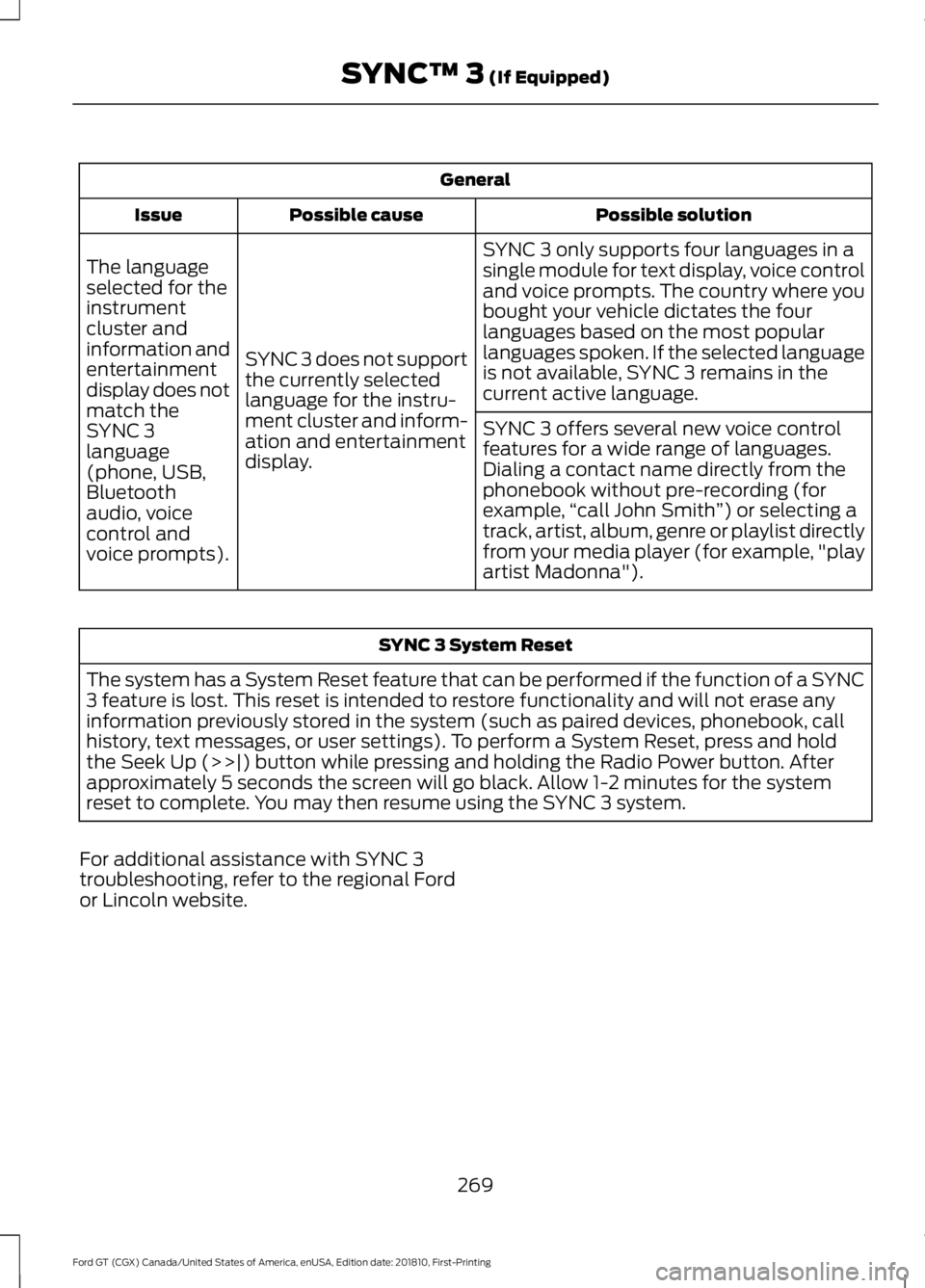
General
Possible solution
Possible cause
Issue
SYNC 3 only supports four languages in a
single module for text display, voice control
and voice prompts. The country where you
bought your vehicle dictates the four
languages based on the most popular
languages spoken. If the selected language
is not available, SYNC 3 remains in the
current active language.
SYNC 3 does not support
the currently selected
language for the instru-
ment cluster and inform-
ation and entertainment
display.
The language
selected for the
instrument
cluster and
information and
entertainment
display does not
match the
SYNC 3
SYNC 3 offers several new voice control
features for a wide range of languages.
Dialing a contact name directly from the
phonebook without pre-recording (for
example,
“call John Smith ”) or selecting a
track, artist, album, genre or playlist directly
from your media player (for example, "play
artist Madonna").
language
(phone, USB,
Bluetooth
audio, voice
control and
voice prompts). SYNC 3 System Reset
The system has a System Reset feature that can be performed if the function of a SYNC
3 feature is lost. This reset is intended to restore functionality and will not erase any
information previously stored in the system (such as paired devices, phonebook, call
history, text messages, or user settings). To perform a System Reset, press and hold
the Seek Up (>>|) button while pressing and holding the Radio Power button. After
approximately 5 seconds the screen will go black. Allow 1-2 minutes for the system
reset to complete. You may then resume using the SYNC 3 system.
For additional assistance with SYNC 3
troubleshooting, refer to the regional Ford
or Lincoln website.
269
Ford GT (CGX) Canada/United States of America, enUSA, Edition date: 201810, First-Printing SYNC™ 3 (If Equipped)
Page 311 of 321
including any copyrighted material or
music file information. You agree that
Gracenote may enforce its respective
rights, collectively or separately, under this
agreement against you, directly in each
company's own name.
Gracenote uses a unique identifier to track
queries for statistical purposes. The
purpose of a randomly assigned numeric
identifier is to allow Gracenote to count
queries without knowing anything about
who you are. For more information, see the
web page at www.gracenote.com for the
Gracenote Privacy Policy.
THE GRACENOTE SOFTWARE, EACH ITEM
OF GRACENOTE DATA AND THE
GRACENOTE CONTENT ARE LICENSED
TO YOU "AS IS". NEITHER GRACENOTE
MAKES ANY REPRESENTATIONS OR
WARRANTIES, EXPRESS OR IMPLIED,
REGARDING THE ACCURACY OF ANY
GRACENOTE DATA FROM THE
GRACENOTE SERVERS OR GRACENOTE
CONTENT. GRACENOTE COLLECTIVELY
AND SEPARATELY RESERVE THE RIGHT
TO DELETE DATA AND/OR CONTENT
FROM THE COMPANIES' RESPECTIVE
SERVERS OR, IN THE CASE OF
GRACENOTE, CHANGE DATA
CATEGORIES FOR ANY CAUSE THAT
GRACENOTE DEEMS SUFFICIENT. NO
WARRANTY IS MADE THAT EITHER
GRACENOTE CONTENT OR THE
GRACENOTE SOFTWARE OR
GRACENOTE SERVERS ARE ERROR-FREE
OR THAT THE FUNCTIONING OF THE
GRACENOTE SOFTWARE OR
GRACENOTE SERVERS WILL BE
UNINTERRUPTED. GRACENOTE IS NOT
OBLIGATED TO PROVIDE YOU WITH ANY
ENHANCED OR ADDITIONAL DATA TYPES
THAT GRACENOTE MAY CHOOSE TO
PROVIDE IN THE FUTURE AND IS FREE
TO DISCONTINUE ITS ONLINE SERVICES
AT ANY TIME. GRACENOTE DISCLAIM ALL
WARRANTIES EXPRESS OR IMPLIED,
INCLUDING, BUT NOT LIMITED TO,
IMPLIED WARRANTIES OF
MERCHANTABILITY, FITNESS FOR A
PARTICULAR PURPOSE, TITLE, AND
NON-INFRINGEMENT. NEITHER
GRACENOTE WARRANTS THE RESULTS
THAT WILL BE OBTAINED BY YOUR USE
OF THE GRACENOTE SOFTWARE OR ANY
GRACENOTE SERVER. IN NO CASE WILL
GRACENOTE BE LIABLE FOR ANY
CONSEQUENTIAL OR INCIDENTAL
DAMAGES OR FOR ANY LOST PROFITS
OR LOST REVENUES FOR ANY REASON
WHATSOEVER. © Gracenote 2007.
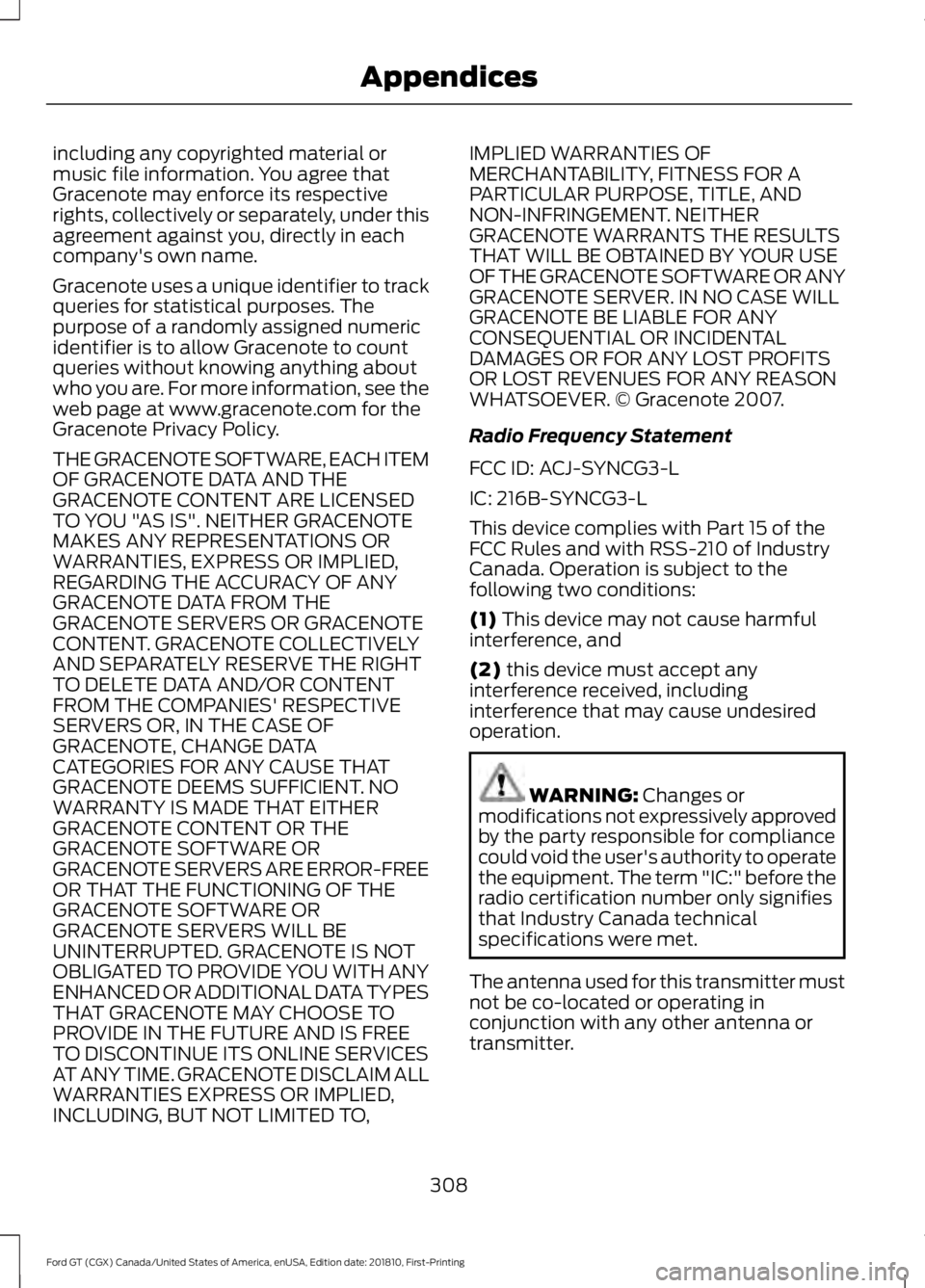
Radio Frequency Statement
FCC ID: ACJ-SYNCG3-L
IC: 216B-SYNCG3-L
This device complies with Part 15 of the
FCC Rules and with RSS-210 of Industry
Canada. Operation is subject to the
following two conditions:
(1) This device may not cause harmful
interference, and
(2)
this device must accept any
interference received, including
interference that may cause undesired
operation. WARNING:
Changes or
modifications not expressively approved
by the party responsible for compliance
could void the user's authority to operate
the equipment. The term "IC:" before the
radio certification number only signifies
that Industry Canada technical
specifications were met.
The antenna used for this transmitter must
not be co-located or operating in
conjunction with any other antenna or
transmitter.
308
Ford GT (CGX) Canada/United States of America, enUSA, Edition date: 201810, First-Printing Appendices
Page 312 of 321
Taiwan Territory
Note: In accordance with the management
approach of low-power radio wave
radiation motors:
Article 12: For approved and certified
low-power radiation motor models,
companies, firms or users must not alter
the frequency, increase the power or
change the characteristics and functions
of the original design without authorization.
Article 14: The usage of low-power
radio-frequency motors must not affect
aviation safety and interfere with legal
telecommunications. Should interference
be detected, immediately stop using the
device and only resume usage after
ensuring that there is no longer any
interference. For the legal
telecommunication and wireless
telecommunication of the telco, the
low-power radio frequency motor must be
able to tolerate legal limits of interference
from telecommunication, industrial,
scientific and radio wave equipment.
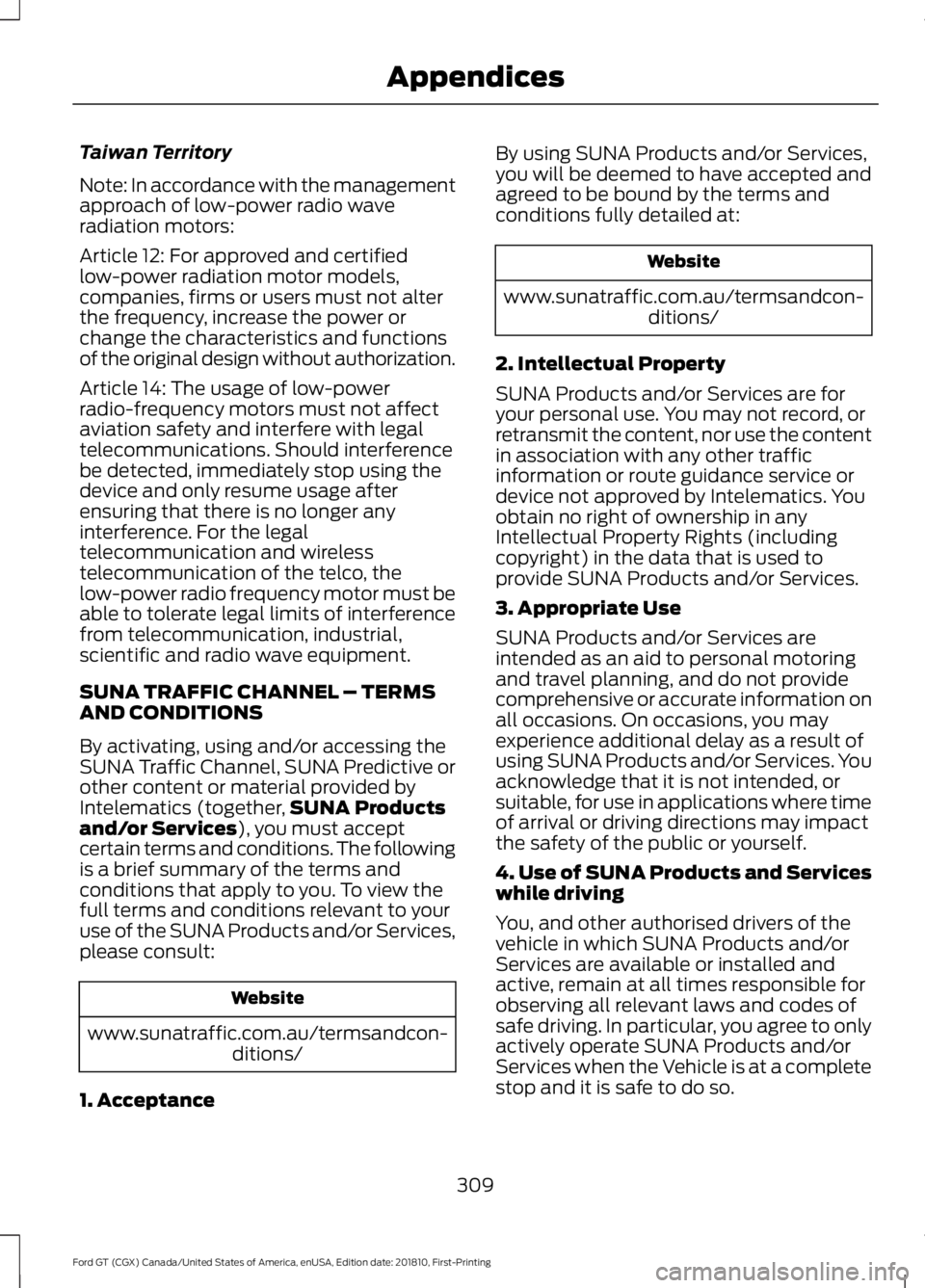
SUNA TRAFFIC CHANNEL – TERMS
AND CONDITIONS
By activating, using and/or accessing the
SUNA Traffic Channel, SUNA Predictive or
other content or material provided by
Intelematics (together,
SUNA Products
and/or Services), you must accept
certain terms and conditions. The following
is a brief summary of the terms and
conditions that apply to you. To view the
full terms and conditions relevant to your
use of the SUNA Products and/or Services,
please consult: Website
www.sunatraffic.com.au/termsandcon- ditions/
1. Acceptance By using SUNA Products and/or Services,
you will be deemed to have accepted and
agreed to be bound by the terms and
conditions fully detailed at: Website
www.sunatraffic.com.au/termsandcon- ditions/
2. Intellectual Property
SUNA Products and/or Services are for
your personal use. You may not record, or
retransmit the content, nor use the content
in association with any other traffic
information or route guidance service or
device not approved by Intelematics. You
obtain no right of ownership in any
Intellectual Property Rights (including
copyright) in the data that is used to
provide SUNA Products and/or Services.
3. Appropriate Use
SUNA Products and/or Services are
intended as an aid to personal motoring
and travel planning, and do not provide
comprehensive or accurate information on
all occasions. On occasions, you may
experience additional delay as a result of
using SUNA Products and/or Services. You
acknowledge that it is not intended, or
suitable, for use in applications where time
of arrival or driving directions may impact
the safety of the public or yourself.
4. Use of SUNA Products and Services
while driving
You, and other authorised drivers of the
vehicle in which SUNA Products and/or
Services are available or installed and
active, remain at all times responsible for
observing all relevant laws and codes of
safe driving. In particular, you agree to only
actively operate SUNA Products and/or
Services when the Vehicle is at a complete
stop and it is safe to do so.
309
Ford GT (CGX) Canada/United States of America, enUSA, Edition date: 201810, First-Printing Appendices
Page 316 of 321
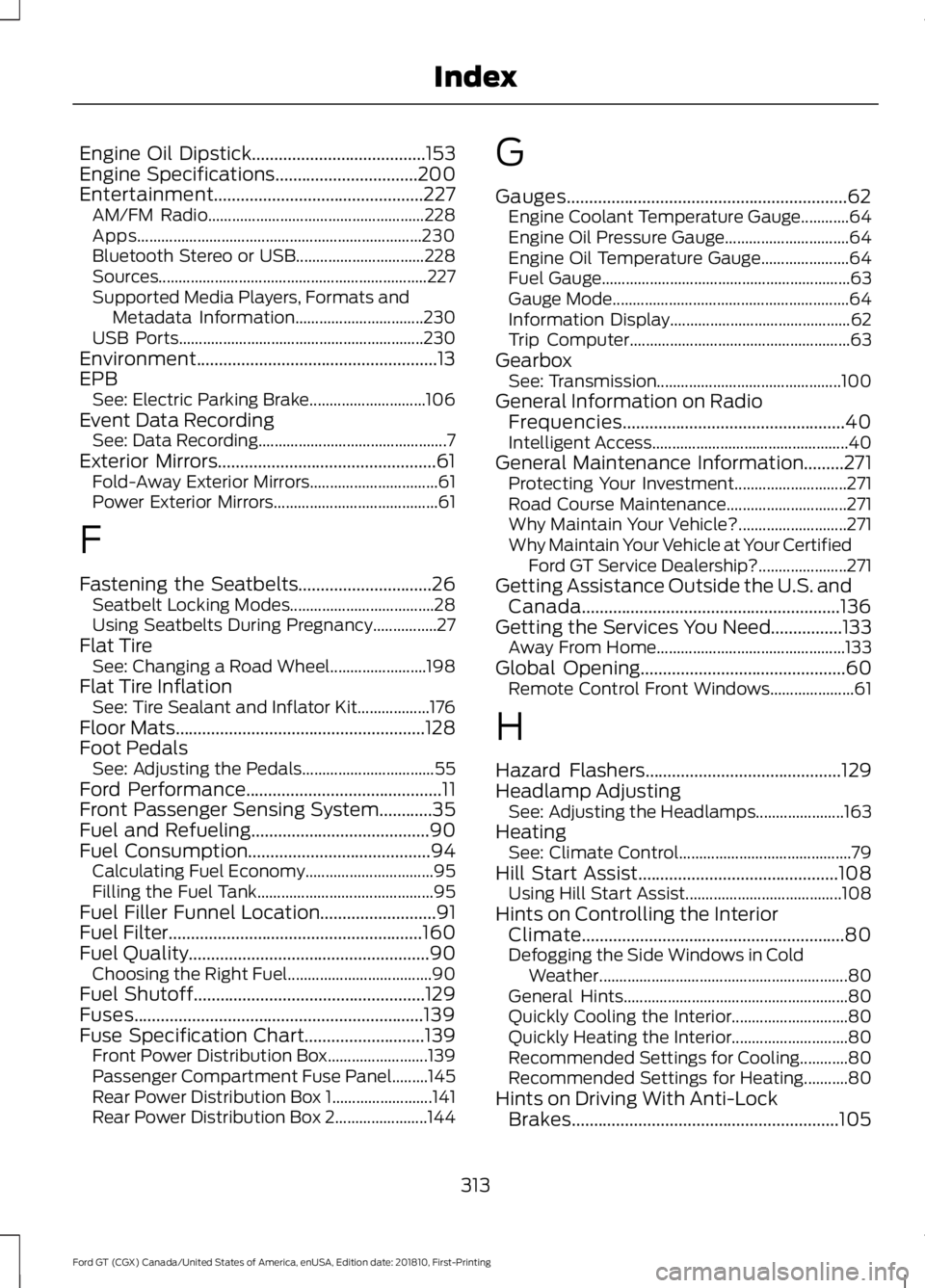
Engine Oil Dipstick.......................................153
Engine Specifications................................200
Entertainment...............................................227 AM/FM Radio...................................................... 228
Apps....................................................................... 230
Bluetooth Stereo or USB................................ 228
Sources................................................................... 227
Supported Media Players, Formats and Metadata Information................................ 230
USB Ports............................................................. 230
Environment......................................................13
EPB See: Electric Parking Brake............................. 106
Event Data Recording See: Data Recording............................................... 7
Exterior Mirrors.................................................61 Fold-Away Exterior Mirrors................................ 61
Power Exterior Mirrors......................................... 61
F
Fastening the Seatbelts..............................26 Seatbelt Locking Modes.................................... 28
Using Seatbelts During Pregnancy................27
Flat Tire See: Changing a Road Wheel........................ 198
Flat Tire Inflation See: Tire Sealant and Inflator Kit.................. 176
Floor Mats........................................................128
Foot Pedals See: Adjusting the Pedals................................. 55
Ford Performance
............................................11
Front Passenger Sensing System............35
Fuel and Refueling
........................................90
Fuel Consumption.........................................94 Calculating Fuel Economy................................ 95
Filling the Fuel Tank............................................ 95
Fuel Filler Funnel Location
..........................91
Fuel Filter.........................................................160
Fuel Quality
......................................................90
Choosing the Right Fuel.................................... 90
Fuel Shutoff
....................................................129
Fuses.................................................................139
Fuse Specification Chart...........................139 Front Power Distribution Box......................... 139
Passenger Compartment Fuse Panel.........145
Rear Power Distribution Box 1......................... 141
Rear Power Distribution Box 2....................... 144G
Gauges...............................................................62
Engine Coolant Temperature Gauge............64
Engine Oil Pressure Gauge............................... 64
Engine Oil Temperature Gauge...................... 64
Fuel Gauge.............................................................. 63
Gauge Mode........................................................... 64
Information Display............................................. 62
Trip Computer....................................................... 63
Gearbox See: Transmission.............................................. 100
General Information on Radio Frequencies..................................................40
Intelligent Access................................................. 40
General Maintenance Information.........271 Protecting Your Investment............................ 271
Road Course Maintenance.............................. 271
Why Maintain Your Vehicle?........................... 271
Why Maintain Your Vehicle at Your Certified Ford GT Service Dealership?...................... 271
Getting Assistance Outside the U.S. and Canada..........................................................136
Getting the Services You Need................133 Away From Home............................................... 133
Global Opening..............................................60 Remote Control Front Windows..................... 61
H
Hazard Flashers
............................................129
Headlamp Adjusting See: Adjusting the Headlamps...................... 163
Heating See: Climate Control........................................... 79
Hill Start Assist.............................................108 Using Hill Start Assist....................................... 108
Hints on Controlling the Interior Climate...........................................................80
Defogging the Side Windows in Cold Weather.............................................................. 80
General Hints........................................................ 80
Quickly Cooling the Interior............................. 80
Quickly Heating the Interior............................. 80
Recommended Settings for Cooling............80
Recommended Settings for Heating...........80
Hints on Driving With Anti-Lock Brakes
............................................................105
313
Ford GT (CGX) Canada/United States of America, enUSA, Edition date: 201810, First-Printing Index
Page 319 of 321
Filling a Portable Fuel Container.....................
91
S
Safety Precautions........................................90
Scheduled Maintenance Record............274
Scheduled Maintenance............................271
Seatbelt Extension.........................................31
Seatbelt Reminder
........................................29
Belt-Minder™........................................................ 29
Seatbelts...........................................................26 Principle of Operation........................................ 26
Seatbelt Warning Lamp and Indicator Chime
..............................................................29
Conditions of operation..................................... 29
Seats...................................................................82
Security..............................................................49
Settings
...........................................................245
911 Assist............................................................... 250
Bluetooth............................................................... 247
Camera Settings................................................ 255
Clock....................................................................... 247
Display................................................................... 255
General.................................................................. 254
Media Player........................................................ 246
Mobile Apps......................................................... 252
Navigation............................................................ 250
Phone...................................................................... 247
Radio...................................................................... 250
Sound..................................................................... 245
Valet Mode........................................................... 256
Voice Control....................................................... 256
Wi-Fi....................................................................... 254
Side Airbags......................................................37
Sitting in the Correct Position...................82
Snow Chains See: Using Snow Chains.................................. 194
Spare Wheel See: Changing a Road Wheel........................ 198
Special Notices
................................................10
Additional Warranty Information.................... 10
Certified Ford GT Service Dealer...................... 11
New Vehicle Limited Warranty........................ 10
On Board Diagnostics Data Link Connector........................................................... 10
Special Instructions............................................. 10Special Operating Conditions Scheduled
Maintenance
...............................................273
Engine Air Filter and Cabin Air Filter
Replacement.................................................. 273
Hot Climate Oil Change Intervals................273
Operating at High Speeds and Track Days.................................................................... 273
Speed Control See: Cruise Control.............................................. 114
Stability Control...........................................109 Principle of Operation...................................... 109
Starting and Stopping the Engine...........86 General Information........................................... 86
Starting the Engine
........................................87
Failure to Start...................................................... 88
Fast Restart............................................................ 88
Guarding Against Exhaust Fumes.................89
Important Ventilating Information................89
Stopping the Engine When Your Vehicle is Moving................................................................. 88
Stopping the Engine When Your Vehicle is Stationary.......................................................... 88
Steering.............................................................115
Steering Wheel Lock
.....................................87
Steering Wheel.................................................51
Storage Compartments..............................85
Supplementary Restraints System.........33 Principle of Operation......................................... 33
Symbols Glossary.............................................5
SYNC™ 3
........................................................209
General Information......................................... 209
SYNC™ 3 Troubleshooting......................256
T
Technical Specifications See: Capacities and Specifications...........200
The Better Business Bureau (BBB) Auto Line Program (U.S. Only)........................134
Tire Care
...........................................................182
Glossary of Tire Terminology......................... 184
Information About Uniform Tire Quality Grading.............................................................. 182
Information Contained on the Tire Sidewall............................................................ 185
Temperature A B C............................................. 183
Traction AA A B C............................................... 183
Treadwear............................................................. 183
316
Ford GT (CGX) Canada/United States of America, enUSA, Edition date: 201810, First-Printing Index