seats FORD GT 2019 User Guide
[x] Cancel search | Manufacturer: FORD, Model Year: 2019, Model line: GT, Model: FORD GT 2019Pages: 321, PDF Size: 5.24 MB
Page 85 of 321
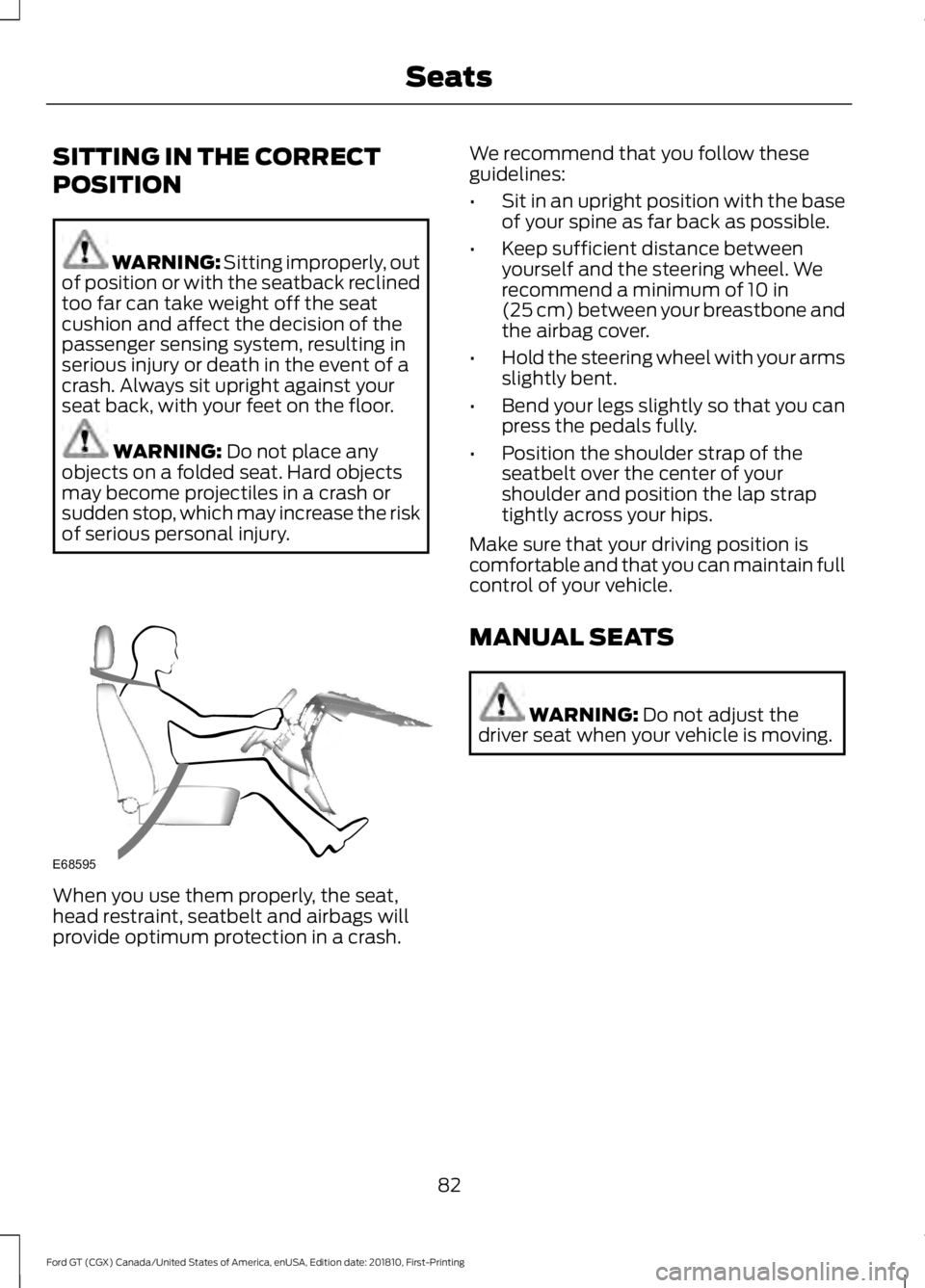
SITTING IN THE CORRECT
POSITION
WARNING: Sitting improperly, out
of position or with the seatback reclined
too far can take weight off the seat
cushion and affect the decision of the
passenger sensing system, resulting in
serious injury or death in the event of a
crash. Always sit upright against your
seat back, with your feet on the floor. WARNING:
Do not place any
objects on a folded seat. Hard objects
may become projectiles in a crash or
sudden stop, which may increase the risk
of serious personal injury. When you use them properly, the seat,
head restraint, seatbelt and airbags will
provide optimum protection in a crash. We recommend that you follow these
guidelines:
•
Sit in an upright position with the base
of your spine as far back as possible.
• Keep sufficient distance between
yourself and the steering wheel. We
recommend a minimum of
10 in
(25 cm) between your breastbone and
the airbag cover.
• Hold the steering wheel with your arms
slightly bent.
• Bend your legs slightly so that you can
press the pedals fully.
• Position the shoulder strap of the
seatbelt over the center of your
shoulder and position the lap strap
tightly across your hips.
Make sure that your driving position is
comfortable and that you can maintain full
control of your vehicle.
MANUAL SEATS WARNING:
Do not adjust the
driver seat when your vehicle is moving.
82
Ford GT (CGX) Canada/United States of America, enUSA, Edition date: 201810, First-Printing SeatsE68595
Page 86 of 321
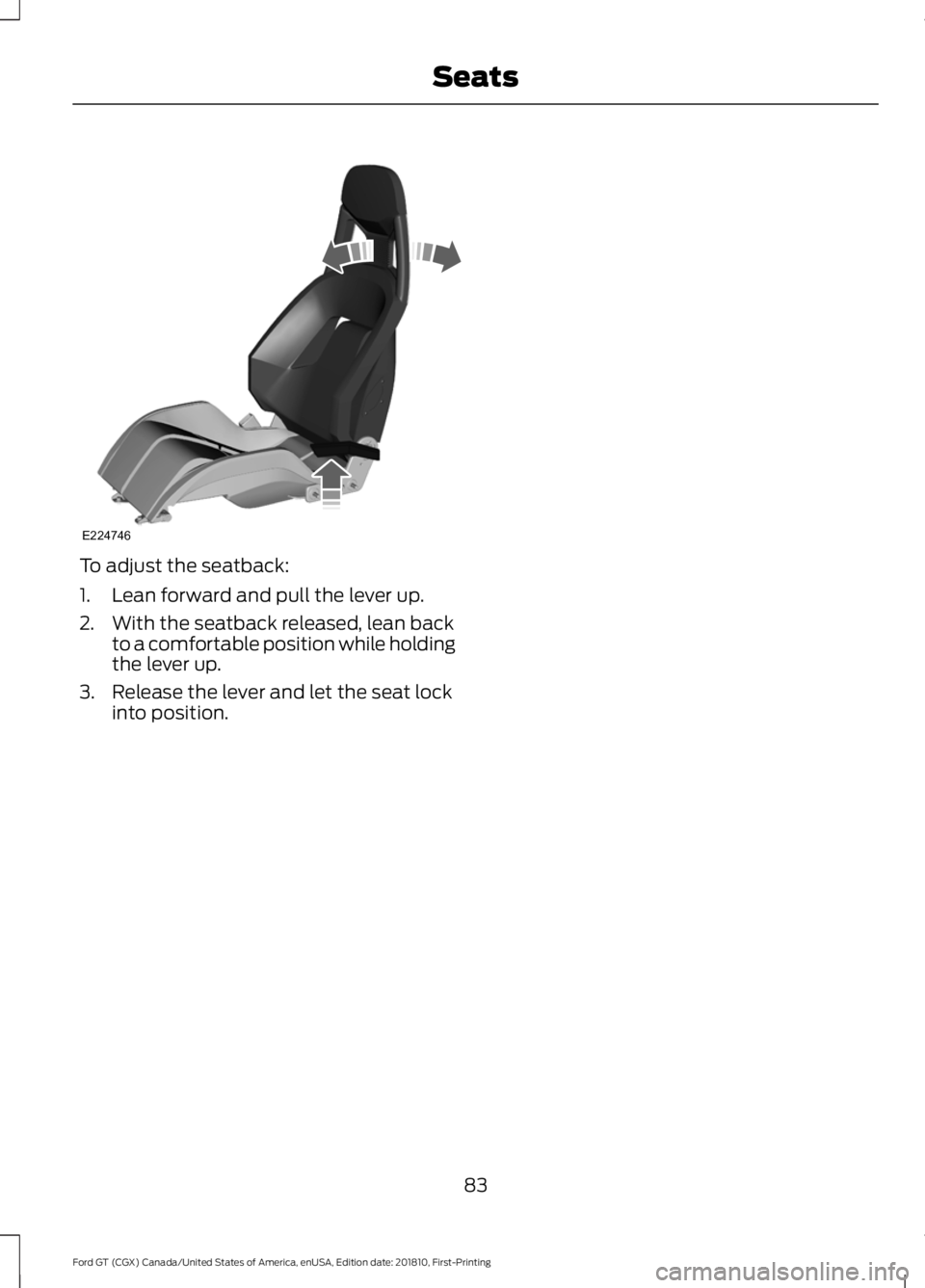
To adjust the seatback:
1. Lean forward and pull the lever up.
2. With the seatback released, lean back
to a comfortable position while holding
the lever up.
3. Release the lever and let the seat lock into position.
83
Ford GT (CGX) Canada/United States of America, enUSA, Edition date: 201810, First-Printing SeatsE224746
Page 88 of 321
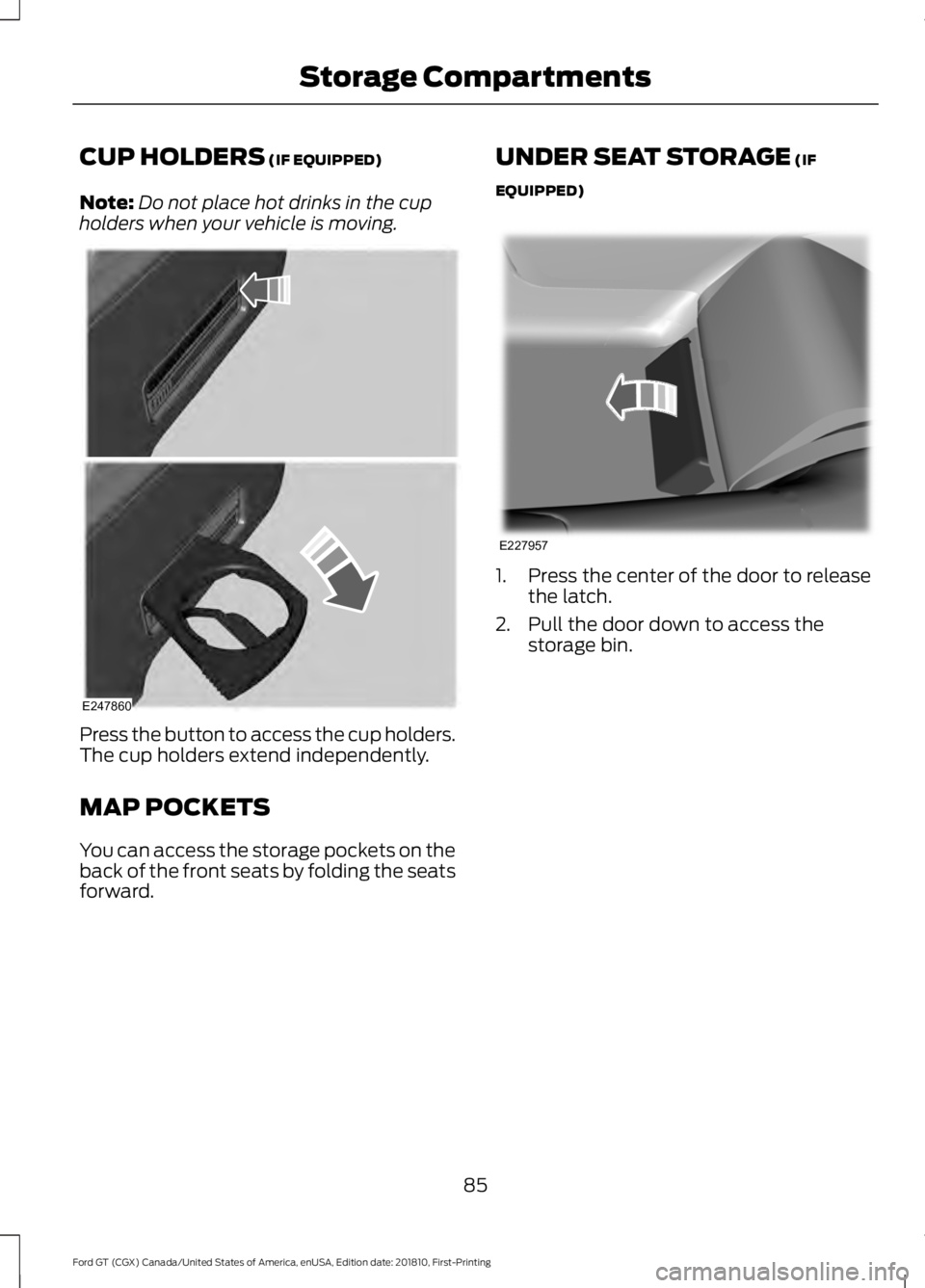
CUP HOLDERS (IF EQUIPPED)
Note: Do not place hot drinks in the cup
holders when your vehicle is moving. Press the button to access the cup holders.
The cup holders extend independently.
MAP POCKETS
You can access the storage pockets on the
back of the front seats by folding the seats
forward. UNDER SEAT STORAGE (IF
EQUIPPED) 1. Press the center of the door to release
the latch.
2. Pull the door down to access the storage bin.
85
Ford GT (CGX) Canada/United States of America, enUSA, Edition date: 201810, First-Printing Storage CompartmentsE247860 E227957
Page 112 of 321
PRINCIPLE OF OPERATION
WARNING: Vehicle modifications
involving braking system, aftermarket
roof racks, suspension, steering system,
tire construction and wheel and tire size
may change the handling characteristics
of your vehicle and may adversely affect
the performance of the electronic
stability control system. In addition,
installing any stereo loudspeakers may
interfere with and adversely affect the
electronic stability control system. Install
any aftermarket stereo loudspeaker as
far as possible from the front center
console, the tunnel, and the front seats
in order to minimize the risk of interfering
with the electronic stability control
sensors. Reducing the effectiveness of
the electronic stability control system
could lead to an increased risk of loss of
vehicle control, vehicle rollover, personal
injury and death. WARNING:
Remember that even
advanced technology cannot defy the
laws of physics. It's always possible to
lose control of a vehicle due to
inappropriate driver input for the
conditions. Aggressive driving on any
road condition can cause you to lose
control of your vehicle increasing the risk
of personal injury or property damage.
Activation of the electronic stability
control system is an indication that at
least some of the tires have exceeded
their ability to grip the road; this could
reduce the operator's ability to control
the vehicle potentially resulting in a loss
of vehicle control, vehicle rollover,
personal injury and death. If your
electronic stability control system
activates, SLOW DOWN. WARNING:
The stability and
traction control light illuminates steadily
if the system detects a failure. Make sure
you did not manually disable the traction
control system using the information
display controls or the switch. If the
stability control and traction control light
is still illuminating steadily, have the
system serviced by an authorized dealer
immediately. Operating your vehicle with
the traction control disabled could lead
to an increased risk of loss of vehicle
control, vehicle rollover, personal injury
and death.
The stability and traction control systems
help you to avoid drive wheel spin and loss
of traction. The system automatically
turns on each time you switch the ignition
on.
If a fault occurs in either the stability
control or the traction control system, you
may experience the following conditions:
• The stability and traction control light
illuminates steadily.
• The stability control and traction
control systems do not enhance your
vehicle's ability to maintain traction of
the wheels.
If a driving condition activates either the
stability control or the traction control
system you may experience the following
conditions:
• The stability and traction control light
flashes.
• Your vehicle slows down.
• Reduced engine power.
• A vibration in the brake pedal.
109
Ford GT (CGX) Canada/United States of America, enUSA, Edition date: 201810, First-Printing Stability Control
Page 174 of 321
CLEANING THE WINDOWS AND
WIPER BLADES
Dirty windshield and wipers will result in
poor windshield wiper operation. Keep the
windshield and wiper blades clean to
maintain windshield wiper performance.
To clean exterior glass surfaces and wiper
blades:
•
Clean the exterior surface of the
windshield with a non-abrasive glass
cleaner.
• For windshields contaminated with
tree sap, chemicals, wax or bugs, clean
the outside surface of the windshield
with Motorcraft Bug and Tar Remover.
• Clean the wiper blades with isopropyl
rubbing alcohol or windshield washer
concentrate.
The interior glass surface of the windshield
and engine cover glass, and both the inner
and outer surface of the bulkhead glass,
have a laminate coating that requires
special care.
To clean interior glass surfaces:
• When cleaning the inside of the
windshield, avoid getting any glass
cleaner on the instrument panel or door
panels. Wipe any excess cleaner off
these surfaces immediately.
• Use a microfiber towel and plain water,
or a mixture of one-half water and
one-half white vinegar, to clean the
interior glass surfaces.
Note: Never use alcohol or ammonia based
cleaners, aerosol sprays or abrasive
compounds to clean the interior glass
surfaces of your vehicle. Using improper
cleaning products can cause damage to
your vehicle. CLEANING THE INTERIOR WARNING: Do not use cleaning
solvents, bleach or dye on the vehicle's
seatbelts, as these actions may weaken
the belt webbing.
Clean safety belts with water applied with
a soft sponge. Let them dry naturally, away
from artificial heat.
Wipe carbon fiber surfaces with a clean,
damp and soft cloth to remove dust. Then
use a clean, dry and soft cloth to dry these
areas.
Cleaning Alcantara Microfiber
Cloth
Note: Some models have Alcantara
microfiber cloth fabric on the seats,
headliner, instrument panel and door panels.
Use a soft brush, a clean, dry cloth or
vacuum cleaner to remove dust and loose
dirt from Alcantara cloth surfaces. Gently
wipe the cloth surfaces with a clean, damp
cotton cloth.
Note: Alcantara microfiber cloth fabric are
made of polyester microfiber with
micro-porous polyurethane. Using
commercially available fabric cleaners can
cause permanent damage.
Note: Do not use commercially available
leather and vinyl cleaning products on
Alcantara cloth fabric.
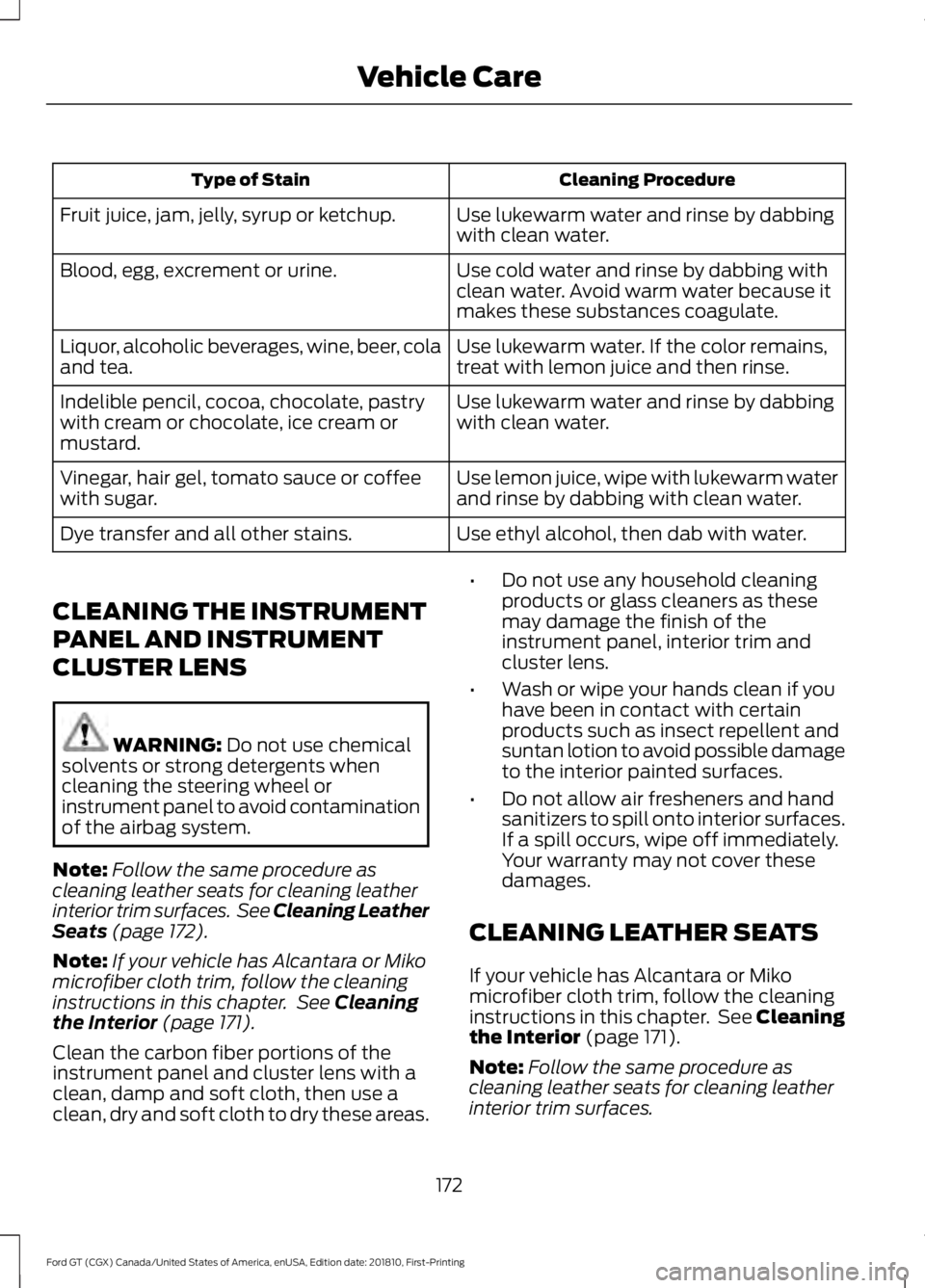
Depending on the type of stain, use water,
lemon juice or pure ethyl alcohol when
cleaning. For cleaning Alcantara microfiber
cloth, refer to the following chart:
171
Ford GT (CGX) Canada/United States of America, enUSA, Edition date: 201810, First-Printing Vehicle Care
Page 175 of 321
Cleaning Procedure
Type of Stain
Use lukewarm water and rinse by dabbing
with clean water.
Fruit juice, jam, jelly, syrup or ketchup.
Use cold water and rinse by dabbing with
clean water. Avoid warm water because it
makes these substances coagulate.
Blood, egg, excrement or urine.
Use lukewarm water. If the color remains,
treat with lemon juice and then rinse.
Liquor, alcoholic beverages, wine, beer, cola
and tea.
Use lukewarm water and rinse by dabbing
with clean water.
Indelible pencil, cocoa, chocolate, pastry
with cream or chocolate, ice cream or
mustard.
Use lemon juice, wipe with lukewarm water
and rinse by dabbing with clean water.
Vinegar, hair gel, tomato sauce or coffee
with sugar.
Use ethyl alcohol, then dab with water.
Dye transfer and all other stains.
CLEANING THE INSTRUMENT
PANEL AND INSTRUMENT
CLUSTER LENS WARNING: Do not use chemical
solvents or strong detergents when
cleaning the steering wheel or
instrument panel to avoid contamination
of the airbag system.
Note: Follow the same procedure as
cleaning leather seats for cleaning leather
interior trim surfaces. See Cleaning Leather
Seats
(page 172).
Note: If your vehicle has Alcantara or Miko
microfiber cloth trim, follow the cleaning
instructions in this chapter. See
Cleaning
the Interior (page 171).
Clean the carbon fiber portions of the
instrument panel and cluster lens with a
clean, damp and soft cloth, then use a
clean, dry and soft cloth to dry these areas. •
Do not use any household cleaning
products or glass cleaners as these
may damage the finish of the
instrument panel, interior trim and
cluster lens.
• Wash or wipe your hands clean if you
have been in contact with certain
products such as insect repellent and
suntan lotion to avoid possible damage
to the interior painted surfaces.
• Do not allow air fresheners and hand
sanitizers to spill onto interior surfaces.
If a spill occurs, wipe off immediately.
Your warranty may not cover these
damages.
CLEANING LEATHER SEATS
If your vehicle has Alcantara or Miko
microfiber cloth trim, follow the cleaning
instructions in this chapter. See Cleaning
the Interior (page 171).
Note: Follow the same procedure as
cleaning leather seats for cleaning leather
interior trim surfaces.
172
Ford GT (CGX) Canada/United States of America, enUSA, Edition date: 201810, First-Printing Vehicle Care
Page 218 of 321
If you do not cancel the call, and SYNC
makes a successful call, a pre-recorded
message plays for the 911 operator, and
then the occupant(s) in your vehicle is able
to talk with the operator. Be prepared to
provide your name, phone number and
location immediately, because not all 911
systems are capable of receiving this
information electronically.
911 Assist May Not Work If
•
Your cellular phone or 911 Assist
hardware sustains damage in a crash.
• The vehicle's battery or the SYNC
system has no power.
• The phone(s) thrown from your vehicle
are the ones paired and connected to
the system.
911 Assist Privacy Notice
When you switch on 911 Assist, it may
disclose to emergency services that your
vehicle has been in a crash involving the
deployment of an airbag or activation of
the fuel pump shut-off. Certain versions or
updates to 911 Assist may also be capable
of electronically or verbally disclosing to
911 operators your vehicle location or other
details about your vehicle or crash to assist
911 operators to provide the most
appropriate emergency services. If you do
not want to disclose this information, do
not switch the feature on.
Safety Information WARNING: Driving while
distracted can result in loss of vehicle
control, crash and injury. We strongly
recommend that you use extreme
caution when using any device that may
take your focus off the road. Your
primary responsibility is the safe
operation of your vehicle. We
recommend against the use of any hand-held device while driving and
encourage the use of voice-operated
systems when possible. Make sure you
are aware of all applicable local laws
that may affect the use of electronic
devices while driving.
• Do not attempt to service or repair the
system. Have an authorized dealer
check your vehicle.
• Do not operate playing devices if the
power cords or cables are broken, split
or damaged. Place cords and cables
out of the way, so they do not interfere
with the operation of pedals, seats,
compartments or safe driving abilities.
• Do not leave playing devices in your
vehicle during extreme conditions as it
could cause them damage. See your
device's user guide for further
information.
• For your safety, some SYNC 3 functions
are speed-dependent. Their use is
limited to when your vehicle is traveling
at speeds under 3 mph (5 km/h). Make
sure that you review your device's
manual before using it with SYNC 3.
Speed-restricted Features
Some features of this system may be too
difficult to use while your vehicle is moving
so they are restricted from use unless your
vehicle is stationary.
• Screens crowded with information,
such as Point of Interest reviews and
ratings, movie times or ski conditions.
• Any action that requires you to use a
keyboard is restricted, such as entering
a navigation destination or editing
information.
• All lists are limited so the user can view
fewer entries (such as phone contacts
or recent phone call entries).
215
Ford GT (CGX) Canada/United States of America, enUSA, Edition date: 201810, First-Printing SYNC™ 3
(If Equipped)
Page 314 of 321
A
A/C
See: Climate Control........................................... 79
About Launch Control.................................167
About This Manual...........................................5 Ford GT Concierge Phone Numbers................5
ABS See: Brakes........................................................... 105
ABS driving hints See: Hints on Driving With Anti-Lock
Brakes................................................................ 105
Accessories....................................................270
Accessories See: Replacement Parts
Recommendation.............................................. 9
Adjusting the Headlamps.........................163 Headlamp Aim Target....................................... 163
Adjusting the Pedals.....................................55
Adjusting the Steering Wheel.....................51
Airbag Disposal...............................................39
Air Conditioning See: Climate Control........................................... 79
Air Filter See: Changing the Engine Air Filter.............164
Alarm See: Anti-Theft Alarm........................................ 50
Anti-Theft Alarm............................................50 Arming the Alarm................................................ 50
Disarming the Alarm........................................... 50
Appendices....................................................285
Apps.................................................................244 ........................................................................\
.......... 244
At a Glance........................................................14
Audible Warnings and Indicators
.............68
Headlamps On Warning Chime..................... 68
Keyless Warning Alert........................................ 68
Audio Control...................................................52 Seek, Next or Previous........................................ 52
Audio System
...............................................208
Audio Unit......................................................208
Autolamps........................................................58
Automatic Climate Control........................79 Directing the Airflow............................................ 79
Setting the Blower Motor Speed.................... 79
Setting the Temperature................................... 79
Switching Auto Mode On and Off.................. 79
Switching Recirculated Air On and Off........79 Switching the Air Conditioning On and
Off........................................................................\
. 79
Automatic Transmission
...........................100
Brake-Shift Interlock......................................... 103
If Your Vehicle Gets Stuck In Mud or Snow.................................................................. 104
Performance Shift Indicator........................... 102
SelectShift™ Automatic Transmission.................................................... 101
Understanding the Positions of Your Automatic Transmission............................ 100
Automatic Transmission Fluid Check.............................................................158
Auxiliary Power Points.................................84 DC Power Point..................................................... 84
Location................................................................... 84
B
Battery See: Changing the 12V Battery...................... 160
Bonnet Lock See: Opening and Closing the Hood...........150
Booster Seats
..................................................22
Types of Booster Seats...................................... 23
Brake Fluid Check
.........................................158
Brakes...............................................................105 General Information.......................................... 105
Breaking-In......................................................127 Cold Engine Operation...................................... 127
Hot Engine Shut down...................................... 127
C
Cabin Air Filter
..................................................81
Capacities and Specifications................205 Specifications..................................................... 205
Car Wash See: Cleaning the Exterior............................... 168
Catalytic Converter........................................97 On-Board Diagnostics (OBD-II)..................... 98
Readiness for Inspection and Maintenance (I/M) Testing..................................................... 98
Changing a Bulb
...........................................164
LED Lamps............................................................ 164
Changing a Fuse...........................................148 Fuses....................................................................... 148
311
Ford GT (CGX) Canada/United States of America, enUSA, Edition date: 201810, First-Printing Index
Page 315 of 321
Changing a Road Wheel............................198
Important Information for Lifting or
Jacking............................................................... 198
Changing the 12V Battery.........................160 Battery Charger and Maintainer................... 160
Battery Management System........................ 162
Changing the Engine Air Filter.................164
Changing the Wiper Blades......................162
Checking the Wiper Blades......................162
Child Restraint and Seatbelt Maintenance..................................................31
Child Restraint Positioning.........................24
Child Safety
........................................................17
General Information............................................. 17
Cleaning Leather Seats...............................172
Cleaning Products
.......................................168
Materials................................................................ 168
Cleaning the Engine.....................................170
Cleaning the Exterior
...................................168
Exterior Plastic Parts......................................... 170
Matte Paint Finish.............................................. 169
Raising the Rear Wing....................................... 170
Standard Paint Finish....................................... 169
Under Hood........................................................... 170
Cleaning the Instrument Panel and Instrument Cluster Lens..........................172
Cleaning the Interior......................................171 Cleaning Alcantara Microfiber Cloth.............171
Cleaning the Wheels....................................173
Cleaning the Windows and Wiper Blades..............................................................171
Climate Control
...............................................79
Coolant Check See: Engine Coolant Check............................ 154
Crash Sensors and Airbag Indicator.......38
Cruise Control..................................................52 Principle of Operation........................................ 114
Cruise control See: Using Cruise Control................................. 114
Cup Holders
.....................................................85
Customer Assistance..................................133
D
Data Recording
..................................................7
Event Data Recording........................................... 8
Service Data Recording......................................... 7
Daytime Running Lamps............................58 Direction Indicators
.......................................59
Doors and Locks.............................................45
Drive Mode Control........................................53 Active Aerodynamics ........................................ 119
Damper Comfort Mode..................................... 119
Drive Mode Selection......................................... 115
Front Lift................................................................. 119
Driver and Passenger Airbags...................34 Children and Airbags........................................... 34
Proper Driver and Front Passenger Seating Adjustment........................................................ 34
Driver and Passenger Knee Airbags........38
Driving Aids......................................................115
Driving at High Speed.................................198 Tire Pressure - Speeds Greater Than .........198
Driving Hints
....................................................127
Driving Through Water................................127
DRL See: Daytime Running Lamps......................... 58
E
Electric Parking Brake
.................................106
Applying the Electric Parking brake............106
Battery With No Charge................................... 107
Releasing the Electric Parking Brake...........107
Emergency Door Release............................48
Emission Law..................................................96 Noise Emissions Warranty, Prohibited
Tampering Acts and Maintenance............97
Tampering With a Noise Control System................................................................ 96
End User License Agreement.................285 VEHICLE SOFTWARE END USER LICENSE
AGREEMENT (EULA) ................................. 285
Engine Coolant Check................................154 Adding Coolant.................................................... 155
Coolant Change.................................................. 156
Engine Coolant Temperature Management................................................... 157
Fail-Safe Cooling................................................ 156
Recycled Coolant............................................... 156
Severe Climates.................................................. 156
Engine Emission Control.............................96
Engine Immobilizer See: Passive Anti-Theft System..................... 49
Engine Oil Check...........................................153 Adding Engine Oil............................................... 153
312
Ford GT (CGX) Canada/United States of America, enUSA, Edition date: 201810, First-Printing Index
Page 317 of 321
Home Screen.................................................219
Hood Lock See: Opening and Closing the Hood...........150
I
In California (U.S. Only).............................134
Information Display Control.......................53
Information Displays....................................69 General Information........................................... 69
Information Messages..................................72 AdvanceTrac ™...................................................... 72
Alarm........................................................................\
. 72
Battery and Charging System.......................... 73
Doors and Locks.................................................... 73
Engine....................................................................... 73
Fuel........................................................................\
.... 74
Hill Start Assist ..................................................... 74
Hydraulic System.................................................. 74
Keys and Intelligent Access.............................. 75
Maintenance ........................................................... 75
Park Brake............................................................... 76
Remote Start.......................................................... 76
Starting System .................................................... 77
Steering System.................................................... 77
Tire Pressure Monitoring System.................... 77
Transmission.......................................................... 78
Installing Child Restraints
............................18
Child Seats............................................................... 18
Using Lap and Shoulder Belts.......................... 19
Using Tether Straps.............................................. 21
Instrument Cluster.........................................62
Instrument Lighting Dimmer
.....................58
Instrument Panel Overview........................14
Interior Lamps.................................................59
Interior Mirror
....................................................61
Introduction........................................................5
J
Jump Starting the Vehicle.........................130 Connecting the Jumper Cables..................... 130
Jump Starting........................................................ 131
Preparing Your Vehicle..................................... 130
Removing the Jumper Cables......................... 131K
Keyless Starting
..............................................86
Ignition Modes...................................................... 86
Keys and Remote Controls........................40
L
Launch Control
..............................................167
Lighting Control..............................................53
High Beams............................................................. 57
Performance Shift Indicator............................ 54
Lighting
...............................................................57
General Information............................................ 57
Load Carrying..................................................121
Load Limit
.........................................................121
Vehicle Loading - with and without a
Trailer................................................................... 121
Locking and Unlocking.................................45 Activating Intelligent Access ........................... 45
Autolock.................................................................. 46
Battery Saver.......................................................... 47
Illuminated Entry.................................................. 47
Illuminated Exit...................................................... 47
Power Door Locks................................................ 45
Remote Control.................................................... 45
Smart Unlocks for Intelligent Access Keys...................................................................... 46
Lug Nuts See: Changing a Road Wheel........................ 198
M
Maintenance..................................................150 General Information.......................................... 150
Manual Seats
...................................................82
Map Pockets....................................................85
Message Center See: Information Displays................................. 69
Mirrors See: Windows and Mirrors............................... 60
Mobile Communications Equipment........11
Motorcraft Parts
...........................................201
N
Navigation......................................................236 cityseeker.............................................................. 243
314
Ford GT (CGX) Canada/United States of America, enUSA, Edition date: 201810, First-Printing Index