transmission FORD GT 2019 Owner's Manual
[x] Cancel search | Manufacturer: FORD, Model Year: 2019, Model line: GT, Model: FORD GT 2019Pages: 321, PDF Size: 5.24 MB
Page 105 of 321
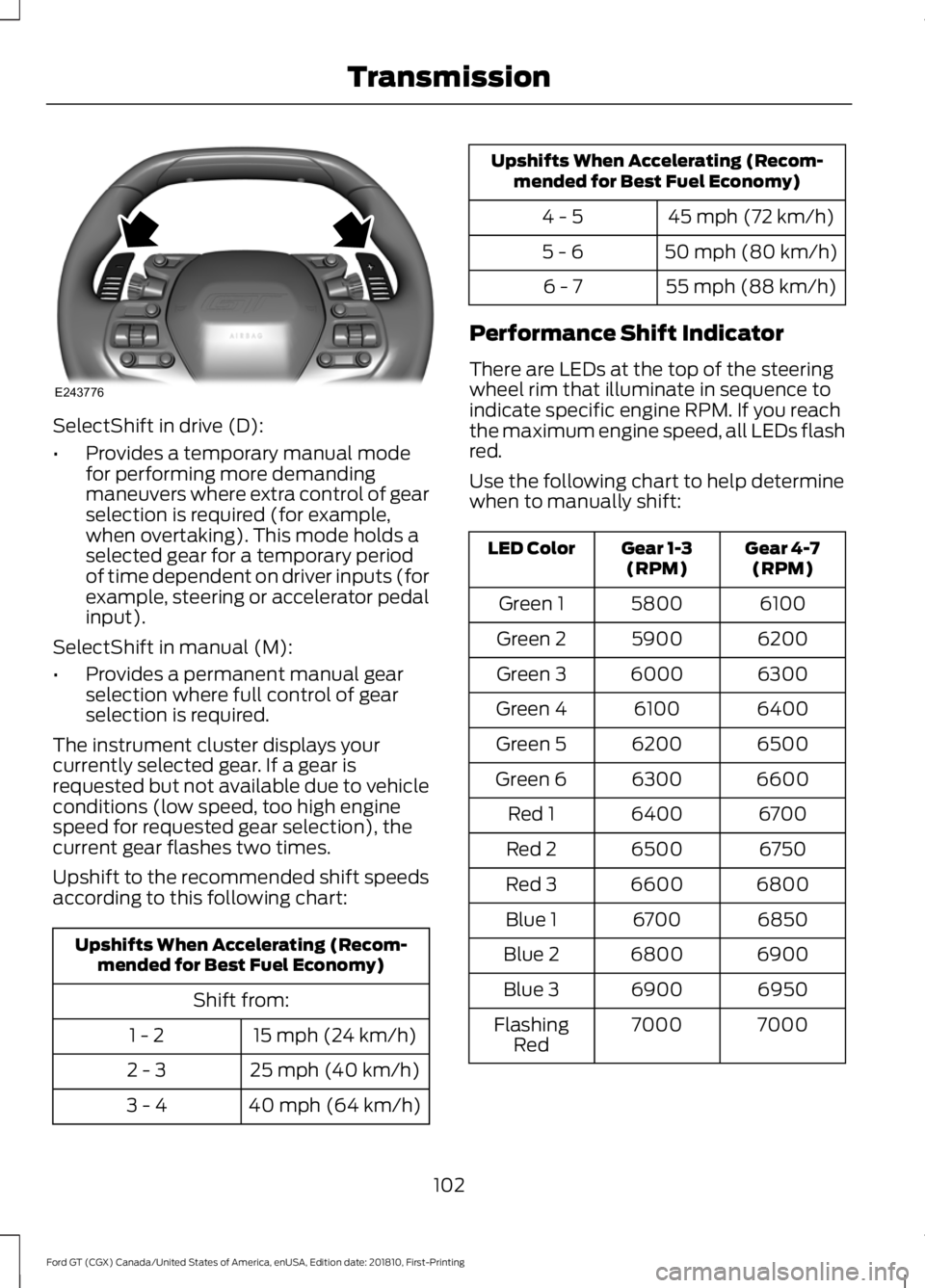
SelectShift in drive (D):
•
Provides a temporary manual mode
for performing more demanding
maneuvers where extra control of gear
selection is required (for example,
when overtaking). This mode holds a
selected gear for a temporary period
of time dependent on driver inputs (for
example, steering or accelerator pedal
input).
SelectShift in manual (M):
• Provides a permanent manual gear
selection where full control of gear
selection is required.
The instrument cluster displays your
currently selected gear. If a gear is
requested but not available due to vehicle
conditions (low speed, too high engine
speed for requested gear selection), the
current gear flashes two times.
Upshift to the recommended shift speeds
according to this following chart: Upshifts When Accelerating (Recom-
mended for Best Fuel Economy)
Shift from:15 mph (24 km/h)
1 - 2
25 mph (40 km/h)
2 - 3
40 mph (64 km/h)
3 - 4 Upshifts When Accelerating (Recom-
mended for Best Fuel Economy)
45 mph (72 km/h)
4 - 5
50 mph (80 km/h)
5 - 6
55 mph (88 km/h)
6 - 7
Performance Shift Indicator
There are LEDs at the top of the steering
wheel rim that illuminate in sequence to
indicate specific engine RPM. If you reach
the maximum engine speed, all LEDs flash
red.
Use the following chart to help determine
when to manually shift: Gear 4-7
(RPM)
Gear 1-3
(RPM)
LED Color
6100
5800
Green 1
6200
5900
Green 2
6300
6000
Green 3
6400
6100
Green 4
6500
6200
Green 5
6600
6300
Green 6
6700
6400
Red 1
6750
6500
Red 2
6800
6600
Red 3
6850
6700
Blue 1
6900
6800
Blue 2
6950
6900
Blue 3
7000
7000
Flashing
Red
102
Ford GT (CGX) Canada/United States of America, enUSA, Edition date: 201810, First-Printing TransmissionE243776
Page 106 of 321
Brake-Shift Interlock
WARNING: When doing this
procedure, you need to take the
transmission out of park (P) which
means your vehicle can roll freely. To
avoid unwanted vehicle movement,
always fully apply the parking brake prior
to doing this procedure. Use wheels
chocks if appropriate. WARNING:
If the parking brake is
fully released, but the brake warning
lamp remains illuminated, the brakes
may not be working properly. Have your
vehicle checked as soon as possible.
Note: You should only use this procedure
in the event that your vehicle is disabled and
you cannot start the engine in order to shift
into Neutral (N) to move it. Use the provided
Transmission Park Override tool to release
the transmission park mechanism and allow
the rear tires to roll freely.
Note: See your authorized dealer as soon
as this procedure is used.
Note: Do not drive your vehicle until you
verify that the brake lamps are working.
Your vehicle is equipped with a brake-shift
interlock feature that prevents moving the
selector from park (P) when the ignition is
in the on position and the brake pedal is
not pressed.
If you cannot move the selector out of park
(P) position with the ignition in the on
position and the brake pedal pressed, a
malfunction may have occurred. It is
possible that a fuse has blown or your
vehicle ’s brake lamps are not operating
properly.
See Fuse Specification Chart
(page 139). If the fuse is good and the brake lamps are
functioning, then there may be a fault in
the system. To roll the car or to allow the
vehicle to be transported for repair, use the
following procedure to place the
transmission into neutral (N) manually. To
place the transmission into neutral (N) in
the event of a battery failure, or other
electrical fault that prevents the shifter
from working, use this procedure.
Manually Placing the Transmission in
Park Override
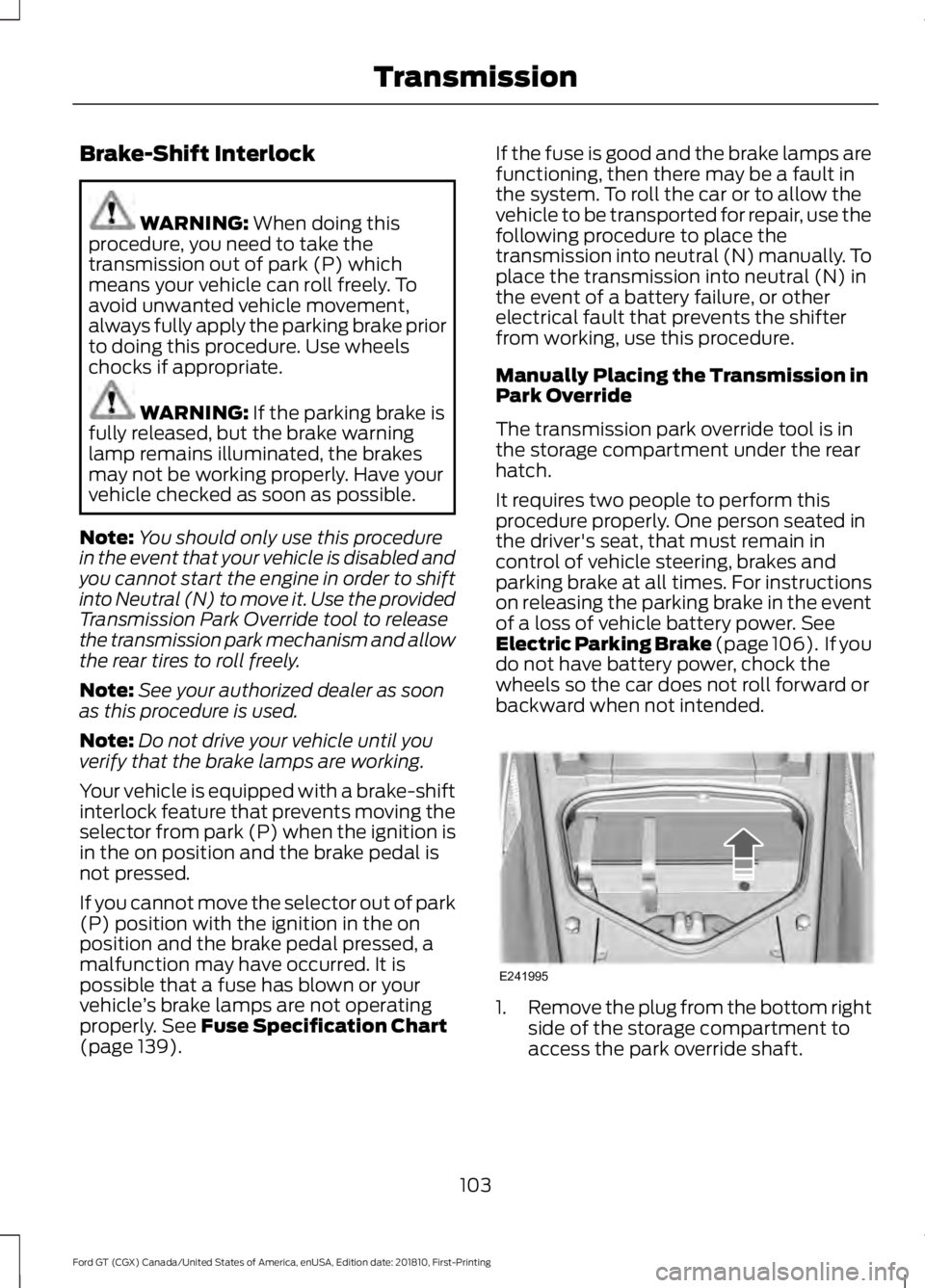
The transmission park override tool is in
the storage compartment under the rear
hatch.
It requires two people to perform this
procedure properly. One person seated in
the driver's seat, that must remain in
control of vehicle steering, brakes and
parking brake at all times. For instructions
on releasing the parking brake in the event
of a loss of vehicle battery power.
See
Electric Parking Brake (page 106). If you
do not have battery power, chock the
wheels so the car does not roll forward or
backward when not intended. 1.
Remove the plug from the bottom right
side of the storage compartment to
access the park override shaft.
103
Ford GT (CGX) Canada/United States of America, enUSA, Edition date: 201810, First-Printing TransmissionE241995
Page 107 of 321
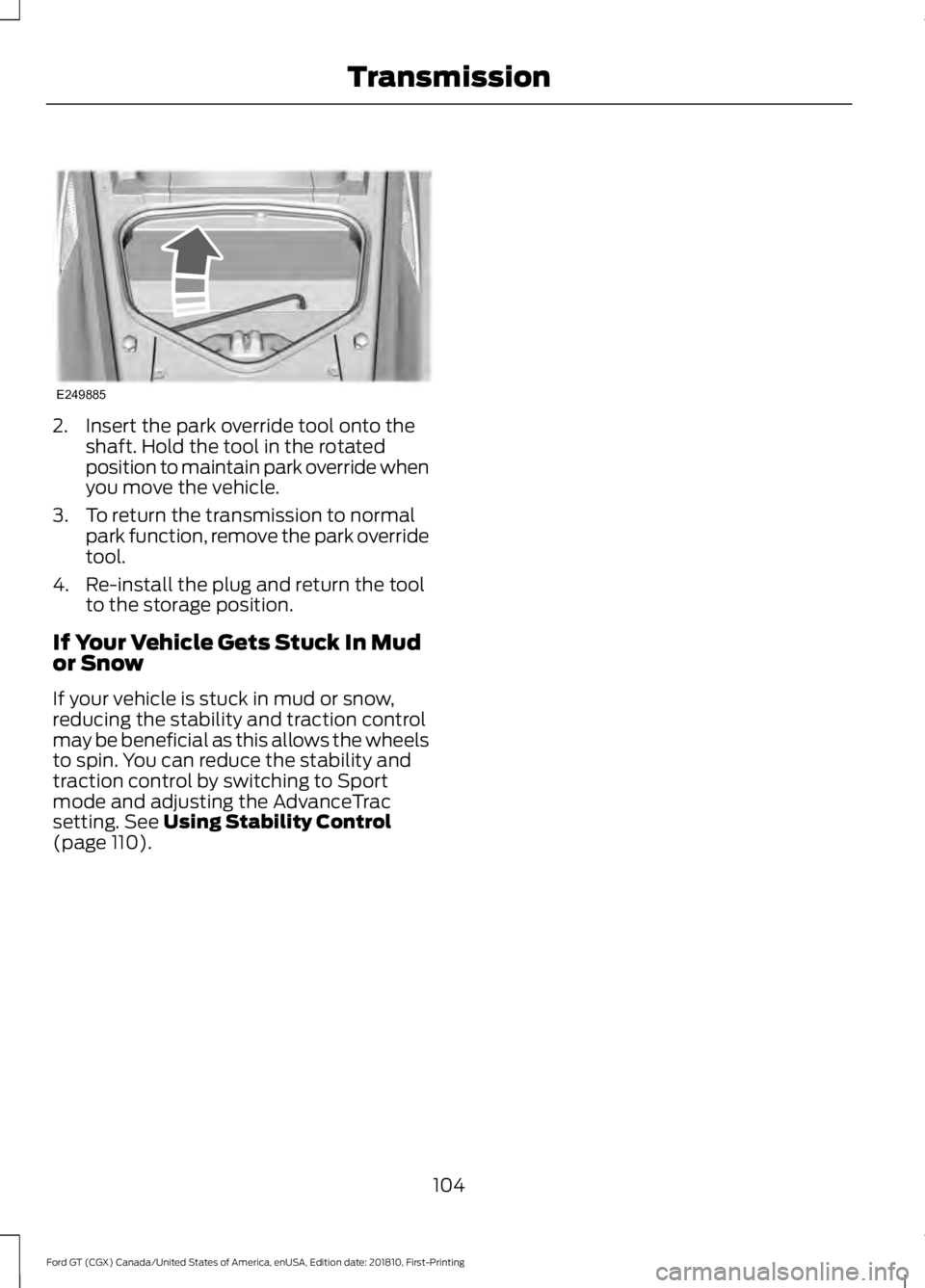
2. Insert the park override tool onto the
shaft. Hold the tool in the rotated
position to maintain park override when
you move the vehicle.
3. To return the transmission to normal park function, remove the park override
tool.
4. Re-install the plug and return the tool to the storage position.
If Your Vehicle Gets Stuck In Mud
or Snow
If your vehicle is stuck in mud or snow,
reducing the stability and traction control
may be beneficial as this allows the wheels
to spin. You can reduce the stability and
traction control by switching to Sport
mode and adjusting the AdvanceTrac
setting. See Using Stability Control
(page 110).
104
Ford GT (CGX) Canada/United States of America, enUSA, Edition date: 201810, First-Printing TransmissionE249885
Page 108 of 321
GENERAL INFORMATION
Note:
Occasional brake noise is normal. If
a metal-to-metal, continuous grinding or
continuous squeal sound is present, the
brake linings may be worn-out. Have the
system checked by an authorized dealer. If
your vehicle has continuous vibration or
shudder in the steering wheel while braking,
have it checked by an authorized dealer.
Note: Brake dust may accumulate on the
wheels, even under normal driving
conditions. Some dust is inevitable as the
brakes wear and does not contribute to
brake noise. See Cleaning the Wheels
(page 173). See
Warning Lamps and
Indicators (page 64).
Wet brakes result in reduced braking
efficiency. Gently press the brake pedal a
few times after washing the car.
Carbon Ceramic Brake Discs
Your vehicle has carbon ceramic brake
discs. When cleaning your wheels and tires,
use care not to get any wheel cleaner or
tire dressing on the brake discs. This lamp illuminates when your
brakes pads are worn and
require replacement. See an
authorized dealer for replacement.
Brake Over Accelerator
In the event the accelerator pedal
becomes stuck or entrapped, apply steady
and firm pressure to the brake pedal to
slow the vehicle and reduce engine power.
If you experience this condition, apply the
brakes and bring your vehicle to a safe stop. Move the transmission to park (P),
switch the engine off and apply the parking
brake. Inspect the accelerator pedal for
any interferences. If none are found and
the condition persists, have your vehicle
towed to the nearest authorized dealer.
Brake Assist
Brake assist detects when you brake
rapidly by measuring the rate at which you
press the brake pedal. It provides
maximum braking efficiency as long as you
press the pedal, and can reduce stopping
distances in critical situations.
Anti-lock Brake System
This system helps you maintain steering
control during emergency stops by keeping
the brakes from locking.
This lamp momentarily
illuminates when you switch the
ignition on. If the light does not
illuminate during start up, remains on or
flashes, the system may be disabled. Have
the system checked by an authorized
dealer. If the anti-lock brake system is
disabled, normal braking is still effective. If the brake warning lamp
remains illuminated after you
release the parking brake, have
the system checked by an authorized
dealer.
HINTS ON DRIVING WITH
ANTI-LOCK BRAKES
The anti-lock braking system does not
eliminate the risks when:
• You drive too closely to the vehicle in
front of you.
• Your vehicle is hydroplaning.
• You take corners too fast.
• The road surface is poor.
105
Ford GT (CGX) Canada/United States of America, enUSA, Edition date: 201810, First-Printing BrakesE138644 E269429 E138644
Page 109 of 321
Note:
If the system activates, the brake
pedal may pulse and may travel further.
Maintain pressure on the brake pedal. You
may also hear a noise from the system. This
is normal.
ELECTRIC PARKING BRAKE WARNING: Always set the parking
brake and leave your vehicle with the
transmission in park (P).
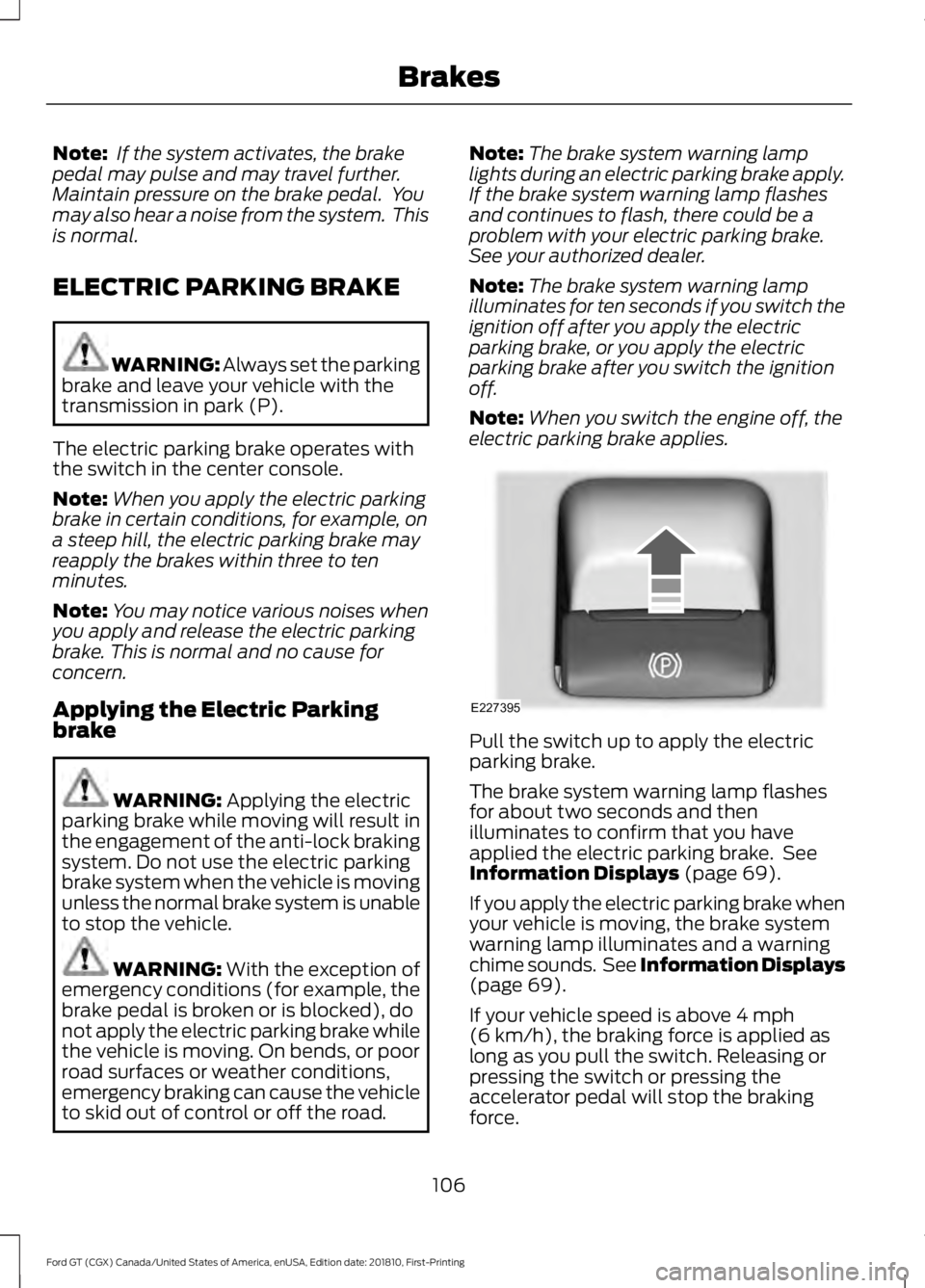
The electric parking brake operates with
the switch in the center console.
Note: When you apply the electric parking
brake in certain conditions, for example, on
a steep hill, the electric parking brake may
reapply the brakes within three to ten
minutes.
Note: You may notice various noises when
you apply and release the electric parking
brake. This is normal and no cause for
concern.
Applying the Electric Parking
brake WARNING:
Applying the electric
parking brake while moving will result in
the engagement of the anti-lock braking
system. Do not use the electric parking
brake system when the vehicle is moving
unless the normal brake system is unable
to stop the vehicle. WARNING: With the exception of
emergency conditions (for example, the
brake pedal is broken or is blocked), do
not apply the electric parking brake while
the vehicle is moving. On bends, or poor
road surfaces or weather conditions,
emergency braking can cause the vehicle
to skid out of control or off the road. Note:
The brake system warning lamp
lights during an electric parking brake apply.
If the brake system warning lamp flashes
and continues to flash, there could be a
problem with your electric parking brake.
See your authorized dealer.
Note: The brake system warning lamp
illuminates for ten seconds if you switch the
ignition off after you apply the electric
parking brake, or you apply the electric
parking brake after you switch the ignition
off.
Note: When you switch the engine off, the
electric parking brake applies. Pull the switch up to apply the electric
parking brake.
The brake system warning lamp flashes
for about two seconds and then
illuminates to confirm that you have
applied the electric parking brake. See
Information Displays
(page 69).
If you apply the electric parking brake when
your vehicle is moving, the brake system
warning lamp illuminates and a warning
chime sounds. See Information Displays
(page
69).
If your vehicle speed is above
4 mph
(6 km/h), the braking force is applied as
long as you pull the switch. Releasing or
pressing the switch or pressing the
accelerator pedal will stop the braking
force.
106
Ford GT (CGX) Canada/United States of America, enUSA, Edition date: 201810, First-Printing BrakesE227395
Page 113 of 321
•
The brake pedal is stiffer than usual.
• If the driving condition is severe and
your foot is not on the brake, the brake
pedal may move as the system applies
higher brake force.
The stability and traction control systems
have several features built into it to help
you maintain control of your vehicle:
AdvanceTrac ™ Electronic
Stability Control
The system enhances your vehicle ’s ability
to prevent skids or lateral slides by
applying brakes to one or more of the
wheels individually and, if necessary,
reducing engine power.
Traction Control
The system enhances your vehicle ’s ability
to maintain traction of the wheels by
detecting and controlling wheel spin.
Traction control settings on your vehicle
are integrated into the AdvanceTrac
Stability Control system. USING STABILITY CONTROL
AdvanceTrac
™ Electronic
Stability Control
The system automatically turns on each
time you switch the ignition on. You can
also use the stability control button on the
center console to adjust the operation of
the AdvanceTrac stability control system.
AdvanceTrac electronic stability control is
disabled when the transmission is in
reverse (R).
The amount of change you can make to
the AdvanceTrac stability control system
depends on the Drive Mode you have
selected.
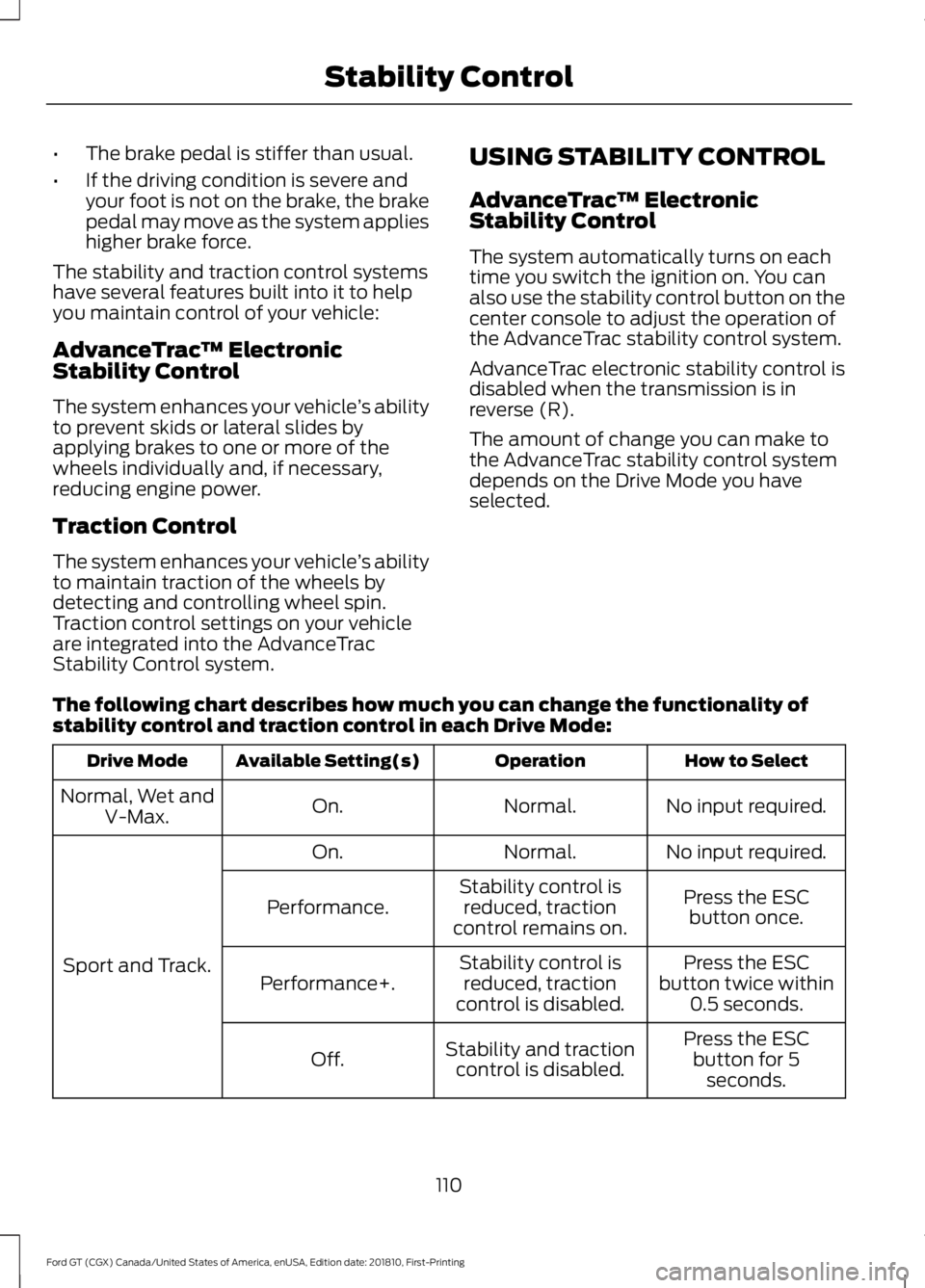
The following chart describes how much you can change the functionality of
stability control and traction control in each Drive Mode: How to Select
Operation
Available Setting(s)
Drive Mode
No input required.
Normal.
On.
Normal, Wet and
V-Max.
No input required.
Normal.
On.
Sport and Track. Press the ESC
button once.
Stability control is
reduced, traction
control remains on.
Performance.
Press the ESC
button twice within 0.5 seconds.
Stability control is
reduced, traction
control is disabled.
Performance+.
Press the ESCbutton for 5 seconds.
Stability and traction
control is disabled.
Off.
110
Ford GT (CGX) Canada/United States of America, enUSA, Edition date: 201810, First-Printing Stability Control
Page 115 of 321
REAR VIEW CAMERA
WARNING: The rear view camera
system is a reverse aid supplement
device that still requires the driver to use
it in conjunction with the interior and
exterior mirrors for maximum coverage. WARNING: Objects that are close
to either corner of the bumper or under
the bumper, might not be seen on the
screen due to the limited coverage of the
camera system. WARNING: Use caution when
turning camera features on or off when
the transmission is not in park (P). Make
sure your vehicle is not moving.
The rear view camera system provides a
video image of the area behind your
vehicle.
During operation, lines appear in the
display which represent your vehicle ’s
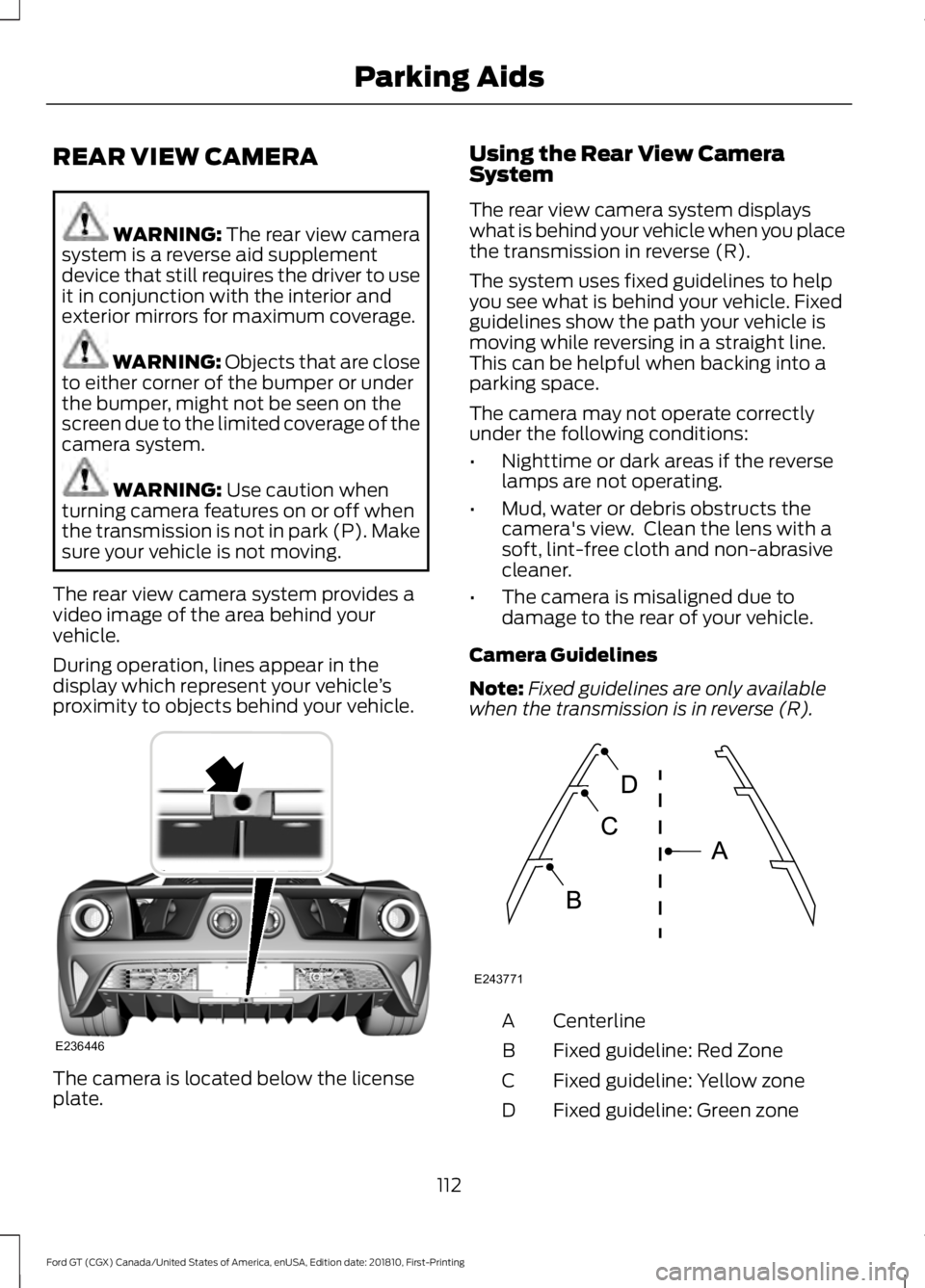
proximity to objects behind your vehicle. The camera is located below the license
plate. Using the Rear View Camera
System
The rear view camera system displays
what is behind your vehicle when you place
the transmission in reverse (R).
The system uses fixed guidelines to help
you see what is behind your vehicle. Fixed
guidelines show the path your vehicle is
moving while reversing in a straight line.
This can be helpful when backing into a
parking space.
The camera may not operate correctly
under the following conditions:
•
Nighttime or dark areas if the reverse
lamps are not operating.
• Mud, water or debris obstructs the
camera's view. Clean the lens with a
soft, lint-free cloth and non-abrasive
cleaner.
• The camera is misaligned due to
damage to the rear of your vehicle.
Camera Guidelines
Note: Fixed guidelines are only available
when the transmission is in reverse (R). Centerline
A
Fixed guideline: Red Zone
B
Fixed guideline: Yellow zone
C
Fixed guideline: Green zone
D
112
Ford GT (CGX) Canada/United States of America, enUSA, Edition date: 201810, First-Printing Parking AidsE236446 E243771
Page 116 of 321
Always use caution while reversing.
Objects in the red zone are closest to your
vehicle and objects in the green zone are
farther away. Objects are getting closer to
your vehicle as they move from the green
zone to the yellow or red zones. Use the
side view mirrors and rear view mirror to
get better coverage on both sides and rear
of the vehicle.
Manual Zoom
WARNING: When manual zoom
is on, the full area behind your vehicle
may not show. Be aware of your
surroundings when using the manual
zoom feature.
Note: Manual zoom is only available when
the transmission is in reverse (R).
Selectable settings for this feature are
Zoom in (+) and Zoom out (-). Press the
symbol in the camera screen to change the
view. The default setting is Zoom OFF.
This feature allows you to get a closer view
of an object behind your vehicle. The zoom
is only active while the transmission is in
reverse (R). When the transmission shifts
out of reverse (R), the feature
automatically turns off and must be reset
when it is used again.
Rear Camera Delay
You can select to have the rear camera
continue to display after shifting from
reverse (R). See
Settings (page 245).
113
Ford GT (CGX) Canada/United States of America, enUSA, Edition date: 201810, First-Printing Parking Aids
Page 118 of 321
STEERING
To help prevent damage to the power
steering system:
•
Never hold the steering wheel at its
furthest turning points (until it stops)
for more than three to five seconds
when the engine is running.
• Do not operate the vehicle with a low
hydraulic fluid level. See Power
Steering Fluid Check (page 159).
• Some noise is normal during operation.
If excessive, check for low hydraulic
fluid level before seeking service by
your dealer.
• Heavy or uneven efforts may be caused
by low hydraulic fluid. Check for low
hydraulic fluid level before seeking
service by your dealer.
• Do not over fill the hydraulic fluid as
this may result in leaks from the
reservoir. See
Power Steering Fluid
Check (page 159).
If the power steering system breaks down
(or if the engine is off), you can manually
steer the vehicle, but it takes more effort.
If the steering wanders or pulls, check for:
• An improperly inflated tire.
• Uneven tire wear.
• Loose or worn suspension
components.
• Loose or worn steering components.
• Improper vehicle alignment.
A high crown in the road or high crosswinds
may also make the steering seem to
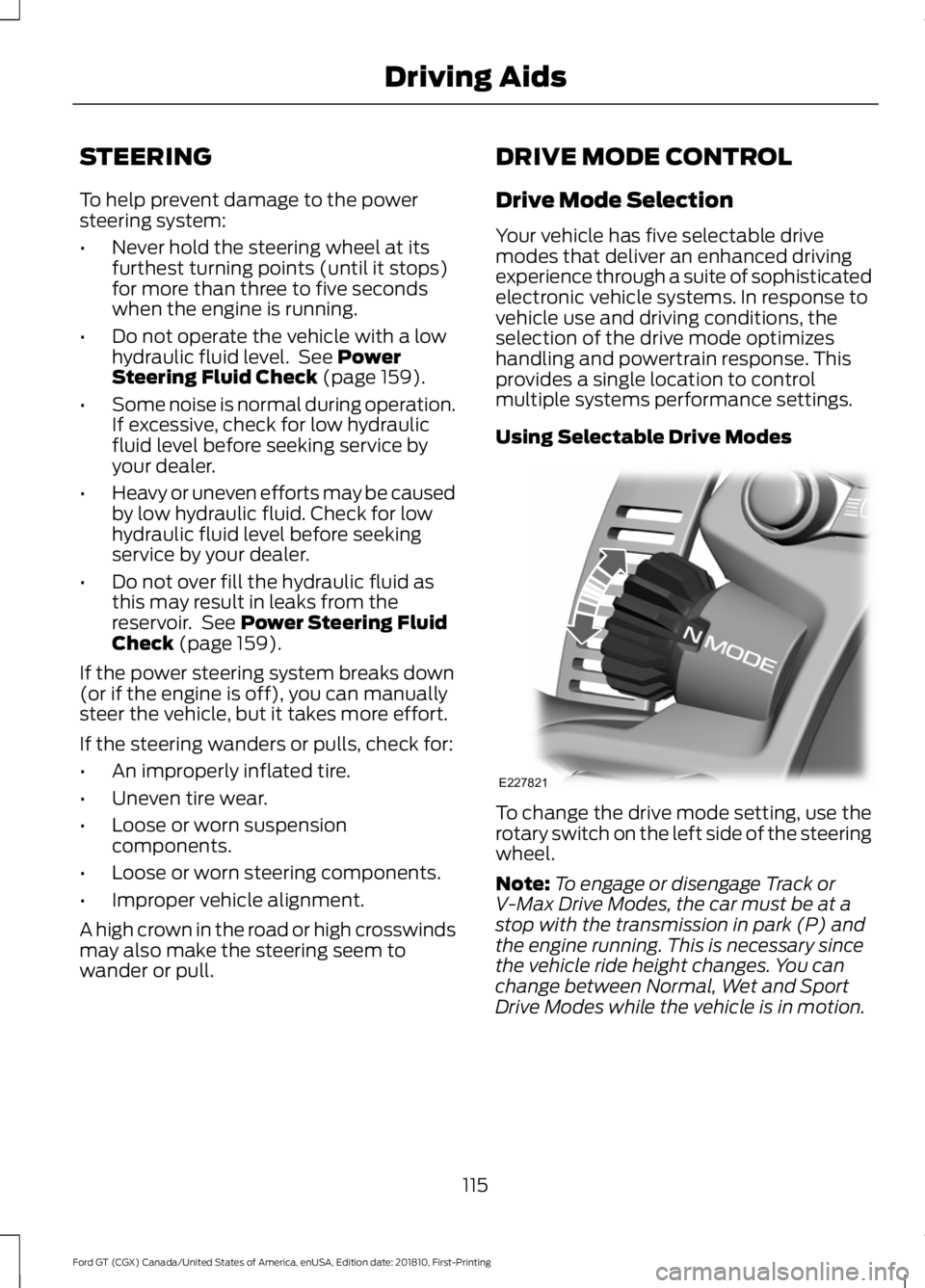
wander or pull. DRIVE MODE CONTROL
Drive Mode Selection
Your vehicle has five selectable drive
modes that deliver an enhanced driving
experience through a suite of sophisticated
electronic vehicle systems. In response to
vehicle use and driving conditions, the
selection of the drive mode optimizes
handling and powertrain response. This
provides a single location to control
multiple systems performance settings.
Using Selectable Drive Modes
To change the drive mode setting, use the
rotary switch on the left side of the steering
wheel.
Note:
To engage or disengage Track or
V-Max Drive Modes, the car must be at a
stop with the transmission in park (P) and
the engine running. This is necessary since
the vehicle ride height changes. You can
change between Normal, Wet and Sport
Drive Modes while the vehicle is in motion.
115
Ford GT (CGX) Canada/United States of America, enUSA, Edition date: 201810, First-Printing Driving AidsE227821
Page 119 of 321
Modes:
•
Normal (N) – Use for normal driving in
dry conditions.
•AdvanceTrac Stability Control is
active and cannot be adjusted.
• Ride height is set to High and
suspension damping is set to
Normal.
• Comfort damping can be selected
with the console switch.
• Launch control is available.
• Transmission automatic shift
calibration is set to Normal.
• Rear wing deploys at speeds above
90 mph (145 km/h) and retracts
when the speed drops below
81 mph (130 km/h)
.
• Air brake activates at speeds above
75 mph (121 km/h) when the brakes
are applied with moderate force.
• Sport (S) – Use for sport driving in dry
conditions.
•AdvanceTrac Stability Control is
active but can be adjusted by use
of the Stability Control button on
the console.
• Ride height is set to High and
suspension damping is set to Sport.
• Comfort damping cannot be
selected.
• Launch control is available.
• Transmission automatic shift
calibration is set to Sport.
• Turbocharger anti-lag calibration
is active.
• Rear wing deploys at speeds above
70 mph (113 km/h)
and retracts
when the speed drops below
45 mph (72 km/h)
.
• Air brake activates at speeds above
75 mph (121 km/h) when the brakes
are applied with moderate force. •
Wet (W) – Use for driving in wet
conditions.
•AdvanceTrac Stability Control is
active and cannot be adjusted.
• Ride height is set to High and
suspension damping is set to
Normal.
• Comfort damping can be selected
with the console switch.
• Launch control is not available.
• Transmission automatic shift
calibration is set to Normal.
• Rear wing deploys at speeds above
90 mph (145 km/h)
and retracts
when the speed drops below
81 mph (130 km/h)
.
• Air brake activates at speeds above
75 mph (121 km/h) when the brakes
are applied with moderate force.
116
Ford GT (CGX) Canada/United States of America, enUSA, Edition date: 201810, First-Printing Driving Aids