ECU FORD GT 2019 Owners Manual
[x] Cancel search | Manufacturer: FORD, Model Year: 2019, Model line: GT, Model: FORD GT 2019Pages: 321, PDF Size: 5.24 MB
Page 4 of 321
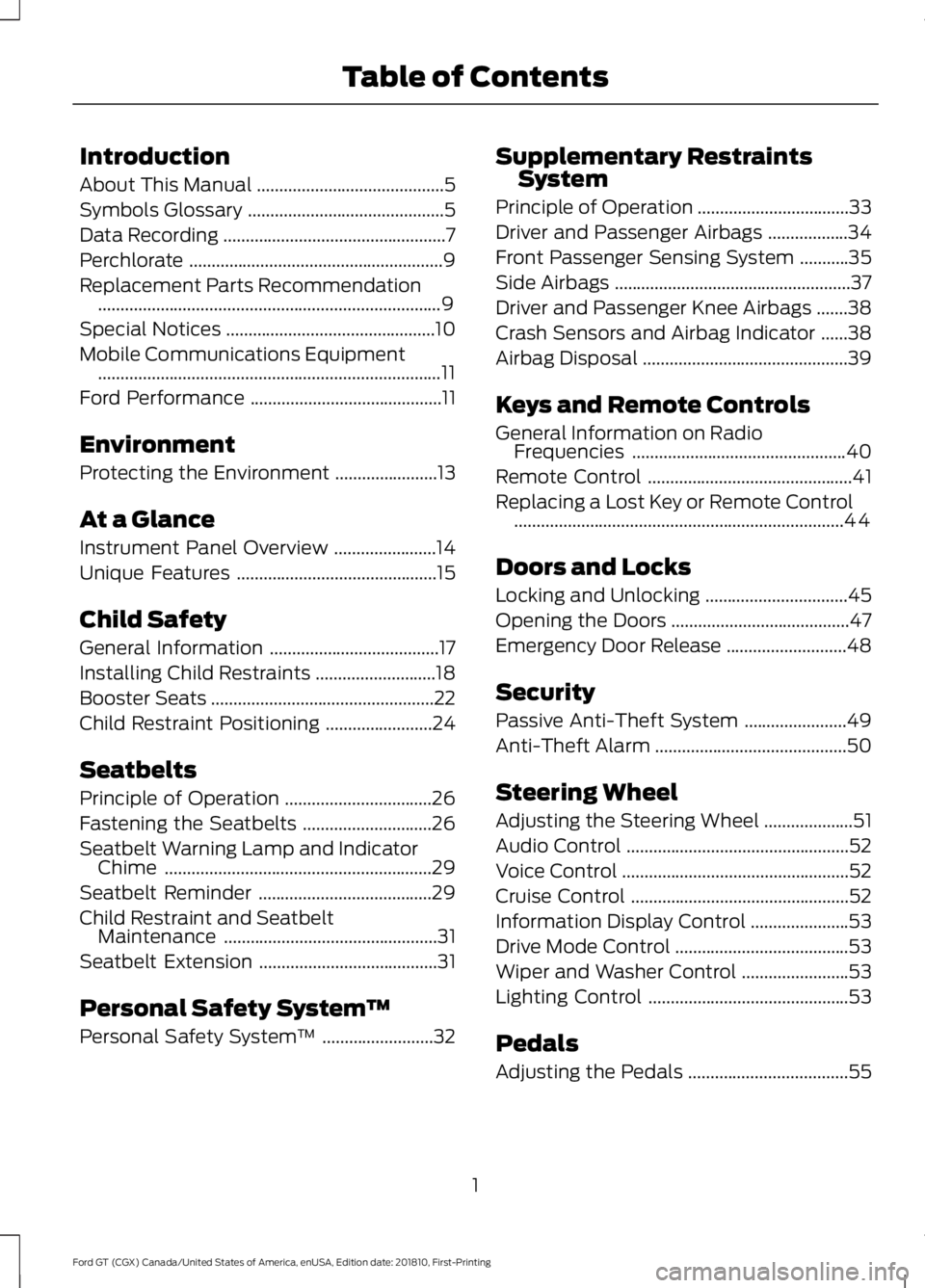
Introduction
About This Manual
..........................................5
Symbols Glossary ............................................
5
Data Recording ..................................................
7
Perchlorate .........................................................
9
Replacement Parts Recommendation ........................................................................\
.....
9
Special Notices ...............................................
10
Mobile Communications Equipment ........................................................................\
.....
11
Ford Performance ...........................................
11
Environment
Protecting the Environment .......................
13
At a Glance
Instrument Panel Overview .......................
14
Unique Features .............................................
15
Child Safety
General Information ......................................
17
Installing Child Restraints ...........................
18
Booster Seats ..................................................
22
Child Restraint Positioning ........................
24
Seatbelts
Principle of Operation .................................
26
Fastening the Seatbelts .............................
26
Seatbelt Warning Lamp and Indicator Chime ............................................................
29
Seatbelt Reminder .......................................
29
Child Restraint and Seatbelt Maintenance ................................................
31
Seatbelt Extension ........................................
31
Personal Safety System ™
Personal Safety System ™.........................
32 Supplementary Restraints
System
Principle of Operation ..................................
33
Driver and Passenger Airbags ..................
34
Front Passenger Sensing System ...........
35
Side Airbags .....................................................
37
Driver and Passenger Knee Airbags .......
38
Crash Sensors and Airbag Indicator ......
38
Airbag Disposal ..............................................
39
Keys and Remote Controls
General Information on Radio Frequencies ................................................
40
Remote Control ..............................................
41
Replacing a Lost Key or Remote Control ........................................................................\
..
44
Doors and Locks
Locking and Unlocking ................................
45
Opening the Doors ........................................
47
Emergency Door Release ...........................
48
Security
Passive Anti-Theft System .......................
49
Anti-Theft Alarm ...........................................
50
Steering Wheel
Adjusting the Steering Wheel ....................
51
Audio Control ..................................................
52
Voice Control ...................................................
52
Cruise Control .................................................
52
Information Display Control ......................
53
Drive Mode Control .......................................
53
Wiper and Washer Control ........................
53
Lighting Control .............................................
53
Pedals
Adjusting the Pedals ....................................
55
1
Ford GT (CGX) Canada/United States of America, enUSA, Edition date: 201810, First-Printing Table of Contents
Page 14 of 321
during normal driving for purposes such as
remote insurance company monitoring,
transmission of vehicle data to other
devices or entities, or altering the
performance of the vehicle, may cause
interference with or even damage to
vehicle systems. We do not recommend
or endorse the use of aftermarket plug-in
devices unless approved by Ford. The
vehicle Warranty will not cover damage
caused by an aftermarket plug-in device.
Certified Ford GT Service Dealer
All occurrences of authorized dealer in this
manual are references to dealers who are
certified to work on the Ford GT. Not all
dealers have this certification. To locate a
certified Ford GT Service dealer, contact
your Ford GT Concierge at
1-800-210-5795.
MOBILE COMMUNICATIONS
EQUIPMENT
WARNING: Driving while
distracted can result in loss of vehicle
control, crash and injury. We strongly
recommend that you use extreme
caution when using any device that may
take your focus off the road. Your
primary responsibility is the safe
operation of your vehicle. We
recommend against the use of any
hand-held device while driving and
encourage the use of voice-operated
systems when possible. Make sure you
are aware of all applicable local laws
that may affect the use of electronic
devices while driving. Using mobile communications equipment
is becoming increasingly important in the
conduct of business and personal affairs.
However, you must not compromise your
own or others’
safety when using such
equipment. Mobile communications can
enhance personal safety and security when
appropriately used, particularly in
emergency situations. Safety must be
paramount when using mobile
communications equipment to avoid
negating these benefits. Mobile
communication equipment includes, but
is not limited to, cellular phones, pagers,
portable email devices, text messaging
devices and portable two-way radios.
FORD PERFORMANCE
Welcome to the Ford Performance family!
Performance and racing are deeply
embedded in Ford ’s DNA, dating back to
October 10, 1901 when Henry Ford won his
first race against Alexander Winton,
America ’s greatest racer at the time. Henry
Ford founded Ford Motor Company 18
months later with capital raised on the
back of this remarkable upset victory.
Today, that spirit of passion, innovation
and performance lives on through Ford
Performance. Established in 2015, the
company ’s performance teams -- Ford
Special Vehicle Team (United States),
Team RS (Europe), Ford Performance
(Australia) and Ford Racing (United
States) – have unified under the mission
to create the world ’s leading performance
vehicles, parts, accessories and
experiences for enthusiasts. This includes
accelerating the development of advanced
aerodynamics, lightweighting, electronics,
powertrain performance, fuel efficiency
and other technologies that can be applied
across Ford ’s product portfolio.
11
Ford GT (CGX) Canada/United States of America, enUSA, Edition date: 201810, First-Printing Introduction
Page 20 of 321
GENERAL INFORMATION
See the following sections for directions
on how to properly use safety restraints
for children.
WARNING: Always make sure your
child is secured properly in a device that
is appropriate for their height, age and
weight. Child safety restraints must be
bought separately from your vehicle.
Failure to follow these instructions and
guidelines may result in an increased risk
of serious injury or death to your child. WARNING: All children are shaped
differently. The recommendations for
safety restraints are based on probable
child height, age and weight thresholds
from the National Highway Traffic Safety
Administration and other safety
organizations, or are the minimum
requirements of law. We recommend
checking with a NHTSA Certified Child
Passenger Safety Technician (CPST) and consult your pediatrician to make
sure your child seat is appropriate for
your child, and is compatible with and
properly installed in your vehicle. To
locate a child seat fitting station and
CPST, contact NHTSA toll free at
1-888-327-4236 or go to
http://www.nhtsa.dot.gov. In Canada,
contact Transport Canada toll free at
1-800-333-0371 or go to www.tc.gc.ca
to find a Child Car Seat Clinic in your
area. Failure to properly restrain children
in safety seats made especially for their
height, age, and weight may result in an
increased risk of serious injury or death
to your child.
WARNING: On hot days, the
temperature inside the vehicle can rise
very quickly. Exposure of people or
animals to these high temperatures for
even a short time can cause death or
serious heat related injuries, including
brain damage. Small children are
particularly at risk.
17
Ford GT (CGX) Canada/United States of America, enUSA, Edition date: 201810, First-Printing Child Safety
Page 22 of 321
Use a child restraint (sometimes called an
infant carrier, convertible seat, or toddler
seat) for infants, toddlers, or children
weighing 40 lb (18 kg) or less (generally
age four or younger).
Using Lap and Shoulder Belts WARNING:
NEVER use a rearward
facing child restraint on a seat protected
by an ACTIVE AIRBAG in front of it,
DEATH or SERIOUS INJURY to the CHILD
can occur. WARNING:
Depending on where
you secure a child restraint, and
depending on the child restraint design,
you may block access to certain seatbelt
buckle assemblies and LATCH lower
anchors, rendering those features
potentially unusable. To avoid risk of
injury, make sure occupants only use
seating positions where they are able to
be properly restrained.
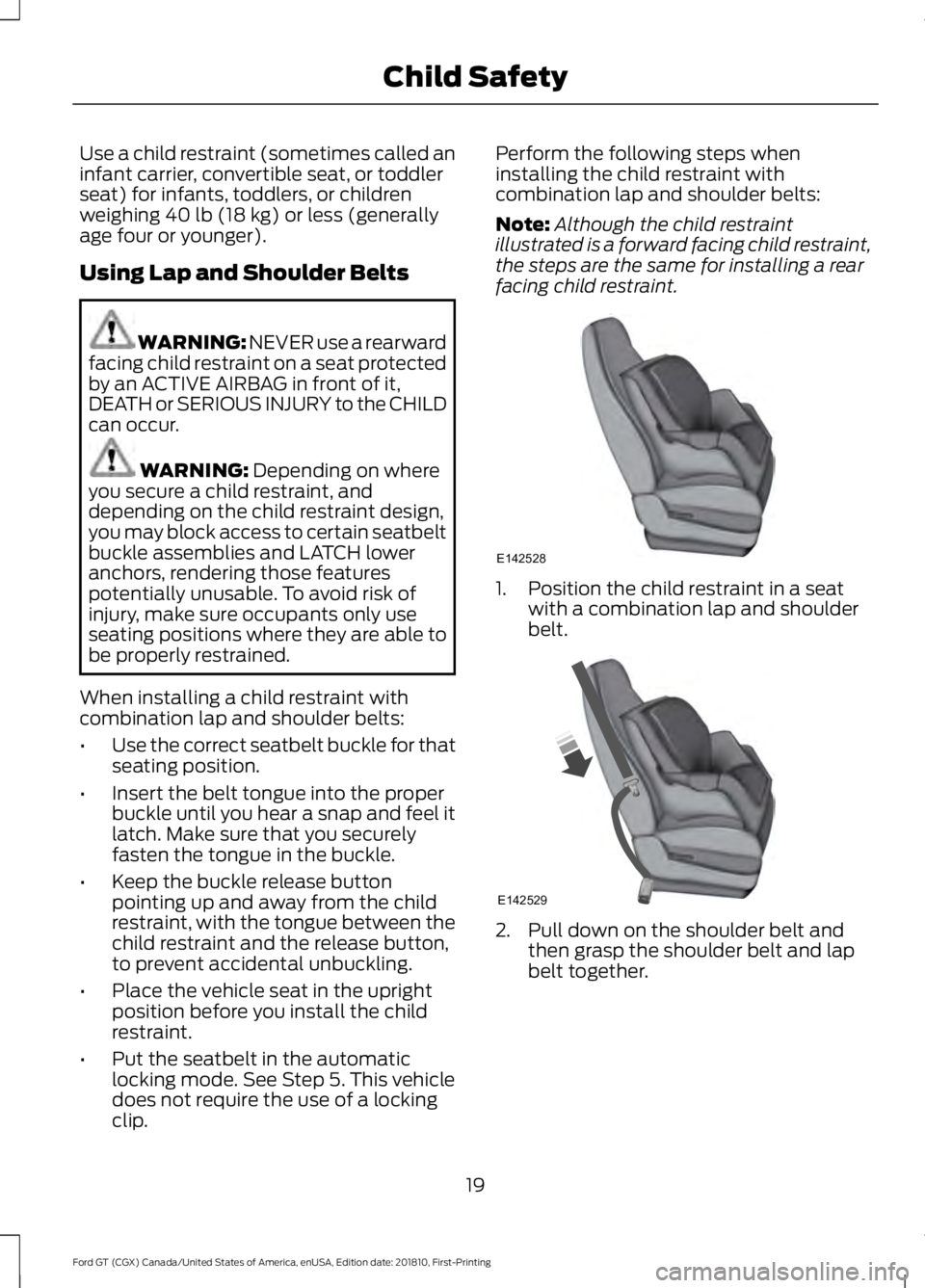
When installing a child restraint with
combination lap and shoulder belts:
• Use the correct seatbelt buckle for that
seating position.
• Insert the belt tongue into the proper
buckle until you hear a snap and feel it
latch. Make sure that you securely
fasten the tongue in the buckle.
• Keep the buckle release button
pointing up and away from the child
restraint, with the tongue between the
child restraint and the release button,
to prevent accidental unbuckling.
• Place the vehicle seat in the upright
position before you install the child
restraint.
• Put the seatbelt in the automatic
locking mode. See Step 5. This vehicle
does not require the use of a locking
clip. Perform the following steps when
installing the child restraint with
combination lap and shoulder belts:
Note:
Although the child restraint
illustrated is a forward facing child restraint,
the steps are the same for installing a rear
facing child restraint. 1. Position the child restraint in a seat
with a combination lap and shoulder
belt. 2. Pull down on the shoulder belt and
then grasp the shoulder belt and lap
belt together.
19
Ford GT (CGX) Canada/United States of America, enUSA, Edition date: 201810, First-Printing Child SafetyE142528 E142529
Page 23 of 321
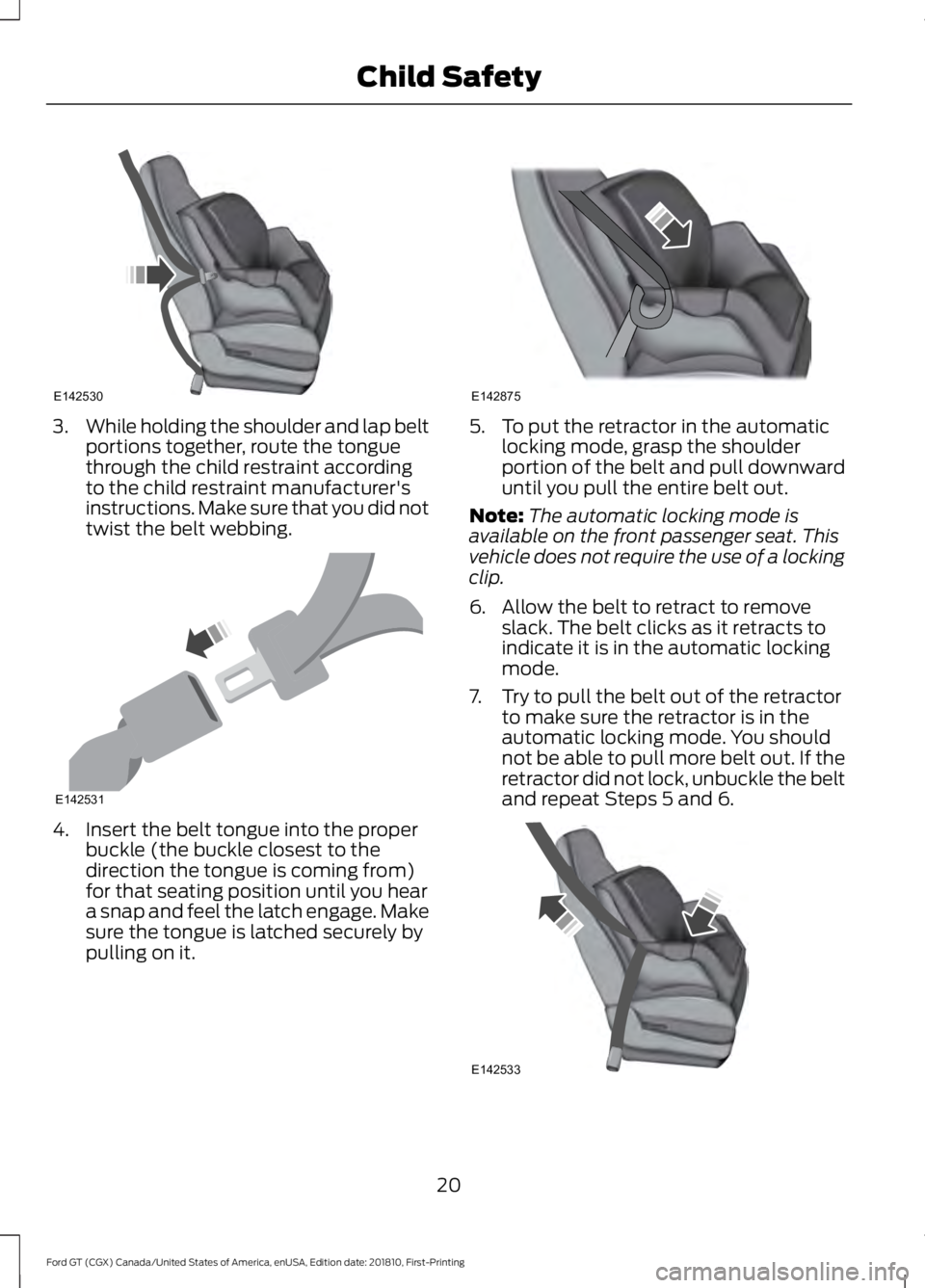
3.
While holding the shoulder and lap belt
portions together, route the tongue
through the child restraint according
to the child restraint manufacturer's
instructions. Make sure that you did not
twist the belt webbing. 4. Insert the belt tongue into the proper
buckle (the buckle closest to the
direction the tongue is coming from)
for that seating position until you hear
a snap and feel the latch engage. Make
sure the tongue is latched securely by
pulling on it. 5. To put the retractor in the automatic
locking mode, grasp the shoulder
portion of the belt and pull downward
until you pull the entire belt out.
Note: The automatic locking mode is
available on the front passenger seat. This
vehicle does not require the use of a locking
clip.
6. Allow the belt to retract to remove slack. The belt clicks as it retracts to
indicate it is in the automatic locking
mode.
7. Try to pull the belt out of the retractor to make sure the retractor is in the
automatic locking mode. You should
not be able to pull more belt out. If the
retractor did not lock, unbuckle the belt
and repeat Steps 5 and 6. 20
Ford GT (CGX) Canada/United States of America, enUSA, Edition date: 201810, First-Printing Child SafetyE142530 E142531 E142875 E142533
Page 24 of 321
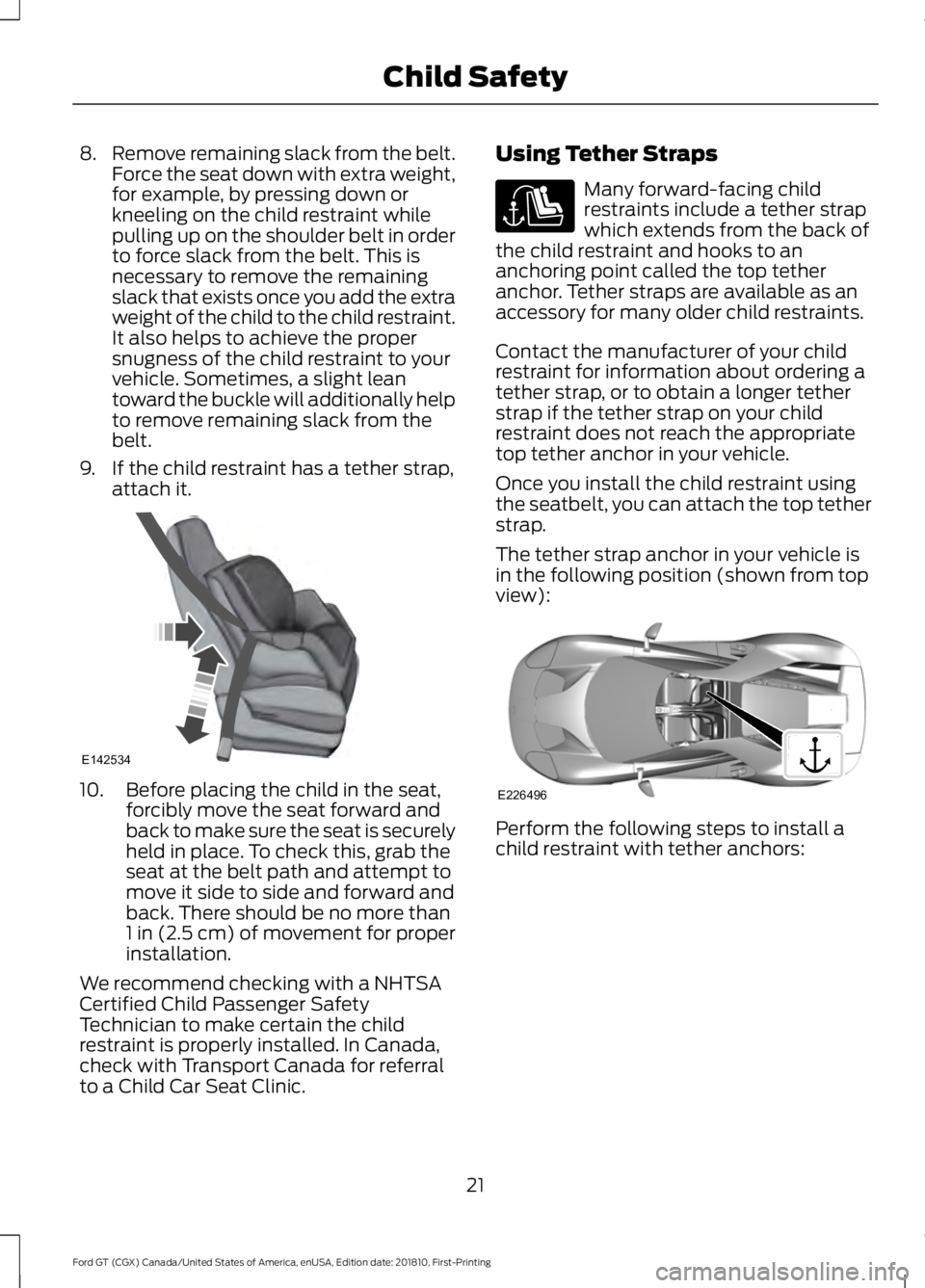
8.
Remove remaining slack from the belt.
Force the seat down with extra weight,
for example, by pressing down or
kneeling on the child restraint while
pulling up on the shoulder belt in order
to force slack from the belt. This is
necessary to remove the remaining
slack that exists once you add the extra
weight of the child to the child restraint.
It also helps to achieve the proper
snugness of the child restraint to your
vehicle. Sometimes, a slight lean
toward the buckle will additionally help
to remove remaining slack from the
belt.
9. If the child restraint has a tether strap, attach it. 10. Before placing the child in the seat,
forcibly move the seat forward and
back to make sure the seat is securely
held in place. To check this, grab the
seat at the belt path and attempt to
move it side to side and forward and
back. There should be no more than
1 in (2.5 cm) of movement for proper
installation.
We recommend checking with a NHTSA
Certified Child Passenger Safety
Technician to make certain the child
restraint is properly installed. In Canada,
check with Transport Canada for referral
to a Child Car Seat Clinic. Using Tether Straps Many forward-facing child
restraints include a tether strap
which extends from the back of
the child restraint and hooks to an
anchoring point called the top tether
anchor. Tether straps are available as an
accessory for many older child restraints.
Contact the manufacturer of your child
restraint for information about ordering a
tether strap, or to obtain a longer tether
strap if the tether strap on your child
restraint does not reach the appropriate
top tether anchor in your vehicle.
Once you install the child restraint using
the seatbelt, you can attach the top tether
strap.
The tether strap anchor in your vehicle is
in the following position (shown from top
view): Perform the following steps to install a
child restraint with tether anchors:
21
Ford GT (CGX) Canada/United States of America, enUSA, Edition date: 201810, First-Printing Child SafetyE142534 E226496
Page 30 of 321
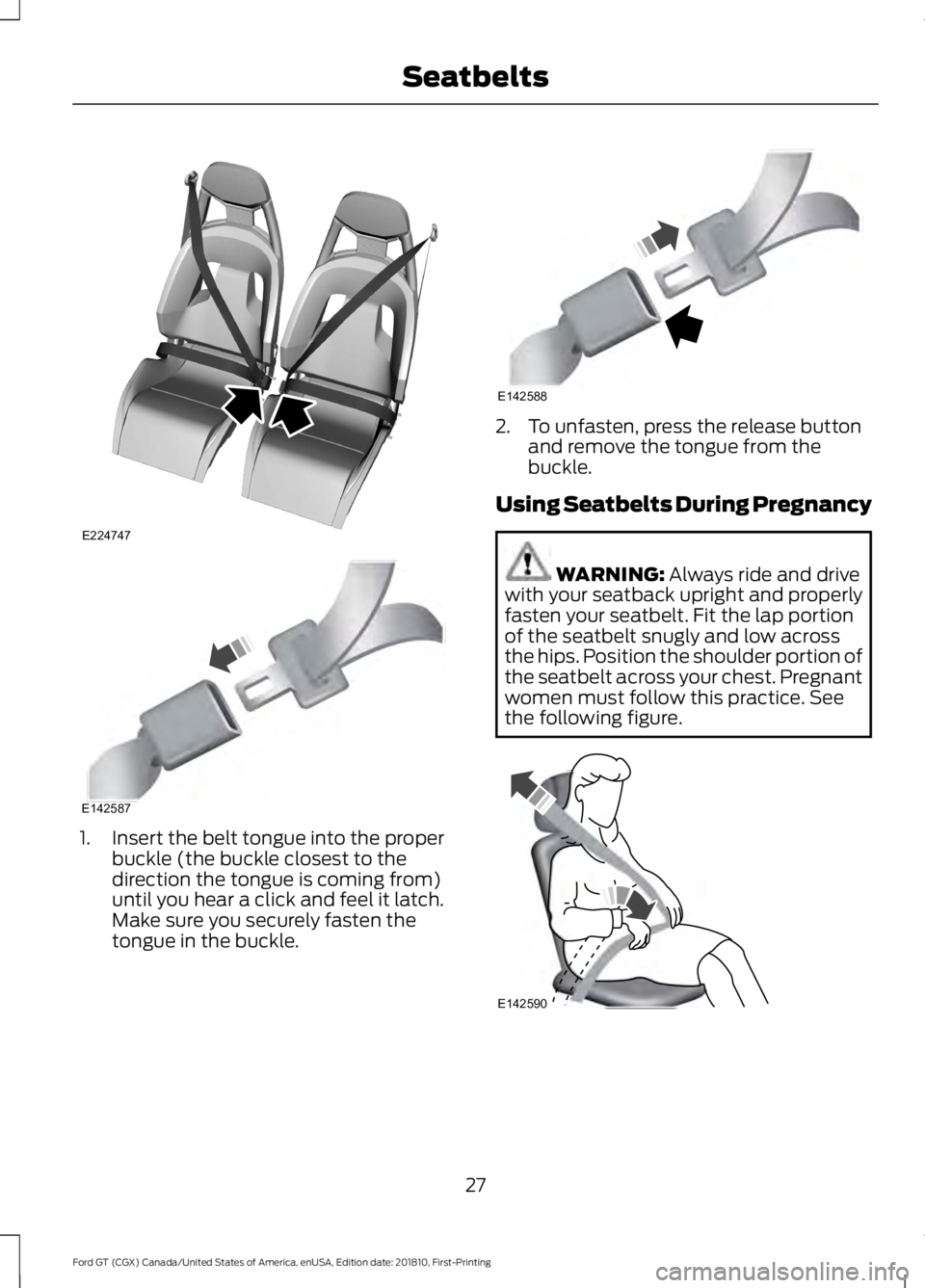
1. Insert the belt tongue into the proper
buckle (the buckle closest to the
direction the tongue is coming from)
until you hear a click and feel it latch.
Make sure you securely fasten the
tongue in the buckle. 2. To unfasten, press the release button
and remove the tongue from the
buckle.
Using Seatbelts During Pregnancy WARNING: Always ride and drive
with your seatback upright and properly
fasten your seatbelt. Fit the lap portion
of the seatbelt snugly and low across
the hips. Position the shoulder portion of
the seatbelt across your chest. Pregnant
women must follow this practice. See
the following figure. 27
Ford GT (CGX) Canada/United States of America, enUSA, Edition date: 201810, First-Printing SeatbeltsE224747 E142587 E142588 E142590
Page 44 of 321
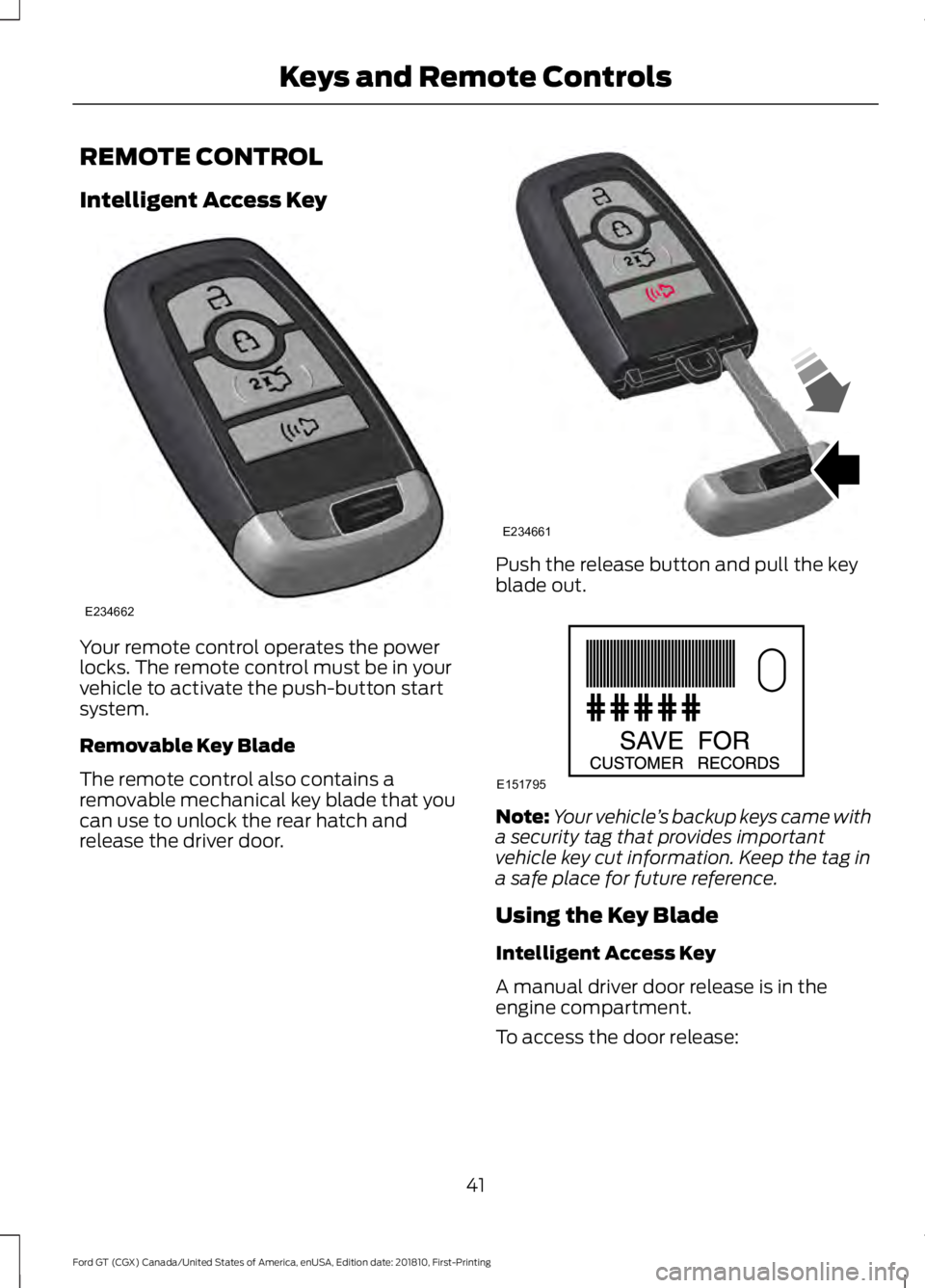
REMOTE CONTROL
Intelligent Access Key
Your remote control operates the power
locks. The remote control must be in your
vehicle to activate the push-button start
system.
Removable Key Blade
The remote control also contains a
removable mechanical key blade that you
can use to unlock the rear hatch and
release the driver door. Push the release button and pull the key
blade out.
Note:
Your vehicle ’s backup keys came with
a security tag that provides important
vehicle key cut information. Keep the tag in
a safe place for future reference.
Using the Key Blade
Intelligent Access Key
A manual driver door release is in the
engine compartment.
To access the door release:
41
Ford GT (CGX) Canada/United States of America, enUSA, Edition date: 201810, First-Printing Keys and Remote ControlsE234662 E234661 E151795
Page 52 of 321
PASSIVE ANTI-THEFT
SYSTEM
Note:
The system is not compatible with
non-Ford aftermarket remote start systems.
Use of these systems may result in vehicle
starting problems and a loss of security
protection.
Note: Metallic objects, electronic devices
or a second coded key on the same key
chain may cause vehicle starting problems
if they are too close to the key when starting
your vehicle. Prevent these objects from
touching the coded key while starting your
vehicle. Switch the ignition off, move all
objects on the key chain away from the
coded key and restart your vehicle if a
problem occurs.
Note: Do not leave a duplicate coded key
in your vehicle. Always take your keys and
lock all doors when leaving your vehicle.
SecuriLock
The system helps prevent your vehicle
from starting unless you use a coded key
programmed to your vehicle. Using the
wrong key may prevent your vehicle from
starting. A message may appear in the
information display.
If you are unable to start your vehicle with
a correctly coded key, it is not operating
properly. A message may appear in the
information display.
Automatic Arming
Your vehicle arms immediately after
switching the ignition off.
Automatic Disarming
Switching the ignition on with a coded key
disarms your vehicle. Replacement Keys
Note:
Your vehicle comes equipped with
two intelligent access keys.
The intelligent access key functions as a
programmed key that operates the driver
door lock and activates the intelligent
access with push button start system, as
well as a remote control.
If your programmed transmitters are lost
or stolen and you do not have an extra
coded key, contact the Ford GT concierge
to have your Ford GT transported to your
Certified Ford GT Service Dealership to
erase the key codes from your vehicle and
program new coded keys. See About This
Manual (page 5).
Store an extra programmed key away from
your vehicle in a safe place to help prevent
any inconveniences. See your authorized
dealer to purchase additional spare or
replacement keys.
Programming a Spare Intelligent
Access Key
Note: You can program a maximum of four
intelligent access keys to your vehicle.
You must have two previously
programmed intelligent access keys inside
your vehicle and the new unprogrammed
intelligent access keys readily accessible.
See an authorized dealer to have the spare
key programmed if two previously
programmed keys are not available.
Make sure that your vehicle is off before
beginning this procedure. Make sure that
you close all the doors before beginning
and that they remain closed throughout
the procedure. Perform all steps within 30
seconds of starting the sequence. Stop
and wait for at least one minute before
starting again if you perform any steps out
of sequence.
Read and understand the entire procedure
before you begin.
49
Ford GT (CGX) Canada/United States of America, enUSA, Edition date: 201810, First-Printing Security
Page 53 of 321
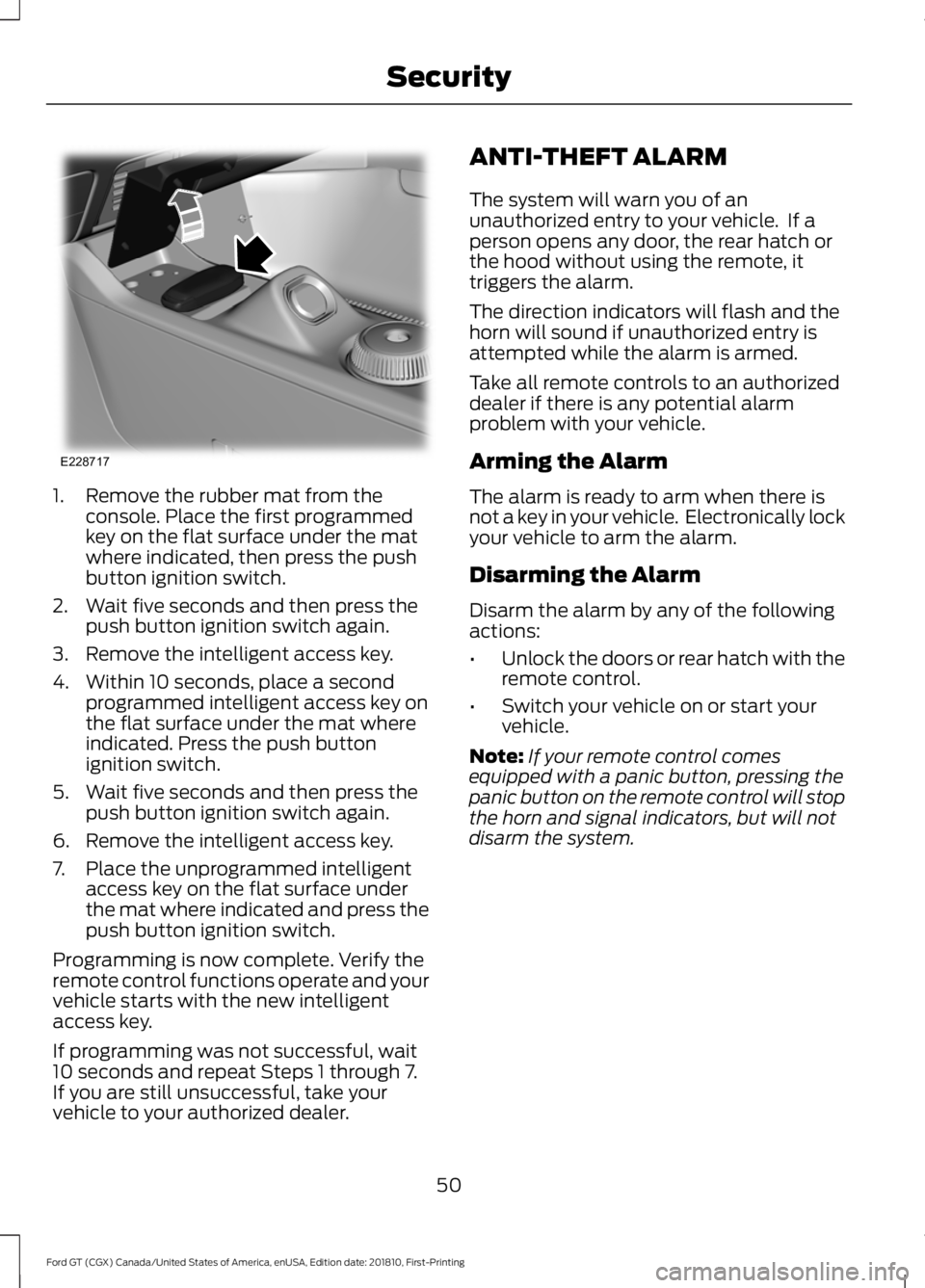
1. Remove the rubber mat from the
console. Place the first programmed
key on the flat surface under the mat
where indicated, then press the push
button ignition switch.
2. Wait five seconds and then press the push button ignition switch again.
3. Remove the intelligent access key.
4. Within 10 seconds, place a second programmed intelligent access key on
the flat surface under the mat where
indicated. Press the push button
ignition switch.
5. Wait five seconds and then press the push button ignition switch again.
6. Remove the intelligent access key.
7. Place the unprogrammed intelligent access key on the flat surface under
the mat where indicated and press the
push button ignition switch.
Programming is now complete. Verify the
remote control functions operate and your
vehicle starts with the new intelligent
access key.
If programming was not successful, wait
10 seconds and repeat Steps 1 through 7.
If you are still unsuccessful, take your
vehicle to your authorized dealer. ANTI-THEFT ALARM
The system will warn you of an
unauthorized entry to your vehicle. If a
person opens any door, the rear hatch or
the hood without using the remote, it
triggers the alarm.
The direction indicators will flash and the
horn will sound if unauthorized entry is
attempted while the alarm is armed.
Take all remote controls to an authorized
dealer if there is any potential alarm
problem with your vehicle.
Arming the Alarm
The alarm is ready to arm when there is
not a key in your vehicle. Electronically lock
your vehicle to arm the alarm.
Disarming the Alarm
Disarm the alarm by any of the following
actions:
•
Unlock the doors or rear hatch with the
remote control.
• Switch your vehicle on or start your
vehicle.
Note: If your remote control comes
equipped with a panic button, pressing the
panic button on the remote control will stop
the horn and signal indicators, but will not
disarm the system.
50
Ford GT (CGX) Canada/United States of America, enUSA, Edition date: 201810, First-Printing SecurityE228717