change wheel FORD GT 2020 User Guide
[x] Cancel search | Manufacturer: FORD, Model Year: 2020, Model line: GT, Model: FORD GT 2020Pages: 316, PDF Size: 6.25 MB
Page 199 of 316
of the driver
’s door. Failure to
follow the tire pressure
recommendations can cause
uneven treadwear patterns and
adversely affect the way your
vehicle handles.
Maximum Inflation Pressure is
the tire manufacturer's maximum
permissible pressure and the
pressure at which the maximum
load can be carried by the tire. This
pressure is normally higher than
the manufacturer ’s recommended
cold inflation pressure which can
be found on the Safety
Compliance Certification Label
(affixed to either the door hinge
pillar, door-latch post, or the door
edge that meets the door-latch
post, next to the driver's seating
position), or Tire Label which is
located on the B-Pillar or the edge
of the driver ’s door. The cold
inflation pressure should never be
set lower than the recommended
pressure on the Safety
Compliance Certification Label or
Tire Label.
When weather temperature
changes occur, tire inflation
pressures also change. A
43°F
(6°C) temperature drop can
cause a corresponding drop of
1 psi (6 kPa)
in inflation pressure.
Check your tire pressures
frequently and adjust them to the
proper pressure which can be
found on the Safety Compliance
Certification Label or Tire Label.
To check the pressure in your
tire(s): 1. Make sure the tires are cool,
meaning they are not hot from
driving even a mile.
Note: If you are checking tire
pressure when the tire is hot, (for
example, driven more than
1 mi
(1.6 km)), never bleed or reduce air
pressure. The tires are hot from
driving and it is normal for
pressures to increase above
recommended cold pressures. A
hot tire at or below recommended
cold inflation pressure could be
significantly under-inflated.
Note: If you have to drive a
distance to get air for your tire(s),
check and record the tire pressure
first and add the appropriate air
pressure when you get to the
pump. It is normal for tires to heat
up and the air pressure inside to go
up as you drive.
2. Remove the cap from the valve
on one tire, then firmly press
the tire gauge onto the valve
and measure the pressure.
3. Add enough air to reach the
recommended air pressure.
Note: If you overfill the tire, release
air by pressing on the metal stem
in the center of the valve. Then
recheck the pressure with your tire
gauge.
4. Replace the valve cap.
5. Repeat this procedure for each
tire, including the spare.
196
Ford GT (CGX) Canada/United States of America, enUSA, Edition date: 201908, First-Printing Wheels and Tires
Page 206 of 316
This device complies with Part 15 of the
FCC Rules and with Licence exempt RSS
Standards of Industry Canada. Operation
is subject to the following two conditions:
•
This device may not cause harmful
interference, and
• This device must accept any
interference received, including
interference that may cause undesired
operation. WARNING: Changes or
modifications not expressively approved
by the party responsible for compliance
could void the user's authority to operate
the equipment. The term "IC:" before the
radio certification number only signifies
that Industry Canada technical
specifications were met.
Changing Tires With a Tire
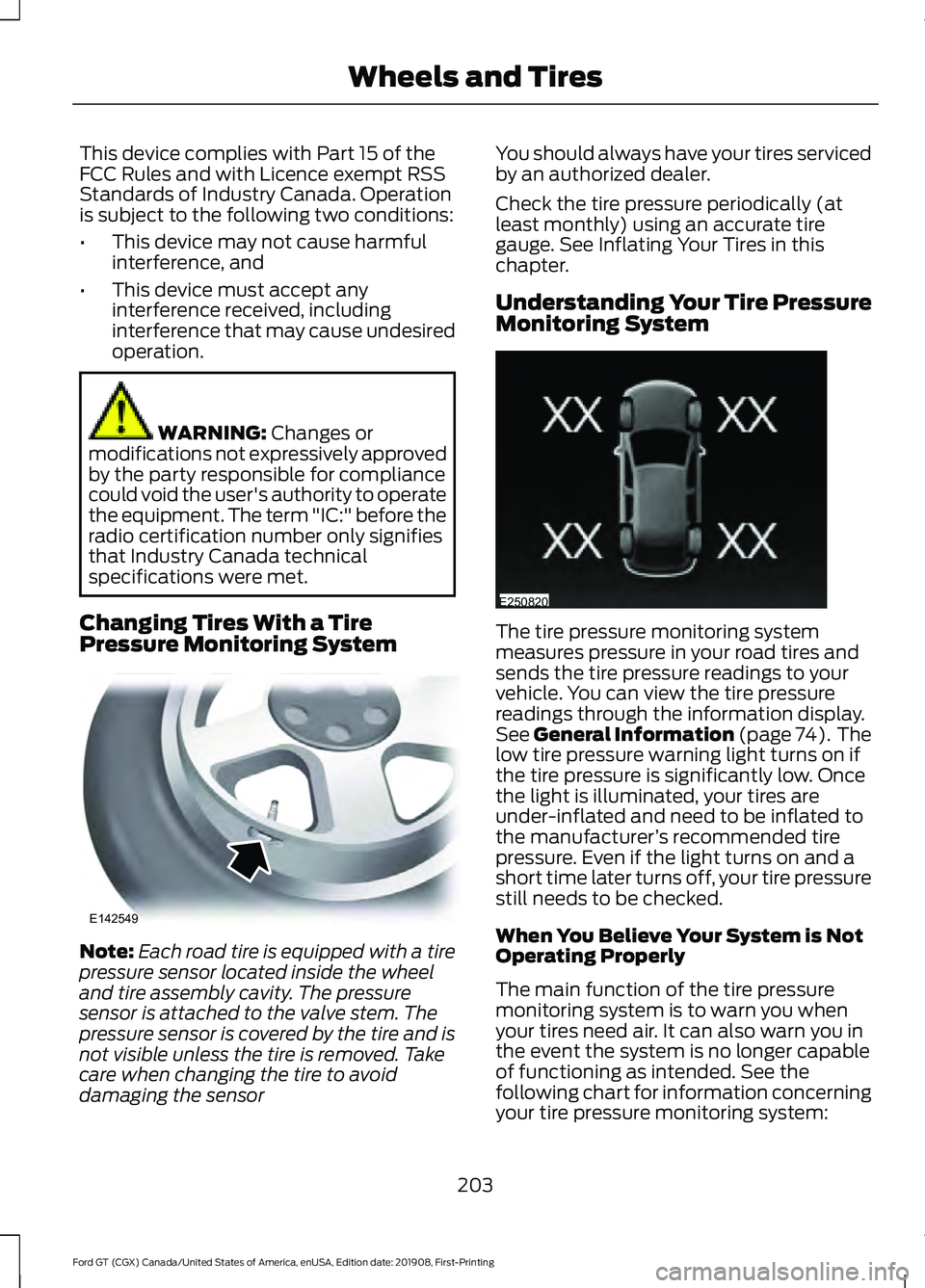
Pressure Monitoring System Note:
Each road tire is equipped with a tire
pressure sensor located inside the wheel
and tire assembly cavity. The pressure
sensor is attached to the valve stem. The
pressure sensor is covered by the tire and is
not visible unless the tire is removed. Take
care when changing the tire to avoid
damaging the sensor You should always have your tires serviced
by an authorized dealer.
Check the tire pressure periodically (at
least monthly) using an accurate tire
gauge. See Inflating Your Tires in this
chapter.
Understanding Your Tire Pressure
Monitoring System
The tire pressure monitoring system
measures pressure in your road tires and
sends the tire pressure readings to your
vehicle. You can view the tire pressure
readings through the information display.
See
General Information (page 74). The
low tire pressure warning light turns on if
the tire pressure is significantly low. Once
the light is illuminated, your tires are
under-inflated and need to be inflated to
the manufacturer ’s recommended tire
pressure. Even if the light turns on and a
short time later turns off, your tire pressure
still needs to be checked.
When You Believe Your System is Not
Operating Properly
The main function of the tire pressure
monitoring system is to warn you when
your tires need air. It can also warn you in
the event the system is no longer capable
of functioning as intended. See the
following chart for information concerning
your tire pressure monitoring system:
203
Ford GT (CGX) Canada/United States of America, enUSA, Edition date: 201908, First-Printing Wheels and TiresE142549 E250820
Page 208 of 316
CHANGING A ROAD WHEEL
Important Information for Lifting
or Jacking
A vehicle jack is not included with your
vehicle. If you are on the road and need to
change a wheel, it is recommended that
you contact the Ford GT Concierge to
obtain roadside assistance. See Special
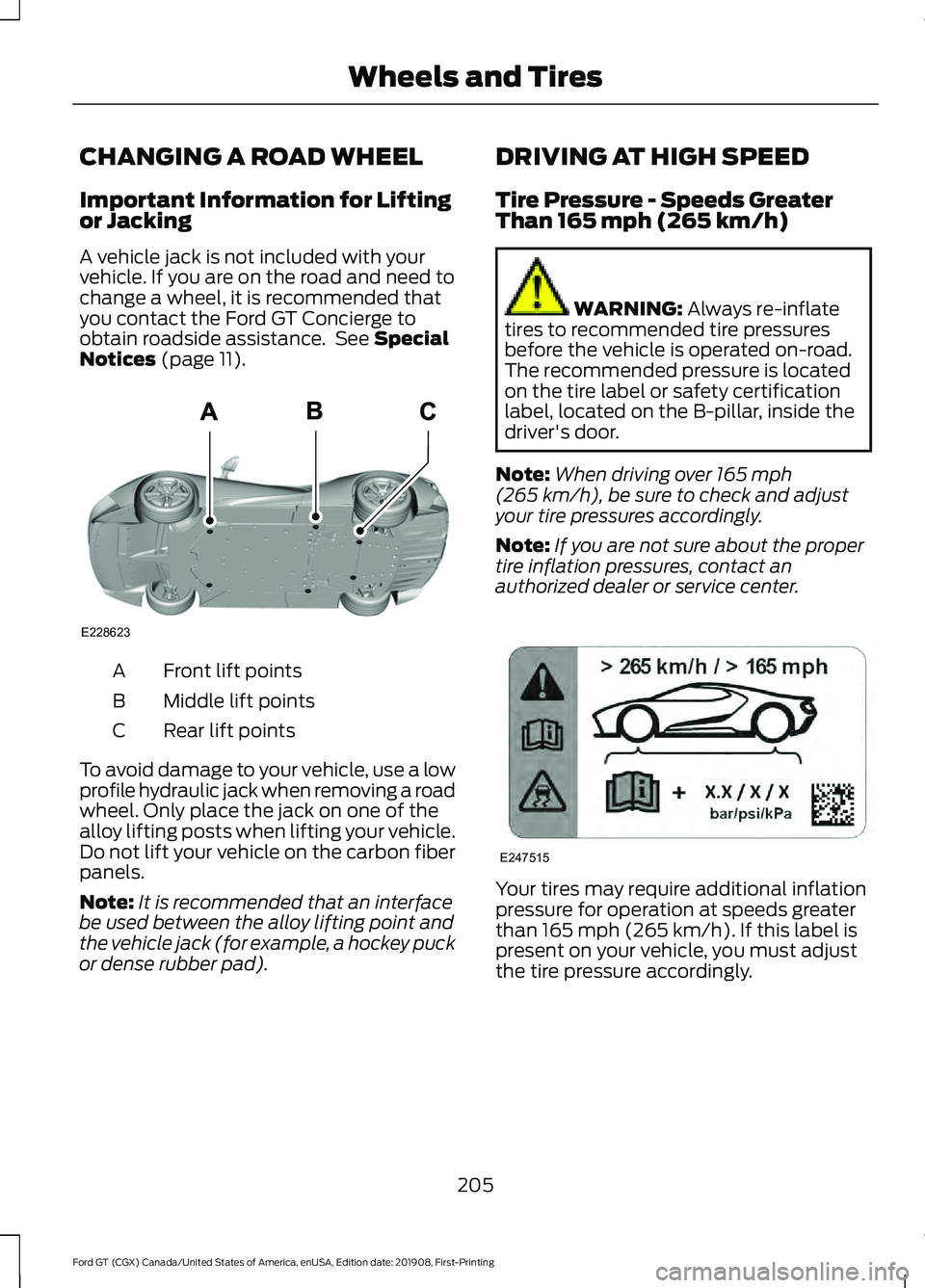
Notices (page 11). Front lift points
A
Middle lift points
B
Rear lift points
C
To avoid damage to your vehicle, use a low
profile hydraulic jack when removing a road
wheel. Only place the jack on one of the
alloy lifting posts when lifting your vehicle.
Do not lift your vehicle on the carbon fiber
panels.
Note: It is recommended that an interface
be used between the alloy lifting point and
the vehicle jack (for example, a hockey puck
or dense rubber pad). DRIVING AT HIGH SPEED
Tire Pressure - Speeds Greater
Than
165 mph (265 km/h) WARNING:
Always re-inflate
tires to recommended tire pressures
before the vehicle is operated on-road.
The recommended pressure is located
on the tire label or safety certification
label, located on the B-pillar, inside the
driver's door.
Note: When driving over
165 mph
(265 km/h), be sure to check and adjust
your tire pressures accordingly.
Note: If you are not sure about the proper
tire inflation pressures, contact an
authorized dealer or service center. Your tires may require additional inflation
pressure for operation at speeds greater
than
165 mph (265 km/h). If this label is
present on your vehicle, you must adjust
the tire pressure accordingly.
205
Ford GT (CGX) Canada/United States of America, enUSA, Edition date: 201908, First-Printing Wheels and TiresE228623 E247515
Page 209 of 316
TECHNICAL SPECIFICATIONS
Wheel Lug Nut Torque Specifications
WARNING: When you install a wheel, always remove any corrosion, dirt or
foreign materials present on the mounting surfaces of the wheel or the surface of the
wheel hub, brake drum or brake disc that contacts the wheel. Make sure to secure any
fasteners that attach the rotor to the hub so they do not interfere with the mounting
surfaces of the wheel. Installing wheels without correct metal-to-metal contact at the
wheel mounting surfaces can cause the wheel nuts to loosen and the wheel to come
off while your vehicle is in motion, resulting in loss of vehicle control, personal injury or
death. Ib-ft (Nm)
*
Bolt size
150 lb.ft (204 Nm)
M14 X 1.5
* Torque specifications are for nut and bolt threads free of dirt and rust. Use only Ford
recommended replacement fasteners.
Retighten the lug nuts to the specified torque within 100 miles (160 kilometers) after any
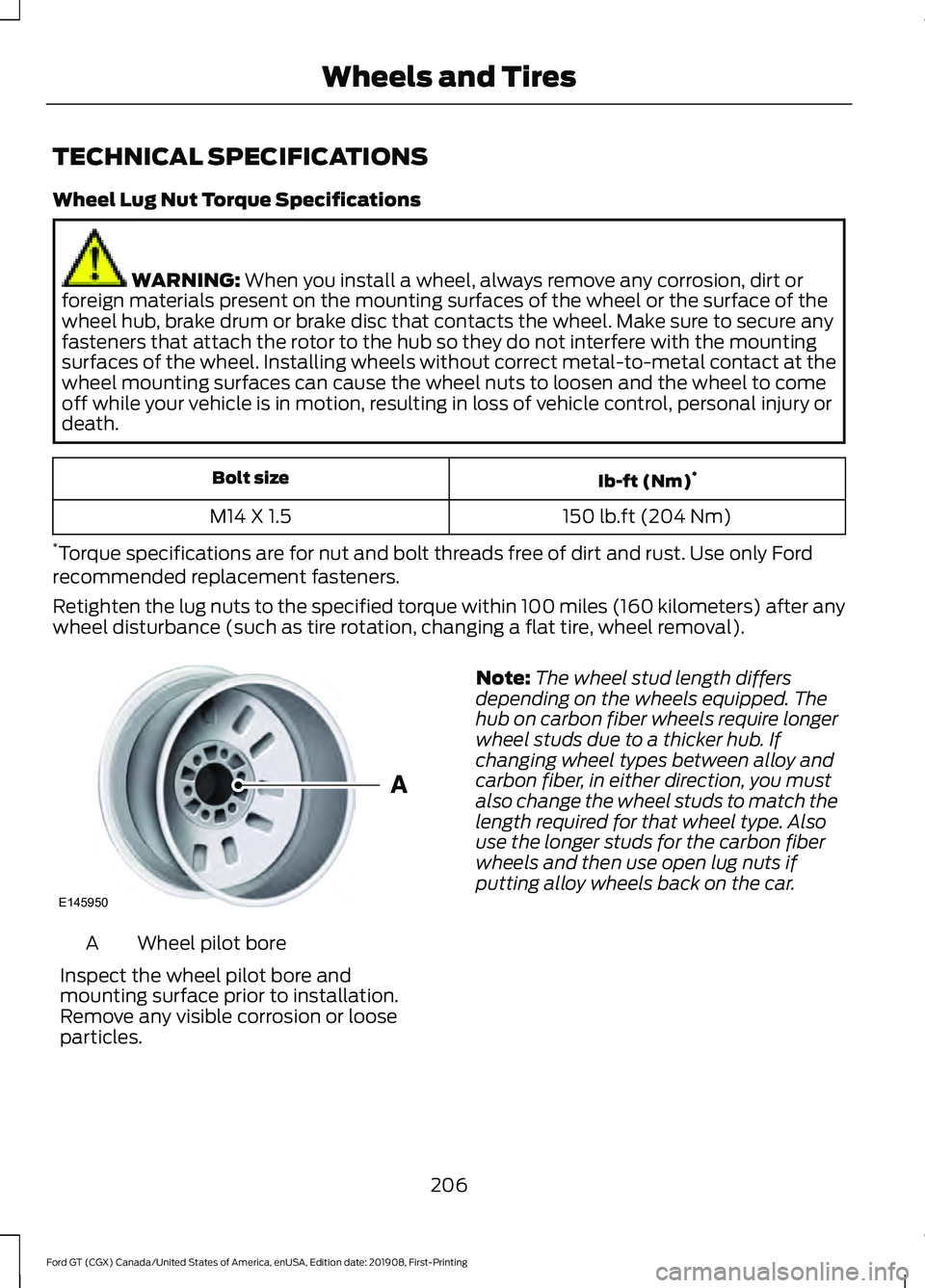
wheel disturbance (such as tire rotation, changing a flat tire, wheel removal). Wheel pilot bore
A
Inspect the wheel pilot bore and
mounting surface prior to installation.
Remove any visible corrosion or loose
particles. Note:
The wheel stud length differs
depending on the wheels equipped. The
hub on carbon fiber wheels require longer
wheel studs due to a thicker hub. If
changing wheel types between alloy and
carbon fiber, in either direction, you must
also change the wheel studs to match the
length required for that wheel type. Also
use the longer studs for the carbon fiber
wheels and then use open lug nuts if
putting alloy wheels back on the car.
206
Ford GT (CGX) Canada/United States of America, enUSA, Edition date: 201908, First-Printing Wheels and TiresE145950
Page 248 of 316
Navigation Map Accuracy and
Updates
HERE is the digital map provider for the
navigation application. If you find map data
errors, you may report them directly to
HERE by going to www.here.com. HERE
evaluates all reported map errors and
responds with the result of their
investigation by e-mail.
The navigation system map data may
contain inaccurate or incomplete
information due to the passage of time,
changing circumstances, sources used and
the nature of collecting comprehensive
geographic data, any of which may lead to
incorrect results. Inaccurate speed limit
information, turn restrictions and other
road attributes may affect the determined
route and associated guidance
Annual navigation map updates are
available for purchase through your
dealership. Depending on your purchase
agreement, you might be eligible for free
Map update. You can choose to download
the Map data update onto a USB, order a
USB, or use Wi-Fi to deliver automatic
updates. To update your Map data over
Wi-Fi, your vehicle must be connected to
a Wi-Fi access point. Map Data files are
large, so it is highly recommended to
perform the update when free Wi-Fi is
available otherwise high data rates may
apply. For USB updates, free map update
eligibility, and other details, contact
dealers at 1-866-462-8837 in the United
States and Canada or 01-800-557-5539
in Mexico or visit our local website for more
information.
APPS
The system allows you interact with select
mobile apps while keeping your eyes on
the road. Voice commands, your steering
wheel buttons, or a quick tap on your
touchscreen give you advanced control of
compatible mobile apps. You can also
stream your favorite music or podcasts,
share your time of arrival with friends, and
keep connected safely.
When you start an app through the system
for the first time, you could be asked to
grant certain permissions. You can review
and change the permissions that you have
granted at any time when your vehicle is
not moving. We recommend that you
check your data plan before using your
apps through the system. Using them
could result in additional charges. We also
recommend that you check the app
provider's terms and conditions and
privacy policy before using their app. Make
sure that you have an active account for
apps that you want to use through the
system. Some apps will work with no
setup. Others require you to configure
some personal settings before you can use
them.
Note:
For more information about available
apps, visit catalog.ford.com.
Using Apps on an iOS Device Select the apps option on the
feature bar.
1. If your device is connected via USB, switch Apple CarPlay off. See Phone
(page 238).
2. Connect your device to a USB port or pair and connect using Bluetooth.
3. If prompted to enable CarPlay, select Disable
.
4. Start the apps on your device that you want to use through SYNC.
245
Ford GT (CGX) Canada/United States of America, enUSA, Edition date: 201908, First-Printing SYNC™ 3
Page 269 of 316
SPECIAL OPERATING
CONDITIONS SCHEDULED
MAINTENANCE
Hot Climate Oil Change Intervals
Vehicles operating in the Middle East,
North Africa, Sub-Saharan Africa or
locations with similar climates using an
American Petroleum Institute (API)
Certified for Gasoline Engines (Certification
mark) oil of SM or SN quality, the normal
oil change interval is 2,500 mi (4,000 km).
Engine Air Filter and Cabin Air
Filter Replacement
The life of the engine air filter and cabin air
filter is dependent on exposure to dusty
and dirty conditions. Vehicles operated in
these conditions require frequent
inspection and replacement of the engine
air filter and cabin air filter.
Operating at High Speeds and
Track Days
Your vehicle is capable of sustained high
speeds and track day driving. Your GT has
electronic controls to reduce power and
limit the RPM to reduce powertrain
temperatures if operating temperatures
are exceeded.
Before Operating Your Vehicle at High
Speeds:
•
Verify your tires have the correct
pressures See Technical
Specifications (page 206).
• Inspect wheels and tires for wear and
damage. Replace any damaged wheels
and tires.
• Check and set lug nut torque. See
Technical Specifications (page 206).
• Verify fluid levels for oil, coolant, brake,
and hydraulic fluid. See Maintenance
(page
157).
• Change the oil and filter prior to use on
the track.
After Operating Your vehicle at High
Speeds and Track Day Driving, Do the
Following:
• Set tire pressures to specification.
• Check and set lug nut torque. See
Technical Specifications (page 206).
• Check all fluid levels.
• If you drive your car for an extended
period of time at high speed or on the
track for an extended time, change the
oil and filter.
SCHEDULED MAINTENANCE
RECORD
After the scheduled maintenance services
are performed, record the Repair Order #,
Distance and Engine Hours in the boxes
provided.
266
Ford GT (CGX) Canada/United States of America, enUSA, Edition date: 201908, First-Printing Scheduled Maintenance
Page 310 of 316

Driving at High Speed................................205
Tire Pressure - Speeds Greater Than
........................................................................\
..... 205
Driving Hints....................................................133
Driving Through Water................................133
DRL See: Daytime Running Lamps......................... 63
E
Electric Parking Brake
...................................111
Applying the Electric Parking brake...............111
Battery With No Charge.................................... 113
Releasing the Electric Parking Brake............112
Emergency Call Limitations.......................44
Emergency Call Requirements
.................43
Emergency Door Release............................53
Emission Law..................................................101
Noise Emissions Warranty, Prohibited
Tampering Acts and Maintenance..........102
Tampering With a Noise Control System................................................................ 101
End User License Agreement
...................277
VEHICLE SOFTWARE END USER LICENSE
AGREEMENT (EULA) .................................. 277
Engine Coolant Check
.................................161
Adding Coolant.................................................... 162
Coolant Change.................................................. 163
Engine Coolant Temperature Management................................................... 165
Fail-Safe Cooling................................................ 163
Recycled Coolant................................................ 163
Severe Climates.................................................. 163
Engine Emission Control
............................101
Engine Immobilizer See: Passive Anti-Theft System..................... 54
Engine Oil Check
..........................................160
Adding Engine Oil............................................... 160
Engine Oil Dipstick
.......................................160
Engine Specifications.................................207
Entertainment...............................................228 AM/FM Radio...................................................... 229
Apps........................................................................\
237
Bluetooth Stereo or USB................................ 236
CD (If equipped)................................................ 235
HD Radio ™ Information (If
Available)......................................................... 232SiriusXM® Satellite Radio (If
Activated)........................................................ 229
Sources.................................................................. 228
Supported Media Players, Formats and Metadata Information................................. 237
USB Ports.............................................................. 237
Environment
......................................................15
EPB See: Electric Parking Brake................................ 111
Event Data Recording See: Data Recording............................................... 7
Exterior Mirrors
................................................66
Fold-Away Exterior Mirrors............................... 66
Power Exterior Mirrors........................................ 66
F
Fastening the Seatbelts
..............................29
Seatbelt Locking Modes.................................... 30
Using Seatbelts During Pregnancy...............30
Using the Sliding Clip.......................................... 29
Flat Tire See: Changing a Road Wheel....................... 205
Flat Tire Inflation See: Tire Sealant and Inflator Kit.................183
Floor Mats........................................................134
Foot Pedals See: Adjusting the Pedals................................ 60
Ford Performance
...........................................13
Front Passenger Sensing System............38
Fuel and Refueling.........................................95
Fuel Consumption.........................................99
Calculating Fuel Economy.............................. 100
Filling the Fuel Tank.......................................... 100
Fuel Filler Funnel Location.........................96
Fuel Filter.........................................................167
Fuel Quality......................................................96 Choosing the Right Fuel.................................... 96
Fuel Shutoff
....................................................135
Fuses.................................................................145
Fuse Specification Chart...........................145 Front Power Distribution Box......................... 145
Passenger Compartment Fuse Panel..........151
Rear Power Distribution Box 1........................ 147
Rear Power Distribution Box 2....................... 150
307
Ford GT (CGX) Canada/United States of America, enUSA, Edition date: 201908, First-Printing Index
Page 314 of 316
Spare Wheel
See: Changing a Road Wheel....................... 205
Special Notices.................................................11
Additional Warranty Information..................... 11
Certified Ford GT Service Dealer..................... 12
New Vehicle Limited Warranty.......................... 11
On Board Diagnostics Data Link Connector............................................................ 12
Special Instructions.............................................. 12
Special Operating Conditions Scheduled Maintenance..............................................266
Engine Air Filter and Cabin Air Filter Replacement..................................................266
Hot Climate Oil Change Intervals................266
Operating at High Speeds and Track Days................................................................... 266
Speed Control See: Cruise Control............................................ 120
Stability Control
.............................................115
Principle of Operation........................................ 115
Starting and Stopping the Engine............91 General Information............................................. 91
Starting the Engine........................................92 Failure to Start....................................................... 93
Fast Restart............................................................ 93
Guarding Against Exhaust Fumes.................94
Important Ventilating Information................94
Stopping the Engine When Your Vehicle is Moving................................................................. 93
Stopping the Engine When Your Vehicle is Stationary.......................................................... 93
Steering.............................................................121
Steering Wheel Lock.....................................92
Steering Wheel
...............................................56
Storage Compartments..............................90
Supplementary Restraints System.........36 Principle of Operation........................................ 36
Symbols Glossary.............................................5
SYNC™ 3
.........................................................219
General Information.......................................... 219
SYNC™ 3 Troubleshooting
......................249
Additional Information and
Assistance........................................................ 261
Apps....................................................................... 256
Navigation............................................................ 255
Personal Profiles................................................ 259
Phone..................................................................... 253
Resetting the System........................................ 261USB and Bluetooth Audio..............................
250
Voice Recognition.............................................. 249
Wi-Fi Connectivity............................................. 258
T
Technical Specifications See: Capacities and Specifications............207
The Better Business Bureau (BBB) Auto Line Program (U.S. Only)
.......................140
Tire Care...........................................................189 Glossary of Tire Terminology.......................... 191
Information About Uniform Tire Quality Grading.............................................................. 189
Information Contained on the Tire Sidewall............................................................. 192
Temperature A B C............................................ 190
Traction AA A B C............................................... 190
Treadwear............................................................. 190
Tire Inflation When Punctured See: Tire Sealant and Inflator Kit.................183
Tire Pressure Monitoring System...........202 Changing Tires With a Tire Pressure
Monitoring System....................................... 203
Understanding Your Tire Pressure Monitoring System ...................................... 203
Tire Repair Kit See: Tire Sealant and Inflator Kit.................183
Tire Sealant and Inflator Kit.....................183 First Stage: Inflating the Tire with Sealing
Compound and Air........................................ 185
General Information.......................................... 184
Second Stage: Checking Tire Pressure............................................................. 187
Tips for Use of the Kit....................................... 184
What to Do After the Tire has Been Sealed................................................................ 187
What to do When a Tire Is Punctured........185
Tires See: Wheels and Tires...................................... 183
Towing a Trailer..............................................132
Towing Points
................................................138
Installing the Recovery Hook......................... 138
Recovery Hook Location.................................. 138
Towing the Vehicle on Four Wheels...........................................................132
Emergency Towing............................................. 132
Towing
...............................................................132
311
Ford GT (CGX) Canada/United States of America, enUSA, Edition date: 201908, First-Printing Index