service FORD GT 2020 Service Manual
[x] Cancel search | Manufacturer: FORD, Model Year: 2020, Model line: GT, Model: FORD GT 2020Pages: 316, PDF Size: 6.25 MB
Page 198 of 316
The tire suppliers may have
additional markings, notes or
warnings such as standard load
or radial tubeless.
Location of the Tire Label
You will find a Tire Label
containing tire inflation pressure
by tire size and other important
information located on the driver
’s
side door opening.
Inflating Your Tires
Safe operation of your vehicle
requires that your tires are
properly inflated. Remember that
a tire can lose up to half of its air
pressure without appearing flat.
Every day before you drive, check
your tires. If one looks lower than
the others, use a tire gauge to
check pressure of all tires and
adjust if required.
At least once a month and before
long trips, inspect each tire and
check the tire pressure with a tire
gauge (including spare, if
equipped). Inflate all tires to the
inflation pressure recommended
by Ford Motor Company.
You are strongly urged to buy a
reliable tire pressure gauge, as
automatic service station gauges
may be inaccurate. Ford
recommends the use of a digital
or dial-type tire pressure gauge
rather than a stick-type tire
pressure gauge. Use the recommended cold
inflation pressure for optimum tire
performance and wear.
Under-inflation or over-inflation
may cause uneven treadwear
patterns.
WARNING:
Under-inflation is the most
common cause of tire failures
and may result in severe tire
cracking, tread separation or
blowout, with unexpected loss
of vehicle control and increased
risk of injury. Under-inflation
increases sidewall flexing and
rolling resistance, resulting in
heat buildup and internal
damage to the tire. It also may
result in unnecessary tire stress,
irregular wear, loss of vehicle
control and accidents. A tire can
lose up to half of its air pressure
and not appear to be flat!
Always inflate your tires to the
Ford recommended inflation
pressure even if it is less than the
maximum inflation pressure
information found on the tire. The
Ford recommended tire inflation
pressure is found on the Safety
Compliance Certification Label
(affixed to either the door hinge
pillar, door-latch post, or the door
edge that meets the door-latch
post, next to the driver's seating
position), or Tire Label which is
located on the B-Pillar or the edge
195
Ford GT (CGX) Canada/United States of America, enUSA, Edition date: 201908, First-Printing Wheels and Tires
Page 202 of 316
the B-Pillar or edge of the
driver's door. If this information
is not found on these labels, then
you should contact your
authorized dealer as soon as
possible. Use of any tire or wheel
not recommended by Ford can
affect the safety and
performance of your vehicle,
which could result in an
increased risk of loss of vehicle
control, vehicle rollover, personal
injury and death.
WARNING: The use of
non-recommended tires and
wheels could cause steering,
suspension, axle, transfer case
or power transfer unit failure. If
you have questions regarding tire
replacement, contact your
authorized dealer as soon as
possible. WARNING:
To reduce the
risk of serious injury, when
mounting replacement tires and
wheels, you should not exceed
the maximum pressure indicated
on the sidewall of the tire to set
the beads without additional
precautions listed below. If the
beads do not seat at the
maximum pressure indicated,
re-lubricate and try again. WARNING:
When
inflating the tire for mounting
pressures up to 20 psi (1.38 bar)
greater than the maximum
pressure on the tire sidewall, the
following precautions must be
taken to protect the person
mounting the tire:
• Make sure that you have the
correct tire and wheel size.
• Lubricate the tire bead and
wheel bead seat area again.
• Stand at a minimum of
12 ft
(3.66 m) away from the wheel
and tire assembly.
• Use both eye and ear
protection. WARNING:
For a
mounting pressure more than
20 psi (1.38 bar)
greater than the
maximum pressure, a Ford
dealer or other tire service
professional should do the
mounting. WARNING: Always inflate
steel carcass tires with a remote
air fill with the person inflating
standing at a minimum of
12 ft
(3.66 m) away from the wheel
and tire assembly.
199
Ford GT (CGX) Canada/United States of America, enUSA, Edition date: 201908, First-Printing Wheels and Tires
Page 206 of 316
This device complies with Part 15 of the
FCC Rules and with Licence exempt RSS
Standards of Industry Canada. Operation
is subject to the following two conditions:
•
This device may not cause harmful
interference, and
• This device must accept any
interference received, including
interference that may cause undesired
operation. WARNING: Changes or
modifications not expressively approved
by the party responsible for compliance
could void the user's authority to operate
the equipment. The term "IC:" before the
radio certification number only signifies
that Industry Canada technical
specifications were met.
Changing Tires With a Tire
Pressure Monitoring System Note:
Each road tire is equipped with a tire
pressure sensor located inside the wheel
and tire assembly cavity. The pressure
sensor is attached to the valve stem. The
pressure sensor is covered by the tire and is
not visible unless the tire is removed. Take
care when changing the tire to avoid
damaging the sensor You should always have your tires serviced
by an authorized dealer.
Check the tire pressure periodically (at
least monthly) using an accurate tire
gauge. See Inflating Your Tires in this
chapter.
Understanding Your Tire Pressure
Monitoring System
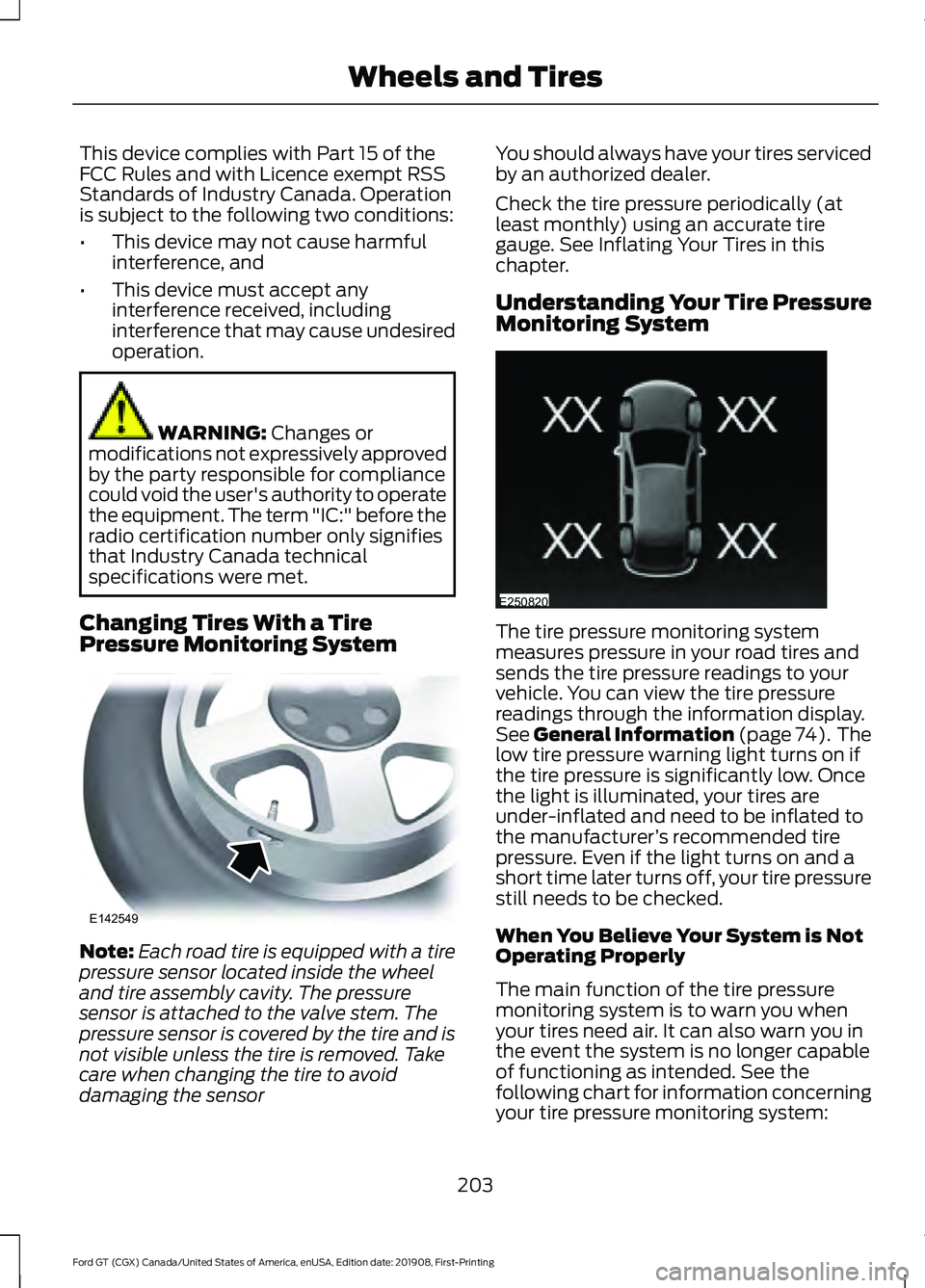
The tire pressure monitoring system
measures pressure in your road tires and
sends the tire pressure readings to your
vehicle. You can view the tire pressure
readings through the information display.
See
General Information (page 74). The
low tire pressure warning light turns on if
the tire pressure is significantly low. Once
the light is illuminated, your tires are
under-inflated and need to be inflated to
the manufacturer ’s recommended tire
pressure. Even if the light turns on and a
short time later turns off, your tire pressure
still needs to be checked.
When You Believe Your System is Not
Operating Properly
The main function of the tire pressure
monitoring system is to warn you when
your tires need air. It can also warn you in
the event the system is no longer capable
of functioning as intended. See the
following chart for information concerning
your tire pressure monitoring system:
203
Ford GT (CGX) Canada/United States of America, enUSA, Edition date: 201908, First-Printing Wheels and TiresE142549 E250820
Page 208 of 316
CHANGING A ROAD WHEEL
Important Information for Lifting
or Jacking
A vehicle jack is not included with your
vehicle. If you are on the road and need to
change a wheel, it is recommended that
you contact the Ford GT Concierge to
obtain roadside assistance. See Special
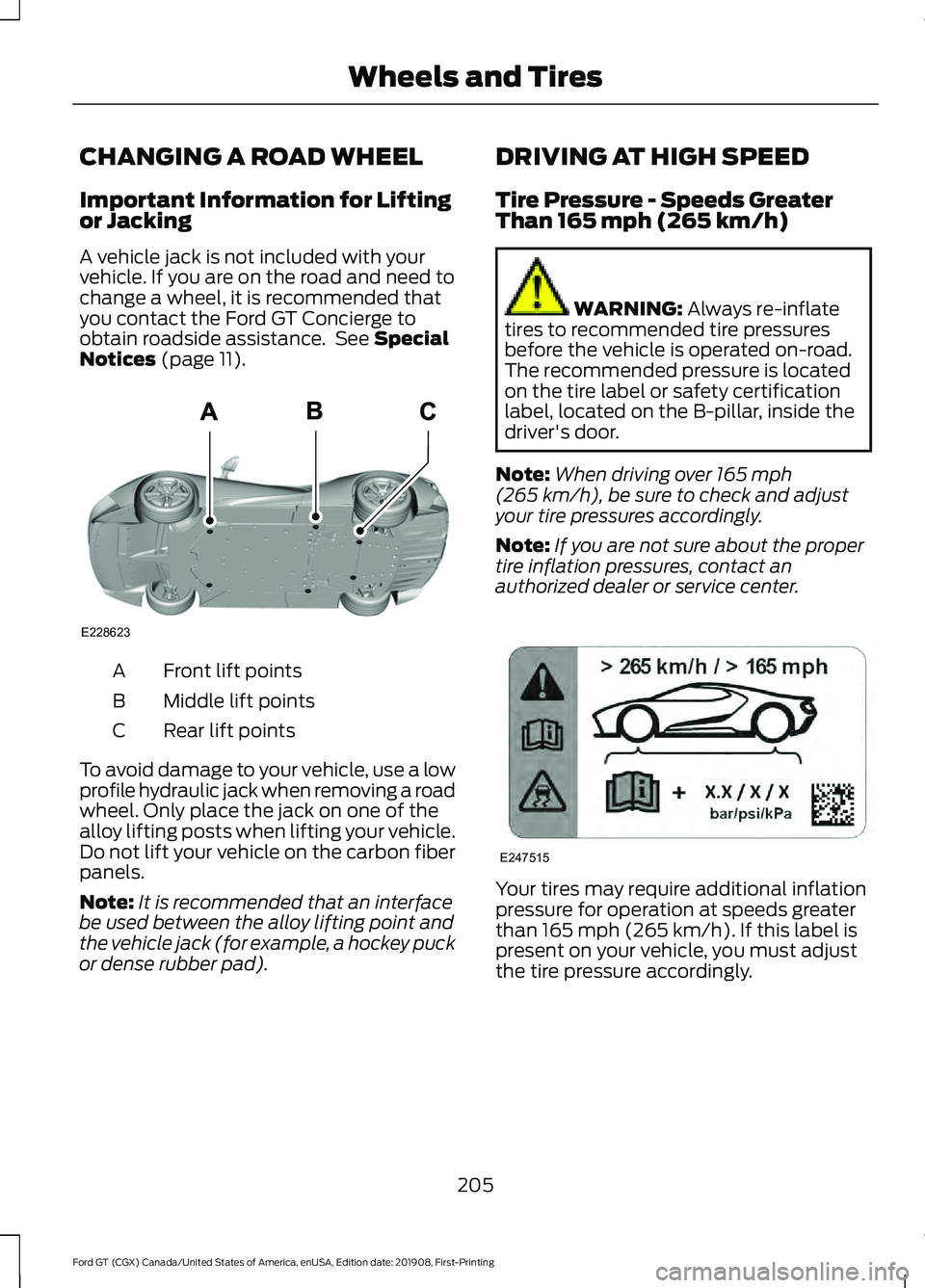
Notices (page 11). Front lift points
A
Middle lift points
B
Rear lift points
C
To avoid damage to your vehicle, use a low
profile hydraulic jack when removing a road
wheel. Only place the jack on one of the
alloy lifting posts when lifting your vehicle.
Do not lift your vehicle on the carbon fiber
panels.
Note: It is recommended that an interface
be used between the alloy lifting point and
the vehicle jack (for example, a hockey puck
or dense rubber pad). DRIVING AT HIGH SPEED
Tire Pressure - Speeds Greater
Than
165 mph (265 km/h) WARNING:
Always re-inflate
tires to recommended tire pressures
before the vehicle is operated on-road.
The recommended pressure is located
on the tire label or safety certification
label, located on the B-pillar, inside the
driver's door.
Note: When driving over
165 mph
(265 km/h), be sure to check and adjust
your tire pressures accordingly.
Note: If you are not sure about the proper
tire inflation pressures, contact an
authorized dealer or service center. Your tires may require additional inflation
pressure for operation at speeds greater
than
165 mph (265 km/h). If this label is
present on your vehicle, you must adjust
the tire pressure accordingly.
205
Ford GT (CGX) Canada/United States of America, enUSA, Edition date: 201908, First-Printing Wheels and TiresE228623 E247515
Page 215 of 316
CAPACITIES AND
SPECIFICATIONS
Use oil and fluid that meets the defined
specification and viscosity grade.
If you use oil and fluids that do not meet
the defined specification and viscosity
grade, this may lead to:
•
Component damage that your vehicle
warranty does not cover.
• Longer engine cranking periods.
• Increased emission levels.
• Reduced engine performance. •
Reduced fuel economy.
• Reduced brake performance.
Air Conditioning System WARNING: The air conditioning
refrigerant system contains refrigerant
under high pressure. Only qualified
personnel should service the air
conditioning refrigerant system. Opening
the air conditioning refrigerant system
can cause personal injury.
Capacities Refrigerant Oil
Refrigerant
Variant
4.7 fl oz (140 ml)
1.5 lb (0.68 kg)
All.
Materials Specification
Name
WSS-M17B21-A
R-1234yf Refrigerant (U.S.)
R-1234yf Refrigerant / Frigorigène R-1234yf
(Canada)
YN-33-A (U.S.)
HS7Z-19B519-BA (Canada)
WSS-M2C300-A2
Motorcraft® R-1234yf Refrigerant PAG Oil (U.S.)
Motorcraft® R-1234yf Refrigerant PAG Oil / Huile
PAG pour frigorigène R-1234yf Motorcraft®
(Canada)
YN-35 (U.S. & Canada)
Transmission Gear
Capacities Quantity
Variant
4.1 qt (3.9 L)
All.
212
Ford GT (CGX) Canada/United States of America, enUSA, Edition date: 201908, First-Printing Capacities and Specifications
Page 217 of 316
Materials
Specification
Name
WSS-M97B44-D2
Motorcraft® Orange Prediluted Antifreeze/Coolant
(U.S.)
Motorcraft® Orange Prediluted Antifreeze/Coolant
/ Antigel/liquide de refroidissement prédilué orange
Motorcraft® (Canada)
VC-3DIL-B (U.S.)
CVC-3DIL-B (Canada)
WSS-M97B57-A2
Motorcraft® Yellow Prediluted Antifreeze/Coolant
(U.S.)
Motorcraft® Yellow Prediluted Antifreeze/Coolant
/ Antigel/liquide de refroidissement prédilué jaune
Motorcraft® (Canada)
VC-13DL-G (U.S.)
CVC-13DL-G (Canada)
Note: Use the coolant type that originally
came with your vehicle. For any questions
regarding coolant, see your authorized
dealer.
Engine Oil We recommend Castrol Edge Supercar
5W-50 motor oil for your vehicle. If this oil
is not available, use motor oils of the
recommended viscosity grade that meet
our specification WSS-M2C931-C such as
Motorcraft® 5W-50 labeled with API SN
service category.
Do not use supplemental engine oil
additives because they are unnecessary
and could lead to engine damage not
covered by your vehicle warranty.
214
Ford GT (CGX) Canada/United States of America, enUSA, Edition date: 201908, First-Printing Capacities and SpecificationsE115472 E300448
Page 233 of 316
SiriusXM satellite radio is a
subscription-based satellite radio service
that broadcasts a variety of music, sports,
news, weather, traffic and entertainment
programming. Your factory-installed
SiriusXM satellite radio system includes
hardware and a limited subscription term
that begins on the date of sale or lease of
your vehicle. See an authorized dealer for
availability.
For more information on extended
subscription terms (a service fee is
required), the online media player and a
list of SiriusXM satellite radio channels,
and other features, please visit
www.siriusxm.com in the United States,
www.siriusxm.ca in Canada, or call
SiriusXM at 1-888-539-7474.
Note:
SiriusXM reserves the unrestricted
right to change, rearrange, add or delete
programming. This includes canceling,
moving or adding particular channels, and
its prices, at any time, with or without notice
to you. We are not responsible for any such
programming changes.
Note: This receiver includes the eCos
real-time operating system. eCos is
published under the eCos License.
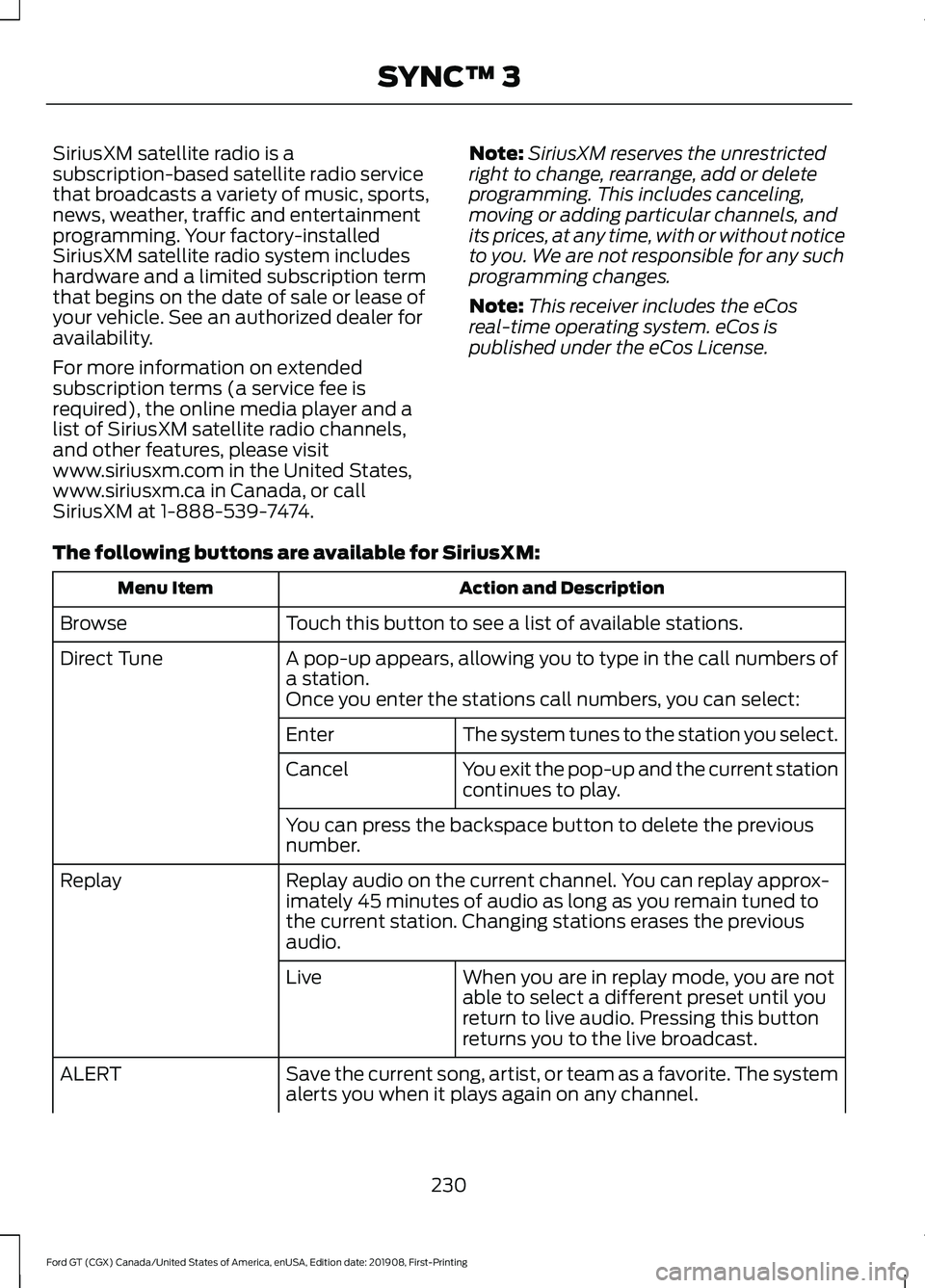
The following buttons are available for SiriusXM: Action and Description
Menu Item
Touch this button to see a list of available stations.
Browse
A pop-up appears, allowing you to type in the call numbers of
a station.
Direct Tune
Once you enter the stations call numbers, you can select:The system tunes to the station you select.
Enter
You exit the pop-up and the current station
continues to play.
Cancel
You can press the backspace button to delete the previous
number.
Replay audio on the current channel. You can replay approx-
imately 45 minutes of audio as long as you remain tuned to
the current station. Changing stations erases the previous
audio.
Replay
When you are in replay mode, you are not
able to select a different preset until you
return to live audio. Pressing this button
returns you to the live broadcast.
Live
Save the current song, artist, or team as a favorite. The system
alerts you when it plays again on any channel.
ALERT
230
Ford GT (CGX) Canada/United States of America, enUSA, Edition date: 201908, First-Printing SYNC™ 3
Page 235 of 316
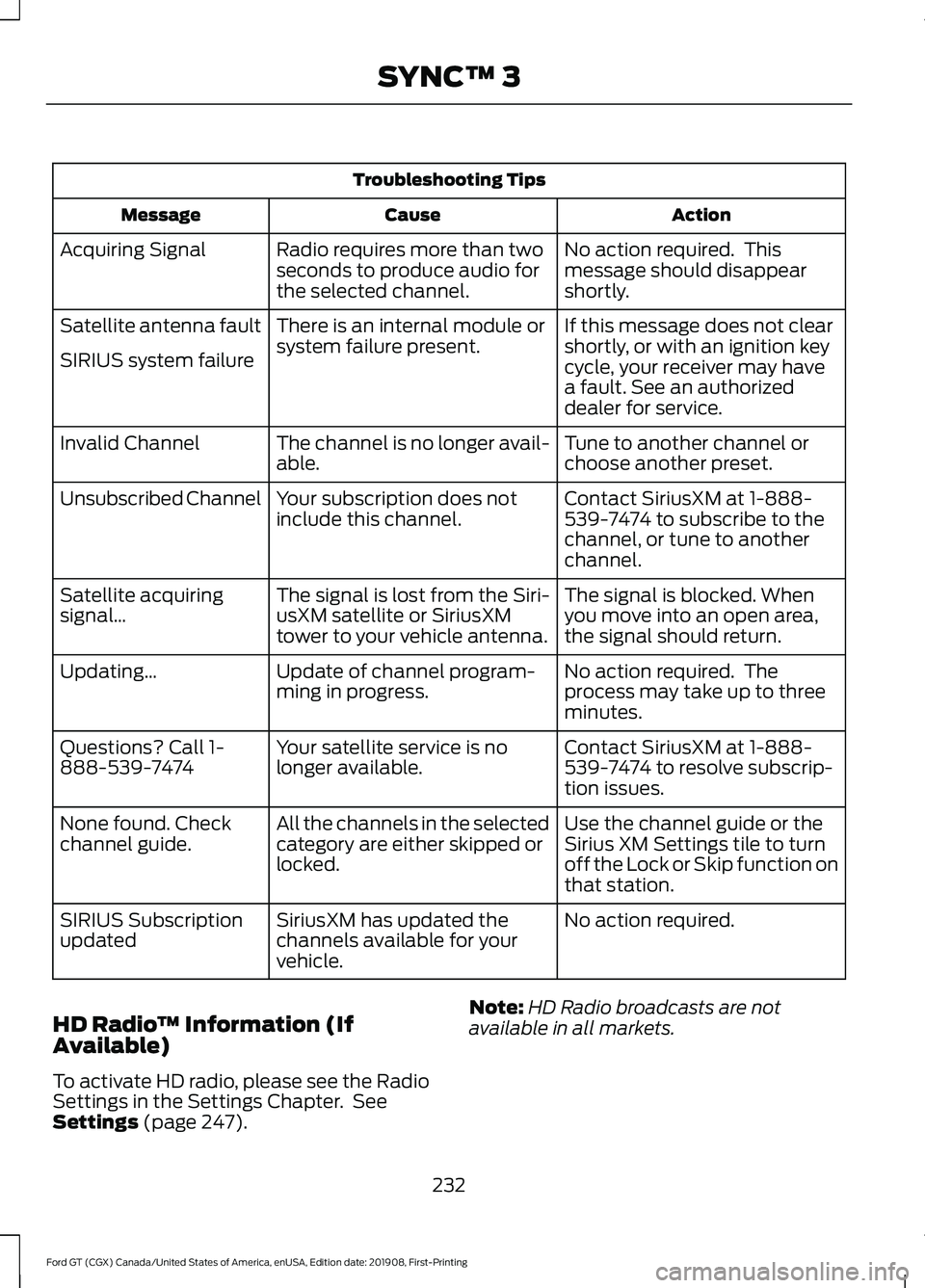
Troubleshooting Tips
Action
Cause
Message
No action required. This
message should disappear
shortly.
Radio requires more than two
seconds to produce audio for
the selected channel.
Acquiring Signal
If this message does not clear
shortly, or with an ignition key
cycle, your receiver may have
a fault. See an authorized
dealer for service.
There is an internal module or
system failure present.
Satellite antenna fault
SIRIUS system failure
Tune to another channel or
choose another preset.
The channel is no longer avail-
able.
Invalid Channel
Contact SiriusXM at 1-888-
539-7474 to subscribe to the
channel, or tune to another
channel.
Your subscription does not
include this channel.
Unsubscribed Channel
The signal is blocked. When
you move into an open area,
the signal should return.
The signal is lost from the Siri-
usXM satellite or SiriusXM
tower to your vehicle antenna.
Satellite acquiring
signal…
No action required. The
process may take up to three
minutes.
Update of channel program-
ming in progress.
Updating…
Contact SiriusXM at 1-888-
539-7474 to resolve subscrip-
tion issues.
Your satellite service is no
longer available.
Questions? Call 1-
888-539-7474
Use the channel guide or the
Sirius XM Settings tile to turn
off the Lock or Skip function on
that station.
All the channels in the selected
category are either skipped or
locked.
None found. Check
channel guide.
No action required.
SiriusXM has updated the
channels available for your
vehicle.
SIRIUS Subscription
updated
HD Radio ™ Information (If
Available)
To activate HD radio, please see the Radio
Settings in the Settings Chapter. See
Settings (page 247). Note:
HD Radio broadcasts are not
available in all markets.
232
Ford GT (CGX) Canada/United States of America, enUSA, Edition date: 201908, First-Printing SYNC™ 3
Page 238 of 316
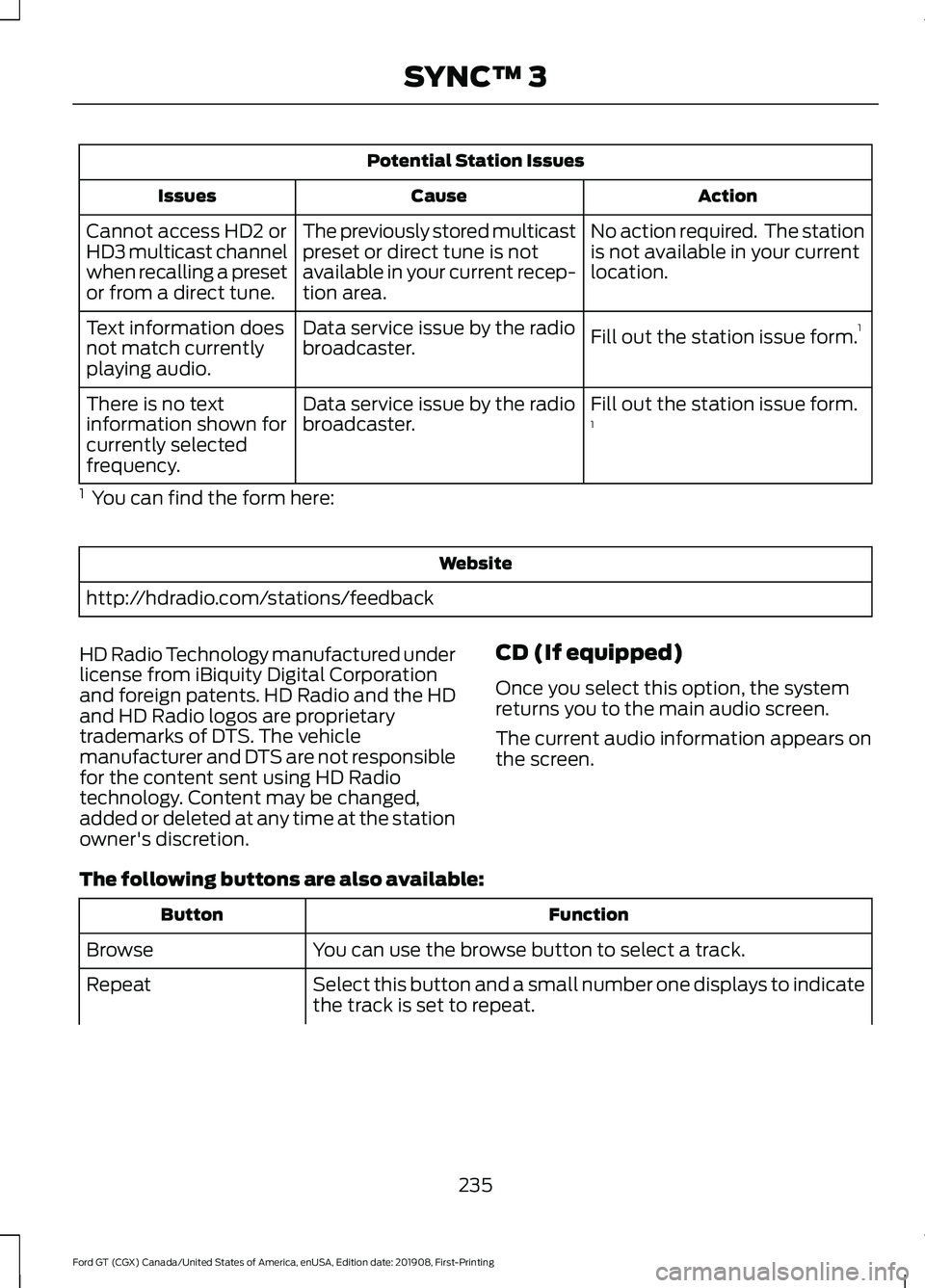
Potential Station Issues
Action
Cause
Issues
No action required. The station
is not available in your current
location.
The previously stored multicast
preset or direct tune is not
available in your current recep-
tion area.
Cannot access HD2 or
HD3 multicast channel
when recalling a preset
or from a direct tune.
Fill out the station issue form.1
Data service issue by the radio
broadcaster.
Text information does
not match currently
playing audio.
Fill out the station issue form.
1
Data service issue by the radio
broadcaster.
There is no text
information shown for
currently selected
frequency.
1 You can find the form here: Website
http://hdradio.com/stations/feedback
HD Radio Technology manufactured under
license from iBiquity Digital Corporation
and foreign patents. HD Radio and the HD
and HD Radio logos are proprietary
trademarks of DTS. The vehicle
manufacturer and DTS are not responsible
for the content sent using HD Radio
technology. Content may be changed,
added or deleted at any time at the station
owner's discretion. CD (If equipped)
Once you select this option, the system
returns you to the main audio screen.
The current audio information appears on
the screen.
The following buttons are also available: Function
Button
You can use the browse button to select a track.
Browse
Select this button and a small number one displays to indicate
the track is set to repeat.
Repeat
235
Ford GT (CGX) Canada/United States of America, enUSA, Edition date: 201908, First-Printing SYNC™ 3
Page 247 of 316
cityseeker, when available, is a service that
provides more information about certain
points of interest such as restaurants,
hotels and attractions.
When you have selected a point of interest,
the location and information appear, such
as address, phone number and a star
rating.
Press More Information to see a photo,
a review, a list of services and facilities, the
average room or meal price and the web
address. This screen displays the point of
interest icons.
For restaurants, cityseeker can provide
information such as star rating, average
cost, review, handicap access, hours of
operation, and website address.
For hotels, cityseeker can provide
information such as star rating, price
category, review, check-in and checkout
times, hotel service icons and website
address. Hotel service icons include:
• Restaurant
• Business center
• Handicap facilities
• Laundry
• Refrigerator
• 24 hour room service
• Fitness center
• Internet access
• Pool
• Wi-Fi Attractions include nearby landmarks,
amusement parks, historic buildings and
more. cityseeker can provide information
such as star rating, reviews, hour of
operation and admission price.
SiriusXM Traffic and Travel Link (If
Equipped)
SiriusXM Traffic and Travel Link is available
on vehicles equipped with navigation and
only in select markets. You must activate
and subscribe to receive SiriusXM Traffic
and Travel Link information. It helps you
locate the best gas prices, find movie
listings, get current traffic alerts, view the
weather map, get accurate ski conditions
and see current sports scores.
The system calculates a reasonable
efficient route based on available speed
limits, traffic, and road conditions. You may
know a local short cut that is more efficient
at a given time than the route provided by
SYNC 3, but you should expect a slight
difference in minutes or miles with the
SYNC 3 route.
Michelin Travel Guide
(If Equipped)
The Michelin travel guide is a service which
provides additional information about
certain places of interest, for example
restaurants, hotels and tourist sites. Points
of interest that have Michelin travel guide
information display a button to show you
more information. Push the button to see
the additional information. If you have
paired your phone with the system, you
can press the phone button to directly
establish a call with the selected point of
interest.
244
Ford GT (CGX) Canada/United States of America, enUSA, Edition date: 201908, First-Printing SYNC™ 3E225487