power steering FORD GT 2021 User Guide
[x] Cancel search | Manufacturer: FORD, Model Year: 2021, Model line: GT, Model: FORD GT 2021Pages: 321, PDF Size: 5.78 MB
Page 164 of 321
If the engine reaches a preset
over-temperature condition, the engine
automatically switches to alternating
cylinder operation. Each disabled cylinder
acts as an air pump and cools the engine.
When this occurs, your vehicle still
operates, however:
•
Engine power is limited.
• The air conditioning system turns off.
Continued operation increases the engine
temperature, causing the engine to
completely shut down. Your steering and
braking effort increases in this situation.
When the engine temperature cools, you
can re-start the engine. Have your vehicle
checked as soon as possible to minimize
engine damage.
When Fail-Safe Mode Is Activated WARNING: Fail-safe mode is for
use during emergencies only. Operate
your vehicle in fail-safe mode only as
long as necessary to bring your vehicle
to rest in a safe location and seek
immediate repairs. When in fail-safe
mode, your vehicle will have limited
power, will not be able to maintain
high-speed operation, and may
completely shut down without warning,
potentially losing engine power, power
steering assist, and power brake assist,
which may increase the possibility of a
crash resulting in serious injury. WARNING:
Do not remove the
coolant reservoir cap when the engine is
on or the cooling system is hot. Wait 10
minutes for the cooling system to cool
down. Cover the coolant reservoir cap
with a thick cloth to prevent the
possibility of scalding and slowly remove
the cap. Failure to follow this instruction
could result in personal injury. Your vehicle has limited engine power
when in the fail-safe mode, drive your
vehicle with caution. Your vehicle does not
maintain high-speed operation and the
engine may operate poorly.
Remember that the engine is capable of
automatically shutting down to prevent
engine damage. In this situation:
1. Pull off the road as soon as safely
possible and switch the engine off.
2. Contact the Ford GT Concierge to obtain assistance.
See About This
Manual (page 5).
3. If this is not possible, wait a short period for the engine to cool.
4. Check the coolant level. If the coolant level is at or below the minimum mark,
add prediluted coolant immediately.
5. When the engine temperature cools, you can re-start the engine. Have your
vehicle checked as soon as possible to
minimize engine damage.
Note: Driving your vehicle without repair
increases the chance of engine damage.
Engine Coolant Temperature
Management WARNING:
To reduce the risk of
crash and injury, be prepared that the
vehicle speed may reduce and the
vehicle may not be able to accelerate
with full power until the coolant
temperature reduces.
At this time, you may notice the coolant
temperature gauge moves toward the red
zone and a message may appear in the
information display.
161
Ford GT (CGX) Canada/United States of America, enUSA, Edition date: 202010, First-Printing Maintenance
Page 166 of 321
WARNING: Do not allow the fluid
to touch your skin or eyes. If this
happens, rinse the affected areas
immediately with plenty of water and
contact your physician. WARNING:
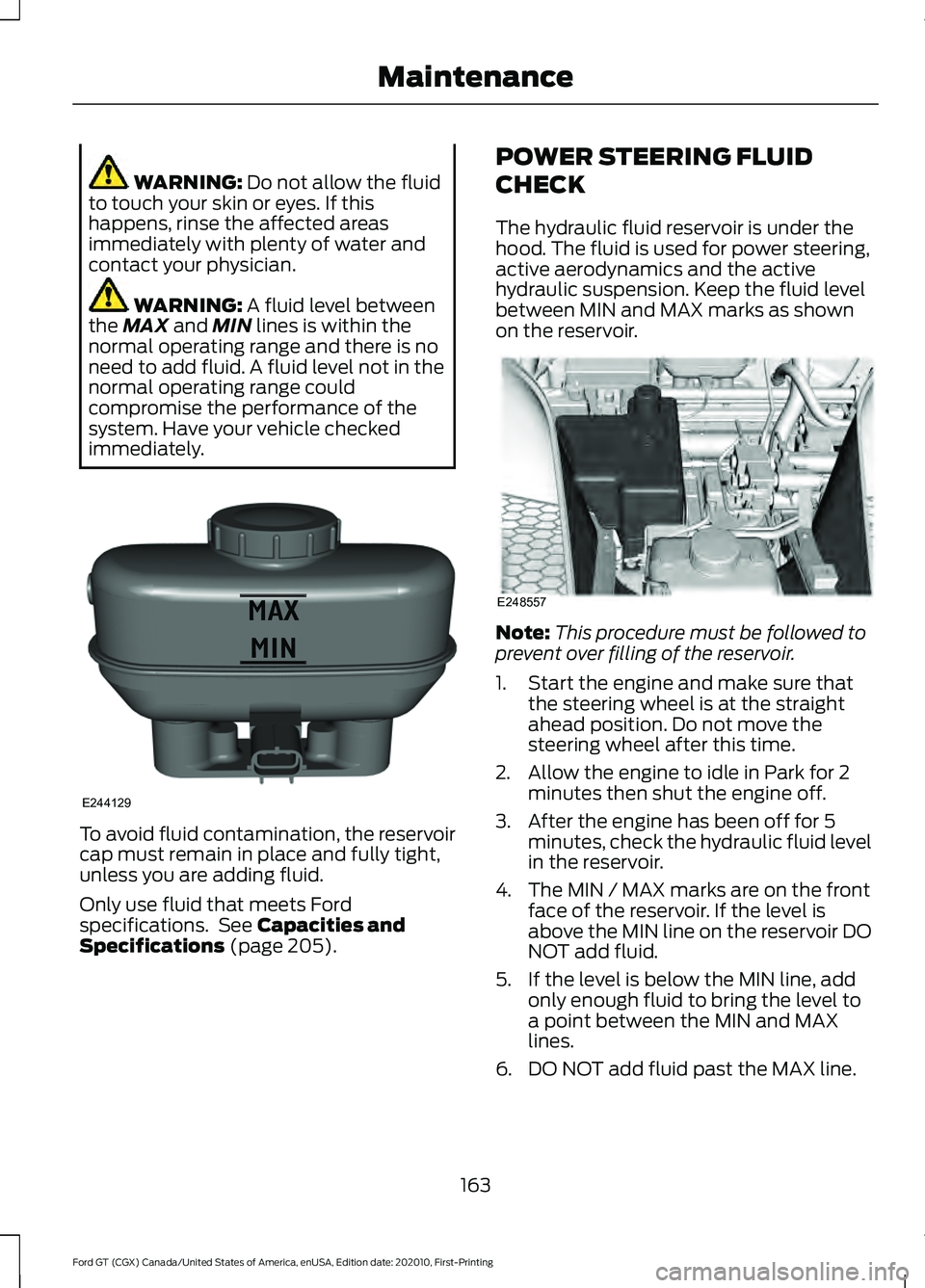
A fluid level between
the MAX and MIN lines is within the
normal operating range and there is no
need to add fluid. A fluid level not in the
normal operating range could
compromise the performance of the
system. Have your vehicle checked
immediately. To avoid fluid contamination, the reservoir
cap must remain in place and fully tight,
unless you are adding fluid.
Only use fluid that meets Ford
specifications. See
Capacities and
Specifications (page 205). POWER STEERING FLUID
CHECK
The hydraulic fluid reservoir is under the
hood. The fluid is used for power steering,
active aerodynamics and the active
hydraulic suspension. Keep the fluid level
between MIN and MAX marks as shown
on the reservoir.
Note:
This procedure must be followed to
prevent over filling of the reservoir.
1. Start the engine and make sure that the steering wheel is at the straight
ahead position. Do not move the
steering wheel after this time.
2. Allow the engine to idle in Park for 2 minutes then shut the engine off.
3. After the engine has been off for 5 minutes, check the hydraulic fluid level
in the reservoir.
4. The MIN / MAX marks are on the front face of the reservoir. If the level is
above the MIN line on the reservoir DO
NOT add fluid.
5. If the level is below the MIN line, add only enough fluid to bring the level to
a point between the MIN and MAX
lines.
6. DO NOT add fluid past the MAX line.
163
Ford GT (CGX) Canada/United States of America, enUSA, Edition date: 202010, First-Printing MaintenanceE244129 E248557
Page 200 of 321
not recommended by Ford can
affect the safety and
performance of your vehicle,
which could result in an
increased risk of loss of vehicle
control, vehicle rollover, personal
injury and death.
WARNING: The use of
non-recommended tires and
wheels could cause steering,
suspension, axle, transfer case
or power transfer unit failure. If
you have questions regarding tire
replacement, contact your
authorized dealer as soon as
possible. WARNING:
To reduce the
risk of serious injury, when
mounting replacement tires and
wheels, you should not exceed
the maximum pressure indicated
on the sidewall of the tire to set
the beads without additional
precautions listed below. If the
beads do not seat at the
maximum pressure indicated,
re-lubricate and try again. WARNING:
When inflating
the tire for mounting pressures
up to
20 psi (1.38 bar) greater
than the maximum pressure on
the tire sidewall, the following
precautions must be taken to
protect the person mounting the
tire: •
Make sure that you have the
correct tire and wheel size.
• Lubricate the tire bead and
wheel bead seat area again.
• Stand at a minimum of
12 ft
(3.66 m) away from the wheel
and tire assembly.
• Use both eye and ear
protection. WARNING: For a mounting
pressure more than
20 psi
(1.38 bar) greater than the
maximum pressure, a Ford
dealer or other tire service
professional should do the
mounting. WARNING:
Always inflate
steel carcass tires with a remote
air fill with the person inflating
standing at a minimum of
12 ft
(3.66 m) away from the wheel
and tire assembly.
Important: Remember to replace
the wheel valve stems when the
road tires are replaced on your
vehicle.
It is recommended that the two
front tires or two rear tires
generally be replaced as a pair.
The tire pressure sensors mounted
in the wheels (originally installed
on your vehicle) are not designed
to be used in aftermarket wheels.
197
Ford GT (CGX) Canada/United States of America, enUSA, Edition date: 202010, First-Printing Wheels and Tires
Page 217 of 321
Materials
Specification
Name
WSS-M6C65-A2
Motorcraft® DOT 4 LV High Performance Motor
Vehicle Brake Fluid(U.S.)
Motorcraft® DOT 4 LV High Performance Motor
Vehicle Brake Fluid / Liquide de frein automobile
haute performance DOT 4 LV Motorcraft®(Canada)
PM-20(U.S. & Canada)
Note: We recommend using DOT 4 Low
Viscosity (LV) High Performance Brake Fluid
or equivalent meeting WSS-M6C65-A2. Use
of any fluid other than the recommended
fluid could cause degraded brake
performance and not meet our performance
standards. Keep brake fluid clean and dry.
Contamination with dirt, water, petroleum
products or other materials could result in
brake system damage and possible failure.
Hydraulic Power Steering, Active Suspension, and Active Aero System
Capacities Quantity
Variant
6.3 qt (6 L)
All.
Materials Specification
Name
WSS-M2C938-AMERCON® LV,
Motorcraft® MERCON® LV Automatic Transmission
Fluid(U.S.)
Motorcraft® MERCON® LV Automatic Transmission
Fluid / Huile pour boîte automatique MERCON® LV
Motorcraft®(Canada)
XT-10-QLVC(U.S.)
CXT-10-LV6(Canada)
214
Ford GT (CGX) Canada/United States of America, enUSA, Edition date: 202010, First-Printing Capacities and Specifications
Page 219 of 321
AUDIO UNIT
WARNING: Driving while distracted
can result in loss of vehicle control, crash
and injury. We strongly recommend that
you use extreme caution when using any
device that may take your focus off the
road. Your primary responsibility is the
safe operation of your vehicle. We
recommend against the use of any
hand-held device while driving and
encourage the use of voice-operated
systems when possible. Make sure you
are aware of all applicable local laws
that may affect the use of electronic
devices while driving.
You can access your audio features with
the touchscreen and steering wheel
controls.
The power button is to the left of the
display screen.
USB PORT
The USB port is on the bottom of the
instrument panel.
The USB port allows you to plug in media
playing devices, memory sticks and charge
supported devices.
216
Ford GT (CGX) Canada/United States of America, enUSA, Edition date: 202010, First-Printing Audio System
Page 224 of 321
Note:
Do not use detergent or any type of
solvent to clean the touchscreen.
Note: Do not pour or spray alcohol onto the
touchscreen.
Using Voice Recognition
Using voice commands allows you to keep
your hands on the wheel and focus on
what is in front of you. The system provides
feedback through audible tones, prompts,
questions and spoken confirmations
depending on the situation and the chosen
level of interaction (voice settings).
The system also asks short questions
(confirmation prompts) when it is not sure
of your request or when there are multiple
possible responses to your request.
When using voice commands, words and
icons may appear in the status bar
indicating the status of the voice command
session. See Using Voice Recognition
(page 228).
Using the Steering Wheel Controls
You can use different controls on your
steering wheel to interact with the
touchscreen system in different ways.
VOL:
Control the volume of audio output.
Voice:
Press to start a voice session. Press
again to stop the voice prompt and
immediately begin speaking. Press and
hold to end a voice session.
SEEK NEXT:
• While in radio mode, press to seek
between memory presets.
• While in USB or Bluetooth Audio, press
to seek between songs or press and
hold to fast seek. SEEK PREVIOUS:
•
While in radio mode, press to seek
between memory presets.
• While in USB or Bluetooth Audio, press
to seek between songs or press and
hold to fast seek.
See
Steering Wheel (page 56).
Using Your Bezel Controls
• Power:
Switch the audio system on
and off.
• DISP:
Switch the display on or off. You
can also touch the screen to switch the
display back on.
911 Assist WARNING:
Unless the 911 Assist
setting is set on before a crash, the
system will not dial for help which could
delay response time, potentially
increasing the risk of serious injury or
death after a crash. WARNING:
Do not wait for 911
Assist to make an emergency call if you
can do it yourself. Dial emergency
services immediately to avoid delayed
response time which could increase the
risk of serious injury or death after a
crash. If you do not hear 911 Assist within
five seconds of the crash, the system or
phone may be damaged or
non-functional. WARNING:
Always place your
phone in a secure location in your vehicle
so it does not become a projectile or get
damaged in a crash. Failure to do so may
cause serious injury to someone or
damage the phone which could prevent
911 Assist from working properly.
Note: The SYNC 911 Assist feature must be
set on before the incident.
221
Ford GT (CGX) Canada/United States of America, enUSA, Edition date: 202010, First-Printing SYNC™ 3
Page 225 of 321
Note:
The SYNC 911 Assist feature only
operates in the U.S., Canada or in a territory
in which 911 is the emergency number.
Note: Before setting this feature on, make
sure that you read the 911 Assist Privacy
Notice later in this section for important
information.
Note: If any user sets 911 Assist to on or off,
that setting applies for all paired phones. If
911 Assist is switched off and the phone is
connected to SYNC, an icon displays on the
status bar.
Note: Every phone operates differently.
While SYNC 911 Assist works with most
cellular phones, some may have trouble
using this feature.
If a crash deploys an airbag (excluding
knee airbags and rear inflatable safety
belts [if equipped]) or activates the fuel
pump shut-off, your SYNC-equipped
vehicle may be able to contact emergency
services by dialing 911 through a paired and
connected Bluetooth-enabled phone. You
can learn more about the 911 Assist
feature, by visiting: Website
www.owner.ford.com
www.syncmyride.ca
www.syncmaroute.ca
For important information about airbag
deployment and the fuel pump shut-off
please see the Supplementary Restrains
and Roadside Emergencies sections of
your owner manual.
To switch 911 Assist on and off please view
the settings information. See Settings
(page 253). To make sure that 911 Assist works
correctly:
•
SYNC must be powered and working
properly at the time of the incident and
throughout feature activation and use.
• The 911 Assist feature must be set on
before the incident.
• You must pair and connect a
Bluetooth-enabled and compatible
cell phone to SYNC.
• A connected Bluetooth-enabled phone
must have the ability to make and
maintain an outgoing call at the time
of the incident.
• A connected Bluetooth-enabled phone
must have adequate network coverage,
battery power and signal strength.
• The vehicle must have battery power
and be located in the U.S., Canada or
in a territory in which 911 is the
emergency number.
In the Event of a Crash
Not all crashes will deploy an airbag or
activate the fuel pump shut-off (the
triggers for 911 Assist). If a connected cell
phone sustains damage or loses its
connection to SYNC during a crash, SYNC
will search for and try to connect to a
previously paired cell phone; SYNC will
then attempt to call the emergency
services.
Before making the call:
• SYNC provides a short window of time
(about 10 seconds) to cancel the call.
If you fail to cancel the call, SYNC
attempts to dial 911.
• SYNC says the following, or a similar
message: "SYNC will attempt to call
911, to cancel the call, press Cancel on
your screen or press and hold the
phone button on your steering wheel."
222
Ford GT (CGX) Canada/United States of America, enUSA, Edition date: 202010, First-Printing SYNC™ 3
Page 314 of 321
9
911 Assist...........................................................43
A
A/C
See: Climate Control........................................... 83
About This Manual...........................................5 Ford GT Concierge Phone Numbers................5
ABS See: Brakes........................................................... 108
ABS driving hints See: Hints on Driving With Anti-Lock
Brakes................................................................ 109
Accessories....................................................278
Accessories See: Replacement Parts
Recommendation............................................. 11
Adjustable Pedals.........................................60
Adjusting the Headlamps.........................166 Headlamp Aim Target...................................... 166
Adjusting the Pedals....................................60
Adjusting the Steering Wheel...................56
Airbag Disposal...............................................42
Air Conditioning See: Climate Control........................................... 83
Air Filter See: Changing the Engine Air Filter.............158
Alarm See: Anti-Theft Alarm........................................ 55
Anti-Theft Alarm
............................................55
Arming the Alarm................................................. 55
Disarming the Alarm........................................... 55
Appendices....................................................283
Apps..................................................................252 ........................................................................\
...........252
At a Glance........................................................16
Audible Warnings and Indicators..............72 Headlamps On Warning Chime...................... 72
Keyless Warning Alert......................................... 72
Audio Control
...................................................57
Seek, Next or Previous........................................ 57
Audio System
.................................................216
Audio Unit........................................................216
Autolamps........................................................63
Automatic Climate Control
........................83
Directing the Airflow........................................... 83Setting the Blower Motor Speed....................
83
Setting the Temperature................................... 83
Switching Auto Mode On and Off.................83
Switching Recirculated Air On and Off........83
Switching the Air Conditioning On and Off........................................................................\
. 83
Automatic Transmission
...........................103
Brake-Shift Interlock......................................... 106
If Your Vehicle Gets Stuck In Mud or Snow................................................................... 107
Performance Shift Indicator........................... 105
SelectShift™ Automatic Transmission................................................... 104
Understanding the Positions of Your Automatic Transmission............................. 103
Automatic Transmission Fluid Check.............................................................162
Auxiliary Power Points..................................87 DC Power Point..................................................... 87
Location................................................................... 87
B
Battery See: Changing the 12V Battery...................... 164
Body Styling Kits..........................................180
Bonnet Lock See: Opening and Closing the Hood...........154
Booster Seats..................................................24 Types of Booster Seats...................................... 25
Brake Fluid Check.........................................162
Brakes...............................................................108 General Information.......................................... 108
Breaking-In.......................................................131 Cold Engine Operation....................................... 131
Hot Engine Shut down....................................... 131
C
Cabin Air Filter.................................................85
Capacities and Specifications.................210 Air Conditioning System.................................. 210
Engine Coolant..................................................... 211
Engine Oil............................................................... 212
Fuel Tank................................................................ 213
Grease..................................................................... 213
Hydraulic Brake System................................... 213
311
Ford GT (CGX) Canada/United States of America, enUSA, Edition date: 202010, First-Printing Index
Page 315 of 321
Hydraulic Power Steering, Active
Suspension, and Active Aero
System............................................................... 214
Locks........................................................................\
213
Transmission Gear............................................. 210
Transmission Wet Clutch.................................. 211
Washer Reservoir................................................ 215
Car Wash See: Cleaning the Exterior................................ 173
Catalytic Converter.....................................100
On-Board Diagnostics (OBD-II).................... 101
Readiness for Inspection and Maintenance (I/M) Testing.................................................... 101
Changing a Bulb
...........................................168
LED Lamps........................................................... 168
Changing a Fuse............................................152 Fuses........................................................................\
152
Changing a Road Wheel...........................203 Important Information for Lifting or
Jacking.............................................................. 203
Changing the 12V Battery
..........................164
Battery Charger and Maintainer................... 164
Battery Management System....................... 166
Changing the Engine Air Filter.................158
Changing the Wiper Blades......................167
Checking the Wiper Blades.......................167
Child Restraint and Seatbelt Maintenance.................................................33
Child Restraint Positioning
.........................26
Child Safety.......................................................19
General Information............................................. 19
Cleaning Leather Seats...............................177
Cleaning Products
.........................................172
Materials................................................................. 172
Cleaning the Engine.....................................174
Cleaning the Exterior....................................173 Exterior Plastic Parts.......................................... 174
Matte Paint Finish............................................... 173
Raising the Rear Wing....................................... 174
Standard Paint Finish........................................ 173
Underbody............................................................. 174
Under Hood........................................................... 174
Cleaning the Instrument Panel and Instrument Cluster Lens..........................176
Cleaning the Interior.....................................175 Cleaning Alcantara Microfiber Cloth............175
Cleaning the Wheels....................................177 Cleaning the Windows and Wiper
Blades
.............................................................175
Climate Control..............................................83
Coolant Check See: Engine Coolant Check............................ 158
Crash Sensors and Airbag Indicator
.........41
Cruise Control..................................................57
Principle of Operation........................................ 118
Cruise control See: Using Cruise Control................................. 118
Cup Holders
.....................................................88
Customer Assistance..................................137
D
Data Recording
..................................................7
Comfort, Convenience and Entertainment
Data........................................................................\
9
Event Data................................................................. 8
Service Data.............................................................. 7
Services That Third Parties Provide.................9
Services That We Provide.................................... 9
Vehicles With a Modem....................................... 9
Vehicles With an Emergency Call System................................................................. 10
Vehicles With SYNC............................................. 10
Daytime Running Lamps.............................63
Declaration of Conformity.......................308
Declaration of Conformity - Vehicles With: SYNC 3.............................................308
Radio Frequency Statement........................ 308
Direction Indicators
.......................................64
Doors and Locks.............................................50
Drive Mode Control.......................................58 Active Aerodynamics ........................................ 123
Damper Comfort Mode.................................... 123
Drive Mode Selection......................................... 119
Front Lift................................................................. 123
Driver and Passenger Airbags....................37 Children and Airbags........................................... 37
Proper Driver and Front Passenger Seating Adjustment........................................................ 37
Driver and Passenger Knee Airbags
.........41
Driving Aids......................................................119
Driving at High Speed................................203
Tire Pressure - Speeds Greater Than
........................................................................\
..... 203
Driving Hints
.....................................................131
312
Ford GT (CGX) Canada/United States of America, enUSA, Edition date: 202010, First-Printing Index
Page 318 of 321
Lighting Control..............................................58
High Beams............................................................ 62
Performance Shift Indicator............................ 59
Lighting..............................................................62 General Information............................................ 62
Load Carrying.................................................125
Load Limit........................................................125 Vehicle Loading - with and without a
Trailer.................................................................. 125
Locking and Unlocking................................50 Activating Intelligent Access .......................... 50
Autolock.................................................................... 51
Battery Saver......................................................... 52
Illuminated Entry.................................................. 52
Illuminated Exit..................................................... 52
Opening the Rear Hatch.................................... 52
Power Door Locks................................................ 50
Remote Control.................................................... 50
Smart Unlocks for Intelligent Access Keys....................................................................... 51
Lug Nuts See: Changing a Road Wheel....................... 203
M
Maintenance..................................................154 General Information.......................................... 154
Manual Seats
..................................................86
Map Pockets....................................................88
Message Center See: Information Displays................................. 73
Mirrors See: Windows and Mirrors................................ 65
Mobile Communications Equipment
.......12
Motorcraft Parts...........................................207
N
Navigation......................................................244 cityseeker............................................................... 251
Destination Mode.............................................. 246
Map Mode............................................................. 245
Navigation Map Updates................................. 251
Navigation Menu................................................ 249
Waypoints............................................................ 250
Normal Scheduled Maintenance..........280 Normal Maintenance Intervals.................... 280O
Oil Check
See: Engine Oil Check........................................ 157
Opening and Closing the Hood...............154 Closing the Front Hood.................................... 155
Closing the Rear Hatch..................................... 155
Opening the Front Hood.................................. 154
Opening the Rear Hatch.................................. 155
Opening the Doors
.........................................52
Opening the Doors from Inside....................... 53
Ordering Additional Owner's Literature........................................................141
P
Parking Aids
.....................................................116
Passive Anti-Theft System.........................54 SecuriLock.............................................................. 54
PATS See: Passive Anti-Theft System..................... 54
Perchlorate........................................................10
Personal Safety System ™
..........................35
How Does the Personal Safety System
Work?.................................................................. 35
Phone...............................................................239 During a Phone Call.......................................... 242
Making Calls......................................................... 241
Pairing Your Cell Phone for the First Time................................................................... 239
Phone Menu........................................................ 240
Receiving Calls.................................................... 242
Smartphone Connectivity.............................. 243
Text Messaging................................................... 243
Post-Crash Alert System...........................135
Power Door Locks See: Locking and Unlocking............................. 50
Power Steering Fluid Check
......................163
Power Windows.............................................65
Accessory Delay.................................................... 65
Bounce-Back......................................................... 65
One-Touch Down................................................. 65
One-Touch Up....................................................... 65
Protecting the Environment........................15
Puncture See: Changing a Road Wheel....................... 203
315
Ford GT (CGX) Canada/United States of America, enUSA, Edition date: 202010, First-Printing Index