reset FORD GT 2021 User Guide
[x] Cancel search | Manufacturer: FORD, Model Year: 2021, Model line: GT, Model: FORD GT 2021Pages: 321, PDF Size: 5.78 MB
Page 150 of 321
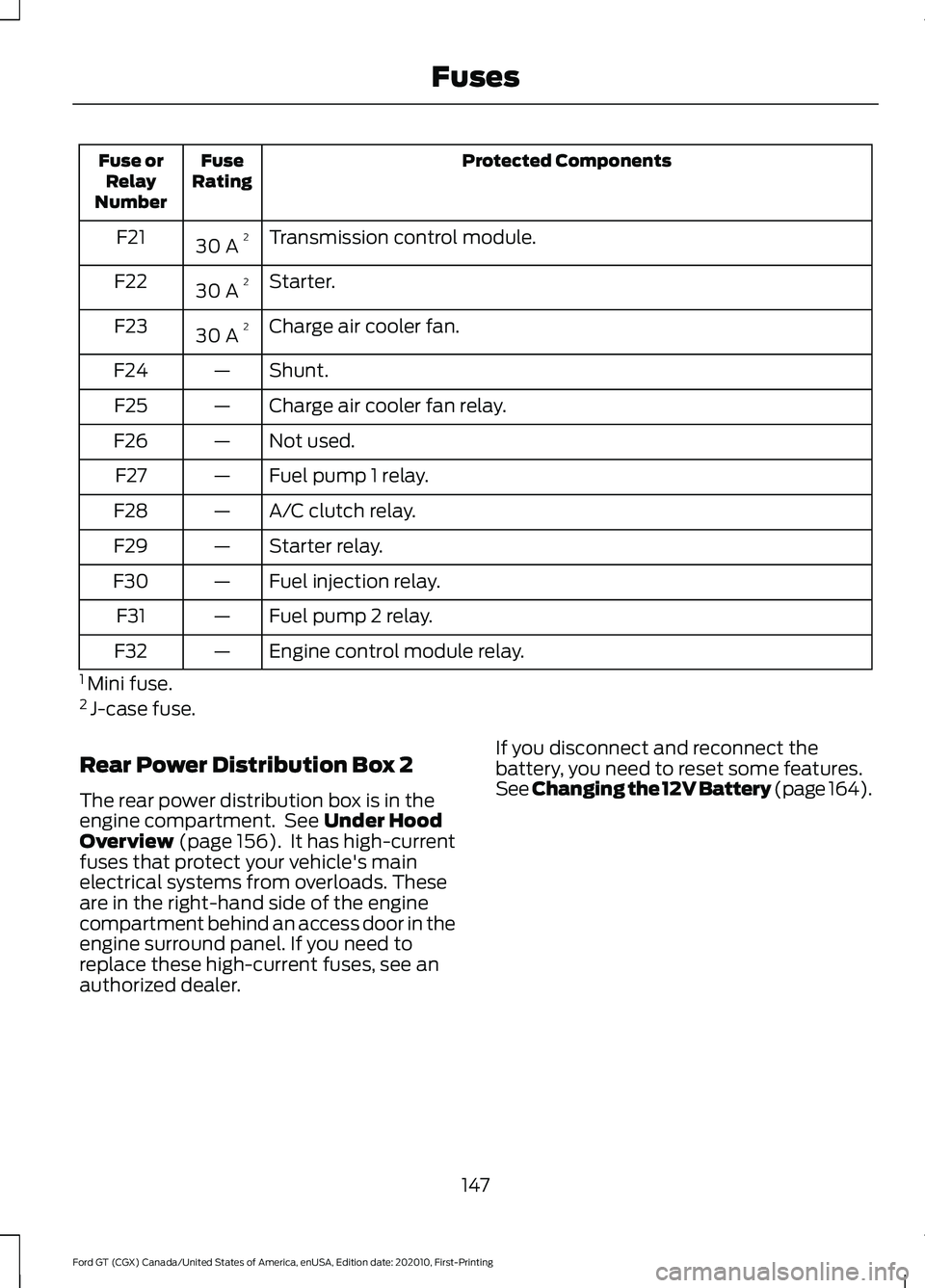
Protected Components
Fuse
Rating
Fuse or
Relay
Number
Transmission control module.
30 A 2
F21
Starter.
30 A 2
F22
Charge air cooler fan.
30 A 2
F23
Shunt.
—
F24
Charge air cooler fan relay.
—
F25
Not used.
—
F26
Fuel pump 1 relay.
—
F27
A/C clutch relay.
—
F28
Starter relay.
—
F29
Fuel injection relay.
—
F30
Fuel pump 2 relay.
—
F31
Engine control module relay.
—
F32
1 Mini fuse.
2 J-case fuse.
Rear Power Distribution Box 2
The rear power distribution box is in the
engine compartment. See Under Hood
Overview (page 156). It has high-current
fuses that protect your vehicle's main
electrical systems from overloads. These
are in the right-hand side of the engine
compartment behind an access door in the
engine surround panel. If you need to
replace these high-current fuses, see an
authorized dealer. If you disconnect and reconnect the
battery, you need to reset some features.
See Changing the 12V Battery (page 164
).
147
Ford GT (CGX) Canada/United States of America, enUSA, Edition date: 202010, First-Printing Fuses
Page 164 of 321
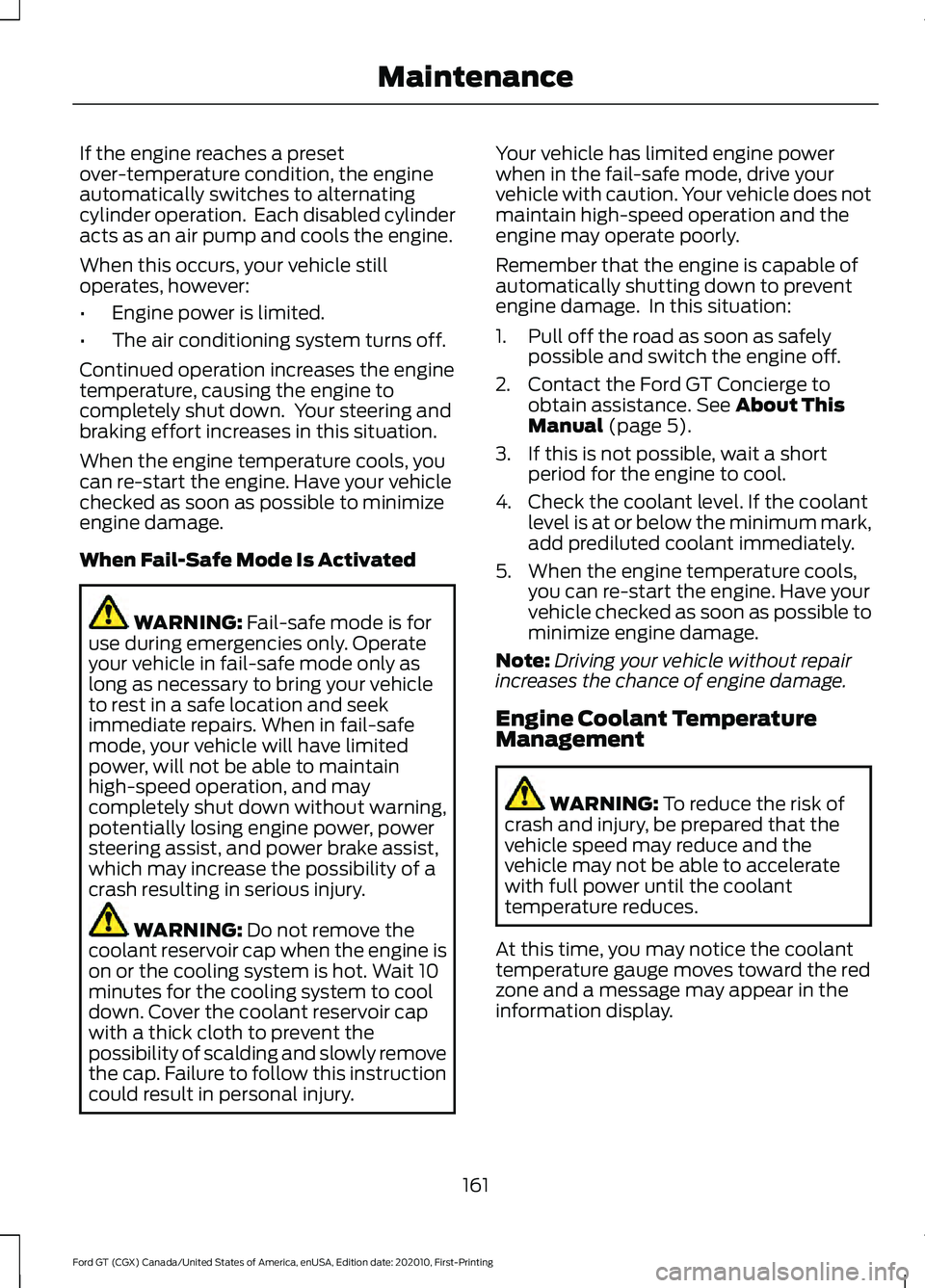
If the engine reaches a preset
over-temperature condition, the engine
automatically switches to alternating
cylinder operation. Each disabled cylinder
acts as an air pump and cools the engine.
When this occurs, your vehicle still
operates, however:
•
Engine power is limited.
• The air conditioning system turns off.
Continued operation increases the engine
temperature, causing the engine to
completely shut down. Your steering and
braking effort increases in this situation.
When the engine temperature cools, you
can re-start the engine. Have your vehicle
checked as soon as possible to minimize
engine damage.
When Fail-Safe Mode Is Activated WARNING: Fail-safe mode is for
use during emergencies only. Operate
your vehicle in fail-safe mode only as
long as necessary to bring your vehicle
to rest in a safe location and seek
immediate repairs. When in fail-safe
mode, your vehicle will have limited
power, will not be able to maintain
high-speed operation, and may
completely shut down without warning,
potentially losing engine power, power
steering assist, and power brake assist,
which may increase the possibility of a
crash resulting in serious injury. WARNING:
Do not remove the
coolant reservoir cap when the engine is
on or the cooling system is hot. Wait 10
minutes for the cooling system to cool
down. Cover the coolant reservoir cap
with a thick cloth to prevent the
possibility of scalding and slowly remove
the cap. Failure to follow this instruction
could result in personal injury. Your vehicle has limited engine power
when in the fail-safe mode, drive your
vehicle with caution. Your vehicle does not
maintain high-speed operation and the
engine may operate poorly.
Remember that the engine is capable of
automatically shutting down to prevent
engine damage. In this situation:
1. Pull off the road as soon as safely
possible and switch the engine off.
2. Contact the Ford GT Concierge to obtain assistance.
See About This
Manual (page 5).
3. If this is not possible, wait a short period for the engine to cool.
4. Check the coolant level. If the coolant level is at or below the minimum mark,
add prediluted coolant immediately.
5. When the engine temperature cools, you can re-start the engine. Have your
vehicle checked as soon as possible to
minimize engine damage.
Note: Driving your vehicle without repair
increases the chance of engine damage.
Engine Coolant Temperature
Management WARNING:
To reduce the risk of
crash and injury, be prepared that the
vehicle speed may reduce and the
vehicle may not be able to accelerate
with full power until the coolant
temperature reduces.
At this time, you may notice the coolant
temperature gauge moves toward the red
zone and a message may appear in the
information display.
161
Ford GT (CGX) Canada/United States of America, enUSA, Edition date: 202010, First-Printing Maintenance
Page 167 of 321
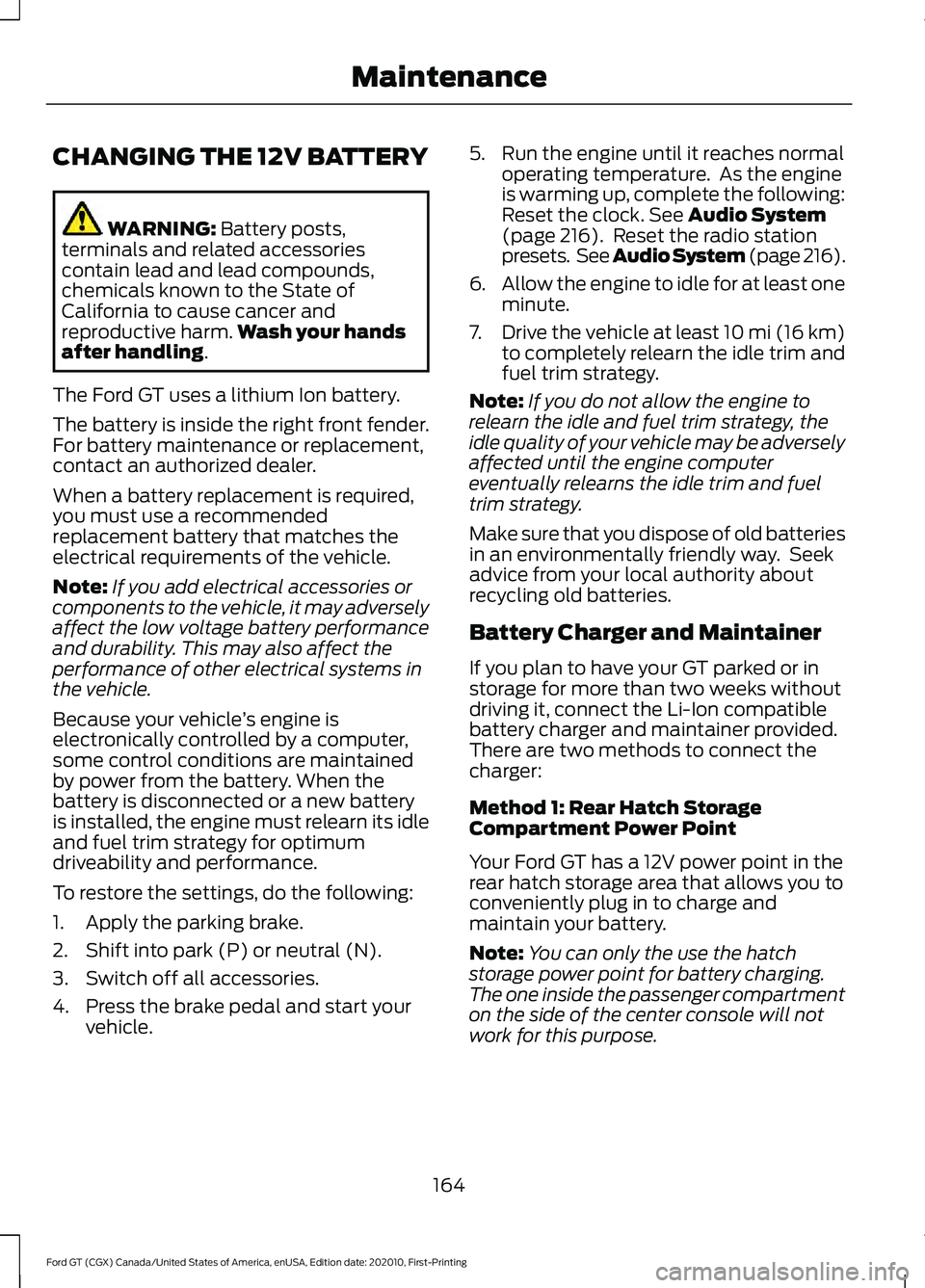
CHANGING THE 12V BATTERY
WARNING: Battery posts,
terminals and related accessories
contain lead and lead compounds,
chemicals known to the State of
California to cause cancer and
reproductive harm. Wash your hands
after handling
.
The Ford GT uses a lithium Ion battery.
The battery is inside the right front fender.
For battery maintenance or replacement,
contact an authorized dealer.
When a battery replacement is required,
you must use a recommended
replacement battery that matches the
electrical requirements of the vehicle.
Note: If you add electrical accessories or
components to the vehicle, it may adversely
affect the low voltage battery performance
and durability. This may also affect the
performance of other electrical systems in
the vehicle.
Because your vehicle ’s engine is
electronically controlled by a computer,
some control conditions are maintained
by power from the battery. When the
battery is disconnected or a new battery
is installed, the engine must relearn its idle
and fuel trim strategy for optimum
driveability and performance.
To restore the settings, do the following:
1. Apply the parking brake.
2. Shift into park (P) or neutral (N).
3. Switch off all accessories.
4. Press the brake pedal and start your vehicle. 5. Run the engine until it reaches normal
operating temperature. As the engine
is warming up, complete the following:
Reset the clock.
See Audio System
(page 216). Reset the radio station
presets. See Audio System (page 216).
6. Allow the engine to idle for at least one
minute.
7. Drive the vehicle at least 10 mi (16 km)
to completely relearn the idle trim and
fuel trim strategy.
Note: If you do not allow the engine to
relearn the idle and fuel trim strategy, the
idle quality of your vehicle may be adversely
affected until the engine computer
eventually relearns the idle trim and fuel
trim strategy.
Make sure that you dispose of old batteries
in an environmentally friendly way. Seek
advice from your local authority about
recycling old batteries.
Battery Charger and Maintainer
If you plan to have your GT parked or in
storage for more than two weeks without
driving it, connect the Li-Ion compatible
battery charger and maintainer provided.
There are two methods to connect the
charger:
Method 1: Rear Hatch Storage
Compartment Power Point
Your Ford GT has a 12V power point in the
rear hatch storage area that allows you to
conveniently plug in to charge and
maintain your battery.
Note: You can only the use the hatch
storage power point for battery charging.
The one inside the passenger compartment
on the side of the center console will not
work for this purpose.
164
Ford GT (CGX) Canada/United States of America, enUSA, Edition date: 202010, First-Printing Maintenance
Page 168 of 321
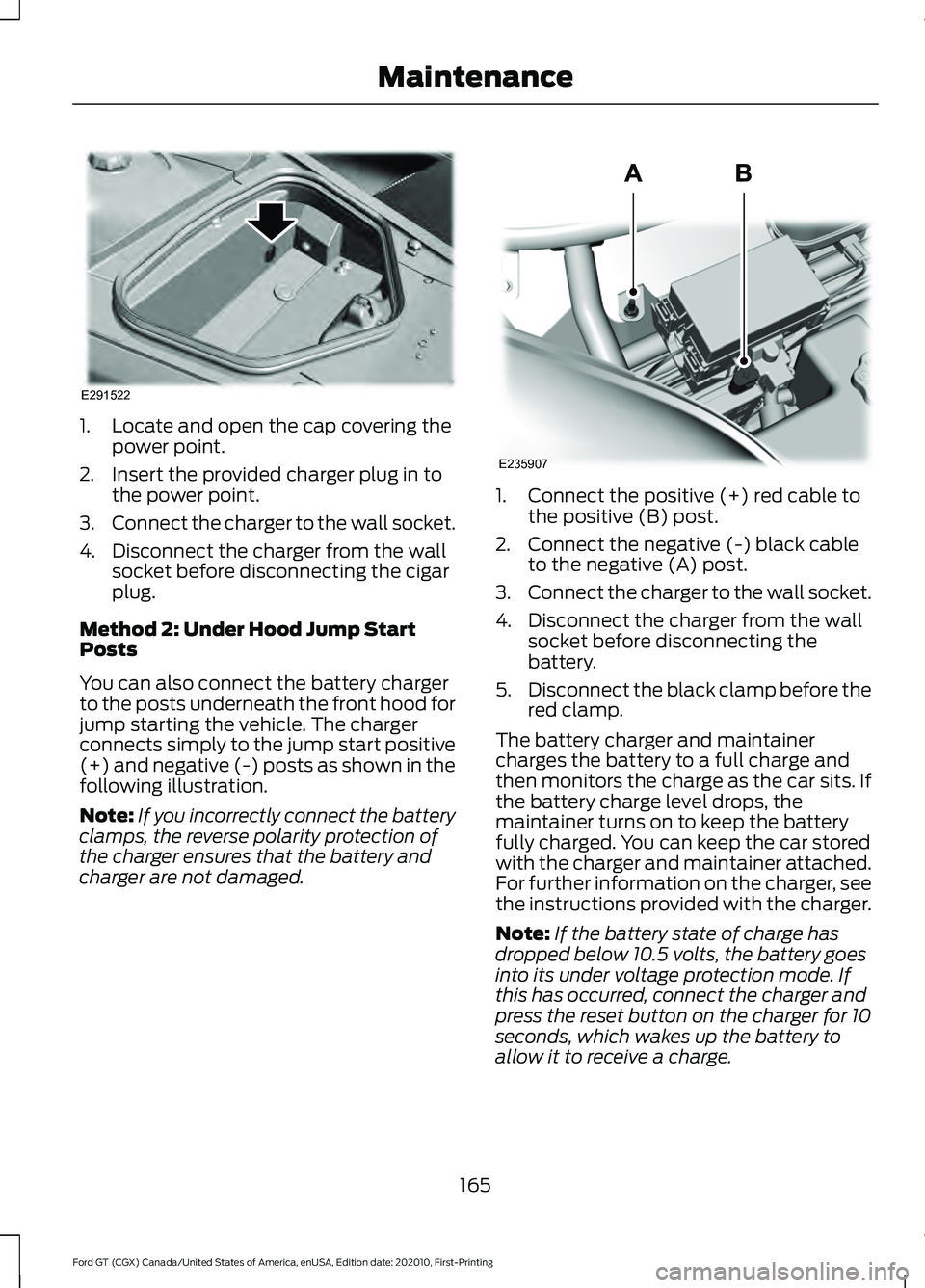
1. Locate and open the cap covering the
power point.
2. Insert the provided charger plug in to the power point.
3. Connect the charger to the wall socket.
4. Disconnect the charger from the wall socket before disconnecting the cigar
plug.
Method 2: Under Hood Jump Start
Posts
You can also connect the battery charger
to the posts underneath the front hood for
jump starting the vehicle. The charger
connects simply to the jump start positive
(+) and negative (-) posts as shown in the
following illustration.
Note: If you incorrectly connect the battery
clamps, the reverse polarity protection of
the charger ensures that the battery and
charger are not damaged. 1. Connect the positive (+) red cable to
the positive (B) post.
2. Connect the negative (-) black cable to the negative (A) post.
3. Connect the charger to the wall socket.
4. Disconnect the charger from the wall socket before disconnecting the
battery.
5. Disconnect the black clamp before the
red clamp.
The battery charger and maintainer
charges the battery to a full charge and
then monitors the charge as the car sits. If
the battery charge level drops, the
maintainer turns on to keep the battery
fully charged. You can keep the car stored
with the charger and maintainer attached.
For further information on the charger, see
the instructions provided with the charger.
Note: If the battery state of charge has
dropped below 10.5 volts, the battery goes
into its under voltage protection mode. If
this has occurred, connect the charger and
press the reset button on the charger for 10
seconds, which wakes up the battery to
allow it to receive a charge.
165
Ford GT (CGX) Canada/United States of America, enUSA, Edition date: 202010, First-Printing MaintenanceE291522 E235907
Page 182 of 321
•
With your foot on the brake, shift
through all the gears while the engine
is running.
• If your vehicle is stored for more than
a few months, we recommend that you
change the engine oil before you use
your vehicle again.
Fuel system
• Fill the fuel tank with high-quality fuel
until the first automatic shutoff of the
fuel pump nozzle and add
commercially available fuel stabilizer.
Run the engine for a minimum of one
minute to ensure that treated fuel has
circulated through the system.
Cooling system
• Protect against freezing temperatures.
• When removing your vehicle from
storage, check coolant fluid level.
Confirm that there are no cooling
system leaks and that fluid is at the
recommended level.
Battery
• Connect your vehicle to the battery
charger/maintainer provided with your
vehicle whenever you store your vehicle
for more than 2 weeks.
• Connect the wires as shown in the
illustration. See Changing the 12V
Battery (page 164).
Brakes
• Make sure the brakes and parking brake
release fully. Tires
•
To minimize flat spots on the tires,
inflate all four tires to the
recommended cold pressures listed on
the Safety Compliance Certification
label or Tire Label. When the vehicle is
taken out of storage, reset the tire
pressures as necessary to the
recommended levels listed on the
Safety Compliance Certification label
or Tire Label affixed to your vehicle.
Note: If you store your vehicle in a location
with low ambient temperatures, follow the
instructions for care of summer tires. See
Using Summer Tires
(page 199).
Miscellaneous
• Move vehicles at least
25 ft (7.5 m)
every 15 days to lubricate working parts
and prevent flat spots in the tires.
Removing Vehicle From Storage
When your vehicle is ready to come out of
storage, do the following:
• Wash your vehicle to remove any dirt
or grease film build-up on window
surfaces.
• Check windshield wipers for any
deterioration.
• Check under the hood and engine cover
for any foreign material that may have
collected during storage such as mice
or squirrel nests.
• Check the exhaust for any foreign
material that may have collected
during storage.
• Check tire pressures and set tire
inflation per the Tire Label.
179
Ford GT (CGX) Canada/United States of America, enUSA, Edition date: 202010, First-Printing Vehicle Care
Page 224 of 321
Note:
Do not use detergent or any type of
solvent to clean the touchscreen.
Note: Do not pour or spray alcohol onto the
touchscreen.
Using Voice Recognition
Using voice commands allows you to keep
your hands on the wheel and focus on
what is in front of you. The system provides
feedback through audible tones, prompts,
questions and spoken confirmations
depending on the situation and the chosen
level of interaction (voice settings).
The system also asks short questions
(confirmation prompts) when it is not sure
of your request or when there are multiple
possible responses to your request.
When using voice commands, words and
icons may appear in the status bar
indicating the status of the voice command
session. See Using Voice Recognition
(page 228).
Using the Steering Wheel Controls
You can use different controls on your
steering wheel to interact with the
touchscreen system in different ways.
VOL:
Control the volume of audio output.
Voice:
Press to start a voice session. Press
again to stop the voice prompt and
immediately begin speaking. Press and
hold to end a voice session.
SEEK NEXT:
• While in radio mode, press to seek
between memory presets.
• While in USB or Bluetooth Audio, press
to seek between songs or press and
hold to fast seek. SEEK PREVIOUS:
•
While in radio mode, press to seek
between memory presets.
• While in USB or Bluetooth Audio, press
to seek between songs or press and
hold to fast seek.
See
Steering Wheel (page 56).
Using Your Bezel Controls
• Power:
Switch the audio system on
and off.
• DISP:
Switch the display on or off. You
can also touch the screen to switch the
display back on.
911 Assist WARNING:
Unless the 911 Assist
setting is set on before a crash, the
system will not dial for help which could
delay response time, potentially
increasing the risk of serious injury or
death after a crash. WARNING:
Do not wait for 911
Assist to make an emergency call if you
can do it yourself. Dial emergency
services immediately to avoid delayed
response time which could increase the
risk of serious injury or death after a
crash. If you do not hear 911 Assist within
five seconds of the crash, the system or
phone may be damaged or
non-functional. WARNING:
Always place your
phone in a secure location in your vehicle
so it does not become a projectile or get
damaged in a crash. Failure to do so may
cause serious injury to someone or
damage the phone which could prevent
911 Assist from working properly.
Note: The SYNC 911 Assist feature must be
set on before the incident.
221
Ford GT (CGX) Canada/United States of America, enUSA, Edition date: 202010, First-Printing SYNC™ 3
Page 228 of 321
The installation of most files occurs in the
background, and does not interrupt your
use of the system. Navigation updates
cannot be installed in the background,
because the files are too large.
To install the update in your vehicle,
remove anything that is plugged in the USB
ports on the media hub and plug in the
USB drive containing the update. When
the USB drive is plugged in, the installation
should begin immediately. After a
successful installation, the update is
available the next time the vehicle is
started.
Please refer to the website for any further
actions.
Updating Over Wi-Fi
To update your System over Wi-Fi your
vehicle must be within the range of a Wi-Fi
access point. Data rates may apply.
To connect your system to Wi-Fi,
select:
Menu Item
Settings
Wi-Fi You can then select your
Wi-Fi network. You may
have to enter the security
code if the network is
secured. The system
confirms when it has
connected to the network.
Available
Wi-Fi
Networks You must also give the system permission
to update automatically. Upon vehicle
delivery, the System asks you if you would
like to use the automatic update feature.
If you agree to automatic updates, you can
press OK to confirm. If this selection does
not appear upon vehicle delivery you can
access it through the General Settings. See
Settings (page 253). You can also perform
a master reset. See SYNC™ 3
Troubleshooting (page 264).
If you would like to switch this feature
on later, select: Menu Item
Settings
General From this menu, you can
enable automatic updates.
If you have not done so
already, the system
prompts you to set up a
Wi-Fi connection when you
enable this feature.
Automatic
System
Updates
When Wi-Fi and automatic updates are
enabled, your system checks for software
updates periodically. If a new version is
available, it downloads at that time.
Software downloads can take place for up
to 30 minutes after you have switched your
vehicle off. The updates do not interrupt
the normal use of your SYNC 3 system. If
a download does not complete for any
reason, the download continues where it
left off at the next Wi-Fi connected
opportunity. Upon activation of an update,
a banner displays on the touchscreen
indicating the system update. Select the
icon to see more detail. This icon displays
for two ignition cycles.
225
Ford GT (CGX) Canada/United States of America, enUSA, Edition date: 202010, First-Printing SYNC™ 3
Page 229 of 321
To switch this feature off:
Menu Item
Settings
General In this menu selection, you
can change the selection
for automatic updates to
OFF.
Automatic
System
Updates
Support
The SYNC support team is available to
help you with any questions you are not
able to answer on your own.
Monday-Saturday, 8:30am-8:00pm EST.
United States: 1-800-392-3673.
Canada: 1-800-565-3673.
Times are subject to change due to
holidays.
Privacy Information
When you connect a cellular phone to
SYNC 3, the system creates a profile within
your vehicle that links to that cellular
phone. This profile helps in offering you
more cellular features and operating more
efficiently. Among other things, this profile
may contain data about your cellular
phone book, text messages (read and unread), and call history, including history
of calls when your cell phone was not
connected to the system. In addition, if you
connect a media device, the system
creates and retains an index of supported
media content. The system also records a
short diagnostic log of approximately 10
minutes of all recent system activity. The
log profile and other system data may be
used to improve the system and help
diagnose any problems that may occur.
The cellular profile, media device index,
and diagnostic log remain in your vehicle
unless you delete them and are generally
accessible only in your vehicle when the
cellular phone or media player is
connected.
If you no longer plan to use the system or
your vehicle, we recommend you perform
a Master Reset to erase all stored
information. You can find more information
about the Master Reset in General
Settings. See Settings (page 253). System
data cannot be accessed without special
equipment and access to your vehicle's
SYNC 3 module. Ford Motor Company and
Ford of Canada do not access the system
data for any purpose other than as
described absent consent, a court order,
or where required by law enforcement,
other government authorities, or other third
parties acting with lawful authority. Other
parties may seek to access the information
independently of Ford Motor Company and
Ford of Canada.
226
Ford GT (CGX) Canada/United States of America, enUSA, Edition date: 202010, First-Printing SYNC™ 3
Page 238 of 321
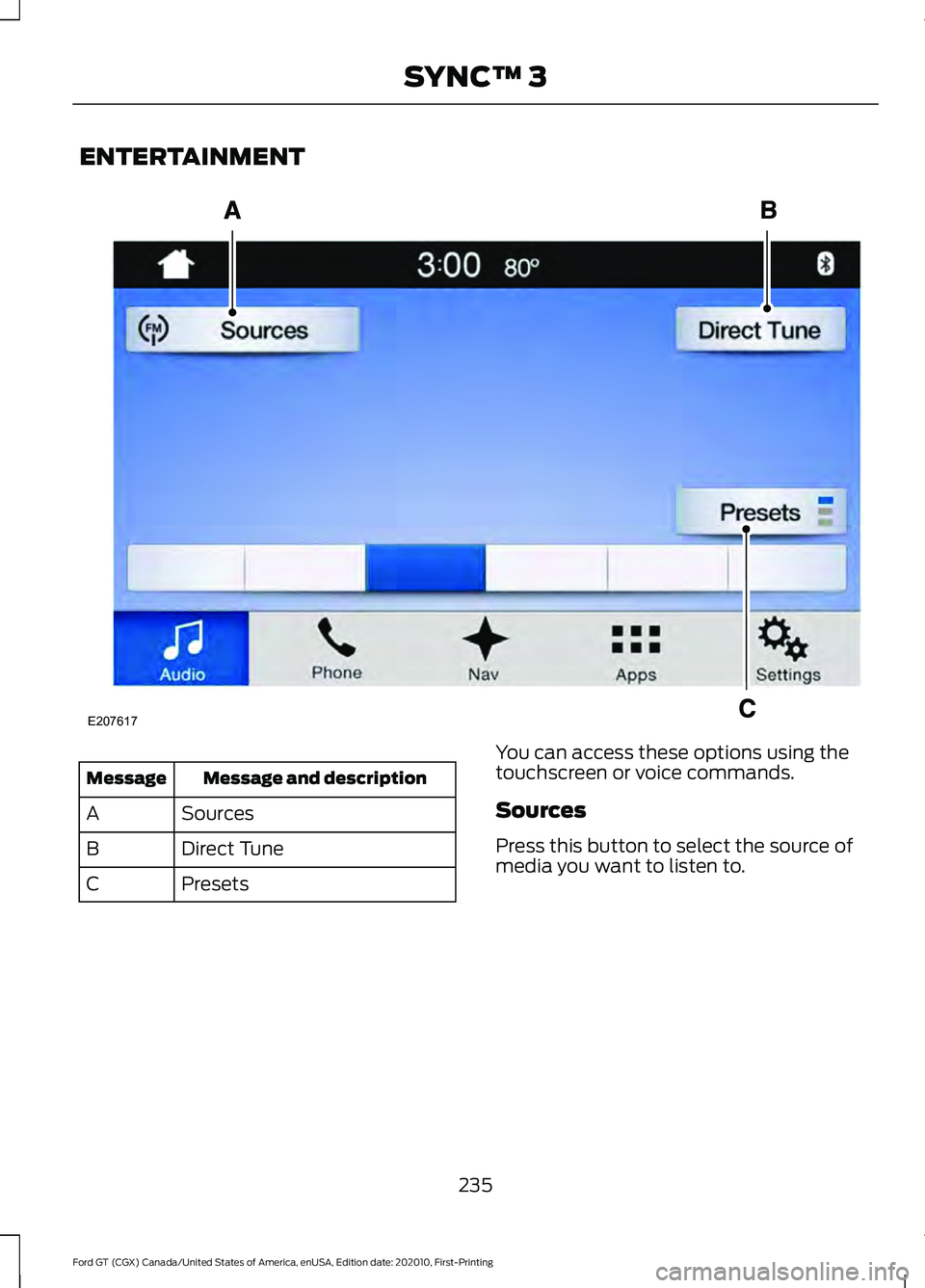
ENTERTAINMENT
Message and description
Message
Sources
A
Direct Tune
B
Presets
C You can access these options using the
touchscreen or voice commands.
Sources
Press this button to select the source of
media you want to listen to.
235
Ford GT (CGX) Canada/United States of America, enUSA, Edition date: 202010, First-Printing SYNC™ 3E207617
Page 239 of 321
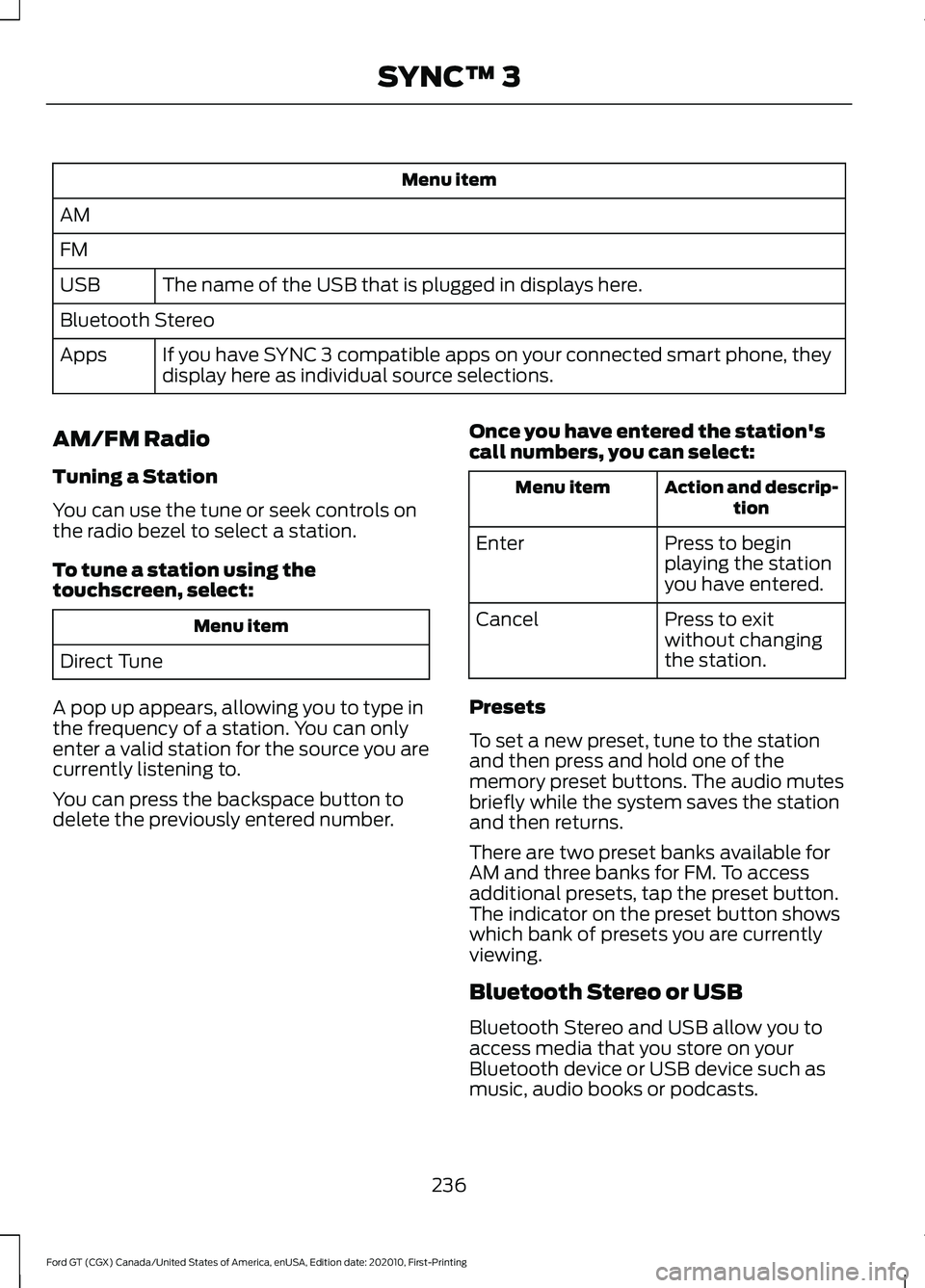
Menu item
AM
FM The name of the USB that is plugged in displays here.
USB
Bluetooth Stereo
If you have SYNC 3 compatible apps on your connected smart phone, they
display here as individual source selections.
Apps
AM/FM Radio
Tuning a Station
You can use the tune or seek controls on
the radio bezel to select a station.
To tune a station using the
touchscreen, select: Menu item
Direct Tune
A pop up appears, allowing you to type in
the frequency of a station. You can only
enter a valid station for the source you are
currently listening to.
You can press the backspace button to
delete the previously entered number. Once you have entered the station's
call numbers, you can select: Action and descrip-
tion
Menu item
Press to begin
playing the station
you have entered.
Enter
Press to exit
without changing
the station.
Cancel
Presets
To set a new preset, tune to the station
and then press and hold one of the
memory preset buttons. The audio mutes
briefly while the system saves the station
and then returns.
There are two preset banks available for
AM and three banks for FM. To access
additional presets, tap the preset button.
The indicator on the preset button shows
which bank of presets you are currently
viewing.
Bluetooth Stereo or USB
Bluetooth Stereo and USB allow you to
access media that you store on your
Bluetooth device or USB device such as
music, audio books or podcasts.
236
Ford GT (CGX) Canada/United States of America, enUSA, Edition date: 202010, First-Printing SYNC™ 3