Aux FORD KUGA 2010 1.G User Guide
[x] Cancel search | Manufacturer: FORD, Model Year: 2010, Model line: KUGA, Model: FORD KUGA 2010 1.GPages: 226, PDF Size: 8.07 MB
Page 179 of 226
TELEPHONE CONTROLS
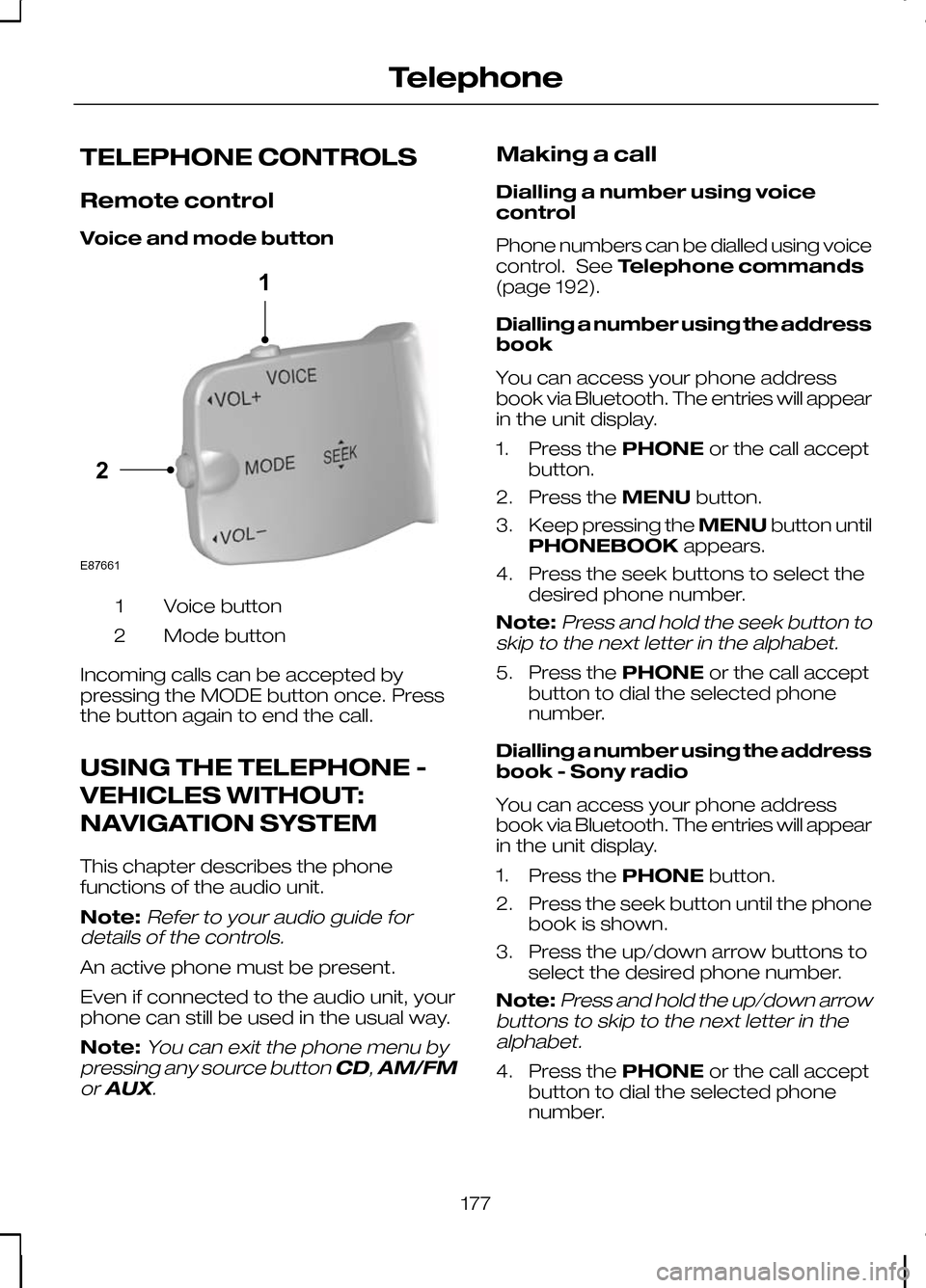
Remote control
Voice and mode button
Voice button
1
Mode button
2
Incoming calls can be accepted by
pressing the MODE button once. Press
the button again to end the call.
USING THE TELEPHONE -
VEHICLES WITHOUT:
NAVIGATION SYSTEM
This chapter describes the phone
functions of the audio unit.
Note:Refer to your audio guide for
details of the controls.
An active phone must be present.
Even if connected to the audio unit, your
phone can still be used in the usual way.
Note:
You can exit the phone menu by
pressing any source button CD,AM/FM
or AUX.
Making a call
Dialling a number using voice
control
Phone numbers can be dialled using voice
control. See Telephone commands
(page 192).
Dialling a number using the address
book
You can access your phone address
book via Bluetooth. The entries will appear
in the unit display.
1. Press the PHONEor the call accept
button.
2. Press the MENUbutton.
3. Keep pressing the MENUbutton until
PHONEBOOK appears.
4. Press the seek buttons to select the desired phone number.
Note:
Press and hold the seek button to
skip to the next letter in the alphabet.
5. Press the PHONEor the call accept
button to dial the selected phone
number.
Dialling a number using the address
book - Sony radio
You can access your phone address
book via Bluetooth. The entries will appear
in the unit display.
1. Press the PHONEbutton.
2. Press the seek button until the phone book is shown.
3. Press the up/down arrow buttons to select the desired phone number.
Note:
Press and hold the up/down arrow
buttons to skip to the next letter in the alphabet.
4. Press the PHONEor the call accept
button to dial the selected phone
number.
177
Telephone21E87661
Page 191 of 226
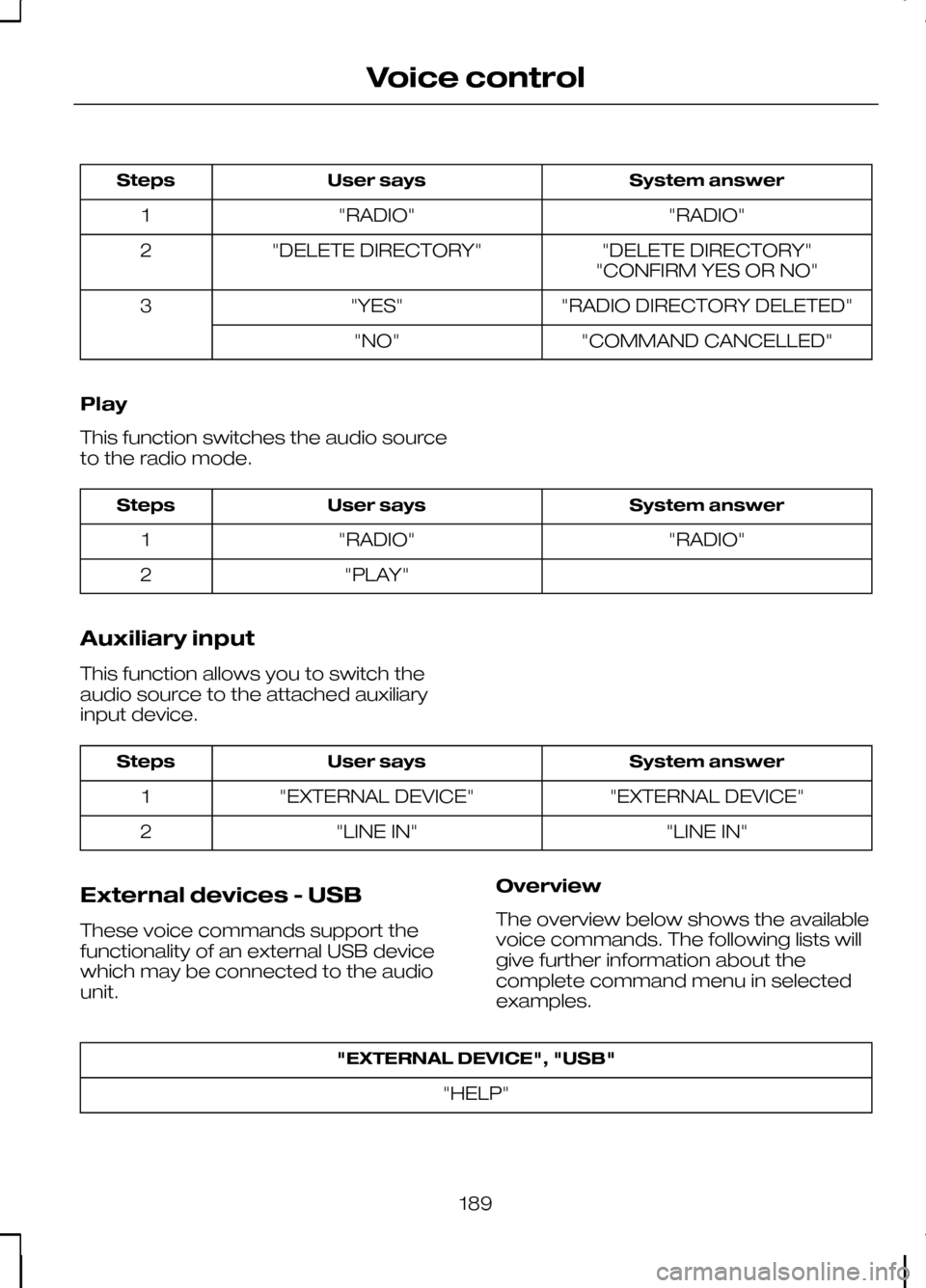
System answer
User says
Steps
"RADIO"
"RADIO"
1
"DELETE DIRECTORY"
"DELETE DIRECTORY"
2
"CONFIRM YES OR NO"
"RADIO DIRECTORY DELETED"
"YES"
3
"COMMAND CANCELLED"
"NO"
Play
This function switches the audio source
to the radio mode. System answer
User says
Steps
"RADIO"
"RADIO"
1
"PLAY"
2
Auxiliary input
This function allows you to switch the
audio source to the attached auxiliary
input device. System answer
User says
Steps
"EXTERNAL DEVICE"
"EXTERNAL DEVICE"
1
"LINE IN"
"LINE IN"
2
External devices - USB
These voice commands support the
functionality of an external USB device
which may be connected to the audio
unit. Overview
The overview below shows the available
voice commands. The following lists will
give further information about the
complete command menu in selected
examples."EXTERNAL DEVICE", "USB"
"HELP"
189
Voice control
Page 202 of 226
GENERAL INFORMATION
CAUTIONS
Take care when handling external
devices with exposed electrical
connectors (such as the USB plug).
Always replace the protective cap/shield
when possible. There may be a risk of
electrostatic discharge causing damage
to the device. Do not touch or handle the USB
socket in the vehicle. Cover the
socket when not in use.
Only use USB Mass-Storage device
compliant devices.
Always switch your audio unit to a
different source (for example the
radio) before unplugging the USB
device. Do not install or connect USB hubs
or splitters.
Note:The system is only designed to
recognize and read suitable audio files from a USB device that conforms to theUSB Mass-Storage device class or aniPod. Not all available USB devices can beguaranteed to function with the system.
Note:It is possible to connect compatible
devices with a trailing USB lead as well as those that plug into the vehicle USBsocket directly (for example USB memorysticks and pen drives).
Note:Some USB devices with a higher
power consumption may not be compatible (for example some larger harddrives).
Note:Access time to read the files on
the external device will vary depending upon factors such as the file structure,size and device content.
The system supports a range of external
devices, to fully integrate with your audio
unit via the USB and auxiliary input
sockets. Once connected, control of the
external device is possible via the audio
unit.
A list of typical compatible devices are
shown below:
• USB memory sticks
• USB portable hard drives
• MP3 players with USB connection
• iPod media players (refer to
www.ford-mobile
-connectivity.com
for latest
compatibility list).
The system is USB 2.0 full speed
compatible, USB 1.1 host compliant and
supports FAT 16/32 file systems.
Information on audio file
structures for external devices
USB
Create only a single partition on the USB
device.
If playlists are created, they must contain
correct file paths referenced to the USB
device. It is recommended to create the
playlist after the audio files have been
transferred to the USB device.
Playlists must be created in .m3u format.
Audio files must be in .mp3 format.
Do not exceed the following limits:
• 1000 items per folder (files, folders and
playlists)
• 5000 folders per USB device
(including playlists)
• 8 subfolder levels.
200
Connectivity
Page 203 of 226
To enable voice control for custom
playlists and folders, follow the procedure
below:
•
Create folders named with the
structure
"Ford<*>" where <*> is a
number 1-10. For example "Ford3"
without an extension.
• Create playlists named with the
structure
"Ford<*>.m3u" where <*>
is a number 1-10. For example
"Ford5.m3u" without any space
between "Ford"and the number.
Thereafter, custom folders and playlists
will be selectable with voice control. See
Audio unit commands (page 183).
iPod
To enable voice control for custom
playlists, create playlists named with the
structure "Ford<*>" where <*> is a
number 1-10. For example "Ford7"
without any space between "Ford"and
the number.
Thereafter, playlists will be selectable with
voice control. See Audio unit
commands (page 183).
CONNECTING AN EXTERNAL
DEVICE WARNING
Make sure the external device is
securely mounted within the vehicle,
and that trailing connections do not
obstruct any of the driving controls. External devices may be connected using
the auxiliary input socket and the USB
port. See
Auxiliary input (AUX IN)
socket (page 99). See USB port(page
100). Connection
Plug in the device, and if necessary
secure it to prevent movement within the
vehicle.
Connecting an iPod
For optimum convenience and audio
quality, we recommend that you purchase
a dedicated single connection lead
available from your dealer.
Alternatively, it is possible to connect your
iPod using the standard iPod USB cable
and a separate 3.5mm audio jack lead. If
using this method preset the iPod volume
to maximum and turn off any equalizer
settings before making the connections:
•
Connect the headphone output of the
iPod to the AUX IN socket.
• Connect the USB cable from the iPod
to the vehicle USB socket.
CONNECTING AN EXTERNAL
DEVICE - VEHICLES WITH:
BLUETOOTH
Connecting a Bluetooth audio
device CAUTION
As various standards exist,
manufacturers are able to implement
a variety of profiles in their Bluetooth
devices. Because of this, an
incompatibility can occur between the
Bluetooth device and the system, which
in some cases may limit system
functionality. To avoid this situation, only
recommended devices should be used.
Please visit the website
www.ford-mobile-connectivity.com
for full details. 201
Connectivity
Page 204 of 226
Bonding the device
Note:Some audio and navigation units
have a separate Bluetooth audio menu. Use this to access setup and control.
To connect the device to the system
follow the same procedure as for
Bluetooth hands free phones. See
Bluetooth setup (page 176).
Operating the device
Select Bluetooth audio as the active
source.
Tracks can be accessed by skipping
forwards and backwards using the
steering wheel controls, or directly from
the audio unit controls.
USING A USB DEVICE
Various icons are used to identify types
of audio file, folders etc. USB device is the active source
Folder
Playlist
Album
Artist
Filename
Track title Information not available
Sony radio
Operation
Select the USB device as the audio
source by repeatedly pressing the
CD/AUX button until USB appears in the
display. After first connecting the USB
device, the first track within the first folder
will start to play automatically.
Subsequently, following audio source
switching, the position of playback on the
USB device is remembered.
To browse the device contents, press the
up/down arrow key or the OK button
once.
The display will show the track
information, together with other important
information described below:
• A vertical scroll bar on the right side of
the display shows the current position
of the folder view.
• ">" after an entry indicates a further
level down is readable (for example a
folder named after an album, with
individual album tracks within that
folder).
• "<" before the list indicates that a
further level up is readable.
• Icons to the left of track/folder text
indicate the type of file/folder. Refer
to the list for an explanation of these
icons.
To navigate the USB device contents, use
the up/down arrow keys to scroll through
lists, and the left/right keys to move up or
down within the folder hierarchy. Once
your desired track, playlist or folder is
highlighted, press the OK button to select
playback.
202
ConnectivityE100029 E100022 E100023 E100024 E100025 E100026 E100027 E100028
Page 205 of 226
Note:If you wish to jump to the top level
of the USB device contents, press and hold the left arrow key.
Audio control
Press the left and right arrow keys to skip
backwards and forwards through tracks.
Press and hold the left/right arrow keys
to enable fast rewind/fast forward through
track content.
Press the up/down arrow key or the OK
button to browse the device contents.
Press the MENU key to enter the USB
menu. It is possible to enable shuffle and
repeat functions here with respect to
folders and playlists.
Press the SCAN button to scan the whole
device, current folder or a playlist if it is in
operation.
Press the INFObutton to display the
following:
• filename
• title
• artist
• album
• track number and playing time.
Repeated button presses will scroll
through these displays.
CD Navigation units
Operation
Select the USB device as the audio
source by pressing the CD/AUXbutton
until DEVICES appears in the display.
Select DEVICES and then select USB from
the available device list. After first
connecting the USB device, the first track
within the first folder will start to play
automatically. Subsequently, following
audio source switching, the position of
playback on the USB device is
remembered. To browse the device contents, press the
SELECT
button once.
The display will show the track
information, together with other important
information described below:
• A vertical scroll bar on the right side of
the display shows the current position
of the folder view.
• ">" after an entry indicates a further
level down is readable (for example a
folder named after an album, with
individual album tracks within that
folder).
• "<" to the left hand side of the display
indicates that a further level up is
readable.
• Icons to the left of track/folder text
indicate the type of file/folder. Refer
to the list for an explanation of these
icons.
To navigate the USB device contents, use
the rotary scroll/select button to browse
through lists. Push the button to expand
the contents within the highlighted playlist
or folder, or to commence playback of a
particular track. Press ESCto go up one
level.
Audio control
Press the SEEKup and down keys to
skip backwards and forwards through
tracks.
Press and hold the SEEKkeys to enable
fast rewind/fast forward through track
content.
Rotate or press the SELECTbutton to
browse the device contents.
Press SHUFFLE or REPEAT buttons to
enable shuffle and repeat functions with
respect to folders and playlists. Different
options may appear depending upon
whether or not a playlist is in operation.
203
Connectivity
Page 206 of 226
Press the SCAN button to scan the
current playlist if it is in operation, or the
complete USB device or folder.
Press the
INFObutton to display the
following:
• filename
• title
• artist
• album
• track number and playing time.
DVD Navigation units
Operation
Select the USB device as the audio
source by pressing the CD/AUXbutton
until the USB button appears to the left of
the display. Select USB from the available
device list.
Note:Some devices may be shown but
not selectable, depending if the device is connected or not.
After first connecting the USB device, the
first track within the first folder will start to
play automatically. Subsequently, following
audio source switching, the position of
playback on the USB device is
remembered.
To browse the device contents, press the
scroll up or down arrow button.
The display will show the track
information, together with other important
information described below:
• A vertical scroll bar on the right side of
the display shows the current position
of the folder view.
• ">" after an entry indicates a further
level down is readable (for example a
folder named after an album, with
individual album tracks within that
folder). •
"<" to the left hand side of the display
indicates that a further level up is
readable.
• Icons to the left of track/folder text
indicate the type of file/folder. Refer
to the list for an explanation of these
icons.
To navigate the USB device contents, use
the scroll buttons to browse through lists.
Push the button to expand the contents
within the highlighted playlist or folder, or
to commence playback of a particular
track. Press the left arrow key to go up
one level.
Audio control
Press the SEEKup and down keys to
skip backwards and forwards through
tracks.
Press and hold the SEEKkeys to enable
fast rewind/fast forward through track
content.
Press the scroll bar arrow keys to browse
the device contents.
Press SHUFFLE or REPEAT buttons to
enable shuffle and repeat functions with
respect to folders and playlists.
Press the SCAN button to scan the
current playlist if it is in operation, or the
complete USB device or folder.
Press the INFObutton to display the
following:
• filename
• title
• artist
• album
• track number and playing time.
USING AN IPOD
Various icons are used to identify types
of audio file, folders etc.
204
Connectivity
Page 207 of 226
iPod is the active source
iPod playlist
iPod artist
iPod album
iPod genre
iPod song
iPod generic category
iPod generic media file
Sony radio
Operation
Select the iPod as the audio source by
repeatedly pressing the CD/AUXbutton
until iPod appears in the display.
The iPod menu list for browsing contents
will be available through the radio display.
Navigation of the contents follows the
same principles as for iPod standalone
use (for example search by artist, title,
etc.). To browse the iPod contents, press
the up/down arrow key or the OK button
once. The display will show the track
information, together with other important
information described below:
•
A vertical scroll bar on the right side of
the display shows the current position
of the list view.
• ">" after an entry indicates a further
level down is readable (for example all
albums by a particular artist).
• "<" before the list indicates that a
further level up is readable.
• An icon on the left side indicates the
type of the currently displayed list (for
example list of albums). Refer to the
list for an explanation of these icons.
To navigate the iPod contents, use the
up/down arrow keys to scroll through lists,
and the left/right keys to move up or
down within the hierarchy. Once your
desired track, playlist, album, artist or
genre is highlighted, press the OK button
to select playback.
Note:If you wish to jump to the top level
of the iPod contents, press and hold the left arrow key.
Audio control
Press the left and right arrow keys to skip
backwards and forwards through tracks.
Press and hold the left/right arrow keys
to enable fast rewind/fast forward through
track content.
Press the up/down arrow key or the OK
button to browse the iPod contents.
Press the MENUkey to enter the iPod
menu. It is possible to enable shuffle and
repeat functions here. It is also possible
to enable the iPod "Shuffle songs" option
directly from the top level.
Press the SCANbutton to scan the
currently selected tracks.
205
ConnectivityE100030 E100031 E100032 E100033 E100034 E100035 E100036 E100037
Page 208 of 226
Press the
INFObutton to display the
following:
• title
• artist
• track number and playing time.
Repeated button presses will scroll
through these displays.
CD Navigation units
Operation
Select the iPod as the audio source by
pressing the CD/AUXbutton until
DEVICES appears in the display. Select
DEVICES and then select iPod from the
available device list.
The iPod menu list for browsing contents
will be available through the display.
Navigation of the contents follows the
same principles as for iPod standalone
use (for example search by artist, title,
etc.). To browse the iPod contents, press
the SELECT button once.
The display will show the track
information, together with other important
information described below:
• A vertical scroll bar on the right side of
the display shows the current position
of the list view.
• ">" after an entry indicates a further
level down is readable (for example all
albums by a particular artist).
• "<" before the list indicates that a
further level up is readable.
• An icon on the left side indicates the
type of the currently displayed list (for
example list of albums). Refer to the
list for an explanation of these icons. To navigate the iPod contents, use the
rotary scroll/select button to browse
through lists. Push the button to expand
the contents within the highlighted playlist,
album, artist, genre or to commence
playback of a particular track. Press
ESC
to go up one level.
Audio control
Press the SEEKup and down keys to
skip backwards and forwards through
tracks.
Press and hold the SEEKkeys to enable
fast rewind/fast forward through track
content.
Rotate or press the SELECT button to
browse the iPod contents.
Press the MENU key to enter the iPod
menu. It is possible to enable shuffle and
repeat functions here. It is also possible
to enable the iPod "Shuffle songs" option
directly from the top level.
Press the SCAN button to scan the
currently selected tracks.
Press the INFObutton to display the
following:
• title
• artist
• track number and playing time.
DVD Navigation units
Operation
Select the iPod as the audio source by
pressing the CD/AUXbutton until the
iPod button appears to the left of the
display. Select iPod from the available
device list.
Note:Some devices may be shown but
not selectable, depending if the device is connected or not.
206
Connectivity
Page 217 of 226
A
A/C
See: Climate control....................................80
About this handbook................................5
ABS See: Brakes..................................................112
ABS driving hints See: Hints on driving with ABS..................112
Accessories See: Parts and accessories..........................5
Adaptive front lighting system (AFS).......................................................49
Adjusting the steering wheel.................39
Adjusting the windscreen washer jets...........................................................43
AFS See: Adaptive front lighting system
(AFS)........................................................... 49
Air conditioning See: Climate control....................................80
Air vents....................................................80
Alarm.........................................................37
All-wheel drive (AWD).............................111
Appendices.............................................211
Arming the alarm.....................................37 Automatic arming delay..............................37
Interior sensors.............................................37
Arming the engine immobiliser.............36
Audible warnings and indicators..........66 Automatic transmission..............................66
Frost............................................................... 66
Key-in-ignition............................................... 67
Key outside car.............................................66
Lights on........................................................67
Low fuel..........................................................67
Seat belt reminder........................................67
Audio control...........................................39 Mode.............................................................. 40
Seek............................................................... 40
Volume........................................................... 39
Audio unit commands..........................183 Auxiliary input...............................................189
CD Changer.................................................184
CD Player.....................................................183
External devices - iPod...............................191
External devices - USB..............................189
Radio............................................................. 186Auto-dimming mirror..............................62
Autolamps................................................47
Automatic climate control.....................83
Air distribution...............................................85
Blower............................................................ 84
Mono mode..................................................84
Recirculated air.............................................85
Setting the temperature.............................84
Switching off the automatic climate control........................................................ 85
Switching the air conditioning on and off................................................................ 85
To switch mono mode back on.................84
To switch mono mode off...........................84
Windscreen defrosting and demisting................................................... 85
Automatic transmission........................108 Emergency park position release
lever........................................................... 110
Hints on driving with an automatic transmission............................................. 110
Manual shifting - Vehicles with a 5 speed transmission............................................ 109
Selector lever positions.............................108
Sport mode and manual shifting - Vehicles with a 6 speed transmission.................109
Autowipers................................................41
Auxiliary heater........................................86 Diesel auxiliary heater (depending on
country)..................................................... 89
Fuel operated heater (depending on country)..................................................... 89
Parking heater..............................................86
Auxiliary input (AUX IN) socket..............99
Auxiliary power sockets.........................97 Power inverter...............................................97
AWD See: All-wheel drive (AWD).........................111
B
Bluetooth setup.....................................176 Handling of phones....................................176
Requirements for Bluetooth
connection............................................... 176
Bonnet lock See: Opening and closing the bonnet.....142
215
Index