Key start FORD KUGA 2010 1.G User Guide
[x] Cancel search | Manufacturer: FORD, Model Year: 2010, Model line: KUGA, Model: FORD KUGA 2010 1.GPages: 226, PDF Size: 8.07 MB
Page 78 of 226
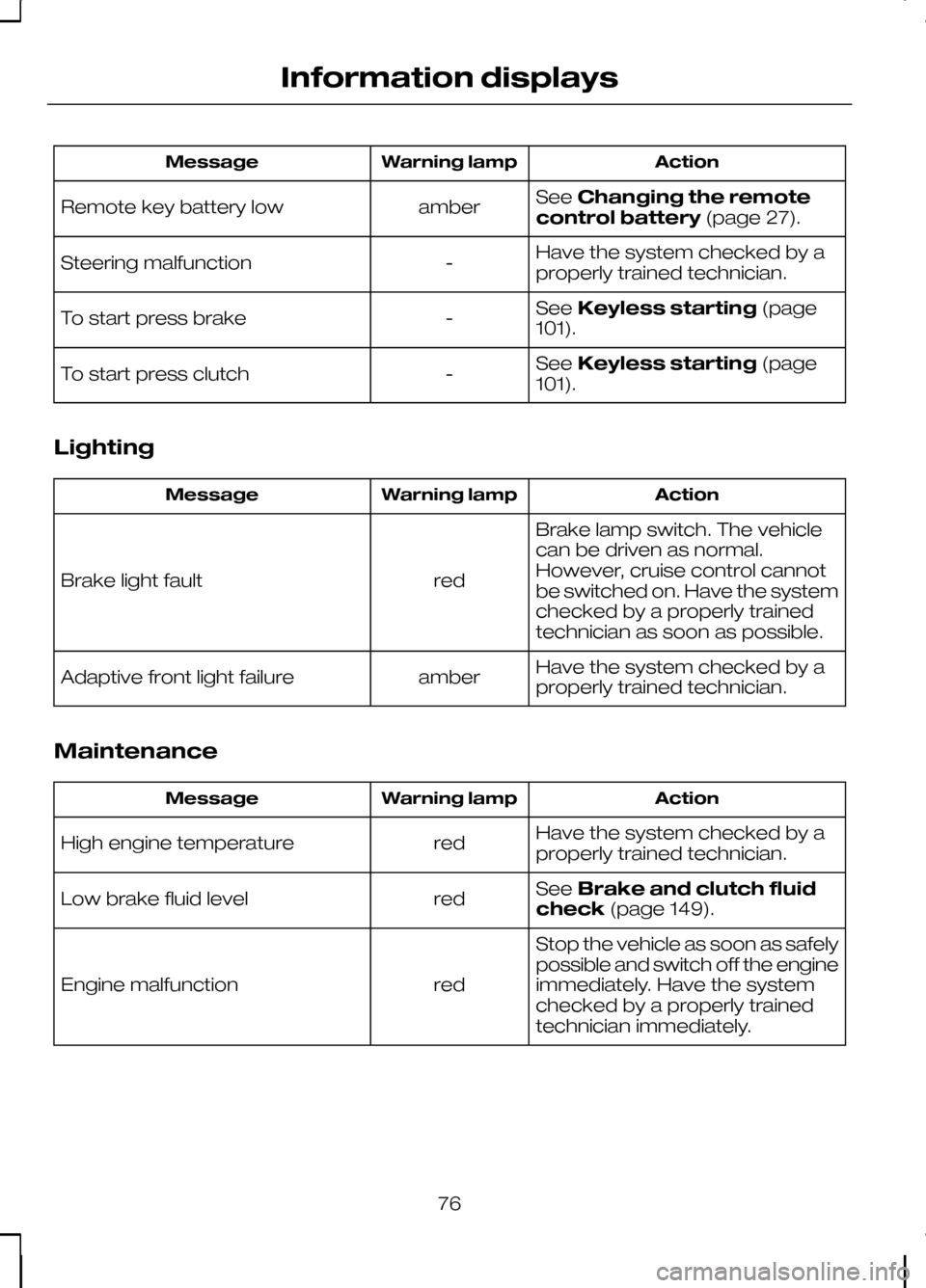
Action
Warning lamp
Message
SeeChanging the remote
control battery (page 27).
amber
Remote key battery low
Have the system checked by a
properly trained technician.
-
Steering malfunction
SeeKeyless starting (page
101).
-
To start press brake
SeeKeyless starting (page
101).
-
To start press clutch
Lighting Action
Warning lamp
Message
Brake lamp switch. The vehicle
can be driven as normal.
However, cruise control cannot
be switched on. Have the system
checked by a properly trained
technician as soon as possible.
red
Brake light fault
Have the system checked by a
properly trained technician.
amber
Adaptive front light failure
Maintenance Action
Warning lamp
Message
Have the system checked by a
properly trained technician.
red
High engine temperature
SeeBrake and clutch fluid
check (page 149).
red
Low brake fluid level
Stop the vehicle as soon as safely
possible and switch off the engine
immediately. Have the system
checked by a properly trained
technician immediately.
red
Engine malfunction
76
Information displays
Page 103 of 226
GENERAL INFORMATION
General points on starting
If the battery has been disconnected the
vehicle may exhibit some unusual driving
characteristics for approx. 8 kilometres
(5 miles) after reconnecting the battery.
This is because the engine management
system must realign itself with the engine.
Any unusual driving characteristics during
this period may be disregarded.
Starting the engine by towing
or pushing
WARNING
To prevent damage you must not
push or tow start your vehicle. Use
booster cables and a booster
battery. See Using booster cables
(page 154). KEYLESS STARTING
WARNINGS
The keyless starting system may not
function if the key is close to metal
objects or electronic devices such
as mobile phones. Always check that the steering
wheel lock is deactivated before
attempting to move your vehicle.
Note:A valid passive key must be
located inside the vehicle to switch the ignition on and start the engine.
Note:To start your engine you must also
fully depress the brake or clutch pedal, depending on the transmission fitted. Ignition on
Press the start button once. All electrical
circuits are operational, warning lamps
and indicators illuminate.
Starting with automatic
transmission
Note:
Releasing the brake pedal during
engine start will stop the engine cranking and return to ignition on.
1. Make sure the transmission is in Por
N.
2. Fully depress the brake pedal.
3. Briefly press the start button.
Starting with manual
transmission
Note:
Releasing the clutch pedal during
engine start will stop the engine cranking and return to ignition on.
1. Fully depress the clutch pedal.
2. Briefly press the start button.
Starting a diesel engine
Note:
Engine cranking will not
commence until the engine glow plug cycle has been completed. This may takeseveral seconds in extremely coldconditions.
Note:Continue to press the clutch or
brake pedal until engine cranking begins.
101
Starting the engineE85766
Page 104 of 226
Failure to start
The passive starting system will not
function if:
•
The passive key frequencies are
jammed.
• The passive key battery is flat.
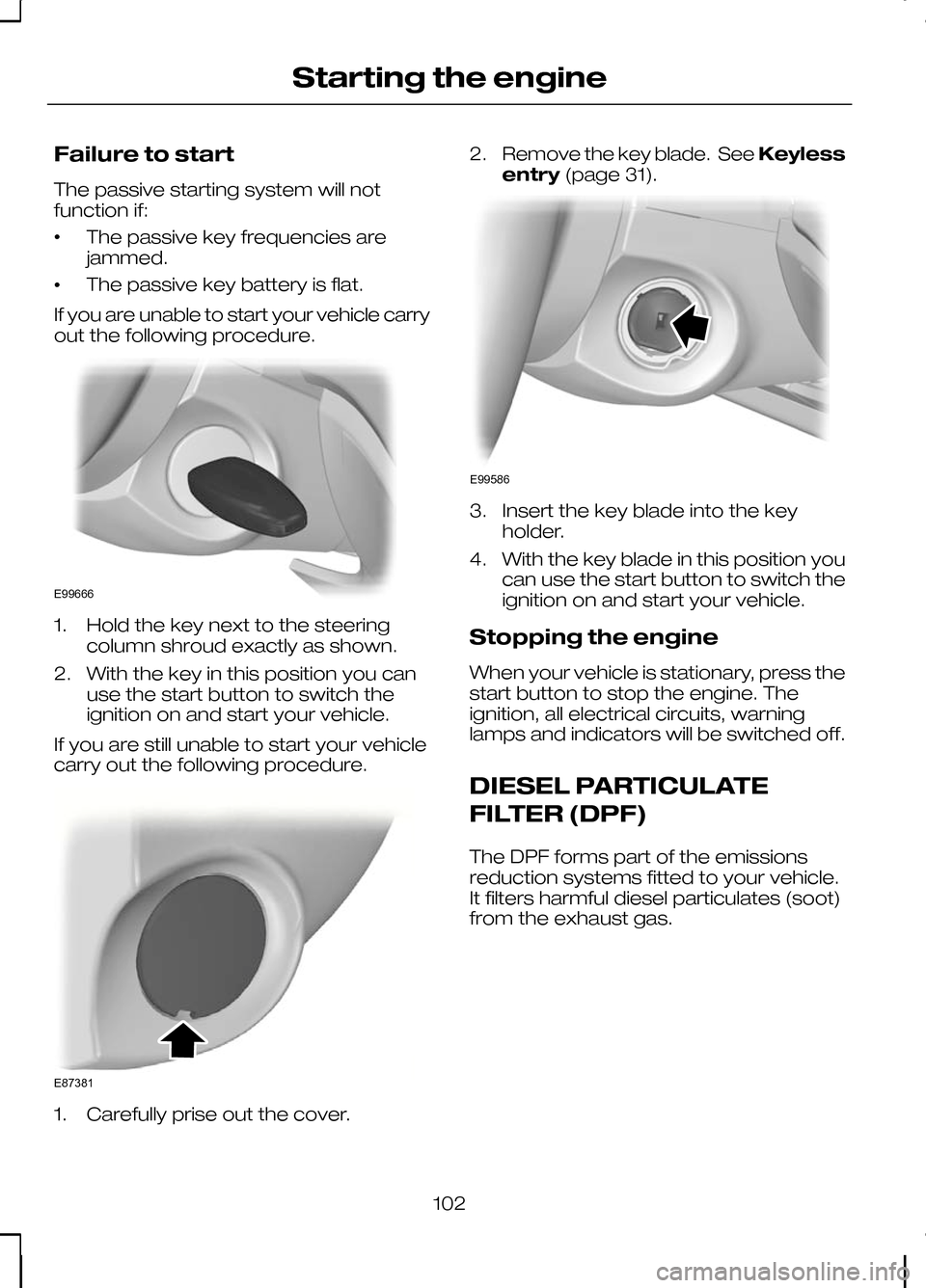
If you are unable to start your vehicle carry
out the following procedure. 1. Hold the key next to the steering
column shroud exactly as shown.
2. With the key in this position you can use the start button to switch the
ignition on and start your vehicle.
If you are still unable to start your vehicle
carry out the following procedure. 1. Carefully prise out the cover. 2.
Remove the key blade. See Keyless
entry (page 31). 3. Insert the key blade into the key
holder.
4. With the key blade in this position you can use the start button to switch the
ignition on and start your vehicle.
Stopping the engine
When your vehicle is stationary, press the
start button to stop the engine. The
ignition, all electrical circuits, warning
lamps and indicators will be switched off.
DIESEL PARTICULATE
FILTER (DPF)
The DPF forms part of the emissions
reduction systems fitted to your vehicle.
It filters harmful diesel particulates (soot)
from the exhaust gas.
102
Starting the engineE99666 E87381 E99586
Page 131 of 226
Driving with a trailer
WARNING
If any of the below conditions
cannot be met, do not use the tow
bar and have it checked by a
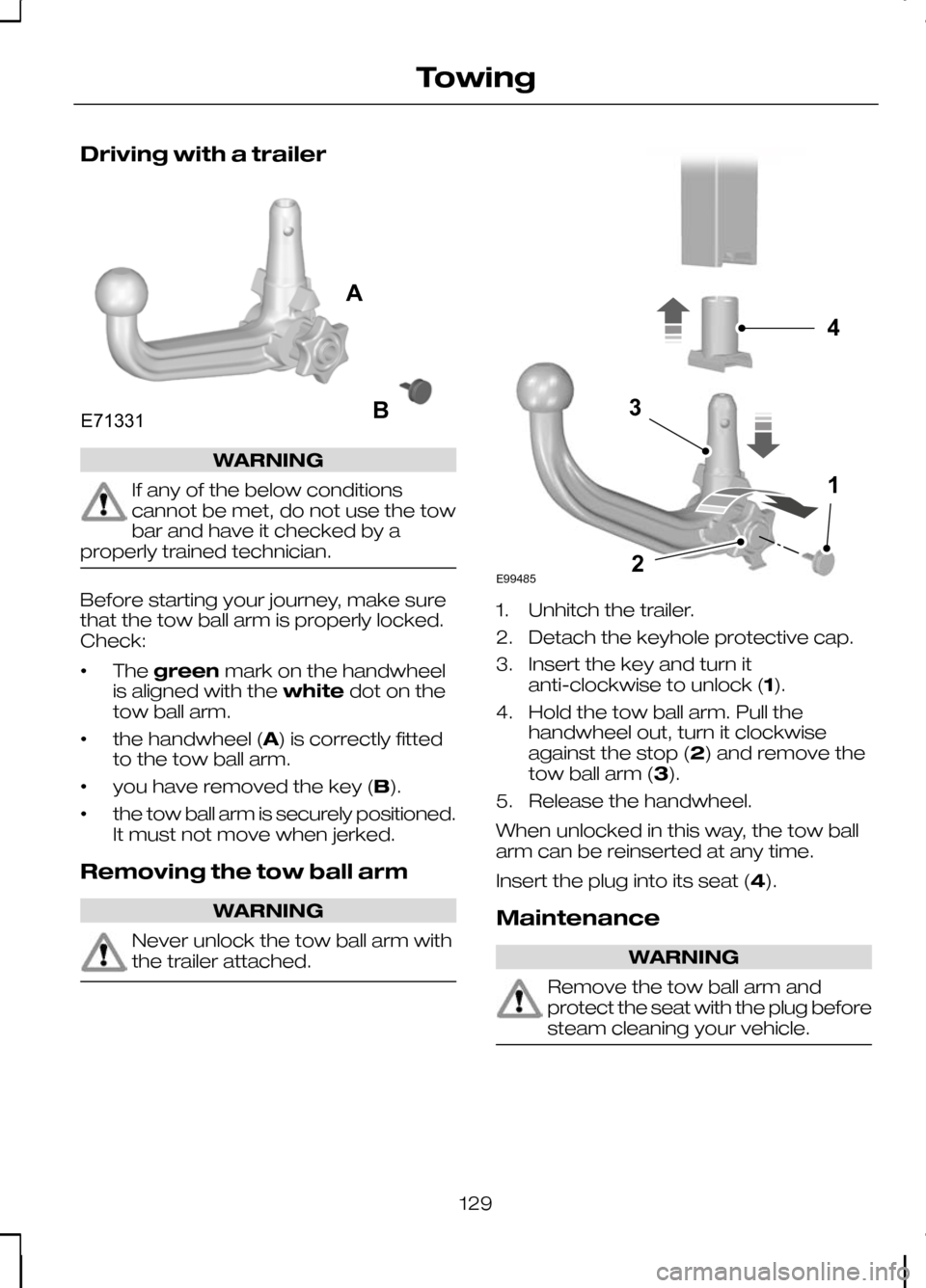
properly trained technician. Before starting your journey, make sure
that the tow ball arm is properly locked.
Check:
•
The
green mark on the handwheel
is aligned with the whitedot on the
tow ball arm.
• the handwheel (A) is correctly fitted
to the tow ball arm.
• you have removed the key (B).
• the tow ball arm is securely positioned.
It must not move when jerked.
Removing the tow ball arm WARNING
Never unlock the tow ball arm with
the trailer attached. 1. Unhitch the trailer.
2. Detach the keyhole protective cap.
3. Insert the key and turn it
anti-clockwise to unlock (1).
4. Hold the tow ball arm. Pull the handwheel out, turn it clockwise
against the stop (2) and remove the
tow ball arm (3).
5. Release the handwheel.
When unlocked in this way, the tow ball
arm can be reinserted at any time.
Insert the plug into its seat (4).
Maintenance WARNING
Remove the tow ball arm and
protect the seat with the plug before
steam cleaning your vehicle.
129
TowingE71331AB E994854132
Page 139 of 226
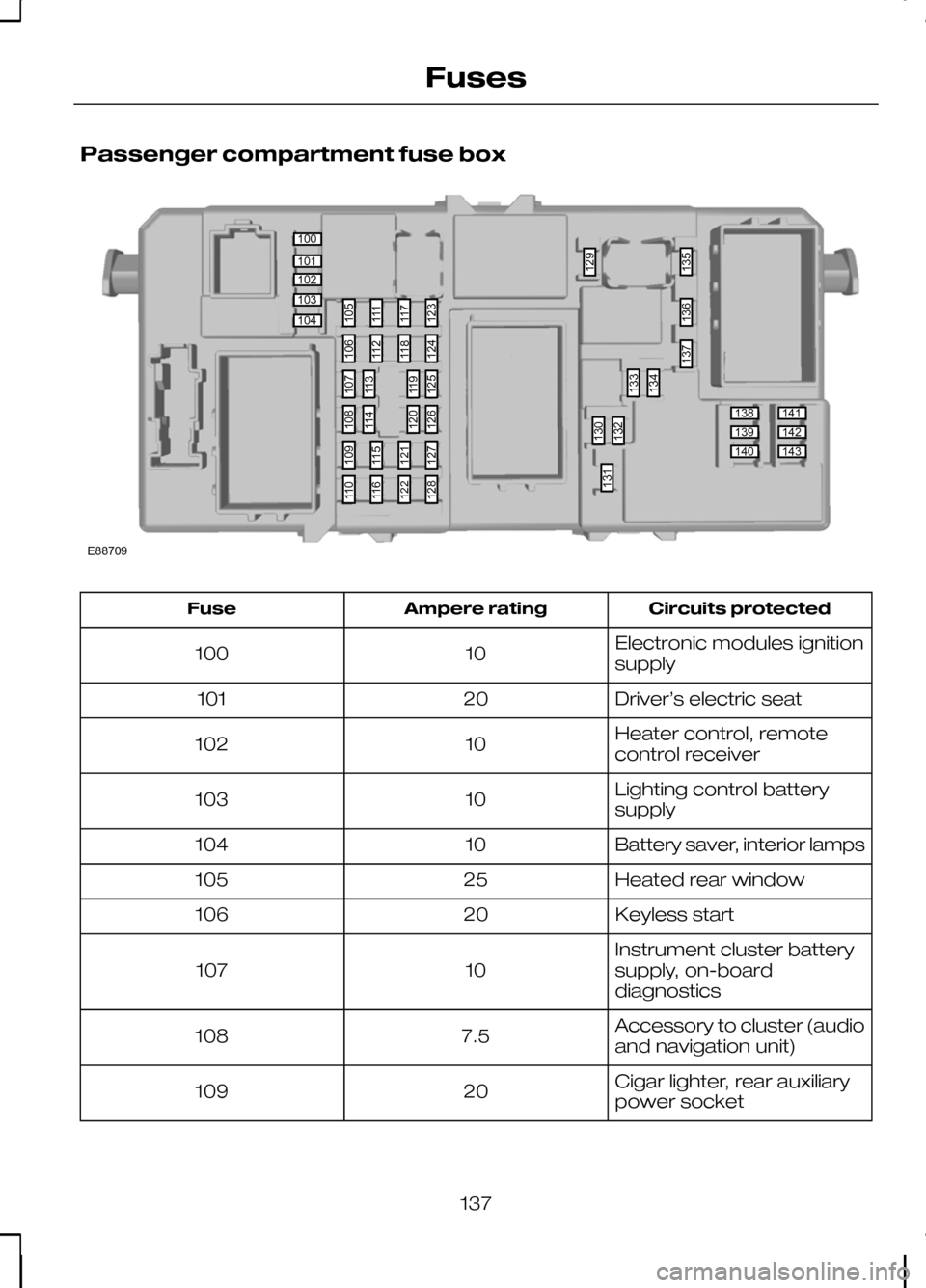
Passenger compartment fuse box
Circuits protected
Ampere rating
Fuse
Electronic modules ignition
supply
10
100
Driver’s electric seat
20
101
Heater control, remote
control receiver
10
102
Lighting control battery
supply
10
103
Battery saver, interior lamps
10
104
Heated rear window
25
105
Keyless start
20
106
Instrument cluster battery
supply, on-board
diagnostics
10
107
Accessory to cluster (audio
and navigation unit)
7.5
108
Cigar lighter, rear auxiliary
power socket
20
109
137
Fuses100101102103104138139140141142143105111117123130132133129134135136137131106112118124109115121127110116122128107113119125108114120126E88709
Page 204 of 226
Bonding the device
Note:Some audio and navigation units
have a separate Bluetooth audio menu. Use this to access setup and control.
To connect the device to the system
follow the same procedure as for
Bluetooth hands free phones. See
Bluetooth setup (page 176).
Operating the device
Select Bluetooth audio as the active
source.
Tracks can be accessed by skipping
forwards and backwards using the
steering wheel controls, or directly from
the audio unit controls.
USING A USB DEVICE
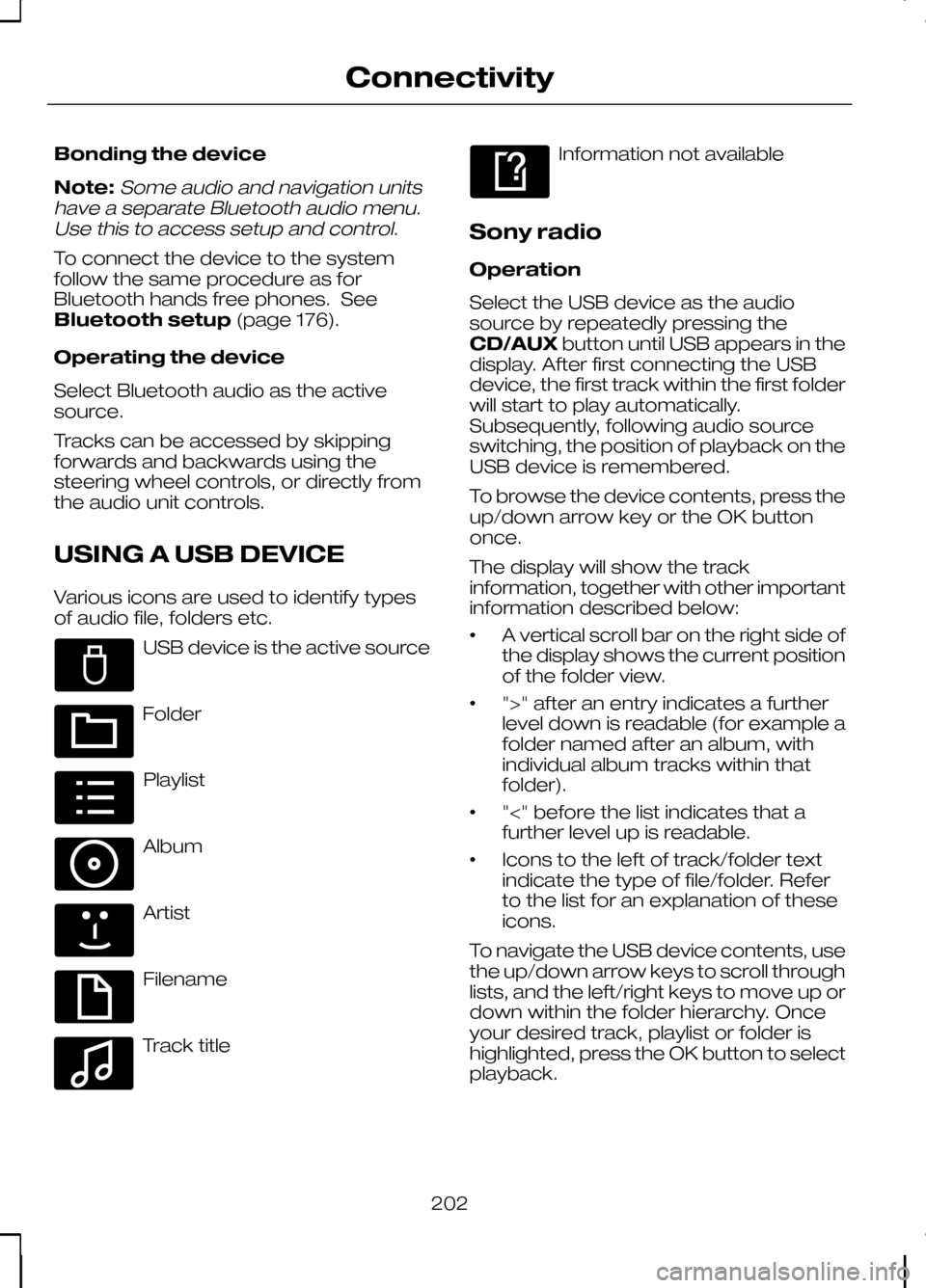
Various icons are used to identify types
of audio file, folders etc. USB device is the active source
Folder
Playlist
Album
Artist
Filename
Track title Information not available
Sony radio
Operation
Select the USB device as the audio
source by repeatedly pressing the
CD/AUX button until USB appears in the
display. After first connecting the USB
device, the first track within the first folder
will start to play automatically.
Subsequently, following audio source
switching, the position of playback on the
USB device is remembered.
To browse the device contents, press the
up/down arrow key or the OK button
once.
The display will show the track
information, together with other important
information described below:
• A vertical scroll bar on the right side of
the display shows the current position
of the folder view.
• ">" after an entry indicates a further
level down is readable (for example a
folder named after an album, with
individual album tracks within that
folder).
• "<" before the list indicates that a
further level up is readable.
• Icons to the left of track/folder text
indicate the type of file/folder. Refer
to the list for an explanation of these
icons.
To navigate the USB device contents, use
the up/down arrow keys to scroll through
lists, and the left/right keys to move up or
down within the folder hierarchy. Once
your desired track, playlist or folder is
highlighted, press the OK button to select
playback.
202
ConnectivityE100029 E100022 E100023 E100024 E100025 E100026 E100027 E100028
Page 205 of 226
Note:If you wish to jump to the top level
of the USB device contents, press and hold the left arrow key.
Audio control
Press the left and right arrow keys to skip
backwards and forwards through tracks.
Press and hold the left/right arrow keys
to enable fast rewind/fast forward through
track content.
Press the up/down arrow key or the OK
button to browse the device contents.
Press the MENU key to enter the USB
menu. It is possible to enable shuffle and
repeat functions here with respect to
folders and playlists.
Press the SCAN button to scan the whole
device, current folder or a playlist if it is in
operation.
Press the INFObutton to display the
following:
• filename
• title
• artist
• album
• track number and playing time.
Repeated button presses will scroll
through these displays.
CD Navigation units
Operation
Select the USB device as the audio
source by pressing the CD/AUXbutton
until DEVICES appears in the display.
Select DEVICES and then select USB from
the available device list. After first
connecting the USB device, the first track
within the first folder will start to play
automatically. Subsequently, following
audio source switching, the position of
playback on the USB device is
remembered. To browse the device contents, press the
SELECT
button once.
The display will show the track
information, together with other important
information described below:
• A vertical scroll bar on the right side of
the display shows the current position
of the folder view.
• ">" after an entry indicates a further
level down is readable (for example a
folder named after an album, with
individual album tracks within that
folder).
• "<" to the left hand side of the display
indicates that a further level up is
readable.
• Icons to the left of track/folder text
indicate the type of file/folder. Refer
to the list for an explanation of these
icons.
To navigate the USB device contents, use
the rotary scroll/select button to browse
through lists. Push the button to expand
the contents within the highlighted playlist
or folder, or to commence playback of a
particular track. Press ESCto go up one
level.
Audio control
Press the SEEKup and down keys to
skip backwards and forwards through
tracks.
Press and hold the SEEKkeys to enable
fast rewind/fast forward through track
content.
Rotate or press the SELECTbutton to
browse the device contents.
Press SHUFFLE or REPEAT buttons to
enable shuffle and repeat functions with
respect to folders and playlists. Different
options may appear depending upon
whether or not a playlist is in operation.
203
Connectivity
Page 206 of 226
Press the SCAN button to scan the
current playlist if it is in operation, or the
complete USB device or folder.
Press the
INFObutton to display the
following:
• filename
• title
• artist
• album
• track number and playing time.
DVD Navigation units
Operation
Select the USB device as the audio
source by pressing the CD/AUXbutton
until the USB button appears to the left of
the display. Select USB from the available
device list.
Note:Some devices may be shown but
not selectable, depending if the device is connected or not.
After first connecting the USB device, the
first track within the first folder will start to
play automatically. Subsequently, following
audio source switching, the position of
playback on the USB device is
remembered.
To browse the device contents, press the
scroll up or down arrow button.
The display will show the track
information, together with other important
information described below:
• A vertical scroll bar on the right side of
the display shows the current position
of the folder view.
• ">" after an entry indicates a further
level down is readable (for example a
folder named after an album, with
individual album tracks within that
folder). •
"<" to the left hand side of the display
indicates that a further level up is
readable.
• Icons to the left of track/folder text
indicate the type of file/folder. Refer
to the list for an explanation of these
icons.
To navigate the USB device contents, use
the scroll buttons to browse through lists.
Push the button to expand the contents
within the highlighted playlist or folder, or
to commence playback of a particular
track. Press the left arrow key to go up
one level.
Audio control
Press the SEEKup and down keys to
skip backwards and forwards through
tracks.
Press and hold the SEEKkeys to enable
fast rewind/fast forward through track
content.
Press the scroll bar arrow keys to browse
the device contents.
Press SHUFFLE or REPEAT buttons to
enable shuffle and repeat functions with
respect to folders and playlists.
Press the SCAN button to scan the
current playlist if it is in operation, or the
complete USB device or folder.
Press the INFObutton to display the
following:
• filename
• title
• artist
• album
• track number and playing time.
USING AN IPOD
Various icons are used to identify types
of audio file, folders etc.
204
Connectivity
Page 220 of 226
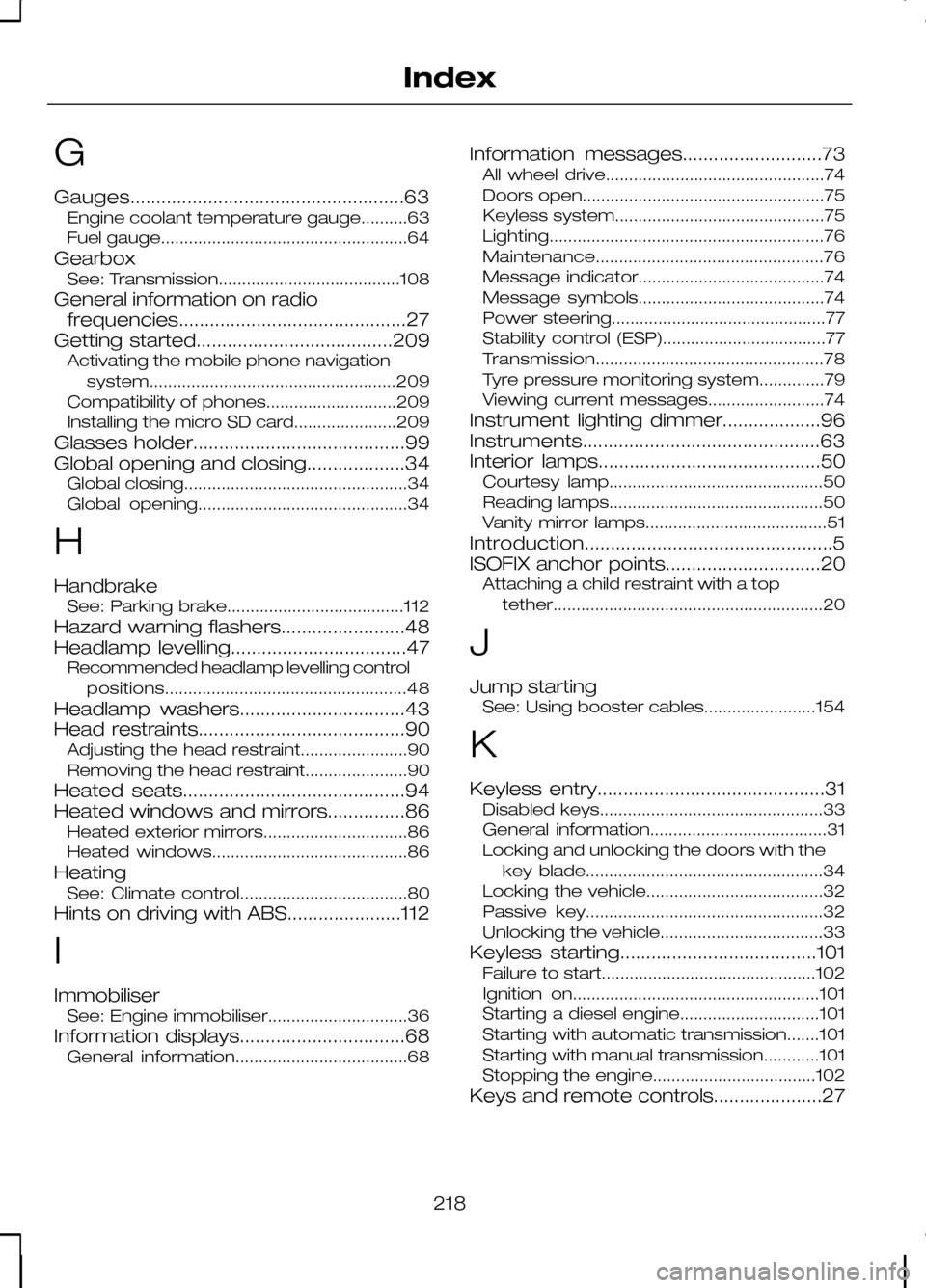
G
Gauges.....................................................63
Engine coolant temperature gauge..........63
Fuel gauge.....................................................64
Gearbox See: Transmission.......................................108
General information on radio frequencies............................................27
Getting started......................................209 Activating the mobile phone navigation
system..................................................... 209
Compatibility of phones............................209
Installing the micro SD card......................209
Glasses holder.........................................99
Global opening and closing...................34 Global closing................................................34
Global opening.............................................34
H
Handbrake See: Parking brake......................................112
Hazard warning flashers........................48
Headlamp levelling..................................47 Recommended headlamp levelling control
positions.................................................... 48
Headlamp washers................................43
Head restraints........................................90 Adjusting the head restraint.......................90
Removing the head restraint......................90
Heated seats...........................................94
Heated windows and mirrors...............86 Heated exterior mirrors...............................86
Heated windows..........................................86
Heating See: Climate control....................................80
Hints on driving with ABS......................112
I
Immobiliser See: Engine immobiliser..............................36
Information displays................................68 General information.....................................68 Information messages...........................73
All wheel drive...............................................74
Doors open....................................................75
Keyless system.............................................75
Lighting........................................................... 76
Maintenance................................................. 76
Message indicator........................................74
Message symbols........................................74
Power steering..............................................77
Stability control (ESP)...................................77
Transmission................................................. 78
Tyre pressure monitoring system..............79
Viewing current messages.........................74
Instrument lighting dimmer...................96
Instruments..............................................63
Interior lamps...........................................50 Courtesy lamp..............................................50
Reading lamps..............................................50
Vanity mirror lamps.......................................51
Introduction................................................5
ISOFIX anchor points..............................20 Attaching a child restraint with a top
tether.......................................................... 20
J
Jump starting See: Using booster cables........................154
K
Keyless entry............................................31 Disabled keys................................................33
General information......................................31
Locking and unlocking the doors with the
key blade...................................................34
Locking the vehicle......................................32
Passive key...................................................32
Unlocking the vehicle...................................33
Keyless starting......................................101 Failure to start..............................................102
Ignition on.....................................................101
Starting a diesel engine..............................101
Starting with automatic transmission.......101
Starting with manual transmission............101
Stopping the engine...................................102
Keys and remote controls.....................27
218
Index
Page 222 of 226
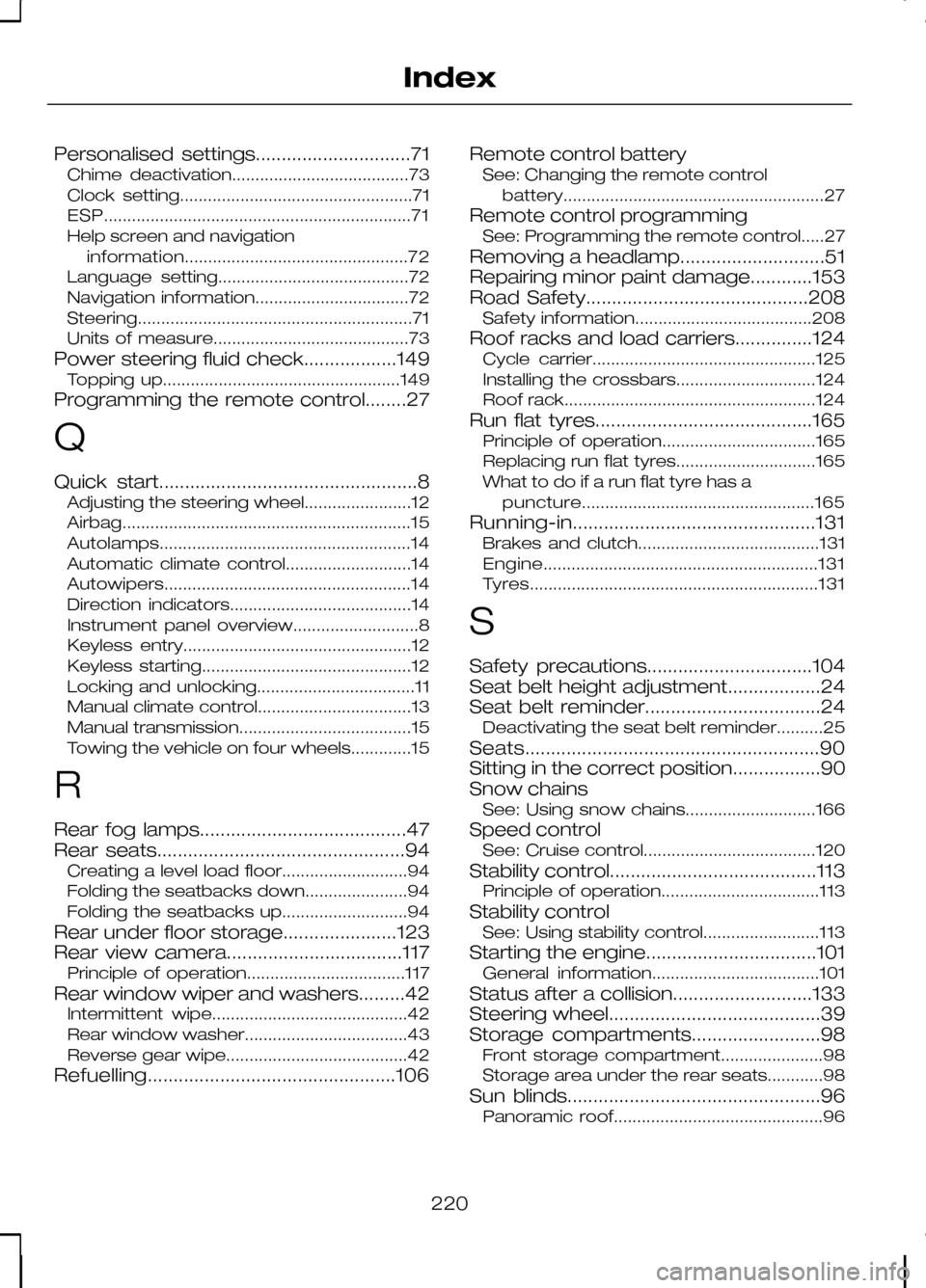
Personalised settings..............................71
Chime deactivation......................................73
Clock setting..................................................71
ESP.................................................................. 71
Help screen and navigation information................................................ 72
Language setting.........................................72
Navigation information.................................72
Steering........................................................... 71
Units of measure..........................................73
Power steering fluid check..................149 Topping up...................................................149
Programming the remote control........27
Q
Quick start..................................................8 Adjusting the steering wheel.......................12
Airbag.............................................................. 15
Autolamps...................................................... 14
Automatic climate control...........................14
Autowipers..................................................... 14
Direction indicators.......................................14
Instrument panel overview...........................8
Keyless entry.................................................12
Keyless starting.............................................12
Locking and unlocking..................................11
Manual climate control.................................13
Manual transmission.....................................15
Towing the vehicle on four wheels.............15
R
Rear fog lamps........................................47
Rear seats................................................94 Creating a level load floor...........................94
Folding the seatbacks down......................94
Folding the seatbacks up...........................94
Rear under floor storage......................123
Rear view camera..................................117 Principle of operation..................................117
Rear window wiper and washers.........42 Intermittent wipe..........................................42
Rear window washer...................................43
Reverse gear wipe.......................................42
Refuelling................................................106 Remote control battery
See: Changing the remote control
battery........................................................ 27
Remote control programming See: Programming the remote control.....27
Removing a headlamp............................51
Repairing minor paint damage............153
Road Safety...........................................208 Safety information......................................208
Roof racks and load carriers...............124 Cycle carrier................................................125
Installing the crossbars..............................124
Roof rack......................................................124
Run flat tyres..........................................165 Principle of operation.................................165
Replacing run flat tyres..............................165
What to do if a run flat tyre has a
puncture.................................................. 165
Running-in...............................................131 Brakes and clutch.......................................131
Engine........................................................... 131
Tyres.............................................................. 131
S
Safety precautions................................104
Seat belt height adjustment..................24
Seat belt reminder..................................24 Deactivating the seat belt reminder..........25
Seats.........................................................90
Sitting in the correct position.................90
Snow chains See: Using snow chains............................166
Speed control See: Cruise control.....................................120
Stability control........................................113 Principle of operation..................................113
Stability control See: Using stability control.........................113
Starting the engine.................................101 General information....................................101
Status after a collision...........................133
Steering wheel.........................................39
Storage compartments.........................98 Front storage compartment......................98
Storage area under the rear seats............98
Sun blinds.................................................96 Panoramic roof.............................................96
220
Index