radio FORD KUGA 2010 1.G User Guide
[x] Cancel search | Manufacturer: FORD, Model Year: 2010, Model line: KUGA, Model: FORD KUGA 2010 1.GPages: 226, PDF Size: 8.07 MB
Page 185 of 226
•
automatic climate control:
"TEMPERATURE", "AUTO MODE",
"DEFROSTING/DEMISTING ON" and
"DEFROSTING/DEMISTING OFF"
• radio: "TUNE NAME"
• external device (USB): "TRACK"
• external device (iPod): "TRACK"
• SD card: "TRACK".
Start communicating with the
system
Before you can start talking to the system
you first have to press the VOICEor
MODE button for each operation and
wait until the system answers with a beep.
See Voice control (page 40).
Press the button again to cancel the voice
session. Name tag
The name tag functionality can support
the phone, audio and navigation features
by using the "STORE NAME" function. You
can assign name tags to items such as
favourite radio stations and personal
phone contacts. See
Audio unit
commands (page 183). See Telephone
commands (page 192). See
Navigation system commands
(page 197).
• Store up to 20 name tags per function.
• The average recording time for each
name tag is approximately 2-3
seconds.
AUDIO UNIT COMMANDS
CD Player
You can control playback directly by voice
control.
Overview
The overview below shows the available
voice commands. The following lists will
give further information about the
complete command menu in selected
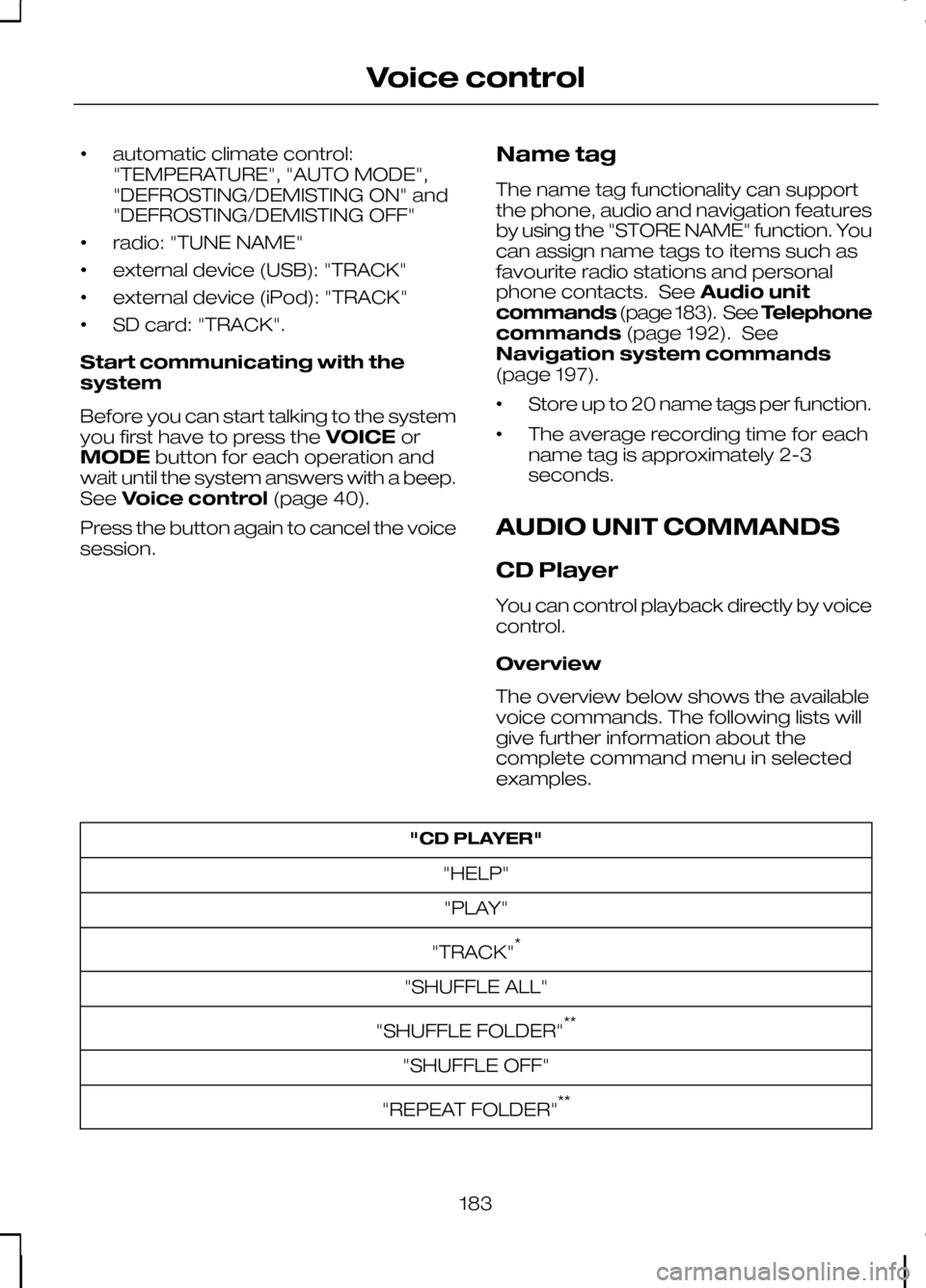
examples. "CD PLAYER"
"HELP""PLAY"
"TRACK" *
"SHUFFLE ALL"
"SHUFFLE FOLDER" **
"SHUFFLE OFF"
"REPEAT FOLDER" **
183
Voice control
Page 188 of 226
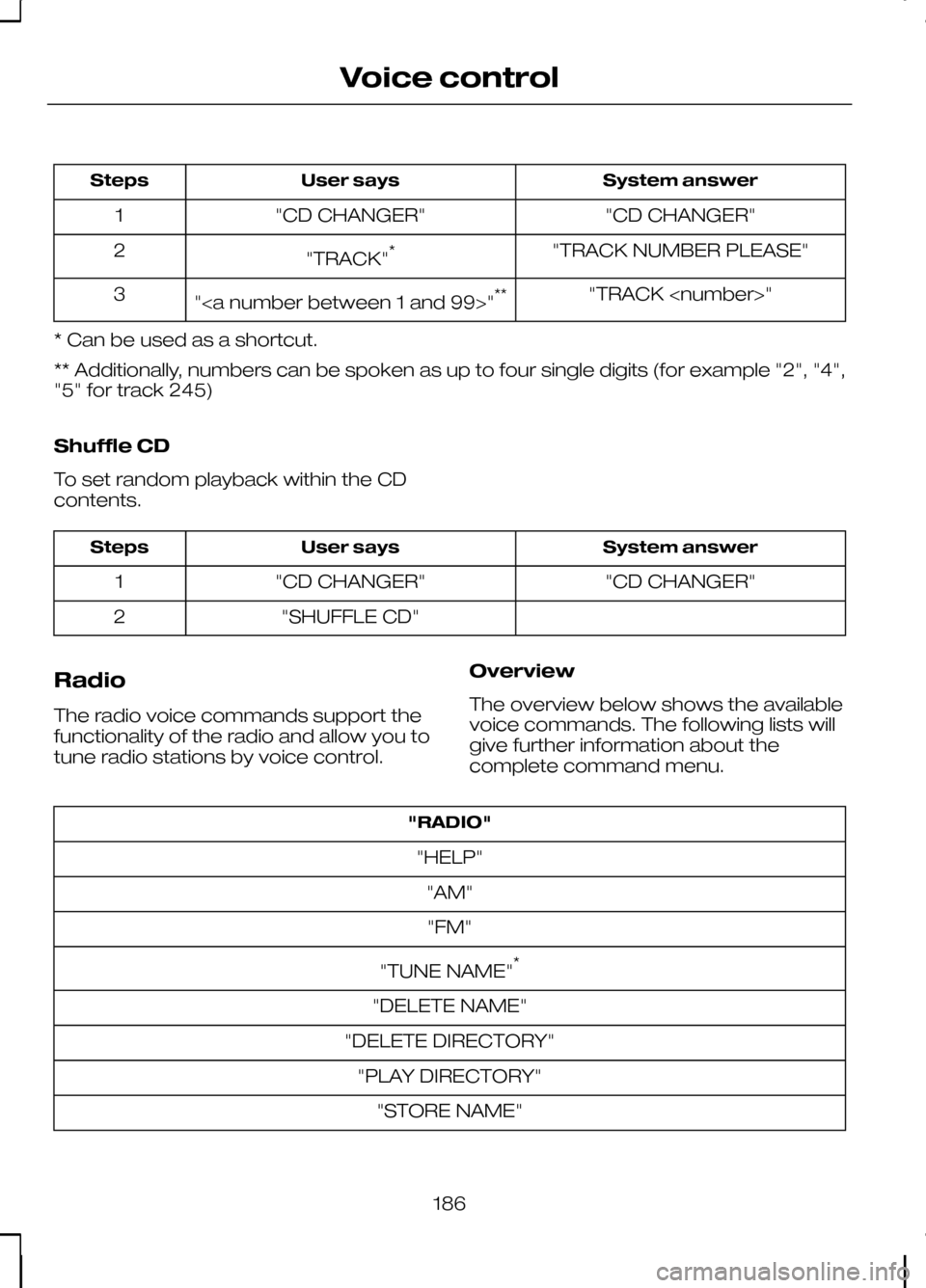
System answer
User says
Steps
"CD CHANGER"
"CD CHANGER"
1
"TRACK NUMBER PLEASE"
"TRACK" *
2
"TRACK
"" **
3
* Can be used as a shortcut.
** Additionally, numbers can be spoken as up to four single digits (for example "2", "4",
"5" for track 245)
Shuffle CD
To set random playback within the CD
contents. System answer
User says
Steps
"CD CHANGER"
"CD CHANGER"
1
"SHUFFLE CD"
2
Radio
The radio voice commands support the
functionality of the radio and allow you to
tune radio stations by voice control. Overview
The overview below shows the available
voice commands. The following lists will
give further information about the
complete command menu."RADIO"
"HELP" "AM""FM"
"TUNE NAME" *
"DELETE NAME"
"DELETE DIRECTORY" "PLAY DIRECTORY" "STORE NAME"
186
Voice control
Page 189 of 226
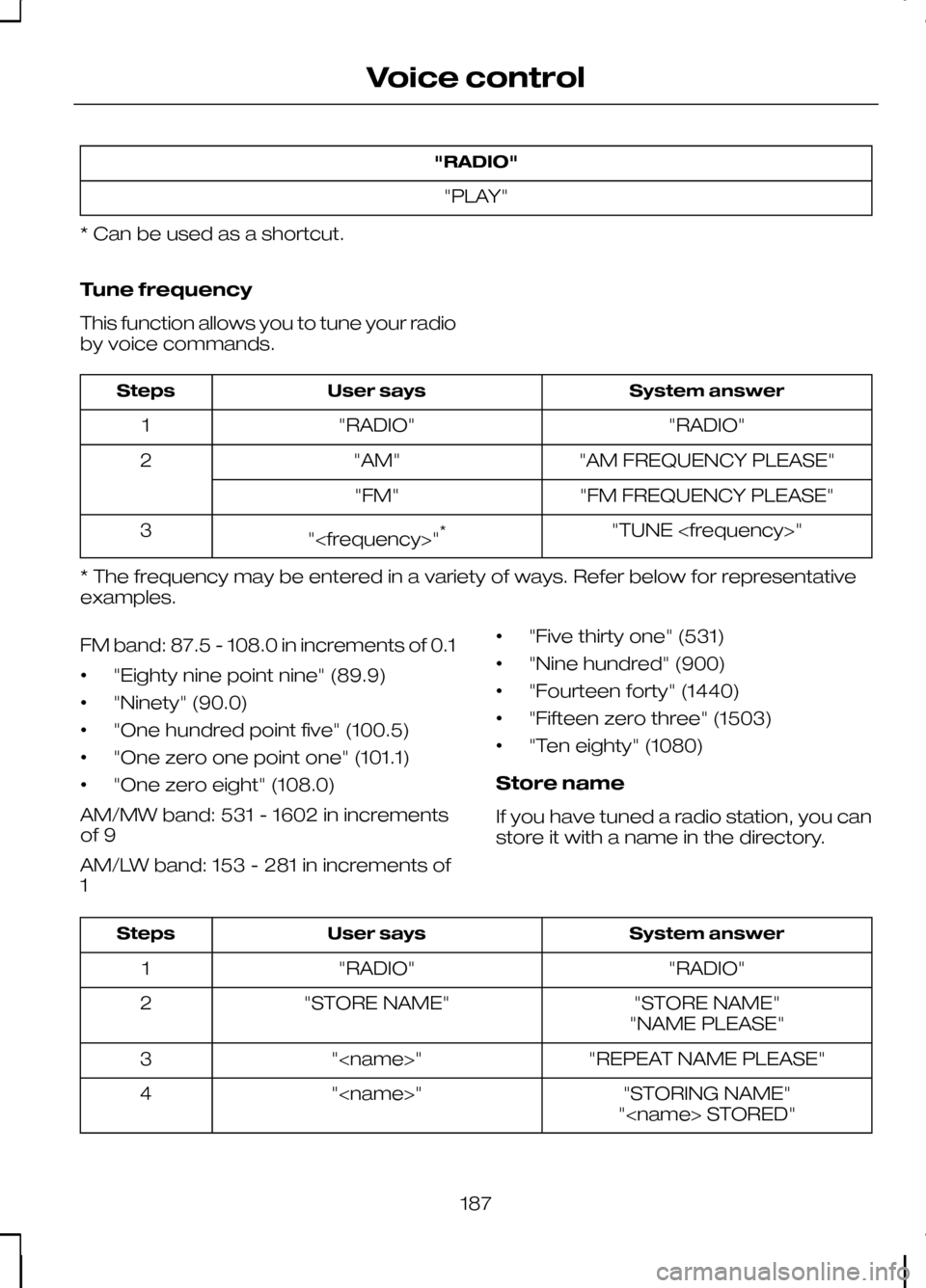
"RADIO"
"PLAY"
* Can be used as a shortcut.
Tune frequency
This function allows you to tune your radio
by voice commands. System answer
User says
Steps
"RADIO"
"RADIO"
1
"AM FREQUENCY PLEASE"
"AM"
2
"FM FREQUENCY PLEASE"
"FM"
"TUNE
"
3
* The frequency may be entered in a variety of ways. Refer below for representative
examples.
FM band: 87.5 - 108.0 in increments of 0.1
• "Eighty nine point nine" (89.9)
• "Ninety" (90.0)
• "One hundred point five" (100.5)
• "One zero one point one" (101.1)
• "One zero eight" (108.0)
AM/MW band: 531 - 1602 in increments
of 9
AM/LW band: 153 - 281 in increments of
1 •
"Five thirty one" (531)
• "Nine hundred" (900)
• "Fourteen forty" (1440)
• "Fifteen zero three" (1503)
• "Ten eighty" (1080)
Store name
If you have tuned a radio station, you can
store it with a name in the directory. System answer
User says
Steps
"RADIO"
"RADIO"
1
"STORE NAME"
"STORE NAME"
2
"NAME PLEASE"
"REPEAT NAME PLEASE"
"
3
"STORING NAME"
"
4
"
187
Voice control
Page 190 of 226
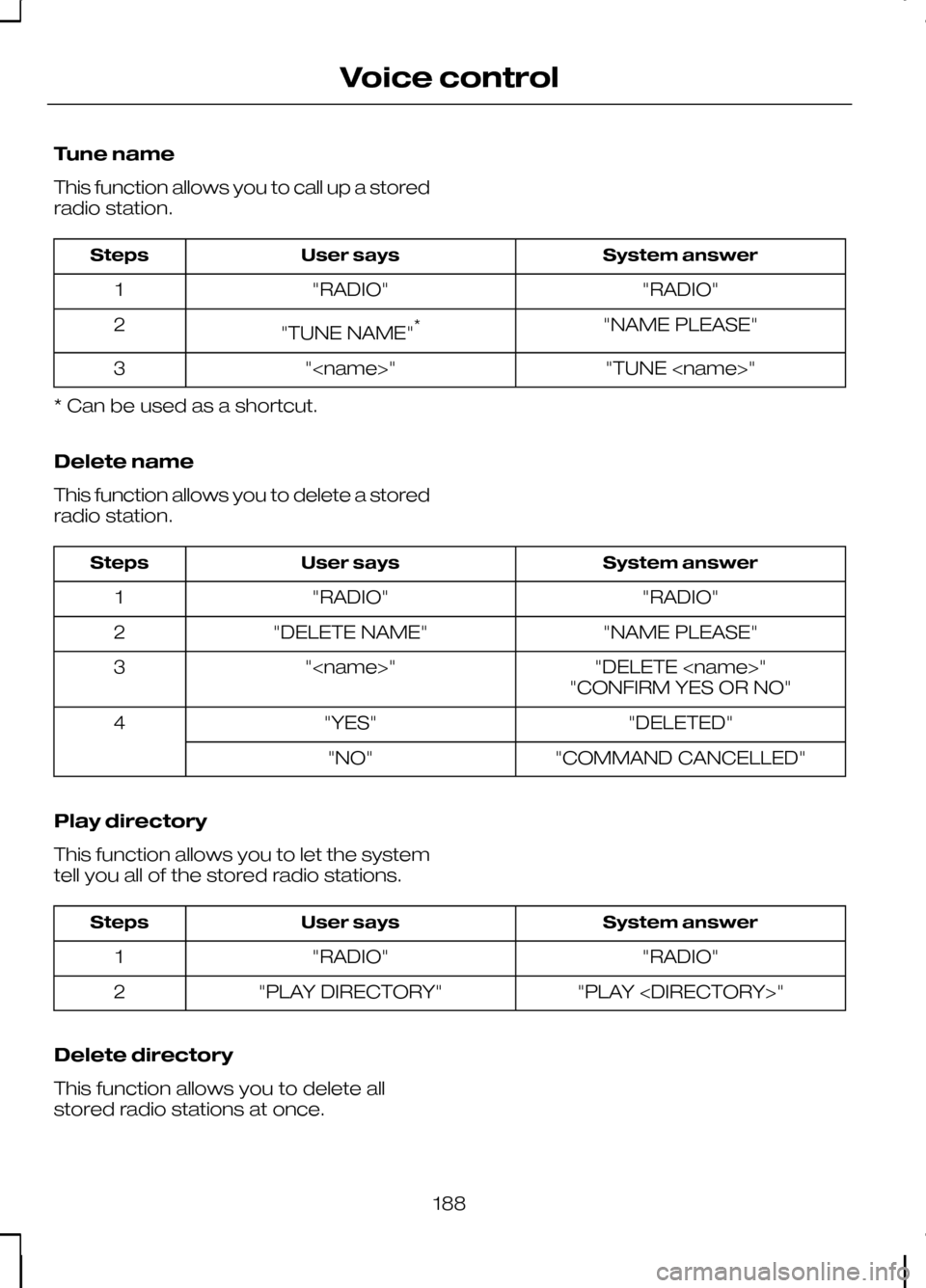
Tune name
This function allows you to call up a stored
radio station.
System answer
User says
Steps
"RADIO"
"RADIO"
1
"NAME PLEASE"
"TUNE NAME" *
2
"TUNE
"
3
* Can be used as a shortcut.
Delete name
This function allows you to delete a stored
radio station. System answer
User says
Steps
"RADIO"
"RADIO"
1
"NAME PLEASE"
"DELETE NAME"
2
"DELETE
"
3
"CONFIRM YES OR NO"
"DELETED"
"YES"
4
"COMMAND CANCELLED"
"NO"
Play directory
This function allows you to let the system
tell you all of the stored radio stations. System answer
User says
Steps
"RADIO"
"RADIO"
1
"PLAY
"PLAY DIRECTORY"
2
Delete directory
This function allows you to delete all
stored radio stations at once.
188
Voice control
Page 191 of 226
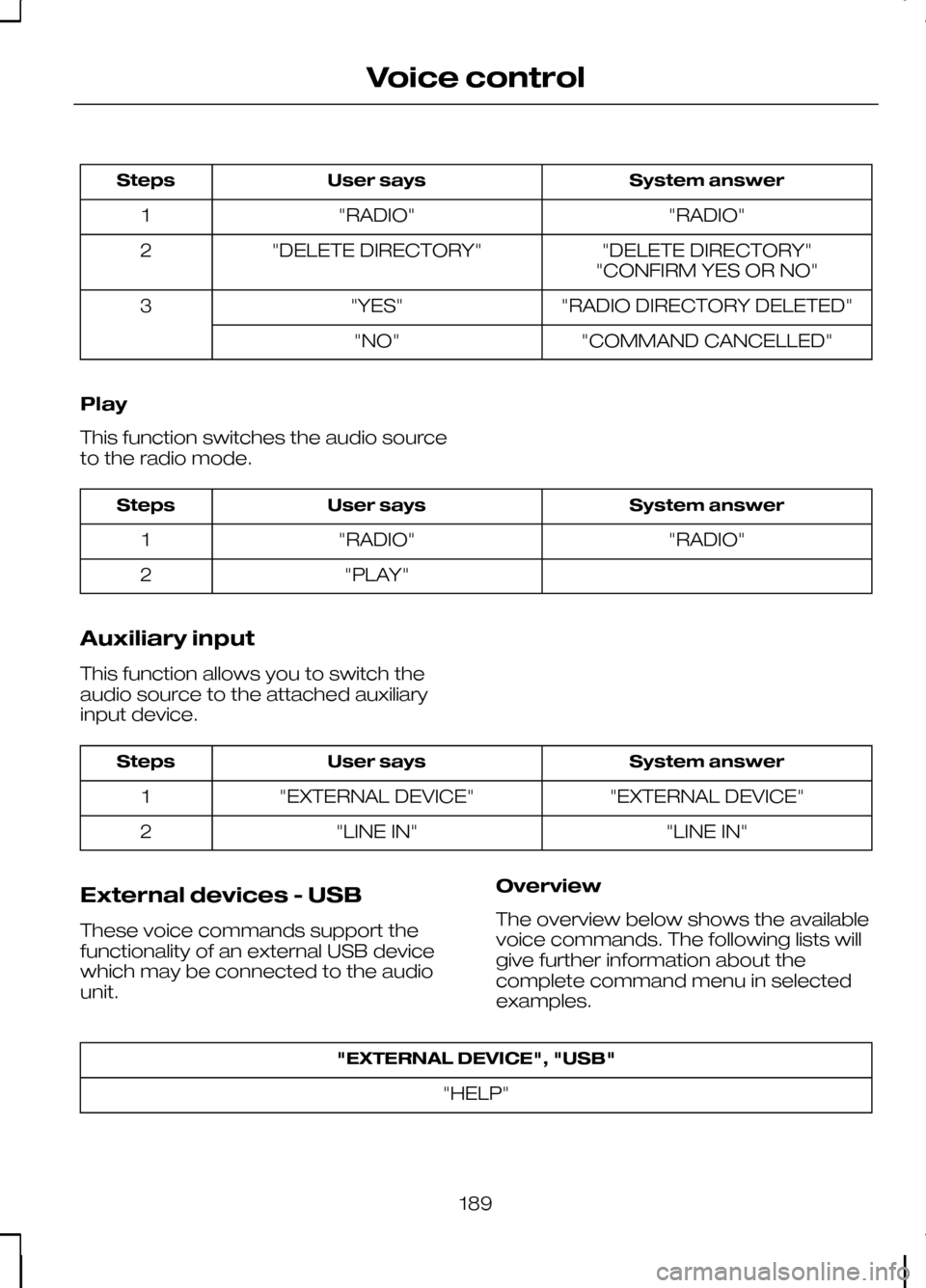
System answer
User says
Steps
"RADIO"
"RADIO"
1
"DELETE DIRECTORY"
"DELETE DIRECTORY"
2
"CONFIRM YES OR NO"
"RADIO DIRECTORY DELETED"
"YES"
3
"COMMAND CANCELLED"
"NO"
Play
This function switches the audio source
to the radio mode. System answer
User says
Steps
"RADIO"
"RADIO"
1
"PLAY"
2
Auxiliary input
This function allows you to switch the
audio source to the attached auxiliary
input device. System answer
User says
Steps
"EXTERNAL DEVICE"
"EXTERNAL DEVICE"
1
"LINE IN"
"LINE IN"
2
External devices - USB
These voice commands support the
functionality of an external USB device
which may be connected to the audio
unit. Overview
The overview below shows the available
voice commands. The following lists will
give further information about the
complete command menu in selected
examples."EXTERNAL DEVICE", "USB"
"HELP"
189
Voice control
Page 202 of 226
GENERAL INFORMATION
CAUTIONS
Take care when handling external
devices with exposed electrical
connectors (such as the USB plug).
Always replace the protective cap/shield
when possible. There may be a risk of
electrostatic discharge causing damage
to the device. Do not touch or handle the USB
socket in the vehicle. Cover the
socket when not in use.
Only use USB Mass-Storage device
compliant devices.
Always switch your audio unit to a
different source (for example the
radio) before unplugging the USB
device. Do not install or connect USB hubs
or splitters.
Note:The system is only designed to
recognize and read suitable audio files from a USB device that conforms to theUSB Mass-Storage device class or aniPod. Not all available USB devices can beguaranteed to function with the system.
Note:It is possible to connect compatible
devices with a trailing USB lead as well as those that plug into the vehicle USBsocket directly (for example USB memorysticks and pen drives).
Note:Some USB devices with a higher
power consumption may not be compatible (for example some larger harddrives).
Note:Access time to read the files on
the external device will vary depending upon factors such as the file structure,size and device content.
The system supports a range of external
devices, to fully integrate with your audio
unit via the USB and auxiliary input
sockets. Once connected, control of the
external device is possible via the audio
unit.
A list of typical compatible devices are
shown below:
• USB memory sticks
• USB portable hard drives
• MP3 players with USB connection
• iPod media players (refer to
www.ford-mobile
-connectivity.com
for latest
compatibility list).
The system is USB 2.0 full speed
compatible, USB 1.1 host compliant and
supports FAT 16/32 file systems.
Information on audio file
structures for external devices
USB
Create only a single partition on the USB
device.
If playlists are created, they must contain
correct file paths referenced to the USB
device. It is recommended to create the
playlist after the audio files have been
transferred to the USB device.
Playlists must be created in .m3u format.
Audio files must be in .mp3 format.
Do not exceed the following limits:
• 1000 items per folder (files, folders and
playlists)
• 5000 folders per USB device
(including playlists)
• 8 subfolder levels.
200
Connectivity
Page 204 of 226
Bonding the device
Note:Some audio and navigation units
have a separate Bluetooth audio menu. Use this to access setup and control.
To connect the device to the system
follow the same procedure as for
Bluetooth hands free phones. See
Bluetooth setup (page 176).
Operating the device
Select Bluetooth audio as the active
source.
Tracks can be accessed by skipping
forwards and backwards using the
steering wheel controls, or directly from
the audio unit controls.
USING A USB DEVICE
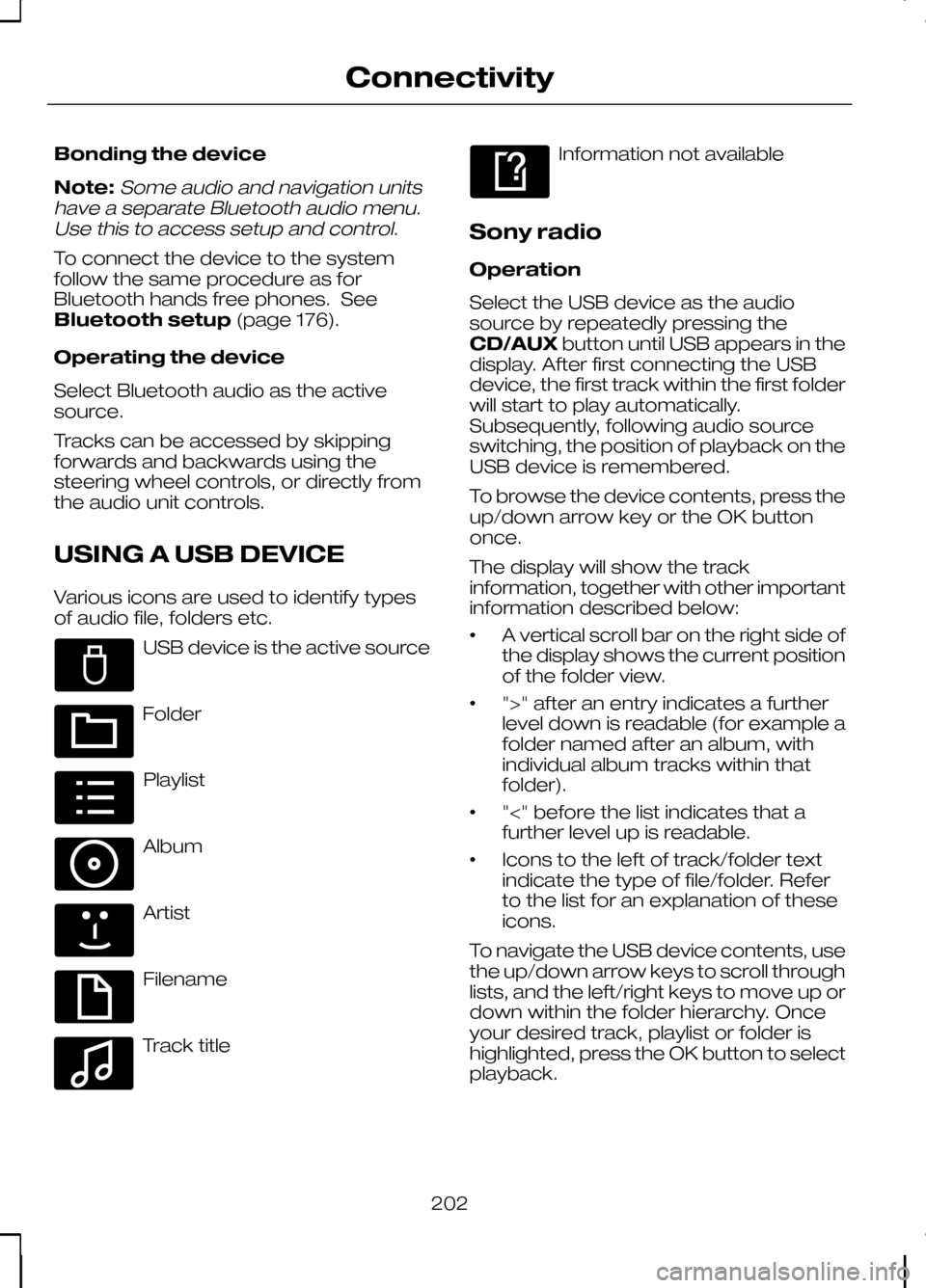
Various icons are used to identify types
of audio file, folders etc. USB device is the active source
Folder
Playlist
Album
Artist
Filename
Track title Information not available
Sony radio
Operation
Select the USB device as the audio
source by repeatedly pressing the
CD/AUX button until USB appears in the
display. After first connecting the USB
device, the first track within the first folder
will start to play automatically.
Subsequently, following audio source
switching, the position of playback on the
USB device is remembered.
To browse the device contents, press the
up/down arrow key or the OK button
once.
The display will show the track
information, together with other important
information described below:
• A vertical scroll bar on the right side of
the display shows the current position
of the folder view.
• ">" after an entry indicates a further
level down is readable (for example a
folder named after an album, with
individual album tracks within that
folder).
• "<" before the list indicates that a
further level up is readable.
• Icons to the left of track/folder text
indicate the type of file/folder. Refer
to the list for an explanation of these
icons.
To navigate the USB device contents, use
the up/down arrow keys to scroll through
lists, and the left/right keys to move up or
down within the folder hierarchy. Once
your desired track, playlist or folder is
highlighted, press the OK button to select
playback.
202
ConnectivityE100029 E100022 E100023 E100024 E100025 E100026 E100027 E100028
Page 207 of 226
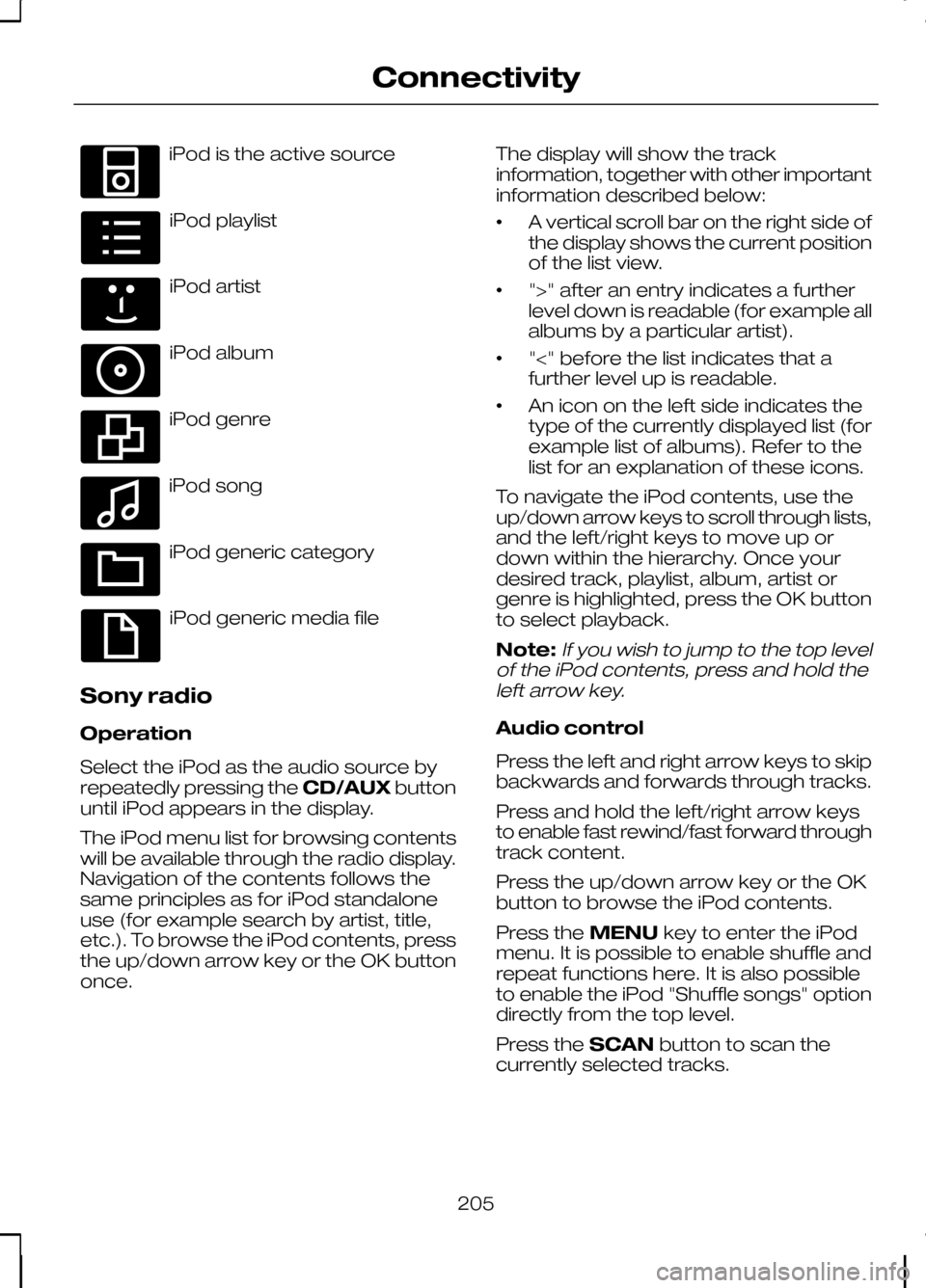
iPod is the active source
iPod playlist
iPod artist
iPod album
iPod genre
iPod song
iPod generic category
iPod generic media file
Sony radio
Operation
Select the iPod as the audio source by
repeatedly pressing the CD/AUXbutton
until iPod appears in the display.
The iPod menu list for browsing contents
will be available through the radio display.
Navigation of the contents follows the
same principles as for iPod standalone
use (for example search by artist, title,
etc.). To browse the iPod contents, press
the up/down arrow key or the OK button
once. The display will show the track
information, together with other important
information described below:
•
A vertical scroll bar on the right side of
the display shows the current position
of the list view.
• ">" after an entry indicates a further
level down is readable (for example all
albums by a particular artist).
• "<" before the list indicates that a
further level up is readable.
• An icon on the left side indicates the
type of the currently displayed list (for
example list of albums). Refer to the
list for an explanation of these icons.
To navigate the iPod contents, use the
up/down arrow keys to scroll through lists,
and the left/right keys to move up or
down within the hierarchy. Once your
desired track, playlist, album, artist or
genre is highlighted, press the OK button
to select playback.
Note:If you wish to jump to the top level
of the iPod contents, press and hold the left arrow key.
Audio control
Press the left and right arrow keys to skip
backwards and forwards through tracks.
Press and hold the left/right arrow keys
to enable fast rewind/fast forward through
track content.
Press the up/down arrow key or the OK
button to browse the iPod contents.
Press the MENUkey to enter the iPod
menu. It is possible to enable shuffle and
repeat functions here. It is also possible
to enable the iPod "Shuffle songs" option
directly from the top level.
Press the SCANbutton to scan the
currently selected tracks.
205
ConnectivityE100030 E100031 E100032 E100033 E100034 E100035 E100036 E100037
Page 211 of 226
GETTING STARTED
CAUTION
Using the system with the engine off
will drain the battery.
Note:You will be charged when sending
and receiving text messages.
Note:Refer to your phone handbook for
all phone functions and operation.
Note:Keep the activation code (printed
on the installation guide) in a safe place.
Note:Retain the activation text message
in your mobile phone inbox.
Compatibility of phones CAUTION
As no common agreement exists,
mobile phone manufacturers are able
to implement a variety of profiles in
their Bluetooth devices. Because of this,
an incompatibility can occur between the
phone and hands-free system, which in
some cases may significantly degrade the
system performance. To avoid this
situation, only recommended phones
should be used. Please visit the website
www.ford-mobile-connectivity.com for
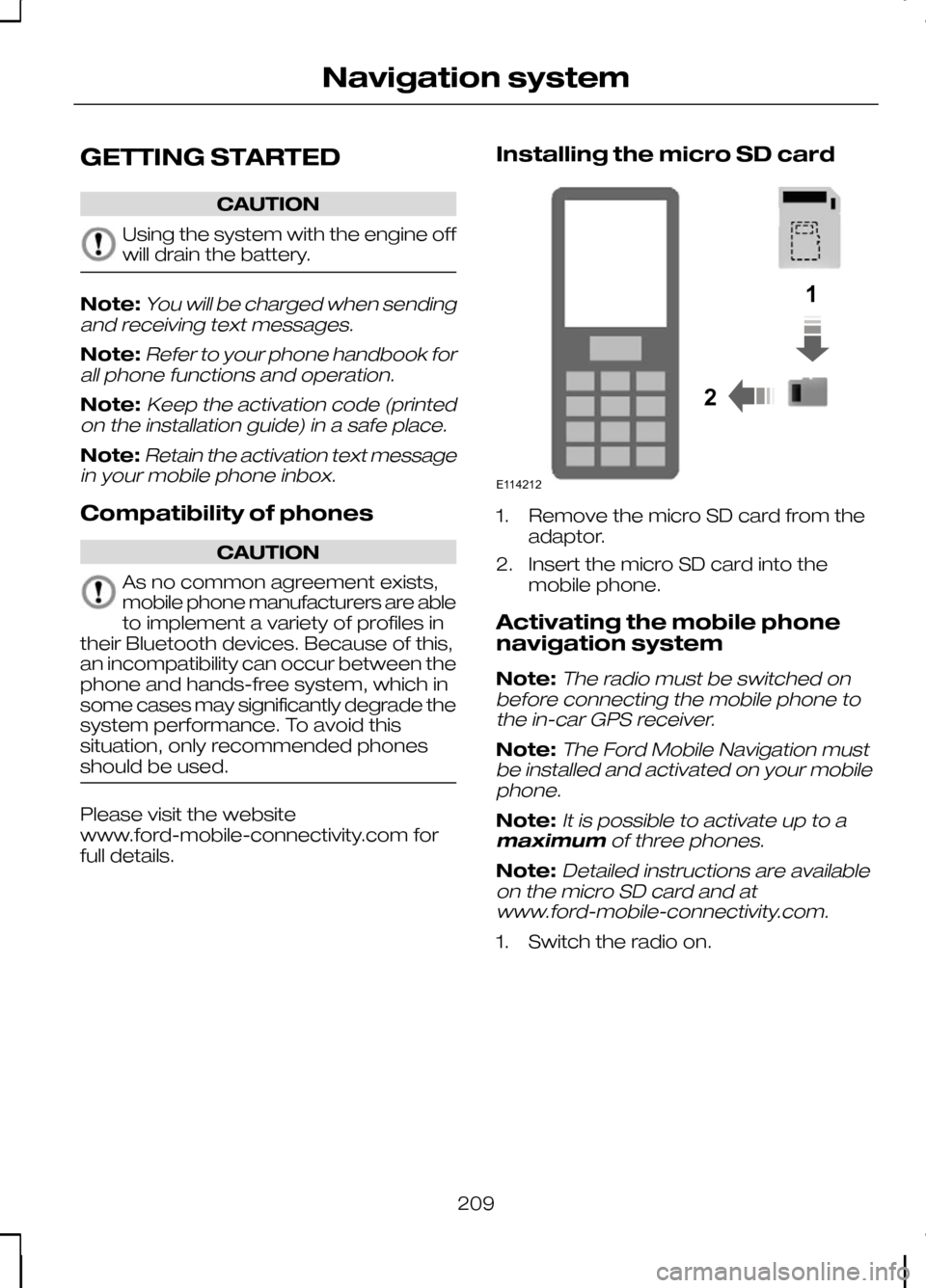
full details. Installing the micro SD card 1. Remove the micro SD card from the
adaptor.
2. Insert the micro SD card into the mobile phone.
Activating the mobile phone
navigation system
Note:
The radio must be switched on
before connecting the mobile phone to the in-car GPS receiver.
Note:The Ford Mobile Navigation must
be installed and activated on your mobile phone.
Note:It is possible to activate up to a
maximum of three phones.
Note:Detailed instructions are available
on the micro SD card and at www.ford-mobile-connectivity.com.
1. Switch the radio on.
209
Navigation system12E114212
Page 214 of 226
ELECTROMAGNETIC
COMPATIBILITY
WARNINGS
Your vehicle has been tested and
certified to European legislations
relating to electromagnetic
compatibility (2004/104/EC). It is your
responsibility to ensure that any
equipment you have fitted complies with
applicable local legislations. Have any
equipment fitted by properly trained
technicians. WARNINGS
Radio frequency (RF) transmitter
equipment (e.g. cellular telephones,
amateur radio transmitters etc.) may
only be fitted to your vehicle if they comply
with the parameters shown in the table
below. There are no special provisions or
conditions for installations or use. Do not mount any transceiver,
microphones, speakers, or any
other item in the deployment path
of the airbag system. Do not fasten antenna cables to
original vehicle wiring, fuel pipes and
brake pipes.
212
AppendicesE114220