Start FORD KUGA 2010 1.G Owner's Manual
[x] Cancel search | Manufacturer: FORD, Model Year: 2010, Model line: KUGA, Model: FORD KUGA 2010 1.GPages: 226, PDF Size: 8.07 MB
Page 74 of 226
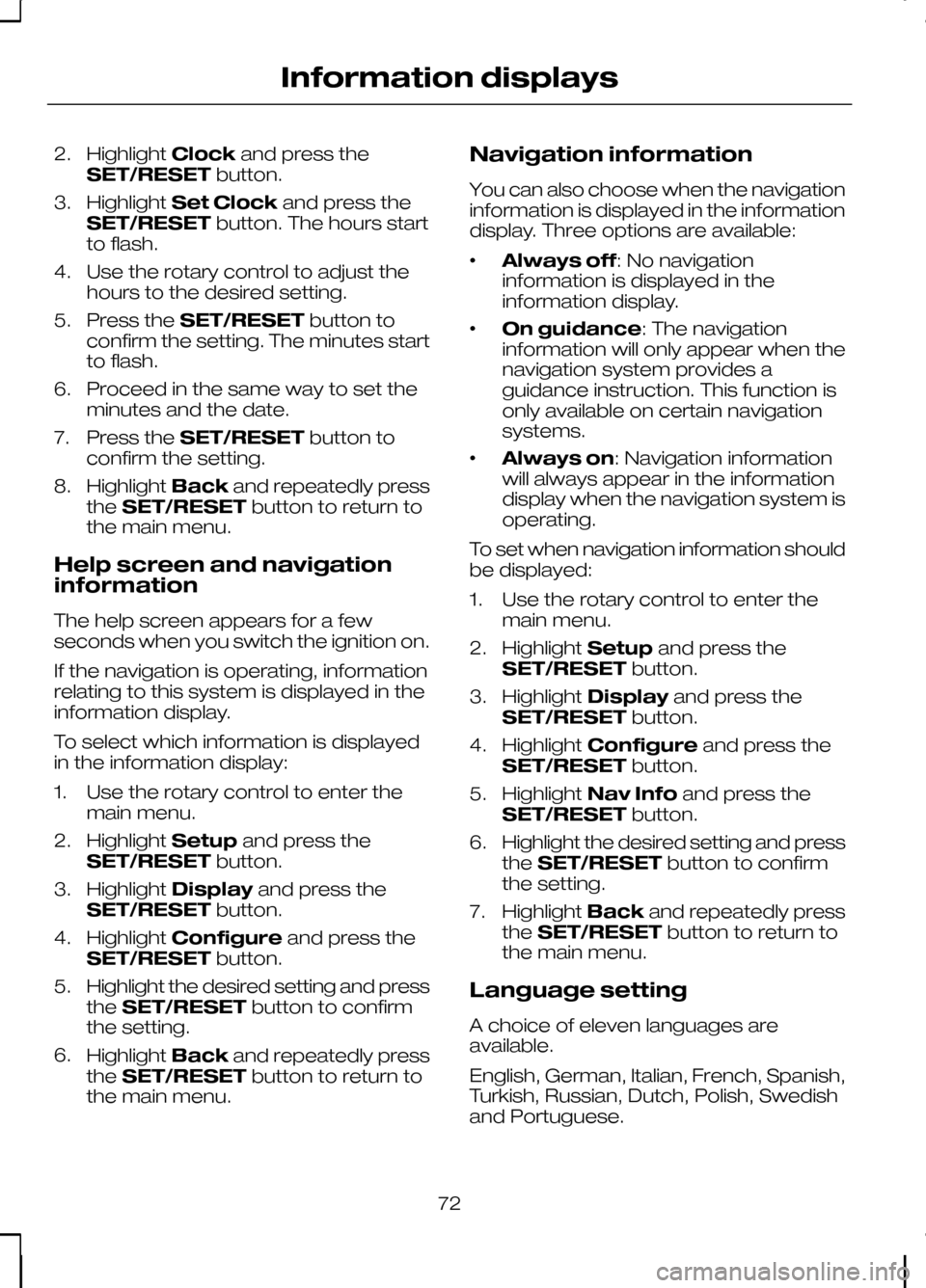
2.
Highlight Clockand press the
SET/RESET button.
3. Highlight Set Clock and press the
SET/RESET button. The hours start
to flash.
4. Use the rotary control to adjust the hours to the desired setting.
5. Press the SET/RESET button to
confirm the setting. The minutes start
to flash.
6. Proceed in the same way to set the minutes and the date.
7. Press the SET/RESET button to
confirm the setting.
8. Highlight Backand repeatedly press
the SET/RESET button to return to
the main menu.
Help screen and navigation
information
The help screen appears for a few
seconds when you switch the ignition on.
If the navigation is operating, information
relating to this system is displayed in the
information display.
To select which information is displayed
in the information display:
1. Use the rotary control to enter the main menu.
2. Highlight Setupand press the
SET/RESET button.
3. Highlight Display and press the
SET/RESET button.
4. Highlight Configure and press the
SET/RESET button.
5. Highlight the desired setting and press
the SET/RESET button to confirm
the setting.
6. Highlight Backand repeatedly press
the SET/RESET button to return to
the main menu. Navigation information
You can also choose when the navigation
information is displayed in the information
display. Three options are available:
•
Always off: No navigation
information is displayed in the
information display.
• On guidance: The navigation
information will only appear when the
navigation system provides a
guidance instruction. This function is
only available on certain navigation
systems.
• Always on: Navigation information
will always appear in the information
display when the navigation system is
operating.
To set when navigation information should
be displayed:
1. Use the rotary control to enter the main menu.
2. Highlight Setupand press the
SET/RESET button.
3. Highlight Display and press the
SET/RESET button.
4. Highlight Configure and press the
SET/RESET button.
5. Highlight Nav Info and press the
SET/RESET button.
6. Highlight the desired setting and press
the SET/RESET button to confirm
the setting.
7. Highlight Backand repeatedly press
the SET/RESET button to return to
the main menu.
Language setting
A choice of eleven languages are
available.
English, German, Italian, French, Spanish,
Turkish, Russian, Dutch, Polish, Swedish
and Portuguese.
72
Information displays
Page 77 of 226
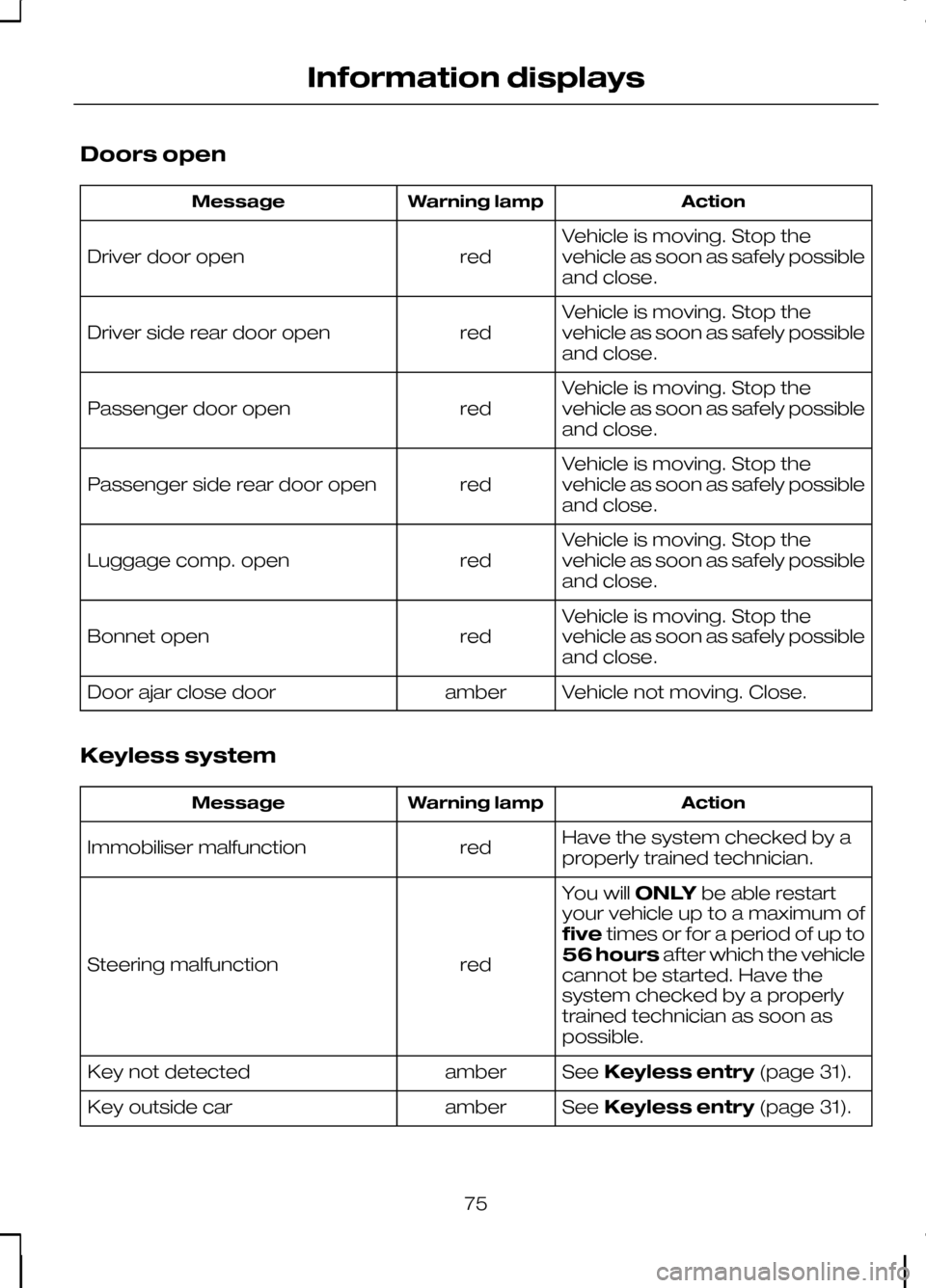
Doors open
Action
Warning lamp
Message
Vehicle is moving. Stop the
vehicle as soon as safely possible
and close.
red
Driver door open
Vehicle is moving. Stop the
vehicle as soon as safely possible
and close.
red
Driver side rear door open
Vehicle is moving. Stop the
vehicle as soon as safely possible
and close.
red
Passenger door open
Vehicle is moving. Stop the
vehicle as soon as safely possible
and close.
red
Passenger side rear door open
Vehicle is moving. Stop the
vehicle as soon as safely possible
and close.
red
Luggage comp. open
Vehicle is moving. Stop the
vehicle as soon as safely possible
and close.
red
Bonnet open
Vehicle not moving. Close.
amber
Door ajar close door
Keyless system Action
Warning lamp
Message
Have the system checked by a
properly trained technician.
red
Immobiliser malfunction
You willONLYbe able restart
your vehicle up to a maximum of
five times or for a period of up to
56 hours after which the vehicle
cannot be started. Have the
system checked by a properly
trained technician as soon as
possible.
red
Steering malfunction
SeeKeyless entry (page 31).
amber
Key not detected
SeeKeyless entry (page 31).
amber
Key outside car
75
Information displays
Page 78 of 226
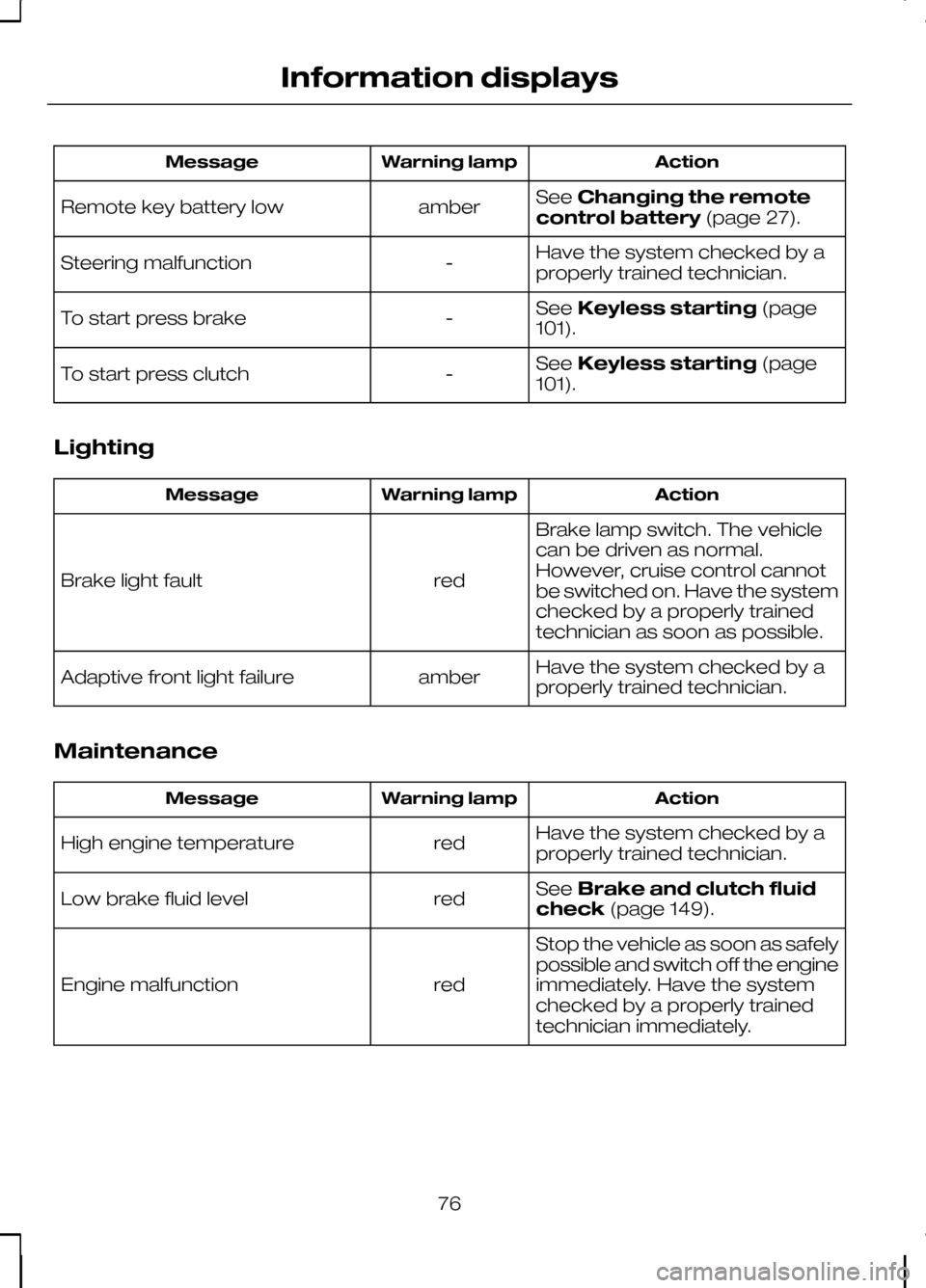
Action
Warning lamp
Message
SeeChanging the remote
control battery (page 27).
amber
Remote key battery low
Have the system checked by a
properly trained technician.
-
Steering malfunction
SeeKeyless starting (page
101).
-
To start press brake
SeeKeyless starting (page
101).
-
To start press clutch
Lighting Action
Warning lamp
Message
Brake lamp switch. The vehicle
can be driven as normal.
However, cruise control cannot
be switched on. Have the system
checked by a properly trained
technician as soon as possible.
red
Brake light fault
Have the system checked by a
properly trained technician.
amber
Adaptive front light failure
Maintenance Action
Warning lamp
Message
Have the system checked by a
properly trained technician.
red
High engine temperature
SeeBrake and clutch fluid
check (page 149).
red
Low brake fluid level
Stop the vehicle as soon as safely
possible and switch off the engine
immediately. Have the system
checked by a properly trained
technician immediately.
red
Engine malfunction
76
Information displays
Page 80 of 226
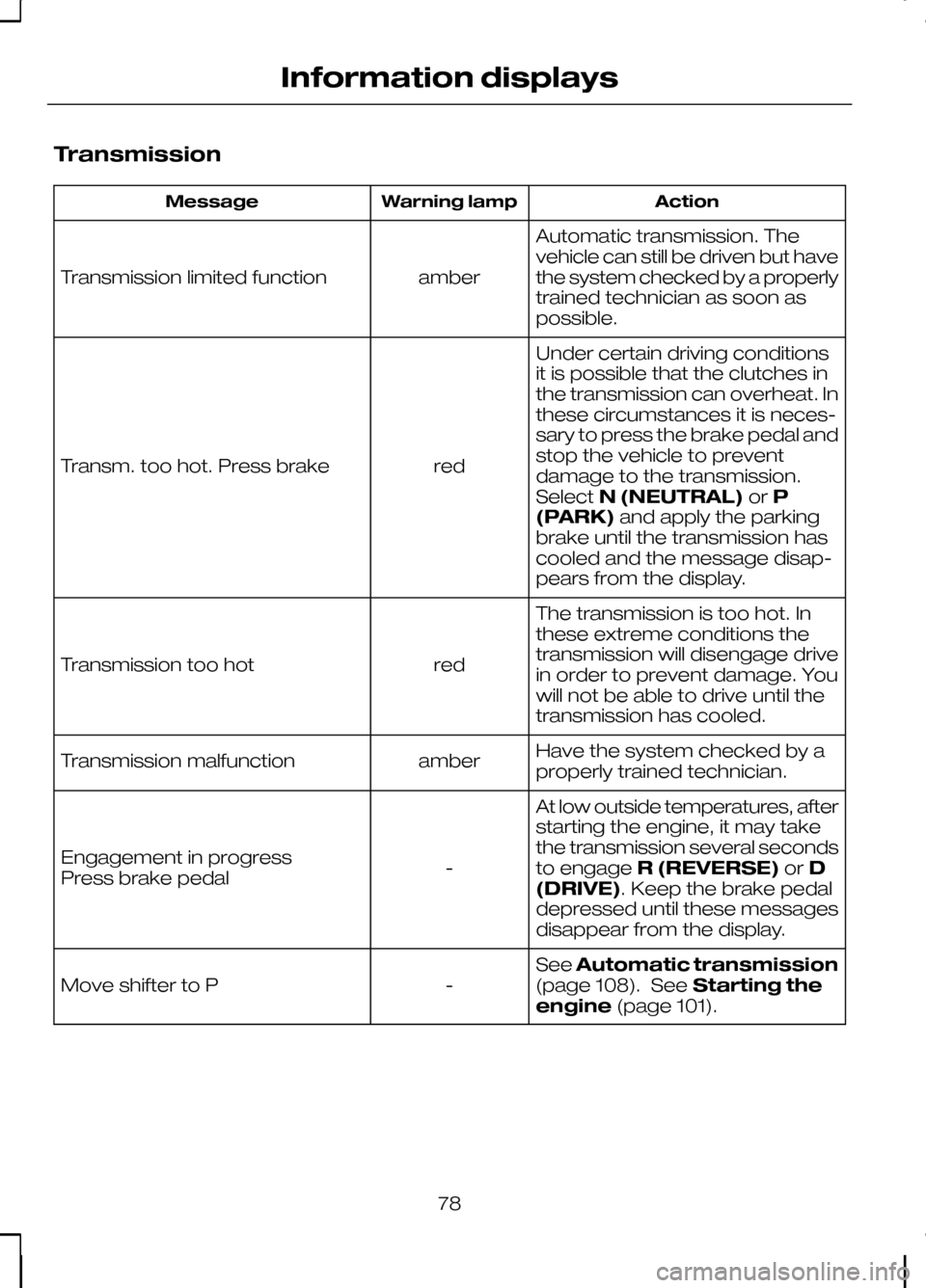
Transmission
Action
Warning lamp
Message
Automatic transmission. The
vehicle can still be driven but have
the system checked by a properly
trained technician as soon as
possible.
amber
Transmission limited function
Under certain driving conditions
it is possible that the clutches in
the transmission can overheat. In
these circumstances it is neces-
sary to press the brake pedal and
stop the vehicle to prevent
red
Transm. too hot. Press brake
damage to the transmission.
SelectN (NEUTRAL) orP
(PARK) and apply the parking
brake until the transmission has
cooled and the message disap-
pears from the display.
The transmission is too hot. In
these extreme conditions the
transmission will disengage drive
in order to prevent damage. You
will not be able to drive until the
transmission has cooled.
red
Transmission too hot
Have the system checked by a
properly trained technician.
amber
Transmission malfunction
At low outside temperatures, after
starting the engine, it may take
the transmission several seconds
to engageR (REVERSE) orD
(DRIVE). Keep the brake pedal
depressed until these messages
disappear from the display.
-
Engagement in progress
Press brake pedal
SeeAutomatic transmission
(page 108). See Starting the
engine (page 101).
-
Move shifter to P
78
Information displays
Page 88 of 226
HEATED WINDOWS AND
MIRRORS
Heated windows
Use the heated windows to defrost or
demist the windscreen or rear window.
Note:The heated windows operate only
when the engine is running.
Heated windscreen Heated rear window
Heated exterior mirrors
Electric exterior mirrors are fitted with a
heating element that will defrost or demist
the mirror glass. They will switch on
automatically when you switch the heated
rear window on.
AUXILIARY HEATER
Parking heater
WARNINGS
The parking heater must not be
operated at filling stations, near
sources of combustible vapours or
dust or in enclosed spaces. The parking heater should be
switched on for approximately 10
minutes at least once a month all
year round. This prevents the water pump
and heater motor from seizing. Note:
The parking heater will only
operate if there is at least 7.5 litres (1.6 gallons) of fuel in the fuel tank and theambient temperature is below 15°C(59°F). The heater will not operate if thebattery is low.
Note:The heating depends on the
outside air temperature.
Note:When the parking heater is
activated, exhaust fumes may come from under the sides of the vehicle. This isnormal.
Note:On vehicles with manual climate
control the heating of the vehicle interior is dependent on the temperature, airdistribution and blower control settings.
The parking heater operates
independently of the vehicle heater by
heating the engine’s coolant circuit. It is
fed from the vehicle fuel tank. You can
also use it while the vehicle is in motion to
help the vehicle heater warm up the
interior more quickly.
Used properly, the parking heater
provides the following benefits:
• It preheats the interior of the vehicle.
• It keeps the windows clear of ice in
the event of frost and prevents
condensation.
• It avoids cold starts and allows the
engine to reach operating
temperature sooner.
To prevent the battery from discharging:
• Once the parking heater has
performed one heating cycle, the next
programmed heating cycle will only
be carried out if you have started the
vehicle’s engine in between.
• After a heating cycle, drive the vehicle
for at least the period of the heating
cycle.
86
Climate controlE72506 E72507
Page 90 of 226
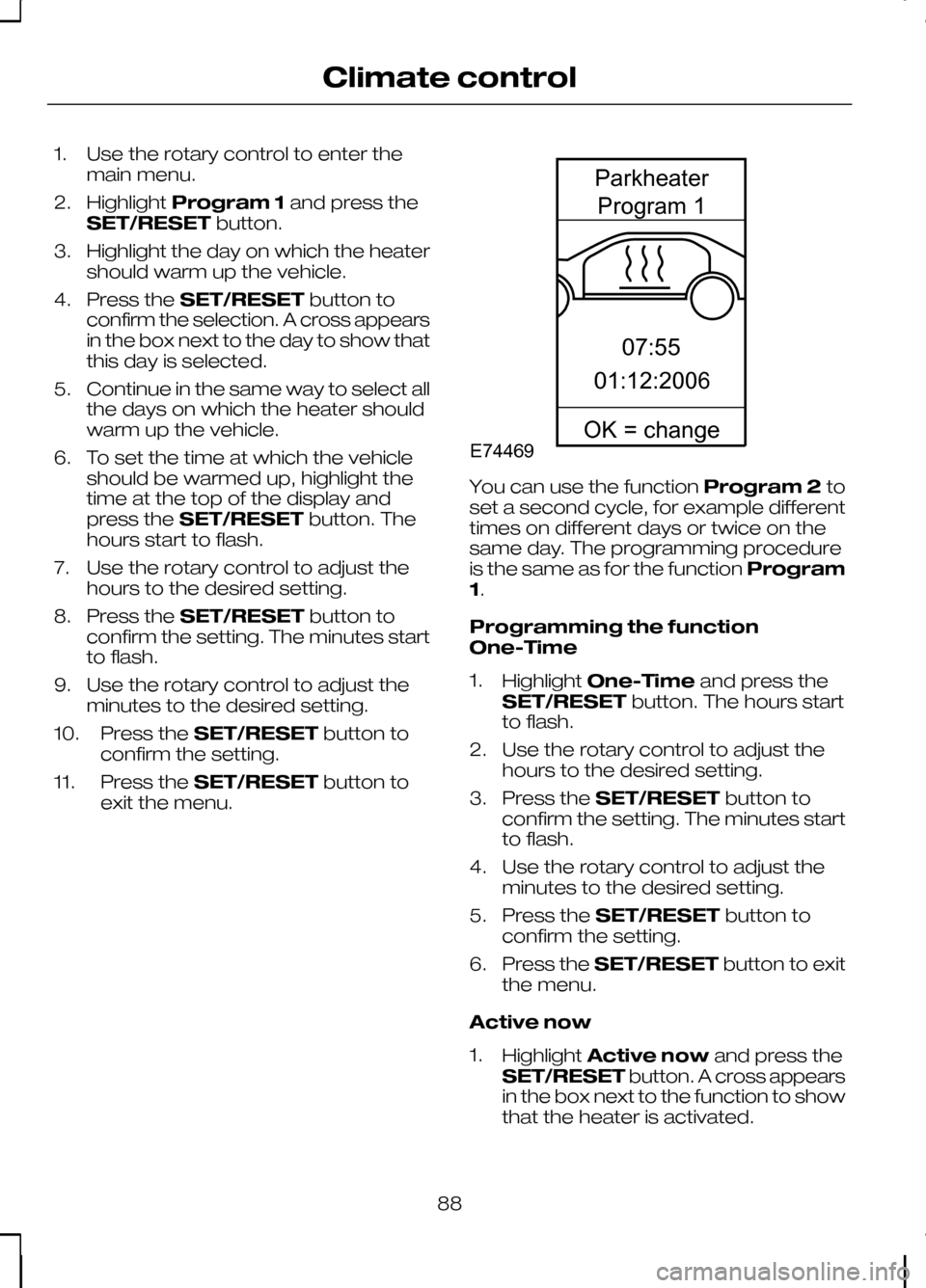
1. Use the rotary control to enter the
main menu.
2. Highlight Program 1 and press the
SET/RESET button.
3. Highlight the day on which the heater should warm up the vehicle.
4. Press the SET/RESET button to
confirm the selection. A cross appears
in the box next to the day to show that
this day is selected.
5. Continue in the same way to select all the days on which the heater should
warm up the vehicle.
6. To set the time at which the vehicle should be warmed up, highlight the
time at the top of the display and
press the SET/RESET button. The
hours start to flash.
7. Use the rotary control to adjust the hours to the desired setting.
8. Press the SET/RESET button to
confirm the setting. The minutes start
to flash.
9. Use the rotary control to adjust the minutes to the desired setting.
10. Press the SET/RESET button to
confirm the setting.
11. Press the SET/RESET button to
exit the menu. You can use the function
Program 2to
set a second cycle, for example different
times on different days or twice on the
same day. The programming procedure
is the same as for the function Program
1.
Programming the function
One-Time
1. Highlight One-Time and press the
SET/RESET button. The hours start
to flash.
2. Use the rotary control to adjust the hours to the desired setting.
3. Press the SET/RESET button to
confirm the setting. The minutes start
to flash.
4. Use the rotary control to adjust the minutes to the desired setting.
5. Press the SET/RESET button to
confirm the setting.
6. Press the SET/RESET button to exit
the menu.
Active now
1. Highlight Active now and press the
SET/RESET button. A cross appears
in the box next to the function to show
that the heater is activated.
88
Climate controlE7446907:5501:12:2006ParkheaterProgram1OK=change
Page 97 of 226
The heated front seats are operated by
rotary controls in the instrument panel.
For item location: See
Quick start(page
8).
The maximum temperature is reached
after five or six minutes. It is regulated
thermostatically.
The seat heating will operate only when
the ignition is on.
95
Seats
Page 103 of 226
GENERAL INFORMATION
General points on starting
If the battery has been disconnected the
vehicle may exhibit some unusual driving
characteristics for approx. 8 kilometres
(5 miles) after reconnecting the battery.
This is because the engine management
system must realign itself with the engine.
Any unusual driving characteristics during
this period may be disregarded.
Starting the engine by towing
or pushing
WARNING
To prevent damage you must not
push or tow start your vehicle. Use
booster cables and a booster
battery. See Using booster cables
(page 154). KEYLESS STARTING
WARNINGS
The keyless starting system may not
function if the key is close to metal
objects or electronic devices such
as mobile phones. Always check that the steering
wheel lock is deactivated before
attempting to move your vehicle.
Note:A valid passive key must be
located inside the vehicle to switch the ignition on and start the engine.
Note:To start your engine you must also
fully depress the brake or clutch pedal, depending on the transmission fitted. Ignition on
Press the start button once. All electrical
circuits are operational, warning lamps
and indicators illuminate.
Starting with automatic
transmission
Note:
Releasing the brake pedal during
engine start will stop the engine cranking and return to ignition on.
1. Make sure the transmission is in Por
N.
2. Fully depress the brake pedal.
3. Briefly press the start button.
Starting with manual
transmission
Note:
Releasing the clutch pedal during
engine start will stop the engine cranking and return to ignition on.
1. Fully depress the clutch pedal.
2. Briefly press the start button.
Starting a diesel engine
Note:
Engine cranking will not
commence until the engine glow plug cycle has been completed. This may takeseveral seconds in extremely coldconditions.
Note:Continue to press the clutch or
brake pedal until engine cranking begins.
101
Starting the engineE85766
Page 104 of 226
Failure to start
The passive starting system will not
function if:
•
The passive key frequencies are
jammed.
• The passive key battery is flat.
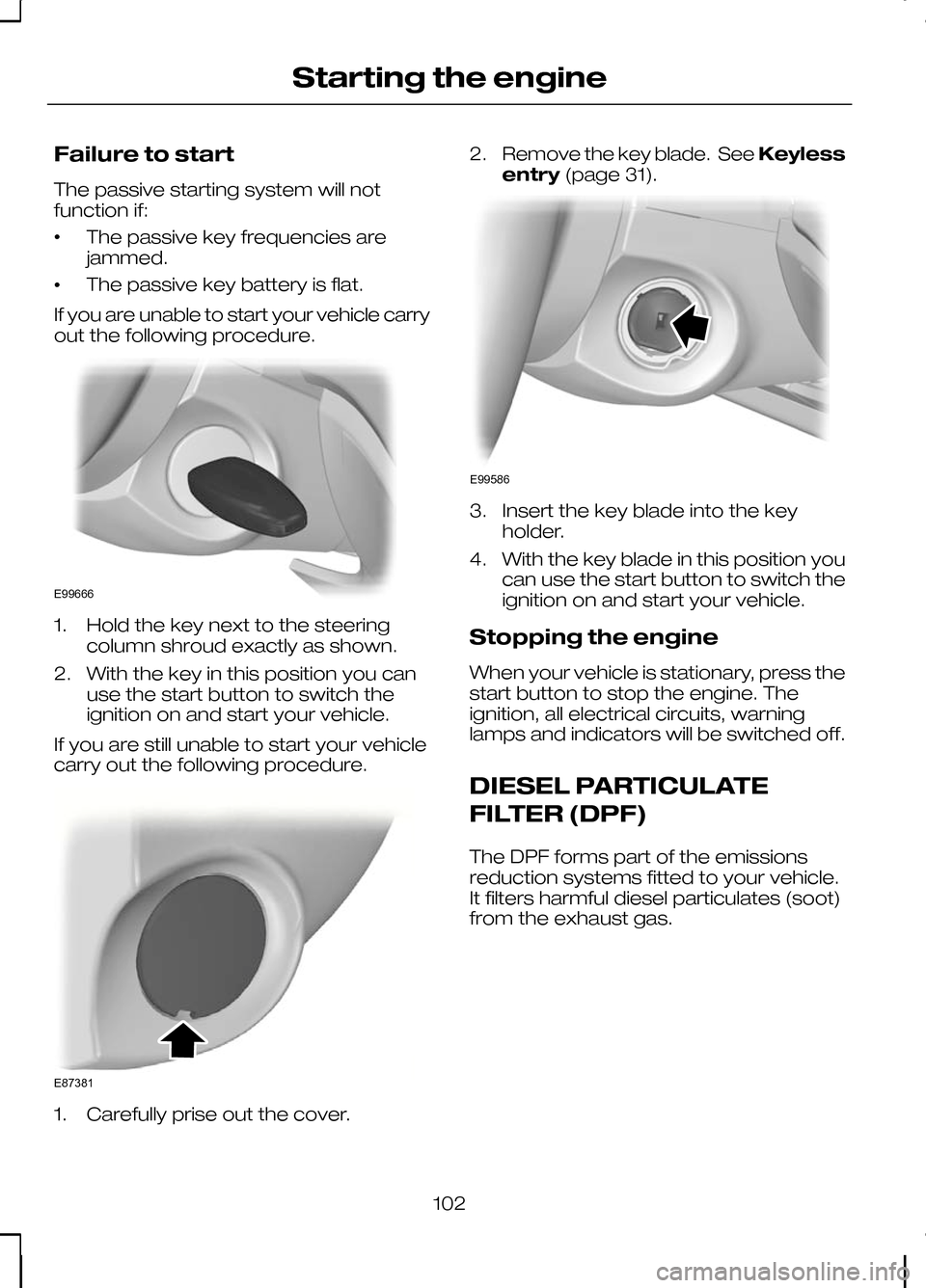
If you are unable to start your vehicle carry
out the following procedure. 1. Hold the key next to the steering
column shroud exactly as shown.
2. With the key in this position you can use the start button to switch the
ignition on and start your vehicle.
If you are still unable to start your vehicle
carry out the following procedure. 1. Carefully prise out the cover. 2.
Remove the key blade. See Keyless
entry (page 31). 3. Insert the key blade into the key
holder.
4. With the key blade in this position you can use the start button to switch the
ignition on and start your vehicle.
Stopping the engine
When your vehicle is stationary, press the
start button to stop the engine. The
ignition, all electrical circuits, warning
lamps and indicators will be switched off.
DIESEL PARTICULATE
FILTER (DPF)
The DPF forms part of the emissions
reduction systems fitted to your vehicle.
It filters harmful diesel particulates (soot)
from the exhaust gas.
102
Starting the engineE99666 E87381 E99586
Page 105 of 226
Regeneration
WARNING
Do not park or idle your vehicle over
dry leaves, dry grass or other
combustible materials. The DPF
regeneration process creates very high
exhaust gas temperatures and the
exhaust will radiate a considerable
amount of heat during and after DPF
regeneration, and after you have switched
the engine off. This is a potential fire
hazard. CAUTION
Avoid running out of fuel.
Note:After you have switched your
engine off the fans may continue to run for a short period of time.
Unlike a normal filter which requires
periodic replacement, the DPF has been
designed to regenerate, or clean itself to
maintain operating efficiency. The
regeneration process takes place
automatically. However, some driving
conditions mean that you may need to
support the regeneration process.
If you drive only short distances or your
journeys contain frequent stopping and
starting, where there is increased
acceleration and deceleration, occasional
trips with the following conditions could
assist the regeneration process:
• Drive your vehicle at a constant speed,
preferably on a main road or
motorway, for up to 20 minutes.
• Avoid prolonged idling and always
observe speed limits and road
conditions. •
Do not switch off the ignition.
• Use a lower gear than normal to
maintain a higher engine speed during
this journey, where appropriate.
SWITCHING OFF THE
ENGINE
Vehicles with a turbocharger CAUTION
Do not switch the engine off when it
is running at high speed. If you do,
the turbocharger will continue
running after the engine oil pressure has
dropped to zero. This will lead to
premature turbocharger bearing wear. Release the accelerator pedal. Wait until
the engine has reached idle speed and
then switch it off.
103
Starting the engine