Start FORD KUGA 2010 1.G Owner's Guide
[x] Cancel search | Manufacturer: FORD, Model Year: 2010, Model line: KUGA, Model: FORD KUGA 2010 1.GPages: 226, PDF Size: 8.07 MB
Page 108 of 226
CAUTIONS
Do not push-start or tow-start your
vehicle. Use booster cables. See
Using booster cables
(page 154).Do not switch the ignition off when
driving.
REFUELLING
CAUTION
Do not attempt to start the engine if
you have filled the fuel tank with the
incorrect fuel. This could damage the
engine. Have the system checked by a
properly trained technician immediately. FUEL CONSUMPTION
The CO2 and fuel consumption figures
are derived from laboratory tests
according to EEC Directive 80/1268/EEC
and subsequent amendments and are
carried out by all vehicle manufacturers.
They are intended as a comparison
between makes and models of vehicles.
They are not intended to represent the
real world fuel consumption you may get
from your vehicle. Real world fuel
consumption is governed by many factors
including; driving style, high speed driving,
stop/start driving, air conditioning usage,
the accessories fitted and towing etc.
Your Ford dealer can give you advice on
improving your fuel consumption.
TECHNICAL SPECIFICATIONS
6-speed manual transmission - 2WD
Fuel consumption figures CO2 emis-
sions
Combined
Extra-urban
Urban
Variant g/km
l/100 km
(mpg)
l/100 km
(mpg)
l/100 km
(mpg)
159
6.1 (46.3)
5.1 (55.4)
7.7 (36.7)
2.0L Duratorq-TDCi stage
IV
156
5.9 (47.9)
5.0 (56.5)
7.5 (37.7)
2.0L Duratorq-TDCi stage
V
106
Fuel and refuelling
Page 110 of 226
MANUAL TRANSMISSION
CAUTION
Do not engage reverse gear when
the vehicle is moving. This can cause
damage to the transmission.
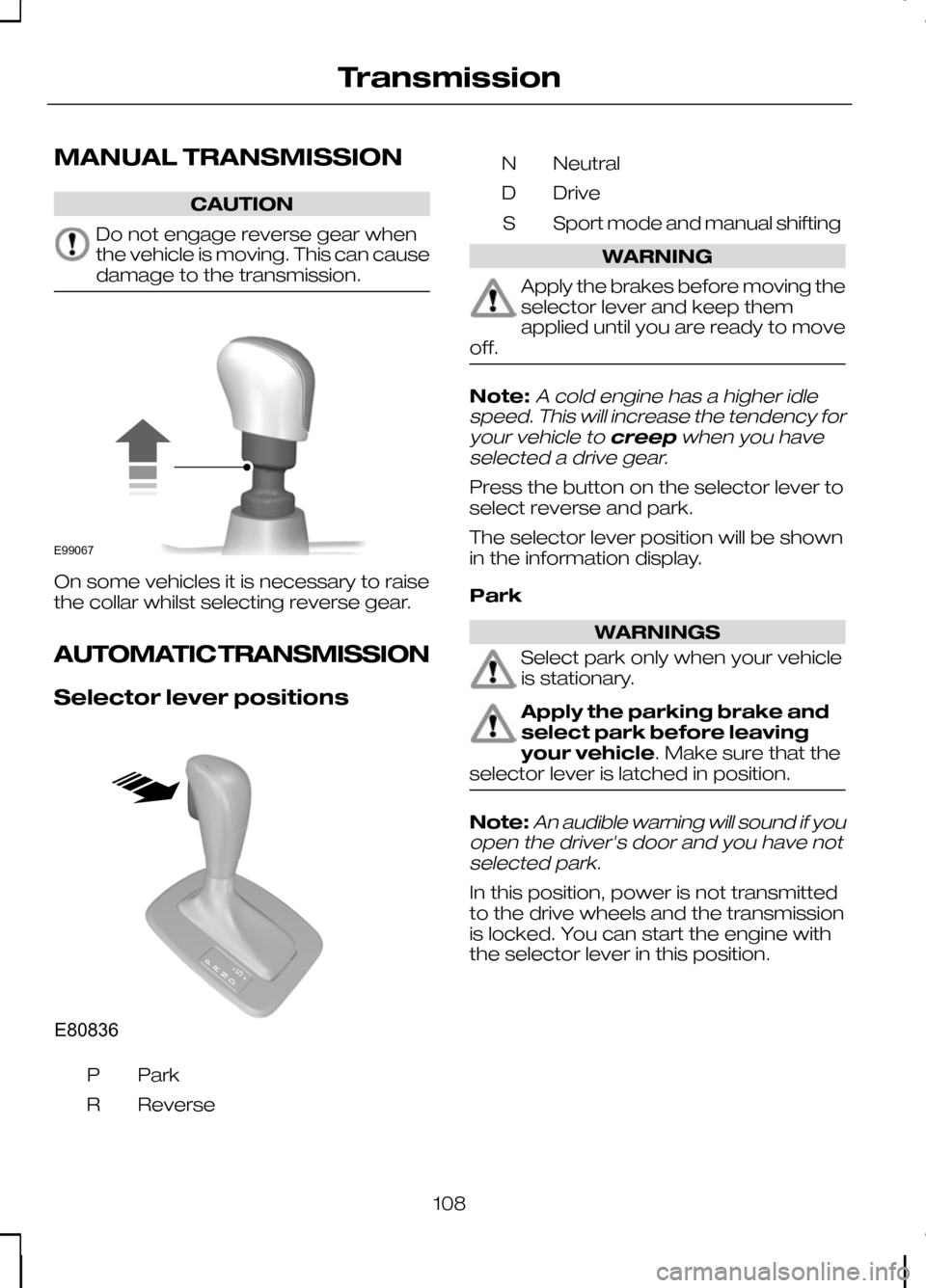
On some vehicles it is necessary to raise
the collar whilst selecting reverse gear.
AUTOMATIC TRANSMISSION
Selector lever positions
ParkP
Reverse
R Neutral
N
Drive
D
Sport mode and manual shifting
S WARNING
Apply the brakes before moving the
selector lever and keep them
applied until you are ready to move
off. Note:A cold engine has a higher idle
speed. This will increase the tendency for
your vehicle to creepwhen you have
selected a drive gear.
Press the button on the selector lever to
select reverse and park.
The selector lever position will be shown
in the information display.
Park WARNINGS
Select park only when your vehicle
is stationary.
Apply the parking brake and
select park before leaving
your vehicle. Make sure that the
selector lever is latched in position. Note:
An audible warning will sound if you
open the driver's door and you have not selected park.
In this position, power is not transmitted
to the drive wheels and the transmission
is locked. You can start the engine with
the selector lever in this position.
108
TransmissionE99067 E80836S
Page 111 of 226
Reverse
WARNING
Select reverse only when your
vehicle is stationary and the engine
is at idle speed.
Neutral
In this position, power is not transmitted
to the drive wheels but the transmission
is not locked. You can start the engine
with the selector lever in this position.
Drive
Select drive to shift automatically through
the forward gears.
The transmission will select the
appropriate gear for optimum
performance based on ambient
temperature, road gradient, vehicle load
and driver input.
Manual shifting - Vehicles with
a 5 speed transmission
WARNING
Do not hold the selector lever
permanently in – or +.
CAUTION
The transmission will automatically
downshift when the engine speed is
too low and upshift when too high.
Note:A shift will occur only when the
vehicle speed and the engine speed are appropriate.
Note:In Select mode the current gear
(1, 2, 3, 4 or 5) will be displayed on the instrument panel.
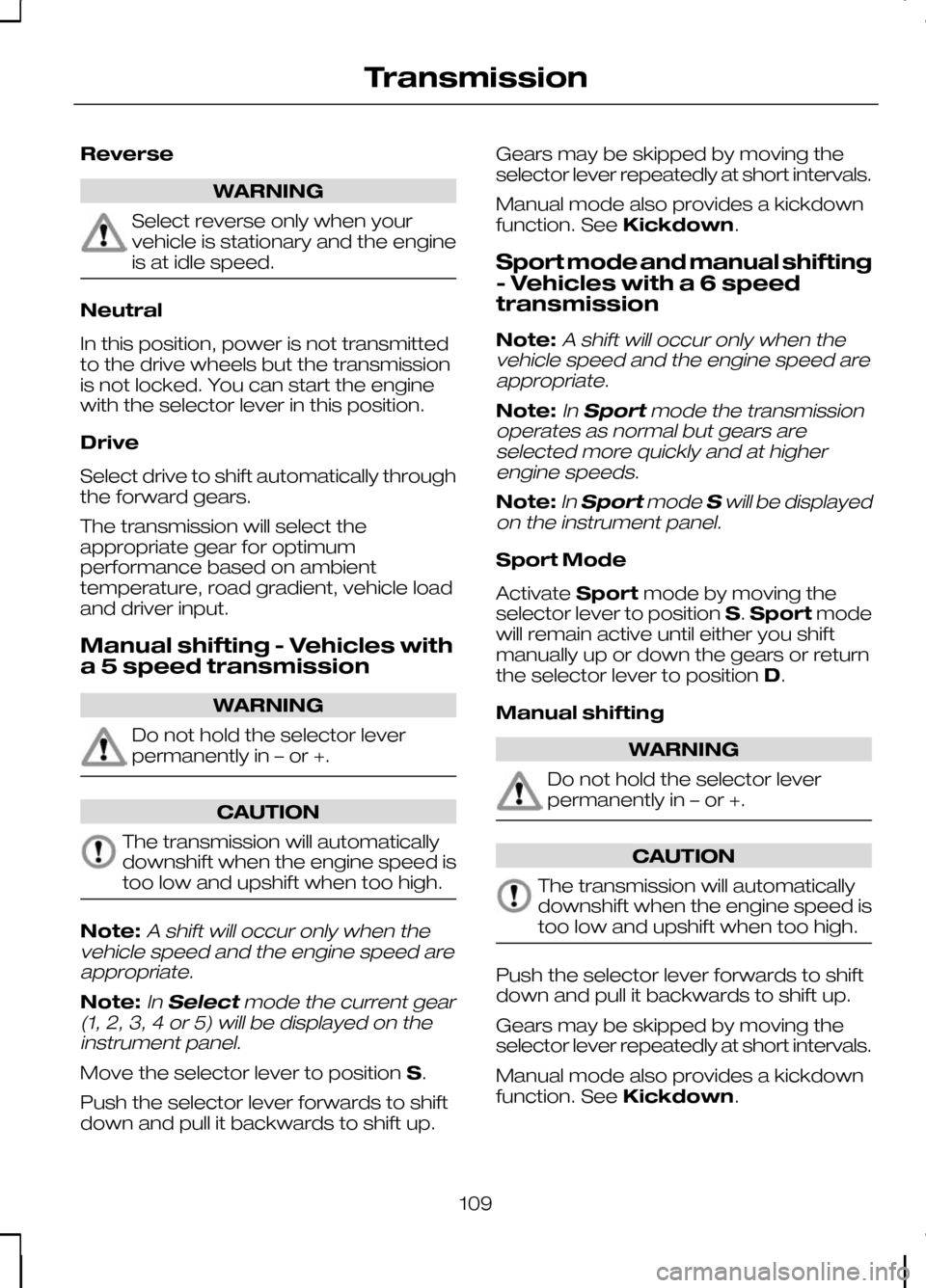
Move the selector lever to position S.
Push the selector lever forwards to shift
down and pull it backwards to shift up. Gears may be skipped by moving the
selector lever repeatedly at short intervals.
Manual mode also provides a kickdown
function. See
Kickdown.
Sport mode and manual shifting
- Vehicles with a 6 speed
transmission
Note:
A shift will occur only when the
vehicle speed and the engine speed are appropriate.
Note:In Sport mode the transmission
operates as normal but gears are selected more quickly and at higherengine speeds.
Note:In Sport modeSwill be displayed
on the instrument panel.
Sport Mode
Activate Sportmode by moving the
selector lever to position S.Sport mode
will remain active until either you shift
manually up or down the gears or return
the selector lever to position D.
Manual shifting WARNING
Do not hold the selector lever
permanently in – or +.
CAUTION
The transmission will automatically
downshift when the engine speed is
too low and upshift when too high.
Push the selector lever forwards to shift
down and pull it backwards to shift up.
Gears may be skipped by moving the
selector lever repeatedly at short intervals.
Manual mode also provides a kickdown
function. See
Kickdown.
109
Transmission
Page 115 of 226
PRINCIPLE OF OPERATION
Electronic stability programme
(ESP)
WARNING
ESP does not relieve you of your
responsibility to drive with due care
and attention.
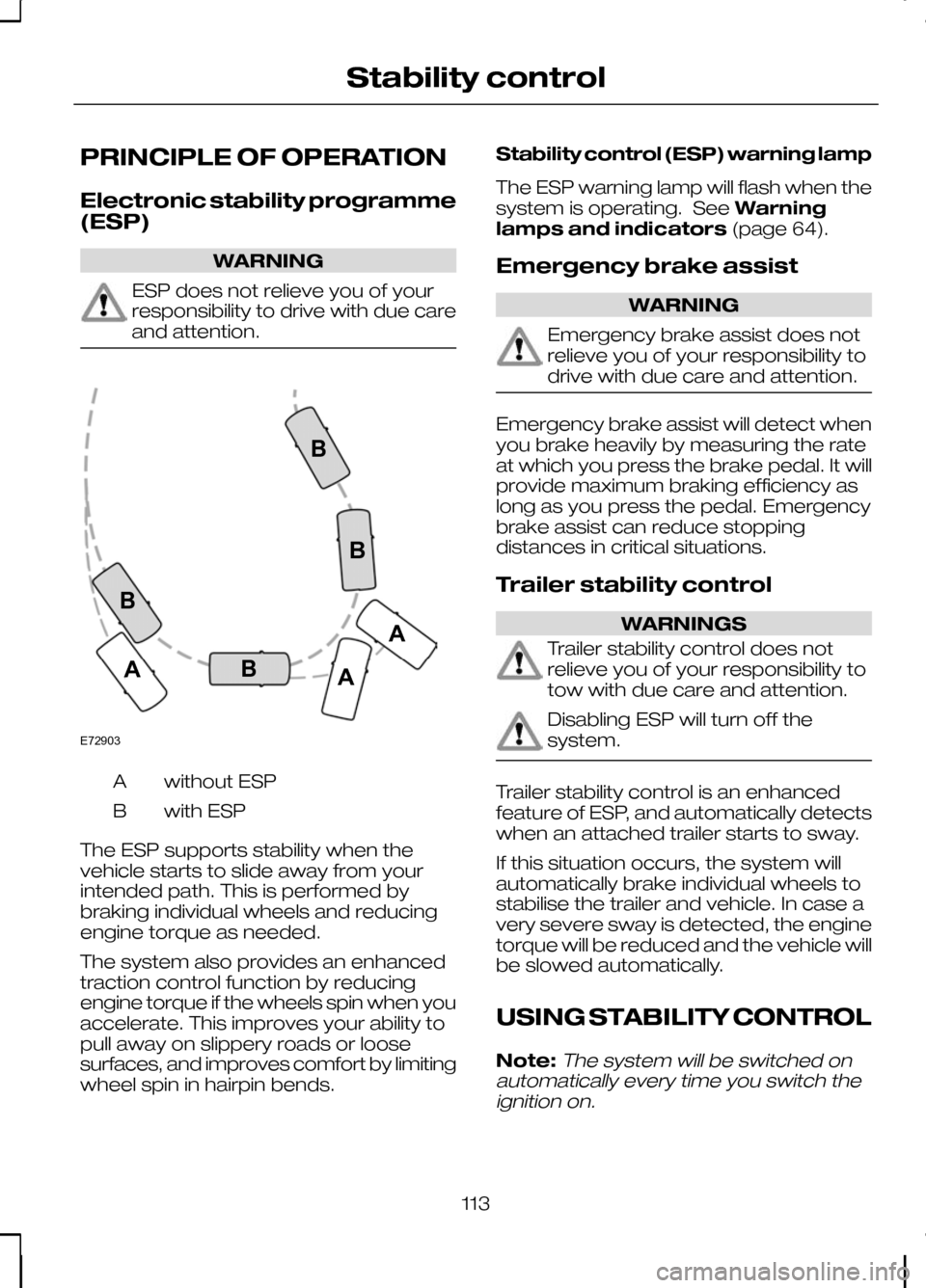
without ESP
A
with ESP
B
The ESP supports stability when the
vehicle starts to slide away from your
intended path. This is performed by
braking individual wheels and reducing
engine torque as needed.
The system also provides an enhanced
traction control function by reducing
engine torque if the wheels spin when you
accelerate. This improves your ability to
pull away on slippery roads or loose
surfaces, and improves comfort by limiting
wheel spin in hairpin bends. Stability control (ESP) warning lamp
The ESP warning lamp will flash when the
system is operating. See
Warning
lamps and indicators (page 64).
Emergency brake assist WARNING
Emergency brake assist does not
relieve you of your responsibility to
drive with due care and attention.
Emergency brake assist will detect when
you brake heavily by measuring the rate
at which you press the brake pedal. It will
provide maximum braking efficiency as
long as you press the pedal. Emergency
brake assist can reduce stopping
distances in critical situations.
Trailer stability control
WARNINGS
Trailer stability control does not
relieve you of your responsibility to
tow with due care and attention.
Disabling ESP will turn off the
system.
Trailer stability control is an enhanced
feature of ESP, and automatically detects
when an attached trailer starts to sway.
If this situation occurs, the system will
automatically brake individual wheels to
stabilise the trailer and vehicle. In case a
very severe sway is detected, the engine
torque will be reduced and the vehicle will
be slowed automatically.
USING STABILITY CONTROL
Note:The system will be switched on
automatically every time you switch the ignition on.
113
Stability controlE72903AAABBBB
Page 117 of 226
PRINCIPLE OF OPERATION
WARNING
The parking aid does not relieve you
of your responsibility to drive with
due care and attention.
CAUTIONS
Vehicles fitted with a trailer tow
module not approved by us may not
correctly detect obstacles.
The sensors may not detect objects
in heavy rain or other conditions that
cause disruptive reflections.
The sensors may not detect objects
with surfaces that absorb ultrasonic
waves.
The parking aid does not detect
obstacles moving away from the
vehicle. They will only be detected
shortly after they start to move towards
the vehicle again. Take particular care when reversing
with a tow ball arm or rear fitted
accessories e.g. a bicycle carrier, as
the rear parking aid will only indicate the
distance from the bumper to the obstacle. If you use a high pressure spray to
wash your vehicle, only spray the
sensors briefly from a distance not
less than 20 centimetres (8 inches). Note:On vehicles fitted with a tow ball
arm, the parking aid is deactivated automatically when any trailer lamps (orlighting boards) are connected to the13-pin socket via a trailer tow module wehave approved.
Note:Keep the sensors free from dirt,
ice and snow. Do not clean with sharp objects.
Note:The parking aid may emit false
tones if it detects a signal using the same frequency as the sensors or if the vehicleis fully laden.
Note:The outer sensors may detect the
side walls of a garage. If the distance between the outer sensor and the sidewall remains constant for three seconds,the tone will switch off. As you continue,the inner sensors will detect rearwardobjects.
USING THE PARKING AID
Switching the parking aid on
and off
Note:
The parking aid switches off
automatically when you start the engine or when you exceed 16 km/h (10 mph).
Note:The front and rear sensors are
always activated or deactivated together.
The parking aid is per default off. To
switch the parking aid on, press the switch
in the instrument panel or select reverse
gear.
The light in the switch illuminates when
the parking aid is activated.
To turn it off, press the switch again.
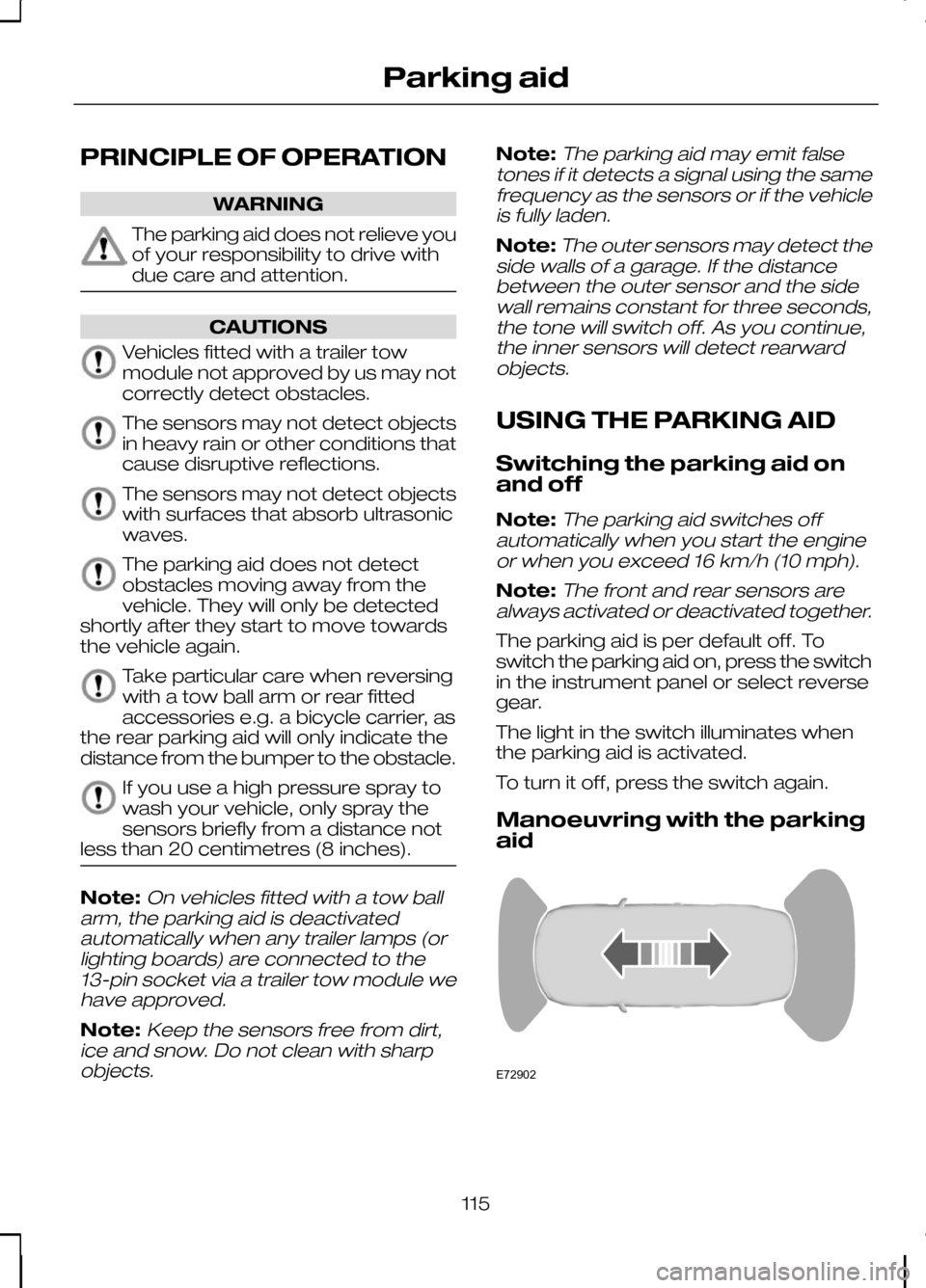
Manoeuvring with the parking
aid 115
Parking aidE72902
Page 118 of 226
Note:If a high pitch warning tone sounds
for three seconds and the light in the switch is flashing, it indicates amalfunction. The system will be disabled.Have the system checked by properlytrained technicians.
You will hear an intermittent tone at a
distance of up to approximately 150
centimetres (59 inches) between the
obstacle and rear bumper, 80 centimetres
(31 inches) between the obstacle and
front bumper and 50 centimetres (20
inches) to the side. Decreasing the
distance accelerates the intermittent tone.
A continuous tone will start at a distance
of less than 30 centimetres (12 inches).
You will hear an alternating tone from the
front and rear if obstacles are closer than
30 centimetres (12 inches) to the front
and rear bumpers.
116
Parking aid
Page 126 of 226
ROOF RACKS AND LOAD
CARRIERS
Roof rack
WARNINGS
If you use a roof rack, the fuel
consumption of your vehicle will be
higher and you may experience
different driving characteristics. Read and follow the manufacturer’s
instructions when you are fitting a
roof rack.
CAUTION
Do not exceed the maximum
permissible roof load of 75 kilograms
(165 pounds) (including the roof
rack). Check the security of the roof rack and
tighten its fittings as follows:
•
before starting
• after driving 50 kilometres (30 miles)
• at 1 000 kilometres (600 miles)
intervals. Installing the crossbars WARNING
Distribute the load evenly over the
loading area and keep the centre of
gravity as low as possible. Secure
the load well to prevent it from slipping.
Never place any loads directly onto the
roof surface. CAUTION
Remove the crossbars before
entering an automatic car wash.
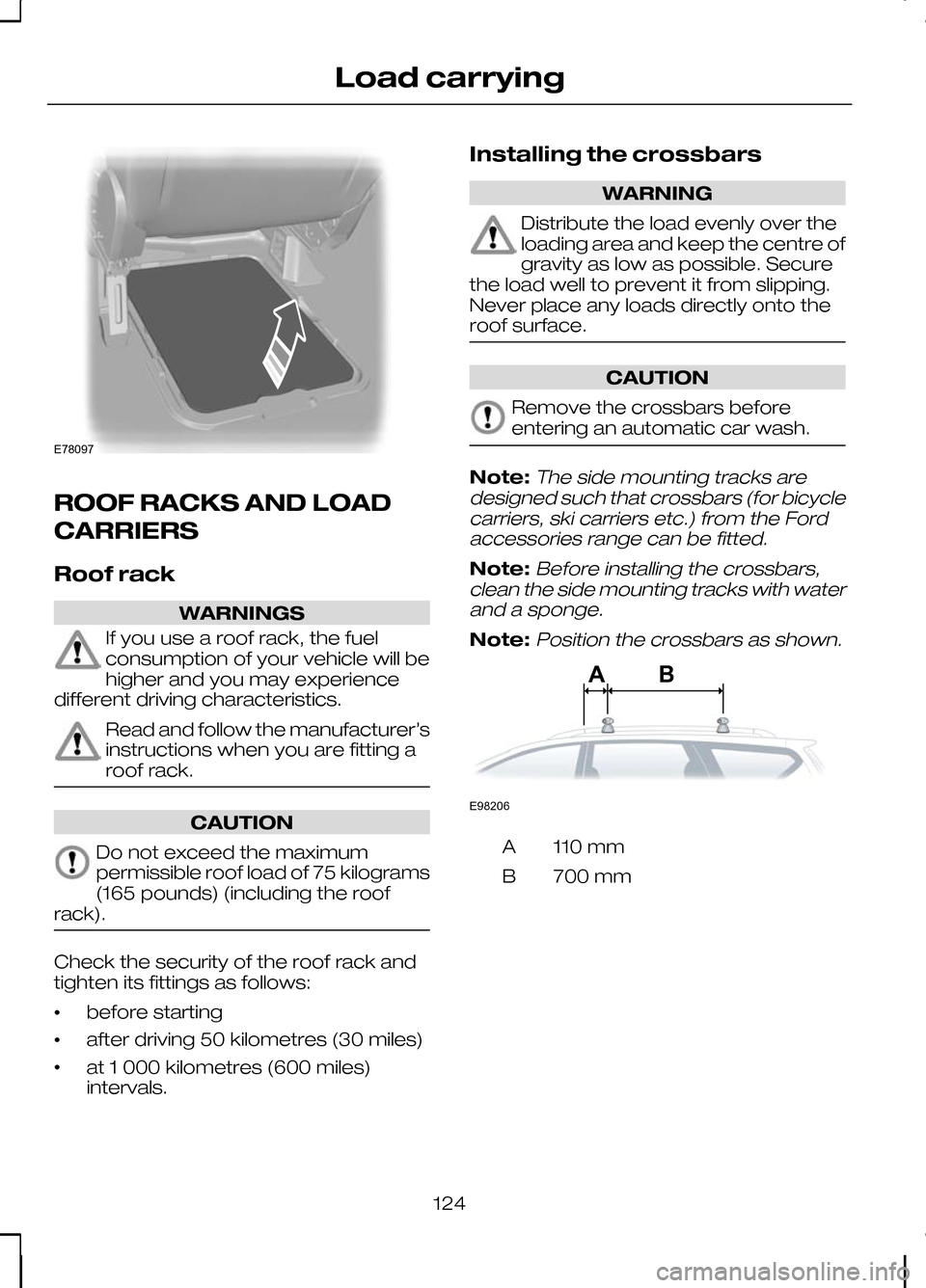
Note:The side mounting tracks are
designed such that crossbars (for bicycle carriers, ski carriers etc.) from the Fordaccessories range can be fitted.
Note:Before installing the crossbars,
clean the side mounting tracks with water and a sponge.
Note:Position the crossbars as shown. 110 mm
A
700 mm
B
124
Load carryingE78097 ABE98206
Page 131 of 226
Driving with a trailer
WARNING
If any of the below conditions
cannot be met, do not use the tow
bar and have it checked by a
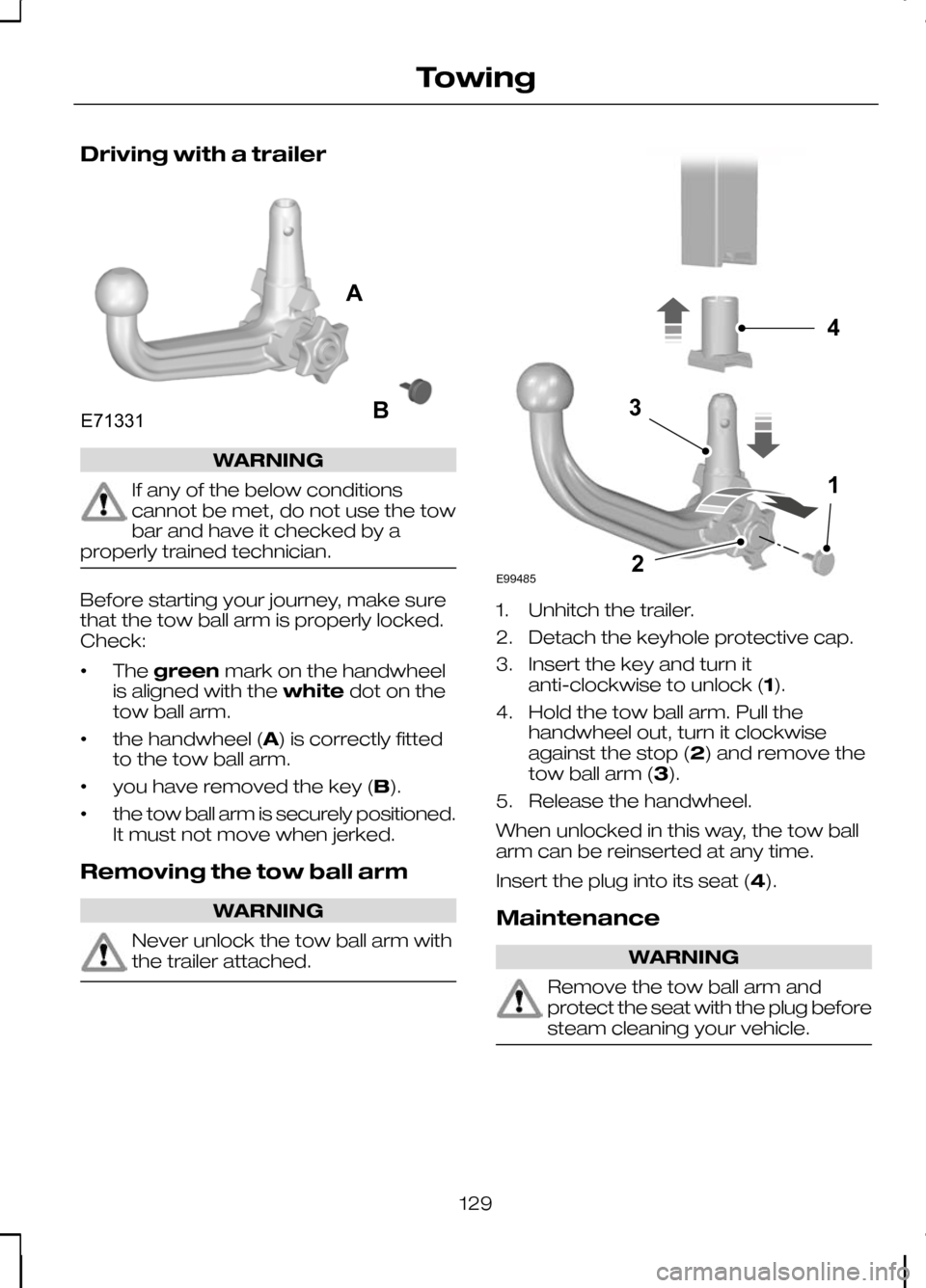
properly trained technician. Before starting your journey, make sure
that the tow ball arm is properly locked.
Check:
•
The
green mark on the handwheel
is aligned with the whitedot on the
tow ball arm.
• the handwheel (A) is correctly fitted
to the tow ball arm.
• you have removed the key (B).
• the tow ball arm is securely positioned.
It must not move when jerked.
Removing the tow ball arm WARNING
Never unlock the tow ball arm with
the trailer attached. 1. Unhitch the trailer.
2. Detach the keyhole protective cap.
3. Insert the key and turn it
anti-clockwise to unlock (1).
4. Hold the tow ball arm. Pull the handwheel out, turn it clockwise
against the stop (2) and remove the
tow ball arm (3).
5. Release the handwheel.
When unlocked in this way, the tow ball
arm can be reinserted at any time.
Insert the plug into its seat (4).
Maintenance WARNING
Remove the tow ball arm and
protect the seat with the plug before
steam cleaning your vehicle.
129
TowingE71331AB E994854132
Page 138 of 226
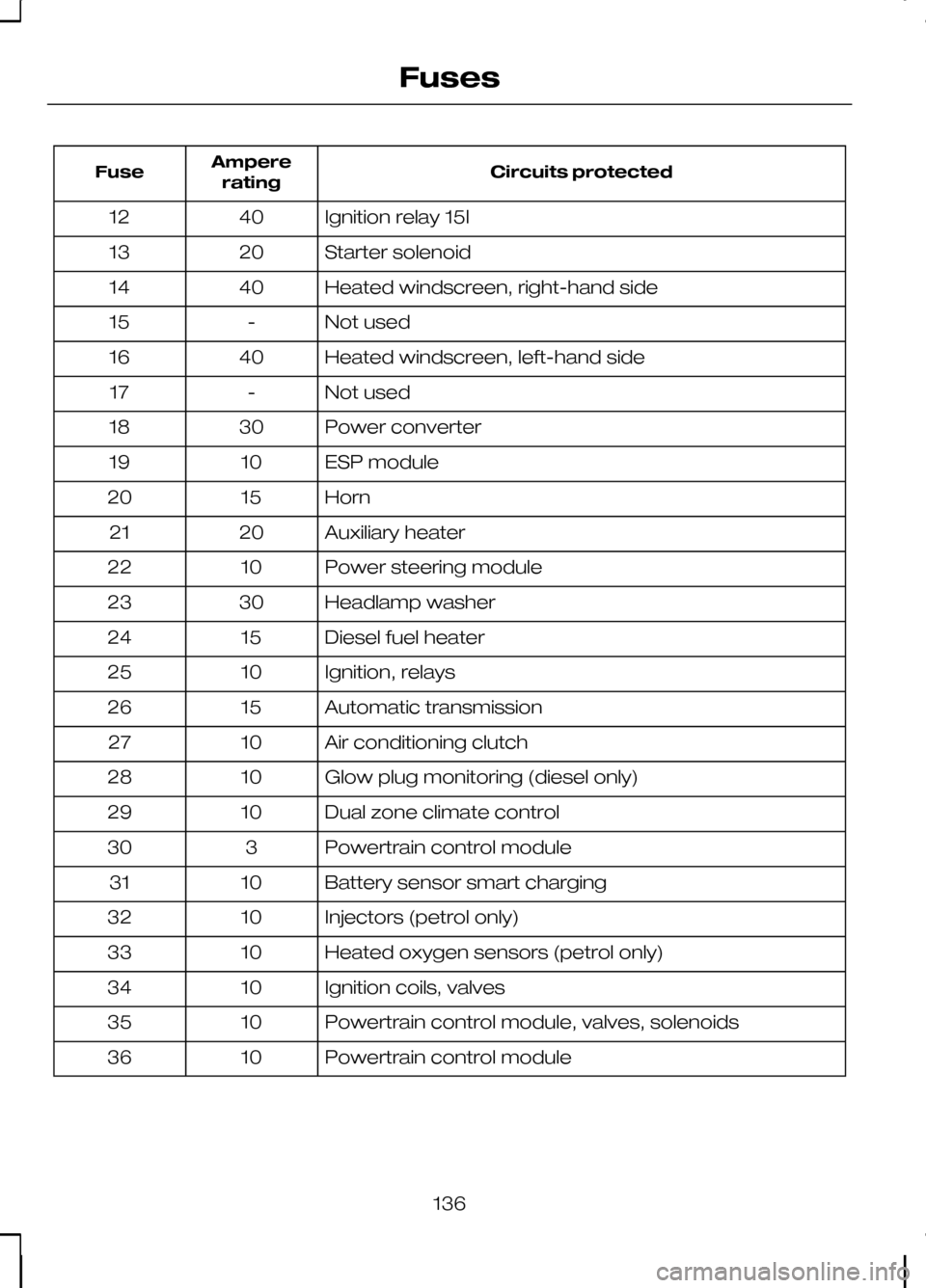
Circuits protected
Ampere
rating
Fuse
Ignition relay 15l
40
12
Starter solenoid
20
13
Heated windscreen, right-hand side
40
14
Not used
-
15
Heated windscreen, left-hand side
40
16
Not used
-
17
Power converter
30
18
ESP module
10
19
Horn
15
20
Auxiliary heater
20
21
Power steering module
10
22
Headlamp washer
30
23
Diesel fuel heater
15
24
Ignition, relays
10
25
Automatic transmission
15
26
Air conditioning clutch
10
27
Glow plug monitoring (diesel only)
10
28
Dual zone climate control
10
29
Powertrain control module
3
30
Battery sensor smart charging
10
31
Injectors (petrol only)
10
32
Heated oxygen sensors (petrol only)
10
33
Ignition coils, valves
10
34
Powertrain control module, valves, solenoids
10
35
Powertrain control module
10
36
136
Fuses
Page 139 of 226
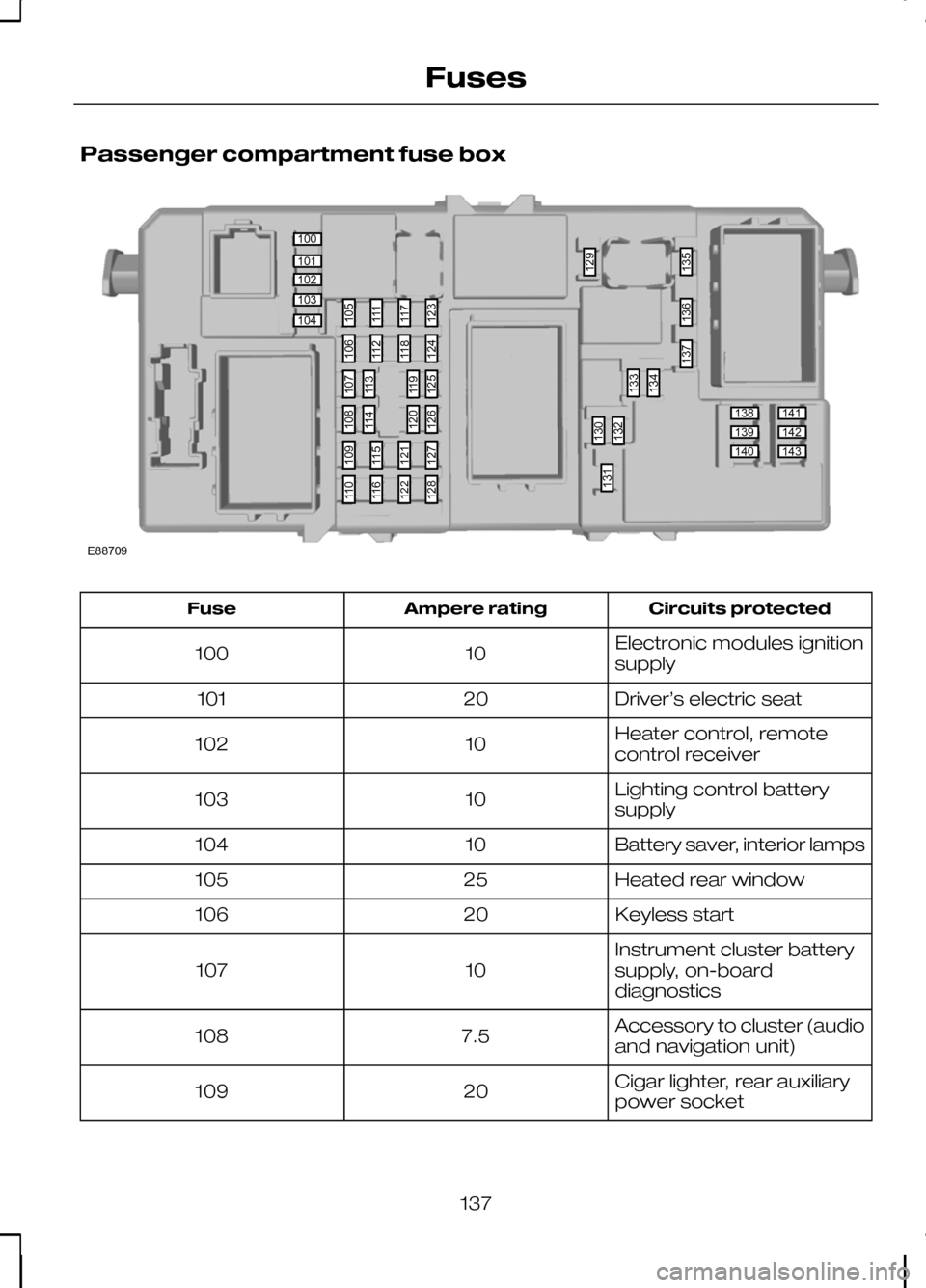
Passenger compartment fuse box
Circuits protected
Ampere rating
Fuse
Electronic modules ignition
supply
10
100
Driver’s electric seat
20
101
Heater control, remote
control receiver
10
102
Lighting control battery
supply
10
103
Battery saver, interior lamps
10
104
Heated rear window
25
105
Keyless start
20
106
Instrument cluster battery
supply, on-board
diagnostics
10
107
Accessory to cluster (audio
and navigation unit)
7.5
108
Cigar lighter, rear auxiliary
power socket
20
109
137
Fuses100101102103104138139140141142143105111117123130132133129134135136137131106112118124109115121127110116122128107113119125108114120126E88709