drive FORD KUGA 2010 1.G Owner's Manual
[x] Cancel search | Manufacturer: FORD, Model Year: 2010, Model line: KUGA, Model: FORD KUGA 2010 1.GPages: 226, PDF Size: 8.07 MB
Page 62 of 226
ELECTRIC WINDOWS
WARNING
Do not operate the electric windows
unless they are free from
obstruction.
Note:If you operate the switches often
during a short period of time, the system might become inoperable for a certaintime to prevent damage due tooverheating.
Switch on the ignition to operate the
electric windows.
Global opening and closing
You can also operate the electric
windows with the ignition off via the global
opening and closing function. See Locks
(page 29).
Driver's door switches
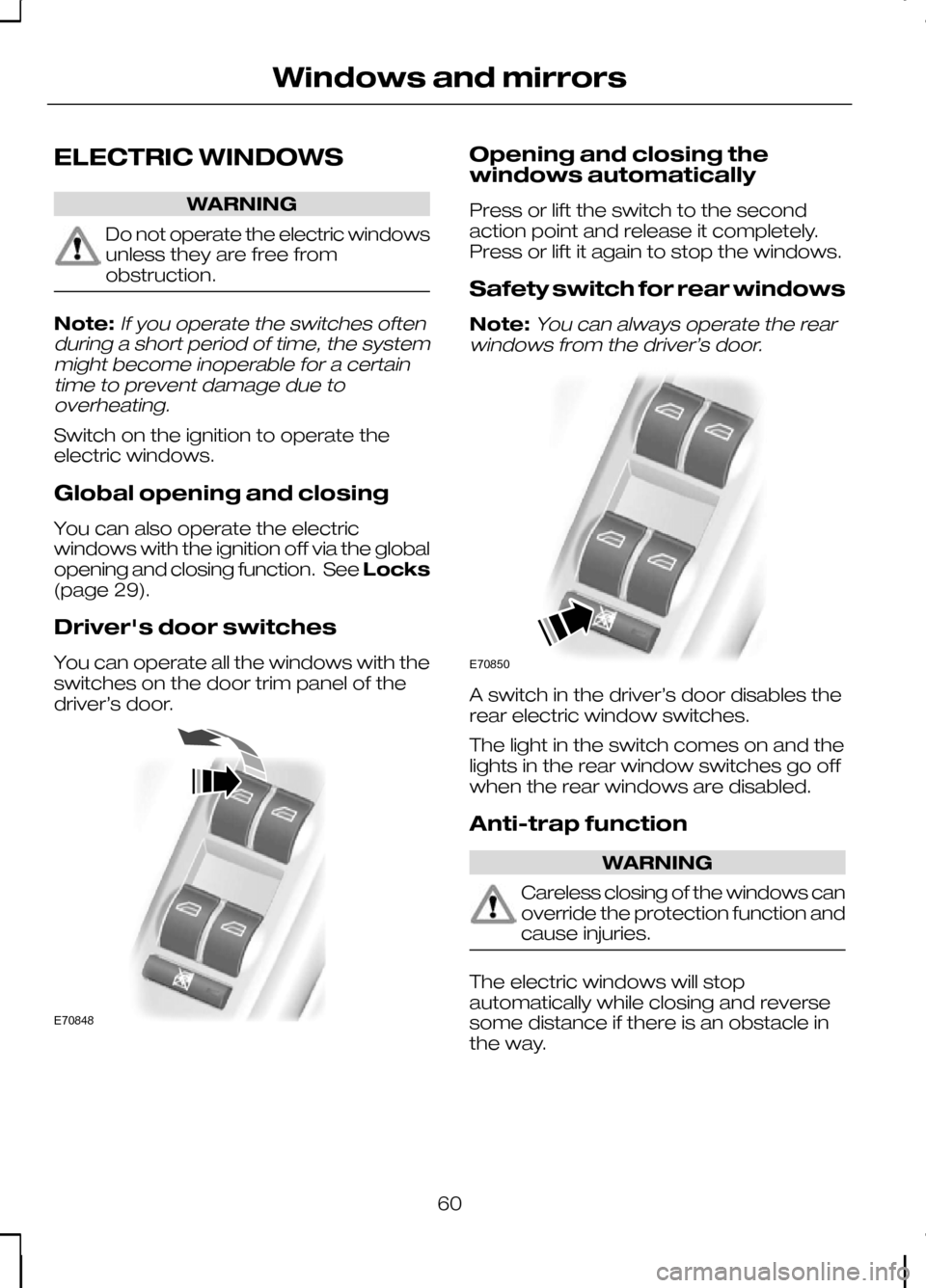
You can operate all the windows with the
switches on the door trim panel of the
driver’s door. Opening and closing the
windows automatically
Press or lift the switch to the second
action point and release it completely.
Press or lift it again to stop the windows.
Safety switch for rear windows
Note:
You can always operate the rear
windows from the driver’s door. A switch in the driver’s door disables the
rear electric window switches.
The light in the switch comes on and the
lights in the rear window switches go off
when the rear windows are disabled.
Anti-trap function
WARNING
Careless closing of the windows can
override the protection function and
cause injuries.
The electric windows will stop
automatically while closing and reverse
some distance if there is an obstacle in
the way.
60
Windows and mirrorsE70848 E70850
Page 68 of 226
If it stays on after starting or
illuminates when driving, this
indicates a malfunction. Stop
your vehicle as soon as it is safe to do so
and switch the engine off. Check the
engine oil level. See Engine oil check
(page 147).
Power steering warning lamp It illuminates to indicate a
malfunction of the power
steering system. Full steering
will be maintained but you will need to
exert greater force on the steering wheel.
Have the system checked by a properly
trained technician as soon as possible.
Rear fog lamp indicator It will illuminate when you switch
the rear fog lamps on.
Seat belt reminder See
Seat belt reminder
(page 24).
Shift indicator It will illuminate to inform you
that shifting to a higher gear
may give better fuel economy
and lower CO2 emissions. It will not
illuminate during periods of high
acceleration, braking or when the clutch
pedal is pressed. Stability control (ESP) indicator While driving, it flashes during
activation of the system. After
switching on the ignition, if it
does not illuminate or illuminates
continuously while driving, this indicates
a malfunction. During a malfunction, the
system switches off. Have the system
checked by a properly trained technician
as soon as possible.
If you switch ESP off, the warning lamp
will illuminate. The lamp will go out when
you switch the system back on or when
you switch the ignition off.
AUDIBLE WARNINGS AND
INDICATORS
Automatic transmission
If position Pis not selected, a warning
chime will sound when the driver’s door
is opened.
Frost WARNING
Even if the temperature rises to
above +4ºC there is no guarantee
that the road is free of hazards
caused by inclement weather. A warning chime will sound in the following
conditions:
•
+4ºC or lower: frost warning
• 0ºC or lower: danger of icy roads.
Key outside car
Vehicles with keyless entry
If the engine is running and a passive key
is no longer detected within the vehicle
interior, a chime will sound as soon as the
door is closed.
66
Instruments
Page 69 of 226
Key-in-ignition
Except vehicles with keyless entry
A warning tone will sound when the
driver’s door is opened if:
•
the key is in the ignition.
Vehicles with keyless entry
A warning tone will sound when the
driver’s door is opened if:
• the ignition is still on
• the spare key is in the ignition.
Lights on
A warning chime will sound if the driver’s
door is opened with the exterior lights
switched on and the ignition switched off.
Low fuel
A warning chime will sound at the
following ranges: 80 km (50 miles), 40 km
(25 miles), 20 km (12 miles), 0 km (0
miles).
Seat belt reminder
See Seat belt reminder (page 24).
67
Instruments
Page 76 of 226
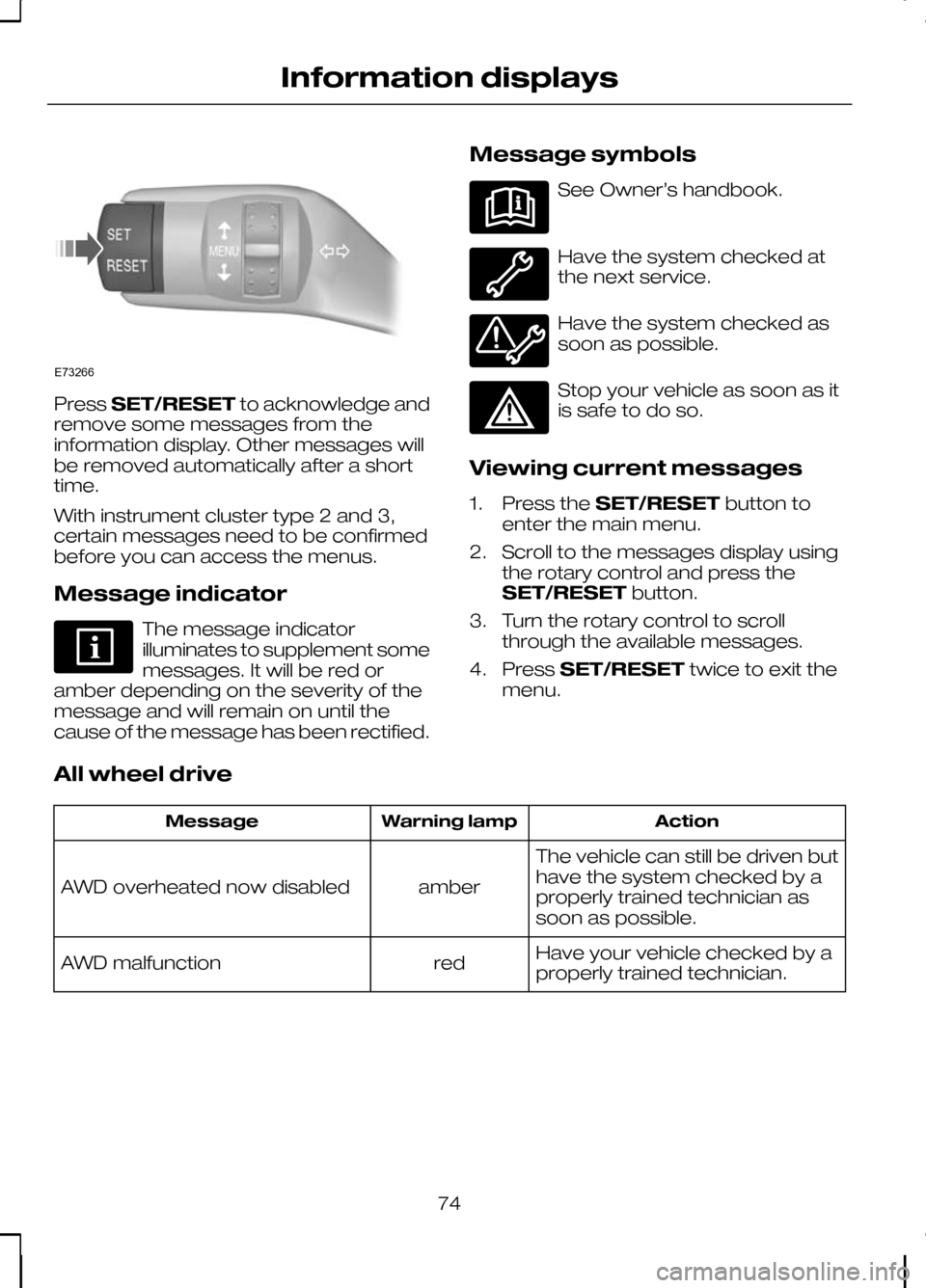
Press
SET/RESET to acknowledge and
remove some messages from the
information display. Other messages will
be removed automatically after a short
time.
With instrument cluster type 2 and 3,
certain messages need to be confirmed
before you can access the menus.
Message indicator The message indicator
illuminates to supplement some
messages. It will be red or
amber depending on the severity of the
message and will remain on until the
cause of the message has been rectified. Message symbols See Owner’s handbook.
Have the system checked at
the next service.
Have the system checked as
soon as possible.
Stop your vehicle as soon as it
is safe to do so.
Viewing current messages
1. Press the SET/RESET button to
enter the main menu.
2. Scroll to the messages display using the rotary control and press the
SET/RESET button.
3. Turn the rotary control to scroll through the available messages.
4. Press SET/RESET twice to exit the
menu.
All wheel drive Action
Warning lamp
Message
The vehicle can still be driven but
have the system checked by a
properly trained technician as
soon as possible.
amber
AWD overheated now disabled
Have your vehicle checked by a
properly trained technician.
red
AWD malfunction
74
Information displaysE73266
Page 77 of 226
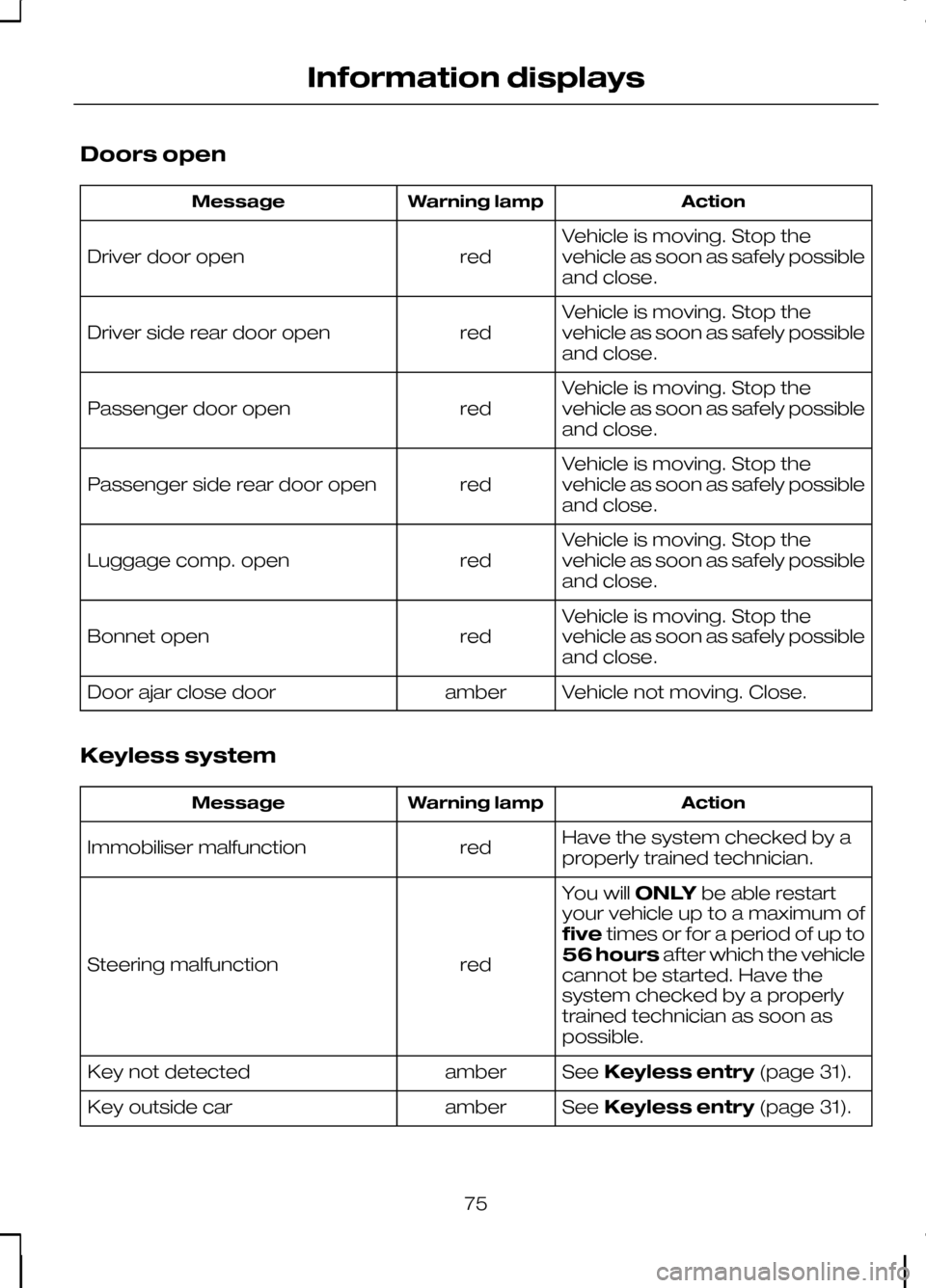
Doors open
Action
Warning lamp
Message
Vehicle is moving. Stop the
vehicle as soon as safely possible
and close.
red
Driver door open
Vehicle is moving. Stop the
vehicle as soon as safely possible
and close.
red
Driver side rear door open
Vehicle is moving. Stop the
vehicle as soon as safely possible
and close.
red
Passenger door open
Vehicle is moving. Stop the
vehicle as soon as safely possible
and close.
red
Passenger side rear door open
Vehicle is moving. Stop the
vehicle as soon as safely possible
and close.
red
Luggage comp. open
Vehicle is moving. Stop the
vehicle as soon as safely possible
and close.
red
Bonnet open
Vehicle not moving. Close.
amber
Door ajar close door
Keyless system Action
Warning lamp
Message
Have the system checked by a
properly trained technician.
red
Immobiliser malfunction
You willONLYbe able restart
your vehicle up to a maximum of
five times or for a period of up to
56 hours after which the vehicle
cannot be started. Have the
system checked by a properly
trained technician as soon as
possible.
red
Steering malfunction
SeeKeyless entry (page 31).
amber
Key not detected
SeeKeyless entry (page 31).
amber
Key outside car
75
Information displays
Page 78 of 226
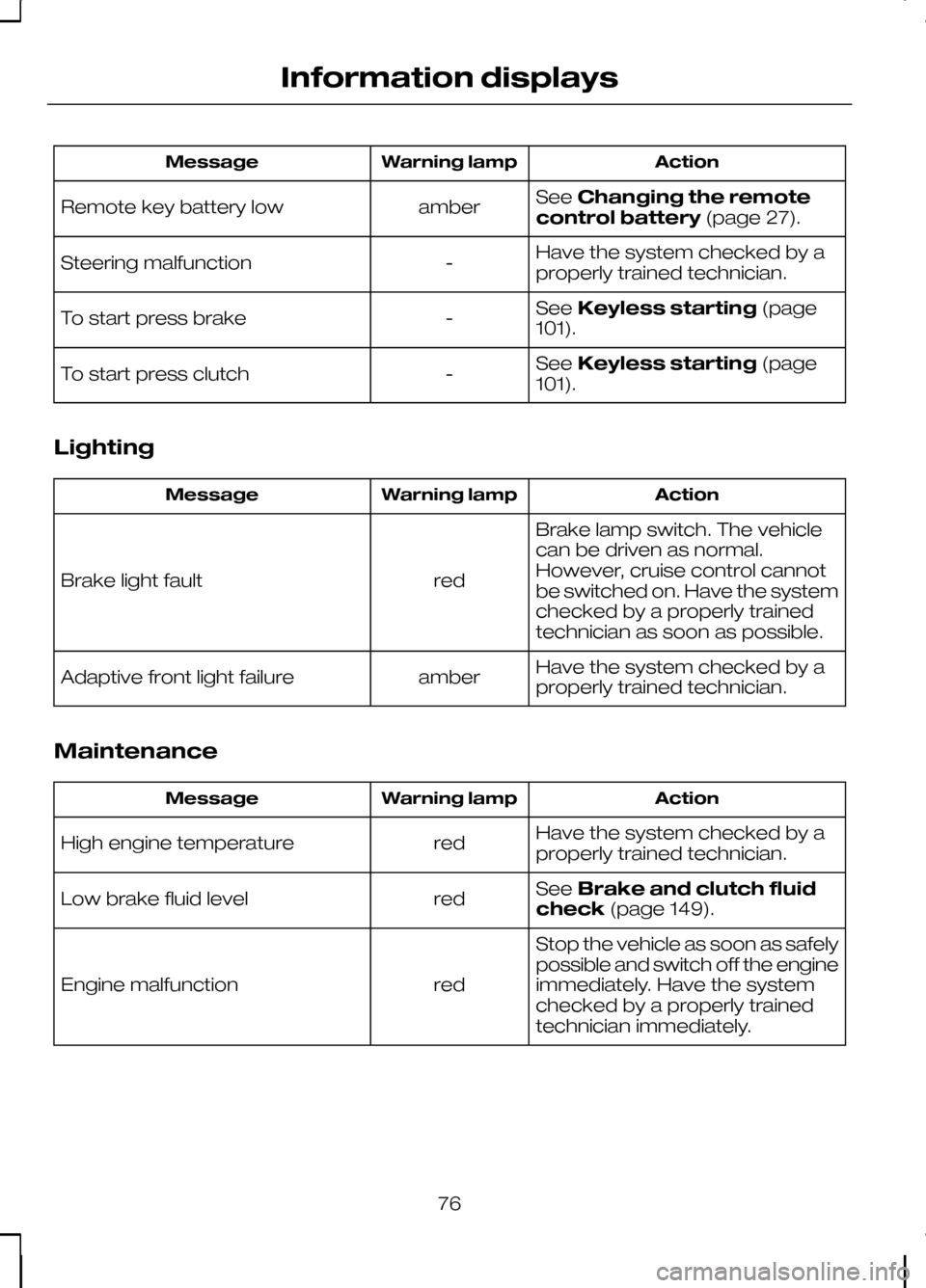
Action
Warning lamp
Message
SeeChanging the remote
control battery (page 27).
amber
Remote key battery low
Have the system checked by a
properly trained technician.
-
Steering malfunction
SeeKeyless starting (page
101).
-
To start press brake
SeeKeyless starting (page
101).
-
To start press clutch
Lighting Action
Warning lamp
Message
Brake lamp switch. The vehicle
can be driven as normal.
However, cruise control cannot
be switched on. Have the system
checked by a properly trained
technician as soon as possible.
red
Brake light fault
Have the system checked by a
properly trained technician.
amber
Adaptive front light failure
Maintenance Action
Warning lamp
Message
Have the system checked by a
properly trained technician.
red
High engine temperature
SeeBrake and clutch fluid
check (page 149).
red
Low brake fluid level
Stop the vehicle as soon as safely
possible and switch off the engine
immediately. Have the system
checked by a properly trained
technician immediately.
red
Engine malfunction
76
Information displays
Page 79 of 226
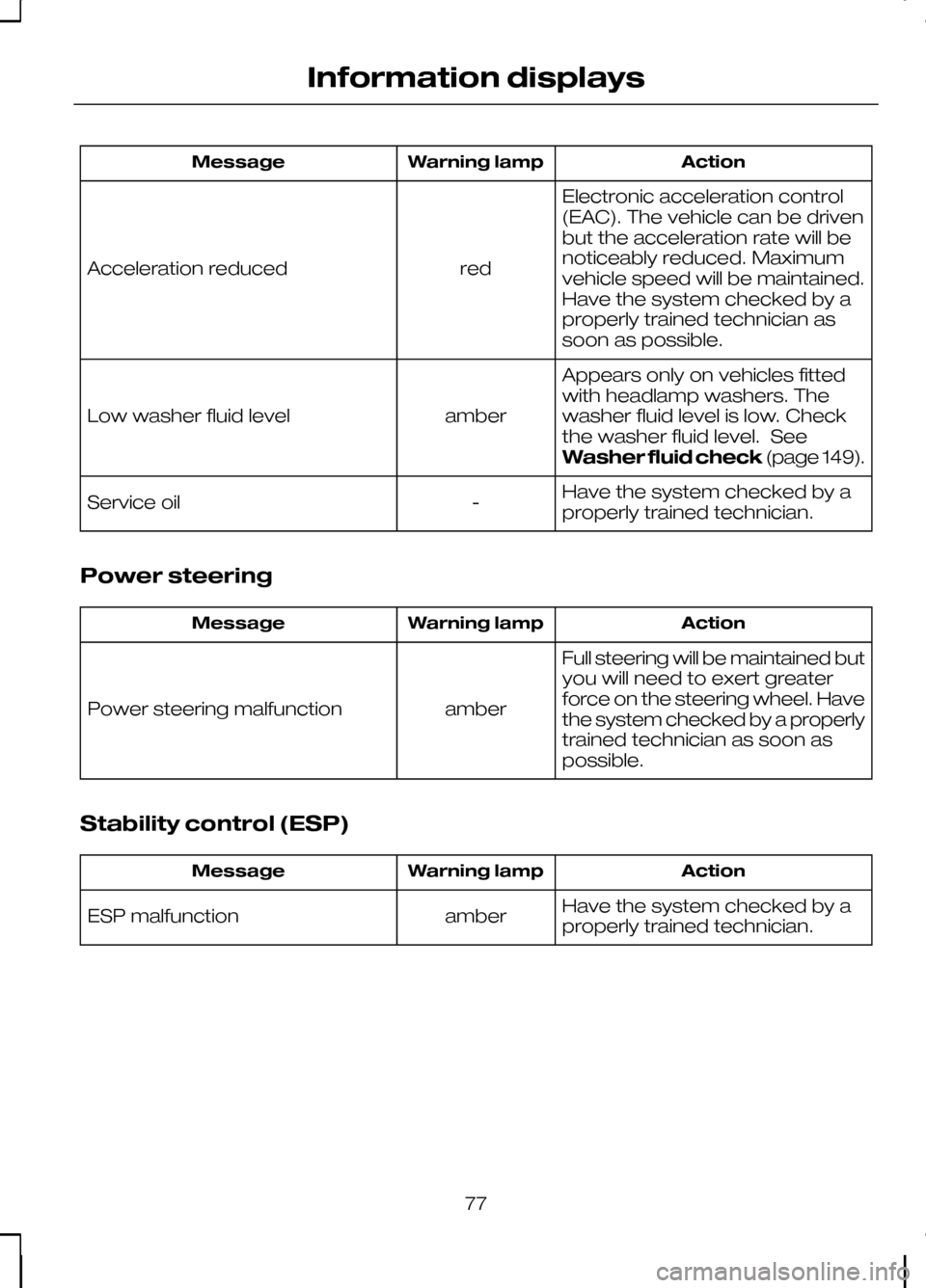
Action
Warning lamp
Message
Electronic acceleration control
(EAC). The vehicle can be driven
but the acceleration rate will be
noticeably reduced. Maximum
vehicle speed will be maintained.
Have the system checked by a
properly trained technician as
soon as possible.
red
Acceleration reduced
Appears only on vehicles fitted
with headlamp washers. The
washer fluid level is low. Check
the washer fluid level. See
Washer fluid check(page 149).
amber
Low washer fluid level
Have the system checked by a
properly trained technician.
-
Service oil
Power steering Action
Warning lamp
Message
Full steering will be maintained but
you will need to exert greater
force on the steering wheel. Have
the system checked by a properly
trained technician as soon as
possible.
amber
Power steering malfunction
Stability control (ESP) Action
Warning lamp
Message
Have the system checked by a
properly trained technician.
amber
ESP malfunction
77
Information displays
Page 80 of 226
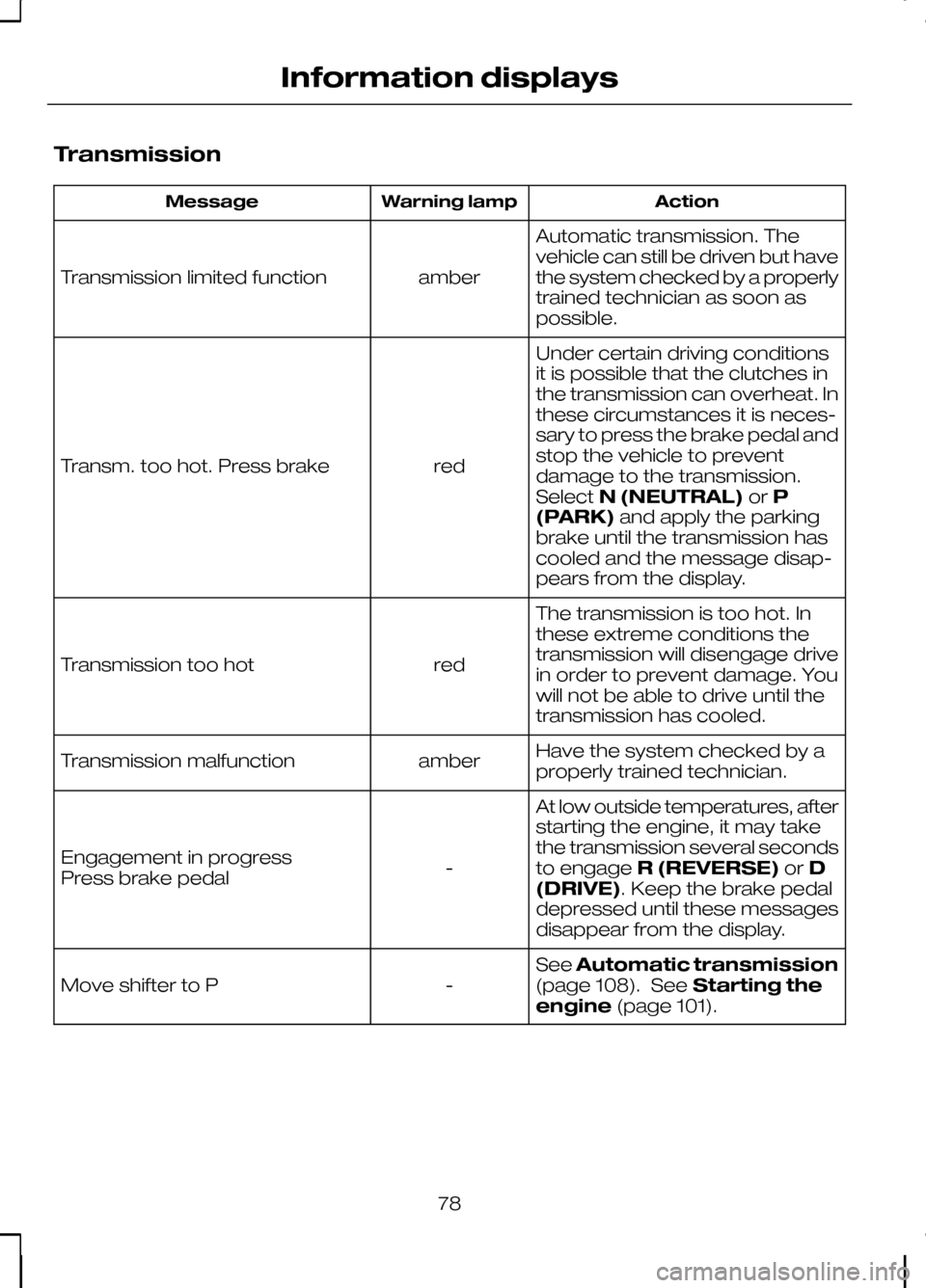
Transmission
Action
Warning lamp
Message
Automatic transmission. The
vehicle can still be driven but have
the system checked by a properly
trained technician as soon as
possible.
amber
Transmission limited function
Under certain driving conditions
it is possible that the clutches in
the transmission can overheat. In
these circumstances it is neces-
sary to press the brake pedal and
stop the vehicle to prevent
red
Transm. too hot. Press brake
damage to the transmission.
SelectN (NEUTRAL) orP
(PARK) and apply the parking
brake until the transmission has
cooled and the message disap-
pears from the display.
The transmission is too hot. In
these extreme conditions the
transmission will disengage drive
in order to prevent damage. You
will not be able to drive until the
transmission has cooled.
red
Transmission too hot
Have the system checked by a
properly trained technician.
amber
Transmission malfunction
At low outside temperatures, after
starting the engine, it may take
the transmission several seconds
to engageR (REVERSE) orD
(DRIVE). Keep the brake pedal
depressed until these messages
disappear from the display.
-
Engagement in progress
Press brake pedal
SeeAutomatic transmission
(page 108). See Starting the
engine (page 101).
-
Move shifter to P
78
Information displays
Page 85 of 226
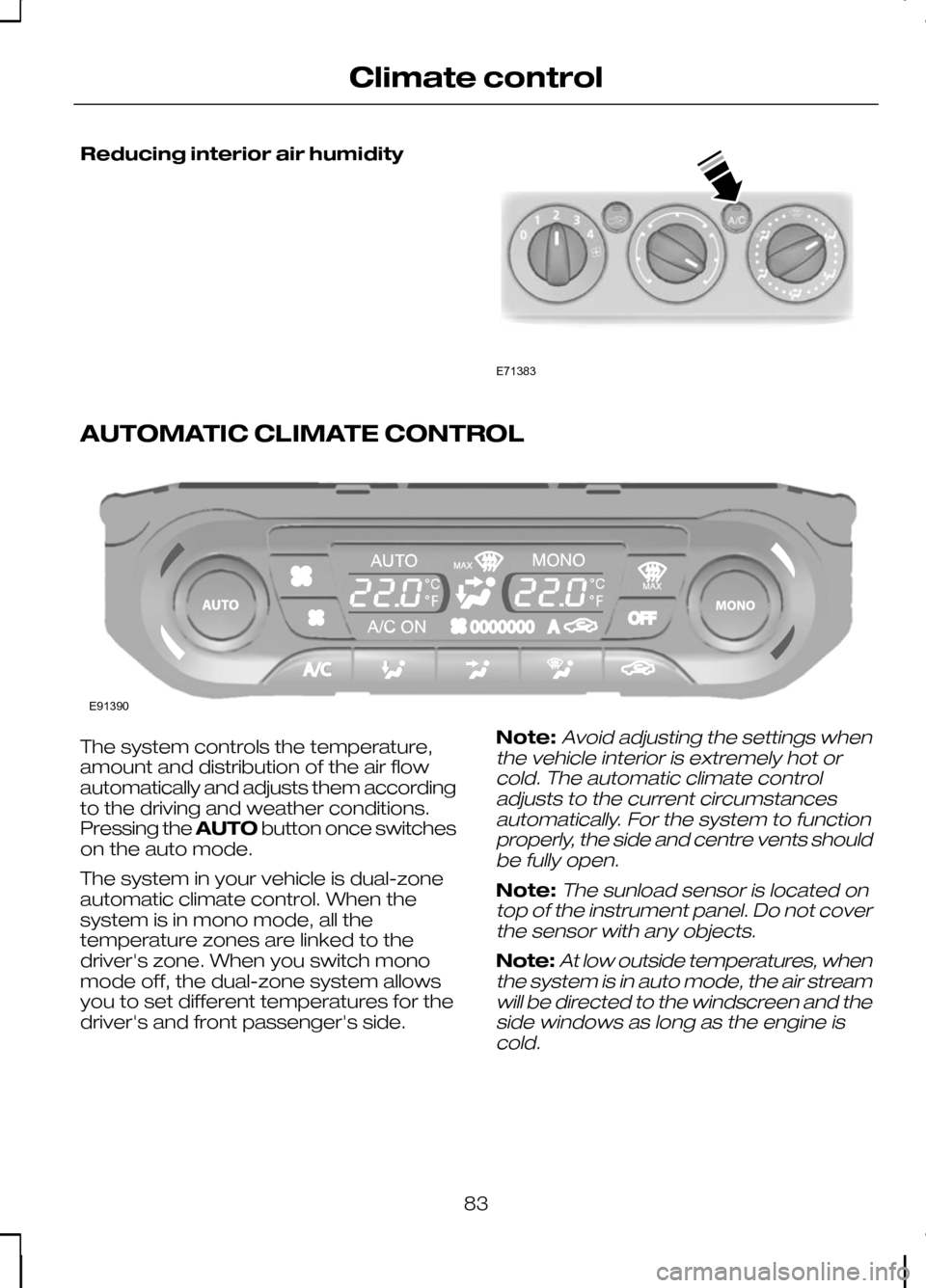
Reducing interior air humidity
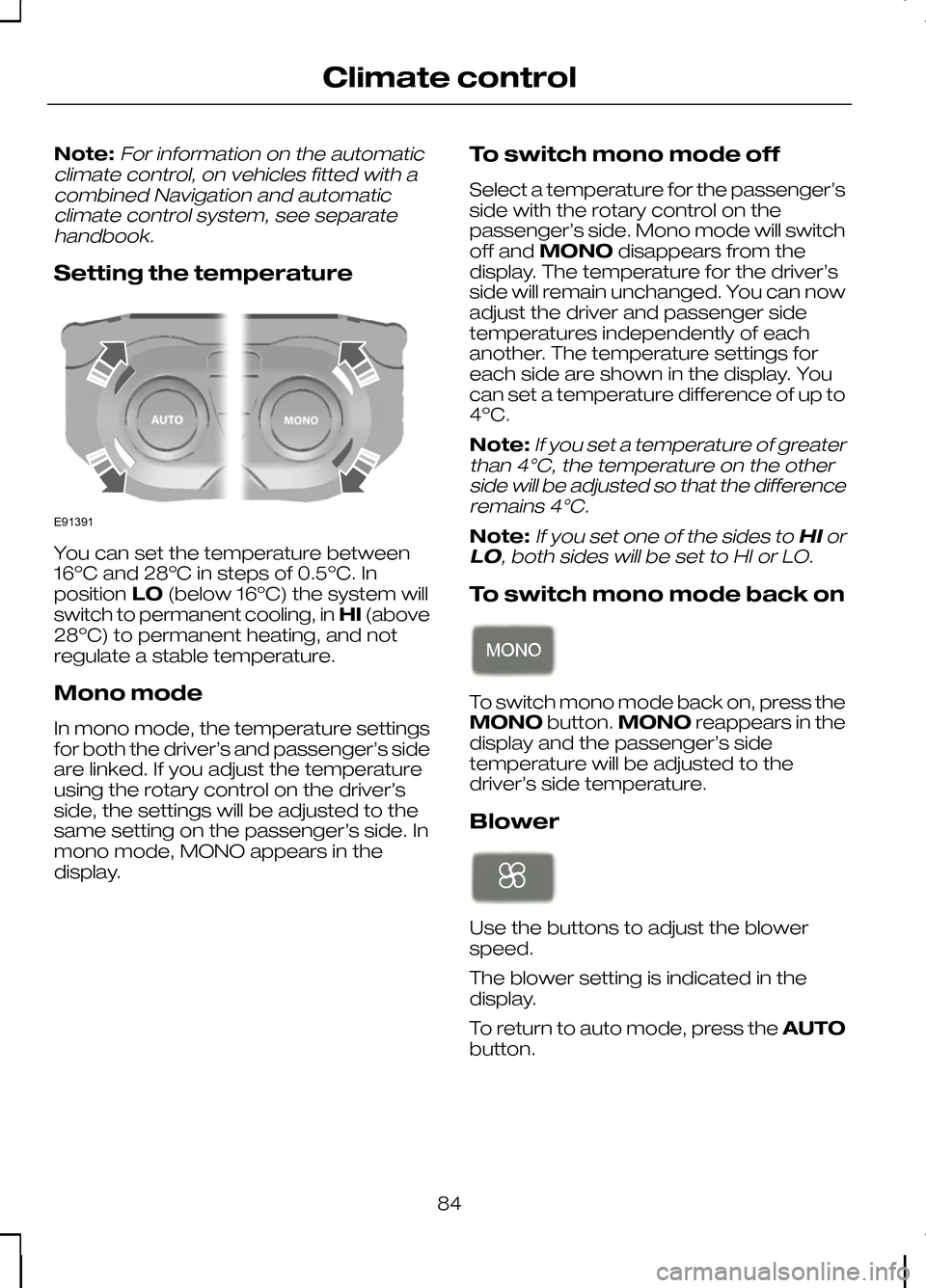
AUTOMATIC CLIMATE CONTROL
The system controls the temperature,
amount and distribution of the air flow
automatically and adjusts them according
to the driving and weather conditions.
Pressing the
AUTObutton once switches
on the auto mode.
The system in your vehicle is dual-zone
automatic climate control. When the
system is in mono mode, all the
temperature zones are linked to the
driver's zone. When you switch mono
mode off, the dual-zone system allows
you to set different temperatures for the
driver's and front passenger's side. Note:Avoid adjusting the settings when
the vehicle interior is extremely hot or cold. The automatic climate controladjusts to the current circumstancesautomatically. For the system to functionproperly, the side and centre vents shouldbe fully open.
Note:The sunload sensor is located on
top of the instrument panel. Do not cover the sensor with any objects.
Note:At low outside temperatures, when
the system is in auto mode, the air stream will be directed to the windscreen and theside windows as long as the engine iscold.
83
Climate controlE71383 E91390
Page 86 of 226
Note:For information on the automatic
climate control, on vehicles fitted with a combined Navigation and automaticclimate control system, see separatehandbook.
Setting the temperature You can set the temperature between
16ºC and 28ºC in steps of 0.5ºC. In
position
LO(below 16ºC) the system will
switch to permanent cooling, in HI(above
28ºC) to permanent heating, and not
regulate a stable temperature.
Mono mode
In mono mode, the temperature settings
for both the driver’s and passenger’s side
are linked. If you adjust the temperature
using the rotary control on the driver’s
side, the settings will be adjusted to the
same setting on the passenger’s side. In
mono mode, MONO appears in the
display. To switch mono mode off
Select a temperature for the passenger’s
side with the rotary control on the
passenger’s side. Mono mode will switch
off and
MONO disappears from the
display. The temperature for the driver’s
side will remain unchanged. You can now
adjust the driver and passenger side
temperatures independently of each
another. The temperature settings for
each side are shown in the display. You
can set a temperature difference of up to
4ºC.
Note:
If you set a temperature of greater
than 4°C, the temperature on the other side will be adjusted so that the differenceremains 4°C.
Note:If you set one of the sides to HIor
LO, both sides will be set to HI or LO.
To switch mono mode back on To switch mono mode back on, press the
MONO
button.MONO reappears in the
display and the passenger’s side
temperature will be adjusted to the
driver’s side temperature.
Blower Use the buttons to adjust the blower
speed.
The blower setting is indicated in the
display.
To return to auto mode, press the
AUTO
button.
84
Climate controlE91391