Page FORD KUGA 2010 1.G Repair Manual
[x] Cancel search | Manufacturer: FORD, Model Year: 2010, Model line: KUGA, Model: FORD KUGA 2010 1.GPages: 226, PDF Size: 8.07 MB
Page 167 of 226
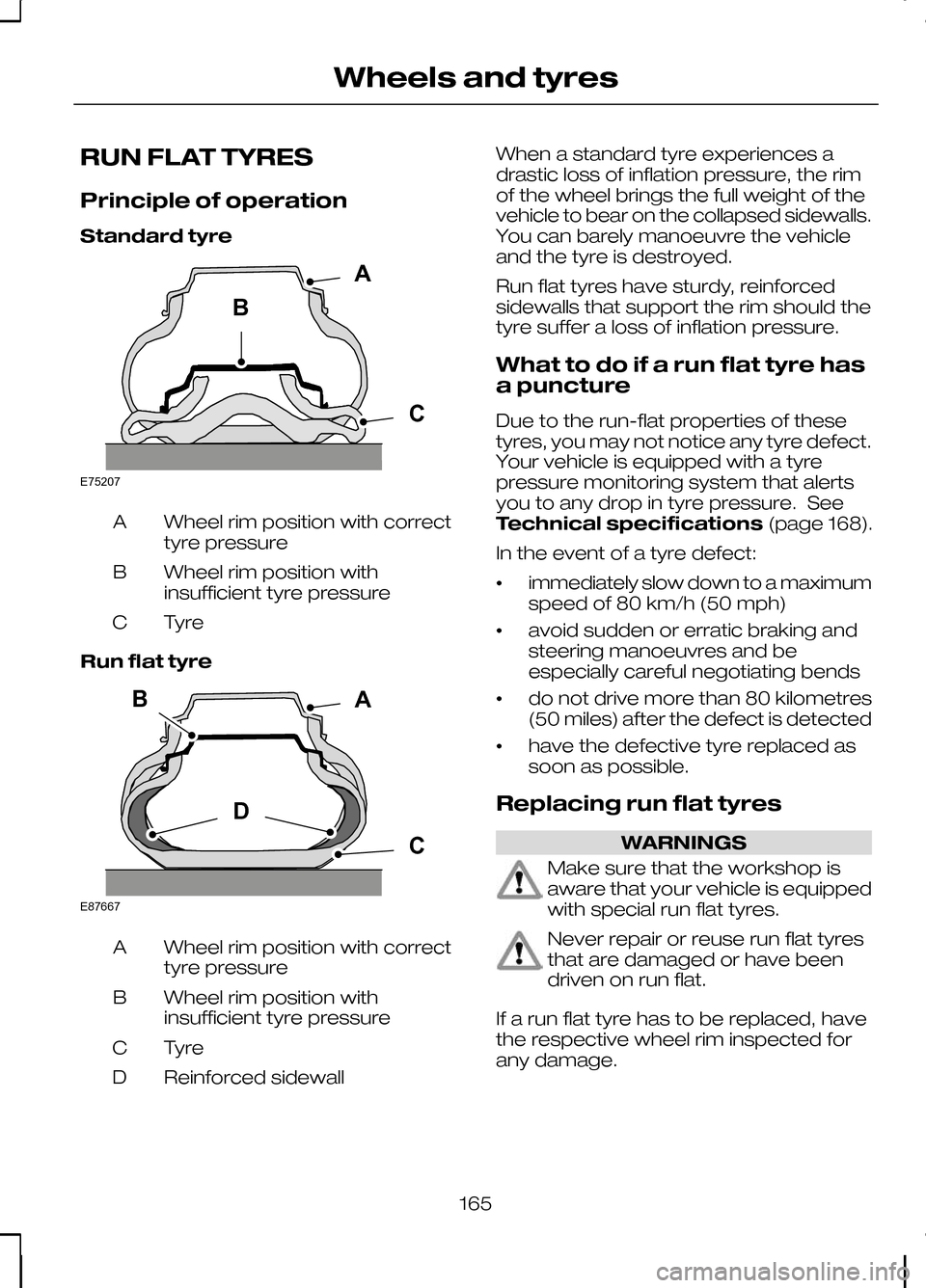
RUN FLAT TYRES
Principle of operation
Standard tyre
Wheel rim position with correct
tyre pressure
A
Wheel rim position with
insufficient tyre pressure
B
TyreC
Run flat tyre Wheel rim position with correct
tyre pressure
A
Wheel rim position with
insufficient tyre pressure
B
TyreC
Reinforced sidewall
D When a standard tyre experiences a
drastic loss of inflation pressure, the rim
of the wheel brings the full weight of the
vehicle to bear on the collapsed sidewalls.
You can barely manoeuvre the vehicle
and the tyre is destroyed.
Run flat tyres have sturdy, reinforced
sidewalls that support the rim should the
tyre suffer a loss of inflation pressure.
What to do if a run flat tyre has
a puncture
Due to the run-flat properties of these
tyres, you may not notice any tyre defect.
Your vehicle is equipped with a tyre
pressure monitoring system that alerts
you to any drop in tyre pressure. See
Technical specifications
(page 168).
In the event of a tyre defect:
• immediately slow down to a maximum
speed of 80 km/h (50 mph)
• avoid sudden or erratic braking and
steering manoeuvres and be
especially careful negotiating bends
• do not drive more than 80 kilometres
(50 miles) after the defect is detected
• have the defective tyre replaced as
soon as possible.
Replacing run flat tyres WARNINGS
Make sure that the workshop is
aware that your vehicle is equipped
with special run flat tyres.
Never repair or reuse run flat tyres
that are damaged or have been
driven on run flat.
If a run flat tyre has to be replaced, have
the respective wheel rim inspected for
any damage.
165
Wheels and tyresBACE75207 BDCAE87667
Page 168 of 226
WARNINGS
Do not fit a mixture of run flat and
standard tyres. In isolated cases, a
standard tyre can be temporarily
mounted on a vehicle otherwise equipped
with run flat tyres. It must be pointed out
to the driver that the standard tyre has no
runflat properties. Do not fit run flat tyres on vehicles
that were not originally fitted with
them. Please contact your dealer
for more details regarding compatibility. Run flat tyres may be sold and mounted
only by specially trained and certified tyre
dealers.
TYRE CARE
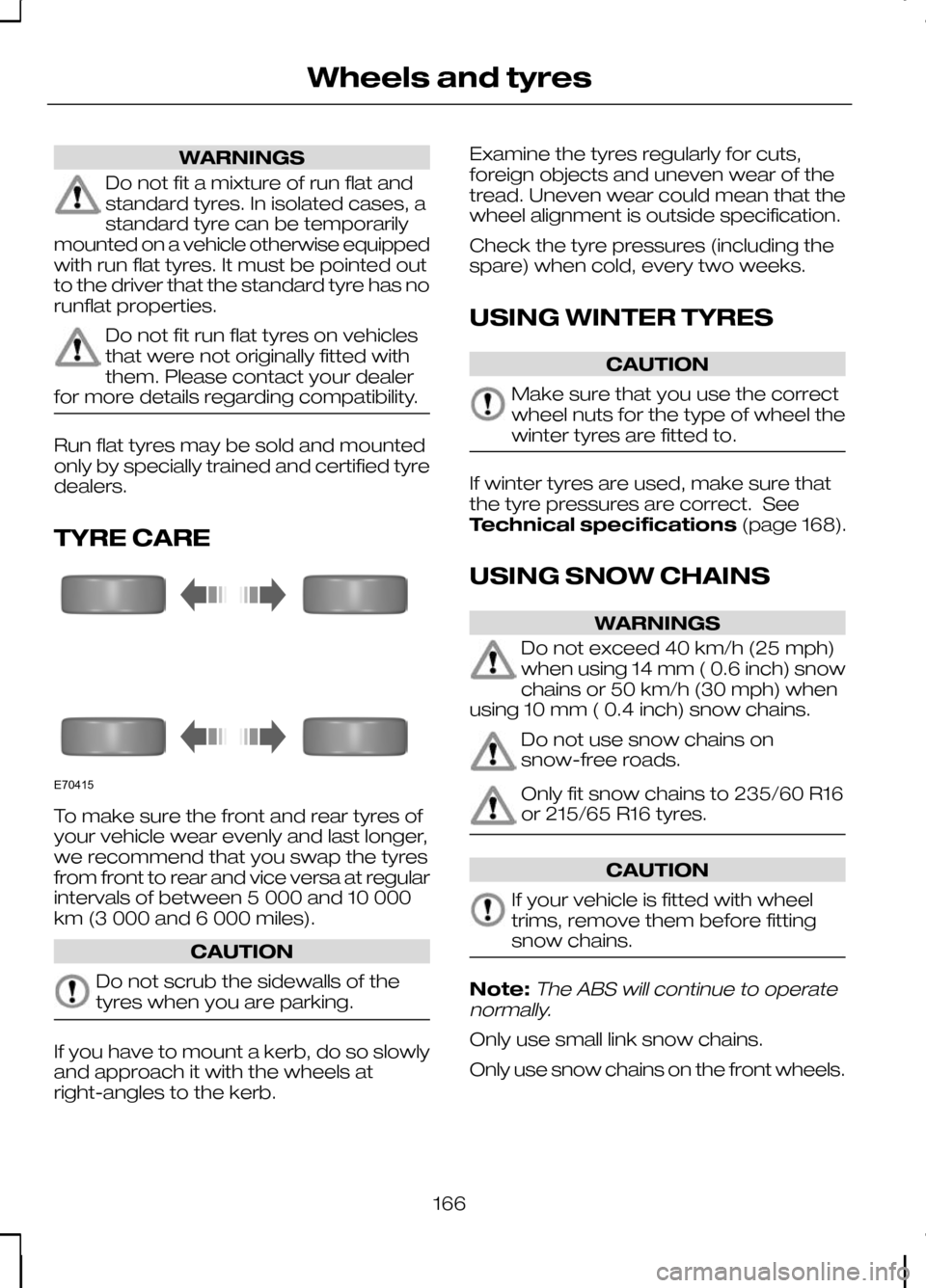
To make sure the front and rear tyres of
your vehicle wear evenly and last longer,
we recommend that you swap the tyres
from front to rear and vice versa at regular
intervals of between 5 000 and 10 000
km (3 000 and 6 000 miles).
CAUTION
Do not scrub the sidewalls of the
tyres when you are parking.
If you have to mount a kerb, do so slowly
and approach it with the wheels at
right-angles to the kerb. Examine the tyres regularly for cuts,
foreign objects and uneven wear of the
tread. Uneven wear could mean that the
wheel alignment is outside specification.
Check the tyre pressures (including the
spare) when cold, every two weeks.
USING WINTER TYRES
CAUTION
Make sure that you use the correct
wheel nuts for the type of wheel the
winter tyres are fitted to.
If winter tyres are used, make sure that
the tyre pressures are correct. See
Technical specifications
(page 168).
USING SNOW CHAINS WARNINGS
Do not exceed 40 km/h (25 mph)
when using 14 mm ( 0.6 inch) snow
chains or 50 km/h (30 mph) when
using 10 mm ( 0.4 inch) snow chains. Do not use snow chains on
snow-free roads.
Only fit snow chains to 235/60 R16
or 215/65 R16 tyres.
CAUTION
If your vehicle is fitted with wheel
trims, remove them before fitting
snow chains.
Note:The ABS will continue to operate
normally.
Only use small link snow chains.
Only use snow chains on the front wheels.
166
Wheels and tyresE70415
Page 169 of 226
Vehicles with stability control
(ESP)
Vehicles with stability control (ESP) may
exhibit some unusual driving
characteristics which can be avoided by
switching the system off. See
Using
stability control (page 113).
TYRE PRESSURE
MONITORING SYSTEM WARNINGS
The system does not relieve you of
your responsibility to regularly check
the tyre pressures.
The system will only provide a low
tyre pressure warning. It will not
inflate the tyres.
Do not drive on significantly
under-inflated tyres. This may cause
the tyres to overheat and fail.
Under-inflation reduces fuel efficiency,
tyre tread life and may also affect your
ability to drive the vehicle safely. CAUTIONS
Do not bend or damage the valves
when you are inflating the tyres.
Have tyres installed by properly
trained technicians.
The Deflation Detection System will alert
you if there is a change of air pressure in
any tyre. It does this by using the ABS
sensors to detect the rolling
circumference of the wheels. When the
circumference changes, this indicates low
pressure in a tyre, a warning message is
displayed in the information display and
the message indicator will illuminate. See
Information messages
(page 73).Apart from a too low tyre pressure or a
damaged tyre, the following situations can
affect the rolling circumference:
•
Vehicle load is uneven.
• When using a trailer or travelling up
and down an incline.
• Using snow chains.
• Driving on soft surfaces such as snow
or mud.
Note:The system will still function
correctly, but there may be an increased detection time.
If a low pressure warning message is
displayed in the information display, check
the tyre pressures as soon as possible
and inflate them to the recommended
pressure. See Technical
specifications (page 168).
If this happens frequently, have the cause
determined and rectified as soon as
possible.
System reset
Note:
Do not reset the system when the
vehicle is moving.
Note:You should reset the system
following any adjustment to the tyre pressures or any changing of tyres.
Note:Turn the ignition on.
Type 2 instrument cluster
1. Using the multifunction lever, navigate
to'SET' > T. Pres.
2. Press and hold the SET/RESET
button until the message Tyre
Pressure set appears.
Type 3 instrument cluster
1. Using the multifunction lever, navigate
tohold 'SET' to set Tyre Pres.
167
Wheels and tyres
Page 179 of 226
TELEPHONE CONTROLS
Remote control
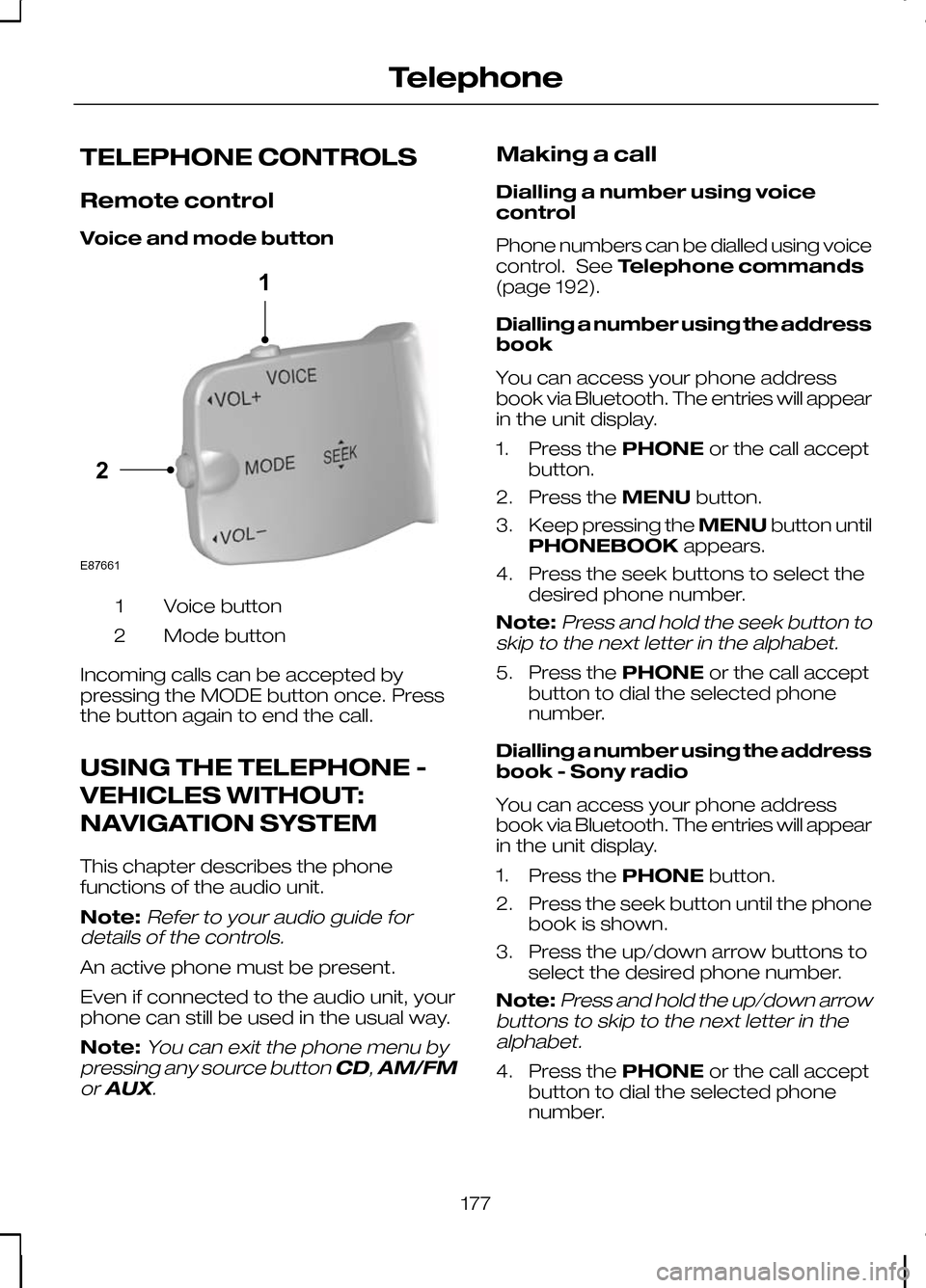
Voice and mode button
Voice button
1
Mode button
2
Incoming calls can be accepted by
pressing the MODE button once. Press
the button again to end the call.
USING THE TELEPHONE -
VEHICLES WITHOUT:
NAVIGATION SYSTEM
This chapter describes the phone
functions of the audio unit.
Note:Refer to your audio guide for
details of the controls.
An active phone must be present.
Even if connected to the audio unit, your
phone can still be used in the usual way.
Note:
You can exit the phone menu by
pressing any source button CD,AM/FM
or AUX.
Making a call
Dialling a number using voice
control
Phone numbers can be dialled using voice
control. See Telephone commands
(page 192).
Dialling a number using the address
book
You can access your phone address
book via Bluetooth. The entries will appear
in the unit display.
1. Press the PHONEor the call accept
button.
2. Press the MENUbutton.
3. Keep pressing the MENUbutton until
PHONEBOOK appears.
4. Press the seek buttons to select the desired phone number.
Note:
Press and hold the seek button to
skip to the next letter in the alphabet.
5. Press the PHONEor the call accept
button to dial the selected phone
number.
Dialling a number using the address
book - Sony radio
You can access your phone address
book via Bluetooth. The entries will appear
in the unit display.
1. Press the PHONEbutton.
2. Press the seek button until the phone book is shown.
3. Press the up/down arrow buttons to select the desired phone number.
Note:
Press and hold the up/down arrow
buttons to skip to the next letter in the alphabet.
4. Press the PHONEor the call accept
button to dial the selected phone
number.
177
Telephone21E87661
Page 182 of 226
3. Scroll through the different phones by
using the seek buttons and display the
phone to be debonded.
4. Press the OK button to be debond.
USING THE TELEPHONE -
VEHICLES WITH:
NAVIGATION SYSTEM
This chapter describes the phone
functions of the Navigation System.
Note:Refer to your Navigation System
guide for details of the controls.
An active phone must be present.
Even if connected to the Navigation
System, your phone can still be used in
the usual way.
Making a call
Dialling a number
Phone numbers can be dialled using voice
control. See Voice control (page 182).
Ending a call
Calls can be ended by pressing either the
END button, the MODEbutton on the
remote switch or the ON/OFFbutton on
the navigation system.
Redialling a number
1. Press the PHONEbutton on the unit.
2. Select REDIAL.
Receiving an incoming call
Accepting an incoming call
Incoming calls can be accepted by
pressing either the call accept button, the
MODE button on the remote control, the
PHONE button on the unit or by using
the ACCEPT option in the menu. Rejecting an incoming call
Incoming calls can be rejected by
pressing either the call reject button, the
CD
orAM/FM buttons on the unit, or by
using the REJECT option in the menu.
Receiving a second incoming
call
Note:
The second incoming call function
must be activated in your phone.
If there is an incoming call, whilst there is
an ongoing call, a beep will be heard and
you will have the option to end the active
call and to accept the incoming call.
Accepting a second incoming call
Second incoming calls can be accepted
by pressing either the call accept button,
the MODE button on the remote control,
the PHONE button on the unit or by
using the ACCEPT option in the menu.
Note:
This will cancel the ongoing call.
Rejecting a second incoming call
Second incoming calls can be rejected by
pressing either the call reject button, or
one of the following buttons on the unit:
CD, AM/FM.
Muting the microphone
During a call, it is possible to mute the
microphone. Whilst muted, confirmation
will appear in the display.
DVD navigation units
Press the mute button (symbol of a
microphone with a line through it). Press
the button once again to turn this function
off.
180
Telephone
Page 184 of 226
PRINCIPLE OF OPERATION
CAUTION
Using the system with the engine off
will drain the battery.
Voice recognition enables operation of
the system without the need to divert your
attention from the road ahead in order to
change settings, or receive feedback
from the system.
Whenever you issue one of the defined
commands with the system active, the
voice recognition system converts your
command into a control signal for the
system. Your inputs take the form of
dialogues or commands. You are guided
through these dialogues by
announcements or questions.
Please familiarise yourself with the
functions of the system before using voice
recognition.
Supported commands
The voice control system allows you to
control the following vehicle functions:
•
Bluetooth phone
• radio
• CD Player/CD Changer
• external device (USB)
• external device (iPod)
• automatic climate control
• navigation system (DVD units only -
refer to separate DVD navigation
handbook).
System response
As you work through a voice session the
system will prompt you with a beep tone
each time the system is ready to proceed. Do not try to give any commands until the
beep tone has been heard. The voice
control system will repeat each spoken
command back to you.
If you are not sure how to continue say
"HELP" for assistance or "CANCEL" if you
do not wish to continue.
The "HELP" function provides only a
subset of the available voice commands.
Detailed explanations of all possible voice
commands can be found on the following
pages.
Voice commands
All voice commands should be given using
a natural speaking voice, as if speaking to
a passenger or on the phone. Your voice
level should be dependant on the
surrounding noise level inside or outside
the vehicle but do not shout.
USING VOICE CONTROL
System operation
The order and content of the voice
controls are given in the following lists. The
tables show the sequence of user voice
commands and system responses for
each available function.
<>
indicates a number or stored name tag
to be inserted by the user.
Short cuts
There are a number of voice command
short cuts available, which allow you to
control some vehicle features without
having to follow the complete command
menu. These are:
• phone: "MOBILE NAME", "DIAL
NUMBER", "DIAL NAME", and
"REDIAL"
• CD player/CD changer: "DISC" and
"TRACK"
182
Voice control
Page 185 of 226
•
automatic climate control:
"TEMPERATURE", "AUTO MODE",
"DEFROSTING/DEMISTING ON" and
"DEFROSTING/DEMISTING OFF"
• radio: "TUNE NAME"
• external device (USB): "TRACK"
• external device (iPod): "TRACK"
• SD card: "TRACK".
Start communicating with the
system
Before you can start talking to the system
you first have to press the VOICEor
MODE button for each operation and
wait until the system answers with a beep.
See Voice control (page 40).
Press the button again to cancel the voice
session. Name tag
The name tag functionality can support
the phone, audio and navigation features
by using the "STORE NAME" function. You
can assign name tags to items such as
favourite radio stations and personal
phone contacts. See
Audio unit
commands (page 183). See Telephone
commands (page 192). See
Navigation system commands
(page 197).
• Store up to 20 name tags per function.
• The average recording time for each
name tag is approximately 2-3
seconds.
AUDIO UNIT COMMANDS
CD Player
You can control playback directly by voice
control.
Overview
The overview below shows the available
voice commands. The following lists will
give further information about the
complete command menu in selected
examples. "CD PLAYER"
"HELP""PLAY"
"TRACK" *
"SHUFFLE ALL"
"SHUFFLE FOLDER" **
"SHUFFLE OFF"
"REPEAT FOLDER" **
183
Voice control
Page 192 of 226
"EXTERNAL DEVICE", "USB"
"PLAY"
"TRACK" *
"PLAYLIST" **
"FOLDER" **
"SHUFFLE ALL"
"SHUFFLE FOLDER"
"SHUFFLE PLAYLIST" "SHUFFLE OFF"
"REPEAT TRACK"
"REPEAT FOLDER" "REPEAT OFF"
* Can be used as a shortcut.
** Playlists and folders activated by voice control must be assigned special filenames.
See General information (page 200).
USB play
This function allows you to switch the
audio source to the attached USB device. System answer
User says
Steps
"EXTERNAL DEVICE"
"EXTERNAL DEVICE"
1
"USB"
"USB"
2
"PLAY"
3
USB Track
You can choose a track on your USB
device directly.
190
Voice control
Page 193 of 226
System answer
User says
Steps
"EXTERNAL DEVICE"
"EXTERNAL DEVICE"
1
"USB"
"USB"
2
"TRACK NUMBER PLEASE"
"TRACK"
3
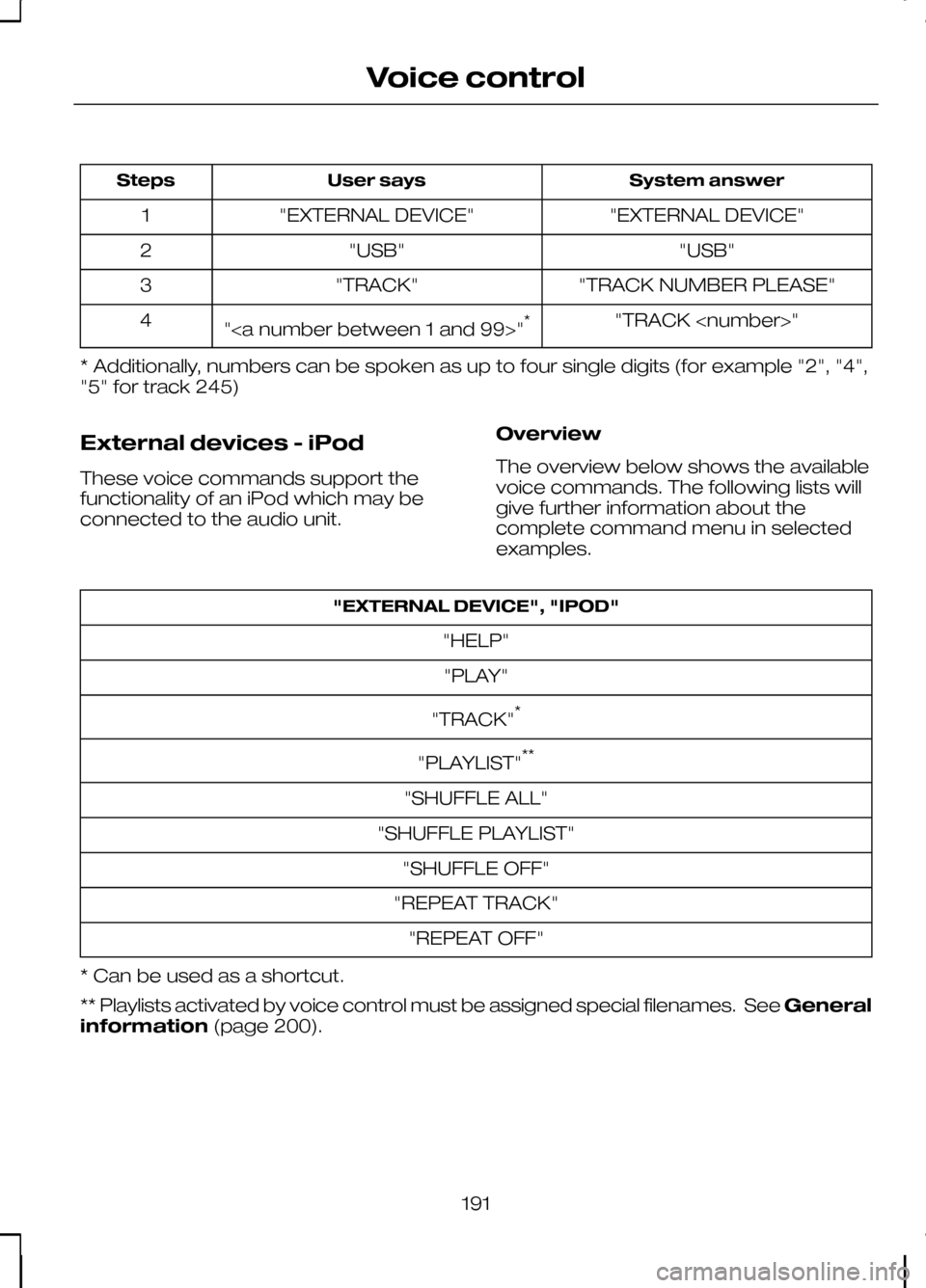
"TRACK
"" *
4
* Additionally, numbers can be spoken as up to four single digits (for example "2", "4",
"5" for track 245)
External devices - iPod
These voice commands support the
functionality of an iPod which may be
connected to the audio unit. Overview
The overview below shows the available
voice commands. The following lists will
give further information about the
complete command menu in selected
examples."EXTERNAL DEVICE", "IPOD"
"HELP""PLAY"
"TRACK" *
"PLAYLIST" **
"SHUFFLE ALL"
"SHUFFLE PLAYLIST" "SHUFFLE OFF"
"REPEAT TRACK" "REPEAT OFF"
* Can be used as a shortcut.
** Playlists activated by voice control must be assigned special filenames. See General
information (page 200).
191
Voice control
Page 194 of 226
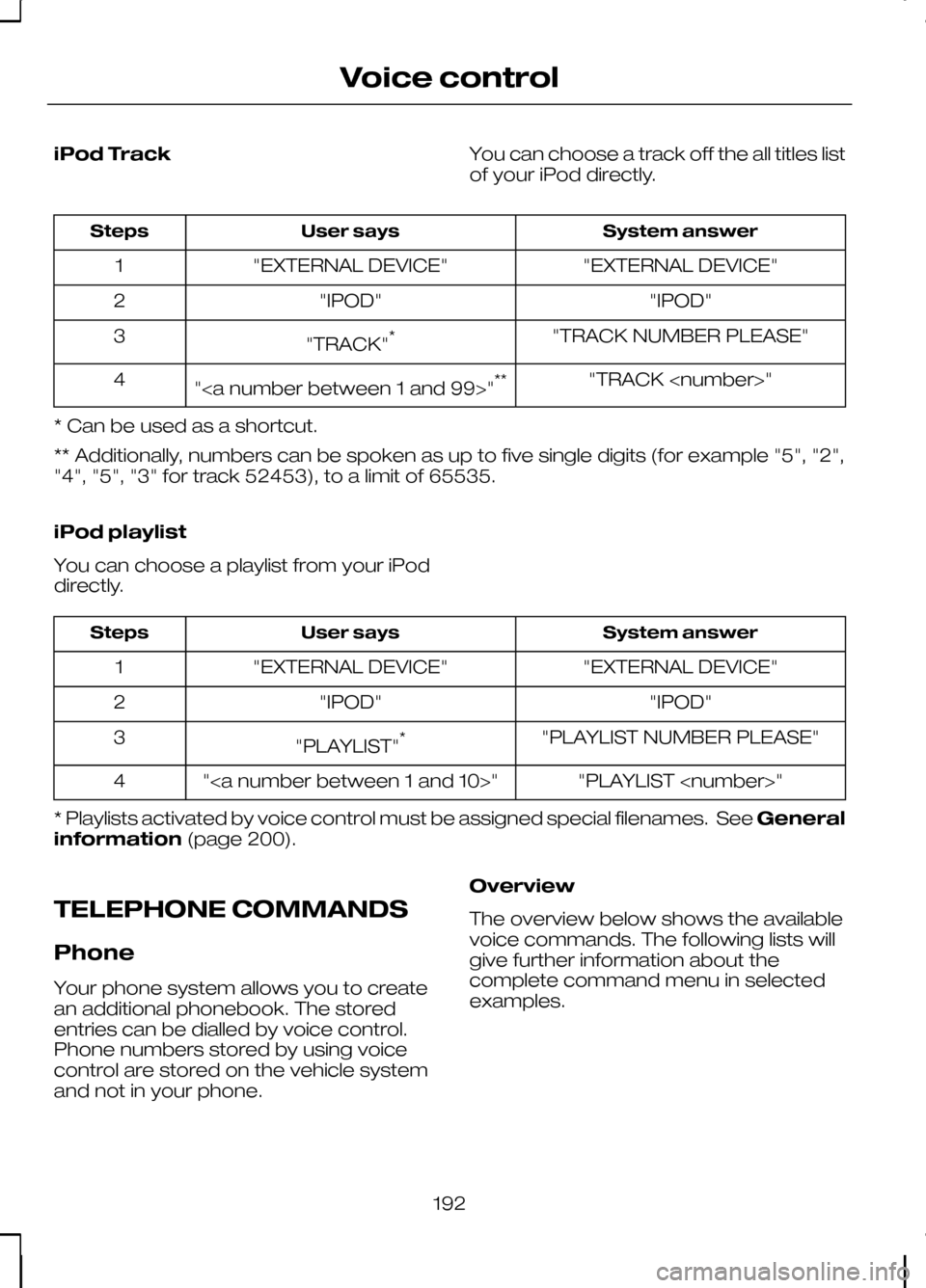
iPod Track
You can choose a track off the all titles list
of your iPod directly. System answer
User says
Steps
"EXTERNAL DEVICE"
"EXTERNAL DEVICE"
1
"IPOD"
"IPOD"
2
"TRACK NUMBER PLEASE"
"TRACK" *
3
"TRACK
"" **
4
* Can be used as a shortcut.
** Additionally, numbers can be spoken as up to five single digits (for example "5", "2",
"4", "5", "3" for track 52453), to a limit of 65535.
iPod playlist
You can choose a playlist from your iPod
directly. System answer
User says
Steps
"EXTERNAL DEVICE"
"EXTERNAL DEVICE"
1
"IPOD"
"IPOD"
2
"PLAYLIST NUMBER PLEASE"
"PLAYLIST" *
3
"PLAYLIST
""
4
* Playlists activated by voice control must be assigned special filenames. See General
information (page 200).
TELEPHONE COMMANDS
Phone
Your phone system allows you to create
an additional phonebook. The stored
entries can be dialled by voice control.
Phone numbers stored by using voice
control are stored on the vehicle system
and not in your phone. Overview
The overview below shows the available
voice commands. The following lists will
give further information about the
complete command menu in selected
examples.
192
Voice control