drive FORD KUGA 2010 1.G Owners Manual
[x] Cancel search | Manufacturer: FORD, Model Year: 2010, Model line: KUGA, Model: FORD KUGA 2010 1.GPages: 226, PDF Size: 8.07 MB
Page 4 of 226
Auto-dimming mirror..............................62
Instruments
Gauges.....................................................63
Warning lamps and indicators..............64
Audible warnings and indicators..........66
Information displays
General information................................68
Personalised settings..............................71
Information messages...........................73
Climate control
Principle of operation..............................80
Air vents....................................................80
Manual climate control............................81
Automatic climate control.....................83
Heated windows and mirrors...............86
Auxiliary heater........................................86
Seats
Sitting in the correct position.................90
Head restraints........................................90
Manual seats............................................91
Electric seats...........................................93
Rear seats................................................94
Heated seats...........................................94
Convenience features
Sun blinds.................................................96
Instrument lighting dimmer...................96
Cup holders.............................................96
Cigar lighter..............................................97
Auxiliary power sockets.........................97
Storage compartments.........................98
Glasses holder.........................................99
Toll reader.................................................99
CD changer..............................................99
Auxiliary input (AUX IN) socket..............99
USB port.................................................100
Floor mats...............................................100
Starting the engine
General information...............................101
Keyless starting......................................101
Diesel particulate filter (DPF)................102
Switching off the engine.......................103
Fuel and refuelling
Safety precautions................................104
Fuel quality - Petrol................................104
Fuel quality - Diesel...............................104
Fuel filler flap...........................................104
Catalytic converter................................105
Refuelling................................................106
Fuel consumption..................................106
Technical specifications........................106
Transmission
Manual transmission.............................108
Automatic transmission........................108
All-wheel drive (AWD).............................111
Brakes
Principle of operation.............................112
Hints on driving with ABS......................112
Parking brake..........................................112
Stability control
Principle of operation.............................113
Using stability control.............................113
Parking aid
Principle of operation.............................115
Using the parking aid.............................115
Rear view camera
Principle of operation.............................117
2
Table of contents
Page 10 of 226
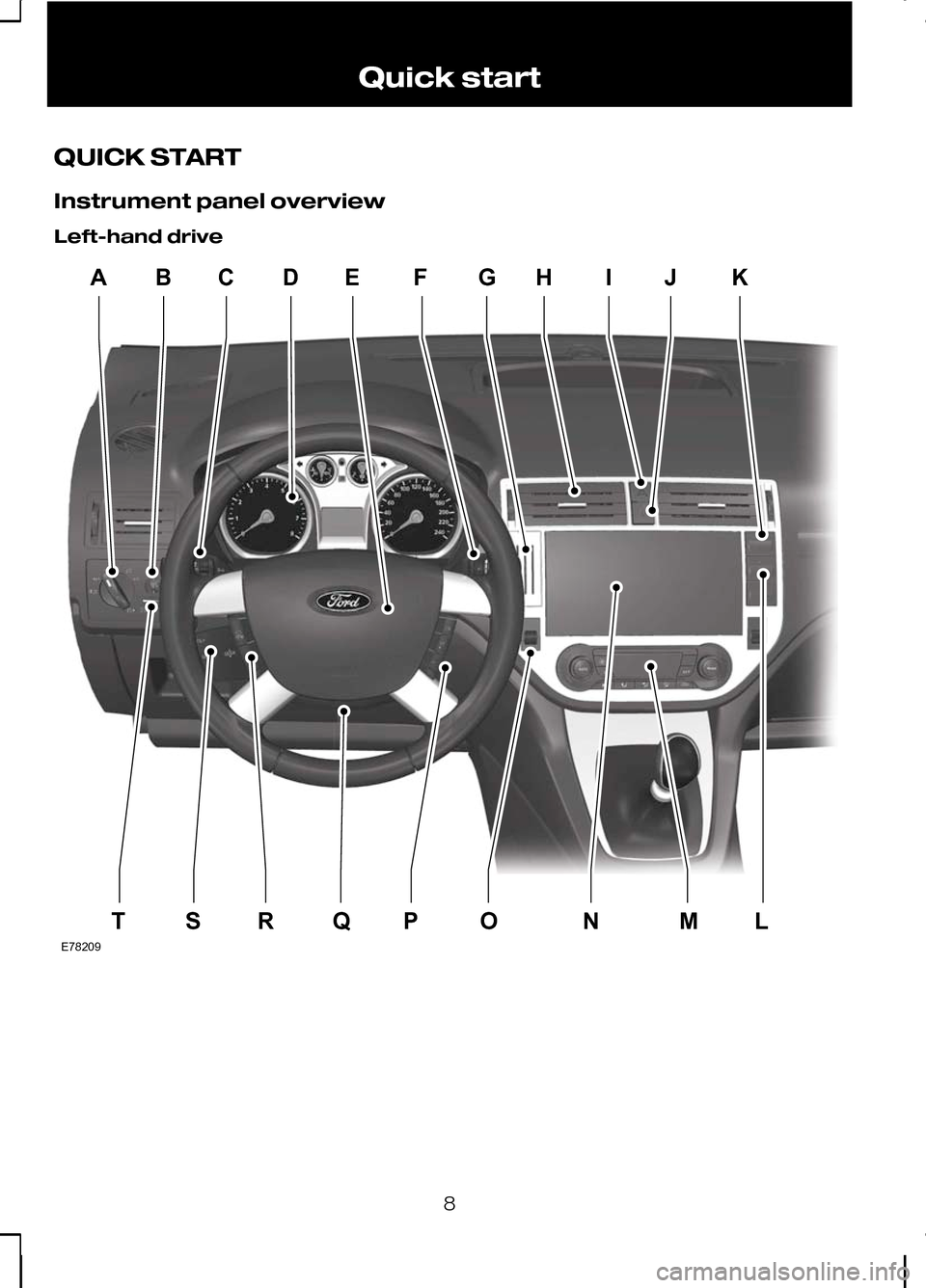
QUICK START
Instrument panel overview
Left-hand drive
8Quick startCDABEFGHIJKTSRQPONMLE78209
Page 11 of 226
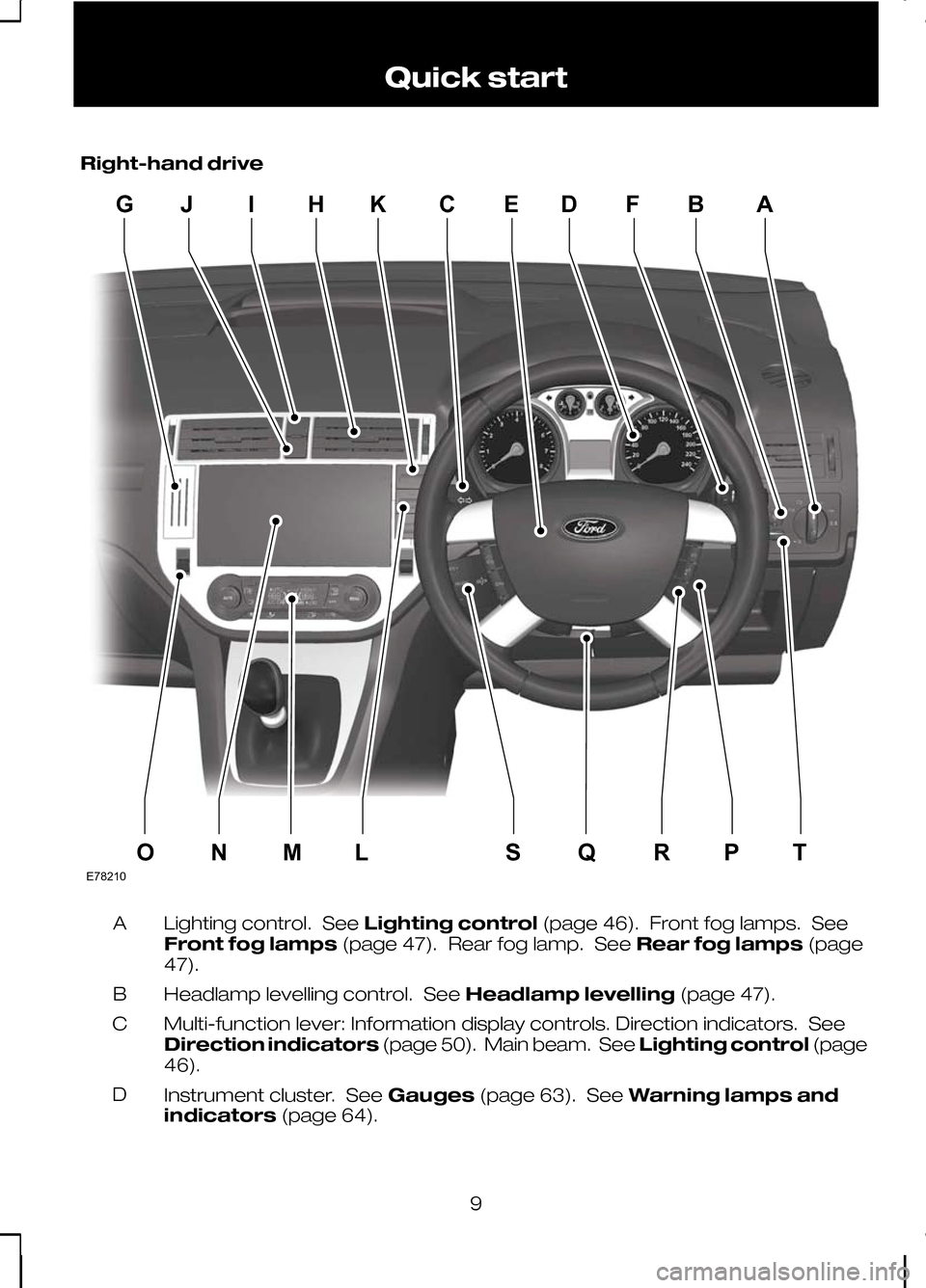
Right-hand drive
Lighting control. See
Lighting control(page 46). Front fog lamps. See
Front fog lamps (page 47). Rear fog lamp. See Rear fog lamps(page
47).
A
Headlamp levelling control. See Headlamp levelling(page 47).
B
Multi-function lever: Information display controls. Direction indicators. See
Direction indicators (page 50). Main beam. See Lighting control(page
46).
C
Instrument cluster. See Gauges(page 63). See Warning lamps and
indicators (page 64).
D
9 Quick startE78210IHGJKCEDFBAONMLSQRPT
Page 13 of 226
Locking and unlocking
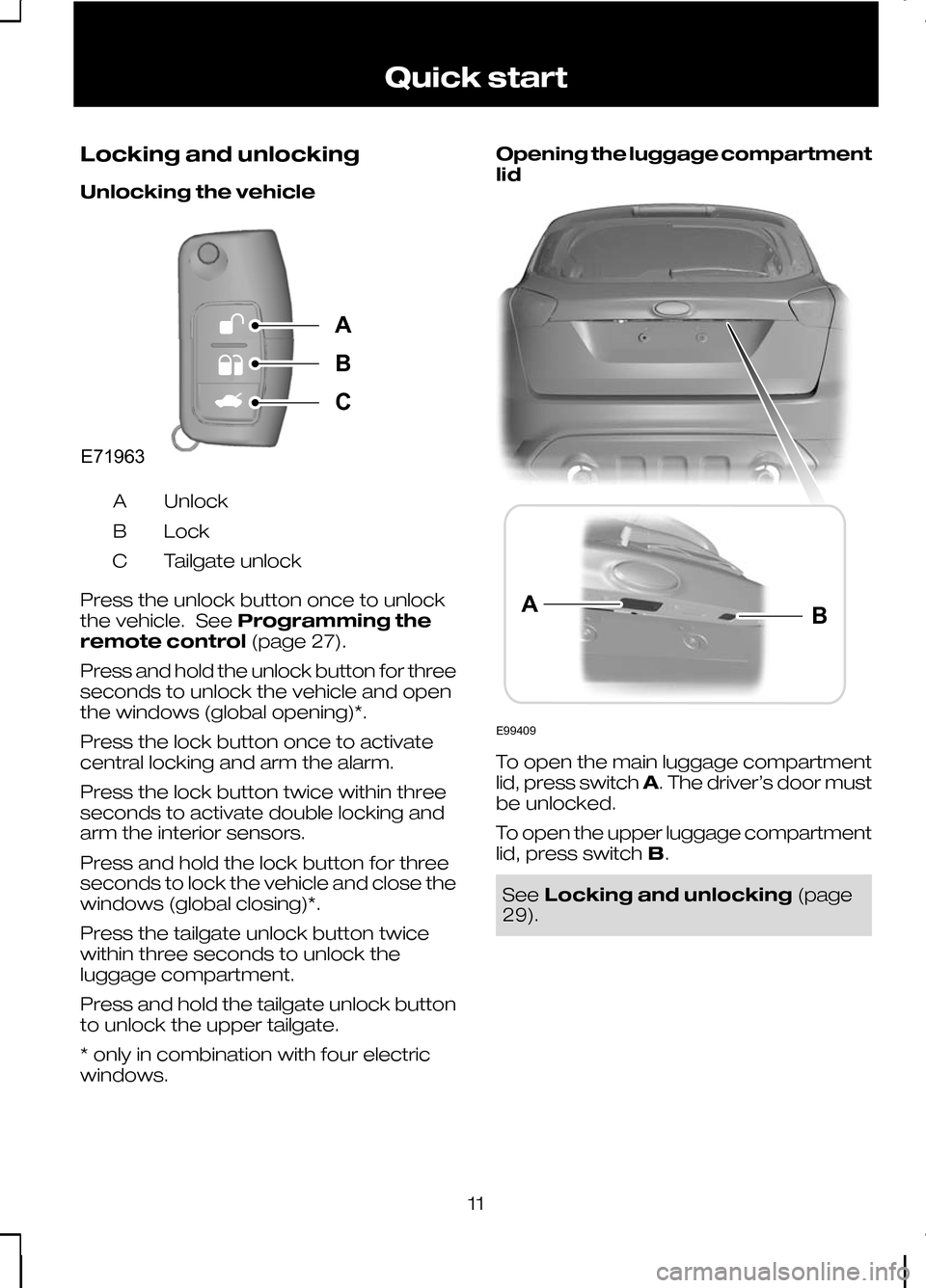
Unlocking the vehicle
Unlock
A
Lock
B
Tailgate unlock
C
Press the unlock button once to unlock
the vehicle. See Programming the
remote control (page 27).
Press and hold the unlock button for three
seconds to unlock the vehicle and open
the windows (global opening)*.
Press the lock button once to activate
central locking and arm the alarm.
Press the lock button twice within three
seconds to activate double locking and
arm the interior sensors.
Press and hold the lock button for three
seconds to lock the vehicle and close the
windows (global closing)*.
Press the tailgate unlock button twice
within three seconds to unlock the
luggage compartment.
Press and hold the tailgate unlock button
to unlock the upper tailgate.
* only in combination with four electric
windows. Opening the luggage compartment
lid
To open the main luggage compartment
lid, press switch
A. The driver’s door must
be unlocked.
To open the upper luggage compartment
lid, press switch B. See
Locking and unlocking (page
29).
11 Quick startE71963ABC E99409BA
Page 17 of 226
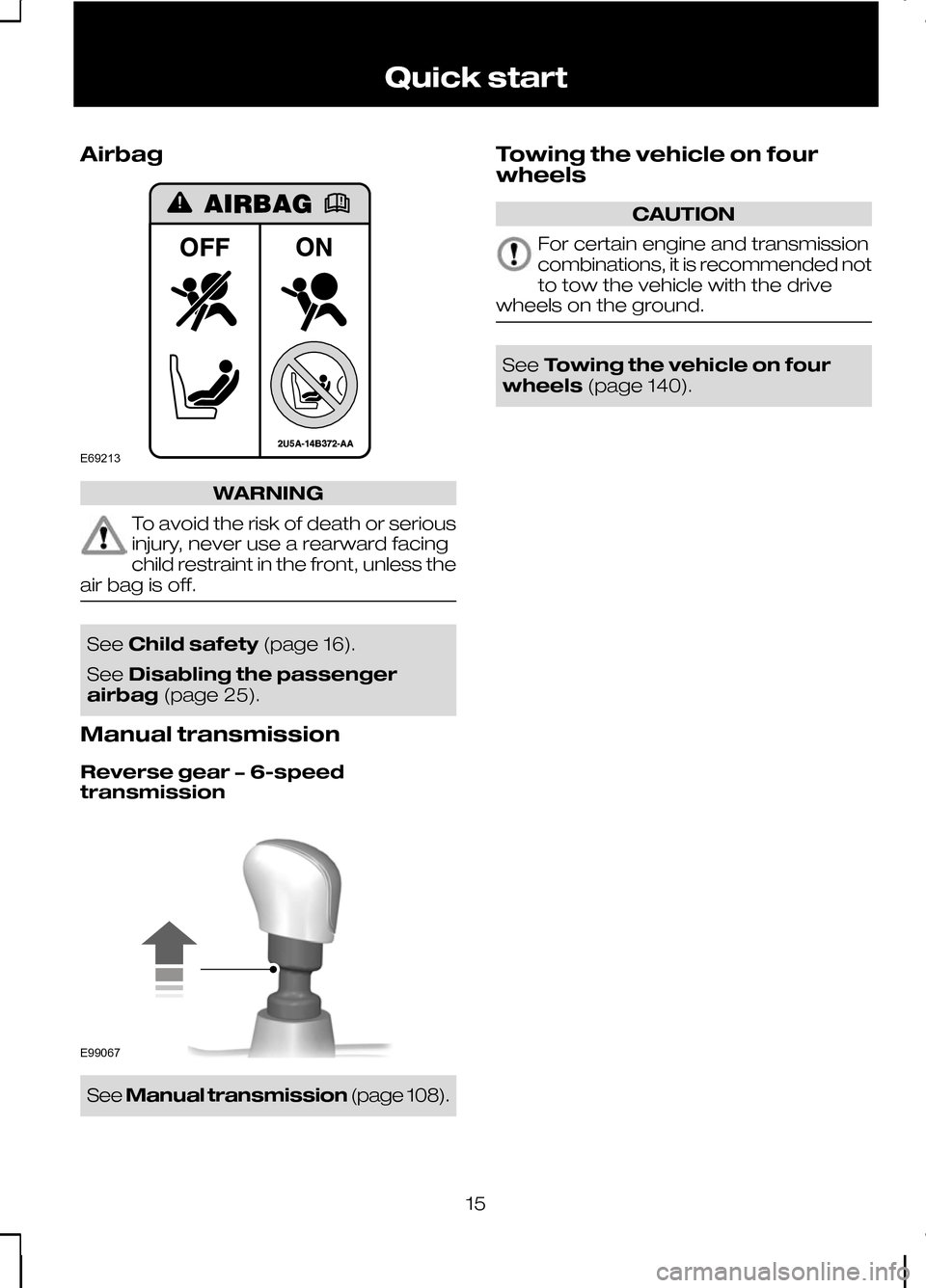
Airbag
WARNING
To avoid the risk of death or serious
injury, never use a rearward facing
child restraint in the front, unless the
air bag is off. See
Child safety (page 16).
See Disabling the passenger
airbag (page 25).
Manual transmission
Reverse gear − 6-speed
transmission See
Manual transmission (page 108).Towing the vehicle on four
wheels CAUTION
For certain engine and transmission
combinations, it is recommended not
to tow the vehicle with the drive
wheels on the ground. See
Towing the vehicle on four
wheels (page 140).
15 Quick startE69213 E99067
Page 24 of 226
PRINCIPLE OF OPERATION
Airbags
WARNINGS
Do not modify the front of your
vehicle in any way. This could
adversely affect deployment of the
airbags. Original text according to ECE
R94.01: Extreme Hazard! Do not use
a rearward facing child restraint on
a seat protected by an airbag in front of
it! Wear a seat belt and keep sufficient
distance between yourself and the
steering wheel. Only when you use
the seat belt properly, can it hold you in a
position that allows the airbag to achieve
its optimum effect. See Sitting in the
correct position (page 90).Have repairs to the steering wheel,
steering column, seats, airbags and
seat belts carried out by a properly
trained technician. Keep the areas in front of the
airbags free from obstruction. Do
not affix anything to or over the
airbag covers. Do not poke sharp objects into
areas where airbags are fitted. This
could damage and adversely affect
deployment of the airbags. Use seat covers designed for seats
with side airbags. Have these fitted
by a properly trained technician.
Note:You will hear a loud bang and see
a cloud of harmless powdery residue if an airbag deploys. This is normal.
Note:Only wipe airbag covers with a
damp cloth.
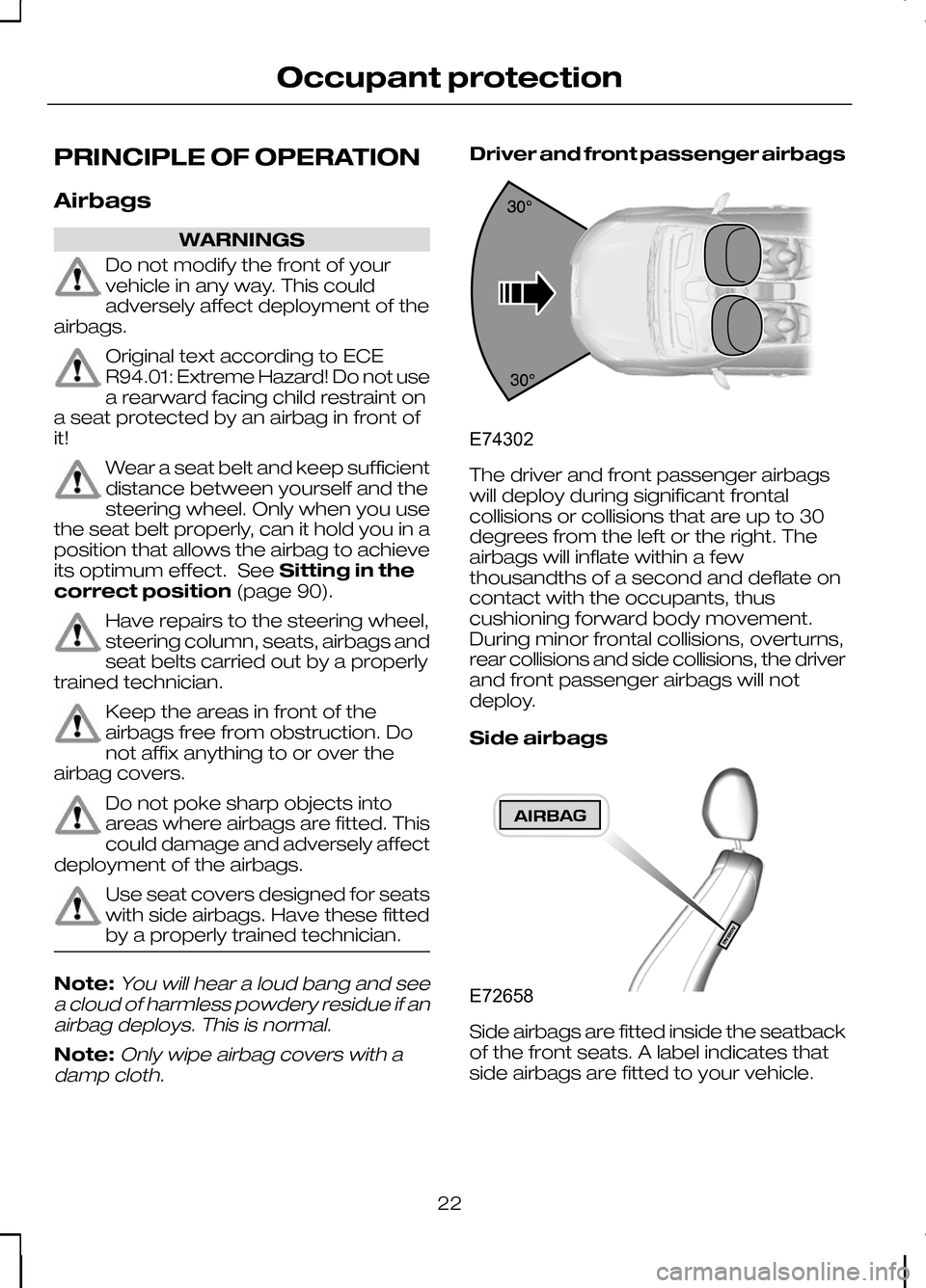
Driver and front passenger airbags The driver and front passenger airbags
will deploy during significant frontal
collisions or collisions that are up to 30
degrees from the left or the right. The
airbags will inflate within a few
thousandths of a second and deflate on
contact with the occupants, thus
cushioning forward body movement.
During minor frontal collisions, overturns,
rear collisions and side collisions, the driver
and front passenger airbags will not
deploy.
Side airbags
Side airbags are fitted inside the seatback
of the front seats. A label indicates that
side airbags are fitted to your vehicle.
22
Occupant protectionE74302 E72658
Page 25 of 226
The side airbags will deploy during
significant lateral collisions. Only the airbag
on the side affected by the collision will
deploy. The airbags will inflate within a few
thousandths of a second and deflate on
contact with the occupants, thus
providing protection for the chest and
shoulder areas. During minor lateral
collisions, overturns, front collisions and
rear collisions, the side airbags will not
deploy.
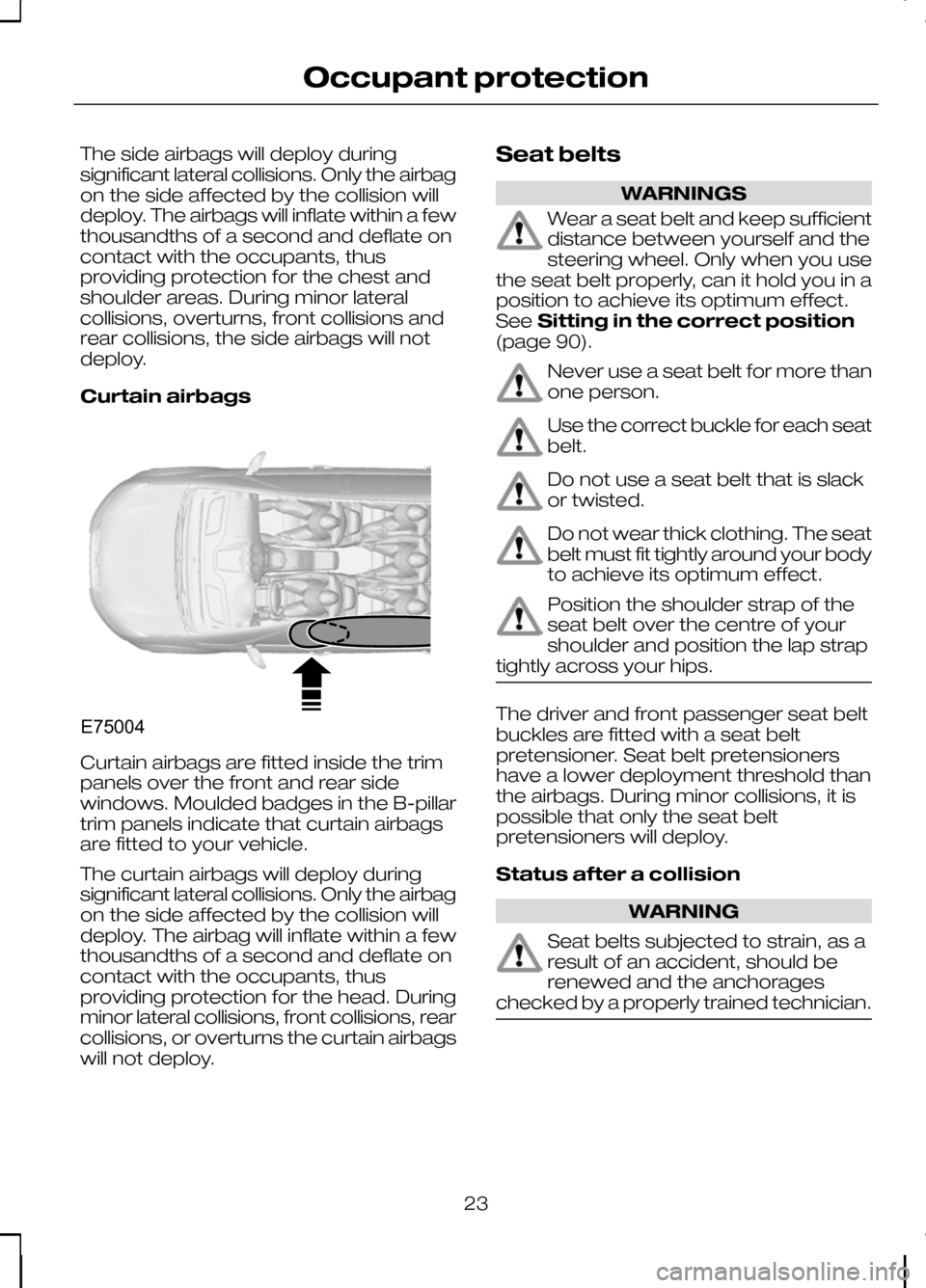
Curtain airbags
Curtain airbags are fitted inside the trim
panels over the front and rear side
windows. Moulded badges in the B-pillar
trim panels indicate that curtain airbags
are fitted to your vehicle.
The curtain airbags will deploy during
significant lateral collisions. Only the airbag
on the side affected by the collision will
deploy. The airbag will inflate within a few
thousandths of a second and deflate on
contact with the occupants, thus
providing protection for the head. During
minor lateral collisions, front collisions, rear
collisions, or overturns the curtain airbags
will not deploy. Seat belts WARNINGS
Wear a seat belt and keep sufficient
distance between yourself and the
steering wheel. Only when you use
the seat belt properly, can it hold you in a
position to achieve its optimum effect.
See Sitting in the correct position
(page 90). Never use a seat belt for more than
one person.
Use the correct buckle for each seat
belt.
Do not use a seat belt that is slack
or twisted.
Do not wear thick clothing. The seat
belt must fit tightly around your body
to achieve its optimum effect.
Position the shoulder strap of the
seat belt over the centre of your
shoulder and position the lap strap
tightly across your hips. The driver and front passenger seat belt
buckles are fitted with a seat belt
pretensioner. Seat belt pretensioners
have a lower deployment threshold than
the airbags. During minor collisions, it is
possible that only the seat belt
pretensioners will deploy.
Status after a collision
WARNING
Seat belts subjected to strain, as a
result of an accident, should be
renewed and the anchorages
checked by a properly trained technician. 23
Occupant protectionE75004
Page 26 of 226
FASTENING THE SEAT
BELTS
WARNING
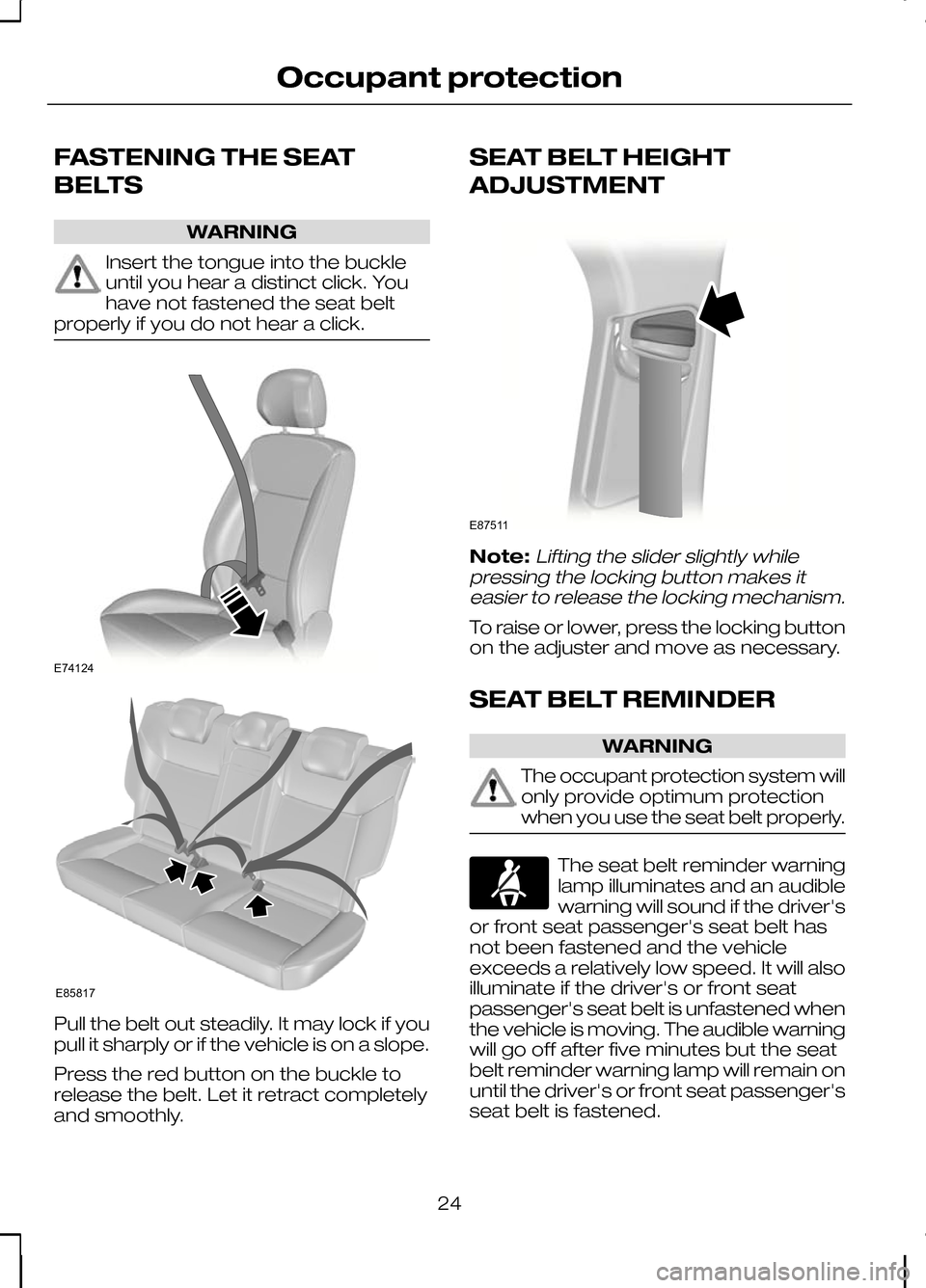
Insert the tongue into the buckle
until you hear a distinct click. You
have not fastened the seat belt
properly if you do not hear a click. Pull the belt out steadily. It may lock if you
pull it sharply or if the vehicle is on a slope.
Press the red button on the buckle to
release the belt. Let it retract completely
and smoothly. SEAT BELT HEIGHT
ADJUSTMENT
Note:Lifting the slider slightly while
pressing the locking button makes it easier to release the locking mechanism.
To raise or lower, press the locking button
on the adjuster and move as necessary.
SEAT BELT REMINDER WARNING
The occupant protection system will
only provide optimum protection
when you use the seat belt properly.
The seat belt reminder warning
lamp illuminates and an audible
warning will sound if the driver's
or front seat passenger's seat belt has
not been fastened and the vehicle
exceeds a relatively low speed. It will also
illuminate if the driver's or front seat
passenger's seat belt is unfastened when
the vehicle is moving. The audible warning
will go off after five minutes but the seat
belt reminder warning lamp will remain on
until the driver's or front seat passenger's
seat belt is fastened.
24
Occupant protectionE74124 E85817 E87511
Page 29 of 226
GENERAL INFORMATION ON
RADIO FREQUENCIES
CAUTION
The radio frequency used by your
remote control can also be used by
other short distance radio
transmissions (e.g. amateur radios,
medical equipment, wireless headphones,
remote controls and alarm systems). If
the frequencies are jammed, you will not
be able to use your remote control. You
can lock and unlock the doors with the
key. Note:You could unlock the doors if you
press the buttons on the remote control unintentionally.
The operating range between your
remote control and your vehicle varies
depending on the environment.
PROGRAMMING THE
REMOTE CONTROL
You can programme a maximum of eight
remote controls to use with your vehicle
(including any supplied with your vehicle).
Ask your dealer for instructions.
CHANGING THE REMOTE
CONTROL BATTERY Make sure that you dispose of
old batteries in an
environmentally friendly way.
Seek advice from your local authority
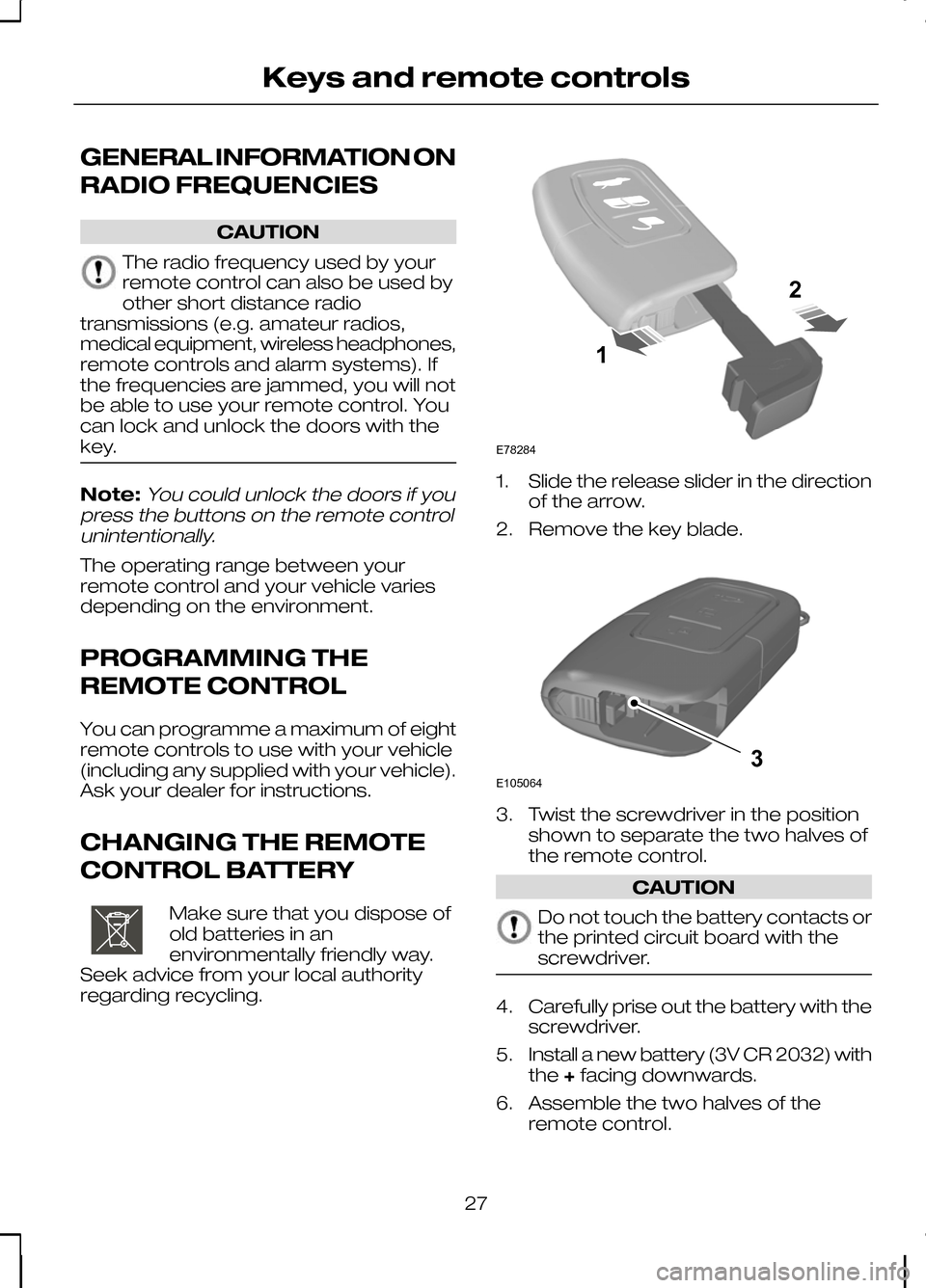
regarding recycling. 1. Slide the release slider in the direction
of the arrow.
2. Remove the key blade. 3. Twist the screwdriver in the position
shown to separate the two halves of
the remote control. CAUTION
Do not touch the battery contacts or
the printed circuit board with the
screwdriver.
4.
Carefully prise out the battery with the
screwdriver.
5. Install a new battery (3V CR 2032) with
the +facing downwards.
6. Assemble the two halves of the remote control.
27
Keys and remote controlsE107998 12E78284 E1050643
Page 31 of 226
LOCKING AND UNLOCKING
Central locking
You can only centrally lock the doors if
they are all closed.
Note:The driver’s door can be unlocked
with the key. This needs to be used if the remote control is not functioning.
Double locking WARNING
Do not activate double locking when
persons or animals are inside the
vehicle. You will not be able to
unlock the doors from the inside if you
have double locked them. Double locking is a theft protection feature
that prevents someone from opening the
doors from the inside. You can only
double lock the doors if they are all closed.
Locking and unlocking
confirmation
When you unlock the doors, the direction
indicators will flash once.
When you lock the doors, the direction
indicators will flash twice. Note:
The direction indicators will flash
twice as soon as you activate central locking. They will not flash again when youpress the lock button on the remotecontrol or turn the key for the secondtime, i.e. when you activate doublelocking.
Locking and unlocking the
doors with the key
Turn the top of the key towards the front
of the vehicle to lock the door. Turn the
top of the key towards the rear of the
vehicle to unlock the door.
Double locking the doors with
the key
Turn the key to the lock position twice
within three seconds to double lock the
doors.
Locking and unlocking the
doors and the luggage
compartment lid with the
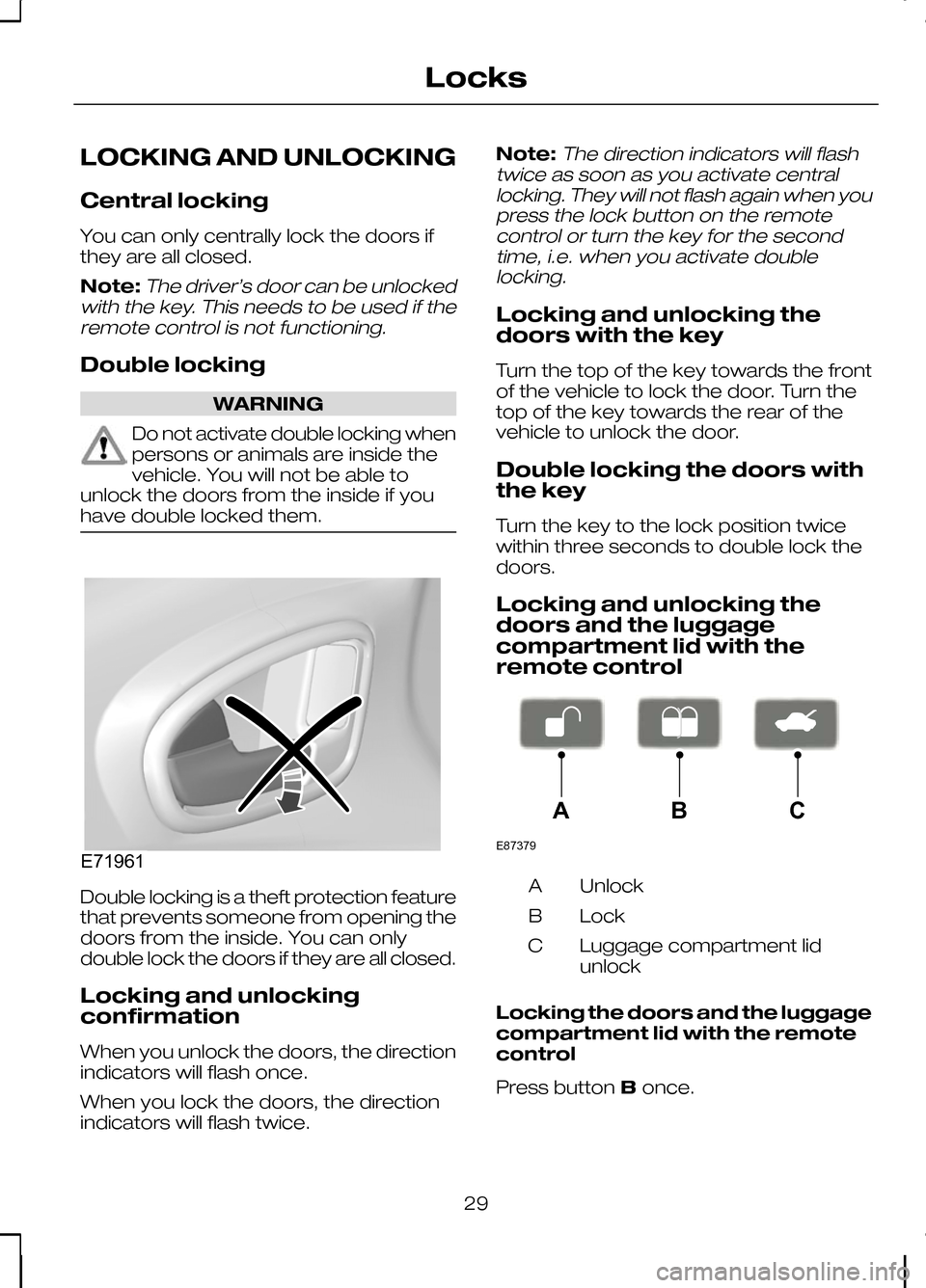
remote control Unlock
A
Lock
B
Luggage compartment lid
unlock
C
Locking the doors and the luggage
compartment lid with the remote
control
Press button Bonce.
29
LocksE71961 E87379ABC