Reverse FORD MAVERICK 2022 User Guide
[x] Cancel search | Manufacturer: FORD, Model Year: 2022, Model line: MAVERICK, Model: FORD MAVERICK 2022Pages: 533, PDF Size: 9.58 MB
Page 211 of 533
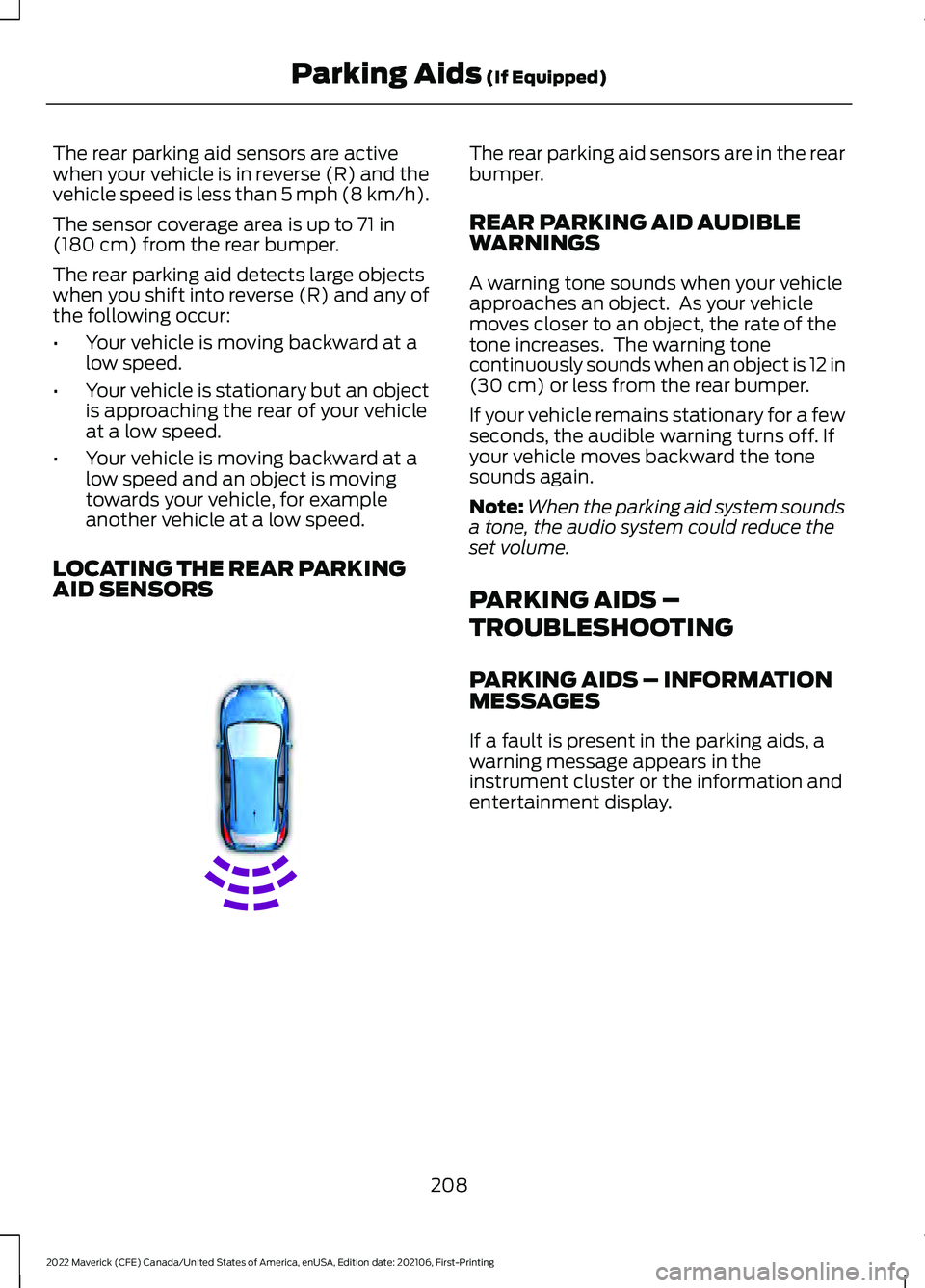
The rear parking aid sensors are active
when your vehicle is in reverse (R) and the
vehicle speed is less than 5 mph (8 km/h).
The sensor coverage area is up to
71 in
(180 cm) from the rear bumper.
The rear parking aid detects large objects
when you shift into reverse (R) and any of
the following occur:
• Your vehicle is moving backward at a
low speed.
• Your vehicle is stationary but an object
is approaching the rear of your vehicle
at a low speed.
• Your vehicle is moving backward at a
low speed and an object is moving
towards your vehicle, for example
another vehicle at a low speed.
LOCATING THE REAR PARKING
AID SENSORS The rear parking aid sensors are in the rear
bumper.
REAR PARKING AID AUDIBLE
WARNINGS
A warning tone sounds when your vehicle
approaches an object. As your vehicle
moves closer to an object, the rate of the
tone increases. The warning tone
continuously sounds when an object is 12 in
(30 cm)
or less from the rear bumper.
If your vehicle remains stationary for a few
seconds, the audible warning turns off. If
your vehicle moves backward the tone
sounds again.
Note: When the parking aid system sounds
a tone, the audio system could reduce the
set volume.
PARKING AIDS –
TROUBLESHOOTING
PARKING AIDS – INFORMATION
MESSAGES
If a fault is present in the parking aids, a
warning message appears in the
instrument cluster or the information and
entertainment display.
208
2022 Maverick (CFE) Canada/United States of America, enUSA, Edition date: 202106, First-Printing Parking Aids
(If Equipped)E130178
Page 213 of 533
WHAT IS THE REAR VIEW
CAMERA
The rear view camera provides a video
image of the area behind your vehicle when
the transmission is in reverse (R).
REAR VIEW CAMERA
PRECAUTIONS
WARNING: The rear view camera
system is a reverse aid supplement
device that still requires the driver to use
it in conjunction with the interior and
exterior mirrors for maximum coverage. WARNING:
Objects that are close
to either corner of the bumper or under
the bumper, might not be seen on the
screen due to the limited coverage of the
camera system. WARNING:
Reverse your vehicle
slowly. Failure to follow this instruction
could result in the loss of control of your
vehicle, personal injury or death. WARNING:
Use caution when the
rear cargo door is ajar. If the rear cargo
door is ajar, the camera will be out of
position and the video image could be
incorrect. All guide lines disappear when
the rear cargo door is ajar. Failure to
follow this instruction could result in
personal injury. WARNING:
Use caution when
turning camera features on or off when
the transmission is not in park (P). Make
sure your vehicle is not moving. Note:
When towing, the camera only sees
what you are towing. This might not provide
adequate coverage and you might not see
some objects. In some vehicles, the guide
lines may disappear when you connect the
trailer tow connector.
LOCATING THE REAR VIEW
CAMERA
The rear view camera is on the tailgate. It
provides a video image of the area behind
your vehicle.
REAR VIEW CAMERA GUIDE
LINES
Note: Active guide lines and fixed guide
lines are only available when the
transmission is in reverse (R).
Note: The centerline is only available if the
active or fixed guide lines are on.
210
2022 Maverick (CFE) Canada/United States of America, enUSA, Edition date: 202106, First-Printing Rear View Camera
Page 214 of 533
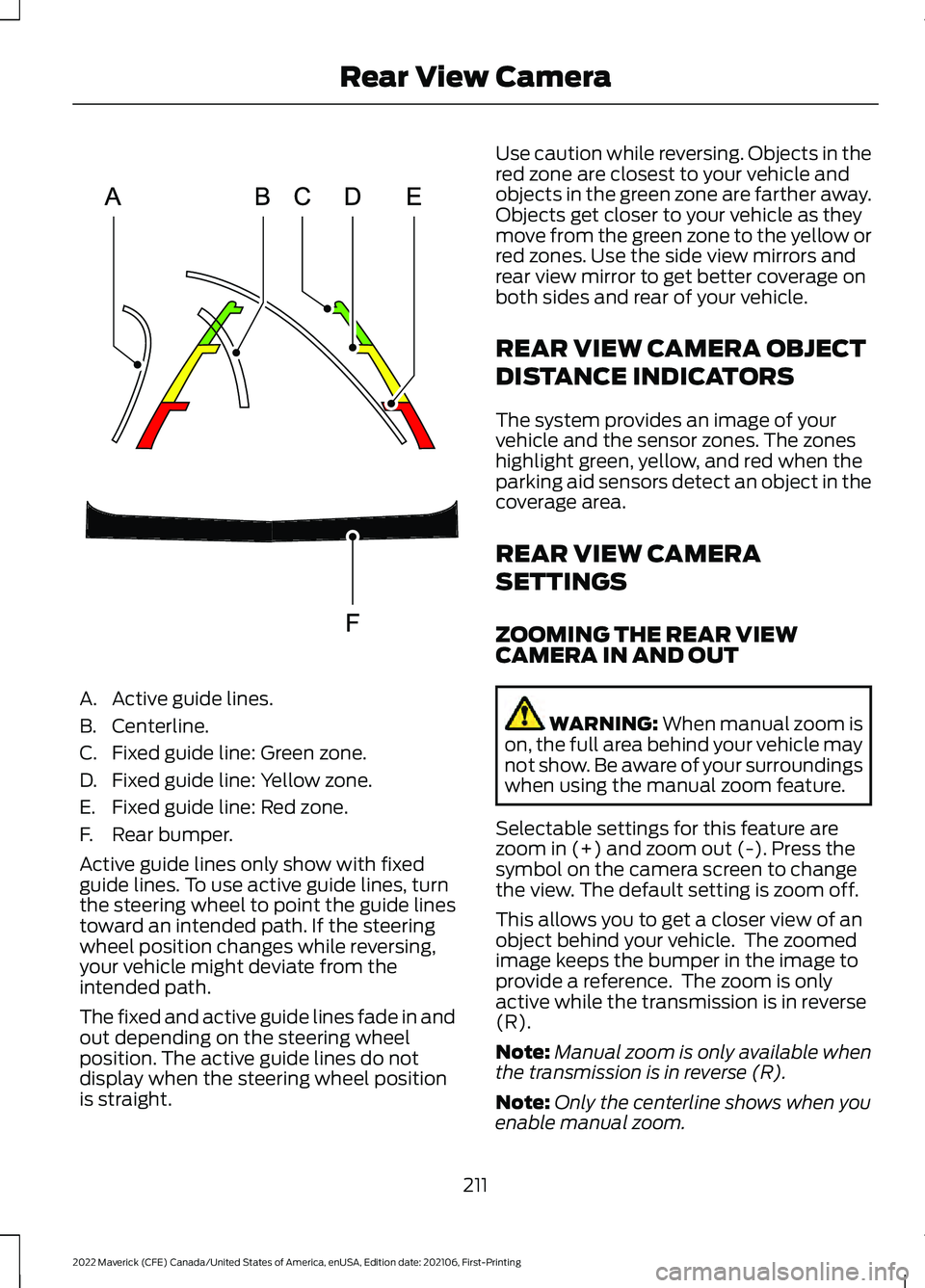
A. Active guide lines.
B. Centerline.
C. Fixed guide line: Green zone.
D. Fixed guide line: Yellow zone.
E. Fixed guide line: Red zone.
F. Rear bumper.
Active guide lines only show with fixed
guide lines. To use active guide lines, turn
the steering wheel to point the guide lines
toward an intended path. If the steering
wheel position changes while reversing,
your vehicle might deviate from the
intended path.
The fixed and active guide lines fade in and
out depending on the steering wheel
position. The active guide lines do not
display when the steering wheel position
is straight. Use caution while reversing. Objects in the
red zone are closest to your vehicle and
objects in the green zone are farther away.
Objects get closer to your vehicle as they
move from the green zone to the yellow or
red zones. Use the side view mirrors and
rear view mirror to get better coverage on
both sides and rear of your vehicle.
REAR VIEW CAMERA OBJECT
DISTANCE INDICATORS
The system provides an image of your
vehicle and the sensor zones. The zones
highlight green, yellow, and red when the
parking aid sensors detect an object in the
coverage area.
REAR VIEW CAMERA
SETTINGS
ZOOMING THE REAR VIEW
CAMERA IN AND OUT
WARNING: When manual zoom is
on, the full area behind your vehicle may
not show. Be aware of your surroundings
when using the manual zoom feature.
Selectable settings for this feature are
zoom in (+) and zoom out (-). Press the
symbol on the camera screen to change
the view. The default setting is zoom off.
This allows you to get a closer view of an
object behind your vehicle. The zoomed
image keeps the bumper in the image to
provide a reference. The zoom is only
active while the transmission is in reverse
(R).
Note: Manual zoom is only available when
the transmission is in reverse (R).
Note: Only the centerline shows when you
enable manual zoom.
211
2022 Maverick (CFE) Canada/United States of America, enUSA, Edition date: 202106, First-Printing Rear View CameraE306774
Page 215 of 533
SWITCHING REAR VIEW CAMERA
DELAY ON AND OFF
1. Press Features on the touchscreen.
2. Press
Driver Assistance.
3. Press
Rear View Camera.
4. Switch
Rear View Camera Delay on or
off.
When shifting the transmission out of
reverse (R) and into any gear other than
park (P), the camera image remains in the
display until:
• Your vehicle speed reaches
approximately
5 mph (8 km/h).
• You shift your vehicle into park (P).
212
2022 Maverick (CFE) Canada/United States of America, enUSA, Edition date: 202106, First-Printing Rear View Camera
Page 240 of 533
WHAT IS BLIND SPOT
INFORMATION SYSTEM
Blind spot information system detects
vehicles that may have entered the blind
spot zone.
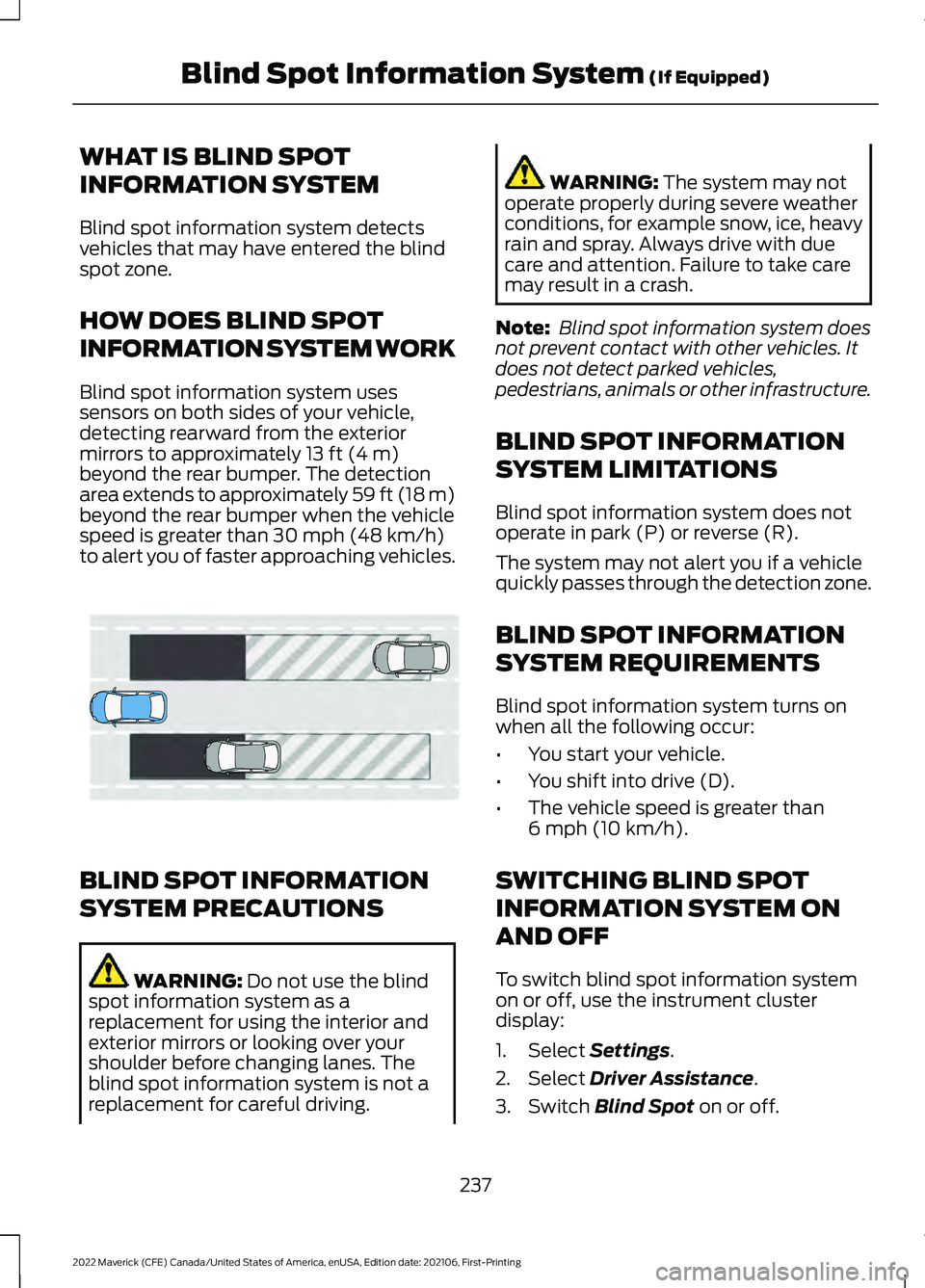
HOW DOES BLIND SPOT
INFORMATION SYSTEM WORK
Blind spot information system uses
sensors on both sides of your vehicle,
detecting rearward from the exterior
mirrors to approximately 13 ft (4 m)
beyond the rear bumper. The detection
area extends to approximately 59 ft (18 m)
beyond the rear bumper when the vehicle
speed is greater than
30 mph (48 km/h)
to alert you of faster approaching vehicles. BLIND SPOT INFORMATION
SYSTEM PRECAUTIONS
WARNING:
Do not use the blind
spot information system as a
replacement for using the interior and
exterior mirrors or looking over your
shoulder before changing lanes. The
blind spot information system is not a
replacement for careful driving. WARNING:
The system may not
operate properly during severe weather
conditions, for example snow, ice, heavy
rain and spray. Always drive with due
care and attention. Failure to take care
may result in a crash.
Note: Blind spot information system does
not prevent contact with other vehicles. It
does not detect parked vehicles,
pedestrians, animals or other infrastructure.
BLIND SPOT INFORMATION
SYSTEM LIMITATIONS
Blind spot information system does not
operate in park (P) or reverse (R).
The system may not alert you if a vehicle
quickly passes through the detection zone.
BLIND SPOT INFORMATION
SYSTEM REQUIREMENTS
Blind spot information system turns on
when all the following occur:
• You start your vehicle.
• You shift into drive (D).
• The vehicle speed is greater than
6 mph (10 km/h)
.
SWITCHING BLIND SPOT
INFORMATION SYSTEM ON
AND OFF
To switch blind spot information system
on or off, use the instrument cluster
display:
1. Select
Settings.
2. Select
Driver Assistance.
3. Switch
Blind Spot on or off.
237
2022 Maverick (CFE) Canada/United States of America, enUSA, Edition date: 202106, First-Printing Blind Spot Information System
(If Equipped)E255695
Page 243 of 533
WHAT IS CROSS TRAFFIC
ALERT
The system alerts you of vehicles
approaching from the sides behind your
vehicle when you shift into reverse (R).
HOW DOES CROSS TRAFFIC
ALERT WORK
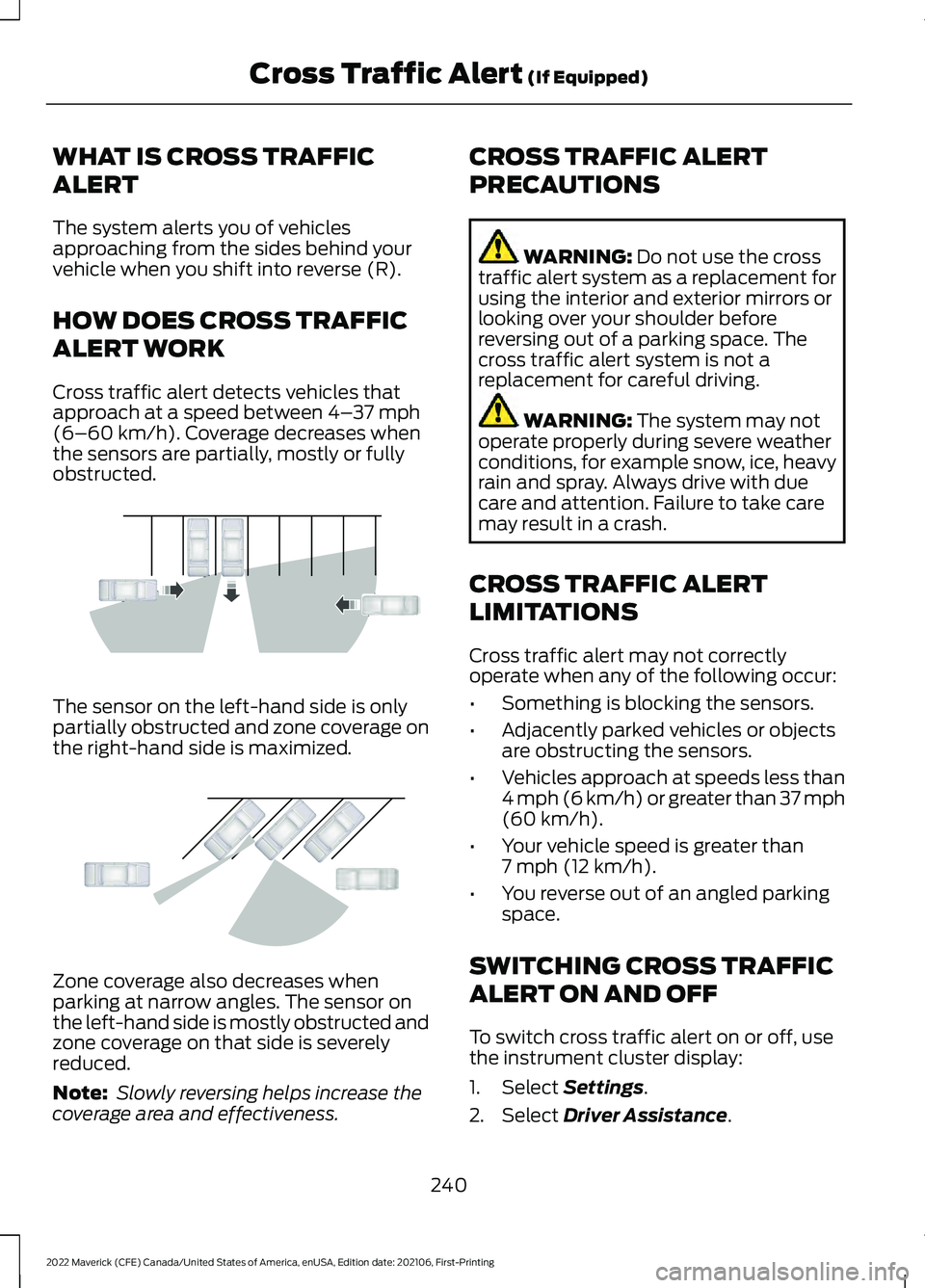
Cross traffic alert detects vehicles that
approach at a speed between 4–
37 mph
(6–60 km/h). Coverage decreases when
the sensors are partially, mostly or fully
obstructed. The sensor on the left-hand side is only
partially obstructed and zone coverage on
the right-hand side is maximized.
Zone coverage also decreases when
parking at narrow angles. The sensor on
the left-hand side is mostly obstructed and
zone coverage on that side is severely
reduced.
Note:
Slowly reversing helps increase the
coverage area and effectiveness. CROSS TRAFFIC ALERT
PRECAUTIONS WARNING:
Do not use the cross
traffic alert system as a replacement for
using the interior and exterior mirrors or
looking over your shoulder before
reversing out of a parking space. The
cross traffic alert system is not a
replacement for careful driving. WARNING:
The system may not
operate properly during severe weather
conditions, for example snow, ice, heavy
rain and spray. Always drive with due
care and attention. Failure to take care
may result in a crash.
CROSS TRAFFIC ALERT
LIMITATIONS
Cross traffic alert may not correctly
operate when any of the following occur:
• Something is blocking the sensors.
• Adjacently parked vehicles or objects
are obstructing the sensors.
• Vehicles approach at speeds less than
4 mph (6 km/h) or greater than 37 mph
(60 km/h)
.
• Your vehicle speed is greater than
7 mph (12 km/h)
.
• You reverse out of an angled parking
space.
SWITCHING CROSS TRAFFIC
ALERT ON AND OFF
To switch cross traffic alert on or off, use
the instrument cluster display:
1. Select
Settings.
2. Select
Driver Assistance.
240
2022 Maverick (CFE) Canada/United States of America, enUSA, Edition date: 202106, First-Printing Cross Traffic Alert
(If Equipped)E142440 E142441
Page 244 of 533
3. Switch Cross Traffic Alert on or off.
Note: The system switches on every time
you switch the ignition on. To permanently
switch the system off, contact an authorized
dealer.
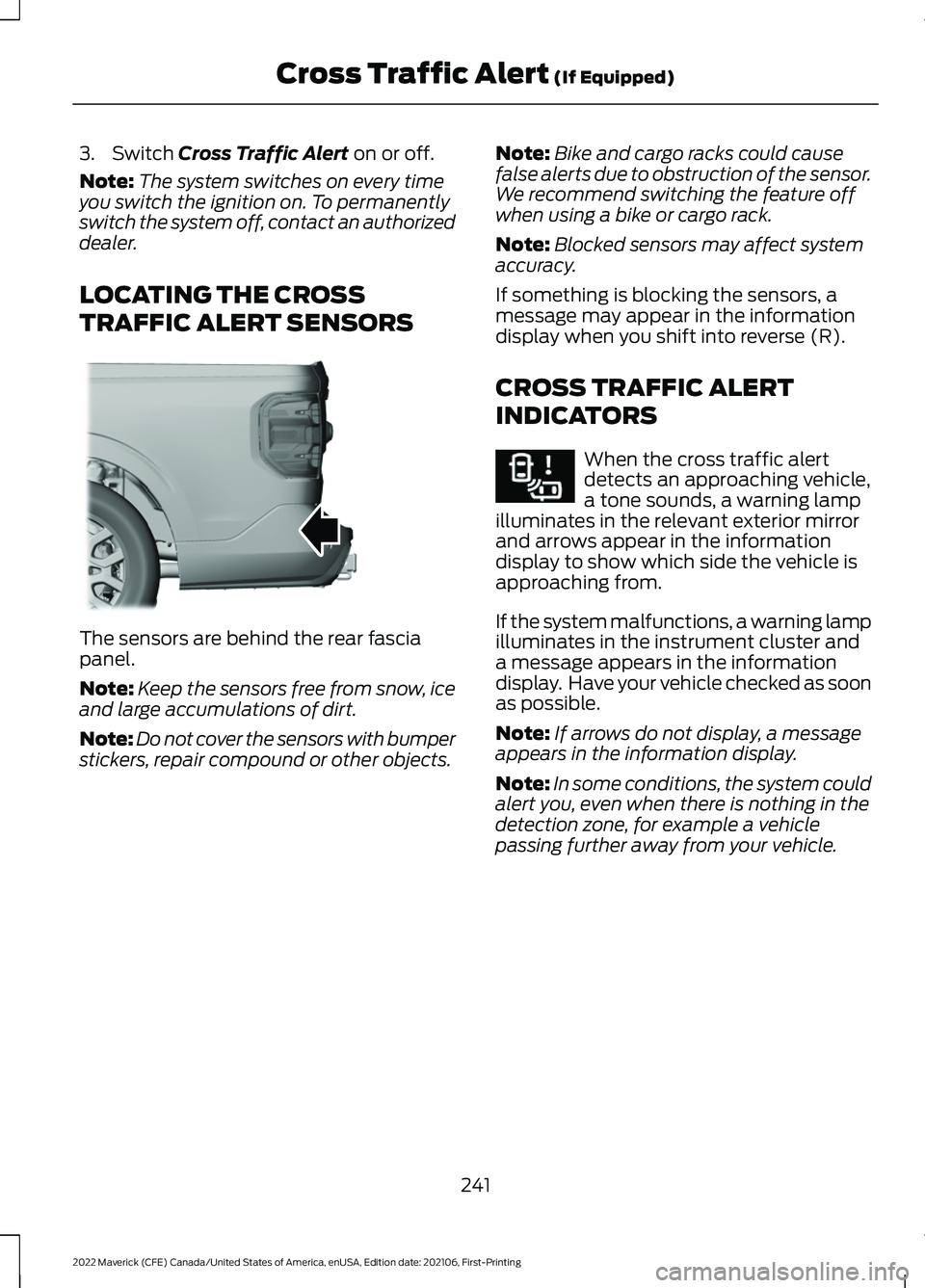
LOCATING THE CROSS
TRAFFIC ALERT SENSORS The sensors are behind the rear fascia
panel.
Note:
Keep the sensors free from snow, ice
and large accumulations of dirt.
Note: Do not cover the sensors with bumper
stickers, repair compound or other objects. Note:
Bike and cargo racks could cause
false alerts due to obstruction of the sensor.
We recommend switching the feature off
when using a bike or cargo rack.
Note: Blocked sensors may affect system
accuracy.
If something is blocking the sensors, a
message may appear in the information
display when you shift into reverse (R).
CROSS TRAFFIC ALERT
INDICATORS When the cross traffic alert
detects an approaching vehicle,
a tone sounds, a warning lamp
illuminates in the relevant exterior mirror
and arrows appear in the information
display to show which side the vehicle is
approaching from.
If the system malfunctions, a warning lamp
illuminates in the instrument cluster and
a message appears in the information
display. Have your vehicle checked as soon
as possible.
Note: If arrows do not display, a message
appears in the information display.
Note: In some conditions, the system could
alert you, even when there is nothing in the
detection zone, for example a vehicle
passing further away from your vehicle.
241
2022 Maverick (CFE) Canada/United States of America, enUSA, Edition date: 202106, First-Printing Cross Traffic Alert
(If Equipped)E354512 E268294
Page 277 of 533
DRIVING IN SPECIAL
CONDITIONS
EMERGENCY MANEUVERS
In an unavoidable emergency where you
must make a sudden sharp maneuver, turn
the steering wheel only as rapidly and as
far as required to avoid the emergency.
Apply smooth pressure to the accelerator
pedal or brake pedal as needed. Avoid
abrupt steering, acceleration and braking
changes. Abrupt changes could increase
the risk of vehicle roll over, loss of vehicle
control and personal injury. If possible, use
any available road surfaces to bring your
vehicle under control.
DRIVING THROUGH MUD AND
WATER
Mud
Be cautious of sudden changes in vehicle
speed or direction when you are driving in
mud. Even all-wheel drive and four-wheel
drive vehicles can lose traction in mud. If
your vehicle slides, steer in the direction of
the slide until you regain control of your
vehicle. After driving through mud, clean
off residue stuck to rotating driveshafts
and tires. Excess residue can cause an
imbalance that could damage drive
components.
Note:
If your vehicle gets stuck in mud, it
could be rocked out by shifting between
forward and reverse gears, stopping
between shifts in a steady pattern. Press
lightly on the accelerator in each gear.
Note: Do not rock your vehicle if the engine
is not at normal operating temperature, as
damage to the transmission could occur. Note:
Do not rock your vehicle for more
than a minute, as damage to the
transmission and tires could occur or the
engine could overheat.
Water
If you must drive though deep water, drive
slowly. The water could limit traction or
brake capability. See Driving Through
Shallow Water (page 275).
When driving though water, determine the
depth and avoid water higher than the
center of the wheel.
Once through water, always try the brakes.
Wet brakes do not stop your vehicle as
quickly as dry brakes. Apply light pressure
to the brake pedal while slowly moving the
vehicle to dry the brakes.
Note: Driving through deep water could
cause damage to the transmission. If the
front or rear axle is submerged in water,
have the axle lubricant and power transfer
unit lubricant checked and changed if
necessary.
DRIVING ON HILLY OR SLOPING
TERRAIN WARNING:
Extreme care should
be used when steering the vehicle in
reverse down a slope so as not to cause
the vehicle to swerve out of control.
Although natural obstacles could make it
necessary to travel diagonally up or down
a hill or steep incline, you should try to drive
straight up or straight down.
274
2022 Maverick (CFE) Canada/United States of America, enUSA, Edition date: 202106, First-Printing Driving Hints
Page 278 of 533
Note:
Avoid turning on steep slopes or hills.
A danger lies in losing traction, slipping
sideways and possible vehicle roll over.
Whenever driving on a hill, determine
beforehand the route you can use. Do not
drive over the crest of a hill without seeing
what conditions are on the other side. Do
not drive in reverse over a hill without the
aid of an observer.
Apply just enough power to the wheels to
climb the hill. Too much power causes the
tires to slip, spin or lose traction, and you
could lose control of your vehicle. When
descending a steep hill, do not descend
the hill in neutral. Avoid sudden hard
braking to keep the front wheels rolling and
to maintain your vehicle's steering.
Note: Your vehicle has anti-lock brakes,
apply the brakes steadily. Do not pump the
brakes.
Note: If your vehicle gets stuck driving on
hilly or sloping terrain, it could be rocked out
by shifting between forward and reverse
gears, stopping between shifts in a steady
pattern. Press lightly on the accelerator in
each gear.
Note: Do not rock your vehicle if the engine
is not at normal operating temperature, as
damage to the transmission could occur.
Note: Do not rock your vehicle for more
than a minute, as damage to the
transmission and tires could occur or the
engine could overheat.
DRIVING IN SAND
When driving over sand, try to keep all four
wheels on the most solid area of the trail.
Steadily drive through the terrain. Apply
the accelerator slowly and avoid excessive
wheel slip. Do not drive your vehicle in
deep sand for an extended period of time.
This could overheat the system. A
message appears in the instrument cluster
display. Note:
If your vehicle gets stuck driving on
hilly or sloping terrain, it could be rocked out
by shifting between forward and reverse
gears, stopping between shifts in a steady
pattern. Press lightly on the accelerator in
each gear.
Note: Do not rock your vehicle if the engine
is not at normal operating temperature, as
damage to the transmission could occur.
Note: Do not rock your vehicle for more
than a minute, as damage to the
transmission and tires could occur or the
engine could overheat
DRIVING THROUGH SHALLOW
WATER WARNING: Do not attempt to
cross a deep or flowing body of water.
Failure to follow this instruction could
result in the loss of control of your
vehicle, personal injury or death.
Note: Driving through standing water can
cause vehicle damage.
Note: Engine damage can occur if water
enters the air filter.
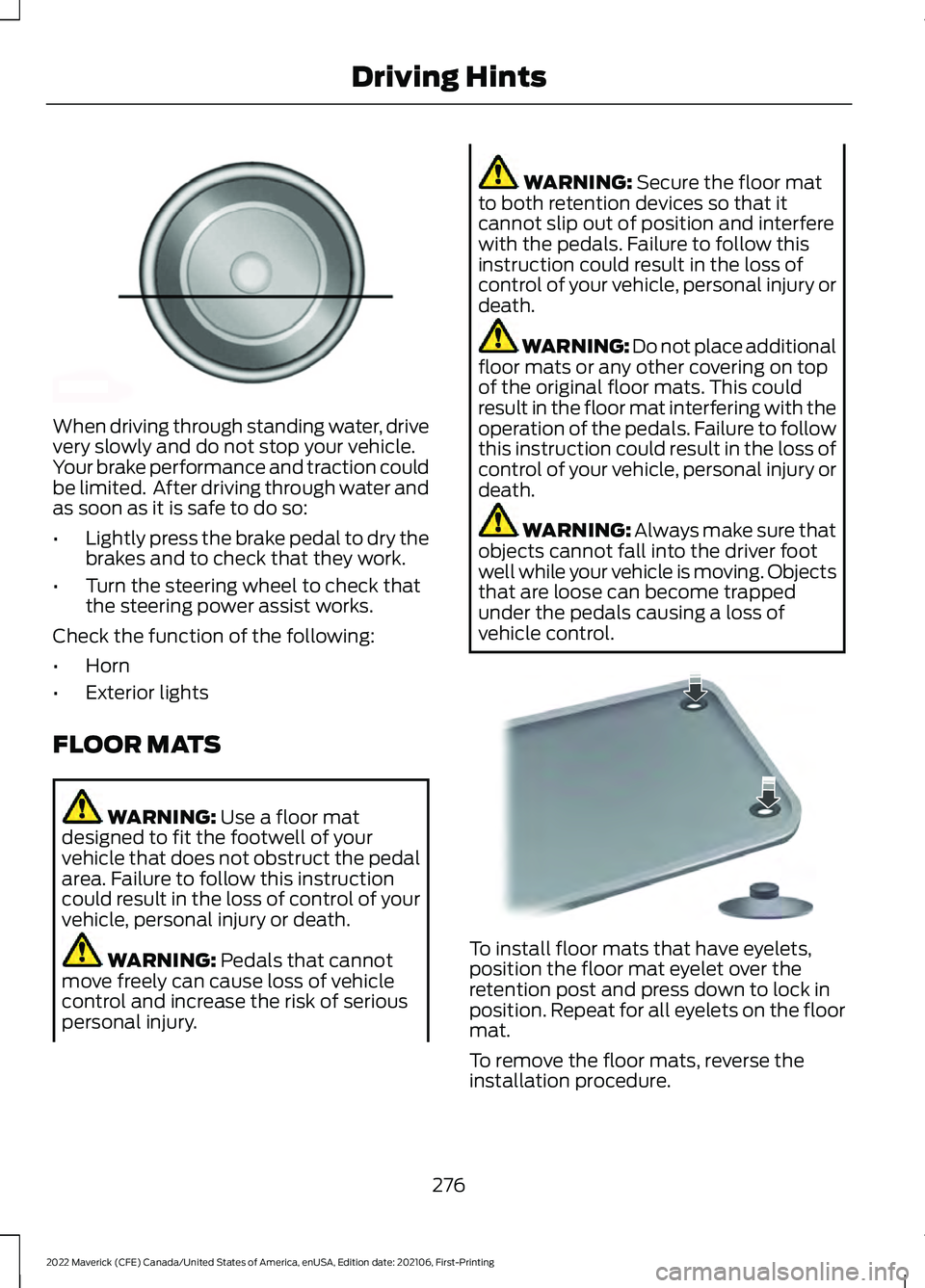
Before driving through standing water,
check the depth. Never drive through water
that is higher than the bottom of the wheel
hubs.
275
2022 Maverick (CFE) Canada/United States of America, enUSA, Edition date: 202106, First-Printing Driving Hints
Page 279 of 533
When driving through standing water, drive
very slowly and do not stop your vehicle.
Your brake performance and traction could
be limited. After driving through water and
as soon as it is safe to do so:
•
Lightly press the brake pedal to dry the
brakes and to check that they work.
• Turn the steering wheel to check that
the steering power assist works.
Check the function of the following:
• Horn
• Exterior lights
FLOOR MATS WARNING: Use a floor mat
designed to fit the footwell of your
vehicle that does not obstruct the pedal
area. Failure to follow this instruction
could result in the loss of control of your
vehicle, personal injury or death. WARNING:
Pedals that cannot
move freely can cause loss of vehicle
control and increase the risk of serious
personal injury. WARNING:
Secure the floor mat
to both retention devices so that it
cannot slip out of position and interfere
with the pedals. Failure to follow this
instruction could result in the loss of
control of your vehicle, personal injury or
death. WARNING: Do not place additional
floor mats or any other covering on top
of the original floor mats. This could
result in the floor mat interfering with the
operation of the pedals. Failure to follow
this instruction could result in the loss of
control of your vehicle, personal injury or
death. WARNING:
Always make sure that
objects cannot fall into the driver foot
well while your vehicle is moving. Objects
that are loose can become trapped
under the pedals causing a loss of
vehicle control. To install floor mats that have eyelets,
position the floor mat eyelet over the
retention post and press down to lock in
position. Repeat for all eyelets on the floor
mat.
To remove the floor mats, reverse the
installation procedure.
276
2022 Maverick (CFE) Canada/United States of America, enUSA, Edition date: 202106, First-Printing Driving HintsE176913 E142666