clock FORD MAVERICK 2022 User Guide
[x] Cancel search | Manufacturer: FORD, Model Year: 2022, Model line: MAVERICK, Model: FORD MAVERICK 2022Pages: 533, PDF Size: 9.58 MB
Page 352 of 533
Drive cautiously when using a full-size
dissimilar spare wheel and tire assembly
and seek service as soon as possible.
Removing the Vehicle Jack and
Tool Bag
The vehicle jack and tool bag are on the
rear passenger side of your vehicle, behind
the passenger seat.
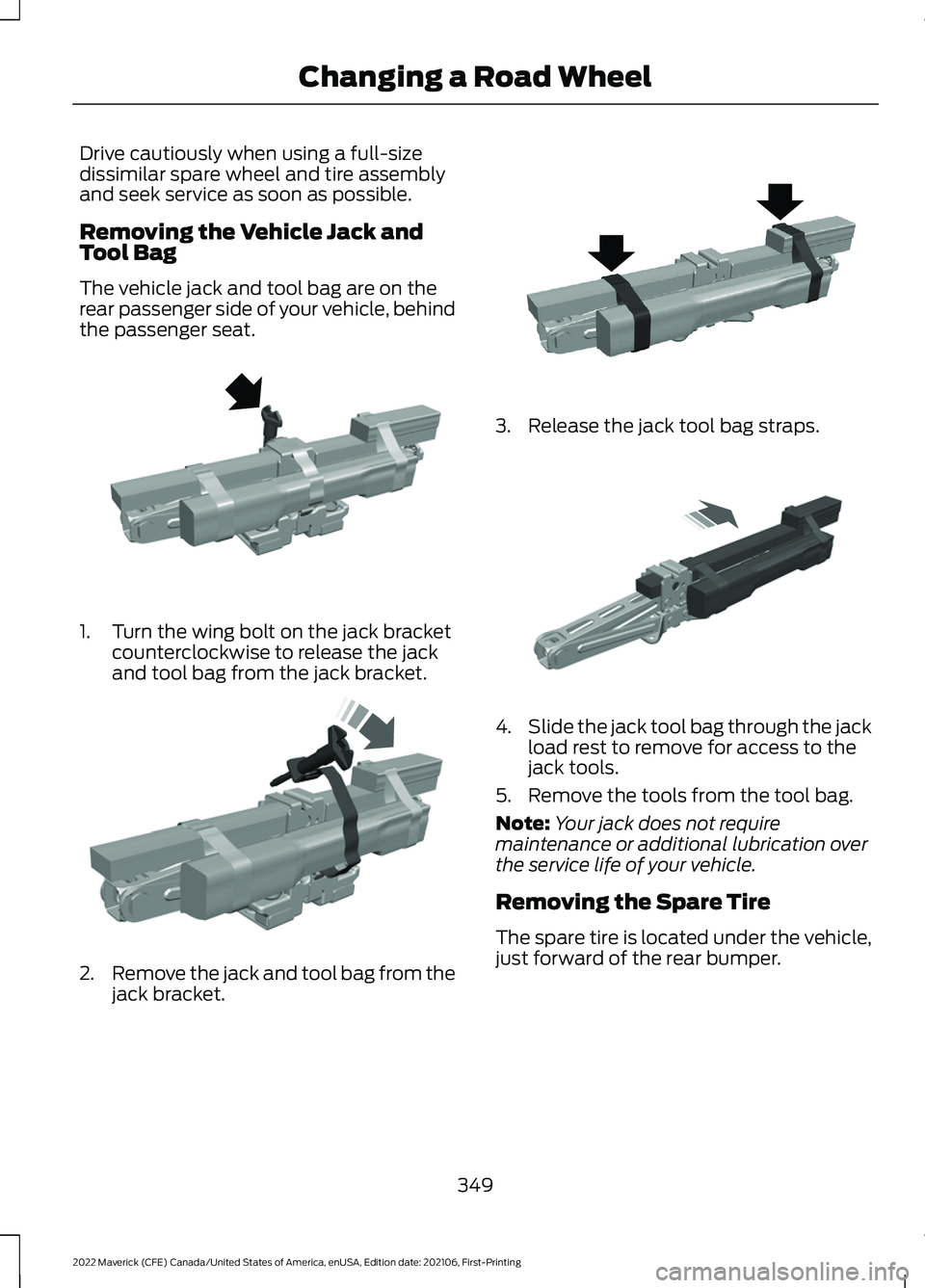
1. Turn the wing bolt on the jack bracket
counterclockwise to release the jack
and tool bag from the jack bracket. 2.
Remove the jack and tool bag from the
jack bracket. 3. Release the jack tool bag straps.
4.
Slide the jack tool bag through the jack
load rest to remove for access to the
jack tools.
5. Remove the tools from the tool bag.
Note: Your jack does not require
maintenance or additional lubrication over
the service life of your vehicle.
Removing the Spare Tire
The spare tire is located under the vehicle,
just forward of the rear bumper.
349
2022 Maverick (CFE) Canada/United States of America, enUSA, Edition date: 202106, First-Printing Changing a Road WheelE352020 E352025 E352022 E352033
Page 353 of 533
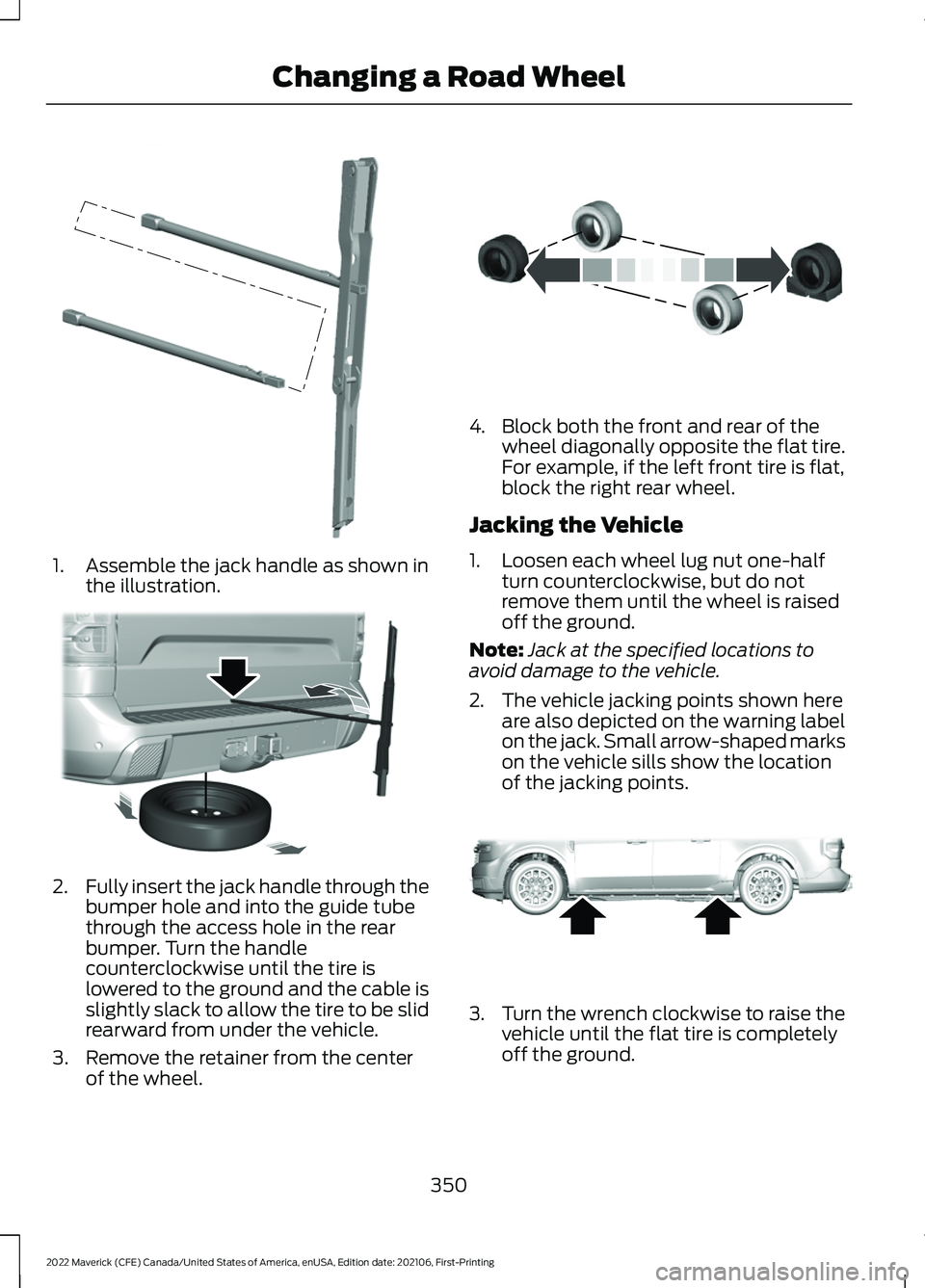
1. Assemble the jack handle as shown in
the illustration. 2.
Fully insert the jack handle through the
bumper hole and into the guide tube
through the access hole in the rear
bumper. Turn the handle
counterclockwise until the tire is
lowered to the ground and the cable is
slightly slack to allow the tire to be slid
rearward from under the vehicle.
3. Remove the retainer from the center of the wheel. 4. Block both the front and rear of the
wheel diagonally opposite the flat tire.
For example, if the left front tire is flat,
block the right rear wheel.
Jacking the Vehicle
1. Loosen each wheel lug nut one-half turn counterclockwise, but do not
remove them until the wheel is raised
off the ground.
Note: Jack at the specified locations to
avoid damage to the vehicle.
2. The vehicle jacking points shown here are also depicted on the warning label
on the jack. Small arrow-shaped marks
on the vehicle sills show the location
of the jacking points. 3.
Turn the wrench clockwise to raise the
vehicle until the flat tire is completely
off the ground.
350
2022 Maverick (CFE) Canada/United States of America, enUSA, Edition date: 202106, First-Printing Changing a Road WheelE352148 E352181 E175447 E352156
Page 354 of 533
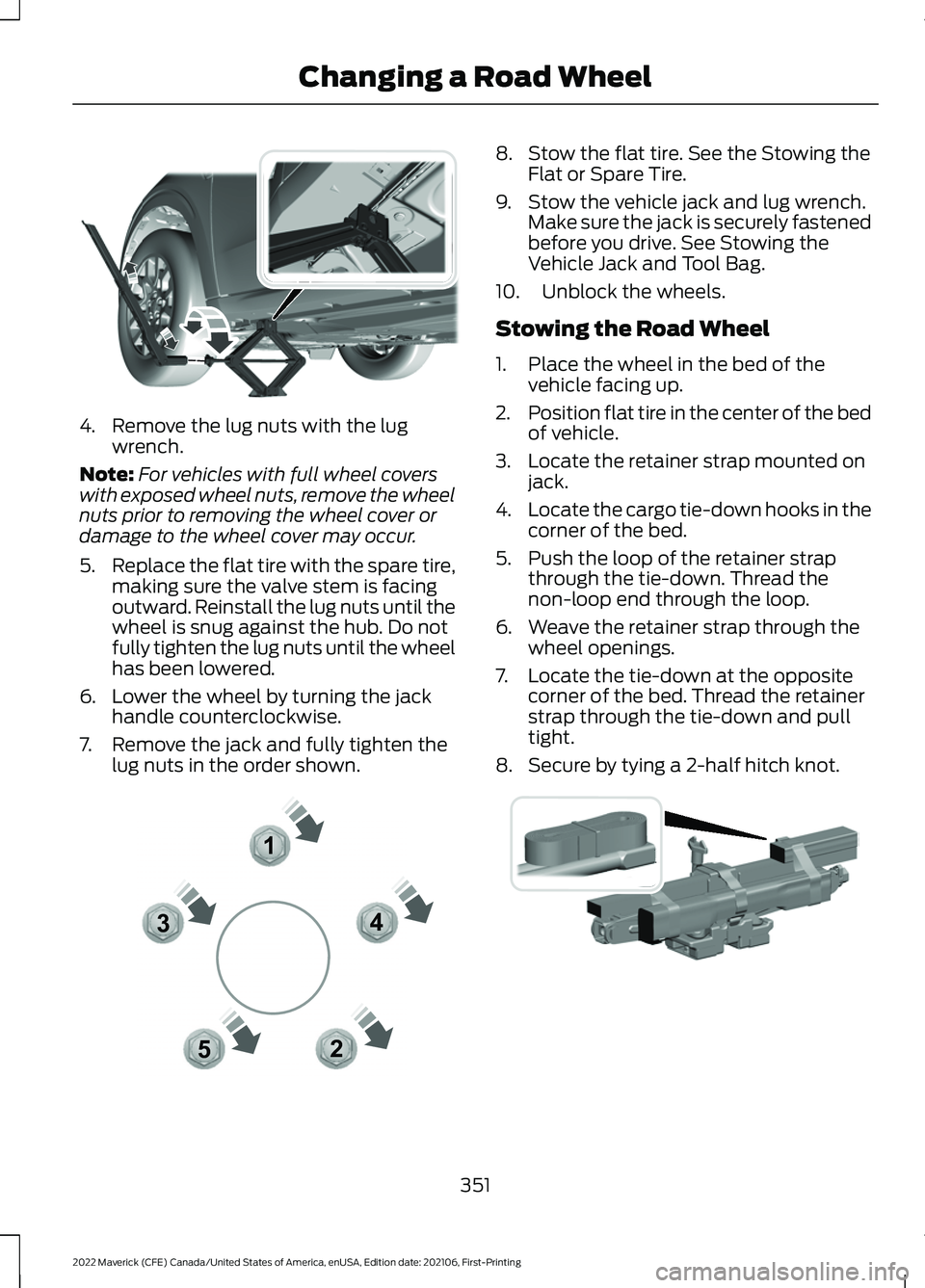
4. Remove the lug nuts with the lug
wrench.
Note: For vehicles with full wheel covers
with exposed wheel nuts, remove the wheel
nuts prior to removing the wheel cover or
damage to the wheel cover may occur.
5. Replace the flat tire with the spare tire,
making sure the valve stem is facing
outward. Reinstall the lug nuts until the
wheel is snug against the hub. Do not
fully tighten the lug nuts until the wheel
has been lowered.
6. Lower the wheel by turning the jack handle counterclockwise.
7. Remove the jack and fully tighten the lug nuts in the order shown. 8. Stow the flat tire. See the Stowing the
Flat or Spare Tire.
9. Stow the vehicle jack and lug wrench. Make sure the jack is securely fastened
before you drive. See Stowing the
Vehicle Jack and Tool Bag.
10. Unblock the wheels.
Stowing the Road Wheel
1. Place the wheel in the bed of the vehicle facing up.
2. Position flat tire in the center of the bed
of vehicle.
3. Locate the retainer strap mounted on jack.
4. Locate the cargo tie-down hooks in the
corner of the bed.
5. Push the loop of the retainer strap through the tie-down. Thread the
non-loop end through the loop.
6. Weave the retainer strap through the wheel openings.
7. Locate the tie-down at the opposite corner of the bed. Thread the retainer
strap through the tie-down and pull
tight.
8. Secure by tying a 2-half hitch knot. 351
2022 Maverick (CFE) Canada/United States of America, enUSA, Edition date: 202106, First-Printing Changing a Road WheelE352182 12
3
4
5E306781 E355266
Page 355 of 533
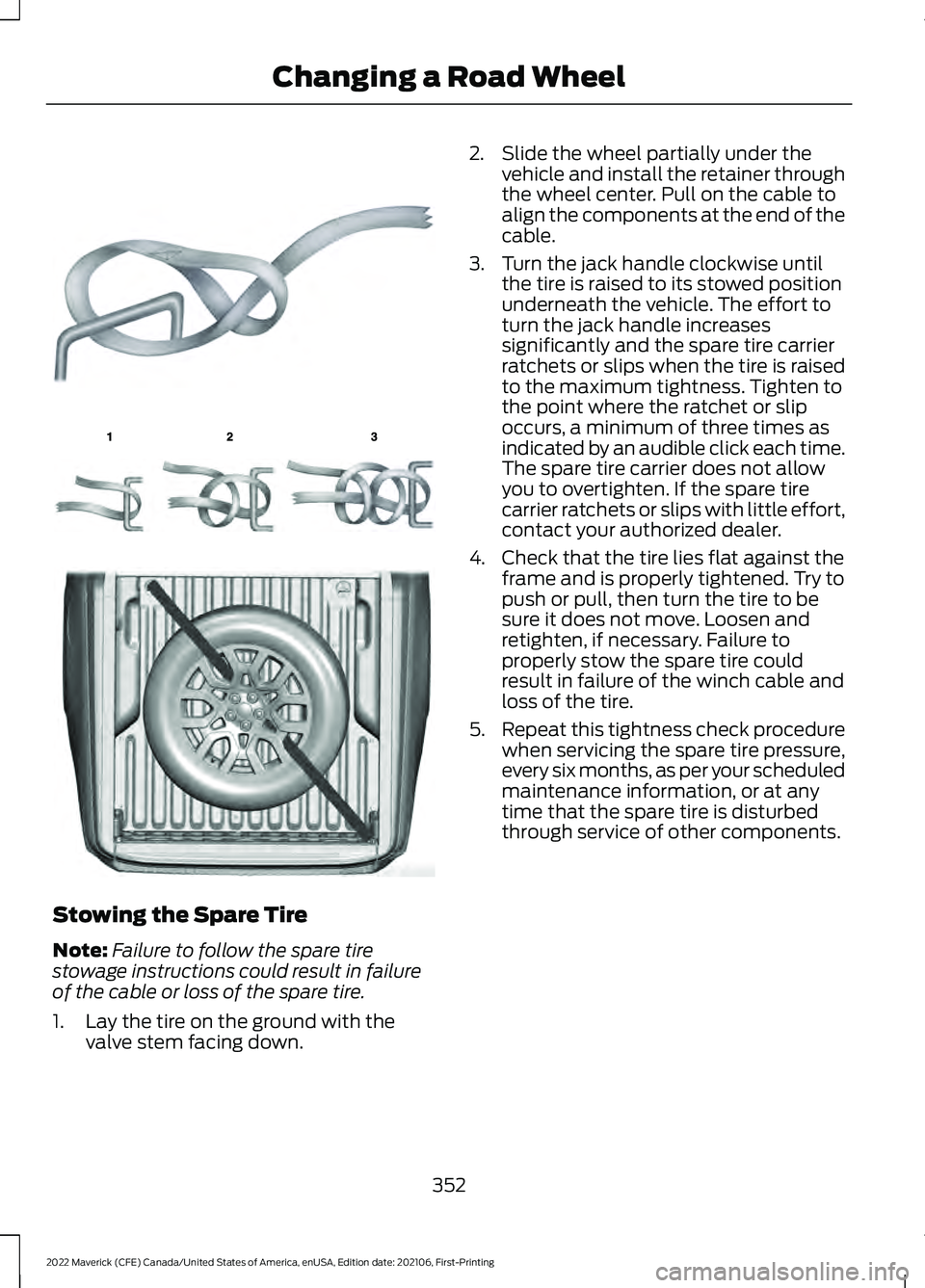
Stowing the Spare Tire
Note:
Failure to follow the spare tire
stowage instructions could result in failure
of the cable or loss of the spare tire.
1. Lay the tire on the ground with the valve stem facing down. 2. Slide the wheel partially under the
vehicle and install the retainer through
the wheel center. Pull on the cable to
align the components at the end of the
cable.
3. Turn the jack handle clockwise until the tire is raised to its stowed position
underneath the vehicle. The effort to
turn the jack handle increases
significantly and the spare tire carrier
ratchets or slips when the tire is raised
to the maximum tightness. Tighten to
the point where the ratchet or slip
occurs, a minimum of three times as
indicated by an audible click each time.
The spare tire carrier does not allow
you to overtighten. If the spare tire
carrier ratchets or slips with little effort,
contact your authorized dealer.
4. Check that the tire lies flat against the frame and is properly tightened. Try to
push or pull, then turn the tire to be
sure it does not move. Loosen and
retighten, if necessary. Failure to
properly stow the spare tire could
result in failure of the winch cable and
loss of the tire.
5. Repeat this tightness check procedure
when servicing the spare tire pressure,
every six months, as per your scheduled
maintenance information, or at any
time that the spare tire is disturbed
through service of other components.
352
2022 Maverick (CFE) Canada/United States of America, enUSA, Edition date: 202106, First-Printing Changing a Road WheelE142906 E143746 E355267
Page 356 of 533
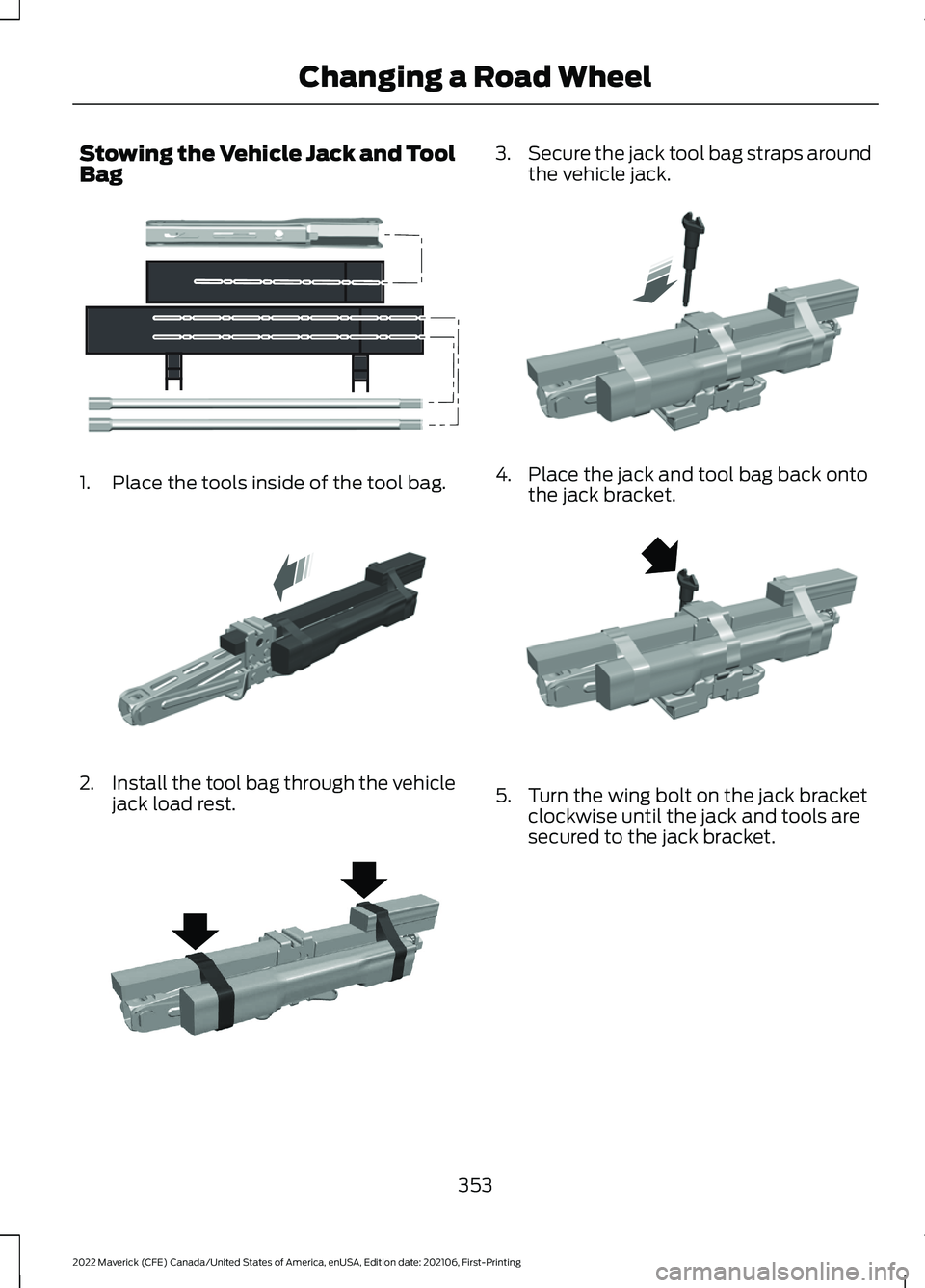
Stowing the Vehicle Jack and Tool
Bag
1. Place the tools inside of the tool bag.
2.
Install the tool bag through the vehicle
jack load rest. 3.
Secure the jack tool bag straps around
the vehicle jack. 4. Place the jack and tool bag back onto
the jack bracket. 5. Turn the wing bolt on the jack bracket
clockwise until the jack and tools are
secured to the jack bracket.
353
2022 Maverick (CFE) Canada/United States of America, enUSA, Edition date: 202106, First-Printing Changing a Road WheelE352149 E352034 E352022 E352027 E352026
Page 388 of 533
Note:
The audio mutes briefly while the
system saves the preset and returns once it
is stored.
Note: You can save presets from multiple
sources to the memory preset bar.
MUTING THE AUDIO Press the button on the steering
wheel to mute the audio.
Press to mute the signal. Press
again to restore the signal.
ADJUSTING THE SOUND
SETTINGS
Balance and Fade (If Equipped)
1. Access the vehicle drawer on the touchscreen.
2. Press
SETTINGS.
3. Press
Sound.
4. Press
Balance / Fade.
5. Press the arrows to adjust the settings.
Tone Settings
1. Access the vehicle drawer on the touchscreen.
2. Press
SETTINGS.
3. Press
Sound.
4. Press
Tone Settings.
5. Use the slider bar to adjust the settings.
Speed Compensated Volume
1. Access the vehicle drawer on the touchscreen.
2. Press
SETTINGS.
3. Press
Sound.
4. Press
Speed Compensated Volume. 5. Press a setting.
Occupancy Mode
(If Equipped)
1. Access the vehicle drawer on the touchscreen.
2. Press
SETTINGS.
3. Press
Sound.
4. Press
Occupancy Mode.
5. Press a setting.
Sound Mode
(If Equipped)
1. Access the vehicle drawer on the touchscreen.
2. Press
SETTINGS.
3. Press
Sound.
4. Press
Sound Mode.
5. Press a setting.
SETTING THE CLOCK AND
DATE
1. Access the vehicle drawer on the touchscreen.
2. Press
SETTINGS.
3. Press
Clock.
4. Set the time.
Note: The
AM and PM options are not
available if 24-hour mode is on.
5. Press the arrows to adjust the settings.
Switching Automatic Time
Updates On and Off
1. Access the vehicle drawer on the touchscreen.
2. Press
SETTINGS.
3. Press
Clock.
4. Switch
Automatic time zone update
on or off.
385
2022 Maverick (CFE) Canada/United States of America, enUSA, Edition date: 202106, First-Printing Audio System - Vehicles With: SYNC 3
Page 392 of 533
GENERAL INFORMATION
WARNING: Driving while distracted
can result in loss of vehicle control, crash
and injury. We strongly recommend that
you use extreme caution when using any
device that may take your focus off the
road. Your primary responsibility is the
safe operation of your vehicle. We
recommend against the use of any
hand-held device while driving and
encourage the use of voice-operated
systems when possible. Make sure you
are aware of all applicable local laws
that may affect the use of electronic
devices while driving.
About SYNC
The system allows you to interact with the
entertainment, information and
communication systems on your vehicle
using voice commands and a touchscreen.
The system provides easy interaction with
audio, phone, navigation, mobile apps and
settings.
Note: You can switch the system on and
use it for up to an hour without switching
the ignition on.
Note: You can use the system after you
switch the ignition off for up to 10 minutes
or until you open a door.
Note: For your safety, some features are
speed-dependent. Their use is limited to
when your vehicle speed is less than 3 mph
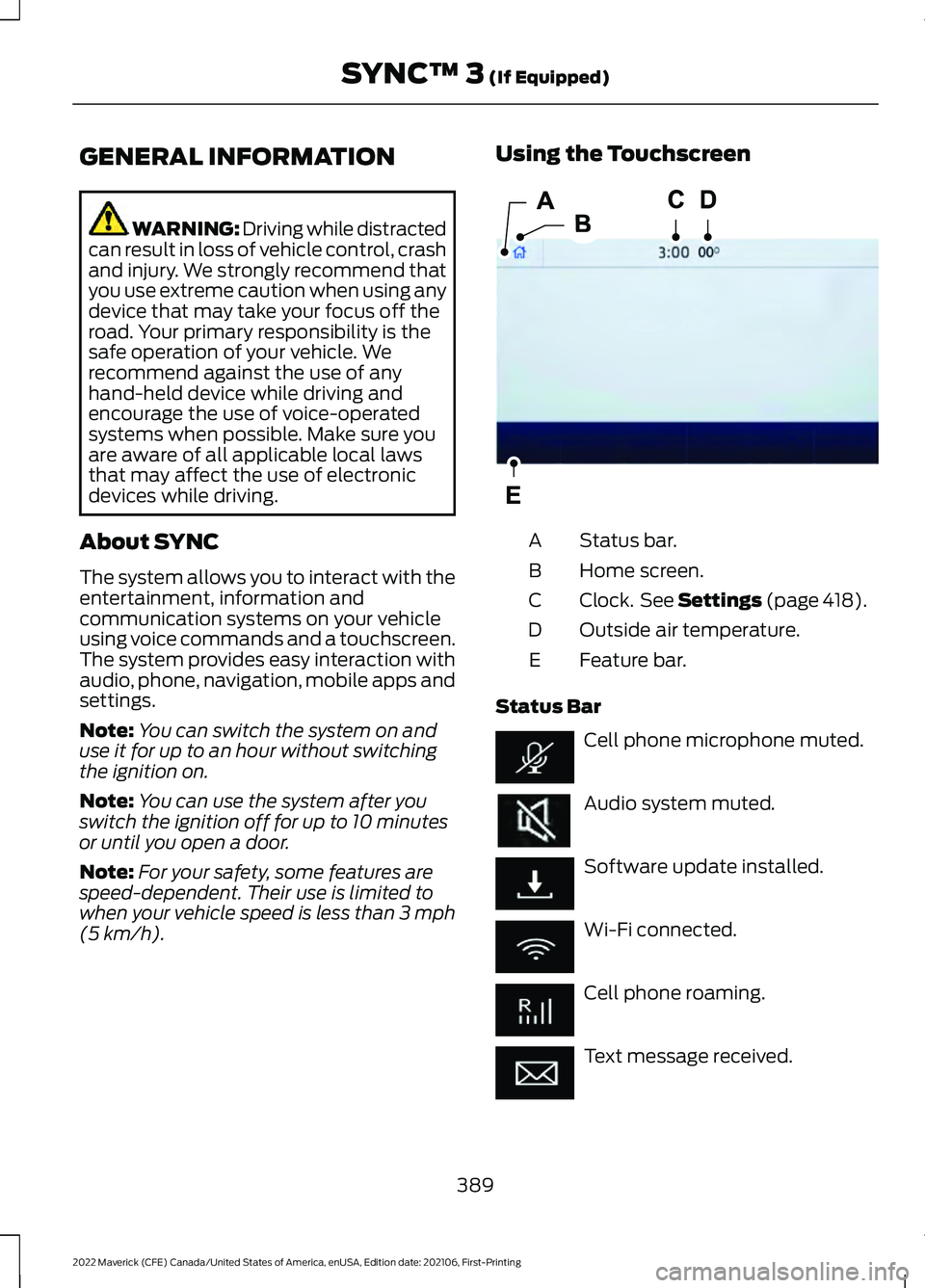
(5 km/h). Using the Touchscreen
Status bar.
A
Home screen.
B
Clock. See Settings (page 418).
C
Outside air temperature.
D
Feature bar.
E
Status Bar Cell phone microphone muted.
Audio system muted.
Software update installed.
Wi-Fi connected.
Cell phone roaming.
Text message received.
389
2022 Maverick (CFE) Canada/United States of America, enUSA, Edition date: 202106, First-Printing SYNC™ 3
(If Equipped)E293823
Page 422 of 533
Clock
Select this tile to adjust the clock settings.
Bluetooth®
Select this tile to switch Bluetooth® on
and off and adjust the settings.
Phone
Select this tile to connect, disconnect, and
manage the connected device settings.
Audio
Select this tile to adjust the audio settings.
Driver Assist
(If Equipped)
Select this tile to adjust Driver Assist
features like Parking Aids, Lane Keeping
System, Pedestrian Detection, and
Auto-Start-Stop.
Vehicle
Select this tile to adjust vehicle settings
like windows, alarm, lighting, and MyKey
settings.
FordPass
(If Equipped)
Select this tile to adjust the FordPass
settings
General
Select this tile to adjust settings like
language, measurement units, or to reset
the system.
911 Assist
(If Equipped)
Select this tile to switch 911 Assist on and
off.
Automatic Updates
Select this tile to adjust the automatic
update settings. Mobile Apps
Select this tile to adjust permissions,
enable, disable, and update mobile apps.
Display
Select this tile to adjust display settings
like brightness and auto dim.
Charge Settings
(If Equipped)
Select this tile to adjust the electric vehicle
charge settings.
Voice Control
Select this tile to adjust voice control
settings like command confirmations and
displayed lists.
Navigation
(If Equipped)
Select this tile to adjust navigation settings
like map preferences and route guidance.
Seats
(If Equipped)
Select this tile to adjust the lumbar
function and massage function of your
multi contour seats.
Message Center
(If Equipped)
Select this tile to view vehicle messages.
Personal Profiles
(If Equipped)
Select this tile to adjust recalled memory
features when using personal profiles.
Valet Mode
(If Equipped)
Select this tile to enable and disable valet
mode.
Ambient Lighting
(If Equipped)
Select this tile to change the color or
intensity of the interior lighting.
419
2022 Maverick (CFE) Canada/United States of America, enUSA, Edition date: 202106, First-Printing SYNC™ 3
(If Equipped)
Page 529 of 533
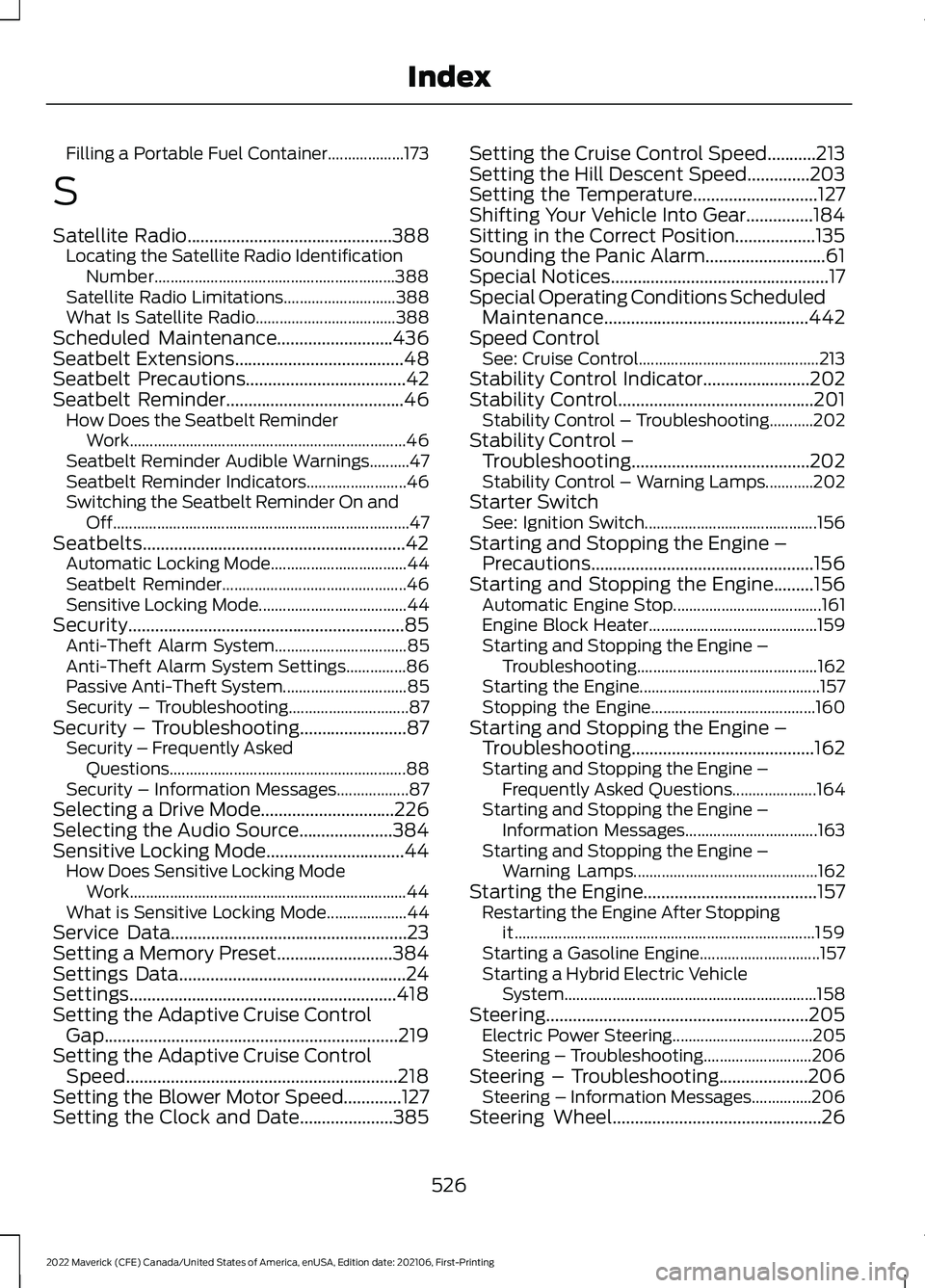
Filling a Portable Fuel Container...................
173
S
Satellite Radio..............................................388
Locating the Satellite Radio Identification
Number............................................................ 388
Satellite Radio Limitations............................ 388
What Is Satellite Radio................................... 388
Scheduled Maintenance
..........................436
Seatbelt Extensions......................................48
Seatbelt Precautions....................................42
Seatbelt Reminder........................................46 How Does the Seatbelt Reminder
Work..................................................................... 46
Seatbelt Reminder Audible Warnings..........47
Seatbelt Reminder Indicators......................... 46
Switching the Seatbelt Reminder On and Off........................................................................\
.. 47
Seatbelts...........................................................42 Automatic Locking Mode.................................. 44
Seatbelt Reminder.............................................. 46
Sensitive Locking Mode..................................... 44
Security..............................................................85 Anti-Theft Alarm System................................. 85
Anti-Theft Alarm System Settings...............86
Passive Anti-Theft System............................... 85
Security – Troubleshooting.............................. 87
Security – Troubleshooting........................87 Security – Frequently Asked
Questions........................................................... 88
Security – Information Messages..................87
Selecting a Drive Mode..............................226
Selecting the Audio Source.....................384
Sensitive Locking Mode...............................44 How Does Sensitive Locking Mode
Work..................................................................... 44
What is Sensitive Locking Mode.................... 44
Service Data
.....................................................23
Setting a Memory Preset..........................384
Settings Data...................................................24
Settings............................................................418
Setting the Adaptive Cruise Control Gap..................................................................219
Setting the Adaptive Cruise Control Speed.............................................................218
Setting the Blower Motor Speed.............127
Setting the Clock and Date.....................385 Setting the Cruise Control Speed...........213
Setting the Hill Descent Speed
..............203
Setting the Temperature............................127
Shifting Your Vehicle Into Gear...............184
Sitting in the Correct Position..................135
Sounding the Panic Alarm...........................61
Special Notices.................................................17
Special Operating Conditions Scheduled Maintenance..............................................442
Speed Control See: Cruise Control............................................. 213
Stability Control Indicator........................202
Stability Control
............................................201
Stability Control – Troubleshooting...........202
Stability Control – Troubleshooting........................................202
Stability Control – Warning Lamps............202
Starter Switch See: Ignition Switch........................................... 156
Starting and Stopping the Engine – Precautions..................................................156
Starting and Stopping the Engine
.........156
Automatic Engine Stop..................................... 161
Engine Block Heater.......................................... 159
Starting and Stopping the Engine – Troubleshooting............................................. 162
Starting the Engine............................................. 157
Stopping the Engine......................................... 160
Starting and Stopping the Engine – Troubleshooting.........................................162
Starting and Stopping the Engine – Frequently Asked Questions.....................164
Starting and Stopping the Engine – Information Messages................................. 163
Starting and Stopping the Engine – Warning Lamps.............................................. 162
Starting the Engine
.......................................157
Restarting the Engine After Stopping
it........................................................................\
... 159
Starting a Gasoline Engine.............................. 157
Starting a Hybrid Electric Vehicle System............................................................... 158
Steering...........................................................205 Electric Power Steering................................... 205
Steering – Troubleshooting........................... 206
Steering – Troubleshooting....................206 Steering – Information Messages...............206
Steering Wheel
...............................................26
526
2022 Maverick (CFE) Canada/United States of America, enUSA, Edition date: 202106, First-Printing Index