remote control FORD MAVERICK 2022 Owner's Manual
[x] Cancel search | Manufacturer: FORD, Model Year: 2022, Model line: MAVERICK, Model: FORD MAVERICK 2022Pages: 533, PDF Size: 9.58 MB
Page 89 of 533
WHAT IS THE BATTERY BACKUP
ALARM
The battery backup alarm is an additional
alarm system that has its own battery and
horn. It is designed to detect if the vehicle
battery or the battery backup alarm is
disconnected.
ARMING THE ANTI-THEFT ALARM
SYSTEM
The alarm is ready to arm when your
vehicle is switched off.
Lock your vehicle with your remote control
to arm the alarm.
DISARMING THE ANTI-THEFT
ALARM SYSTEM
Disarm the alarm by performing any of the
following actions:
•
Unlock the doors or luggage
compartment with the remote control.
• Switch your vehicle on or start your
vehicle.
ANTI-THEFT ALARM SYSTEM
SETTINGS
WHAT ARE THE ALARM SECURITY
LEVELS
You can select two levels of alarm security,
all sensors and perimeter sensing.
All Sensors
All sensors is the standard setting.
In all sensors, all equipped sensors are on
when you arm the alarm. Note:
Do not arm the alarm with all sensors
if passengers, animals or other moving
objects are inside your vehicle.
Perimeter Sensing
In perimeter sensing, the interior sensors
are off when you arm the alarm.
All the other equipped sensors activate
when you arm the alarm in this mode.
SETTING THE ALARM SECURITY
LEVEL
To select a different security level, use the
instrument cluster display:
1. Select Settings.
2. Select
Vehicle.
3. Select
Alarm.
4. Select a setting.
WHAT IS ASK ON EXIT
You can choose which level of security you
require after you switch the ignition off.
Note: If you do not choose a setting, the
system defaults to all sensors.
SWITCHING ASK ON EXIT ON AND
OFF
To switch the system on or off, use the
instrument cluster display:
1. Select
Settings.
2. Select
Vehicle.
3. Select
Alarm.
4. Switch
Ask on exit on or off.
86
2022 Maverick (CFE) Canada/United States of America, enUSA, Edition date: 202106, First-Printing Security
Page 91 of 533
SECURITY – FREQUENTLY ASKED
QUESTIONS
What should I do if there is any
potential alarm problem with my
vehicle?
Take all remote controls to an
authorized dealer if there is any
potential alarm problem with your
vehicle.
What should I do if the vehicle is unable
to start with a correctly coded key? Have your vehicle checked as soon as
possible.
88
2022 Maverick (CFE) Canada/United States of America, enUSA, Edition date: 202106, First-Printing Security
Page 92 of 533
ADJUSTING THE STEERING
WHEEL
WARNING: Do not adjust the
steering wheel when your vehicle is
moving.
Note: Make sure that you are sitting in the
correct position. See Sitting in the Correct
Position
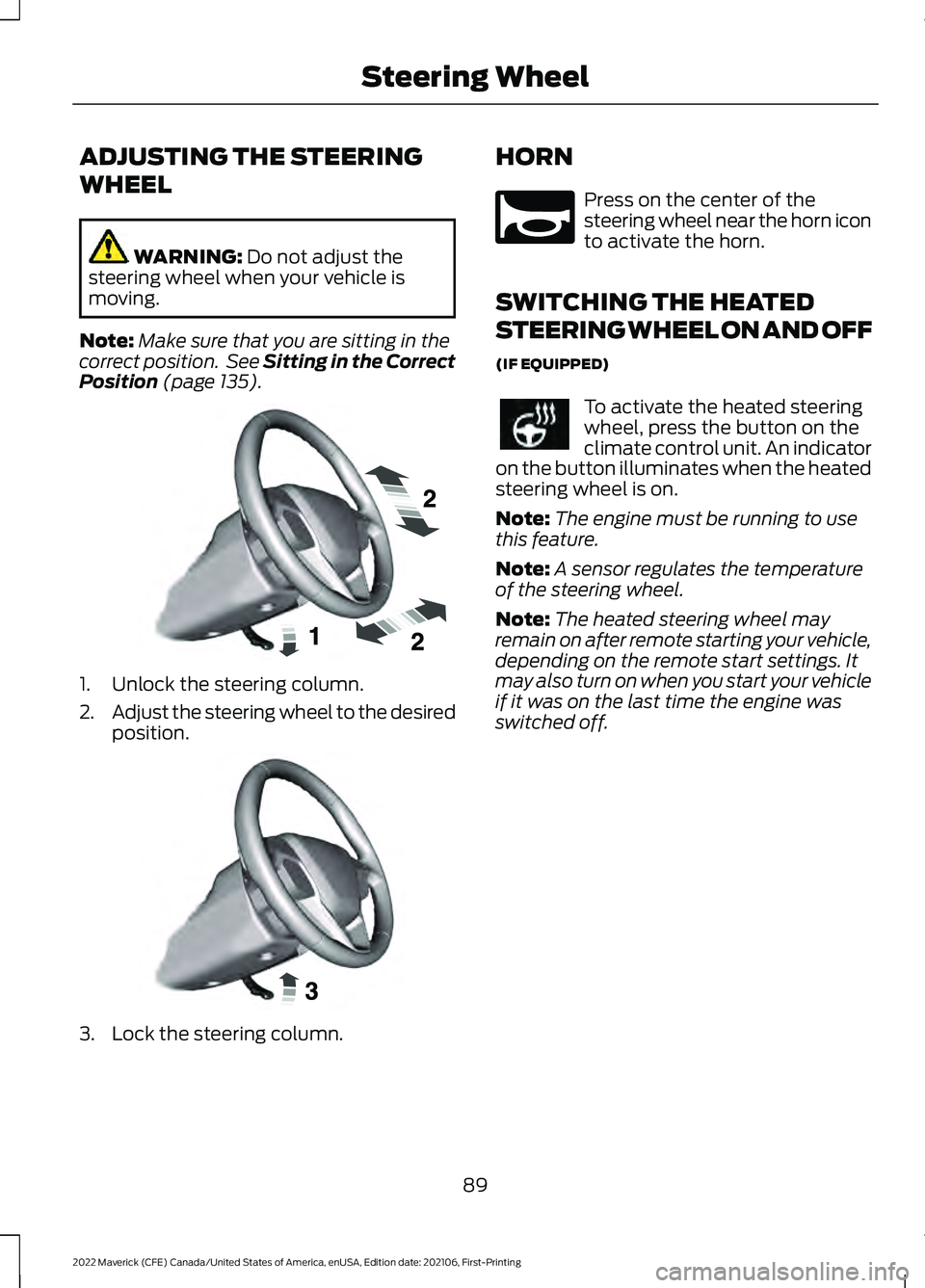
(page 135). 1. Unlock the steering column.
2.
Adjust the steering wheel to the desired
position. 3. Lock the steering column. HORN Press on the center of the
steering wheel near the horn icon
to activate the horn.
SWITCHING THE HEATED
STEERING WHEEL ON AND OFF
(IF EQUIPPED) To activate the heated steering
wheel, press the button on the
climate control unit. An indicator
on the button illuminates when the heated
steering wheel is on.
Note: The engine must be running to use
this feature.
Note: A sensor regulates the temperature
of the steering wheel.
Note: The heated steering wheel may
remain on after remote starting your vehicle,
depending on the remote start settings. It
may also turn on when you start your vehicle
if it was on the last time the engine was
switched off.
89
2022 Maverick (CFE) Canada/United States of America, enUSA, Edition date: 202106, First-Printing Steering WheelE191039 E191047 E270945
Page 102 of 533
SWITCHING ALL OF THE
INTERIOR LAMPS ON AND OFF
The lamps turn on under the following
conditions:
•
You open any door.
• You press a button on the remote
control.
• You press the all lamps on button on
the overhead console. Press to switch all interior lamps
on or off.
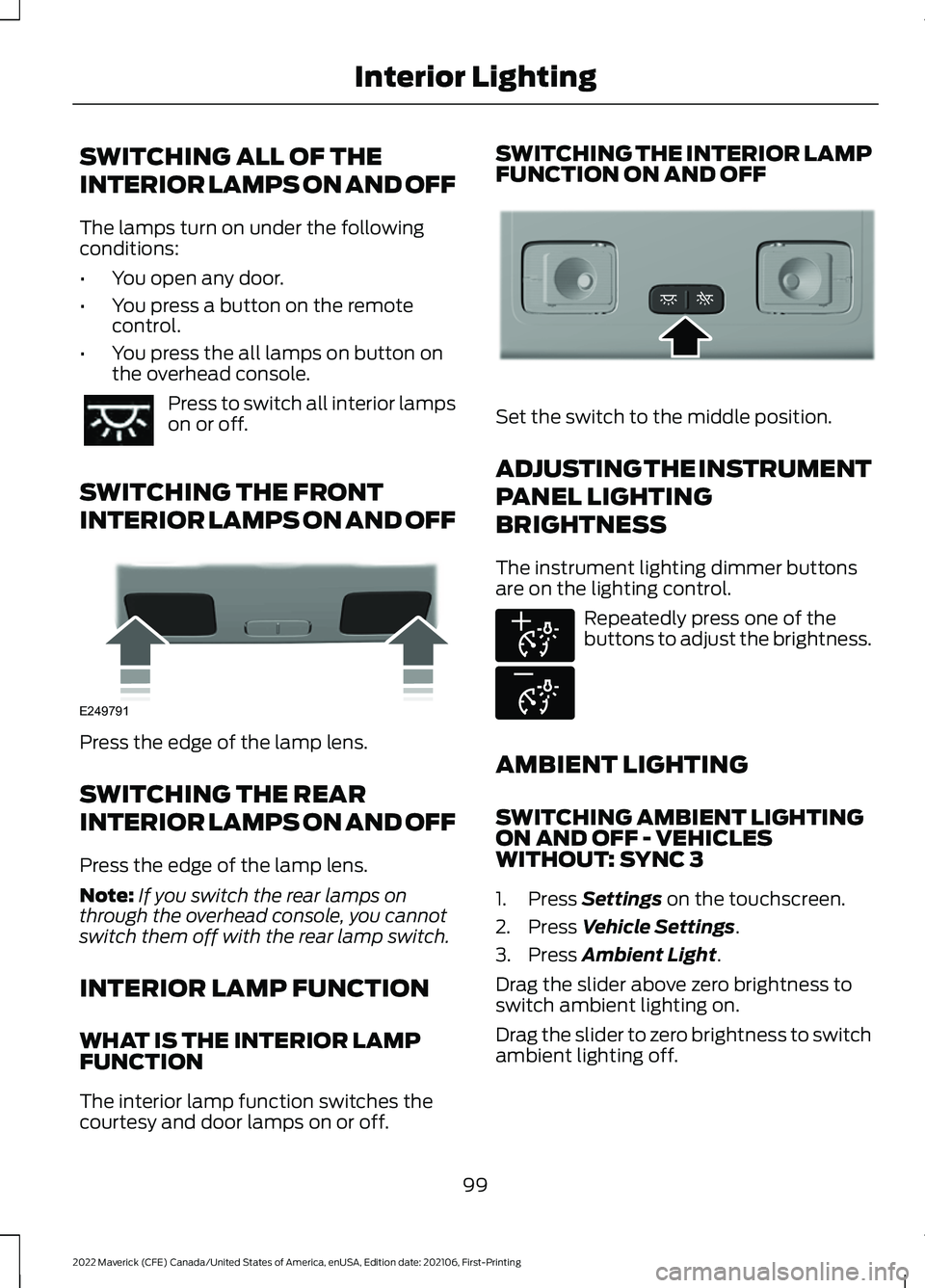
SWITCHING THE FRONT
INTERIOR LAMPS ON AND OFF Press the edge of the lamp lens.
SWITCHING THE REAR
INTERIOR LAMPS ON AND OFF
Press the edge of the lamp lens.
Note:
If you switch the rear lamps on
through the overhead console, you cannot
switch them off with the rear lamp switch.
INTERIOR LAMP FUNCTION
WHAT IS THE INTERIOR LAMP
FUNCTION
The interior lamp function switches the
courtesy and door lamps on or off. SWITCHING THE INTERIOR LAMP
FUNCTION ON AND OFF
Set the switch to the middle position.
ADJUSTING THE INSTRUMENT
PANEL LIGHTING
BRIGHTNESS
The instrument lighting dimmer buttons
are on the lighting control.
Repeatedly press one of the
buttons to adjust the brightness.
AMBIENT LIGHTING
SWITCHING AMBIENT LIGHTING
ON AND OFF - VEHICLES
WITHOUT: SYNC 3
1. Press Settings on the touchscreen.
2. Press
Vehicle Settings.
3. Press
Ambient Light.
Drag the slider above zero brightness to
switch ambient lighting on.
Drag the slider to zero brightness to switch
ambient lighting off.
99
2022 Maverick (CFE) Canada/United States of America, enUSA, Edition date: 202106, First-Printing Interior Lighting E249791 E299443 E291299 E296433
Page 126 of 533
WHAT IS REMOTE START
The system allows you to remotely start
your vehicle and to adjust the interior
temperature according to the settings that
you chose.
REMOTE START
PRECAUTIONS
WARNING: Do not start the engine
in a closed garage or in other enclosed
areas. Exhaust fumes are toxic. Always
open the garage door before you start
the engine. Failure to follow this
instruction could result in personal injury
or death.
REMOTE START LIMITATIONS
Remote start does not work under the
following conditions:
• The alarm horn is sounding.
• The hood is open.
• The transmission is not in park (P).
• The ignition is on.
• The battery voltage is below the
minimum operating voltage.
Note: Do not use remote start if your fuel
level is low.
Note: You can use remote start with
FordPass. See Connecting the Vehicle to
a Wi-Fi Network (page 369).
ENABLING REMOTE START
1. Using the information display controls on the steering wheel, select Settings.
2. Select
Vehicle Settings.
3. Select
Remote Start. 4. Switch
System on.
Note: To use remote start, make sure that
the modem is enabled. See
Enabling and
Disabling the Modem (page 369).
REMOTELY STARTING AND
STOPPING THE VEHICLE
Remotely Starting the Vehicle Press the button on the remote
control.
Within three seconds, press the
button twice on the remote
control.
Note: You can also use the FordPass App
to start the vehicle.
Note: The turn signals flash twice.
Note: The parking lamps turn on when the
vehicle is running.
Note: The horn sounds if the system fails
to start.
Note: All other vehicle systems remain off
when you have remotely started the vehicle.
Note: The vehicle remains secured when
you have remotely started the vehicle. A
valid key must be inside your vehicle to
switch the ignition on and drive your vehicle.
Remotely Stopping the Vehicle Within three seconds, press the
button twice on the remote
control.
EXTENDING THE REMOTE
START DURATION
To extend the remote start duration during
remote start, do the following:
123
2022 Maverick (CFE) Canada/United States of America, enUSA, Edition date: 202106, First-Printing Remote Start
(If Equipped)E138623 E138625 E138625
Page 127 of 533
Press the button on the remote
control.
Within three seconds, press the
button on the remote control.
Within three seconds, press the
button again.
If the duration is set to 15 minutes, the
duration extends by another 15 minutes.
This provides a total of 30 minutes.
Note: Remote start can only be extended
once.
Note: A maximum of two remote starts, or
one remote start with an extension, are
allowed. To reset the restart procedure
switch the vehicle to on, then to off.
REMOTE START REMOTE
CONTROL INDICATORS
Remote Control Feedback
An LED on the remote control provides
status feedback of remote start or stop
commands. Status
LED
Remote startsuccessful.
Solid green.
Remote stopsuccessful.
Solid red.
Request failed or
status not received.
Blinking red.
Status incomplete.
Blinking green. REMOTE START SETTINGS -
VEHICLES WITH: SYNC 3
SWITCHING CLIMATE CONTROL
AUTO MODE ON AND OFF
1. Using the information display controls
on the steering wheel, select Settings.
2. Select Vehicle Settings.
3. Select
Remote Start.
4. Select
Climate Control.
5. Switch
Auto on.
Note: If you switch the auto mode on, the
system attempts to heat or cool the interior
to
72°F (22°C).
Note: When you remotely start the engine,
you cannot adjust the climate control
settings until you start your vehicle.
Note: When you switch the ignition on, the
climate control system returns to the last
used settings.
Note: The heated windshield, heated rear
window, heated mirrors, heated seats and
heated steering wheel could turn on in cold
weather. Ventilated seats could turn on in
hot weather.
SWITCHING CLIMATE CONTROL
LAST SETTINGS ON AND OFF
1. Using the information display controls on the steering wheel, select Settings.
2. Select
Vehicle Settings.
3. Select
Remote Start.
4. Select
Climate Control.
5. Switch
Last Settings on.
Note: If you switch the last settings on, the
system remembers the last used settings.
124
2022 Maverick (CFE) Canada/United States of America, enUSA, Edition date: 202106, First-Printing Remote Start
(If Equipped)E138623 E138625
Page 128 of 533
SWITCHING THE HEATED SEAT
SETTINGS ON AND OFF
1. Using the information display controls
on the steering wheel, select Settings.
2. Select Vehicle Settings.
3. Select
Remote Start.
4. Select
Seats.
5. Select
Auto or Off.
Note: If you switch the heated seat settings
on, the heated seats turn on during cold
weather.
Note: You cannot adjust the heated seat
settings when you have remotely started
the engine.
SWITCHING THE HEATED
STEERING WHEEL SETTINGS ON
AND OFF
1. Using the information display controls on the steering wheel, select Settings.
2. Select
Vehicle Settings.
3. Select
Remote Start.
4. Select
Seats and Wheel.
5. Select
Auto or Off.
Note: If you switch the heated steering
wheel settings on, the heated steering wheel
turn on during cold weather.
Note: You cannot adjust the heated
steering wheel settings when you have
remotely started the engine.
SETTING THE REMOTE START
DURATION
You can set a duration for the engine to
run.
1. Using the information display controls on the steering wheel, select Settings.
2. Select
Vehicle Settings.
3. Select
Remote Start. 4. Select
Duration.
125
2022 Maverick (CFE) Canada/United States of America, enUSA, Edition date: 202106, First-Printing Remote Start
(If Equipped)
Page 152 of 533
WHAT IS THE POWER OUTLET
The power outlet can power devices that
use a household plug.
POWER OUTLET
PRECAUTIONS
WARNING: Do not keep electrical
devices plugged in the power point
whenever the device is not in use. Do not
use any extension cord with the 110 volt
AC power point, since it will defeat the
safety protection design. Doing so may
cause the power point to overload due
to powering multiple devices that can
reach beyond the 400 watt load limit
and could result in fire or serious injury. WARNING:
Do not keep electrical
devices plugged in the power point
whenever the device is not in use. Power
points power up during remote start.
POWER OUTLET LIMITATIONS
Devices may exceed the power rating
shown the device label when plugged in.
Unplug the device and switch the ignition
on and off to reset the system.
You should not use the power outlet for
these types of electric devices:
• Cathode ray tube type televisions.
• Motor loads, for example vacuum
cleaners, electric saws and other
electric power tools, or
compressor-driven refrigerators. •
Measuring devices which process
precise data, for example medical
equipment or measuring equipment.
• Other appliances requiring an
extremely stable power supply, for
example microcomputer-controlled
electric blankets or touch sensor
lamps.
LOCATING THE POWER
OUTLET
The power outlet could be on the
instrument panel, the rear of the center
console or in the pickup bed.
POWER OUTLET INDICATORS
The power outlet indicator illuminates to
let you know the status of the system. Description
Indicator Status
When the indicatorlight is on, the
outlet is providing power.
On
When the indicatorlight is off, there is no power to the outlet.
Off
When the indicator
light is flashing, the outlet is in a fault mode.
Flashing
Fault mode
The power outlet temporarily turns off
power if the device exceeds the watt limit.
1. Unplug your device.
2. Switch your vehicle off to let the system cool and reset the fault mode.
149
2022 Maverick (CFE) Canada/United States of America, enUSA, Edition date: 202106, First-Printing Power Outlet - Vehicles With: 110V Power Outlet
Page 155 of 533
WHAT IS THE WIRELESS
ACCESSORY CHARGER
The wireless accessory charger allows you
to charge one compatible Qi wireless
charging device on the charging area.
WIRELESS ACCESSORY
CHARGER PRECAUTIONS
WARNING: Wireless charging
devices can affect the operation of
implanted medical devices, including
cardiac pacemakers. If you have any
implanted medical devices, we
recommend that you consult with your
physician.
Tests on this equipment show that it
complies with part 18 of the FCC Rules.
• This equipment generates, uses and
can radiate radio frequency energy and
may cause harmful interference to
radio communications. There is no
guarantee that the interference will not
occur in a particular installation. If this
equipment does cause harmful
interference to radio or television
reception, please consult the dealer.
• This product is not end-user
serviceable. WARNING:
Changes or
modifications not expressively approved
by the party responsible for compliance
could void the user's authority to operate
the equipment. The term "IC:" before the
radio certification number only signifies
that Industry Canada technical
specifications were met. This device complies with Industry Canada
licence-exempt RSS standard(s).
Operation is subject to:
•
This device may not cause interference.
• This device must accept any
interference, including interference that
may cause undesired operation of the
device.
Keep the charging area clean and remove
foreign objects prior to charging a device.
Do not place items with a magnetic strip
or radio-frequency identification chip, for
example passports, parking tickets,
transportation passes or credit cards, near
the charging area when charging a device.
Damage may occur to the magnetic strip
or radio-frequency identification chip.
Do not place metal objects, for example
remote controls, coins and candy
wrappers, on or near the charging area
when charging a device. Metal objects may
heat up and degrade the charging
performance, in addition to causing
interruptions in charging.
Note: During charging, the device and the
charger could heat up, this is normal. If the
battery gets hotter than usual, the device
may stop charging.
LOCATING THE WIRELESS
ACCESSORY CHARGER The charging area is on the
center console or in the media
bin below the instrument panel.
CHARGING A WIRELESS
DEVICE
Place the device on the center of the
charging surface with the charging side
down. The charging stops after your device
reaches a full charge.
152
2022 Maverick (CFE) Canada/United States of America, enUSA, Edition date: 202106, First-Printing Wireless Accessory Charger
(If Equipped)E297549
Page 186 of 533
AUTOMATIC TRANSMISSION
PRECAUTIONS
WARNING: When your vehicle is
stationary, keep the brake pedal fully
pressed when shifting gears. Failure to
follow this instruction could result in
personal injury, death or property
damage. WARNING:
Do not apply the brake
pedal and accelerator pedal
simultaneously. Applying both pedals
simultaneously for more than a few
seconds will limit power, which may
result in difficulty maintaining speed in
traffic and could lead to serious injury. WARNING:
Apply the parking
brake, shift into park (P), switch the
vehicle off and remove the key or remote
control before you leave your vehicle.
Failure to follow this instruction could
result in personal injury or death.
Note: You may not be able to shift out of
park (P) unless the intelligent access key is
inside your vehicle.
AUTOMATIC TRANSMISSION
POSITIONS
PARK (P) WARNING:
Move the transmission
selector lever to park (P) only when your
vehicle is stationary.
This position locks the driveline and
prevents the wheels from turning.
The electric parking brake could apply if: •
You shift to park (P) on a slope.
• You shift to park (P) without the brake
pedal fully pressed.
Note: A tone sounds if you attempt to exit
your vehicle without the transmission in park
(P).
Note: You can start your vehicle in this
position.
Note: You may not be able to shift out of
park (P) if the vehicle battery has no charge.
See
Crash and Breakdown Information
(page 278).
Note: You may not be able to shift out of
park (P) if your vehicle blows a fuse.
See
Fuses (page 290).
Note: You may not be able to shift out of
park (P) unless the key or remote control is
inside your vehicle.
Note: Your vehicle could shift into park (P)
if you attempt to exit your vehicle without
the transmission in park (P). See How Does
Automatic Return to Park (P) Work (page
186
).
Note: A tone could sound when you select
park (P).
REVERSE (R) WARNING:
Move the transmission
selector lever to reverse (R) only when
your vehicle is stationary and the engine
is at idle speed.
This position allows your vehicle to move
backward. Come to a complete stop
before shifting into and out of reverse (R).
183
2022 Maverick (CFE) Canada/United States of America, enUSA, Edition date: 202106, First-Printing Automatic Transmission