key FORD MAVERICK 2022 Workshop Manual
[x] Cancel search | Manufacturer: FORD, Model Year: 2022, Model line: MAVERICK, Model: FORD MAVERICK 2022Pages: 533, PDF Size: 9.58 MB
Page 282 of 533
Vehicles Sold in Canada: Getting
Roadside Assistance
To fully assist you should you have a
vehicle concern, Ford Motor Company of
Canada, Limited offers a complimentary
roadside assistance program. This
program is eligible within Canada or the
continental United States.
The service is available 24 hours a day,
seven days a week.
This program is separate from the New
Vehicle Limited Warranty, but the coverage
is concurrent with the powertrain coverage
period of your vehicle. Canadian roadside
coverage and benefits may differ from the
U.S. coverage.
If you require more information, please call
us in Canada at 1-800-665-2006, or visit
our website at www
.f or d . c a .
HIGH VOLTAGE BATTERY
VEHICLE PRECAUTIONS -
HYBRID ELECTRIC VEHICLE
(HEV)
In the event of damage or fire involving an
electric vehicle or hybrid-electric vehicle:
• Assume the high-voltage battery and
associated components are energized
and fully charged.
• Exposed electrical components, wires
and high-voltage batteries present
potential high-voltage shock hazards.
• Venting high-voltage battery vapors
are potentially toxic and flammable.
• Physical damage to the vehicle or
high-voltage battery could result in
immediate or delayed release of toxic,
flammable gases and fire. Vehicle information and general safety
practices include reviewing the owner's
manual and becoming familiar with your
vehicle's safety information and
recommended safety practices.
Crashes
A crash or impact significant enough to
require an emergency response for
conventional vehicles would also require
the same response for an electric or
hybrid-electric vehicle.
If Possible:
1. Move your vehicle to a safe, nearby
location and remain on the scene.
2. Roll down the windows before you switch your vehicle off.
3. Place your vehicle in park (P), set the parking brake, switch off the vehicle,
activate the hazard flashers and move
your key(s) at least
16 ft (5 m) away
from the vehicle.
Always:
• Call emergency assistance if needed
and advise that an electric or
hybrid-electric vehicle is involved.
• Avoid contact with leaking fluids and
gases, and remain out of the way of
oncoming traffic until emergency
responders arrive.
• When emergency responders arrive,
tell them that the vehicle involved is an
electric vehicle or hybrid-electric
vehicle.
Fires
As with any vehicle, call emergency
assistance immediately if you see sparks,
smoke or flames coming from the vehicle.
Remain a safe distance from the vehicle
and try to stay clear of the smoke.
279
2022 Maverick (CFE) Canada/United States of America, enUSA, Edition date: 202106, First-Printing Crash and Breakdown Information
Page 283 of 533
1. Exit the vehicle immediately.
2. Advise emergency assistance that an
electric or hybrid-electric vehicle is
involved.
3. As with any vehicle fire, do not inhale smoke, vapors or gas from the vehicle,
as they may be hazardous.
Post-Incident
1. Do not store a severely damaged vehicle with a lithium-ion battery inside
a structure or within 49 ft (15 m) of any
structure or vehicle.
2. Make sure that passenger and luggage
compartments remain ventilated.
3. Call emergency assistance if you observe leaking fluids, sparks, smoke
or flames, or hear gurgling or bubbling
from the high-voltage battery.
SWITCHING THE HAZARD
FLASHERS ON AND OFF The hazard flasher button is on
the instrument panel. Press the
button to switch the hazard
flashers on if your vehicle is creating a
safety hazard for other road users.
When you switch the hazard flashers on,
all front and rear direction indicators flash.
Note: The hazard flashers operate when
the ignition is in any position, or if the key is
not in the ignition. The battery loses charge
and could have insufficient power to restart
your vehicle.
Press the button again to switch them off. JUMP STARTING THE VEHICLE
JUMP STARTING PRECAUTIONS WARNING: Batteries normally
produce explosive gases which can
cause personal injury. Therefore, do not
allow flames, sparks or lighted
substances to come near the battery.
When working near the battery, always
shield your face and protect your eyes.
Always provide correct ventilation. WARNING:
Keep batteries out of
reach of children. Batteries contain
sulfuric acid. Avoid contact with skin,
eyes or clothing. Shield your eyes when
working near the battery to protect
against possible splashing of acid
solution. In case of acid contact with skin
or eyes, flush immediately with water for
a minimum of 15 minutes and get prompt
medical attention. If acid is swallowed,
call a physician immediately. WARNING:
Use only adequately
sized cables with insulated clamps. WARNING:
Make sure that the
cables are clear of any moving parts and
fuel delivery system parts. WARNING: Connect batteries with
only the same nominal voltage. WARNING: If the engine is running
while the hood is open, stay clear of
moving engine components. Failure to
follow this warning could result in serious
personal injury or death.
Do not attempt to push-start an automatic
transmission vehicle. This could cause
transmission damage.
280
2022 Maverick (CFE) Canada/United States of America, enUSA, Edition date: 202106, First-Printing Crash and Breakdown Information
Page 291 of 533
Note:
If your vehicle has an ignition key, you
cannot remove the key from the ignition
when the transmission is in neutral (N) and
your vehicle is off.
Note: Start the engine and allow it to run
for a few minutes at the beginning of each
day, and every six hours or fewer. With the
engine running and your foot on the brake,
shift into drive (D) and then into reverse (R)
before shifting back into neutral (N). Before
continuing to tow, switch neutral tow on.
EMERGENCY TOWING -
GASOLINE
If your vehicle becomes inoperable without
access to wheel dollies or a vehicle
transport trailer, it can be flat-towed with
all wheels on the ground, regardless of the
powertrain and transmission configuration,
under the following conditions:
• Your vehicle is facing forward for
towing in a forward direction.
• Use the manual park release
procedure. See Using Manual Park
Release (page 186). Failure to do so
may result in damage to the
transmission.
• Maximum speed is 35 mph (56 km/h).
• Maximum distance is
50 mi (80 km). EMERGENCY TOWING -
HYBRID ELECTRIC VEHICLE
(HEV)
If your vehicle becomes inoperable without
access to wheel dollies or a vehicle
transport trailer, it can be flat-towed with
all wheels on the ground, regardless of the
powertrain and transmission configuration,
under the following conditions:
•
Your vehicle is facing forward for
towing in a forward direction.
• You switch
Neutral Tow on.
• You release the parking brake.
• Maximum speed is 35 mph (55 km/h).
• Maximum distance is
50 mi (80 km).
Switching
Neutral Tow On
1. Switch your vehicle on in accessory mode.
2. Press the menu button on the steering
wheel to enter the instrument cluster
display main menu.
3. Select
Settings.
4. Select
Neutral Tow.
5. Follow the instructions on the information display.
6. Fully press the brake pedal.
7. Shift into neutral (N).
8. Switch the ignition off.
Note: Failure to follow these instructions
could result in damage to the transmission.
Note: Switching neutral tow on requires
battery power.
Note: Put your climate control system in
recirculated air mode to prevent exhaust
fumes from entering your vehicle. See
Climate Control
(page 126).
288
2022 Maverick (CFE) Canada/United States of America, enUSA, Edition date: 202106, First-Printing Towing Your Vehicle
Page 300 of 533
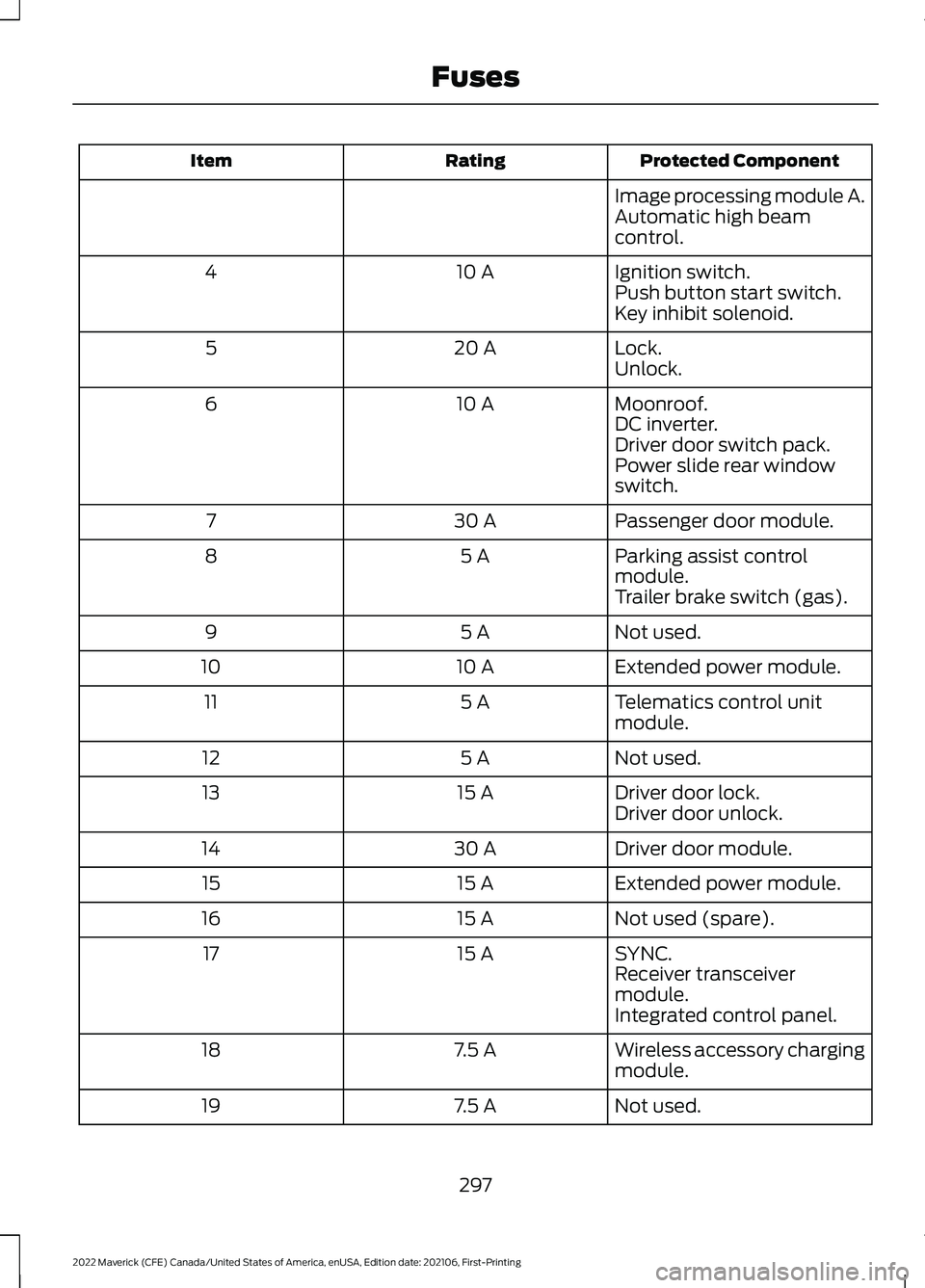
Protected Component
Rating
Item
Image processing module A.
Automatic high beam
control.
Ignition switch.
10 A
4
Push button start switch.
Key inhibit solenoid.
Lock.
20 A
5
Unlock.
Moonroof.
10 A
6
DC inverter.
Driver door switch pack.
Power slide rear window
switch.
Passenger door module.
30 A
7
Parking assist control
module.
5 A
8
Trailer brake switch (gas).
Not used.
5 A
9
Extended power module.
10 A
10
Telematics control unit
module.
5 A
11
Not used.
5 A
12
Driver door lock.
15 A
13
Driver door unlock.
Driver door module.
30 A
14
Extended power module.
15 A
15
Not used (spare).
15 A
16
SYNC.
15 A
17
Receiver transceiver
module.
Integrated control panel.
Wireless accessory charging
module.
7.5 A
18
Not used.
7.5 A
19
297
2022 Maverick (CFE) Canada/United States of America, enUSA, Edition date: 202106, First-Printing Fuses
Page 381 of 533
Contacts
Alphabetically sort your contacts.
Phone Settings
Change ring tones, alerts or pair another
phone.
Do Not Disturb
Reject incoming calls and switch ring tones
and alerts off.
Phone Keypad.
Directly dial a number.
Mute
Mute your cell phone microphone. Text Messaging
Setting Text Message Notification
iOS
1. Go to the settings menu on your cell
phone.
2. Select Bluetooth.
3. Select the information icon to the right
of your vehicle.
4. Switch text message notification on.
Android
1. Go to the settings menu on your cell phone.
2. Select Bluetooth.
3. Select the profiles option.
4. Select the phone profile .
5. Switch text message notification on.
Using Text Messaging Description
Menu Item
View the text message.
View
Call the sender.
Call
Reply to the text message with a standard text message.
Reply
STREAMING BLUETOOTH
AUDIO
Check the compatibility of your device on
the local Ford website.
Pair your device. See
Connecting a
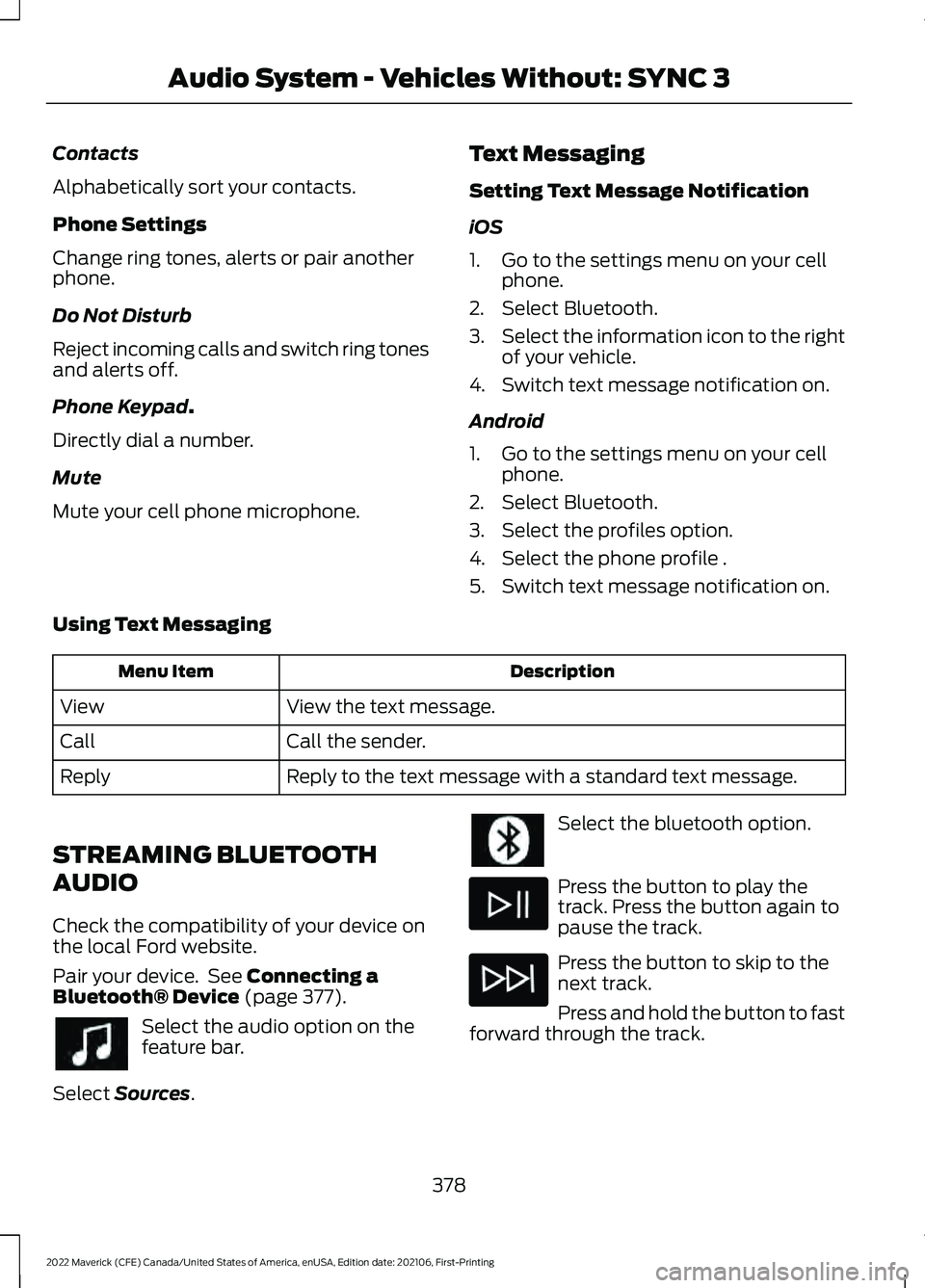
Bluetooth® Device (page 377). Select the audio option on the
feature bar.
Select
Sources. Select the bluetooth option.
Press the button to play the
track. Press the button again to
pause the track.
Press the button to skip to the
next track.
Press and hold the button to fast
forward through the track.
378
2022 Maverick (CFE) Canada/United States of America, enUSA, Edition date: 202106, First-Printing Audio System - Vehicles Without: SYNC 3
Page 405 of 533
Troubleshooting Tips
Action
Cause
Message
No action required. This
message should disappear
shortly.
Radio requires more than two
seconds to produce audio for
the selected channel.
Acquiring Signal
If this message does not clear
shortly, or with an ignition key
cycle, your receiver may have
a fault. See an authorized
dealer for service.
There is an internal module or
system failure present.
Satellite antenna fault
SIRIUS system failure
Tune to another channel or
choose another preset.
The channel is no longer avail-
able.
Invalid Channel
Contact SiriusXM at 1-888-
539-7474 to subscribe to the
channel, or tune to another
channel.
Your subscription does not
include this channel.
Unsubscribed Channel
The signal is blocked. When
you move into an open area,
the signal should return.
The signal is lost from the Siri-
usXM satellite or SiriusXM
tower to your vehicle antenna.
Satellite acquiring
signal…
No action required. The
process may take up to three
minutes.
Update of channel program-
ming in progress.
Updating…
Contact SiriusXM at 1-888-
539-7474 to resolve subscrip-
tion issues.
Your satellite service is no
longer available.
Questions? Call 1-
888-539-7474
Use the channel guide or the
Sirius XM Settings tile to turn
off the Lock or Skip function on
that station.
All the channels in the selected
category are either skipped or
locked.
None found. Check
channel guide.
No action required.
SiriusXM has updated the
channels available for your
vehicle.
SIRIUS Subscription
updated
HD Radio ™ Information (If
Available)
To activate HD radio, please see the Radio
Settings in the Settings Chapter. See
Settings (page 418). Note:
HD Radio broadcasts are not
available in all markets.
402
2022 Maverick (CFE) Canada/United States of America, enUSA, Edition date: 202106, First-Printing SYNC™ 3
(If Equipped)
Page 412 of 533
Phone List
Display the list of paired or connected
devices that you can select.
Note:
Up to 12 devices can be stored.
Do Not Disturb
Reject incoming calls and switch ring tones
and alerts off.
Phone Keypad
Directly dial a number.
Text Messaging
Setting Text Message Notification
iOS
1. Go to the settings menu on your cell phone. 2. Select Bluetooth.
3.
Select the information icon to the right
of your vehicle.
4. Switch text message notification on.
Android
1. Go to the settings menu on your cell phone.
2. Select Bluetooth.
3. Select the profiles option.
4. Select the phone profile.
5. Switch text message notification on.
Using Text Messaging Description
Menu Item
Hear the text message.
Hear It
View the text message.
View
Call the sender.
Call
Reply to the text message with a standard text message.
Reply
Apple CarPlay (If Equipped)
1. Connect your device to a USB port.
2. Follow the instructions on the touchscreen.
Note: Certain features of the system are
not available when you are using Apple
CarPlay.
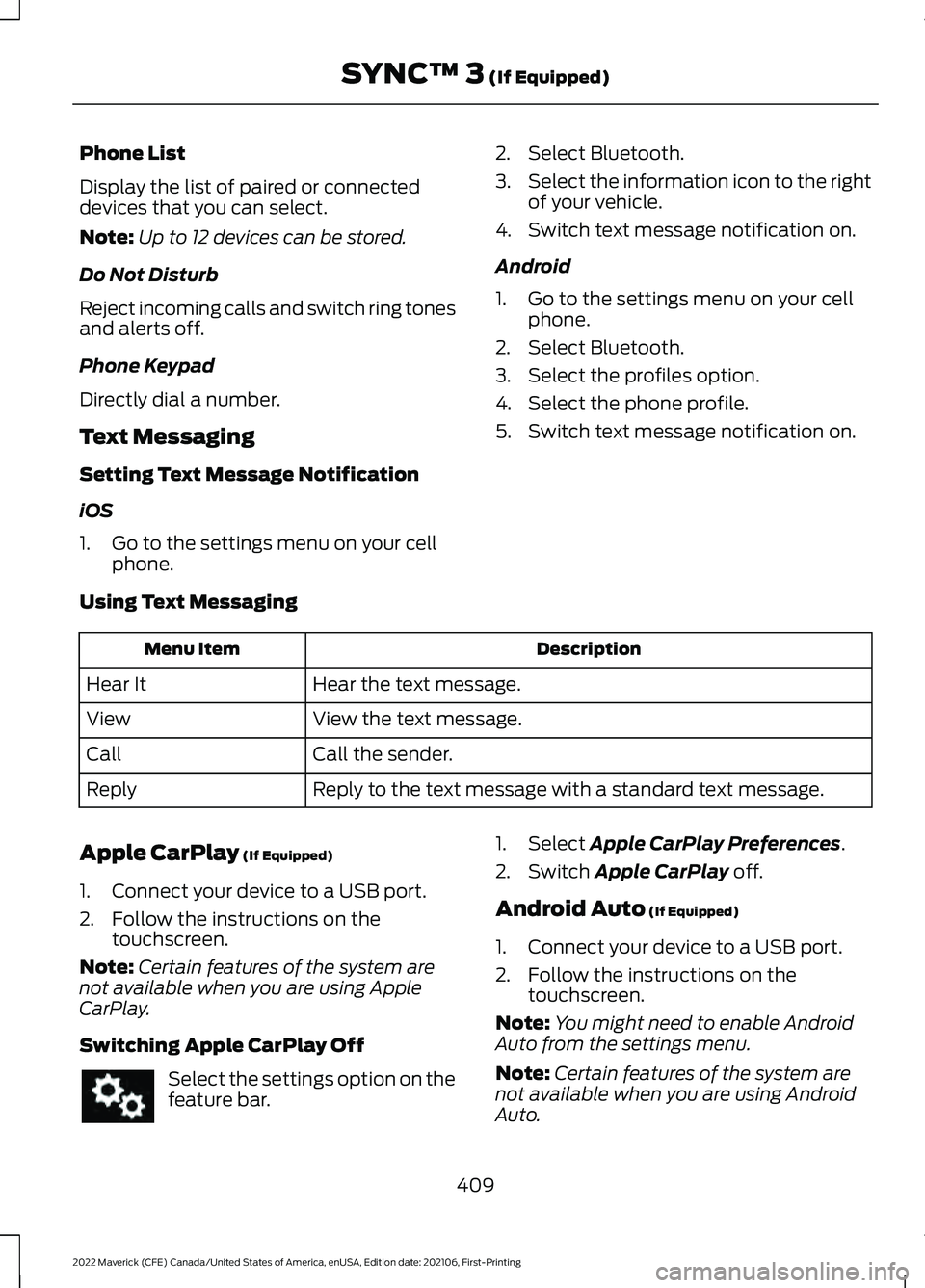
Switching Apple CarPlay Off Select the settings option on the
feature bar. 1. Select Apple CarPlay Preferences.
2. Switch
Apple CarPlay off.
Android Auto
(If Equipped)
1. Connect your device to a USB port.
2. Follow the instructions on the touchscreen.
Note: You might need to enable Android
Auto from the settings menu.
Note: Certain features of the system are
not available when you are using Android
Auto.
409
2022 Maverick (CFE) Canada/United States of America, enUSA, Edition date: 202106, First-Printing SYNC™ 3
(If Equipped)
Page 414 of 533
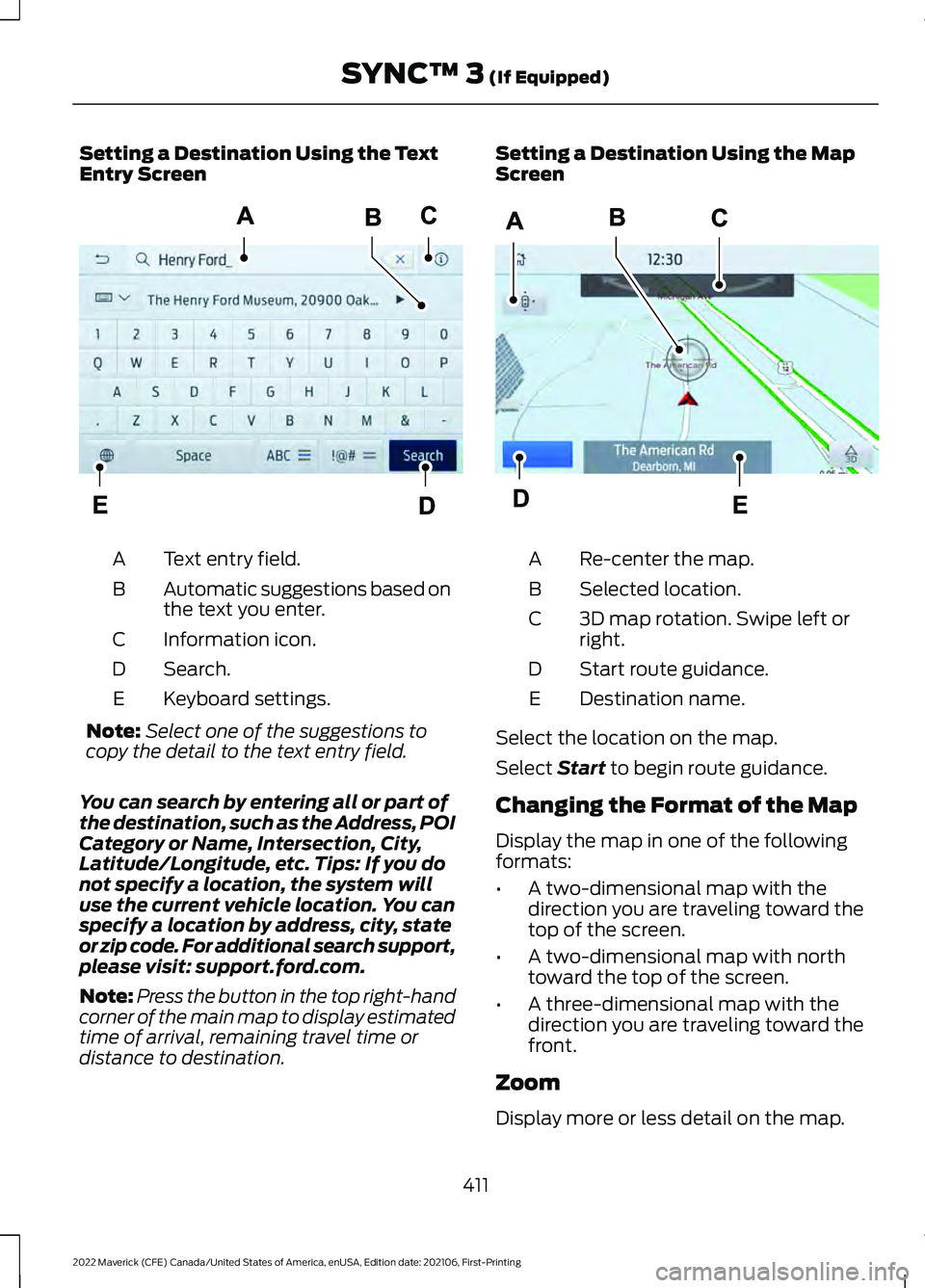
Setting a Destination Using the Text
Entry Screen
Text entry field.
A
Automatic suggestions based on
the text you enter.
B
Information icon.
C
Search.
D
Keyboard settings.
E
Note: Select one of the suggestions to
copy the detail to the text entry field.
You can search by entering all or part of
the destination, such as the Address, POI
Category or Name, Intersection, City,
Latitude/Longitude, etc. Tips: If you do
not specify a location, the system will
use the current vehicle location. You can
specify a location by address, city, state
or zip code. For additional search support,
please visit: support.ford.com.
Note: Press the button in the top right-hand
corner of the main map to display estimated
time of arrival, remaining travel time or
distance to destination. Setting a Destination Using the Map
Screen
Re-center the map.
A
Selected location.
B
3D map rotation. Swipe left or
right.
C
Start route guidance.
D
Destination name.
E
Select the location on the map.
Select Start to begin route guidance.
Changing the Format of the Map
Display the map in one of the following
formats:
• A two-dimensional map with the
direction you are traveling toward the
top of the screen.
• A two-dimensional map with north
toward the top of the screen.
• A three-dimensional map with the
direction you are traveling toward the
front.
Zoom
Display more or less detail on the map.
411
2022 Maverick (CFE) Canada/United States of America, enUSA, Edition date: 202106, First-Printing SYNC™ 3
(If Equipped)E297558 E297559
Page 422 of 533
Clock
Select this tile to adjust the clock settings.
Bluetooth®
Select this tile to switch Bluetooth® on
and off and adjust the settings.
Phone
Select this tile to connect, disconnect, and
manage the connected device settings.
Audio
Select this tile to adjust the audio settings.
Driver Assist
(If Equipped)
Select this tile to adjust Driver Assist
features like Parking Aids, Lane Keeping
System, Pedestrian Detection, and
Auto-Start-Stop.
Vehicle
Select this tile to adjust vehicle settings
like windows, alarm, lighting, and MyKey
settings.
FordPass
(If Equipped)
Select this tile to adjust the FordPass
settings
General
Select this tile to adjust settings like
language, measurement units, or to reset
the system.
911 Assist
(If Equipped)
Select this tile to switch 911 Assist on and
off.
Automatic Updates
Select this tile to adjust the automatic
update settings. Mobile Apps
Select this tile to adjust permissions,
enable, disable, and update mobile apps.
Display
Select this tile to adjust display settings
like brightness and auto dim.
Charge Settings
(If Equipped)
Select this tile to adjust the electric vehicle
charge settings.
Voice Control
Select this tile to adjust voice control
settings like command confirmations and
displayed lists.
Navigation
(If Equipped)
Select this tile to adjust navigation settings
like map preferences and route guidance.
Seats
(If Equipped)
Select this tile to adjust the lumbar
function and massage function of your
multi contour seats.
Message Center
(If Equipped)
Select this tile to view vehicle messages.
Personal Profiles
(If Equipped)
Select this tile to adjust recalled memory
features when using personal profiles.
Valet Mode
(If Equipped)
Select this tile to enable and disable valet
mode.
Ambient Lighting
(If Equipped)
Select this tile to change the color or
intensity of the interior lighting.
419
2022 Maverick (CFE) Canada/United States of America, enUSA, Edition date: 202106, First-Printing SYNC™ 3
(If Equipped)
Page 464 of 533
United States and Canada
WARNING: Changes or
modifications not expressively approved
by the party responsible for compliance
could void the user's authority to operate
the equipment. The term "IC:" before the
radio certification number only signifies
that Industry Canada technical
specifications were met.
FCC ID: L2C0065TR
IC: 3432A-0065TR
This device complies with Part 15 of the
FCC Rules and with Innovation, Science
and Economic Development Canada ’s
licence-exempt RSS(s). Operation is
subject to the following two conditions:
1. This device may not cause harmful interference, and
2. This device must accept any interference received, including
interference that may cause undesired
operation.
Zambia KEYS AND REMOTE CONTROLS
Argentina
461
2022 Maverick (CFE) Canada/United States of America, enUSA, Edition date: 202106, First-Printing Customer InformationE340196 E339844 E342143 E340119