warning FORD MAVERICK 2022 Workshop Manual
[x] Cancel search | Manufacturer: FORD, Model Year: 2022, Model line: MAVERICK, Model: FORD MAVERICK 2022Pages: 533, PDF Size: 9.58 MB
Page 109 of 533
OPENING AND CLOSING THE
SUN SHADE
WARNING: Do not leave children
unattended in your vehicle and do not
let them play with the sun shades.
Failure to follow this instruction could
result in personal injury.
Opening and Closing the Sun
Shade
The sliding shade can be manually opened
or closed when the moonroof is closed.
Pull the shade toward the front of the
vehicle to close it.
OPENING AND CLOSING THE
MOONROOF WARNING:
Do not leave children
unattended in your vehicle and do not
let them play with the moonroof. Failure
to follow this instruction could result in
personal injury. WARNING:
When closing the
moonroof, verify that it is free of
obstruction and make sure that children
and pets are not in the proximity of the
roof opening.
Note: With the panoramic moonroof panel
fully open and vehicle speed increasing to
approximately
50 mph (80 km/h), the
moonroof opening panel automatically
closes approximately 8 in (20 cm) to reduce
excessive wind noise at higher speeds. This
feature only functions one time per key
cycle, so you can open the glass further if
desired. The moonroof controls are located on the
overhead console and have a one-touch
open and close feature. To stop its
movement during one-touch operation,
press the control a second time.
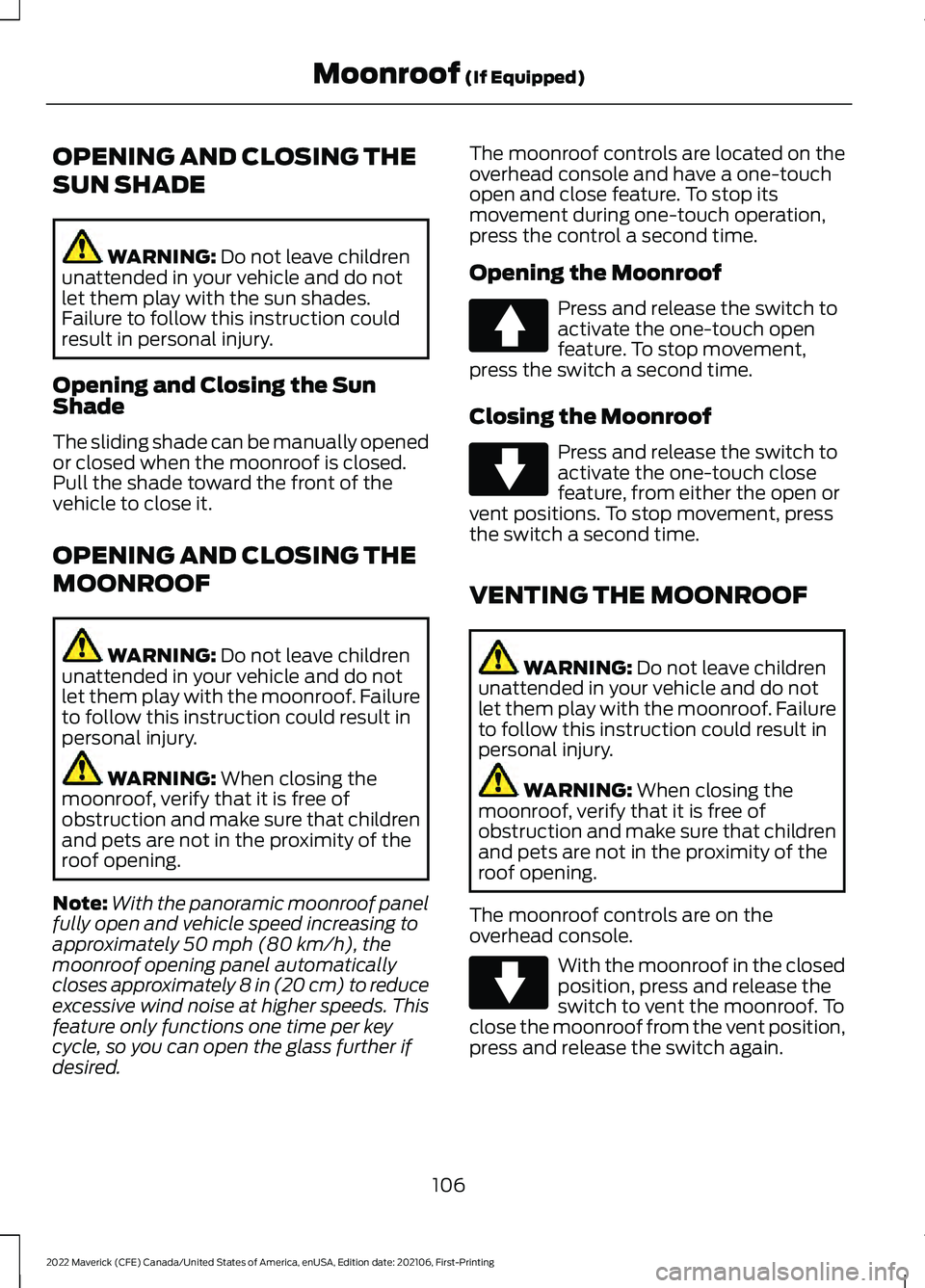
Opening the Moonroof Press and release the switch to
activate the one-touch open
feature. To stop movement,
press the switch a second time.
Closing the Moonroof Press and release the switch to
activate the one-touch close
feature, from either the open or
vent positions. To stop movement, press
the switch a second time.
VENTING THE MOONROOF WARNING:
Do not leave children
unattended in your vehicle and do not
let them play with the moonroof. Failure
to follow this instruction could result in
personal injury. WARNING:
When closing the
moonroof, verify that it is free of
obstruction and make sure that children
and pets are not in the proximity of the
roof opening.
The moonroof controls are on the
overhead console. With the moonroof in the closed
position, press and release the
switch to vent the moonroof. To
close the moonroof from the vent position,
press and release the switch again.
106
2022 Maverick (CFE) Canada/United States of America, enUSA, Edition date: 202106, First-Printing Moonroof
(If Equipped)E340663 E340636 E340636
Page 115 of 533
WHAT IS THE POWER GAUGE
- HYBRID ELECTRIC VEHICLE
(HEV)
The power gauge displays power to the
wheels when accelerating or maintaining
speed. When slowing down by lifting your
foot off the accelerator pedal or pressing
the brake, the gauge displays the power
captured by the regenerative braking
system and returned to the high voltage
battery.
WHAT IS THE SPEEDOMETER
Indicates the vehicle speed.
FUEL GAUGE
WHAT IS THE FUEL GAUGE
Indicates approximately how much fuel is
in the fuel tank.
FUEL GAUGE LIMITATIONS
The fuel gauge may not provide an
accurate reading when your vehicle is on
an incline.
LOCATING THE FUEL FILLER
DOOR
The arrow adjacent to the fuel pump
symbol indicates on which side of your
vehicle the fuel filler door is located.
WHAT IS THE LOW FUEL
REMINDER
A low fuel level reminder displays and
sounds when the distance to empty
reaches 75 mi (120 km) to empty for
MyKey, and at 50 mi (80 km), 25 mi
(40 km), 12 mi (20 km) and 0 mi (0 km)
for all vehicle keys.
Note: The low fuel reminder can appear at
different fuel gauge positions depending on
fuel economy conditions. This variation is
normal.
WHAT IS DISTANCE TO EMPTY -
GASOLINE, HYBRID ELECTRIC
VEHICLE (HEV)
Indicates the approximate distance your
vehicle can travel on the fuel remaining in
the tank. Changes in driving pattern can
cause the value to not only decrease but
also increase or stay constant for periods
of time.
WHAT IS THE ENGINE
COOLANT TEMPERATURE
GAUGE
Indicates the engine coolant temperature.
WHAT IS THE INFORMATION
BAR
The information bar displays information
related to the ambient air temperature,
odometer, compass, indicators and
warning lamps.
112
2022 Maverick (CFE) Canada/United States of America, enUSA, Edition date: 202106, First-Printing Instrument Cluster
Page 116 of 533
WHAT ARE THE INSTRUMENT
CLUSTER WARNING LAMPS
Warning lamps alert you to a vehicle
condition that could become serious.
Some lamps illuminate when you start
your vehicle to make sure they work. If any
lamps remain on after starting your vehicle,
refer to the respective system warning
lamp for further information.
INSTRUMENT CLUSTER
WARNING LAMPS
Anti-Lock Braking System
If it illuminates when you are
driving, this indicates your
vehicle requires service. Your
vehicle continues to have normal braking
without the anti-lock brake system
function. Have your vehicle checked as
soon as possible.
Battery It illuminates when you switch
the ignition on.
If it illuminates when the engine
is running, this indicates your vehicle
requires service. Have your vehicle
checked as soon as possible.
Brake System It illuminates when you apply the
parking brake and the ignition is
on. If it illuminates when your
vehicle is moving, make sure the
parking brake is released. If the
parking brake is released, this
indicates low brake fluid level or the brake
system requires service. Have your vehicle
checked as soon as possible.
Note: Indicators may vary depending on
region. Door Ajar It illuminates when you switch
the ignition on and remains on if
any door is open.
Electric Park Brake It illuminates or flashes when the
electric parking brake requires
service. Have your vehicle
checked as soon as possible.
Engine or Motor Coolant
Temperature If it illuminates, safely stop your
vehicle and switch your vehicle
off. Have your vehicle checked
as soon as possible.
Fasten Seatbelt It illuminates and a tone sounds
until you fasten the seatbelts.
Fasten Rear Seatbelt It illuminates and a tone sounds
until you fasten the rear
seatbelts.
High Voltage Electric System
Failure It illuminates if your vehicle has
an electrical component fault or
failure that causes your vehicle
to shutdown or enter a limited operating
mode. A message may appear in the
instrument cluster display.
113
2022 Maverick (CFE) Canada/United States of America, enUSA, Edition date: 202106, First-Printing Instrument Cluster E270480 E146190 E71880 E206718 E332963
Page 117 of 533
Hood Ajar
It illuminates when the ignition
is on and the hood is not
completely closed.
Low Beam Warning It illuminates when the low
beam headlamp requires service.
Have the system checked as
soon as possible.
Low Fuel Level It illuminates when the fuel level
is low.
Low Tire Pressure Warning It illuminates when your tire
pressure is low. If illuminated,
check your tire pressure as soon
as possible. If it begins to flash at anytime,
have the system checked as soon as
possible.
Low Washer Fluid It illuminates when the washer
fluid is low.
Malfunction Indicator Lamp It illuminates when the ignition
is on and the engine is off, this is
normal operation. If it illuminates
when the engine is on this indicates that
the emission control system requires
service. If it flashes, have your vehicle
checked immediately. See Starting and
Stopping the Engine – Warning Lamps
(page
162). Oil Pressure It illuminates when the engine
oil pressure is low.
Powertrain Fault Illuminates when the powertrain
requires service. Have the
system checked as soon as
possible.
Tailgate Ajar It illuminates when the ignition
is on and the tailgate is not
completely closed.
WHAT ARE THE INSTRUMENT
CLUSTER INDICATORS
Indicators notify you of various features
that are active on your vehicle.
INSTRUMENT CLUSTER
INDICATORS
Adaptive Cruise Control See
Adaptive Cruise Control
(page 215).
Airbag See
Airbags (page 50).
Automatic High Beam Control See
Automatic High Beam
Control Indicators (page 97).
114
2022 Maverick (CFE) Canada/United States of America, enUSA, Edition date: 202106, First-Printing Instrument ClusterE296055 E181350 E132353 E311338 E144524 E67017
Page 119 of 533
USING THE INSTRUMENT
CLUSTER DISPLAY CONTROLS
WARNING: Driving while distracted
can result in loss of vehicle control, crash
and injury. We strongly recommend that
you use extreme caution when using any
device that may take your focus off the
road. Your primary responsibility is the
safe operation of your vehicle. We
recommend against the use of any
hand-held device while driving and
encourage the use of voice-operated
systems when possible. Make sure you
are aware of all applicable local laws
that may affect the use of electronic
devices while driving.
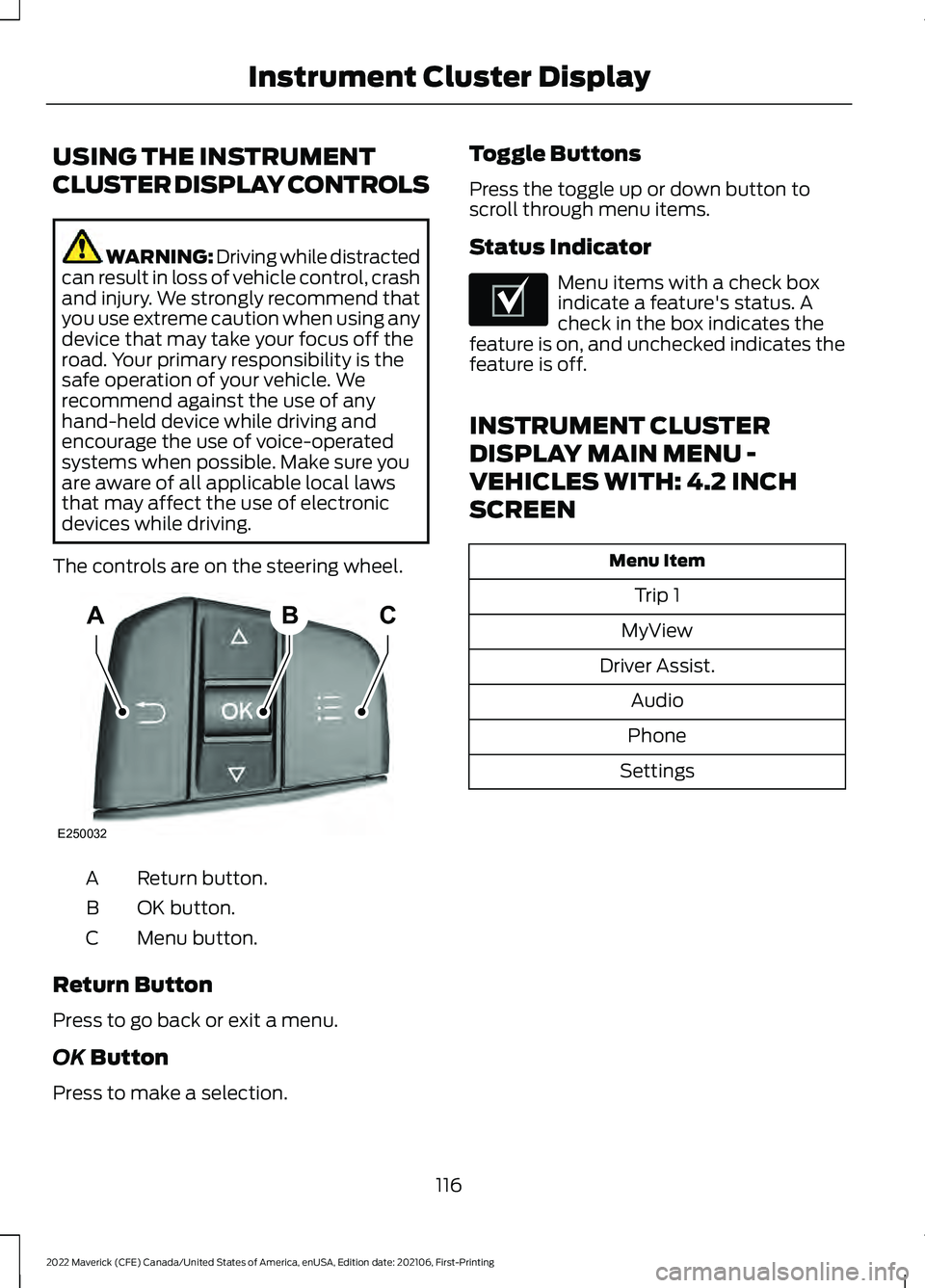
The controls are on the steering wheel. Return button.
A
OK button.
B
Menu button.
C
Return Button
Press to go back or exit a menu.
OK Button
Press to make a selection. Toggle Buttons
Press the toggle up or down button to
scroll through menu items.
Status Indicator Menu items with a check box
indicate a feature's status. A
check in the box indicates the
feature is on, and unchecked indicates the
feature is off.
INSTRUMENT CLUSTER
DISPLAY MAIN MENU -
VEHICLES WITH: 4.2 INCH
SCREEN Menu Item
Trip 1
MyView
Driver Assist. Audio
Phone
Settings
116
2022 Maverick (CFE) Canada/United States of America, enUSA, Edition date: 202106, First-Printing Instrument Cluster DisplayABC
E250032 E204495
Page 126 of 533
WHAT IS REMOTE START
The system allows you to remotely start
your vehicle and to adjust the interior
temperature according to the settings that
you chose.
REMOTE START
PRECAUTIONS
WARNING: Do not start the engine
in a closed garage or in other enclosed
areas. Exhaust fumes are toxic. Always
open the garage door before you start
the engine. Failure to follow this
instruction could result in personal injury
or death.
REMOTE START LIMITATIONS
Remote start does not work under the
following conditions:
• The alarm horn is sounding.
• The hood is open.
• The transmission is not in park (P).
• The ignition is on.
• The battery voltage is below the
minimum operating voltage.
Note: Do not use remote start if your fuel
level is low.
Note: You can use remote start with
FordPass. See Connecting the Vehicle to
a Wi-Fi Network (page 369).
ENABLING REMOTE START
1. Using the information display controls on the steering wheel, select Settings.
2. Select
Vehicle Settings.
3. Select
Remote Start. 4. Switch
System on.
Note: To use remote start, make sure that
the modem is enabled. See
Enabling and
Disabling the Modem (page 369).
REMOTELY STARTING AND
STOPPING THE VEHICLE
Remotely Starting the Vehicle Press the button on the remote
control.
Within three seconds, press the
button twice on the remote
control.
Note: You can also use the FordPass App
to start the vehicle.
Note: The turn signals flash twice.
Note: The parking lamps turn on when the
vehicle is running.
Note: The horn sounds if the system fails
to start.
Note: All other vehicle systems remain off
when you have remotely started the vehicle.
Note: The vehicle remains secured when
you have remotely started the vehicle. A
valid key must be inside your vehicle to
switch the ignition on and drive your vehicle.
Remotely Stopping the Vehicle Within three seconds, press the
button twice on the remote
control.
EXTENDING THE REMOTE
START DURATION
To extend the remote start duration during
remote start, do the following:
123
2022 Maverick (CFE) Canada/United States of America, enUSA, Edition date: 202106, First-Printing Remote Start
(If Equipped)E138623 E138625 E138625
Page 138 of 533
FRONT SEAT PRECAUTIONS
WARNING: Sitting improperly, out
of position or with the seatback reclined
too far can take weight off the seat
cushion and affect the decision of the
passenger sensing system, resulting in
serious injury or death in the event of a
crash. Always sit upright against your
seat back, with your feet on the floor. WARNING: Do not recline the seat
backrest too far as this can cause the
occupant to slide under the seatbelt,
resulting in personal injury in the event
of a crash. WARNING:
Do not place objects
higher than the top of the seat backrest.
Failure to follow this instruction could
result in personal injury or death in the
event of a sudden stop or crash. WARNING: Do not adjust the driver
seat or seat backrest when your vehicle
is moving. This may result in sudden seat
movement, causing the loss of control
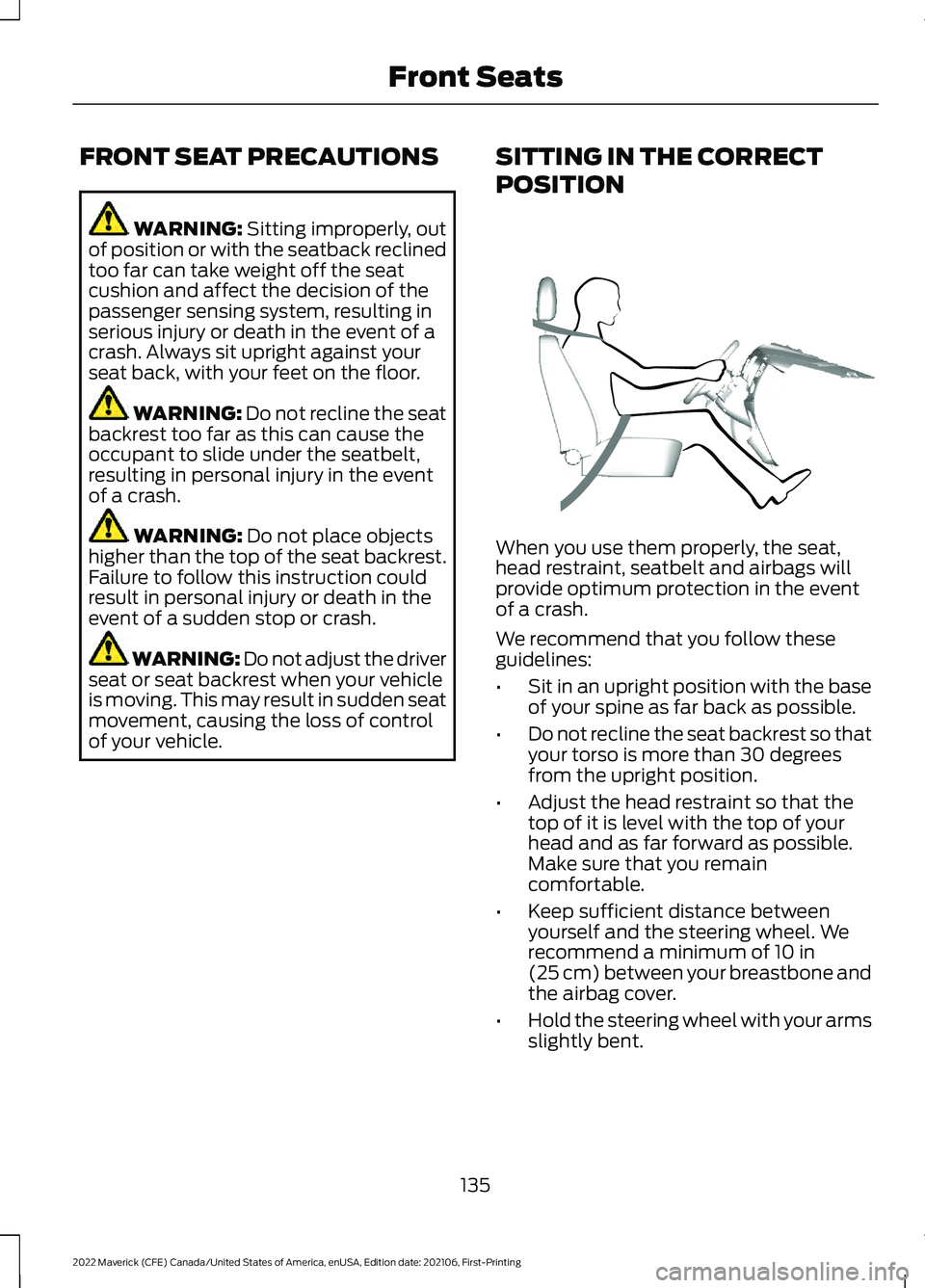
of your vehicle. SITTING IN THE CORRECT
POSITION When you use them properly, the seat,
head restraint, seatbelt and airbags will
provide optimum protection in the event
of a crash.
We recommend that you follow these
guidelines:
•
Sit in an upright position with the base
of your spine as far back as possible.
• Do not recline the seat backrest so that
your torso is more than 30 degrees
from the upright position.
• Adjust the head restraint so that the
top of it is level with the top of your
head and as far forward as possible.
Make sure that you remain
comfortable.
• Keep sufficient distance between
yourself and the steering wheel. We
recommend a minimum of
10 in
(25 cm) between your breastbone and
the airbag cover.
• Hold the steering wheel with your arms
slightly bent.
135
2022 Maverick (CFE) Canada/United States of America, enUSA, Edition date: 202106, First-Printing Front SeatsE68595
Page 139 of 533
•
Bend your legs slightly so that you can
press the pedals fully.
• Position the shoulder strap of the
seatbelt over the center of your
shoulder and position the lap strap
tightly across your hips.
Make sure that your driving position is
comfortable and that you can maintain full
control of your vehicle.
MANUAL SEATS
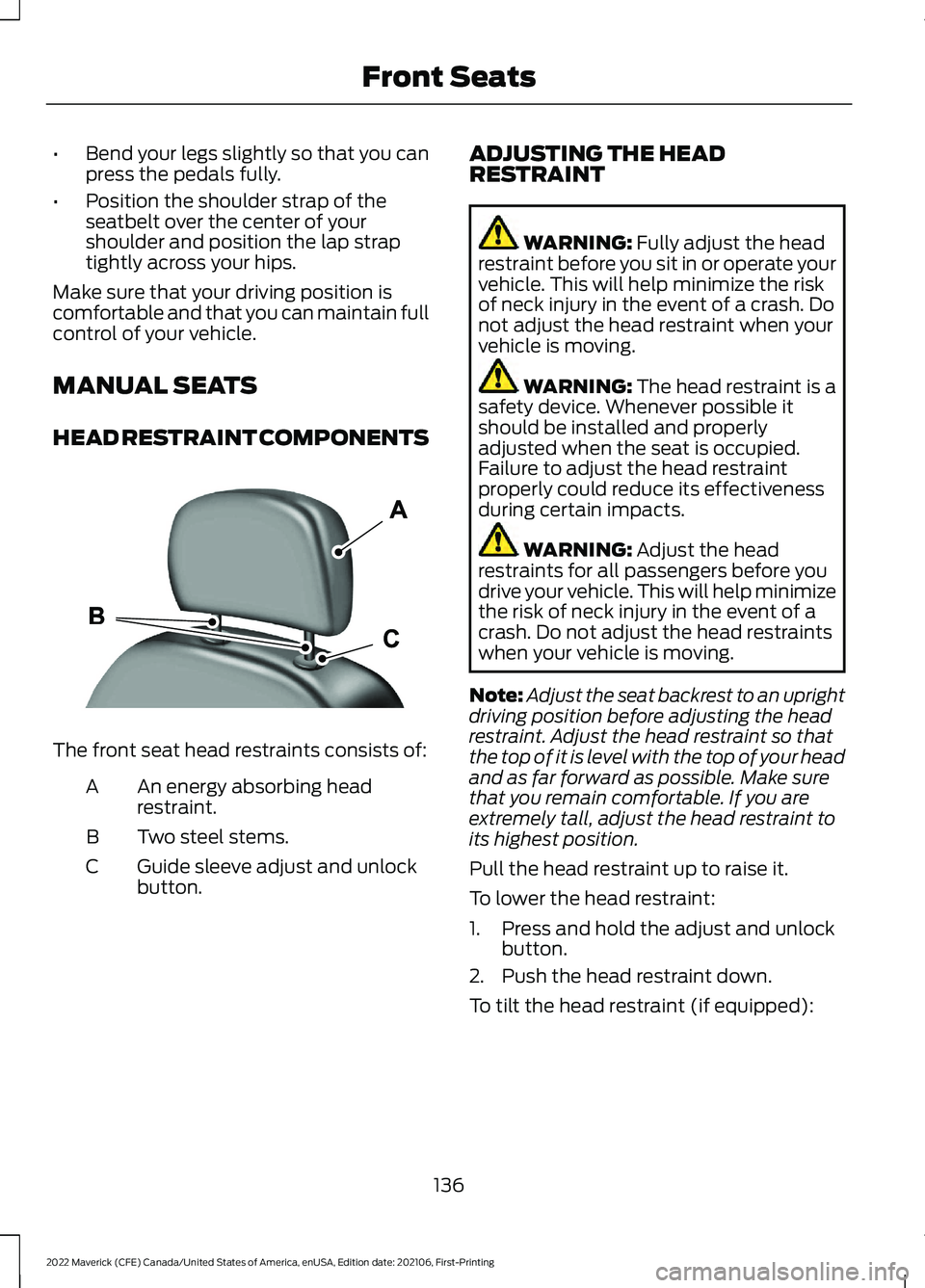
HEAD RESTRAINT COMPONENTS The front seat head restraints consists of:
An energy absorbing head
restraint.
A
Two steel stems.
B
Guide sleeve adjust and unlock
button.
C ADJUSTING THE HEAD
RESTRAINT WARNING: Fully adjust the head
restraint before you sit in or operate your
vehicle. This will help minimize the risk
of neck injury in the event of a crash. Do
not adjust the head restraint when your
vehicle is moving. WARNING:
The head restraint is a
safety device. Whenever possible it
should be installed and properly
adjusted when the seat is occupied.
Failure to adjust the head restraint
properly could reduce its effectiveness
during certain impacts. WARNING:
Adjust the head
restraints for all passengers before you
drive your vehicle. This will help minimize
the risk of neck injury in the event of a
crash. Do not adjust the head restraints
when your vehicle is moving.
Note: Adjust the seat backrest to an upright
driving position before adjusting the head
restraint. Adjust the head restraint so that
the top of it is level with the top of your head
and as far forward as possible. Make sure
that you remain comfortable. If you are
extremely tall, adjust the head restraint to
its highest position.
Pull the head restraint up to raise it.
To lower the head restraint:
1. Press and hold the adjust and unlock button.
2. Push the head restraint down.
To tilt the head restraint (if equipped):
136
2022 Maverick (CFE) Canada/United States of America, enUSA, Edition date: 202106, First-Printing Front SeatsE291139
Page 140 of 533
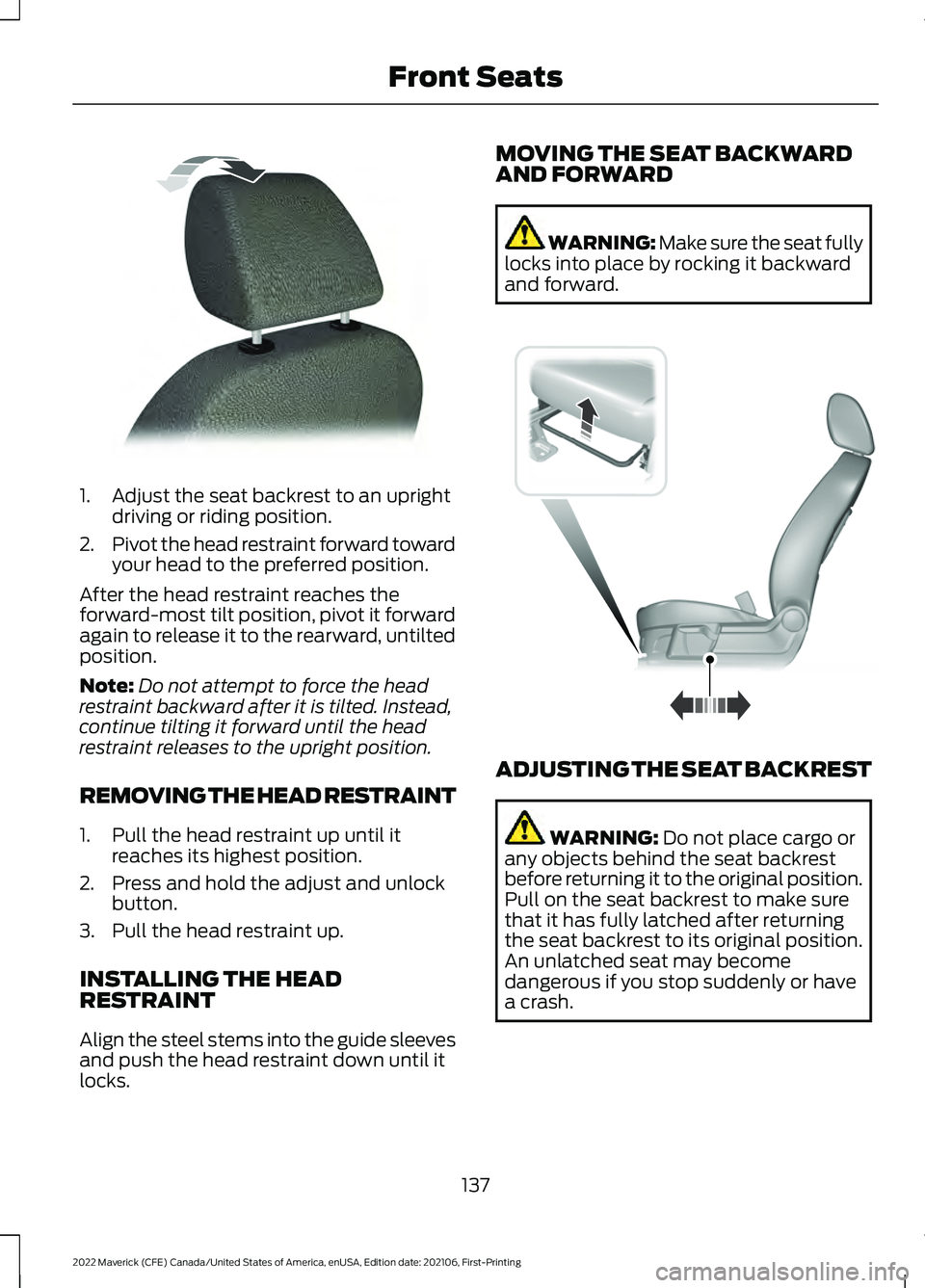
1. Adjust the seat backrest to an upright
driving or riding position.
2. Pivot the head restraint forward toward
your head to the preferred position.
After the head restraint reaches the
forward-most tilt position, pivot it forward
again to release it to the rearward, untilted
position.
Note: Do not attempt to force the head
restraint backward after it is tilted. Instead,
continue tilting it forward until the head
restraint releases to the upright position.
REMOVING THE HEAD RESTRAINT
1. Pull the head restraint up until it reaches its highest position.
2. Press and hold the adjust and unlock button.
3. Pull the head restraint up.
INSTALLING THE HEAD
RESTRAINT
Align the steel stems into the guide sleeves
and push the head restraint down until it
locks. MOVING THE SEAT BACKWARD
AND FORWARD WARNING: Make sure the seat fully
locks into place by rocking it backward
and forward. ADJUSTING THE SEAT BACKREST
WARNING: Do not place cargo or
any objects behind the seat backrest
before returning it to the original position.
Pull on the seat backrest to make sure
that it has fully latched after returning
the seat backrest to its original position.
An unlatched seat may become
dangerous if you stop suddenly or have
a crash.
137
2022 Maverick (CFE) Canada/United States of America, enUSA, Edition date: 202106, First-Printing Front SeatsE144727 E163870
Page 141 of 533
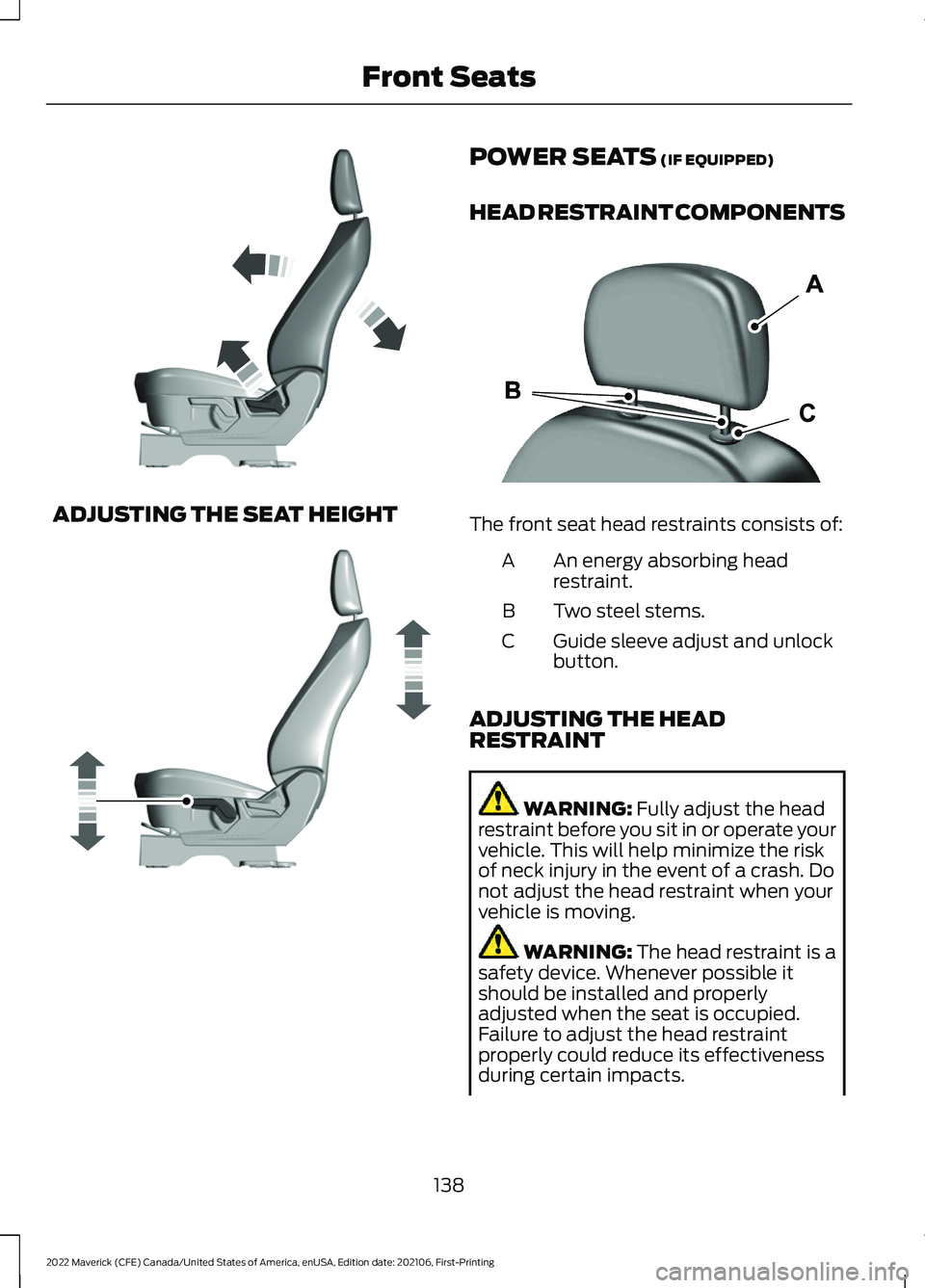
ADJUSTING THE SEAT HEIGHT POWER SEATS (IF EQUIPPED)
HEAD RESTRAINT COMPONENTS The front seat head restraints consists of:
An energy absorbing head
restraint.
A
Two steel stems.
B
Guide sleeve adjust and unlock
button.
C
ADJUSTING THE HEAD
RESTRAINT WARNING:
Fully adjust the head
restraint before you sit in or operate your
vehicle. This will help minimize the risk
of neck injury in the event of a crash. Do
not adjust the head restraint when your
vehicle is moving. WARNING:
The head restraint is a
safety device. Whenever possible it
should be installed and properly
adjusted when the seat is occupied.
Failure to adjust the head restraint
properly could reduce its effectiveness
during certain impacts.
138
2022 Maverick (CFE) Canada/United States of America, enUSA, Edition date: 202106, First-Printing Front SeatsE293558 E293554 E291139