sport FORD MAVERICK 2022 Owners Manual
[x] Cancel search | Manufacturer: FORD, Model Year: 2022, Model line: MAVERICK, Model: FORD MAVERICK 2022Pages: 533, PDF Size: 9.58 MB
Page 13 of 533
Driving Hints
Cold Weather Precautions
.......................273
Driving on Snow and Ice ...........................
273
Breaking-In ....................................................
273
Driving Economically .................................
273
Driving in Special Conditions ..................
274
Driving Through Shallow Water .............
275
Floor Mats ......................................................
276
Crash and Breakdown Information
Roadside Assistance .................................
278
High Voltage Battery Vehicle Precautions - Hybrid Electric Vehicle (HEV) .........
279
Switching the Hazard Flashers On and Off ................................................................
280
Jump Starting the Vehicle .......................
280
Post-Crash Alert System .........................
283
Automatic Crash Shutoff ........................
284
Recovery Towing .........................................
284
Transporting the Vehicle .........................
286
Towing Your Vehicle
Towing Your Vehicle Precautions ..........
287
Recreationally Towing Your Vehicle - Gasoline, FWD .........................................
287
Recreationally Towing Your Vehicle - Gasoline, AWD .........................................
287
Recreationally Towing Your Vehicle - Hybrid Electric Vehicle (HEV) ............
287
Emergency Towing - Gasoline ...............
288
Emergency Towing - Hybrid Electric Vehicle (HEV) ..........................................
288
Towing Your Vehicle – Troubleshooting - Hybrid Electric Vehicle (HEV) .........
289
Fuses
Fuse Precautions ........................................
290
Under Hood Fuse Box ..............................
290
Body Control Module Fuse Box ............
296
Identifying Fuse Types .............................
298Fuses – Troubleshooting
.........................
298
Maintenance
Maintenance Precautions .......................
299
Opening and Closing the Hood .............
299
Under Hood Overview - 2.0L EcoBoost™ ........................................................................\
.
301
Under Hood Overview - 2.5L, Hybrid Electric Vehicle (HEV) ..........................
302
Engine Oil ......................................................
303
Checking the Coolant ...............................
304
Changing the Engine Air Filter - 2.0L EcoBoost™ ..............................................
308
Changing the Engine Air Filter - 2.5L, Hybrid Electric Vehicle (HEV) ...........
309
Changing the Fuel Filter ..........................
309
Drive Belt Routing Overview - 2.0L EcoBoost™ ...............................................
310
Changing the 12V Battery .........................
310
Adjusting the Headlamps .........................
312
Exterior Bulbs ................................................
313
Interior Bulbs .................................................
318
Vehicle Care
Cleaning Products .......................................
319
Cleaning the Exterior ..................................
319
Cleaning the Interior ...................................
321
Repairing Minor Paint Damage ..............
323
Waxing Your Vehicle ..................................
323
Body Styling Kits
Body Styling Kit Precautions ..................
324
Storing Your Vehicle
Preparing Your Vehicle for Storage ......
325
Removing Your Vehicle From Storage ........................................................................\
326
Wheel and Tire Information
Locating the Tire label ...............................
327
10
2022 Maverick (CFE) Canada/United States of America, enUSA, Edition date: 202106, First-Printing Table of Contents
Page 14 of 533
Department of Transportation Uniform
Tire Quality Grades .................................327
Information on the Tire Sidewall ..........
328
Glossary of Tire Terminology ..................
333
Tire Replacement Requirements .........
334
Using Snow Chains ....................................
336
Tire Care
Checking the Tire Pressures ...................
338
Inflating the Tires ........................................
338
Inspecting the Tire for Wear ...................
339
Inspecting the Tire for Damage .............
339
Inspecting the Wheel Valve Stems ......
340
Tire Rotation ................................................
340
Tire Pressure Monitoring System
What Is the Tire Pressure Monitoring System ........................................................
342
Tire Pressure Monitoring System Overview ....................................................
342
Tire Pressure Monitoring System Precautions ...............................................
343
Tire Pressure Monitoring System Limitations ................................................
343
Viewing the Tire Pressures ......................
344
Tire Pressure Monitoring System – Troubleshooting .....................................
344
Changing a Road Wheel
Changing a Flat Tire ..................................
346
Wheel Nuts ...................................................
354
Capacities and Specifications
Engine Specifications - 2.0L EcoBoost™ ........................................................................\
355
Engine Specifications - 2.5L, Hybrid Electric Vehicle (HEV) ..........................
356
Motorcraft Parts - 2.0L EcoBoost™ .....
357
Motorcraft Parts - 2.5L, Hybrid Electric Vehicle (HEV) ...........................................
357Engine Oil Capacity and Specification -
2.0L EcoBoost™ .....................................
359
Engine Oil Capacity and Specification - 2.5L, Hybrid Electric Vehicle (HEV)
.......................................................................
360
Cooling System Capacity and Specification - 2.0L EcoBoost™ .......
361
Cooling System Capacity and Specification - 2.5L, Hybrid Electric
Vehicle (HEV) ..........................................
362
Fuel Tank Capacity - Excluding: Hybrid Electric Vehicle (HEV) ..........................
363
Fuel Tank Capacity - Hybrid Electric Vehicle (HEV) ..........................................
364
Air Conditioning System Capacity and Specification - 2.0L EcoBoost™ ......
365
Air Conditioning System Capacity and Specification - 2.5L, Hybrid Electric
Vehicle (HEV) ..........................................
366
Washer Fluid Specification .....................
366
Brake Fluid Specification .........................
367
Vehicle Identification
Vehicle Identification Number ..............
368
Connected Vehicle
What Is a Connected Vehicle .................
369
Connected Vehicle Requirements .......
369
Connected Vehicle Limitations .............
369
Connecting the Vehicle to a Mobile Network .....................................................
369
Connecting the Vehicle to a Wi-Fi Network .....................................................
369
Connected Vehicle – Troubleshooting - Vehicles With: Modem .........................
370
Connected Vehicle – Troubleshooting - Vehicles With: SYNC 3 ...........................
371
Vehicle Wi-Fi Hotspot
Creating a Vehicle Wi-Fi Hotspot - Vehicles With: SYNC 3 ..........................
373
Changing the Vehicle Wi-Fi Hotspot Name or Password .................................
373
11
2022 Maverick (CFE) Canada/United States of America, enUSA, Edition date: 202106, First-Printing Table of Contents
Page 34 of 533
CHILD SAFETY PRECAUTIONS
WARNING: Always make sure your
child is secured properly in a device that
is appropriate for their height, age and
weight. Child safety restraints must be
bought separately from your vehicle.
Failure to follow these instructions and
guidelines may result in an increased risk
of serious injury or death to your child. WARNING: All children are shaped
differently. The National Highway Traffic
Safety Administration and other safety
organizations, base their
recommendations for child restraints on
probable child height, age and weight
thresholds, or on the minimum
requirements of the law. We recommend
that you check with a NHTSA Certified
Child Passenger Safety Technician
(CPST) to make sure that you properly
install the child restraint in your vehicle
and that you consult your pediatrician to
make sure you have a child restraint
appropriate for your child. To locate a
child restraint fitting station and CPST,
contact NHTSA toll free at
1-888-327-4236 or go to
www.nhtsa.dot.gov. In Canada, contact
Transport Canada toll free at
1-800-333-0371 or go to www.tc.gc.ca
to find a Child Car Seat Clinic in your
area. Failure to properly restrain children
in child restraints made especially for
their height, age and weight, may result
in an increased risk of serious injury or
death to your child. WARNING:
On hot days, the
temperature inside the vehicle can rise
very quickly. Exposure of people or
animals to these high temperatures for
even a short time can cause death or
serious heat related injuries, including
brain damage. Small children are
particularly at risk. WARNING:
Do not place a
rearward facing child restraint in front of
an active airbag. Failure to follow this
instruction could result in personal injury
or death. WARNING:
Properly secure
children 12 years old and under in a rear
seating position whenever possible. If
you are unable to properly secure all
children in a rear seating position,
properly secure the largest child on the
front seat. If you must use a forward
facing child restraint on the front seat,
move the seat as far back as possible.
Failure to follow these instructions could
result in personal injury or death. WARNING: Always carefully follow
the instructions and warnings provided
by the manufacturer of any child
restraint to determine if the restraint
device is appropriate for your child's size,
height, weight, or age. Follow the child
restraint manufacturer's instructions and
warnings provided for installation and
use in conjunction with the instructions
and warnings provided by your vehicle
manufacturer. A safety seat that is
improperly installed or utilized, is
inappropriate for your child's height, age,
or weight or does not properly fit the
child may increase the risk of serious
injury or death.
31
2022 Maverick (CFE) Canada/United States of America, enUSA, Edition date: 202106, First-Printing Child Safety
Page 39 of 533
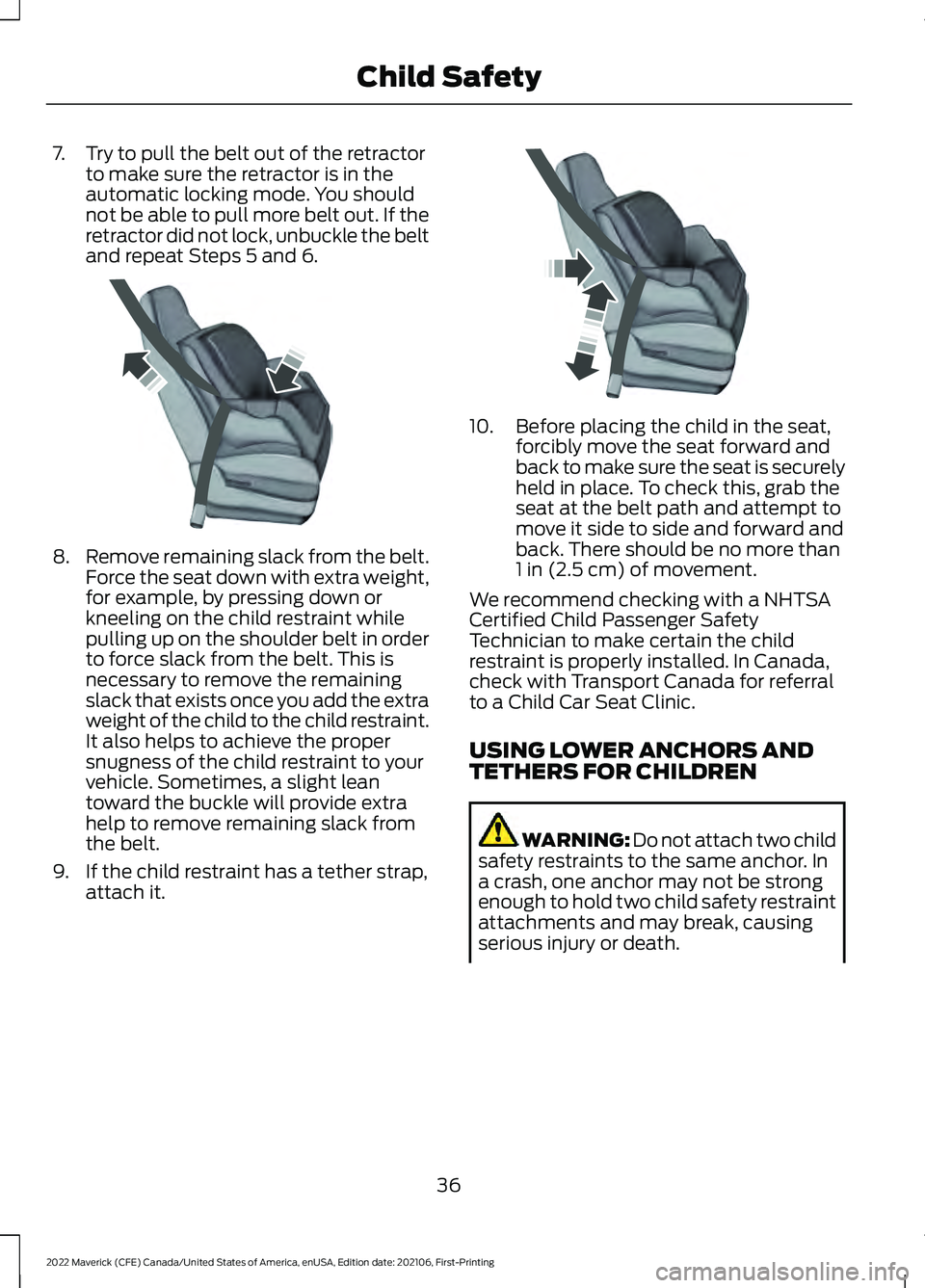
7. Try to pull the belt out of the retractor
to make sure the retractor is in the
automatic locking mode. You should
not be able to pull more belt out. If the
retractor did not lock, unbuckle the belt
and repeat Steps 5 and 6. 8.
Remove remaining slack from the belt.
Force the seat down with extra weight,
for example, by pressing down or
kneeling on the child restraint while
pulling up on the shoulder belt in order
to force slack from the belt. This is
necessary to remove the remaining
slack that exists once you add the extra
weight of the child to the child restraint.
It also helps to achieve the proper
snugness of the child restraint to your
vehicle. Sometimes, a slight lean
toward the buckle will provide extra
help to remove remaining slack from
the belt.
9. If the child restraint has a tether strap, attach it. 10. Before placing the child in the seat,
forcibly move the seat forward and
back to make sure the seat is securely
held in place. To check this, grab the
seat at the belt path and attempt to
move it side to side and forward and
back. There should be no more than
1 in (2.5 cm) of movement.
We recommend checking with a NHTSA
Certified Child Passenger Safety
Technician to make certain the child
restraint is properly installed. In Canada,
check with Transport Canada for referral
to a Child Car Seat Clinic.
USING LOWER ANCHORS AND
TETHERS FOR CHILDREN WARNING: Do not attach two child
safety restraints to the same anchor. In
a crash, one anchor may not be strong
enough to hold two child safety restraint
attachments and may break, causing
serious injury or death.
36
2022 Maverick (CFE) Canada/United States of America, enUSA, Edition date: 202106, First-Printing Child SafetyE142533 E142534
Page 155 of 533
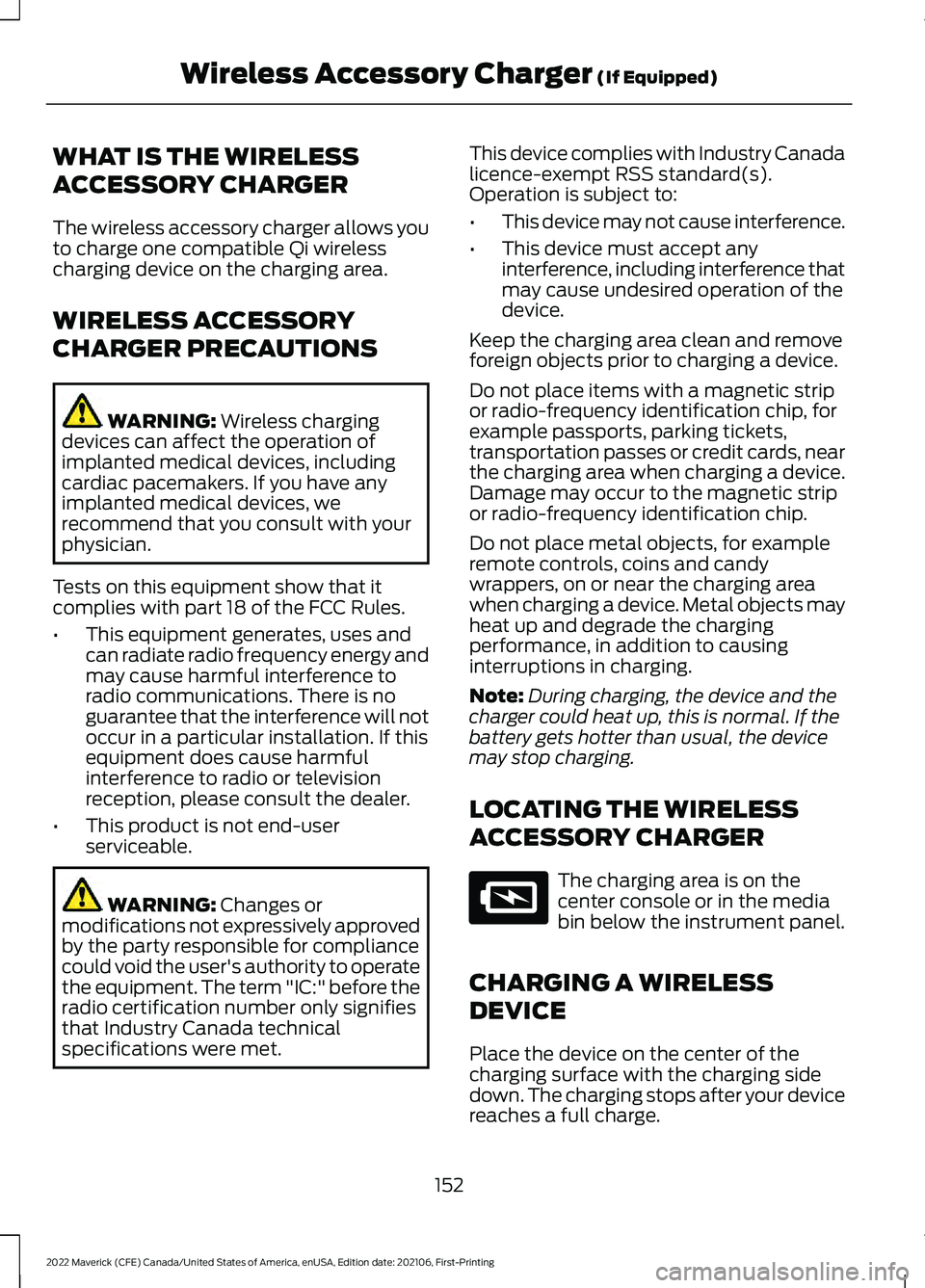
WHAT IS THE WIRELESS
ACCESSORY CHARGER
The wireless accessory charger allows you
to charge one compatible Qi wireless
charging device on the charging area.
WIRELESS ACCESSORY
CHARGER PRECAUTIONS
WARNING: Wireless charging
devices can affect the operation of
implanted medical devices, including
cardiac pacemakers. If you have any
implanted medical devices, we
recommend that you consult with your
physician.
Tests on this equipment show that it
complies with part 18 of the FCC Rules.
• This equipment generates, uses and
can radiate radio frequency energy and
may cause harmful interference to
radio communications. There is no
guarantee that the interference will not
occur in a particular installation. If this
equipment does cause harmful
interference to radio or television
reception, please consult the dealer.
• This product is not end-user
serviceable. WARNING:
Changes or
modifications not expressively approved
by the party responsible for compliance
could void the user's authority to operate
the equipment. The term "IC:" before the
radio certification number only signifies
that Industry Canada technical
specifications were met. This device complies with Industry Canada
licence-exempt RSS standard(s).
Operation is subject to:
•
This device may not cause interference.
• This device must accept any
interference, including interference that
may cause undesired operation of the
device.
Keep the charging area clean and remove
foreign objects prior to charging a device.
Do not place items with a magnetic strip
or radio-frequency identification chip, for
example passports, parking tickets,
transportation passes or credit cards, near
the charging area when charging a device.
Damage may occur to the magnetic strip
or radio-frequency identification chip.
Do not place metal objects, for example
remote controls, coins and candy
wrappers, on or near the charging area
when charging a device. Metal objects may
heat up and degrade the charging
performance, in addition to causing
interruptions in charging.
Note: During charging, the device and the
charger could heat up, this is normal. If the
battery gets hotter than usual, the device
may stop charging.
LOCATING THE WIRELESS
ACCESSORY CHARGER The charging area is on the
center console or in the media
bin below the instrument panel.
CHARGING A WIRELESS
DEVICE
Place the device on the center of the
charging surface with the charging side
down. The charging stops after your device
reaches a full charge.
152
2022 Maverick (CFE) Canada/United States of America, enUSA, Edition date: 202106, First-Printing Wireless Accessory Charger
(If Equipped)E297549
Page 203 of 533
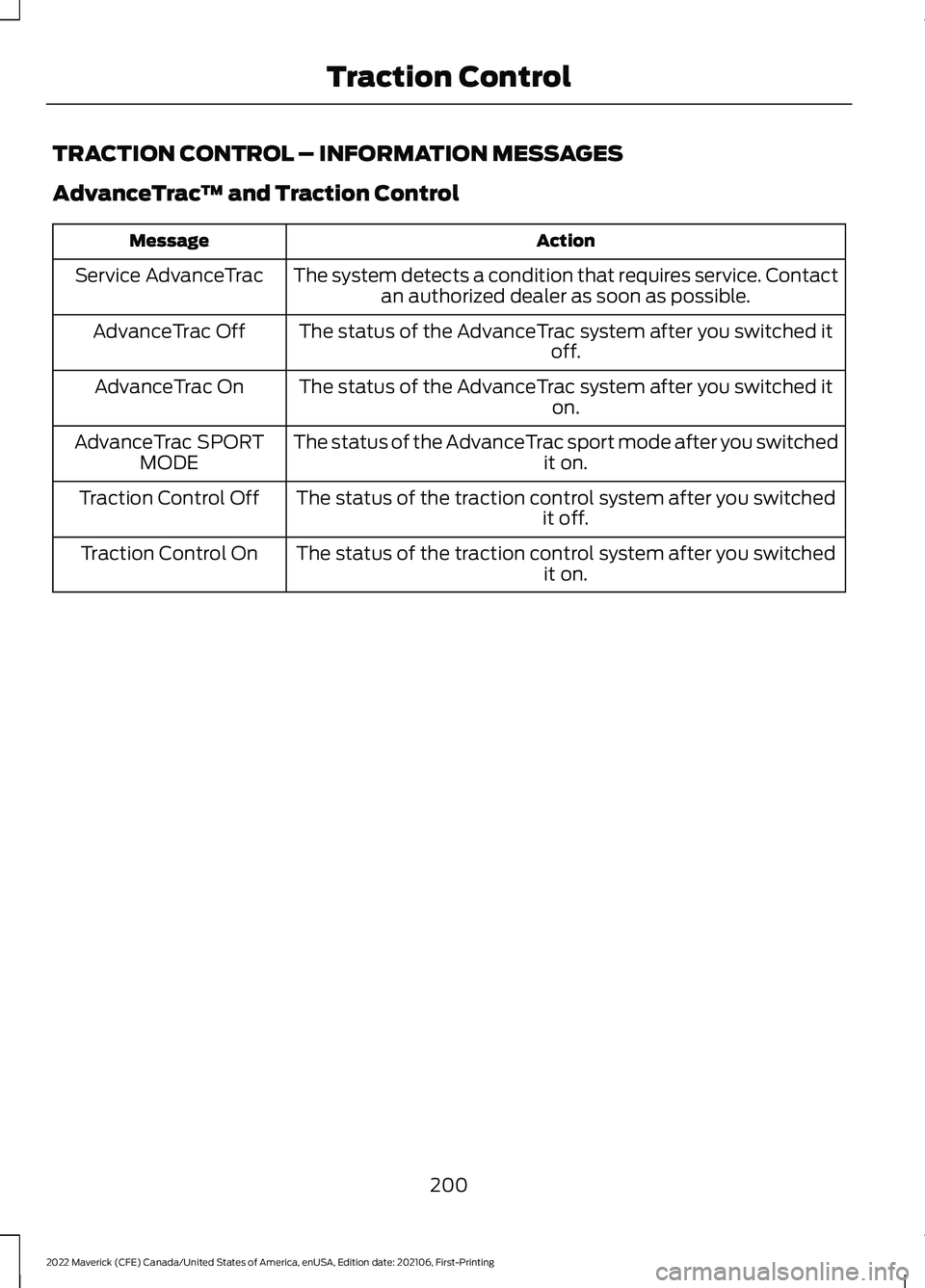
TRACTION CONTROL – INFORMATION MESSAGES
AdvanceTrac
™ and Traction Control Action
Message
The system detects a condition that requires service. Contactan authorized dealer as soon as possible.
Service AdvanceTrac
The status of the AdvanceTrac system after you switched it off.
AdvanceTrac Off
The status of the AdvanceTrac system after you switched it on.
AdvanceTrac On
The status of the AdvanceTrac sport mode after you switched it on.
AdvanceTrac SPORT
MODE
The status of the traction control system after you switched it off.
Traction Control Off
The status of the traction control system after you switched it on.
Traction Control On
200
2022 Maverick (CFE) Canada/United States of America, enUSA, Edition date: 202106, First-Printing Traction Control
Page 223 of 533
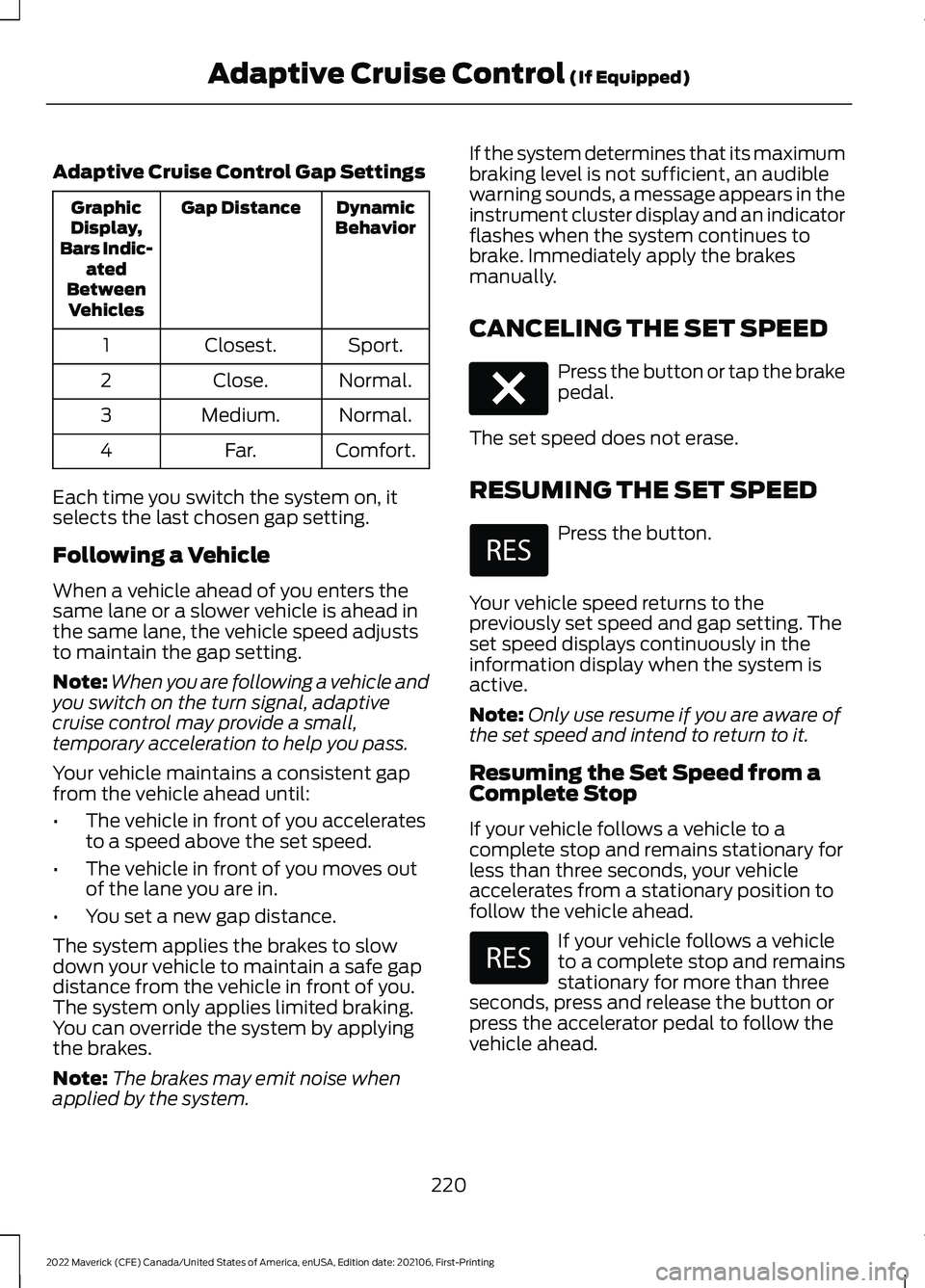
Adaptive Cruise Control Gap Settings
Dynamic
Behavior
Gap Distance
Graphic
Display,
Bars Indic- ated
Between Vehicles
Sport.
Closest.
1
Normal.
Close.
2
Normal.
Medium.
3
Comfort.
Far.
4
Each time you switch the system on, it
selects the last chosen gap setting.
Following a Vehicle
When a vehicle ahead of you enters the
same lane or a slower vehicle is ahead in
the same lane, the vehicle speed adjusts
to maintain the gap setting.
Note: When you are following a vehicle and
you switch on the turn signal, adaptive
cruise control may provide a small,
temporary acceleration to help you pass.
Your vehicle maintains a consistent gap
from the vehicle ahead until:
• The vehicle in front of you accelerates
to a speed above the set speed.
• The vehicle in front of you moves out
of the lane you are in.
• You set a new gap distance.
The system applies the brakes to slow
down your vehicle to maintain a safe gap
distance from the vehicle in front of you.
The system only applies limited braking.
You can override the system by applying
the brakes.
Note: The brakes may emit noise when
applied by the system. If the system determines that its maximum
braking level is not sufficient, an audible
warning sounds, a message appears in the
instrument cluster display and an indicator
flashes when the system continues to
brake. Immediately apply the brakes
manually.
CANCELING THE SET SPEED
Press the button or tap the brake
pedal.
The set speed does not erase.
RESUMING THE SET SPEED Press the button.
Your vehicle speed returns to the
previously set speed and gap setting. The
set speed displays continuously in the
information display when the system is
active.
Note: Only use resume if you are aware of
the set speed and intend to return to it.
Resuming the Set Speed from a
Complete Stop
If your vehicle follows a vehicle to a
complete stop and remains stationary for
less than three seconds, your vehicle
accelerates from a stationary position to
follow the vehicle ahead. If your vehicle follows a vehicle
to a complete stop and remains
stationary for more than three
seconds, press and release the button or
press the accelerator pedal to follow the
vehicle ahead.
220
2022 Maverick (CFE) Canada/United States of America, enUSA, Edition date: 202106, First-Printing Adaptive Cruise Control (If Equipped)E280804
Page 230 of 533
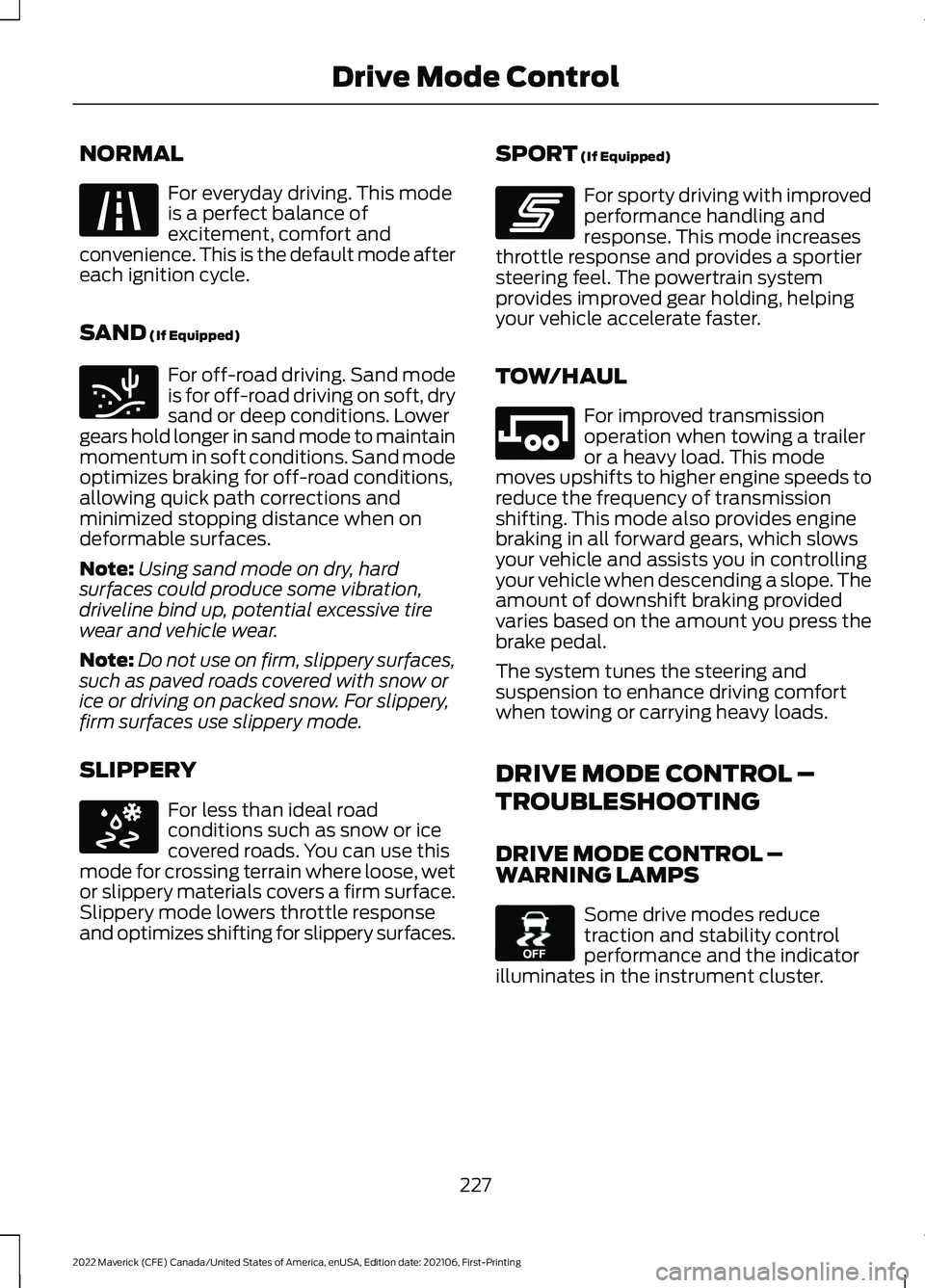
NORMAL
For everyday driving. This mode
is a perfect balance of
excitement, comfort and
convenience. This is the default mode after
each ignition cycle.
SAND (If Equipped) For off-road driving. Sand mode
is for off-road driving on soft, dry
sand or deep conditions. Lower
gears hold longer in sand mode to maintain
momentum in soft conditions. Sand mode
optimizes braking for off-road conditions,
allowing quick path corrections and
minimized stopping distance when on
deformable surfaces.
Note: Using sand mode on dry, hard
surfaces could produce some vibration,
driveline bind up, potential excessive tire
wear and vehicle wear.
Note: Do not use on firm, slippery surfaces,
such as paved roads covered with snow or
ice or driving on packed snow. For slippery,
firm surfaces use slippery mode.
SLIPPERY For less than ideal road
conditions such as snow or ice
covered roads. You can use this
mode for crossing terrain where loose, wet
or slippery materials covers a firm surface.
Slippery mode lowers throttle response
and optimizes shifting for slippery surfaces. SPORT
(If Equipped) For sporty driving with improved
performance handling and
response. This mode increases
throttle response and provides a sportier
steering feel. The powertrain system
provides improved gear holding, helping
your vehicle accelerate faster.
TOW/HAUL For improved transmission
operation when towing a trailer
or a heavy load. This mode
moves upshifts to higher engine speeds to
reduce the frequency of transmission
shifting. This mode also provides engine
braking in all forward gears, which slows
your vehicle and assists you in controlling
your vehicle when descending a slope. The
amount of downshift braking provided
varies based on the amount you press the
brake pedal.
The system tunes the steering and
suspension to enhance driving comfort
when towing or carrying heavy loads.
DRIVE MODE CONTROL –
TROUBLESHOOTING
DRIVE MODE CONTROL –
WARNING LAMPS Some drive modes reduce
traction and stability control
performance and the indicator
illuminates in the instrument cluster.
227
2022 Maverick (CFE) Canada/United States of America, enUSA, Edition date: 202106, First-Printing Drive Mode ControlE225310 E332185 E295414 E246593 E246592 E130458
Page 259 of 533
5.
Determine the combined
weight of luggage and cargo
being loaded on the vehicle.
That weight may not safely
exceed the available cargo and
luggage load capacity
calculated in Step 4.
6. If your vehicle will be towing a
trailer, load from your trailer
will be transferred to your
vehicle. Consult this manual to
determine how this reduces the
available cargo and luggage
load capacity of your vehicle.
Helpful examples for
calculating the available
amount of cargo and luggage
load capacity
Suppose your vehicle has a
1400-pound (635-kilogram) cargo
and luggage capacity. You decide
to go golfing. Is there enough load
capacity to carry you, four of your
friends and all the golf bags? You
and four friends average 220
pounds (99 kilograms) each and
the golf bags weigh approximately
30 pounds (13.5 kilograms) each.
The calculation would be: 1400 -
(5 x 220) - (5 x 30) = 1400 - 1100
- 150 = 150 pounds. Yes, you have
enough load capacity in your
vehicle to transport four friends
and your golf bags. In metric units,
the calculation would be: 635
kilograms - (5 x 99 kilograms) -
(5 x 13.5 kilograms) = 635 - 495 -
67.5 = 72.5 kilograms. Suppose your vehicle has a
1400-pound (635-kilogram) cargo
and luggage capacity. You and
one of your friends decide to pick
up cement from the local home
improvement store to finish that
patio you have been planning for
the past two years. Measuring the
inside of the vehicle with the rear
seat folded down, you have room
for twelve 100-pound
(45-kilogram) bags of cement. Do
you have enough load capacity to
transport the cement to your
home? If you and your friend each
weigh 220 pounds (99 kilograms),
the calculation would be: 1400 -
(2 x 220) - (12 x 100) = 1400 - 440
- 1200 = - 240 pounds. No, you do
not have enough cargo capacity
to carry that much weight. In
metric units, the calculation would
be: 635 kilograms - (2 x 99
kilograms) - (12 x 45 kilograms) =
635 - 198 - 540 = -103 kilograms.
You will need to reduce the load
weight by at least 240 pounds
(104 kilograms). If you remove
three 100-pound (45-kilogram)
cement bags, then the load
calculation would be: 1400 - (2 x
220) - (9 x 100) = 1400 - 440 -
900 = 60 pounds. Now you have
the load capacity to transport the
cement and your friend home. In
metric units, the calculation would
be: 635 kilograms - (2 x 99
kilograms) - (9 x 45 kilograms) =
635 - 198 - 405 = 32 kilograms.
256
2022 Maverick (CFE) Canada/United States of America, enUSA, Edition date: 202106, First-Printing Load Carrying
Page 289 of 533
TRANSPORTING THE VEHICLE
If you need to tow your vehicle, contact a
professional towing service or your
roadside assistance service provider.
Your manufacturer produces a towing
manual for all authorized tow truck
operators. Have your tow truck operator
refer to this manual for proper hook-up
and towing procedures.
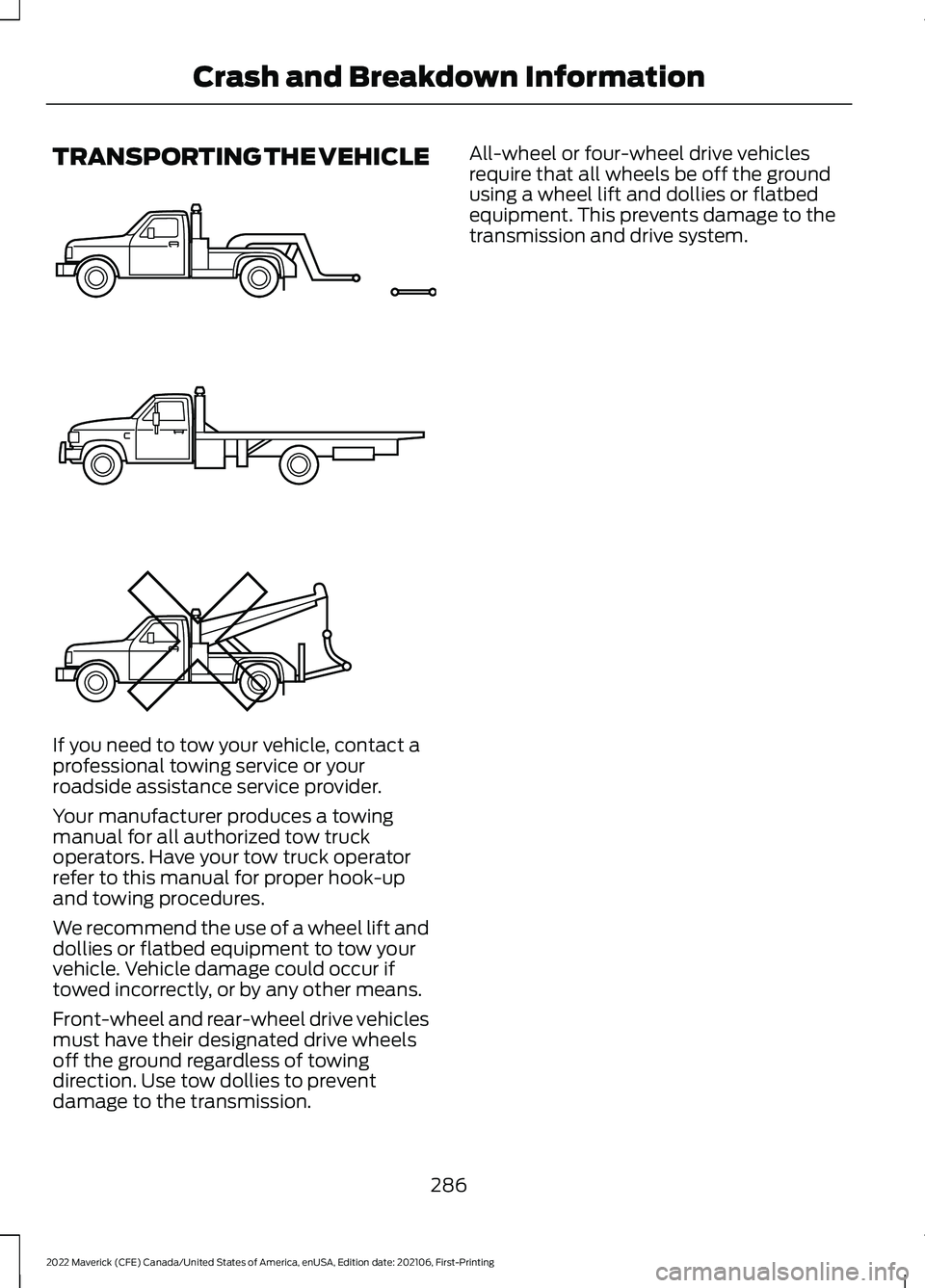
We recommend the use of a wheel lift and
dollies or flatbed equipment to tow your
vehicle. Vehicle damage could occur if
towed incorrectly, or by any other means.
Front-wheel and rear-wheel drive vehicles
must have their designated drive wheels
off the ground regardless of towing
direction. Use tow dollies to prevent
damage to the transmission. All-wheel or four-wheel drive vehicles
require that all wheels be off the ground
using a wheel lift and dollies or flatbed
equipment. This prevents damage to the
transmission and drive system.
286
2022 Maverick (CFE) Canada/United States of America, enUSA, Edition date: 202106, First-Printing Crash and Breakdown InformationE143886