turn signal FORD MAVERICK 2022 Owners Manual
[x] Cancel search | Manufacturer: FORD, Model Year: 2022, Model line: MAVERICK, Model: FORD MAVERICK 2022Pages: 533, PDF Size: 9.58 MB
Page 64 of 533
Note:
Inspect the key blade for debris.
Periodically clean with a brush.
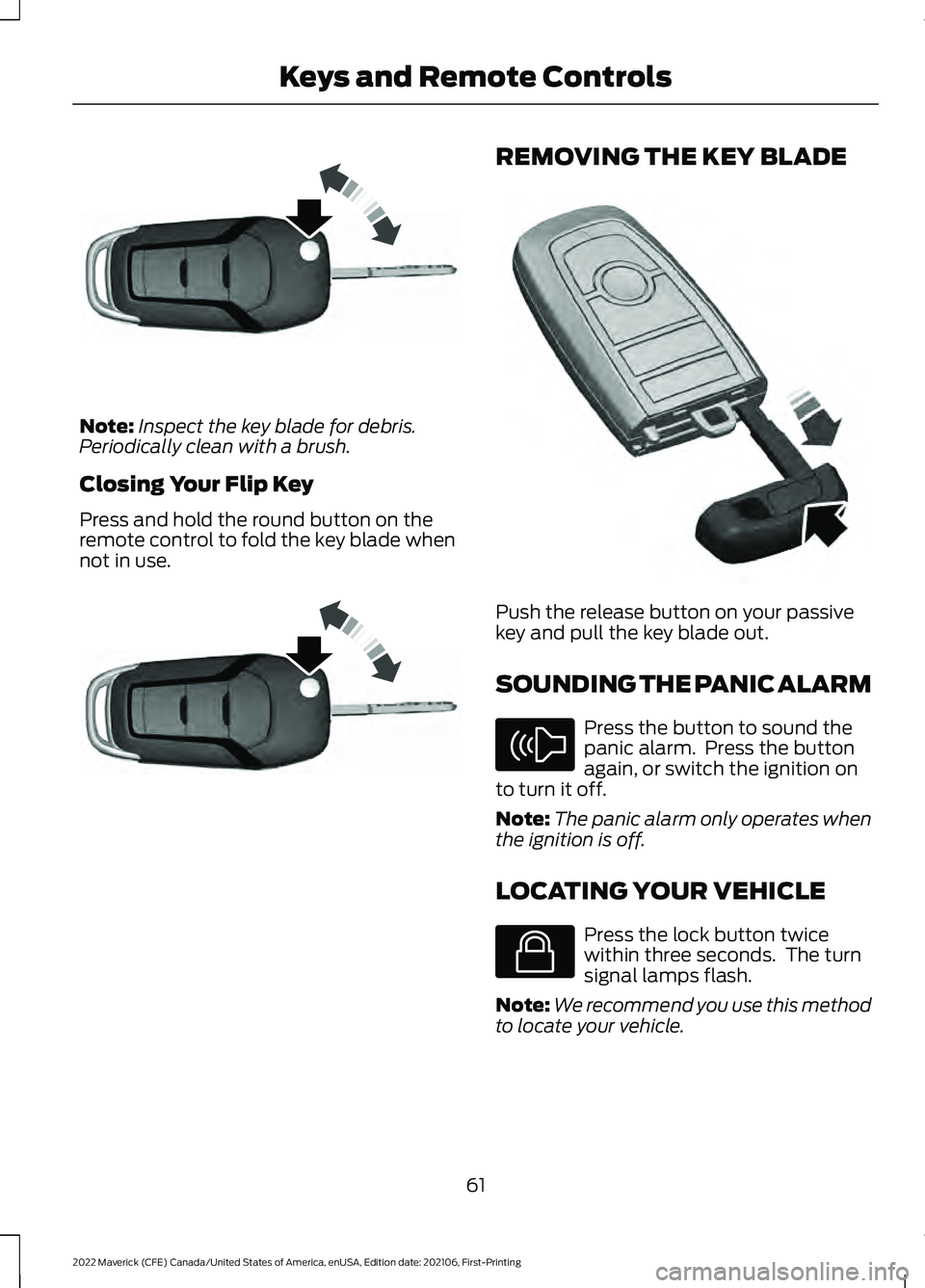
Closing Your Flip Key
Press and hold the round button on the
remote control to fold the key blade when
not in use. REMOVING THE KEY BLADE
Push the release button on your passive
key and pull the key blade out.
SOUNDING THE PANIC ALARM
Press the button to sound the
panic alarm. Press the button
again, or switch the ignition on
to turn it off.
Note: The panic alarm only operates when
the ignition is off.
LOCATING YOUR VEHICLE Press the lock button twice
within three seconds. The turn
signal lamps flash.
Note: We recommend you use this method
to locate your vehicle.
61
2022 Maverick (CFE) Canada/United States of America, enUSA, Edition date: 202106, First-Printing Keys and Remote ControlsE191532 E191532 E322866 E138624 E138623
Page 76 of 533
OPERATING THE DOORS
FROM OUTSIDE YOUR
VEHICLE
UNLOCKING AND LOCKING THE
DOORS USING THE REMOTE
CONTROL
You can only use the remote control when
your vehicle is stationary.
Unlocking the Doors
Press the button to unlock all
doors.
Locking the Doors Press the button to lock all
doors. One short flash of the
turn signal lamps confirms that
your vehicle has locked.
Note: For more information on operating
the doors from outside your vehicle See
Keyless Entry (page 77).
UNLOCKING AND LOCKING THE
DOORS USING THE KEY BLADE
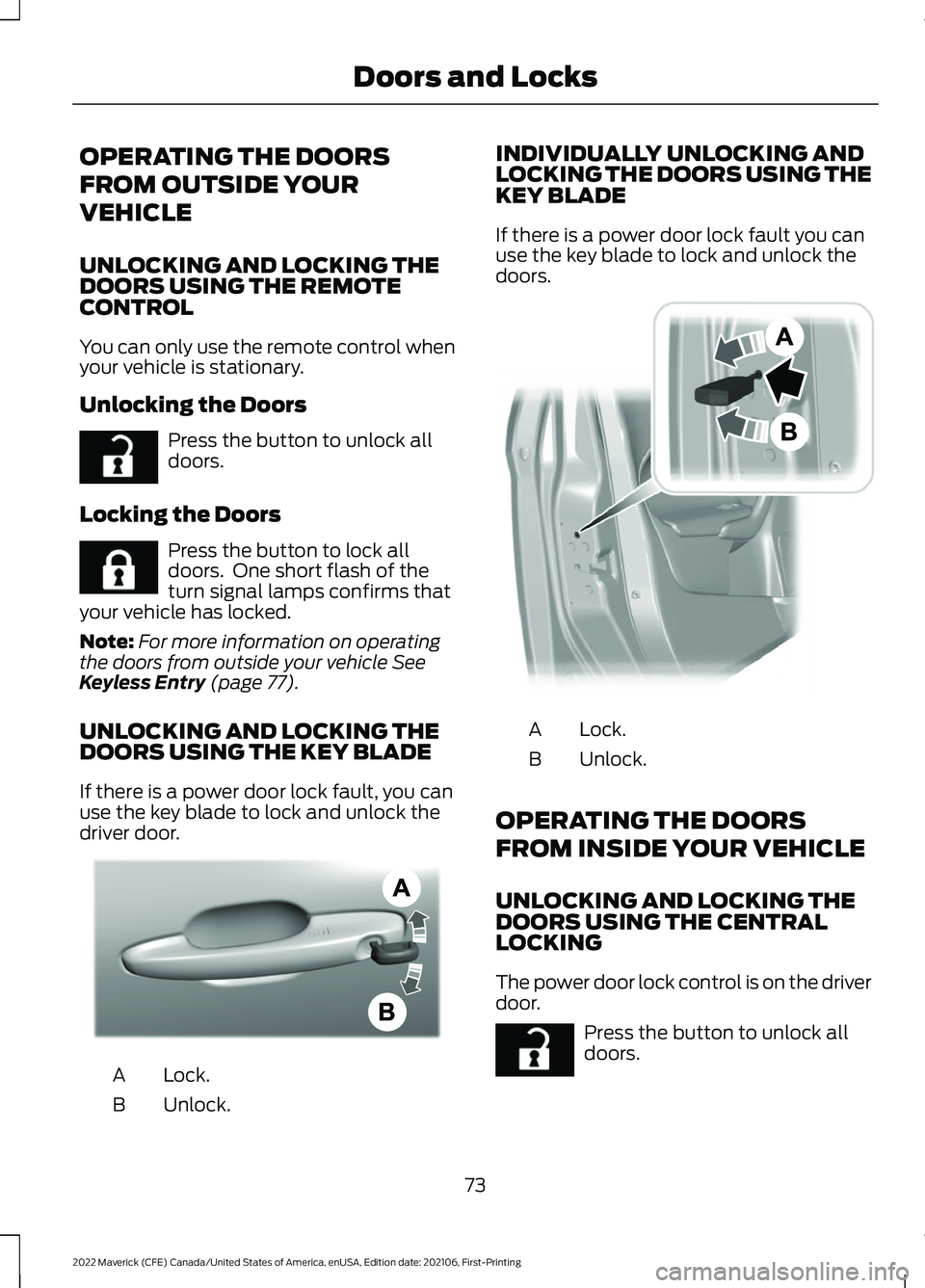
If there is a power door lock fault, you can
use the key blade to lock and unlock the
driver door. Lock.
A
Unlock.
B INDIVIDUALLY UNLOCKING AND
LOCKING THE DOORS USING THE
KEY BLADE
If there is a power door lock fault you can
use the key blade to lock and unlock the
doors.
Lock.
A
Unlock.
B
OPERATING THE DOORS
FROM INSIDE YOUR VEHICLE
UNLOCKING AND LOCKING THE
DOORS USING THE CENTRAL
LOCKING
The power door lock control is on the driver
door. Press the button to unlock all
doors.
73
2022 Maverick (CFE) Canada/United States of America, enUSA, Edition date: 202106, First-Printing Doors and LocksE267112 E267111 AE328009 E112203 E267112
Page 96 of 533
EXTERIOR LIGHTING
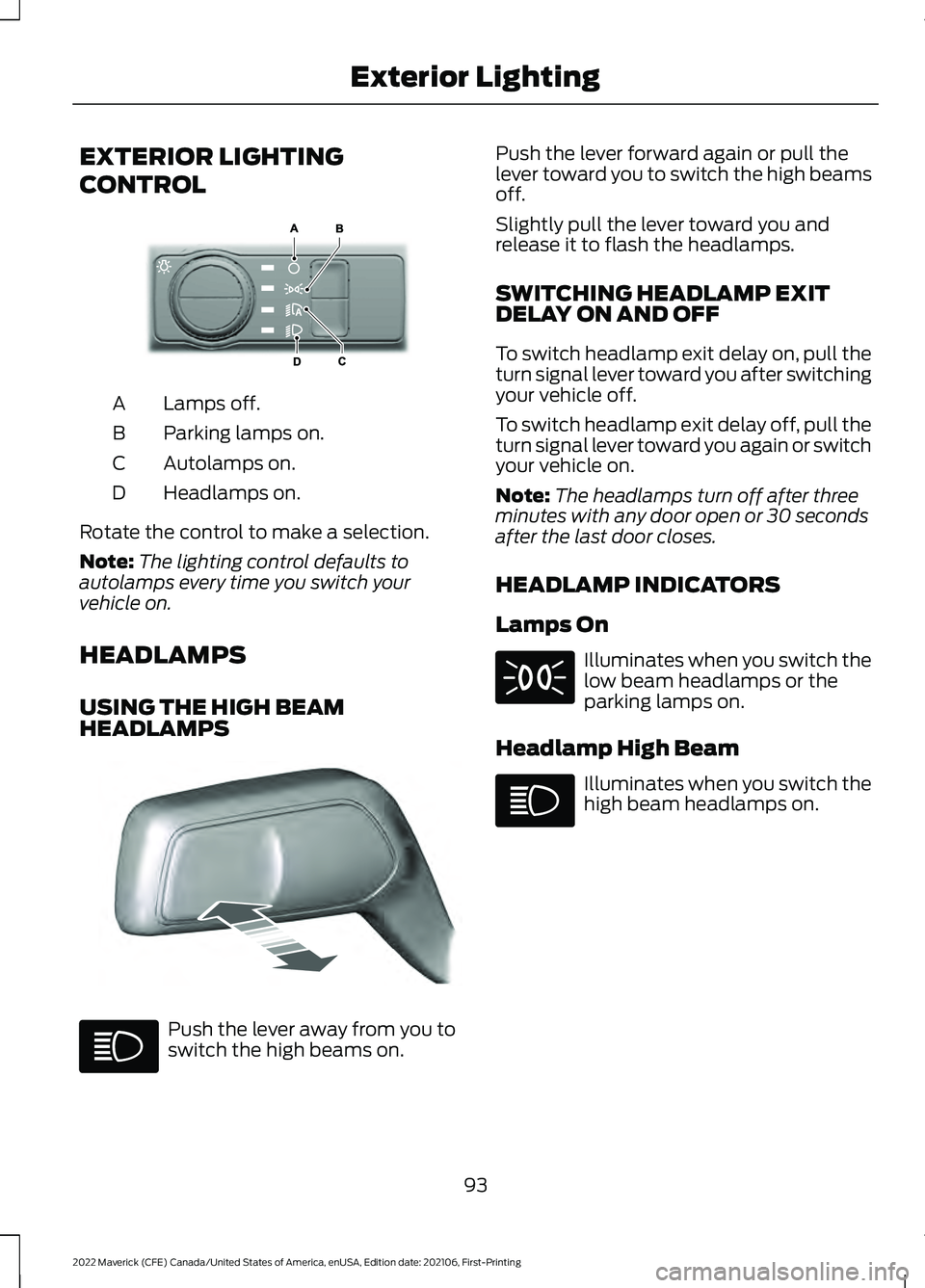
CONTROL
Lamps off.
A
Parking lamps on.
B
Autolamps on.
C
Headlamps on.
D
Rotate the control to make a selection.
Note: The lighting control defaults to
autolamps every time you switch your
vehicle on.
HEADLAMPS
USING THE HIGH BEAM
HEADLAMPS Push the lever away from you to
switch the high beams on. Push the lever forward again or pull the
lever toward you to switch the high beams
off.
Slightly pull the lever toward you and
release it to flash the headlamps.
SWITCHING HEADLAMP EXIT
DELAY ON AND OFF
To switch headlamp exit delay on, pull the
turn signal lever toward you after switching
your vehicle off.
To switch headlamp exit delay off, pull the
turn signal lever toward you again or switch
your vehicle on.
Note:
The headlamps turn off after three
minutes with any door open or 30 seconds
after the last door closes.
HEADLAMP INDICATORS
Lamps On Illuminates when you switch the
low beam headlamps or the
parking lamps on.
Headlamp High Beam Illuminates when you switch the
high beam headlamps on.
93
2022 Maverick (CFE) Canada/United States of America, enUSA, Edition date: 202106, First-Printing Exterior LightingE327629 E328253
Page 98 of 533
EXTERIOR LAMPS
SWITCHING THE TURN SIGNAL
LAMPS ON AND OFF
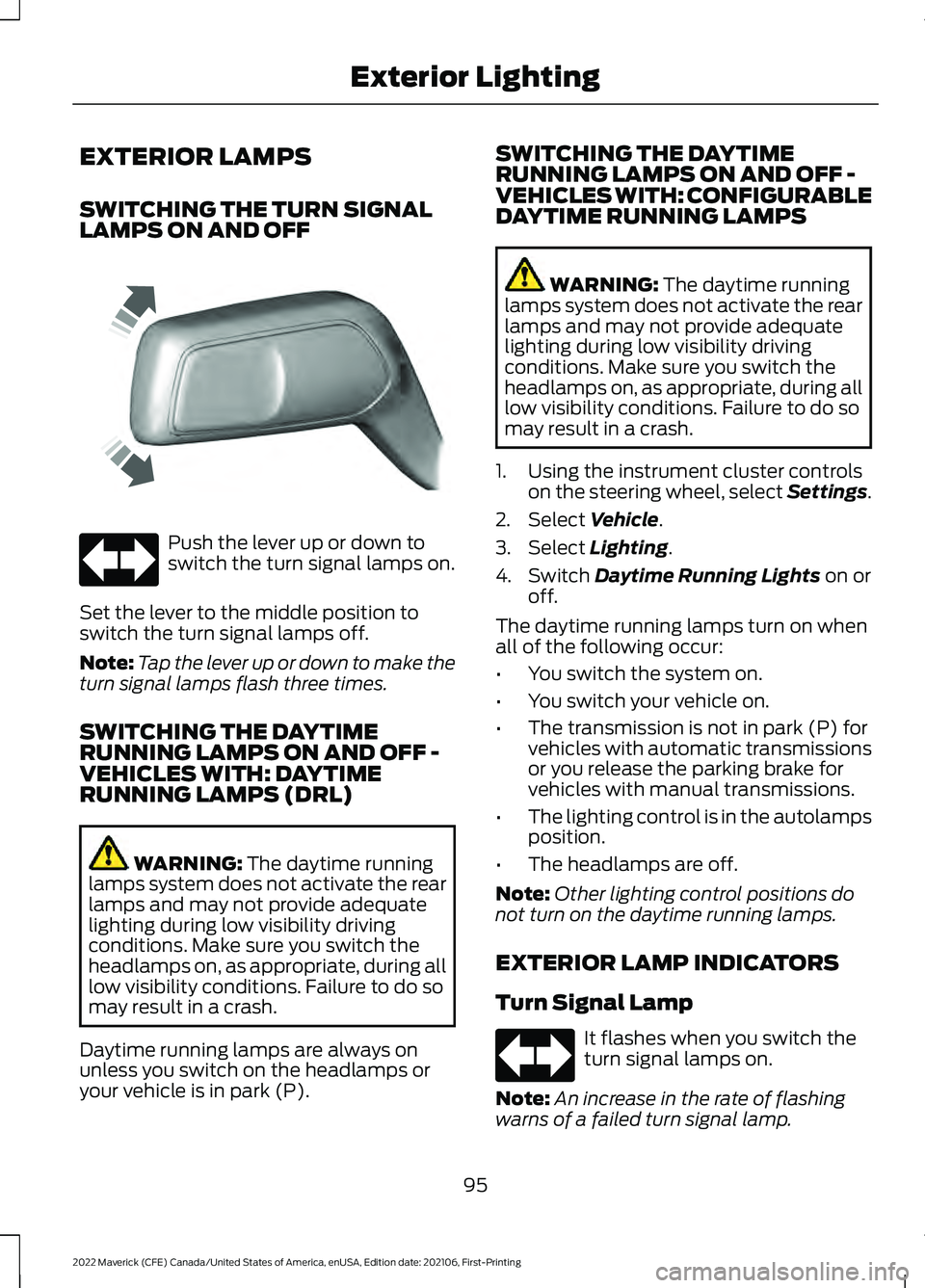
Push the lever up or down to
switch the turn signal lamps on.
Set the lever to the middle position to
switch the turn signal lamps off.
Note: Tap the lever up or down to make the
turn signal lamps flash three times.
SWITCHING THE DAYTIME
RUNNING LAMPS ON AND OFF -
VEHICLES WITH: DAYTIME
RUNNING LAMPS (DRL) WARNING: The daytime running
lamps system does not activate the rear
lamps and may not provide adequate
lighting during low visibility driving
conditions. Make sure you switch the
headlamps on, as appropriate, during all
low visibility conditions. Failure to do so
may result in a crash.
Daytime running lamps are always on
unless you switch on the headlamps or
your vehicle is in park (P). SWITCHING THE DAYTIME
RUNNING LAMPS ON AND OFF -
VEHICLES WITH: CONFIGURABLE
DAYTIME RUNNING LAMPS WARNING:
The daytime running
lamps system does not activate the rear
lamps and may not provide adequate
lighting during low visibility driving
conditions. Make sure you switch the
headlamps on, as appropriate, during all
low visibility conditions. Failure to do so
may result in a crash.
1. Using the instrument cluster controls on the steering wheel, select Settings.
2. Select
Vehicle.
3. Select
Lighting.
4. Switch
Daytime Running Lights on or
off.
The daytime running lamps turn on when
all of the following occur:
• You switch the system on.
• You switch your vehicle on.
• The transmission is not in park (P) for
vehicles with automatic transmissions
or you release the parking brake for
vehicles with manual transmissions.
• The lighting control is in the autolamps
position.
• The headlamps are off.
Note: Other lighting control positions do
not turn on the daytime running lamps.
EXTERIOR LAMP INDICATORS
Turn Signal Lamp It flashes when you switch the
turn signal lamps on.
Note: An increase in the rate of flashing
warns of a failed turn signal lamp.
95
2022 Maverick (CFE) Canada/United States of America, enUSA, Edition date: 202106, First-Printing Exterior LightingE242676
Page 107 of 533
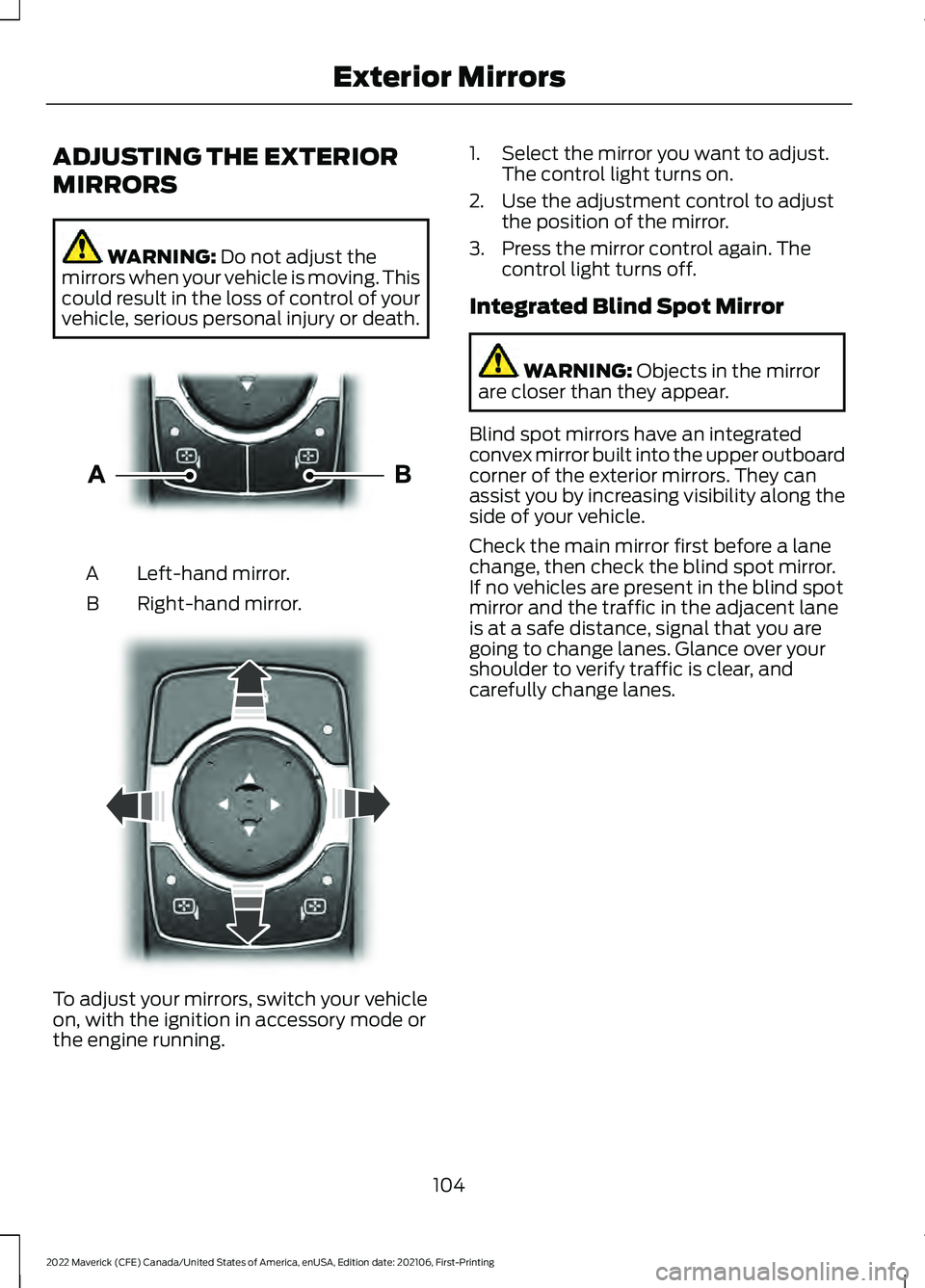
ADJUSTING THE EXTERIOR
MIRRORS
WARNING: Do not adjust the
mirrors when your vehicle is moving. This
could result in the loss of control of your
vehicle, serious personal injury or death. Left-hand mirror.
A
Right-hand mirror.
B To adjust your mirrors, switch your vehicle
on, with the ignition in accessory mode or
the engine running. 1. Select the mirror you want to adjust.
The control light turns on.
2. Use the adjustment control to adjust the position of the mirror.
3. Press the mirror control again. The control light turns off.
Integrated Blind Spot Mirror WARNING:
Objects in the mirror
are closer than they appear.
Blind spot mirrors have an integrated
convex mirror built into the upper outboard
corner of the exterior mirrors. They can
assist you by increasing visibility along the
side of your vehicle.
Check the main mirror first before a lane
change, then check the blind spot mirror.
If no vehicles are present in the blind spot
mirror and the traffic in the adjacent lane
is at a safe distance, signal that you are
going to change lanes. Glance over your
shoulder to verify traffic is clear, and
carefully change lanes.
104
2022 Maverick (CFE) Canada/United States of America, enUSA, Edition date: 202106, First-Printing Exterior MirrorsE303926 E303927
Page 118 of 533
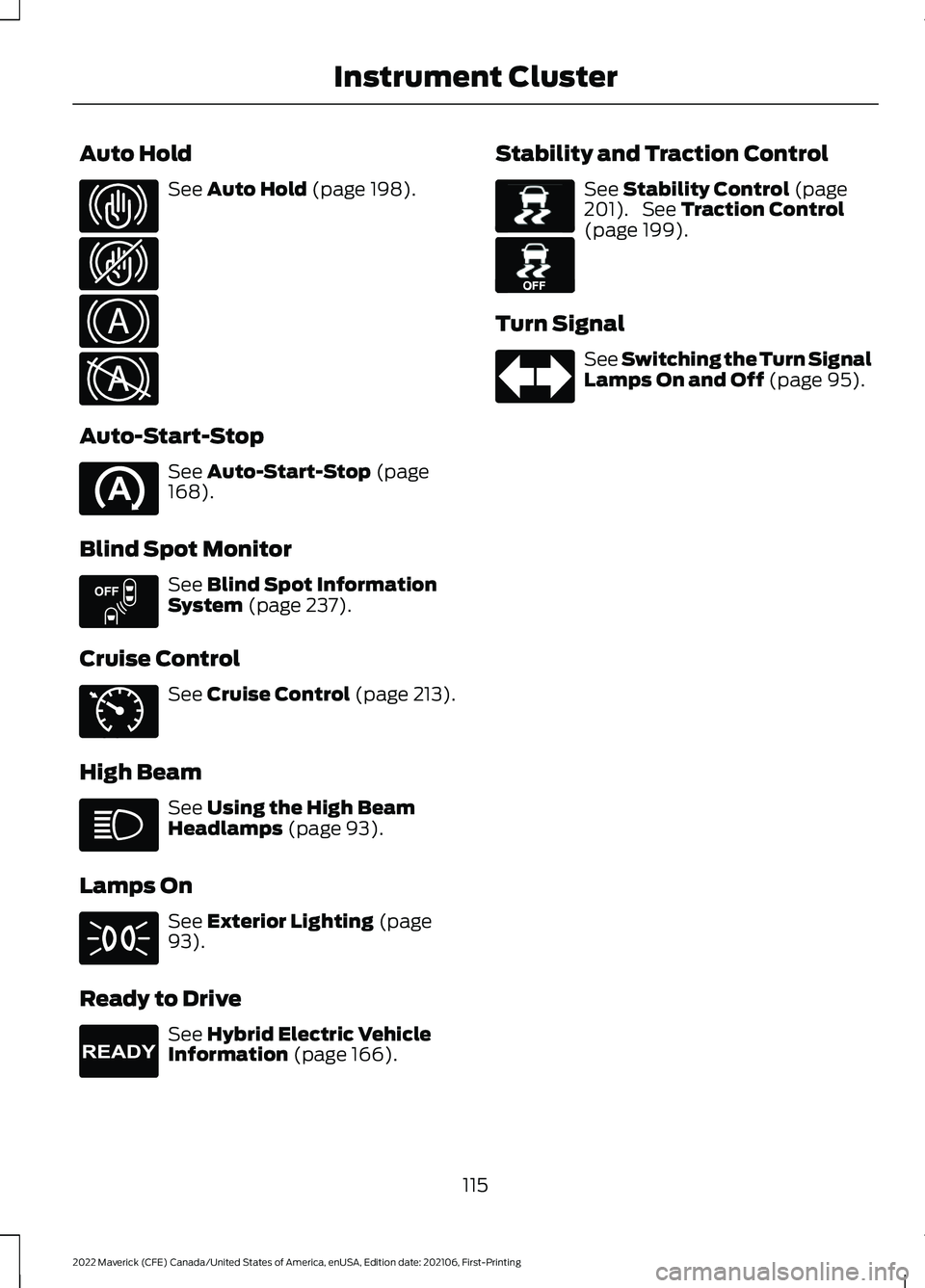
Auto Hold
See Auto Hold (page 198).
Auto-Start-Stop See
Auto-Start-Stop (page
168).
Blind Spot Monitor See
Blind Spot Information
System (page 237).
Cruise Control See
Cruise Control (page 213).
High Beam See
Using the High Beam
Headlamps (page 93).
Lamps On See
Exterior Lighting (page
93).
Ready to Drive See
Hybrid Electric Vehicle
Information (page 166). Stability and Traction Control See
Stability Control (page
201). See Traction Control
(page 199).
Turn Signal See Switching the Turn Signal
Lamps On and Off
(page 95).
115
2022 Maverick (CFE) Canada/United States of America, enUSA, Edition date: 202106, First-Printing Instrument ClusterE323448 E323449 E322410 E322411 E151262 E71340 E224090 E138639 E130458
Page 126 of 533
WHAT IS REMOTE START
The system allows you to remotely start
your vehicle and to adjust the interior
temperature according to the settings that
you chose.
REMOTE START
PRECAUTIONS
WARNING: Do not start the engine
in a closed garage or in other enclosed
areas. Exhaust fumes are toxic. Always
open the garage door before you start
the engine. Failure to follow this
instruction could result in personal injury
or death.
REMOTE START LIMITATIONS
Remote start does not work under the
following conditions:
• The alarm horn is sounding.
• The hood is open.
• The transmission is not in park (P).
• The ignition is on.
• The battery voltage is below the
minimum operating voltage.
Note: Do not use remote start if your fuel
level is low.
Note: You can use remote start with
FordPass. See Connecting the Vehicle to
a Wi-Fi Network (page 369).
ENABLING REMOTE START
1. Using the information display controls on the steering wheel, select Settings.
2. Select
Vehicle Settings.
3. Select
Remote Start. 4. Switch
System on.
Note: To use remote start, make sure that
the modem is enabled. See
Enabling and
Disabling the Modem (page 369).
REMOTELY STARTING AND
STOPPING THE VEHICLE
Remotely Starting the Vehicle Press the button on the remote
control.
Within three seconds, press the
button twice on the remote
control.
Note: You can also use the FordPass App
to start the vehicle.
Note: The turn signals flash twice.
Note: The parking lamps turn on when the
vehicle is running.
Note: The horn sounds if the system fails
to start.
Note: All other vehicle systems remain off
when you have remotely started the vehicle.
Note: The vehicle remains secured when
you have remotely started the vehicle. A
valid key must be inside your vehicle to
switch the ignition on and drive your vehicle.
Remotely Stopping the Vehicle Within three seconds, press the
button twice on the remote
control.
EXTENDING THE REMOTE
START DURATION
To extend the remote start duration during
remote start, do the following:
123
2022 Maverick (CFE) Canada/United States of America, enUSA, Edition date: 202106, First-Printing Remote Start
(If Equipped)E138623 E138625 E138625
Page 223 of 533
Adaptive Cruise Control Gap Settings
Dynamic
Behavior
Gap Distance
Graphic
Display,
Bars Indic- ated
Between Vehicles
Sport.
Closest.
1
Normal.
Close.
2
Normal.
Medium.
3
Comfort.
Far.
4
Each time you switch the system on, it
selects the last chosen gap setting.
Following a Vehicle
When a vehicle ahead of you enters the
same lane or a slower vehicle is ahead in
the same lane, the vehicle speed adjusts
to maintain the gap setting.
Note: When you are following a vehicle and
you switch on the turn signal, adaptive
cruise control may provide a small,
temporary acceleration to help you pass.
Your vehicle maintains a consistent gap
from the vehicle ahead until:
• The vehicle in front of you accelerates
to a speed above the set speed.
• The vehicle in front of you moves out
of the lane you are in.
• You set a new gap distance.
The system applies the brakes to slow
down your vehicle to maintain a safe gap
distance from the vehicle in front of you.
The system only applies limited braking.
You can override the system by applying
the brakes.
Note: The brakes may emit noise when
applied by the system. If the system determines that its maximum
braking level is not sufficient, an audible
warning sounds, a message appears in the
instrument cluster display and an indicator
flashes when the system continues to
brake. Immediately apply the brakes
manually.
CANCELING THE SET SPEED
Press the button or tap the brake
pedal.
The set speed does not erase.
RESUMING THE SET SPEED Press the button.
Your vehicle speed returns to the
previously set speed and gap setting. The
set speed displays continuously in the
information display when the system is
active.
Note: Only use resume if you are aware of
the set speed and intend to return to it.
Resuming the Set Speed from a
Complete Stop
If your vehicle follows a vehicle to a
complete stop and remains stationary for
less than three seconds, your vehicle
accelerates from a stationary position to
follow the vehicle ahead. If your vehicle follows a vehicle
to a complete stop and remains
stationary for more than three
seconds, press and release the button or
press the accelerator pedal to follow the
vehicle ahead.
220
2022 Maverick (CFE) Canada/United States of America, enUSA, Edition date: 202106, First-Printing Adaptive Cruise Control (If Equipped)E280804
Page 233 of 533
WHAT IS THE LANE KEEPING
SYSTEM
The lane keeping system alerts you by
providing temporary steering assistance
or steering wheel vibration when it detects
an unintended lane departure.
HOW DOES THE LANE
KEEPING SYSTEM WORK
The lane keeping system uses a forward
looking camera mounted on the windshield
to monitor vehicle movement within the
travel lane.
When the camera detects a drift out of the
travel lane, the lane keeping system alerts
the driver by vibrating the steering wheel,
or aids the driver by providing a small
steering input to move the vehicle back
into the travel lane.
The driver can select one of three modes:
•
Alert (If Equipped)
• Aid
• Alert + Aid
LANE KEEPING SYSTEM
PRECAUTIONS WARNING: You are responsible for
controlling your vehicle at all times. The
system is designed to be an aid and does
not relieve you of your responsibility to
drive with due care and attention. Failure
to follow this instruction could result in
the loss of control of your vehicle,
personal injury or death. WARNING: The system will not
operate if the sensor cannot track the
road lane markings. WARNING:
The sensor may
incorrectly track lane markings as other
structures or objects. This can result in
a false or missed warning. WARNING:
In cold and severe
weather conditions the system may not
function. Rain, snow and spray can all
limit sensor performance. WARNING:
The system may not
operate properly if the sensor is blocked.
Keep the windshield free from
obstruction. WARNING:
If damage occurs in the
immediate area surrounding the sensor,
have your vehicle checked as soon as
possible. WARNING:
The system may not
correctly operate if your vehicle is fitted
with a suspension kit not approved by
us. WARNING:
Large contrasts in
outside lighting can limit sensor
performance.
LANE KEEPING SYSTEM
LIMITATIONS
The lane keeping system only operates
when the vehicle speed is greater than
40 mph (64 km/h)
.
The system works when the camera can
detect at least one lane marking.
The lane keeping system may not correctly
operate in any of the following conditions:
• The lane keeping system does not
detect at least one lane marking.
• You switch the turn signal on.
230
2022 Maverick (CFE) Canada/United States of America, enUSA, Edition date: 202106, First-Printing Lane Keeping System
(If Equipped)
Page 234 of 533
•
You apply direct steering, accelerate
fast or brake hard.
• The vehicle speed is less than 40 mph
(64 km/h).
• The anti-lock brake, stability control or
traction control system activates.
• The lane is too narrow.
• Something is obscuring the camera or
it is unable to detect the lane markings
due to environment, traffic or vehicle
conditions.
The lane keeping system may not correct
lane positioning in any of the following
conditions:
• High winds.
• Uneven road surfaces.
• Heavy or uneven loads.
• Incorrect tire pressure.
SWITCHING THE LANE
KEEPING SYSTEM ON AND
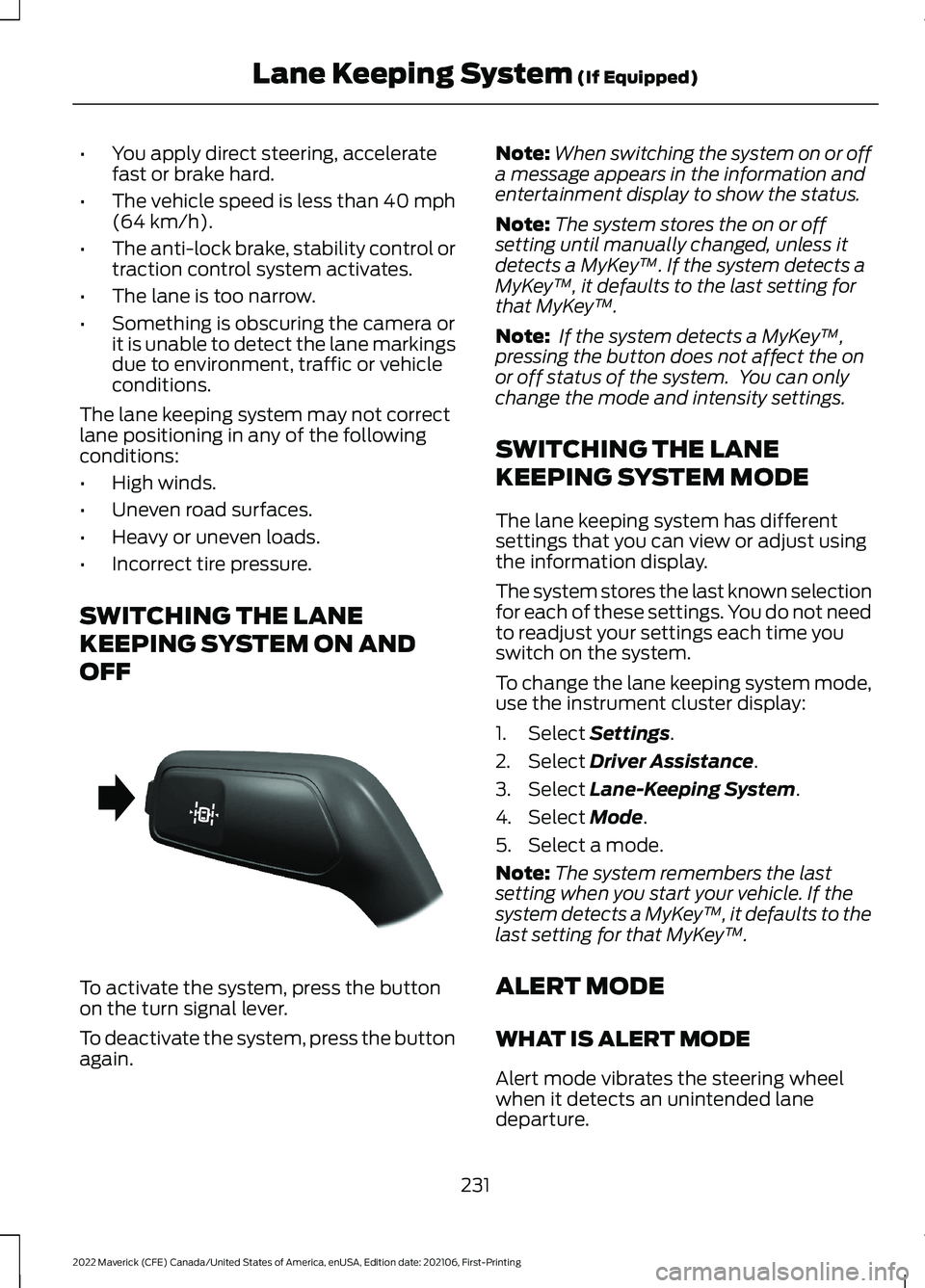
OFF To activate the system, press the button
on the turn signal lever.
To deactivate the system, press the button
again. Note:
When switching the system on or off
a message appears in the information and
entertainment display to show the status.
Note: The system stores the on or off
setting until manually changed, unless it
detects a MyKey ™. If the system detects a
MyKey ™, it defaults to the last setting for
that MyKey ™.
Note: If the system detects a MyKey ™,
pressing the button does not affect the on
or off status of the system. You can only
change the mode and intensity settings.
SWITCHING THE LANE
KEEPING SYSTEM MODE
The lane keeping system has different
settings that you can view or adjust using
the information display.
The system stores the last known selection
for each of these settings. You do not need
to readjust your settings each time you
switch on the system.
To change the lane keeping system mode,
use the instrument cluster display:
1. Select
Settings.
2. Select
Driver Assistance.
3. Select
Lane-Keeping System.
4. Select
Mode.
5. Select a mode.
Note: The system remembers the last
setting when you start your vehicle. If the
system detects a MyKey ™, it defaults to the
last setting for that MyKey ™.
ALERT MODE
WHAT IS ALERT MODE
Alert mode vibrates the steering wheel
when it detects an unintended lane
departure.
231
2022 Maverick (CFE) Canada/United States of America, enUSA, Edition date: 202106, First-Printing Lane Keeping System
(If Equipped)E288067