lock FORD MAVERICK 2023 Owners Manual
[x] Cancel search | Manufacturer: FORD, Model Year: 2023, Model line: MAVERICK, Model: FORD MAVERICK 2023Pages: 556, PDF Size: 14.79 MB
Page 439 of 556
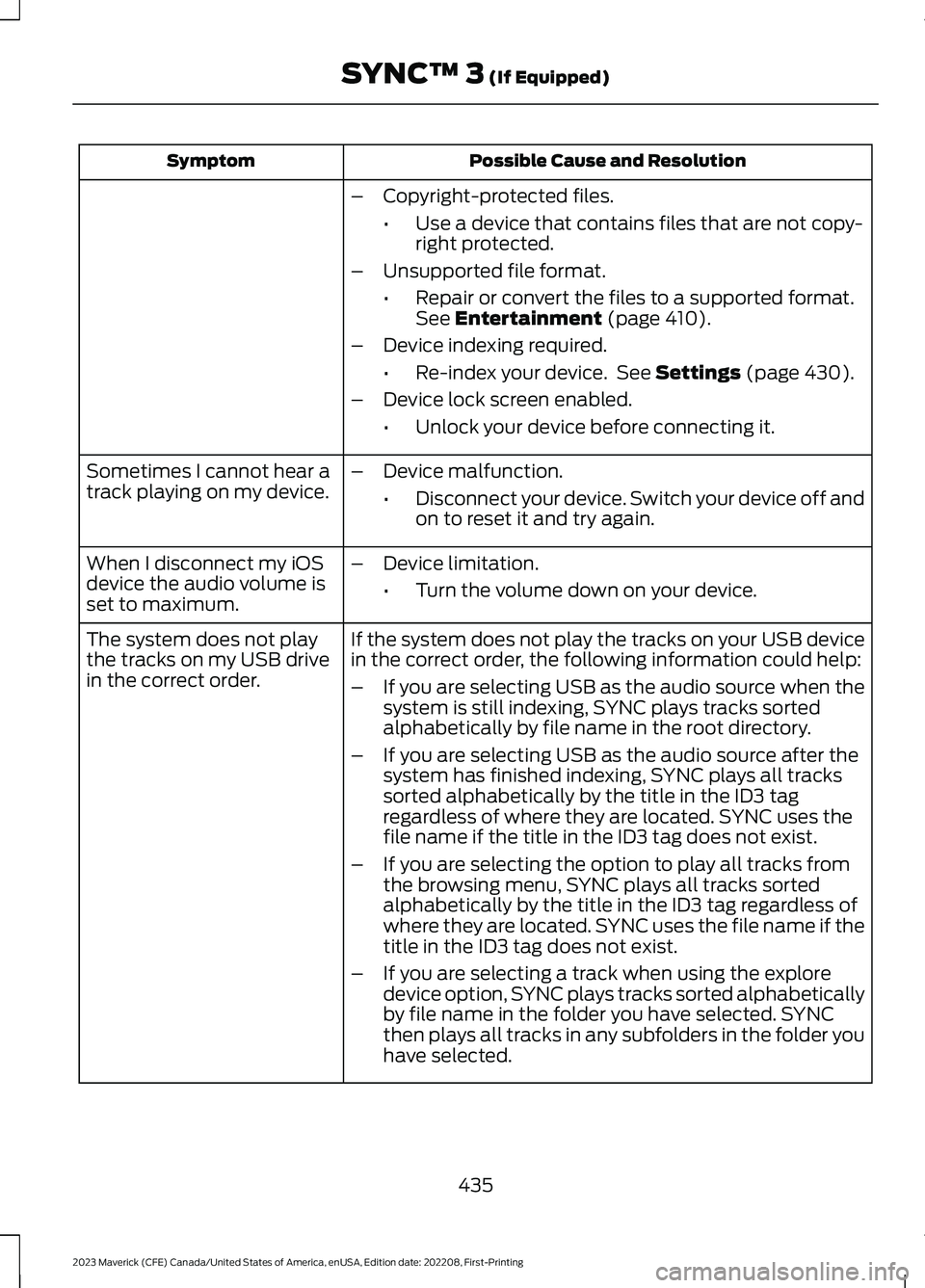
Possible Cause and ResolutionSymptom
–Copyright-protected files.
•Use a device that contains files that are not copy-right protected.
–Unsupported file format.
•Repair or convert the files to a supported format.See Entertainment (page 410).
–Device indexing required.
•Re-index your device. See Settings (page 430).
–Device lock screen enabled.
•Unlock your device before connecting it.
Sometimes I cannot hear atrack playing on my device.–Device malfunction.
•Disconnect your device. Switch your device off andon to reset it and try again.
When I disconnect my iOSdevice the audio volume isset to maximum.
–Device limitation.
•Turn the volume down on your device.
If the system does not play the tracks on your USB devicein the correct order, the following information could help:The system does not playthe tracks on my USB drivein the correct order.–If you are selecting USB as the audio source when thesystem is still indexing, SYNC plays tracks sortedalphabetically by file name in the root directory.
–If you are selecting USB as the audio source after thesystem has finished indexing, SYNC plays all trackssorted alphabetically by the title in the ID3 tagregardless of where they are located. SYNC uses thefile name if the title in the ID3 tag does not exist.
–If you are selecting the option to play all tracks fromthe browsing menu, SYNC plays all tracks sortedalphabetically by the title in the ID3 tag regardless ofwhere they are located. SYNC uses the file name if thetitle in the ID3 tag does not exist.
–If you are selecting a track when using the exploredevice option, SYNC plays tracks sorted alphabeticallyby file name in the folder you have selected. SYNCthen plays all tracks in any subfolders in the folder youhave selected.
435
2023 Maverick (CFE) Canada/United States of America, enUSA, Edition date: 202208, First-PrintingSYNC™ 3 (If Equipped)
Page 440 of 556
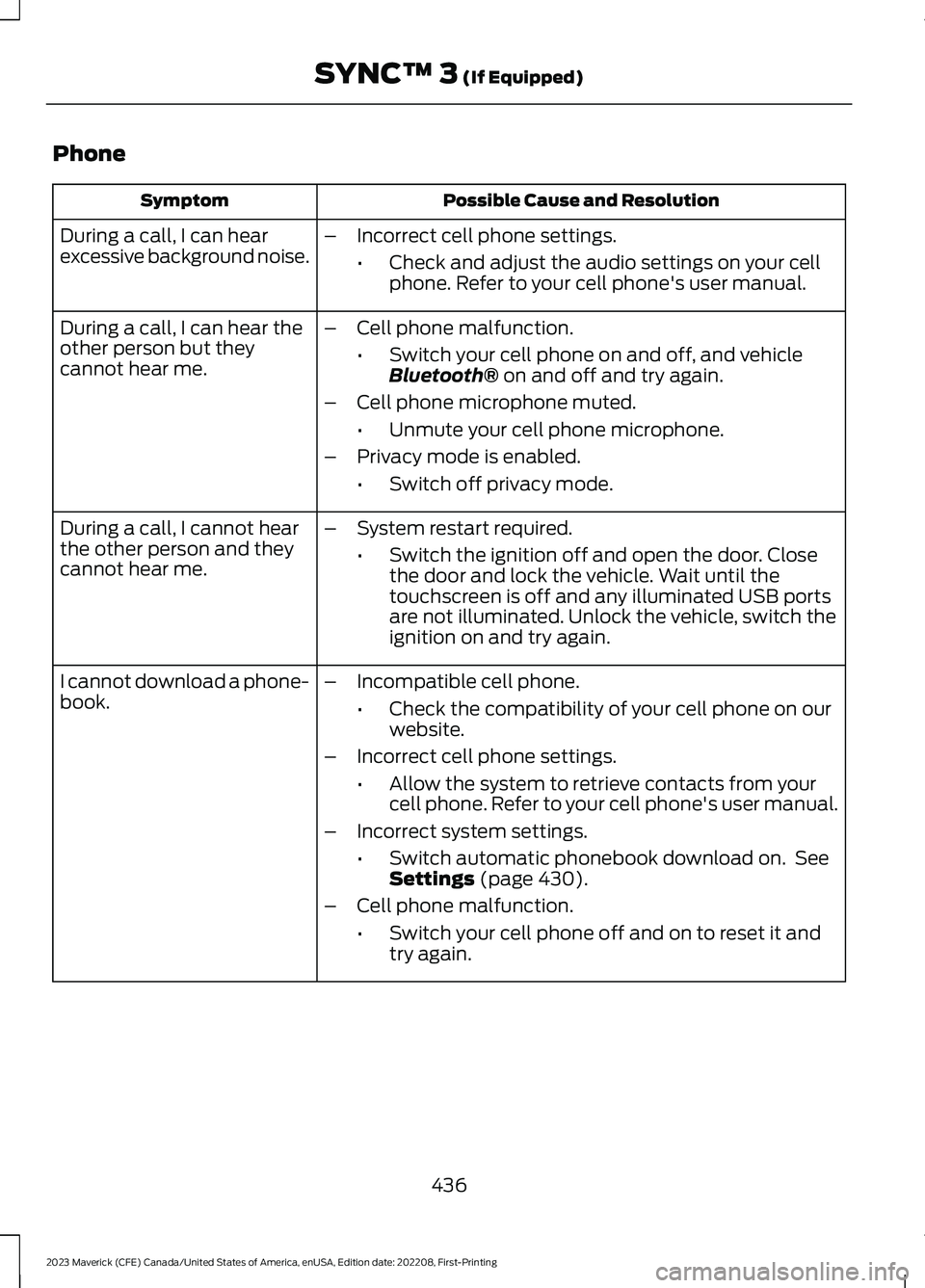
Phone
Possible Cause and ResolutionSymptom
During a call, I can hearexcessive background noise.–Incorrect cell phone settings.
•Check and adjust the audio settings on your cellphone. Refer to your cell phone's user manual.
During a call, I can hear theother person but theycannot hear me.
–Cell phone malfunction.
•Switch your cell phone on and off, and vehicleBluetooth® on and off and try again.
–Cell phone microphone muted.
•Unmute your cell phone microphone.
–Privacy mode is enabled.
•Switch off privacy mode.
During a call, I cannot hearthe other person and theycannot hear me.
–System restart required.
•Switch the ignition off and open the door. Closethe door and lock the vehicle. Wait until thetouchscreen is off and any illuminated USB portsare not illuminated. Unlock the vehicle, switch theignition on and try again.
I cannot download a phone-book.–Incompatible cell phone.
•Check the compatibility of your cell phone on ourwebsite.
–Incorrect cell phone settings.
•Allow the system to retrieve contacts from yourcell phone. Refer to your cell phone's user manual.
–Incorrect system settings.
•Switch automatic phonebook download on. SeeSettings (page 430).
–Cell phone malfunction.
•Switch your cell phone off and on to reset it andtry again.
436
2023 Maverick (CFE) Canada/United States of America, enUSA, Edition date: 202208, First-PrintingSYNC™ 3 (If Equipped)
Page 446 of 556
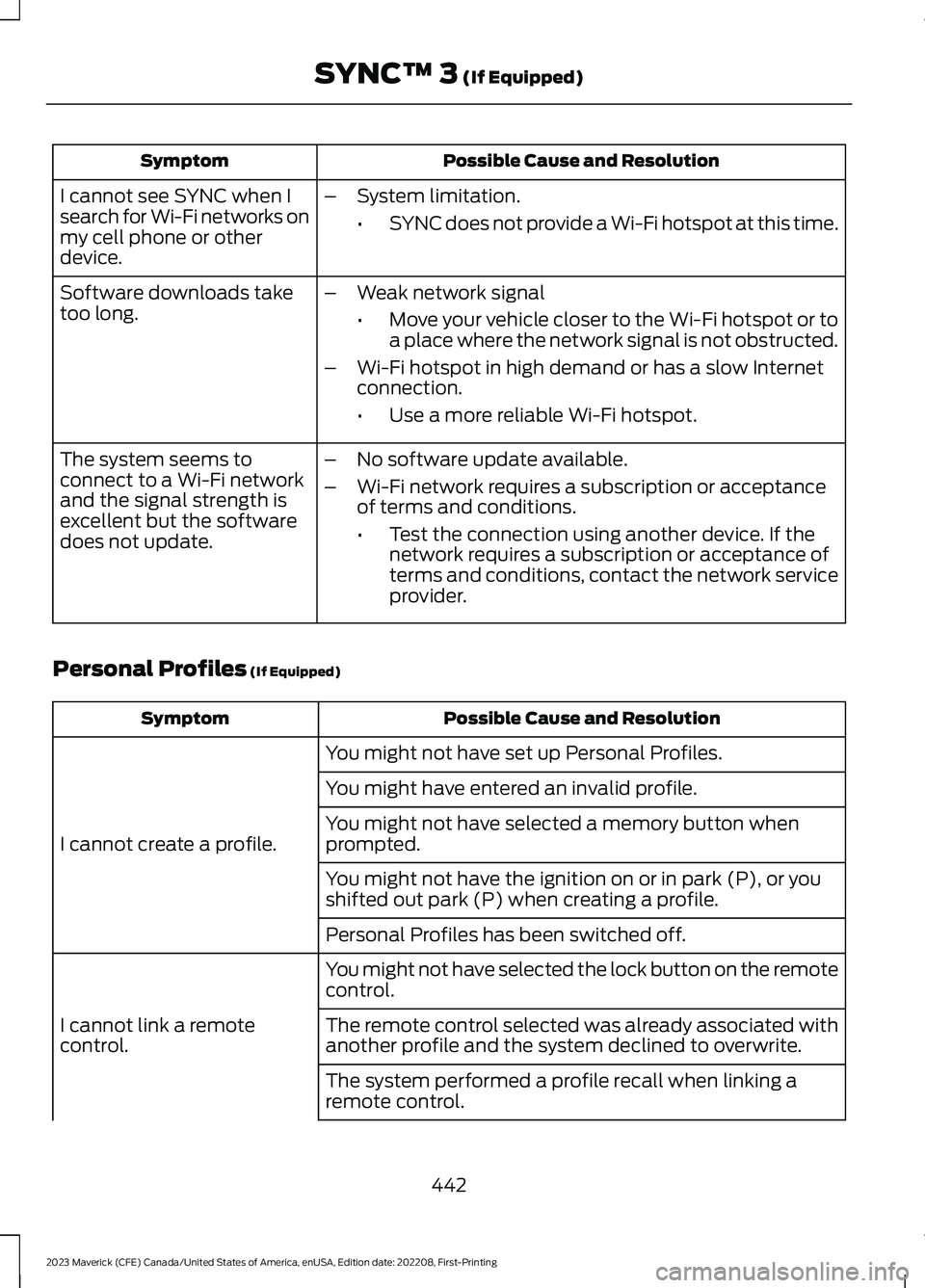
Possible Cause and ResolutionSymptom
I cannot see SYNC when Isearch for Wi-Fi networks onmy cell phone or otherdevice.
–System limitation.
•SYNC does not provide a Wi-Fi hotspot at this time.
–Weak network signal
•Move your vehicle closer to the Wi-Fi hotspot or toa place where the network signal is not obstructed.
–Wi-Fi hotspot in high demand or has a slow Internetconnection.
•Use a more reliable Wi-Fi hotspot.
Software downloads taketoo long.
–No software update available.
–Wi-Fi network requires a subscription or acceptanceof terms and conditions.
•Test the connection using another device. If thenetwork requires a subscription or acceptance ofterms and conditions, contact the network serviceprovider.
The system seems toconnect to a Wi-Fi networkand the signal strength isexcellent but the softwaredoes not update.
Personal Profiles (If Equipped)
Possible Cause and ResolutionSymptom
You might not have set up Personal Profiles.
I cannot create a profile.
You might have entered an invalid profile.
You might not have selected a memory button whenprompted.
You might not have the ignition on or in park (P), or youshifted out park (P) when creating a profile.
Personal Profiles has been switched off.
You might not have selected the lock button on the remotecontrol.
I cannot link a remotecontrol.The remote control selected was already associated withanother profile and the system declined to overwrite.
The system performed a profile recall when linking aremote control.
442
2023 Maverick (CFE) Canada/United States of America, enUSA, Edition date: 202208, First-PrintingSYNC™ 3 (If Equipped)
Page 447 of 556
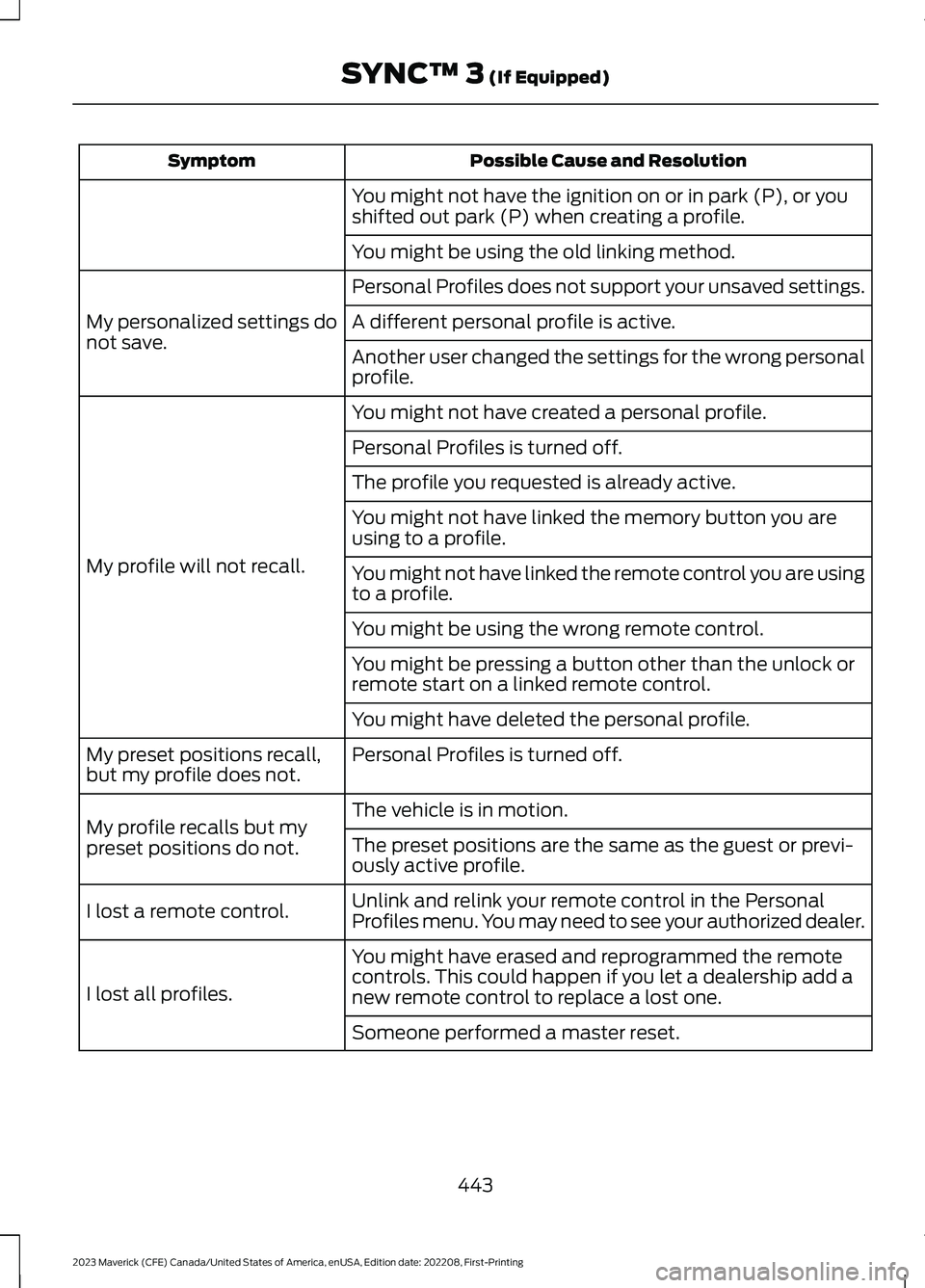
Possible Cause and ResolutionSymptom
You might not have the ignition on or in park (P), or youshifted out park (P) when creating a profile.
You might be using the old linking method.
Personal Profiles does not support your unsaved settings.
My personalized settings donot save.A different personal profile is active.
Another user changed the settings for the wrong personalprofile.
You might not have created a personal profile.
My profile will not recall.
Personal Profiles is turned off.
The profile you requested is already active.
You might not have linked the memory button you areusing to a profile.
You might not have linked the remote control you are usingto a profile.
You might be using the wrong remote control.
You might be pressing a button other than the unlock orremote start on a linked remote control.
You might have deleted the personal profile.
Personal Profiles is turned off.My preset positions recall,but my profile does not.
The vehicle is in motion.My profile recalls but mypreset positions do not.The preset positions are the same as the guest or previ-ously active profile.
Unlink and relink your remote control in the PersonalProfiles menu. You may need to see your authorized dealer.I lost a remote control.
You might have erased and reprogrammed the remotecontrols. This could happen if you let a dealership add anew remote control to replace a lost one.I lost all profiles.
Someone performed a master reset.
443
2023 Maverick (CFE) Canada/United States of America, enUSA, Edition date: 202208, First-PrintingSYNC™ 3 (If Equipped)
Page 452 of 556
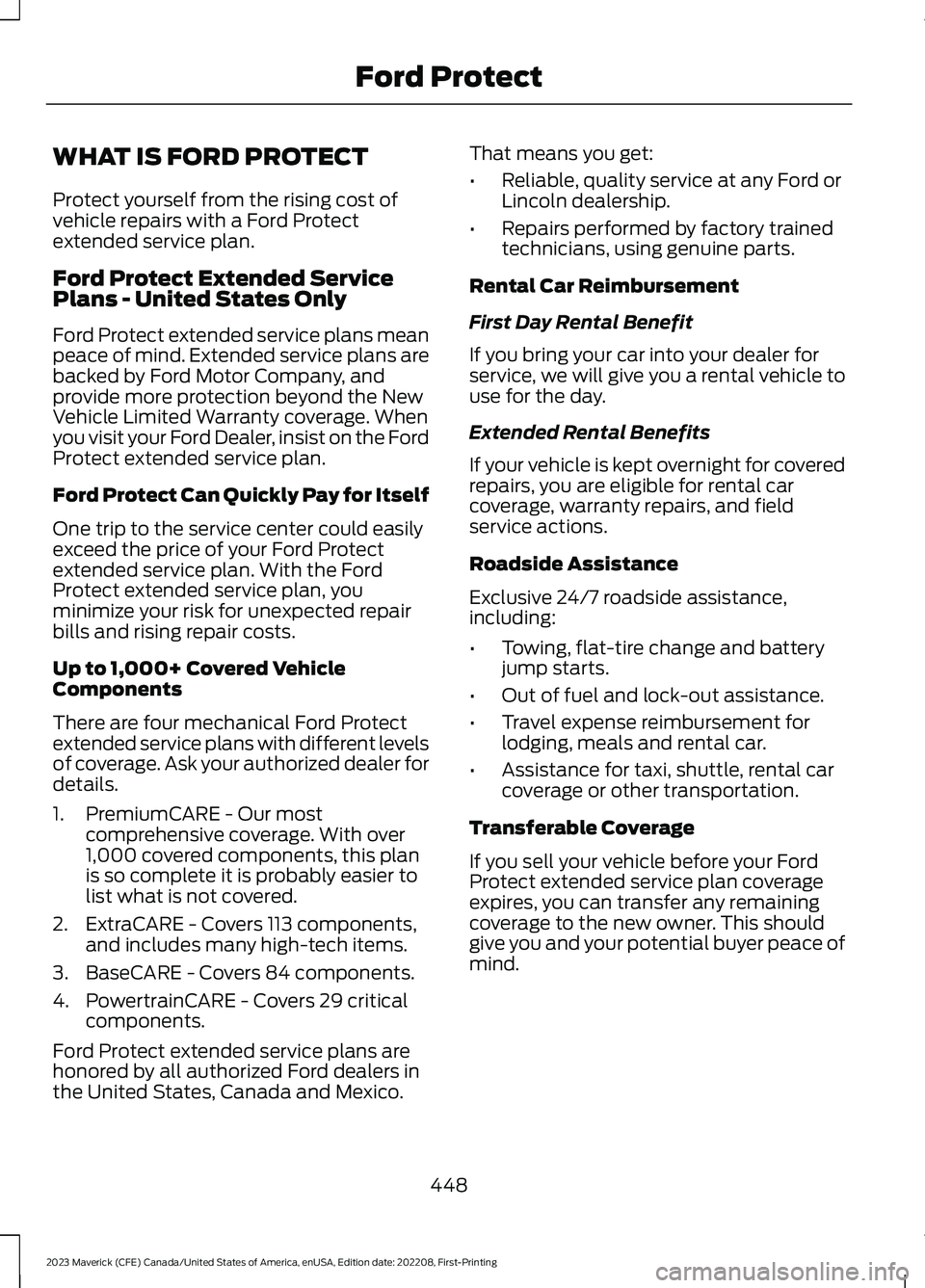
WHAT IS FORD PROTECT
Protect yourself from the rising cost ofvehicle repairs with a Ford Protectextended service plan.
Ford Protect Extended ServicePlans - United States Only
Ford Protect extended service plans meanpeace of mind. Extended service plans arebacked by Ford Motor Company, andprovide more protection beyond the NewVehicle Limited Warranty coverage. Whenyou visit your Ford Dealer, insist on the FordProtect extended service plan.
Ford Protect Can Quickly Pay for Itself
One trip to the service center could easilyexceed the price of your Ford Protectextended service plan. With the FordProtect extended service plan, youminimize your risk for unexpected repairbills and rising repair costs.
Up to 1,000+ Covered VehicleComponents
There are four mechanical Ford Protectextended service plans with different levelsof coverage. Ask your authorized dealer fordetails.
1.PremiumCARE - Our mostcomprehensive coverage. With over1,000 covered components, this planis so complete it is probably easier tolist what is not covered.
2.ExtraCARE - Covers 113 components,and includes many high-tech items.
3.BaseCARE - Covers 84 components.
4.PowertrainCARE - Covers 29 criticalcomponents.
Ford Protect extended service plans arehonored by all authorized Ford dealers inthe United States, Canada and Mexico.
That means you get:
•Reliable, quality service at any Ford orLincoln dealership.
•Repairs performed by factory trainedtechnicians, using genuine parts.
Rental Car Reimbursement
First Day Rental Benefit
If you bring your car into your dealer forservice, we will give you a rental vehicle touse for the day.
Extended Rental Benefits
If your vehicle is kept overnight for coveredrepairs, you are eligible for rental carcoverage, warranty repairs, and fieldservice actions.
Roadside Assistance
Exclusive 24/7 roadside assistance,including:
•Towing, flat-tire change and batteryjump starts.
•Out of fuel and lock-out assistance.
•Travel expense reimbursement forlodging, meals and rental car.
•Assistance for taxi, shuttle, rental carcoverage or other transportation.
Transferable Coverage
If you sell your vehicle before your FordProtect extended service plan coverageexpires, you can transfer any remainingcoverage to the new owner. This shouldgive you and your potential buyer peace ofmind.
448
2023 Maverick (CFE) Canada/United States of America, enUSA, Edition date: 202208, First-PrintingFord Protect
Page 456 of 556
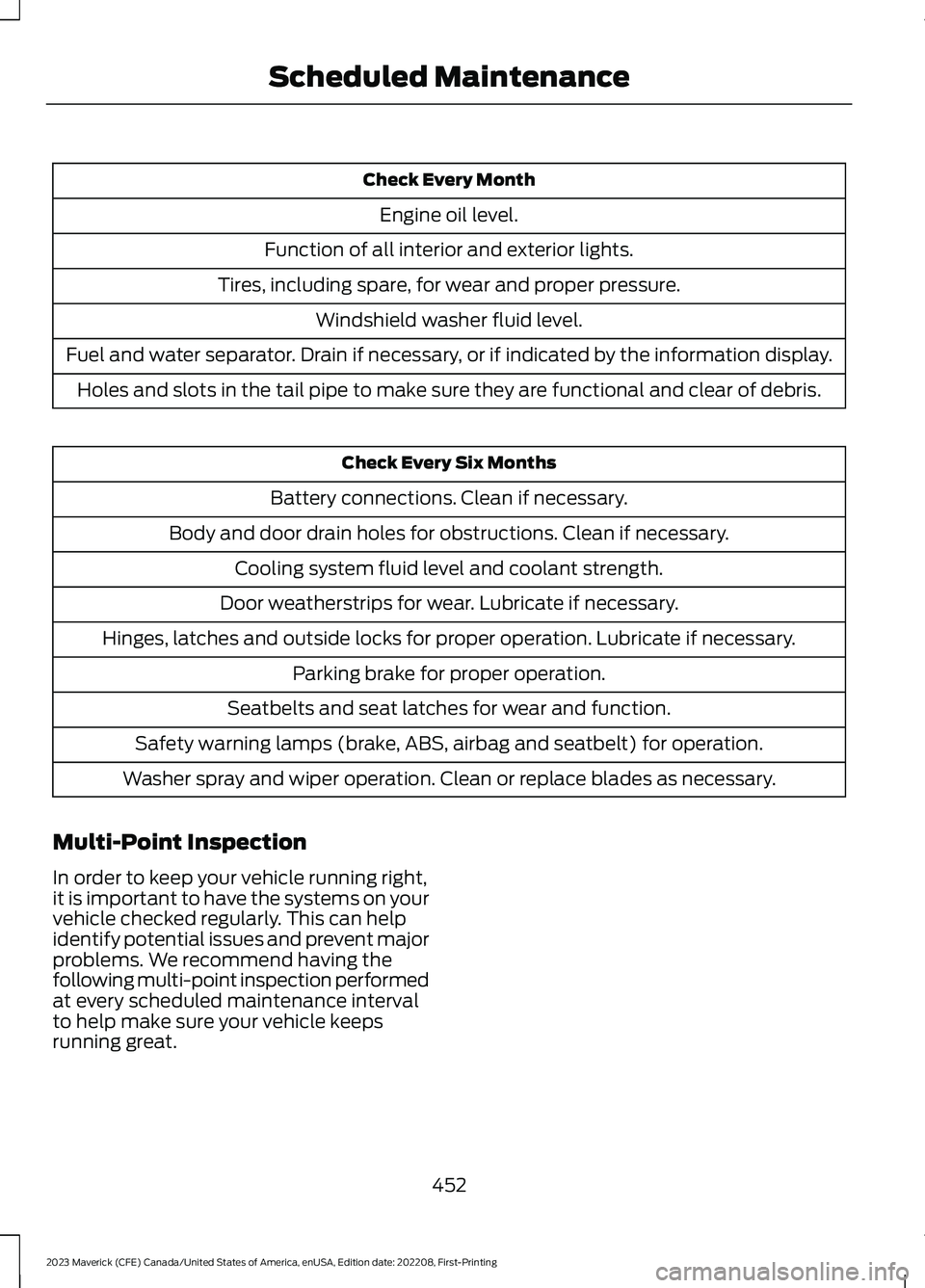
Check Every Month
Engine oil level.
Function of all interior and exterior lights.
Tires, including spare, for wear and proper pressure.
Windshield washer fluid level.
Fuel and water separator. Drain if necessary, or if indicated by the information display.
Holes and slots in the tail pipe to make sure they are functional and clear of debris.
Check Every Six Months
Battery connections. Clean if necessary.
Body and door drain holes for obstructions. Clean if necessary.
Cooling system fluid level and coolant strength.
Door weatherstrips for wear. Lubricate if necessary.
Hinges, latches and outside locks for proper operation. Lubricate if necessary.
Parking brake for proper operation.
Seatbelts and seat latches for wear and function.
Safety warning lamps (brake, ABS, airbag and seatbelt) for operation.
Washer spray and wiper operation. Clean or replace blades as necessary.
Multi-Point Inspection
In order to keep your vehicle running right,it is important to have the systems on yourvehicle checked regularly. This can helpidentify potential issues and prevent majorproblems. We recommend having thefollowing multi-point inspection performedat every scheduled maintenance intervalto help make sure your vehicle keepsrunning great.
452
2023 Maverick (CFE) Canada/United States of America, enUSA, Edition date: 202208, First-PrintingScheduled Maintenance
Page 540 of 556
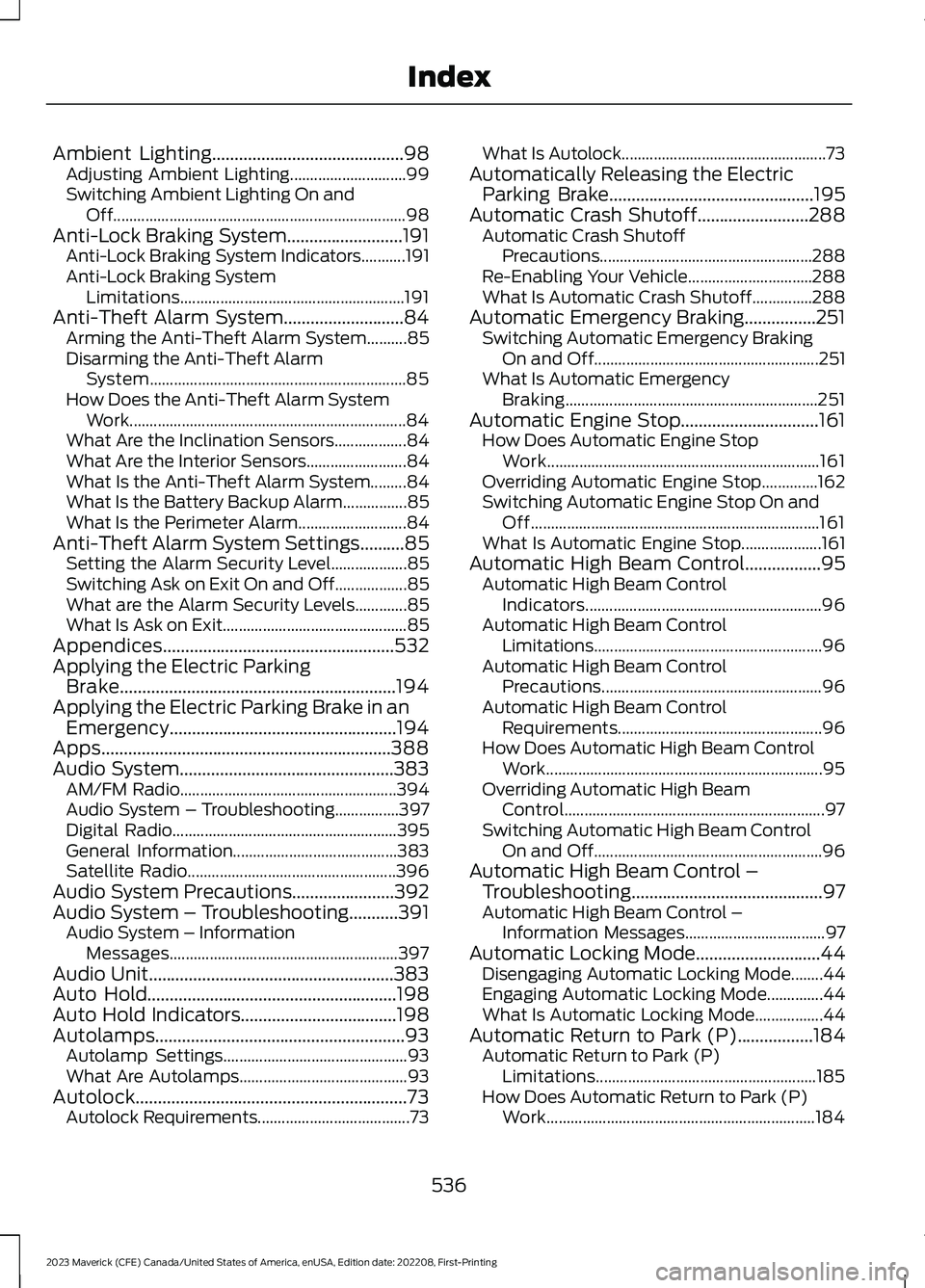
Ambient Lighting...........................................98Adjusting Ambient Lighting.............................99Switching Ambient Lighting On andOff.........................................................................98Anti-Lock Braking System..........................191Anti-Lock Braking System Indicators...........191Anti-Lock Braking SystemLimitations........................................................191Anti-Theft Alarm System...........................84Arming the Anti-Theft Alarm System..........85Disarming the Anti-Theft AlarmSystem................................................................85How Does the Anti-Theft Alarm SystemWork.....................................................................84What Are the Inclination Sensors..................84What Are the Interior Sensors.........................84What Is the Anti-Theft Alarm System.........84What Is the Battery Backup Alarm................85What Is the Perimeter Alarm...........................84Anti-Theft Alarm System Settings..........85Setting the Alarm Security Level...................85Switching Ask on Exit On and Off..................85What are the Alarm Security Levels.............85What Is Ask on Exit..............................................85Appendices....................................................532Applying the Electric ParkingBrake..............................................................194Applying the Electric Parking Brake in anEmergency...................................................194Apps.................................................................388Audio System................................................383AM/FM Radio......................................................394Audio System – Troubleshooting................397Digital Radio........................................................395General Information.........................................383Satellite Radio....................................................396Audio System Precautions.......................392Audio System – Troubleshooting...........391Audio System – InformationMessages.........................................................397Audio Unit.......................................................383Auto Hold........................................................198Auto Hold Indicators...................................198Autolamps........................................................93Autolamp Settings..............................................93What Are Autolamps..........................................93Autolock.............................................................73Autolock Requirements......................................73
What Is Autolock...................................................73Automatically Releasing the ElectricParking Brake..............................................195Automatic Crash Shutoff.........................288Automatic Crash ShutoffPrecautions.....................................................288Re-Enabling Your Vehicle...............................288What Is Automatic Crash Shutoff...............288Automatic Emergency Braking................251Switching Automatic Emergency BrakingOn and Off........................................................251What Is Automatic EmergencyBraking...............................................................251Automatic Engine Stop...............................161How Does Automatic Engine StopWork....................................................................161Overriding Automatic Engine Stop..............162Switching Automatic Engine Stop On andOff........................................................................161What Is Automatic Engine Stop....................161Automatic High Beam Control.................95Automatic High Beam ControlIndicators...........................................................96Automatic High Beam ControlLimitations.........................................................96Automatic High Beam ControlPrecautions.......................................................96Automatic High Beam ControlRequirements...................................................96How Does Automatic High Beam ControlWork.....................................................................95Overriding Automatic High BeamControl.................................................................97Switching Automatic High Beam ControlOn and Off.........................................................96Automatic High Beam Control –Troubleshooting...........................................97Automatic High Beam Control –Information Messages...................................97Automatic Locking Mode............................44Disengaging Automatic Locking Mode........44Engaging Automatic Locking Mode..............44What Is Automatic Locking Mode.................44Automatic Return to Park (P).................184Automatic Return to Park (P)Limitations.......................................................185How Does Automatic Return to Park (P)Work...................................................................184
536
2023 Maverick (CFE) Canada/United States of America, enUSA, Edition date: 202208, First-PrintingIndex
Page 541 of 556
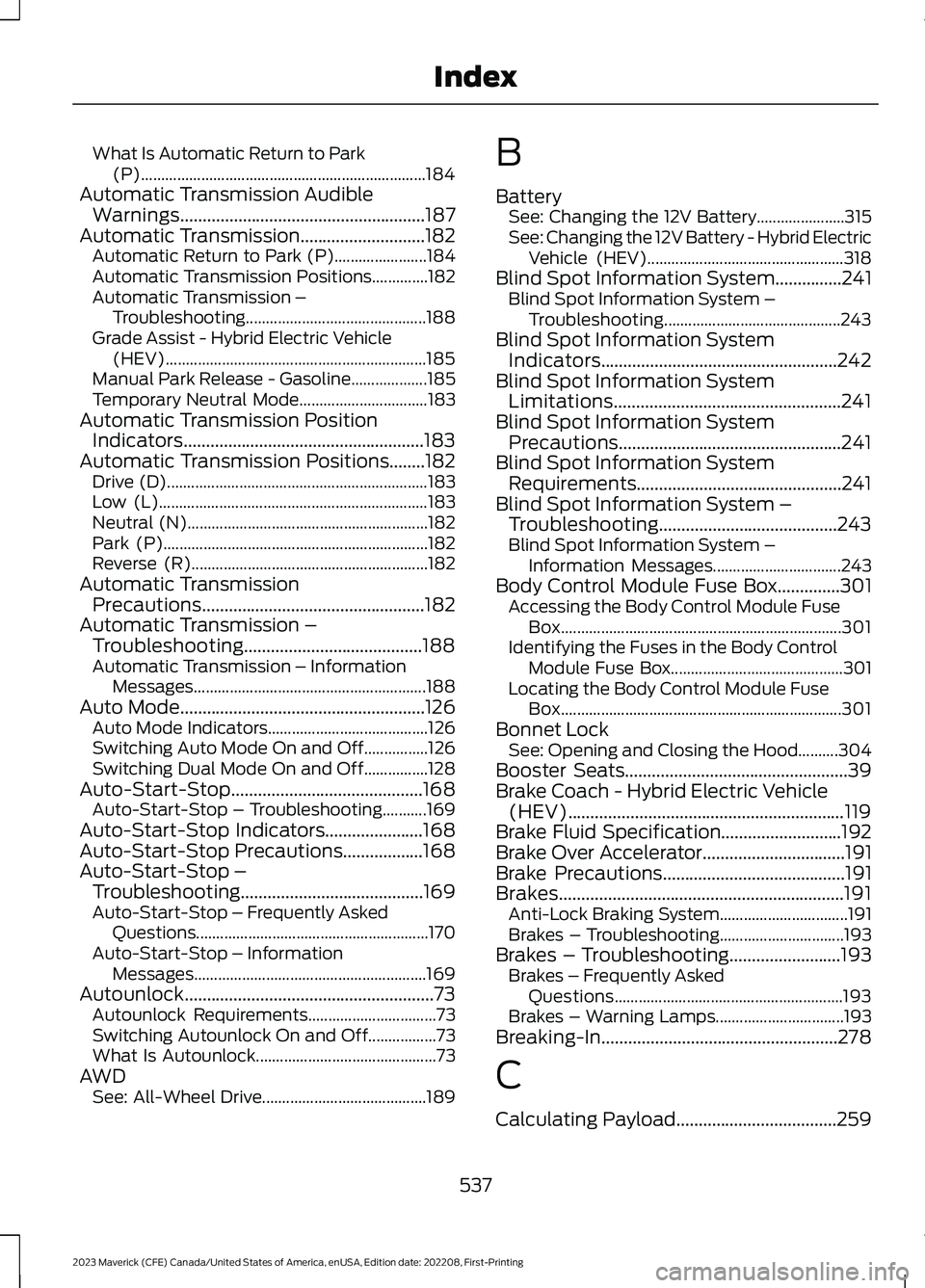
What Is Automatic Return to Park(P).......................................................................184Automatic Transmission AudibleWarnings.......................................................187Automatic Transmission............................182Automatic Return to Park (P).......................184Automatic Transmission Positions..............182Automatic Transmission –Troubleshooting.............................................188Grade Assist - Hybrid Electric Vehicle(HEV).................................................................185Manual Park Release - Gasoline...................185Temporary Neutral Mode................................183Automatic Transmission PositionIndicators......................................................183Automatic Transmission Positions........182Drive (D).................................................................183Low (L)...................................................................183Neutral (N)............................................................182Park (P)..................................................................182Reverse (R)...........................................................182Automatic TransmissionPrecautions..................................................182Automatic Transmission –Troubleshooting........................................188Automatic Transmission – InformationMessages..........................................................188Auto Mode.......................................................126Auto Mode Indicators........................................126Switching Auto Mode On and Off................126Switching Dual Mode On and Off................128Auto-Start-Stop...........................................168Auto-Start-Stop – Troubleshooting...........169Auto-Start-Stop Indicators......................168Auto-Start-Stop Precautions..................168Auto-Start-Stop –Troubleshooting.........................................169Auto-Start-Stop – Frequently AskedQuestions..........................................................170Auto-Start-Stop – InformationMessages..........................................................169Autounlock........................................................73Autounlock Requirements................................73Switching Autounlock On and Off.................73What Is Autounlock.............................................73AWDSee: All-Wheel Drive.........................................189
B
BatterySee: Changing the 12V Battery......................315See: Changing the 12V Battery - Hybrid ElectricVehicle (HEV).................................................318Blind Spot Information System...............241Blind Spot Information System –Troubleshooting............................................243Blind Spot Information SystemIndicators.....................................................242Blind Spot Information SystemLimitations...................................................241Blind Spot Information SystemPrecautions..................................................241Blind Spot Information SystemRequirements..............................................241Blind Spot Information System –Troubleshooting........................................243Blind Spot Information System –Information Messages................................243Body Control Module Fuse Box..............301Accessing the Body Control Module FuseBox......................................................................301Identifying the Fuses in the Body ControlModule Fuse Box...........................................301Locating the Body Control Module FuseBox......................................................................301Bonnet LockSee: Opening and Closing the Hood..........304Booster Seats..................................................39Brake Coach - Hybrid Electric Vehicle(HEV)..............................................................119Brake Fluid Specification...........................192Brake Over Accelerator................................191Brake Precautions.........................................191Brakes................................................................191Anti-Lock Braking System................................191Brakes – Troubleshooting...............................193Brakes – Troubleshooting.........................193Brakes – Frequently AskedQuestions.........................................................193Brakes – Warning Lamps................................193Breaking-In.....................................................278
C
Calculating Payload....................................259
537
2023 Maverick (CFE) Canada/United States of America, enUSA, Edition date: 202208, First-PrintingIndex
Page 542 of 556
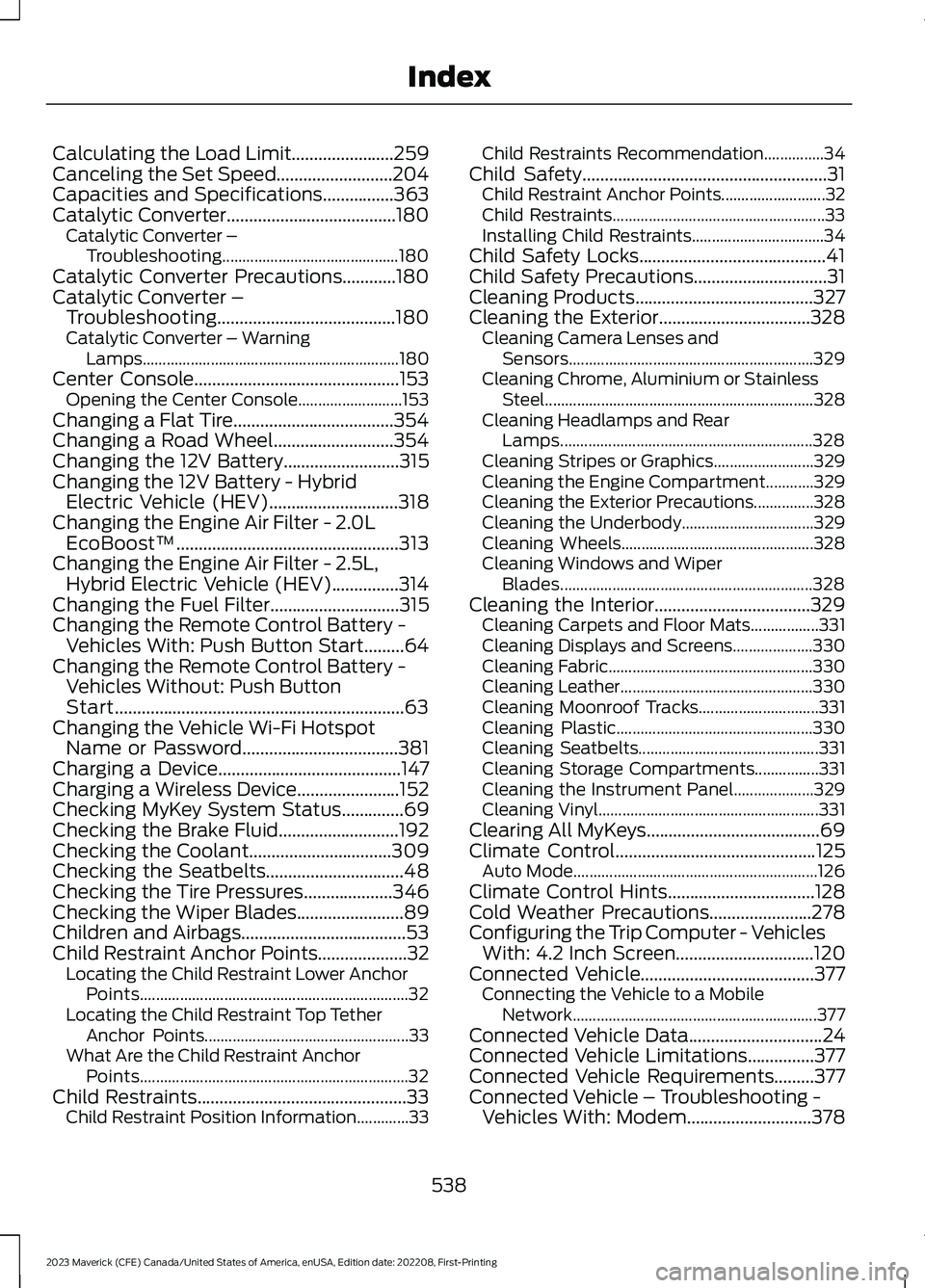
Calculating the Load Limit.......................259Canceling the Set Speed..........................204Capacities and Specifications................363Catalytic Converter......................................180Catalytic Converter –Troubleshooting............................................180Catalytic Converter Precautions............180Catalytic Converter –Troubleshooting........................................180Catalytic Converter – WarningLamps................................................................180Center Console..............................................153Opening the Center Console..........................153Changing a Flat Tire....................................354Changing a Road Wheel...........................354Changing the 12V Battery..........................315Changing the 12V Battery - HybridElectric Vehicle (HEV).............................318Changing the Engine Air Filter - 2.0LEcoBoost™..................................................313Changing the Engine Air Filter - 2.5L,Hybrid Electric Vehicle (HEV)...............314Changing the Fuel Filter.............................315Changing the Remote Control Battery -Vehicles With: Push Button Start.........64Changing the Remote Control Battery -Vehicles Without: Push ButtonStart.................................................................63Changing the Vehicle Wi-Fi HotspotName or Password...................................381Charging a Device.........................................147Charging a Wireless Device.......................152Checking MyKey System Status..............69Checking the Brake Fluid...........................192Checking the Coolant................................309Checking the Seatbelts...............................48Checking the Tire Pressures....................346Checking the Wiper Blades........................89Children and Airbags.....................................53Child Restraint Anchor Points....................32Locating the Child Restraint Lower AnchorPoints...................................................................32Locating the Child Restraint Top TetherAnchor Points...................................................33What Are the Child Restraint AnchorPoints...................................................................32Child Restraints...............................................33Child Restraint Position Information.............33
Child Restraints Recommendation...............34Child Safety.......................................................31Child Restraint Anchor Points..........................32Child Restraints.....................................................33Installing Child Restraints.................................34Child Safety Locks..........................................41Child Safety Precautions..............................31Cleaning Products........................................327Cleaning the Exterior..................................328Cleaning Camera Lenses andSensors.............................................................329Cleaning Chrome, Aluminium or StainlessSteel...................................................................328Cleaning Headlamps and RearLamps...............................................................328Cleaning Stripes or Graphics.........................329Cleaning the Engine Compartment............329Cleaning the Exterior Precautions...............328Cleaning the Underbody.................................329Cleaning Wheels................................................328Cleaning Windows and WiperBlades...............................................................328Cleaning the Interior...................................329Cleaning Carpets and Floor Mats.................331Cleaning Displays and Screens....................330Cleaning Fabric...................................................330Cleaning Leather................................................330Cleaning Moonroof Tracks..............................331Cleaning Plastic.................................................330Cleaning Seatbelts.............................................331Cleaning Storage Compartments................331Cleaning the Instrument Panel....................329Cleaning Vinyl.......................................................331Clearing All MyKeys.......................................69Climate Control.............................................125Auto Mode.............................................................126Climate Control Hints.................................128Cold Weather Precautions.......................278Configuring the Trip Computer - VehiclesWith: 4.2 Inch Screen...............................120Connected Vehicle.......................................377Connecting the Vehicle to a MobileNetwork.............................................................377Connected Vehicle Data..............................24Connected Vehicle Limitations...............377Connected Vehicle Requirements.........377Connected Vehicle – Troubleshooting -Vehicles With: Modem............................378
538
2023 Maverick (CFE) Canada/United States of America, enUSA, Edition date: 202208, First-PrintingIndex
Page 543 of 556
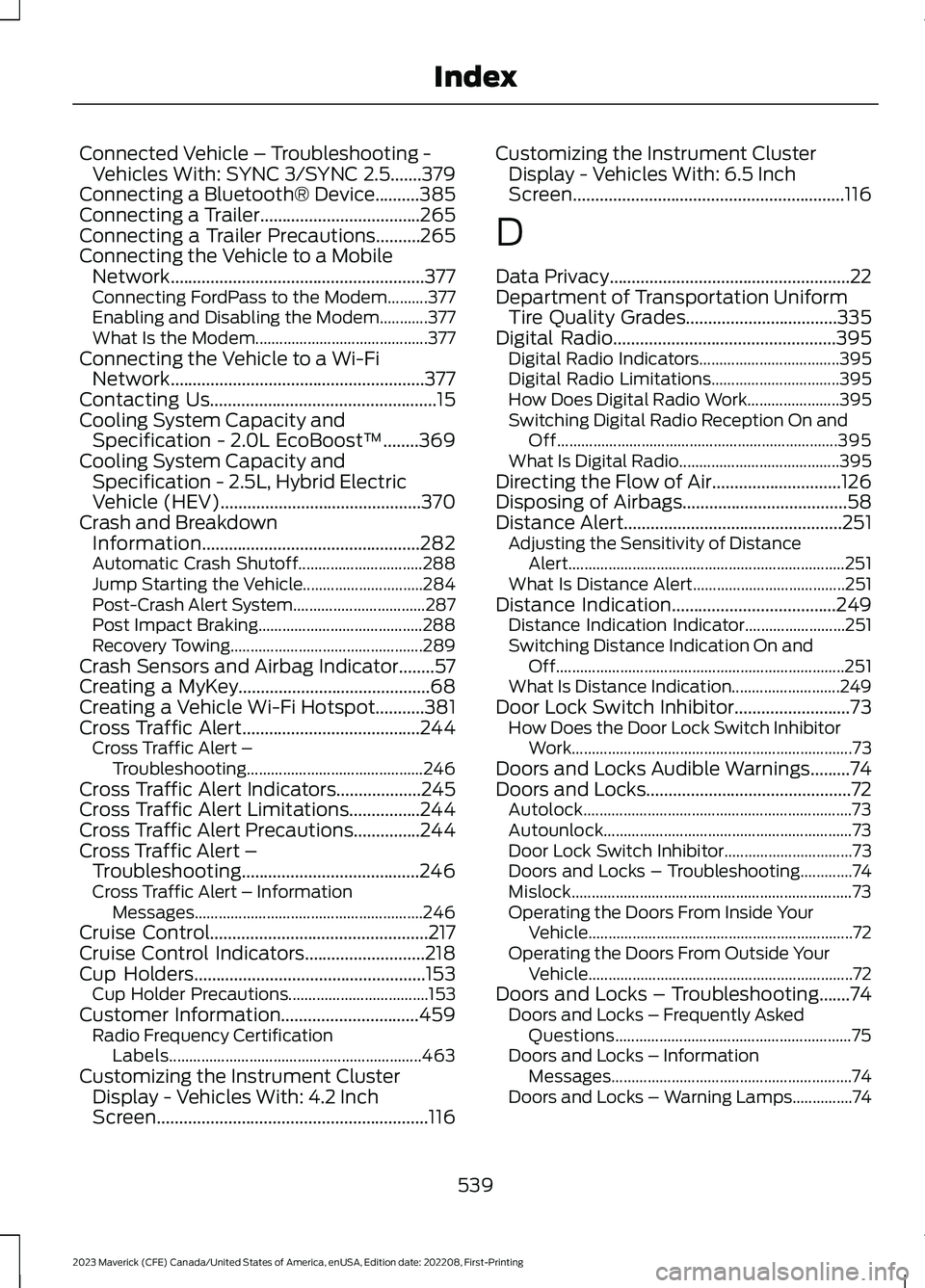
Connected Vehicle – Troubleshooting -Vehicles With: SYNC 3/SYNC 2.5.......379Connecting a Bluetooth® Device..........385Connecting a Trailer....................................265Connecting a Trailer Precautions..........265Connecting the Vehicle to a MobileNetwork.........................................................377Connecting FordPass to the Modem..........377Enabling and Disabling the Modem............377What Is the Modem...........................................377Connecting the Vehicle to a Wi-FiNetwork.........................................................377Contacting Us...................................................15Cooling System Capacity andSpecification - 2.0L EcoBoost™........369Cooling System Capacity andSpecification - 2.5L, Hybrid ElectricVehicle (HEV).............................................370Crash and BreakdownInformation.................................................282Automatic Crash Shutoff...............................288Jump Starting the Vehicle..............................284Post-Crash Alert System.................................287Post Impact Braking.........................................288Recovery Towing................................................289Crash Sensors and Airbag Indicator........57Creating a MyKey...........................................68Creating a Vehicle Wi-Fi Hotspot...........381Cross Traffic Alert........................................244Cross Traffic Alert –Troubleshooting............................................246Cross Traffic Alert Indicators...................245Cross Traffic Alert Limitations................244Cross Traffic Alert Precautions...............244Cross Traffic Alert –Troubleshooting........................................246Cross Traffic Alert – InformationMessages.........................................................246Cruise Control.................................................217Cruise Control Indicators...........................218Cup Holders....................................................153Cup Holder Precautions...................................153Customer Information...............................459Radio Frequency CertificationLabels...............................................................463Customizing the Instrument ClusterDisplay - Vehicles With: 4.2 InchScreen.............................................................116
Customizing the Instrument ClusterDisplay - Vehicles With: 6.5 InchScreen.............................................................116
D
Data Privacy......................................................22Department of Transportation UniformTire Quality Grades..................................335Digital Radio..................................................395Digital Radio Indicators...................................395Digital Radio Limitations................................395How Does Digital Radio Work.......................395Switching Digital Radio Reception On andOff......................................................................395What Is Digital Radio........................................395Directing the Flow of Air.............................126Disposing of Airbags.....................................58Distance Alert.................................................251Adjusting the Sensitivity of DistanceAlert.....................................................................251What Is Distance Alert......................................251Distance Indication.....................................249Distance Indication Indicator.........................251Switching Distance Indication On andOff........................................................................251What Is Distance Indication...........................249Door Lock Switch Inhibitor..........................73How Does the Door Lock Switch InhibitorWork......................................................................73Doors and Locks Audible Warnings.........74Doors and Locks..............................................72Autolock...................................................................73Autounlock..............................................................73Door Lock Switch Inhibitor................................73Doors and Locks – Troubleshooting.............74Mislock......................................................................73Operating the Doors From Inside YourVehicle..................................................................72Operating the Doors From Outside YourVehicle..................................................................72Doors and Locks – Troubleshooting.......74Doors and Locks – Frequently AskedQuestions...........................................................75Doors and Locks – InformationMessages............................................................74Doors and Locks – Warning Lamps...............74
539
2023 Maverick (CFE) Canada/United States of America, enUSA, Edition date: 202208, First-PrintingIndex