ECU FORD MAVERICK 2023 User Guide
[x] Cancel search | Manufacturer: FORD, Model Year: 2023, Model line: MAVERICK, Model: FORD MAVERICK 2023Pages: 556, PDF Size: 14.79 MB
Page 67 of 556
CHANGING THE REMOTE
CONTROL BATTERY -
VEHICLES WITHOUT: PUSH
BUTTON START
WARNING: Keep batteries awayfrom children to prevent ingestion.Failure to follow this instruction couldresult in personal injury or death. Ifingested, immediately seek medicalattention.
WARNING: If the batterycompartment does not securely close,stop using the remote control andreplace it as soon as possible. In themeantime, keep the remote control awayfrom children. Failure to follow thisinstruction could result in personal injuryor death.
Battery Replacement Procedure
The remote control uses one coin-type3-volt lithium battery CR2032 orequivalent.
Press the button to release the key bladebefore beginning the procedure.
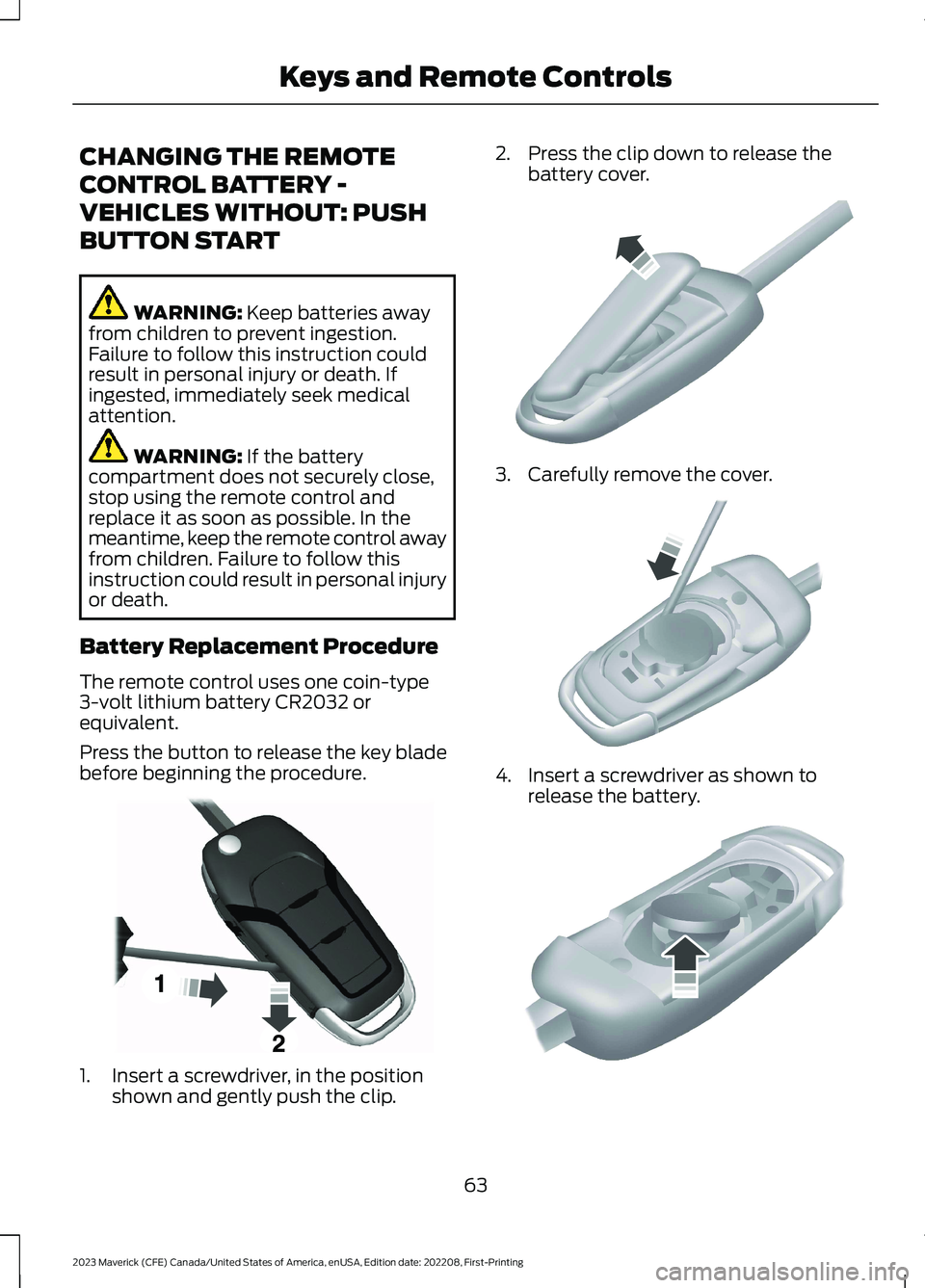
1.Insert a screwdriver, in the positionshown and gently push the clip.
2.Press the clip down to release thebattery cover.
3.Carefully remove the cover.
4.Insert a screwdriver as shown torelease the battery.
63
2023 Maverick (CFE) Canada/United States of America, enUSA, Edition date: 202208, First-PrintingKeys and Remote ControlsE191533 E151799 E151800 E151801
Page 68 of 556
Note:Do not touch the battery contacts orthe printed circuit board with thescrewdriver.
5.Remove the battery.
6.Install a new battery with the + facingup.
7.Replace the battery cover.
Dispose of old batteries in anenvironmentally friendly way.Seek advice from your localauthority about recycling old batteries.
Note:Do not wipe off any grease on thebattery terminals or on the back surface ofthe circuit board.
Note: Replacing the battery does not erasethe programmed key from your vehicle. Theremote control should operate normally.
CHANGING THE REMOTE
CONTROL BATTERY -
VEHICLES WITH: PUSH
BUTTON START
WARNING: Keep batteries awayfrom children to prevent ingestion.Failure to follow this instruction couldresult in personal injury or death. Ifingested, immediately seek medicalattention.
WARNING: If the batterycompartment does not securely close,stop using the remote control andreplace it as soon as possible. In themeantime, keep the remote control awayfrom children. Failure to follow thisinstruction could result in personal injuryor death.
The remote control uses one coin-type3-volt lithium battery CR2450 orequivalent.
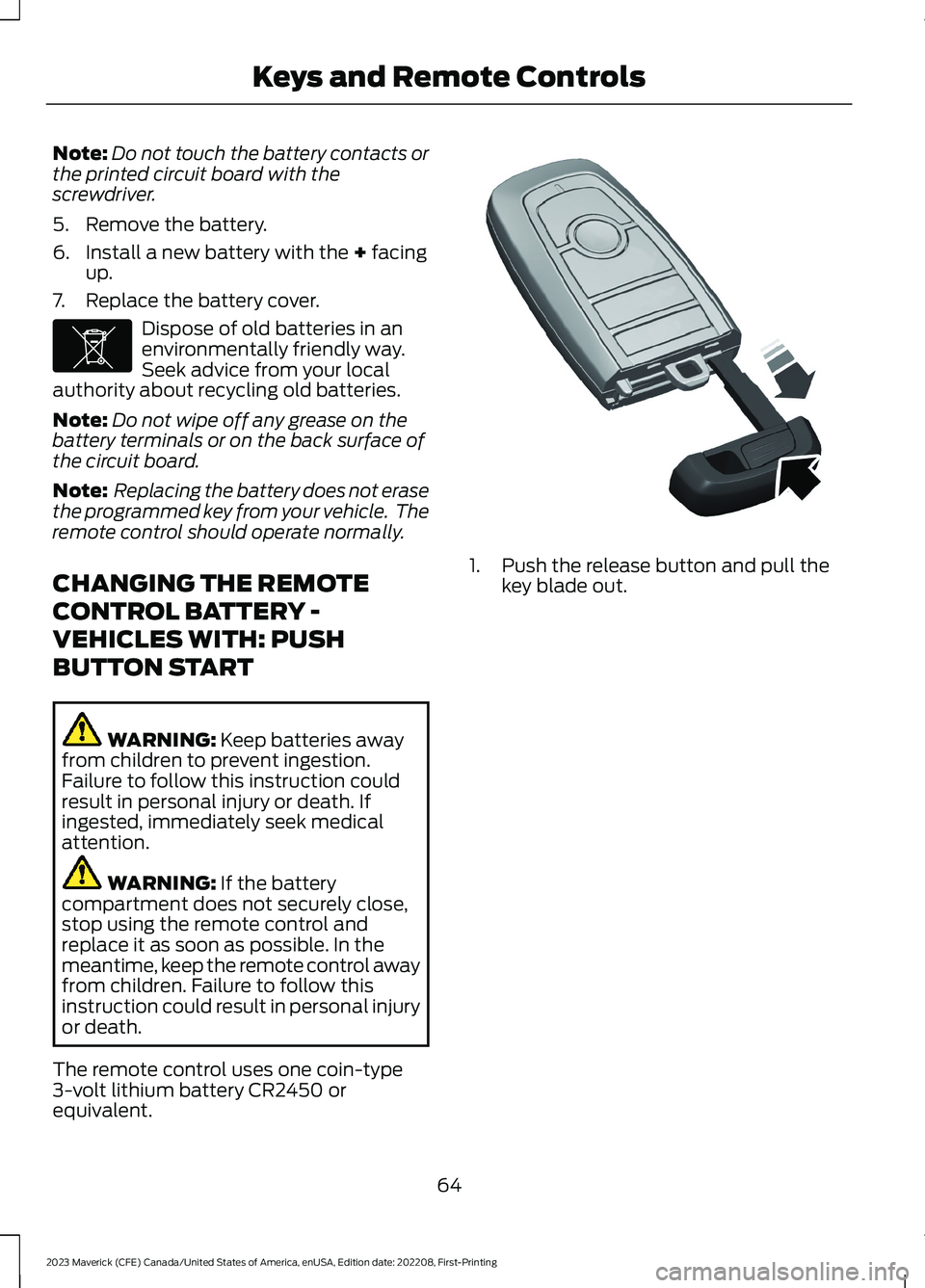
1.Push the release button and pull thekey blade out.
64
2023 Maverick (CFE) Canada/United States of America, enUSA, Edition date: 202208, First-PrintingKeys and Remote ControlsE107998 E322866
Page 70 of 556
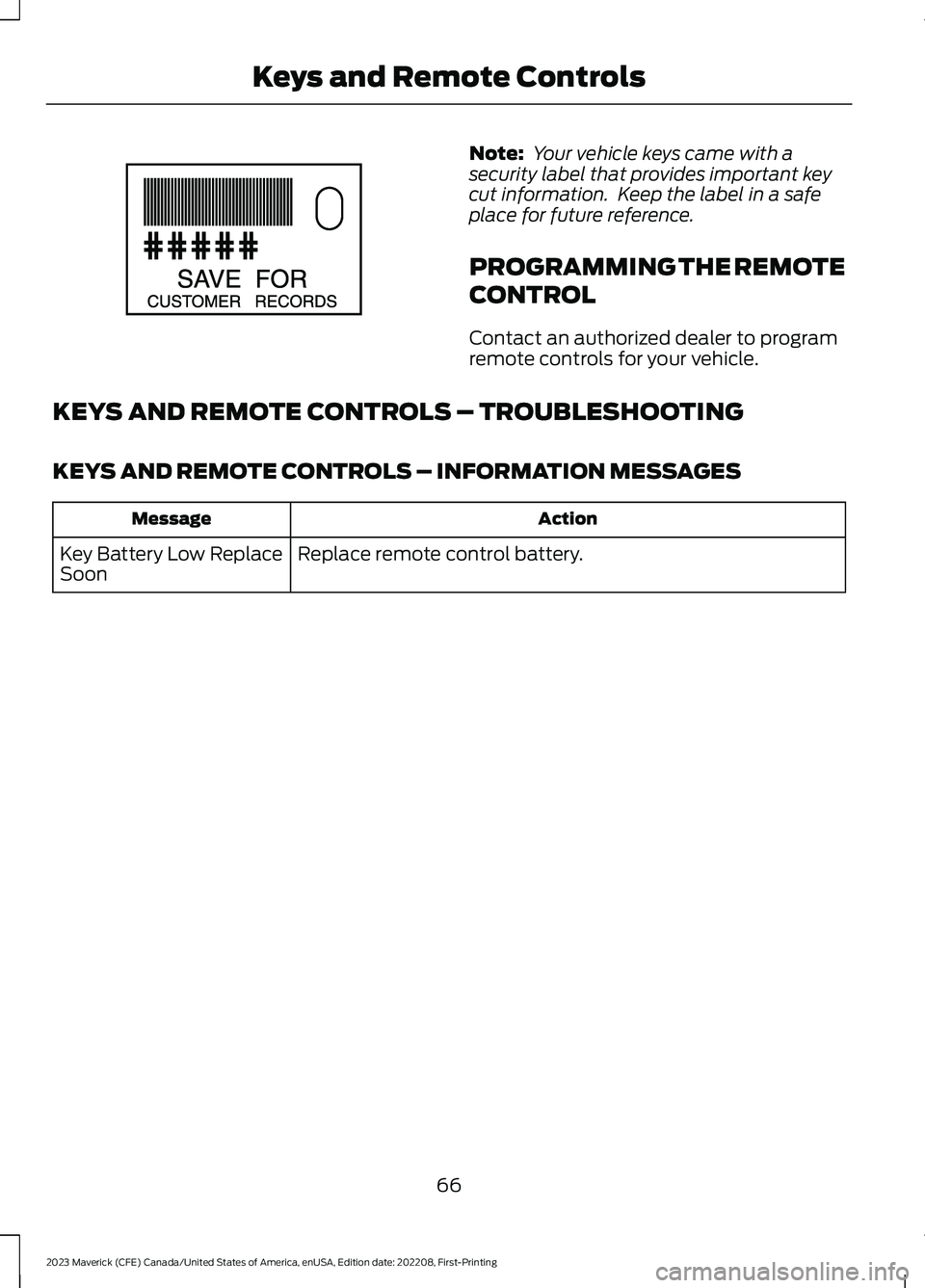
Note: Your vehicle keys came with asecurity label that provides important keycut information. Keep the label in a safeplace for future reference.
PROGRAMMING THE REMOTE
CONTROL
Contact an authorized dealer to programremote controls for your vehicle.
KEYS AND REMOTE CONTROLS – TROUBLESHOOTING
KEYS AND REMOTE CONTROLS – INFORMATION MESSAGES
ActionMessage
Replace remote control battery.Key Battery Low ReplaceSoon
66
2023 Maverick (CFE) Canada/United States of America, enUSA, Edition date: 202208, First-PrintingKeys and Remote ControlsE151795
Page 85 of 556
TAILGATE PRECAUTIONS
WARNING: It is extremelydangerous to ride in a cargo area, insideor outside of a vehicle. In a crash, peopleriding in these areas are more likely to beseriously injured or killed. Do not allowpeople to ride in any area of your vehiclethat is not equipped with seats andseatbelts. Make sure everyone in yourvehicle is in a seat and properly using aseatbelt. Failure to follow this warningcould result in serious personal injury ordeath.
OPENING THE TAILGATE
OPENING THE TAILGATE FROMOUTSIDE YOUR VEHICLE
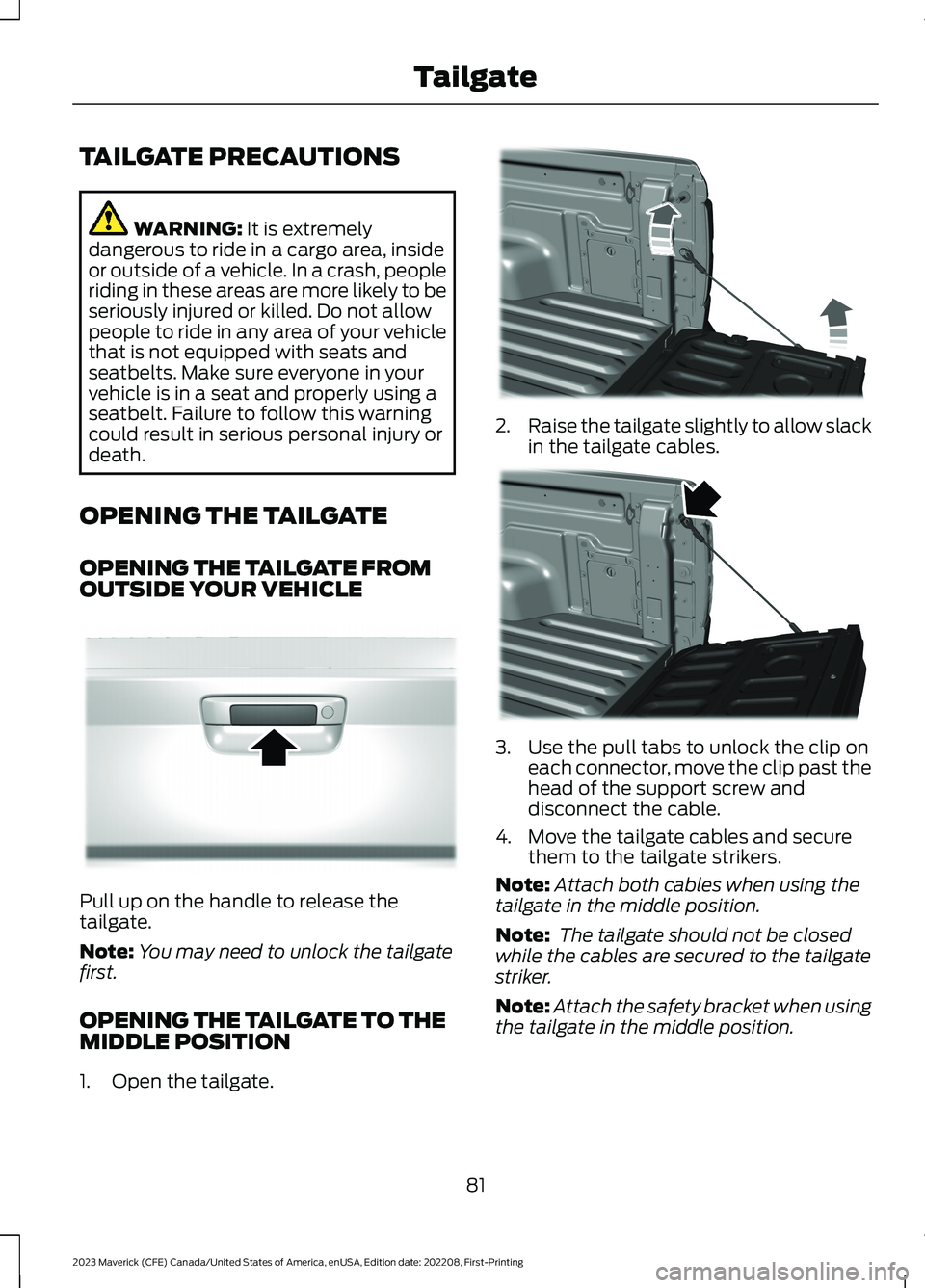
Pull up on the handle to release thetailgate.
Note:You may need to unlock the tailgatefirst.
OPENING THE TAILGATE TO THEMIDDLE POSITION
1.Open the tailgate.
2.Raise the tailgate slightly to allow slackin the tailgate cables.
3.Use the pull tabs to unlock the clip oneach connector, move the clip past thehead of the support screw anddisconnect the cable.
4.Move the tailgate cables and securethem to the tailgate strikers.
Note:Attach both cables when using thetailgate in the middle position.
Note: The tailgate should not be closedwhile the cables are secured to the tailgatestriker.
Note:Attach the safety bracket when usingthe tailgate in the middle position.
81
2023 Maverick (CFE) Canada/United States of America, enUSA, Edition date: 202208, First-PrintingTailgateE348034 E351595 E351596
Page 86 of 556
When hauling cargo using the tailgatemiddle position, make sure the load isevenly distributed and supported using thesupport locations in the pickup bed. SeeLocating the Pickup Bed Slots (page264).
Note:Secure all cargo.
Note:The maximum load capacity for themiddle position is 500 lb (226 kg) evenlydistributed to the 2 pickup box wheelhouselocations and the tailgate.
LOCKING AND UNLOCKING
THE TAILGATE
Manual
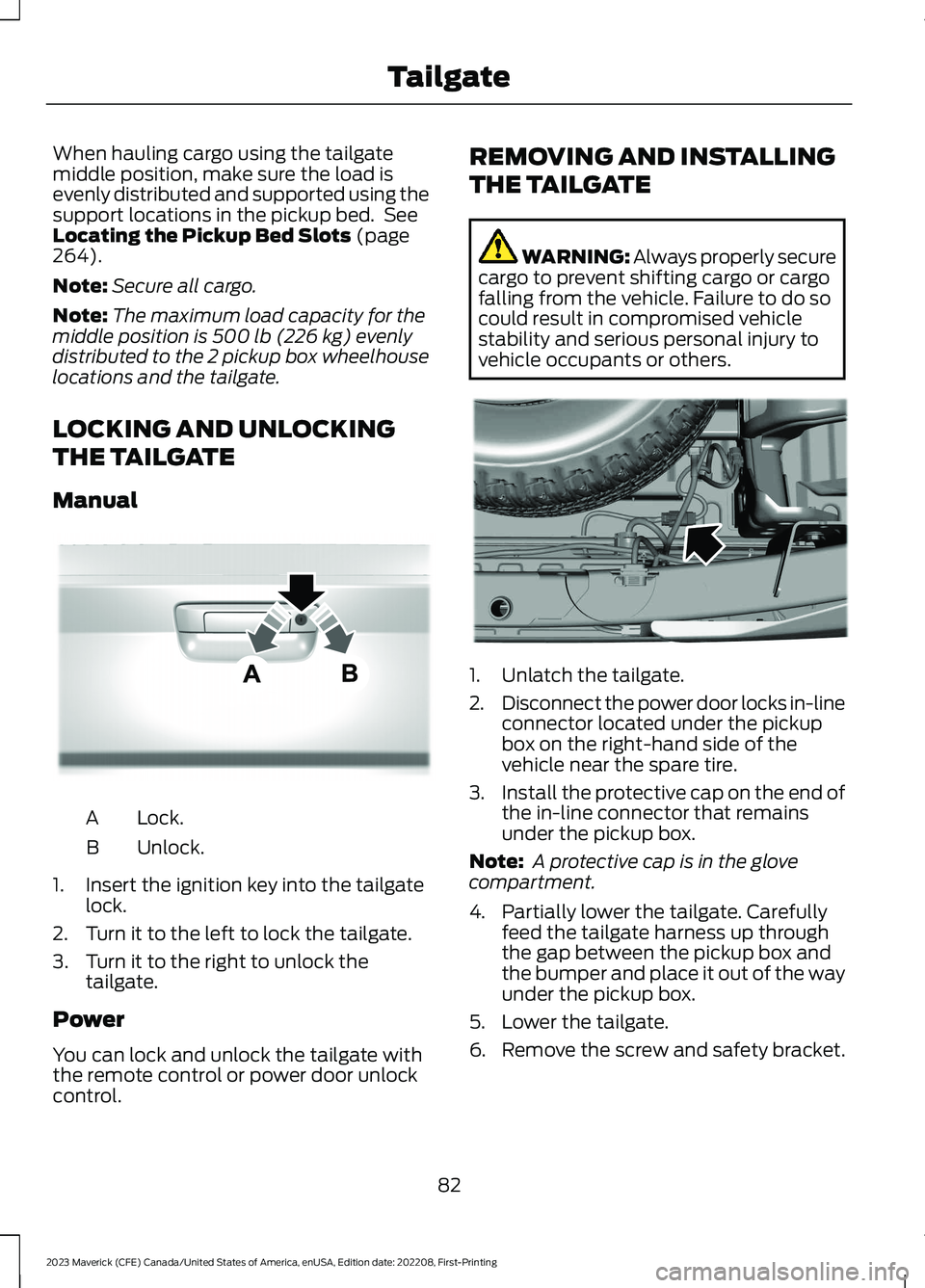
Lock.A
Unlock.B
1.Insert the ignition key into the tailgatelock.
2.Turn it to the left to lock the tailgate.
3.Turn it to the right to unlock thetailgate.
Power
You can lock and unlock the tailgate withthe remote control or power door unlockcontrol.
REMOVING AND INSTALLING
THE TAILGATE
WARNING: Always properly securecargo to prevent shifting cargo or cargofalling from the vehicle. Failure to do socould result in compromised vehiclestability and serious personal injury tovehicle occupants or others.
1.Unlatch the tailgate.
2.Disconnect the power door locks in-lineconnector located under the pickupbox on the right-hand side of thevehicle near the spare tire.
3.Install the protective cap on the end ofthe in-line connector that remainsunder the pickup box.
Note: A protective cap is in the glovecompartment.
4.Partially lower the tailgate. Carefullyfeed the tailgate harness up throughthe gap between the pickup box andthe bumper and place it out of the wayunder the pickup box.
5.Lower the tailgate.
6.Remove the screw and safety bracket.
82
2023 Maverick (CFE) Canada/United States of America, enUSA, Edition date: 202208, First-PrintingTailgateE348035 E189556
Page 88 of 556
PASSIVE ANTI-THEFT
SYSTEM
WHAT IS THE PASSIVE ANTI-THEFT SYSTEM
The passive anti-theft system preventssomeone from starting the vehicle with anincorrectly coded key.
Note:Do not leave a duplicate coded keyin your vehicle. Always take the keys andlock all the doors when leaving your vehicle.
HOW DOES THE PASSIVE ANTI-THEFT SYSTEM WORK
The passive anti-theft system arms whenyou switch the ignition off.
It disarms when the ignition is switched onwith a correctly coded key.
Note:The system is not compatible withnon-Ford aftermarket remote start systems.
Note:Do not leave a duplicate coded keyin your vehicle. Always take the keys andlock all doors when leaving your vehicle.
ANTI-THEFT ALARM SYSTEM
(IF EQUIPPED)
WHAT IS THE ANTI-THEFT ALARMSYSTEM
The anti-theft alarm system warns you ofan unauthorized entry to your vehicle.
HOW DOES THE ANTI-THEFTALARM SYSTEM WORK
When armed, the anti-theft alarm istriggered in any of the following ways:
•If someone opens a door, the liftgateor the hood without a correctly codedkey or remote control.
•If you turn the power on without acorrectly coded key.
•If the interior sensors detect movementinside your vehicle.
•If the inclination sensors detect anattempt to raise your vehicle.
•If someone disconnects the vehiclebattery or the battery backup alarm.
If the anti-theft alarm is triggered, thealarm horn sounds for 30 seconds and thedirection indicators flash for 5 minutes.
Any further attempts to carry out one ofthe above sounds the alarm again.
WHAT IS THE PERIMETER ALARM
The perimeter alarm is designed to detectunauthorized access to your vehicle.
WHAT ARE THE INTERIORSENSORS
The interior sensors are designed to detectany movement inside your vehicle.
The interior sensors are in the overheadconsole.
Note:Do not cover the interior sensors.
WHAT ARE THE INCLINATIONSENSORS
The inclination sensor is designed to detectan attempt to raise your vehicle, forexample to remove a wheel or to tow itaway.
84
2023 Maverick (CFE) Canada/United States of America, enUSA, Edition date: 202208, First-PrintingSecurity
Page 89 of 556
WHAT IS THE BATTERY BACKUPALARM
The battery backup alarm is an additionalalarm sounder that has its own battery. Itcan detect if the vehicle battery isdisconnected to overcome the alarmsystem.
ARMING THE ANTI-THEFT ALARMSYSTEM
The alarm is ready to arm when yourvehicle is switched off.
Lock your vehicle with your remote controlto arm the alarm.
DISARMING THE ANTI-THEFTALARM SYSTEM
Disarm the alarm by performing any of thefollowing actions:
•Unlock the doors or luggagecompartment with the remote control.
•Switch your vehicle on or start yourvehicle.
ANTI-THEFT ALARM SYSTEM
SETTINGS
WHAT ARE THE ALARM SECURITYLEVELS
You can select two levels of alarm security,all sensors and perimeter sensing.
All Sensors
All sensors is the standard setting.
In all sensors, all equipped sensors are onwhen you arm the alarm.
Note:Do not arm the alarm with all sensorsif passengers, animals or other movingobjects are inside your vehicle.
Perimeter Sensing
In perimeter sensing, the interior sensorsare off when you arm the alarm.
All the other equipped sensors activatewhen you arm the alarm in this mode.
SETTING THE ALARM SECURITYLEVEL
To select a different security level, use theinstrument cluster display:
1.Select Settings.
2.Select Vehicle.
3.Select Alarm.
4.Select a setting.
WHAT IS ASK ON EXIT
You can choose which level of security yourequire after you switch the ignition off.
Note:If you do not choose a setting, thesystem defaults to all sensors.
SWITCHING ASK ON EXIT ON ANDOFF
To switch the system on or off, use theinstrument cluster display:
1.Select Settings.
2.Select Vehicle.
3.Select Alarm.
4.Switch Ask on exit on or off.
85
2023 Maverick (CFE) Canada/United States of America, enUSA, Edition date: 202208, First-PrintingSecurity
Page 90 of 556
SECURITY – TROUBLESHOOTING
SECURITY – INFORMATION MESSAGES
DetailsMessage
The system has not detected a correctly coded key.No Key Detected
The system has malfunctioned. Have your vehicle checkedas soon as possible.Starting System Fault
Displays when the alarm has been triggered due to unauthor-ized entry.Vehicle Alarm To StopAlarm, Start Vehicle.
Alarm Announcement
86
2023 Maverick (CFE) Canada/United States of America, enUSA, Edition date: 202208, First-PrintingSecurity
Page 91 of 556
SECURITY – FREQUENTLY ASKEDQUESTIONS
What should I do if there is anypotential alarm problem with myvehicle?
Take all remote controls to anauthorized dealer if there is anypotential alarm problem with yourvehicle.
What should I do if the vehicle is unableto start with a correctly coded key?
Have your vehicle checked as soon aspossible.
87
2023 Maverick (CFE) Canada/United States of America, enUSA, Edition date: 202208, First-PrintingSecurity
Page 122 of 556
4.Select a tire pressure unit.
CHANGING THE TIRE PRESSUREUNIT - VEHICLES WITH: 6.5 INCHSCREEN
You can change the tire pressure unit usingthe instrument cluster display.
1.Select Display Setup.
2.Select Tire pressure.
3.Select a pressure unit.
FUEL ECONOMY DISPLAY -
GASOLINE
An instant fuel economy gauge is providedalong with average fuel economy. Averagefuel economy is continuously averagedsince the last reset.
Note:Press and hold the OK button on thecontrols on the steering wheel to reset youraverage fuel economy.
FUEL ECONOMY DISPLAY -
HYBRID ELECTRIC VEHICLE
(HEV)
An instant fuel economy gauge is providedalong with average fuel economy. Averagefuel economy is continuously averagedsince the last reset.
When the gasoline engine is off, the instantfuel economy gauge is replaced with anelectric driving message.
Note:Press and hold the OK button on thecontrols on the steering wheel to reset youraverage fuel economy.
Note:Fuel economy display is a selectablescreen. See Customizing the InstrumentCluster Display (page 116). SeeCustomizing the Instrument ClusterDisplay (page 116).
EV COACH - HYBRID ELECTRIC
VEHICLE (HEV)
EV coach can help you get the most out ofyour vehicle's electric driving capabilities.
Note:EV coach is a selectable screen. SeeCustomizing the Instrument ClusterDisplay (page 116).
When you are accelerating or maintainingspeed you see a blue or white solid barindicating vehicle power. You may also seea blue rectangular box which shows thepower level at which the engine turns on.
•When the power level is within the box,the color of the bar is blue. This meansyou are in electric operation and theengine is off.
•When the power level is outside of thebox, the color of the bar is white. Thismeans you are in hybrid operation witha combination of the electric motorand the engine providing vehicle power.
When you are decelerating with either yourfoot off the accelerator pedal or on thebrake pedal, a green or white solid bardisplays indicating the power being usedto slow down your vehicle. You may alsosee a green rectangular box which showsthe amount of power that can berecaptured by the regenerative brakingsystem and returned to the high voltagebattery.
•When the power level is within the box,the color of the bar is green. Thismeans that the regenerative brakingsystem is being used to efficiently slowyour vehicle down and return themaximum percentage of energy to thehigh voltage battery.
•When the power level is outside of thebox, the color of the bar is white. Thismeans both the regenerative brakingsystem and conventional brakingsystem are being used.
118
2023 Maverick (CFE) Canada/United States of America, enUSA, Edition date: 202208, First-PrintingInstrument Cluster Display