brake sensor FORD MAVERICK 2023 User Guide
[x] Cancel search | Manufacturer: FORD, Model Year: 2023, Model line: MAVERICK, Model: FORD MAVERICK 2023Pages: 556, PDF Size: 14.79 MB
Page 233 of 556
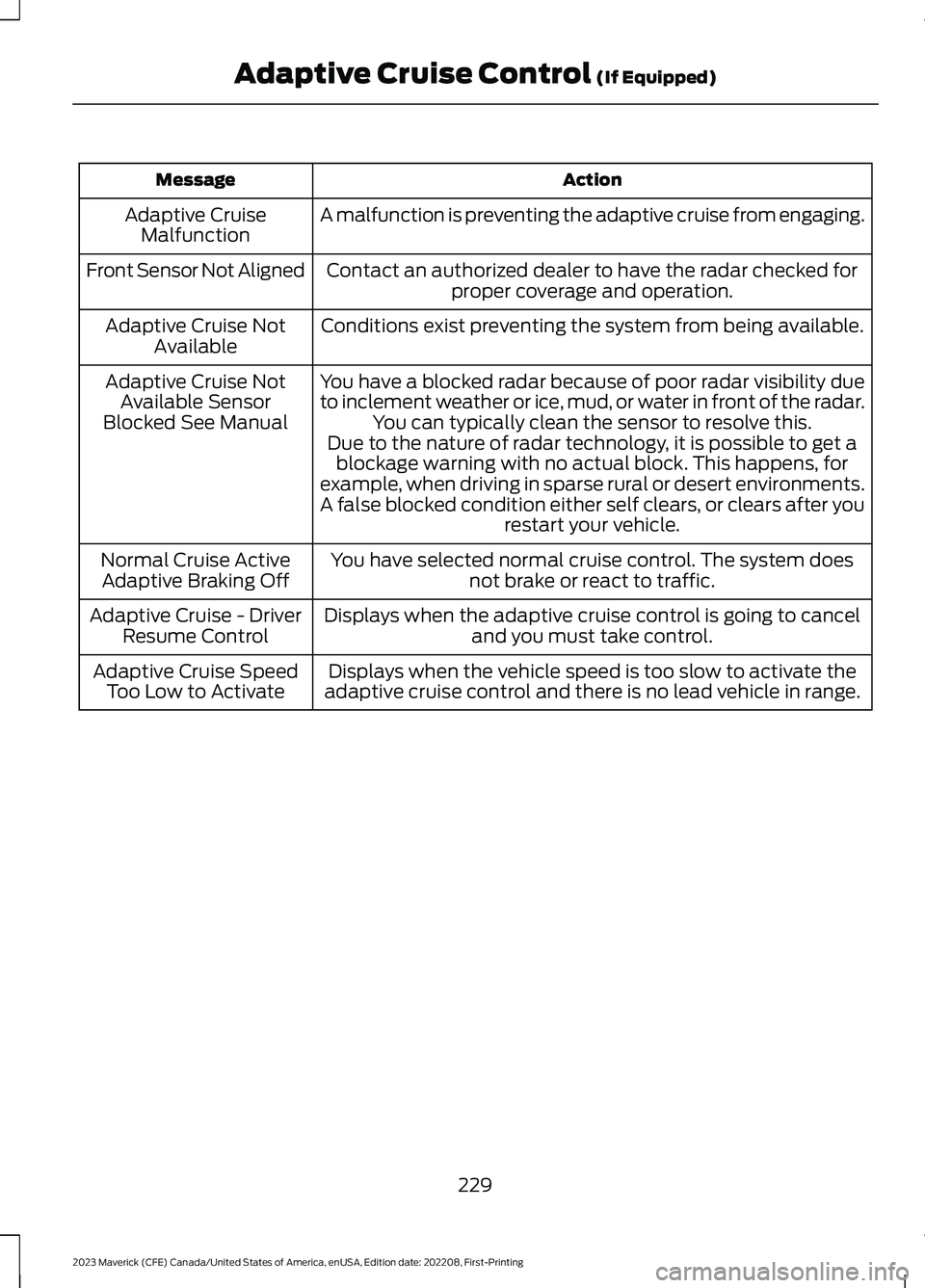
ActionMessage
A malfunction is preventing the adaptive cruise from engaging.Adaptive CruiseMalfunction
Front Sensor Not AlignedContact an authorized dealer to have the radar checked forproper coverage and operation.
Conditions exist preventing the system from being available.Adaptive Cruise NotAvailable
You have a blocked radar because of poor radar visibility dueto inclement weather or ice, mud, or water in front of the radar.You can typically clean the sensor to resolve this.
Adaptive Cruise NotAvailable SensorBlocked See ManualDue to the nature of radar technology, it is possible to get ablockage warning with no actual block. This happens, forexample, when driving in sparse rural or desert environments.A false blocked condition either self clears, or clears after yourestart your vehicle.
You have selected normal cruise control. The system doesnot brake or react to traffic.Normal Cruise ActiveAdaptive Braking Off
Displays when the adaptive cruise control is going to canceland you must take control.Adaptive Cruise - DriverResume Control
Displays when the vehicle speed is too slow to activate theadaptive cruise control and there is no lead vehicle in range.Adaptive Cruise SpeedToo Low to Activate
229
2023 Maverick (CFE) Canada/United States of America, enUSA, Edition date: 202208, First-PrintingAdaptive Cruise Control (If Equipped)
Page 252 of 556
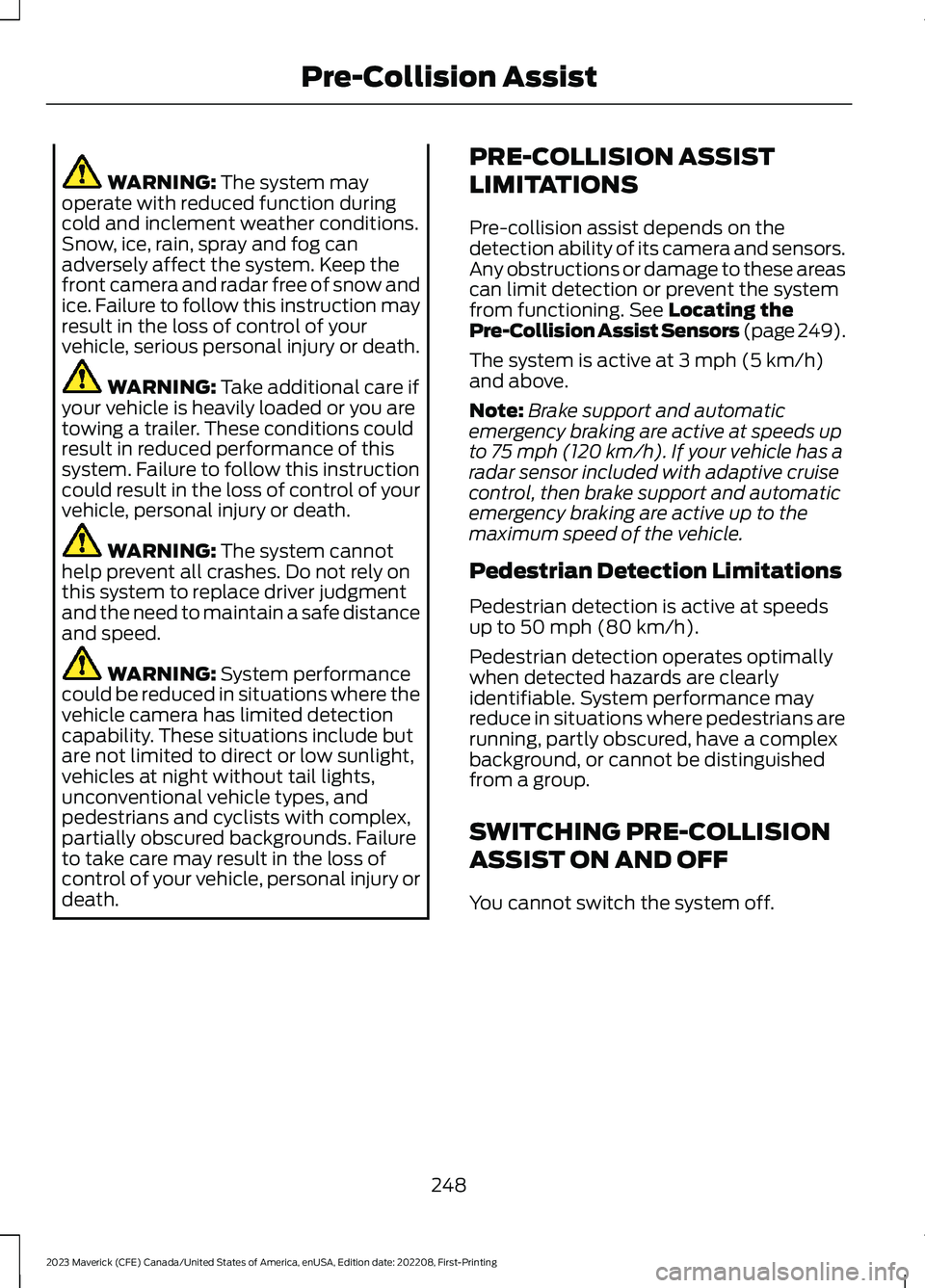
WARNING: The system mayoperate with reduced function duringcold and inclement weather conditions.Snow, ice, rain, spray and fog canadversely affect the system. Keep thefront camera and radar free of snow andice. Failure to follow this instruction mayresult in the loss of control of yourvehicle, serious personal injury or death.
WARNING: Take additional care ifyour vehicle is heavily loaded or you aretowing a trailer. These conditions couldresult in reduced performance of thissystem. Failure to follow this instructioncould result in the loss of control of yourvehicle, personal injury or death.
WARNING: The system cannothelp prevent all crashes. Do not rely onthis system to replace driver judgmentand the need to maintain a safe distanceand speed.
WARNING: System performancecould be reduced in situations where thevehicle camera has limited detectioncapability. These situations include butare not limited to direct or low sunlight,vehicles at night without tail lights,unconventional vehicle types, andpedestrians and cyclists with complex,partially obscured backgrounds. Failureto take care may result in the loss ofcontrol of your vehicle, personal injury ordeath.
PRE-COLLISION ASSIST
LIMITATIONS
Pre-collision assist depends on thedetection ability of its camera and sensors.Any obstructions or damage to these areascan limit detection or prevent the systemfrom functioning. See Locating thePre-Collision Assist Sensors (page 249).
The system is active at 3 mph (5 km/h)and above.
Note:Brake support and automaticemergency braking are active at speeds upto 75 mph (120 km/h). If your vehicle has aradar sensor included with adaptive cruisecontrol, then brake support and automaticemergency braking are active up to themaximum speed of the vehicle.
Pedestrian Detection Limitations
Pedestrian detection is active at speedsup to 50 mph (80 km/h).
Pedestrian detection operates optimallywhen detected hazards are clearlyidentifiable. System performance mayreduce in situations where pedestrians arerunning, partly obscured, have a complexbackground, or cannot be distinguishedfrom a group.
SWITCHING PRE-COLLISION
ASSIST ON AND OFF
You cannot switch the system off.
248
2023 Maverick (CFE) Canada/United States of America, enUSA, Edition date: 202208, First-PrintingPre-Collision Assist
Page 320 of 556
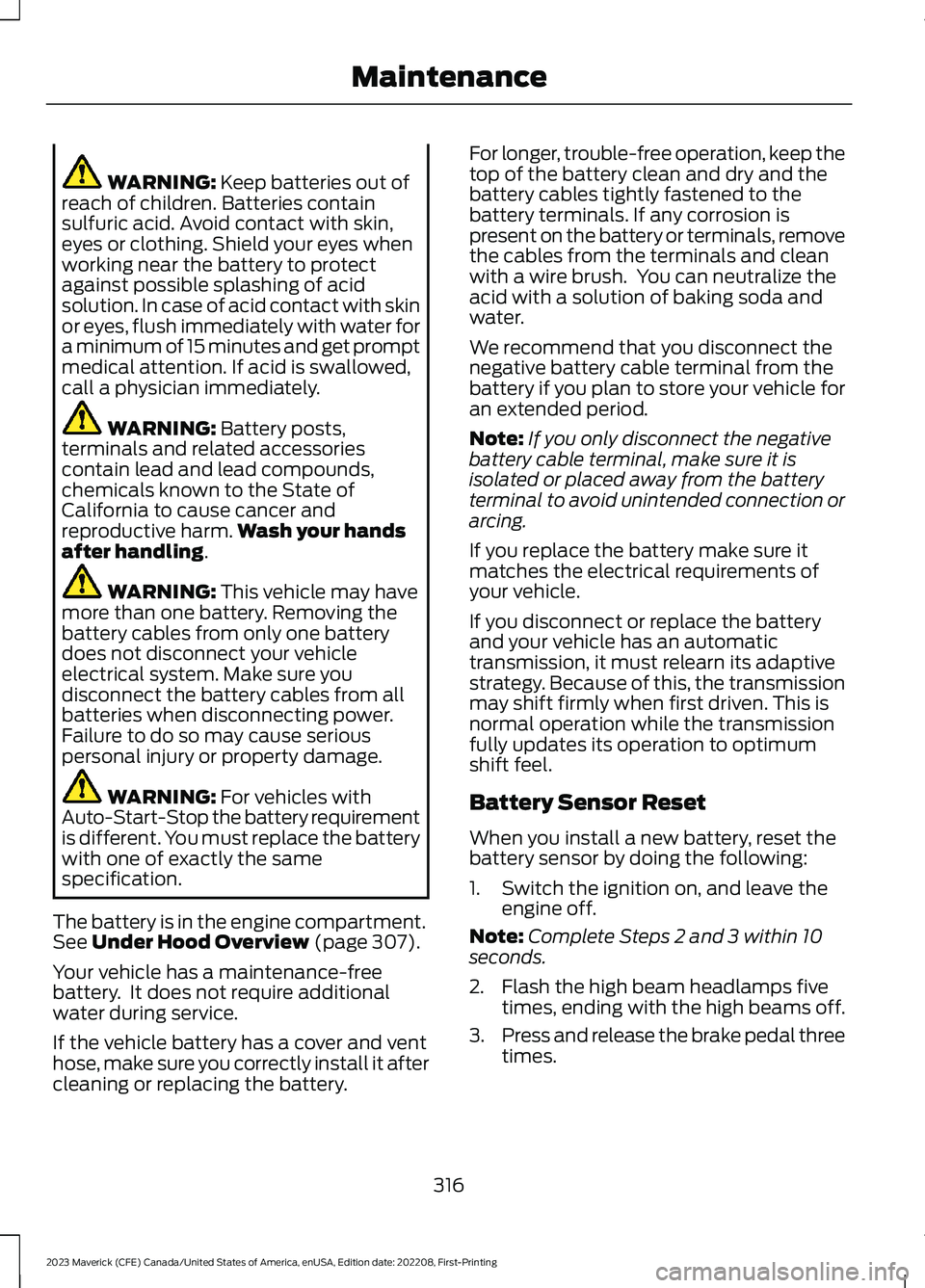
WARNING: Keep batteries out ofreach of children. Batteries containsulfuric acid. Avoid contact with skin,eyes or clothing. Shield your eyes whenworking near the battery to protectagainst possible splashing of acidsolution. In case of acid contact with skinor eyes, flush immediately with water fora minimum of 15 minutes and get promptmedical attention. If acid is swallowed,call a physician immediately.
WARNING: Battery posts,terminals and related accessoriescontain lead and lead compounds,chemicals known to the State ofCalifornia to cause cancer andreproductive harm.Wash your handsafter handling.
WARNING: This vehicle may havemore than one battery. Removing thebattery cables from only one batterydoes not disconnect your vehicleelectrical system. Make sure youdisconnect the battery cables from allbatteries when disconnecting power.Failure to do so may cause seriouspersonal injury or property damage.
WARNING: For vehicles withAuto-Start-Stop the battery requirementis different. You must replace the batterywith one of exactly the samespecification.
The battery is in the engine compartment.See Under Hood Overview (page 307).
Your vehicle has a maintenance-freebattery. It does not require additionalwater during service.
If the vehicle battery has a cover and venthose, make sure you correctly install it aftercleaning or replacing the battery.
For longer, trouble-free operation, keep thetop of the battery clean and dry and thebattery cables tightly fastened to thebattery terminals. If any corrosion ispresent on the battery or terminals, removethe cables from the terminals and cleanwith a wire brush. You can neutralize theacid with a solution of baking soda andwater.
We recommend that you disconnect thenegative battery cable terminal from thebattery if you plan to store your vehicle foran extended period.
Note:If you only disconnect the negativebattery cable terminal, make sure it isisolated or placed away from the batteryterminal to avoid unintended connection orarcing.
If you replace the battery make sure itmatches the electrical requirements ofyour vehicle.
If you disconnect or replace the batteryand your vehicle has an automatictransmission, it must relearn its adaptivestrategy. Because of this, the transmissionmay shift firmly when first driven. This isnormal operation while the transmissionfully updates its operation to optimumshift feel.
Battery Sensor Reset
When you install a new battery, reset thebattery sensor by doing the following:
1.Switch the ignition on, and leave theengine off.
Note:Complete Steps 2 and 3 within 10seconds.
2.Flash the high beam headlamps fivetimes, ending with the high beams off.
3.Press and release the brake pedal threetimes.
316
2023 Maverick (CFE) Canada/United States of America, enUSA, Edition date: 202208, First-PrintingMaintenance
Page 323 of 556
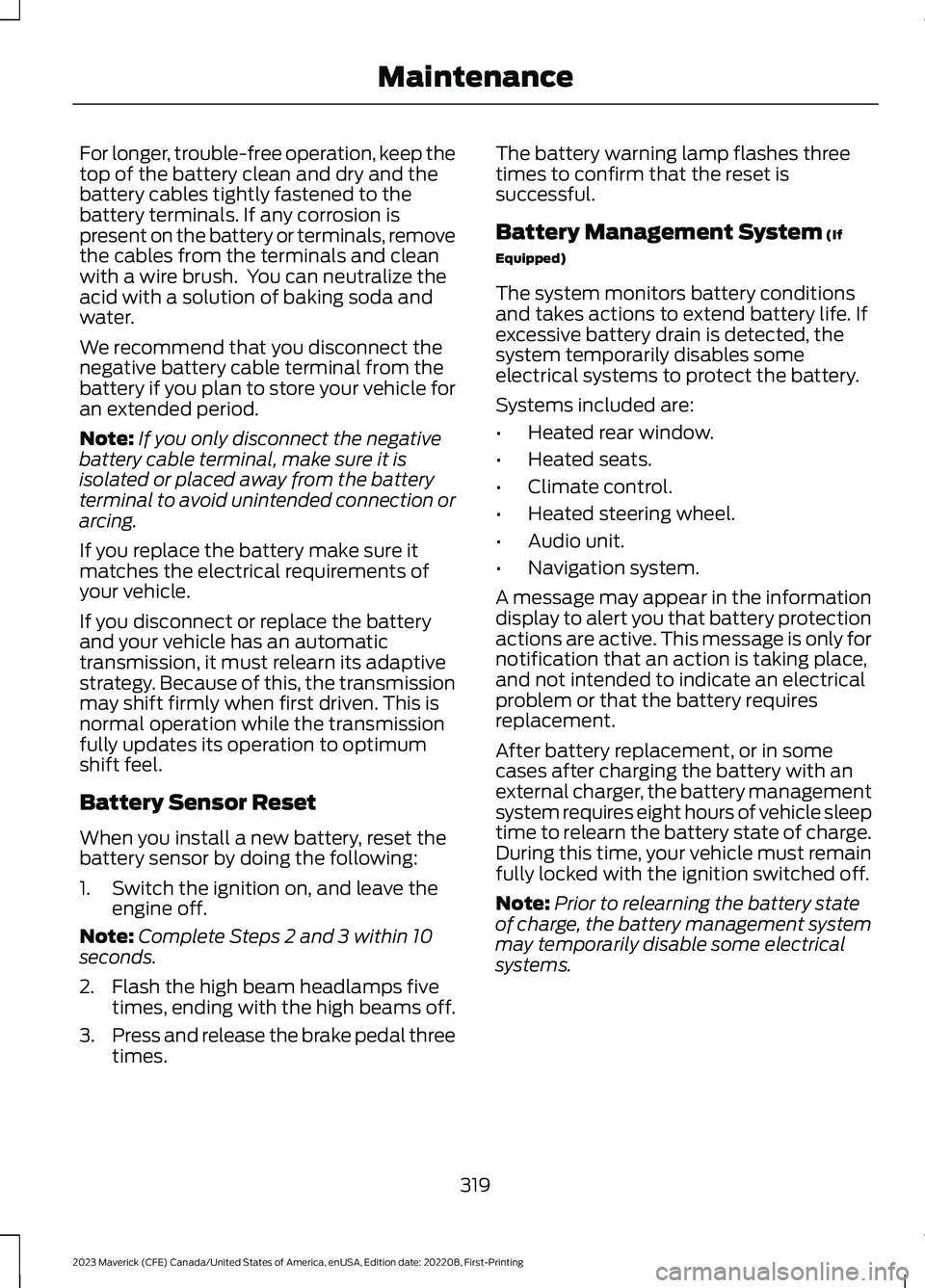
For longer, trouble-free operation, keep thetop of the battery clean and dry and thebattery cables tightly fastened to thebattery terminals. If any corrosion ispresent on the battery or terminals, removethe cables from the terminals and cleanwith a wire brush. You can neutralize theacid with a solution of baking soda andwater.
We recommend that you disconnect thenegative battery cable terminal from thebattery if you plan to store your vehicle foran extended period.
Note:If you only disconnect the negativebattery cable terminal, make sure it isisolated or placed away from the batteryterminal to avoid unintended connection orarcing.
If you replace the battery make sure itmatches the electrical requirements ofyour vehicle.
If you disconnect or replace the batteryand your vehicle has an automatictransmission, it must relearn its adaptivestrategy. Because of this, the transmissionmay shift firmly when first driven. This isnormal operation while the transmissionfully updates its operation to optimumshift feel.
Battery Sensor Reset
When you install a new battery, reset thebattery sensor by doing the following:
1.Switch the ignition on, and leave theengine off.
Note:Complete Steps 2 and 3 within 10seconds.
2.Flash the high beam headlamps fivetimes, ending with the high beams off.
3.Press and release the brake pedal threetimes.
The battery warning lamp flashes threetimes to confirm that the reset issuccessful.
Battery Management System (If
Equipped)
The system monitors battery conditionsand takes actions to extend battery life. Ifexcessive battery drain is detected, thesystem temporarily disables someelectrical systems to protect the battery.
Systems included are:
•Heated rear window.
•Heated seats.
•Climate control.
•Heated steering wheel.
•Audio unit.
•Navigation system.
A message may appear in the informationdisplay to alert you that battery protectionactions are active. This message is only fornotification that an action is taking place,and not intended to indicate an electricalproblem or that the battery requiresreplacement.
After battery replacement, or in somecases after charging the battery with anexternal charger, the battery managementsystem requires eight hours of vehicle sleeptime to relearn the battery state of charge.During this time, your vehicle must remainfully locked with the ignition switched off.
Note:Prior to relearning the battery stateof charge, the battery management systemmay temporarily disable some electricalsystems.
319
2023 Maverick (CFE) Canada/United States of America, enUSA, Edition date: 202208, First-PrintingMaintenance
Page 358 of 556
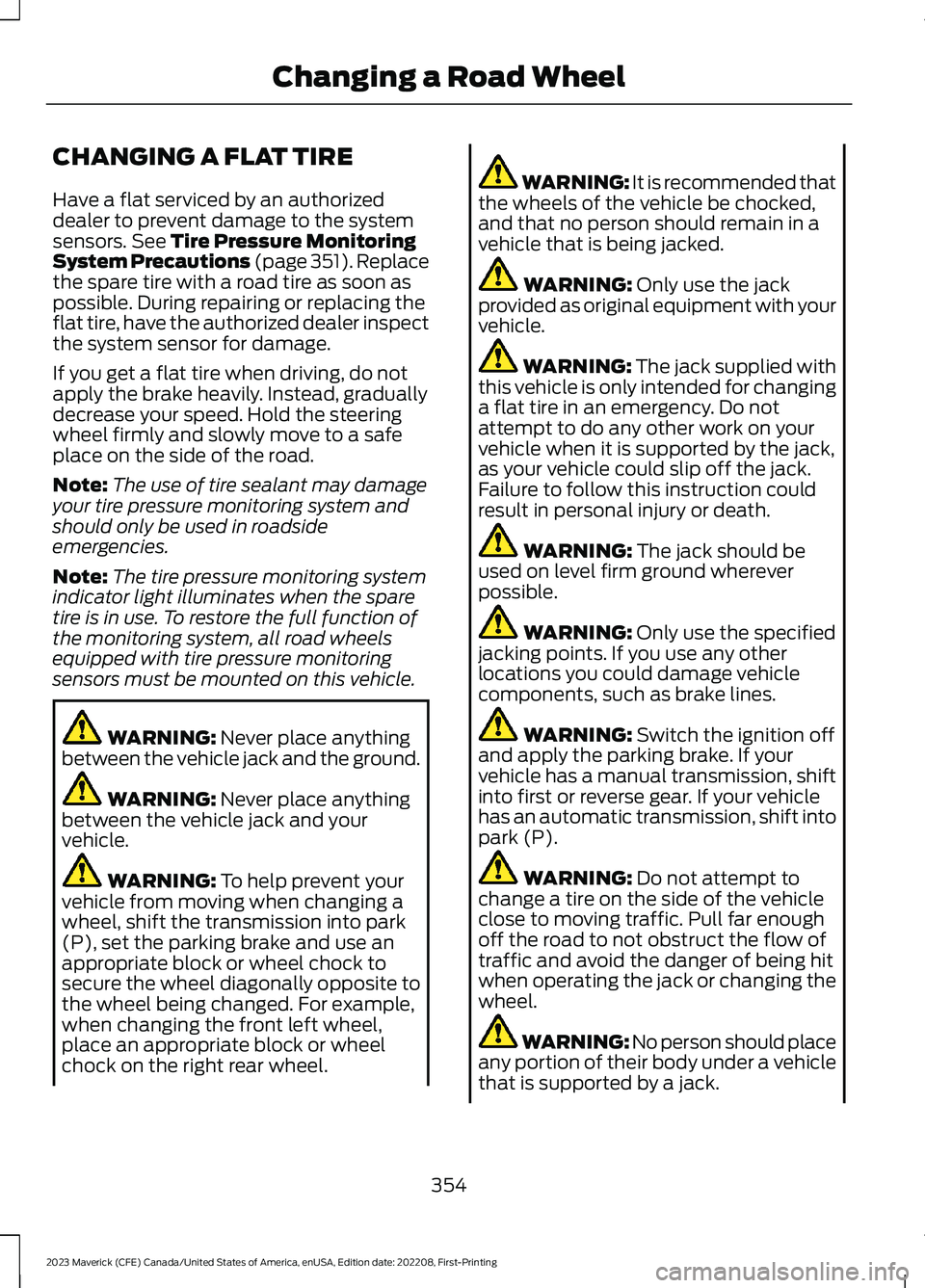
CHANGING A FLAT TIRE
Have a flat serviced by an authorizeddealer to prevent damage to the systemsensors. See Tire Pressure MonitoringSystem Precautions (page 351).Replacethe spare tire with a road tire as soon aspossible. During repairing or replacing theflat tire, have the authorized dealer inspectthe system sensor for damage.
If you get a flat tire when driving, do notapply the brake heavily. Instead, graduallydecrease your speed. Hold the steeringwheel firmly and slowly move to a safeplace on the side of the road.
Note:The use of tire sealant may damageyour tire pressure monitoring system andshould only be used in roadsideemergencies.
Note:The tire pressure monitoring systemindicator light illuminates when the sparetire is in use. To restore the full function ofthe monitoring system, all road wheelsequipped with tire pressure monitoringsensors must be mounted on this vehicle.
WARNING: Never place anythingbetween the vehicle jack and the ground.
WARNING: Never place anythingbetween the vehicle jack and yourvehicle.
WARNING: To help prevent yourvehicle from moving when changing awheel, shift the transmission into park(P), set the parking brake and use anappropriate block or wheel chock tosecure the wheel diagonally opposite tothe wheel being changed. For example,when changing the front left wheel,place an appropriate block or wheelchock on the right rear wheel.
WARNING: It is recommended thatthe wheels of the vehicle be chocked,and that no person should remain in avehicle that is being jacked.
WARNING: Only use the jackprovided as original equipment with yourvehicle.
WARNING: The jack supplied withthis vehicle is only intended for changinga flat tire in an emergency. Do notattempt to do any other work on yourvehicle when it is supported by the jack,as your vehicle could slip off the jack.Failure to follow this instruction couldresult in personal injury or death.
WARNING: The jack should beused on level firm ground whereverpossible.
WARNING: Only use the specifiedjacking points. If you use any otherlocations you could damage vehiclecomponents, such as brake lines.
WARNING: Switch the ignition offand apply the parking brake. If yourvehicle has a manual transmission, shiftinto first or reverse gear. If your vehiclehas an automatic transmission, shift intopark (P).
WARNING: Do not attempt tochange a tire on the side of the vehicleclose to moving traffic. Pull far enoughoff the road to not obstruct the flow oftraffic and avoid the danger of being hitwhen operating the jack or changing thewheel.
WARNING: No person should placeany portion of their body under a vehiclethat is supported by a jack.
354
2023 Maverick (CFE) Canada/United States of America, enUSA, Edition date: 202208, First-PrintingChanging a Road Wheel
Page 540 of 556
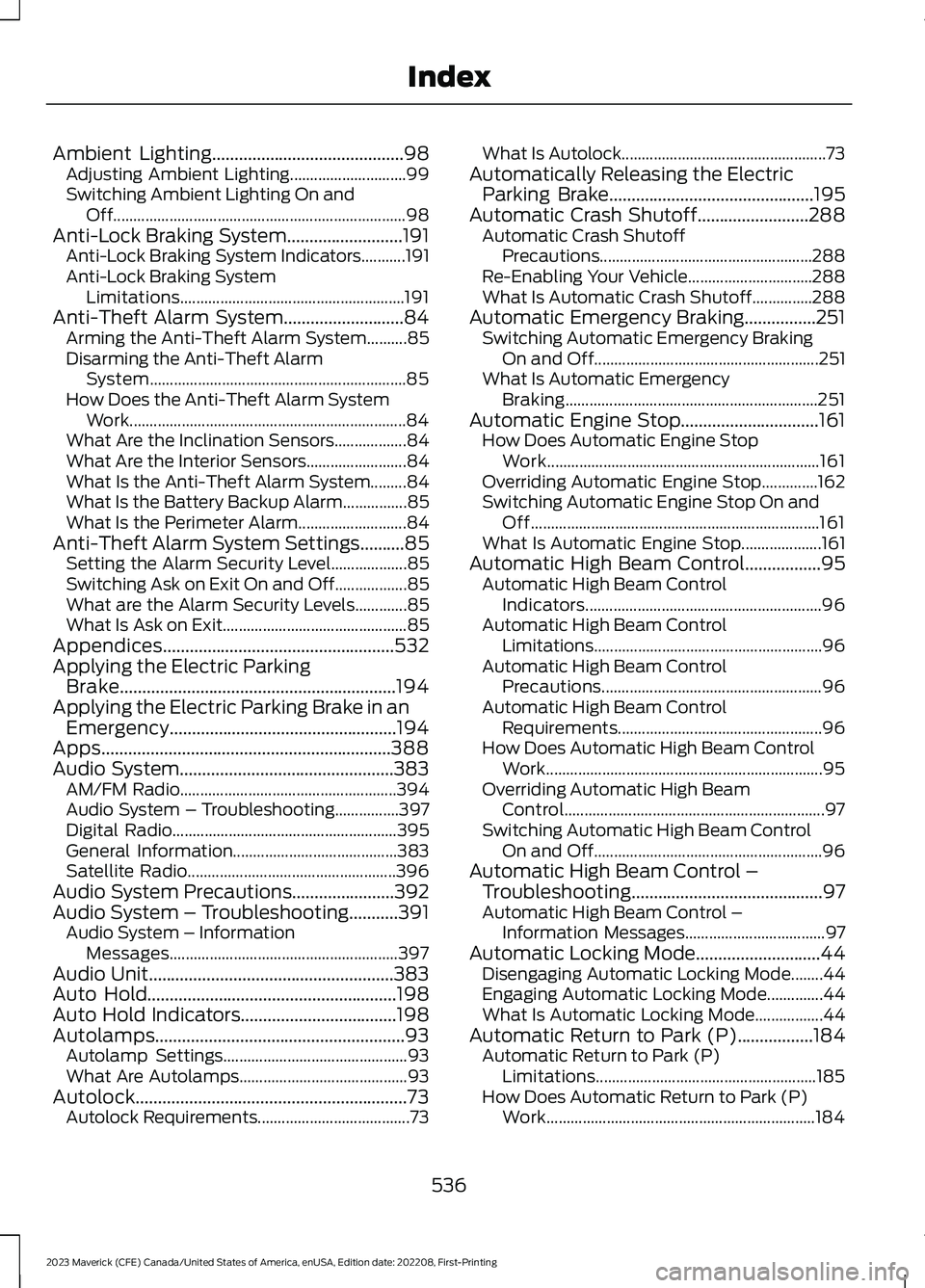
Ambient Lighting...........................................98Adjusting Ambient Lighting.............................99Switching Ambient Lighting On andOff.........................................................................98Anti-Lock Braking System..........................191Anti-Lock Braking System Indicators...........191Anti-Lock Braking SystemLimitations........................................................191Anti-Theft Alarm System...........................84Arming the Anti-Theft Alarm System..........85Disarming the Anti-Theft AlarmSystem................................................................85How Does the Anti-Theft Alarm SystemWork.....................................................................84What Are the Inclination Sensors..................84What Are the Interior Sensors.........................84What Is the Anti-Theft Alarm System.........84What Is the Battery Backup Alarm................85What Is the Perimeter Alarm...........................84Anti-Theft Alarm System Settings..........85Setting the Alarm Security Level...................85Switching Ask on Exit On and Off..................85What are the Alarm Security Levels.............85What Is Ask on Exit..............................................85Appendices....................................................532Applying the Electric ParkingBrake..............................................................194Applying the Electric Parking Brake in anEmergency...................................................194Apps.................................................................388Audio System................................................383AM/FM Radio......................................................394Audio System – Troubleshooting................397Digital Radio........................................................395General Information.........................................383Satellite Radio....................................................396Audio System Precautions.......................392Audio System – Troubleshooting...........391Audio System – InformationMessages.........................................................397Audio Unit.......................................................383Auto Hold........................................................198Auto Hold Indicators...................................198Autolamps........................................................93Autolamp Settings..............................................93What Are Autolamps..........................................93Autolock.............................................................73Autolock Requirements......................................73
What Is Autolock...................................................73Automatically Releasing the ElectricParking Brake..............................................195Automatic Crash Shutoff.........................288Automatic Crash ShutoffPrecautions.....................................................288Re-Enabling Your Vehicle...............................288What Is Automatic Crash Shutoff...............288Automatic Emergency Braking................251Switching Automatic Emergency BrakingOn and Off........................................................251What Is Automatic EmergencyBraking...............................................................251Automatic Engine Stop...............................161How Does Automatic Engine StopWork....................................................................161Overriding Automatic Engine Stop..............162Switching Automatic Engine Stop On andOff........................................................................161What Is Automatic Engine Stop....................161Automatic High Beam Control.................95Automatic High Beam ControlIndicators...........................................................96Automatic High Beam ControlLimitations.........................................................96Automatic High Beam ControlPrecautions.......................................................96Automatic High Beam ControlRequirements...................................................96How Does Automatic High Beam ControlWork.....................................................................95Overriding Automatic High BeamControl.................................................................97Switching Automatic High Beam ControlOn and Off.........................................................96Automatic High Beam Control –Troubleshooting...........................................97Automatic High Beam Control –Information Messages...................................97Automatic Locking Mode............................44Disengaging Automatic Locking Mode........44Engaging Automatic Locking Mode..............44What Is Automatic Locking Mode.................44Automatic Return to Park (P).................184Automatic Return to Park (P)Limitations.......................................................185How Does Automatic Return to Park (P)Work...................................................................184
536
2023 Maverick (CFE) Canada/United States of America, enUSA, Edition date: 202208, First-PrintingIndex
Page 542 of 556
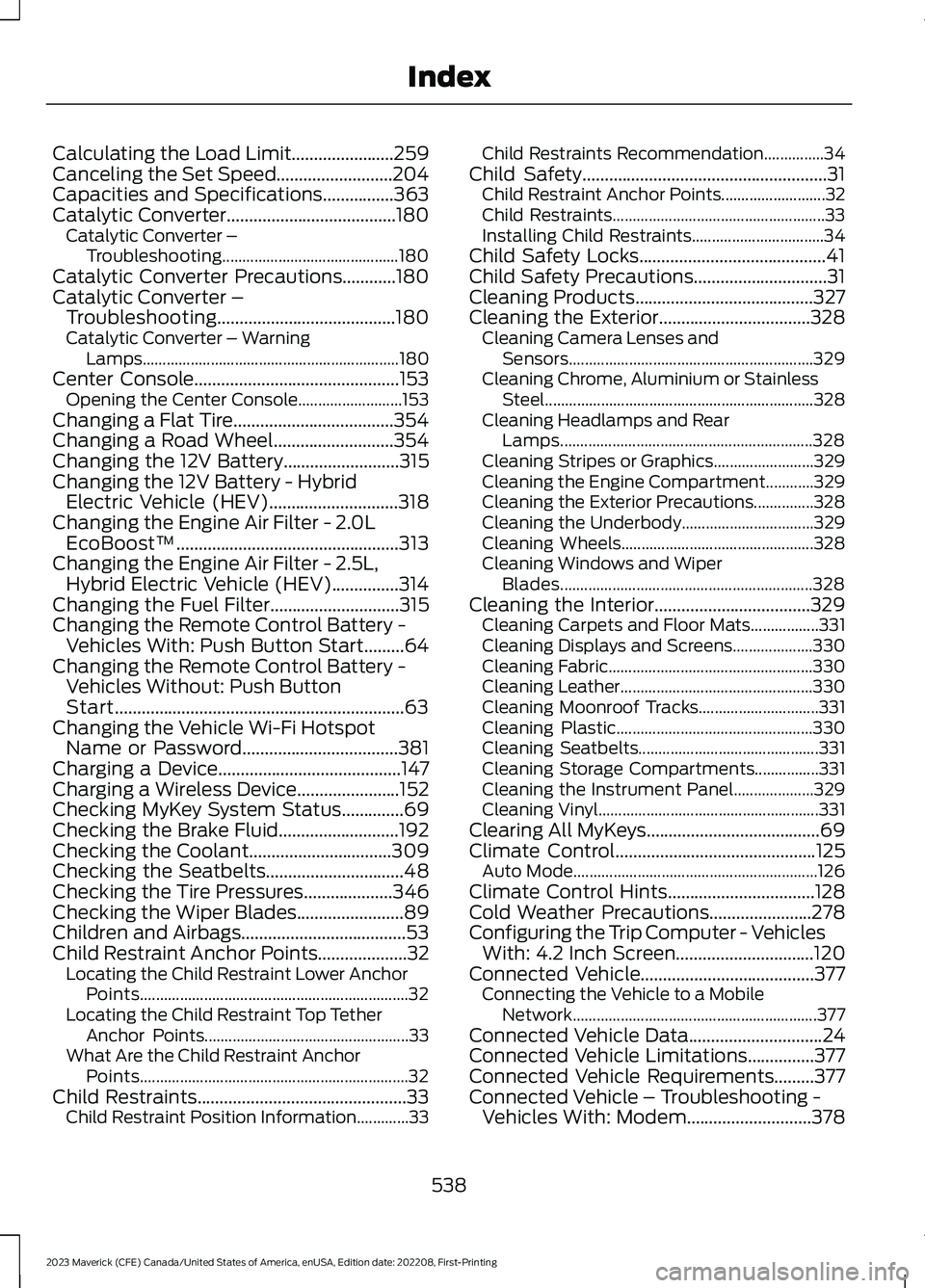
Calculating the Load Limit.......................259Canceling the Set Speed..........................204Capacities and Specifications................363Catalytic Converter......................................180Catalytic Converter –Troubleshooting............................................180Catalytic Converter Precautions............180Catalytic Converter –Troubleshooting........................................180Catalytic Converter – WarningLamps................................................................180Center Console..............................................153Opening the Center Console..........................153Changing a Flat Tire....................................354Changing a Road Wheel...........................354Changing the 12V Battery..........................315Changing the 12V Battery - HybridElectric Vehicle (HEV).............................318Changing the Engine Air Filter - 2.0LEcoBoost™..................................................313Changing the Engine Air Filter - 2.5L,Hybrid Electric Vehicle (HEV)...............314Changing the Fuel Filter.............................315Changing the Remote Control Battery -Vehicles With: Push Button Start.........64Changing the Remote Control Battery -Vehicles Without: Push ButtonStart.................................................................63Changing the Vehicle Wi-Fi HotspotName or Password...................................381Charging a Device.........................................147Charging a Wireless Device.......................152Checking MyKey System Status..............69Checking the Brake Fluid...........................192Checking the Coolant................................309Checking the Seatbelts...............................48Checking the Tire Pressures....................346Checking the Wiper Blades........................89Children and Airbags.....................................53Child Restraint Anchor Points....................32Locating the Child Restraint Lower AnchorPoints...................................................................32Locating the Child Restraint Top TetherAnchor Points...................................................33What Are the Child Restraint AnchorPoints...................................................................32Child Restraints...............................................33Child Restraint Position Information.............33
Child Restraints Recommendation...............34Child Safety.......................................................31Child Restraint Anchor Points..........................32Child Restraints.....................................................33Installing Child Restraints.................................34Child Safety Locks..........................................41Child Safety Precautions..............................31Cleaning Products........................................327Cleaning the Exterior..................................328Cleaning Camera Lenses andSensors.............................................................329Cleaning Chrome, Aluminium or StainlessSteel...................................................................328Cleaning Headlamps and RearLamps...............................................................328Cleaning Stripes or Graphics.........................329Cleaning the Engine Compartment............329Cleaning the Exterior Precautions...............328Cleaning the Underbody.................................329Cleaning Wheels................................................328Cleaning Windows and WiperBlades...............................................................328Cleaning the Interior...................................329Cleaning Carpets and Floor Mats.................331Cleaning Displays and Screens....................330Cleaning Fabric...................................................330Cleaning Leather................................................330Cleaning Moonroof Tracks..............................331Cleaning Plastic.................................................330Cleaning Seatbelts.............................................331Cleaning Storage Compartments................331Cleaning the Instrument Panel....................329Cleaning Vinyl.......................................................331Clearing All MyKeys.......................................69Climate Control.............................................125Auto Mode.............................................................126Climate Control Hints.................................128Cold Weather Precautions.......................278Configuring the Trip Computer - VehiclesWith: 4.2 Inch Screen...............................120Connected Vehicle.......................................377Connecting the Vehicle to a MobileNetwork.............................................................377Connected Vehicle Data..............................24Connected Vehicle Limitations...............377Connected Vehicle Requirements.........377Connected Vehicle – Troubleshooting -Vehicles With: Modem............................378
538
2023 Maverick (CFE) Canada/United States of America, enUSA, Edition date: 202208, First-PrintingIndex
Page 548 of 556
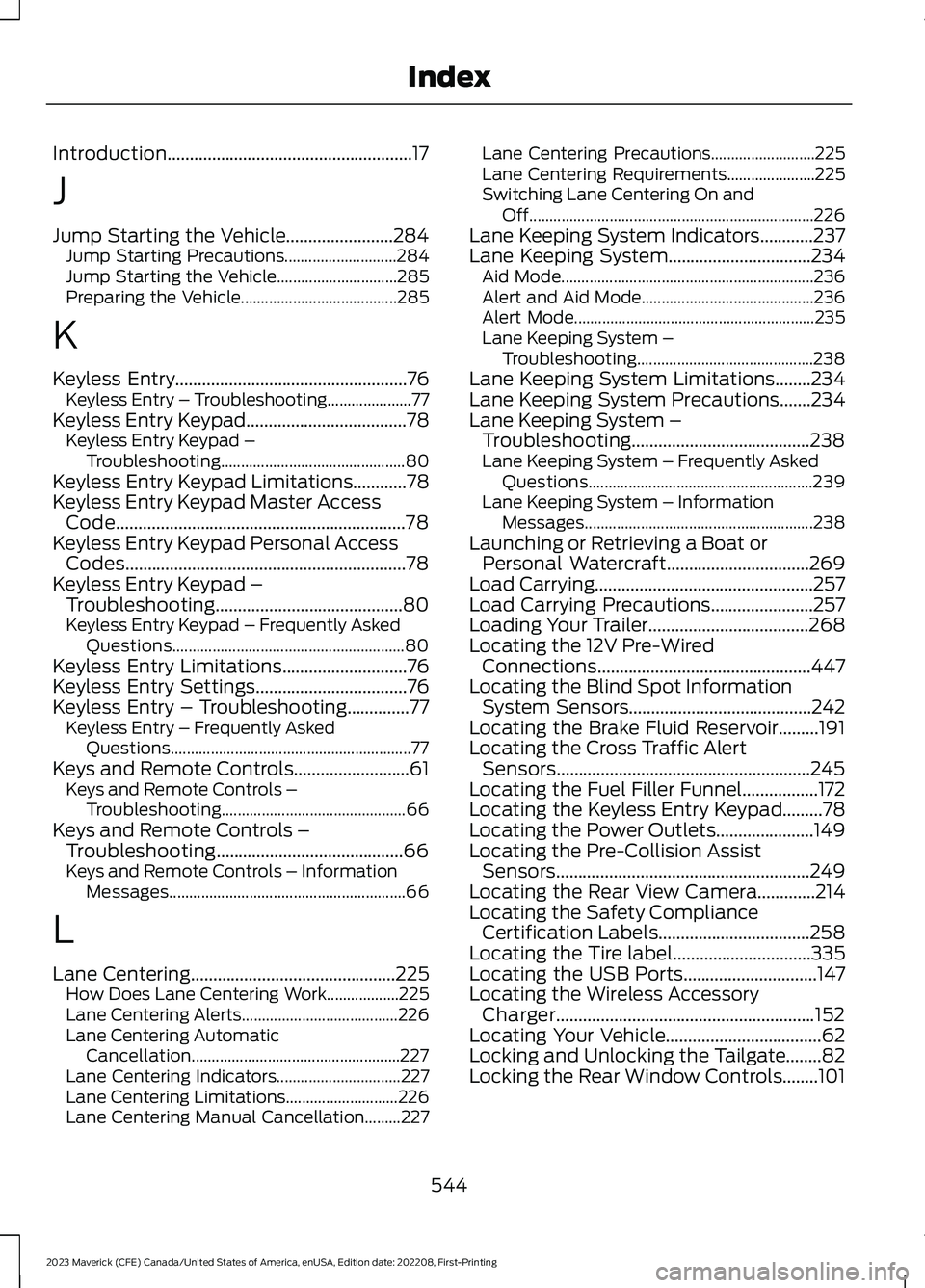
Introduction.......................................................17
J
Jump Starting the Vehicle........................284Jump Starting Precautions............................284Jump Starting the Vehicle..............................285Preparing the Vehicle.......................................285
K
Keyless Entry....................................................76Keyless Entry – Troubleshooting.....................77Keyless Entry Keypad....................................78Keyless Entry Keypad –Troubleshooting..............................................80Keyless Entry Keypad Limitations............78Keyless Entry Keypad Master AccessCode.................................................................78Keyless Entry Keypad Personal AccessCodes...............................................................78Keyless Entry Keypad –Troubleshooting..........................................80Keyless Entry Keypad – Frequently AskedQuestions..........................................................80Keyless Entry Limitations............................76Keyless Entry Settings..................................76Keyless Entry – Troubleshooting..............77Keyless Entry – Frequently AskedQuestions............................................................77Keys and Remote Controls..........................61Keys and Remote Controls –Troubleshooting..............................................66Keys and Remote Controls –Troubleshooting..........................................66Keys and Remote Controls – InformationMessages...........................................................66
L
Lane Centering..............................................225How Does Lane Centering Work..................225Lane Centering Alerts.......................................226Lane Centering AutomaticCancellation....................................................227Lane Centering Indicators...............................227Lane Centering Limitations............................226Lane Centering Manual Cancellation.........227
Lane Centering Precautions..........................225Lane Centering Requirements......................225Switching Lane Centering On andOff.......................................................................226Lane Keeping System Indicators............237Lane Keeping System................................234Aid Mode...............................................................236Alert and Aid Mode...........................................236Alert Mode............................................................235Lane Keeping System –Troubleshooting............................................238Lane Keeping System Limitations........234Lane Keeping System Precautions.......234Lane Keeping System –Troubleshooting........................................238Lane Keeping System – Frequently AskedQuestions........................................................239Lane Keeping System – InformationMessages.........................................................238Launching or Retrieving a Boat orPersonal Watercraft................................269Load Carrying.................................................257Load Carrying Precautions.......................257Loading Your Trailer....................................268Locating the 12V Pre-WiredConnections................................................447Locating the Blind Spot InformationSystem Sensors.........................................242Locating the Brake Fluid Reservoir.........191Locating the Cross Traffic AlertSensors.........................................................245Locating the Fuel Filler Funnel.................172Locating the Keyless Entry Keypad.........78Locating the Power Outlets......................149Locating the Pre-Collision AssistSensors.........................................................249Locating the Rear View Camera.............214Locating the Safety ComplianceCertification Labels..................................258Locating the Tire label...............................335Locating the USB Ports..............................147Locating the Wireless AccessoryCharger..........................................................152Locating Your Vehicle...................................62Locking and Unlocking the Tailgate........82Locking the Rear Window Controls........101
544
2023 Maverick (CFE) Canada/United States of America, enUSA, Edition date: 202208, First-PrintingIndex
Page 551 of 556
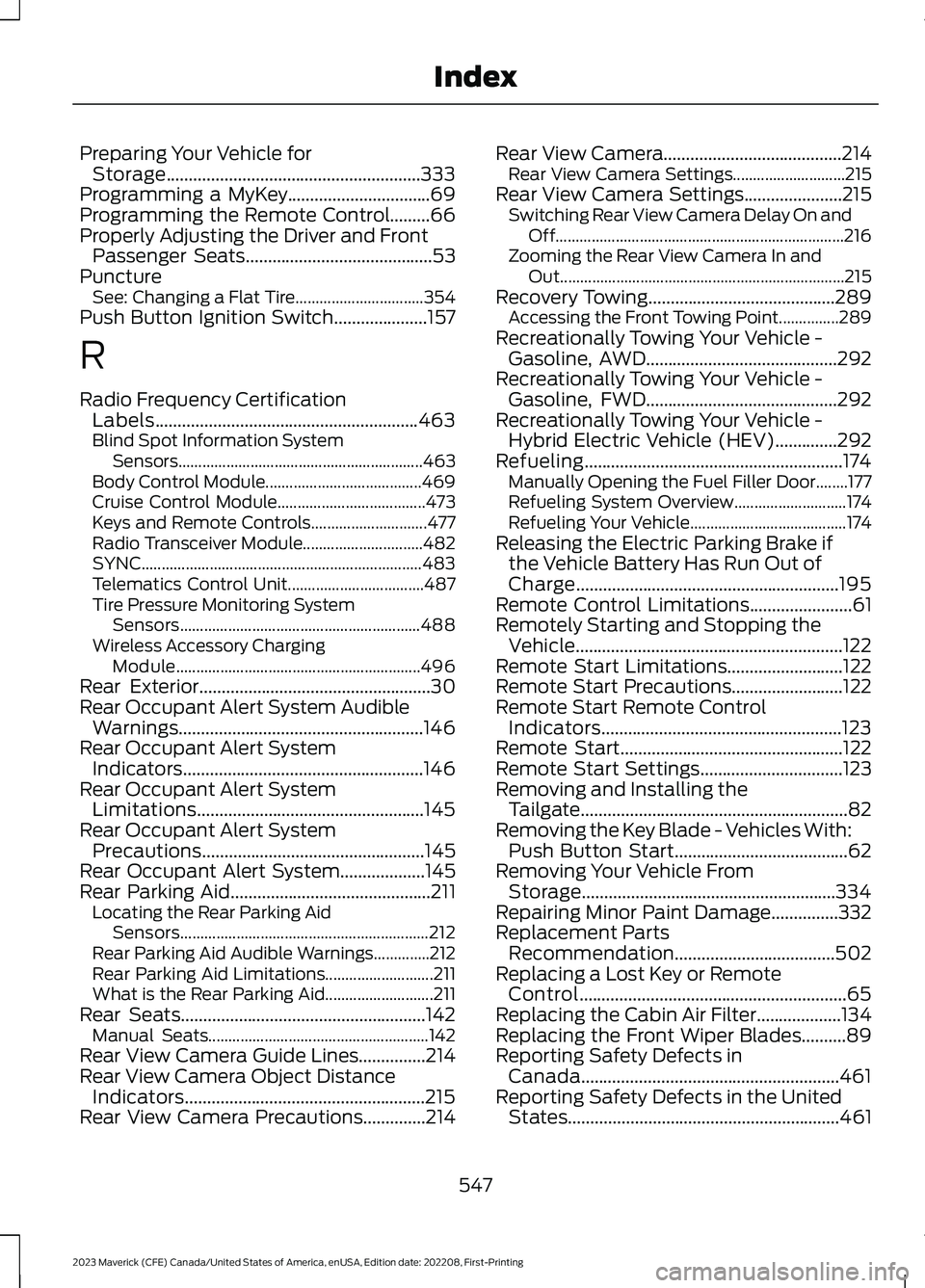
Preparing Your Vehicle forStorage.........................................................333Programming a MyKey................................69Programming the Remote Control.........66Properly Adjusting the Driver and FrontPassenger Seats..........................................53PunctureSee: Changing a Flat Tire................................354Push Button Ignition Switch.....................157
R
Radio Frequency CertificationLabels...........................................................463Blind Spot Information SystemSensors.............................................................463Body Control Module.......................................469Cruise Control Module.....................................473Keys and Remote Controls.............................477Radio Transceiver Module..............................482SYNC......................................................................483Telematics Control Unit..................................487Tire Pressure Monitoring SystemSensors............................................................488Wireless Accessory ChargingModule.............................................................496Rear Exterior....................................................30Rear Occupant Alert System AudibleWarnings.......................................................146Rear Occupant Alert SystemIndicators......................................................146Rear Occupant Alert SystemLimitations...................................................145Rear Occupant Alert SystemPrecautions..................................................145Rear Occupant Alert System...................145Rear Parking Aid.............................................211Locating the Rear Parking AidSensors..............................................................212Rear Parking Aid Audible Warnings..............212Rear Parking Aid Limitations...........................211What is the Rear Parking Aid...........................211Rear Seats.......................................................142Manual Seats.......................................................142Rear View Camera Guide Lines...............214Rear View Camera Object DistanceIndicators......................................................215Rear View Camera Precautions..............214
Rear View Camera........................................214Rear View Camera Settings............................215Rear View Camera Settings......................215Switching Rear View Camera Delay On andOff........................................................................216Zooming the Rear View Camera In andOut.......................................................................215Recovery Towing..........................................289Accessing the Front Towing Point...............289Recreationally Towing Your Vehicle -Gasoline, AWD...........................................292Recreationally Towing Your Vehicle -Gasoline, FWD...........................................292Recreationally Towing Your Vehicle -Hybrid Electric Vehicle (HEV)..............292Refueling..........................................................174Manually Opening the Fuel Filler Door........177Refueling System Overview............................174Refueling Your Vehicle.......................................174Releasing the Electric Parking Brake ifthe Vehicle Battery Has Run Out ofCharge...........................................................195Remote Control Limitations.......................61Remotely Starting and Stopping theVehicle............................................................122Remote Start Limitations..........................122Remote Start Precautions.........................122Remote Start Remote ControlIndicators......................................................123Remote Start..................................................122Remote Start Settings................................123Removing and Installing theTailgate............................................................82Removing the Key Blade - Vehicles With:Push Button Start.......................................62Removing Your Vehicle FromStorage.........................................................334Repairing Minor Paint Damage...............332Replacement PartsRecommendation....................................502Replacing a Lost Key or RemoteControl............................................................65Replacing the Cabin Air Filter...................134Replacing the Front Wiper Blades..........89Reporting Safety Defects inCanada..........................................................461Reporting Safety Defects in the UnitedStates.............................................................461
547
2023 Maverick (CFE) Canada/United States of America, enUSA, Edition date: 202208, First-PrintingIndex