wheel FORD MAVERICK 2023 Service Manual
[x] Cancel search | Manufacturer: FORD, Model Year: 2023, Model line: MAVERICK, Model: FORD MAVERICK 2023Pages: 556, PDF Size: 14.79 MB
Page 204 of 556
HOW DOES TRACTION
CONTROL WORK
If your vehicle begins to slide, the systemapplies the brakes to individual wheelsand, when needed, reduces power at thesame time. If the wheels spin whenaccelerating on slippery or loose surfaces,the system reduces power in order toincrease traction.
SWITCHING TRACTION
CONTROL ON AND OFF
WARNING: Operating your vehiclewith the traction control disabled couldlead to an increased risk of loss of vehiclecontrol, vehicle rollover, personal injuryand death.
The traction control system turns on eachtime you switch the ignition on.
The button for your traction control systemis located on the center console.
Press and release the button to switchtraction control off. The stability controlsystem remains fully active.
When you switch traction control off, amessage and an illuminated icon appearon the instrument cluster.
Press the switch again to turn the tractioncontrol system back on to normaloperation.
If your vehicle is stuck in mud or snow,switching traction control off may bebeneficial as this allows the wheels to spin.
Your vehicle may have MyKey restrictionsregarding this feature. See What IsMyKey (page 67).
TRACTION CONTROL
INDICATOR
TRACTION CONTROL –
TROUBLESHOOTING
TRACTION CONTROL – WARNINGLAMPS
System Messages
The traction control lighttemporarily illuminates onstart-up and flashes whenactivated by a driving condition.
The traction control off light temporarilyilluminates on start-up and stays on:
•When you switch the traction controlsystem off.
•When you select an alternative stabilitycontrol mode.
•If a problem occurs in the system.
200
2023 Maverick (CFE) Canada/United States of America, enUSA, Edition date: 202208, First-PrintingTraction ControlE356488 E138639 E130458 E138639
Page 206 of 556
HOW DOES STABILITY
CONTROL WORK
WARNING: Vehicle modificationsinvolving braking system, aftermarketroof racks, suspension, steering system,tire construction and wheel and tire sizemay change the handling characteristicsof your vehicle and may adversely affectthe performance of the electronicstability control system. In addition,installing any stereo loudspeakers mayinterfere with and adversely affect theelectronic stability control system. Installany aftermarket stereo loudspeaker asfar as possible from the front centerconsole, the tunnel, and the front seatsin order to minimize the risk of interferingwith the electronic stability controlsensors. Reducing the effectiveness ofthe electronic stability control systemcould lead to an increased risk of loss ofvehicle control, vehicle rollover, personalinjury and death.
WARNING: Remember that evenadvanced technology cannot defy thelaws of physics. It's always possible tolose control of a vehicle due toinappropriate driver input for theconditions. Aggressive driving on anyroad condition can cause you to losecontrol of your vehicle increasing the riskof personal injury or property damage.Activation of the electronic stabilitycontrol system is an indication that atleast some of the tires have exceededtheir ability to grip the road; this couldreduce the operator's ability to controlthe vehicle potentially resulting in a lossof vehicle control, vehicle rollover,personal injury and death. If yourelectronic stability control systemactivates, SLOW DOWN.
If a driving condition activates either thestability control or the traction controlsystem you may experience the followingconditions:
•The stability and traction control lightflashes.
•Your vehicle slows down.
•Reduced engine power.
The stability control system has severalfeatures built into it to help you maintaincontrol of your vehicle:
Electronic Stability Control
Electronic stability control enhances yourvehicle’s ability to prevent skids or lateralslides by applying brakes to one or moreof the wheels individually and, if necessary,reducing engine power.
Roll Stability Control
Roll stability control enhances yourvehicle’s ability to prevent rollovers bydetecting your vehicle’s roll motion andthe rate at which it changes by applyingthe brakes to one or more wheelsindividually.
Curve Control
Curve control enhances your vehicle’sability to follow the road when corneringseverely or avoiding objects in the roadway.Curve control operates by reducing enginepower and, if necessary, applying brakesto one or more of the wheels individually.
Traction Control
Traction control enhances your vehicle’sability to maintain traction of the wheelsby detecting and controlling wheel spin.See How Does Traction Control Work(page 200).
202
2023 Maverick (CFE) Canada/United States of America, enUSA, Edition date: 202208, First-PrintingStability Control
Page 208 of 556
WHAT IS TRAIL CONTROL
WARNING: The system does notcontrol speed in low traction conditionsor extremely steep slopes. The systemis designed to be an aid and does notrelieve you of your responsibility to drivewith due care and attention. Failure tofollow this instruction could result inpersonal injury.
Trail control lets you focus on steeringduring low-speed and off-road use bycontrolling your vehicle's acceleration andbraking to maintain the speed that you set.
You may hear a noise from the anti-lockbrake system pump motor when you usethe system. This is normal.
TRAIL CONTROL LIMITATIONS
Trail control is unavailable when any of thefollowing occur:
•Your vehicle speed is greater than20 mph (32 km/h) in four-wheel driveor four-wheel drive lock.
•Your vehicle speed is greater than5 mph (8 km/h) in reverse (R).
•The transmission is in park (P).
•The driver side door is open or yourseatbelt is off when the driver side dooris removed.
•Cruise control is on.
•Pro trailer backup assist is on.
SWITCHING TRAIL CONTROL
ON AND OFF
Press the Trail Control on thetouchscreen.
The system switches off if you press thebutton again or exceed 42 mph (68 km/h).
SETTING THE TRAIL CONTROL
SPEED
Note:The buttons are located on thesteering wheel.
Drive to your preferred speed.
Press button to increase the setcurrent speed.
Press button to decrease the setcurrent speed.
Note:The indicator changes color.
You can adjust the set speed in small orlarge increments. Press the toggle buttonupward or downward once to adjust theset speed in small increments. Press andhold the toggle button upward ordownward to adjust the set speed in largeincrements.
You can also adjust the set speed bybraking.
Note:Pressing the brake pedal does notswitch off the system.
CANCELING THE SET SPEED
Press the button.
TRAIL CONTROL INDICATORS
204
2023 Maverick (CFE) Canada/United States of America, enUSA, Edition date: 202208, First-PrintingTrail Control (If Equipped)E272858 E246884 E246885 E350925 E272858
Page 219 of 556
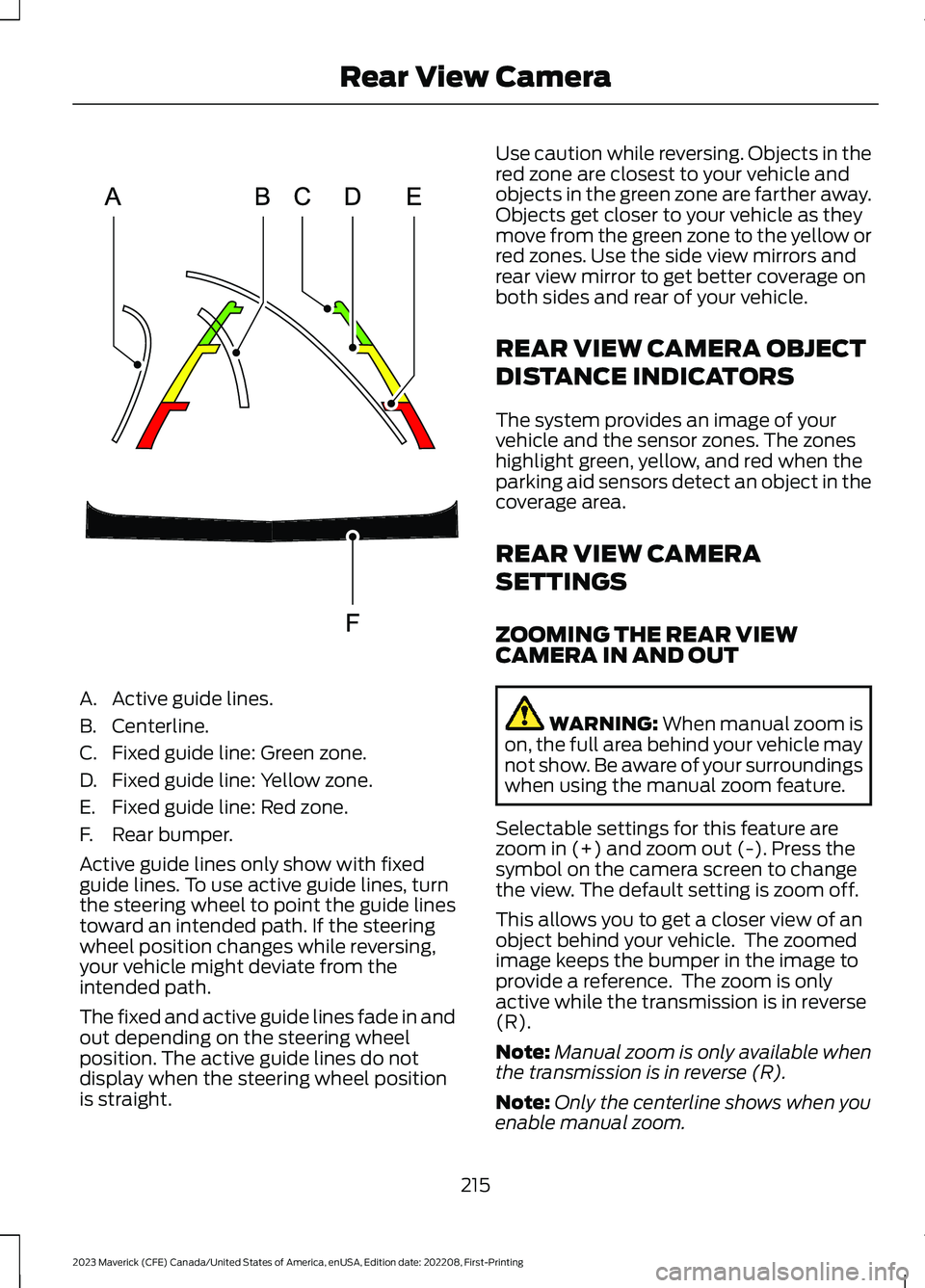
A.Active guide lines.
B.Centerline.
C.Fixed guide line: Green zone.
D.Fixed guide line: Yellow zone.
E.Fixed guide line: Red zone.
F.Rear bumper.
Active guide lines only show with fixedguide lines. To use active guide lines, turnthe steering wheel to point the guide linestoward an intended path. If the steeringwheel position changes while reversing,your vehicle might deviate from theintended path.
The fixed and active guide lines fade in andout depending on the steering wheelposition. The active guide lines do notdisplay when the steering wheel positionis straight.
Use caution while reversing. Objects in thered zone are closest to your vehicle andobjects in the green zone are farther away.Objects get closer to your vehicle as theymove from the green zone to the yellow orred zones. Use the side view mirrors andrear view mirror to get better coverage onboth sides and rear of your vehicle.
REAR VIEW CAMERA OBJECT
DISTANCE INDICATORS
The system provides an image of yourvehicle and the sensor zones. The zoneshighlight green, yellow, and red when theparking aid sensors detect an object in thecoverage area.
REAR VIEW CAMERA
SETTINGS
ZOOMING THE REAR VIEWCAMERA IN AND OUT
WARNING: When manual zoom ison, the full area behind your vehicle maynot show. Be aware of your surroundingswhen using the manual zoom feature.
Selectable settings for this feature arezoom in (+) and zoom out (-). Press thesymbol on the camera screen to changethe view. The default setting is zoom off.
This allows you to get a closer view of anobject behind your vehicle. The zoomedimage keeps the bumper in the image toprovide a reference. The zoom is onlyactive while the transmission is in reverse(R).
Note:Manual zoom is only available whenthe transmission is in reverse (R).
Note:Only the centerline shows when youenable manual zoom.
215
2023 Maverick (CFE) Canada/United States of America, enUSA, Edition date: 202208, First-PrintingRear View CameraE306774
Page 221 of 556
WHAT IS CRUISE CONTROL
Cruise control lets you maintain a setspeed without keeping your foot on theaccelerator pedal.
Requirements
Use cruise control when the vehicle speedis greater than 20 mph (30 km/h).
SWITCHING CRUISE CONTROL
ON AND OFF
WARNING: Do not use cruisecontrol on winding roads, in heavy trafficor when the road surface is slippery. Thiscould result in loss of vehicle control,serious injury or death.
The cruise controls are on the steeringwheel.
Switching Cruise Control On
Press the button to put thesystem in standby mode.
Switching Cruise Control Off
Press the button when instandby mode or switch theignition off.
Note:When you switch cruise control offthe set speed clears.
SETTING THE CRUISE
CONTROL SPEED
WARNING: When you are goingdownhill, your vehicle speed couldincrease above the set speed. Thesystem does not apply the brakes.
Drive to the speed you prefer.
Press the toggle button upwardor downward to set the currentspeed.
Take your foot off the accelerator pedal.
Note:The indicator changes color in theinformation display.
Changing the Set Speed
Press and release the togglebutton upward to increase theset speed in small increments.
Press and hold the toggle button upwardto accelerate. Release the button whenyou have reached your preferred speed.
Press and release the togglebutton downward to decreasethe set speed in smallincrements.
Press and hold the toggle buttondownward to decelerate. Release thebutton when you have reached yourpreferred speed.
Note: If you accelerate by pressing theaccelerator pedal, the set speed does notchange. When you release the acceleratorpedal, your vehicle returns to the speed thatyou previously set.
217
2023 Maverick (CFE) Canada/United States of America, enUSA, Edition date: 202208, First-PrintingCruise Control (If Equipped)E71340 E71340 E246884 E246885 E246884 E246885
Page 225 of 556
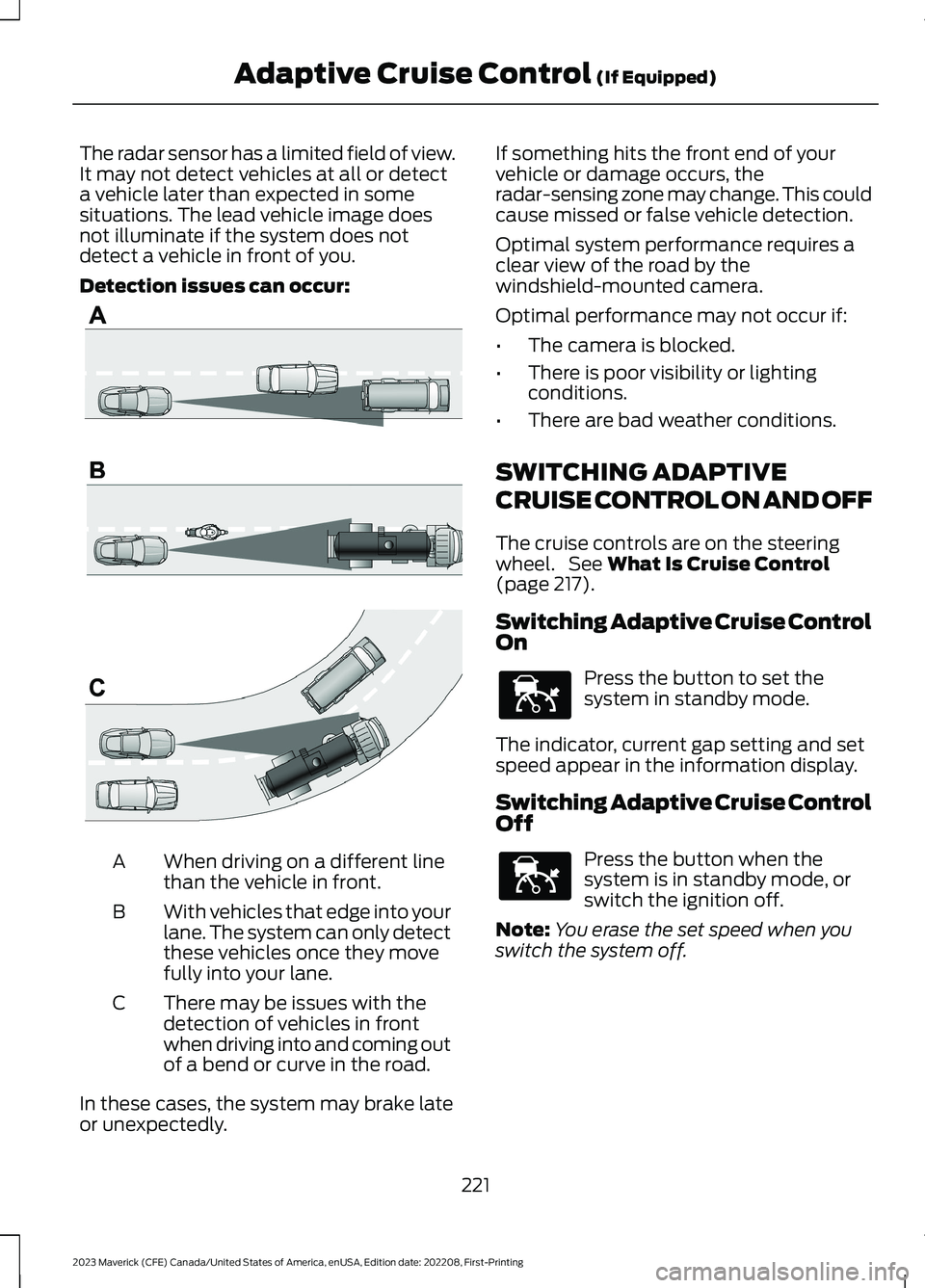
The radar sensor has a limited field of view.It may not detect vehicles at all or detecta vehicle later than expected in somesituations. The lead vehicle image doesnot illuminate if the system does notdetect a vehicle in front of you.
Detection issues can occur:
When driving on a different linethan the vehicle in front.A
With vehicles that edge into yourlane. The system can only detectthese vehicles once they movefully into your lane.
B
There may be issues with thedetection of vehicles in frontwhen driving into and coming outof a bend or curve in the road.
C
In these cases, the system may brake lateor unexpectedly.
If something hits the front end of yourvehicle or damage occurs, theradar-sensing zone may change. This couldcause missed or false vehicle detection.
Optimal system performance requires aclear view of the road by thewindshield-mounted camera.
Optimal performance may not occur if:
•The camera is blocked.
•There is poor visibility or lightingconditions.
•There are bad weather conditions.
SWITCHING ADAPTIVE
CRUISE CONTROL ON AND OFF
The cruise controls are on the steeringwheel. See What Is Cruise Control(page 217).
Switching Adaptive Cruise ControlOn
Press the button to set thesystem in standby mode.
The indicator, current gap setting and setspeed appear in the information display.
Switching Adaptive Cruise ControlOff
Press the button when thesystem is in standby mode, orswitch the ignition off.
Note:You erase the set speed when youswitch the system off.
221
2023 Maverick (CFE) Canada/United States of America, enUSA, Edition date: 202208, First-PrintingAdaptive Cruise Control (If Equipped)E71621 E144529 E144529
Page 229 of 556
SWITCHING FROM ADAPTIVE
CRUISE CONTROL TO CRUISE
CONTROL
WARNING: Normal cruise controlwill not brake when your vehicle isapproaching slower vehicles. Always beaware of which mode you have selectedand apply the brakes when necessary.
Use the instrument cluster display to selectthe following:
1.Select Settings.
2.Select Driver Assistance.
3.Select Cruise Control.
4.Select Normal.
The cruise control indicatorreplaces the adaptive cruisecontrol indicator if you selectnormal cruise control. The gap settingdoes not display, and the system does notrespond to lead vehicles. Automaticbraking remains active to maintain setspeed. The system remembers the lastsetting when you start your vehicle.
LANE CENTERING
HOW DOES LANE CENTERINGWORK
Adaptive cruise control with lane centeringuses the vehicle's front radar sensor andfront windshield camera sensor, togetherwith the steering sensor to operate.
Using these sensors, the system appliescontinuous steering assistance towardsdriving in the middle of the lane you chooseon highway roads.
Note:The gap setting for adaptive cruisecontrol with lane centering, operates in thesame way as normal adaptive cruise control.
LANE CENTERING PRECAUTIONS
WARNING: Do not use the systemwhen towing a trailer. Failure to followthis instruction could result in the loss ofcontrol of your vehicle, personal injury ordeath.
WARNING: Do not use the systemif any changes or modifications to thesteering wheel have been made. Anychanges or modifications to the steeringwheel could affect the functionality orperformance of the system. Failure tofollow this instruction could result in theloss of control of your vehicle, personalinjury or death.
Adaptive cruise control precautions applyto lane centering unless stated otherwiseor contradicted by a lane centeringprecaution. See Adaptive Cruise ControlPrecautions (page 219).
LANE CENTERINGREQUIREMENTS
You must keep your hands on the steeringwheel at all times.
Lane centering only activates when all ofthe following occur:
•Adaptive cruise control with lanecentering is enabled in your informationand entertainment screen. SeeSwitching Lane Centering On andOff (page 226).
•You have adaptive cruise control withstop and go enabled and set.
•The steering sensor detects your handson the steering wheel.
225
2023 Maverick (CFE) Canada/United States of America, enUSA, Edition date: 202208, First-PrintingAdaptive Cruise Control (If Equipped)E71340
Page 230 of 556
•The system detects both lane markingswhen driving on a straight road.
•Your vehicle is initially centered in thelane between two visible line markings.
Note:If the system does not detect validlane line markings, the system will remainin standby until valid line markings areavailables.
LANE CENTERING LIMITATIONS
Adaptive cruise control limitations applyto lane centering unless stated otherwiseor contradicted by a lane centeringlimitation. See Adaptive Cruise ControlLimitations (page 220).
Lane centering may not correctly operatein any of the following conditions:
•The lane width is too narrow or wide.
•The curve in the road is too small.
•The system does not detect theminimum required lane markings orwhen lanes merge or split.
•When the required steering effort tomaintain lane center exceeds the lanecentering system limit.
•When driving in areas that are underconstruction or when road work is inprogress.
•If the front windshield camera and/orthe front radar are blocked.
•When using a spare tire.
•Inclement weather conditionsincluding, but not limited to, high wind,heavy rain, and fog.
•Driving into direct sunlight.
•When modification to the steeringsystem has been made, includingalterations to the steering wheel.
•When towing a trailer.
See Lane Centering Precautions (page225).
Note:The system steering assistance islimited and may not have sufficient effortfor all driving situations and/or conditions,such as driving through tight curves ordriving through curves at high speeds.
Note:In exceptional conditions, the systemmay deviate from the lane center.
SWITCHING LANE CENTERING ONAND OFF
You must keep your hands on the steeringwheel at all times.
The controls are on the steering wheel.
Press the button.
The indicator appears in the informationdisplay. When the system is on, the colorof the indicator changes to indicate thesystem status.
You can override the system at any timeby steering your vehicle.
Note:The correct requirements must bemet before you can switch the system on.See Lane Centering Requirements (page225).
LANE CENTERING ALERTS
You must keep your hands on the steeringwheel at all times.
When the system is active and detects nosteering activity for a period of time, thesystem alerts you to put your hands on thesteering wheel. If you do not reactappropriately to the warnings the adaptivecruise control with lane centering systemcancels and slows your vehicle down toidle speeds while maintaining steeringcontrol. See Lane Centering AutomaticCancellation (page 227).
226
2023 Maverick (CFE) Canada/United States of America, enUSA, Edition date: 202208, First-PrintingAdaptive Cruise Control (If Equipped)E262175
Page 231 of 556
The system also alerts you if your vehiclecrosses lane line markings withoutdetected steering activity.
Note:The system could detect a light gripor light touch on the steering wheel ashands-off driving.
LANE CENTERING AUTOMATICCANCELLATION
When an external condition cancels thesystem, and your hands are on the steeringwheel, a tone sounds and a messageappears in the instrument cluster display.
When an external condition cancels thesystem, and your hands are not on thesteering wheel, the system immediatelyalerts you to take control of the vehicle. Ifthis alert is ignored, the system slows thevehicle while maintaining steeringassistance when lane markings areavailable. When no lane markings areavailable, the vehicle comes to a stop.
If your vehicle starts to slowdown after system cancellation,you must take full control of thevehicle. To re-enable adaptive cruisecontrol with lane centering aftercancellation, press and release the resumebutton.
Automatic cancellation can also occur if:
•The lane becomes too wide or narrow.
•The system cannot detect valid lanemarkings.
•Lane markings cross over one another.
•The curve of the road is too sharp.
Note:If your vehicle slows down due to yourinactivity twice within a key cycle, thesystem disables. To reset the system, whenthe vehicle is stationary, return the gearselector to park (P) and turn the vehicle off.Then, restart the vehicle with your foot onthe brake pedal.
LANE CENTERING MANUALCANCELLATION
When you perform the following actions,adaptive cruise control with lane centeringwill cancel:
•The brake pedal is pressed.
•Adaptive cruise control button isswitched off on the steering wheel.
The lane centering system is momentarilysuppressed when either of the followingactions are performed:
•Turn signal indicator is latched ortapped.
•You steer the vehicle out of lane.
LANE CENTERING INDICATORS
Illuminates when you switchlane centering on. The color ofthe indicator changes to indicatethe system status.
Gray status indicates the system is on butin standby mode.
Green status indicates the system isenabled and applying steering assistanceto keep the vehicle in the center of the lane.
Amber status with an audible tone, thatthen changes to gray status, indicates asystem automatic cancellation.
227
2023 Maverick (CFE) Canada/United States of America, enUSA, Edition date: 202208, First-PrintingAdaptive Cruise Control (If Equipped)E308130 E297977
Page 232 of 556
ADAPTIVE CRUISE CONTROL
– TROUBLESHOOTING
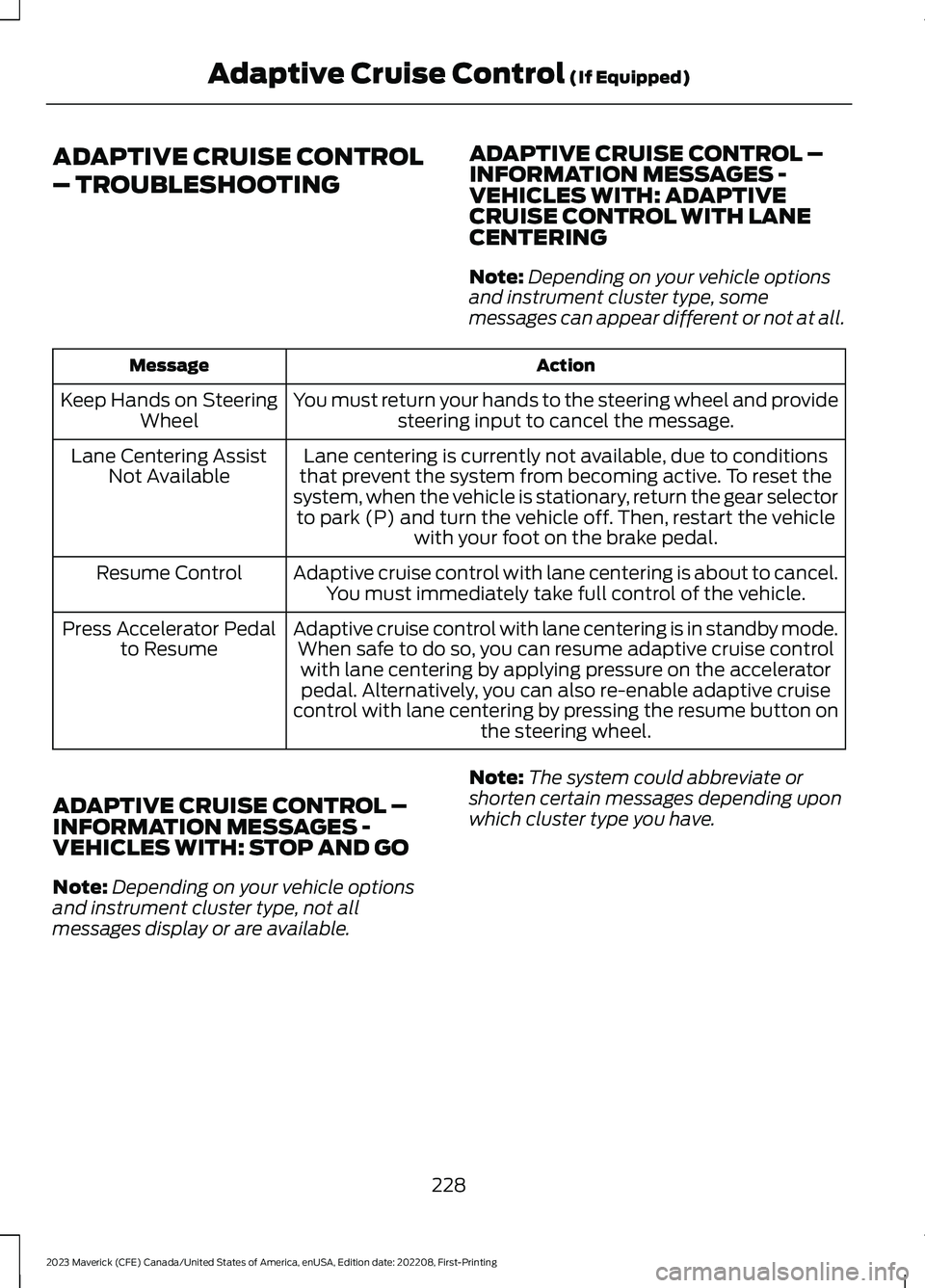
ADAPTIVE CRUISE CONTROL –INFORMATION MESSAGES -VEHICLES WITH: ADAPTIVECRUISE CONTROL WITH LANECENTERING
Note:Depending on your vehicle optionsand instrument cluster type, somemessages can appear different or not at all.
ActionMessage
You must return your hands to the steering wheel and providesteering input to cancel the message.Keep Hands on SteeringWheel
Lane centering is currently not available, due to conditionsthat prevent the system from becoming active. To reset thesystem, when the vehicle is stationary, return the gear selectorto park (P) and turn the vehicle off. Then, restart the vehiclewith your foot on the brake pedal.
Lane Centering AssistNot Available
Adaptive cruise control with lane centering is about to cancel.You must immediately take full control of the vehicle.Resume Control
Adaptive cruise control with lane centering is in standby mode.When safe to do so, you can resume adaptive cruise controlwith lane centering by applying pressure on the acceleratorpedal. Alternatively, you can also re-enable adaptive cruisecontrol with lane centering by pressing the resume button onthe steering wheel.
Press Accelerator Pedalto Resume
ADAPTIVE CRUISE CONTROL –INFORMATION MESSAGES -VEHICLES WITH: STOP AND GO
Note:Depending on your vehicle optionsand instrument cluster type, not allmessages display or are available.
Note:The system could abbreviate orshorten certain messages depending uponwhich cluster type you have.
228
2023 Maverick (CFE) Canada/United States of America, enUSA, Edition date: 202208, First-PrintingAdaptive Cruise Control (If Equipped)