light FORD MAVERICK 2023 Workshop Manual
[x] Cancel search | Manufacturer: FORD, Model Year: 2023, Model line: MAVERICK, Model: FORD MAVERICK 2023Pages: 556, PDF Size: 14.79 MB
Page 243 of 556
LANE KEEPING SYSTEM – FREQUENTLY ASKED QUESTIONS
Why is the feature not available (lane markings are gray) when I can see the lane markingson the road?
Your vehicle speed is less than 40 mph (65 km/h).
The sun is shining directly into the camera lens.
A quick intentional lane change has occurred.
Your vehicle stays too close to the lane markings for an extended interval of time.
Driving at high speeds in curves.
The last alert warning or aid intervention occurred a short time ago.
Ambiguous lane markings, for example, in construction zones.
Rapid transition from light to dark, or from dark to light.
Sudden offset in lane markings.
ABS or AdvanceTrac™ is active.
There is a camera blockage due to dirt, grime, fog, frost or water on the windshield.
You are driving too close to the vehicle in front of you.
Transitioning between no lane markings to lane markings, or vice versa.
There is standing water on the road.
Faint lane markings, for example, partial yellow lane markings on concrete roads.
Lane width is too narrow or too wide.
You have not calibrated the camera after a windshield replacement.
Driving on tight or on uneven roads.
239
2023 Maverick (CFE) Canada/United States of America, enUSA, Edition date: 202208, First-PrintingLane Keeping System (If Equipped)
Page 251 of 556
WHAT IS PRE-COLLISION
ASSIST
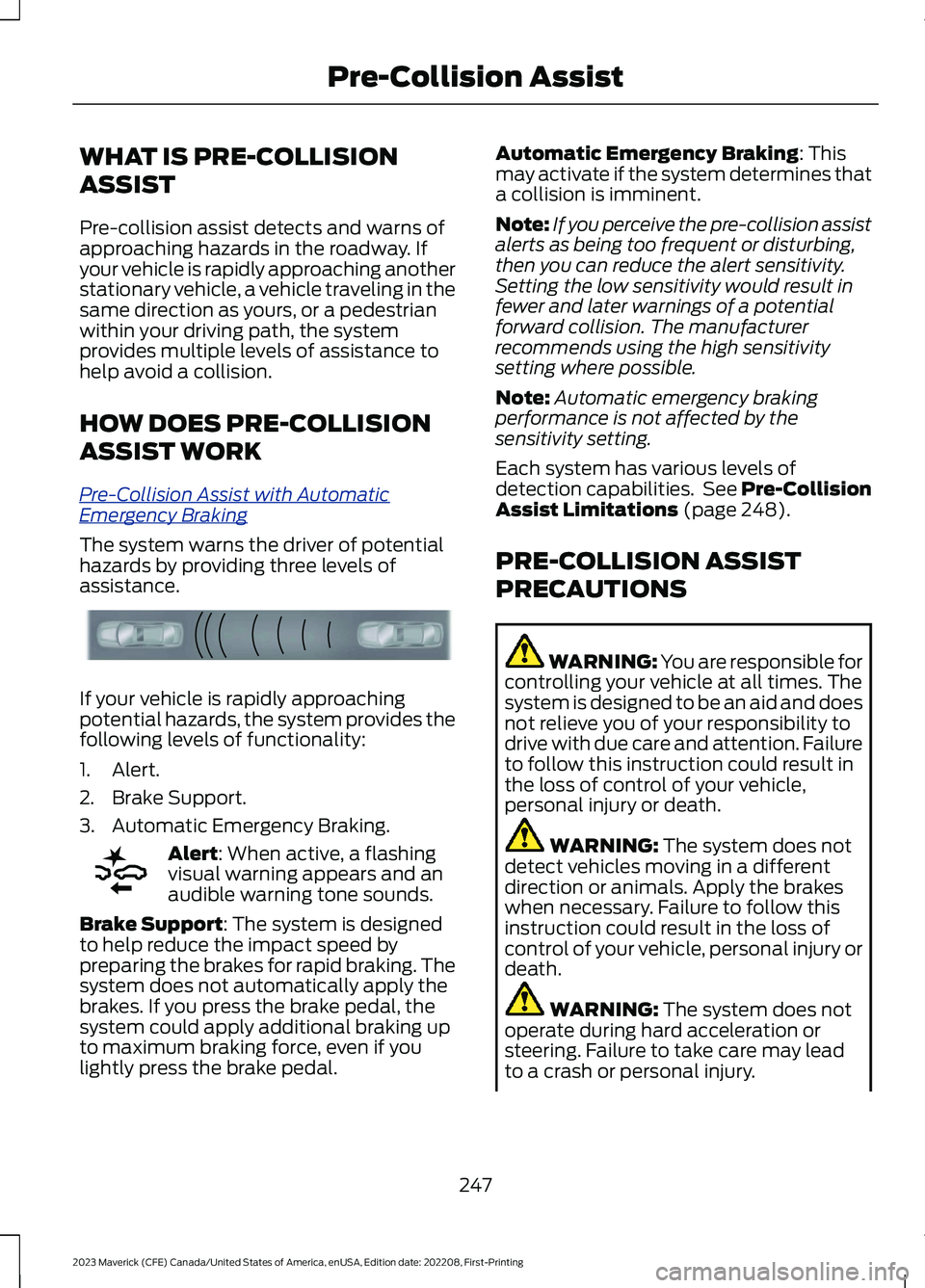
Pre-collision assist detects and warns ofapproaching hazards in the roadway. Ifyour vehicle is rapidly approaching anotherstationary vehicle, a vehicle traveling in thesame direction as yours, or a pedestrianwithin your driving path, the systemprovides multiple levels of assistance tohelp avoid a collision.
HOW DOES PRE-COLLISION
ASSIST WORK
Pre-Collision Assist with AutomaticEmergency Braking
The system warns the driver of potentialhazards by providing three levels ofassistance.
If your vehicle is rapidly approachingpotential hazards, the system provides thefollowing levels of functionality:
1.Alert.
2.Brake Support.
3.Automatic Emergency Braking.
Alert: When active, a flashingvisual warning appears and anaudible warning tone sounds.
Brake Support: The system is designedto help reduce the impact speed bypreparing the brakes for rapid braking. Thesystem does not automatically apply thebrakes. If you press the brake pedal, thesystem could apply additional braking upto maximum braking force, even if youlightly press the brake pedal.
Automatic Emergency Braking: Thismay activate if the system determines thata collision is imminent.
Note:If you perceive the pre-collision assistalerts as being too frequent or disturbing,then you can reduce the alert sensitivity.Setting the low sensitivity would result infewer and later warnings of a potentialforward collision. The manufacturerrecommends using the high sensitivitysetting where possible.
Note:Automatic emergency brakingperformance is not affected by thesensitivity setting.
Each system has various levels ofdetection capabilities. See Pre-CollisionAssist Limitations (page 248).
PRE-COLLISION ASSIST
PRECAUTIONS
WARNING: You are responsible forcontrolling your vehicle at all times. Thesystem is designed to be an aid and doesnot relieve you of your responsibility todrive with due care and attention. Failureto follow this instruction could result inthe loss of control of your vehicle,personal injury or death.
WARNING: The system does notdetect vehicles moving in a differentdirection or animals. Apply the brakeswhen necessary. Failure to follow thisinstruction could result in the loss ofcontrol of your vehicle, personal injury ordeath.
WARNING: The system does notoperate during hard acceleration orsteering. Failure to take care may leadto a crash or personal injury.
247
2023 Maverick (CFE) Canada/United States of America, enUSA, Edition date: 202208, First-PrintingPre-Collision AssistE156130 E255268
Page 252 of 556
WARNING: The system mayoperate with reduced function duringcold and inclement weather conditions.Snow, ice, rain, spray and fog canadversely affect the system. Keep thefront camera and radar free of snow andice. Failure to follow this instruction mayresult in the loss of control of yourvehicle, serious personal injury or death.
WARNING: Take additional care ifyour vehicle is heavily loaded or you aretowing a trailer. These conditions couldresult in reduced performance of thissystem. Failure to follow this instructioncould result in the loss of control of yourvehicle, personal injury or death.
WARNING: The system cannothelp prevent all crashes. Do not rely onthis system to replace driver judgmentand the need to maintain a safe distanceand speed.
WARNING: System performancecould be reduced in situations where thevehicle camera has limited detectioncapability. These situations include butare not limited to direct or low sunlight,vehicles at night without tail lights,unconventional vehicle types, andpedestrians and cyclists with complex,partially obscured backgrounds. Failureto take care may result in the loss ofcontrol of your vehicle, personal injury ordeath.
PRE-COLLISION ASSIST
LIMITATIONS
Pre-collision assist depends on thedetection ability of its camera and sensors.Any obstructions or damage to these areascan limit detection or prevent the systemfrom functioning. See Locating thePre-Collision Assist Sensors (page 249).
The system is active at 3 mph (5 km/h)and above.
Note:Brake support and automaticemergency braking are active at speeds upto 75 mph (120 km/h). If your vehicle has aradar sensor included with adaptive cruisecontrol, then brake support and automaticemergency braking are active up to themaximum speed of the vehicle.
Pedestrian Detection Limitations
Pedestrian detection is active at speedsup to 50 mph (80 km/h).
Pedestrian detection operates optimallywhen detected hazards are clearlyidentifiable. System performance mayreduce in situations where pedestrians arerunning, partly obscured, have a complexbackground, or cannot be distinguishedfrom a group.
SWITCHING PRE-COLLISION
ASSIST ON AND OFF
You cannot switch the system off.
248
2023 Maverick (CFE) Canada/United States of America, enUSA, Edition date: 202208, First-PrintingPre-Collision Assist
Page 269 of 556
CONNECTING A TRAILER
PRECAUTIONS
Do not tow a trailer until you drive yourvehicle at least 1,000 mi (1,600 km).
Consult your local motor vehicle laws fortowing a trailer.
See the instructions included with towingaccessories for the proper installation andadjustment specifications.
Service your vehicle more frequently if youtow a trailer. See Normal ScheduledMaintenance (page 453).
If you use a rental trailer, follow theinstructions the rental agency gives you.
When attaching the trailer wiring connectorto your vehicle, only use a proper fittingconnector that works with the vehicle andtrailer functions.
Account for the trailer coupler weight aspart of your vehicle load when calculatingthe total vehicle weight.
Do not exceed the load limits. SeeCalculating the Load Limit (page 259).
CONNECTING A TRAILER
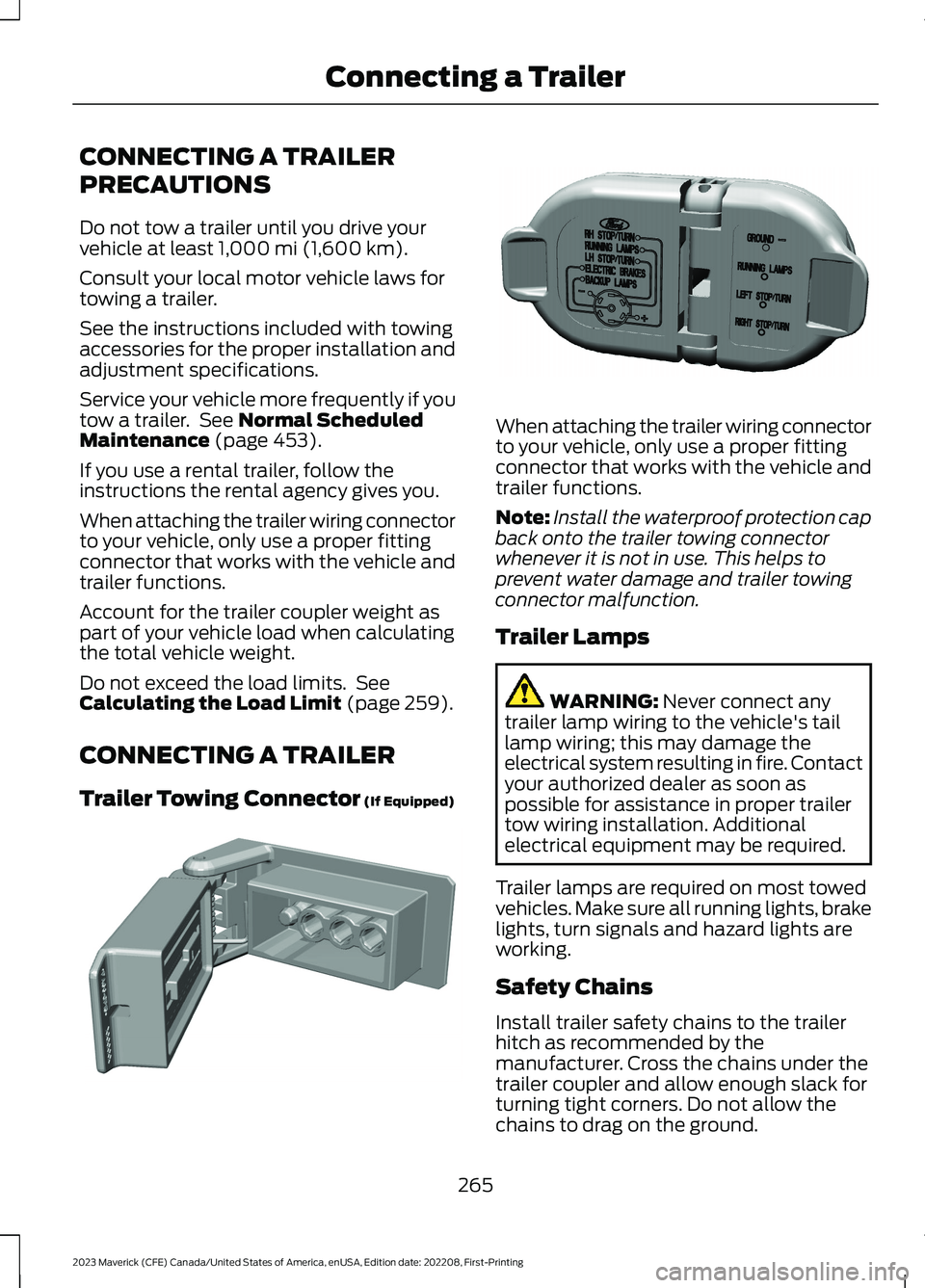
Trailer Towing Connector (If Equipped)
When attaching the trailer wiring connectorto your vehicle, only use a proper fittingconnector that works with the vehicle andtrailer functions.
Note:Install the waterproof protection capback onto the trailer towing connectorwhenever it is not in use. This helps toprevent water damage and trailer towingconnector malfunction.
Trailer Lamps
WARNING: Never connect anytrailer lamp wiring to the vehicle's taillamp wiring; this may damage theelectrical system resulting in fire. Contactyour authorized dealer as soon aspossible for assistance in proper trailertow wiring installation. Additionalelectrical equipment may be required.
Trailer lamps are required on most towedvehicles. Make sure all running lights, brakelights, turn signals and hazard lights areworking.
Safety Chains
Install trailer safety chains to the trailerhitch as recommended by themanufacturer. Cross the chains under thetrailer coupler and allow enough slack forturning tight corners. Do not allow thechains to drag on the ground.
265
2023 Maverick (CFE) Canada/United States of America, enUSA, Edition date: 202208, First-PrintingConnecting a TrailerE353969 E163167
Page 272 of 556
Certain states require functioning trailerbrakes for trailers over a specified weight.Be sure to check state regulations for thisspecified weight.
Ford Motor Company recommendsseparate functioning brake systems fortrailers weighing more than 1,500 lb(680 kg) when loaded.
TOWING A TRAILER
LIMITATIONS
The vehicle's load capacitydesignation is by weight, not byvolume, so you cannot necessarilyuse all available space whenloading a vehicle or trailer.
Note:Your vehicle could havereduced performance whenoperating at high altitudes andwhen heavily loaded or towing a
trailer. When driving at elevation,to match driving performance asperceived at sea level, reduce grossvehicle weight and grosscombination weight by 2% per1,000 ft (300 m) elevation.
LOADING YOUR TRAILER
To help minimize how trailermovement affects your vehiclewhen driving:
•Load the heaviest items closestto the trailer floor.
•Load the heaviest itemscentered between the left andright side trailer tires.
•Load the heaviest items abovethe trailer axles or just slightlyforward toward the trailertongue. Do not allow the finaltrailer tongue weight to goabove or below 10-15% of theloaded trailer weight. Thetrailer tongue weight shouldnever exceed 10% of themaximum towing capacity.
•Select a ball mount with thecorrect rise or drop. When boththe loaded vehicle and trailerare connected, the trailer frameshould be level, or slightlyangled down toward yourvehicle, when viewed from theside.
TRAILER TOWING HINTS
Towing a trailer places an extra load onyour vehicle's engine, transmission, axle,brakes, tires and suspension. Periodicallyinspect these components during and afterany towing operation.
When driving with a trailer or payload, aslight takeoff vibration or shudder may bepresent due to the increased payloadweight.
Your vehicle may have a temporary orconventional spare tire. A temporary sparetire is different in diameter or width,tread-type, or is from a differentmanufacturer than the road tires on yourvehicle. Consult information on the tirelabel or Safety Compliance label forlimitations when using.
268
2023 Maverick (CFE) Canada/United States of America, enUSA, Edition date: 202208, First-PrintingTowing a Trailer
Page 279 of 556
INTEGRATED TRAILER BRAKE CONTROLLER –
TROUBLESHOOTING
INTEGRATED TRAILER BRAKE CONTROLLER – INFORMATIONMESSAGES
DetailsMessage
The system detects a correct trailerconnection during a given ignition cycle.Trailer Connected
The system detects the trailer wiringconnection is disconnected, during a givenignition cycle.
Trailer Disconnected
The system detects an electrical fault inthe trailer brake circuit. If this messageappears without a trailer attached, see yourauthorized dealer. If a trailer is attached,inspect and repair the trailer wiring.
Trailer Wiring Fault
Displays the current gain setting for thetrailer brake.Trailer Brake Gain: {trailer gain value:#0.0}
Displays the current gain setting for thetrailer brake when you do not have a trailerconnected.
Trailer Brake Gain: {trailer gain value:#0.0}No Trailer
Perform a trailer brake and trailer lightcheck if possible. If the message persists,have your vehicle checked as soon aspossible.
Trailer Brake Module Fault
The trailer battery voltage is too low tocharge.Trailer Battery Not Charging See Manual
275
2023 Maverick (CFE) Canada/United States of America, enUSA, Edition date: 202208, First-PrintingIntegrated Trailer Brake Controller (If Equipped)
Page 283 of 556
DRIVING IN SPECIAL
CONDITIONS
DRIVING THROUGH MUD ANDWATER
Mud
Be cautious of sudden changes in vehiclespeed or direction when you are driving inmud. Even all-wheel drive and four-wheeldrive vehicles can lose traction in mud. Ifyour vehicle slides, steer in the direction ofthe slide until you regain control of yourvehicle. After driving through mud, cleanoff residue stuck to rotating driveshaftsand tires. Excess residue can cause animbalance that could damage drivecomponents.
Note:If your vehicle gets stuck in mud, itcould be rocked out by shifting betweenforward and reverse gears, stoppingbetween shifts in a steady pattern. Presslightly on the accelerator in each gear.
Note:Do not rock your vehicle if the engineis not at normal operating temperature, asdamage to the transmission could occur.
Note:Do not rock your vehicle for morethan a minute, as damage to thetransmission and tires could occur or theengine could overheat.
Water
If you must drive though deep water, driveslowly. The water could limit traction orbrake capability. See Driving ThroughShallow Water (page 280).
When driving though water, determine thedepth and avoid water higher than thecenter of the wheel.
Once through water, always try the brakes.Wet brakes do not stop your vehicle asquickly as dry brakes. Apply light pressureto the brake pedal while slowly moving thevehicle to dry the brakes.
Note:Driving through deep water couldcause damage to the transmission. If thefront or rear axle is submerged in water,have the axle lubricant and power transferunit lubricant checked and changed ifnecessary.
DRIVING ON HILLY OR SLOPINGTERRAIN
WARNING: Extreme care shouldbe used when steering the vehicle inreverse down a slope so as not to causethe vehicle to swerve out of control.
Although natural obstacles could make itnecessary to travel diagonally up or downa hill or steep incline, you should try to drivestraight up or straight down.
Note: Avoid turning on steep slopes or hills.A danger lies in losing traction, slippingsideways and possible vehicle roll over.Whenever driving on a hill, determinebeforehand the route you can use. Do notdrive over the crest of a hill without seeingwhat conditions are on the other side. Donot drive in reverse over a hill without theaid of an observer.
Apply just enough power to the wheels toclimb the hill. Too much power causes thetires to slip, spin or lose traction, and youcould lose control of your vehicle. Whendescending a steep hill, do not descendthe hill in neutral. Avoid sudden hardbraking to keep the front wheels rolling andto maintain your vehicle's steering.
Note:Your vehicle has anti-lock brakes,apply the brakes steadily. Do not pump thebrakes.
279
2023 Maverick (CFE) Canada/United States of America, enUSA, Edition date: 202208, First-PrintingDriving Hints
Page 284 of 556
Note:Do not rock your vehicle if the engineis not at normal operating temperature, asdamage to the transmission could occur.
Note:Do not rock your vehicle for morethan a minute, as damage to thetransmission and tires could occur or theengine could overheat.
DRIVING IN SAND
When driving over sand, try to keep all fourwheels on the most solid area of the trail.Steadily drive through the terrain. Applythe accelerator slowly and avoid excessivewheel slip. Do not drive your vehicle indeep sand for an extended period of time.This could overheat the system. Amessage appears in the instrument clusterdisplay.
Note:If your vehicle gets stuck driving onhilly or sloping terrain, it could be rocked outby shifting between forward and reversegears, stopping between shifts in a steadypattern. Press lightly on the accelerator ineach gear.
Note:Do not rock your vehicle if the engineis not at normal operating temperature, asdamage to the transmission could occur.
Note:Do not rock your vehicle for morethan a minute, as damage to thetransmission and tires could occur or theengine could overheat
DRIVING THROUGH SHALLOW
WATER
WARNING: Do not attempt tocross a deep or flowing body of water.Failure to follow this instruction couldresult in the loss of control of yourvehicle, personal injury or death.
Note:Driving through standing water cancause vehicle damage.
Note:Engine damage can occur if waterenters the air filter.
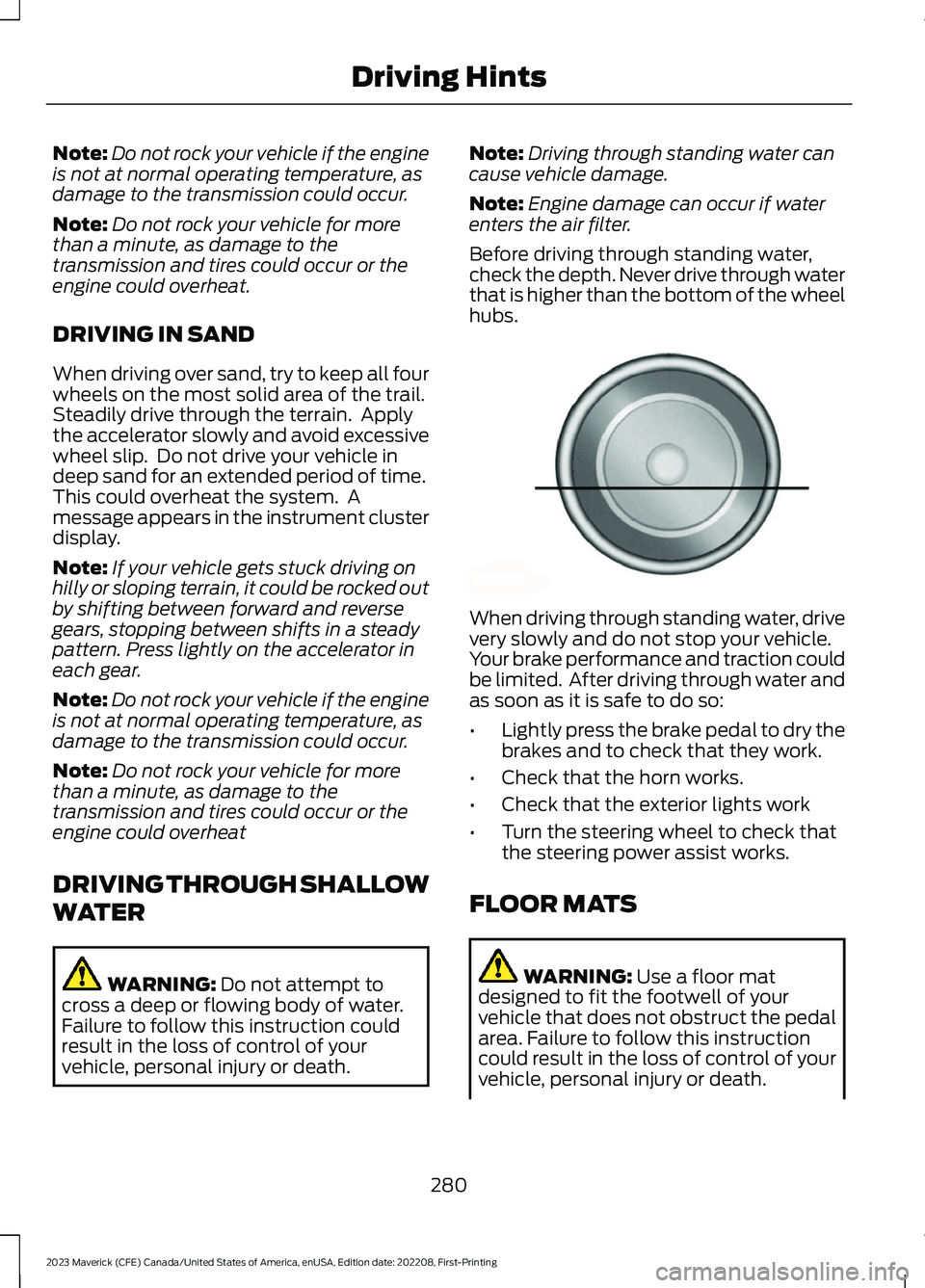
Before driving through standing water,check the depth. Never drive through waterthat is higher than the bottom of the wheelhubs.
When driving through standing water, drivevery slowly and do not stop your vehicle.Your brake performance and traction couldbe limited. After driving through water andas soon as it is safe to do so:
•Lightly press the brake pedal to dry thebrakes and to check that they work.
•Check that the horn works.
•Check that the exterior lights work
•Turn the steering wheel to check thatthe steering power assist works.
FLOOR MATS
WARNING: Use a floor matdesigned to fit the footwell of yourvehicle that does not obstruct the pedalarea. Failure to follow this instructioncould result in the loss of control of yourvehicle, personal injury or death.
280
2023 Maverick (CFE) Canada/United States of America, enUSA, Edition date: 202208, First-PrintingDriving HintsE176913
Page 288 of 556
1.Exit the vehicle immediately.
2.Advise emergency assistance that anelectric or hybrid-electric vehicle isinvolved.
3.As with any vehicle fire, do not inhalesmoke, vapors or gas from the vehicle,as they may be hazardous.
Post-Incident
1.Do not store a severely damagedvehicle with a lithium-ion battery insidea structure or within 49 ft (15 m) of anystructure or vehicle.
2.Make sure that passenger and luggagecompartments remain ventilated.
3.Call emergency assistance if youobserve leaking fluids, sparks, smokeor flames, or hear gurgling or bubblingfrom the high-voltage battery.
SWITCHING THE HAZARD
FLASHERS ON AND OFF
The hazard flasher button is onthe instrument panel. Press thebutton to switch the hazardflashers on if your vehicle is creating asafety hazard for other road users.
When you switch the hazard flashers on,all front and rear direction indicators flash.
Note:The hazard flashers operate whenthe ignition is in any position, or if the key isnot in the ignition. The battery loses chargeand could have insufficient power to restartyour vehicle.
Press the button again to switch them off.
JUMP STARTING THE VEHICLE
JUMP STARTING PRECAUTIONS
WARNING: Batteries normallyproduce explosive gases which cancause personal injury. Therefore, do notallow flames, sparks or lightedsubstances to come near the battery.When working near the battery, alwaysshield your face and protect your eyes.Always provide correct ventilation.
WARNING: Keep batteries out ofreach of children. Batteries containsulfuric acid. Avoid contact with skin,eyes or clothing. Shield your eyes whenworking near the battery to protectagainst possible splashing of acidsolution. In case of acid contact with skinor eyes, flush immediately with water fora minimum of 15 minutes and get promptmedical attention. If acid is swallowed,call a physician immediately.
WARNING: Use only adequatelysized cables with insulated clamps.
WARNING: Make sure that thecables are clear of any moving parts andfuel delivery system parts.
WARNING: Connect batteries withonly the same nominal voltage.
WARNING: If the engine is runningwhile the hood is open, stay clear ofmoving engine components. Failure tofollow this warning could result in seriouspersonal injury or death.
Do not attempt to push-start an automatictransmission vehicle. This could causetransmission damage.
284
2023 Maverick (CFE) Canada/United States of America, enUSA, Edition date: 202208, First-PrintingCrash and Breakdown InformationE75790
Page 303 of 556
Protected ComponentRatingItem
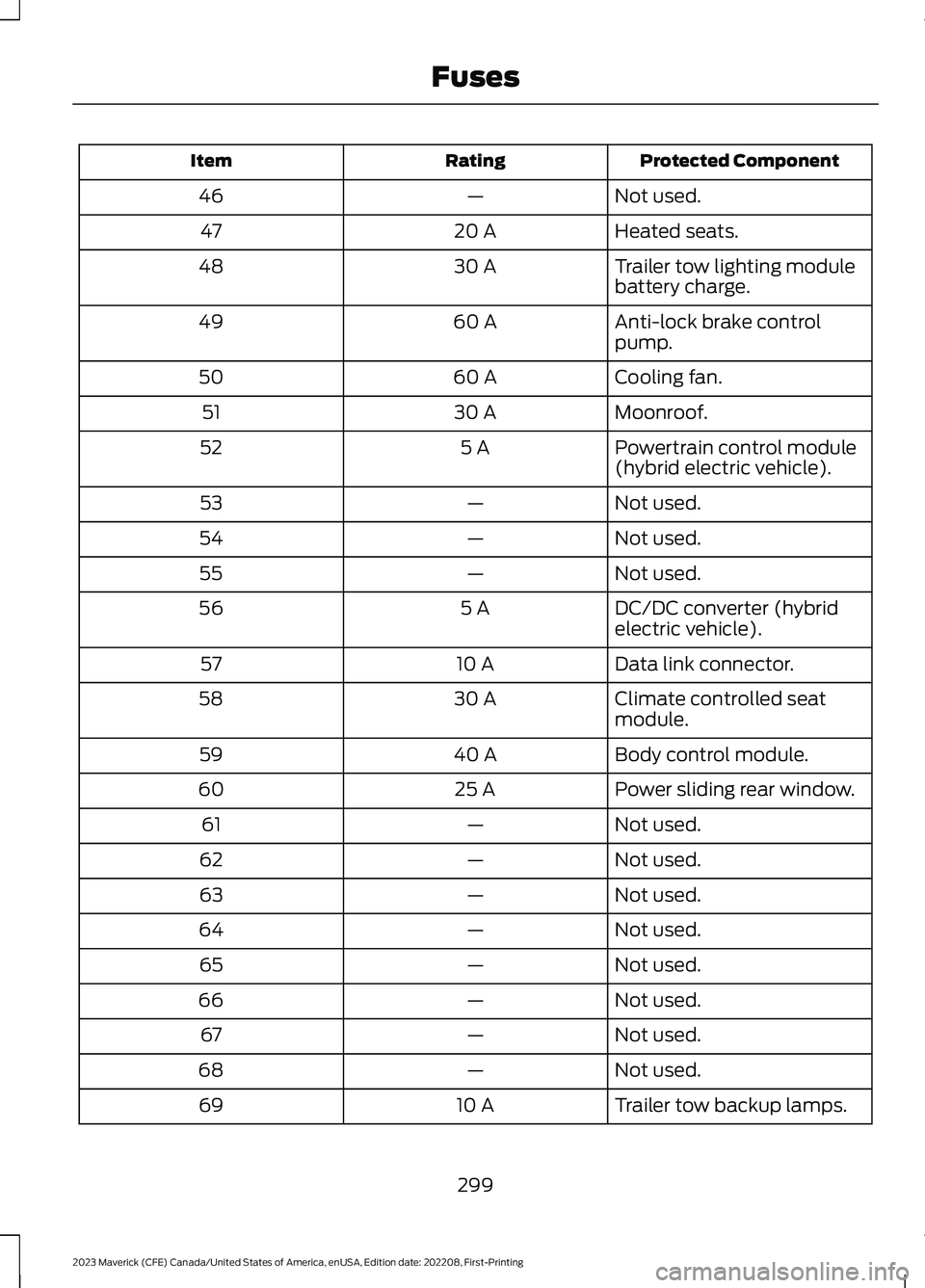
Not used.—46
Heated seats.20 A47
Trailer tow lighting modulebattery charge.30 A48
Anti-lock brake controlpump.60 A49
Cooling fan.60 A50
Moonroof.30 A51
Powertrain control module(hybrid electric vehicle).5 A52
Not used.—53
Not used.—54
Not used.—55
DC/DC converter (hybridelectric vehicle).5 A56
Data link connector.10 A57
Climate controlled seatmodule.30 A58
Body control module.40 A59
Power sliding rear window.25 A60
Not used.—61
Not used.—62
Not used.—63
Not used.—64
Not used.—65
Not used.—66
Not used.—67
Not used.—68
Trailer tow backup lamps.10 A69
299
2023 Maverick (CFE) Canada/United States of America, enUSA, Edition date: 202208, First-PrintingFuses