Scheduled Maintenance FORD MAVERICK 2023 Owners Manual
[x] Cancel search | Manufacturer: FORD, Model Year: 2023, Model line: MAVERICK, Model: FORD MAVERICK 2023Pages: 556, PDF Size: 14.79 MB
Page 16 of 556
Connected Vehicle – Troubleshooting -Vehicles With: Modem..........................378
Connected Vehicle – Troubleshooting -Vehicles With: SYNC 3/SYNC 2.5......379
Vehicle Wi-Fi Hotspot
Creating a Vehicle Wi-Fi Hotspot..........381
Changing the Vehicle Wi-Fi HotspotName or Password.................................381
Vehicle Wi-Fi Hotspot – Troubleshooting........................................................................382
Audio System - VehiclesWithout: SYNC 3
General Information..................................383
Audio Unit......................................................383
AM/FM Radio...............................................384
Connecting a Bluetooth® Device.........385
Streaming Bluetooth Audio...................386
Playing Media From a USB Device.......387
USB Port.........................................................387
Apps................................................................388
Using Voice Recognition..........................390
Audio System – Troubleshooting..........391
Audio System - Vehicles With:SYNC 3
Audio System Precautions......................392
Switching the Audio Unit On and Off........................................................................392
Selecting the Audio Source....................392
Playing or Pausing the Audio Source........................................................................392
Adjusting the Volume................................392
Switching Shuffle Mode On and Off........................................................................392
Switching Repeat Mode On and Off........................................................................392
Setting a Memory Preset.........................393
Muting the Audio........................................393
Adjusting the Sound Settings................393
Setting the Clock and Date.....................393
AM/FM Radio...............................................394
Digital Radio.................................................395
Satellite Radio.............................................396
Audio System – Troubleshooting.........397
SYNC™ 3
General Information...................................401
Using Voice Recognition..........................403
Entertainment..............................................410
Phone.............................................................420
Navigation.....................................................422
Electric Vehicle Information....................427
Apps................................................................428
Settings..........................................................430
SYNC™ 3 Troubleshooting.....................432
Vehicle Software Updates -Vehicles Without: SYNC 3
Vehicle Software Updates......................445
Accessories
Accessories...................................................446
12V Pre-Wired Connections
What are the 12V Pre-Wired Connections........................................................................447
12V Pre-Wired Connections Precautions........................................................................447
Locating the 12V Pre-Wired Connections........................................................................447
Ford Protect
What Is Ford Protect.................................448
Scheduled Maintenance
General Maintenance Information......450
Normal Scheduled Maintenance.........453
Special Operating Conditions ScheduledMaintenance............................................456
12
2023 Maverick (CFE) Canada/United States of America, enUSA, Edition date: 202208, First-PrintingTable of Contents
Page 138 of 556
WHAT IS THE CABIN AIR
FILTER
The cabin air filter improves the quality ofair in your vehicle by trapping dust, pollenand other particles.
REPLACING THE CABIN AIR
FILTER
Replace the filter at regular intervals. SeeScheduled Maintenance (page 450).
The cabin air filter is behind the glovecompartment.
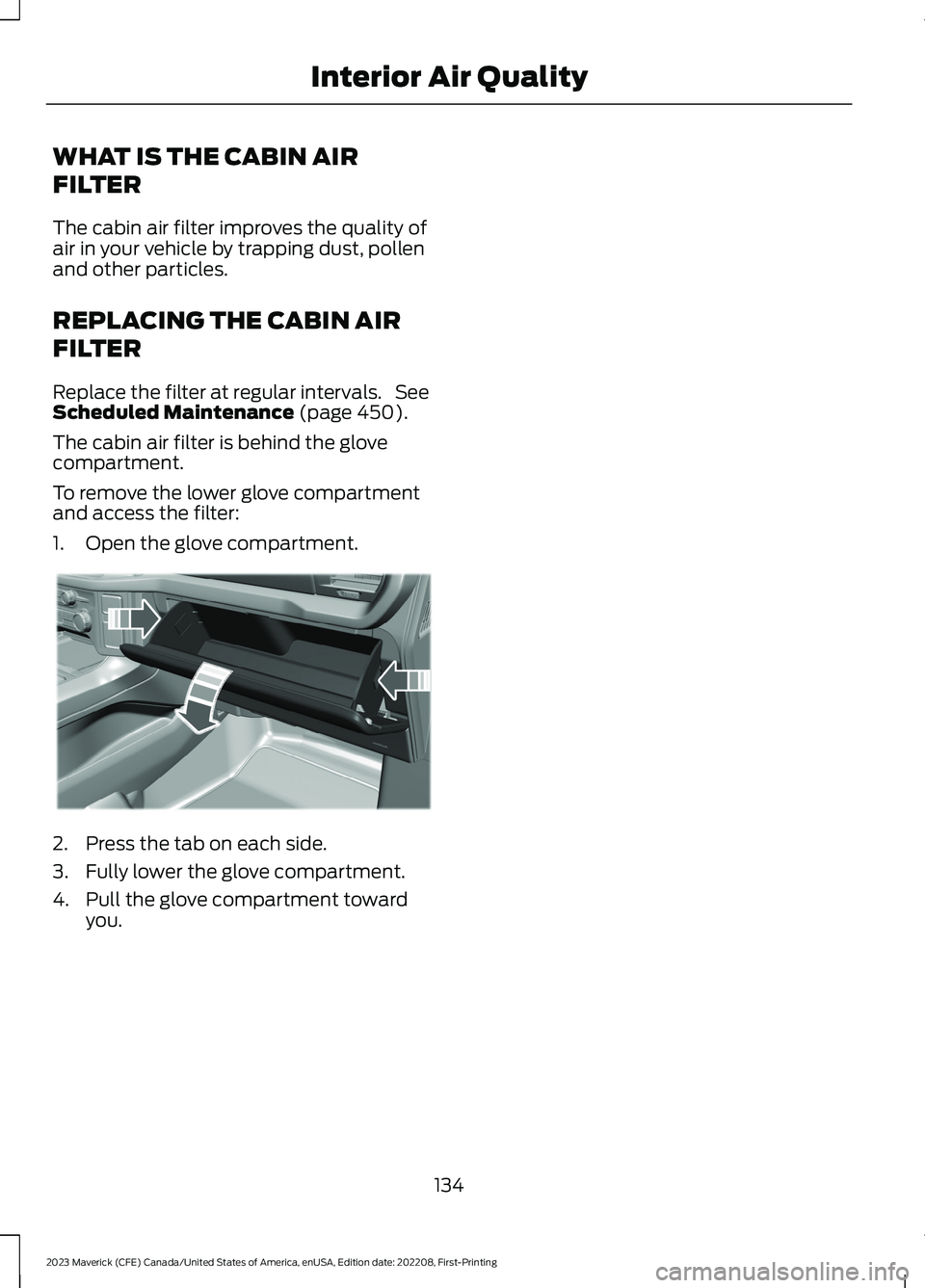
To remove the lower glove compartmentand access the filter:
1.Open the glove compartment.
2.Press the tab on each side.
3.Fully lower the glove compartment.
4.Pull the glove compartment towardyou.
134
2023 Maverick (CFE) Canada/United States of America, enUSA, Edition date: 202208, First-PrintingInterior Air QualityE311296
Page 184 of 556
WHAT IS THE CATALYTIC
CONVERTER
The catalytic converter is part of yourvehicle's emissions system and filtersharmful pollutants from the exhaust gas.
CATALYTIC CONVERTER
PRECAUTIONS
WARNING: Do not park, idle ordrive your vehicle on dry grass or otherdry ground cover. The emission systemheats up the engine compartment andexhaust system, creating the risk of fire.
WARNING: The normal operatingtemperature of the exhaust system isvery high. Never work around or attemptto repair any part of the exhaust systemuntil it has cooled. Use special care whenworking around the catalytic converter.The catalytic converter heats up to a veryhigh temperature after only a shortperiod of engine operation and stays hotafter the engine is switched off.
WARNING: Exhaust leaks mayresult in entry of harmful and potentiallylethal fumes into the passengercompartment. If you smell exhaustfumes inside your vehicle, have yourvehicle inspected immediately. Do notdrive if you smell exhaust fumes.
To avoid damaging the catalytic converter:
•Do not crank the engine for more than10 seconds at a time.
•Do not run the engine with a spark pluglead disconnected.
•Do not push-start or tow-start yourvehicle. Use booster cables. See JumpStarting Precautions (page 284).
•Use the correct fuel. See Fuel andRefueling (page 171).
•Do not switch the ignition off when yourvehicle is moving.
•Avoid running out of fuel.
•Have the items listed in scheduledmaintenance information performedaccording to the specified schedule.
Note:Do not make any unauthorizedchanges to your vehicle or engine. By law,vehicle owners and anyone whomanufactures, repairs, or services a fleet ofvehicles are not permitted to intentionallyremove an emission control device orprevent it from working.
CATALYTIC CONVERTER –
TROUBLESHOOTING
CATALYTIC CONVERTER –WARNING LAMPS
Your vehicle has an on-board diagnosticssystem that monitors the emission controlsystem. If any of the following warninglamps illuminate, this may indicate thatthe on-board diagnostics system hasdetected an emission control systemmalfunction.
Continuing to drive your vehicle may causereduced power or the engine to stop.Failure to respond to a warning lamp maycause damage that your vehicle Warrantymay not cover. Have your vehicle checkedas soon as possible.
180
2023 Maverick (CFE) Canada/United States of America, enUSA, Edition date: 202208, First-PrintingCatalytic ConverterE103308 E67021 E67028
Page 197 of 556
BRAKES –
TROUBLESHOOTING
BRAKES – WARNING LAMPS
WARNING: Driving your vehiclewith the warning lamp on is dangerous.A significant decrease in brakingperformance may occur. It may take youlonger to stop your vehicle. Have yourvehicle checked as soon as possible.Driving extended distances with theparking brake engaged can cause brakefailure and the risk of personal injury.
If the ABS indicator illuminateswhen you are driving, thisindicates a malfunction. Yourvehicle continues to have normal brakingwithout the anti-lock braking systemfunction. See an authorized dealer.
It also momentarily illuminates when youswitch the ignition on to confirm the lampis functional. If it does not illuminate whenyou switch the ignition on, or begins toflash at any time, have the system checkedby an authorized dealer.
The brake indicator momentarilyilluminates when you switch theignition on to confirm the lampis functional. It may also illuminate whenyou apply the parking brake and theignition is on. If it illuminates when yourvehicle is moving, make sure the parkingbrake is disengaged. If the parking brakeis disengaged, this indicates low brake fluidlevel or a brake system fault. See anauthorized dealer.
BRAKES – FREQUENTLY ASKEDQUESTIONS
Is brake dust on the wheels normal?
Brake dust could accumulate on thewheels, even under normal drivingconditions. Some dust is inevitable asthe brakes wear and does notcontribute to brake noise. SeeCleaning Wheels (page 328).
Will wet driving conditions effect mybraking abilities?
Wet brakes result in reduced brakingefficiency. Gently press the brakepedal a few times when driving froma car wash or standing water to dry thebrakes.
Is brake noise considered normal?
Occasional brake noise is normal. If ametal-to-metal, continuous grindingor continuous squeal sound is present,the brake linings may be worn-out andan authorized dealer should checkthem. If the vehicle has continuousvibration or shudder in the steeringwheel while braking, an authorizeddealer should check your vehicle.
When should you replace the brakefluid?
Brake fluid absorbs water over timewhich degrades the effectiveness ofthe brake fluid. Change the brake fluidat the specified intervals to preventdegraded braking performance. SeeNormal Scheduled Maintenance(page 453).
193
2023 Maverick (CFE) Canada/United States of America, enUSA, Edition date: 202208, First-PrintingBrakesE67020 E270480 E67024
Page 269 of 556
CONNECTING A TRAILER
PRECAUTIONS
Do not tow a trailer until you drive yourvehicle at least 1,000 mi (1,600 km).
Consult your local motor vehicle laws fortowing a trailer.
See the instructions included with towingaccessories for the proper installation andadjustment specifications.
Service your vehicle more frequently if youtow a trailer. See Normal ScheduledMaintenance (page 453).
If you use a rental trailer, follow theinstructions the rental agency gives you.
When attaching the trailer wiring connectorto your vehicle, only use a proper fittingconnector that works with the vehicle andtrailer functions.
Account for the trailer coupler weight aspart of your vehicle load when calculatingthe total vehicle weight.
Do not exceed the load limits. SeeCalculating the Load Limit (page 259).
CONNECTING A TRAILER
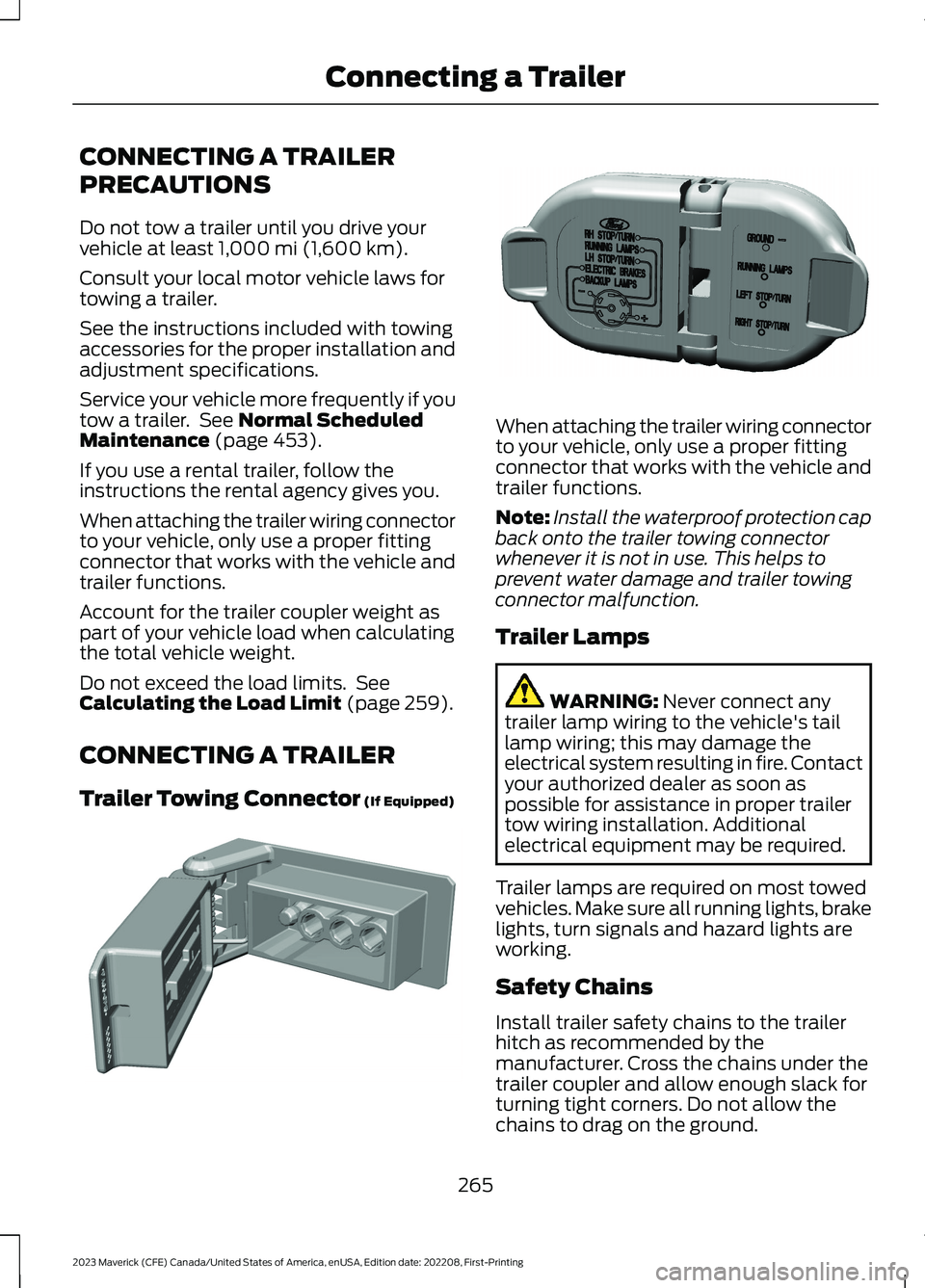
Trailer Towing Connector (If Equipped)
When attaching the trailer wiring connectorto your vehicle, only use a proper fittingconnector that works with the vehicle andtrailer functions.
Note:Install the waterproof protection capback onto the trailer towing connectorwhenever it is not in use. This helps toprevent water damage and trailer towingconnector malfunction.
Trailer Lamps
WARNING: Never connect anytrailer lamp wiring to the vehicle's taillamp wiring; this may damage theelectrical system resulting in fire. Contactyour authorized dealer as soon aspossible for assistance in proper trailertow wiring installation. Additionalelectrical equipment may be required.
Trailer lamps are required on most towedvehicles. Make sure all running lights, brakelights, turn signals and hazard lights areworking.
Safety Chains
Install trailer safety chains to the trailerhitch as recommended by themanufacturer. Cross the chains under thetrailer coupler and allow enough slack forturning tight corners. Do not allow thechains to drag on the ground.
265
2023 Maverick (CFE) Canada/United States of America, enUSA, Edition date: 202208, First-PrintingConnecting a TrailerE353969 E163167
Page 313 of 556
RESETTING THE INTELLIGENT OILLIFE MONITOR
Use the information display controls onthe steering wheel to reset the oil changereminder.
From the main menu scroll to:
Action and descriptionMessage
Press the OK button, thenfrom this menu scroll to thefollowing message.
Settings
Press the OK button, thenfrom this menu scroll to thefollowing message.
Oil LifeReset
Press and hold the OKbutton until the instrumentcluster displays thefollowing message.
Hold OK toReset
Reset Successful
When the oil changereminder resets the instru-ment cluster displays 100%.
Remaining Life
{00}%
If the instrument clusterdisplays one of the followingmessages, repeat theprocess.
Not Reset
Reset Cancelled
ENGINE OIL CAPACITY ANDSPECIFICATION
For filling information, please refer to theCapacities and Specifications section ofyour owner's manual. See Engine OilCapacity and Specification (page 367).
CHECKING THE COOLANT
When the engine is cold, check theconcentration and level of the coolant atthe intervals listed in the scheduledmaintenance information. See ScheduledMaintenance (page 450).
Note:Make sure that the coolant level isbetween the minimum and maximum markson the coolant reservoir.
Note: Coolant expands when it is hot. Thelevel may extend beyond the MAX mark.
If the coolant level is at or below theminimum mark, add prediluted coolantimmediately.
Maintain coolant concentration within48% to 50%, which equates to a freezepoint between -29°F (-34°C) and -35°F(-37°C). Coolant concentration should bechecked using a refractometer. We do notrecommend the use of hydrometers orcoolant test strips for measuring coolantconcentration.
Adding Coolant
WARNING: Keep your hands andclothing clear of the cooling fan.
WARNING: Do not remove thecoolant reservoir cap when the engine ison or the cooling system is hot. Wait 10minutes for the cooling system to cooldown. Cover the coolant reservoir capwith a thick cloth to prevent thepossibility of scalding and slowly removethe cap. Failure to follow this instructioncould result in personal injury.
WARNING: Do not add coolantwhen the vehicle is on or the coolingsystem is hot. Failure to follow thisinstruction could result in personal injury.
309
2023 Maverick (CFE) Canada/United States of America, enUSA, Edition date: 202208, First-PrintingMaintenance
Page 315 of 556
Severe Climates
If you drive in extremely cold climates, youmay need to increase the coolantconcentration above 50%.
Note:A coolant concentration of 60%provides improved freeze point protection.Coolant concentrations above 60%decrease the overheat protectioncharacteristics of the coolant and couldcause engine damage.
If you drive in extremely hot climates, youmay need to decrease the coolantconcentration to 40%.
Note:A coolant concentration of 40%provides improved overheat protection.Coolant concentrations below 40%decrease the overheat and corrosionprotection characteristics of the coolant andcould cause engine damage.
Coolant Change
WARNING: Do not dispose ofcoolant in the household refuse or thepublic sewage system. Use an authorizedwaste disposal facility.
Change the coolant at specific mileageintervals. Refer to the scheduledmaintenance information. See NormalScheduled Maintenance (page 453).
Note:Dispose of used coolant in theappropriate manner.
Follow your community's regulations andstandards for recycling and disposing ofautomotive fluids.
Fail-Safe Cooling
Fail-safe cooling allows you to temporarilydrive your vehicle before any incrementalcomponent damage occurs. The fail-safedistance depends on ambienttemperature, vehicle load and terrain.
How Fail-Safe Cooling Works
WARNING: If you continue to driveyour vehicle when the engine isoverheating, the engine could stopwithout warning. Failure to follow thisinstruction could result in the loss ofcontrol of your vehicle.
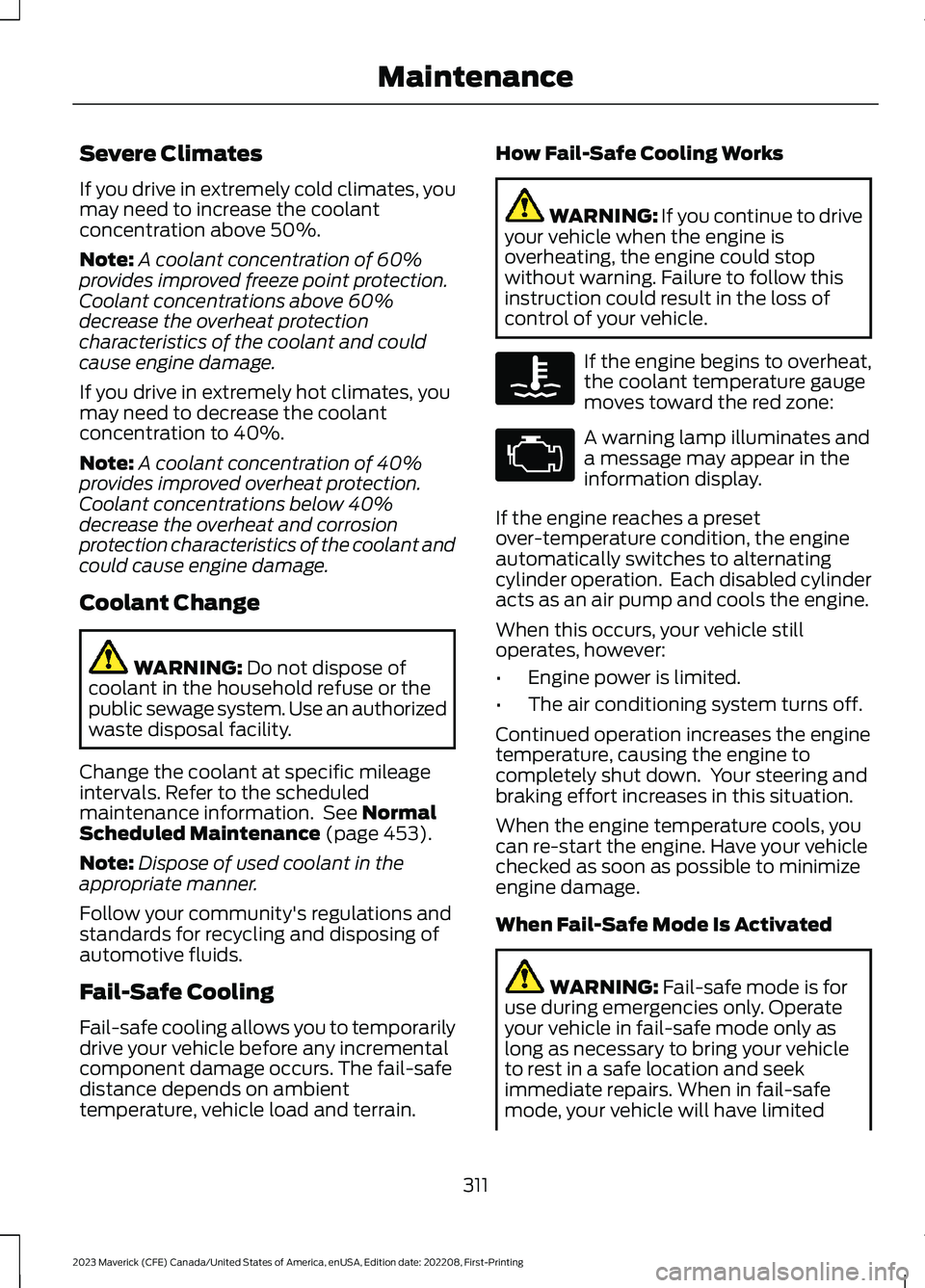
If the engine begins to overheat,the coolant temperature gaugemoves toward the red zone:
A warning lamp illuminates anda message may appear in theinformation display.
If the engine reaches a presetover-temperature condition, the engineautomatically switches to alternatingcylinder operation. Each disabled cylinderacts as an air pump and cools the engine.
When this occurs, your vehicle stilloperates, however:
•Engine power is limited.
•The air conditioning system turns off.
Continued operation increases the enginetemperature, causing the engine tocompletely shut down. Your steering andbraking effort increases in this situation.
When the engine temperature cools, youcan re-start the engine. Have your vehiclechecked as soon as possible to minimizeengine damage.
When Fail-Safe Mode Is Activated
WARNING: Fail-safe mode is foruse during emergencies only. Operateyour vehicle in fail-safe mode only aslong as necessary to bring your vehicleto rest in a safe location and seekimmediate repairs. When in fail-safemode, your vehicle will have limited
311
2023 Maverick (CFE) Canada/United States of America, enUSA, Edition date: 202208, First-PrintingMaintenanceE103308 E67028
Page 317 of 556
1.Stop your vehicle as soon as it is safeto do so. Fully apply the parking brake,shift into park (P) or neutral (N).
2.Leave the engine running until thecoolant temperature gauge needlereturns to the normal position. If thetemperature does not drop afterseveral minutes, follow the remainingsteps.
3.Switch the engine off and wait for it tocool. Check the coolant level.
4.If the coolant level is at or below theminimum mark, add prediluted coolantimmediately.
5.If the coolant level is normal, restartthe engine and continue.
CHANGING THE ENGINE AIR
FILTER - 2.0L ECOBOOST™
WARNING: To reduce the risk ofvehicle damage and personal burninjuries, do not start your engine with theair cleaner removed and do not removeit while the engine is running.
When changing the air filter element, useonly parts that meet or exceed ourspecifications.
For EcoBoost equipped vehicles: Whenservicing the air cleaner, it is important thatno foreign material enter the air inductionsystem. The engine and turbocharger aresusceptible to damage from even smallparticles.
Change the air filter element at the properinterval. See Scheduled Maintenance(page 450).
Note: Failure to use the correct air filterelement may result in severe enginedamage. The customer warranty may bevoid for any damage to the engine if thecorrect air filter element is not used.
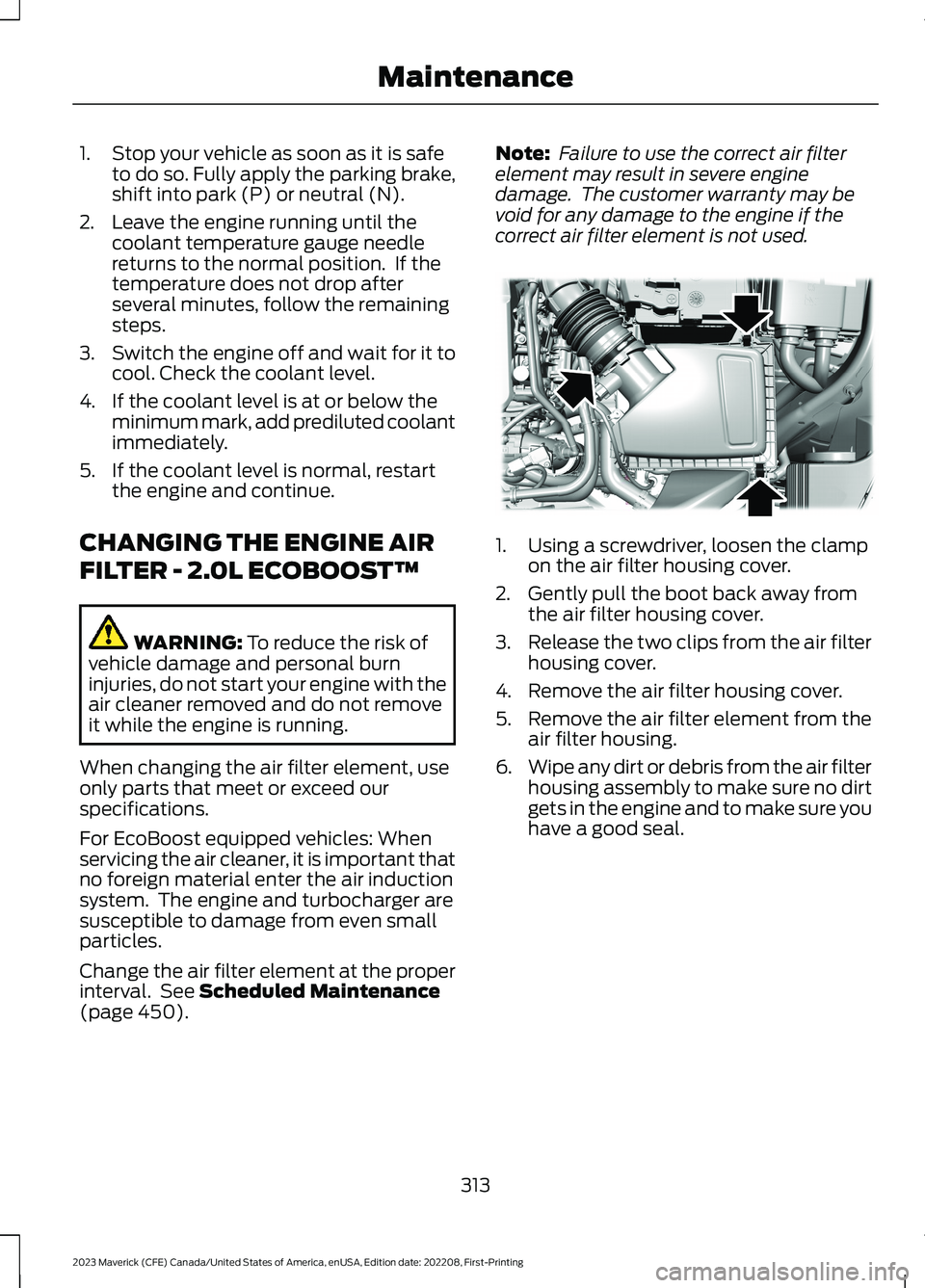
1.Using a screwdriver, loosen the clampon the air filter housing cover.
2.Gently pull the boot back away fromthe air filter housing cover.
3.Release the two clips from the air filterhousing cover.
4.Remove the air filter housing cover.
5.Remove the air filter element from theair filter housing.
6.Wipe any dirt or debris from the air filterhousing assembly to make sure no dirtgets in the engine and to make sure youhave a good seal.
313
2023 Maverick (CFE) Canada/United States of America, enUSA, Edition date: 202208, First-PrintingMaintenanceE299070
Page 318 of 556
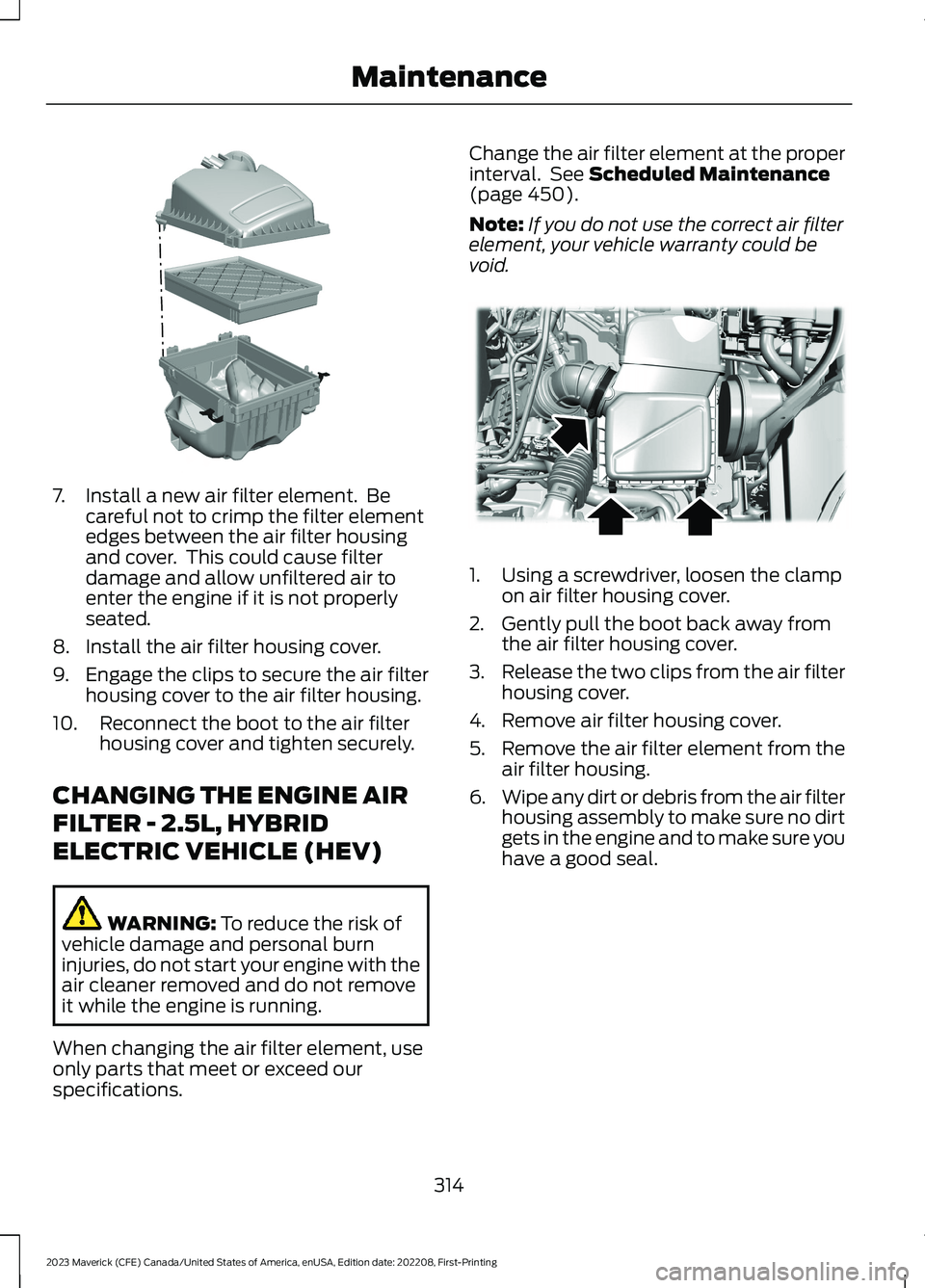
7.Install a new air filter element. Becareful not to crimp the filter elementedges between the air filter housingand cover. This could cause filterdamage and allow unfiltered air toenter the engine if it is not properlyseated.
8.Install the air filter housing cover.
9.Engage the clips to secure the air filterhousing cover to the air filter housing.
10.Reconnect the boot to the air filterhousing cover and tighten securely.
CHANGING THE ENGINE AIR
FILTER - 2.5L, HYBRID
ELECTRIC VEHICLE (HEV)
WARNING: To reduce the risk ofvehicle damage and personal burninjuries, do not start your engine with theair cleaner removed and do not removeit while the engine is running.
When changing the air filter element, useonly parts that meet or exceed ourspecifications.
Change the air filter element at the properinterval. See Scheduled Maintenance(page 450).
Note:If you do not use the correct air filterelement, your vehicle warranty could bevoid.
1.Using a screwdriver, loosen the clampon air filter housing cover.
2.Gently pull the boot back away fromthe air filter housing cover.
3.Release the two clips from the air filterhousing cover.
4.Remove air filter housing cover.
5.Remove the air filter element from theair filter housing.
6.Wipe any dirt or debris from the air filterhousing assembly to make sure no dirtgets in the engine and to make sure youhave a good seal.
314
2023 Maverick (CFE) Canada/United States of America, enUSA, Edition date: 202208, First-PrintingMaintenanceE299073 E299071
Page 364 of 556
Stowing the Spare Tire
Note:Failure to follow the spare tirestowage instructions could result in failureof the cable or loss of the spare tire.
1.Lay the tire on the ground with thevalve stem facing down.
2.Slide the wheel partially under thevehicle and install the retainer throughthe wheel center. Pull on the cable toalign the components at the end of thecable.
3.Turn the jack handle clockwise untilthe tire is raised to its stowed positionunderneath the vehicle. The effort toturn the jack handle increasessignificantly and the spare tire carrierratchets or slips when the tire is raisedto the maximum tightness. Tighten tothe point where the ratchet or slipoccurs, a minimum of three times asindicated by an audible click each time.The spare tire carrier does not allowyou to overtighten. If the spare tirecarrier ratchets or slips with little effort,contact your authorized dealer.
4.Check that the tire lies flat against theframe and is properly tightened. Try topush or pull, then turn the tire to besure it does not move. Loosen andretighten, if necessary. Failure toproperly stow the spare tire couldresult in failure of the winch cable andloss of the tire.
5.Repeat this tightness check procedurewhen servicing the spare tire pressure,every six months, as per your scheduledmaintenance information, or at anytime that the spare tire is disturbedthrough service of other components.
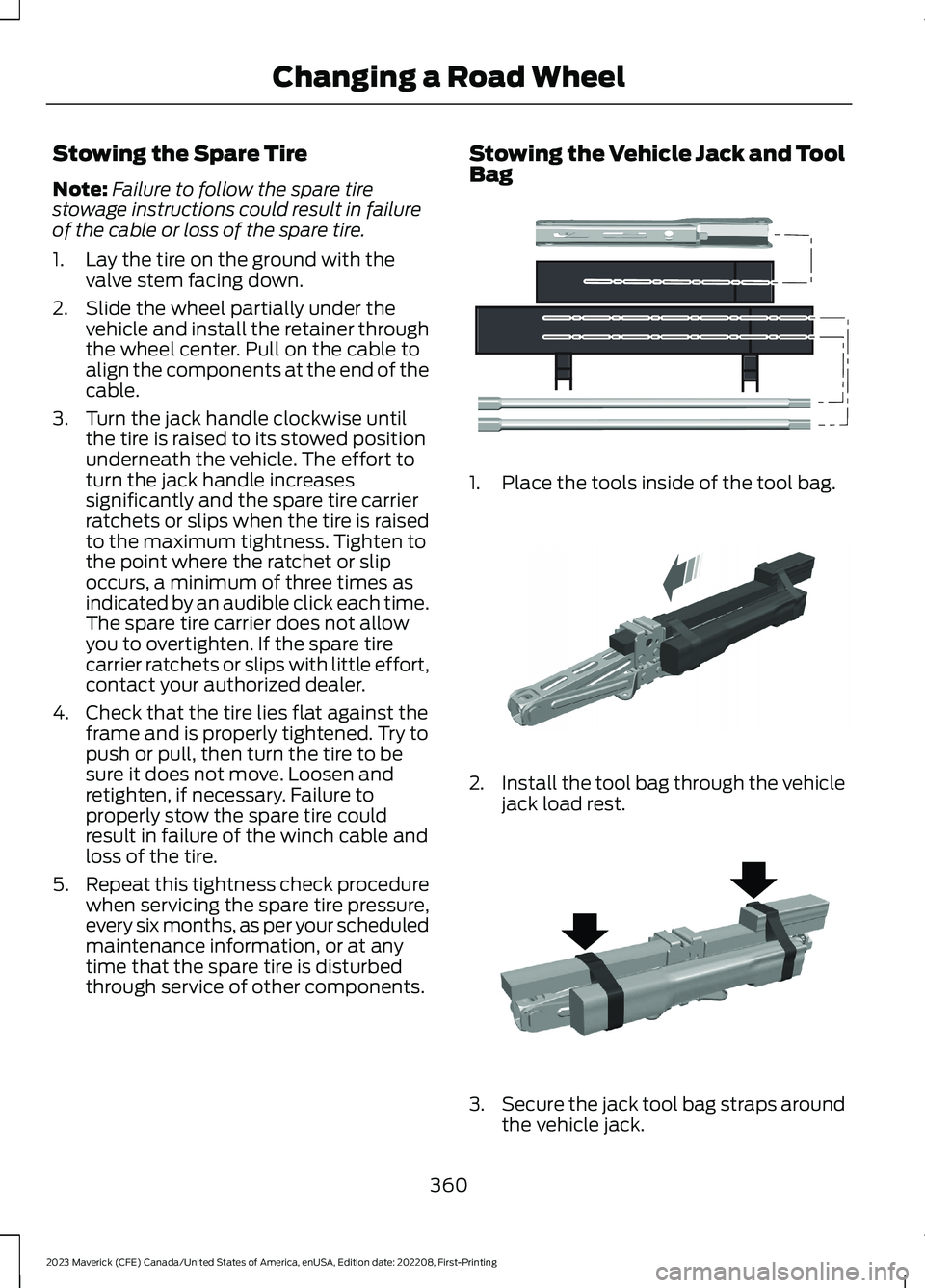
Stowing the Vehicle Jack and ToolBag
1.Place the tools inside of the tool bag.
2.Install the tool bag through the vehiclejack load rest.
3.Secure the jack tool bag straps aroundthe vehicle jack.
360
2023 Maverick (CFE) Canada/United States of America, enUSA, Edition date: 202208, First-PrintingChanging a Road WheelE352149 E352034 E352022