ice FORD MONDEO 2014 4.G Owners Manual
[x] Cancel search | Manufacturer: FORD, Model Year: 2014, Model line: MONDEO, Model: FORD MONDEO 2014 4.GPages: 446, PDF Size: 29.09 MB
Page 380 of 446
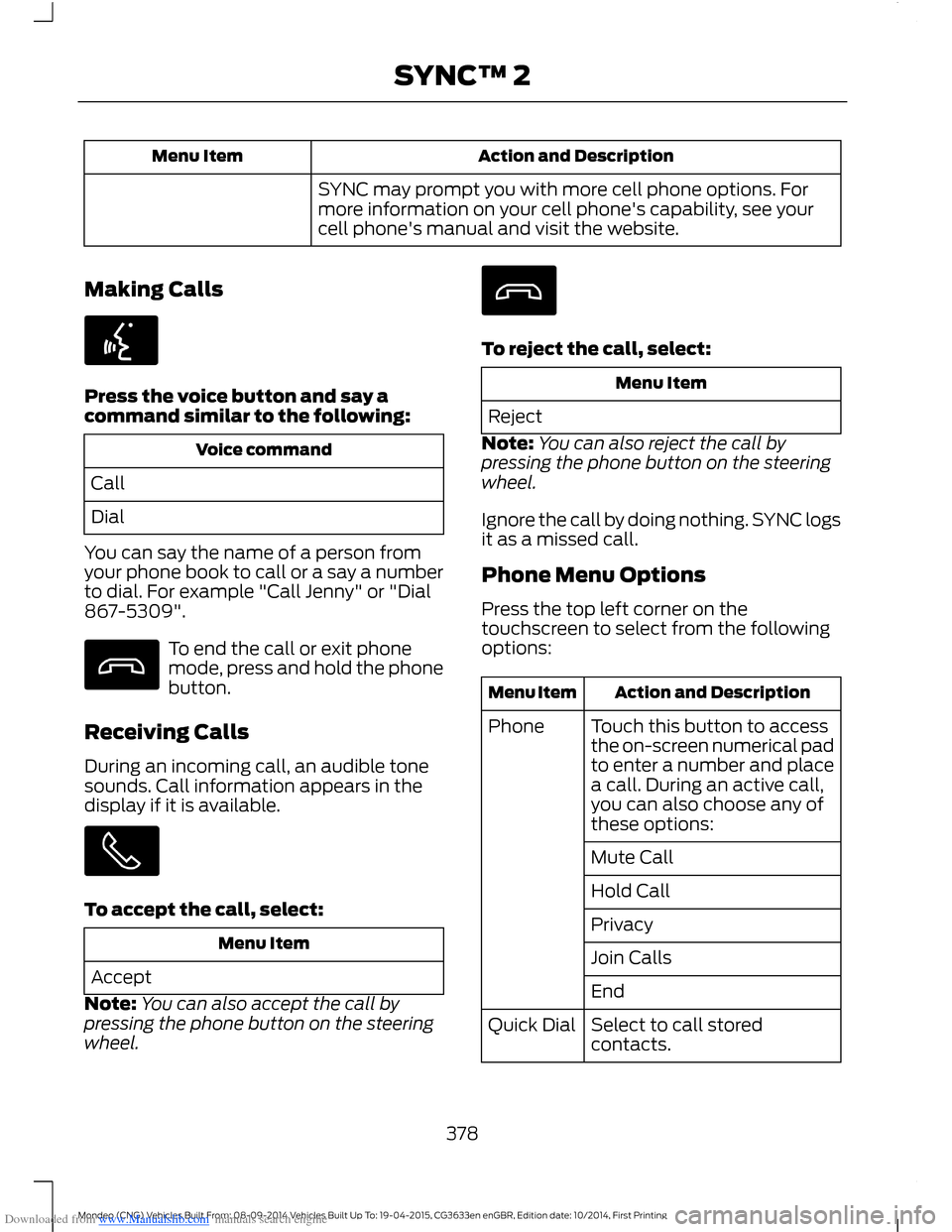
Downloaded from www.Manualslib.com manuals search engine Action and DescriptionMenu Item
SYNC may prompt you with more cell phone options. Formore information on your cell phone's capability, see yourcell phone's manual and visit the website.
Making Calls
Press the voice button and say acommand similar to the following:
Voice command
Call
Dial
You can say the name of a person fromyour phone book to call or a say a numberto dial. For example "Call Jenny" or "Dial867-5309".
To end the call or exit phonemode, press and hold the phonebutton.
Receiving Calls
During an incoming call, an audible tonesounds. Call information appears in thedisplay if it is available.
To accept the call, select:
Menu Item
Accept
Note:You can also accept the call bypressing the phone button on the steeringwheel.
To reject the call, select:
Menu Item
Reject
Note:You can also reject the call bypressing the phone button on the steeringwheel.
Ignore the call by doing nothing. SYNC logsit as a missed call.
Phone Menu Options
Press the top left corner on thetouchscreen to select from the followingoptions:
Action and DescriptionMenu Item
Touch this button to accessthe on-screen numerical padto enter a number and placea call. During an active call,you can also choose any ofthese options:
Phone
Mute Call
Hold Call
Privacy
Join Calls
End
Select to call storedcontacts.Quick Dial
378Mondeo (CNG) Vehicles Built From: 08-09-2014 Vehicles Built Up To: 19-04-2015, CG3633en enGBR, Edition date: 10/2014, First PrintingSYNC™ 2
Page 381 of 446
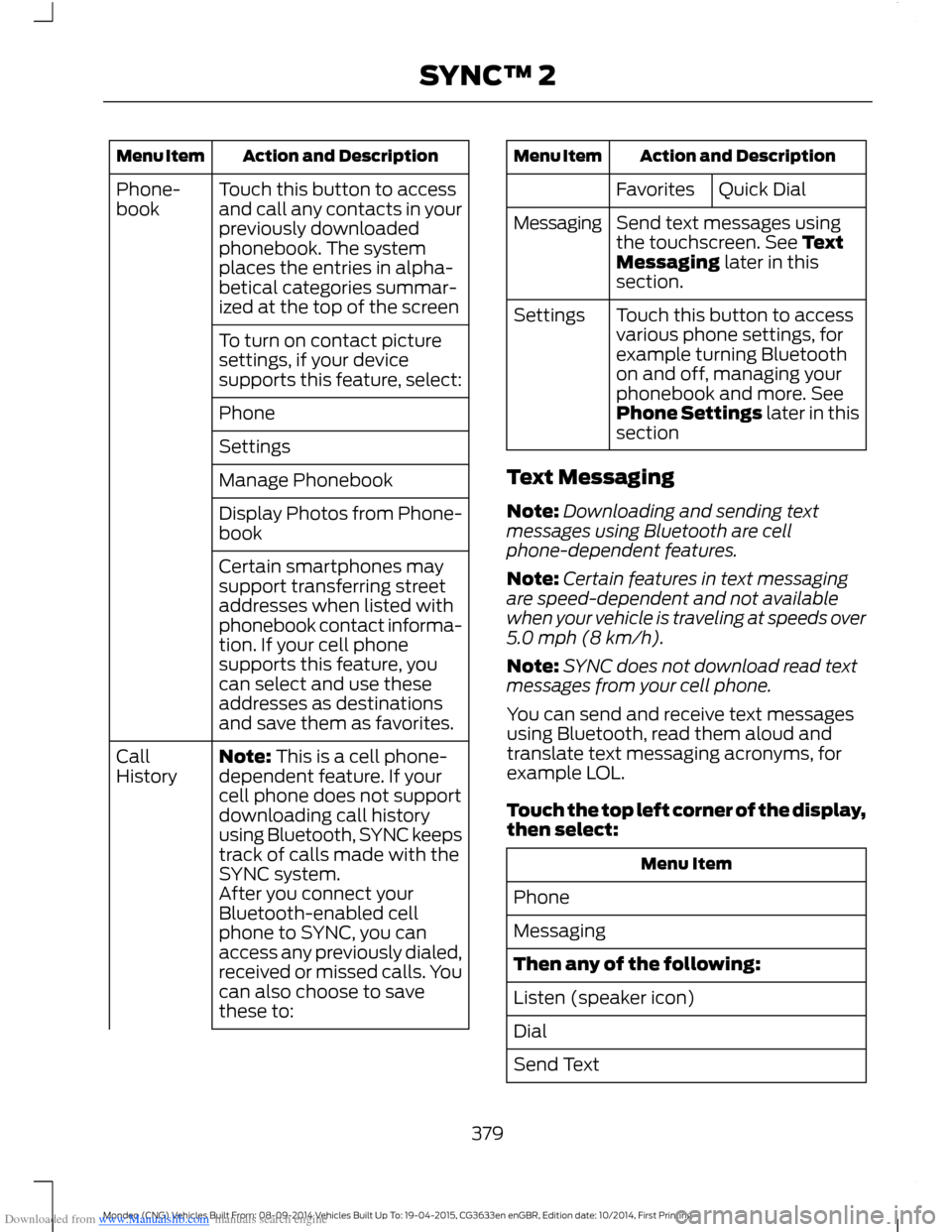
Downloaded from www.Manualslib.com manuals search engine Action and DescriptionMenu Item
Touch this button to accessand call any contacts in yourpreviously downloadedphonebook. The systemplaces the entries in alpha-betical categories summar-ized at the top of the screen
Phone-book
To turn on contact picturesettings, if your devicesupports this feature, select:
Phone
Settings
Manage Phonebook
Display Photos from Phone-book
Certain smartphones maysupport transferring streetaddresses when listed withphonebook contact informa-tion. If your cell phonesupports this feature, youcan select and use theseaddresses as destinationsand save them as favorites.
Note: This is a cell phone-dependent feature. If yourcell phone does not supportdownloading call historyusing Bluetooth, SYNC keepstrack of calls made with theSYNC system.
CallHistory
After you connect yourBluetooth-enabled cellphone to SYNC, you canaccess any previously dialed,received or missed calls. Youcan also choose to savethese to:
Action and DescriptionMenu Item
Quick DialFavorites
Send text messages usingthe touchscreen. See TextMessaging later in thissection.
Messaging
Touch this button to accessvarious phone settings, forexample turning Bluetoothon and off, managing yourphonebook and more. SeePhone Settings later in thissection
Settings
Text Messaging
Note:Downloading and sending textmessages using Bluetooth are cellphone-dependent features.
Note:Certain features in text messagingare speed-dependent and not availablewhen your vehicle is traveling at speeds over5.0 mph (8 km/h).
Note:SYNC does not download read textmessages from your cell phone.
You can send and receive text messagesusing Bluetooth, read them aloud andtranslate text messaging acronyms, forexample LOL.
Touch the top left corner of the display,then select:
Menu Item
Phone
Messaging
Then any of the following:
Listen (speaker icon)
Dial
Send Text
379Mondeo (CNG) Vehicles Built From: 08-09-2014 Vehicles Built Up To: 19-04-2015, CG3633en enGBR, Edition date: 10/2014, First PrintingSYNC™ 2
Page 382 of 446
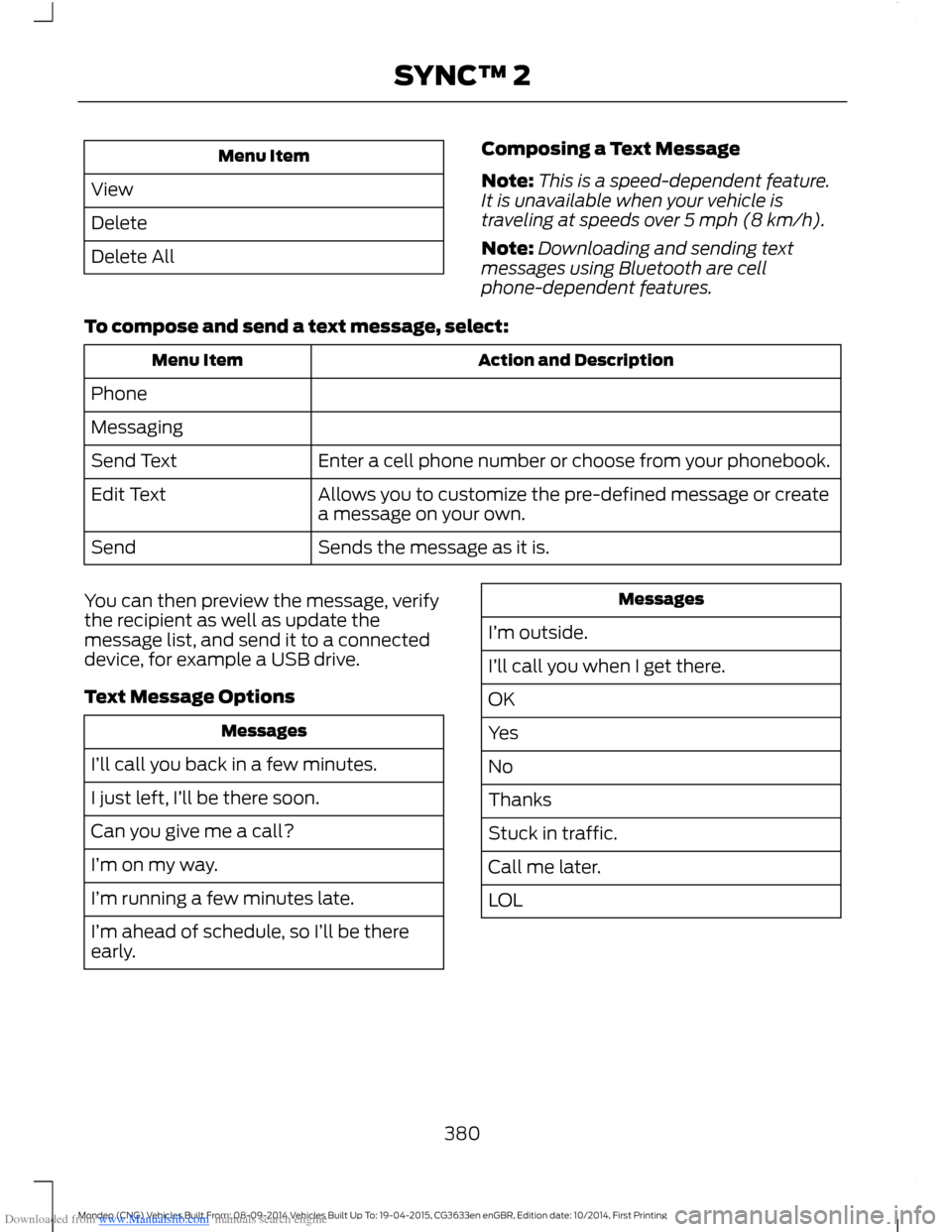
Downloaded from www.Manualslib.com manuals search engine Menu Item
View
Delete
Delete All
Composing a Text Message
Note:This is a speed-dependent feature.It is unavailable when your vehicle istraveling at speeds over 5 mph (8 km/h).
Note:Downloading and sending textmessages using Bluetooth are cellphone-dependent features.
To compose and send a text message, select:
Action and DescriptionMenu Item
Phone
Messaging
Enter a cell phone number or choose from your phonebook.Send Text
Allows you to customize the pre-defined message or createa message on your own.Edit Text
Sends the message as it is.Send
You can then preview the message, verifythe recipient as well as update themessage list, and send it to a connecteddevice, for example a USB drive.
Text Message Options
Messages
I’ll call you back in a few minutes.
I just left, I’ll be there soon.
Can you give me a call?
I’m on my way.
I’m running a few minutes late.
I’m ahead of schedule, so I’ll be thereearly.
Messages
I’m outside.
I’ll call you when I get there.
OK
Yes
No
Thanks
Stuck in traffic.
Call me later.
LOL
380Mondeo (CNG) Vehicles Built From: 08-09-2014 Vehicles Built Up To: 19-04-2015, CG3633en enGBR, Edition date: 10/2014, First PrintingSYNC™ 2
Page 383 of 446
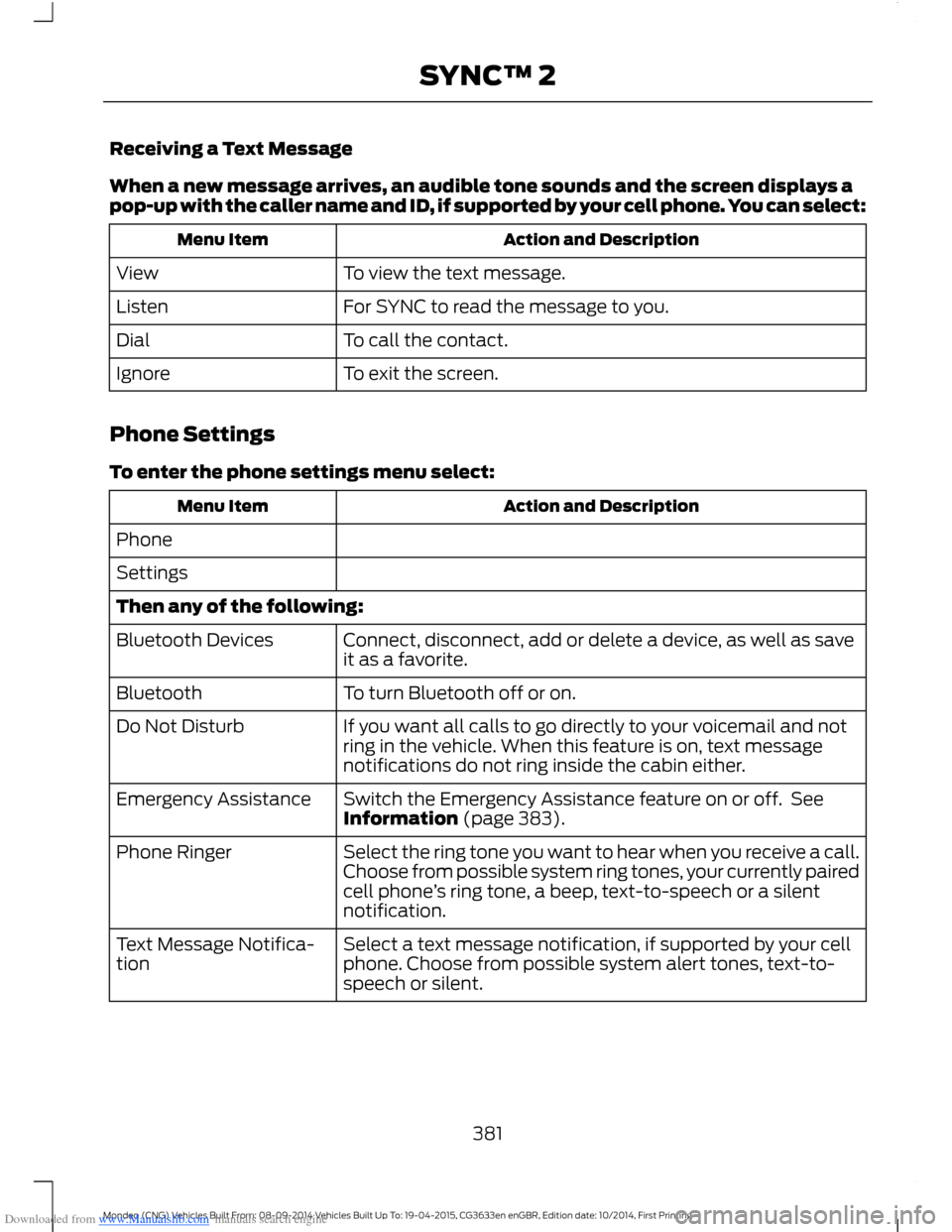
Downloaded from www.Manualslib.com manuals search engine Receiving a Text Message
When a new message arrives, an audible tone sounds and the screen displays apop-up with the caller name and ID, if supported by your cell phone. You can select:
Action and DescriptionMenu Item
To view the text message.View
For SYNC to read the message to you.Listen
To call the contact.Dial
To exit the screen.Ignore
Phone Settings
To enter the phone settings menu select:
Action and DescriptionMenu Item
Phone
Settings
Then any of the following:
Connect, disconnect, add or delete a device, as well as saveit as a favorite.Bluetooth Devices
To turn Bluetooth off or on.Bluetooth
If you want all calls to go directly to your voicemail and notring in the vehicle. When this feature is on, text messagenotifications do not ring inside the cabin either.
Do Not Disturb
Switch the Emergency Assistance feature on or off. SeeInformation (page 383).Emergency Assistance
Select the ring tone you want to hear when you receive a call.Choose from possible system ring tones, your currently pairedcell phone’s ring tone, a beep, text-to-speech or a silentnotification.
Phone Ringer
Select a text message notification, if supported by your cellphone. Choose from possible system alert tones, text-to-speech or silent.
Text Message Notifica-tion
381Mondeo (CNG) Vehicles Built From: 08-09-2014 Vehicles Built Up To: 19-04-2015, CG3633en enGBR, Edition date: 10/2014, First PrintingSYNC™ 2
Page 384 of 446
Downloaded from www.Manualslib.com manuals search engine Action and DescriptionMenu Item
If your cell phone is compatible, use this screen to adjust yourinternet data connection. Select to make your connectionprofile with the personal area network or to turn off yourconnection. You can also choose to adjust your settings orhave the system always connect, never connect whenroaming or query on connect. Press ? for more information.
Internet Data Connection
To access features such as automatic phonebook download,re-download your phonebook, add contacts from your cellphone as well as delete or upload your phonebook.
Manage Phonebook
To have the system alert you when your cell phone is inroaming mode.Roaming Warning
Phone Voice CommandsPress the voice button and whenprompted say any of the following or asimilar command:
Voice command
Call Voicemail
Listen to Message
Reply to Message
Pair Phone
help
382Mondeo (CNG) Vehicles Built From: 08-09-2014 Vehicles Built Up To: 19-04-2015, CG3633en enGBR, Edition date: 10/2014, First PrintingSYNC™ 2
Page 386 of 446
Downloaded from www.Manualslib.com manuals search engine Press Notifications, and then choose from any of the following services:
Action and DescriptionMenu Item
The complete messageView
The messageDelete
MessagesDelete All
This screen displays any system messages(such as an SD card fault).
Note:The system alerts you to anymessages by turning the information iconyellow. After you read or delete themessages, the icon returns to white.
Calendar
If your vehicle is equipped withNavigation, touch the I(Information) button to accessthese features. If your vehicle is notequipped with Navigation, touch the cornerof the touchscreen with the green tab.
Press Calendar. You can view the currentcalendar by day, week or month.
Emergency Assistance (If Equipped)
WARNINGS
For this feature to work, your mobilephone must be Bluetooth capableand compatible with the system.
Always place your mobile phone ina secure location inside your vehicle.Failure to do so may cause seriousinjury to someone or damage the phonewhich could prevent Emergency Assistancefrom working correctly.
Unless the Emergency Assistancesetting is set to on prior to a collision,the system will not attempt to placean emergency call which could delay theresponse time, potentially increasing therisk of serious injury or death. Do not wait
WARNINGS
for Emergency Assistance to make anemergency call if you can do it yourself.Dial emergency services immediately toavoid a delayed response time. If you donot hear Emergency Assistance within fiveseconds of the crash, the system or cellphone may be damaged or non-functional.
Note:Before setting the feature on, pleaseread the important notice about theEmergency Assistance feature and theEmergency Assistance privacy notice laterin this section for important information.
Note:When you switch EmergencyAssistance on or off, the setting apply to allpaired mobile phones. If you switchEmergency Assistance off and a previouslypaired phone connects when you switch theignition on, either a voice message plays, adisplay message or icon is shown, or both.
Note:Note: Every mobile phone operatesdifferently. While Emergency Assistanceworks with most mobile phones, somemobile phones may experience difficultiesusing this feature.
384Mondeo (CNG) Vehicles Built From: 08-09-2014 Vehicles Built Up To: 19-04-2015, CG3633en enGBR, Edition date: 10/2014, First PrintingSYNC™ 2
Page 387 of 446
Downloaded from www.Manualslib.com manuals search engine In the event of a collision which deploysan airbag or activates the fuel pumpshut-off, the system may contact theemergency services (including call center)through a paired and connected mobilephone. The emergency services operatorcontacts the relevant police agency andestablishes communication among threeparties (you, call center and the policeagency). In the end, the local police agencycoordinates the rescue.
Note:In case of an emergency, EmergencyAssistance, as a means of communicationaid, can help you contact specific rescuedepartments of public security. EmergencyAssistance does not implement the rescueoperations. The local public securitydepartment deploys specific rescueoperations according to the actual situation.
See Supplementary Restraints System(page 27). Important informationregarding airbag deployment is in thischapter.
See Roadside Emergencies (page 224).Important information regarding the fuelpump shut-off is in this chapter.
Setting Emergency Assistance On
If your vehicle is equipped withNavigation, touch the I (Information)button to access these features. If yourvehicle is not equipped withNavigation, touch the corner of thetouchscreen with the green tab. Thenselect:
Menu Item
Apps
Emergency Assistance
On
Display Options
If you switch on this feature, a confirmationmessage appears in the display when yourcell phone connects and your vehiclestarts.
If you switch off this feature, the dialogallows you to set a reminder.
Off with reminder provides a display andvoice reminder when your cell phoneconnects and your vehicle starts.
Off without reminder provides a displayreminder only without a voice reminderwhen your cell phone connects.
To make sure that Emergency Assistanceworks correctly:
•The system must have power and beworking correctly at the time of thecrash and during feature activation anduse.
•You must switch on the feature beforea crash.
•You must have a cell phone connectedto the system.
•In certain countries, it may benecessary to have a valid andregistered SIM card with credit in orderto place and maintain an emergencycall.
•A connected cell phone must have theability to make and maintain anoutgoing call at the time of the crash.
•A connected cell phone must haveadequate network coverage, batterypower and signal strength.
•Your vehicle must have battery power.
385Mondeo (CNG) Vehicles Built From: 08-09-2014 Vehicles Built Up To: 19-04-2015, CG3633en enGBR, Edition date: 10/2014, First PrintingSYNC™ 2
Page 388 of 446
Downloaded from www.Manualslib.com manuals search engine Note:This feature only works in a Europeancountry or region where SYNC EmergencyAssistance can call the local emergencyservices. Visit the regional Ford website fordetails.
In the Event of a Crash
Note:Not every crash deploys an airbag ortriggers the fuel pump shut off (which mayturn on Emergency Assistance). However,if Emergency Assistance is triggered thesystem tries to contact the emergencyservices. If a connected cell phone sustainsdamage or loses connection to the system,it searches for and tries to connect to anyavailable previously paired cell phone. Thesystem attempts to dial 112.
Before making a call:
•If you do not cancel the call and SYNCmakes a successful call, anintroductory message plays for theemergency operator. After thismessage, there is hands-freecommunication between your vehicle'soccupants and the operator.
•The system provides a short windowof time (approximately 10 seconds) tocancel the call. If you do not cancel thecall, the system attempts to dial 112.
•The system plays a message lettingyou know when it attempts to make anemergency call. You can cancel the callby selecting the relevant button or bypressing the end call button on thesteering wheel.
During a call:
•Emergency Assistance uses yourvehicle GPS or cellular networkinformation when available todetermine the most appropriatelanguage to use.
•The language the system uses tointeract with the occupants of yourvehicle may differ from the languageused to deliver information to theemergency operator.
•After the delivery of the introductorymessage the voice line opens so thatyou can speak hands-free with theemergency operator.
•When the line is connected, you mustbe prepared to provide your name,phone number and locationinformation immediately.
Note:While the system providesinformation to the emergency operator, thesystem plays a message letting you knowit is sending important information. It thenlets you know when the line is open to starthands-free communication.
Note:During an Emergency Assistance call,an emergency priority screen appears whichcontains vehicle GPS coordinates whenavailable.
Note:It is possible that GPS locationinformation is not available at the time ofthe crash; in this case, EmergencyAssistance will still attempt to place anemergency call.
Note:It is possible that the emergencyservices will not receive the GPScoordinates; in this case, hands-freecommunication with an emergency operatoris available.
386Mondeo (CNG) Vehicles Built From: 08-09-2014 Vehicles Built Up To: 19-04-2015, CG3633en enGBR, Edition date: 10/2014, First PrintingSYNC™ 2
Page 389 of 446
Downloaded from www.Manualslib.com manuals search engine Note:The emergency operator may alsoreceive information from the cellularnetwork such as cell phone number, cellphone location and cell phone carrier nameindependent from SYNC EmergencyAssistance.
Emergency Assistance may not workif:
•Your cell phone or EmergencyAssistance hardware sustains damagein the crash
•The vehicle battery or the system hasno power.
•A crash ejects your cell phone fromyour vehicle.
•You do not have a valid and registeredSIM card with credit in your cell phone.
•You are in a European country or regionwhere the SYNC Emergency Assistancecannot place the call. Visit the regionalFord website for details
Important Information about theEmergency Assistance Feature
Emergency Assistance does not currentlycall emergency services in the followingmarkets: Albania, Belarus, Bosnia andHerzegovina, Macedonia, Netherlands,Ukraine, Moldova and Russia.
Visit the regional Ford website for latestdetails.
Emergency Assistance Privacy Notice
When you switch on EmergencyAssistance, it may disclose to emergencyservices that your vehicle has been in acrash involving the deployment of anairbag or activation of the fuel pump shutoff. This feature has the capability todisclose your location information to theemergency operator or other details aboutyour vehicle or crash to provide the mostappropriate emergency services.
If you do not want to disclose thisinformation, do not switch on the feature.
Where Am I?
For vehicle location and information select:
Action and DescriptionMenu Item
Information
Help
Then select:
View your vehicle's current location, if yourvehicle is equipped with navigation. If yourvehicle is not equipped with navigation, youdo not see this button.
Where Am I?
387Mondeo (CNG) Vehicles Built From: 08-09-2014 Vehicles Built Up To: 19-04-2015, CG3633en enGBR, Edition date: 10/2014, First PrintingSYNC™ 2
Page 391 of 446
Downloaded from www.Manualslib.com manuals search engine MAX A/C: Touch to cool your vehicle with recirculated air. Touch again fornormal A/C operation. MAX A/C distributes air through instrument panel ventsand may help reduce odors from entering your vehicle. MAX A/C is moreeconomical and efficient than normal A/C mode.
E
A/C: Touch to switch the air conditioning on or off. Use A/C with recirculatedair to improve cooling performance and efficiency. A/C engages automaticallyin MAX A/C, defrost and footwell/defrost.
F
AUTO: Touch to engage automatic operation, then set the temperature usingthe temperature control. The system automatically controls fan speed, airflowdistribution, A/C on or off and the use of fresh or recirculated air.
G
Heated rear window: Turns the heated rear window on and off. See HeatedWindows and Mirrors (page 121).H
MAX Defrost: Distributes outside air through the windshield air vents andautomatically turns the air conditioning on. The fan is set to the highest speedand the temperature to HI. When the air distribution is set in this position, youare unable to select recirculated air or manually adjust the fan speed andtemperature control.
I
Heated windscreen: Press the button to clear the heated windscreen of thinice and fog.J
Manual airflow distribution controls: Footwell and Defrost: Distributesair through the windshield defroster vents, demister vents, floor vents and rearseat floor vents, and provides outside air to reduce window fogging.Panel:Distributes air through the instrument panel vents.Panel and Floor: Distributesair through the instrument panel vents, demister vents, floor vents and rear seatfloor vents.Floor: Distributes air through the demister vents, floor vents andrear seat floor vents.Defrost: Touch to clear the windshield of fog and thin ice.Touch again to return to the previous airflow selection. When on, defrost providesoutside air to reduce window fogging and distributes air through the windshielddefroster vents and demister vents.
K
Driver settings: Touch + or – to adjust the temperature.L
Touch the heated seat icon to turn the heated seat off and on (if equipped).
Touch the climate-controlled seat icon to turn the climate-controlled seat offand on (if equipped).
Touch MyTemp to select your preset temperature setpoint. Touch and holdMyTemp to save a new preset temperature setpoint.
Touch the heated steering wheel icon to turn the heated steering wheel on andoff (if equipped).
389Mondeo (CNG) Vehicles Built From: 08-09-2014 Vehicles Built Up To: 19-04-2015, CG3633en enGBR, Edition date: 10/2014, First PrintingSYNC™ 2