ice FORD MONDEO 2014 4.G Owners Manual
[x] Cancel search | Manufacturer: FORD, Model Year: 2014, Model line: MONDEO, Model: FORD MONDEO 2014 4.GPages: 446, PDF Size: 29.09 MB
Page 392 of 446
Downloaded from www.Manualslib.com manuals search engine Climate Control Voice CommandsPress the voice button on thesteering wheel controls. Whenprompted, say any of thefollowing or a similar command:
Voice commands
Climate On
Climate Off
Adjust the temperature to between 15.0 - 30.0°C or59 - 86°F.Set temperature
NAVIGATION
Note:The navigation SD card must be inthe SD card slot to operate the navigationsystem. If you need a replacement SD card,contact an authorized dealer.
Note:The SD card slot is spring-loaded. Toremove the SD card, just push the card inand release it. Do not attempt to pull thecard out to remove it; this could causedamage.
Your navigation system is comprised oftwo main features, destination mode andmap mode.
Destination Mode
To set a destination press the green corner of your touchscreen, then the press:
Menu Item
Dest.
Choose any of the following:
My Home
Favorites
Previous Destinations
Point of Interest
Emergency
Street Address
Intersection
City Center
390Mondeo (CNG) Vehicles Built From: 08-09-2014 Vehicles Built Up To: 19-04-2015, CG3633en enGBR, Edition date: 10/2014, First PrintingSYNC™ 2
Page 394 of 446
Downloaded from www.Manualslib.com manuals search engine To begin navigation press:
Action and DescriptionMenu Item
You can cancel the route or have thesystem demo the route for you.Start Route
During route guidance, you can press thetalking bubble icon that appears in theupper right navigation corner (green bar) ifyou want the system to repeat route guid-ance information. When the system repeatsthe last guidance instruction, it updates thedistance to the next guidance instruction,since it detects when the vehicle is moving.
To set route preferences press:
Action and DescriptionMenu Item
In route preferences you can to set prefer-ences like avoiding motorways, tollroads,ferries and car trains or tunnels.
Route Prefs
Note:If your vehicle is on a recognized roadand you do not press the Start Routebutton, the system defaults to the FastestRoute option and begins guidance.
Michelin Travel Guide
The Michelin travel guide is a service whichprovides additional information aboutcertain places of interests (POI) such asrestaurants, hotels and touristic sites (ifavailable).
If you have paired your phone with thesystem, you can press the phone buttonto directly establish a call with the selectedPOI.
Note:Not all features are available in alllanguages and countries.
Point of Interest (POI) Categories
Main categories
Fuel Station
Parking
Food, Drink and Dining
Automotive
Travel and Transportation
Shopping
Financial
Entertainment & Arts
Emergency
Recreation & Sports
Community
392Mondeo (CNG) Vehicles Built From: 08-09-2014 Vehicles Built Up To: 19-04-2015, CG3633en enGBR, Edition date: 10/2014, First PrintingSYNC™ 2
Page 395 of 446
Downloaded from www.Manualslib.com manuals search engine Main categories
Government
Health and Medicine
Domestic Services
To expand these listings, press the + infront of the listing.
The system also allows you to sortalphabetically or by distance.
Setting Your NavigationPreferences
Select settings for the system totake into account when planningyour route.
To access the settings options, press
Menu Item
Settings
Navigation
Then select any of the following:
Map Preferences
Second Level Messages, Actions and DescriptionsMenu Item
Map Preferences
Then select any of the following:
Display your vehicle’s previously traveled route with white dots.You can switch this feature:Breadcrumbs
OffOn
Have the system display your turn listTurn List Format
Bottom to TopTop to Bottom
When parking point of interest notification is on, the iconsdisplay on the map when you get close to your destination.This may not be very useful in dense areas, and may clutterthe map when other points of interest display. Set the auto-matic parking point of interest notification. You can switch thisfeature:
Parking POI Notification
OffOn
393Mondeo (CNG) Vehicles Built From: 08-09-2014 Vehicles Built Up To: 19-04-2015, CG3633en enGBR, Edition date: 10/2014, First PrintingSYNC™ 2
Page 397 of 446
Downloaded from www.Manualslib.com manuals search engine Traffic Preferences
Second Level Messages, Actions and DescriptionsMenu Item
Traffic Preferences
Then select any of the following:
You can choose how you want the system to handle trafficproblems along your route.Avoid Traffic Problems
Have the system reroute you to avoidtraffic incidents that develop andimpact the current route. The systemdoes not provide a traffic alert notific-ation
Automatic
Have the system always provide atraffic alert notification for trafficincidents along the planned route.You have a choice to accept or ignorethe notification before making theroute deviation.
Manual
Activate traffic alert notifications on or off.Traffic alert notification
Have the system avoid traffic problems automatically.Traffic Icon Settings
Switch traffic alert notifications on or off.
Have the system display accident icons.
Have the system display traffic jam icons.
Have the system display closed roads.
Have the system display road work icons.
Have the system display incident icons.
Have the system display icons for areas where difficult drivingconditions may occur.
Have the system display icons for areas where snow and iceon the road may occur.
Have the system display any smog icons.
395Mondeo (CNG) Vehicles Built From: 08-09-2014 Vehicles Built Up To: 19-04-2015, CG3633en enGBR, Edition date: 10/2014, First PrintingSYNC™ 2
Page 399 of 446
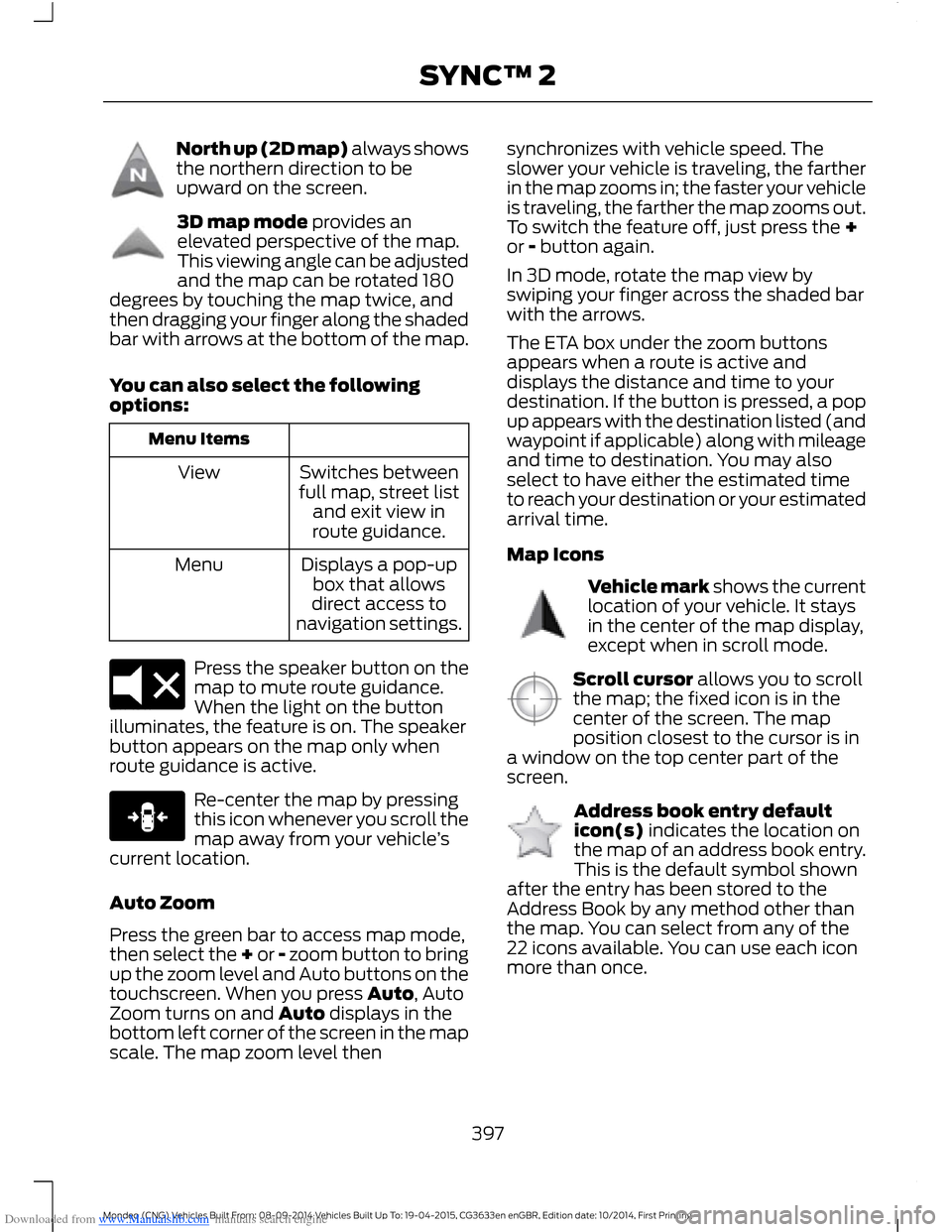
Downloaded from www.Manualslib.com manuals search engine North up (2D map) always showsthe northern direction to beupward on the screen.
3D map mode provides anelevated perspective of the map.This viewing angle can be adjustedand the map can be rotated 180degrees by touching the map twice, andthen dragging your finger along the shadedbar with arrows at the bottom of the map.
You can also select the followingoptions:
Menu Items
Switches betweenfull map, street listand exit view inroute guidance.
View
Displays a pop-upbox that allowsdirect access tonavigation settings.
Menu
Press the speaker button on themap to mute route guidance.When the light on the buttonilluminates, the feature is on. The speakerbutton appears on the map only whenroute guidance is active.
Re-center the map by pressingthis icon whenever you scroll themap away from your vehicle’scurrent location.
Auto Zoom
Press the green bar to access map mode,then select the + or - zoom button to bringup the zoom level and Auto buttons on thetouchscreen. When you press Auto, AutoZoom turns on and Auto displays in thebottom left corner of the screen in the mapscale. The map zoom level then
synchronizes with vehicle speed. Theslower your vehicle is traveling, the fartherin the map zooms in; the faster your vehicleis traveling, the farther the map zooms out.To switch the feature off, just press the +or - button again.
In 3D mode, rotate the map view byswiping your finger across the shaded barwith the arrows.
The ETA box under the zoom buttonsappears when a route is active anddisplays the distance and time to yourdestination. If the button is pressed, a popup appears with the destination listed (andwaypoint if applicable) along with mileageand time to destination. You may alsoselect to have either the estimated timeto reach your destination or your estimatedarrival time.
Map Icons
Vehicle mark shows the currentlocation of your vehicle. It staysin the center of the map display,except when in scroll mode.
Scroll cursor allows you to scrollthe map; the fixed icon is in thecenter of the screen. The mapposition closest to the cursor is ina window on the top center part of thescreen.
Address book entry defaulticon(s) indicates the location onthe map of an address book entry.This is the default symbol shownafter the entry has been stored to theAddress Book by any method other thanthe map. You can select from any of the22 icons available. You can use each iconmore than once.
397Mondeo (CNG) Vehicles Built From: 08-09-2014 Vehicles Built Up To: 19-04-2015, CG3633en enGBR, Edition date: 10/2014, First PrintingSYNC™ 2
Page 401 of 446
Downloaded from www.Manualslib.com manuals search engine View/Edit Route
Access these features when a route isactive:
Menu Item
View Route
Edit Destination/Waypoints
Edit Turn List
Detour
Edit Route Preferences
Edit Traffic Preferences
Cancel Route
HERE is the digital map provider for thenavigation application. If you find map dataerrors, you may report them directly toHERE by going to www.here.com. HEREevaluates all reported map errors andresponds with the result of theirinvestigation by e-mail.
Navigation Map Updates
Annual navigation map updates areavailable for purchase through yourdealership.
Navigation Voice Commands
When in navigation mode, pressthe voice button on the steeringwheel controls.
After the tone, say any of the following or a similar command:
Voice command
Destination
Zoom Out
Zoom In
Where Am I
help
The following commands can only be used when a navigation route is active:
Voice command
Detour
Cancel Route
Show Route
Repeat Instruction
Turn List
399Mondeo (CNG) Vehicles Built From: 08-09-2014 Vehicles Built Up To: 19-04-2015, CG3633en enGBR, Edition date: 10/2014, First PrintingSYNC™ 2
Page 402 of 446
Downloaded from www.Manualslib.com manuals search engine One-shot Destination Street Address
To set a destination with voicecommands, you can say:
Action and Descrip-tionVoice Command
The system asksyou to say the fulladdress. Thesystem displays anexample on-screen.
Find an Address
You can then speak the address naturally,such as "One two three four Main Street,Anytown".
SYNC™ TROUBLESHOOTING
Your SYNC system is easy to use. However,should questions arise, please refer to thetables below.
To check your cell phone's compatibility,visit the regional Ford website.
Cell phone issues
Possible solutionPossible causeIssue
Refer to your device's manual about audioadjustments.
The audio controlsettings on your cellphone may be affectingSYNC performance.
A lot of back-ground noiseduring a phonecall.
Try switching off your cell phone, resettingit or removing the battery, then trying again.Possible cell phonemalfunction.
During a call, Ican hear theother personbut they cannothear me.
Make sure that the microphone for SYNCis not set to off.
Check your cell phone's compatibility.This is a cell phone-dependent feature.
SYNC is notable to down-load my phone-book.
Try switching off your cell phone, resettingit or removing the battery, then trying again.
Possible cell phonemalfunction.
Try pushing your phonebook contacts toSYNC by selecting the option to add.
You must switch on your cell phone andthe automatic phonebook downloadfeature on SYNC.
400Mondeo (CNG) Vehicles Built From: 08-09-2014 Vehicles Built Up To: 19-04-2015, CG3633en enGBR, Edition date: 10/2014, First PrintingSYNC™ 2
Page 403 of 446
Downloaded from www.Manualslib.com manuals search engine Cell phone issues
Possible solutionPossible causeIssue
Try pushing your phonebook contacts toSYNC by selecting the option to add.
Limitations on your cellphone's capability.
The systemsays "Phone-book down-loaded" but mySYNC phone-book is empty oris missingcontacts.
If the missing contacts are stored on yourSIM card, try moving them to your cellphone's memory.
Remove any pictures or special ring tonesassociated with the missing contact.
You must switch on your cell phone andthe automatic phonebook downloadfeature on SYNC.
Check your cell phone's compatibility.This is a cell phone-dependent feature.
I am havingtroubleconnecting mycell phone toSYNC.
Try switching off your cell phone, resettingit or removing the battery, then trying again.
Possible cell phonemalfunction.
Try deleting your device from SYNC anddeleting SYNC from your device, then tryingagain.
Always check the security and auto acceptprompt settings relative to the SYNCBluetooth connection on your cell phone.
Update your cell phone's firmware.
Switch off the auto download setting.
Check your cell phone's compatibility.This is a cell phone-dependent feature.
Text messagingis not workingon SYNC.
Try switching off your cell phone, resettingit or removing the battery, then trying again.Possible cell phonemalfunction.
iPhone•Go to your cell phone's Settings.
•Go to the Bluetooth Menu.
•Make sure the connection status showsNot Connected.
•Press the blue circle to enter the nextmenu.
•Turn on Show Notifications.
•Turn on Sync Contacts.
401Mondeo (CNG) Vehicles Built From: 08-09-2014 Vehicles Built Up To: 19-04-2015, CG3633en enGBR, Edition date: 10/2014, First PrintingSYNC™ 2
Page 404 of 446
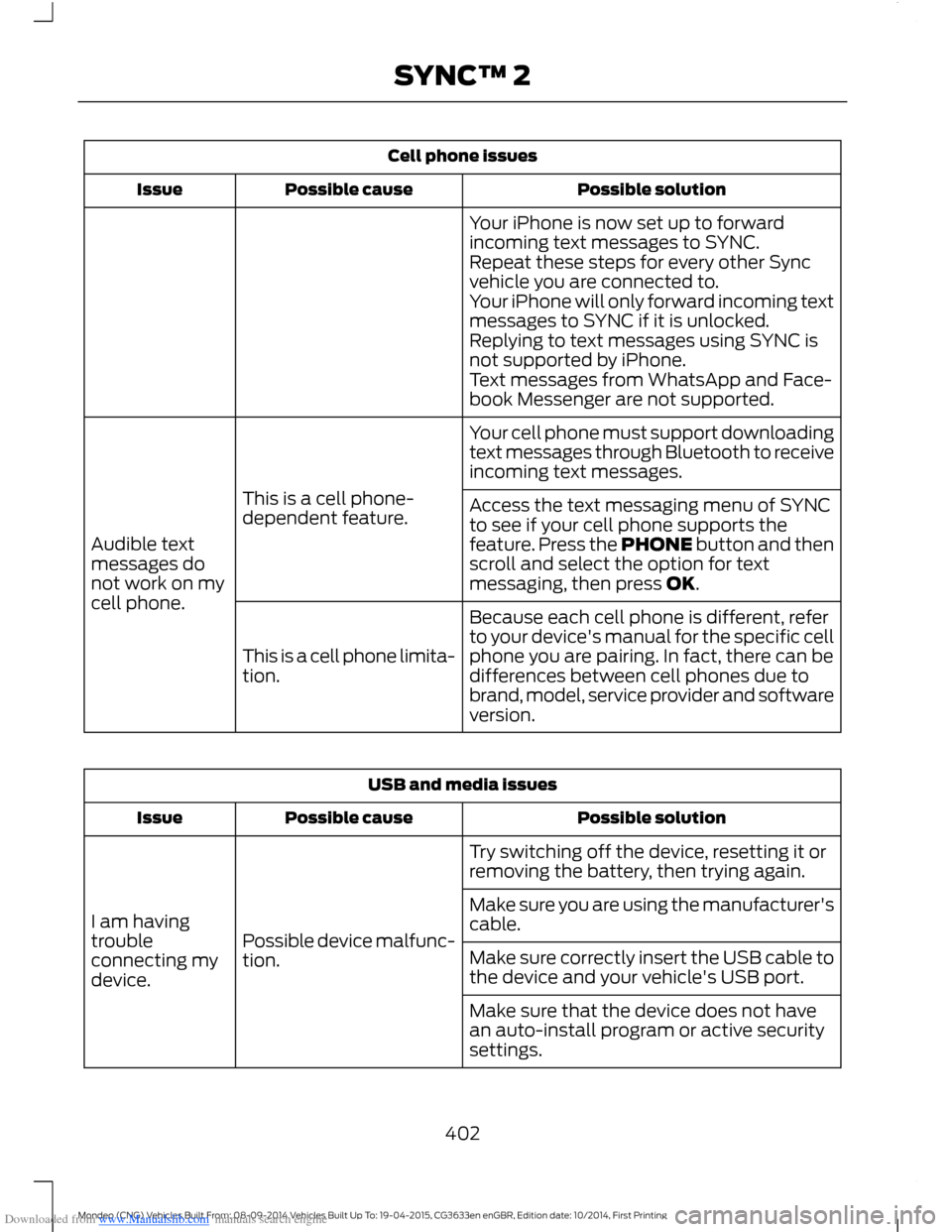
Downloaded from www.Manualslib.com manuals search engine Cell phone issues
Possible solutionPossible causeIssue
Your iPhone is now set up to forwardincoming text messages to SYNC.Repeat these steps for every other Syncvehicle you are connected to.Your iPhone will only forward incoming textmessages to SYNC if it is unlocked.Replying to text messages using SYNC isnot supported by iPhone.Text messages from WhatsApp and Face-book Messenger are not supported.
Your cell phone must support downloadingtext messages through Bluetooth to receiveincoming text messages.
This is a cell phone-dependent feature.
Audible textmessages donot work on mycell phone.
Access the text messaging menu of SYNCto see if your cell phone supports thefeature. Press the PHONE button and thenscroll and select the option for textmessaging, then press OK.
Because each cell phone is different, referto your device's manual for the specific cellphone you are pairing. In fact, there can bedifferences between cell phones due tobrand, model, service provider and softwareversion.
This is a cell phone limita-tion.
USB and media issues
Possible solutionPossible causeIssue
Try switching off the device, resetting it orremoving the battery, then trying again.
Possible device malfunc-tion.
I am havingtroubleconnecting mydevice.
Make sure you are using the manufacturer'scable.
Make sure correctly insert the USB cable tothe device and your vehicle's USB port.
Make sure that the device does not havean auto-install program or active securitysettings.
402Mondeo (CNG) Vehicles Built From: 08-09-2014 Vehicles Built Up To: 19-04-2015, CG3633en enGBR, Edition date: 10/2014, First PrintingSYNC™ 2
Page 405 of 446
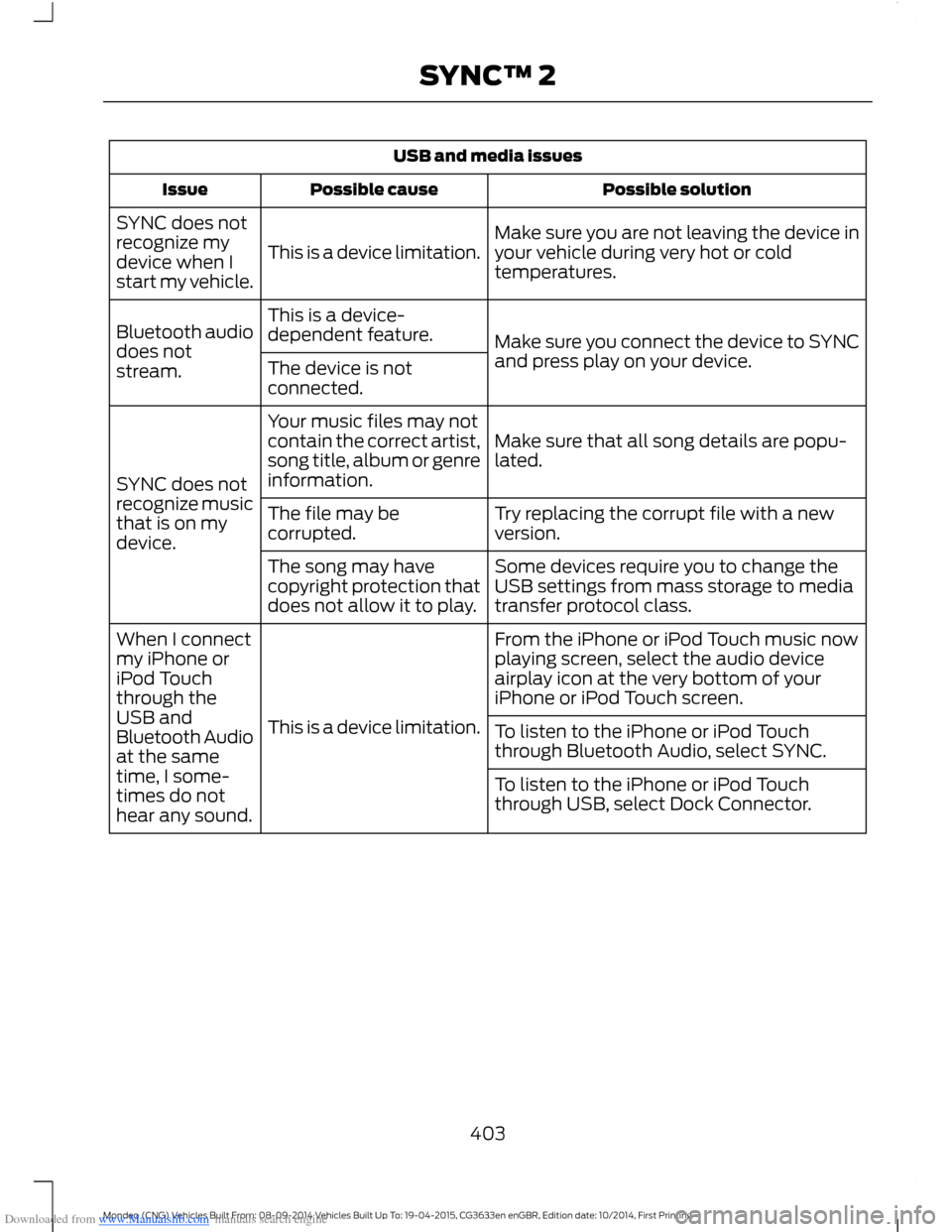
Downloaded from www.Manualslib.com manuals search engine USB and media issues
Possible solutionPossible causeIssue
Make sure you are not leaving the device inyour vehicle during very hot or coldtemperatures.This is a device limitation.
SYNC does notrecognize mydevice when Istart my vehicle.
Make sure you connect the device to SYNCand press play on your device.
This is a device-dependent feature.Bluetooth audiodoes notstream.The device is notconnected.
Make sure that all song details are popu-lated.
Your music files may notcontain the correct artist,song title, album or genreinformation.SYNC does notrecognize musicthat is on mydevice.
Try replacing the corrupt file with a newversion.The file may becorrupted.
Some devices require you to change theUSB settings from mass storage to mediatransfer protocol class.
The song may havecopyright protection thatdoes not allow it to play.
From the iPhone or iPod Touch music nowplaying screen, select the audio deviceairplay icon at the very bottom of youriPhone or iPod Touch screen.
This is a device limitation.
When I connectmy iPhone oriPod Touchthrough theUSB andBluetooth Audioat the sametime, I some-times do nothear any sound.
To listen to the iPhone or iPod Touchthrough Bluetooth Audio, select SYNC.
To listen to the iPhone or iPod Touchthrough USB, select Dock Connector.
403Mondeo (CNG) Vehicles Built From: 08-09-2014 Vehicles Built Up To: 19-04-2015, CG3633en enGBR, Edition date: 10/2014, First PrintingSYNC™ 2