engine service now FORD MONDEO 2014 4.G User Guide
[x] Cancel search | Manufacturer: FORD, Model Year: 2014, Model line: MONDEO, Model: FORD MONDEO 2014 4.GPages: 446, PDF Size: 29.09 MB
Page 178 of 446
Downloaded from www.Manualslib.com manuals search engine •Driving above approximately 22 mph(35 km/h) for 30 seconds during anactive park search.
•Driving above 6 mph (9 km/h) duringautomatic steering.
•Switching off the traction controlsystem.
Certain vehicle conditions can alsodeactivate the system, such as:
•Traction control has activated.
•There is an anti-lock brake systemactivation or failure.
If a problem occurs with the system, awarning message displays accompaniedby a tone. Occasional system messagesmay occur in normal operation. Forrecurring or frequent system faults, contactan authorized dealer to have your vehicleserviced.
Troubleshooting the System
The system does not look for a space
The traction control system may be off.
The transmission is in reverse (R). Your vehicle must be moving forward to be able todetect a parking space.
The system does not offer a particular space
The sensors may be covered (for example, snow, ice or dirt buildup). Covered senorscan affect the system's functionality.
There is not enough room in the parking space for your vehicle to safely park.
There is not enough space for the parking maneuver on the opposite side of the parkingspace.
The parking space is farther than 4.9 ft (1.5 m) or closer than 15.7 in (0.4 m) away.
The transmission is in reverse (R). Your vehicle must be moving forward to be able todetect a parking space.
Your vehicle is going faster than 19 mph (30 km/h) for parallel and 22 mph (35 km/h)for perpendicular parking.
176Mondeo (CNG) Vehicles Built From: 08-09-2014 Vehicles Built Up To: 19-04-2015, CG3633en enGBR, Edition date: 10/2014, First PrintingParking Aids
Page 219 of 446
Downloaded from www.Manualslib.com manuals search engine 1.Press the button. An audible doubletone (low pitch followed by a highpitch) sounds to let you know thesystem is operating.
2.Press the button again within fourseconds to swivel the tow ball arm. Aseries of audible tones sounds and theLED flashes while the tow ball armswivels.
3.When the tow ball arm finishesswiveling, the LED stops flashing andan audible double tone (high pitchfollowed by a low pitch) sounds.
The tow ball arm is ready for use when itfinishes swiveling into the towing position.
Swiveling the Tow Ball Arm In
Before swiveling the tow ball arm in:
•Unhitch the trailer or dismantle loadcarriers and their attachments.
•Dismantle attachments for trackingstabilization.
•Remove the plug for the trailer powersupply and the adapter from the trailersocket. Failure to do so may causedamage to the bumper when the towball arm swivels into its stowedposition.
To start swiveling the tow ball arm in, pressthe swivel button twice within fourseconds.
The tow ball arm swivels into the stowedposition automatically.
Tow Ball Arm Fault Conditions
If the LED on the swivel button is rapidlyflashing and an audible tone sequence(high pitch) sounds, repeat the swivelprocess. If this does not resolve theproblem, see an authorized dealer.
A message may appear in the informationdisplay. See Information Messages(page 96).
Driving with a Trailer
WARNINGS
In the event of a vehicle breakdown,disconnect the trailer before towingthe vehicle.
If any of the conditions below cannotbe met, do not use the tow bar andhave it checked by a properly trainedtechnician. Before starting your journey,make sure that the tow ball arm is properlylocked.
Check that:
•There is a last audible low pitch tonewhen the locking procedure finishes.
•The tow ball arm properly locks. Makesure it does not move when jerked.
Maintenance
Note:The towing hitch and control unit aremaintenance-free. Do not grease or oil thesecomponents.
Note:Do not attempt to service the towinghitch. Only the manufacturer should carryout repairs or dismantle the hitch.
Note:When cleaning the vehicle with asteam jet, do not direct the high-pressurejet directly onto the swivel joint of the towball arm and socket. After cleaning thevehicle, unplug the connector or open thetrailer socket to make sure no water entered.If water is present, dry the socket.
TOWING POINTS
WARNING
The towing eye has a left-handthread. Turn it counterclockwise toinstall it. Make sure that the towingeye is fully tightened. Failure to do so couldresult in the towing eye becoming loose.
217Mondeo (CNG) Vehicles Built From: 08-09-2014 Vehicles Built Up To: 19-04-2015, CG3633en enGBR, Edition date: 10/2014, First PrintingTowing
Page 324 of 446
Downloaded from www.Manualslib.com manuals search engine Display Options
If you switch on this feature, a confirmationmessage appears in the display.
If you switch off this feature, a dialog willappear in the display, which allows you toset a voice reminder.
Off with voice reminder provides a displayand voice reminder when your cell phoneconnects and your vehicle starts.
Off without voice reminder provides adisplay reminder only without a voicereminder when your cell phone connects.
To make sure that Emergency Assistanceworks correctly:
•The system must have power and beworking correctly at the time of thecrash and during feature activation anduse.
•You must switch on the feature beforea crash.
•You must have a cell phone connectedto the system.
•In certain countries, it may benecessary to have a valid andregistered SIM card with credit in orderto place and maintain an emergencycall.
•A connected cell phone must have theability to make and maintain anoutgoing call at the time of the crash.
•A connected cell phone must haveadequate network coverage, batterypower and signal strength.
•Your vehicle must have battery power.
Note:This feature only works in a Europeancountry or region where SYNC EmergencyAssistance can call the local emergencyservices. Visit the regional Ford website fordetails.
In the Event of a Crash
Note:Not every crash deploys an airbag ortriggers the fuel pump shut off (which mayturn on Emergency Assistance). However,if Emergency Assistance is triggered thesystem tries to contact the emergencyservices. If a connected cell phone sustainsdamage or loses connection to the system,it searches for and tries to connect to anyavailable previously paired cell phone. Thesystem attempts to dial 112.
Before making a call:
•If you do not cancel the call and SYNCmakes a successful call, anintroductory message plays for theemergency operator. After thismessage, there is hands-freecommunication between your vehicle'soccupants and the operator.
•The system provides a short windowof time (approximately 10 seconds) tocancel the call. If you do not cancel thecall, the system attempts to dial 112.
•The system plays a message lettingyou know when it attempts to make anemergency call. You can cancel the callby selecting the relevant functionbutton or by pressing the end callbutton on the steering wheel.
During a call:
•Emergency Assistance uses yourvehicle GPS or cellular networkinformation when available todetermine the most appropriatelanguage to use. It alerts theemergency operator of the crash anddelivers the introductory message. Thismay include your vehicle GPScoordinates.
•The language the system uses tointeract with the occupants of yourvehicle may differ from the languageused to deliver information to theemergency operator.
322Mondeo (CNG) Vehicles Built From: 08-09-2014 Vehicles Built Up To: 19-04-2015, CG3633en enGBR, Edition date: 10/2014, First PrintingSYNC™
Page 325 of 446
Downloaded from www.Manualslib.com manuals search engine •After the delivery of the introductorymessage the voice line opens so thatyou can speak hands-free with theemergency operator.
•When the line is connected, you mustbe prepared to provide your name,phone number and locationinformation immediately.
Note:While the system providesinformation to the emergency operator, thesystem plays a message letting you knowit is sending important information. It thenlets you know when the line is open to starthands-free communication.
Note:During an Emergency Assistance call,an emergency priority screen appears whichcontains vehicle GPS coordinates whenavailable.
Note:It is possible that GPS locationinformation is not available at the time ofthe crash; in this case, EmergencyAssistance will still attempt to place anemergency call.
Note:It is possible that the emergencyservices will not receive the GPScoordinates; in this case, hands-freecommunication with an emergency operatoris available.
Note:The emergency operator may alsoreceive information from the cellularnetwork such as cell phone number, cellphone location and cell phone carrier nameindependent from SYNC EmergencyAssistance.
Emergency Assistance may not work if:
•Your cell phone or EmergencyAssistance hardware sustains damagein the crash.
•The vehicle battery or the system hasno power.
•A crash ejects your cell phone fromyour vehicle.
•You do not have a valid and registeredSIM card with credit in your cell phone.
•You are in a European country or regionwhere the SYNC Emergency Assistancecannot place the call. Visit the regionalFord website for details.
Important Information about theEmergency Assistance Feature
Emergency Assistance does not currentlycall emergency services in the followingmarkets: Albania, Belarus, Bosnia andHerzegovina, Macedonia, Netherlands,Ukraine, Moldova and Russia.
Visit the regional Ford website for thelatest details.
Emergency Assistance Privacy Notice
When you switch on EmergencyAssistance, it may disclose to emergencyservices that your vehicle has been in acrash involving the deployment of anairbag or activation of the fuel pump shutoff. This feature has the capability todisclose your location information to theemergency operator or other details aboutyour vehicle or crash to provide the mostappropriate emergency services.
If you do not want to disclose thisinformation, do not switch on the feature.
SYNC AppLink
The system enables voice and manualcontrol of SYNC AppLink enabledsmartphone apps. Once an app is runningthrough AppLink, you can control mainfeatures of the app through voicecommands and manual controls.
Note:You must pair and connect yoursmartphone to SYNC to access AppLink.
Note:iPhone users need to connect thephone to the USB port.
Note:Android users need to connect thephone to SYNC using Bluetooth.
323Mondeo (CNG) Vehicles Built From: 08-09-2014 Vehicles Built Up To: 19-04-2015, CG3633en enGBR, Edition date: 10/2014, First PrintingSYNC™
Page 337 of 446
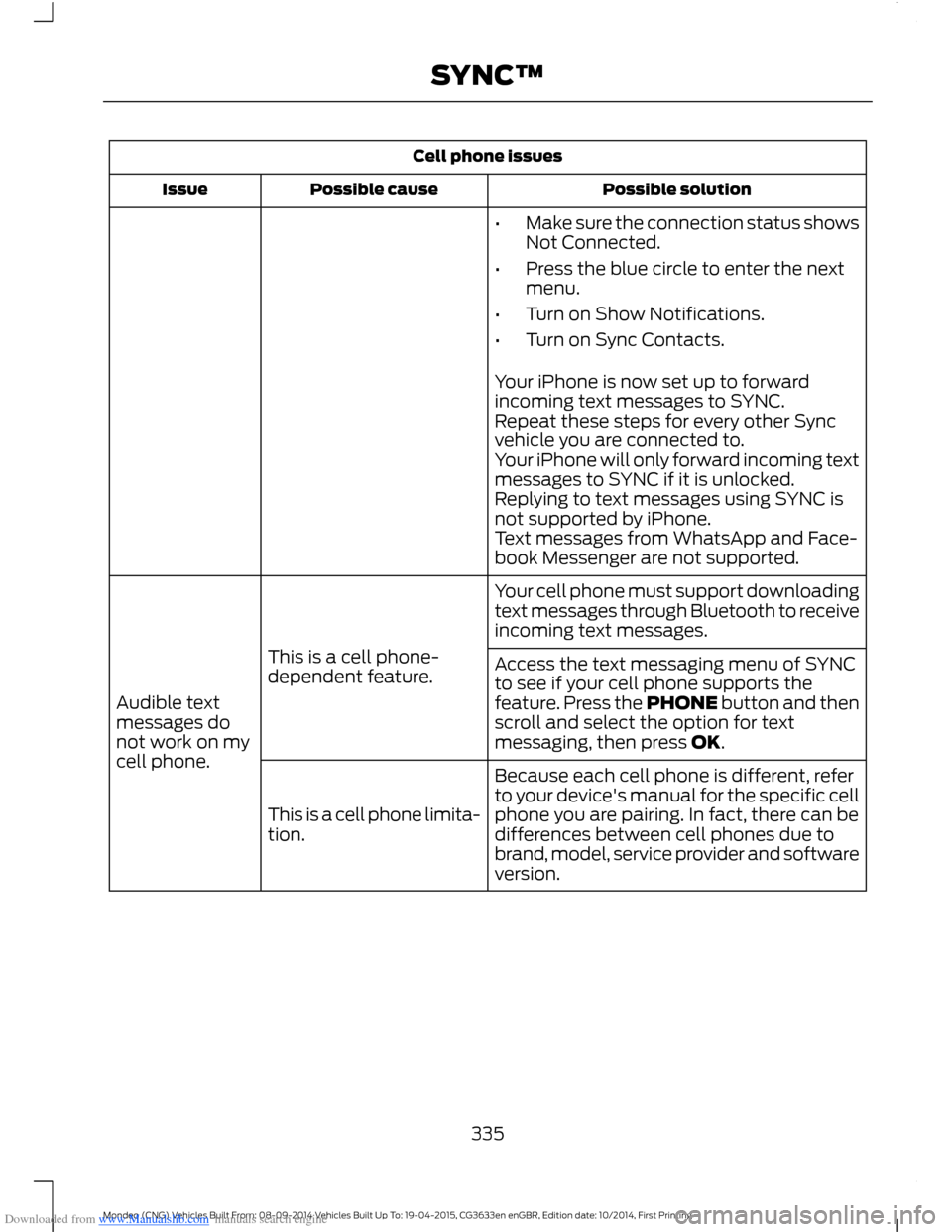
Downloaded from www.Manualslib.com manuals search engine Cell phone issues
Possible solutionPossible causeIssue
•Make sure the connection status showsNot Connected.
•Press the blue circle to enter the nextmenu.
•Turn on Show Notifications.
•Turn on Sync Contacts.
Your iPhone is now set up to forwardincoming text messages to SYNC.Repeat these steps for every other Syncvehicle you are connected to.Your iPhone will only forward incoming textmessages to SYNC if it is unlocked.Replying to text messages using SYNC isnot supported by iPhone.Text messages from WhatsApp and Face-book Messenger are not supported.
Your cell phone must support downloadingtext messages through Bluetooth to receiveincoming text messages.
This is a cell phone-dependent feature.
Audible textmessages donot work on mycell phone.
Access the text messaging menu of SYNCto see if your cell phone supports thefeature. Press the PHONE button and thenscroll and select the option for textmessaging, then press OK.
Because each cell phone is different, referto your device's manual for the specific cellphone you are pairing. In fact, there can bedifferences between cell phones due tobrand, model, service provider and softwareversion.
This is a cell phone limita-tion.
335Mondeo (CNG) Vehicles Built From: 08-09-2014 Vehicles Built Up To: 19-04-2015, CG3633en enGBR, Edition date: 10/2014, First PrintingSYNC™
Page 388 of 446
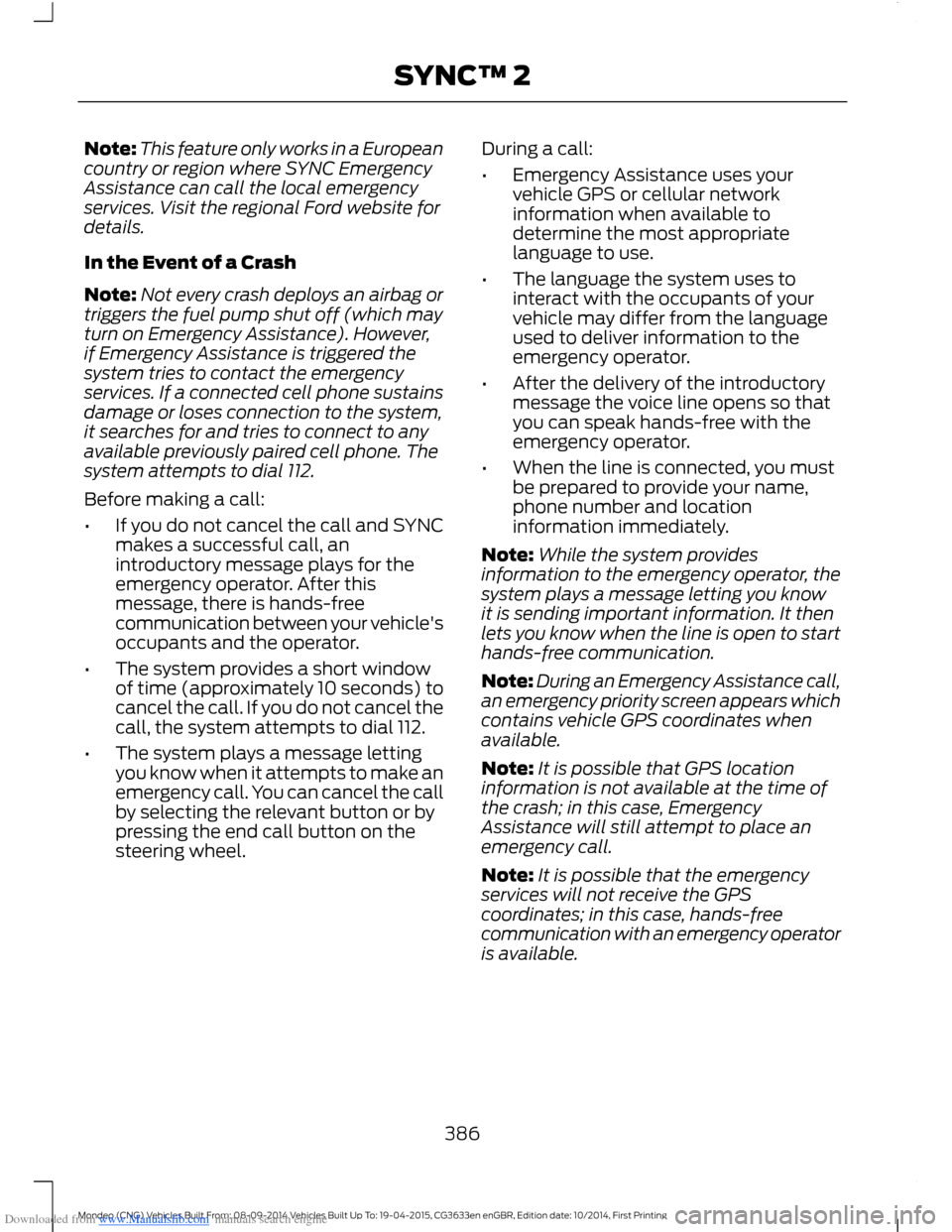
Downloaded from www.Manualslib.com manuals search engine Note:This feature only works in a Europeancountry or region where SYNC EmergencyAssistance can call the local emergencyservices. Visit the regional Ford website fordetails.
In the Event of a Crash
Note:Not every crash deploys an airbag ortriggers the fuel pump shut off (which mayturn on Emergency Assistance). However,if Emergency Assistance is triggered thesystem tries to contact the emergencyservices. If a connected cell phone sustainsdamage or loses connection to the system,it searches for and tries to connect to anyavailable previously paired cell phone. Thesystem attempts to dial 112.
Before making a call:
•If you do not cancel the call and SYNCmakes a successful call, anintroductory message plays for theemergency operator. After thismessage, there is hands-freecommunication between your vehicle'soccupants and the operator.
•The system provides a short windowof time (approximately 10 seconds) tocancel the call. If you do not cancel thecall, the system attempts to dial 112.
•The system plays a message lettingyou know when it attempts to make anemergency call. You can cancel the callby selecting the relevant button or bypressing the end call button on thesteering wheel.
During a call:
•Emergency Assistance uses yourvehicle GPS or cellular networkinformation when available todetermine the most appropriatelanguage to use.
•The language the system uses tointeract with the occupants of yourvehicle may differ from the languageused to deliver information to theemergency operator.
•After the delivery of the introductorymessage the voice line opens so thatyou can speak hands-free with theemergency operator.
•When the line is connected, you mustbe prepared to provide your name,phone number and locationinformation immediately.
Note:While the system providesinformation to the emergency operator, thesystem plays a message letting you knowit is sending important information. It thenlets you know when the line is open to starthands-free communication.
Note:During an Emergency Assistance call,an emergency priority screen appears whichcontains vehicle GPS coordinates whenavailable.
Note:It is possible that GPS locationinformation is not available at the time ofthe crash; in this case, EmergencyAssistance will still attempt to place anemergency call.
Note:It is possible that the emergencyservices will not receive the GPScoordinates; in this case, hands-freecommunication with an emergency operatoris available.
386Mondeo (CNG) Vehicles Built From: 08-09-2014 Vehicles Built Up To: 19-04-2015, CG3633en enGBR, Edition date: 10/2014, First PrintingSYNC™ 2
Page 404 of 446
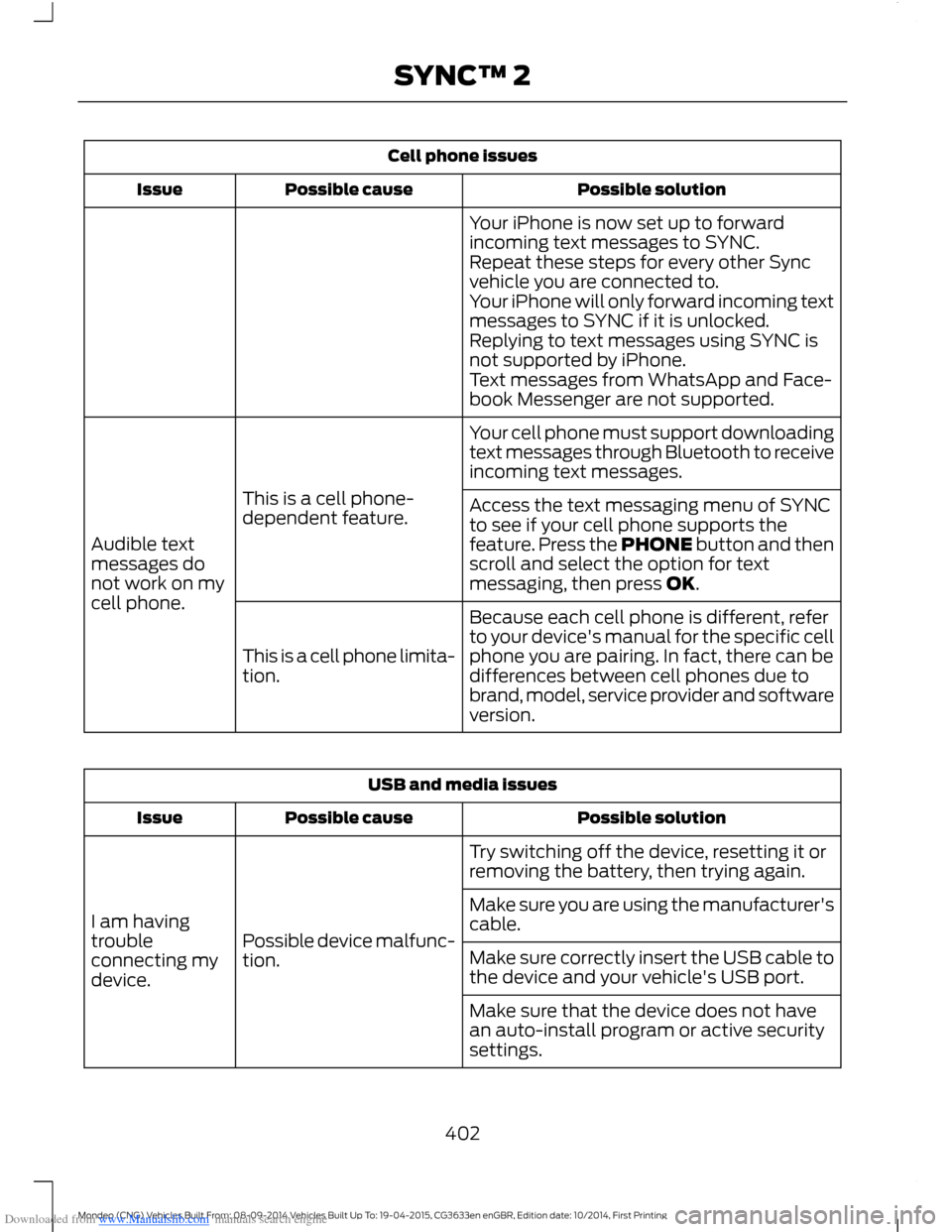
Downloaded from www.Manualslib.com manuals search engine Cell phone issues
Possible solutionPossible causeIssue
Your iPhone is now set up to forwardincoming text messages to SYNC.Repeat these steps for every other Syncvehicle you are connected to.Your iPhone will only forward incoming textmessages to SYNC if it is unlocked.Replying to text messages using SYNC isnot supported by iPhone.Text messages from WhatsApp and Face-book Messenger are not supported.
Your cell phone must support downloadingtext messages through Bluetooth to receiveincoming text messages.
This is a cell phone-dependent feature.
Audible textmessages donot work on mycell phone.
Access the text messaging menu of SYNCto see if your cell phone supports thefeature. Press the PHONE button and thenscroll and select the option for textmessaging, then press OK.
Because each cell phone is different, referto your device's manual for the specific cellphone you are pairing. In fact, there can bedifferences between cell phones due tobrand, model, service provider and softwareversion.
This is a cell phone limita-tion.
USB and media issues
Possible solutionPossible causeIssue
Try switching off the device, resetting it orremoving the battery, then trying again.
Possible device malfunc-tion.
I am havingtroubleconnecting mydevice.
Make sure you are using the manufacturer'scable.
Make sure correctly insert the USB cable tothe device and your vehicle's USB port.
Make sure that the device does not havean auto-install program or active securitysettings.
402Mondeo (CNG) Vehicles Built From: 08-09-2014 Vehicles Built Up To: 19-04-2015, CG3633en enGBR, Edition date: 10/2014, First PrintingSYNC™ 2
Page 414 of 446
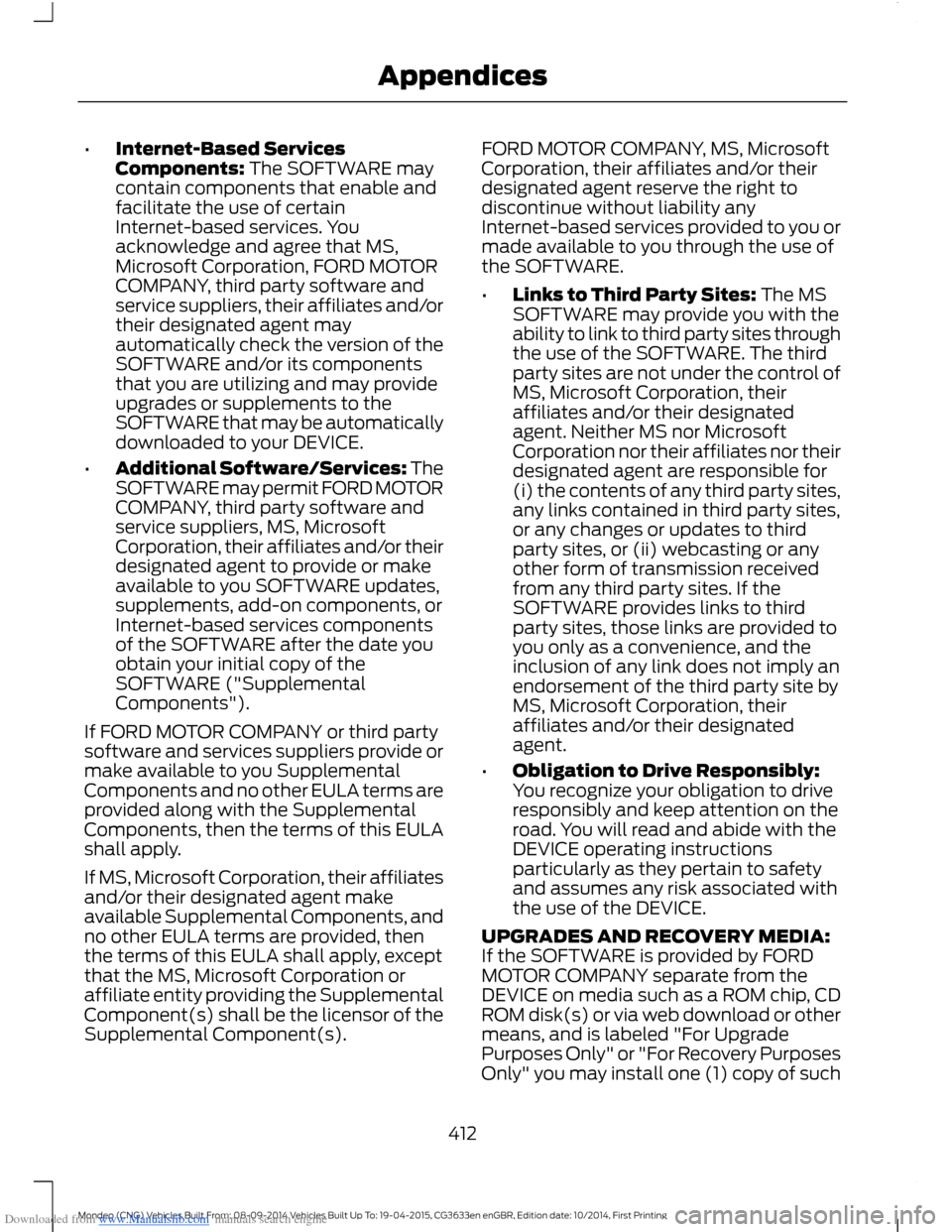
Downloaded from www.Manualslib.com manuals search engine •Internet-Based ServicesComponents: The SOFTWARE maycontain components that enable andfacilitate the use of certainInternet-based services. Youacknowledge and agree that MS,Microsoft Corporation, FORD MOTORCOMPANY, third party software andservice suppliers, their affiliates and/ortheir designated agent mayautomatically check the version of theSOFTWARE and/or its componentsthat you are utilizing and may provideupgrades or supplements to theSOFTWARE that may be automaticallydownloaded to your DEVICE.
•Additional Software/Services: TheSOFTWARE may permit FORD MOTORCOMPANY, third party software andservice suppliers, MS, MicrosoftCorporation, their affiliates and/or theirdesignated agent to provide or makeavailable to you SOFTWARE updates,supplements, add-on components, orInternet-based services componentsof the SOFTWARE after the date youobtain your initial copy of theSOFTWARE ("SupplementalComponents").
If FORD MOTOR COMPANY or third partysoftware and services suppliers provide ormake available to you SupplementalComponents and no other EULA terms areprovided along with the SupplementalComponents, then the terms of this EULAshall apply.
If MS, Microsoft Corporation, their affiliatesand/or their designated agent makeavailable Supplemental Components, andno other EULA terms are provided, thenthe terms of this EULA shall apply, exceptthat the MS, Microsoft Corporation oraffiliate entity providing the SupplementalComponent(s) shall be the licensor of theSupplemental Component(s).
FORD MOTOR COMPANY, MS, MicrosoftCorporation, their affiliates and/or theirdesignated agent reserve the right todiscontinue without liability anyInternet-based services provided to you ormade available to you through the use ofthe SOFTWARE.
•Links to Third Party Sites: The MSSOFTWARE may provide you with theability to link to third party sites throughthe use of the SOFTWARE. The thirdparty sites are not under the control ofMS, Microsoft Corporation, theiraffiliates and/or their designatedagent. Neither MS nor MicrosoftCorporation nor their affiliates nor theirdesignated agent are responsible for(i) the contents of any third party sites,any links contained in third party sites,or any changes or updates to thirdparty sites, or (ii) webcasting or anyother form of transmission receivedfrom any third party sites. If theSOFTWARE provides links to thirdparty sites, those links are provided toyou only as a convenience, and theinclusion of any link does not imply anendorsement of the third party site byMS, Microsoft Corporation, theiraffiliates and/or their designatedagent.
•Obligation to Drive Responsibly:You recognize your obligation to driveresponsibly and keep attention on theroad. You will read and abide with theDEVICE operating instructionsparticularly as they pertain to safetyand assumes any risk associated withthe use of the DEVICE.
UPGRADES AND RECOVERY MEDIA:If the SOFTWARE is provided by FORDMOTOR COMPANY separate from theDEVICE on media such as a ROM chip, CDROM disk(s) or via web download or othermeans, and is labeled "For UpgradePurposes Only" or "For Recovery PurposesOnly" you may install one (1) copy of such
412Mondeo (CNG) Vehicles Built From: 08-09-2014 Vehicles Built Up To: 19-04-2015, CG3633en enGBR, Edition date: 10/2014, First PrintingAppendices
Page 415 of 446
Downloaded from www.Manualslib.com manuals search engine SOFTWARE onto the DEVICE as areplacement copy for the existingSOFTWARE, and use it in accordance withthis EULA, including any additional EULAterms accompanying the upgradeSOFTWARE.
INTELLECTUAL PROPERTY RIGHTS:All title and intellectual property rights inand to the SOFTWARE (including but notlimited to any images, photographs,animations, video, audio, music, text and"applets" incorporated into theSOFTWARE), the accompanying printedmaterials, and any copies of theSOFTWARE, are owned by MS, MicrosoftCorporation, FORD MOTOR COMPANY, ortheir affiliates or suppliers. TheSOFTWARE is licensed, not sold. You maynot copy the printed materialsaccompanying the SOFTWARE. All titleand intellectual property rights in and tothe content which may be accessedthrough use of the SOFTWARE is theproperty of the respective content ownerand may be protected by applicablecopyright or other intellectual propertylaws and treaties. This EULA grants you norights to use such content. All rights notspecifically granted under this EULA arereserved by MS, Microsoft Corporation,FORD MOTOR COMPANY, third partysoftware and service providers, theiraffiliates and suppliers. Use of any on-lineservices which may be accessed throughthe SOFTWARE may be governed by therespective terms of use relating to suchservices. If this SOFTWARE containsdocumentation that is provided only inelectronic form, you may print one copy ofsuch electronic documentation.
EXPORT RESTRICTIONS: Youacknowledge that the SOFTWARE issubject to U.S. and European Union exportjurisdiction. You agree to comply with allapplicable international and national lawsthat apply to the SOFTWARE, including
the U.S. Export Administration Regulations,as well as end-user, end-use anddestination restrictions issued by U.S. andother governments. For additionalinformation, seehttp://www.microsoft.com/exporting/.
TRADEMARKS: This EULA does not grantyou any rights in connection with anytrademarks or service marks of FORDMOTOR COMPANY, MS, MicrosoftCorporation, third party software or serviceproviders, their affiliates or suppliers.
PRODUCT SUPPORT: Product supportfor the SOFTWARE is not provided by MS,its parent corporation MicrosoftCorporation, or their affiliates orsubsidiaries. For product support, pleaserefer to FORD MOTOR COMPANYinstructions provided in the documentationfor the DEVICE. Should you have anyquestions concerning this EULA, or if youdesire to contact FORD MOTORCOMPANY for any other reason, pleaserefer to the address provided in thedocumentation for the DEVICE.
No Liability for Certain Damages:EXCEPT AS PROHIBITED BY LAW, FORDMOTOR COMPANY, ANY THIRD PARTYSOFTWARE OR SERVICES SUPPLIERS,MS, MICROSOFT CORPORATION ANDTHEIR AFFILIATES SHALL HAVE NOLIABILITY FOR ANY INDIRECT, SPECIAL,CONSEQUENTIAL OR INCIDENTALDAMAGES ARISING FROM OR INCONNECTION WITH THE USE ORPERFORMANCE OF THE SOFTWARE. THISLIMITATION SHALL APPLY EVEN IF ANYREMEDY FAILS OF ITS ESSENTIALPURPOSE. IN NO EVENT SHALL MS,MICROSOFT CORPORATION AND/ORTHEIR AFFILIATES BE LIABLE FOR ANYAMOUNT IN EXCESS OF U.S. TWOHUNDRED FIFTY DOLLARS (U.S.$250.00).
413Mondeo (CNG) Vehicles Built From: 08-09-2014 Vehicles Built Up To: 19-04-2015, CG3633en enGBR, Edition date: 10/2014, First PrintingAppendices
Page 417 of 446
Downloaded from www.Manualslib.com manuals search engine Volume Setting: Do not raise the volumeexcessively. Keep the volume at a levelwhere you can still hear outside traffic andemergency signals while driving. Drivingwhile unable to hear these sounds couldcause an accident.
Use of Speech Recognition Functions:Speech recognition software is inherentlya statistical process which is subject toerrors. It is your responsibility to monitorany speech recognition functions includedin the system and address any errors.
Navigation Features: Any navigationfeatures included in the system areintended to provide turn by turninstructions to get you to a desireddestination. Please make certain allpersons using this system carefully readand follow instructions and safetyinformation fully.
Distraction Hazard: Any navigationfeatures may require manual (non-verbal)setup. Attempting to perform such set-upor insert data while driving can seriouslydistract your attention and could cause anaccident or other serious consequences.Stop the vehicle in a safe and legal mannerbefore attempting these operations.
Let Your Judgment Prevail: Anynavigation features are provided only asan aid. Make your driving decisions basedon your observations of local conditionsand existing traffic regulations. Any suchfeature is not a substitute for your personaljudgment. Any route suggestions made bythis system should never replace any localtraffic regulations or your personaljudgment or knowledge of safe drivingpractices.
Route Safety: Do not follow the routesuggestions if doing so would result in anunsafe or illegal maneuver, if you would beplaced in an unsafe situation, or if youwould be directed into an area that youconsider unsafe. The driver is ultimatelyresponsible for the safe operation of thevehicle and therefore, must evaluatewhether it is safe to follow the suggesteddirections.
Potential Map Inaccuracy: Maps usedby this system may be inaccurate becauseof changes in roads, traffic controls ordriving conditions. Always use goodjudgment and common sense whenfollowing the suggested routes.
Emergency Services: Do not rely on anynavigation features included in the systemto route you to emergency services. Asklocal authorities or an emergency servicesoperator for these locations. Not allemergency services such as police, firestations, hospitals and clinics are likely tobe contained in the map database for suchnavigation features.
Telenav Software End User LicenseAgreement
Please read these terms and conditionscarefully before you use the TelenavSoftware. Your use of the TelenavSoftware indicates that you accept theseterms and conditions. If you do not acceptthese terms and conditions, do not breakthe seal of the package, launch, orotherwise use the Telenav Software.
These terms and conditions represent theagreement (“Agreement”) between youand Telenav, Inc. (“Telenav”) with respectto the Telenav Software (includingupgrades, modifications, or additionsthereto) (collectively “Telenav Software”).All references herein to “you” and “your”means you, your employees, agents, andcontractors, and any other entity on whosebehalf you accept these terms and
415Mondeo (CNG) Vehicles Built From: 08-09-2014 Vehicles Built Up To: 19-04-2015, CG3633en enGBR, Edition date: 10/2014, First PrintingAppendices