ECO mode FORD MONDEO 2014 4.G Owner's Manual
[x] Cancel search | Manufacturer: FORD, Model Year: 2014, Model line: MONDEO, Model: FORD MONDEO 2014 4.GPages: 446, PDF Size: 29.09 MB
Page 156 of 446
Downloaded from www.Manualslib.com manuals search engine FUEL CONSUMPTION
We derive CO2 and fuel consumptionfigures in laboratory tests according toRegulation (EC) 715/2007 or CR (EC)692/2008 and subsequent amendments.
They are intended as a comparisonbetween makes and models of vehicles.They are not intended to represent the realworld fuel consumption you may get fromyour vehicle.
Real world fuel consumption is governedby many factors, for example driving style,high speed driving, stop-start driving, airconditioning usage, the accessories fitted,payload and towing.
The advertised capacity is the indicatedcapacity and the empty reserve combined.Indicated capacity is the difference in theamount of fuel in the fuel tank and whenthe fuel gauge indicates empty. Emptyreserve is the amount of fuel in the fueltank after the fuel gauge indicates empty.
Note: The amount of fuel in the emptyreserve varies and should not be relied uponto increase driving range. When refuelingyour vehicle after the fuel gauge indicatesempty, you might not be able to refuel thefull amount of the advertised capacity dueto the empty reserve still present in the fueltank.
Filling the Fuel Tank
For consistent results when refueling:
•Switch the ignition off.
•Allow no more than two automaticshut-offs when refueling.
Results are most accurate when therefueling method is consistent.
Calculating Fuel Economy
Do not measure fuel economy during thefirst 1000 mi (1,600 km) of driving (this isthe engine break-in period). A moreaccurate measurement is obtained after2500 mi (4,000 km). Also, fuel expense,frequency of fill ups or fuel gauge readingsare not accurate ways to measure fueleconomy.
1.Fill the fuel tank completely and recordthe initial odometer reading.
2.Each time you fill the fuel tank, recordthe amount of fuel added.
3.After at least three fill ups, fill the fueltank and record the current odometerreading.
4.Subtract your initial odometer readingfrom the current odometer reading.
5.Calculate fuel economy by dividingmiles traveled by gallons used (ForMetric: Multiply liters used by 100, thendivide by kilometers traveled).
Keep a record for at least one month andrecord the type of driving (city or freeway).This provides an accurate estimate of yourvehicle’s fuel economy under currentdriving conditions. Additionally, keepingrecords during summer and winter showhow temperature impacts fuel economy.In general, your vehicle will use more fuelin cold temperatures.
154Mondeo (CNG) Vehicles Built From: 08-09-2014 Vehicles Built Up To: 19-04-2015, CG3633en enGBR, Edition date: 10/2014, First PrintingFuel and Refueling
Page 157 of 446
Downloaded from www.Manualslib.com manuals search engine MANUAL TRANSMISSION
Selecting Reverse Gear
Do not engage reverse gear when yourvehicle is moving. This can cause damageto the transmission.
Raise the collar when you select reversegear.
AUTOMATIC TRANSMISSION
WARNINGS
Always set the parking brake fullyand make sure you shift the gearshiftlever to park (P). Switch the ignitionoff and remove the key whenever you leaveyour vehicle.
Do not apply the brake pedal andaccelerator pedal simultaneously.Applying both pedals simultaneouslyfor more than three seconds will limitengine rpm, which may result in difficultymaintaining speed in traffic and could leadto serious injury.
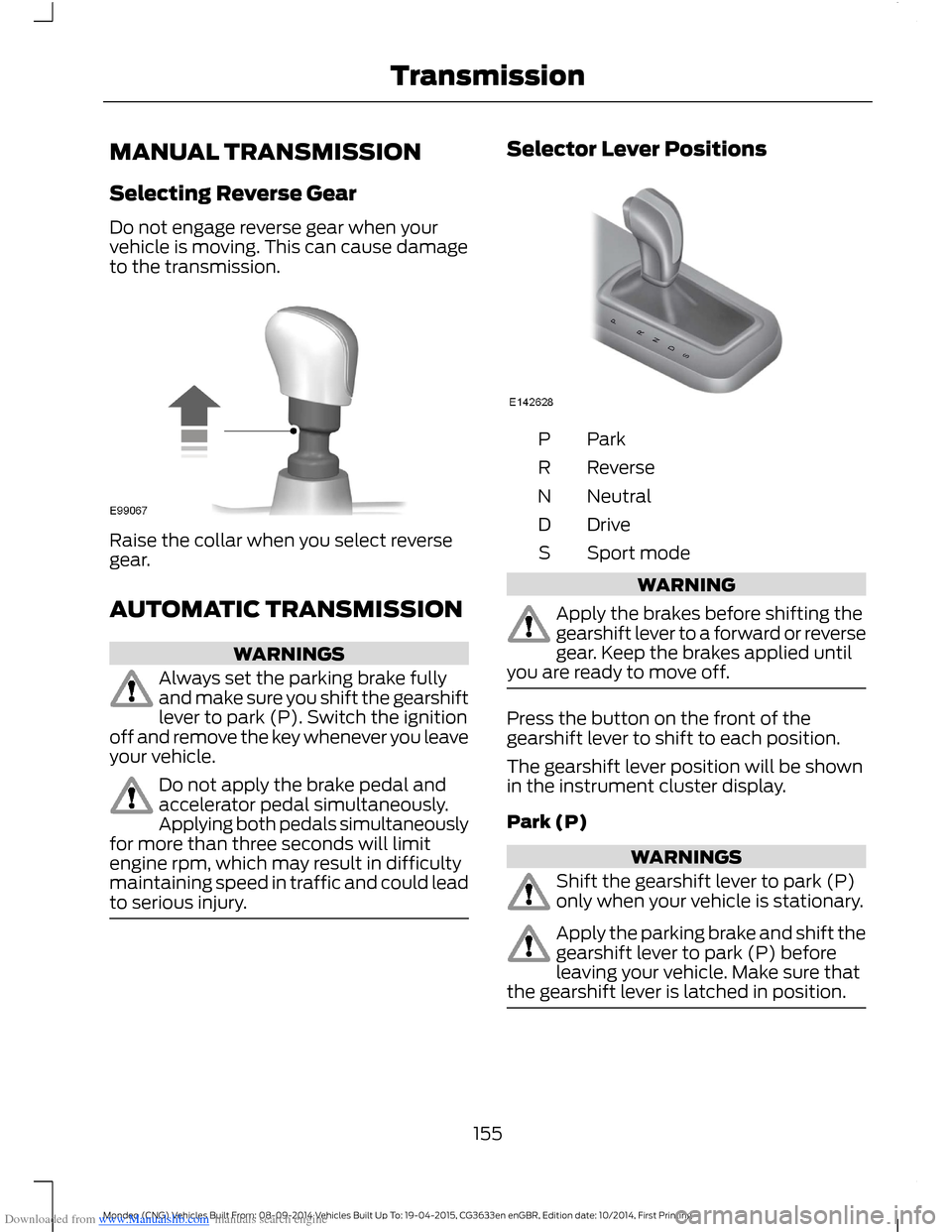
Selector Lever Positions
ParkP
ReverseR
NeutralN
DriveD
Sport modeS
WARNING
Apply the brakes before shifting thegearshift lever to a forward or reversegear. Keep the brakes applied untilyou are ready to move off.
Press the button on the front of thegearshift lever to shift to each position.
The gearshift lever position will be shownin the instrument cluster display.
Park (P)
WARNINGS
Shift the gearshift lever to park (P)only when your vehicle is stationary.
Apply the parking brake and shift thegearshift lever to park (P) beforeleaving your vehicle. Make sure thatthe gearshift lever is latched in position.
155Mondeo (CNG) Vehicles Built From: 08-09-2014 Vehicles Built Up To: 19-04-2015, CG3633en enGBR, Edition date: 10/2014, First PrintingTransmission
Page 183 of 446
Downloaded from www.Manualslib.com manuals search engine PRINCIPLE OF OPERATION
Cruise control lets you maintain a setspeed without keeping your foot on theaccelerator pedal. You can use cruisecontrol when your vehicle speed is greaterthan 20 mph (30 km/h).
USING CRUISE CONTROL
WARNINGS
Do not use cruise control on windingroads, in heavy traffic or, when theroad surface is slippery. This couldresult in loss of vehicle control, seriousinjury or death.
When you are going downhill, yourvehicle speed may increase abovethe set speed. The system will notapply the brakes but a warning displays.
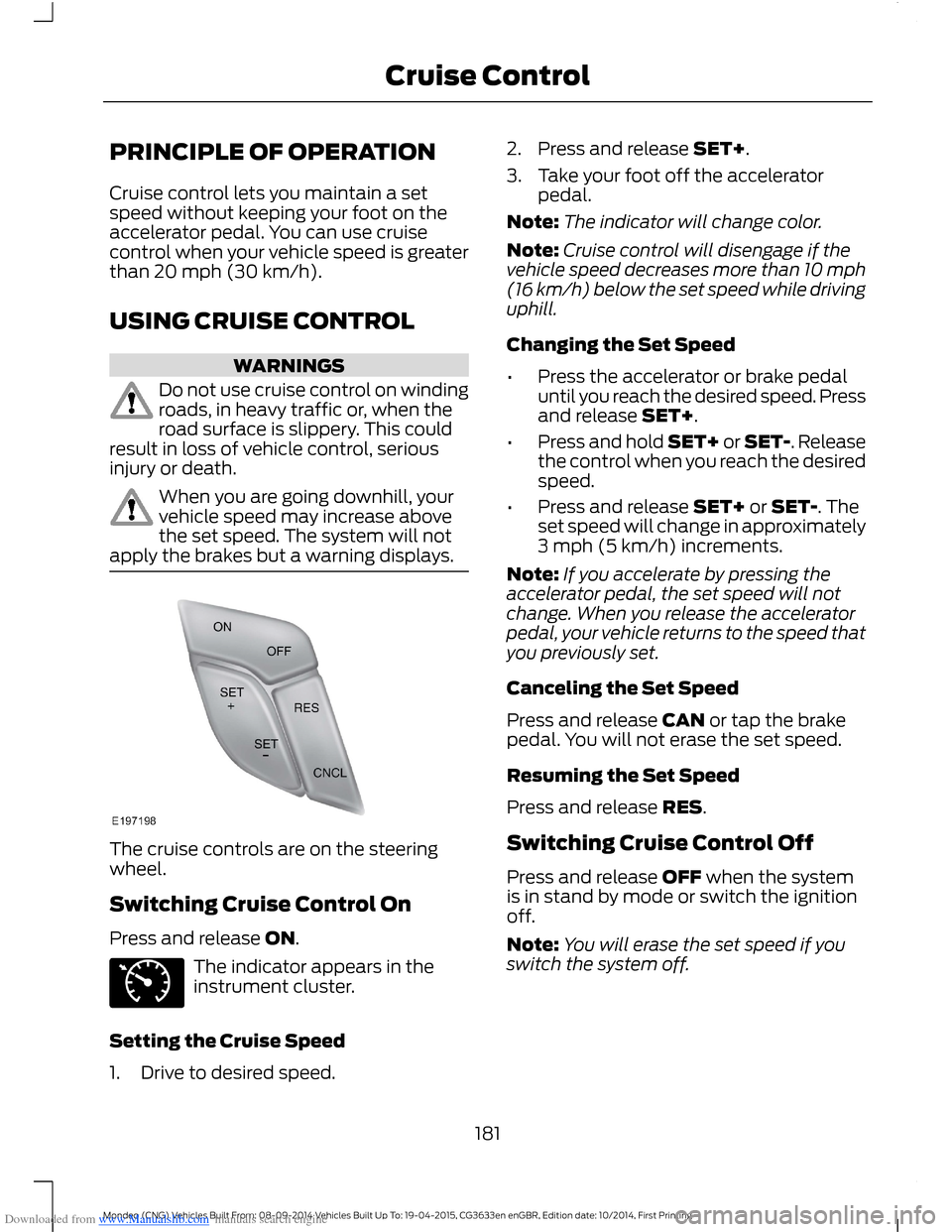
The cruise controls are on the steeringwheel.
Switching Cruise Control On
Press and release ON.
The indicator appears in theinstrument cluster.
Setting the Cruise Speed
1.Drive to desired speed.
2.Press and release SET+.
3.Take your foot off the acceleratorpedal.
Note:The indicator will change color.
Note:Cruise control will disengage if thevehicle speed decreases more than 10 mph(16 km/h) below the set speed while drivinguphill.
Changing the Set Speed
•Press the accelerator or brake pedaluntil you reach the desired speed. Pressand release SET+.
•Press and hold SET+ or SET-. Releasethe control when you reach the desiredspeed.
•Press and release SET+ or SET-. Theset speed will change in approximately3 mph (5 km/h) increments.
Note:If you accelerate by pressing theaccelerator pedal, the set speed will notchange. When you release the acceleratorpedal, your vehicle returns to the speed thatyou previously set.
Canceling the Set Speed
Press and release CAN or tap the brakepedal. You will not erase the set speed.
Resuming the Set Speed
Press and release RES.
Switching Cruise Control Off
Press and release OFF when the systemis in stand by mode or switch the ignitionoff.
Note:You will erase the set speed if youswitch the system off.
181Mondeo (CNG) Vehicles Built From: 08-09-2014 Vehicles Built Up To: 19-04-2015, CG3633en enGBR, Edition date: 10/2014, First PrintingCruise Control
Page 186 of 446
Downloaded from www.Manualslib.com manuals search engine Resuming the Set Speed
Press and release RES+. The vehiclereturns to the previously set speed and gapsetting. The set speed displayscontinuously in the information displaywhile the system is active.
Switching the System Off
Press and release the Adaptive CruiseControl CAN/OFF button when thesystem is in stand by mode or switch theignition off.
Note:The set speed memory erases whenyou switch off the system.
Following a Vehicle
WARNINGS
When following a vehicle, yourvehicle does not decelerateautomatically to a stop, nor doesyour vehicle always decelerate quicklyenough to avoid a crash without driverintervention. Always apply the brakes whennecessary. Failing to do so may result in acrash, serious injury or death.
Adaptive cruise control only warnsof vehicles detected by the radarsensor. In some cases there may beno warning or a delayed warning. Youshould always apply the brakes whennecessary. Failing to do so may result in acrash, serious injury or death.
When a vehicle ahead of you enters thesame lane or a slower vehicle is ahead inthe same lane, the vehicle speed adjuststo maintain a preset gap.
The lead vehicle graphic illuminates.
Your vehicle maintains a constant gapbehind the vehicle ahead until:
•The vehicle in front of you acceleratesto a speed above the set speed.
•The vehicle in front of you moves outof your lane or out of view.
•The vehicle speed falls below 12 mph(20 km/h).
•A new gap is set.
The system applies the brakes to slow yourvehicle to maintain a safe gap from thevehicle in front. The maximum brakingwhich the system can apply is limited. Youcan override the system by applying thebrakes.
If the system predicts that its maximumbraking level is insufficient, an audiblewarning sounds and a message appearsin the information display while the systemcontinues to brake.
The system is designed to assist you bywarning you of the risk of a crash with thevehicle in front of you.
The system is designed to alert you bywarning chimes and a visual warning in theinformation display.
Brake support is turned on to enable fullbraking effectiveness and reduce theseverity of a crash with the vehicle in frontof you.
Note:The brakes may emit a sound whenmodulated by the adaptive cruise controlsystem.
184Mondeo (CNG) Vehicles Built From: 08-09-2014 Vehicles Built Up To: 19-04-2015, CG3633en enGBR, Edition date: 10/2014, First PrintingCruise Control
Page 190 of 446
Downloaded from www.Manualslib.com manuals search engine The following table lists possible causes and actions for this message displaying.
ActionCause
Clean the grille surface in front of the radaror remove the object causing the obstruc-tion.
The surface of the radar in the grille is dirtyor obstructed in some way.
Wait a short time. It may take severalminutes for the radar to detect that it is freefrom obstruction.
The surface of the radar in the grille is cleanbut the message remains in the display.
Do not use the system in these conditionsbecause it may not detect any vehiclesahead.
Heavy rain or snow is interfering with theradar signals.
Do not use the system in these conditionsbecause it may not detect any vehiclesahead.
Swirling water, snow or ice on the surfaceof the road may interfere with the radarsignals.
It is possible to get a blockage warning andnot be blocked. A false blocked conditionself clears or clears after a key cycle.
Switching to Normal CruiseControl
WARNING
Normal cruise control does not brakedue to slower vehicles. Always beaware of which mode you haveselected and apply the brakes whennecessary.
You can manually change from adaptivecruise control to normal cruise controlthrough the information display.
The cruise control indicator lightreplaces the adaptive cruisecontrol indicator light if youselect normal cruise control. The gapsetting does not display, the system doesnot automatically respond to lead vehiclesand automatic braking does not activate.The system remembers the last settingwhen you start your vehicle.
188Mondeo (CNG) Vehicles Built From: 08-09-2014 Vehicles Built Up To: 19-04-2015, CG3633en enGBR, Edition date: 10/2014, First PrintingCruise Control
Page 191 of 446
Downloaded from www.Manualslib.com manuals search engine SPEED LIMITER
Principle of Operation
WARNING
When you are going downhill, yourspeed may increase above the setspeed. The system will not apply thebrakes but a warning will be given.
The system allows you to set a speed, towhich your vehicle then becomes limited.The set speed will become the effectivemaximum speed of your vehicle, but withthe option to temporarily exceed this limitif required.
Using the System
Note:The set speed limit can beintentionally exceeded for a short period oftime if required, for example whenovertaking.
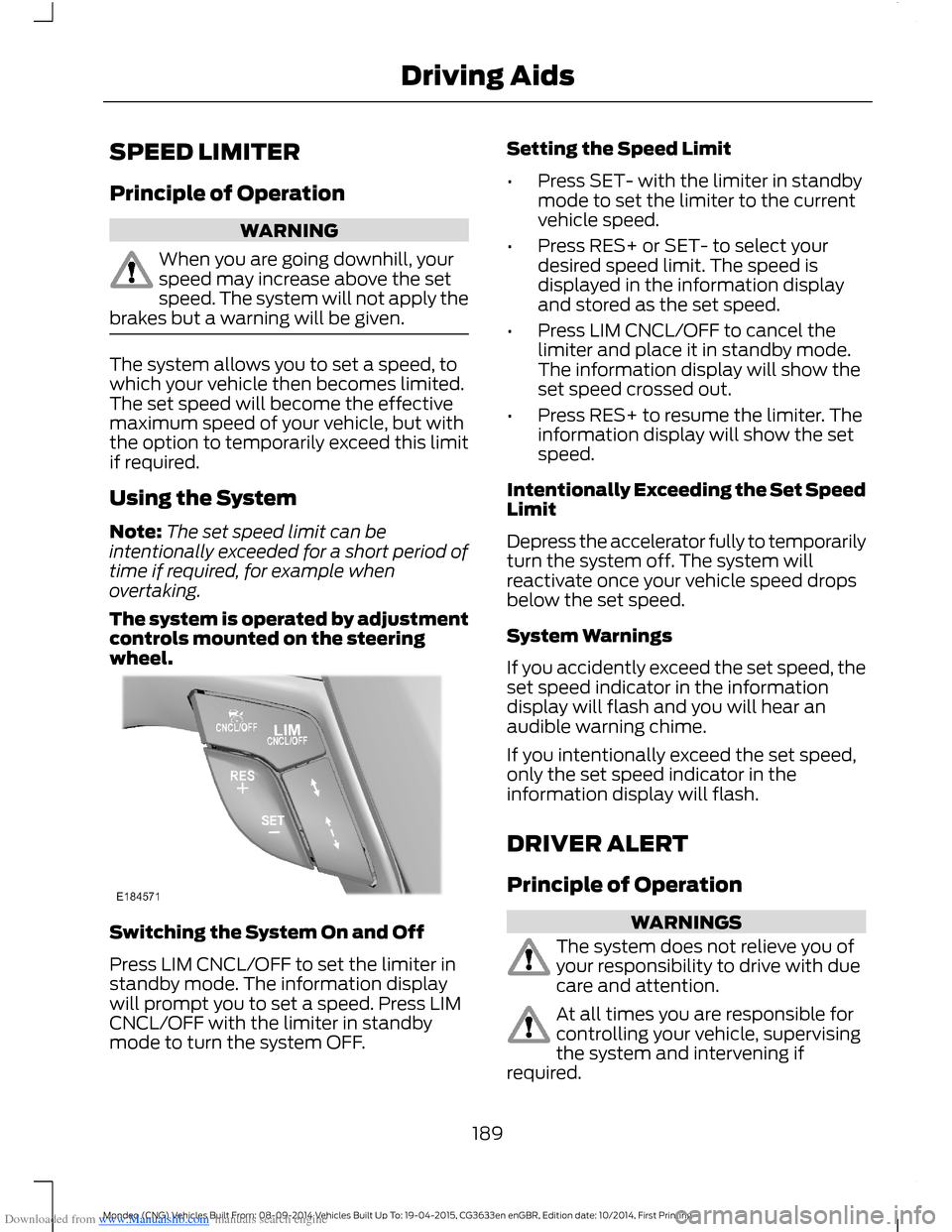
The system is operated by adjustmentcontrols mounted on the steeringwheel.
Switching the System On and Off
Press LIM CNCL/OFF to set the limiter instandby mode. The information displaywill prompt you to set a speed. Press LIMCNCL/OFF with the limiter in standbymode to turn the system OFF.
Setting the Speed Limit
•Press SET- with the limiter in standbymode to set the limiter to the currentvehicle speed.
•Press RES+ or SET- to select yourdesired speed limit. The speed isdisplayed in the information displayand stored as the set speed.
•Press LIM CNCL/OFF to cancel thelimiter and place it in standby mode.The information display will show theset speed crossed out.
•Press RES+ to resume the limiter. Theinformation display will show the setspeed.
Intentionally Exceeding the Set SpeedLimit
Depress the accelerator fully to temporarilyturn the system off. The system willreactivate once your vehicle speed dropsbelow the set speed.
System Warnings
If you accidently exceed the set speed, theset speed indicator in the informationdisplay will flash and you will hear anaudible warning chime.
If you intentionally exceed the set speed,only the set speed indicator in theinformation display will flash.
DRIVER ALERT
Principle of Operation
WARNINGS
The system does not relieve you ofyour responsibility to drive with duecare and attention.
At all times you are responsible forcontrolling your vehicle, supervisingthe system and intervening ifrequired.
189Mondeo (CNG) Vehicles Built From: 08-09-2014 Vehicles Built Up To: 19-04-2015, CG3633en enGBR, Edition date: 10/2014, First PrintingDriving Aids
Page 196 of 446
Downloaded from www.Manualslib.com manuals search engine •If you apply direct steering, acceleratefast or brake hard.
•Your vehicle speed is outside theoperating limits.
•If there is an anti-lock brake or stabilitycontrol intervention.
•Narrow lane width.
Note:You can override the system at anytime during its operation by turning thesteering wheel.
BLIND SPOT INFORMATION
SYSTEM
Blind Spot Information System(BLIS™) with Cross Traffic Alert
(If Equipped)
WARNING
Do not use the system as areplacement for using the mirrors orlooking over your shoulder beforechanging lanes. You should only use thesystem as an aid. It is not a replacementfor careful driving.
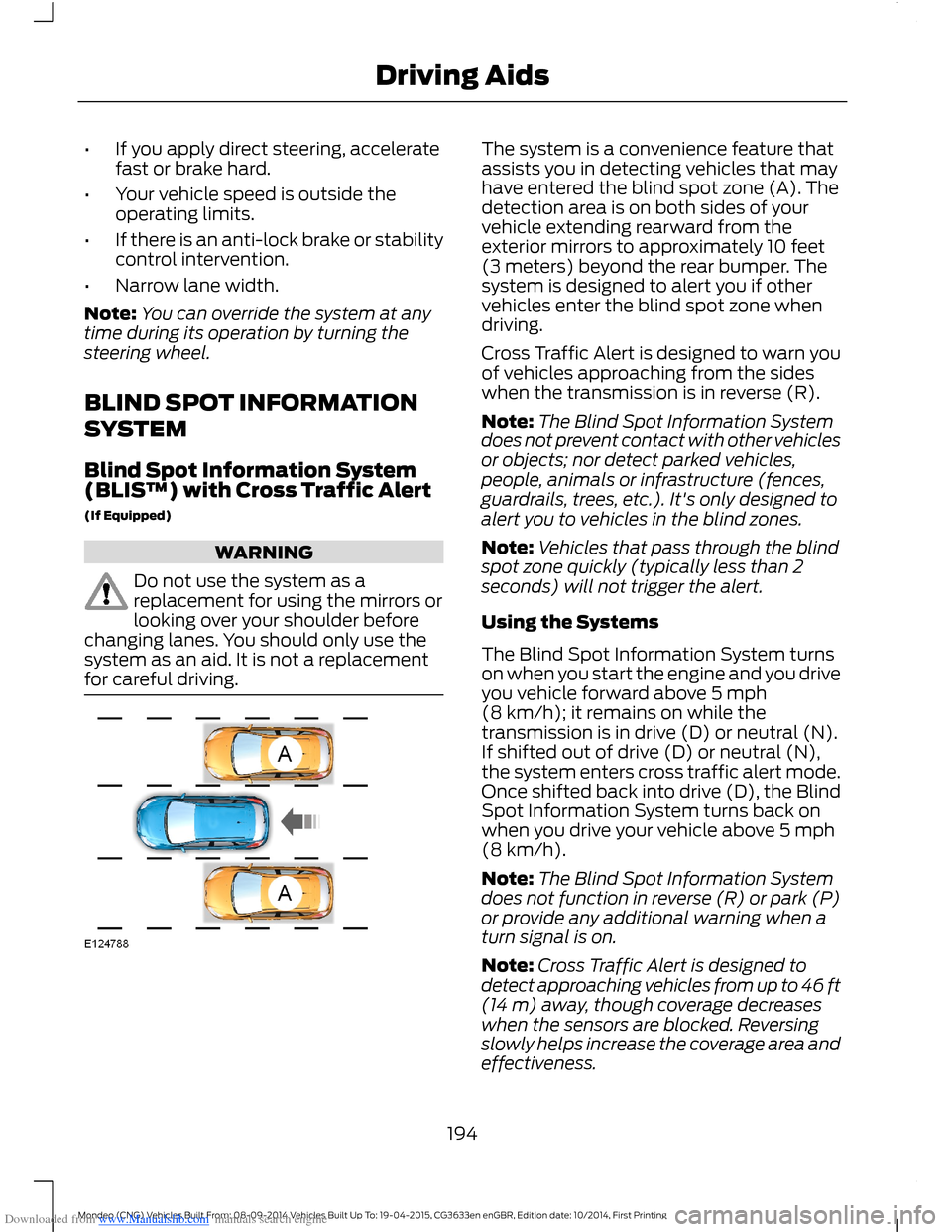
The system is a convenience feature thatassists you in detecting vehicles that mayhave entered the blind spot zone (A). Thedetection area is on both sides of yourvehicle extending rearward from theexterior mirrors to approximately 10 feet(3 meters) beyond the rear bumper. Thesystem is designed to alert you if othervehicles enter the blind spot zone whendriving.
Cross Traffic Alert is designed to warn youof vehicles approaching from the sideswhen the transmission is in reverse (R).
Note:The Blind Spot Information Systemdoes not prevent contact with other vehiclesor objects; nor detect parked vehicles,people, animals or infrastructure (fences,guardrails, trees, etc.). It's only designed toalert you to vehicles in the blind zones.
Note:Vehicles that pass through the blindspot zone quickly (typically less than 2seconds) will not trigger the alert.
Using the Systems
The Blind Spot Information System turnson when you start the engine and you driveyou vehicle forward above 5 mph(8 km/h); it remains on while thetransmission is in drive (D) or neutral (N).If shifted out of drive (D) or neutral (N),the system enters cross traffic alert mode.Once shifted back into drive (D), the BlindSpot Information System turns back onwhen you drive your vehicle above 5 mph(8 km/h).
Note:The Blind Spot Information Systemdoes not function in reverse (R) or park (P)or provide any additional warning when aturn signal is on.
Note:Cross Traffic Alert is designed todetect approaching vehicles from up to 46 ft(14 m) away, though coverage decreaseswhen the sensors are blocked. Reversingslowly helps increase the coverage area andeffectiveness.
194Mondeo (CNG) Vehicles Built From: 08-09-2014 Vehicles Built Up To: 19-04-2015, CG3633en enGBR, Edition date: 10/2014, First PrintingDriving Aids
Page 207 of 446
Downloaded from www.Manualslib.com manuals search engine DRIVE CONTROL
Driver Select Suspension
Driver select suspension delivers a uniquedriving experience through a suite ofsophisticated electronic vehicle systems.These systems continuously monitor yourdriving inputs and the road conditions tooptimize ride comfort, steering andhandling.
Driver select suspension consists of thefollowing systems:
•Continuously controlled dampingdynamically adjusts the shockabsorbers stiffness in real time tomatch the road surface and driverinputs. This system continuouslymonitors your vehicle’s motion (roll,pitch, bounce), suspension position,load, speed, road conditions, andsteering to adjust the suspensiondamping for optimal vehicle control.
•Electronically power-assisted steeringadjusts steering effort and feel basedon your vehicle speed and your inputs.
You can configure which of the modes areactive when your vehicle is in (D) drive orin (S) sport. The configuration remainsactive until modified from the main menuon the information display. See GeneralInformation (page 86).
Modes:
•Comfort – Provides a more relaxeddriving experience, maximizing comfort.Your steering effort decreases and thesuspension movement is more fluid.Comfort mode is ideal when you desireenhanced traveling comfort.
•Normal – Delivers a balancedcombination of comfortable, controlledride and confident handling. This modeprovides an engaging drive experienceand a direct connection to the roadwithout sacrificing any of thecomposure demanded from yourvehicle.
•Sport – Provides a sportier drivingexperience. The suspension stiffens,with an emphasis on handling andcontrol. The engine responds moredirectly to your inputs. Sport mode isideal for use during more spiriteddriving.
Adaptive Steering
You can configure which of the modes areactive when your vehicle is in (D) drive orin (S) sport. The configuration remainsactive until modified from the main menuon the information display. See GeneralInformation (page 86).
Modes:
•Normal – Default factory setting.
•Sport – Slightly higher effort requiredfor steering with more road force feltthrough the steering wheel.
205Mondeo (CNG) Vehicles Built From: 08-09-2014 Vehicles Built Up To: 19-04-2015, CG3633en enGBR, Edition date: 10/2014, First PrintingDriving Aids
Page 226 of 446
Downloaded from www.Manualslib.com manuals search engine HAZARD WARNING FLASHERS
The hazard warning button is located onthe instrument panel. Use it when yourvehicle is creating a safety hazard for othermotorists.
Press the button to turn on the hazardwarning function, and the front and reardirection indicators will flash.
Press the button again to turn them off.
Note:If used when the engine is notrunning, the battery will lose charge. Theremay be insufficient power to restart yourengine.
Note:Depending on applicable laws andregulations in the country for which yourvehicle was originally built, the hazardwarning flashers may flash if you brakeheavily.
FIRST AID KIT
For 5-door and wagon vehicles, stow thefirst aid kit in the left side wall storage areain the luggage compartment. For 4-doorvehicles, stow the first aid kit in the rearunder floor storage compartment. SeeRear Under Floor Storage (page 208).
WARNING TRIANGLE
Space is provided in the luggagecompartment.
FUEL SHUTOFF
WARNING
Failure to inspect and, if necessary,repair fuel leaks after a collision mayincrease the risk of fire and seriousinjury. Ford Motor Company recommendsthat the fuel system be inspected by anauthorized dealer after any collision.
In the event of a moderate to severecollision, this vehicle includes a fuel pumpshutoff feature that stops the flow of fuelto the engine. Not every impact will causea shutoff.
Should your vehicle shut off after acollision, you may restart your vehicle. Forvehicles equipped with a key system:
1.Switch off the ignition.
2.Switch on the ignition.
3.Repeat Steps 1 and 2 to re-enable thefuel pump.
For vehicles equipped with a push buttonstart system:
1.Press the START/STOP button toswitch off the ignition.
2.Press the brake pedal and press theSTART/STOP button to start thevehicle.
3.Remove your foot from the brake pedaland press the START/STOP buttonto switch off the ignition.
4.You can either attempt to start theengine by pressing the brake pedal andthe START/STOP button, or switchon the ignition only by pressing theSTART/STOP button withoutpressing the brake pedal. Both waysre-enable the fuel system.
224Mondeo (CNG) Vehicles Built From: 08-09-2014 Vehicles Built Up To: 19-04-2015, CG3633en enGBR, Edition date: 10/2014, First PrintingRoadside Emergencies
Page 294 of 446
Downloaded from www.Manualslib.com manuals search engine GENERAL INFORMATION
Radio Frequencies and Reception Factors
Radio reception factors
The further you travel away from an FM station, the weakerthe signal and the weaker the reception.Distance and Strength
Hills, mountains, tall buildings, bridges, tunnels, freewayoverpasses, parking garages, dense tree foliage andthunderstorms can interfere with the reception.
Terrain
When you pass near a radio transmission tower, a strongersignal can override a weaker signal and can cause interfer-ence in the audio system.
Station overload
CD and CD Player Information
Note:CD units play commercially pressed4.75-inch (12 centimeter) audio compactdiscs only. Due to technical incompatibility,certain recordable and re-recordablecompact discs may not function correctlywhen used in Ford CD players.
Note:Do not insert CDs with homemadepaper (adhesive) labels into the CD playeras the label may peel and cause the CD tobecome jammed. You should use apermanent felt tip marker rather thanadhesive labels on your homemade CDs.Ballpoint pens may damage CDs. Pleasecontact an authorized dealer for furtherinformation.
Note:Do not use any irregularly shapeddiscs or discs with a scratch protection filmattached.
Always handle discs by their edges only.Clean the disc with an approved CDcleaner only. Wipe it from the center of thedisc toward the edge. Do not clean in acircular motion.
Do not expose discs to direct sunlight orheat sources for extended periods.
MP3 and WMA Track and FolderStructure
Audio systems capable of recognizing andplaying MP3 and WMA individual tracksand folder structures work as follows:
•There are two different modes for MP3and WMA disc playback: MP3 andWMA track mode (system default) andMP3 and WMA folder mode.
•MP3 and WMA track mode ignores anyfolder structure on the MP3 and WMAdisc. The player numbers each MP3and WMA track on the disc (noted bythe MP3 or WMA file extension) fromT001 to a maximum of T255. Themaximum number of playable MP3 andWMA files may be less depending onthe structure of the CD and exactmodel of radio present.
292Mondeo (CNG) Vehicles Built From: 08-09-2014 Vehicles Built Up To: 19-04-2015, CG3633en enGBR, Edition date: 10/2014, First PrintingAudio System