mirror FORD MONDEO 2014 4.G Owner's Manual
[x] Cancel search | Manufacturer: FORD, Model Year: 2014, Model line: MONDEO, Model: FORD MONDEO 2014 4.GPages: 446, PDF Size: 29.09 MB
Page 134 of 446
Downloaded from www.Manualslib.com manuals search engine Saving a PreSet Position
1.Switch the ignition on.
2.Adjust the seat, exterior mirrors andsteering column to your desiredposition.
3.Press and hold the desired presetbutton until you hear a single tone.
You can save up to three preset memorypositions. You can save a memory presetat any time.
Recalling a PreSet Position
Press and release the preset buttonassociated with your desired drivingposition. The seat, mirrors and steeringcolumn move to the position stored forthat preset.
Note:You can only recall a preset memoryposition when the ignition is off, or when thetransmission is in park (P) or neutral (N)(and your vehicle is not moving) if theignition is on.
You can recall a preset memory positionby pressing the unlock button on yourremote control or intelligent access key ifit is linked to a preset position.
Linking a PreSet Position to YourRemote Control or IntelligentAccess Key
Your vehicle can save the preset memorypositions for up to three remote controlsor intelligent access keys.
1.With the ignition on, move the memorypositions to the desired positions.
2.Press and hold the desired presetbutton for about five seconds. A tonesounds after about two seconds.Continue holding until a second toneis heard.
3.Within three seconds, press the lockbutton on the remote control you arelinking.
To unlink a remote control, follow thesame procedure – except in step 3, pressthe unlock button on the remote control.
Note:Pressing any active memory featureadjustment control - power seat, mirror, oroptional steering column switch or anymemory button – during a memory recallcancels the operation.
A seat recall movement will also stop ifyou drive your vehicle.
Note:If more than one linked remotecontrol or intelligent access key is in range,the memory function moves to the settingsof the first key stored.
Easy Entry and Exit Function
If you enable the easy entry and exitfeature, it automatically moves the driverseat position rearward up to fivecentimeters when the transmission is inpark (P) and you remove the key or turnoff the keyless start ignition.
The driver seat returns to the previousposition when you put the key in theignition or you activate the keyless startignition.
You can switch off the easy entry and exitfeature by using the driver informationdisplay.
132Mondeo (CNG) Vehicles Built From: 08-09-2014 Vehicles Built Up To: 19-04-2015, CG3633en enGBR, Edition date: 10/2014, First PrintingSeats
Page 179 of 446
Downloaded from www.Manualslib.com manuals search engine The system does not position the vehicle where I want in the space
Your vehicle is rolling in the opposite direction of the transmission (rolling forward withreverse [R] selected).
An irregular curb along the parking space prevents the system from aligning your vehicleproperly.
Vehicles or objects bordering the space may not be positioned correctly.
You pulled your vehicle too far past the parking space. The system performs best whenyou drive the same distance past the parking space.
The tires may not be installed or maintained correctly (not inflated correctly, impropersize, or of different sizes).
A repair or alteration has changed detection capabilities.
A parked vehicle has a high attachment (salt sprayer, snowplow or moving truck bed).
The parking space length or position of parked objects changed after your vehicle passed.
The temperature around your vehicle changes quickly (driving from a heated garageinto the cold, or after leaving a car wash).
REAR VIEW CAMERA
WARNINGS
The rear view camera system is areverse aid supplement device thatstill requires the driver to use it inconjunction with the interior and exteriormirrors for maximum coverage.
Objects that are close to eithercorner of the bumper or under thebumper, might not be seen on thescreen due to the limited coverage of thecamera system.
Back up as slow as possible sincehigher speeds might limit yourreaction time to stop your vehicle.
WARNINGS
Use caution when using the rearvideo camera and the luggagecompartment door is ajar. If theluggage compartment door is ajar, thecamera will be out of position and thevideo image may be incorrect. Allguidelines disappear when the luggagecompartment door is ajar.
Use caution when turning camerafeatures on or off. Make sure yourvehicle is not moving.
The rear view camera system provides avideo image of the area behind yourvehicle.
During operation, lines appear in thedisplay which represent your vehicle’s pathand proximity to objects behind yourvehicle.
177Mondeo (CNG) Vehicles Built From: 08-09-2014 Vehicles Built Up To: 19-04-2015, CG3633en enGBR, Edition date: 10/2014, First PrintingParking Aids
Page 181 of 446
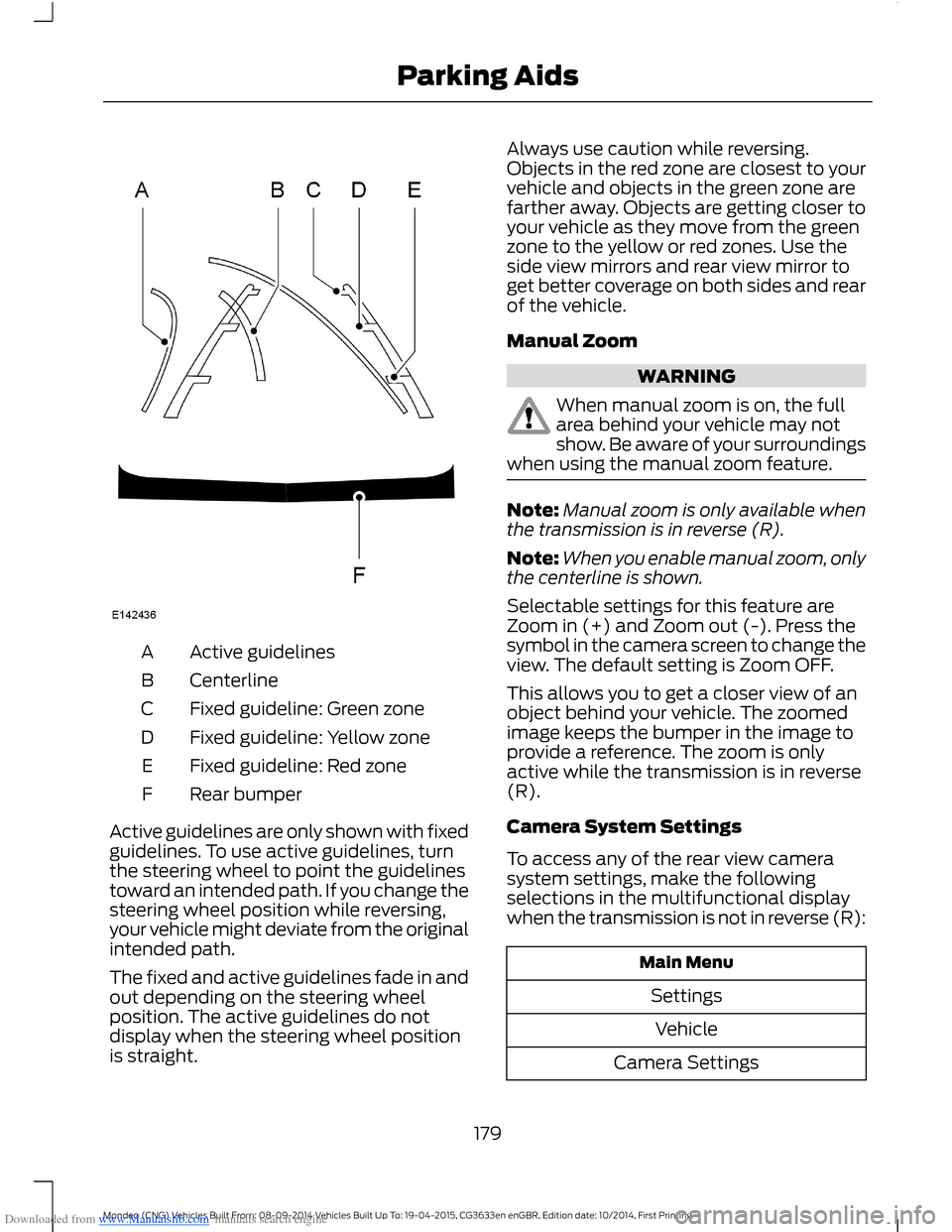
Downloaded from www.Manualslib.com manuals search engine Active guidelinesA
CenterlineB
Fixed guideline: Green zoneC
Fixed guideline: Yellow zoneD
Fixed guideline: Red zoneE
Rear bumperF
Active guidelines are only shown with fixedguidelines. To use active guidelines, turnthe steering wheel to point the guidelinestoward an intended path. If you change thesteering wheel position while reversing,your vehicle might deviate from the originalintended path.
The fixed and active guidelines fade in andout depending on the steering wheelposition. The active guidelines do notdisplay when the steering wheel positionis straight.
Always use caution while reversing.Objects in the red zone are closest to yourvehicle and objects in the green zone arefarther away. Objects are getting closer toyour vehicle as they move from the greenzone to the yellow or red zones. Use theside view mirrors and rear view mirror toget better coverage on both sides and rearof the vehicle.
Manual Zoom
WARNING
When manual zoom is on, the fullarea behind your vehicle may notshow. Be aware of your surroundingswhen using the manual zoom feature.
Note:Manual zoom is only available whenthe transmission is in reverse (R).
Note:When you enable manual zoom, onlythe centerline is shown.
Selectable settings for this feature areZoom in (+) and Zoom out (-). Press thesymbol in the camera screen to change theview. The default setting is Zoom OFF.
This allows you to get a closer view of anobject behind your vehicle. The zoomedimage keeps the bumper in the image toprovide a reference. The zoom is onlyactive while the transmission is in reverse(R).
Camera System Settings
To access any of the rear view camerasystem settings, make the followingselections in the multifunctional displaywhen the transmission is not in reverse (R):
Main Menu
Settings
Vehicle
Camera Settings
179Mondeo (CNG) Vehicles Built From: 08-09-2014 Vehicles Built Up To: 19-04-2015, CG3633en enGBR, Edition date: 10/2014, First PrintingParking Aids
Page 194 of 446
Downloaded from www.Manualslib.com manuals search engine Note:The system may assist you whendriving on fast main roads and freeways.
Note:The system may not operate duringhard braking or acceleration and when youare intentionally steering your vehicle.
Note:The system will operate with aminimum of one tracked lane marking.
Note:The system will only operate abovevehicle speeds of approximately 40 mph(65 km/h).
The sensor is located behind the interiormirror. It continuously monitors conditionsto alert you of unintentional lane driftingat high speeds.
The system will automatically detect andtrack the lane markings on the road. If yourvehicle unintentionally drifts toward theroad lane markings, a warning will beshown in the display. There is also awarning given in the form of a vibration feltthrough the steering wheel.
Using Lane Keeping Alert
Switching the System On and Off
Note:When you switch the system off, awarning indicator will remain illuminated inthe information display. See WarningLamps and Indicators (page 81).
Note:The system status and settings willremain unchanged when you switch theignition on and off.
Switch the system on and off using thebutton on the direction indicator stalk.
Press the button twice to switch thesystem on. Press the button once to switchthe system off.
Setting the Steering Wheel VibrationLevel
The system has three intensity levels whichyou can set using the information display.See General Information (page 86).
Setting the System Sensitivity
You can adjust how quickly the systemwarns you of a dangerous situation. Thesystem has two sensitivity levels which youcan set using the information display. SeeGeneral Information (page 86).
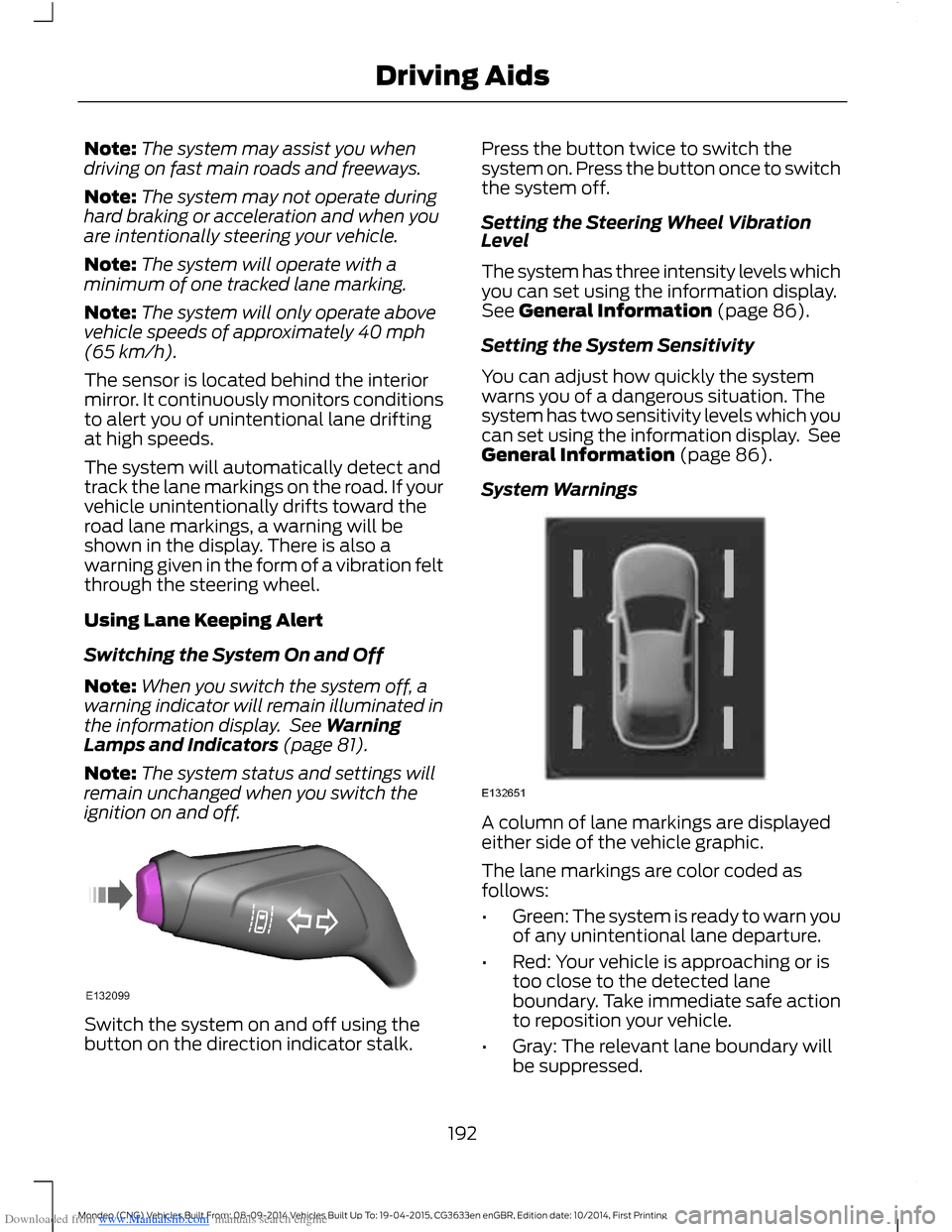
System Warnings
A column of lane markings are displayedeither side of the vehicle graphic.
The lane markings are color coded asfollows:
•Green: The system is ready to warn youof any unintentional lane departure.
•Red: Your vehicle is approaching or istoo close to the detected laneboundary. Take immediate safe actionto reposition your vehicle.
•Gray: The relevant lane boundary willbe suppressed.
192Mondeo (CNG) Vehicles Built From: 08-09-2014 Vehicles Built Up To: 19-04-2015, CG3633en enGBR, Edition date: 10/2014, First PrintingDriving Aids
Page 196 of 446
Downloaded from www.Manualslib.com manuals search engine •If you apply direct steering, acceleratefast or brake hard.
•Your vehicle speed is outside theoperating limits.
•If there is an anti-lock brake or stabilitycontrol intervention.
•Narrow lane width.
Note:You can override the system at anytime during its operation by turning thesteering wheel.
BLIND SPOT INFORMATION
SYSTEM
Blind Spot Information System(BLIS™) with Cross Traffic Alert
(If Equipped)
WARNING
Do not use the system as areplacement for using the mirrors orlooking over your shoulder beforechanging lanes. You should only use thesystem as an aid. It is not a replacementfor careful driving.
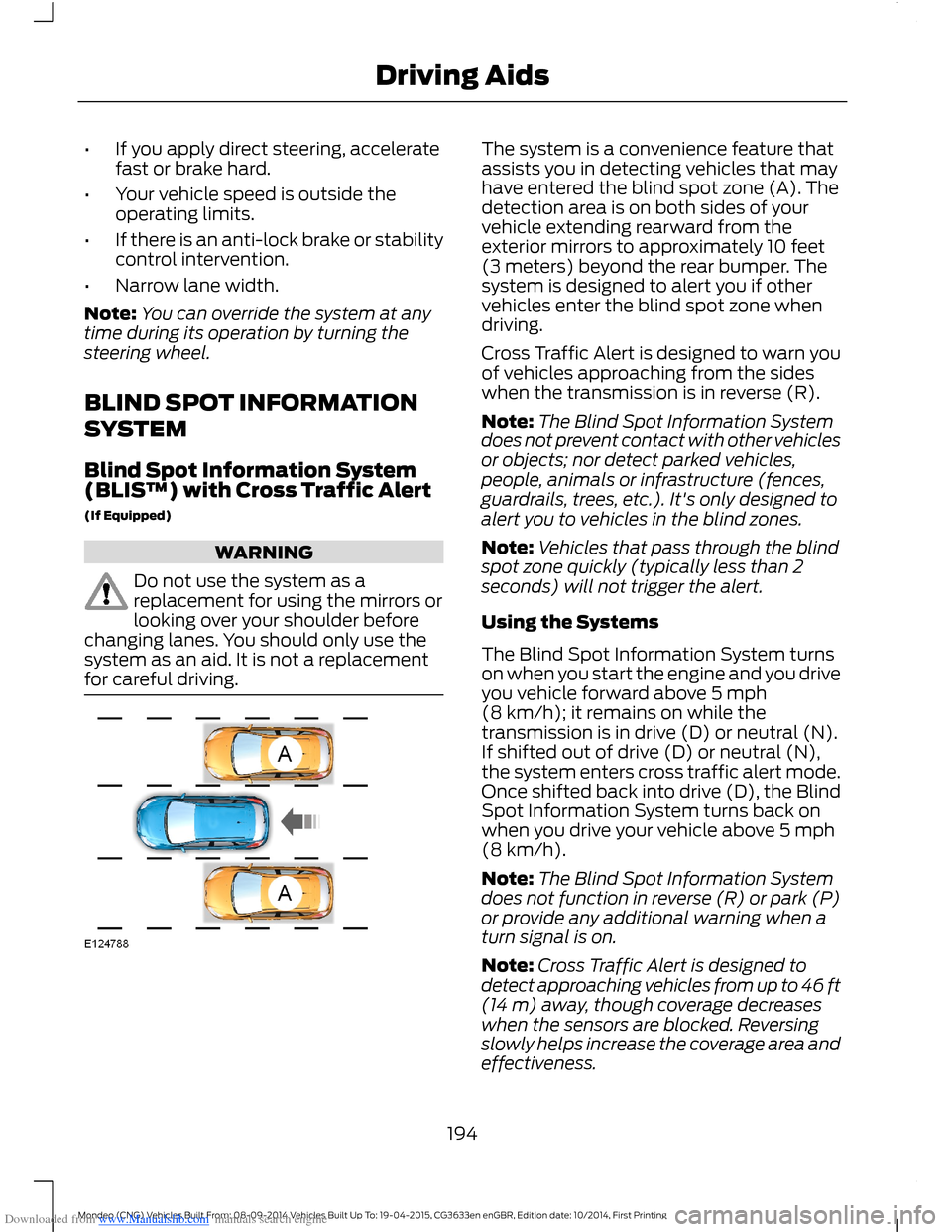
The system is a convenience feature thatassists you in detecting vehicles that mayhave entered the blind spot zone (A). Thedetection area is on both sides of yourvehicle extending rearward from theexterior mirrors to approximately 10 feet(3 meters) beyond the rear bumper. Thesystem is designed to alert you if othervehicles enter the blind spot zone whendriving.
Cross Traffic Alert is designed to warn youof vehicles approaching from the sideswhen the transmission is in reverse (R).
Note:The Blind Spot Information Systemdoes not prevent contact with other vehiclesor objects; nor detect parked vehicles,people, animals or infrastructure (fences,guardrails, trees, etc.). It's only designed toalert you to vehicles in the blind zones.
Note:Vehicles that pass through the blindspot zone quickly (typically less than 2seconds) will not trigger the alert.
Using the Systems
The Blind Spot Information System turnson when you start the engine and you driveyou vehicle forward above 5 mph(8 km/h); it remains on while thetransmission is in drive (D) or neutral (N).If shifted out of drive (D) or neutral (N),the system enters cross traffic alert mode.Once shifted back into drive (D), the BlindSpot Information System turns back onwhen you drive your vehicle above 5 mph(8 km/h).
Note:The Blind Spot Information Systemdoes not function in reverse (R) or park (P)or provide any additional warning when aturn signal is on.
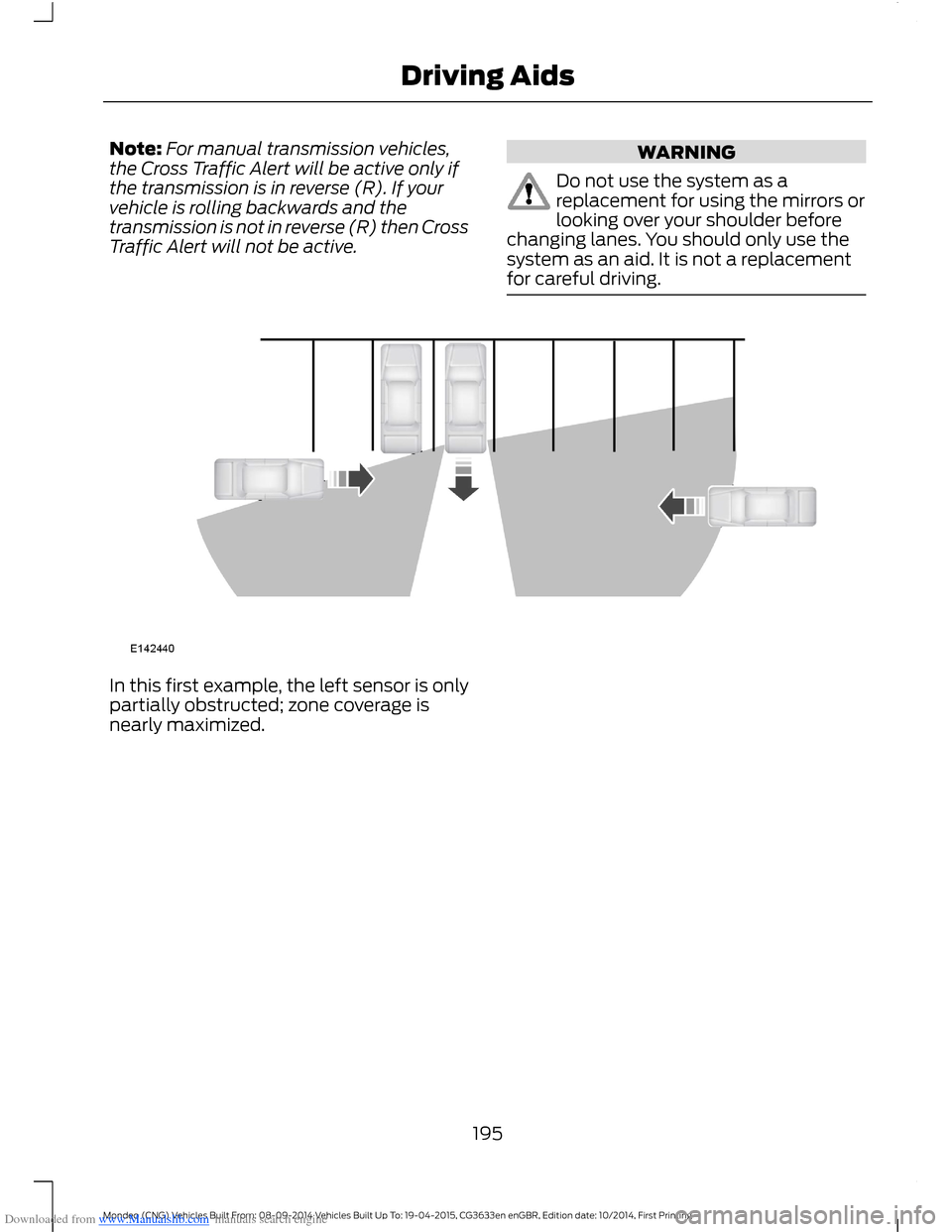
Note:Cross Traffic Alert is designed todetect approaching vehicles from up to 46 ft(14 m) away, though coverage decreaseswhen the sensors are blocked. Reversingslowly helps increase the coverage area andeffectiveness.
194Mondeo (CNG) Vehicles Built From: 08-09-2014 Vehicles Built Up To: 19-04-2015, CG3633en enGBR, Edition date: 10/2014, First PrintingDriving Aids
Page 197 of 446
Downloaded from www.Manualslib.com manuals search engine Note:For manual transmission vehicles,the Cross Traffic Alert will be active only ifthe transmission is in reverse (R). If yourvehicle is rolling backwards and thetransmission is not in reverse (R) then CrossTraffic Alert will not be active.
WARNING
Do not use the system as areplacement for using the mirrors orlooking over your shoulder beforechanging lanes. You should only use thesystem as an aid. It is not a replacementfor careful driving.
In this first example, the left sensor is onlypartially obstructed; zone coverage isnearly maximized.
195Mondeo (CNG) Vehicles Built From: 08-09-2014 Vehicles Built Up To: 19-04-2015, CG3633en enGBR, Edition date: 10/2014, First PrintingDriving Aids
Page 198 of 446
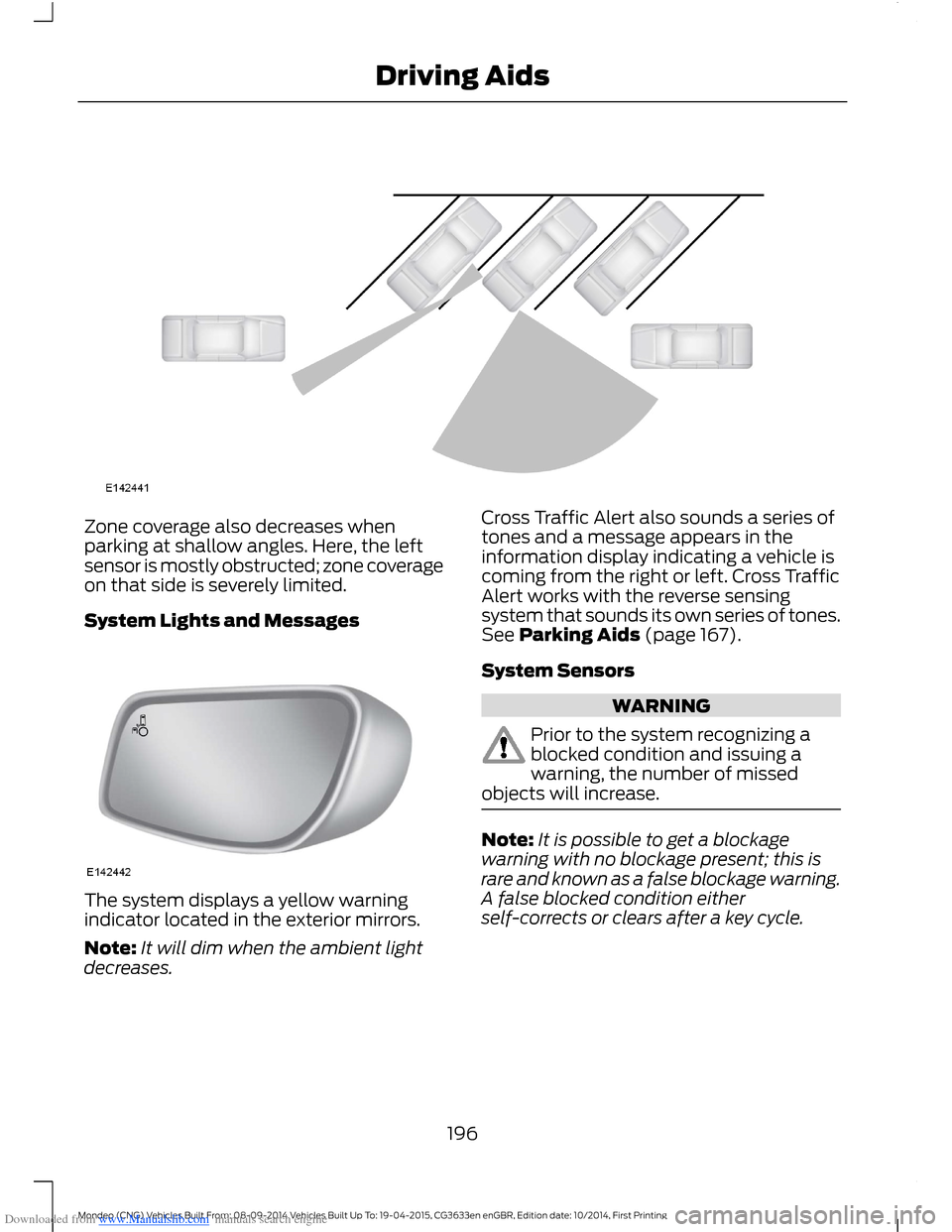
Downloaded from www.Manualslib.com manuals search engine Zone coverage also decreases whenparking at shallow angles. Here, the leftsensor is mostly obstructed; zone coverageon that side is severely limited.
System Lights and Messages
The system displays a yellow warningindicator located in the exterior mirrors.
Note:It will dim when the ambient lightdecreases.
Cross Traffic Alert also sounds a series oftones and a message appears in theinformation display indicating a vehicle iscoming from the right or left. Cross TrafficAlert works with the reverse sensingsystem that sounds its own series of tones.See Parking Aids (page 167).
System Sensors
WARNING
Prior to the system recognizing ablocked condition and issuing awarning, the number of missedobjects will increase.
Note:It is possible to get a blockagewarning with no blockage present; this israre and known as a false blockage warning.A false blocked condition eitherself-corrects or clears after a key cycle.
196Mondeo (CNG) Vehicles Built From: 08-09-2014 Vehicles Built Up To: 19-04-2015, CG3633en enGBR, Edition date: 10/2014, First PrintingDriving Aids
Page 201 of 446
Downloaded from www.Manualslib.com manuals search engine Note:Keep the windshield free fromobstructions such as bird droppings, insectsand snow or ice.
Note:The system may not detect all trafficsigns and may read signs incorrectly.
Note:The system is designed toautomatically detect traffic signs meetingthe Vienna convention.
Note:Traffic sign data provided by thenavigation system contains informationintegrated to the data carrier release.
There is a sensor mounted behind theinterior rear view mirror. It continuouslymonitors road signs to inform you of thecurrent speed limit and overtakingregulations.
The system automatically detectsrecognisable traffic signs, such as:
•Speed limit signs.
•No overtaking signs.
•Speed limit cancellation signs.
When the system recognises a traffic sign,it will be shown in the display.
Using the System
Switching the System On and Off
Note:The system status and settings willremain unchanged during ignition cycles.
You can switch the system on and off usingthe information display. See GeneralInformation (page 86).
Setting the System Speed Warning
The system has a number of speedwarning levels which can be set using theinformation display. See GeneralInformation (page 86).
System Display
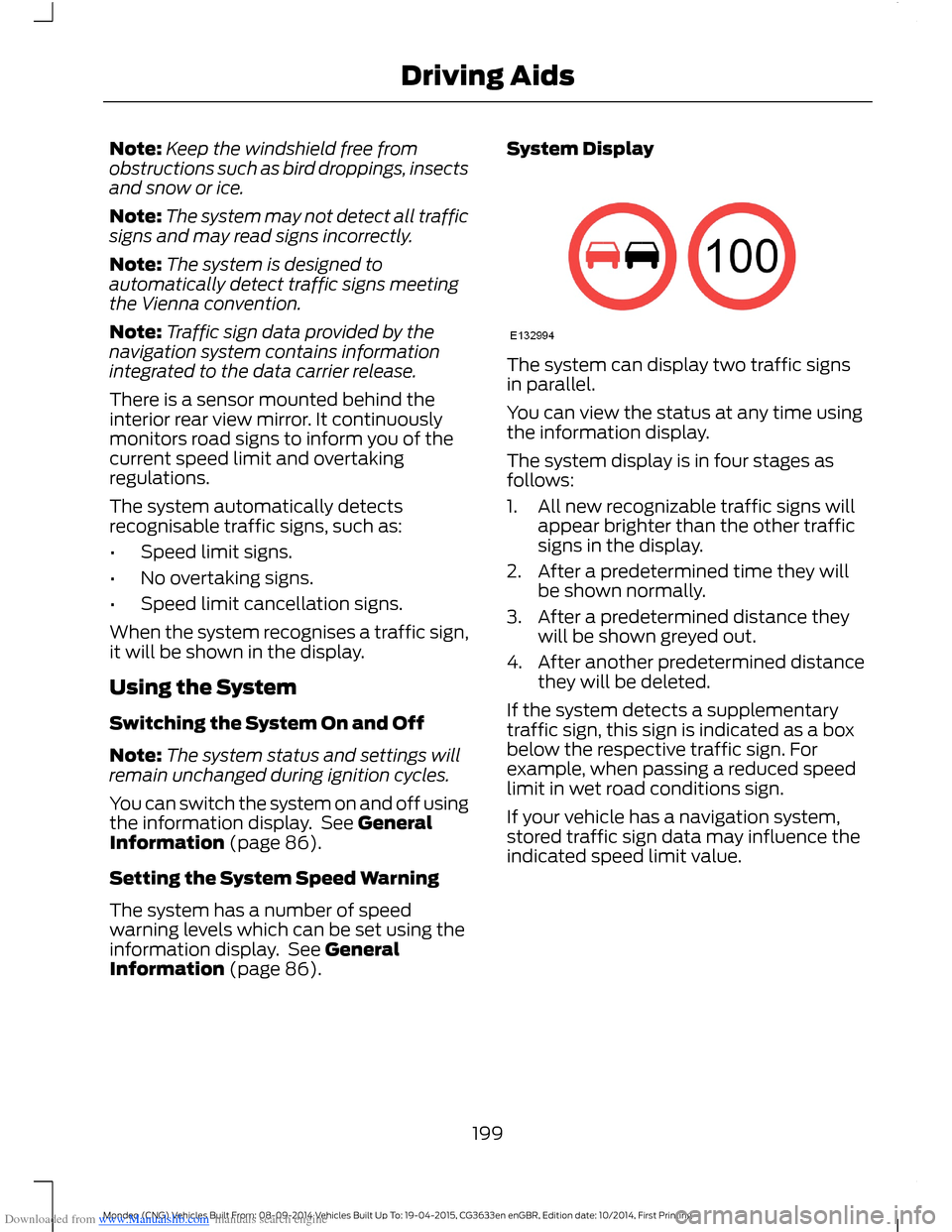
The system can display two traffic signsin parallel.
You can view the status at any time usingthe information display.
The system display is in four stages asfollows:
1.All new recognizable traffic signs willappear brighter than the other trafficsigns in the display.
2.After a predetermined time they willbe shown normally.
3.After a predetermined distance theywill be shown greyed out.
4.After another predetermined distancethey will be deleted.
If the system detects a supplementarytraffic sign, this sign is indicated as a boxbelow the respective traffic sign. Forexample, when passing a reduced speedlimit in wet road conditions sign.
If your vehicle has a navigation system,stored traffic sign data may influence theindicated speed limit value.
199Mondeo (CNG) Vehicles Built From: 08-09-2014 Vehicles Built Up To: 19-04-2015, CG3633en enGBR, Edition date: 10/2014, First PrintingDriving Aids
Page 202 of 446
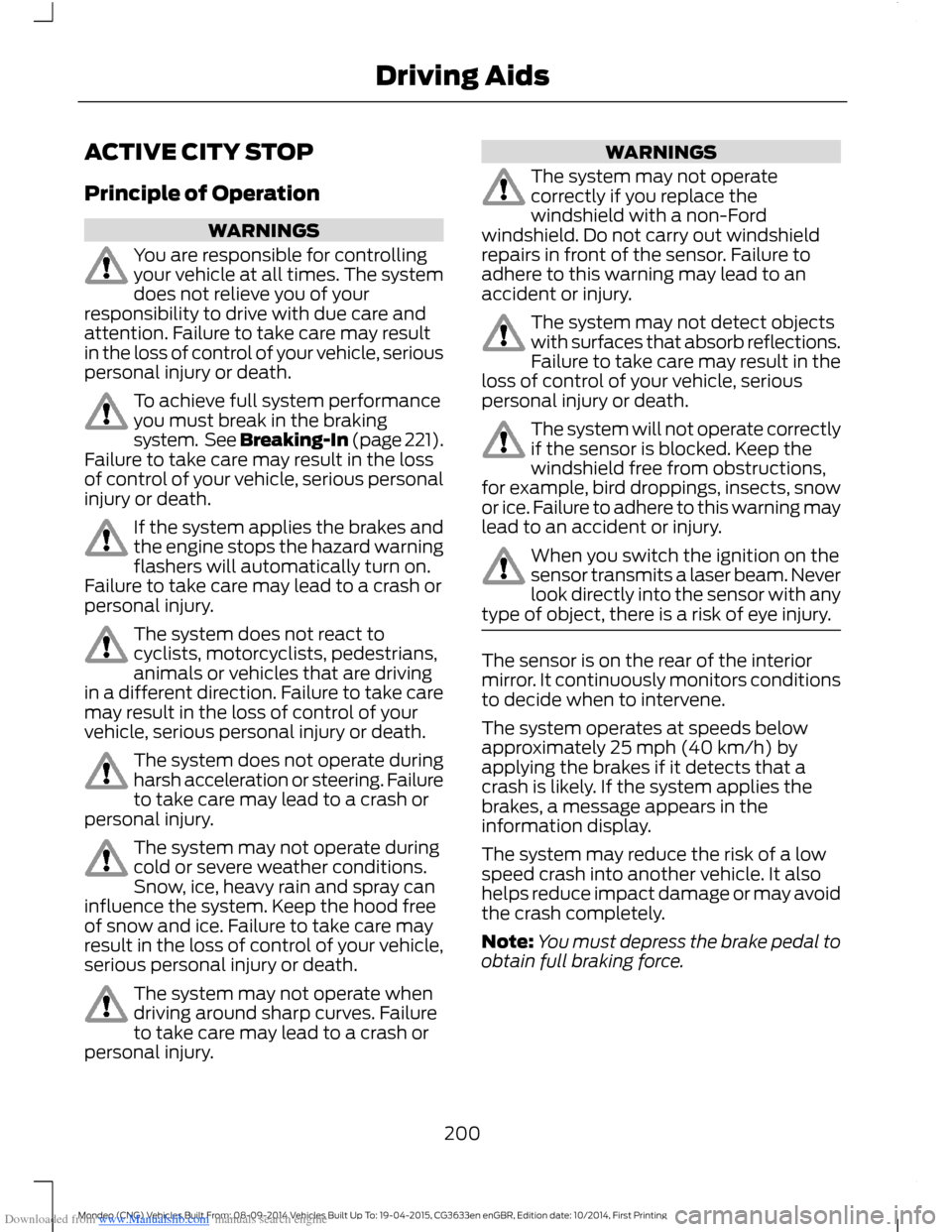
Downloaded from www.Manualslib.com manuals search engine ACTIVE CITY STOP
Principle of Operation
WARNINGS
You are responsible for controllingyour vehicle at all times. The systemdoes not relieve you of yourresponsibility to drive with due care andattention. Failure to take care may resultin the loss of control of your vehicle, seriouspersonal injury or death.
To achieve full system performanceyou must break in the brakingsystem. See Breaking-In (page 221).Failure to take care may result in the lossof control of your vehicle, serious personalinjury or death.
If the system applies the brakes andthe engine stops the hazard warningflashers will automatically turn on.Failure to take care may lead to a crash orpersonal injury.
The system does not react tocyclists, motorcyclists, pedestrians,animals or vehicles that are drivingin a different direction. Failure to take caremay result in the loss of control of yourvehicle, serious personal injury or death.
The system does not operate duringharsh acceleration or steering. Failureto take care may lead to a crash orpersonal injury.
The system may not operate duringcold or severe weather conditions.Snow, ice, heavy rain and spray caninfluence the system. Keep the hood freeof snow and ice. Failure to take care mayresult in the loss of control of your vehicle,serious personal injury or death.
The system may not operate whendriving around sharp curves. Failureto take care may lead to a crash orpersonal injury.
WARNINGS
The system may not operatecorrectly if you replace thewindshield with a non-Fordwindshield. Do not carry out windshieldrepairs in front of the sensor. Failure toadhere to this warning may lead to anaccident or injury.
The system may not detect objectswith surfaces that absorb reflections.Failure to take care may result in theloss of control of your vehicle, seriouspersonal injury or death.
The system will not operate correctlyif the sensor is blocked. Keep thewindshield free from obstructions,for example, bird droppings, insects, snowor ice. Failure to adhere to this warning maylead to an accident or injury.
When you switch the ignition on thesensor transmits a laser beam. Neverlook directly into the sensor with anytype of object, there is a risk of eye injury.
The sensor is on the rear of the interiormirror. It continuously monitors conditionsto decide when to intervene.
The system operates at speeds belowapproximately 25 mph (40 km/h) byapplying the brakes if it detects that acrash is likely. If the system applies thebrakes, a message appears in theinformation display.
The system may reduce the risk of a lowspeed crash into another vehicle. It alsohelps reduce impact damage or may avoidthe crash completely.
Note:You must depress the brake pedal toobtain full braking force.
200Mondeo (CNG) Vehicles Built From: 08-09-2014 Vehicles Built Up To: 19-04-2015, CG3633en enGBR, Edition date: 10/2014, First PrintingDriving Aids
Page 236 of 446
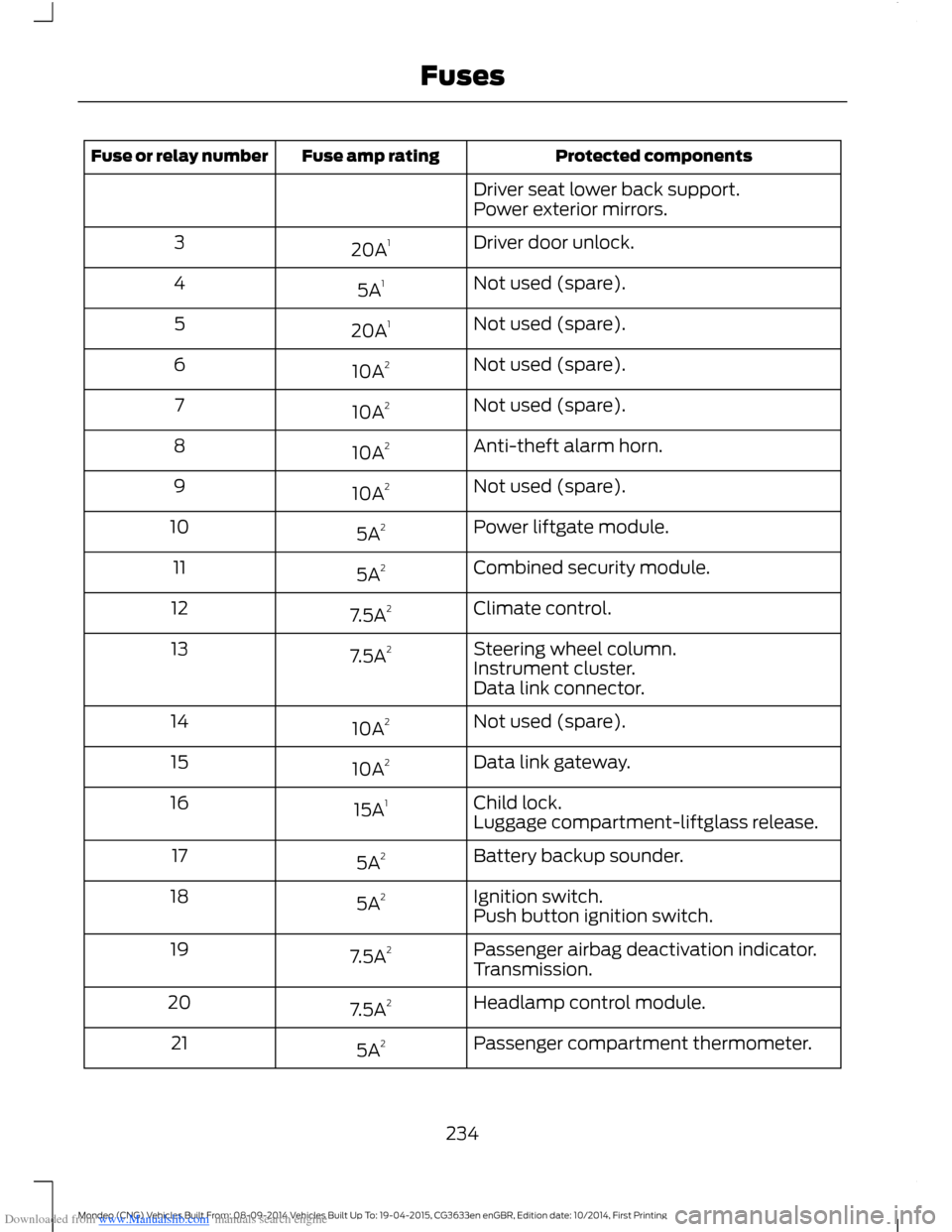
Downloaded from www.Manualslib.com manuals search engine Protected componentsFuse amp ratingFuse or relay number
Driver seat lower back support.Power exterior mirrors.
Driver door unlock.20A13
Not used (spare).5A14
Not used (spare).20A15
Not used (spare).10A26
Not used (spare).10A27
Anti-theft alarm horn.10A28
Not used (spare).10A29
Power liftgate module.5A210
Combined security module.5A211
Climate control.7.5A212
Steering wheel column.7.5A213Instrument cluster.Data link connector.
Not used (spare).10A214
Data link gateway.10A215
Child lock.15A116Luggage compartment-liftglass release.
Battery backup sounder.5A217
Ignition switch.5A218Push button ignition switch.
Passenger airbag deactivation indicator.7.5A219Transmission.
Headlamp control module.7.5A220
Passenger compartment thermometer.5A221
234Mondeo (CNG) Vehicles Built From: 08-09-2014 Vehicles Built Up To: 19-04-2015, CG3633en enGBR, Edition date: 10/2014, First PrintingFuses