remote control FORD MONDEO 2014 4.G Owner's Manual
[x] Cancel search | Manufacturer: FORD, Model Year: 2014, Model line: MONDEO, Model: FORD MONDEO 2014 4.GPages: 446, PDF Size: 29.09 MB
Page 75 of 446
Downloaded from www.Manualslib.com manuals search engine GLOBAL OPENING AND
CLOSING
You can use the remote control to operatethe windows with the ignition off.
Note:You can enable or disable this featurein the information display or see anauthorized dealer. See (page 86).
Note:To operate this feature, accessorydelay must not be active.
Opening the Windows
You can only open the windows for a shorttime after you unlock your vehicle with theremote control. After you unlock yourvehicle, press and hold the remote controlunlock button to open the windows andvent the moonroof. Release the buttononce movement starts. Press the lock orunlock button to stop movement.
Closing the Windows
WARNING
When closing the windows andmoonroof, you should verify they arefree of obstructions and make surethat children and pets are not in theproximity of the window openings.
To close the windows and moonroof, pressand hold the remote control lock button.Release the button once movement starts.Press the lock or unlock button to stopmovement.
EXTERIOR MIRRORS
Power Exterior Mirrors
WARNING
Do not adjust the mirrors when yourvehicle is moving.
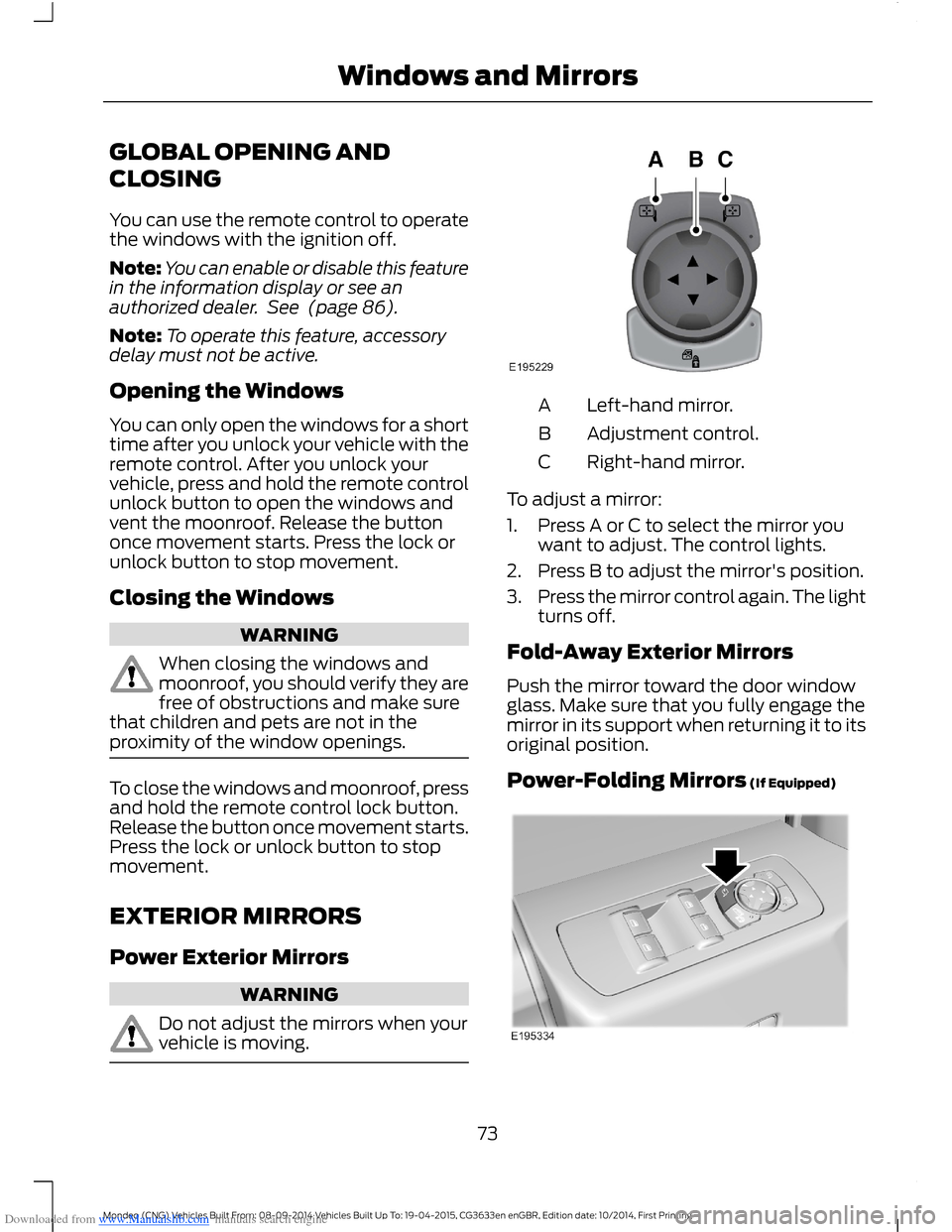
Left-hand mirror.A
Adjustment control.B
Right-hand mirror.C
To adjust a mirror:
1.Press A or C to select the mirror youwant to adjust. The control lights.
2.Press B to adjust the mirror's position.
3.Press the mirror control again. The lightturns off.
Fold-Away Exterior Mirrors
Push the mirror toward the door windowglass. Make sure that you fully engage themirror in its support when returning it to itsoriginal position.
Power-Folding Mirrors (If Equipped)
73Mondeo (CNG) Vehicles Built From: 08-09-2014 Vehicles Built Up To: 19-04-2015, CG3633en enGBR, Edition date: 10/2014, First PrintingWindows and Mirrors
Page 92 of 446
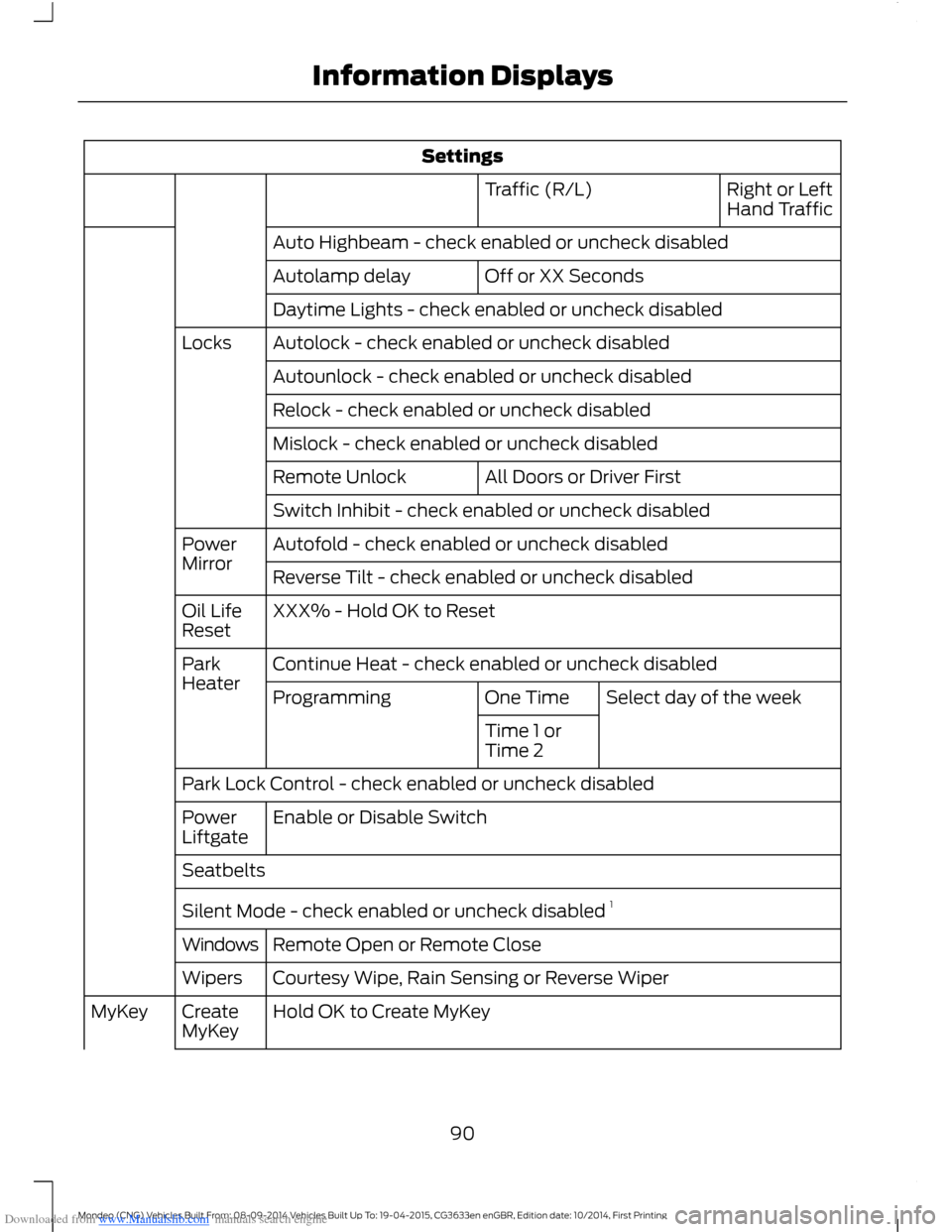
Downloaded from www.Manualslib.com manuals search engine Settings
Right or LeftHand TrafficTraffic (R/L)
Auto Highbeam - check enabled or uncheck disabled
Off or XX SecondsAutolamp delay
Daytime Lights - check enabled or uncheck disabled
Autolock - check enabled or uncheck disabledLocks
Autounlock - check enabled or uncheck disabled
Relock - check enabled or uncheck disabled
Mislock - check enabled or uncheck disabled
All Doors or Driver FirstRemote Unlock
Switch Inhibit - check enabled or uncheck disabled
Autofold - check enabled or uncheck disabledPowerMirrorReverse Tilt - check enabled or uncheck disabled
XXX% - Hold OK to ResetOil LifeReset
Continue Heat - check enabled or uncheck disabledParkHeaterSelect day of the weekOne TimeProgramming
Time 1 orTime 2
Park Lock Control - check enabled or uncheck disabled
Enable or Disable SwitchPowerLiftgate
Seatbelts
Silent Mode - check enabled or uncheck disabled 1
Remote Open or Remote CloseWindows
Courtesy Wipe, Rain Sensing or Reverse WiperWipers
Hold OK to Create MyKeyCreateMyKeyMyKey
90Mondeo (CNG) Vehicles Built From: 08-09-2014 Vehicles Built Up To: 19-04-2015, CG3633en enGBR, Edition date: 10/2014, First PrintingInformation Displays
Page 97 of 446
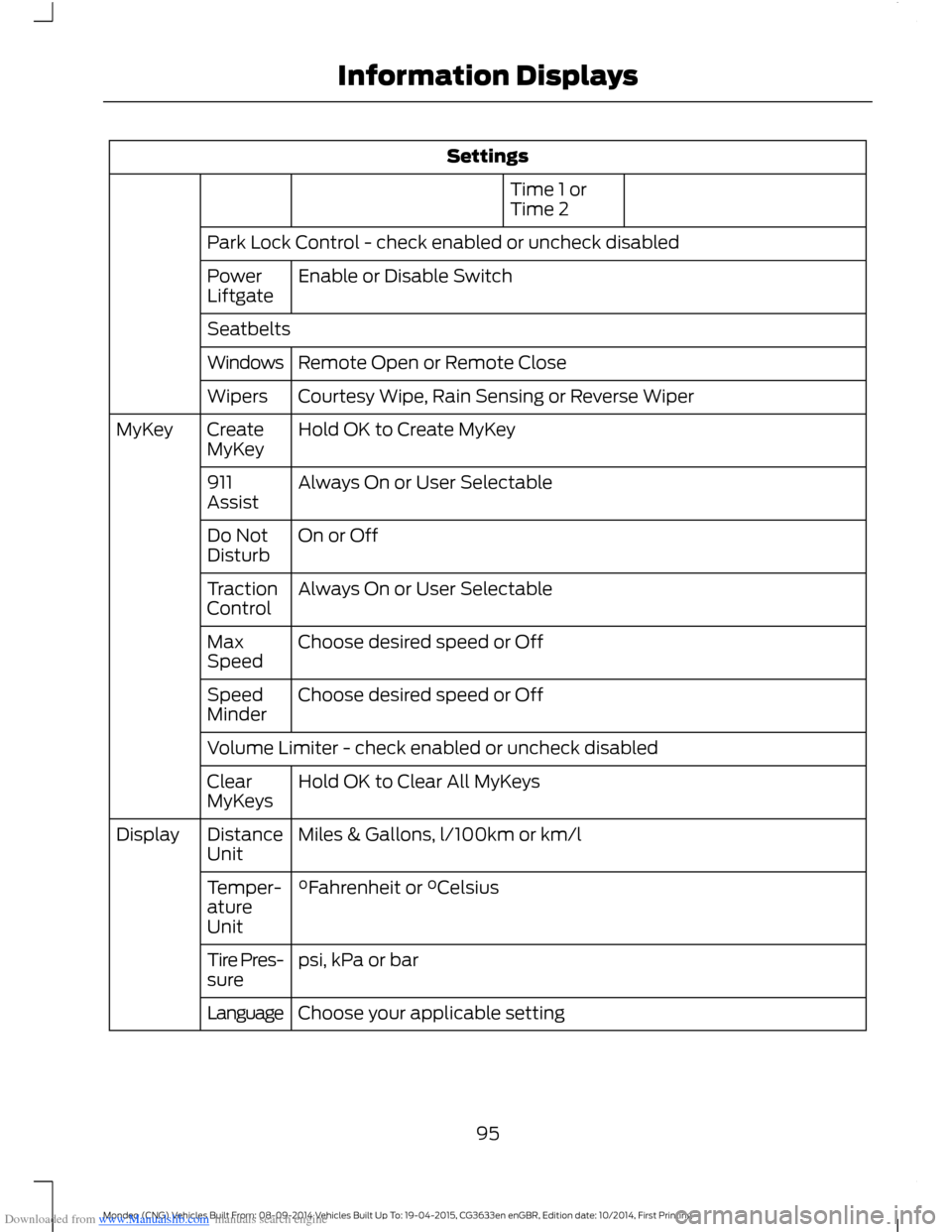
Downloaded from www.Manualslib.com manuals search engine Settings
Time 1 orTime 2
Park Lock Control - check enabled or uncheck disabled
Enable or Disable SwitchPowerLiftgate
Seatbelts
Remote Open or Remote CloseWindows
Courtesy Wipe, Rain Sensing or Reverse WiperWipers
Hold OK to Create MyKeyCreateMyKeyMyKey
Always On or User Selectable911Assist
On or OffDo NotDisturb
Always On or User SelectableTractionControl
Choose desired speed or OffMaxSpeed
Choose desired speed or OffSpeedMinder
Volume Limiter - check enabled or uncheck disabled
Hold OK to Clear All MyKeysClearMyKeys
Miles & Gallons, l/100km or km/lDistanceUnitDisplay
°Fahrenheit or °CelsiusTemper-atureUnit
psi, kPa or barTire Pres-sure
Choose your applicable settingLanguage
95Mondeo (CNG) Vehicles Built From: 08-09-2014 Vehicles Built Up To: 19-04-2015, CG3633en enGBR, Edition date: 10/2014, First PrintingInformation Displays
Page 105 of 446
Downloaded from www.Manualslib.com manuals search engine Hill Start Assist
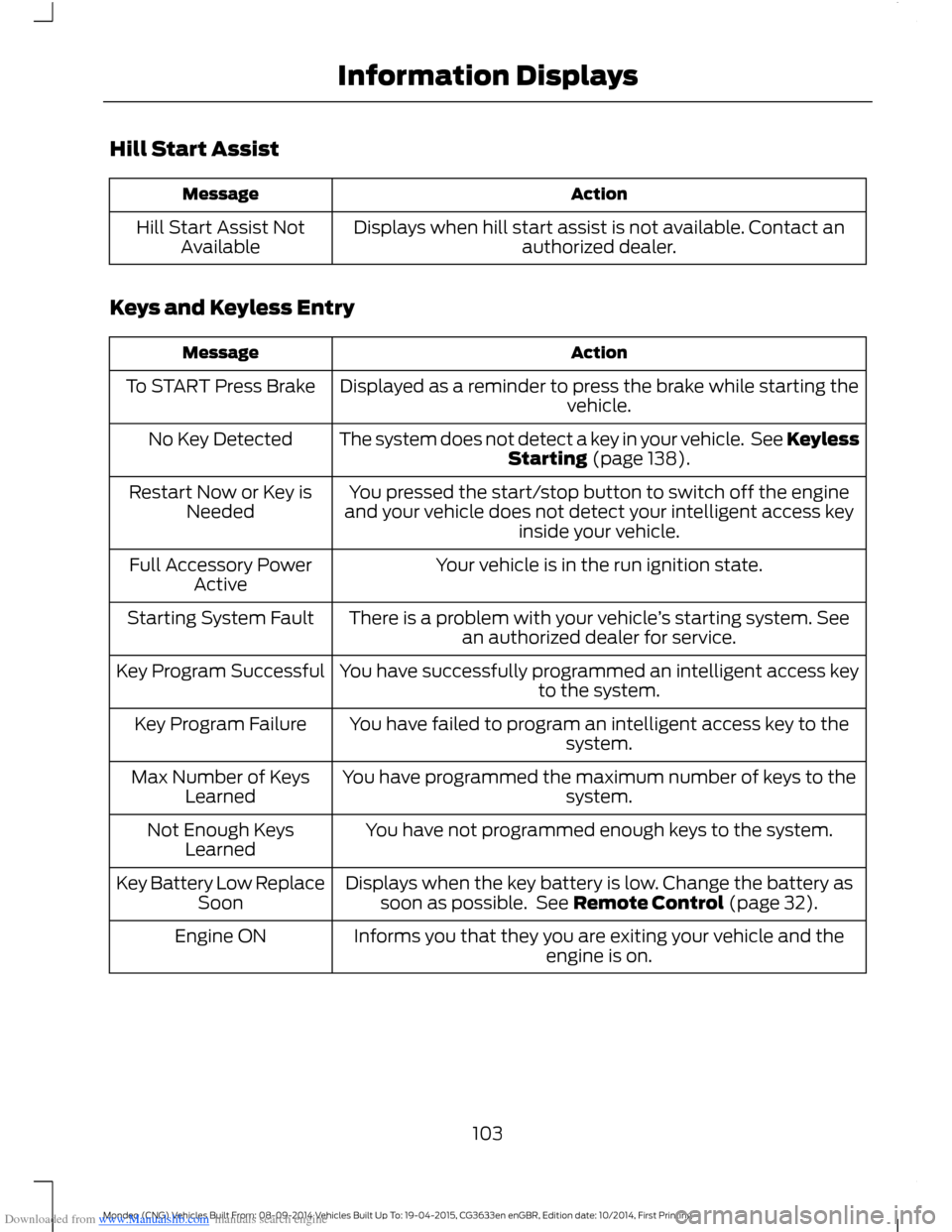
ActionMessage
Displays when hill start assist is not available. Contact anauthorized dealer.Hill Start Assist NotAvailable
Keys and Keyless Entry
ActionMessage
Displayed as a reminder to press the brake while starting thevehicle.To START Press Brake
The system does not detect a key in your vehicle. See KeylessStarting (page 138).No Key Detected
You pressed the start/stop button to switch off the engineand your vehicle does not detect your intelligent access keyinside your vehicle.
Restart Now or Key isNeeded
Your vehicle is in the run ignition state.Full Accessory PowerActive
There is a problem with your vehicle’s starting system. Seean authorized dealer for service.Starting System Fault
You have successfully programmed an intelligent access keyto the system.Key Program Successful
You have failed to program an intelligent access key to thesystem.Key Program Failure
You have programmed the maximum number of keys to thesystem.Max Number of KeysLearned
You have not programmed enough keys to the system.Not Enough KeysLearned
Displays when the key battery is low. Change the battery assoon as possible. See Remote Control (page 32).Key Battery Low ReplaceSoon
Informs you that they you are exiting your vehicle and theengine is on.Engine ON
103Mondeo (CNG) Vehicles Built From: 08-09-2014 Vehicles Built Up To: 19-04-2015, CG3633en enGBR, Edition date: 10/2014, First PrintingInformation Displays
Page 134 of 446
Downloaded from www.Manualslib.com manuals search engine Saving a PreSet Position
1.Switch the ignition on.
2.Adjust the seat, exterior mirrors andsteering column to your desiredposition.
3.Press and hold the desired presetbutton until you hear a single tone.
You can save up to three preset memorypositions. You can save a memory presetat any time.
Recalling a PreSet Position
Press and release the preset buttonassociated with your desired drivingposition. The seat, mirrors and steeringcolumn move to the position stored forthat preset.
Note:You can only recall a preset memoryposition when the ignition is off, or when thetransmission is in park (P) or neutral (N)(and your vehicle is not moving) if theignition is on.
You can recall a preset memory positionby pressing the unlock button on yourremote control or intelligent access key ifit is linked to a preset position.
Linking a PreSet Position to YourRemote Control or IntelligentAccess Key
Your vehicle can save the preset memorypositions for up to three remote controlsor intelligent access keys.
1.With the ignition on, move the memorypositions to the desired positions.
2.Press and hold the desired presetbutton for about five seconds. A tonesounds after about two seconds.Continue holding until a second toneis heard.
3.Within three seconds, press the lockbutton on the remote control you arelinking.
To unlink a remote control, follow thesame procedure – except in step 3, pressthe unlock button on the remote control.
Note:Pressing any active memory featureadjustment control - power seat, mirror, oroptional steering column switch or anymemory button – during a memory recallcancels the operation.
A seat recall movement will also stop ifyou drive your vehicle.
Note:If more than one linked remotecontrol or intelligent access key is in range,the memory function moves to the settingsof the first key stored.
Easy Entry and Exit Function
If you enable the easy entry and exitfeature, it automatically moves the driverseat position rearward up to fivecentimeters when the transmission is inpark (P) and you remove the key or turnoff the keyless start ignition.
The driver seat returns to the previousposition when you put the key in theignition or you activate the keyless startignition.
You can switch off the easy entry and exitfeature by using the driver informationdisplay.
132Mondeo (CNG) Vehicles Built From: 08-09-2014 Vehicles Built Up To: 19-04-2015, CG3633en enGBR, Edition date: 10/2014, First PrintingSeats
Page 140 of 446
Downloaded from www.Manualslib.com manuals search engine GENERAL INFORMATION
WARNINGS
Extended idling at high enginespeeds can produce very hightemperatures in the engine andexhaust system, creating the risk of fire orother damage.
Do not park, idle or drive your vehicleon dry grass or other dry groundcover. The emission system heats upthe engine compartment and exhaustsystem, creating the risk of fire.
Do not start the engine in a closedgarage or in other enclosed areas.Exhaust fumes can be toxic. Alwaysopen the garage door before you start theengine.
If you smell exhaust fumes insideyour vehicle, have your vehiclechecked by an authorized dealerimmediately. Do not drive your vehicle ifyou smell exhaust fumes.
If you disconnect the battery, your vehiclemay exhibit some unusual drivingcharacteristics for approximately 5 miles(8 kilometers) after you reconnect it. Thisis because the engine management systemmust realign itself with the engine. You candisregard any unusual drivingcharacteristics during this period.
The powertrain control system meets allCanadian interference-causing equipmentstandard requirements regulating theimpulse electrical field or radio noise.
When you start the engine, avoid pressingthe accelerator pedal before and duringoperation. Only use the accelerator pedalwhen you have difficulty starting theengine.
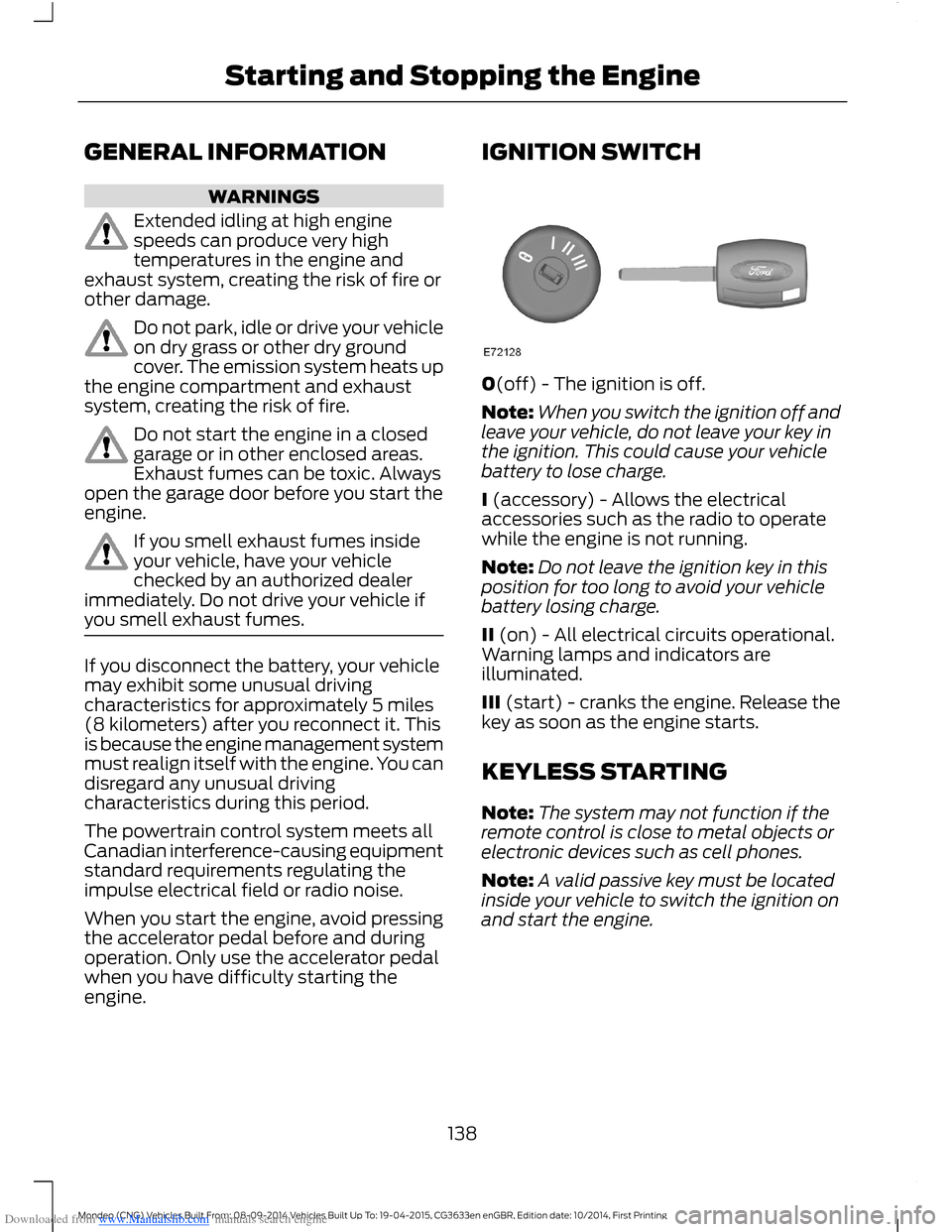
IGNITION SWITCH
0(off) - The ignition is off.
Note:When you switch the ignition off andleave your vehicle, do not leave your key inthe ignition. This could cause your vehiclebattery to lose charge.
I (accessory) - Allows the electricalaccessories such as the radio to operatewhile the engine is not running.
Note:Do not leave the ignition key in thisposition for too long to avoid your vehiclebattery losing charge.
II (on) - All electrical circuits operational.Warning lamps and indicators areilluminated.
III (start) - cranks the engine. Release thekey as soon as the engine starts.
KEYLESS STARTING
Note:The system may not function if theremote control is close to metal objects orelectronic devices such as cell phones.
Note:A valid passive key must be locatedinside your vehicle to switch the ignition onand start the engine.
138Mondeo (CNG) Vehicles Built From: 08-09-2014 Vehicles Built Up To: 19-04-2015, CG3633en enGBR, Edition date: 10/2014, First PrintingStarting and Stopping the Engine
Page 228 of 446
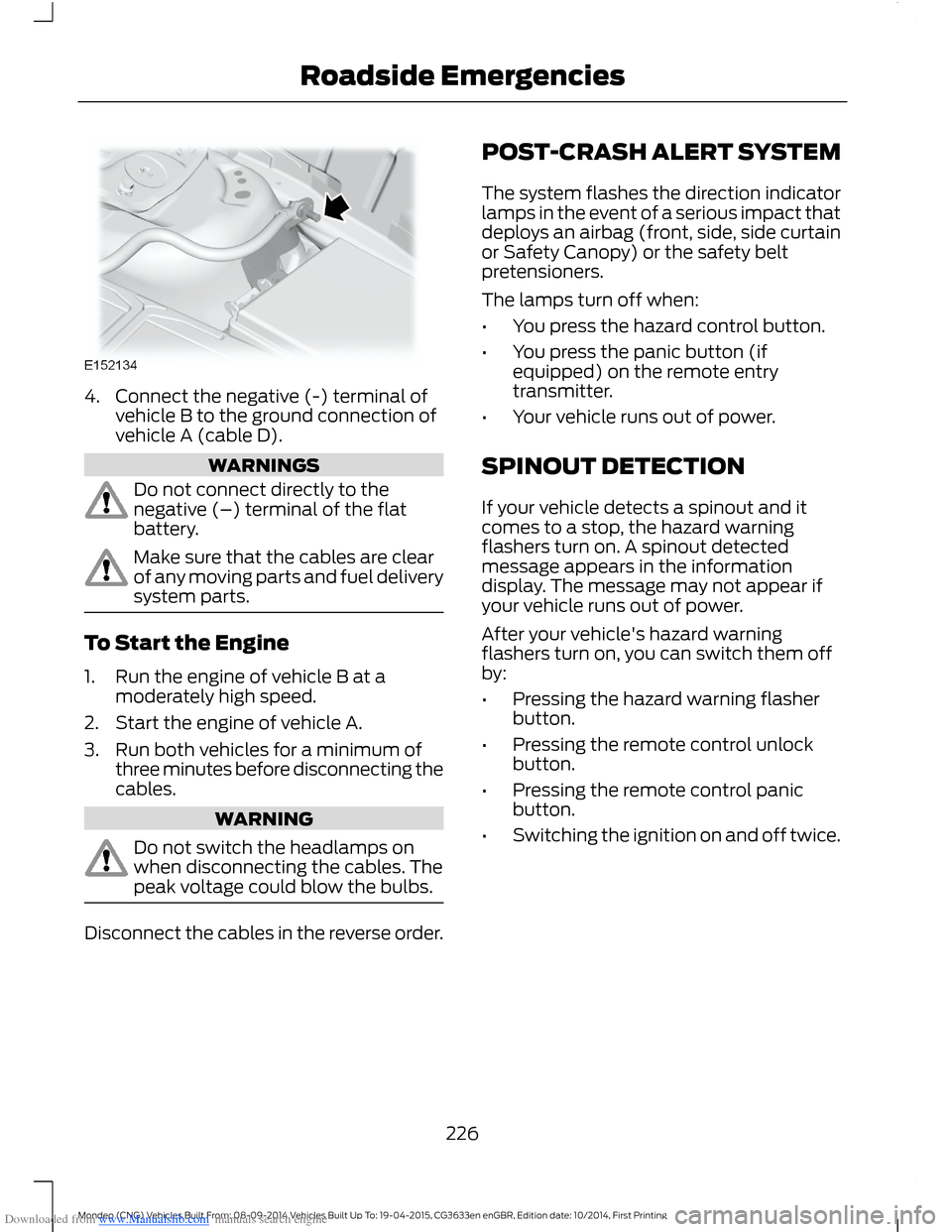
Downloaded from www.Manualslib.com manuals search engine 4.Connect the negative (-) terminal ofvehicle B to the ground connection ofvehicle A (cable D).
WARNINGS
Do not connect directly to thenegative (–) terminal of the flatbattery.
Make sure that the cables are clearof any moving parts and fuel deliverysystem parts.
To Start the Engine
1.Run the engine of vehicle B at amoderately high speed.
2.Start the engine of vehicle A.
3.Run both vehicles for a minimum ofthree minutes before disconnecting thecables.
WARNING
Do not switch the headlamps onwhen disconnecting the cables. Thepeak voltage could blow the bulbs.
Disconnect the cables in the reverse order.
POST-CRASH ALERT SYSTEM
The system flashes the direction indicatorlamps in the event of a serious impact thatdeploys an airbag (front, side, side curtainor Safety Canopy) or the safety beltpretensioners.
The lamps turn off when:
•You press the hazard control button.
•You press the panic button (ifequipped) on the remote entrytransmitter.
•Your vehicle runs out of power.
SPINOUT DETECTION
If your vehicle detects a spinout and itcomes to a stop, the hazard warningflashers turn on. A spinout detectedmessage appears in the informationdisplay. The message may not appear ifyour vehicle runs out of power.
After your vehicle's hazard warningflashers turn on, you can switch them offby:
•Pressing the hazard warning flasherbutton.
•Pressing the remote control unlockbutton.
•Pressing the remote control panicbutton.
•Switching the ignition on and off twice.
226Mondeo (CNG) Vehicles Built From: 08-09-2014 Vehicles Built Up To: 19-04-2015, CG3633en enGBR, Edition date: 10/2014, First PrintingRoadside Emergencies
Page 232 of 446
Downloaded from www.Manualslib.com manuals search engine Protected componentsFuse amp ratingFuse or relay number
Power seats.10A153
Fuel operated heater remote control.5A254
Not used (spare).5A255
1Micro fuse.2Dual micro fuse.3M-type fuse.
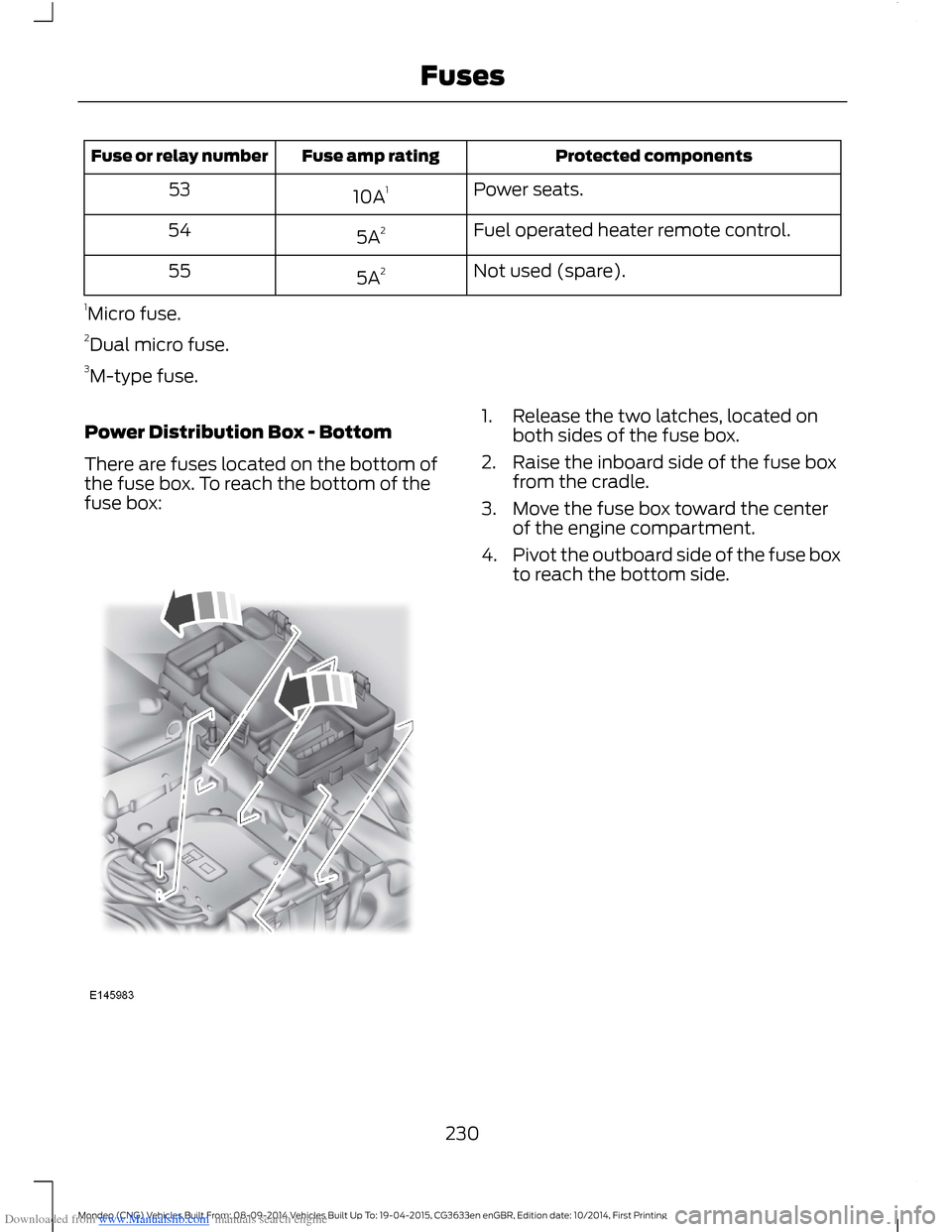
Power Distribution Box - Bottom
There are fuses located on the bottom ofthe fuse box. To reach the bottom of thefuse box:
1.Release the two latches, located onboth sides of the fuse box.
2.Raise the inboard side of the fuse boxfrom the cradle.
3.Move the fuse box toward the centerof the engine compartment.
4.Pivot the outboard side of the fuse boxto reach the bottom side.
230Mondeo (CNG) Vehicles Built From: 08-09-2014 Vehicles Built Up To: 19-04-2015, CG3633en enGBR, Edition date: 10/2014, First PrintingFuses
Page 435 of 446
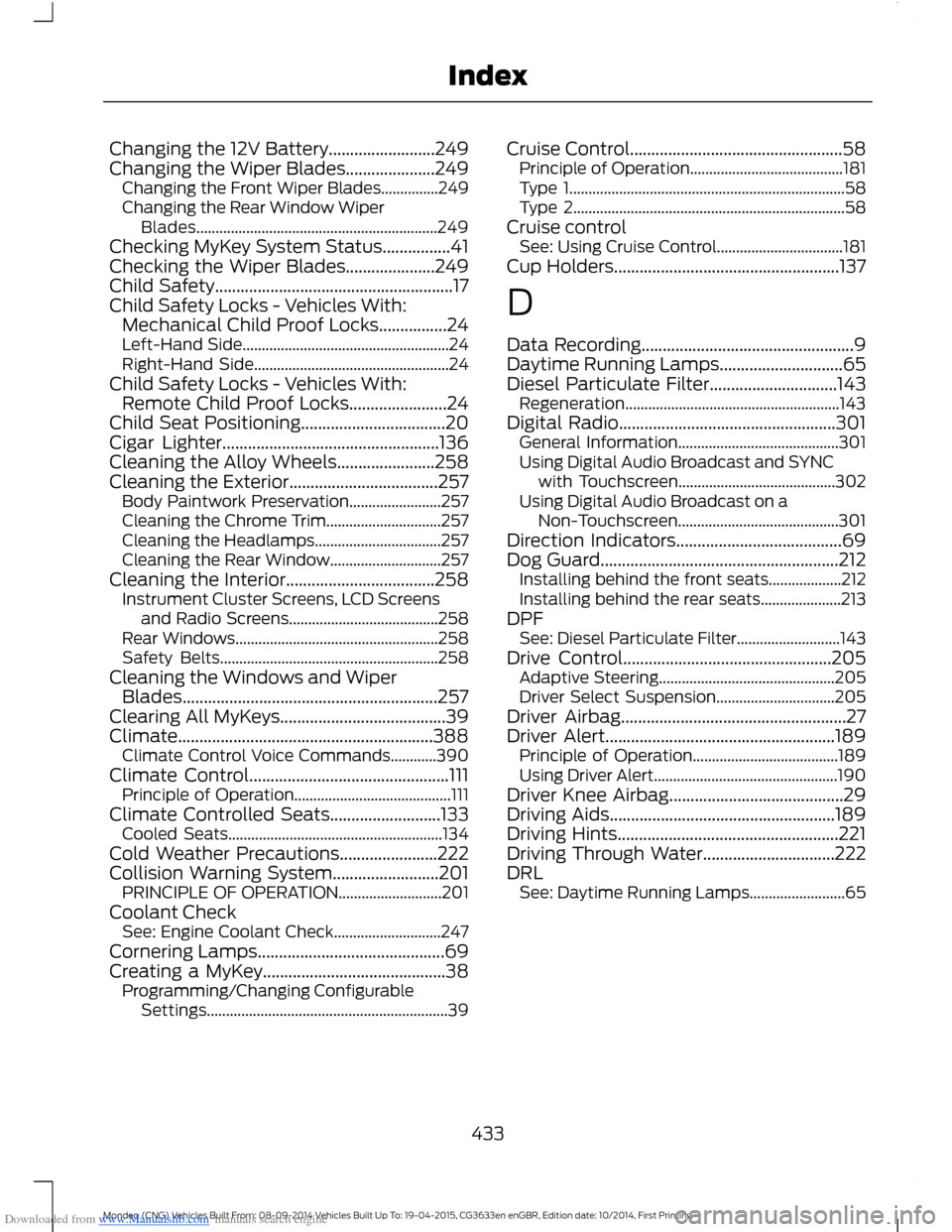
Downloaded from www.Manualslib.com manuals search engine Changing the 12V Battery.........................249Changing the Wiper Blades.....................249Changing the Front Wiper Blades...............249Changing the Rear Window WiperBlades...............................................................249Checking MyKey System Status................41Checking the Wiper Blades.....................249Child Safety........................................................17Child Safety Locks - Vehicles With:Mechanical Child Proof Locks................24Left-Hand Side......................................................24Right-Hand Side...................................................24Child Safety Locks - Vehicles With:Remote Child Proof Locks.......................24Child Seat Positioning..................................20Cigar Lighter...................................................136Cleaning the Alloy Wheels.......................258Cleaning the Exterior...................................257Body Paintwork Preservation........................257Cleaning the Chrome Trim..............................257Cleaning the Headlamps.................................257Cleaning the Rear Window.............................257Cleaning the Interior...................................258Instrument Cluster Screens, LCD Screensand Radio Screens.......................................258Rear Windows.....................................................258Safety Belts.........................................................258Cleaning the Windows and WiperBlades............................................................257Clearing All MyKeys.......................................39Climate............................................................388Climate Control Voice Commands............390Climate Control...............................................111Principle of Operation.........................................111Climate Controlled Seats..........................133Cooled Seats........................................................134Cold Weather Precautions.......................222Collision Warning System.........................201PRINCIPLE OF OPERATION...........................201Coolant CheckSee: Engine Coolant Check............................247Cornering Lamps............................................69Creating a MyKey...........................................38Programming/Changing ConfigurableSettings...............................................................39
Cruise Control..................................................58Principle of Operation........................................181Type 1........................................................................58Type 2.......................................................................58Cruise controlSee: Using Cruise Control.................................181Cup Holders.....................................................137
D
Data Recording..................................................9Daytime Running Lamps.............................65Diesel Particulate Filter..............................143Regeneration........................................................143Digital Radio...................................................301General Information..........................................301Using Digital Audio Broadcast and SYNCwith Touchscreen.........................................302Using Digital Audio Broadcast on aNon-Touchscreen..........................................301Direction Indicators.......................................69Dog Guard........................................................212Installing behind the front seats...................212Installing behind the rear seats.....................213DPFSee: Diesel Particulate Filter...........................143Drive Control.................................................205Adaptive Steering..............................................205Driver Select Suspension...............................205Driver Airbag.....................................................27Driver Alert......................................................189Principle of Operation......................................189Using Driver Alert................................................190Driver Knee Airbag.........................................29Driving Aids.....................................................189Driving Hints....................................................221Driving Through Water...............................222DRLSee: Daytime Running Lamps.........................65
433Mondeo (CNG) Vehicles Built From: 08-09-2014 Vehicles Built Up To: 19-04-2015, CG3633en enGBR, Edition date: 10/2014, First PrintingIndex
Page 438 of 446
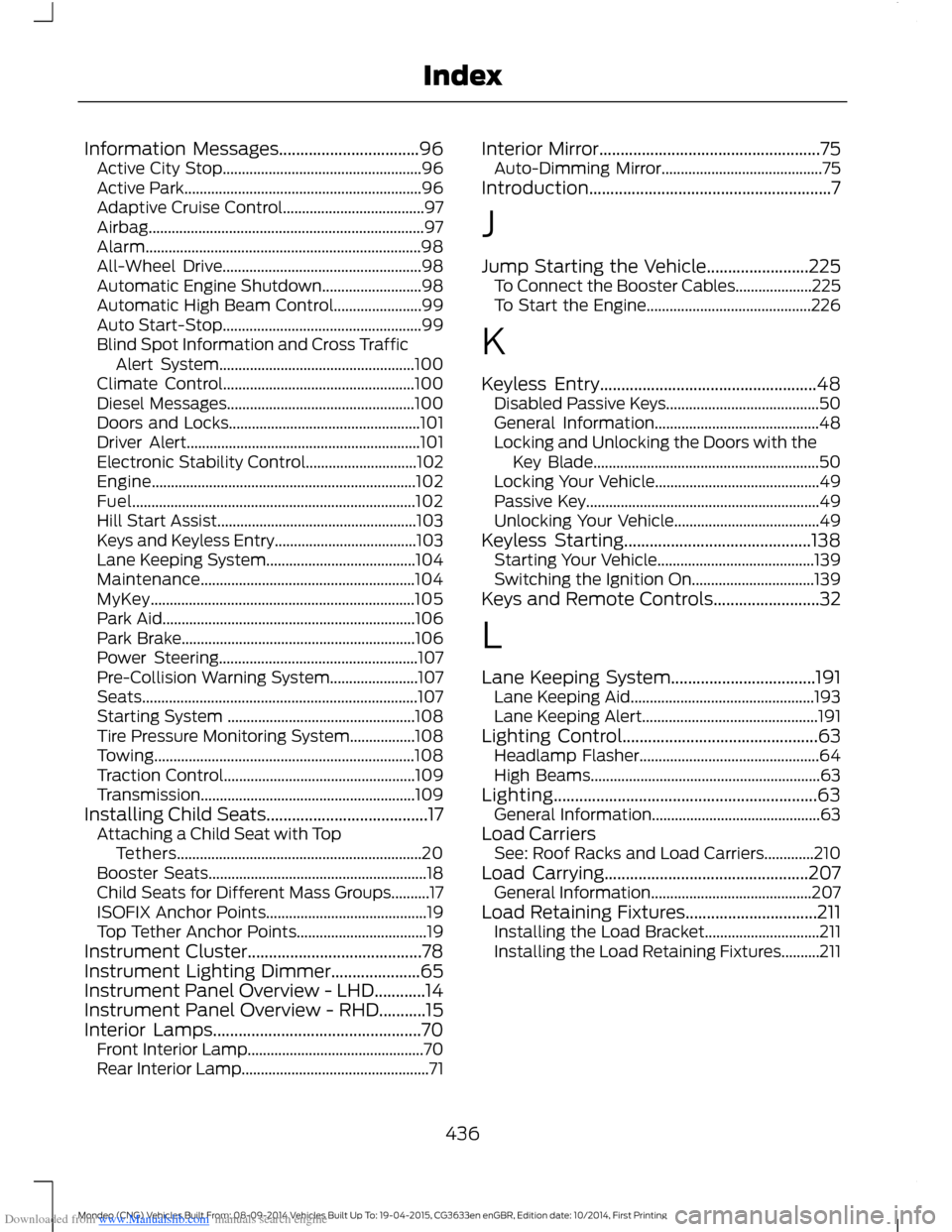
Downloaded from www.Manualslib.com manuals search engine Information Messages.................................96Active City Stop....................................................96Active Park..............................................................96Adaptive Cruise Control.....................................97Airbag........................................................................97Alarm........................................................................98All-Wheel Drive....................................................98Automatic Engine Shutdown..........................98Automatic High Beam Control.......................99Auto Start-Stop....................................................99Blind Spot Information and Cross TrafficAlert System...................................................100Climate Control..................................................100Diesel Messages.................................................100Doors and Locks..................................................101Driver Alert.............................................................101Electronic Stability Control.............................102Engine.....................................................................102Fuel..........................................................................102Hill Start Assist....................................................103Keys and Keyless Entry.....................................103Lane Keeping System.......................................104Maintenance........................................................104MyKey.....................................................................105Park Aid..................................................................106Park Brake.............................................................106Power Steering....................................................107Pre-Collision Warning System.......................107Seats........................................................................107Starting System .................................................108Tire Pressure Monitoring System.................108Towing....................................................................108Traction Control..................................................109Transmission........................................................109Installing Child Seats......................................17Attaching a Child Seat with TopTethers................................................................20Booster Seats.........................................................18Child Seats for Different Mass Groups..........17ISOFIX Anchor Points..........................................19Top Tether Anchor Points..................................19Instrument Cluster.........................................78Instrument Lighting Dimmer.....................65Instrument Panel Overview - LHD............14Instrument Panel Overview - RHD...........15Interior Lamps.................................................70Front Interior Lamp..............................................70Rear Interior Lamp.................................................71
Interior Mirror....................................................75Auto-Dimming Mirror..........................................75Introduction.........................................................7
J
Jump Starting the Vehicle........................225To Connect the Booster Cables....................225To Start the Engine...........................................226
K
Keyless Entry...................................................48Disabled Passive Keys........................................50General Information...........................................48Locking and Unlocking the Doors with theKey Blade...........................................................50Locking Your Vehicle...........................................49Passive Key.............................................................49Unlocking Your Vehicle......................................49Keyless Starting............................................138Starting Your Vehicle.........................................139Switching the Ignition On................................139Keys and Remote Controls.........................32
L
Lane Keeping System..................................191Lane Keeping Aid................................................193Lane Keeping Alert..............................................191Lighting Control..............................................63Headlamp Flasher...............................................64High Beams............................................................63Lighting..............................................................63General Information............................................63Load CarriersSee: Roof Racks and Load Carriers.............210Load Carrying................................................207General Information..........................................207Load Retaining Fixtures...............................211Installing the Load Bracket..............................211Installing the Load Retaining Fixtures..........211
436Mondeo (CNG) Vehicles Built From: 08-09-2014 Vehicles Built Up To: 19-04-2015, CG3633en enGBR, Edition date: 10/2014, First PrintingIndex