lock FORD MONDEO 2014 4.G Owner's Guide
[x] Cancel search | Manufacturer: FORD, Model Year: 2014, Model line: MONDEO, Model: FORD MONDEO 2014 4.GPages: 446, PDF Size: 29.09 MB
Page 74 of 446
Downloaded from www.Manualslib.com manuals search engine POWER WINDOWS
WARNINGS
Do not leave children unattended inyour vehicle and do not let them playwith the power windows. They mayseriously injure themselves.
When closing the power windows,you should verify they are free ofobstructions and make sure thatchildren and pets are not in the proximityof the window openings.
Note:You may hear a pulsing noise whenjust one of the windows is open. Lower theopposite window slightly to reduce thisnoise.
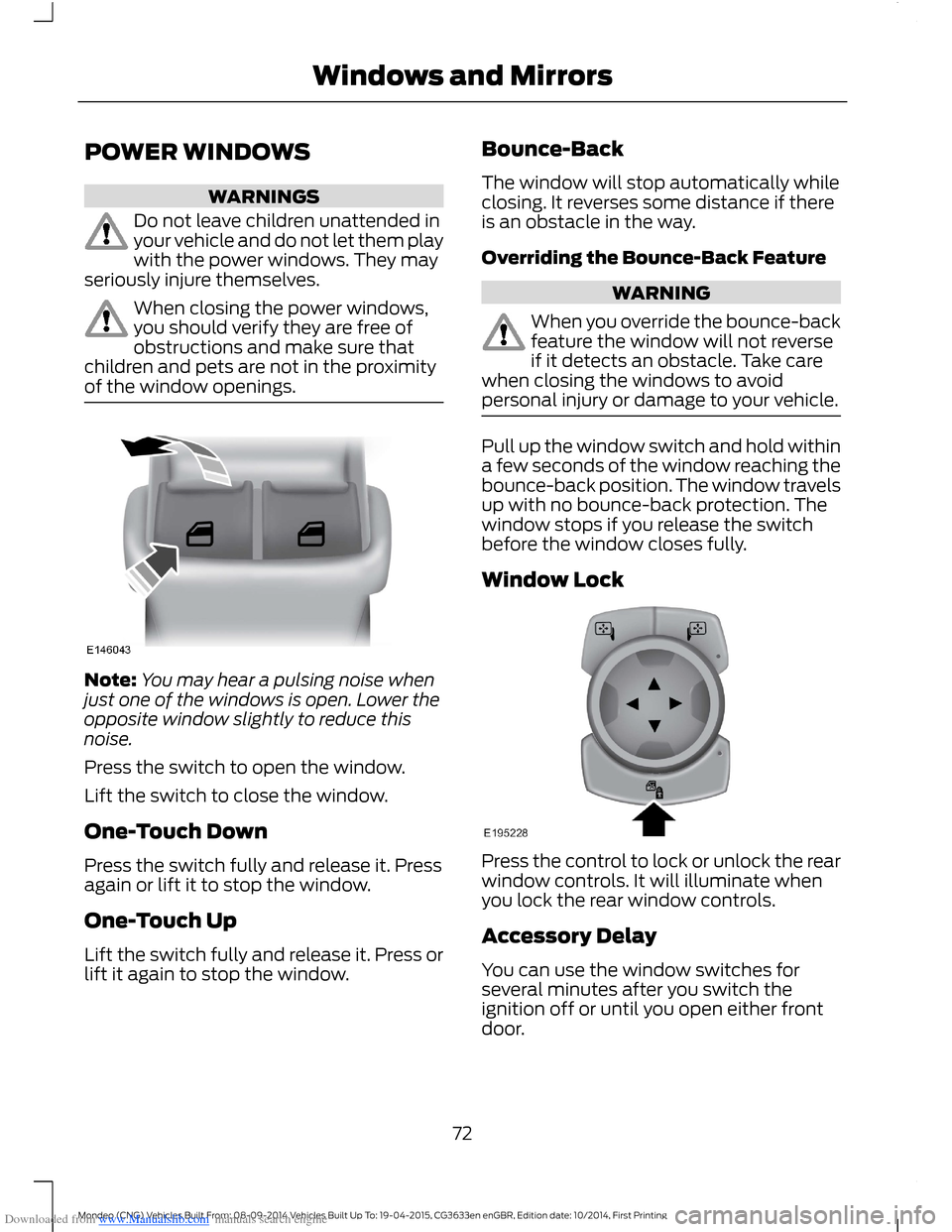
Press the switch to open the window.
Lift the switch to close the window.
One-Touch Down
Press the switch fully and release it. Pressagain or lift it to stop the window.
One-Touch Up
Lift the switch fully and release it. Press orlift it again to stop the window.
Bounce-Back
The window will stop automatically whileclosing. It reverses some distance if thereis an obstacle in the way.
Overriding the Bounce-Back Feature
WARNING
When you override the bounce-backfeature the window will not reverseif it detects an obstacle. Take carewhen closing the windows to avoidpersonal injury or damage to your vehicle.
Pull up the window switch and hold withina few seconds of the window reaching thebounce-back position. The window travelsup with no bounce-back protection. Thewindow stops if you release the switchbefore the window closes fully.
Window Lock
Press the control to lock or unlock the rearwindow controls. It will illuminate whenyou lock the rear window controls.
Accessory Delay
You can use the window switches forseveral minutes after you switch theignition off or until you open either frontdoor.
72Mondeo (CNG) Vehicles Built From: 08-09-2014 Vehicles Built Up To: 19-04-2015, CG3633en enGBR, Edition date: 10/2014, First PrintingWindows and Mirrors
Page 75 of 446
Downloaded from www.Manualslib.com manuals search engine GLOBAL OPENING AND
CLOSING
You can use the remote control to operatethe windows with the ignition off.
Note:You can enable or disable this featurein the information display or see anauthorized dealer. See (page 86).
Note:To operate this feature, accessorydelay must not be active.
Opening the Windows
You can only open the windows for a shorttime after you unlock your vehicle with theremote control. After you unlock yourvehicle, press and hold the remote controlunlock button to open the windows andvent the moonroof. Release the buttononce movement starts. Press the lock orunlock button to stop movement.
Closing the Windows
WARNING
When closing the windows andmoonroof, you should verify they arefree of obstructions and make surethat children and pets are not in theproximity of the window openings.
To close the windows and moonroof, pressand hold the remote control lock button.Release the button once movement starts.Press the lock or unlock button to stopmovement.
EXTERIOR MIRRORS
Power Exterior Mirrors
WARNING
Do not adjust the mirrors when yourvehicle is moving.
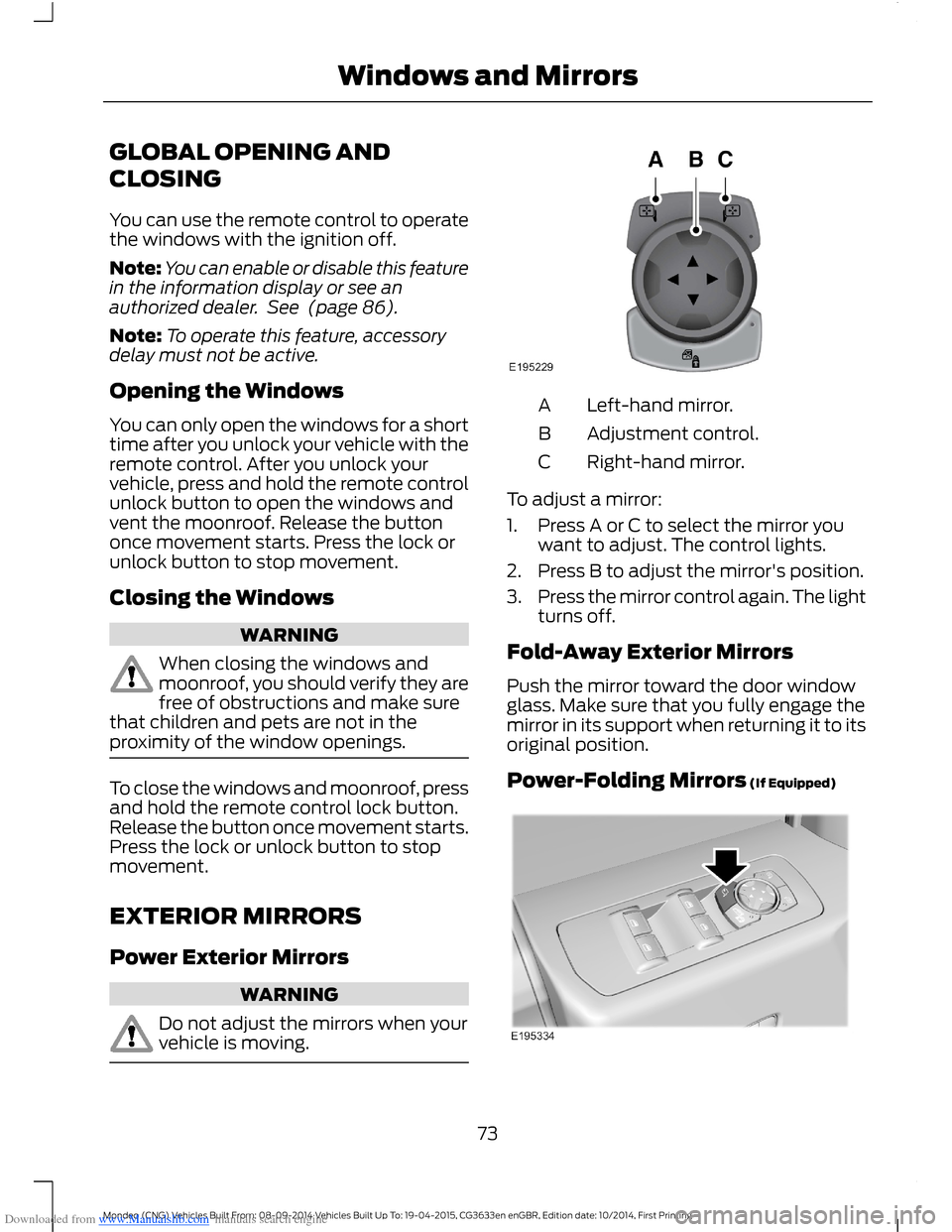
Left-hand mirror.A
Adjustment control.B
Right-hand mirror.C
To adjust a mirror:
1.Press A or C to select the mirror youwant to adjust. The control lights.
2.Press B to adjust the mirror's position.
3.Press the mirror control again. The lightturns off.
Fold-Away Exterior Mirrors
Push the mirror toward the door windowglass. Make sure that you fully engage themirror in its support when returning it to itsoriginal position.
Power-Folding Mirrors (If Equipped)
73Mondeo (CNG) Vehicles Built From: 08-09-2014 Vehicles Built Up To: 19-04-2015, CG3633en enGBR, Edition date: 10/2014, First PrintingWindows and Mirrors
Page 76 of 446
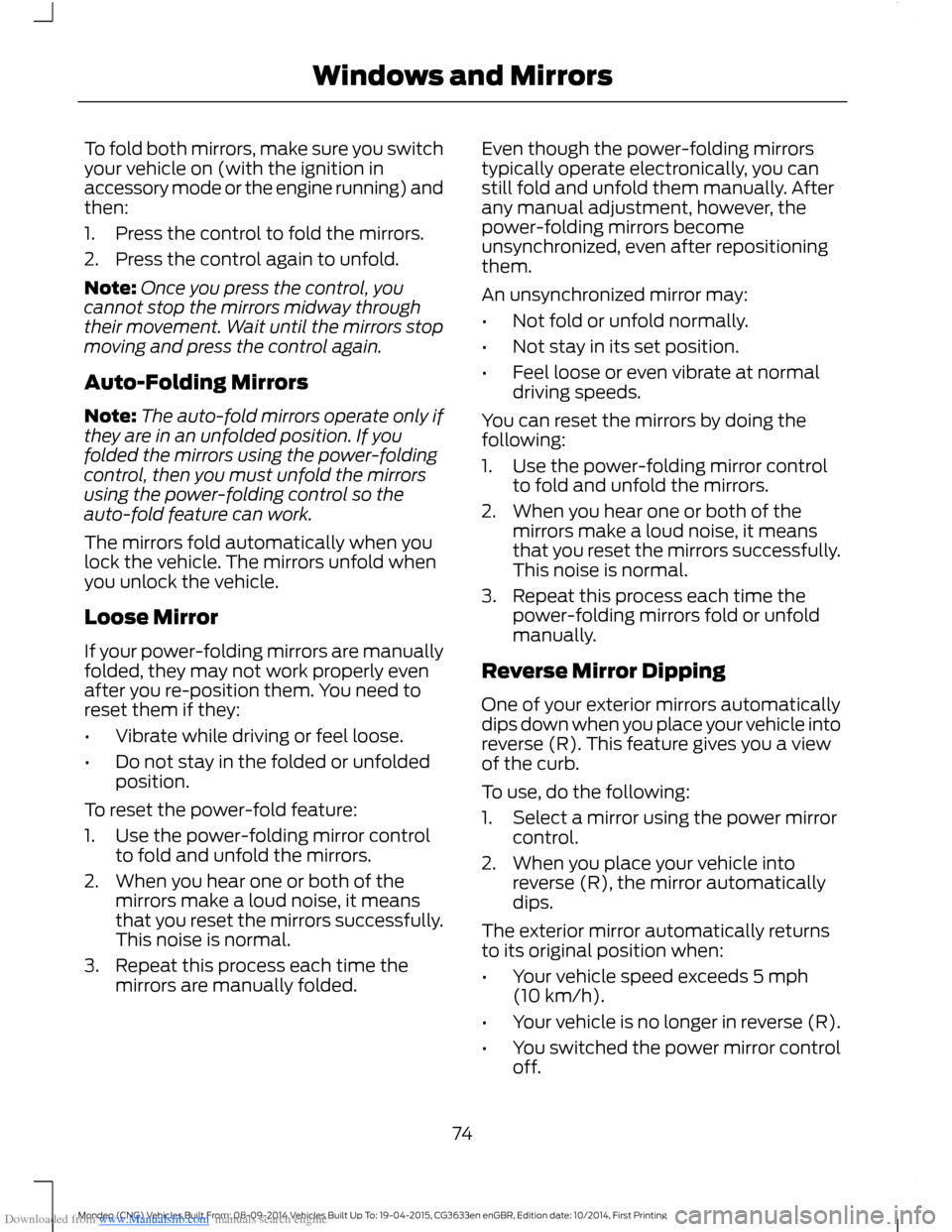
Downloaded from www.Manualslib.com manuals search engine To fold both mirrors, make sure you switchyour vehicle on (with the ignition inaccessory mode or the engine running) andthen:
1.Press the control to fold the mirrors.
2.Press the control again to unfold.
Note:Once you press the control, youcannot stop the mirrors midway throughtheir movement. Wait until the mirrors stopmoving and press the control again.
Auto-Folding Mirrors
Note:The auto-fold mirrors operate only ifthey are in an unfolded position. If youfolded the mirrors using the power-foldingcontrol, then you must unfold the mirrorsusing the power-folding control so theauto-fold feature can work.
The mirrors fold automatically when youlock the vehicle. The mirrors unfold whenyou unlock the vehicle.
Loose Mirror
If your power-folding mirrors are manuallyfolded, they may not work properly evenafter you re-position them. You need toreset them if they:
•Vibrate while driving or feel loose.
•Do not stay in the folded or unfoldedposition.
To reset the power-fold feature:
1.Use the power-folding mirror controlto fold and unfold the mirrors.
2.When you hear one or both of themirrors make a loud noise, it meansthat you reset the mirrors successfully.This noise is normal.
3.Repeat this process each time themirrors are manually folded.
Even though the power-folding mirrorstypically operate electronically, you canstill fold and unfold them manually. Afterany manual adjustment, however, thepower-folding mirrors becomeunsynchronized, even after repositioningthem.
An unsynchronized mirror may:
•Not fold or unfold normally.
•Not stay in its set position.
•Feel loose or even vibrate at normaldriving speeds.
You can reset the mirrors by doing thefollowing:
1.Use the power-folding mirror controlto fold and unfold the mirrors.
2.When you hear one or both of themirrors make a loud noise, it meansthat you reset the mirrors successfully.This noise is normal.
3.Repeat this process each time thepower-folding mirrors fold or unfoldmanually.
Reverse Mirror Dipping
One of your exterior mirrors automaticallydips down when you place your vehicle intoreverse (R). This feature gives you a viewof the curb.
To use, do the following:
1.Select a mirror using the power mirrorcontrol.
2.When you place your vehicle intoreverse (R), the mirror automaticallydips.
The exterior mirror automatically returnsto its original position when:
•Your vehicle speed exceeds 5 mph(10 km/h).
•Your vehicle is no longer in reverse (R).
•You switched the power mirror controloff.
74Mondeo (CNG) Vehicles Built From: 08-09-2014 Vehicles Built Up To: 19-04-2015, CG3633en enGBR, Edition date: 10/2014, First PrintingWindows and Mirrors
Page 77 of 446
Downloaded from www.Manualslib.com manuals search engine The mirror automatically adjusts to a setposition, but you can change the positionby doing the following:
1.Switch the ignition on.
2.Select the mirror you want tore-position.
3.Put your vehicle into reverse (R) andlet the mirror automatically dip to itsset position.
4.When the mirror is in its dipped positionand is no longer moving, re-position itto your preference.
5.Put your vehicle into park (P).
6.Use the memory preset control to savethe position. See Memory Function(page 131).
Heated Exterior Mirrors (If Equipped)
See Heated Windows and Mirrors (page121).
Memory Mirrors (If Equipped)
You can save and recall the mirrorpositions through the memory function.See Memory Function (page 131).
Auto-Dimming Feature (If Equipped)
The driver exterior mirror automaticallydims when the interior auto-dimmingmirror turns on.
Direction Indicator Mirrors (If Equipped)
The outer portion of the appropriate mirrorhousing blinks when you switch on thedirection indicator.
Blind Spot Monitor (If Equipped)
See Blind Spot Information System(page 194).
INTERIOR MIRROR
WARNING
Do not adjust the mirror when yourvehicle is moving.
Note:Do not clean the housing or glass ofany mirror with harsh abrasives, fuel or otherpetroleum or ammonia-based cleaningproducts.
You can adjust the interior mirror to yourpreference. Some mirrors also have asecond pivot point. This lets you move themirror head up or down and from side toside.
Pull the tab below the mirror toward youto reduce glare at night.
Auto-Dimming Mirror (If Equipped)
Note:Do not block the sensors on the frontand back of the mirror. Mirror performancemay be affected. A rear center passenger orraised rear center head restraint may alsoblock light from reaching the sensor.
The mirror will dim automatically to reduceglare when bright lights are detected frombehind your vehicle. It will automaticallyreturn to normal reflection when you selectreverse gear to make sure you have a clearview when backing up.
75Mondeo (CNG) Vehicles Built From: 08-09-2014 Vehicles Built Up To: 19-04-2015, CG3633en enGBR, Edition date: 10/2014, First PrintingWindows and Mirrors
Page 83 of 446
Downloaded from www.Manualslib.com manuals search engine WARNING LAMPS AND
INDICATORS
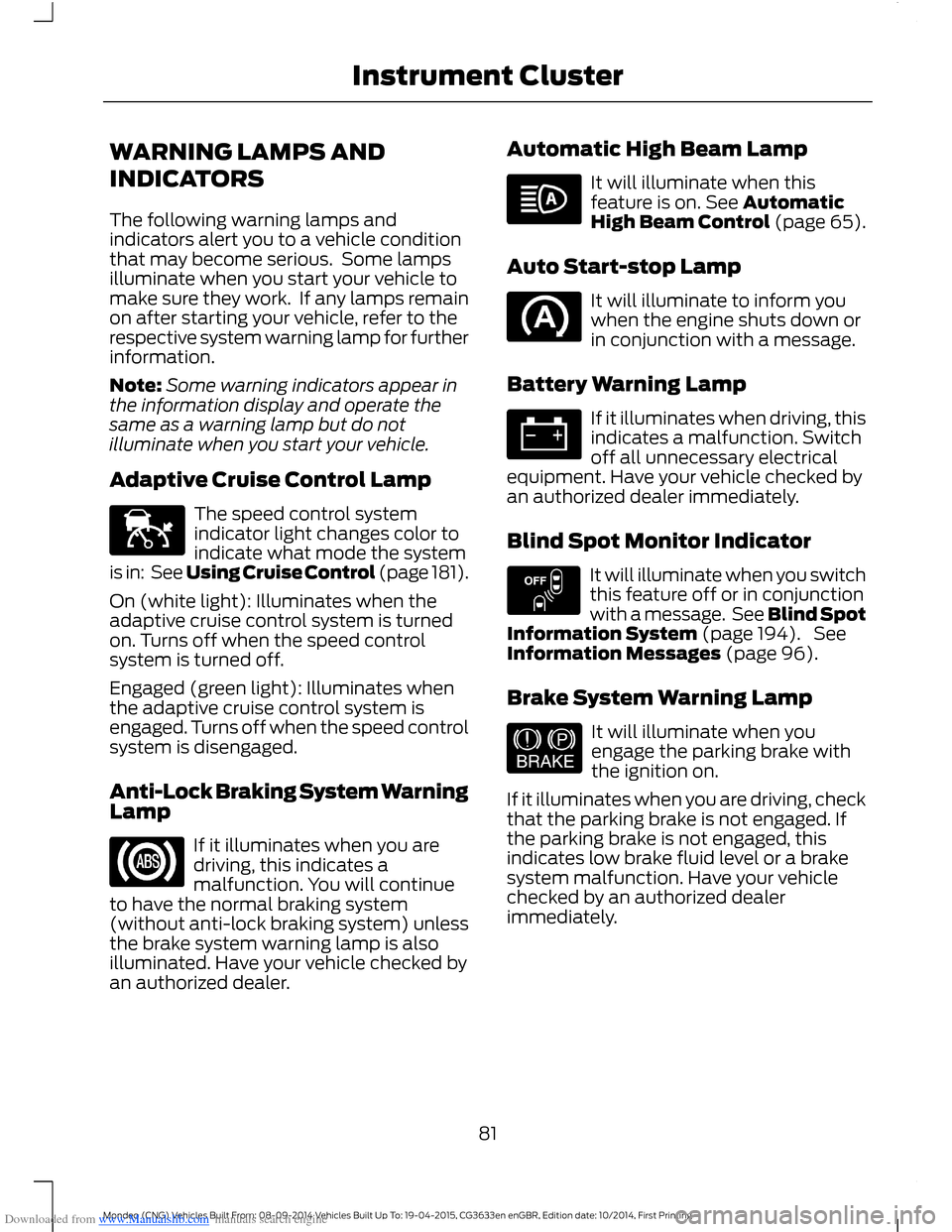
The following warning lamps andindicators alert you to a vehicle conditionthat may become serious. Some lampsilluminate when you start your vehicle tomake sure they work. If any lamps remainon after starting your vehicle, refer to therespective system warning lamp for furtherinformation.
Note:Some warning indicators appear inthe information display and operate thesame as a warning lamp but do notilluminate when you start your vehicle.
Adaptive Cruise Control Lamp
The speed control systemindicator light changes color toindicate what mode the systemis in: See Using Cruise Control (page 181).
On (white light): Illuminates when theadaptive cruise control system is turnedon. Turns off when the speed controlsystem is turned off.
Engaged (green light): Illuminates whenthe adaptive cruise control system isengaged. Turns off when the speed controlsystem is disengaged.
Anti-Lock Braking System WarningLamp
If it illuminates when you aredriving, this indicates amalfunction. You will continueto have the normal braking system(without anti-lock braking system) unlessthe brake system warning lamp is alsoilluminated. Have your vehicle checked byan authorized dealer.
Automatic High Beam Lamp
It will illuminate when thisfeature is on. See AutomaticHigh Beam Control (page 65).
Auto Start-stop Lamp
It will illuminate to inform youwhen the engine shuts down orin conjunction with a message.
Battery Warning Lamp
If it illuminates when driving, thisindicates a malfunction. Switchoff all unnecessary electricalequipment. Have your vehicle checked byan authorized dealer immediately.
Blind Spot Monitor Indicator
It will illuminate when you switchthis feature off or in conjunctionwith a message. See Blind SpotInformation System (page 194). SeeInformation Messages (page 96).
Brake System Warning Lamp
It will illuminate when youengage the parking brake withthe ignition on.
If it illuminates when you are driving, checkthat the parking brake is not engaged. Ifthe parking brake is not engaged, thisindicates low brake fluid level or a brakesystem malfunction. Have your vehiclechecked by an authorized dealerimmediately.
81Mondeo (CNG) Vehicles Built From: 08-09-2014 Vehicles Built Up To: 19-04-2015, CG3633en enGBR, Edition date: 10/2014, First PrintingInstrument Cluster
Page 92 of 446
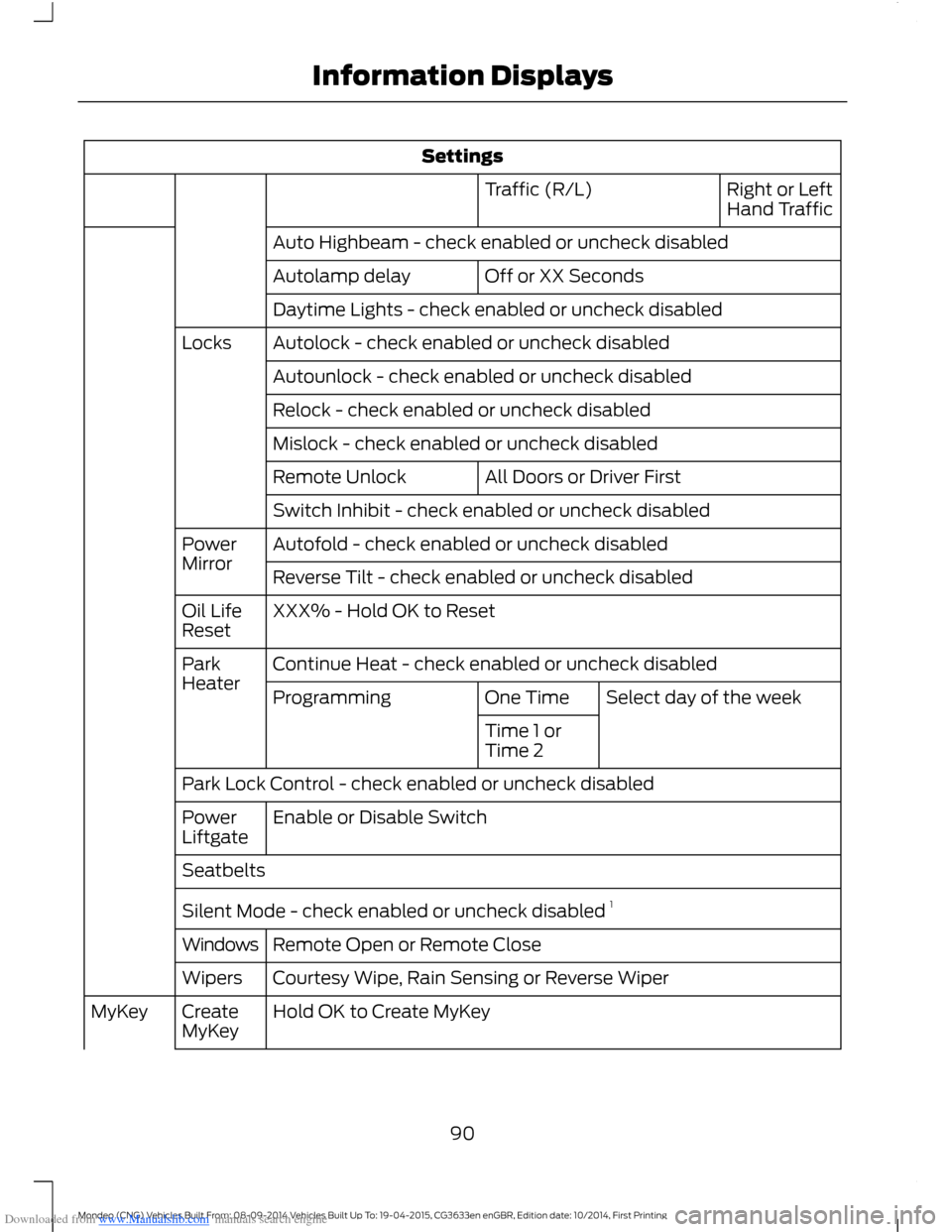
Downloaded from www.Manualslib.com manuals search engine Settings
Right or LeftHand TrafficTraffic (R/L)
Auto Highbeam - check enabled or uncheck disabled
Off or XX SecondsAutolamp delay
Daytime Lights - check enabled or uncheck disabled
Autolock - check enabled or uncheck disabledLocks
Autounlock - check enabled or uncheck disabled
Relock - check enabled or uncheck disabled
Mislock - check enabled or uncheck disabled
All Doors or Driver FirstRemote Unlock
Switch Inhibit - check enabled or uncheck disabled
Autofold - check enabled or uncheck disabledPowerMirrorReverse Tilt - check enabled or uncheck disabled
XXX% - Hold OK to ResetOil LifeReset
Continue Heat - check enabled or uncheck disabledParkHeaterSelect day of the weekOne TimeProgramming
Time 1 orTime 2
Park Lock Control - check enabled or uncheck disabled
Enable or Disable SwitchPowerLiftgate
Seatbelts
Silent Mode - check enabled or uncheck disabled 1
Remote Open or Remote CloseWindows
Courtesy Wipe, Rain Sensing or Reverse WiperWipers
Hold OK to Create MyKeyCreateMyKeyMyKey
90Mondeo (CNG) Vehicles Built From: 08-09-2014 Vehicles Built Up To: 19-04-2015, CG3633en enGBR, Edition date: 10/2014, First PrintingInformation Displays
Page 96 of 446
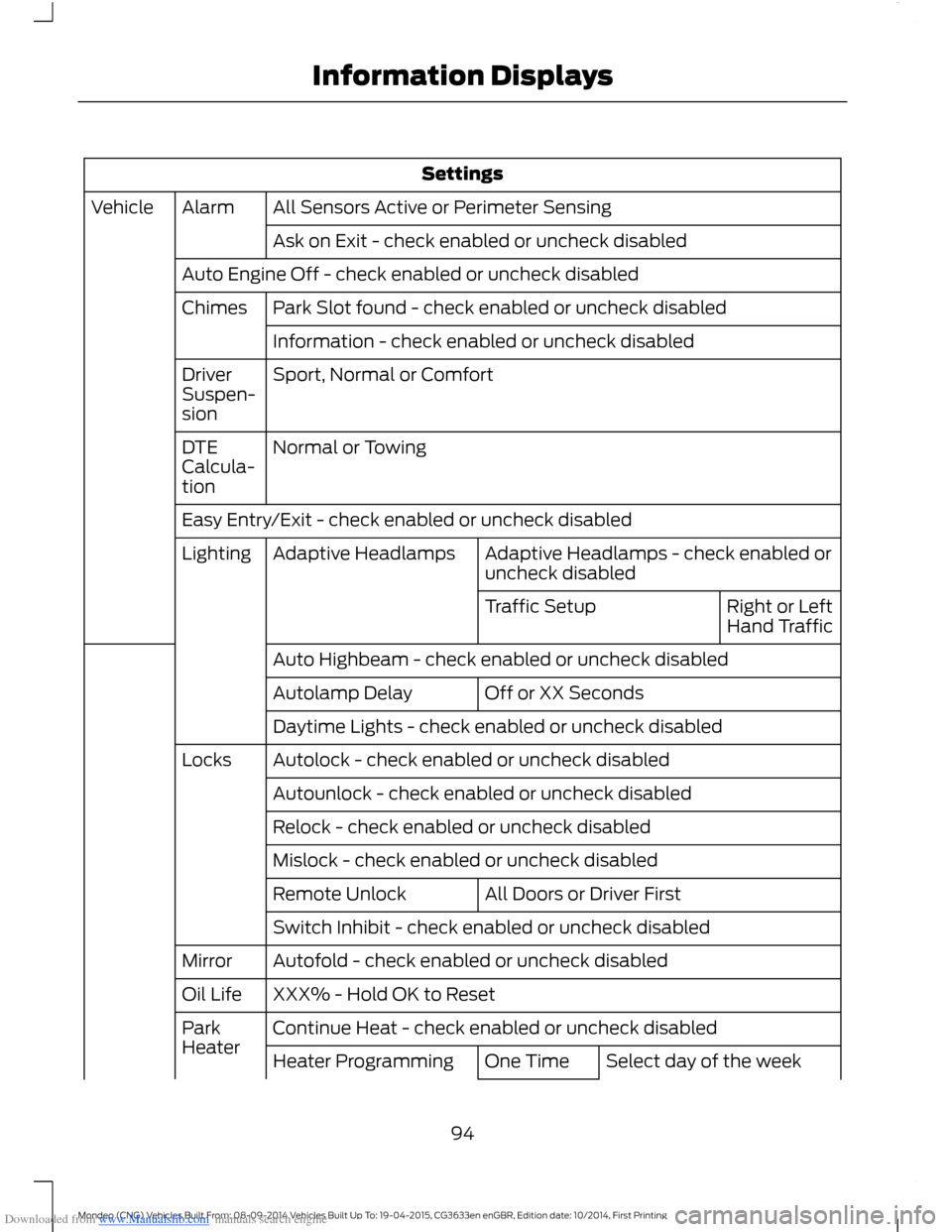
Downloaded from www.Manualslib.com manuals search engine Settings
All Sensors Active or Perimeter SensingAlarmVehicle
Ask on Exit - check enabled or uncheck disabled
Auto Engine Off - check enabled or uncheck disabled
Park Slot found - check enabled or uncheck disabledChimes
Information - check enabled or uncheck disabled
Sport, Normal or ComfortDriverSuspen-sion
Normal or TowingDTECalcula-tion
Easy Entry/Exit - check enabled or uncheck disabled
Adaptive Headlamps - check enabled oruncheck disabledAdaptive HeadlampsLighting
Right or LeftHand TrafficTraffic Setup
Auto Highbeam - check enabled or uncheck disabled
Off or XX SecondsAutolamp Delay
Daytime Lights - check enabled or uncheck disabled
Autolock - check enabled or uncheck disabledLocks
Autounlock - check enabled or uncheck disabled
Relock - check enabled or uncheck disabled
Mislock - check enabled or uncheck disabled
All Doors or Driver FirstRemote Unlock
Switch Inhibit - check enabled or uncheck disabled
Autofold - check enabled or uncheck disabledMirror
XXX% - Hold OK to ResetOil Life
Continue Heat - check enabled or uncheck disabledParkHeaterSelect day of the weekOne TimeHeater Programming
94Mondeo (CNG) Vehicles Built From: 08-09-2014 Vehicles Built Up To: 19-04-2015, CG3633en enGBR, Edition date: 10/2014, First PrintingInformation Displays
Page 97 of 446
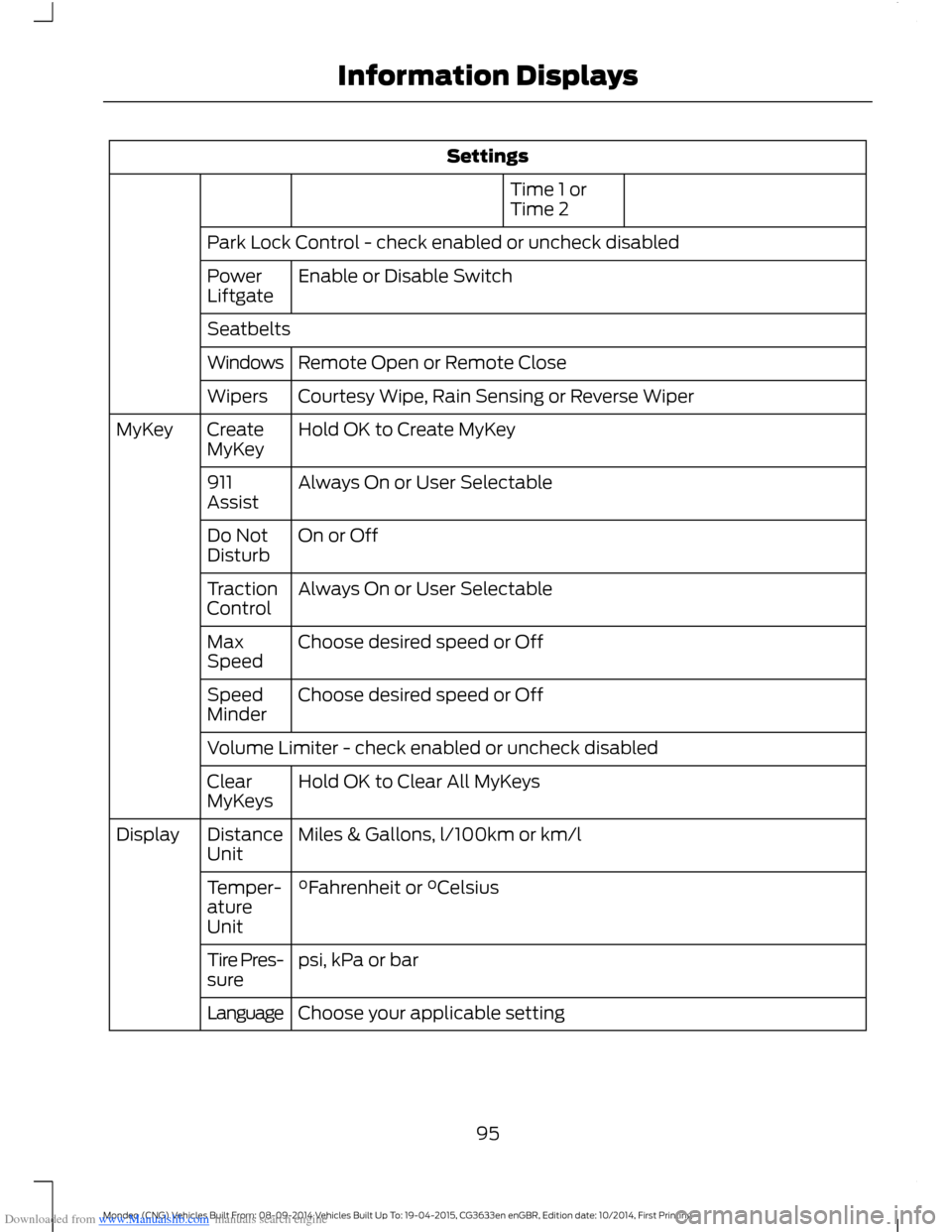
Downloaded from www.Manualslib.com manuals search engine Settings
Time 1 orTime 2
Park Lock Control - check enabled or uncheck disabled
Enable or Disable SwitchPowerLiftgate
Seatbelts
Remote Open or Remote CloseWindows
Courtesy Wipe, Rain Sensing or Reverse WiperWipers
Hold OK to Create MyKeyCreateMyKeyMyKey
Always On or User Selectable911Assist
On or OffDo NotDisturb
Always On or User SelectableTractionControl
Choose desired speed or OffMaxSpeed
Choose desired speed or OffSpeedMinder
Volume Limiter - check enabled or uncheck disabled
Hold OK to Clear All MyKeysClearMyKeys
Miles & Gallons, l/100km or km/lDistanceUnitDisplay
°Fahrenheit or °CelsiusTemper-atureUnit
psi, kPa or barTire Pres-sure
Choose your applicable settingLanguage
95Mondeo (CNG) Vehicles Built From: 08-09-2014 Vehicles Built Up To: 19-04-2015, CG3633en enGBR, Edition date: 10/2014, First PrintingInformation Displays
Page 98 of 446
Downloaded from www.Manualslib.com manuals search engine INFORMATION MESSAGES
Note:Depending on your vehicle optionsand instrument cluster type, not all of themessages will display or be available.
Note:The information display mayabbreviate or shorten certain messages.
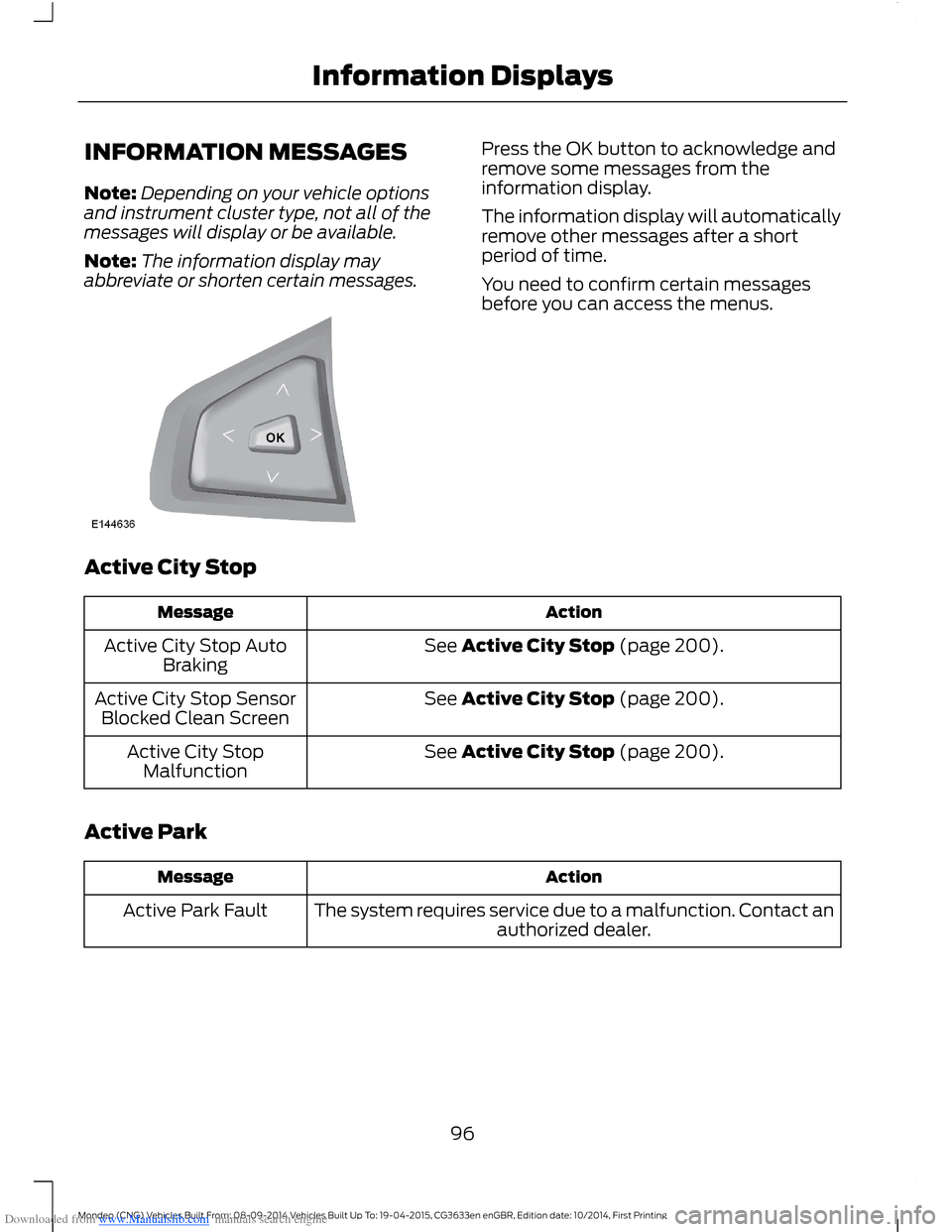
Press the OK button to acknowledge andremove some messages from theinformation display.
The information display will automaticallyremove other messages after a shortperiod of time.
You need to confirm certain messagesbefore you can access the menus.
Active City Stop
ActionMessage
See Active City Stop (page 200).Active City Stop AutoBraking
See Active City Stop (page 200).Active City Stop SensorBlocked Clean Screen
See Active City Stop (page 200).Active City StopMalfunction
Active Park
ActionMessage
The system requires service due to a malfunction. Contact anauthorized dealer.Active Park Fault
96Mondeo (CNG) Vehicles Built From: 08-09-2014 Vehicles Built Up To: 19-04-2015, CG3633en enGBR, Edition date: 10/2014, First PrintingInformation Displays
Page 99 of 446
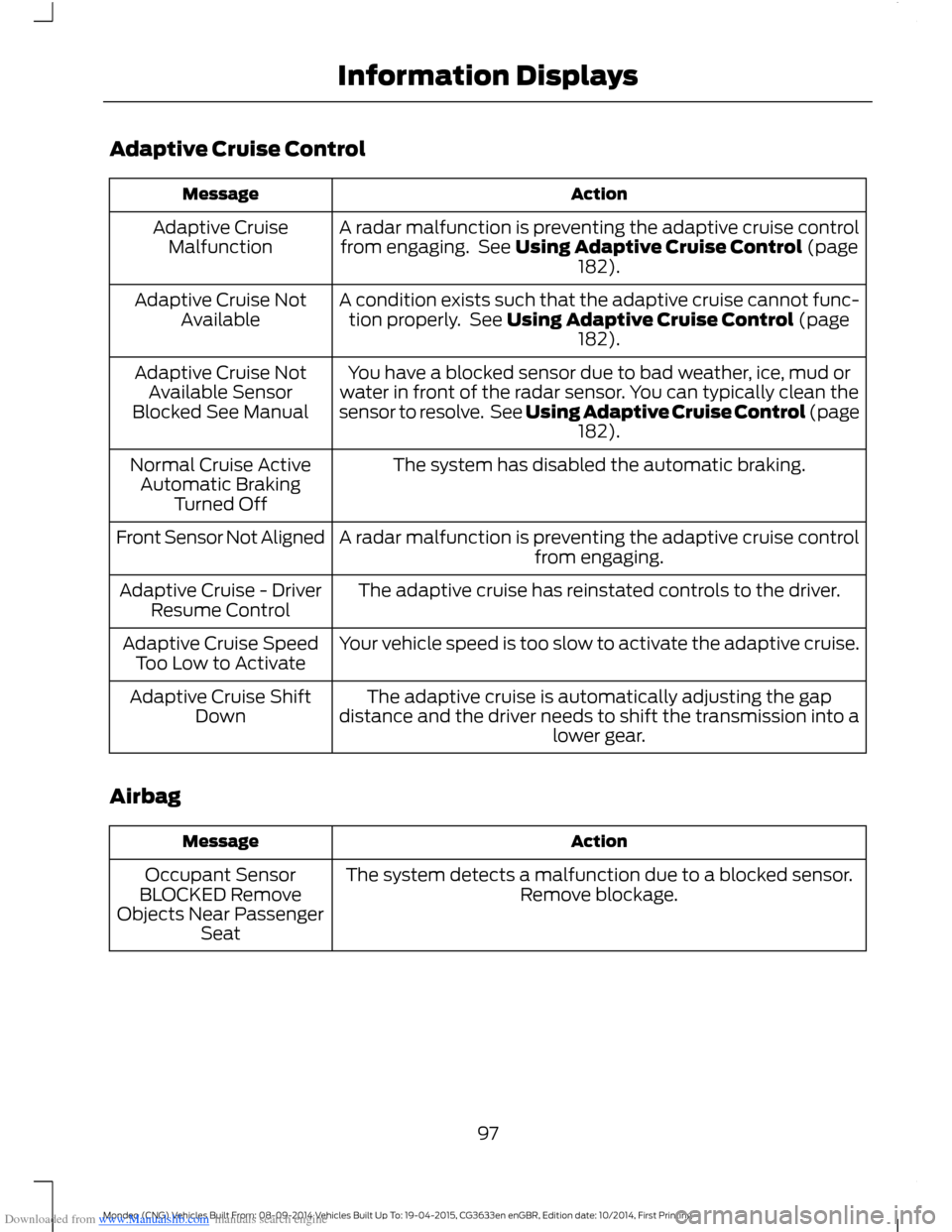
Downloaded from www.Manualslib.com manuals search engine Adaptive Cruise Control
ActionMessage
A radar malfunction is preventing the adaptive cruise controlfrom engaging. See Using Adaptive Cruise Control (page182).
Adaptive CruiseMalfunction
A condition exists such that the adaptive cruise cannot func-tion properly. See Using Adaptive Cruise Control (page182).
Adaptive Cruise NotAvailable
You have a blocked sensor due to bad weather, ice, mud orwater in front of the radar sensor. You can typically clean thesensor to resolve. See Using Adaptive Cruise Control (page182).
Adaptive Cruise NotAvailable SensorBlocked See Manual
The system has disabled the automatic braking.Normal Cruise ActiveAutomatic BrakingTurned Off
A radar malfunction is preventing the adaptive cruise controlfrom engaging.Front Sensor Not Aligned
The adaptive cruise has reinstated controls to the driver.Adaptive Cruise - DriverResume Control
Your vehicle speed is too slow to activate the adaptive cruise.Adaptive Cruise SpeedToo Low to Activate
The adaptive cruise is automatically adjusting the gapdistance and the driver needs to shift the transmission into alower gear.
Adaptive Cruise ShiftDown
Airbag
ActionMessage
The system detects a malfunction due to a blocked sensor.Remove blockage.Occupant SensorBLOCKED RemoveObjects Near PassengerSeat
97Mondeo (CNG) Vehicles Built From: 08-09-2014 Vehicles Built Up To: 19-04-2015, CG3633en enGBR, Edition date: 10/2014, First PrintingInformation Displays