phone FORD MONDEO 2014 4.G Workshop Manual
[x] Cancel search | Manufacturer: FORD, Model Year: 2014, Model line: MONDEO, Model: FORD MONDEO 2014 4.GPages: 446, PDF Size: 29.09 MB
Page 365 of 446
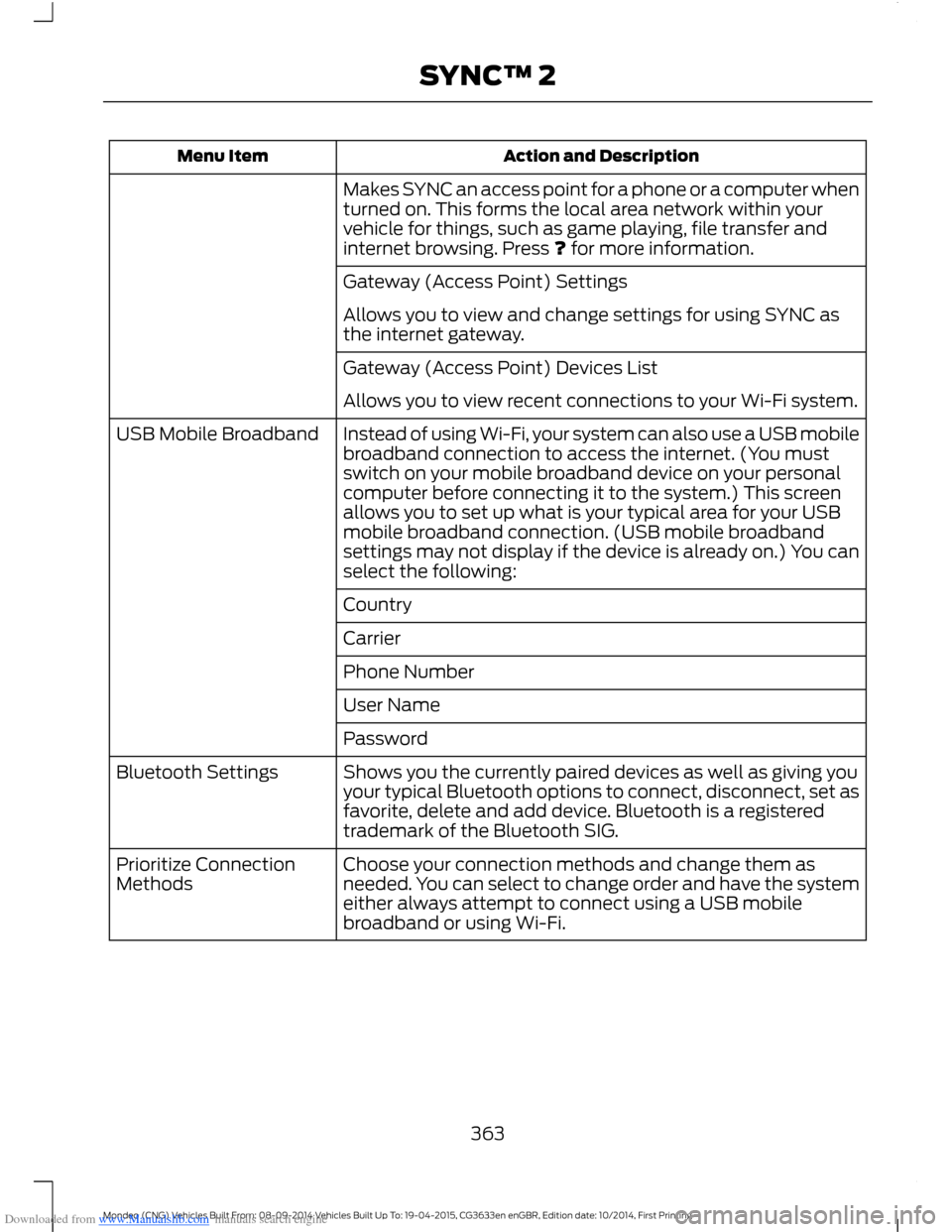
Downloaded from www.Manualslib.com manuals search engine Action and DescriptionMenu Item
Makes SYNC an access point for a phone or a computer whenturned on. This forms the local area network within yourvehicle for things, such as game playing, file transfer andinternet browsing. Press ? for more information.
Gateway (Access Point) Settings
Allows you to view and change settings for using SYNC asthe internet gateway.
Gateway (Access Point) Devices List
Allows you to view recent connections to your Wi-Fi system.
Instead of using Wi-Fi, your system can also use a USB mobilebroadband connection to access the internet. (You mustswitch on your mobile broadband device on your personalcomputer before connecting it to the system.) This screenallows you to set up what is your typical area for your USBmobile broadband connection. (USB mobile broadbandsettings may not display if the device is already on.) You canselect the following:
USB Mobile Broadband
Country
Carrier
Phone Number
User Name
Password
Shows you the currently paired devices as well as giving youyour typical Bluetooth options to connect, disconnect, set asfavorite, delete and add device. Bluetooth is a registeredtrademark of the Bluetooth SIG.
Bluetooth Settings
Choose your connection methods and change them asneeded. You can select to change order and have the systemeither always attempt to connect using a USB mobilebroadband or using Wi-Fi.
Prioritize ConnectionMethods
363Mondeo (CNG) Vehicles Built From: 08-09-2014 Vehicles Built Up To: 19-04-2015, CG3633en enGBR, Edition date: 10/2014, First PrintingSYNC™ 2
Page 367 of 446
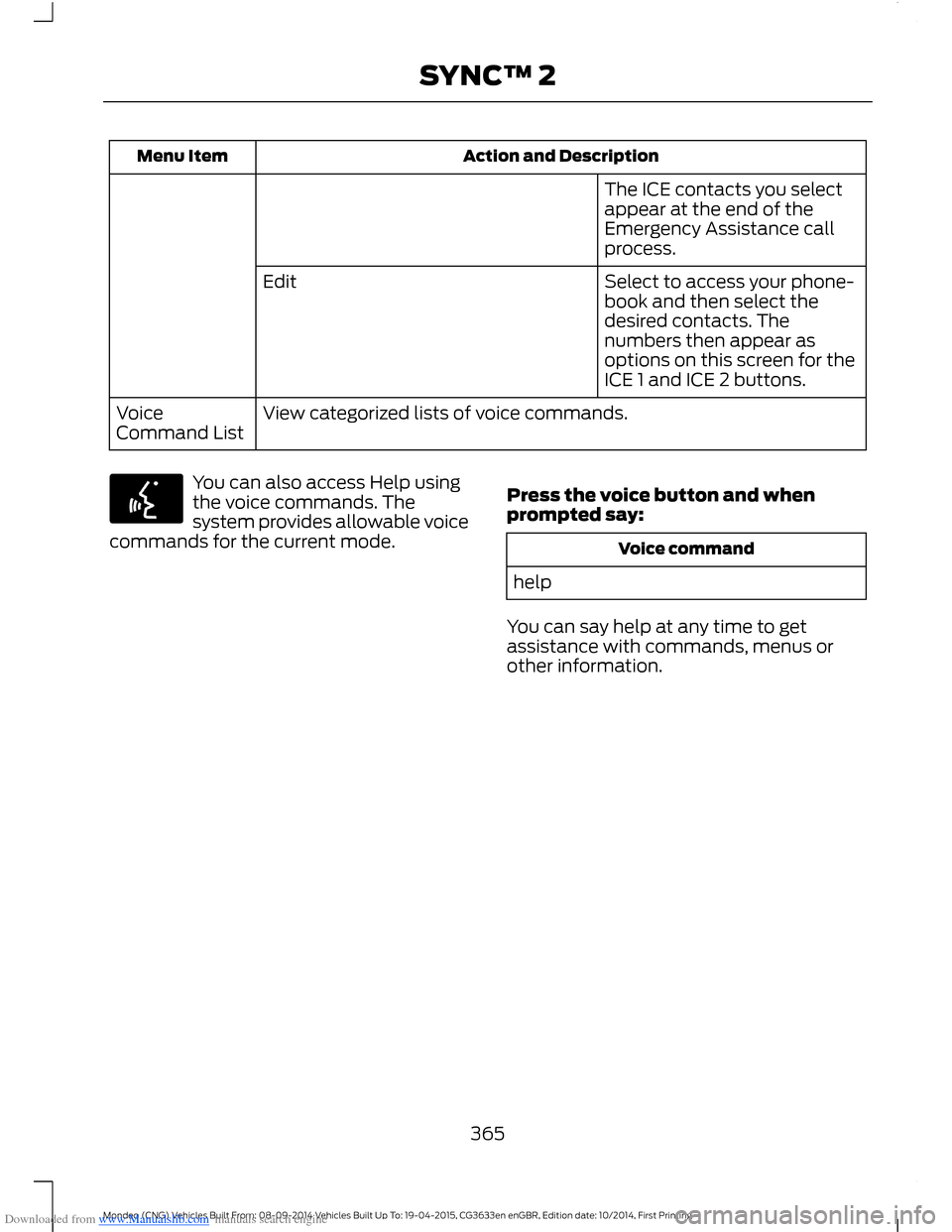
Downloaded from www.Manualslib.com manuals search engine Action and DescriptionMenu Item
The ICE contacts you selectappear at the end of theEmergency Assistance callprocess.
Select to access your phone-book and then select thedesired contacts. Thenumbers then appear asoptions on this screen for theICE 1 and ICE 2 buttons.
Edit
View categorized lists of voice commands.VoiceCommand List
You can also access Help usingthe voice commands. Thesystem provides allowable voicecommands for the current mode.
Press the voice button and whenprompted say:
Voice command
help
You can say help at any time to getassistance with commands, menus orother information.
365Mondeo (CNG) Vehicles Built From: 08-09-2014 Vehicles Built Up To: 19-04-2015, CG3633en enGBR, Edition date: 10/2014, First PrintingSYNC™ 2
Page 372 of 446
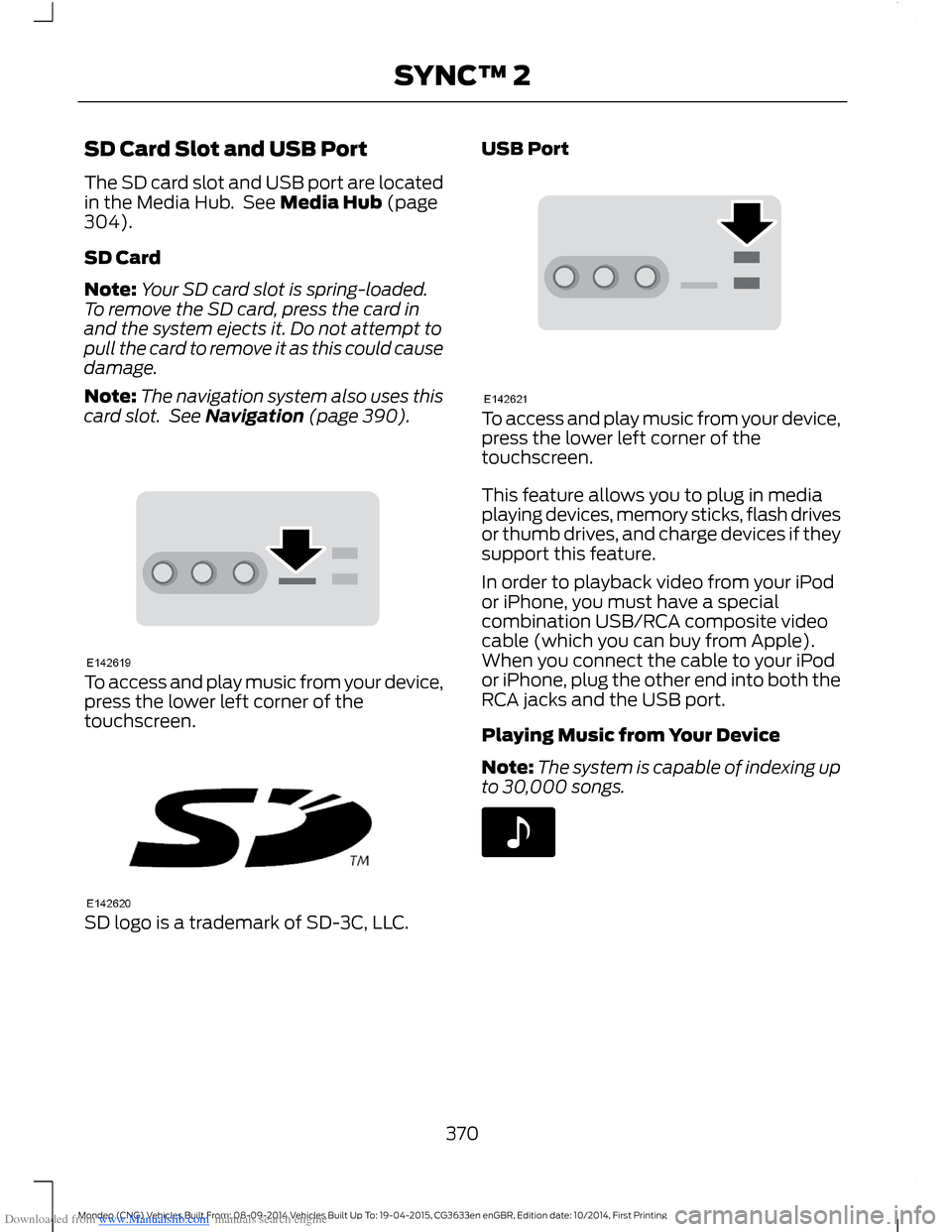
Downloaded from www.Manualslib.com manuals search engine SD Card Slot and USB Port
The SD card slot and USB port are locatedin the Media Hub. See Media Hub (page304).
SD Card
Note:Your SD card slot is spring-loaded.To remove the SD card, press the card inand the system ejects it. Do not attempt topull the card to remove it as this could causedamage.
Note:The navigation system also uses thiscard slot. See Navigation (page 390).
To access and play music from your device,press the lower left corner of thetouchscreen.
SD logo is a trademark of SD-3C, LLC.
USB Port
To access and play music from your device,press the lower left corner of thetouchscreen.
This feature allows you to plug in mediaplaying devices, memory sticks, flash drivesor thumb drives, and charge devices if theysupport this feature.
In order to playback video from your iPodor iPhone, you must have a specialcombination USB/RCA composite videocable (which you can buy from Apple).When you connect the cable to your iPodor iPhone, plug the other end into both theRCA jacks and the USB port.
Playing Music from Your Device
Note:The system is capable of indexing upto 30,000 songs.
370Mondeo (CNG) Vehicles Built From: 08-09-2014 Vehicles Built Up To: 19-04-2015, CG3633en enGBR, Edition date: 10/2014, First PrintingSYNC™ 2
Page 375 of 446
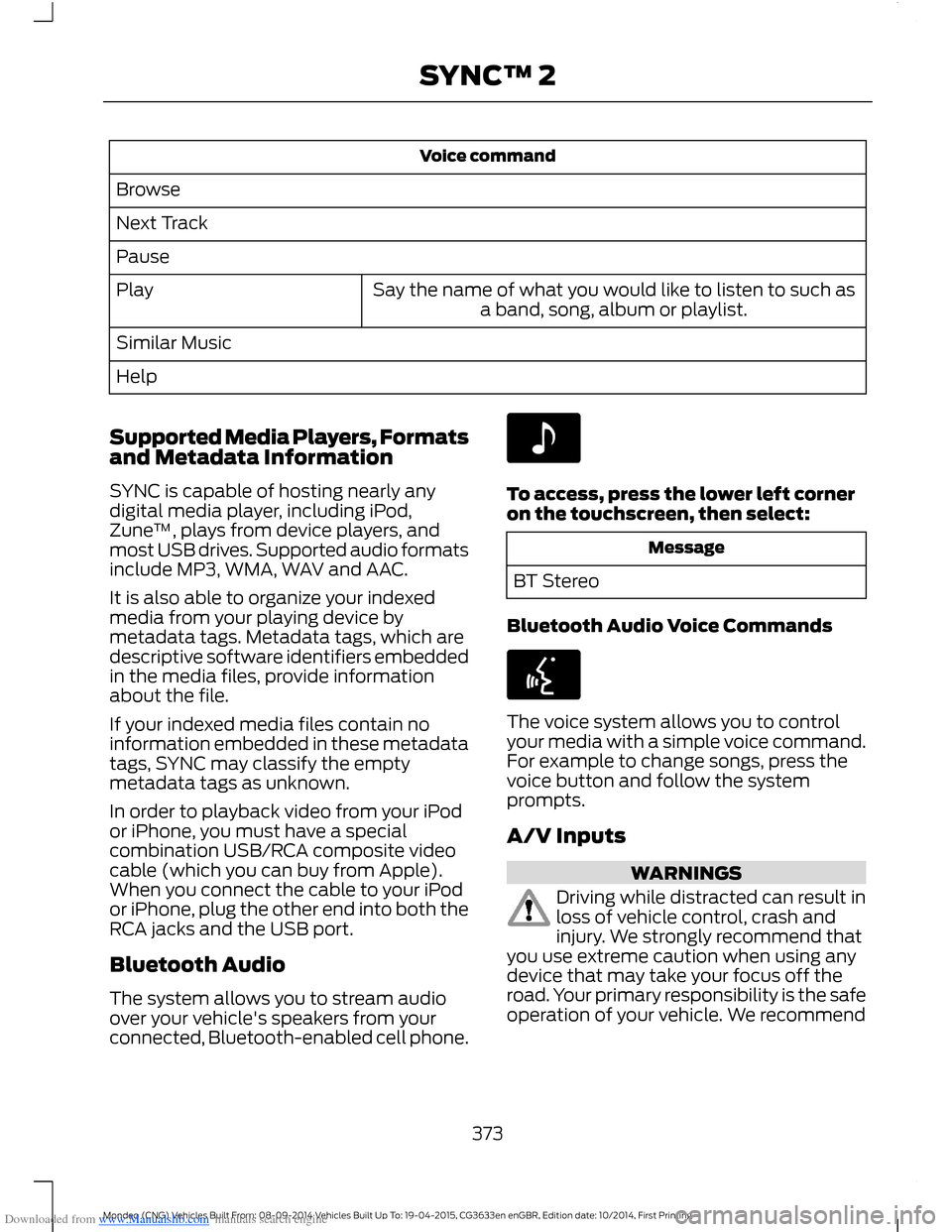
Downloaded from www.Manualslib.com manuals search engine Voice command
Browse
Next Track
Pause
Say the name of what you would like to listen to such asa band, song, album or playlist.Play
Similar Music
Help
Supported Media Players, Formatsand Metadata Information
SYNC is capable of hosting nearly anydigital media player, including iPod,Zune™, plays from device players, andmost USB drives. Supported audio formatsinclude MP3, WMA, WAV and AAC.
It is also able to organize your indexedmedia from your playing device bymetadata tags. Metadata tags, which aredescriptive software identifiers embeddedin the media files, provide informationabout the file.
If your indexed media files contain noinformation embedded in these metadatatags, SYNC may classify the emptymetadata tags as unknown.
In order to playback video from your iPodor iPhone, you must have a specialcombination USB/RCA composite videocable (which you can buy from Apple).When you connect the cable to your iPodor iPhone, plug the other end into both theRCA jacks and the USB port.
Bluetooth Audio
The system allows you to stream audioover your vehicle's speakers from yourconnected, Bluetooth-enabled cell phone.
To access, press the lower left corneron the touchscreen, then select:
Message
BT Stereo
Bluetooth Audio Voice Commands
The voice system allows you to controlyour media with a simple voice command.For example to change songs, press thevoice button and follow the systemprompts.
A/V Inputs
WARNINGS
Driving while distracted can result inloss of vehicle control, crash andinjury. We strongly recommend thatyou use extreme caution when using anydevice that may take your focus off theroad. Your primary responsibility is the safeoperation of your vehicle. We recommend
373Mondeo (CNG) Vehicles Built From: 08-09-2014 Vehicles Built Up To: 19-04-2015, CG3633en enGBR, Edition date: 10/2014, First PrintingSYNC™ 2
Page 376 of 446
Downloaded from www.Manualslib.com manuals search engine WARNINGS
against the use of any handheld devicewhile driving and encourage the use ofvoice-operated systems when possible.Make sure you are aware of all applicablelocal laws that may affect the use ofelectronic devices while driving.
For safety reasons, do not connector adjust the settings on yourportable music player while yourvehicle is moving.
Store the portable music player in asecure location, such as the centerconsole or the glove box, when yourvehicle is moving. Hard objects maybecome projectiles in a crash or suddenstop, which may increase the risk of seriousinjury. The audio extension cable must belong enough to allow the portable musicplayer to be safely stored while yourvehicle is moving.
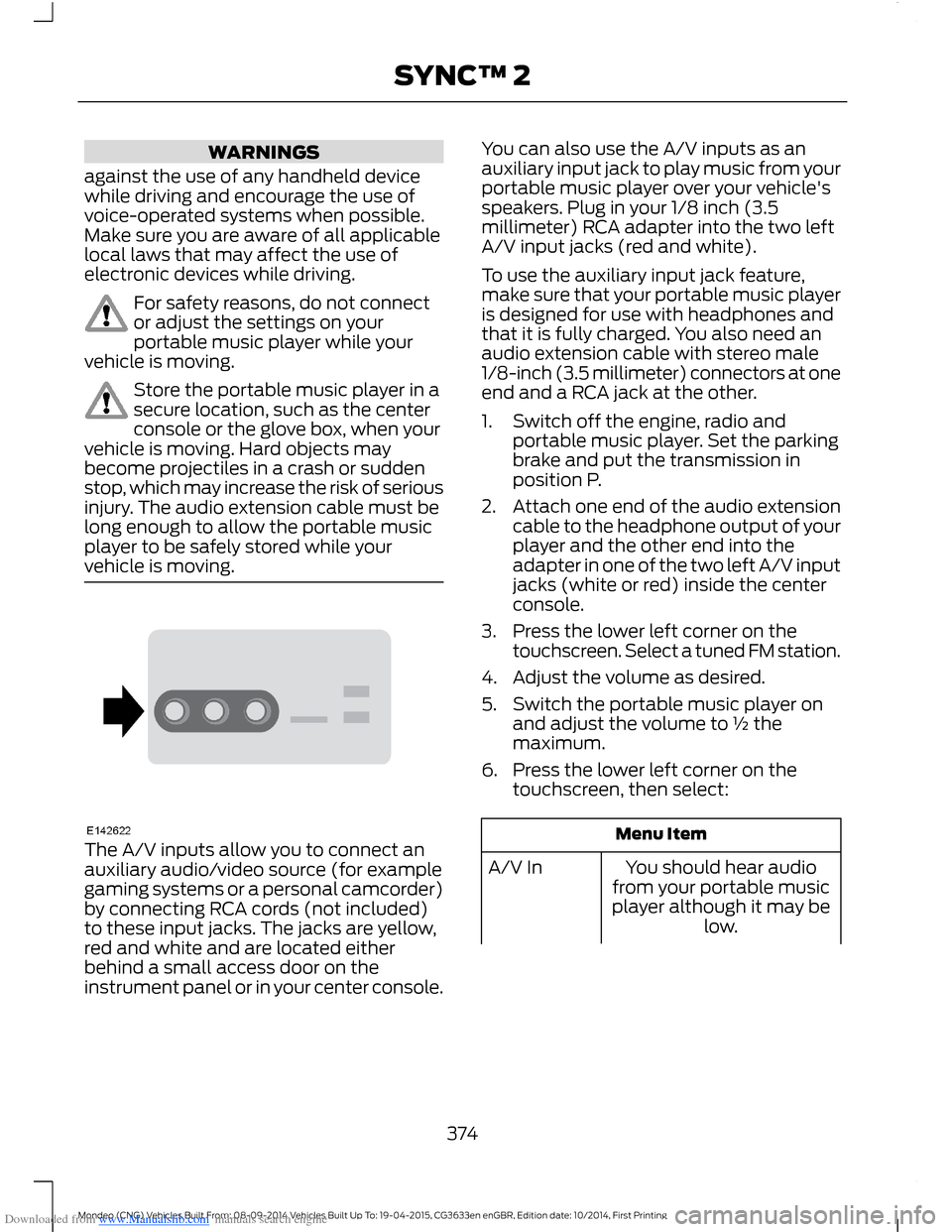
The A/V inputs allow you to connect anauxiliary audio/video source (for examplegaming systems or a personal camcorder)by connecting RCA cords (not included)to these input jacks. The jacks are yellow,red and white and are located eitherbehind a small access door on theinstrument panel or in your center console.
You can also use the A/V inputs as anauxiliary input jack to play music from yourportable music player over your vehicle'sspeakers. Plug in your 1/8 inch (3.5millimeter) RCA adapter into the two leftA/V input jacks (red and white).
To use the auxiliary input jack feature,make sure that your portable music playeris designed for use with headphones andthat it is fully charged. You also need anaudio extension cable with stereo male1/8-inch (3.5 millimeter) connectors at oneend and a RCA jack at the other.
1.Switch off the engine, radio andportable music player. Set the parkingbrake and put the transmission inposition P.
2.Attach one end of the audio extensioncable to the headphone output of yourplayer and the other end into theadapter in one of the two left A/V inputjacks (white or red) inside the centerconsole.
3.Press the lower left corner on thetouchscreen. Select a tuned FM station.
4.Adjust the volume as desired.
5.Switch the portable music player onand adjust the volume to ½ themaximum.
6.Press the lower left corner on thetouchscreen, then select:
Menu Item
You should hear audiofrom your portable musicplayer although it may below.
A/V In
374Mondeo (CNG) Vehicles Built From: 08-09-2014 Vehicles Built Up To: 19-04-2015, CG3633en enGBR, Edition date: 10/2014, First PrintingSYNC™ 2
Page 377 of 446
Downloaded from www.Manualslib.com manuals search engine Menu Item
Adjust the sound on yourportable music player untilit reaches the level of theFM station by switchingback and forth betweenthe controls.
In order to playback video from your iPodor iPhone, you must have a specialcombination USB/RCA composite videocable (which you can buy from Apple).When you connect the cable to your iPodor iPhone, plug the other end into both theRCA jacks and the USB port.
Troubleshooting
•Do not connect the audio input jack toa line level output. The jack only workscorrectly with devices that have aheadphone output with a volumecontrol.
•Do not set the portable music player'svolume level higher than is necessaryto match the volume of the FM radioas this causes distortion and reducessound quality.
•If the music sounds distorted at lowerlistening levels, turn the portable musicplayer volume down. If the problempersists, replace or recharge thebatteries in the portable media player.
•Control the portable media player inthe same manner when used withheadphones, as the auxiliary input jackdoes not provide control (such as Playor Pause) over the attached portablemedia player.
PHONE
375Mondeo (CNG) Vehicles Built From: 08-09-2014 Vehicles Built Up To: 19-04-2015, CG3633en enGBR, Edition date: 10/2014, First PrintingSYNC™ 2
Page 378 of 446
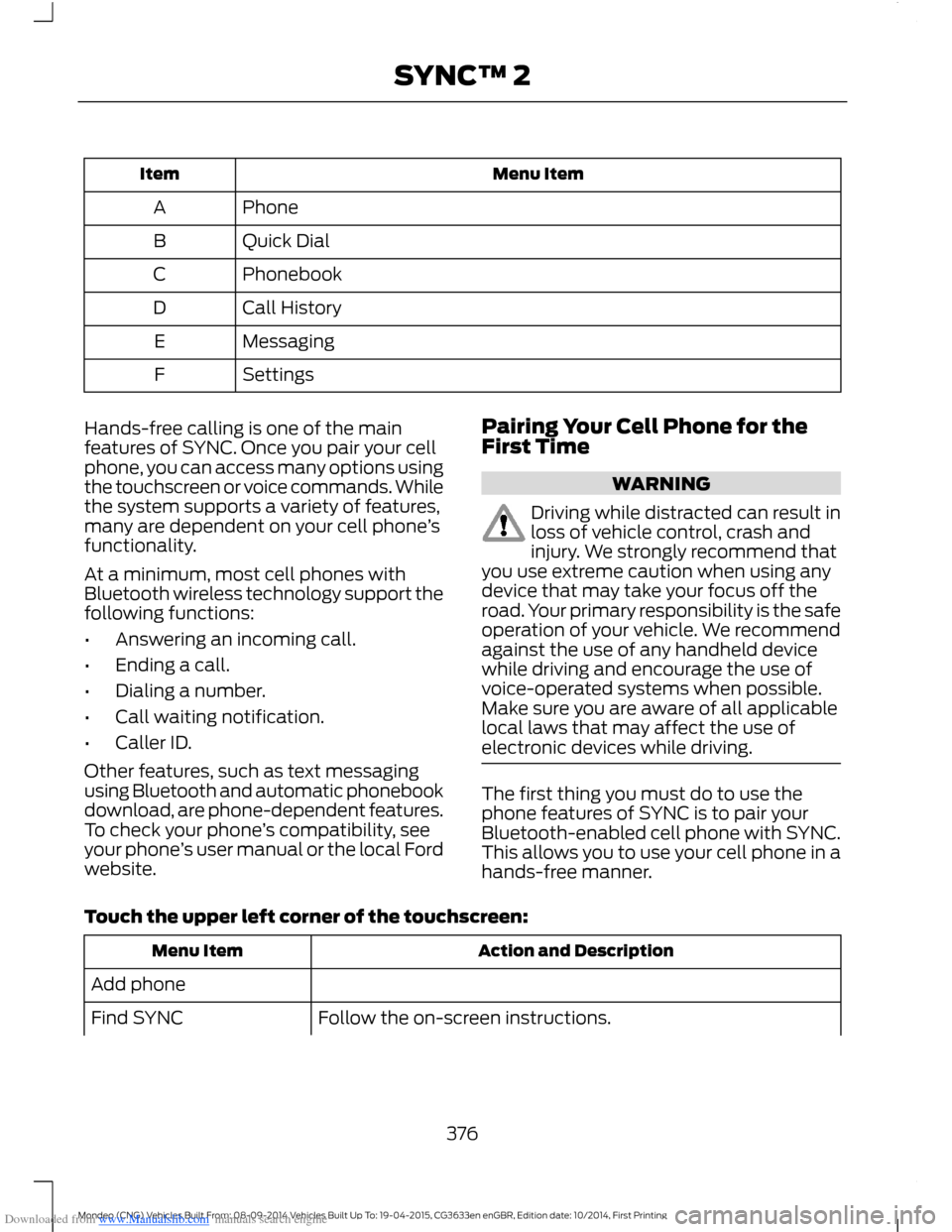
Downloaded from www.Manualslib.com manuals search engine Menu ItemItem
PhoneA
Quick DialB
PhonebookC
Call HistoryD
MessagingE
SettingsF
Hands-free calling is one of the mainfeatures of SYNC. Once you pair your cellphone, you can access many options usingthe touchscreen or voice commands. Whilethe system supports a variety of features,many are dependent on your cell phone’sfunctionality.
At a minimum, most cell phones withBluetooth wireless technology support thefollowing functions:
•Answering an incoming call.
•Ending a call.
•Dialing a number.
•Call waiting notification.
•Caller ID.
Other features, such as text messagingusing Bluetooth and automatic phonebookdownload, are phone-dependent features.To check your phone’s compatibility, seeyour phone’s user manual or the local Fordwebsite.
Pairing Your Cell Phone for theFirst Time
WARNING
Driving while distracted can result inloss of vehicle control, crash andinjury. We strongly recommend thatyou use extreme caution when using anydevice that may take your focus off theroad. Your primary responsibility is the safeoperation of your vehicle. We recommendagainst the use of any handheld devicewhile driving and encourage the use ofvoice-operated systems when possible.Make sure you are aware of all applicablelocal laws that may affect the use ofelectronic devices while driving.
The first thing you must do to use thephone features of SYNC is to pair yourBluetooth-enabled cell phone with SYNC.This allows you to use your cell phone in ahands-free manner.
Touch the upper left corner of the touchscreen:
Action and DescriptionMenu Item
Add phone
Follow the on-screen instructions.Find SYNC
376Mondeo (CNG) Vehicles Built From: 08-09-2014 Vehicles Built Up To: 19-04-2015, CG3633en enGBR, Edition date: 10/2014, First PrintingSYNC™ 2
Page 379 of 446
Downloaded from www.Manualslib.com manuals search engine Action and DescriptionMenu Item
Make sure that Bluetooth is set to On and that your cell phoneis in the correct mode. See your cell phone’s manual ifnecessary.Select SYNC and a six-digit PIN appears on your device.If you are prompted to enter a PIN on your device, it does notsupport Secure Simple Pairing. To pair, enter the PINdisplayed on the touchscreen. Skip the next step.When prompted on your cell phone’s display, confirm thatthe PIN provided by SYNC matches the PIN displayed on yourcell phone.The display indicates when the pairing is successful.SYNC may prompt you with more cell phone options. Formore information on your cell phone's capability, see yourcell phone's manual and visit the website.
Pairing Subsequent Cell Phones
Make sure that Bluetooth is set to On andthat your cell phone is in the correct mode.See your device's manual if necessary.
To pair a subsequent cell phone, select:
Action and DescriptionMenu Item
Phone
Settings
Bluetooth Devices
Add Device
Follow the on-screen instructions.Find SYNCMake sure that Bluetooth is set to On and that your cell phoneis in the correct mode. See your cell phone’s manual ifnecessary.Select SYNC and a six-digit PIN appears on your device.If you are prompted to enter a PIN on your device, it does notsupport Secure Simple Pairing. To pair, enter the PINdisplayed on the touchscreen. Skip the next step.When prompted on your cell phone’s display, confirm thatthe PIN provided by SYNC matches the PIN displayed on yourcell phone.The display indicates when the pairing is successful.
377Mondeo (CNG) Vehicles Built From: 08-09-2014 Vehicles Built Up To: 19-04-2015, CG3633en enGBR, Edition date: 10/2014, First PrintingSYNC™ 2
Page 380 of 446
Downloaded from www.Manualslib.com manuals search engine Action and DescriptionMenu Item
SYNC may prompt you with more cell phone options. Formore information on your cell phone's capability, see yourcell phone's manual and visit the website.
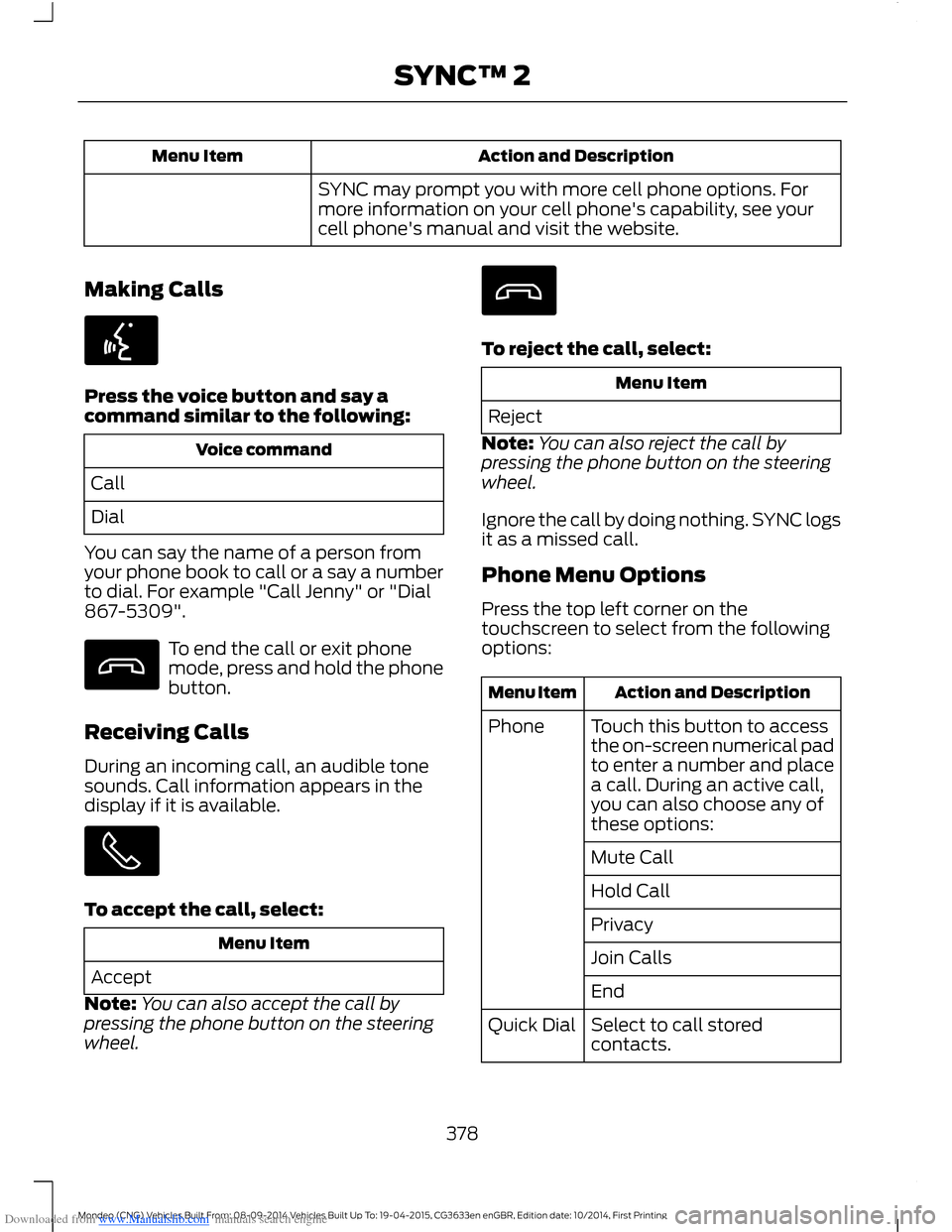
Making Calls
Press the voice button and say acommand similar to the following:
Voice command
Call
Dial
You can say the name of a person fromyour phone book to call or a say a numberto dial. For example "Call Jenny" or "Dial867-5309".
To end the call or exit phonemode, press and hold the phonebutton.
Receiving Calls
During an incoming call, an audible tonesounds. Call information appears in thedisplay if it is available.
To accept the call, select:
Menu Item
Accept
Note:You can also accept the call bypressing the phone button on the steeringwheel.
To reject the call, select:
Menu Item
Reject
Note:You can also reject the call bypressing the phone button on the steeringwheel.
Ignore the call by doing nothing. SYNC logsit as a missed call.
Phone Menu Options
Press the top left corner on thetouchscreen to select from the followingoptions:
Action and DescriptionMenu Item
Touch this button to accessthe on-screen numerical padto enter a number and placea call. During an active call,you can also choose any ofthese options:
Phone
Mute Call
Hold Call
Privacy
Join Calls
End
Select to call storedcontacts.Quick Dial
378Mondeo (CNG) Vehicles Built From: 08-09-2014 Vehicles Built Up To: 19-04-2015, CG3633en enGBR, Edition date: 10/2014, First PrintingSYNC™ 2
Page 381 of 446
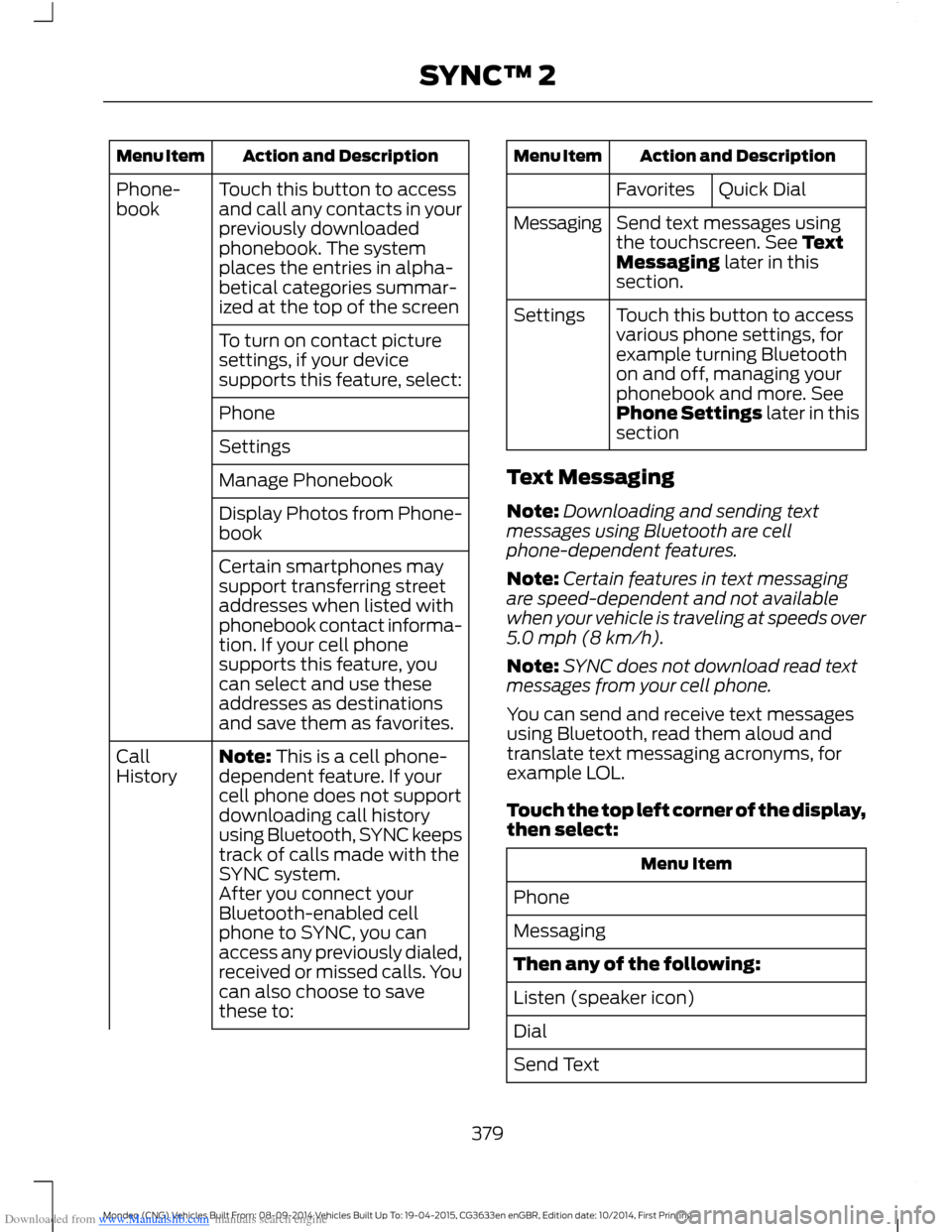
Downloaded from www.Manualslib.com manuals search engine Action and DescriptionMenu Item
Touch this button to accessand call any contacts in yourpreviously downloadedphonebook. The systemplaces the entries in alpha-betical categories summar-ized at the top of the screen
Phone-book
To turn on contact picturesettings, if your devicesupports this feature, select:
Phone
Settings
Manage Phonebook
Display Photos from Phone-book
Certain smartphones maysupport transferring streetaddresses when listed withphonebook contact informa-tion. If your cell phonesupports this feature, youcan select and use theseaddresses as destinationsand save them as favorites.
Note: This is a cell phone-dependent feature. If yourcell phone does not supportdownloading call historyusing Bluetooth, SYNC keepstrack of calls made with theSYNC system.
CallHistory
After you connect yourBluetooth-enabled cellphone to SYNC, you canaccess any previously dialed,received or missed calls. Youcan also choose to savethese to:
Action and DescriptionMenu Item
Quick DialFavorites
Send text messages usingthe touchscreen. See TextMessaging later in thissection.
Messaging
Touch this button to accessvarious phone settings, forexample turning Bluetoothon and off, managing yourphonebook and more. SeePhone Settings later in thissection
Settings
Text Messaging
Note:Downloading and sending textmessages using Bluetooth are cellphone-dependent features.
Note:Certain features in text messagingare speed-dependent and not availablewhen your vehicle is traveling at speeds over5.0 mph (8 km/h).
Note:SYNC does not download read textmessages from your cell phone.
You can send and receive text messagesusing Bluetooth, read them aloud andtranslate text messaging acronyms, forexample LOL.
Touch the top left corner of the display,then select:
Menu Item
Phone
Messaging
Then any of the following:
Listen (speaker icon)
Dial
Send Text
379Mondeo (CNG) Vehicles Built From: 08-09-2014 Vehicles Built Up To: 19-04-2015, CG3633en enGBR, Edition date: 10/2014, First PrintingSYNC™ 2